power FORD ESCAPE 2017 3.G User Guide
[x] Cancel search | Manufacturer: FORD, Model Year: 2017, Model line: ESCAPE, Model: FORD ESCAPE 2017 3.GPages: 486, PDF Size: 6.34 MB
Page 61 of 486
Closing the Liftgate
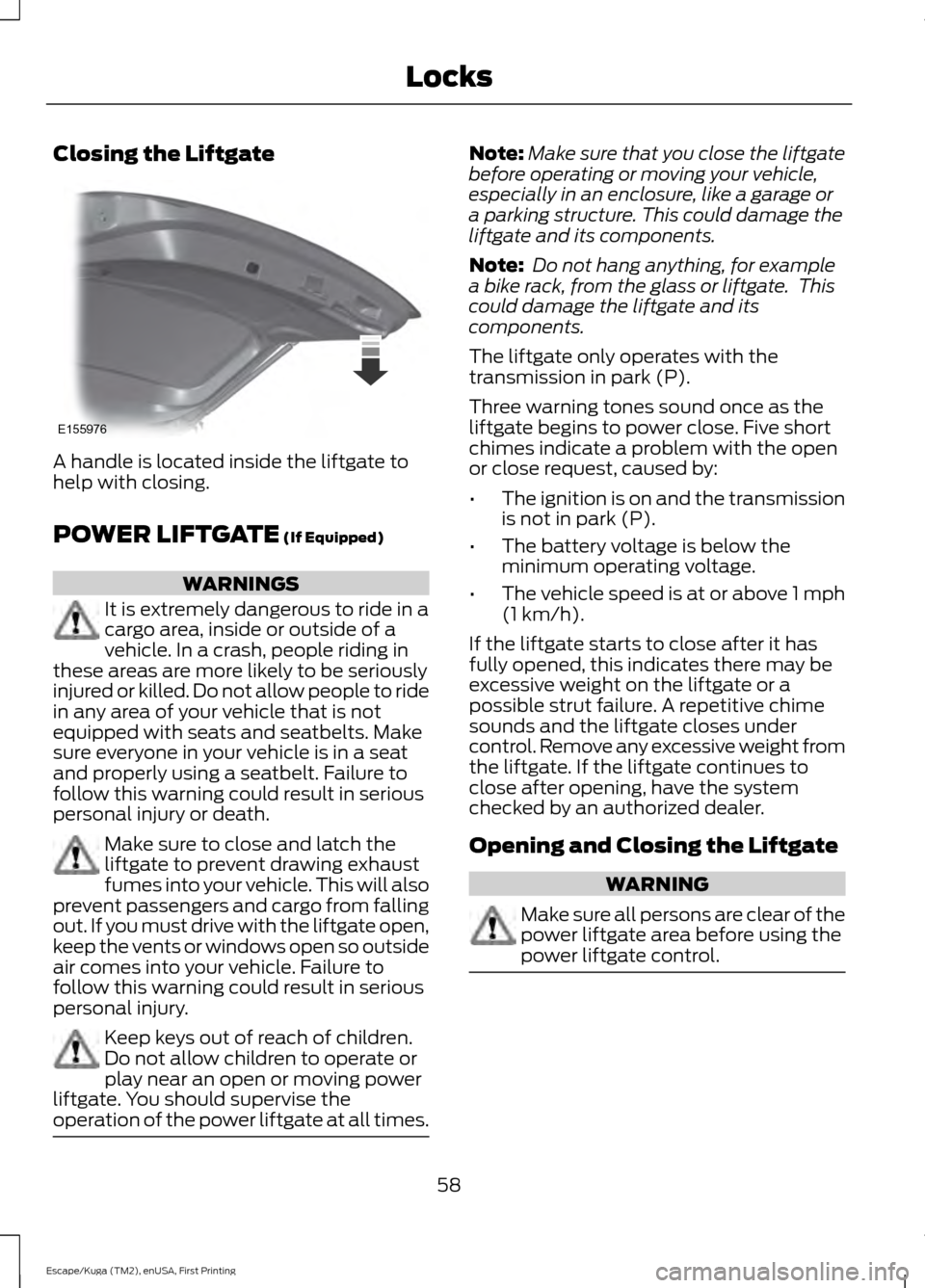
A handle is located inside the liftgate to
help with closing.
POWER LIFTGATE (If Equipped)
WARNINGS
It is extremely dangerous to ride in a
cargo area, inside or outside of a
vehicle. In a crash, people riding in
these areas are more likely to be seriously
injured or killed. Do not allow people to ride
in any area of your vehicle that is not
equipped with seats and seatbelts. Make
sure everyone in your vehicle is in a seat
and properly using a seatbelt. Failure to
follow this warning could result in serious
personal injury or death. Make sure to close and latch the
liftgate to prevent drawing exhaust
fumes into your vehicle. This will also
prevent passengers and cargo from falling
out. If you must drive with the liftgate open,
keep the vents or windows open so outside
air comes into your vehicle. Failure to
follow this warning could result in serious
personal injury. Keep keys out of reach of children.
Do not allow children to operate or
play near an open or moving power
liftgate. You should supervise the
operation of the power liftgate at all times. Note:
Make sure that you close the liftgate
before operating or moving your vehicle,
especially in an enclosure, like a garage or
a parking structure. This could damage the
liftgate and its components.
Note: Do not hang anything, for example
a bike rack, from the glass or liftgate. This
could damage the liftgate and its
components.
The liftgate only operates with the
transmission in park (P).
Three warning tones sound once as the
liftgate begins to power close. Five short
chimes indicate a problem with the open
or close request, caused by:
• The ignition is on and the transmission
is not in park (P).
• The battery voltage is below the
minimum operating voltage.
• The vehicle speed is at or above 1 mph
(1 km/h)
.
If the liftgate starts to close after it has
fully opened, this indicates there may be
excessive weight on the liftgate or a
possible strut failure. A repetitive chime
sounds and the liftgate closes under
control. Remove any excessive weight from
the liftgate. If the liftgate continues to
close after opening, have the system
checked by an authorized dealer.
Opening and Closing the Liftgate WARNING
Make sure all persons are clear of the
power liftgate area before using the
power liftgate control.
58
Escape/Kuga (TM2), enUSA, First Printing LocksE155976
Page 62 of 486
Note:
Make sure the area behind your
vehicle is free from obstruction and that
there is enough room for you to operate the
liftgate. Objects too close to your vehicle,
for example a wall, garage door or another
vehicle may come into contact with the
moving liftgate. This could damage the
liftgate and its components.
Note: Be careful when opening or closing
the liftgate in a garage or other enclosed
area to avoid damaging the liftgate.
Note: Do not leave the liftgate open while
driving. This could damage the liftgate and
its components.
From the Instrument Panel Press the button on the
instrument panel near the
lighting control.
With the Remote Control Press the button twice within
three seconds.
With the Outside Control Button
Opening the Liftgate
1. Unlock the liftgate with the remote control or power door unlock control.
If an intelligent access key is within 3 ft
(1 m) of the liftgate, the liftgate unlocks
when you press the liftgate release
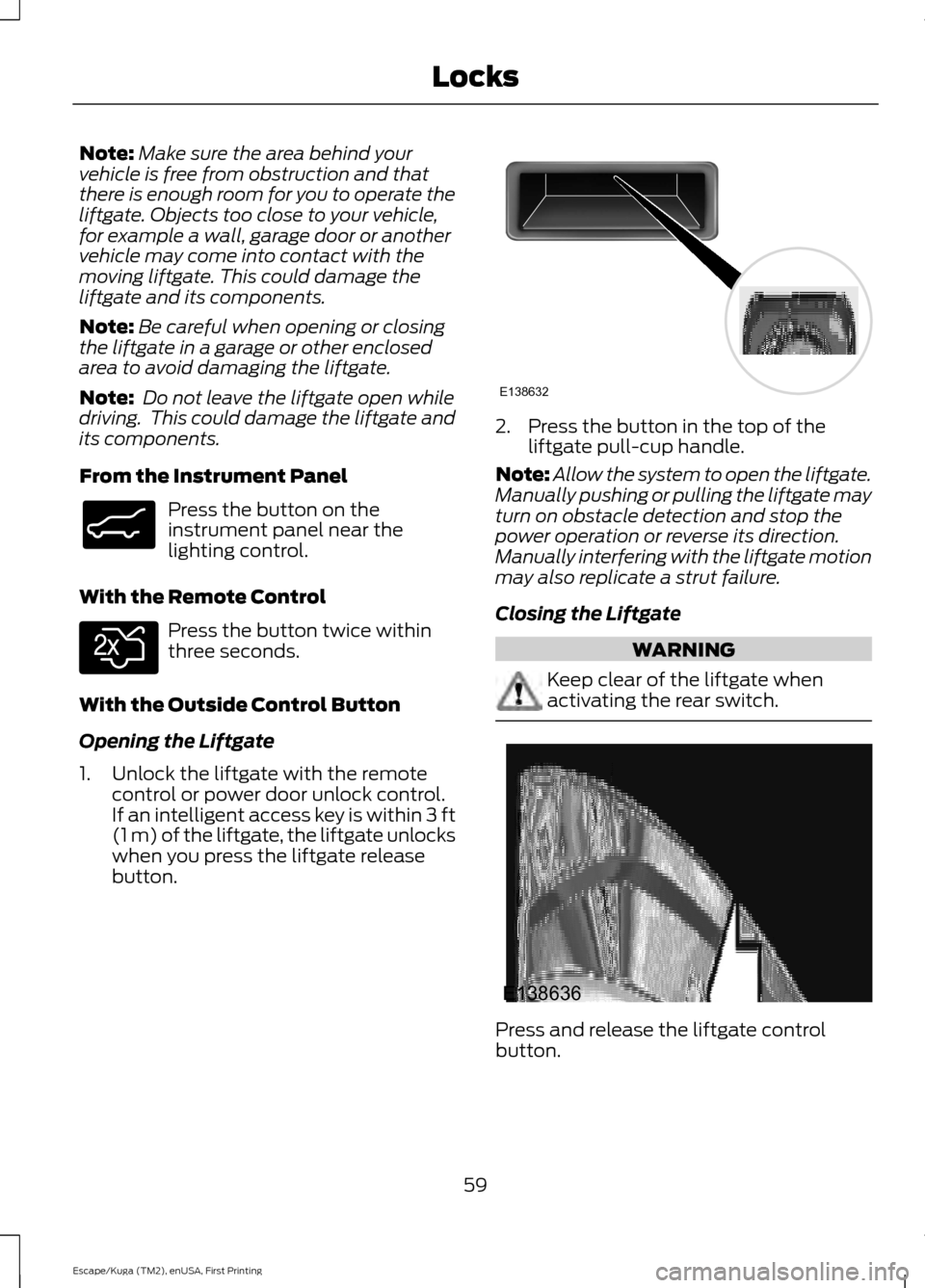
button. 2. Press the button in the top of the
liftgate pull-cup handle.
Note: Allow the system to open the liftgate.
Manually pushing or pulling the liftgate may
turn on obstacle detection and stop the
power operation or reverse its direction.
Manually interfering with the liftgate motion
may also replicate a strut failure.
Closing the Liftgate WARNING
Keep clear of the liftgate when
activating the rear switch.
Press and release the liftgate control
button.
59
Escape/Kuga (TM2), enUSA, First Printing LocksE138633 E138630 E138632 E138636
Page 63 of 486
Stopping the Liftgate Movement
Note:
Do not apply sudden excessive force
to the liftgate while it is in motion. This
could damage the power liftgate and its
components.
You can stop the liftgate movement by
doing any of the following:
• Pressing the liftgate control button.
• Pressing the liftgate button on the
remote control twice.
• Pressing the liftgate button on the
instrument panel.
• Moving your foot under and away from
the center rear bumper in a single-kick
motion. *
* This method only works for vehicles with
the hands-free liftgate feature.
Setting the Liftgate Open Height
1. Open the liftgate.
2. Stop the liftgate by pressing the control
button on the liftgate when it reaches
the desired height.
Note: When the liftgate has stopped
moving, you can also manually move it to
the desired height.
3. Press and hold the liftgate control button on the liftgate until a tone
sounds, indicating programming is
complete.
Note: You can only use the liftgate control
button to program the height.
Note: You cannot program the height if the
liftgate position is too low.
The new open liftgate height is recalled
when the power liftgate is opened. To
change the programmed height, repeat the
above procedure. Once you open the
power liftgate, you can manually move it
to a different height. You can fully open
the liftgate by manually pushing it upward
to the maximum open position. Note:
The system recalls the new
programmed height, even if you disconnect
the battery.
Obstacle Detection
When Closing
The system stops when it detects an
obstacle. Two short tones sound and the
system reverses to open. When you
remove the obstacle, you can power close
the liftgate.
Note: Entering your vehicle while the
liftgate is closing can cause your vehicle to
bounce and activate obstacle detection. To
prevent this, let the power liftgate close
completely before you enter your vehicle.
Before driving off, check the instrument
cluster for a liftgate or door ajar message or
warning indicator. Failure to do this could
result in unintentionally leaving the liftgate
open while driving.
When Opening
The system stops when it detects an
obstacle and two short tones sound. When
you remove the obstacle, you can continue
to operate the liftgate.
Hands-Free Feature (If Equipped)
Make sure you have an intelligent access
transmitter within
3 ft (1 m) of the liftgate.
60
Escape/Kuga (TM2), enUSA, First Printing Locks
Page 64 of 486
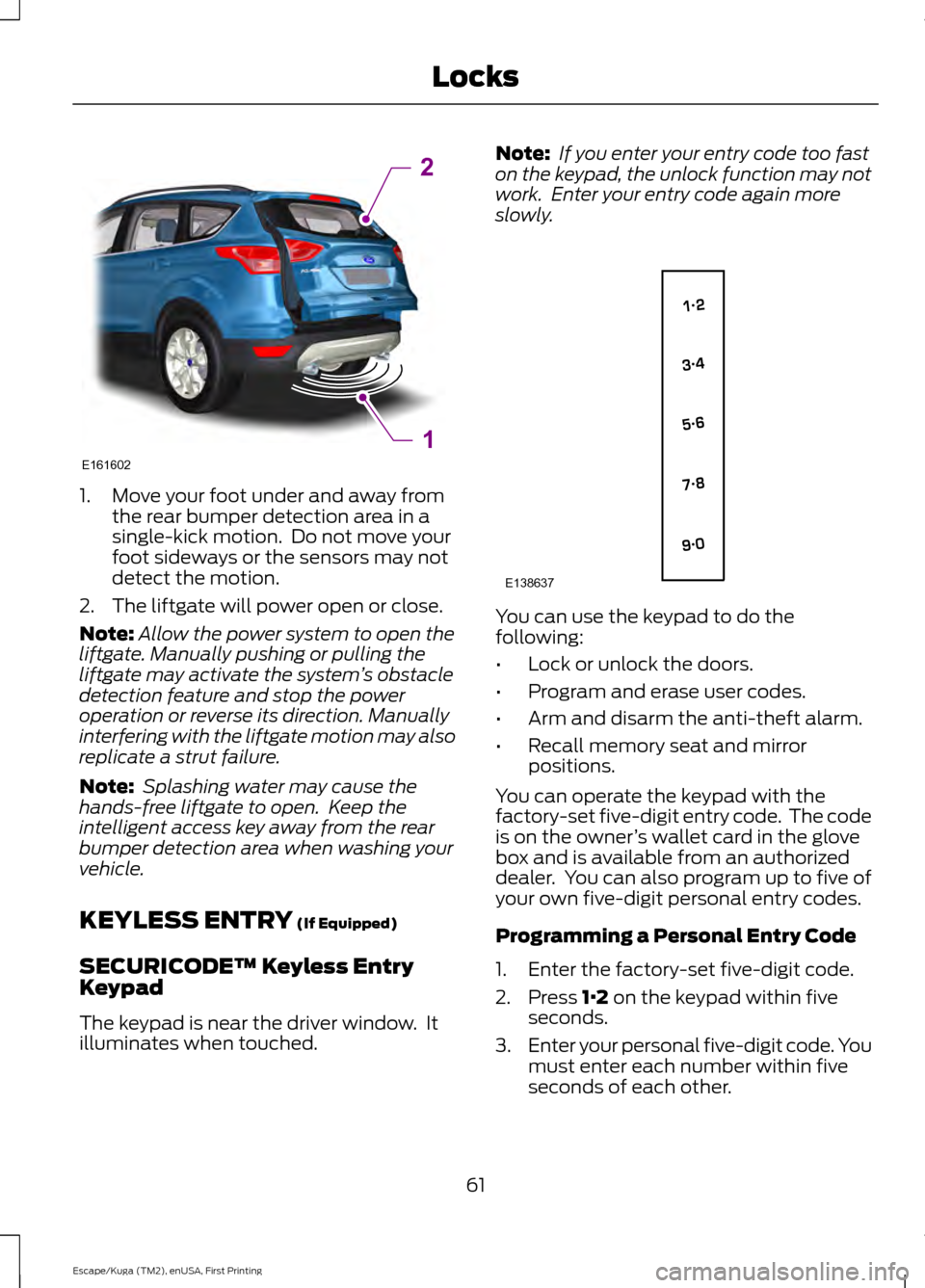
1. Move your foot under and away from
the rear bumper detection area in a
single-kick motion. Do not move your
foot sideways or the sensors may not
detect the motion.
2. The liftgate will power open or close.
Note: Allow the power system to open the
liftgate. Manually pushing or pulling the
liftgate may activate the system ’s obstacle
detection feature and stop the power
operation or reverse its direction. Manually
interfering with the liftgate motion may also
replicate a strut failure.
Note: Splashing water may cause the
hands-free liftgate to open. Keep the
intelligent access key away from the rear
bumper detection area when washing your
vehicle.
KEYLESS ENTRY (If Equipped)
SECURICODE™ Keyless Entry
Keypad
The keypad is near the driver window. It
illuminates when touched. Note:
If you enter your entry code too fast
on the keypad, the unlock function may not
work. Enter your entry code again more
slowly. You can use the keypad to do the
following:
•
Lock or unlock the doors.
• Program and erase user codes.
• Arm and disarm the anti-theft alarm.
• Recall memory seat and mirror
positions.
You can operate the keypad with the
factory-set five-digit entry code. The code
is on the owner ’s wallet card in the glove
box and is available from an authorized
dealer. You can also program up to five of
your own five-digit personal entry codes.
Programming a Personal Entry Code
1. Enter the factory-set five-digit code.
2. Press
1·2 on the keypad within five
seconds.
3. Enter your personal five-digit code. You
must enter each number within five
seconds of each other.
61
Escape/Kuga (TM2), enUSA, First Printing LocksE161602
2
1 E138637
Page 72 of 486
WINDSHIELD WIPERS
Note:
Fully defrost the windshield before
you switch the windshield wipers on.
Note: Make sure you switch the windshield
wipers and vehicle power off before using
an automatic car wash.
Note: If streaks or smears appear on the
windshield, clean the windshield and the
wiper blades. See Checking the Wiper
Blades (page 250). If that does not resolve
the issue, install new wiper blades. See
Changing the Wiper Blades
(page 250).
Note: Do not operate the wipers on a dry
windshield. This may scratch the glass,
damage the wiper blades or cause the wiper
motor to burn out. Always use the
windshield washers before wiping a dry
windshield.
Note: When wiping on dry glass, the wipers
may switch to the next lower operating
mode (low-speed or intermittent). The
previous operation mode may resume after
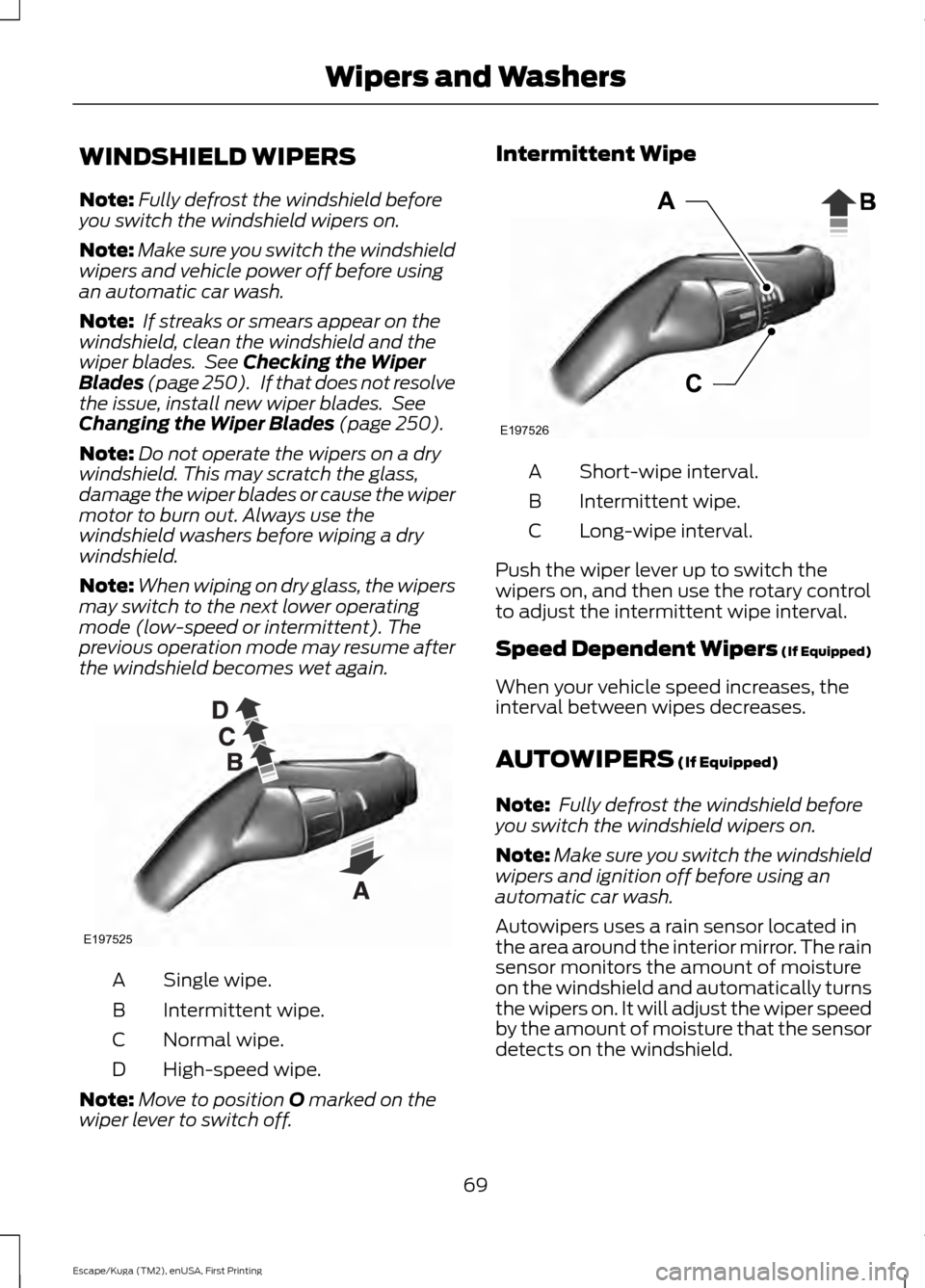
the windshield becomes wet again. Single wipe.
A
Intermittent wipe.
B
Normal wipe.
C
High-speed wipe.
D
Note: Move to position
O marked on the
wiper lever to switch off. Intermittent Wipe
Short-wipe interval.
A
Intermittent wipe.
B
Long-wipe interval.
C
Push the wiper lever up to switch the
wipers on, and then use the rotary control
to adjust the intermittent wipe interval.
Speed Dependent Wipers (If Equipped)
When your vehicle speed increases, the
interval between wipes decreases.
AUTOWIPERS
(If Equipped)
Note: Fully defrost the windshield before
you switch the windshield wipers on.
Note: Make sure you switch the windshield
wipers and ignition off before using an
automatic car wash.
Autowipers uses a rain sensor located in
the area around the interior mirror. The rain
sensor monitors the amount of moisture
on the windshield and automatically turns
the wipers on. It will adjust the wiper speed
by the amount of moisture that the sensor
detects on the windshield.
69
Escape/Kuga (TM2), enUSA, First Printing Wipers and WashersE197525 E197526
Page 81 of 486
POWER WINDOWS
WARNINGS
Do not leave children unattended in
your vehicle and do not let them play
with the power windows. They may
seriously injure themselves. When closing the power windows,
you should verify they are free of
obstructions and make sure that
children and pets are not in the proximity
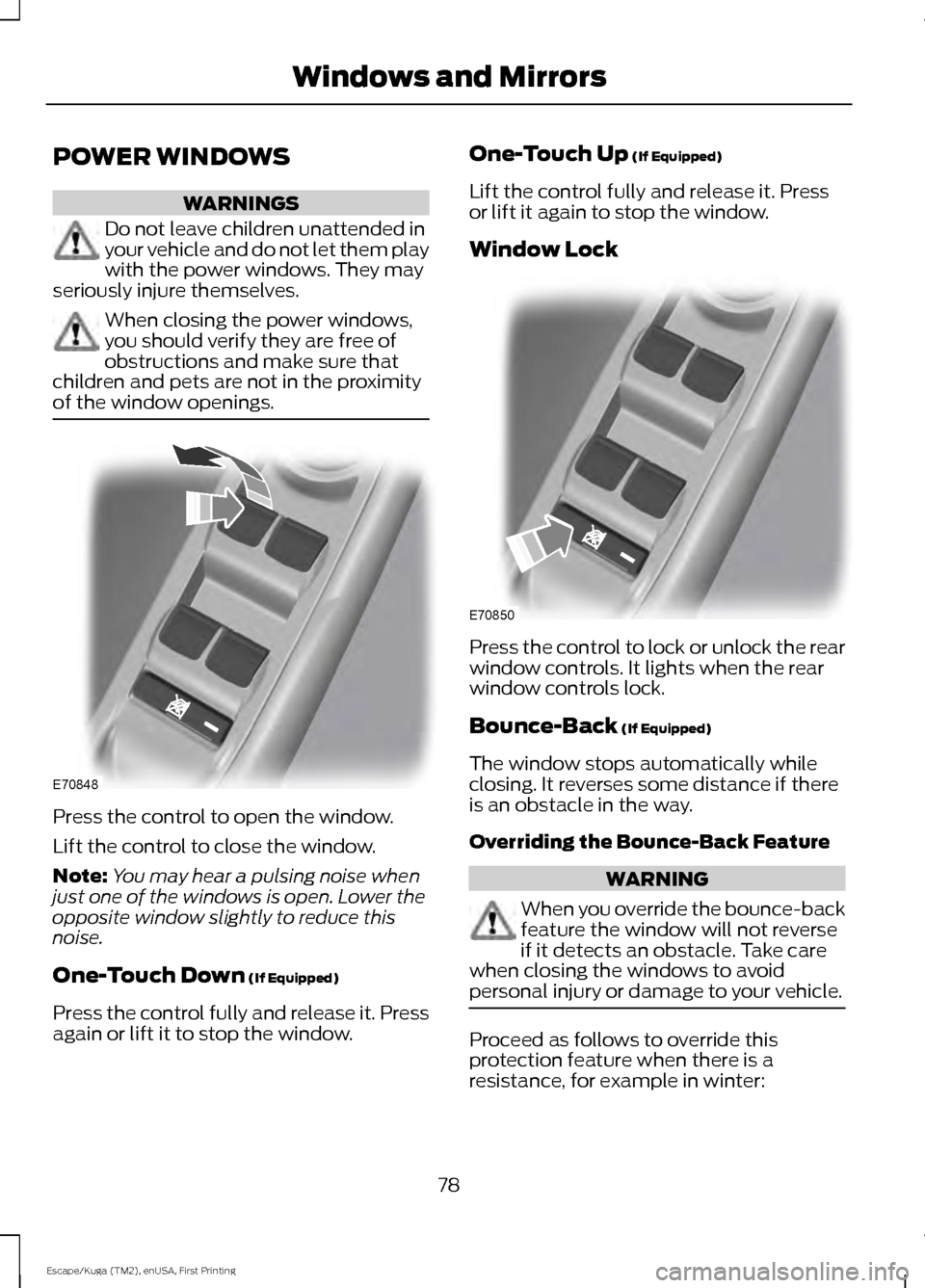
of the window openings. Press the control to open the window.
Lift the control to close the window.
Note:
You may hear a pulsing noise when
just one of the windows is open. Lower the
opposite window slightly to reduce this
noise.
One-Touch Down (If Equipped)
Press the control fully and release it. Press
again or lift it to stop the window. One-Touch Up
(If Equipped)
Lift the control fully and release it. Press
or lift it again to stop the window.
Window Lock Press the control to lock or unlock the rear
window controls. It lights when the rear
window controls lock.
Bounce-Back
(If Equipped)
The window stops automatically while
closing. It reverses some distance if there
is an obstacle in the way.
Overriding the Bounce-Back Feature WARNING
When you override the bounce-back
feature the window will not reverse
if it detects an obstacle. Take care
when closing the windows to avoid
personal injury or damage to your vehicle. Proceed as follows to override this
protection feature when there is a
resistance, for example in winter:
78
Escape/Kuga (TM2), enUSA, First Printing Windows and MirrorsE70848 E70850
Page 82 of 486
1.
Close the window twice until it reaches
the point of resistance and let it
reverse.
2. Close the window a third time to the point of resistance. You disabled the
bounce-back feature and you can now
close the window manually. The
window travels past the point of
resistance and you can close it fully.
Contact an authorized dealer as soon as
possible if the window does not close after
the third attempt.
Resetting the Bounce-Back Feature WARNING
The bounce-back feature remains
turned off until you reset the
memory.
If you have disconnected the battery, you
must reset the bounce-back memory
separately for each window.
1. Lift and hold the control until the
window is fully closed.
2. Release the control.
3. Lift and hold the control again for a few
seconds.
4. Release the control.
5. Lift and hold the control again for a few
seconds.
6. Release the control.
7. Press and hold the control until the window is fully open.
8. Lift and hold the control until the window is fully closed.
9. Release the control.
10. Open the window and then try to close it automatically.
11. Repeat the procedure if the window does not close automatically. Accessory Delay (If Equipped)
You can use the window controls for
several minutes after switching off the
ignition or until opening either front door.
EXTERIOR MIRRORS
Power Exterior Mirrors WARNING
Do not adjust the mirrors when your
vehicle is moving.
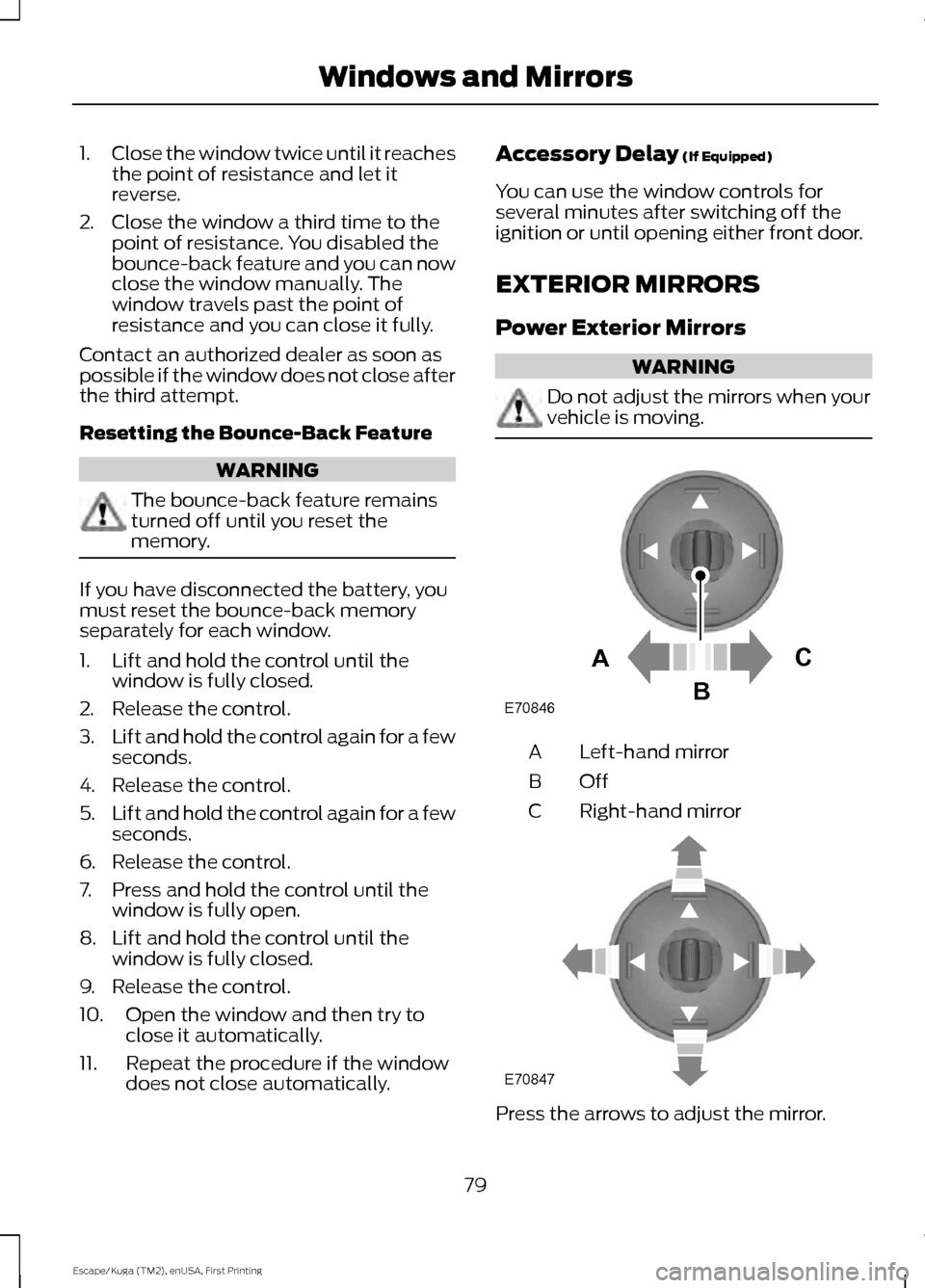
Left-hand mirror
A
OffB
Right-hand mirror
C Press the arrows to adjust the mirror.
79
Escape/Kuga (TM2), enUSA, First Printing Windows and MirrorsE70846A
C
B E70847
Page 101 of 486
Engine
Action
Message
Indicator
Message
Engine service is required. Contact yourauthorized dealer.
Amber
Engine fault Service now
Displays when the engine temperature is too
high. Stop the vehicle in a safe place and allow to engine to cool. If the problem persists,
contact your authorized dealer. See Engine
Coolant Check (page 243).
Red
High engine temperature
Stop safely
Displays when the engine has reduced powerin order to help reduce high coolant temper- ature.
-
Power Reduced to
Lower Engine Temp
Hill Start Assist Action
Message
Indicator
Message
Displays when hill start assist is not available.Contact your authorized dealer.
Amber
Hill Start Assist Not
Available
Keyless Vehicle Action
Message
Indicator
Message
Displays to remind you that the key is in thetrunk. See
Keyless Starting (page 128).
Amber
Ford KeyFree Key inside
vehicle
Displayed if the key is not detected by the
system. See
Keyless Starting (page 128).
-
Ford KeyFree No key
detected
Displayed as a reminder to turn off the vehicle.See
Keyless Starting (page 128).
Red
Switch ign. off Press
ENGINE Start/Stop button
98
Escape/Kuga (TM2), enUSA, First Printing Information Displays
Page 104 of 486
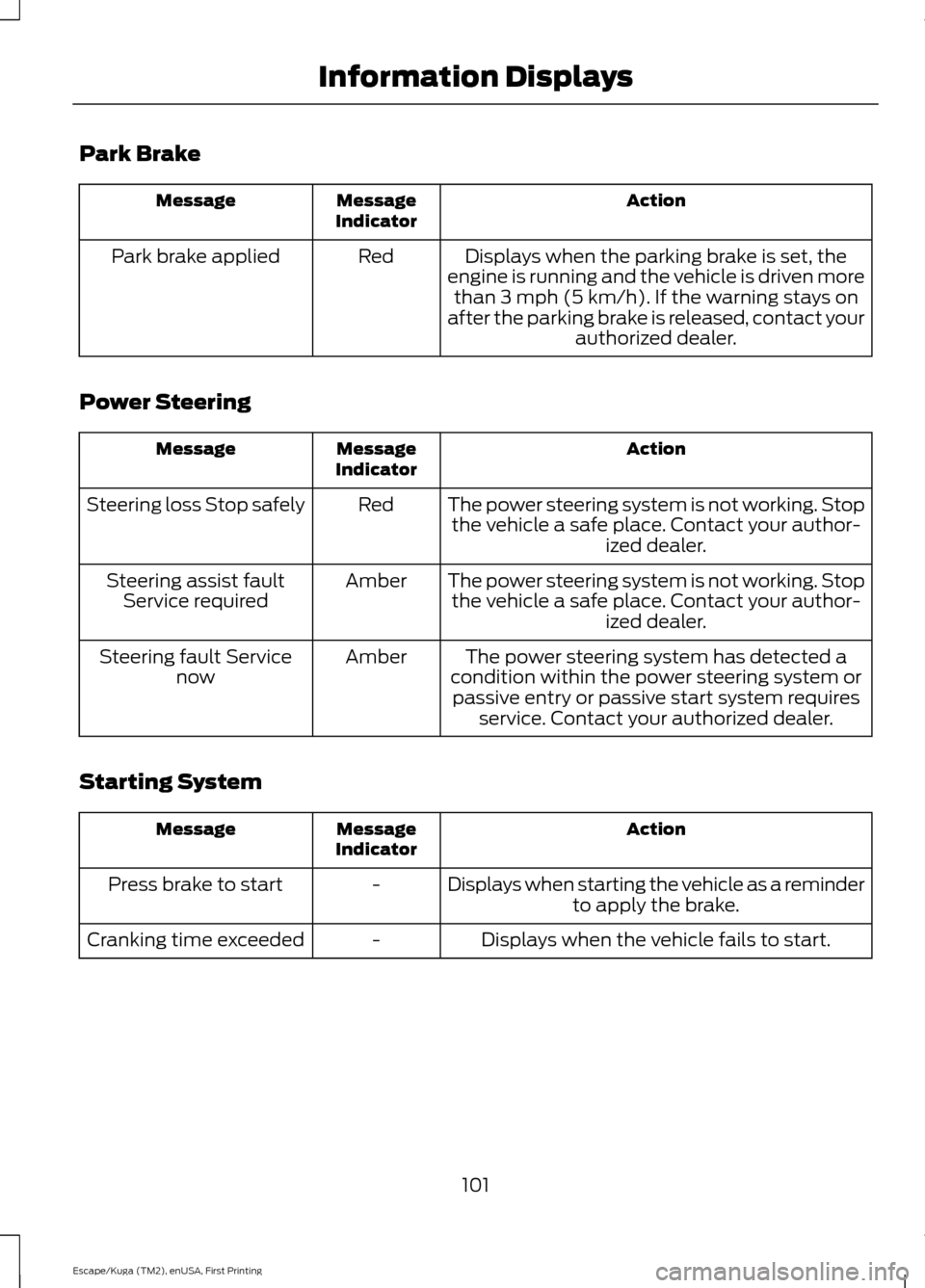
Park Brake
Action
Message
Indicator
Message
Displays when the parking brake is set, the
engine is running and the vehicle is driven more than 3 mph (5 km/h). If the warning stays on
after the parking brake is released, contact your authorized dealer.
Red
Park brake applied
Power Steering Action
Message
Indicator
Message
The power steering system is not working. Stopthe vehicle a safe place. Contact your author- ized dealer.
Red
Steering loss Stop safely
The power steering system is not working. Stopthe vehicle a safe place. Contact your author- ized dealer.
Amber
Steering assist fault
Service required
The power steering system has detected a
condition within the power steering system or passive entry or passive start system requires service. Contact your authorized dealer.
Amber
Steering fault Service
now
Starting System Action
Message
Indicator
Message
Displays when starting the vehicle as a reminderto apply the brake.
-
Press brake to start
Displays when the vehicle fails to start.
-
Cranking time exceeded
101
Escape/Kuga (TM2), enUSA, First Printing Information Displays
Page 108 of 486
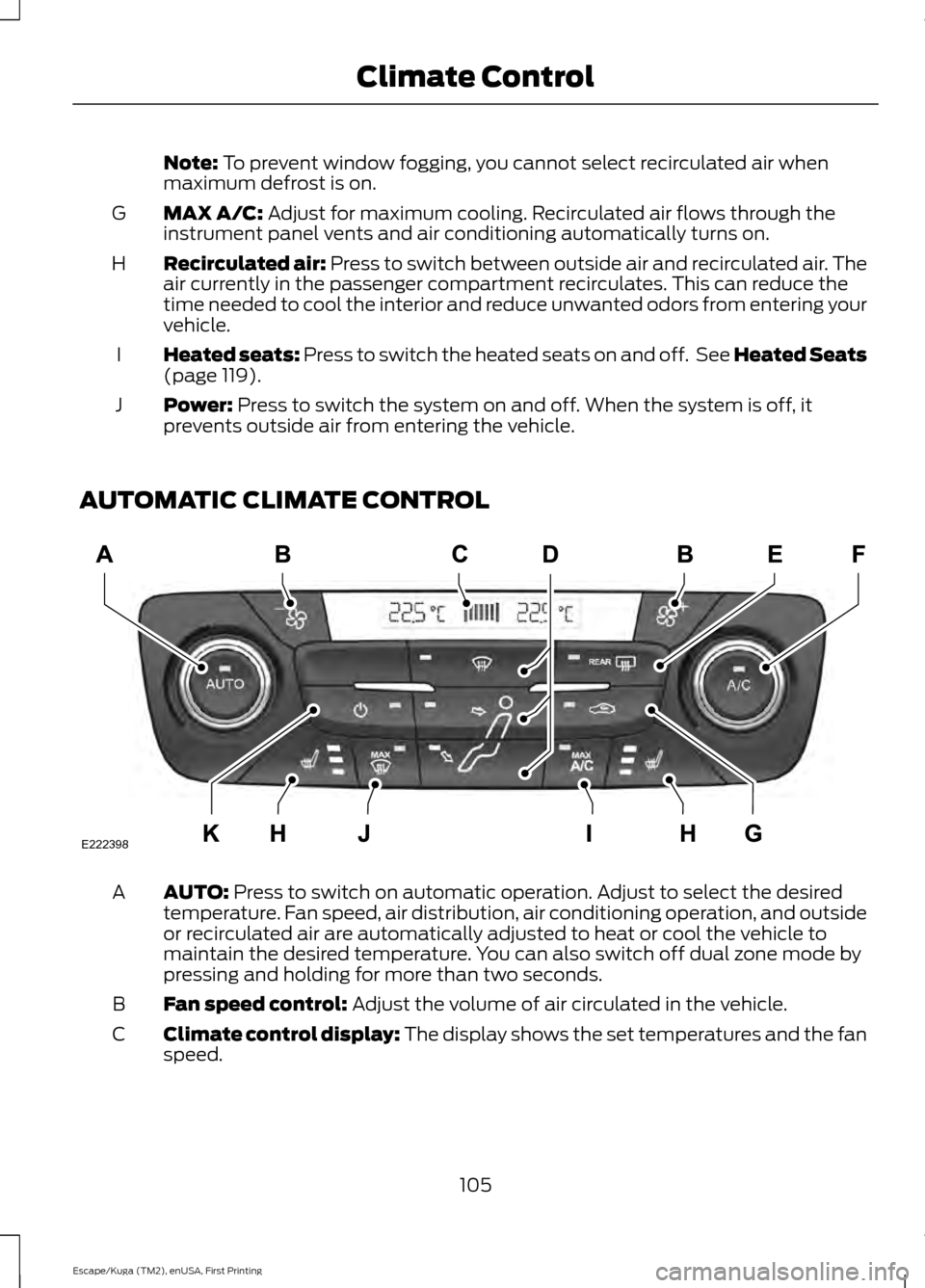
Note: To prevent window fogging, you cannot select recirculated air when
maximum defrost is on.
MAX A/C:
Adjust for maximum cooling. Recirculated air flows through the
instrument panel vents and air conditioning automatically turns on.
G
Recirculated air:
Press to switch between outside air and recirculated air. The
air currently in the passenger compartment recirculates. This can reduce the
time needed to cool the interior and reduce unwanted odors from entering your
vehicle.
H
Heated seats:
Press to switch the heated seats on and off. See Heated Seats
(page 119).
I
Power:
Press to switch the system on and off. When the system is off, it
prevents outside air from entering the vehicle.
J
AUTOMATIC CLIMATE CONTROL AUTO:
Press to switch on automatic operation. Adjust to select the desired
temperature. Fan speed, air distribution, air conditioning operation, and outside
or recirculated air are automatically adjusted to heat or cool the vehicle to
maintain the desired temperature. You can also switch off dual zone mode by
pressing and holding for more than two seconds.
A
Fan speed control:
Adjust the volume of air circulated in the vehicle.
B
Climate control display: The display shows the set temperatures and the fan
speed.
C
105
Escape/Kuga (TM2), enUSA, First Printing Climate ControlE222398