remote start FORD ESCAPE 2017 3.G User Guide
[x] Cancel search | Manufacturer: FORD, Model Year: 2017, Model line: ESCAPE, Model: FORD ESCAPE 2017 3.GPages: 486, PDF Size: 6.34 MB
Page 67 of 486
2.
Switch the ignition from off to on. Keep
the ignition on for at least 3 seconds,
but no more than 10 seconds.
3. Switch the ignition off and remove the
first coded key from the ignition.
4. After at least 3 seconds but within 10 seconds of switching the ignition off,
insert the second previously coded key
into the ignition.
5. Switch the ignition from off to on. Keep
the ignition on for at least 3 seconds,
but no more than 10 seconds.
6. Switch the ignition off and remove the
second previously programmed coded
key from the ignition.
7. After at least 3 seconds but within 10 seconds of switching the ignition off
and removing the previously
programmed coded key, insert the new
unprogrammed key into the ignition.
8. Switch the ignition from off to on. Keep
the ignition on for at least six seconds.
9. Remove the newly programmed coded
key from the ignition.
If you have successfully programmed the
new integrated keyhead transmitter, it will
start your vehicle and operate the remote
entry system.
If programming was unsuccessful, wait 10
seconds and repeat steps 1 through 9. If
you are still unsuccessful, take your vehicle
to your authorized dealer.
Programming a Spare Intelligent
Access Key
Note: You can program a maximum of eight
coded keys to your vehicle. All eight must
be intelligent access keys.
You can program your own intelligent
access keys to your vehicle. This procedure
programs both the vehicle immobilizer
keycode and the remote control to your
vehicle. You must have two previously
programmed intelligent access keys inside
your vehicle and the new unprogrammed
intelligent access key readily accessible.
Contact an authorized dealer to have the
spare key programmed if two previously
programmed keys are not available.
Make sure that the ignition is switched off
before beginning this procedure. Make sure
that you close all the doors before
beginning and that they remain closed
throughout the procedure. Carry out all
steps within 30 seconds of starting the
sequence. Stop and wait for at least one
minute before starting again if you carry
out any steps out of sequence.
Read and understand the entire procedure
before you begin.
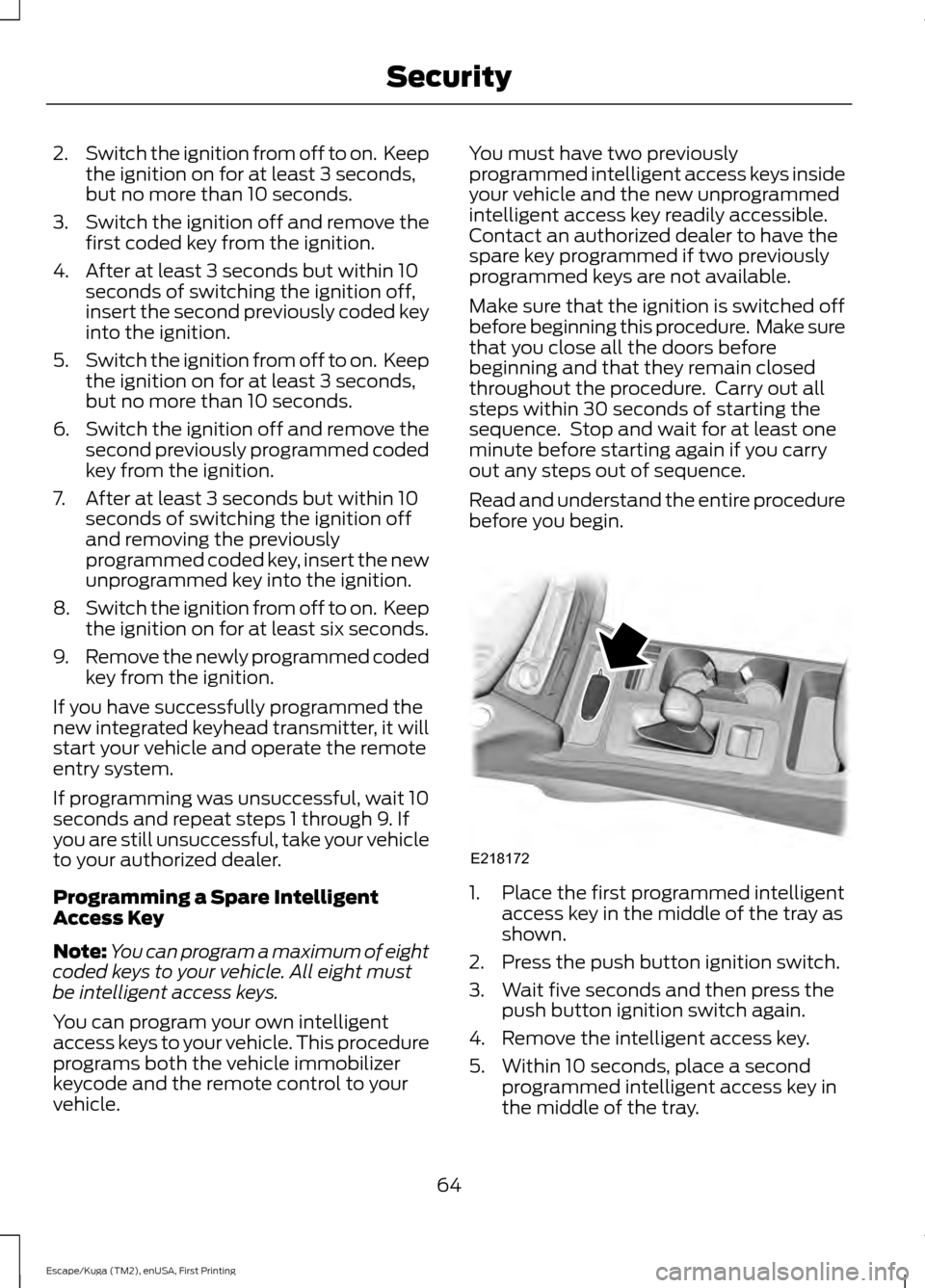
1. Place the first programmed intelligent
access key in the middle of the tray as
shown.
2. Press the push button ignition switch.
3. Wait five seconds and then press the push button ignition switch again.
4. Remove the intelligent access key.
5. Within 10 seconds, place a second programmed intelligent access key in
the middle of the tray.
64
Escape/Kuga (TM2), enUSA, First Printing SecurityE218172
Page 68 of 486
6. Press the push button ignition switch.
7. Wait five seconds and then press the
push button ignition switch again.
8. Remove the intelligent access key.
9. Within 10 seconds, place the unprogrammed intelligent access key
in the middle of the tray.
10. Press the push button ignition switch.
Keep the ignition on for at least six
seconds.
11. Remove the newly programmed intelligent access key.
Programming is now complete. Check that
the remote control functions operate and
your vehicle starts with the new intelligent
access key.
If programming was unsuccessful, wait 10
seconds and repeat steps 1 through 11. If
programming remains unsuccessful,
contact an authorized dealer.
ANTI-THEFT ALARM (If Equipped)
The system will warn you of an
unauthorized entry to your vehicle. It will
be triggered if any door, the luggage
compartment or the hood is opened
without using the key, remote control or
keyless entry keypad.
The direction indicators will flash and the
horn will sound if unauthorized entry is
attempted while the alarm is armed.
Take all remote controls to an authorized
dealer if there is any potential alarm
problem with your vehicle.
Arming the Alarm
The alarm is ready to arm when there is
not a key in the ignition. Electronically lock
the vehicle to arm the alarm. The message indicator flashes
when theft protection is active. Disarming the Alarm
Disarm the alarm by any of the following
actions:
•
Unlock the doors or luggage
compartment with the remote control
or keyless entry keypad.
• Switch the ignition on or start the
vehicle.
• Use a key in the driver ’s door to unlock
the vehicle, then switch the ignition on
within 12 seconds.
Note: Pressing the panic button on the
remote control will stop the horn and signal
indicators, but will not disarm the system.
65
Escape/Kuga (TM2), enUSA, First Printing Security
Page 94 of 486
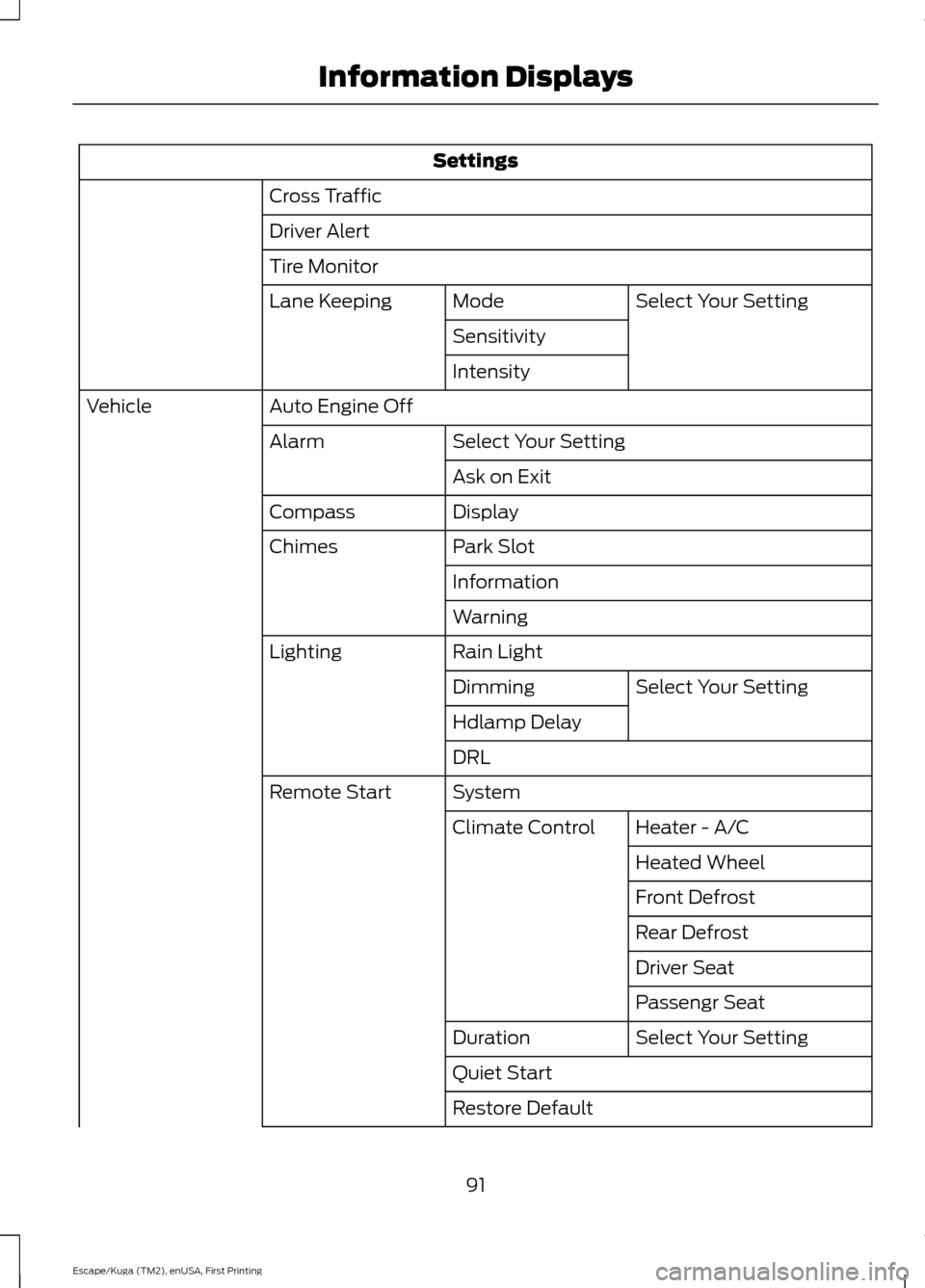
Settings
Cross Traffic
Driver Alert
Tire Monitor Select Your Setting
Mode
Lane Keeping
Sensitivity
Intensity
Auto Engine Off
Vehicle
Select Your Setting
Alarm
Ask on Exit
Display
Compass
Park Slot
Chimes
Information
Warning
Rain Light
Lighting
Select Your Setting
Dimming
Hdlamp Delay
DRL
System
Remote Start
Heater - A/C
Climate Control
Heated Wheel
Front Defrost
Rear Defrost
Driver Seat
Passengr Seat
Select Your Setting
Duration
Quiet Start
Restore Default
91
Escape/Kuga (TM2), enUSA, First Printing Information Displays
Page 102 of 486
Action
Message
Indicator
Message
Displayed as a reminder to press the brakewhile starting the vehicle.
-
Press brake to start
Displayed when a valid key is not detected
within the vehicle. See Keyless Starting (page 128).
Red
Ford KeyFree Key not
inside car
Displays when the key battery is low. Change
the battery as soon as possible. See
Remote
Control (page 45).
-
Key Battery Low Replace
Soon
Lighting Action
Message
Indicator
Message
Displays when the brake lamp bulb has burnedout. Contact your authorized dealer.
-
Brake lamp Bulb fault
Displays when the low beam headlamp bulb
has burned out. Contact your authorized dealer.
-
Low beam Bulb fault
Displays when an electrical system problem
occurs with the headlamp system. Contact your authorized dealer.
Amber
Headlamp fault Service
required
Maintenance Action
Message
Indicator
Message
Displays when the engine oil life is depleted andrequires a change. See
Engine Oil Check
(page 241).
-
Engine oil change due
Indicates the brake fluid level is low and the
brake system should be inspected immediately. See
Brake Fluid Check (page 247).
Red
Brake fluid level low
Service now
99
Escape/Kuga (TM2), enUSA, First Printing Information Displays
Page 113 of 486
HEATED WINDOWS AND
MIRRORS (If Equipped)
Heated Rear Window
Note: Make sure the engine is running
before operating the heated windows. Press the button to clear the
heated rear window of thin ice
and fog. The heated rear window
will automatically turn off after a short
period of time. Start the engine before you
switch the heated rear window on.
Note: Do not use razor blades or other
sharp objects to clean or remove decals
from the inside of the heated rear window.
The vehicle warranty does not cover
damage caused to the heated rear window
grid lines.
Heated Exterior Mirror
(If Equipped)
When you switch the heated rear window
on, the heated exterior mirrors will
automatically turn on.
Note: Do not remove ice from the mirrors
with a scraper or adjust the mirror glass
when it is frozen in place.
Note: Do not clean the mirror housing or
glass with harsh abrasives, fuel or other
petroleum-based cleaning products.
CABIN AIR FILTER
Your vehicle is equipped with a cabin air
filter, which gives you and your passengers
the following benefits:
• It improves your driving comfort by
reducing particle concentration.
• It improves the interior compartment
cleanliness.
• It protects the climate control
components from particle deposits. Your cabin air filter is located under the
instrument panel in the passenger footwell
area.
Note:
Make sure you have a cabin air filter
installed at all times. This prevents foreign
objects from entering the system. Running
the system without a filter in place could
result in degradation or damage to the
system.
Replace the filter at regular intervals. See
Maintenance
(page 236).
For additional cabin air filter information,
or to replace the filter, see an authorized
dealer.
REMOTE START
(If Equipped)
The remote start feature allows you to
pre-condition the interior of your vehicle.
The climate control system works to
achieve comfort according to your previous
settings.
Note: You cannot adjust the system during
remote start operation.
Turn the ignition on to return the system
to its previous settings. You can now make
adjustments normally, but you need to turn
certain vehicle-dependent features back
on, such as:
• Heated seats.
• Cooled seats.
• Heated steering wheel.
• Heated mirrors.
• Heated rear window.
You can adjust the default remote start
settings using the information display
controls. See
Information Displays
(page 89).
110
Escape/Kuga (TM2), enUSA, First Printing Climate ControlE184884
Page 285 of 486
WARNINGS
3. Stand at a minimum of 12 ft
(3.66 m) away from the wheel
and tire assembly.
4. Use both eye and ear
protection.
For a mounting pressure more
than 20 psi (1.38 bar) greater than
the maximum pressure, a Ford
dealer or other tire service
professional should do the
mounting.
Always inflate steel carcass tires
with a remote air fill with the
person inflating standing at a
minimum of
12 ft (3.66 m) away
from the wheel and tire assembly. Important: Remember to replace
the wheel valve stems when the
road tires are replaced on your
vehicle.
It is recommended that the two
front tires or two rear tires
generally be replaced as a pair.
The tire pressure sensors mounted
in the wheels (originally installed
on your vehicle) are not designed
to be used in aftermarket wheels.
The use of wheels or tires not
recommended by Ford Motor
Company may affect the
operation of your tire pressure
monitoring system. If the tire pressure monitoring
system indicator is flashing, your
system is malfunctioning. Your
replacement tire might be
incompatible with your tire
pressure monitoring system, or
some component of the system
may be damaged.
Safety Practices
WARNINGS
If your vehicle is stuck in
snow, mud or sand, do not
rapidly spin the tires; spinning the
tires can tear the tire and cause
an explosion. A tire can explode in
as little as three to five seconds. Do not spin the wheels at
over 34 mph (55 km/h). The
tires may fail and injure a
passenger or bystander. Driving habits have a great deal
to do with your tire mileage and
safety.
*Observe posted speed limits
*Avoid fast starts, stops and turns
*Avoid potholes and objects on
the road
*Do not run over curbs or hit the
tire against a curb when parking
282
Escape/Kuga (TM2), enUSA, First Printing Wheels and Tires
Page 376 of 486
Creating a SYNC Owner Account
Why do I need a SYNC owner account?
•
Essential for keeping up with the latest
software and connected features.
• Access to customer support for any
questions you may have.
• Maintain account permissions.
Visit the website to sign up and register. Website
owner.ford.com
www.syncmyride.ca
www.syncmaroute.ca
MyFord Mobile ™ with Embedded
Modem (If Equipped)
Connect to your vehicle using the MyFord
Mobile app on your smartphone. The
embedded modem in your vehicle
communicates with the app and allows
you to start, lock, unlock and locate your
vehicle remotely. The app also connects
you with other vehicle resources like a
parking locator, roadside assistance, dealer
locations and Ford Support. MyFord Mobile
is supported by Android and iPhone and it
is available through the App Store and
Google Play. The MyFord mobile app is
available through a free download.
Services included for four years. Text and
data rates apply to usage.
Updating Your System
You can choose to download the update
onto a USB drive or use Wi-Fi to deliver
automatic updates.
USB Updates
To use the USB update you need to log
into your owner account and visit the SYNC
software update page. Website
owner.ford.com
www.syncmyride.ca
www.syncmaroute.ca
The website notifies you if an update is
available. You can then select to download
the update.
You will need an empty USB drive. Please
check the website for minimum
requirements. Once you have inserted the
USB drive into your computer, choose to
start the download. Follow the instructions
provided to download the files to the USB
drive.
The installation of most files occurs in the
background, and does not interrupt your
use of the system. Navigation updates
cannot be installed in the background,
because the files are too large.
To install the update in your vehicle,
remove anything that is plugged in the USB
ports on the media hub and plug in the
USB drive containing the update. When
the USB drive is plugged in, the installation
should begin immediately. After a
successful installation, the update is
available the next time the vehicle is
started.
When the installation is complete, take the
USB drive back to the computer to report
the update. Log into your owner account
and return to the SYNC software update
page and confirm that you have installed
the update. Insert the USB drive used for
the update into your computer and choose
to report your update. The website updates
your records to reflect your current
software version.
373
Escape/Kuga (TM2), enUSA, First Printing SYNC™ 3
(If Equipped)
Page 436 of 486
For a complete listing of the accessories
that are available for your vehicle, please
contact your authorized dealer or visit the
online store web site:
Web Address (United States)
www.Accessories.Ford.com Web Address (Canada)
www.Accessories.Ford.ca
Ford Motor Company will repair or replace
any properly authorized dealer-installed
Ford Original Accessory found to be
defective in factory-supplied materials or
workmanship during the warranty period,
as well as any component damaged by the
defective accessories.
Ford Motor Company will warrant your
Ford accessory through the warranty that
provides the greatest benefit:
• 24 months, unlimited mileage.
• The remainder of your new vehicle
limited warranty.
Contact an authorized dealer for details
and a copy of the warranty.
Exterior Style
• Graphics*.
• Hood deflector*.
• Side window deflectors.
• Splash guards.
• Spoiler winglets.
Interior Style
• Door sill plates.
• Floor mats.
• Interior light kit.
• Seat covers*. Lifestyle
•
Ash cup or smoker's packages.
• Camping tent*.
• Car cover*.
• Cargo area protector.
• Cargo cover.
• Cargo net*.
• Cargo shade.
• Soft cargo organizers.
• Roof racks and carriers*.
• Roof rails and crossbars.
• Recovery hook (towing eye).
• Tablet cradle*.
• Trailer towing accessories.
Peace of Mind
• Bumper mounted warning sensors*.
• Hitch scan*.
• Keyless entry keypad.
• Remote start.
• Roadside assistance kit*.
• Vehicle security systems.
• Wheel locks.
*Ford Licensed Accessories. The accessory
manufacturer designs, develops and
therefore warrants Ford Licensed
Accessories, and does not design or test
these accessories to Ford Motor Company
engineering requirements. Contact an
authorized Ford dealer for the
manufacturer ’s limited warranty details
and request a copy of the Ford Licensed
Accessories product limited warranty from
the accessory manufacturer.
433
Escape/Kuga (TM2), enUSA, First Printing Accessories
Page 481 of 486
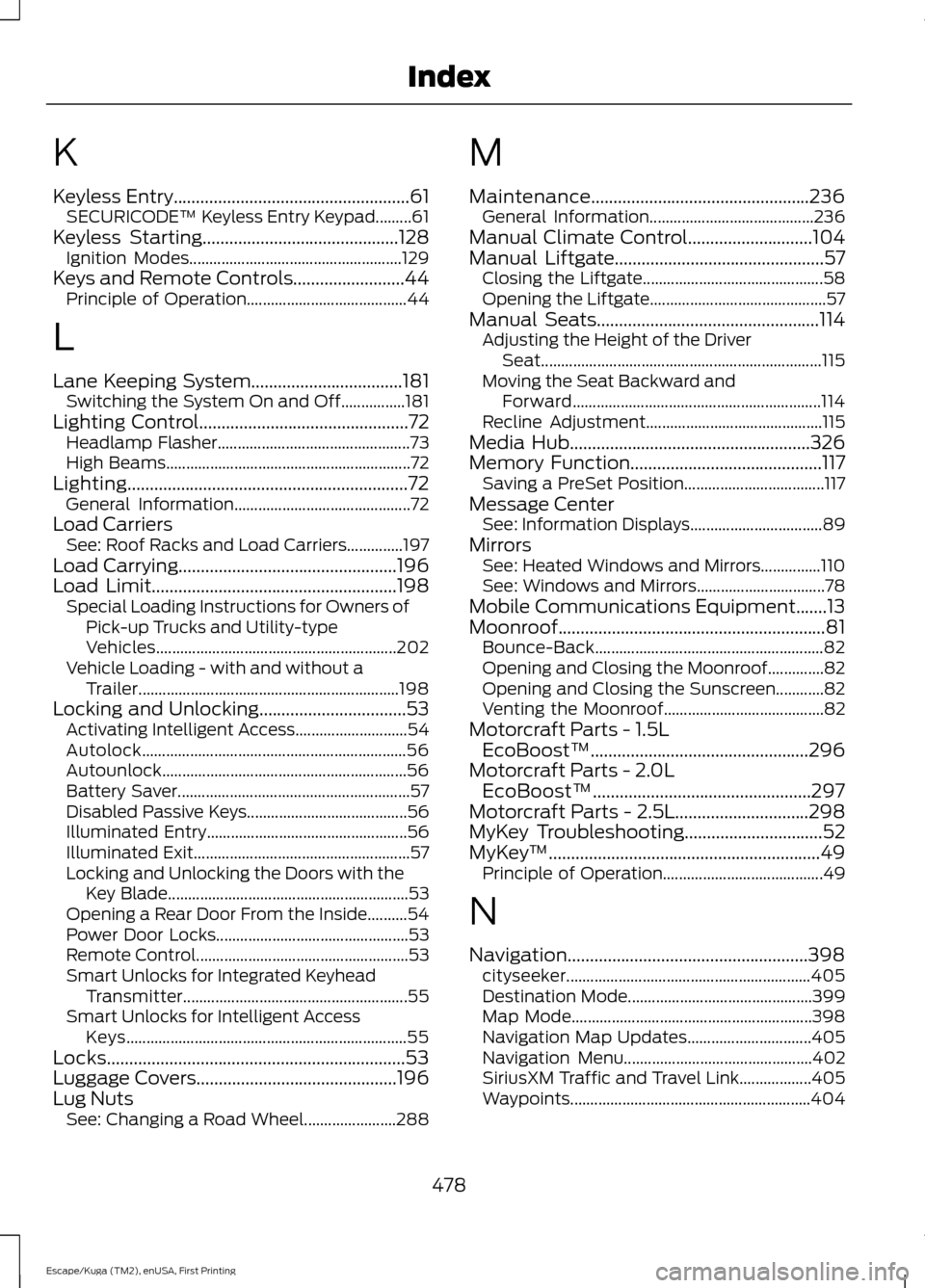
K
Keyless Entry.....................................................61
SECURICODE™ Keyless Entry Keypad.........61
Keyless Starting
............................................128
Ignition Modes..................................................... 129
Keys and Remote Controls.........................44 Principle of Operation........................................ 44
L
Lane Keeping System..................................181 Switching the System On and Off................181
Lighting Control
...............................................72
Headlamp Flasher................................................ 73
High Beams............................................................. 72
Lighting...............................................................72 General Information............................................ 72
Load Carriers See: Roof Racks and Load Carriers..............197
Load Carrying
.................................................196
Load Limit.......................................................198
Special Loading Instructions for Owners of
Pick-up Trucks and Utility-type
Vehicles............................................................ 202
Vehicle Loading - with and without a Trailer................................................................. 198
Locking and Unlocking
.................................53
Activating Intelligent Access............................ 54
Autolock.................................................................. 56
Autounlock............................................................. 56
Battery Saver.......................................................... 57
Disabled Passive Keys........................................ 56
Illuminated Entry.................................................. 56
Illuminated Exit...................................................... 57
Locking and Unlocking the Doors with the Key Blade............................................................ 53
Opening a Rear Door From the Inside..........54
Power Door Locks................................................ 53
Remote Control..................................................... 53
Smart Unlocks for Integrated Keyhead Transmitter........................................................ 55
Smart Unlocks for Intelligent Access Keys...................................................................... 55
Locks...................................................................53
Luggage Covers.............................................196
Lug Nuts See: Changing a Road Wheel....................... 288M
Maintenance.................................................236
General Information......................................... 236
Manual Climate Control
............................104
Manual Liftgate...............................................57
Closing the Liftgate............................................. 58
Opening the Liftgate............................................ 57
Manual Seats
..................................................114
Adjusting the Height of the Driver
Seat...................................................................... 115
Moving the Seat Backward and Forward.............................................................. 114
Recline Adjustment............................................ 115
Media Hub......................................................326
Memory Function...........................................117 Saving a PreSet Position................................... 117
Message Center See: Information Displays................................. 89
Mirrors See: Heated Windows and Mirrors...............110
See: Windows and Mirrors................................ 78
Mobile Communications Equipment.......13
Moonroof............................................................81 Bounce-Back......................................................... 82
Opening and Closing the Moonroof..............82
Opening and Closing the Sunscreen............82
Venting the Moonroof........................................ 82
Motorcraft Parts - 1.5L EcoBoost™.................................................296
Motorcraft Parts - 2.0L EcoBoost™.................................................297
Motorcraft Parts - 2.5L..............................298
MyKey Troubleshooting
...............................52
MyKey ™.............................................................49
Principle of Operation........................................ 49
N
Navigation......................................................398 cityseeker............................................................. 405
Destination Mode.............................................. 399
Map Mode............................................................ 398
Navigation Map Updates............................... 405
Navigation Menu............................................... 402
SiriusXM Traffic and Travel Link.................. 405
Waypoints............................................................ 404
478
Escape/Kuga (TM2), enUSA, First Printing Index
Page 482 of 486
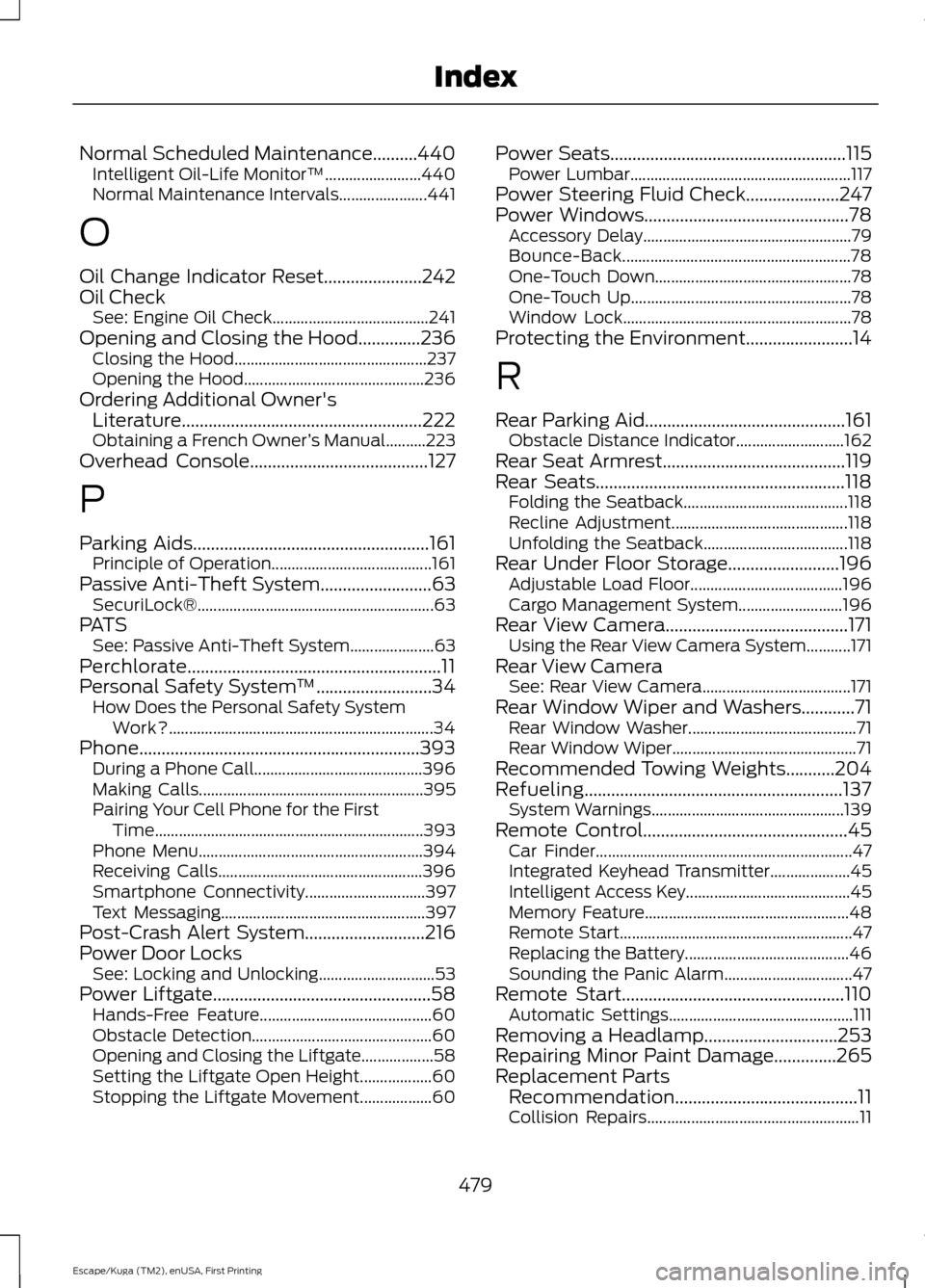
Normal Scheduled Maintenance..........440
Intelligent Oil-Life Monitor™........................ 440
Normal Maintenance Intervals...................... 441
O
Oil Change Indicator Reset......................242
Oil Check See: Engine Oil Check....................................... 241
Opening and Closing the Hood..............236
Closing the Hood................................................ 237
Opening the Hood............................................. 236
Ordering Additional Owner's Literature......................................................222
Obtaining a French Owner ’s Manual..........223
Overhead Console
........................................127
P
Parking Aids
.....................................................161
Principle of Operation........................................ 161
Passive Anti-Theft System
.........................63
SecuriLock®........................................................... 63
PATS See: Passive Anti-Theft System..................... 63
Perchlorate.........................................................11
Personal Safety System ™
..........................34
How Does the Personal Safety System
Work?.................................................................. 34
Phone...............................................................393 During a Phone Call.......................................... 396
Making Calls........................................................ 395
Pairing Your Cell Phone for the First Time................................................................... 393
Phone Menu........................................................ 394
Receiving Calls................................................... 396
Smartphone Connectivity.............................. 397
Text Messaging................................................... 397
Post-Crash Alert System...........................216
Power Door Locks See: Locking and Unlocking............................. 53
Power Liftgate
.................................................58
Hands-Free Feature........................................... 60
Obstacle Detection............................................. 60
Opening and Closing the Liftgate.................. 58
Setting the Liftgate Open Height.................. 60
Stopping the Liftgate Movement.................. 60Power Seats
.....................................................115
Power Lumbar....................................................... 117
Power Steering Fluid Check.....................247
Power Windows
..............................................78
Accessory Delay.................................................... 79
Bounce-Back......................................................... 78
One-Touch Down................................................. 78
One-Touch Up....................................................... 78
Window Lock......................................................... 78
Protecting the Environment........................14
R
Rear Parking Aid
.............................................161
Obstacle Distance Indicator........................... 162
Rear Seat Armrest.........................................119
Rear Seats........................................................118 Folding the Seatback......................................... 118
Recline Adjustment............................................ 118
Unfolding the Seatback.................................... 118
Rear Under Floor Storage.........................196 Adjustable Load Floor...................................... 196
Cargo Management System.......................... 196
Rear View Camera.........................................171 Using the Rear View Camera System...........171
Rear View Camera See: Rear View Camera..................................... 171
Rear Window Wiper and Washers............71 Rear Window Washer.......................................... 71
Rear Window Wiper.............................................. 71
Recommended Towing Weights...........204
Refueling..........................................................137 System Warnings................................................ 139
Remote Control..............................................45 Car Finder................................................................ 47
Integrated Keyhead Transmitter.................... 45
Intelligent Access Key......................................... 45
Memory Feature................................................... 48
Remote Start.......................................................... 47
Replacing the Battery......................................... 46
Sounding the Panic Alarm................................ 47
Remote Start..................................................110 Automatic Settings.............................................. 111
Removing a Headlamp
..............................253
Repairing Minor Paint Damage..............265
Replacement Parts Recommendation.........................................11
Collision Repairs..................................................... 11
479
Escape/Kuga (TM2), enUSA, First Printing Index