warning lights FORD ESCAPE 2017 3.G User Guide
[x] Cancel search | Manufacturer: FORD, Model Year: 2017, Model line: ESCAPE, Model: FORD ESCAPE 2017 3.GPages: 486, PDF Size: 6.34 MB
Page 213 of 486
•
Transmissions give their best fuel
economy when operated in the top
cruise gear and with steady pressure
on the gas pedal.
• Four-wheel-drive operation (if
equipped) is less fuel efficient than
two-wheel-drive operation.
• Close the windows for high-speed
driving.
DRIVING THROUGH WATER WARNING
Do not drive through flowing or deep
water as you may lose control of your
vehicle.
Note:
Driving through standing water can
cause vehicle damage.
Note: Engine damage can occur if water
enters the air filter.
Before driving through standing water,
check the depth. Never drive through water
that is higher than the bottom of the front
rocker area of your vehicle. When driving through standing water, drive
very slowly and do not stop your vehicle.
Your brake performance and traction may
be limited. After driving through water and
as soon as it is safe to do so: •
Lightly press the brake pedal to dry the
brakes and to check that they work.
• Check that the horn works.
• Check that the exterior lights work.
• Turn the steering wheel to check that
the steering power assist works.
FLOOR MATS WARNINGS
Always use floor mats that are
designed to fit the foot well of your
vehicle. Only use floor mats that
leave the pedal area unobstructed. Only
use floor mats that are firmly secured to
retention posts so that they cannot slip out
of position and interfere with the pedals
or impair safe operation of your vehicle in
other ways. Pedals that cannot move freely can
cause loss of vehicle control and
increase the risk of serious personal
injury. Always make sure that the floor
mats are properly attached to the
retention posts in the carpet that are
supplied with your vehicle. Floor mats must
be properly secured to both retention posts
to make sure mats do not shift out of
position. Never place floor mats or any other
covering in the vehicle foot well that
cannot be properly secured to
prevent them from moving and interfering
with the pedals or the ability to control the
vehicle. Never place floor mats or any other
covering on top of already installed
floor mats. Floor mats should always
rest on top of vehicle carpeting surface and
not another floor mat or other covering.
Additional floor mats or any other covering
will reduce the pedal clearance and
potentially interfere with pedal operation.
210
Escape/Kuga (TM2), enUSA, First Printing Driving HintsE176360
Page 442 of 486
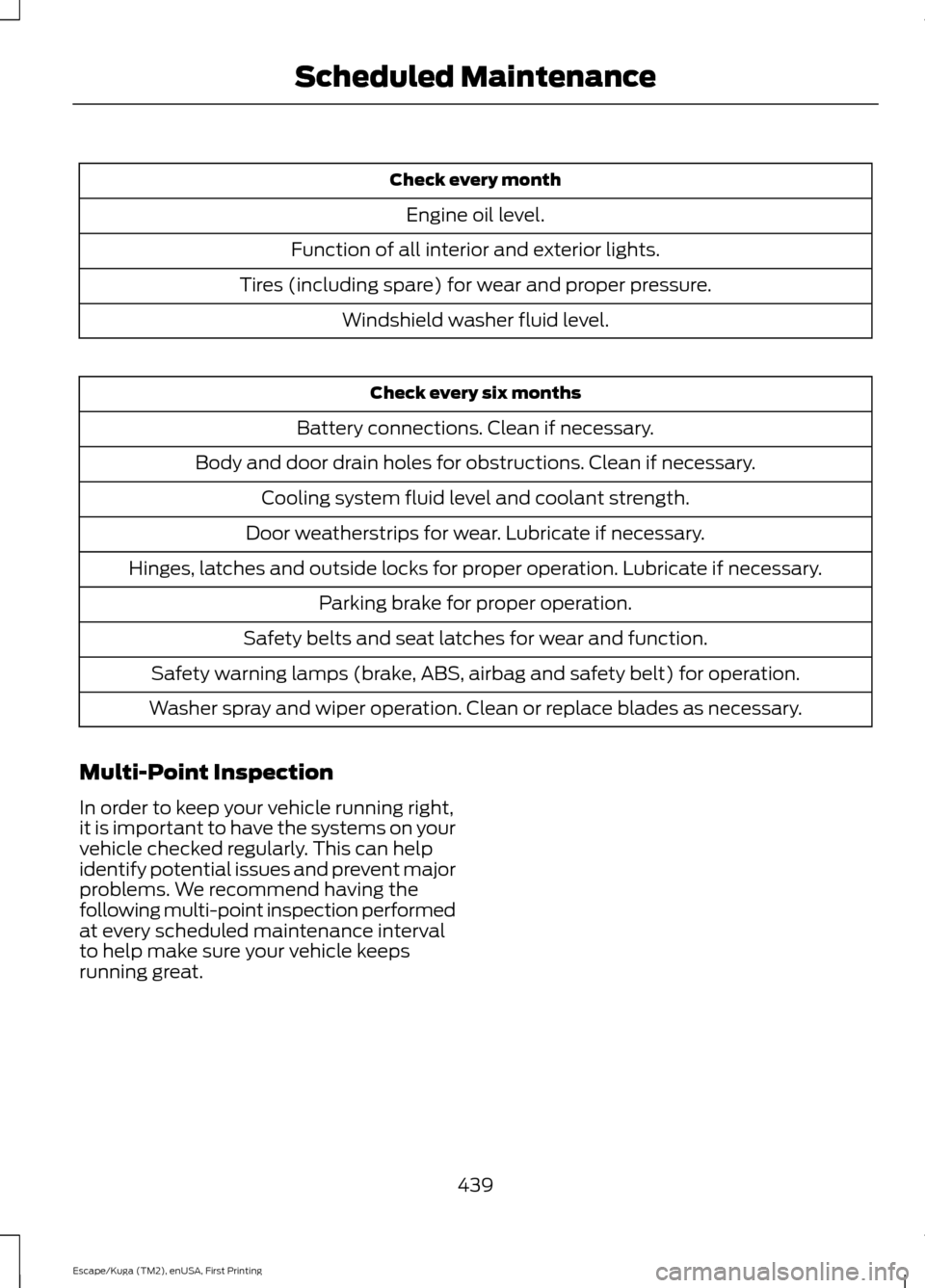
Check every month
Engine oil level.
Function of all interior and exterior lights.
Tires (including spare) for wear and proper pressure. Windshield washer fluid level. Check every six months
Battery connections. Clean if necessary.
Body and door drain holes for obstructions. Clean if necessary. Cooling system fluid level and coolant strength.
Door weatherstrips for wear. Lubricate if necessary.
Hinges, latches and outside locks for proper operation. Lubricate if necessary. Parking brake for proper operation.
Safety belts and seat latches for wear and function.
Safety warning lamps (brake, ABS, airbag and safety belt) for operation.
Washer spray and wiper operation. Clean or replace blades as necessary.
Multi-Point Inspection
In order to keep your vehicle running right,
it is important to have the systems on your
vehicle checked regularly. This can help
identify potential issues and prevent major
problems. We recommend having the
following multi-point inspection performed
at every scheduled maintenance interval
to help make sure your vehicle keeps
running great.
439
Escape/Kuga (TM2), enUSA, First Printing Scheduled Maintenance
Page 478 of 486
Climate Control............................................104
Collision Warning System.........................192
PRINCIPLE OF OPERATION........................... 192
Coolant Check See: Engine Coolant Check............................ 243
Crash Sensors and Airbag Indicator........42
Creating a MyKey
...........................................50
Programming or Changing Configurable
Settings................................................................ 51
Cross Traffic Alert.........................................187 False Alerts........................................................... 190
Switching the System Off and On...............190
System Errors...................................................... 190
System Lights, Messages and Audible Alerts.................................................................. 189
System Limitations........................................... 190
Using the System................................................ 187
Cruise Control.................................................68 Principle of Operation....................................... 174
Type One................................................................. 68
Type Two................................................................. 68
Cruise control See: Using Cruise Control................................. 174
Customer Assistance
..................................218
D
Data Recording
..................................................9
Event Data Recording........................................... 9
Service Data Recording........................................ 9
Daytime Running Lamps.............................74 Type 1 - Conventional
(Non-Configurable)........................................ 74
Type 2 - Configurable.......................................... 74
Digital Radio
...................................................321
HD Radio Reception and Station
Troubleshooting............................................ 322
Direction Indicators
........................................76
Driver Alert......................................................180
Using Driver Alert............................................... 180
Driver and Passenger Airbags...................36 Children and Airbags.......................................... 36
Proper Driver and Front Passenger Seating Adjustment........................................................ 36
Driver Knee Airbag.........................................40
Driving Aids
.....................................................180
Driving Hints..................................................209
Driving Through Water................................210 DRL
See: Daytime Running Lamps......................... 74
E
Eco Mode
..........................................................191
Resetting Eco Mode............................................ 191
Type 1........................................................................\
191
Type 2 and 3.......................................................... 191
Economical Driving
.....................................209
Electric Parking Brake.................................154 Applying the Electric Parking brake.............154
Battery With No Charge................................... 156
Parking On a Hill (Vehicles With a Manual Transmission) ................................................ 154
Releasing the Electric Parking Brake...........155
Emission Control System...........................141 On-Board Diagnostics (OBD-II).................... 142
Readiness for Inspection and Maintenance (I/M) Testing.................................................... 142
End User License Agreement.................456 VEHICLE SOFTWARE END USER LICENSE
AGREEMENT (EULA) ................................ 456
Engine Block Heater.....................................131 Using the Engine Block Heater...................... 132
Engine Coolant Check................................243 Adding Coolant................................................... 243
Coolant Change................................................. 245
Engine Coolant Temperature Management.................................................. 246
Fail-Safe Cooling............................................... 245
Recycled Coolant............................................... 244
Severe Climates................................................. 245
Engine Immobilizer See: Passive Anti-Theft System..................... 63
Engine Oil Check
...........................................241
Adding Engine Oil............................................... 241
Engine Oil Dipstick - 1.5L EcoBoost™..................................................241
Engine Oil Dipstick - 2.0L EcoBoost™/ 2.5L..................................................................241
Engine Specifications - 1.5L EcoBoost™.................................................294
Drivebelt Routing............................................... 294
Engine Specifications - 2.0L EcoBoost™.................................................294
Drivebelt Routing............................................... 295
475
Escape/Kuga (TM2), enUSA, First Printing Index
Page 485 of 486
Universal Garage Door Opener...............120
HomeLink Wireless Control System...........120
USB Port
.........................................................326
Using Adaptive Cruise Control.................175 Automatic Braking.............................................. 176
Automatic Cancel............................................... 178
Changing the Set Speed................................... 177
Detection Beam Issues..................................... 176
Forward Alert Function..................................... 179
Setting a Speed.................................................... 177
Setting the Vehicle Gap.................................... 177
Standby Mode...................................................... 178
Switching the System Off................................ 178
Switching the System On................................. 177
Using the System................................................. 177
Using Cruise Control....................................174 Switching Cruise Control Off.......................... 174
Switching Cruise Control On........................... 174
Using Four-Wheel Drive
.............................148
Driving in Special Conditions With
Four-Wheel Drive.......................................... 148
Using MyKey With Remote Start Systems..........................................................52
Using Snow Chains
.....................................284
Using Stability Control...............................160
Using SYNC™ With Your Media Player............................................................348
Accessing Your USB Song Library...............352
Bluetooth Devices and System Settings............................................................ 354
Connecting Your Digital Media Player to the USB Port.......................................................... 348
Media Menu Features....................................... 352
Media Voice Commands................................ 349
USB 2...................................................................... 354
Voice Commands for Audio Sources.........355
Using SYNC™ With Your Phone.............331 Accessing Features through the Phone
Menu.................................................................. 336
Accessing Your Phone Settings................... 339
Bluetooth Devices............................................. 340
Making Calls........................................................ 334
Pairing a Phone for the First Time................331
Pairing Subsequent Phones.......................... 332
Phone Options during an Active Call.........335
Phone Voice Commands................................ 333
Receiving Calls.................................................... 335
System Settings.................................................. 341Text Messaging...................................................
337
Using Traction Control................................158 Switching the System Off............................... 158
System Indicator Lights and Messages.......................................................... 158
Using a Switch..................................................... 158
Using the Information Display Controls............................................................. 158
Using Voice Recognition
...........................329
Audio Voice Commands................................. 378
Initiating a Voice Session................................ 329
Mobile App Voice Commands....................... 381
Navigation Voice Commands....................... 380
Phone Voice Commands................................ 379
SiriusXM Traffic and Travel Link Voice Commands..................................................... 382
System Interaction and Feedback..............330
Voice Settings Commands............................ 382
Utilizing the Mediation/Arbitration Program (Canada Only)..........................221
V
Vehicle Care....................................................261 General Information.......................................... 261
Vehicle Certification Label
......................300
Vehicle Identification Number...............299
Vehicle Storage
............................................266
Battery.................................................................... 267
Body....................................................................... 266
Brakes..................................................................... 267
Cooling system................................................... 267
Engine.................................................................... 266
Fuel system.......................................................... 267
General.................................................................. 266
Miscellaneous...................................................... 267
Removing Vehicle From Storage.................. 267
Tires........................................................................\
. 267
Ventilation See: Climate Control......................................... 104
VIN See: Vehicle Identification Number............299
Voice Control
....................................................67
W
Warning Lamps and Indicators................85 Adaptive Cruise Control.................................... 85
482
Escape/Kuga (TM2), enUSA, First Printing Index