steering FORD ESCAPE 2017 3.G Repair Manual
[x] Cancel search | Manufacturer: FORD, Model Year: 2017, Model line: ESCAPE, Model: FORD ESCAPE 2017 3.GPages: 486, PDF Size: 6.34 MB
Page 380 of 486
Home screen display
Tile
Item
If your vehicle does not have navigation, this space contains the
audio information.
* If equipped.
You can touch any of the feature displays
to access that feature.
Anytime you select the home button, the
system returns you to this screen.
USING VOICE RECOGNITION
The SYNC 3 system allows you to use voice
commands, to control features like audio
and phone. By using voice commands, you
can keep your hands on the wheel and your
eyes on the road. You can access each feature controlled by
SYNC 3 through a variety of commands. To activate the SYNC 3 voice
commands push the voice
button on the steering wheel and
wait for the prompt.
___ is a dynamic listing, meaning that it can
be the name of anything, such as artist, the
name of contact or number. The context
and the description of the command tell
you what to say for this dynamic option.
There are some commands that work for
every feature, these commands are: Action and Description
Voice Command
Brings you to the main menu.
Main Menu
Returns you to the previous screen.
Go back
Ends the voice session.
Cancel
Gives you a list of possible voice commands.
List of Commands
You can name any feature and the system gives a list of
commands available for the feature. For example, you could
say:
___ List of Commands
Phone List of Commands
Navigation List of Commands
You can use this command to view the next page of options on
any screen where multiple pages of choices are given.
Next Page
You can use this command to view the previous page of options
on any screen where multiple pages of choices are given.
Previous Page
Gives you available commands you can use on the current
screen.
Help
377
Escape/Kuga (TM2), enUSA, First Printing SYNC™ 3 (If Equipped)E142599
Page 398 of 486
Action and Description
Menu Item
Item
You can also sort the calls by selecting the drop down menu at
the top of the screen. You can choose: Missed
Outgoing
Incoming
All
All of your contacts from your phone display in alphabetical
order.
Contacts
B
Selecting this button allows
you to choose a specific letter
to view.
A-Z Jump
Displays the name of your phone and takes you to the phone
settings options.
Phone Settings
C
From this menu, you can pair subsequent devices, set ring tones
and alerts. See Settings (page 408).
Displays all recent text messages.
Text Messages
D
Use this keypad to dial in a phone number.
Phone Keypad
E
Use the backspace button to delete numbers.
Press this button to begin a
call.
Call
Touch this button to send all calls directly to your voicemail.
New text message notifications are not displayed on the screen
and all ringtones and alerts are set to silent.
Do Not Disturb
F
Users with phones having voice services
may see a button to access the feature.
For example, iPhone users see a Siri button.
A press and hold of the voice button on the
steering wheel also accesses this feature.
Making Calls
There are many ways to make calls from
the SYNC 3 system, including using voice
commands. See
Using Voice
Recognition (page 377). You can use the
touchscreen to place calls as well.
395
Escape/Kuga (TM2), enUSA, First Printing SYNC™ 3
(If Equipped)
Page 399 of 486
To call a number in your contacts,
select:
Action and Description
Menu Item
You can then select the
name of the contact you
want to call. Any numbers
stored for that contact
display along with any
stored contact photos. You
can then select the
number that you want to
call. The system begins the
call.
Contacts
To call a number from your recent calls,
select: Action and Description
Menu Item
You can then select an
entry that you want to call.
The system begins the call.
Recent Call
List
To call a number that is not stored in
your phone, select: Action and Description
Menu Item
Select the digits of the
number you wish to call.
Phone
Keypad
The system begins the call.
Call
Pressing the backspace button deletes the
last digit you typed.
Receiving Calls
During an incoming call, an audible tone
sounds. Caller information appears in the
display if it is available. To accept the call, select: Menu Item
Accept
Note: You can also accept the call by
pressing the phone button on the steering
wheel.
To reject the call, select: Menu Item
Reject
Note: You can also reject the call by
pressing the phone button on the steering
wheel.
Ignore the call by doing nothing. SYNC 3
logs it as a missed call.
During a Phone Call
During a phone call, the contacts name
and number display on the screen along
with the call duration.
The phone status items are also visible:
• Signal Strength.
• Battery.
• 911 Assist (United States and Canada
Only). See Settings (page 408).
You can select any of the following during
an active phone call:
396
Escape/Kuga (TM2), enUSA, First Printing SYNC™ 3
(If Equipped)
Page 400 of 486
Item
Immediately end a
phone call. You can
also press the
button on the
steering wheel.
End Call
Press this to access
the phone keypad.
Keypad
You can switch the
microphone off so
the caller does not
hear you.
Mute Item
Privacy Transfer the call to
the cell phone or
back to SYNC 3.
Text Messaging
Note: Downloading and sending text
messages using Bluetooth are cell
phone-dependent features.
Note: Certain features in text messaging
are speed-dependent and not available
when your vehicle is traveling at speeds over
3 mph (5 km/h).
Receiving a Text Message
When a new message arrives, an audible tone sounds and the screen displays a
pop-up with the caller name and ID, if supported by your cell phone. You can select: Action and Description
Menu Item
Have SYNC 3 read the message to you.
Hear It
View the text on the touchscreen.
View
To call the sender.
Call
You can select from 15 preset messages. Press the message
that you would like to use and confirm to send the message.
SYNC 3 confirms when the message is sent successfully.
Reply
To exit the screen.
Close
Smartphone Connectivity (If Equipped)
SYNC 3 allows you to use Apple CarPlay
and Android Auto to access your
smartphone.
When you use smartphone connectivity,
you can:
• Make calls.
• Send and receive messages.
• Listen to music.
• Use your phone's voice assistant. Smartphone connectivity disables some
SYNC 3 features.
Most smartphone connectivity features
require mobile data usage.
Apple CarPlay
Apple CarPlay requires an iPhone 5 or
newer with iOS 7.1 or newer (Ford
recommends updating to the latest iOS
version). To enable this feature, plug your
phone into a USB port and select Apple
CarPlay on your SYNC 3 screen. See Media
Hub
(page 326).
397
Escape/Kuga (TM2), enUSA, First Printing SYNC™ 3
(If Equipped)
Page 409 of 486
HERE is the digital map provider for the
navigation application. If you find map data
errors, you may report them directly to
HERE by going to
www.here.com/mapcreator. HERE
evaluates all reported map errors and
responds with the result of their
investigation by e-mail.
Map coverage includes the USA (including
Puerto Rico and the US Virgin Islands),
Canada and Mexico.
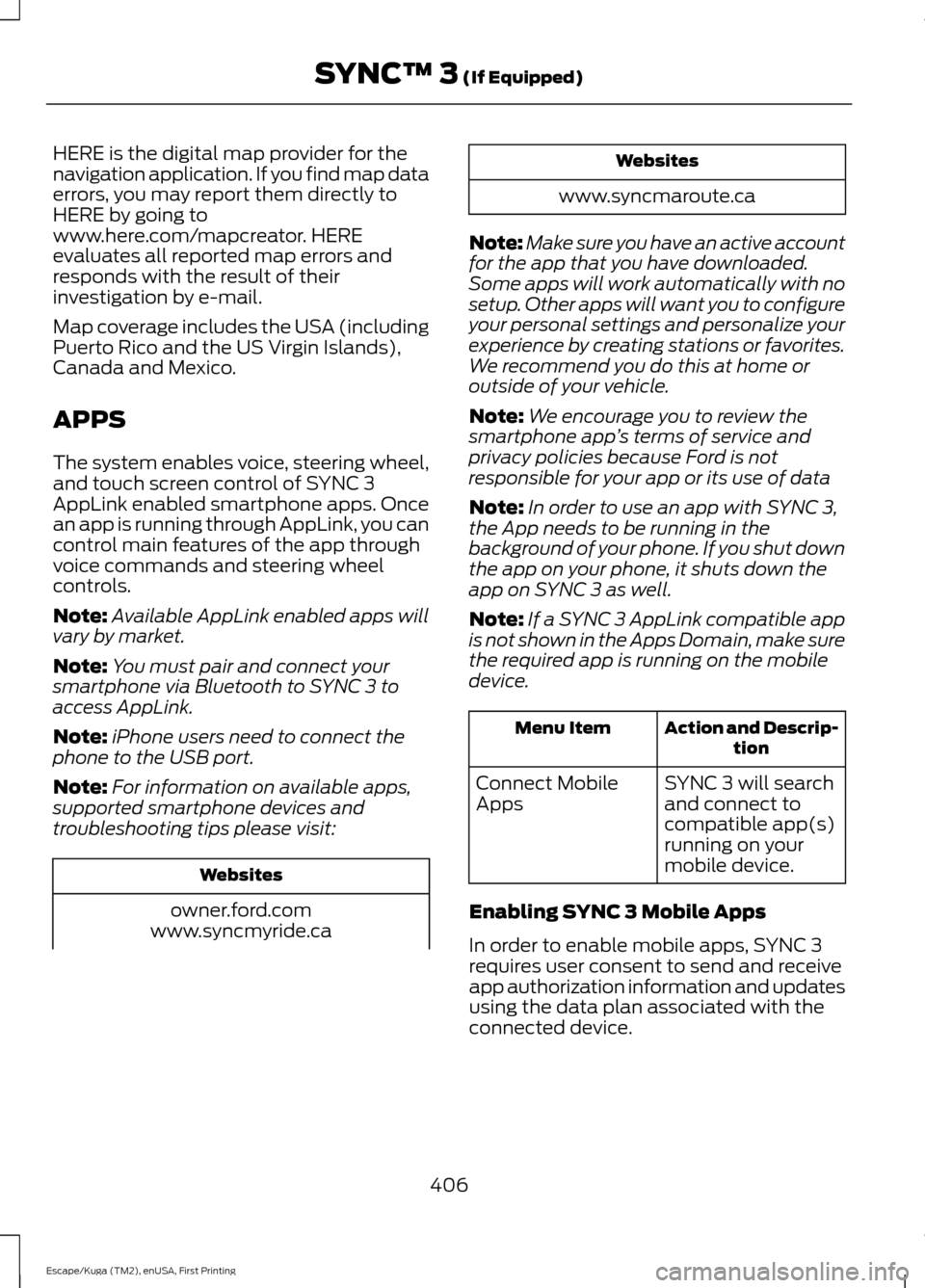
APPS
The system enables voice, steering wheel,
and touch screen control of SYNC 3
AppLink enabled smartphone apps. Once
an app is running through AppLink, you can
control main features of the app through
voice commands and steering wheel
controls.
Note:
Available AppLink enabled apps will
vary by market.
Note: You must pair and connect your
smartphone via Bluetooth to SYNC 3 to
access AppLink.
Note: iPhone users need to connect the
phone to the USB port.
Note: For information on available apps,
supported smartphone devices and
troubleshooting tips please visit: Websites
owner.ford.com
www.syncmyride.ca Websites
www.syncmaroute.ca
Note: Make sure you have an active account
for the app that you have downloaded.
Some apps will work automatically with no
setup. Other apps will want you to configure
your personal settings and personalize your
experience by creating stations or favorites.
We recommend you do this at home or
outside of your vehicle.
Note: We encourage you to review the
smartphone app ’s terms of service and
privacy policies because Ford is not
responsible for your app or its use of data
Note: In order to use an app with SYNC 3,
the App needs to be running in the
background of your phone. If you shut down
the app on your phone, it shuts down the
app on SYNC 3 as well.
Note: If a SYNC 3 AppLink compatible app
is not shown in the Apps Domain, make sure
the required app is running on the mobile
device. Action and Descrip-
tion
Menu Item
SYNC 3 will search
and connect to
compatible app(s)
running on your
mobile device.
Connect Mobile
Apps
Enabling SYNC 3 Mobile Apps
In order to enable mobile apps, SYNC 3
requires user consent to send and receive
app authorization information and updates
using the data plan associated with the
connected device.
406
Escape/Kuga (TM2), enUSA, First Printing SYNC™ 3 (If Equipped)
Page 443 of 486
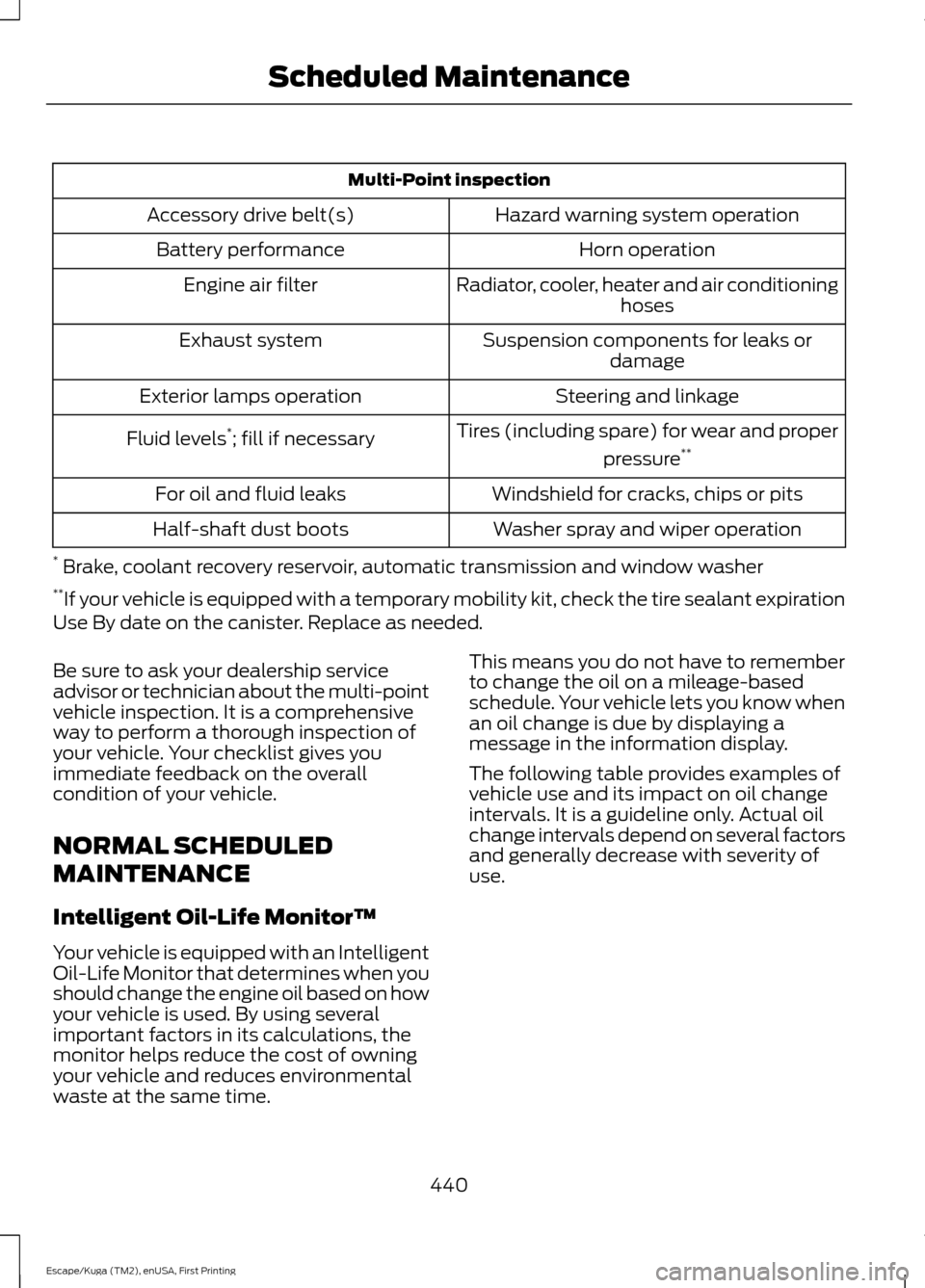
Multi-Point inspection
Hazard warning system operation
Accessory drive belt(s)
Horn operation
Battery performance
Radiator, cooler, heater and air conditioninghoses
Engine air filter
Suspension components for leaks ordamage
Exhaust system
Steering and linkage
Exterior lamps operation
Tires (including spare) for wear and properpressure**
Fluid levels *
; fill if necessary
Windshield for cracks, chips or pits
For oil and fluid leaks
Washer spray and wiper operation
Half-shaft dust boots
* Brake, coolant recovery reservoir, automatic transmission and window washer
** If your vehicle is equipped with a temporary mobility kit, check the tire sealant expiration
Use By date on the canister. Replace as needed.
Be sure to ask your dealership service
advisor or technician about the multi-point
vehicle inspection. It is a comprehensive
way to perform a thorough inspection of
your vehicle. Your checklist gives you
immediate feedback on the overall
condition of your vehicle.
NORMAL SCHEDULED
MAINTENANCE
Intelligent Oil-Life Monitor™
Your vehicle is equipped with an Intelligent
Oil-Life Monitor that determines when you
should change the engine oil based on how
your vehicle is used. By using several
important factors in its calculations, the
monitor helps reduce the cost of owning
your vehicle and reduces environmental
waste at the same time. This means you do not have to remember
to change the oil on a mileage-based
schedule. Your vehicle lets you know when
an oil change is due by displaying a
message in the information display.
The following table provides examples of
vehicle use and its impact on oil change
intervals. It is a guideline only. Actual oil
change intervals depend on several factors
and generally decrease with severity of
use.
440
Escape/Kuga (TM2), enUSA, First Printing Scheduled Maintenance
Page 444 of 486
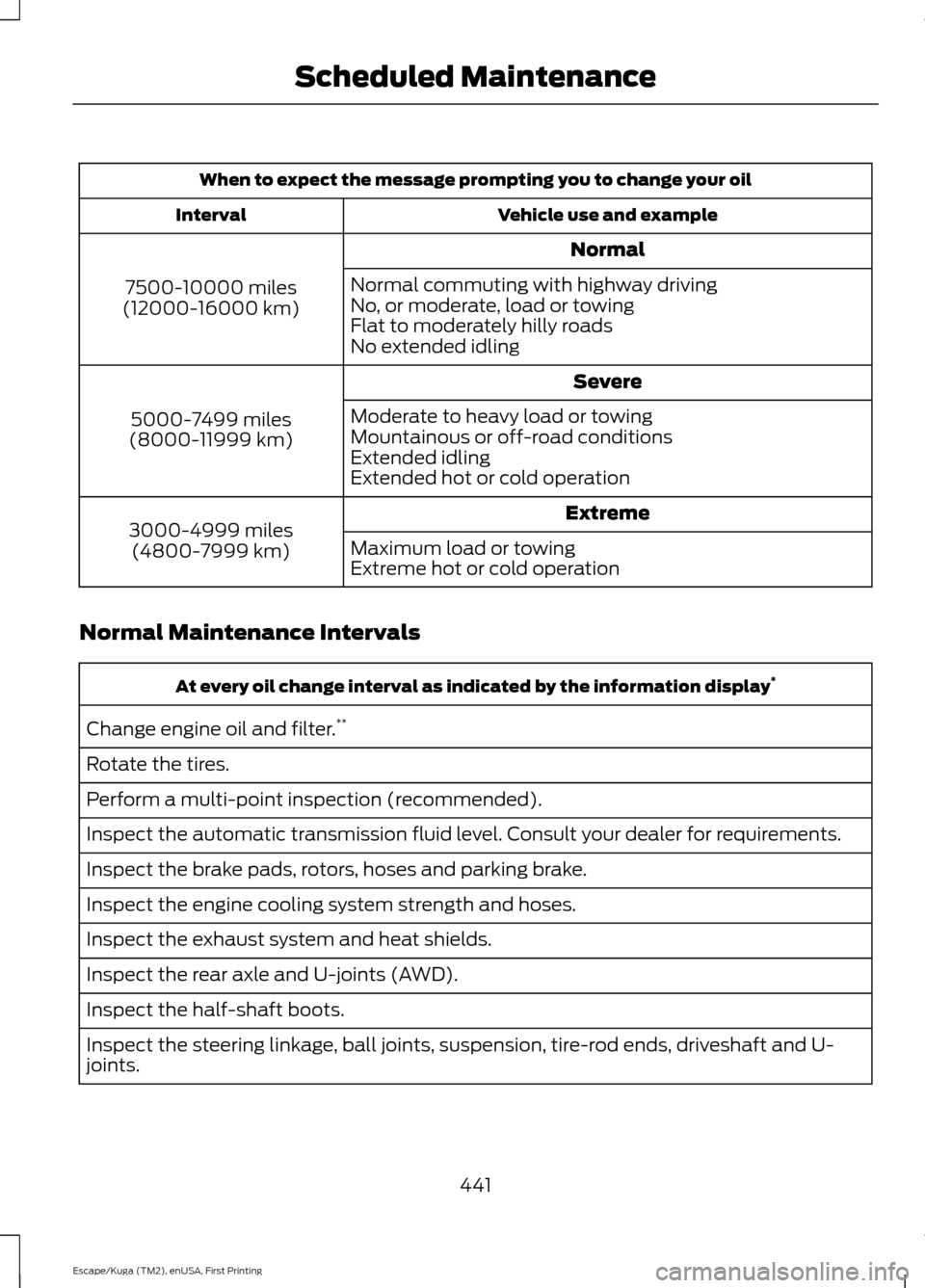
When to expect the message prompting you to change your oil
Vehicle use and example
Interval
Normal
7500-10000 miles
(12000-16000 km) Normal commuting with highway driving
No, or moderate, load or towing
Flat to moderately hilly roads
No extended idling
Severe
5000-7499 miles
(8000-11999 km) Moderate to heavy load or towing
Mountainous or off-road conditions
Extended idling
Extended hot or cold operation
Extreme
3000-4999 miles
(4800-7999 km) Maximum load or towing
Extreme hot or cold operation
Normal Maintenance Intervals At every oil change interval as indicated by the information display
*
Change engine oil and filter. **
Rotate the tires.
Perform a multi-point inspection (recommended).
Inspect the automatic transmission fluid level. Consult your dealer for requirements.
Inspect the brake pads, rotors, hoses and parking brake.
Inspect the engine cooling system strength and hoses.
Inspect the exhaust system and heat shields.
Inspect the rear axle and U-joints (AWD).
Inspect the half-shaft boots.
Inspect the steering linkage, ball joints, suspension, tire-rod ends, driveshaft and U-
joints.
441
Escape/Kuga (TM2), enUSA, First Printing Scheduled Maintenance
Page 476 of 486
4
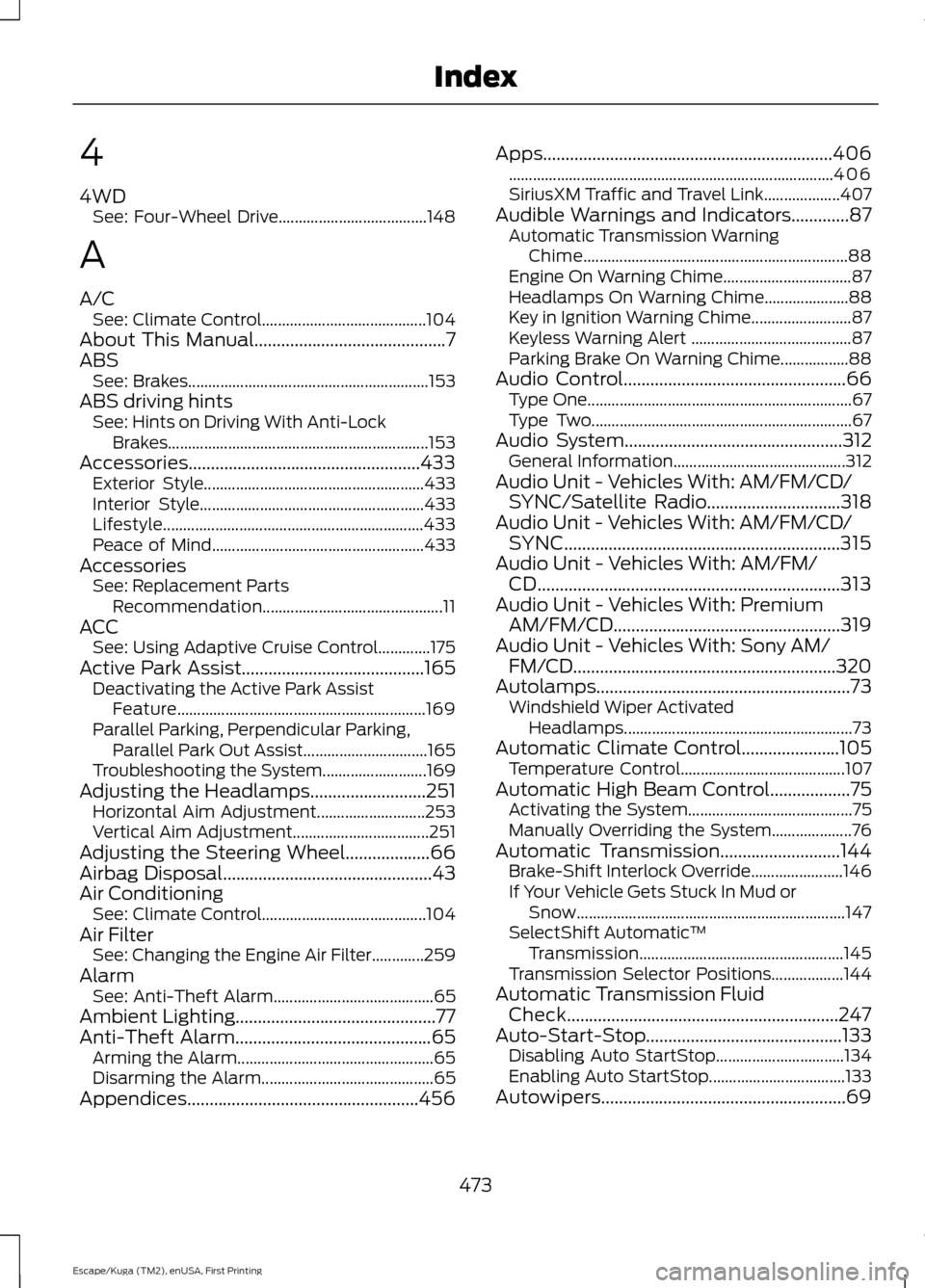
4WD
See: Four-Wheel Drive..................................... 148
A
A/C See: Climate Control......................................... 104
About This Manual...........................................7
ABS See: Brakes............................................................ 153
ABS driving hints See: Hints on Driving With Anti-Lock
Brakes................................................................. 153
Accessories....................................................433 Exterior Style....................................................... 433
Interior Style........................................................ 433
Lifestyle................................................................. 433
Peace of Mind..................................................... 433
Accessories See: Replacement Parts
Recommendation............................................. 11
ACC See: Using Adaptive Cruise Control.............175
Active Park Assist.........................................165 Deactivating the Active Park Assist
Feature.............................................................. 169
Parallel Parking, Perpendicular Parking, Parallel Park Out Assist............................... 165
Troubleshooting the System.......................... 169
Adjusting the Headlamps
..........................251
Horizontal Aim Adjustment........................... 253
Vertical Aim Adjustment.................................. 251
Adjusting the Steering Wheel...................66
Airbag Disposal
...............................................43
Air Conditioning See: Climate Control......................................... 104
Air Filter See: Changing the Engine Air Filter.............259
Alarm See: Anti-Theft Alarm........................................ 65
Ambient Lighting.............................................77
Anti-Theft Alarm
............................................65
Arming the Alarm................................................. 65
Disarming the Alarm........................................... 65
Appendices....................................................456 Apps.................................................................406
........................................................................\
......... 406
SiriusXM Traffic and Travel Link................... 407
Audible Warnings and Indicators.............87 Automatic Transmission Warning
Chime.................................................................. 88
Engine On Warning Chime................................ 87
Headlamps On Warning Chime..................... 88
Key in Ignition Warning Chime......................... 87
Keyless Warning Alert ........................................ 87
Parking Brake On Warning Chime.................88
Audio Control
..................................................66
Type One.................................................................. 67
Type Two................................................................. 67
Audio System
.................................................312
General Information........................................... 312
Audio Unit - Vehicles With: AM/FM/CD/ SYNC/Satellite Radio
..............................318
Audio Unit - Vehicles With: AM/FM/CD/ SYNC..............................................................315
Audio Unit - Vehicles With: AM/FM/ CD....................................................................313
Audio Unit - Vehicles With: Premium AM/FM/CD...................................................319
Audio Unit - Vehicles With: Sony AM/ FM/CD...........................................................320
Autolamps.........................................................73 Windshield Wiper Activated
Headlamps......................................................... 73
Automatic Climate Control......................105 Temperature Control......................................... 107
Automatic High Beam Control
..................75
Activating the System......................................... 75
Manually Overriding the System.................... 76
Automatic Transmission
...........................144
Brake-Shift Interlock Override....................... 146
If Your Vehicle Gets Stuck In Mud or Snow................................................................... 147
SelectShift Automatic ™
Transmission................................................... 145
Transmission Selector Positions.................. 144
Automatic Transmission Fluid Check.............................................................247
Auto-Start-Stop............................................133 Disabling Auto StartStop................................ 134
Enabling Auto StartStop.................................. 133
Autowipers.......................................................69
473
Escape/Kuga (TM2), enUSA, First Printing Index
Page 480 of 486
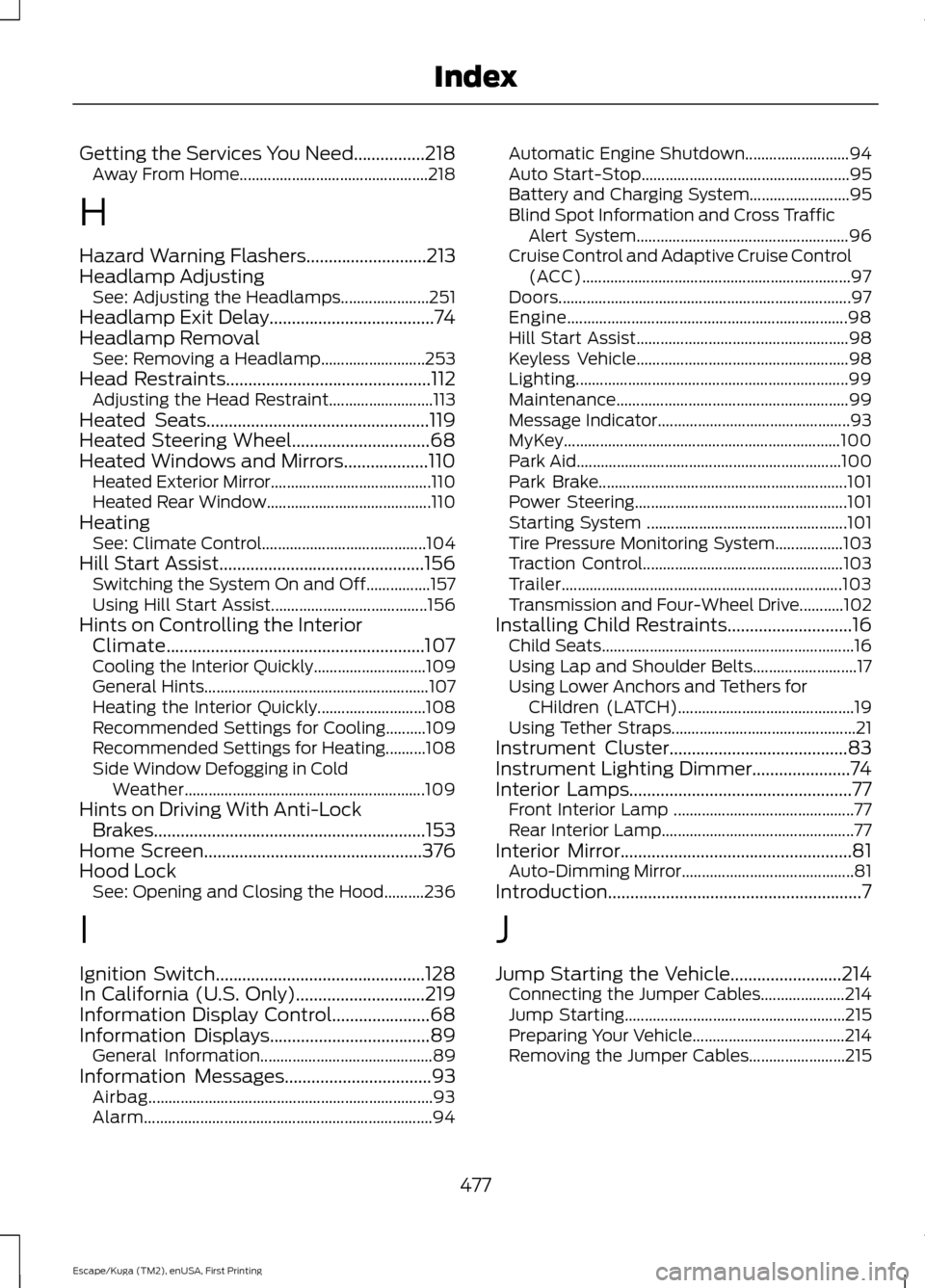
Getting the Services You Need................218
Away From Home............................................... 218
H
Hazard Warning Flashers...........................213
Headlamp Adjusting See: Adjusting the Headlamps...................... 251
Headlamp Exit Delay.....................................74
Headlamp Removal See: Removing a Headlamp.......................... 253
Head Restraints
..............................................112
Adjusting the Head Restraint.......................... 113
Heated Seats
..................................................119
Heated Steering Wheel...............................68
Heated Windows and Mirrors...................110 Heated Exterior Mirror........................................ 110
Heated Rear Window......................................... 110
Heating See: Climate Control......................................... 104
Hill Start Assist..............................................156 Switching the System On and Off................157
Using Hill Start Assist....................................... 156
Hints on Controlling the Interior Climate..........................................................107
Cooling the Interior Quickly............................ 109
General Hints........................................................ 107
Heating the Interior Quickly........................... 108
Recommended Settings for Cooling..........109
Recommended Settings for Heating..........108
Side Window Defogging in Cold Weather............................................................ 109
Hints on Driving With Anti-Lock Brakes.............................................................153
Home Screen
.................................................376
Hood Lock See: Opening and Closing the Hood..........236
I
Ignition Switch
...............................................128
In California (U.S. Only).............................219
Information Display Control......................68
Information Displays....................................89
General Information........................................... 89
Information Messages
.................................93
Airbag....................................................................... 93
Alarm........................................................................\
94Automatic Engine Shutdown..........................
94
Auto Start-Stop.................................................... 95
Battery and Charging System......................... 95
Blind Spot Information and Cross Traffic Alert System..................................................... 96
Cruise Control and Adaptive Cruise Control (ACC)................................................................... 97
Doors........................................................................\
. 97
Engine...................................................................... 98
Hill Start Assist..................................................... 98
Keyless Vehicle..................................................... 98
Lighting.................................................................... 99
Maintenance.......................................................... 99
Message Indicator................................................ 93
MyKey..................................................................... 100
Park Aid.................................................................. 100
Park Brake.............................................................. 101
Power Steering..................................................... 101
Starting System .................................................. 101
Tire Pressure Monitoring System.................103
Traction Control.................................................. 103
Trailer...................................................................... 103
Transmission and Four-Wheel Drive...........102
Installing Child Restraints
............................16
Child Seats............................................................... 16
Using Lap and Shoulder Belts.......................... 17
Using Lower Anchors and Tethers for CHildren (LATCH)............................................ 19
Using Tether Straps.............................................. 21
Instrument Cluster
........................................83
Instrument Lighting Dimmer......................74
Interior Lamps..................................................77
Front Interior Lamp ............................................. 77
Rear Interior Lamp................................................ 77
Interior Mirror....................................................81 Auto-Dimming Mirror........................................... 81
Introduction.........................................................7
J
Jump Starting the Vehicle.........................214 Connecting the Jumper Cables..................... 214
Jump Starting....................................................... 215
Preparing Your Vehicle...................................... 214
Removing the Jumper Cables........................ 215
477
Escape/Kuga (TM2), enUSA, First Printing Index
Page 482 of 486
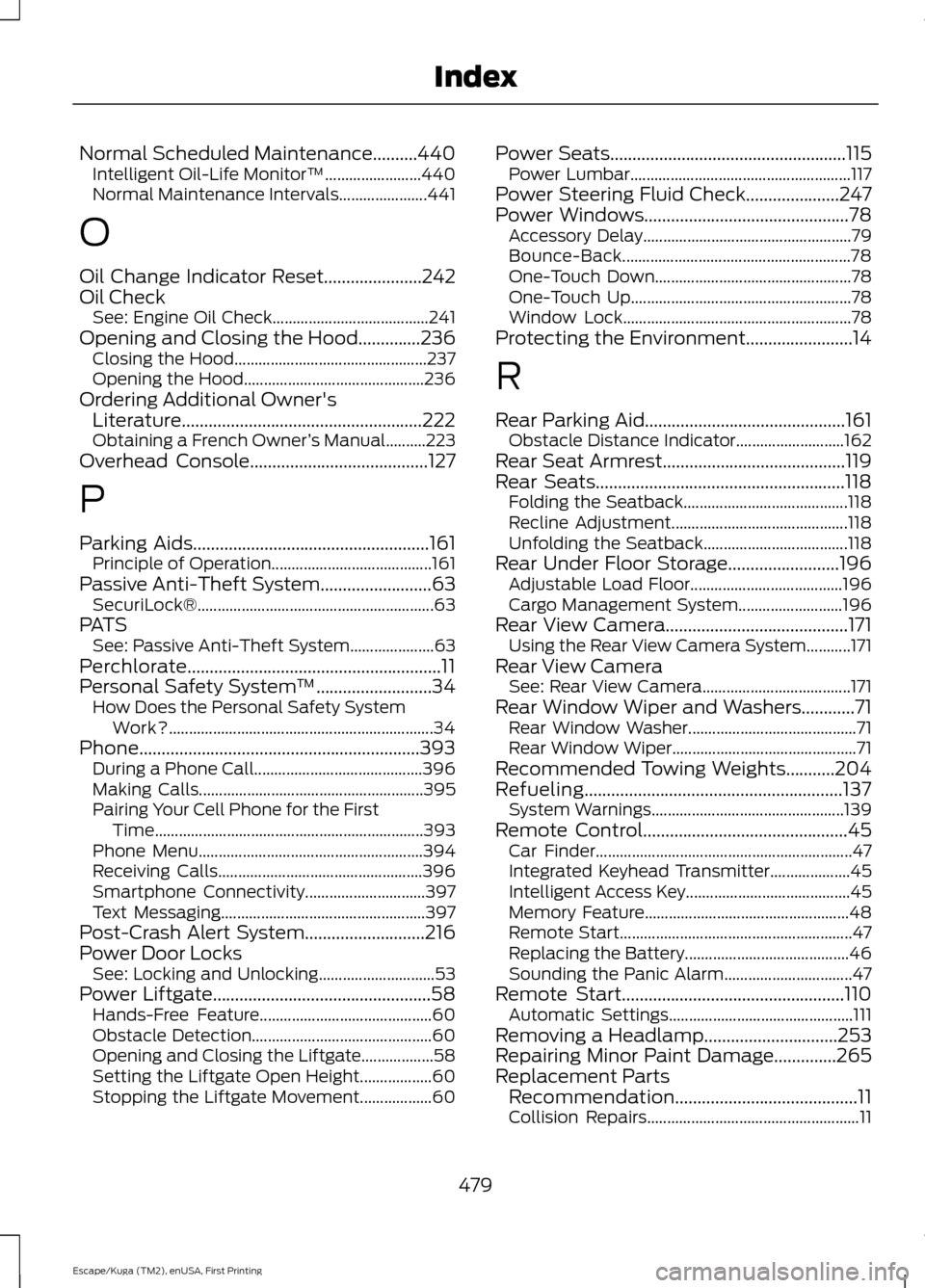
Normal Scheduled Maintenance..........440
Intelligent Oil-Life Monitor™........................ 440
Normal Maintenance Intervals...................... 441
O
Oil Change Indicator Reset......................242
Oil Check See: Engine Oil Check....................................... 241
Opening and Closing the Hood..............236
Closing the Hood................................................ 237
Opening the Hood............................................. 236
Ordering Additional Owner's Literature......................................................222
Obtaining a French Owner ’s Manual..........223
Overhead Console
........................................127
P
Parking Aids
.....................................................161
Principle of Operation........................................ 161
Passive Anti-Theft System
.........................63
SecuriLock®........................................................... 63
PATS See: Passive Anti-Theft System..................... 63
Perchlorate.........................................................11
Personal Safety System ™
..........................34
How Does the Personal Safety System
Work?.................................................................. 34
Phone...............................................................393 During a Phone Call.......................................... 396
Making Calls........................................................ 395
Pairing Your Cell Phone for the First Time................................................................... 393
Phone Menu........................................................ 394
Receiving Calls................................................... 396
Smartphone Connectivity.............................. 397
Text Messaging................................................... 397
Post-Crash Alert System...........................216
Power Door Locks See: Locking and Unlocking............................. 53
Power Liftgate
.................................................58
Hands-Free Feature........................................... 60
Obstacle Detection............................................. 60
Opening and Closing the Liftgate.................. 58
Setting the Liftgate Open Height.................. 60
Stopping the Liftgate Movement.................. 60Power Seats
.....................................................115
Power Lumbar....................................................... 117
Power Steering Fluid Check.....................247
Power Windows
..............................................78
Accessory Delay.................................................... 79
Bounce-Back......................................................... 78
One-Touch Down................................................. 78
One-Touch Up....................................................... 78
Window Lock......................................................... 78
Protecting the Environment........................14
R
Rear Parking Aid
.............................................161
Obstacle Distance Indicator........................... 162
Rear Seat Armrest.........................................119
Rear Seats........................................................118 Folding the Seatback......................................... 118
Recline Adjustment............................................ 118
Unfolding the Seatback.................................... 118
Rear Under Floor Storage.........................196 Adjustable Load Floor...................................... 196
Cargo Management System.......................... 196
Rear View Camera.........................................171 Using the Rear View Camera System...........171
Rear View Camera See: Rear View Camera..................................... 171
Rear Window Wiper and Washers............71 Rear Window Washer.......................................... 71
Rear Window Wiper.............................................. 71
Recommended Towing Weights...........204
Refueling..........................................................137 System Warnings................................................ 139
Remote Control..............................................45 Car Finder................................................................ 47
Integrated Keyhead Transmitter.................... 45
Intelligent Access Key......................................... 45
Memory Feature................................................... 48
Remote Start.......................................................... 47
Replacing the Battery......................................... 46
Sounding the Panic Alarm................................ 47
Remote Start..................................................110 Automatic Settings.............................................. 111
Removing a Headlamp
..............................253
Repairing Minor Paint Damage..............265
Replacement Parts Recommendation.........................................11
Collision Repairs..................................................... 11
479
Escape/Kuga (TM2), enUSA, First Printing Index