phone FORD ESCAPE 2017 3.G Manual Online
[x] Cancel search | Manufacturer: FORD, Model Year: 2017, Model line: ESCAPE, Model: FORD ESCAPE 2017 3.GPages: 486, PDF Size: 6.34 MB
Page 431 of 486
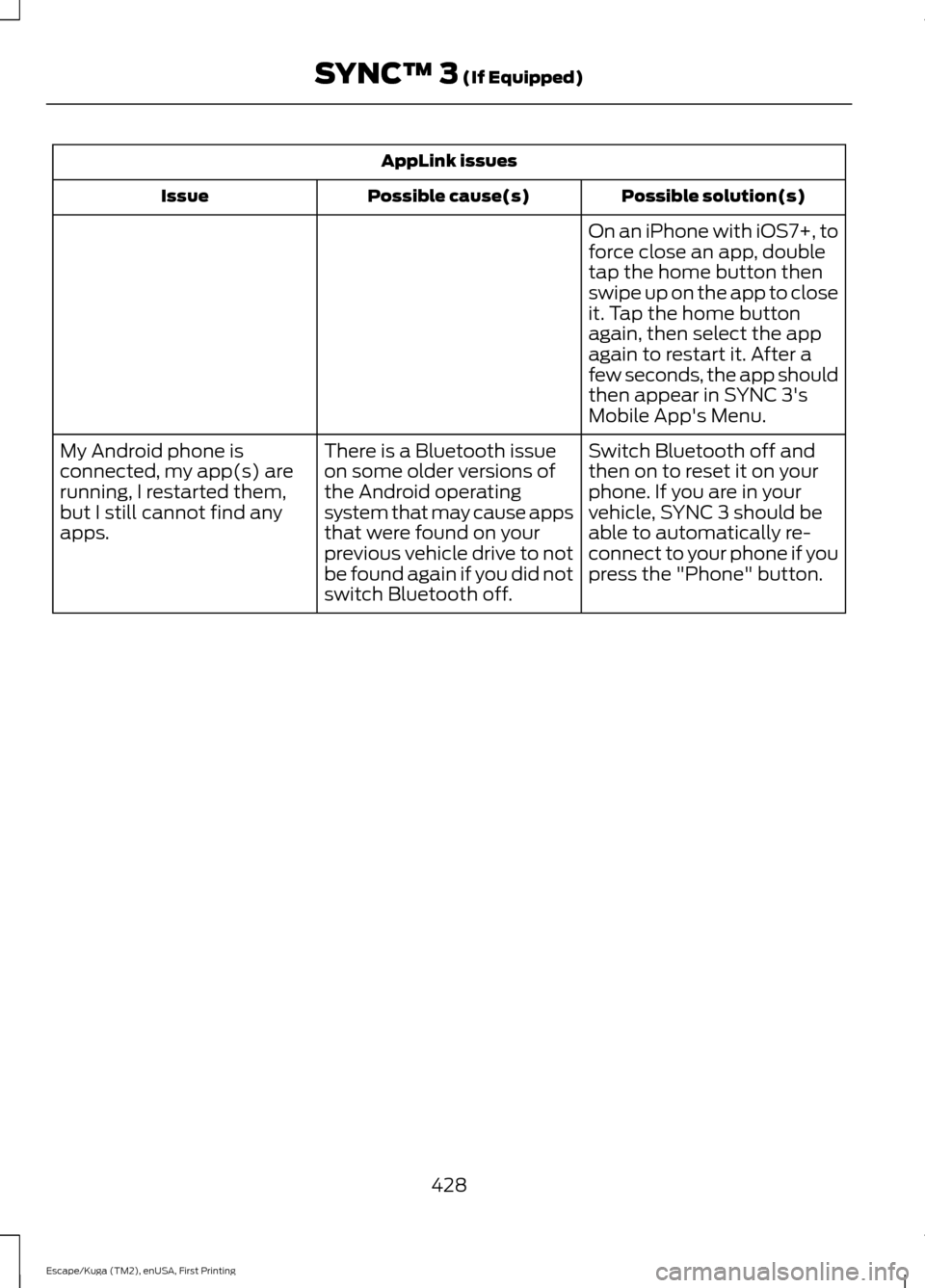
AppLink issues
Possible solution(s)
Possible cause(s)
Issue
On an iPhone with iOS7+, to
force close an app, double
tap the home button then
swipe up on the app to close
it. Tap the home button
again, then select the app
again to restart it. After a
few seconds, the app should
then appear in SYNC 3's
Mobile App's Menu.
Switch Bluetooth off and
then on to reset it on your
phone. If you are in your
vehicle, SYNC 3 should be
able to automatically re-
connect to your phone if you
press the "Phone" button.
There is a Bluetooth issue
on some older versions of
the Android operating
system that may cause apps
that were found on your
previous vehicle drive to not
be found again if you did not
switch Bluetooth off.
My Android phone is
connected, my app(s) are
running, I restarted them,
but I still cannot find any
apps.
428
Escape/Kuga (TM2), enUSA, First Printing SYNC™ 3 (If Equipped)
Page 432 of 486
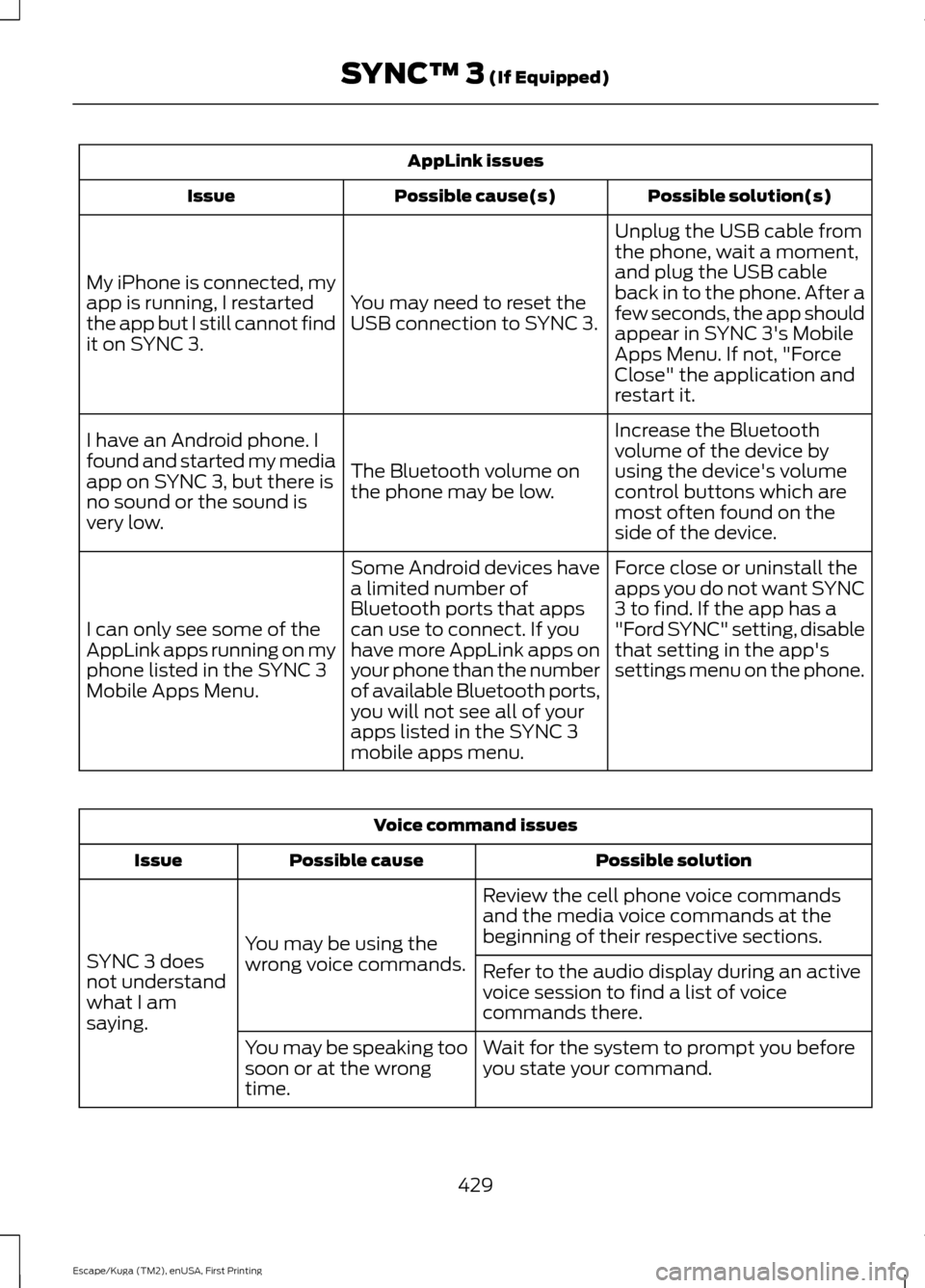
AppLink issues
Possible solution(s)
Possible cause(s)
Issue
Unplug the USB cable from
the phone, wait a moment,
and plug the USB cable
back in to the phone. After a
few seconds, the app should
appear in SYNC 3's Mobile
Apps Menu. If not, "Force
Close" the application and
restart it.
You may need to reset the
USB connection to SYNC 3.
My iPhone is connected, my
app is running, I restarted
the app but I still cannot find
it on SYNC 3.
Increase the Bluetooth
volume of the device by
using the device's volume
control buttons which are
most often found on the
side of the device.
The Bluetooth volume on
the phone may be low.
I have an Android phone. I
found and started my media
app on SYNC 3, but there is
no sound or the sound is
very low.
Force close or uninstall the
apps you do not want SYNC
3 to find. If the app has a
"Ford SYNC" setting, disable
that setting in the app's
settings menu on the phone.
Some Android devices have
a limited number of
Bluetooth ports that apps
can use to connect. If you
have more AppLink apps on
your phone than the number
of available Bluetooth ports,
you will not see all of your
apps listed in the SYNC 3
mobile apps menu.
I can only see some of the
AppLink apps running on my
phone listed in the SYNC 3
Mobile Apps Menu. Voice command issues
Possible solution
Possible cause
Issue
Review the cell phone voice commands
and the media voice commands at the
beginning of their respective sections.
You may be using the
wrong voice commands.
SYNC 3 does
not understand
what I am
saying. Refer to the audio display during an active
voice session to find a list of voice
commands there.
Wait for the system to prompt you before
you state your command.
You may be speaking too
soon or at the wrong
time.
429
Escape/Kuga (TM2), enUSA, First Printing SYNC™ 3 (If Equipped)
Page 433 of 486
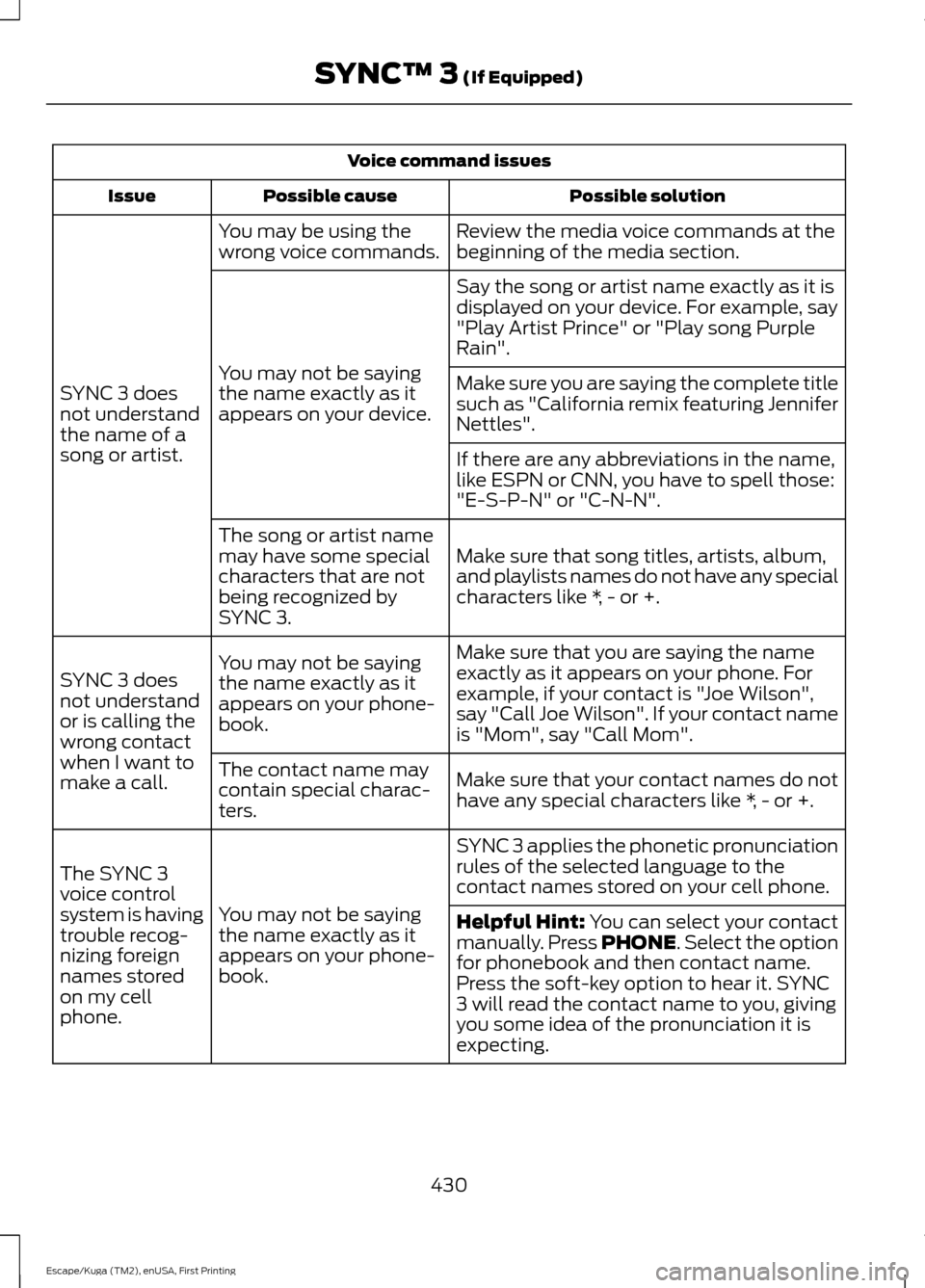
Voice command issues
Possible solution
Possible cause
Issue
Review the media voice commands at the
beginning of the media section.
You may be using the
wrong voice commands.
SYNC 3 does
not understand
the name of a
song or artist. Say the song or artist name exactly as it is
displayed on your device. For example, say
"Play Artist Prince" or "Play song Purple
Rain".
You may not be saying
the name exactly as it
appears on your device. Make sure you are saying the complete title
such as "California remix featuring Jennifer
Nettles".
If there are any abbreviations in the name,
like ESPN or CNN, you have to spell those:
"E-S-P-N" or "C-N-N".
Make sure that song titles, artists, album,
and playlists names do not have any special
characters like *, - or +.
The song or artist name
may have some special
characters that are not
being recognized by
SYNC 3.
Make sure that you are saying the name
exactly as it appears on your phone. For
example, if your contact is "Joe Wilson",
say "Call Joe Wilson". If your contact name
is "Mom", say "Call Mom".
You may not be saying
the name exactly as it
appears on your phone-
book.
SYNC 3 does
not understand
or is calling the
wrong contact
when I want to
make a call.
Make sure that your contact names do not
have any special characters like *, - or +.
The contact name may
contain special charac-
ters.
SYNC 3 applies the phonetic pronunciation
rules of the selected language to the
contact names stored on your cell phone.
You may not be saying
the name exactly as it
appears on your phone-
book.
The SYNC 3
voice control
system is having
trouble recog-
nizing foreign
names stored
on my cell
phone.
Helpful Hint: You can select your contact
manually. Press PHONE. Select the option
for phonebook and then contact name.
Press the soft-key option to hear it. SYNC
3 will read the contact name to you, giving
you some idea of the pronunciation it is
expecting.
430
Escape/Kuga (TM2), enUSA, First Printing SYNC™ 3
(If Equipped)
Page 434 of 486
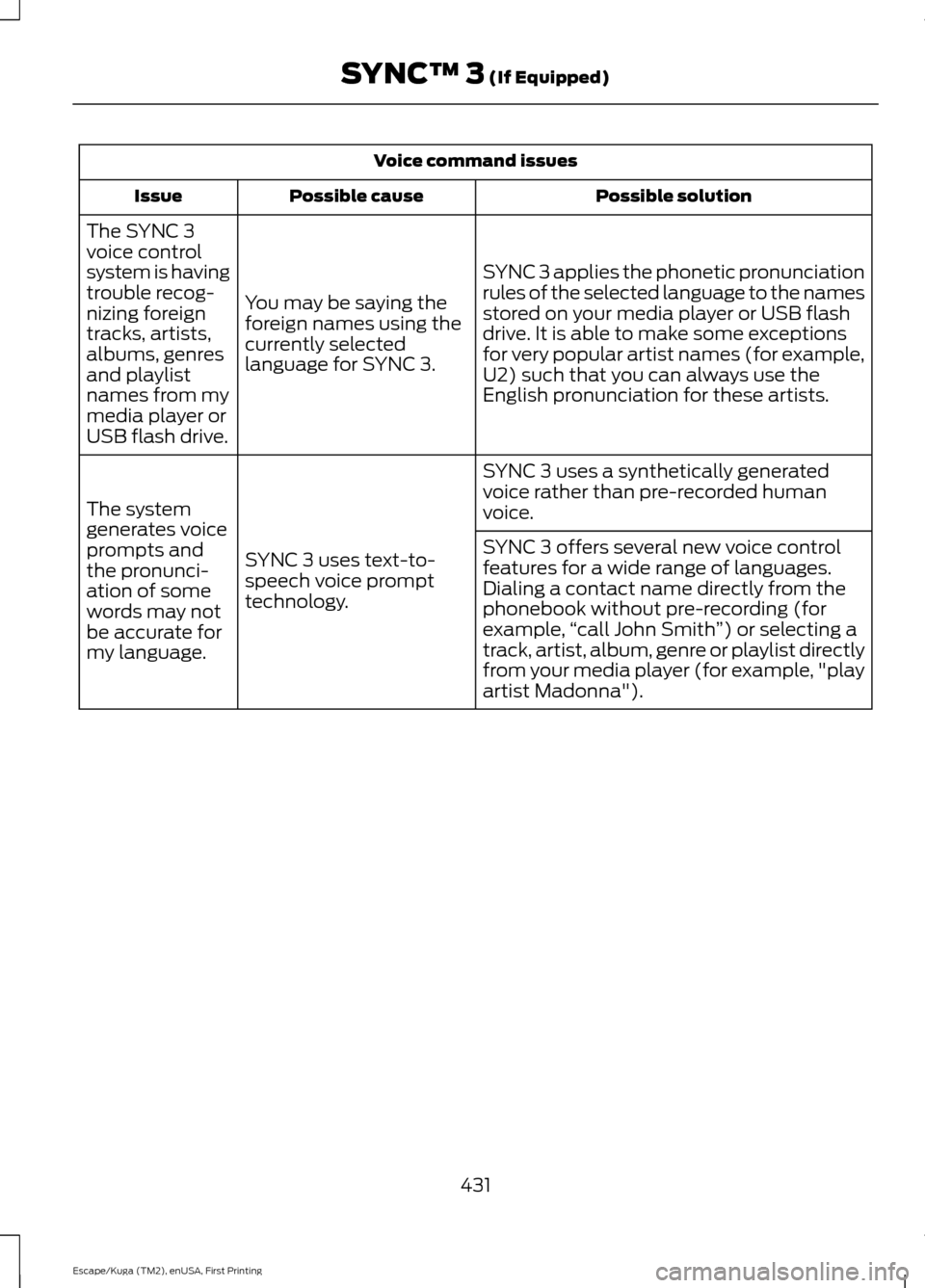
Voice command issues
Possible solution
Possible cause
Issue
SYNC 3 applies the phonetic pronunciation
rules of the selected language to the names
stored on your media player or USB flash
drive. It is able to make some exceptions
for very popular artist names (for example,
U2) such that you can always use the
English pronunciation for these artists.
You may be saying the
foreign names using the
currently selected
language for SYNC 3.
The SYNC 3
voice control
system is having
trouble recog-
nizing foreign
tracks, artists,
albums, genres
and playlist
names from my
media player or
USB flash drive.
SYNC 3 uses a synthetically generated
voice rather than pre-recorded human
voice.
SYNC 3 uses text-to-
speech voice prompt
technology.
The system
generates voice
prompts and
the pronunci-
ation of some
words may not
be accurate for
my language. SYNC 3 offers several new voice control
features for a wide range of languages.
Dialing a contact name directly from the
phonebook without pre-recording (for
example,
“call John Smith ”) or selecting a
track, artist, album, genre or playlist directly
from your media player (for example, "play
artist Madonna").
431
Escape/Kuga (TM2), enUSA, First Printing SYNC™ 3 (If Equipped)
Page 435 of 486
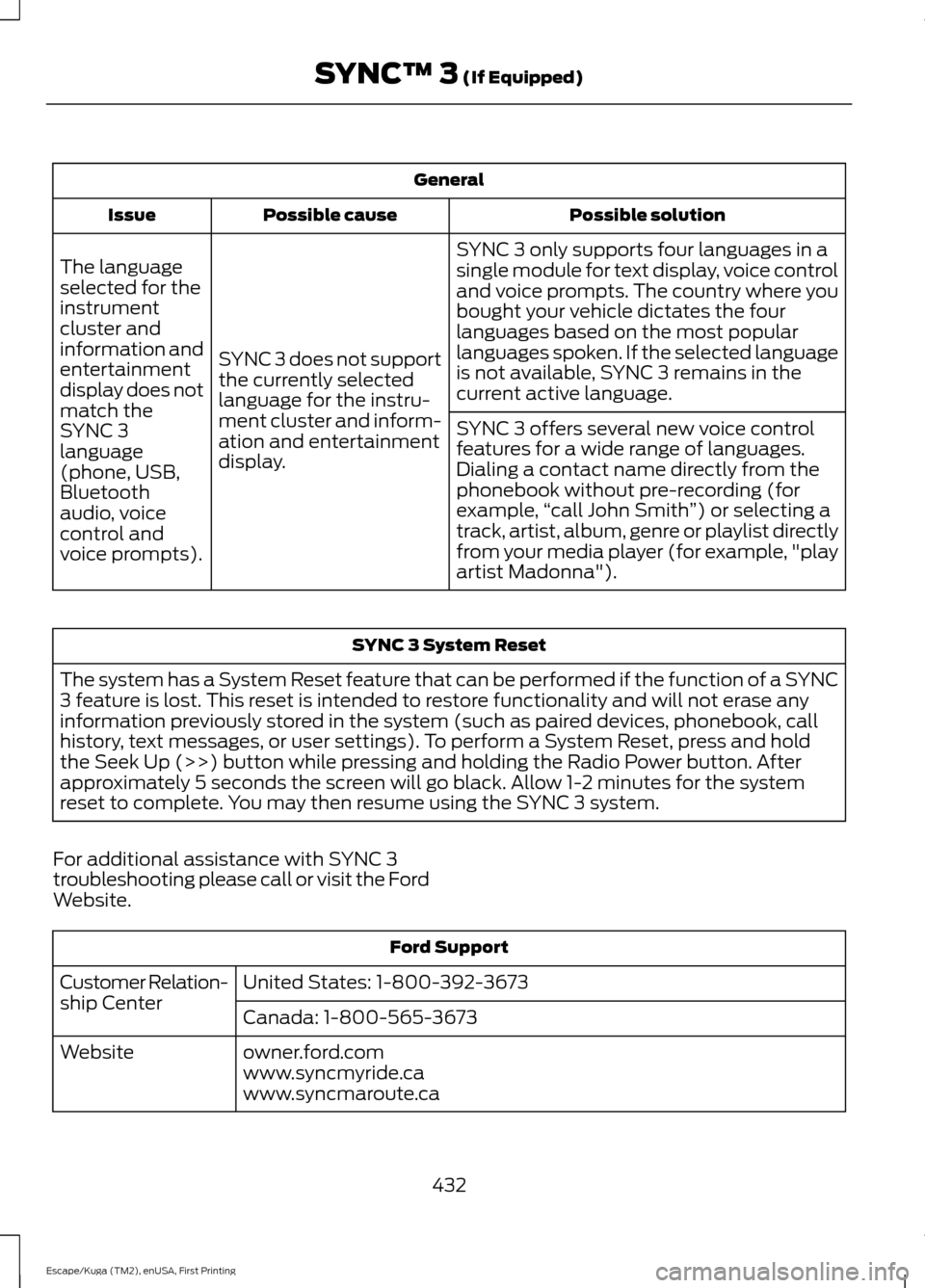
General
Possible solution
Possible cause
Issue
SYNC 3 only supports four languages in a
single module for text display, voice control
and voice prompts. The country where you
bought your vehicle dictates the four
languages based on the most popular
languages spoken. If the selected language
is not available, SYNC 3 remains in the
current active language.
SYNC 3 does not support
the currently selected
language for the instru-
ment cluster and inform-
ation and entertainment
display.
The language
selected for the
instrument
cluster and
information and
entertainment
display does not
match the
SYNC 3
SYNC 3 offers several new voice control
features for a wide range of languages.
Dialing a contact name directly from the
phonebook without pre-recording (for
example,
“call John Smith ”) or selecting a
track, artist, album, genre or playlist directly
from your media player (for example, "play
artist Madonna").
language
(phone, USB,
Bluetooth
audio, voice
control and
voice prompts). SYNC 3 System Reset
The system has a System Reset feature that can be performed if the function of a SYNC
3 feature is lost. This reset is intended to restore functionality and will not erase any
information previously stored in the system (such as paired devices, phonebook, call
history, text messages, or user settings). To perform a System Reset, press and hold
the Seek Up (>>) button while pressing and holding the Radio Power button. After
approximately 5 seconds the screen will go black. Allow 1-2 minutes for the system
reset to complete. You may then resume using the SYNC 3 system.
For additional assistance with SYNC 3
troubleshooting please call or visit the Ford
Website. Ford Support
United States: 1-800-392-3673
Customer Relation-
ship Center
Canada: 1-800-565-3673
owner.ford.com
Website
www.syncmyride.ca
www.syncmaroute.ca
432
Escape/Kuga (TM2), enUSA, First Printing SYNC™ 3 (If Equipped)
Page 437 of 486
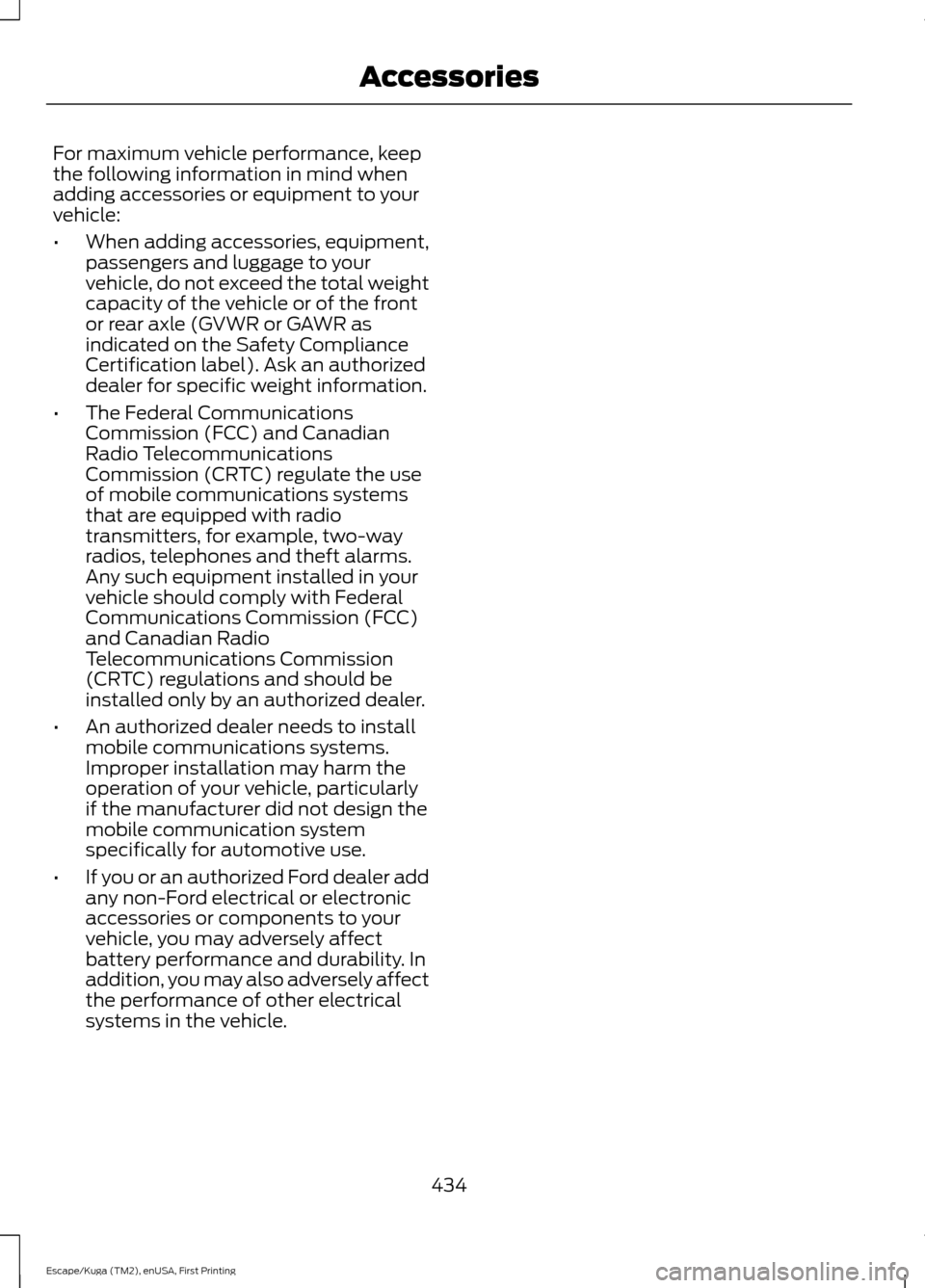
For maximum vehicle performance, keep
the following information in mind when
adding accessories or equipment to your
vehicle:
•
When adding accessories, equipment,
passengers and luggage to your
vehicle, do not exceed the total weight
capacity of the vehicle or of the front
or rear axle (GVWR or GAWR as
indicated on the Safety Compliance
Certification label). Ask an authorized
dealer for specific weight information.
• The Federal Communications
Commission (FCC) and Canadian
Radio Telecommunications
Commission (CRTC) regulate the use
of mobile communications systems
that are equipped with radio
transmitters, for example, two-way
radios, telephones and theft alarms.
Any such equipment installed in your
vehicle should comply with Federal
Communications Commission (FCC)
and Canadian Radio
Telecommunications Commission
(CRTC) regulations and should be
installed only by an authorized dealer.
• An authorized dealer needs to install
mobile communications systems.
Improper installation may harm the
operation of your vehicle, particularly
if the manufacturer did not design the
mobile communication system
specifically for automotive use.
• If you or an authorized Ford dealer add
any non-Ford electrical or electronic
accessories or components to your
vehicle, you may adversely affect
battery performance and durability. In
addition, you may also adversely affect
the performance of other electrical
systems in the vehicle.
434
Escape/Kuga (TM2), enUSA, First Printing Accessories
Page 471 of 486
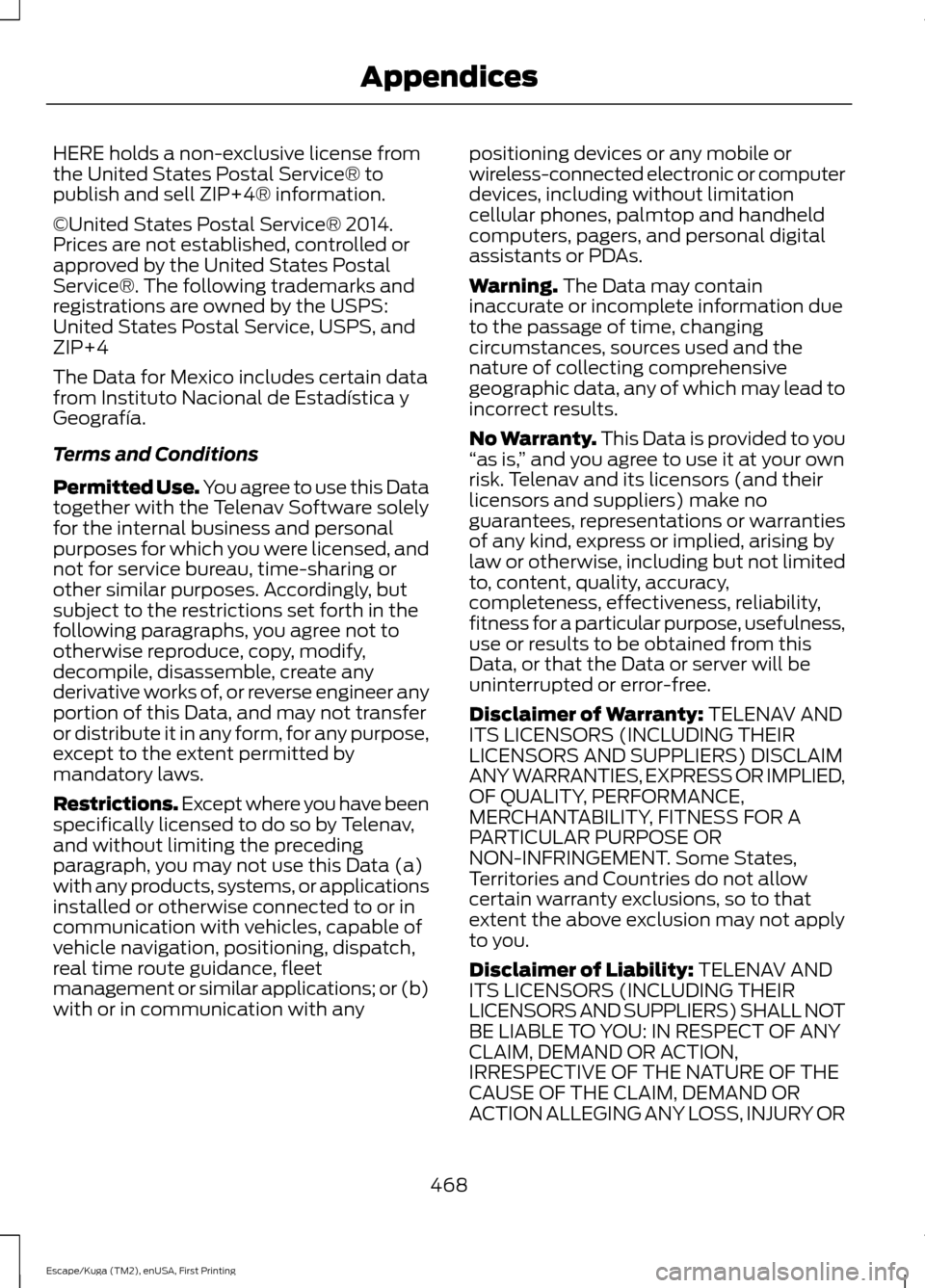
HERE holds a non-exclusive license from
the United States Postal Service® to
publish and sell ZIP+4® information.
©United States Postal Service® 2014.
Prices are not established, controlled or
approved by the United States Postal
Service®. The following trademarks and
registrations are owned by the USPS:
United States Postal Service, USPS, and
ZIP+4
The Data for Mexico includes certain data
from Instituto Nacional de Estadística y
Geografía.
Terms and Conditions
Permitted Use. You agree to use this Data
together with the Telenav Software solely
for the internal business and personal
purposes for which you were licensed, and
not for service bureau, time-sharing or
other similar purposes. Accordingly, but
subject to the restrictions set forth in the
following paragraphs, you agree not to
otherwise reproduce, copy, modify,
decompile, disassemble, create any
derivative works of, or reverse engineer any
portion of this Data, and may not transfer
or distribute it in any form, for any purpose,
except to the extent permitted by
mandatory laws.
Restrictions. Except where you have been
specifically licensed to do so by Telenav,
and without limiting the preceding
paragraph, you may not use this Data (a)
with any products, systems, or applications
installed or otherwise connected to or in
communication with vehicles, capable of
vehicle navigation, positioning, dispatch,
real time route guidance, fleet
management or similar applications; or (b)
with or in communication with any
positioning devices or any mobile or
wireless-connected electronic or computer
devices, including without limitation
cellular phones, palmtop and handheld
computers, pagers, and personal digital
assistants or PDAs.
Warning. The Data may contain
inaccurate or incomplete information due
to the passage of time, changing
circumstances, sources used and the
nature of collecting comprehensive
geographic data, any of which may lead to
incorrect results.
No Warranty.
This Data is provided to you
“ as is, ” and you agree to use it at your own
risk. Telenav and its licensors (and their
licensors and suppliers) make no
guarantees, representations or warranties
of any kind, express or implied, arising by
law or otherwise, including but not limited
to, content, quality, accuracy,
completeness, effectiveness, reliability,
fitness for a particular purpose, usefulness,
use or results to be obtained from this
Data, or that the Data or server will be
uninterrupted or error-free.
Disclaimer of Warranty:
TELENAV AND
ITS LICENSORS (INCLUDING THEIR
LICENSORS AND SUPPLIERS) DISCLAIM
ANY WARRANTIES, EXPRESS OR IMPLIED,
OF QUALITY, PERFORMANCE,
MERCHANTABILITY, FITNESS FOR A
PARTICULAR PURPOSE OR
NON-INFRINGEMENT. Some States,
Territories and Countries do not allow
certain warranty exclusions, so to that
extent the above exclusion may not apply
to you.
Disclaimer of Liability:
TELENAV AND
ITS LICENSORS (INCLUDING THEIR
LICENSORS AND SUPPLIERS) SHALL NOT
BE LIABLE TO YOU: IN RESPECT OF ANY
CLAIM, DEMAND OR ACTION,
IRRESPECTIVE OF THE NATURE OF THE
CAUSE OF THE CLAIM, DEMAND OR
ACTION ALLEGING ANY LOSS, INJURY OR
468
Escape/Kuga (TM2), enUSA, First Printing Appendices
Page 482 of 486
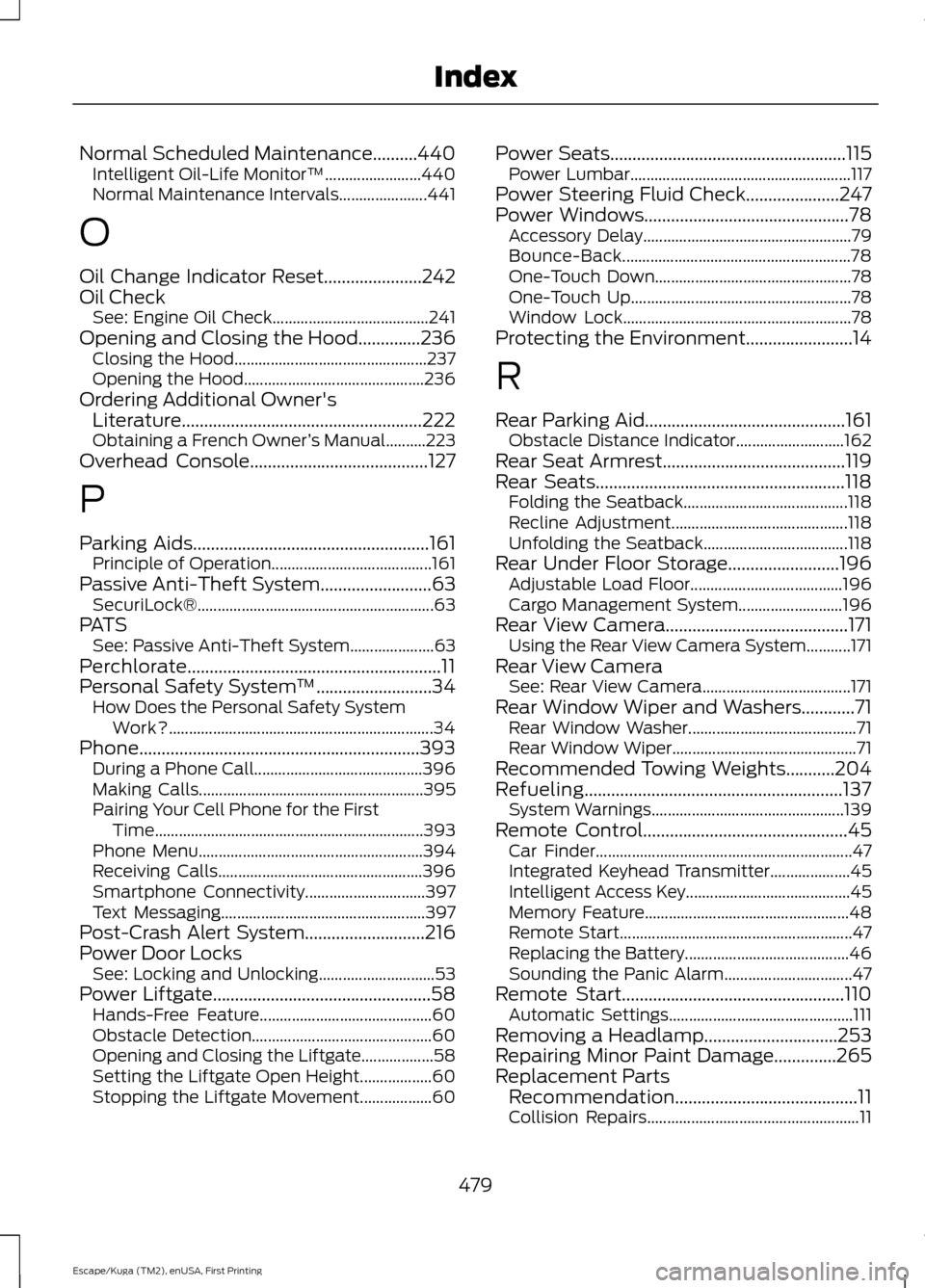
Normal Scheduled Maintenance..........440
Intelligent Oil-Life Monitor™........................ 440
Normal Maintenance Intervals...................... 441
O
Oil Change Indicator Reset......................242
Oil Check See: Engine Oil Check....................................... 241
Opening and Closing the Hood..............236
Closing the Hood................................................ 237
Opening the Hood............................................. 236
Ordering Additional Owner's Literature......................................................222
Obtaining a French Owner ’s Manual..........223
Overhead Console
........................................127
P
Parking Aids
.....................................................161
Principle of Operation........................................ 161
Passive Anti-Theft System
.........................63
SecuriLock®........................................................... 63
PATS See: Passive Anti-Theft System..................... 63
Perchlorate.........................................................11
Personal Safety System ™
..........................34
How Does the Personal Safety System
Work?.................................................................. 34
Phone...............................................................393 During a Phone Call.......................................... 396
Making Calls........................................................ 395
Pairing Your Cell Phone for the First Time................................................................... 393
Phone Menu........................................................ 394
Receiving Calls................................................... 396
Smartphone Connectivity.............................. 397
Text Messaging................................................... 397
Post-Crash Alert System...........................216
Power Door Locks See: Locking and Unlocking............................. 53
Power Liftgate
.................................................58
Hands-Free Feature........................................... 60
Obstacle Detection............................................. 60
Opening and Closing the Liftgate.................. 58
Setting the Liftgate Open Height.................. 60
Stopping the Liftgate Movement.................. 60Power Seats
.....................................................115
Power Lumbar....................................................... 117
Power Steering Fluid Check.....................247
Power Windows
..............................................78
Accessory Delay.................................................... 79
Bounce-Back......................................................... 78
One-Touch Down................................................. 78
One-Touch Up....................................................... 78
Window Lock......................................................... 78
Protecting the Environment........................14
R
Rear Parking Aid
.............................................161
Obstacle Distance Indicator........................... 162
Rear Seat Armrest.........................................119
Rear Seats........................................................118 Folding the Seatback......................................... 118
Recline Adjustment............................................ 118
Unfolding the Seatback.................................... 118
Rear Under Floor Storage.........................196 Adjustable Load Floor...................................... 196
Cargo Management System.......................... 196
Rear View Camera.........................................171 Using the Rear View Camera System...........171
Rear View Camera See: Rear View Camera..................................... 171
Rear Window Wiper and Washers............71 Rear Window Washer.......................................... 71
Rear Window Wiper.............................................. 71
Recommended Towing Weights...........204
Refueling..........................................................137 System Warnings................................................ 139
Remote Control..............................................45 Car Finder................................................................ 47
Integrated Keyhead Transmitter.................... 45
Intelligent Access Key......................................... 45
Memory Feature................................................... 48
Remote Start.......................................................... 47
Replacing the Battery......................................... 46
Sounding the Panic Alarm................................ 47
Remote Start..................................................110 Automatic Settings.............................................. 111
Removing a Headlamp
..............................253
Repairing Minor Paint Damage..............265
Replacement Parts Recommendation.........................................11
Collision Repairs..................................................... 11
479
Escape/Kuga (TM2), enUSA, First Printing Index
Page 483 of 486
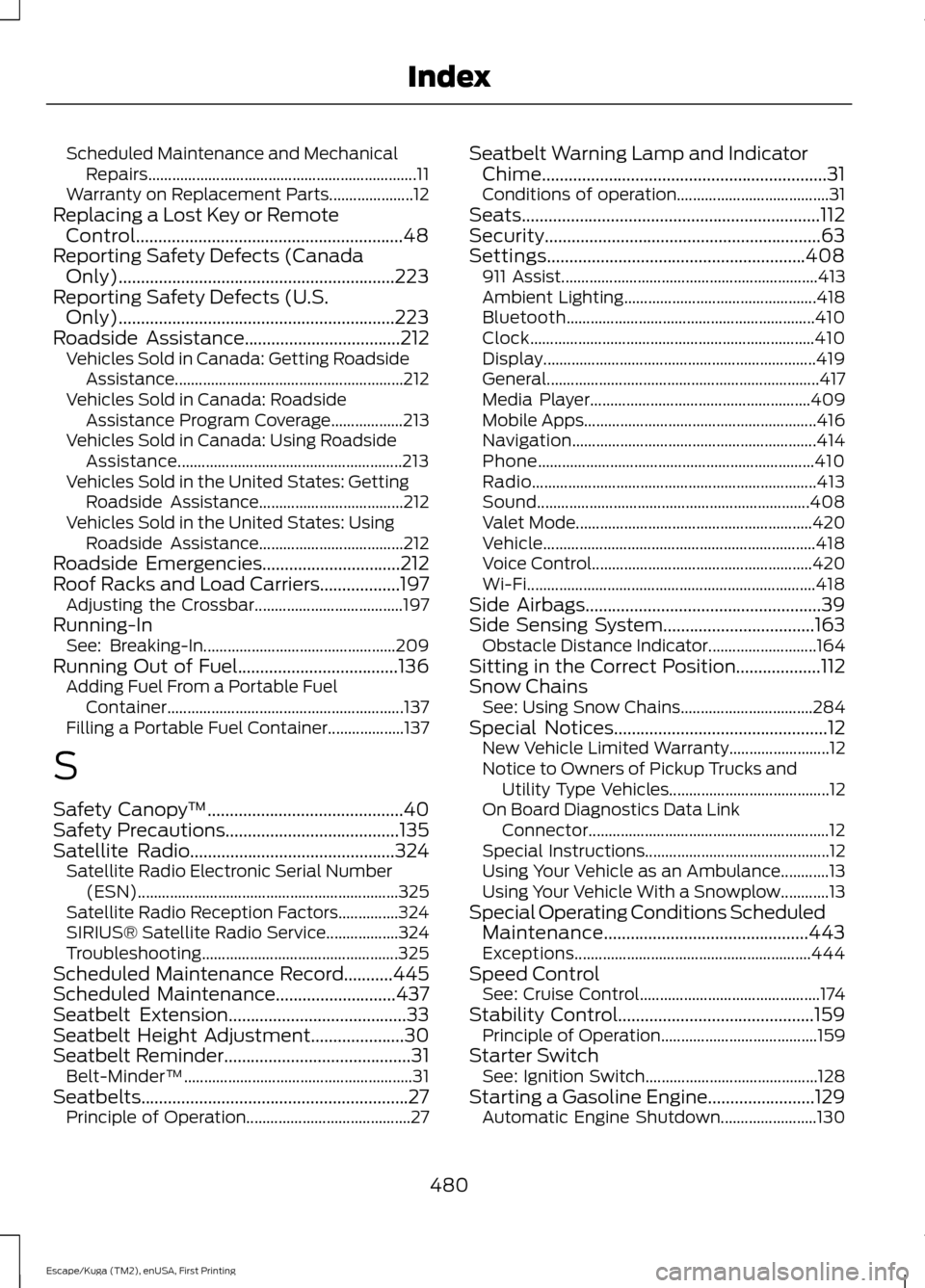
Scheduled Maintenance and Mechanical
Repairs................................................................... 11
Warranty on Replacement Parts..................... 12
Replacing a Lost Key or Remote Control............................................................48
Reporting Safety Defects (Canada Only)..............................................................223
Reporting Safety Defects (U.S. Only)
..............................................................223
Roadside Assistance...................................212
Vehicles Sold in Canada: Getting Roadside
Assistance......................................................... 212
Vehicles Sold in Canada: Roadside Assistance Program Coverage.................. 213
Vehicles Sold in Canada: Using Roadside Assistance........................................................ 213
Vehicles Sold in the United States: Getting Roadside Assistance.................................... 212
Vehicles Sold in the United States: Using Roadside Assistance.................................... 212
Roadside Emergencies...............................212
Roof Racks and Load Carriers..................197 Adjusting the Crossbar..................................... 197
Running-In See: Breaking-In................................................ 209
Running Out of Fuel
....................................136
Adding Fuel From a Portable Fuel
Container........................................................... 137
Filling a Portable Fuel Container................... 137
S
Safety Canopy ™
............................................40
Safety Precautions.......................................135
Satellite Radio..............................................324
Satellite Radio Electronic Serial Number
(ESN)................................................................. 325
Satellite Radio Reception Factors...............324
SIRIUS® Satellite Radio Service.................. 324
Troubleshooting................................................. 325
Scheduled Maintenance Record
...........445
Scheduled Maintenance...........................437
Seatbelt Extension........................................33
Seatbelt Height Adjustment.....................30
Seatbelt Reminder
..........................................31
Belt-Minder™......................................................... 31
Seatbelts............................................................27 Principle of Operation......................................... 27Seatbelt Warning Lamp and Indicator
Chime................................................................31
Conditions of operation...................................... 31
Seats...................................................................112
Security..............................................................63
Settings..........................................................408 911 Assist................................................................ 413
Ambient Lighting................................................ 418
Bluetooth.............................................................. 410
Clock....................................................................... 410
Display.................................................................... 419
General.................................................................... 417
Media Player....................................................... 409
Mobile Apps.......................................................... 416
Navigation............................................................. 414
Phone..................................................................... 410
Radio....................................................................... 413
Sound.................................................................... 408
Valet Mode........................................................... 420
Vehicle.................................................................... 418
Voice Control....................................................... 420
Wi-Fi........................................................................\
418
Side Airbags.....................................................39
Side Sensing System..................................163 Obstacle Distance Indicator........................... 164
Sitting in the Correct Position...................112
Snow Chains See: Using Snow Chains................................. 284
Special Notices................................................12 New Vehicle Limited Warranty......................... 12
Notice to Owners of Pickup Trucks and Utility Type Vehicles........................................ 12
On Board Diagnostics Data Link Connector............................................................ 12
Special Instructions.............................................. 12
Using Your Vehicle as an Ambulance............13
Using Your Vehicle With a Snowplow............13
Special Operating Conditions Scheduled Maintenance..............................................443
Exceptions........................................................... 444
Speed Control See: Cruise Control............................................. 174
Stability Control............................................159 Principle of Operation....................................... 159
Starter Switch See: Ignition Switch........................................... 128
Starting a Gasoline Engine........................129 Automatic Engine Shutdown........................ 130
480
Escape/Kuga (TM2), enUSA, First Printing Index
Page 485 of 486
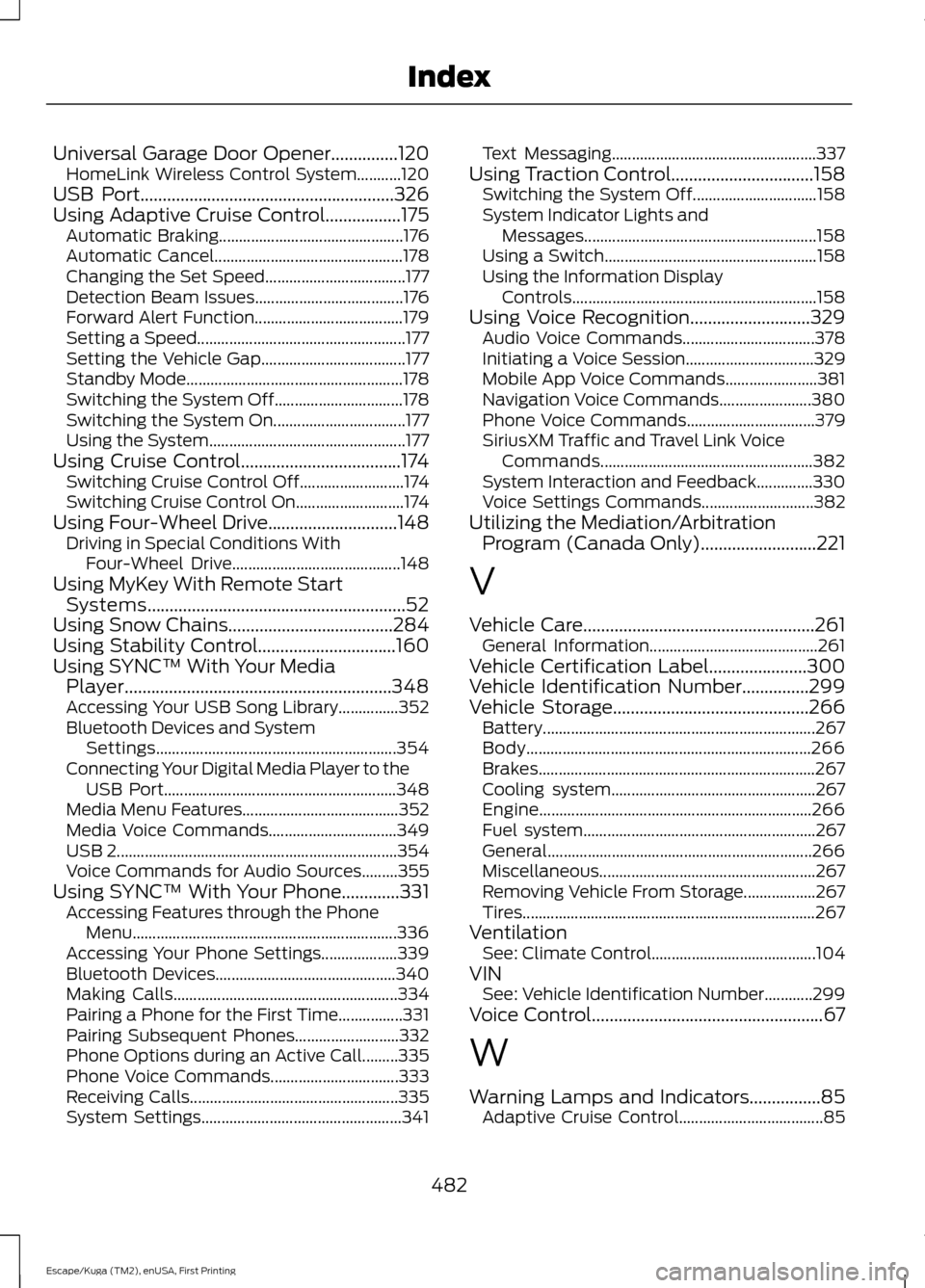
Universal Garage Door Opener...............120
HomeLink Wireless Control System...........120
USB Port
.........................................................326
Using Adaptive Cruise Control.................175 Automatic Braking.............................................. 176
Automatic Cancel............................................... 178
Changing the Set Speed................................... 177
Detection Beam Issues..................................... 176
Forward Alert Function..................................... 179
Setting a Speed.................................................... 177
Setting the Vehicle Gap.................................... 177
Standby Mode...................................................... 178
Switching the System Off................................ 178
Switching the System On................................. 177
Using the System................................................. 177
Using Cruise Control....................................174 Switching Cruise Control Off.......................... 174
Switching Cruise Control On........................... 174
Using Four-Wheel Drive
.............................148
Driving in Special Conditions With
Four-Wheel Drive.......................................... 148
Using MyKey With Remote Start Systems..........................................................52
Using Snow Chains
.....................................284
Using Stability Control...............................160
Using SYNC™ With Your Media Player............................................................348
Accessing Your USB Song Library...............352
Bluetooth Devices and System Settings............................................................ 354
Connecting Your Digital Media Player to the USB Port.......................................................... 348
Media Menu Features....................................... 352
Media Voice Commands................................ 349
USB 2...................................................................... 354
Voice Commands for Audio Sources.........355
Using SYNC™ With Your Phone.............331 Accessing Features through the Phone
Menu.................................................................. 336
Accessing Your Phone Settings................... 339
Bluetooth Devices............................................. 340
Making Calls........................................................ 334
Pairing a Phone for the First Time................331
Pairing Subsequent Phones.......................... 332
Phone Options during an Active Call.........335
Phone Voice Commands................................ 333
Receiving Calls.................................................... 335
System Settings.................................................. 341Text Messaging...................................................
337
Using Traction Control................................158 Switching the System Off............................... 158
System Indicator Lights and Messages.......................................................... 158
Using a Switch..................................................... 158
Using the Information Display Controls............................................................. 158
Using Voice Recognition
...........................329
Audio Voice Commands................................. 378
Initiating a Voice Session................................ 329
Mobile App Voice Commands....................... 381
Navigation Voice Commands....................... 380
Phone Voice Commands................................ 379
SiriusXM Traffic and Travel Link Voice Commands..................................................... 382
System Interaction and Feedback..............330
Voice Settings Commands............................ 382
Utilizing the Mediation/Arbitration Program (Canada Only)..........................221
V
Vehicle Care....................................................261 General Information.......................................... 261
Vehicle Certification Label
......................300
Vehicle Identification Number...............299
Vehicle Storage
............................................266
Battery.................................................................... 267
Body....................................................................... 266
Brakes..................................................................... 267
Cooling system................................................... 267
Engine.................................................................... 266
Fuel system.......................................................... 267
General.................................................................. 266
Miscellaneous...................................................... 267
Removing Vehicle From Storage.................. 267
Tires........................................................................\
. 267
Ventilation See: Climate Control......................................... 104
VIN See: Vehicle Identification Number............299
Voice Control
....................................................67
W
Warning Lamps and Indicators................85 Adaptive Cruise Control.................................... 85
482
Escape/Kuga (TM2), enUSA, First Printing Index