audio FORD ESCAPE 2017 3.G Owners Manual
[x] Cancel search | Manufacturer: FORD, Model Year: 2017, Model line: ESCAPE, Model: FORD ESCAPE 2017 3.GPages: 486, PDF Size: 6.34 MB
Page 5 of 486
Audio Control..................................................66
Voice Control....................................................67
Cruise Control.................................................68
Information Display Control
......................68
Heated Steering Wheel
...............................68
Wipers and Washers
Windshield Wipers
........................................69
Autowipers.......................................................69
Windshield Washers.....................................70
Rear Window Wiper and Washers
............71
Lighting
General Information
......................................72
Lighting Control
...............................................72
Autolamps
.........................................................73
Instrument Lighting Dimmer......................74
Headlamp Exit Delay
....................................74
Daytime Running Lamps
.............................74
Automatic High Beam Control..................75
Front Fog Lamps............................................76
Direction Indicators........................................76
Interior Lamps
..................................................77
Ambient Lighting.............................................77
Windows and Mirrors
Power Windows
..............................................78
Exterior Mirrors
................................................79
Interior Mirror....................................................81
Sun Visors..........................................................81
Moonroof............................................................81
Instrument Cluster
Gauges...............................................................83
Warning Lamps and Indicators................85
Audible Warnings and Indicators.............87
Information Displays
General Information.....................................89 Trip Computer.................................................92
Information Messages
.................................93
Climate Control
Manual Climate Control
............................104
Automatic Climate Control......................105
Hints on Controlling the Interior Climate
.........................................................107
Heated Windows and Mirrors...................110
Cabin Air Filter
................................................110
Remote Start..................................................110
Seats
Sitting in the Correct Position...................112
Head Restraints
..............................................112
Manual Seats
..................................................114
Power Seats
.....................................................115
Memory Function...........................................117
Rear Seats........................................................118
Heated Seats
..................................................119
Rear Seat Armrest
.........................................119
Universal Garage Door Opener
Universal Garage Door Opener
...............120
Auxiliary Power Points
Auxiliary Power Points
................................125
Storage Compartments
Center Console
...............................................127
Overhead Console
........................................127
Starting and Stopping the Engine
General Information
....................................128
Ignition Switch
...............................................128
Keyless Starting
............................................128
Starting a Gasoline Engine
.......................129
Engine Block Heater.....................................131
2
Escape/Kuga (TM2), enUSA, First Printing Table of Contents
Page 8 of 486
Capacities and Specific-
ations
Engine Specifications - 1.5L EcoBoost™...............................................294
Engine Specifications - 2.0L EcoBoost™...............................................294
Engine Specifications - 2.5L....................295
Motorcraft Parts - 1.5L EcoBoost™......296
Motorcraft Parts - 2.0L EcoBoost™......297
Motorcraft Parts - 2.5L..............................298
Vehicle Identification Number...............299
Vehicle Certification Label
......................300
Transmission Code Designation...........300
Capacities and Specifications - 1.5L EcoBoost™................................................301
Capacities and Specifications - 2.0L EcoBoost™...............................................304
Capacities and Specifications - 2.5L....308
Audio System
General Information
....................................312
Audio Unit - Vehicles With: AM/FM/ CD
...................................................................313
Audio Unit - Vehicles With: AM/FM/CD/ SYNC.............................................................315
Audio Unit - Vehicles With: AM/FM/CD/ SYNC/Satellite Radio.............................318
Audio Unit - Vehicles With: Premium AM/ FM/CD..........................................................319
Audio Unit - Vehicles With: Sony AM/FM/ CD..................................................................320
Digital Radio
...................................................321
Satellite Radio..............................................324
USB Port
.........................................................326
Media Hub......................................................326
SYNC™
General Information....................................327
Using Voice Recognition...........................329
Using SYNC™ With Your Phone.............331
SYNC™ Applications and Services......343 Using SYNC™ With Your Media
Player...........................................................348
SYNC™ Troubleshooting
..........................357
SYNC™ 3
General Information
...................................365
Home Screen.................................................376
Using Voice Recognition............................377
Entertainment..............................................383
Phone...............................................................393
Navigation
......................................................398
Apps.................................................................406
Settings..........................................................408
SYNC™ 3 Troubleshooting.....................420
Accessories
Accessories....................................................433
Extended Service Plan (ESP)
Extended Service Plan (ESP).................435
Scheduled Maintenance
General Maintenance Information
........437
Normal Scheduled Maintenance..........440
Special Operating Conditions Scheduled Maintenance.............................................443
Scheduled Maintenance Record...........445
Appendices
End User License Agreement
.................456
5
Escape/Kuga (TM2), enUSA, First Printing Table of Contents
Page 52 of 486
PRINCIPLE OF OPERATION
MyKey allows you to program keys with
restricted driving modes to promote good
driving habits. You can program the
restrictions to all keys but one. Any keys
that you did not program are administrator
keys or admin keys.
You can use admin keys to:
•
Create a MyKey with certain vehicle
restrictions.
• Program certain MyKey settings.
• Clear all MyKey restrictions.
After you program a MyKey, you can view
the following information through the
information display:
• The total number of admin keys and
MyKeys for your vehicle.
• The total distance a MyKey driver
traveled with your vehicle.
Note: Every MyKey receives the same
restrictions and settings. You cannot
program them individually.
Note: For vehicles equipped with a
push-button start switch: When both a
MyKey and an admin key are present when
you start your vehicle, the system recognizes
the admin key only. Standard Settings
Not every vehicle includes the features
listed below. If your vehicle has this
equipment, then you cannot change the
following settings when using a MyKey:
•
Seatbelt reminder or Belt-Minder™.
MyKey mutes the audio system until
drivers, and in some instances,
passengers, fasten their seatbelts.
Note: If your vehicle includes an
AM/FM radio or a very basic audio
system, then the radio may not mute.
• Earlier low-fuel warning. The low-fuel
warning activates earlier for MyKey
drivers, giving them more time to refuel.
• Certain driver alerts, stability systems
or parking aids turn on automatically
when you use the MyKey system. For
example, Blind Spot Information
System (BLIS), cross traffic alert, lane
departure warning or forward collision
warning. Note:
MyKey drivers may be
able to turn the lane departure warning
feature off, but this feature turns back
on automatically with every new key
cycle.
• Restricted touchscreen operation in
some markets. For example, MyKey
may prevent manual navigation
destination input while the vehicle is in
any gear other than park (P) or when
the vehicle reaches a certain rate of
speed.
• Satellite radio adult content
restrictions, if this feature is available
in your market.
Optional Settings
You can configure certain vehicle feature
settings when you first create a MyKey. You
can also change the settings afterward
with an admin key.
49
Escape/Kuga (TM2), enUSA, First Printing MyKey
™
Page 53 of 486
Note:
Not every feature applies to every
vehicle in every market. When they are
available for your vehicle, then they appear
in your information display, providing
choices to switch them on or off, or to select
a more specific setting.
• Various vehicle speed limits so the
MyKey driver cannot exceed certain
speeds. The information display shows
warnings followed by an audible tone
when the MyKey driver reaches the set
speed. You cannot override the set
speed by fully depressing the
accelerator pedal. WARNING
Do not set MyKey maximum speed
limit to a limit that will prevent the
driver from maintaining a safe speed
considering posted speed limits and
prevailing road conditions. The driver is
always responsible to drive in accordance
with local laws and prevailing conditions.
Failure to do so could result in accident or
injury. •
Various vehicle speed reminders so
MyKey drivers know when their vehicle
speed approaches the limits. Warnings
appear in your information display and
a tone sounds when the MyKey drivers
exceed the set vehicle speed.
• The audio system's maximum volume
limits to 45% so MyKey drivers can
concentrate on the road. A message
appears in the information display
when MyKey drivers attempt to exceed
the limited volume. MyKey also
disables the automatic volume control.
Note: If your vehicle includes an
AM/FM radio or a very basic audio
system, then the radio may not limit.
• Always on setting. This setting forces
certain features to remain on and
active for MyKey drivers. For example,
E911 or emergency assistance and the
do not disturb features stay on even if
a MyKey driver uses the feature's
control to switch it off.
CREATING A MYKEY
Use the information display to create a
MyKey.
1. Switch the ignition on using the key or the transmitter you want to program.
2. Access the main menu in the information display and then scroll
through the menus to begin
programming your MyKey. See
Information Displays
(page 89).
3. Follow the instructions in the display.
4. A confirmation message appears in the
display after you finish programming
your MyKey. The programmed
restrictions apply when you restart your
vehicle with the programmed key or
transmitter.
Note: Make sure you label the programmed
MyKey so you can distinguish it from the
admin keys.
50
Escape/Kuga (TM2), enUSA, First Printing MyKey
™
Page 69 of 486
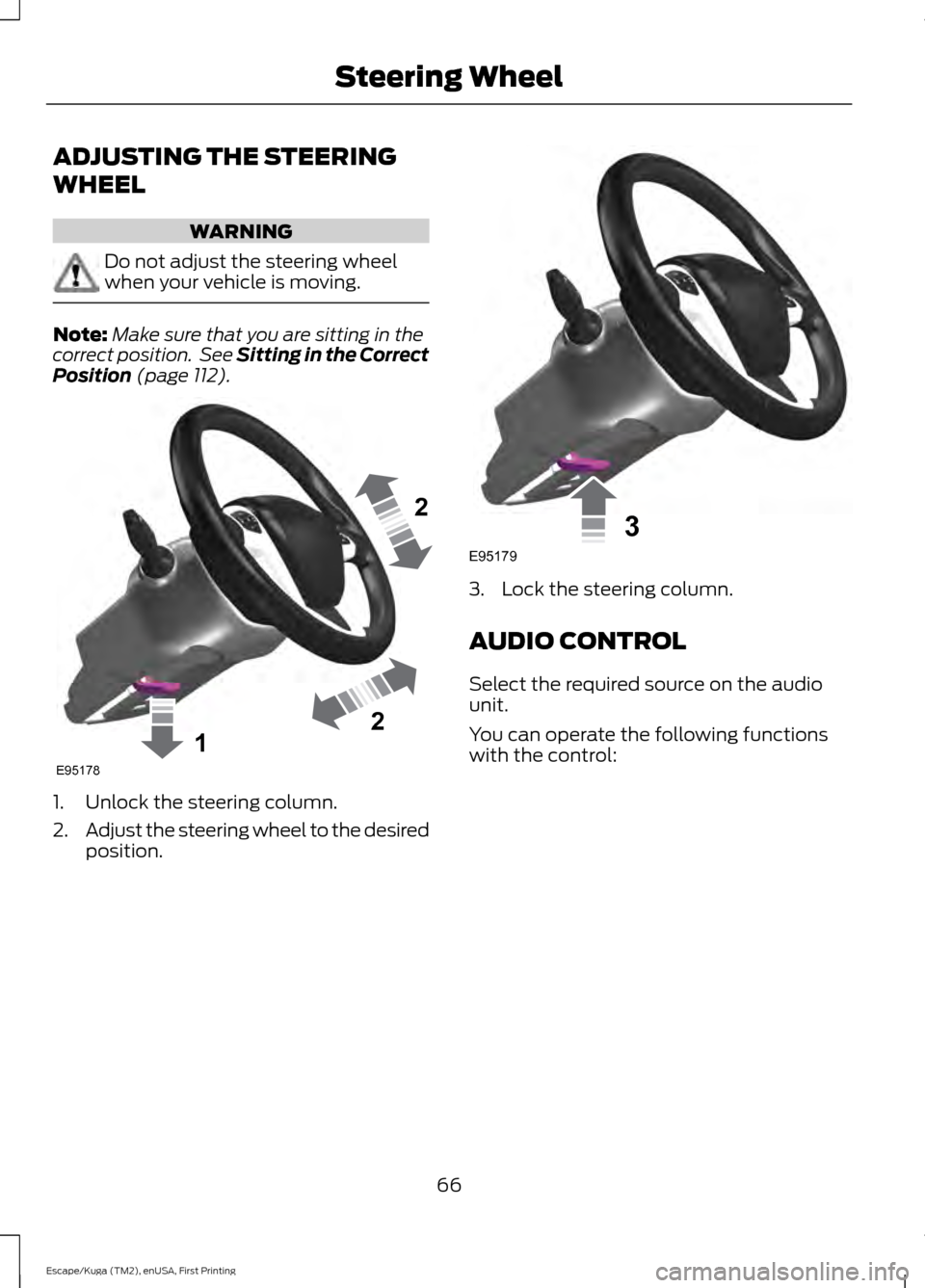
ADJUSTING THE STEERING
WHEEL
WARNING
Do not adjust the steering wheel
when your vehicle is moving.
Note:
Make sure that you are sitting in the
correct position. See Sitting in the Correct
Position (page 112). 1. Unlock the steering column.
2.
Adjust the steering wheel to the desired
position. 3. Lock the steering column.
AUDIO CONTROL
Select the required source on the audio
unit.
You can operate the following functions
with the control:
66
Escape/Kuga (TM2), enUSA, First Printing Steering Wheel122E95178 3E95179
Page 103 of 486
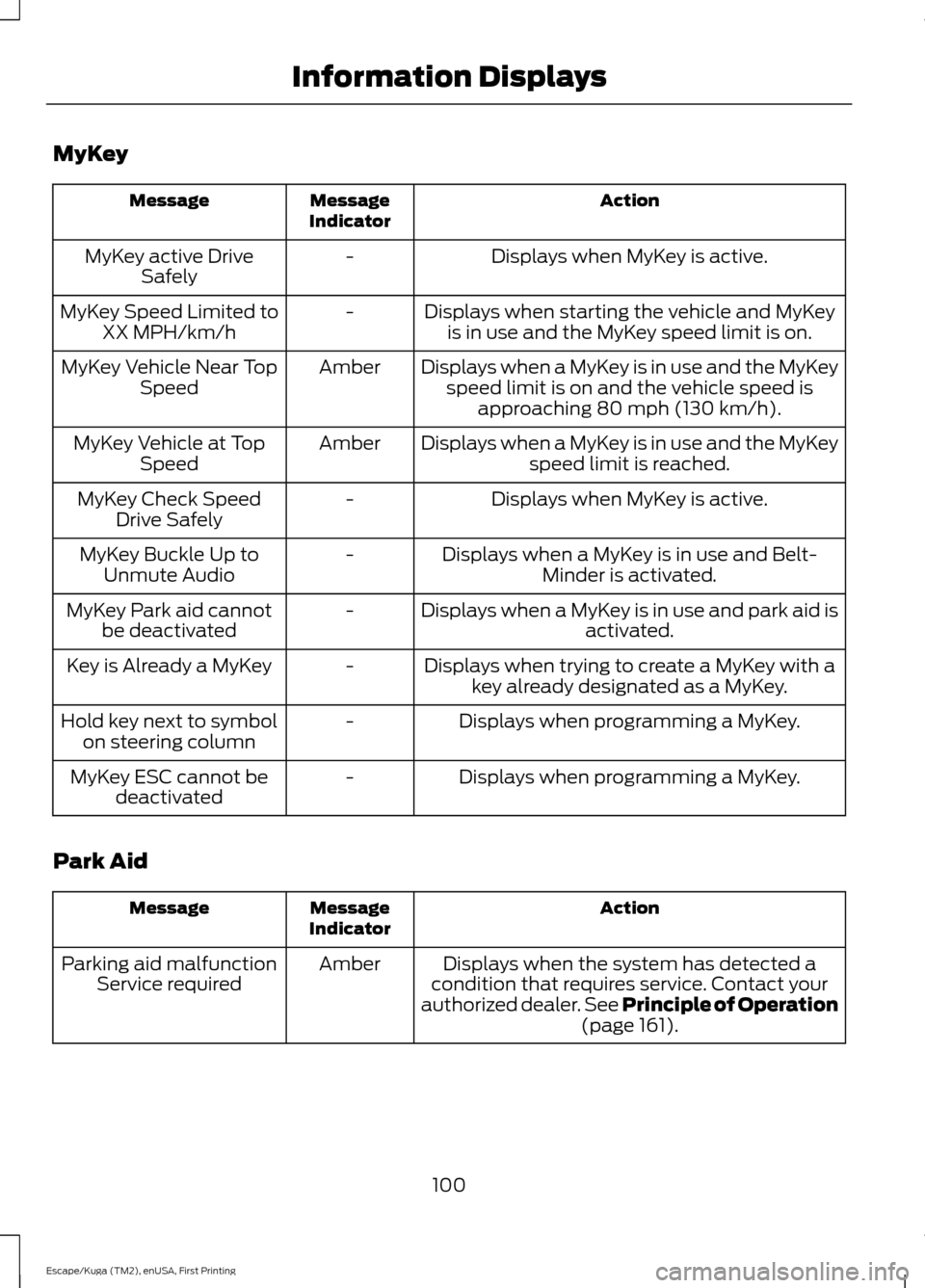
MyKey
Action
Message
Indicator
Message
Displays when MyKey is active.
-
MyKey active Drive
Safely
Displays when starting the vehicle and MyKeyis in use and the MyKey speed limit is on.
-
MyKey Speed Limited to
XX MPH/km/h
Displays when a MyKey is in use and the MyKeyspeed limit is on and the vehicle speed is approaching 80 mph (130 km/h).
Amber
MyKey Vehicle Near Top
Speed
Displays when a MyKey is in use and the MyKeyspeed limit is reached.
Amber
MyKey Vehicle at Top
Speed
Displays when MyKey is active.
-
MyKey Check Speed
Drive Safely
Displays when a MyKey is in use and Belt-Minder is activated.
-
MyKey Buckle Up to
Unmute Audio
Displays when a MyKey is in use and park aid isactivated.
-
MyKey Park aid cannot
be deactivated
Displays when trying to create a MyKey with akey already designated as a MyKey.
-
Key is Already a MyKey
Displays when programming a MyKey.
-
Hold key next to symbol
on steering column
Displays when programming a MyKey.
-
MyKey ESC cannot be
deactivated
Park Aid Action
Message
Indicator
Message
Displays when the system has detected a
condition that requires service. Contact your
authorized dealer. See Principle of Operation
(page 161).
Amber
Parking aid malfunction
Service required
100
Escape/Kuga (TM2), enUSA, First Printing Information Displays
Page 165 of 486
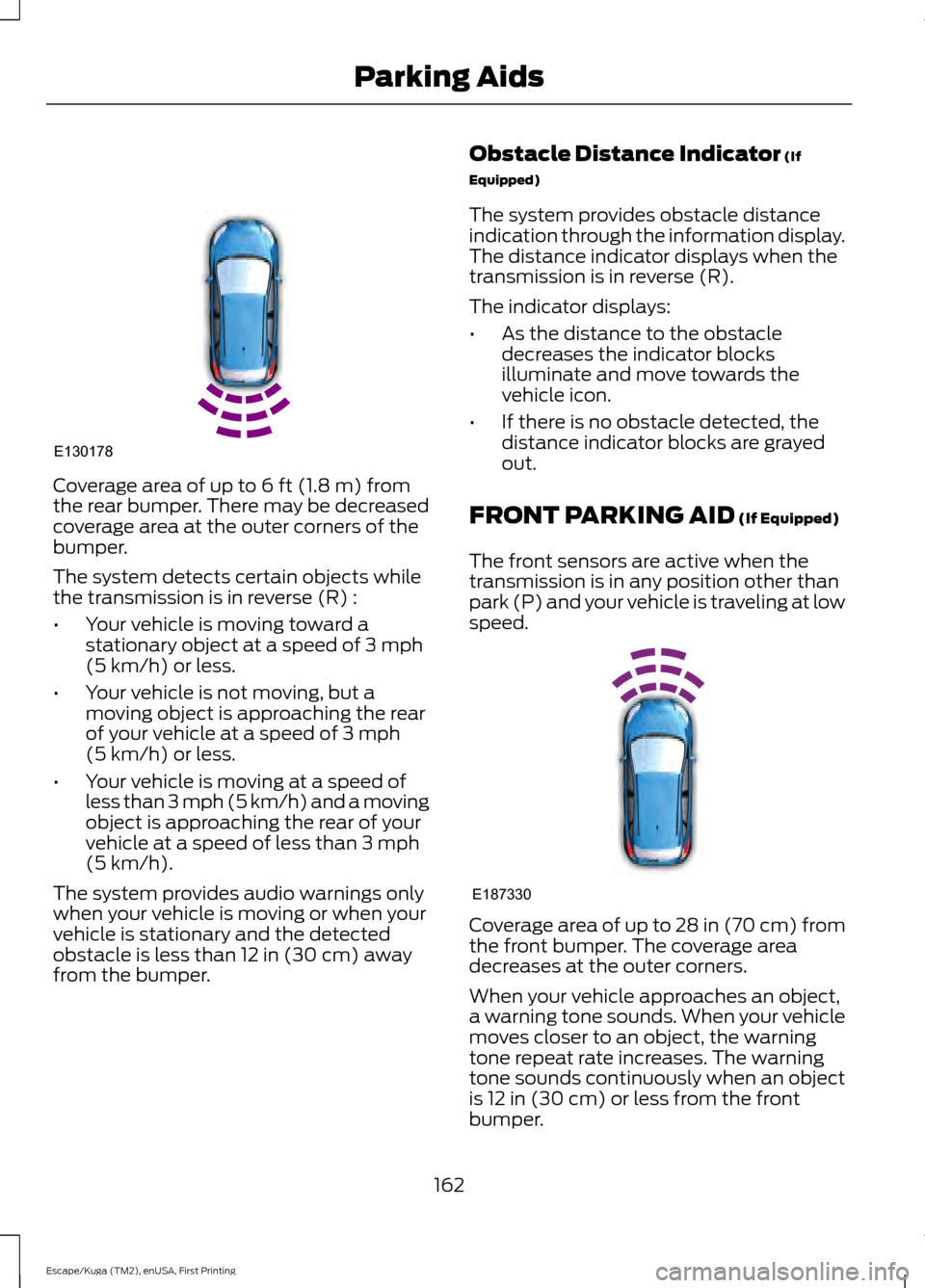
Coverage area of up to 6 ft (1.8 m) from
the rear bumper. There may be decreased
coverage area at the outer corners of the
bumper.
The system detects certain objects while
the transmission is in reverse (R) :
• Your vehicle is moving toward a
stationary object at a speed of
3 mph
(5 km/h) or less.
• Your vehicle is not moving, but a
moving object is approaching the rear
of your vehicle at a speed of
3 mph
(5 km/h) or less.
• Your vehicle is moving at a speed of
less than 3 mph (5 km/h) and a moving
object is approaching the rear of your
vehicle at a speed of less than
3 mph
(5 km/h).
The system provides audio warnings only
when your vehicle is moving or when your
vehicle is stationary and the detected
obstacle is less than
12 in (30 cm) away
from the bumper. Obstacle Distance Indicator
(If
Equipped)
The system provides obstacle distance
indication through the information display.
The distance indicator displays when the
transmission is in reverse (R).
The indicator displays:
• As the distance to the obstacle
decreases the indicator blocks
illuminate and move towards the
vehicle icon.
• If there is no obstacle detected, the
distance indicator blocks are grayed
out.
FRONT PARKING AID
(If Equipped)
The front sensors are active when the
transmission is in any position other than
park (P) and your vehicle is traveling at low
speed. Coverage area of up to
28 in (70 cm) from
the front bumper. The coverage area
decreases at the outer corners.
When your vehicle approaches an object,
a warning tone sounds. When your vehicle
moves closer to an object, the warning
tone repeat rate increases. The warning
tone sounds continuously when an object
is
12 in (30 cm) or less from the front
bumper.
162
Escape/Kuga (TM2), enUSA, First Printing Parking AidsE130178 E187330
Page 166 of 486
You can switch the system off through the
information display menu or from the
pop-up message that appears once you
shift the transmission into reverse (R). See
General Information (page 89). If your
vehicle has a parking aid button, you can
switch the system off by pressing the
button.
Obstacle Distance Indicator
(If
Equipped)
The system provides obstacle distance
indication through the information display.
The indicator displays:
• As the distance to the obstacle
decreases the indicator blocks
illuminate and move towards the
vehicle icon.
• If there is no obstacle detected, the
distance indicator blocks are grayed
out.
If the transmission is in reverse (R), the
front sensing system provides audio
warnings when your vehicle is moving and
the detected obstacle is moving towards
your vehicle. Once the vehicle is stationary,
the audio warning will be stopped after 2
seconds. Visual indication is always
present in reverse (R).
If the transmission is in drive (D) or any
other forward gear (for example, low (L),
sport (S) or any forward gear in a manual
transmission), the front sensing system
provides audio and visual warnings when
your vehicle is moving below a speed of
7 mph (12 km/h) and an obstacle is located
inside the detection area. Once the vehicle
is stationary, the audio warning will be
stopped after 2 seconds and the visual
indication stops after 4 seconds. If the
obstacles detected are within
12 in
(30 cm), the visual indication remains on. If the transmission is in neutral (N), the
system provides visual indication only
when your vehicle is moving at
7 mph
(12 km/h) or below and an obstacle is
located inside the detection area. Once
your vehicle is stationary, the visual
indication will stop after 4 seconds.
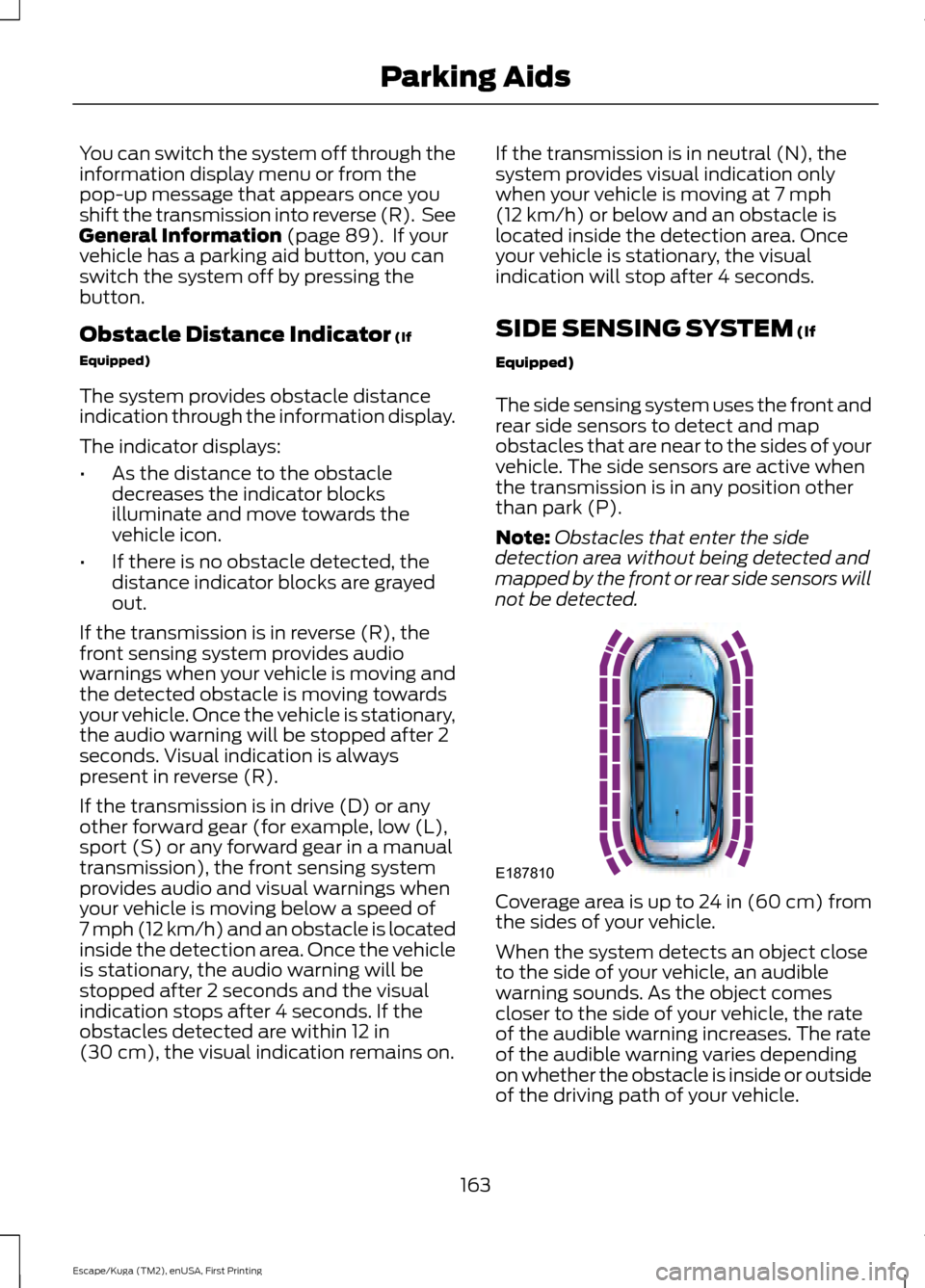
SIDE SENSING SYSTEM
(If
Equipped)
The side sensing system uses the front and
rear side sensors to detect and map
obstacles that are near to the sides of your
vehicle. The side sensors are active when
the transmission is in any position other
than park (P).
Note: Obstacles that enter the side
detection area without being detected and
mapped by the front or rear side sensors will
not be detected. Coverage area is up to 24 in (60 cm) from
the sides of your vehicle.
When the system detects an object close
to the side of your vehicle, an audible
warning sounds. As the object comes
closer to the side of your vehicle, the rate
of the audible warning increases. The rate
of the audible warning varies depending
on whether the obstacle is inside or outside
of the driving path of your vehicle.
163
Escape/Kuga (TM2), enUSA, First Printing Parking AidsE187810
Page 235 of 486
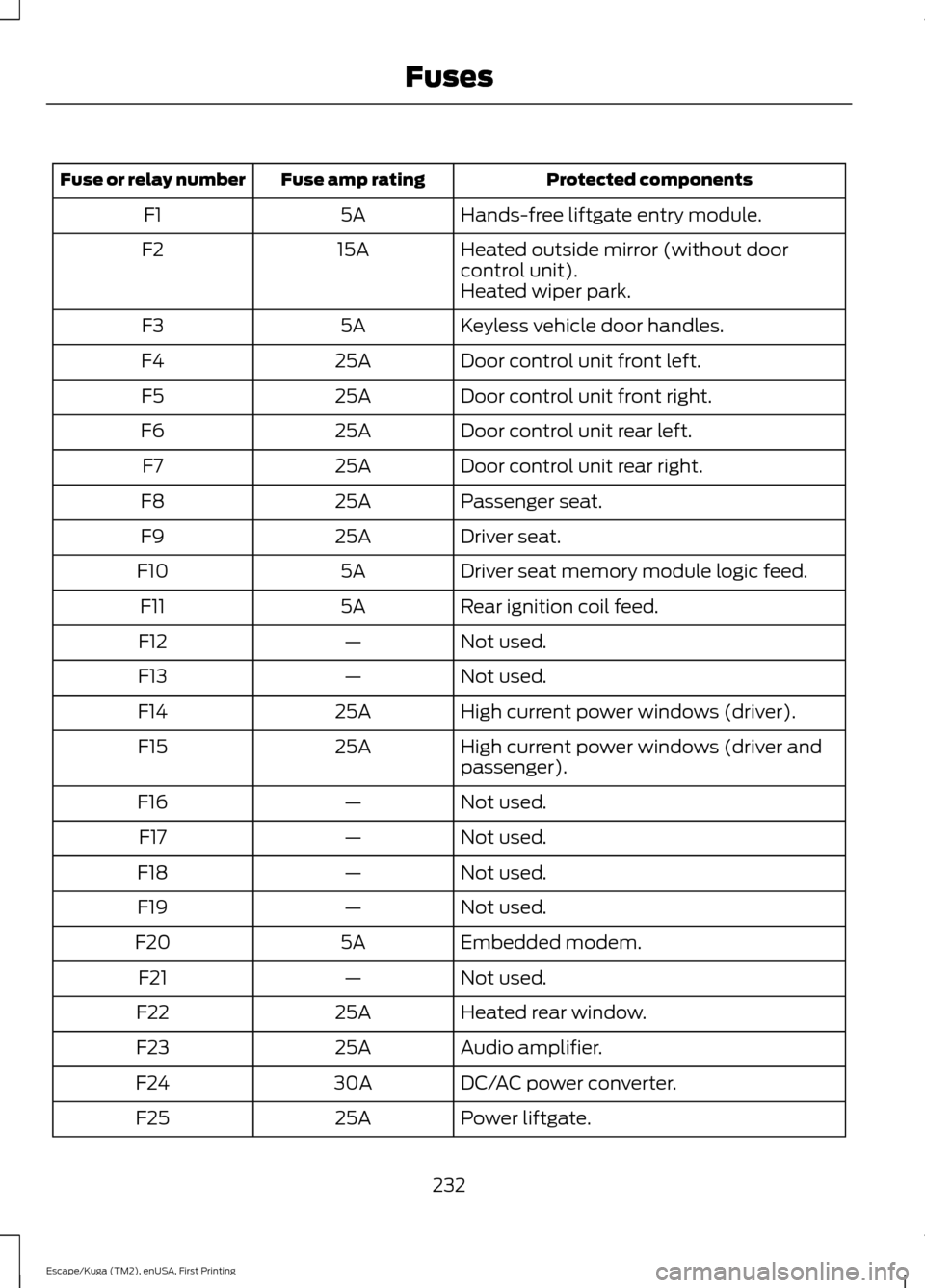
Protected components
Fuse amp rating
Fuse or relay number
Hands-free liftgate entry module.
5A
F1
Heated outside mirror (without door
control unit).
15A
F2
Heated wiper park.
Keyless vehicle door handles.
5A
F3
Door control unit front left.
25A
F4
Door control unit front right.
25A
F5
Door control unit rear left.
25A
F6
Door control unit rear right.
25A
F7
Passenger seat.
25A
F8
Driver seat.
25A
F9
Driver seat memory module logic feed.
5A
F10
Rear ignition coil feed.
5A
F11
Not used.
—
F12
Not used.
—
F13
High current power windows (driver).
25A
F14
High current power windows (driver and
passenger).
25A
F15
Not used.
—
F16
Not used.
—
F17
Not used.
—
F18
Not used.
—
F19
Embedded modem.
5A
F20
Not used.
—
F21
Heated rear window.
25A
F22
Audio amplifier.
25A
F23
DC/AC power converter.
30A
F24
Power liftgate.
25A
F25
232
Escape/Kuga (TM2), enUSA, First Printing Fuses
Page 252 of 486
Note:
If you add electrical accessories or
components to the vehicle, it may adversely
affect the low voltage battery performance
and durability. This may also affect the
performance of other electrical systems in
the vehicle.
For longer, trouble-free operation, keep the
top of the battery clean and dry.
If you see any corrosion on the battery or
terminals, remove the cables from the
terminals and clean with a wire brush. You
can neutralize the acid with a solution of
baking soda and water.
Because your vehicle ’s engine is
electronically controlled by a computer,
some control conditions are maintained
by power from the battery. When the
battery is disconnected or a new battery
is installed, the engine must relearn its idle
and fuel trim strategy for optimum
driveability and performance. Flexible fuel
vehicles (FFV) must also relearn the
ethanol content of the fuel for optimum
driveability and performance.
To restore the settings, do the following:
1. Apply the parking brake.
2. Shift into park (P) or neutral (N).
3. Switch off all accessories.
4. Press the brake pedal and start your vehicle.
5. Run the engine until it reaches normal operating temperature. While the
engine is warming up, complete the
following: Reset the clock. See Audio
System (page 312). Reset the power
windows bounce-back feature. See
Windows and Mirrors
(page 78).
Reset the radio station presets. See
Audio System
(page 312).
6. Allow the engine to idle for at least one
minute. 7.
Drive the vehicle at least 10 mi (16 km)
to completely relearn the idle trim and
fuel trim strategy.
Note: If you do not allow the engine to
relearn the idle and fuel trim strategy, the
idle quality of your vehicle may be adversely
affected until the engine computer
eventually relearns the idle trim and fuel
trim strategy.
Note: For flexible fuel vehicles, if you are
operating on E85, you may experience poor
starts or an inability to start the engine and
driveability problems until the fuel trim and
ethanol content have been relearned.
Make sure that you dispose of old batteries
in an environmentally friendly way. Seek
advice from your local authority about
recycling old batteries.
If storing your vehicle for more than 30
days without recharging the battery, we
recommend that you disconnect the
battery cables to maintain battery charge
for quick starting.
Battery Management System
(If
Equipped)
The battery management system monitors
battery conditions and takes actions to
extend battery life. If excessive battery
drain is detected, the system temporarily
disables some electrical systems to
protect the battery.
Systems included are:
• Heated rear window.
• Heated seats.
• Climate control.
• Heated steering wheel.
• Audio unit.
• Navigation system.
249
Escape/Kuga (TM2), enUSA, First Printing Maintenance