automatic transmission FORD ESCAPE 2017 3.G Owners Manual
[x] Cancel search | Manufacturer: FORD, Model Year: 2017, Model line: ESCAPE, Model: FORD ESCAPE 2017 3.GPages: 486, PDF Size: 6.34 MB
Page 6 of 486
Unique Driving Character-
istics
Auto-Start-Stop............................................133
Fuel and Refueling
Safety Precautions.......................................135
Fuel Quality.....................................................136
Fuel Filler Funnel Location........................136
Running Out of Fuel
....................................136
Refueling..........................................................137
Fuel Consumption
.......................................140
Emission Control System...........................141
Transmission
Automatic Transmission...........................144
Four-Wheel Drive
Principle of Operation
................................148
Using Four-Wheel Drive.............................148
Brakes
General Information....................................153
Hints on Driving With Anti-Lock Brakes...........................................................153
Electric Parking Brake.................................154
Hill Start Assist..............................................156
Traction Control
Principle of Operation
.................................158
Using Traction Control................................158
Stability Control
Principle of Operation.................................159
Using Stability Control...............................160
Parking Aids
Principle of Operation..................................161
Rear Parking Aid.............................................161
Front Parking Aid
..........................................162 Side Sensing System..................................163
Active Park Assist.........................................165
Rear View Camera.........................................171
Cruise Control
Principle of Operation.................................174
Using Cruise Control....................................174
Using Adaptive Cruise Control
.................175
Driving Aids
Driver Alert
......................................................180
Lane Keeping System..................................181
Blind Spot Information System..............185
Cross Traffic Alert.........................................187
Eco Mode
..........................................................191
Steering............................................................192
Collision Warning System.........................192
Load Carrying
Rear Under Floor Storage.........................196
Luggage Covers.............................................196
Roof Racks and Load Carriers..................197
Load Limit.......................................................198
Towing
Towing a Trailer
............................................203
Trailer Sway Control
...................................204
Recommended Towing Weights...........204
Essential Towing Checks..........................206
Towing the Vehicle on Four Wheels......208
Driving Hints
Breaking-In....................................................209
Economical Driving
.....................................209
Driving Through Water................................210
Floor Mats
.......................................................210
Roadside Emergencies
Roadside Assistance
...................................212
3
Escape/Kuga (TM2), enUSA, First Printing Table of Contents
Page 7 of 486
Hazard Warning Flashers...........................213
Fuel Shutoff
....................................................213
Jump Starting the Vehicle.........................214
Post-Crash Alert System...........................216
Transporting the Vehicle............................216
Towing Points.................................................216
Customer Assistance
Getting the Services You Need................218
In California (U.S. Only).............................219
The Better Business Bureau (BBB) Auto Line Program (U.S. Only).....................220
Utilizing the Mediation/Arbitration Program (Canada Only)
........................221
Getting Assistance Outside the U.S. and Canada.........................................................221
Ordering Additional Owner's Literature.....................................................222
Reporting Safety Defects (U.S. Only).............................................................223
Reporting Safety Defects (Canada Only).............................................................223
Fuses
Fuse Specification Chart
...........................225
Changing a Fuse
...........................................234
Maintenance
General Information
...................................236
Opening and Closing the Hood
..............236
Under Hood Overview - 1.5L EcoBoost™................................................238
Under Hood Overview - 2.0L EcoBoost™................................................239
Under Hood Overview - 2.5L..................240
Engine Oil Dipstick - 1.5L EcoBoost™.................................................241
Engine Oil Dipstick - 2.0L EcoBoost™/ 2.5L
................................................................241
Engine Oil Check...........................................241
Oil Change Indicator Reset
......................242
Engine Coolant Check
...............................243 Automatic Transmission Fluid
Check............................................................247
Brake Fluid Check
........................................247
Power Steering Fluid Check.....................247
Washer Fluid Check
....................................248
Changing the 12V Battery
.........................248
Checking the Wiper Blades.....................250
Changing the Wiper Blades.....................250
Adjusting the Headlamps
..........................251
Removing a Headlamp
..............................253
Changing a Bulb...........................................253
Bulb Specification Chart
...........................257
Changing the Engine Air Filter
................259
Vehicle Care
General Information....................................261
Cleaning Products........................................261
Cleaning the Exterior...................................261
Waxing.............................................................262
Cleaning the Engine....................................263
Cleaning the Windows and Wiper Blades..........................................................263
Cleaning the Interior...................................264
Cleaning the Instrument Panel and Instrument Cluster Lens.......................264
Cleaning Leather Seats.............................265
Repairing Minor Paint Damage
..............265
Cleaning the Alloy Wheels.......................265
Vehicle Storage
............................................266
Wheels and Tires
General Information...................................268
Tire Care
............................................................271
Using Snow Chains
.....................................284
Tire Pressure Monitoring System..........285
Changing a Road Wheel
...........................288
Technical Specifications...........................292
4
Escape/Kuga (TM2), enUSA, First Printing Table of Contents
Page 50 of 486
5. Reinstall the battery cover and key
blade.
Car Finder Press the button twice within
three seconds. The horn sounds
and the direction indicators
flash. We recommend you use this method
to locate your vehicle, rather than using
the panic alarm.
Sounding the Panic Alarm
Note: The panic alarm only operates when
the ignition is off. Press the button to sound the
panic alarm. Press the button
again or switch the ignition on to
turn it off.
Remote Start (If Equipped) WARNING
To avoid exhaust fumes, do not use
remote start if your vehicle is parked
indoors or in areas that are not well
ventilated. Note:
Do not use remote start if your fuel
level is low. The remote start button is on the
transmitter.
This feature allows you to start your
vehicle from the outside. The transmitter
has an extended operating range.
Vehicles with automatic climate control
can be configured to operate when you
remote start your vehicle. See Automatic
Climate Control
(page 105). Many states and provinces have
restrictions for the use of remote start.
Check your local and state or provincial
laws for specific requirements regarding
remote start systems.
The remote start system does not work if
any of the following occur:
•
The ignition is on.
• The anti-theft alarm triggers.
• You switch off the feature.
• The hood is open.
• The transmission is not in park (P).
• The battery voltage is below the
minimum operating voltage.
• The service engine soon indicator was
on the last time you drove your vehicle.
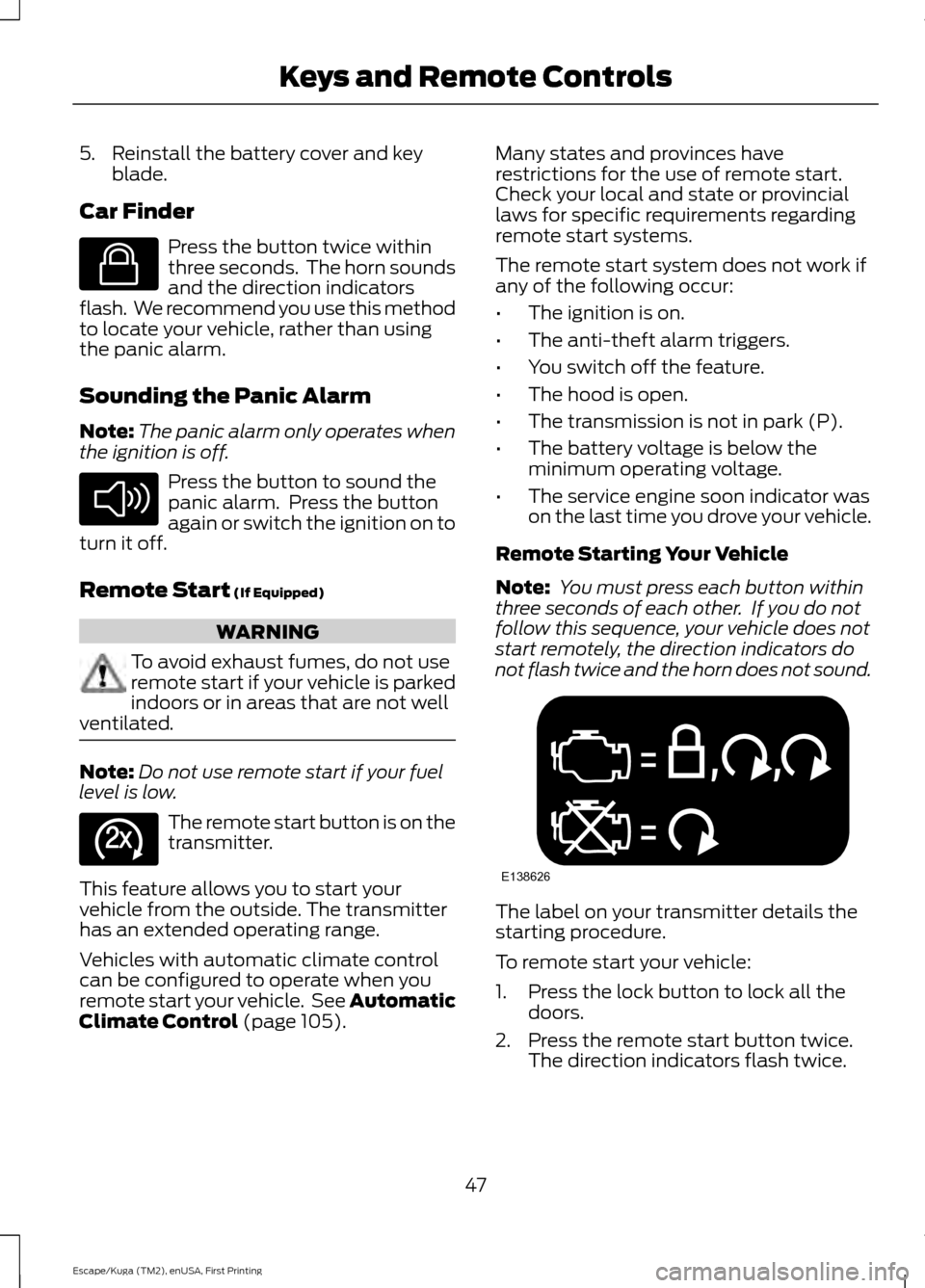
Remote Starting Your Vehicle
Note: You must press each button within
three seconds of each other. If you do not
follow this sequence, your vehicle does not
start remotely, the direction indicators do
not flash twice and the horn does not sound. The label on your transmitter details the
starting procedure.
To remote start your vehicle:
1. Press the lock button to lock all the
doors.
2. Press the remote start button twice. The direction indicators flash twice.
47
Escape/Kuga (TM2), enUSA, First Printing Keys and Remote ControlsE138623 E138624 E138625 E138626
Page 77 of 486
INSTRUMENT LIGHTING
DIMMER
Note:
You disable the manual dimmer
when you adjust the setting to Auto
Dimming in the information display. See
Information Displays (page 89).
Note: If you disconnect the battery or it
becomes discharged, the illuminated
components will switch to the maximum
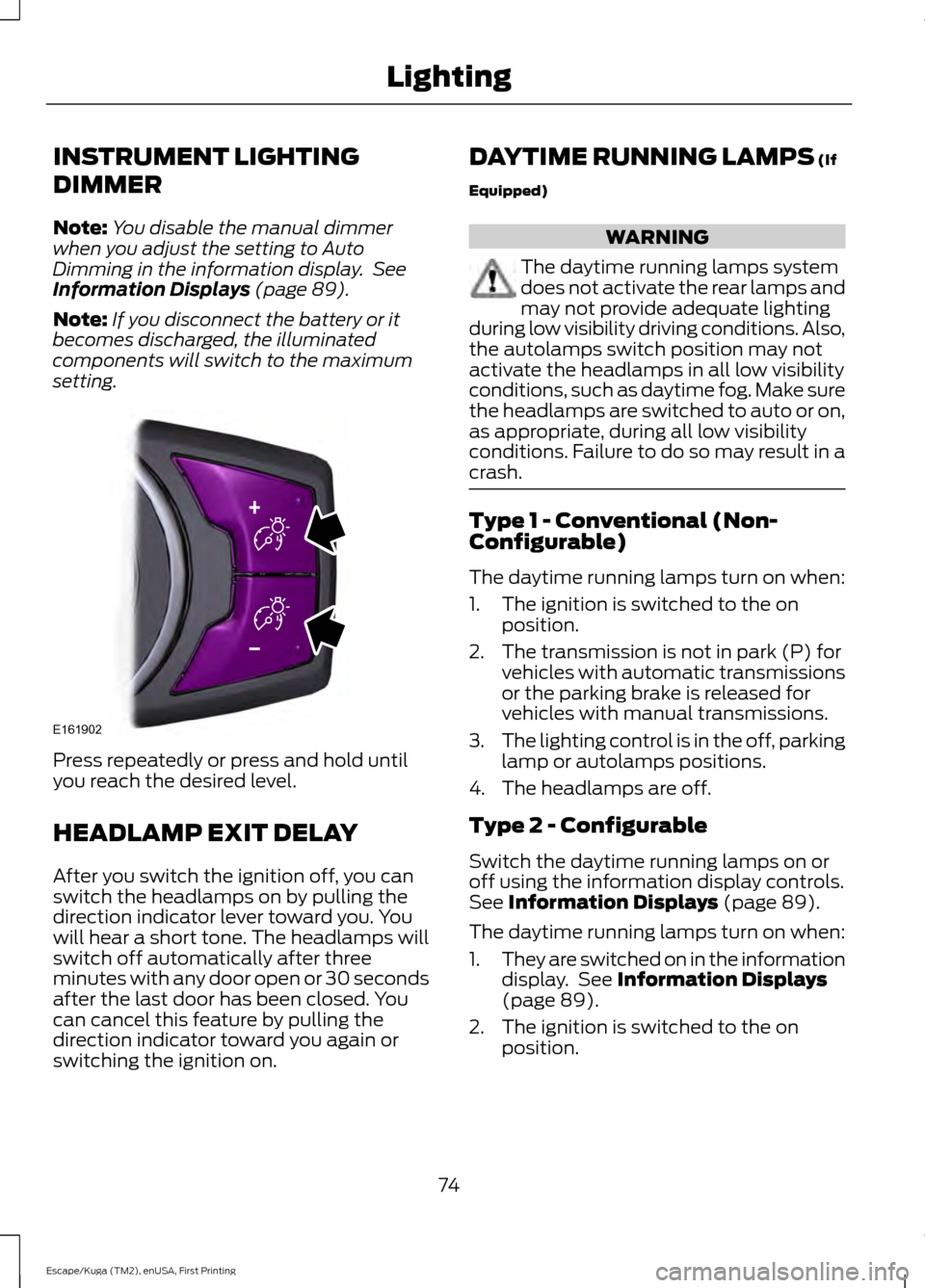
setting. Press repeatedly or press and hold until
you reach the desired level.
HEADLAMP EXIT DELAY
After you switch the ignition off, you can
switch the headlamps on by pulling the
direction indicator lever toward you. You
will hear a short tone. The headlamps will
switch off automatically after three
minutes with any door open or 30 seconds
after the last door has been closed. You
can cancel this feature by pulling the
direction indicator toward you again or
switching the ignition on. DAYTIME RUNNING LAMPS
(If
Equipped) WARNING
The daytime running lamps system
does not activate the rear lamps and
may not provide adequate lighting
during low visibility driving conditions. Also,
the autolamps switch position may not
activate the headlamps in all low visibility
conditions, such as daytime fog. Make sure
the headlamps are switched to auto or on,
as appropriate, during all low visibility
conditions. Failure to do so may result in a
crash. Type 1 - Conventional (Non-
Configurable)
The daytime running lamps turn on when:
1. The ignition is switched to the on
position.
2. The transmission is not in park (P) for vehicles with automatic transmissions
or the parking brake is released for
vehicles with manual transmissions.
3. The lighting control is in the off, parking
lamp or autolamps positions.
4. The headlamps are off.
Type 2 - Configurable
Switch the daytime running lamps on or
off using the information display controls.
See
Information Displays (page 89).
The daytime running lamps turn on when:
1. They are switched on in the information
display. See
Information Displays
(page 89).
2. The ignition is switched to the on position.
74
Escape/Kuga (TM2), enUSA, First Printing LightingE161902
Page 78 of 486
3. The transmission is not in park (P) for
vehicles with automatic transmissions
or the parking brake is released for
vehicles with manual transmissions.
4. The lighting control is in the autolamps
position.
5. The headlamps are off.
The other lighting control switch positions
do not activate the daytime running lamps,
and you can use them to temporarily
override autolamp control.
When switched off in the information
display, the daytime running lamps are off
in all lighting control switch positions.
AUTOMATIC HIGH BEAM
CONTROL (If Equipped)
The system automatically turns on the high
beams if it is dark enough and no other
traffic is present. When it detects the
headlights of an approaching vehicle, the
rear lamps of the preceding vehicle or
street lighting, the system turns off the high
beams before they distract other drivers.
The low beams remain on.
Note: If it appears that automatic high
beam is not functioning properly, check the
windshield in front of the camera for a
blockage. A clear view of the road is required
for proper system operation. Make sure that
authorized personnel repair any windshield
damage in the area of the camera's field of
view.
Note: If the system detects a blockage such
as bird droppings, bug splatter, snow or ice,
and you do not observe changes, the system
may go into low beam mode until you clear
the blockage. A message may also appear
in the information display noting the front
camera is blocked. Note:
Typical road dust, dirt and water
spots do not affect the performance of the
automatic high beam control. However, in
cold or inclement weather conditions, you
may notice a decrease in the availability of
the automatic high beam control, especially
at start up. If you want to change the beam
state independently of the system, you may
switch the high beams on or off using the
lighting control switch. Automatic high
beam control resumes when conditions are
correct.
Note: Modification of your vehicle ride
height such as using much larger tires, may
degrade feature performance.
A camera sensor, centrally mounted
behind the windshield of your vehicle,
continuously monitors conditions to decide
when to switch the high beams off and on.
Once the system is active, the high beams
switch on if:
• The ambient light level is low enough.
• There is no traffic in front of the vehicle.
• The vehicle speed is greater than
approximately
31 mph (50 km/h).
The high beams turn off if:
• The system detects the headlamps of
an approaching vehicle or the rear
lamps of a preceding vehicle.
• Vehicle speed falls below
approximately
26 mph (42 km/h).
• The ambient light level is high enough
that high beams are not required.
• The system detects severe rain, snow
or fog.
• The camera is blocked.
Activating the System
Switch on the system in the information
display and switch the lighting control to
the autolamps position. See Information
Displays
(page 89). See Autolamps
(page 73).
75
Escape/Kuga (TM2), enUSA, First Printing Lighting
Page 91 of 486
Headlamps On Warning Chime
Sounds when you remove the key from the
ignition and open the driver's door and you
have left the headlamps or parking lamps
on.
Parking Brake On Warning Chime
Sounds when you have left the parking
brake on and drive your vehicle. If the
warning chime remains on after you have
released the parking brake, have the
system checked by your authorized dealer
immediately.
Automatic Transmission Warning
Chime
Sounds when you have not moved the
transmission selector lever to position P.
A message will be shown in the display.
88
Escape/Kuga (TM2), enUSA, First Printing Instrument Cluster
Page 105 of 486
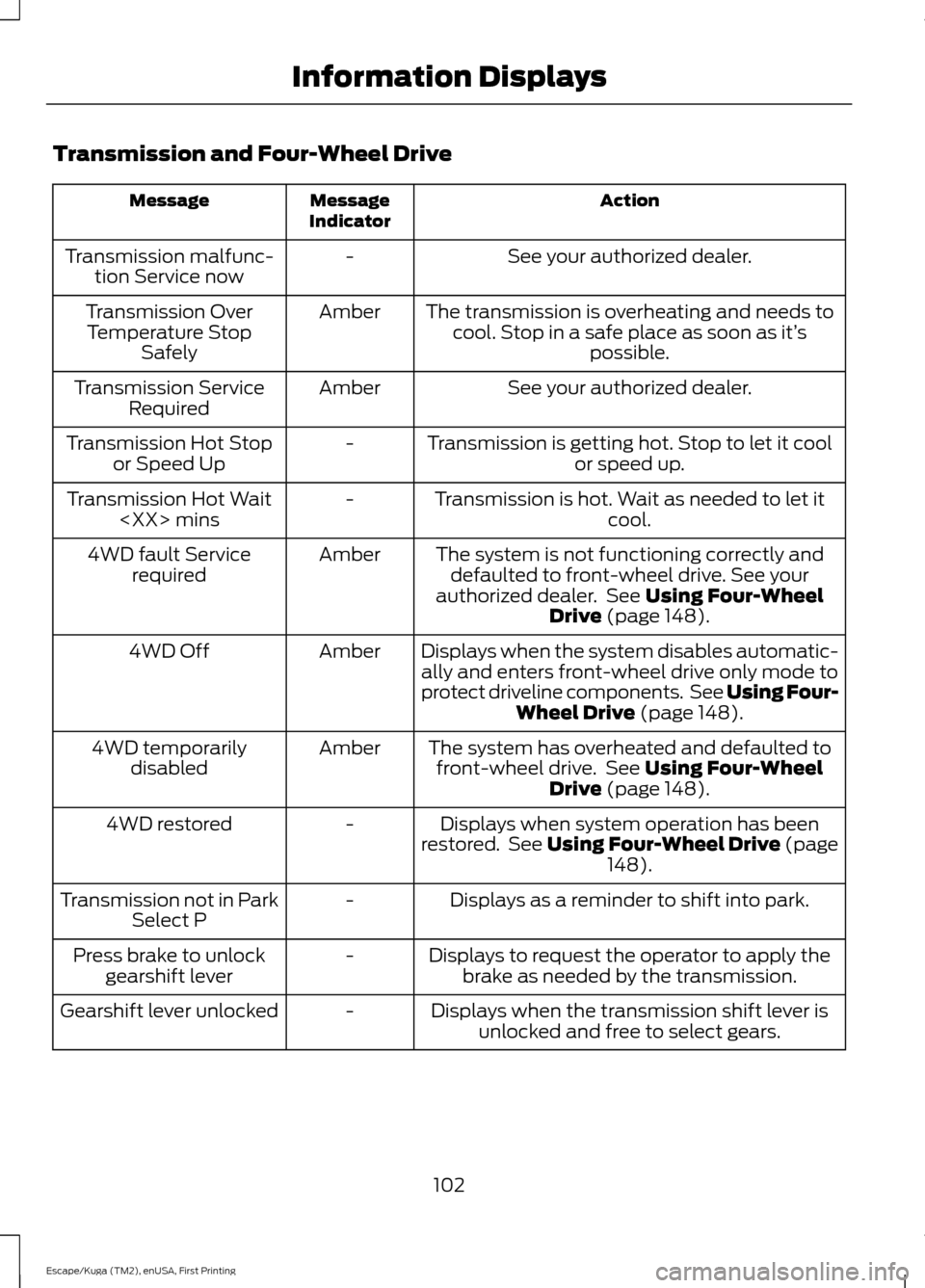
Transmission and Four-Wheel Drive
Action
Message
Indicator
Message
See your authorized dealer.
-
Transmission malfunc-
tion Service now
The transmission is overheating and needs tocool. Stop in a safe place as soon as it’ s
possible.
Amber
Transmission Over
Temperature Stop Safely
See your authorized dealer.
Amber
Transmission Service
Required
Transmission is getting hot. Stop to let it coolor speed up.
-
Transmission Hot Stop
or Speed Up
Transmission is hot. Wait as needed to let itcool.
-
Transmission Hot Wait
The system is not functioning correctly anddefaulted to front-wheel drive. See your
authorized dealer. See Using Four-Wheel
Drive (page 148).
Amber
4WD fault Service
required
Displays when the system disables automatic-ally and enters front-wheel drive only mode to
protect driveline components. See Using Four- Wheel Drive
(page 148).
Amber
4WD Off
The system has overheated and defaulted tofront-wheel drive. See
Using Four-Wheel
Drive (page 148).
Amber
4WD temporarily
disabled
Displays when system operation has been
restored. See Using Four-Wheel Drive (page 148
).
-
4WD restored
Displays as a reminder to shift into park.
-
Transmission not in Park
Select P
Displays to request the operator to apply thebrake as needed by the transmission.
-
Press brake to unlock
gearshift lever
Displays when the transmission shift lever isunlocked and free to select gears.
-
Gearshift lever unlocked
102
Escape/Kuga (TM2), enUSA, First Printing Information Displays
Page 120 of 486
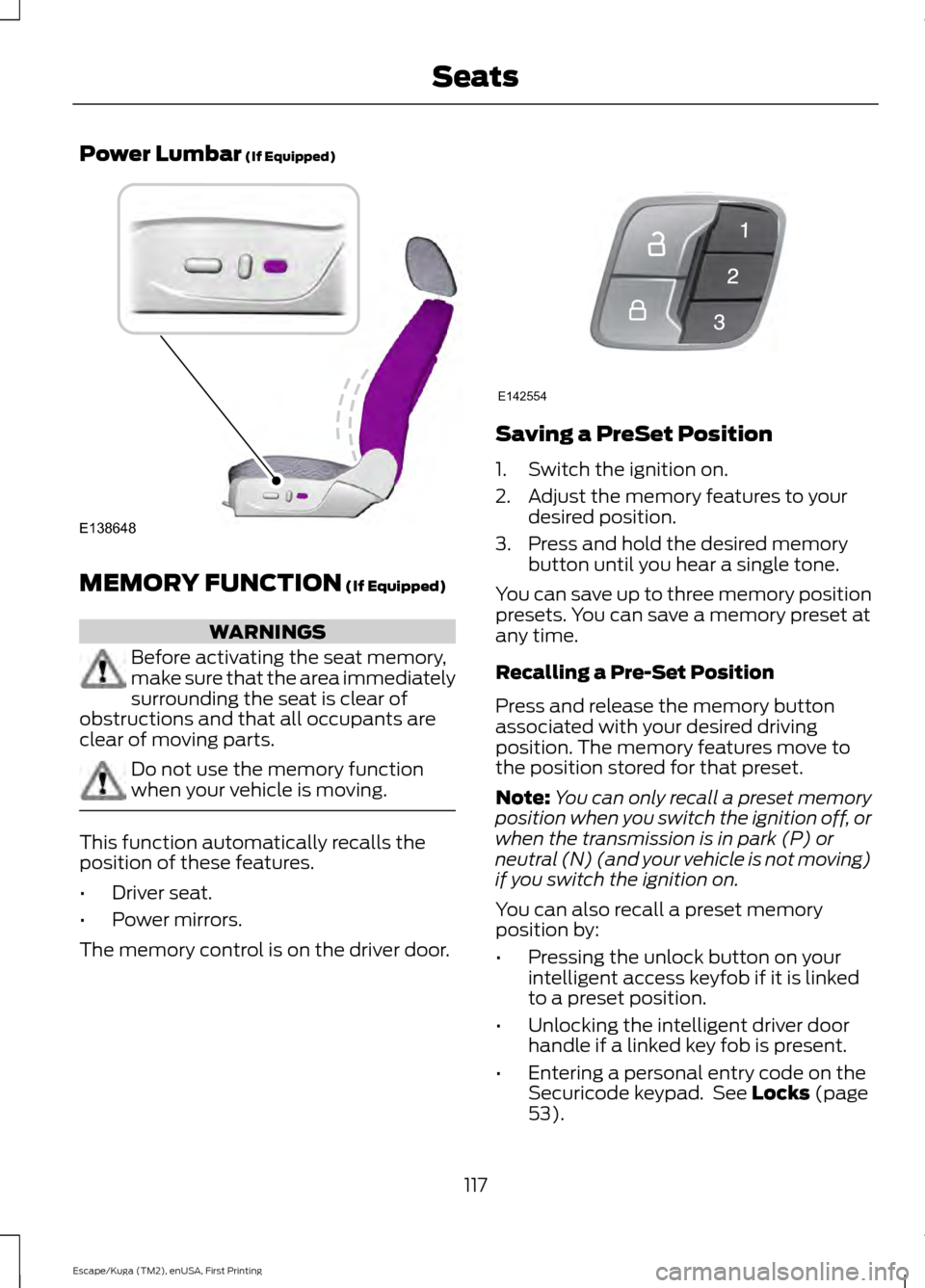
Power Lumbar (If Equipped)
MEMORY FUNCTION
(If Equipped)
WARNINGS
Before activating the seat memory,
make sure that the area immediately
surrounding the seat is clear of
obstructions and that all occupants are
clear of moving parts. Do not use the memory function
when your vehicle is moving.
This function automatically recalls the
position of these features.
•
Driver seat.
• Power mirrors.
The memory control is on the driver door. Saving a PreSet Position
1. Switch the ignition on.
2. Adjust the memory features to your
desired position.
3. Press and hold the desired memory button until you hear a single tone.
You can save up to three memory position
presets. You can save a memory preset at
any time.
Recalling a Pre-Set Position
Press and release the memory button
associated with your desired driving
position. The memory features move to
the position stored for that preset.
Note: You can only recall a preset memory
position when you switch the ignition off, or
when the transmission is in park (P) or
neutral (N) (and your vehicle is not moving)
if you switch the ignition on.
You can also recall a preset memory
position by:
• Pressing the unlock button on your
intelligent access keyfob if it is linked
to a preset position.
• Unlocking the intelligent driver door
handle if a linked key fob is present.
• Entering a personal entry code on the
Securicode keypad. See
Locks (page
53).
117
Escape/Kuga (TM2), enUSA, First Printing SeatsE138648 E142554
Page 132 of 486
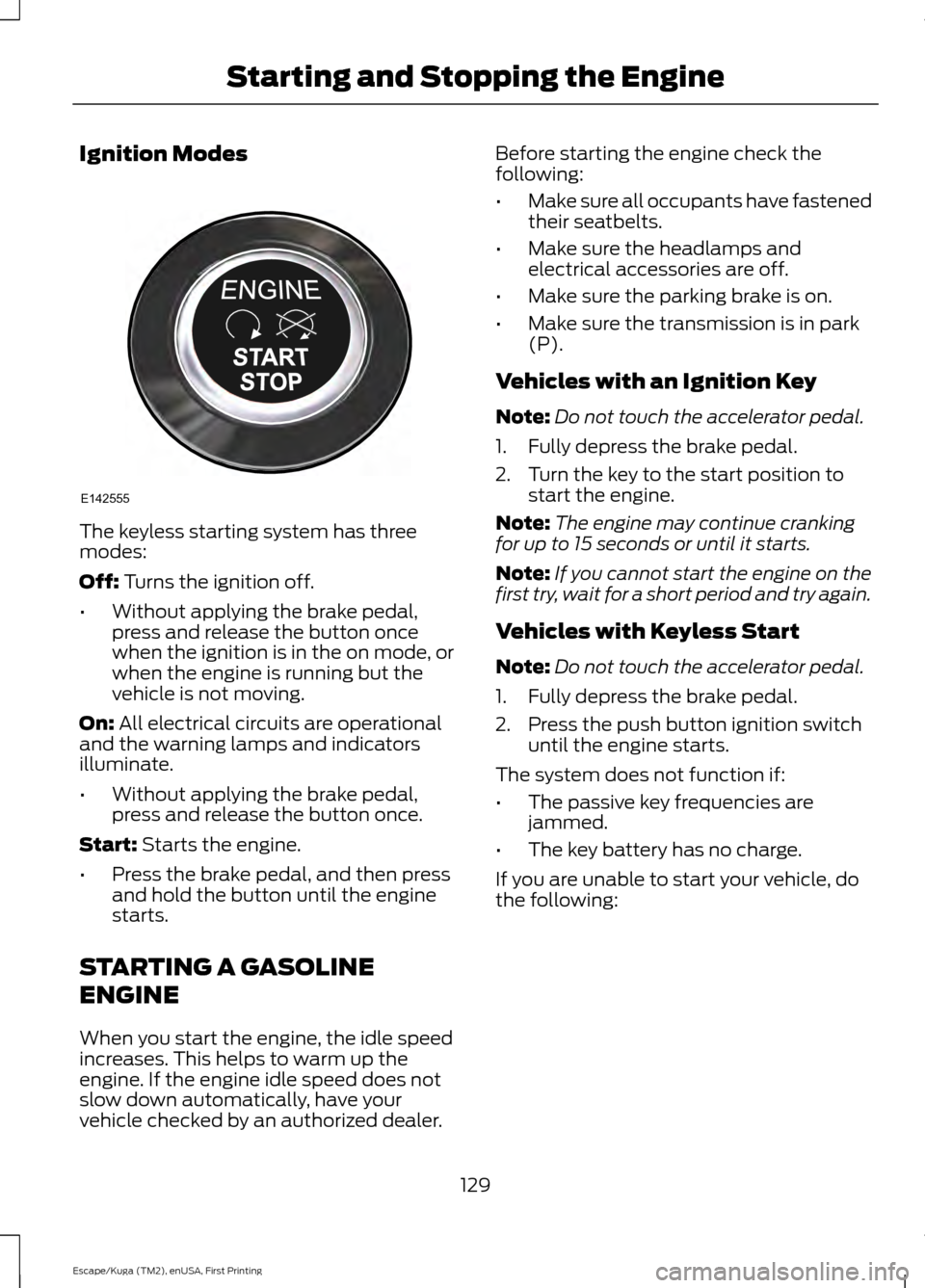
Ignition Modes
The keyless starting system has three
modes:
Off: Turns the ignition off.
• Without applying the brake pedal,
press and release the button once
when the ignition is in the on mode, or
when the engine is running but the
vehicle is not moving.
On:
All electrical circuits are operational
and the warning lamps and indicators
illuminate.
• Without applying the brake pedal,
press and release the button once.
Start:
Starts the engine.
• Press the brake pedal, and then press
and hold the button until the engine
starts.
STARTING A GASOLINE
ENGINE
When you start the engine, the idle speed
increases. This helps to warm up the
engine. If the engine idle speed does not
slow down automatically, have your
vehicle checked by an authorized dealer. Before starting the engine check the
following:
•
Make sure all occupants have fastened
their seatbelts.
• Make sure the headlamps and
electrical accessories are off.
• Make sure the parking brake is on.
• Make sure the transmission is in park
(P).
Vehicles with an Ignition Key
Note: Do not touch the accelerator pedal.
1. Fully depress the brake pedal.
2. Turn the key to the start position to start the engine.
Note: The engine may continue cranking
for up to 15 seconds or until it starts.
Note: If you cannot start the engine on the
first try, wait for a short period and try again.
Vehicles with Keyless Start
Note: Do not touch the accelerator pedal.
1. Fully depress the brake pedal.
2. Press the push button ignition switch until the engine starts.
The system does not function if:
• The passive key frequencies are
jammed.
• The key battery has no charge.
If you are unable to start your vehicle, do
the following:
129
Escape/Kuga (TM2), enUSA, First Printing Starting and Stopping the EngineE142555
Page 136 of 486
AUTO-START-STOP
The system helps reduce fuel consumption
by automatically shutting off and restarting
the engine while your vehicle is stopped.
The engine will restart automatically when
you release the brake pedal. In some
situations, your vehicle may restart
automatically, for example:
•
To maintain interior comfort
• To recharge the battery
Note: Power assist steering is turned off
when the engine is off. WARNINGS
The engine may restart
automatically if required by the
system.
Switch the ignition off before
opening the hood or performing any
maintenance. Failure to do so may
result in serious injuries due to automatic
engine restart. Always switch the ignition off before
leaving your vehicle, as the system
may have turned the engine off, but
the ignition will still be on and automatic
restart may occur. The Auto StartStop system status is
available at a glance within the information
display. See Information Displays (page
89).
Enabling Auto StartStop
The system is automatically enabled every
time you start your vehicle if the following
conditions are met:
• The Auto StartStop button is not
pressed (not illuminated).
• Your vehicle exceeds an initial speed
of
3 mph (5 km/h) after the vehicle has
been initially started.
• Your vehicle is stopped. •
Your foot is on the brake pedal.
• The transmission is in drive (D).
• The driver's door is closed.
• There is adequate brake vacuum.
• The interior compartment has been
cooled or warmed to an acceptable
level.
• The front windshield defroster is off.
• The steering wheel is not turned rapidly
or is not at a sharp angle.
• The vehicle is not on a steep road
grade.
• The battery is within optimal operating
conditions (battery state of charge and
temperature in range).
• The engine coolant is at operating
temperature.
• Elevation is below approximately
10,000 ft (3,048 m)
.
• Ambient temperature is moderate.
Note: The system allows multiple
successive Auto StartStop events, but it
may not operate in conditions of heavy
traffic or in extended low speed operation. The green Auto StartStop
indicator light on the instrument
cluster will illuminate to indicate
when the automatic engine stop occurs. If the instrument cluster is
equipped with a grey Auto
StartStop indicator light, it is
illuminated when automatic engine stop
is not available due to one of the above
noted conditions not being met.
Automatic Engine Restart
Any of the following conditions will result
in an automatic restart of the engine:
• Your foot is removed from the brake
pedal.
• You press the accelerator pedal.
133
Escape/Kuga (TM2), enUSA, First Printing Unique Driving Characteristics E146361