storage FORD ESCAPE 2018 User Guide
[x] Cancel search | Manufacturer: FORD, Model Year: 2018, Model line: ESCAPE, Model: FORD ESCAPE 2018Pages: 517, PDF Size: 6.62 MB
Page 300 of 517
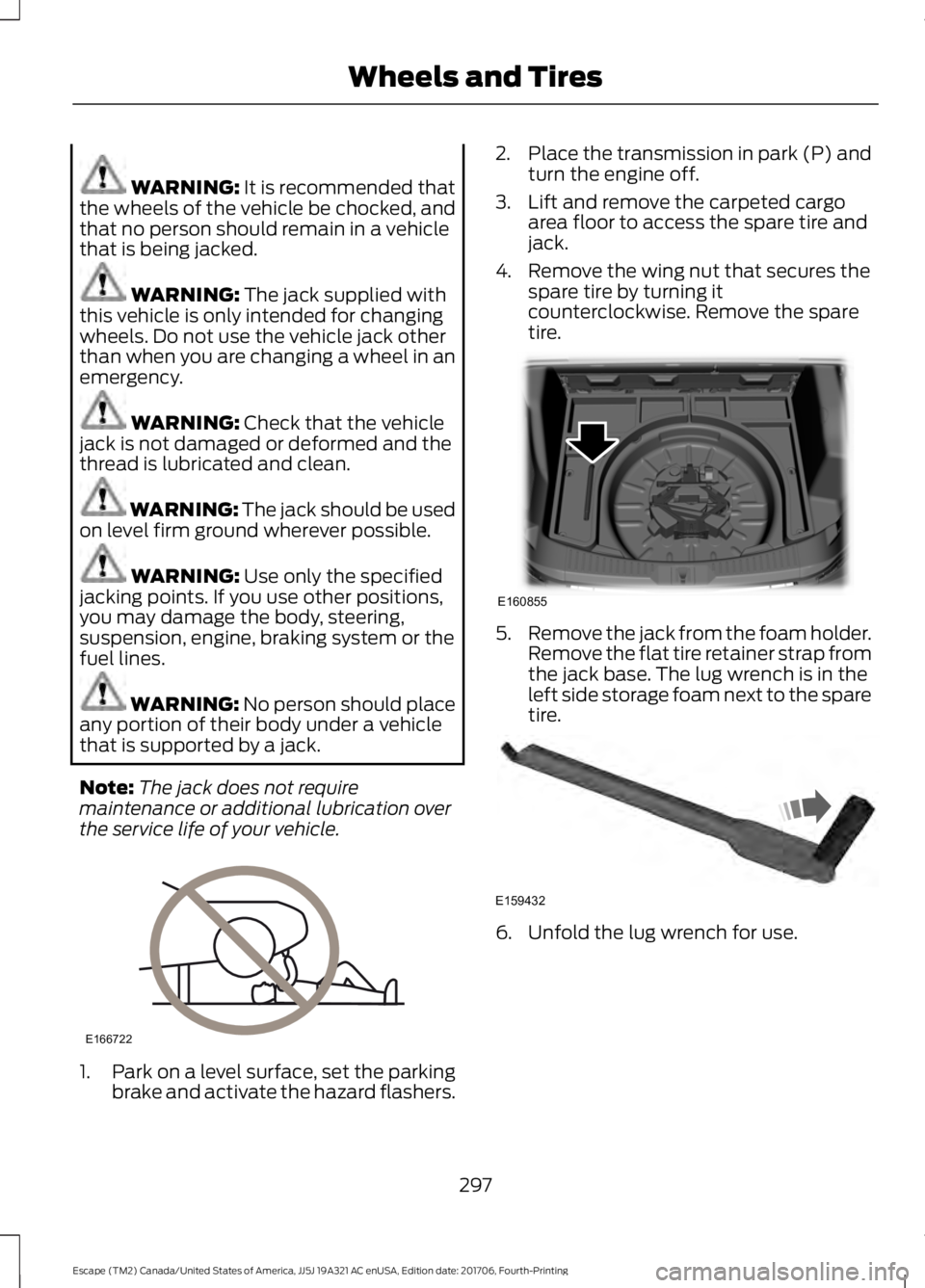
WARNING: It is recommended that
the wheels of the vehicle be chocked, and
that no person should remain in a vehicle
that is being jacked. WARNING:
The jack supplied with
this vehicle is only intended for changing
wheels. Do not use the vehicle jack other
than when you are changing a wheel in an
emergency. WARNING:
Check that the vehicle
jack is not damaged or deformed and the
thread is lubricated and clean. WARNING:
The jack should be used
on level firm ground wherever possible. WARNING:
Use only the specified
jacking points. If you use other positions,
you may damage the body, steering,
suspension, engine, braking system or the
fuel lines. WARNING: No person should place
any portion of their body under a vehicle
that is supported by a jack.
Note: The jack does not require
maintenance or additional lubrication over
the service life of your vehicle. 1.
Park on a level surface, set the parking
brake and activate the hazard flashers. 2.
Place the transmission in park (P) and
turn the engine off.
3. Lift and remove the carpeted cargo area floor to access the spare tire and
jack.
4. Remove the wing nut that secures the spare tire by turning it
counterclockwise. Remove the spare
tire. 5.
Remove the jack from the foam holder.
Remove the flat tire retainer strap from
the jack base. The lug wrench is in the
left side storage foam next to the spare
tire. 6. Unfold the lug wrench for use.
297
Escape (TM2) Canada/United States of America, JJ5J 19A321 AC enUSA, Edition date: 201706, Fourth-Printing Wheels and TiresE166722 E160855 E159432
Page 366 of 517
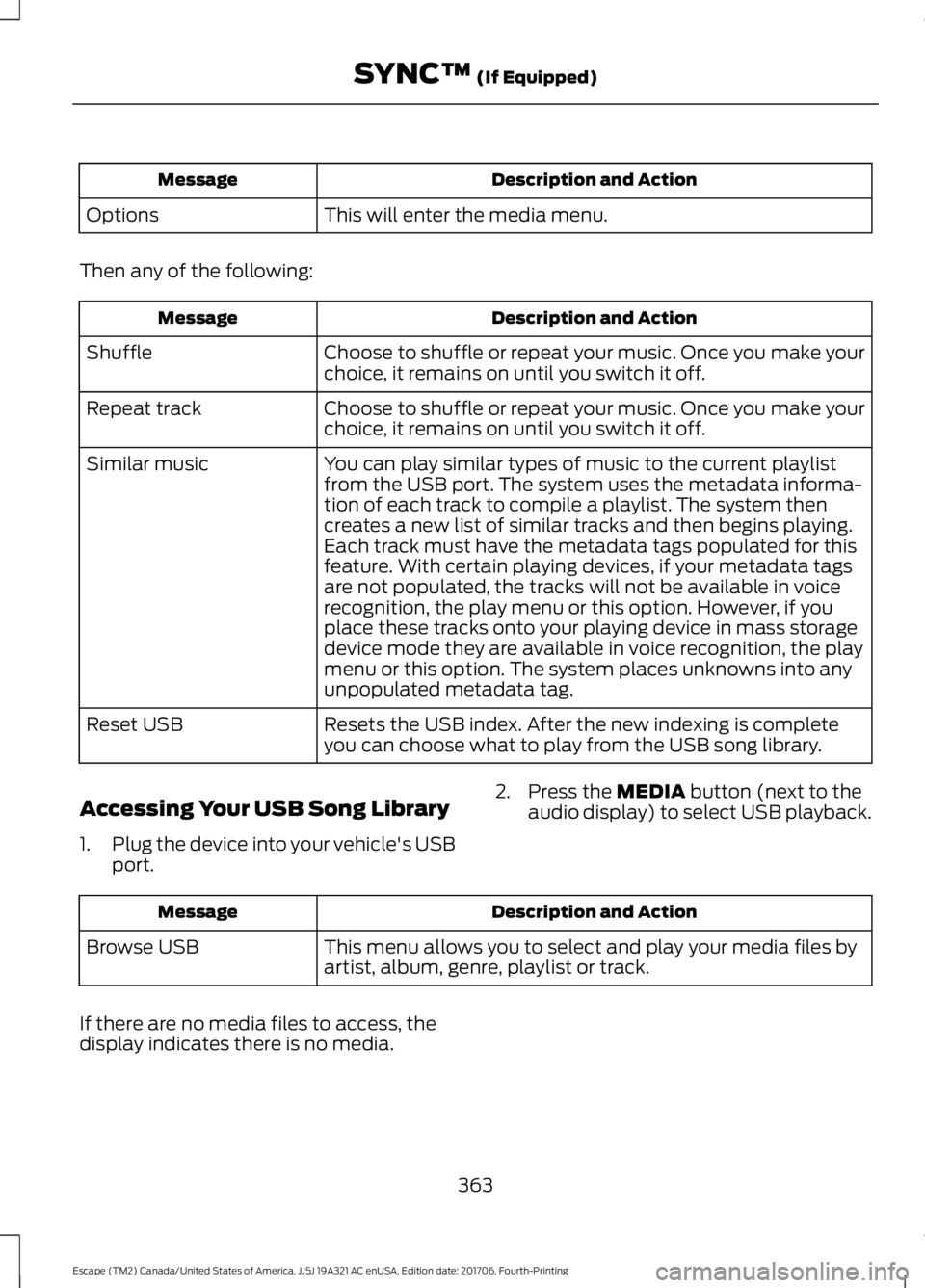
Description and Action
Message
This will enter the media menu.
Options
Then any of the following: Description and Action
Message
Choose to shuffle or repeat your music. Once you make your
choice, it remains on until you switch it off.
Shuffle
Choose to shuffle or repeat your music. Once you make your
choice, it remains on until you switch it off.
Repeat track
You can play similar types of music to the current playlist
from the USB port. The system uses the metadata informa-
tion of each track to compile a playlist. The system then
creates a new list of similar tracks and then begins playing.
Each track must have the metadata tags populated for this
feature. With certain playing devices, if your metadata tags
Similar music
are not populated, the tracks will not be available in voice
recognition, the play menu or this option. However, if you
place these tracks onto your playing device in mass storage
device mode they are available in voice recognition, the play
menu or this option. The system places unknowns into any
unpopulated metadata tag.
Resets the USB index. After the new indexing is complete
you can choose what to play from the USB song library.
Reset USB
Accessing Your USB Song Library
1. Plug the device into your vehicle's USB
port. 2. Press the MEDIA button (next to the
audio display) to select USB playback. Description and Action
Message
This menu allows you to select and play your media files by
artist, album, genre, playlist or track.
Browse USB
If there are no media files to access, the
display indicates there is no media.
363
Escape (TM2) Canada/United States of America, JJ5J 19A321 AC enUSA, Edition date: 201706, Fourth-Printing SYNC™
(If Equipped)
Page 368 of 517
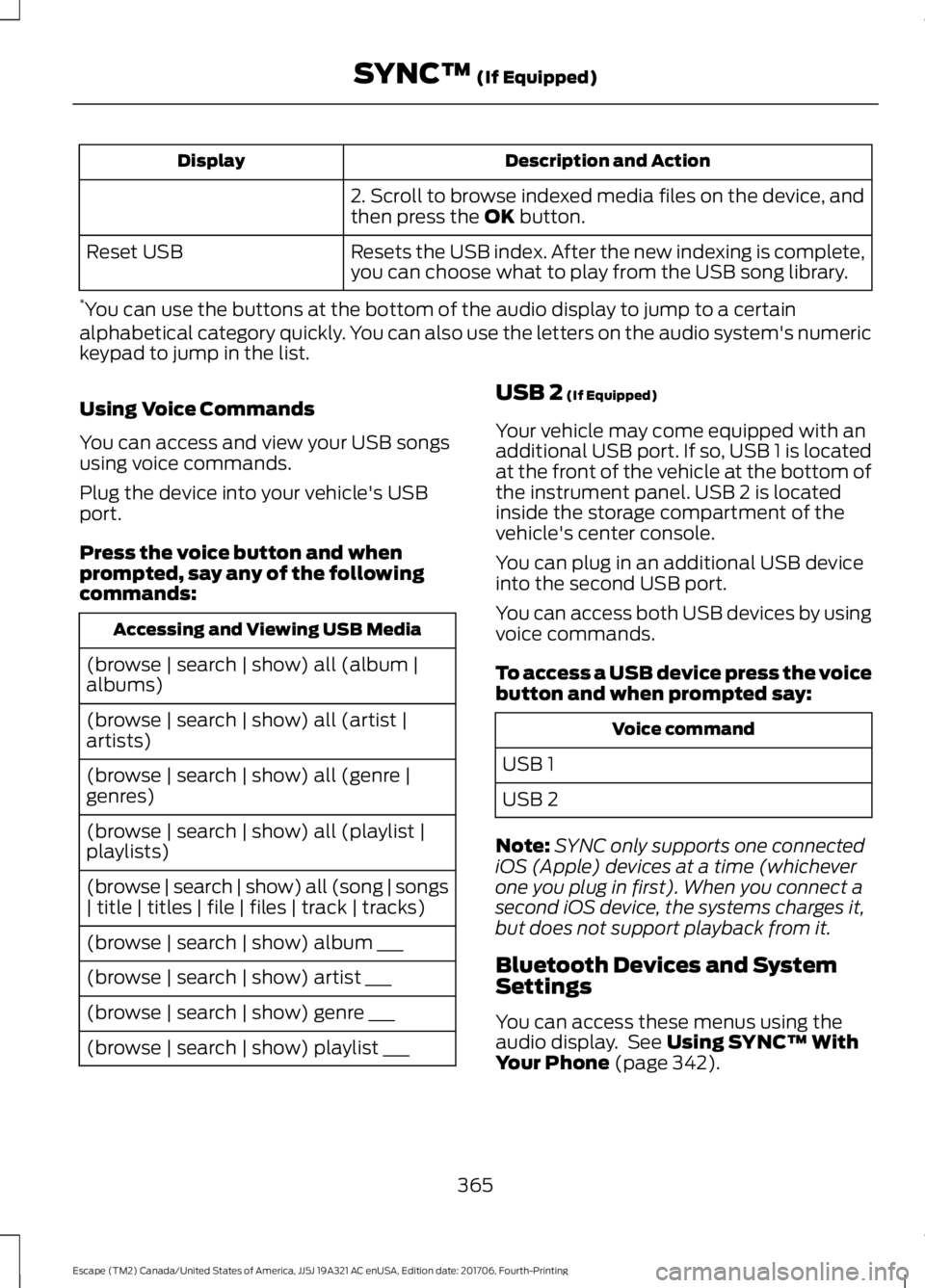
Description and Action
Display
2. Scroll to browse indexed media files on the device, and
then press the OK button.
Resets the USB index. After the new indexing is complete,
you can choose what to play from the USB song library.
Reset USB
* You can use the buttons at the bottom of the audio display to jump to a certain
alphabetical category quickly. You can also use the letters on the audio system's numeric
keypad to jump in the list.
Using Voice Commands
You can access and view your USB songs
using voice commands.
Plug the device into your vehicle's USB
port.
Press the voice button and when
prompted, say any of the following
commands: Accessing and Viewing USB Media
(browse | search | show) all (album |
albums)
(browse | search | show) all (artist |
artists)
(browse | search | show) all (genre |
genres)
(browse | search | show) all (playlist |
playlists)
(browse | search | show) all (song | songs
| title | titles | file | files | track | tracks)
(browse | search | show) album ___
(browse | search | show) artist ___
(browse | search | show) genre ___
(browse | search | show) playlist ___ USB 2
(If Equipped)
Your vehicle may come equipped with an
additional USB port. If so, USB 1 is located
at the front of the vehicle at the bottom of
the instrument panel. USB 2 is located
inside the storage compartment of the
vehicle's center console.
You can plug in an additional USB device
into the second USB port.
You can access both USB devices by using
voice commands.
To access a USB device press the voice
button and when prompted say: Voice command
USB 1
USB 2
Note: SYNC only supports one connected
iOS (Apple) devices at a time (whichever
one you plug in first). When you connect a
second iOS device, the systems charges it,
but does not support playback from it.
Bluetooth Devices and System
Settings
You can access these menus using the
audio display. See
Using SYNC™ With
Your Phone (page 342).
365
Escape (TM2) Canada/United States of America, JJ5J 19A321 AC enUSA, Edition date: 201706, Fourth-Printing SYNC™
(If Equipped)
Page 374 of 517
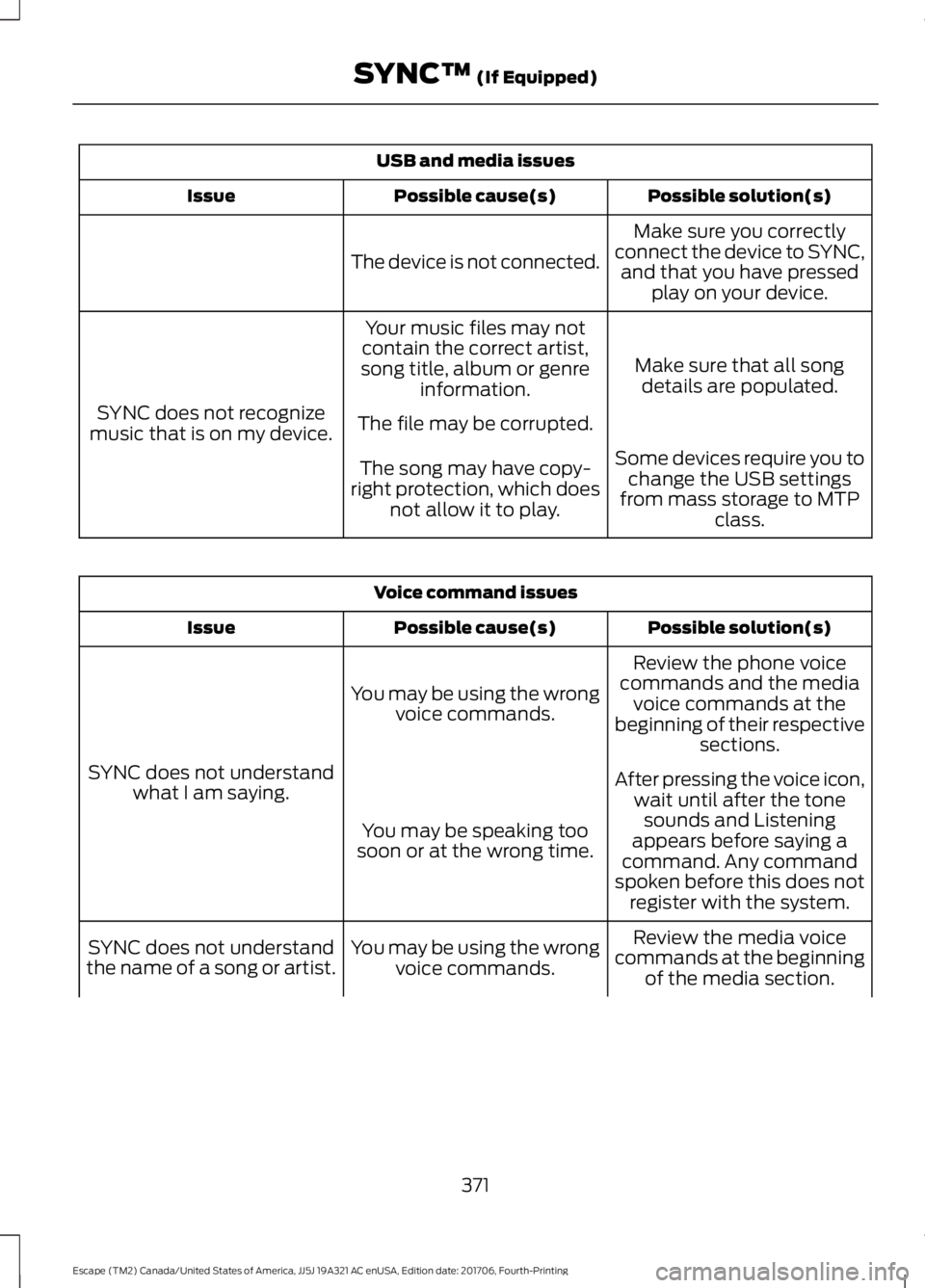
USB and media issues
Possible solution(s)
Possible cause(s)
Issue
Make sure you correctly
connect the device to SYNC, and that you have pressed play on your device.
The device is not connected.
Make sure that all songdetails are populated.
Your music files may not
contain the correct artist,
song title, album or genre information.
SYNC does not recognize
music that is on my device. The file may be corrupted.
Some devices require you tochange the USB settings
from mass storage to MTP class.
The song may have copy-
right protection, which does not allow it to play. Voice command issues
Possible solution(s)
Possible cause(s)
Issue
Review the phone voice
commands and the media voice commands at the
beginning of their respective sections.
You may be using the wrong
voice commands.
SYNC does not understand what I am saying. After pressing the voice icon,
wait until after the tonesounds and Listening
appears before saying a
command. Any command
spoken before this does not register with the system.
You may be speaking too
soon or at the wrong time.
Review the media voice
commands at the beginning of the media section.
You may be using the wrong
voice commands.
SYNC does not understand
the name of a song or artist.
371
Escape (TM2) Canada/United States of America, JJ5J 19A321 AC enUSA, Edition date: 201706, Fourth-Printing SYNC™ (If Equipped)
Page 443 of 517
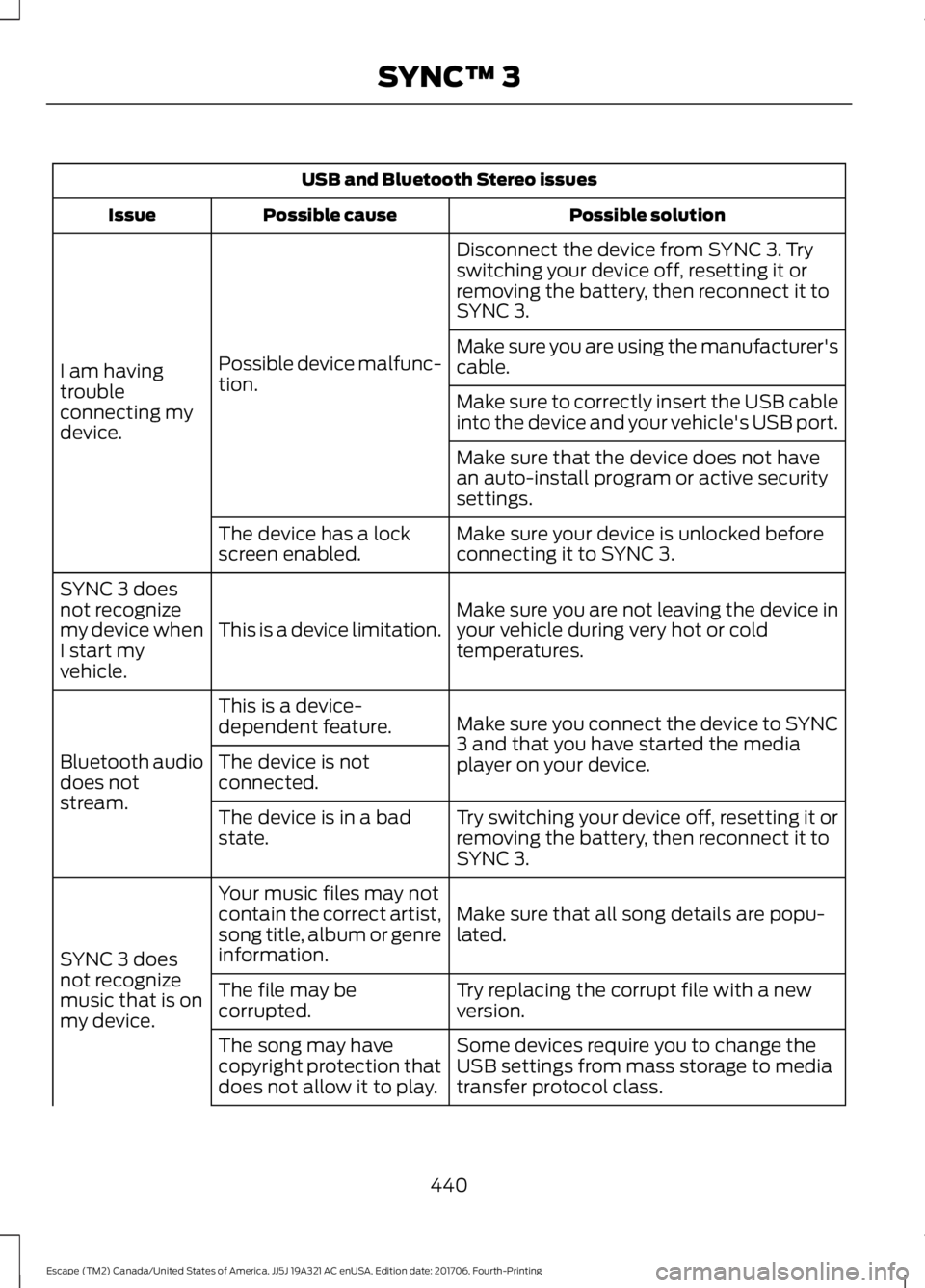
USB and Bluetooth Stereo issues
Possible solution
Possible cause
Issue
Disconnect the device from SYNC 3. Try
switching your device off, resetting it or
removing the battery, then reconnect it to
SYNC 3.
Possible device malfunc-
tion.
I am having
trouble
connecting my
device. Make sure you are using the manufacturer's
cable.
Make sure to correctly insert the USB cable
into the device and your vehicle's USB port.
Make sure that the device does not have
an auto-install program or active security
settings.
Make sure your device is unlocked before
connecting it to SYNC 3.
The device has a lock
screen enabled.
Make sure you are not leaving the device in
your vehicle during very hot or cold
temperatures.
This is a device limitation.
SYNC 3 does
not recognize
my device when
I start my
vehicle.
Make sure you connect the device to SYNC
3 and that you have started the media
player on your device.
This is a device-
dependent feature.
Bluetooth audio
does not
stream. The device is not
connected.
Try switching your device off, resetting it or
removing the battery, then reconnect it to
SYNC 3.
The device is in a bad
state.
Make sure that all song details are popu-
lated.
Your music files may not
contain the correct artist,
song title, album or genre
information.
SYNC 3 does
not recognize
music that is on
my device. Try replacing the corrupt file with a new
version.
The file may be
corrupted.
Some devices require you to change the
USB settings from mass storage to media
transfer protocol class.
The song may have
copyright protection that
does not allow it to play.
440
Escape (TM2) Canada/United States of America, JJ5J 19A321 AC enUSA, Edition date: 201706, Fourth-Printing SYNC™ 3
Page 494 of 517
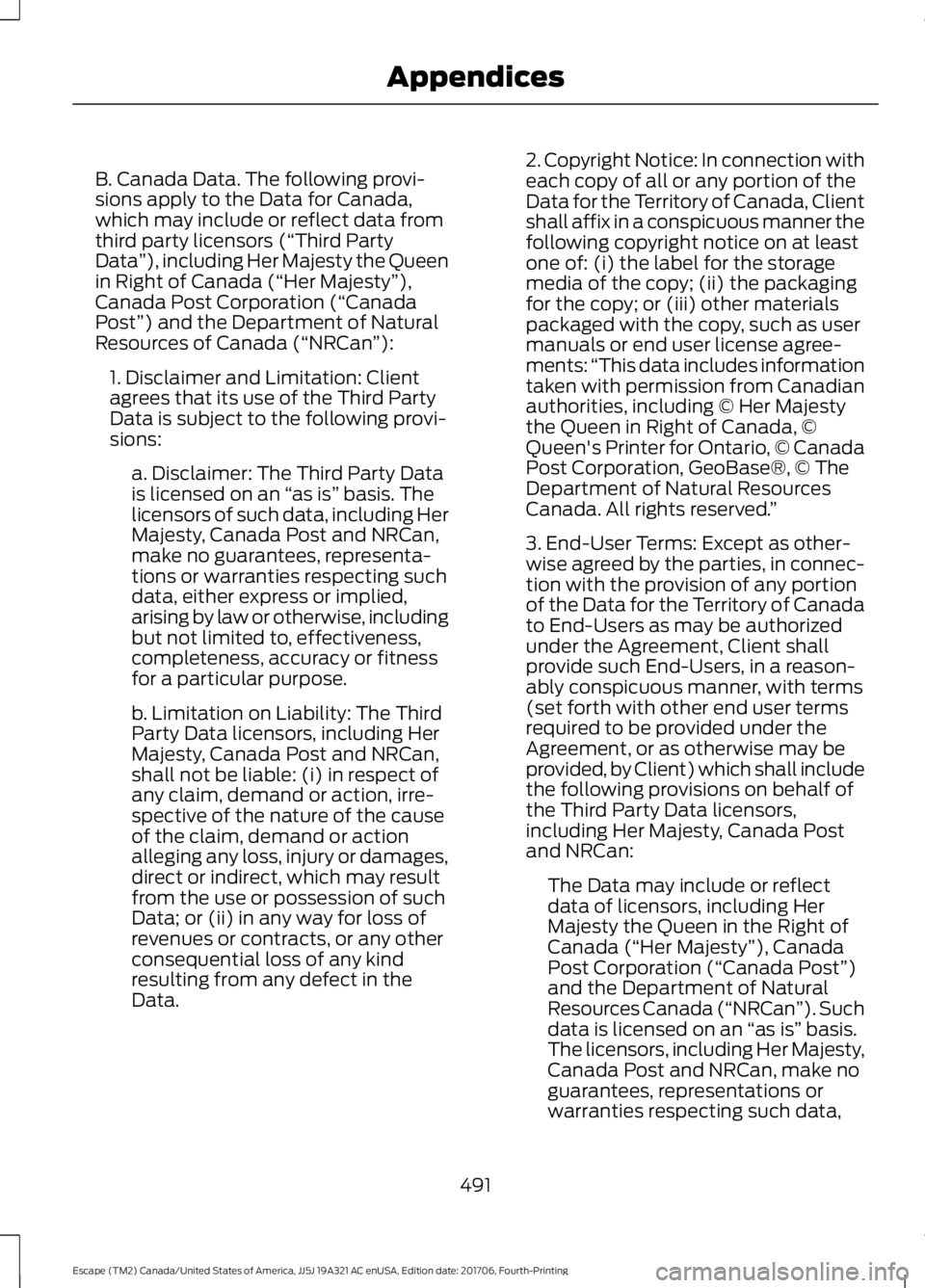
B. Canada Data. The following provi-
sions apply to the Data for Canada,
which may include or reflect data from
third party licensors (“Third Party
Data
”), including Her Majesty the Queen
in Right of Canada (“Her Majesty ”),
Canada Post Corporation (“Canada
Post”) and the Department of Natural
Resources of Canada (“NRCan ”):
1. Disclaimer and Limitation: Client
agrees that its use of the Third Party
Data is subject to the following provi-
sions: a. Disclaimer: The Third Party Data
is licensed on an “as is” basis. The
licensors of such data, including Her
Majesty, Canada Post and NRCan,
make no guarantees, representa-
tions or warranties respecting such
data, either express or implied,
arising by law or otherwise, including
but not limited to, effectiveness,
completeness, accuracy or fitness
for a particular purpose.
b. Limitation on Liability: The Third
Party Data licensors, including Her
Majesty, Canada Post and NRCan,
shall not be liable: (i) in respect of
any claim, demand or action, irre-
spective of the nature of the cause
of the claim, demand or action
alleging any loss, injury or damages,
direct or indirect, which may result
from the use or possession of such
Data; or (ii) in any way for loss of
revenues or contracts, or any other
consequential loss of any kind
resulting from any defect in the
Data. 2. Copyright Notice: In connection with
each copy of all or any portion of the
Data for the Territory of Canada, Client
shall affix in a conspicuous manner the
following copyright notice on at least
one of: (i) the label for the storage
media of the copy; (ii) the packaging
for the copy; or (iii) other materials
packaged with the copy, such as user
manuals or end user license agree-
ments:
“This data includes information
taken with permission from Canadian
authorities, including © Her Majesty
the Queen in Right of Canada, ©
Queen's Printer for Ontario, © Canada
Post Corporation, GeoBase®, © The
Department of Natural Resources
Canada. All rights reserved. ”
3. End-User Terms: Except as other-
wise agreed by the parties, in connec-
tion with the provision of any portion
of the Data for the Territory of Canada
to End-Users as may be authorized
under the Agreement, Client shall
provide such End-Users, in a reason-
ably conspicuous manner, with terms
(set forth with other end user terms
required to be provided under the
Agreement, or as otherwise may be
provided, by Client) which shall include
the following provisions on behalf of
the Third Party Data licensors,
including Her Majesty, Canada Post
and NRCan: The Data may include or reflect
data of licensors, including Her
Majesty the Queen in the Right of
Canada (“Her Majesty ”), Canada
Post Corporation (“Canada Post”)
and the Department of Natural
Resources Canada (“NRCan ”). Such
data is licensed on an “as is” basis.
The licensors, including Her Majesty,
Canada Post and NRCan, make no
guarantees, representations or
warranties respecting such data,
491
Escape (TM2) Canada/United States of America, JJ5J 19A321 AC enUSA, Edition date: 201706, Fourth-Printing Appendices
Page 513 of 517
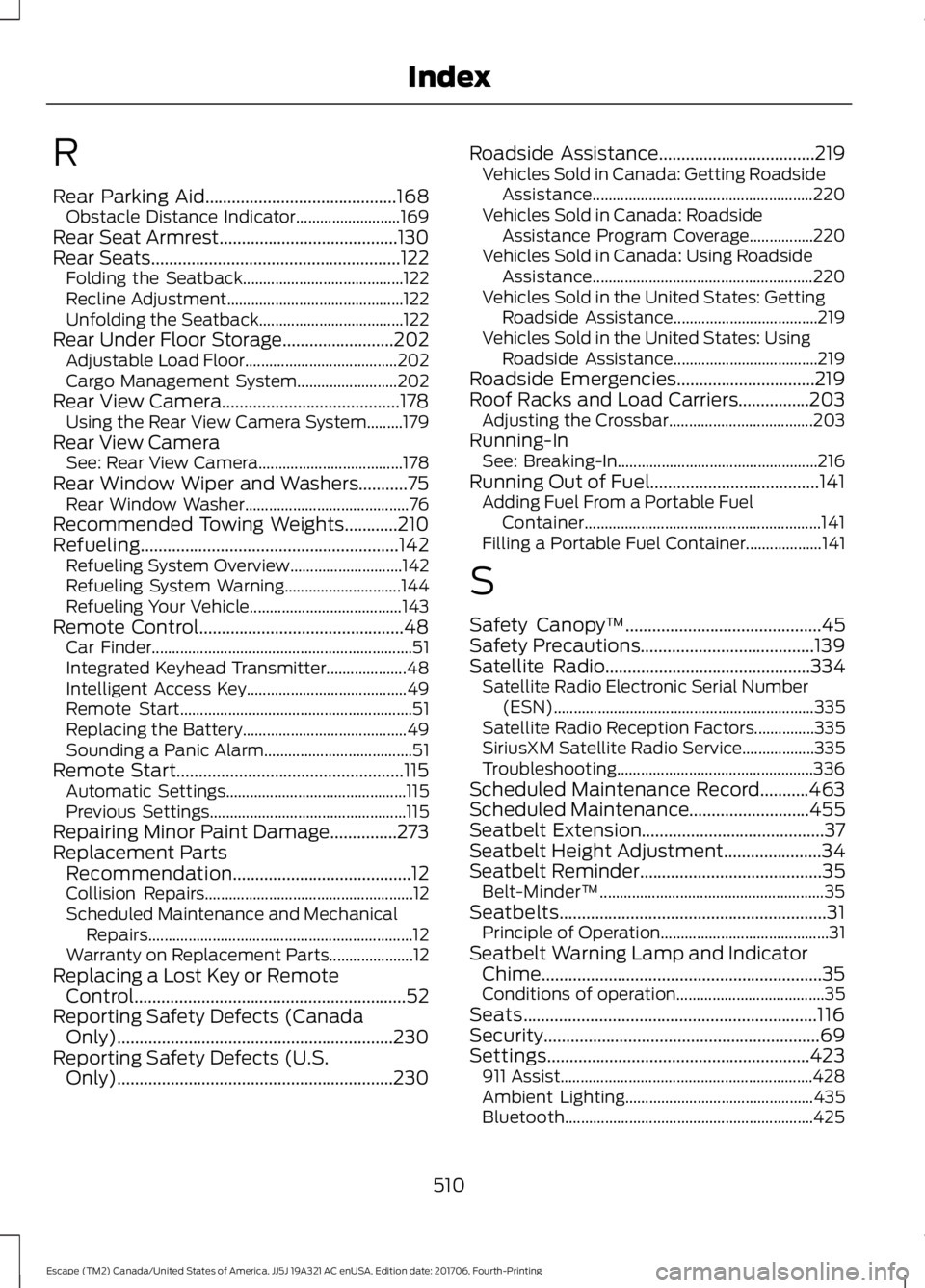
R
Rear Parking Aid...........................................168
Obstacle Distance Indicator.......................... 169
Rear Seat Armrest........................................130
Rear Seats
........................................................122
Folding the Seatback........................................ 122
Recline Adjustment............................................ 122
Unfolding the Seatback.................................... 122
Rear Under Floor Storage.........................202 Adjustable Load Floor...................................... 202
Cargo Management System......................... 202
Rear View Camera........................................178 Using the Rear View Camera System.........179
Rear View Camera See: Rear View Camera.................................... 178
Rear Window Wiper and Washers...........75 Rear Window Washer......................................... 76
Recommended Towing Weights............210
Refueling..........................................................142 Refueling System Overview............................ 142
Refueling System Warning............................. 144
Refueling Your Vehicle...................................... 143
Remote Control..............................................48 Car Finder................................................................. 51
Integrated Keyhead Transmitter.................... 48
Intelligent Access Key........................................ 49
Remote Start.......................................................... 51
Replacing the Battery......................................... 49
Sounding a Panic Alarm..................................... 51
Remote Start...................................................115 Automatic Settings............................................. 115
Previous Settings................................................. 115
Repairing Minor Paint Damage...............273
Replacement Parts Recommendation........................................12
Collision Repairs.................................................... 12
Scheduled Maintenance and Mechanical Repairs.................................................................. 12
Warranty on Replacement Parts..................... 12
Replacing a Lost Key or Remote Control.............................................................52
Reporting Safety Defects (Canada Only)
..............................................................230
Reporting Safety Defects (U.S. Only)
..............................................................230 Roadside Assistance
...................................219
Vehicles Sold in Canada: Getting Roadside
Assistance....................................................... 220
Vehicles Sold in Canada: Roadside Assistance Program Coverage................220
Vehicles Sold in Canada: Using Roadside Assistance....................................................... 220
Vehicles Sold in the United States: Getting Roadside Assistance.................................... 219
Vehicles Sold in the United States: Using Roadside Assistance.................................... 219
Roadside Emergencies...............................219
Roof Racks and Load Carriers................203 Adjusting the Crossbar.................................... 203
Running-In See: Breaking-In.................................................. 216
Running Out of Fuel
......................................141
Adding Fuel From a Portable Fuel
Container........................................................... 141
Filling a Portable Fuel Container................... 141
S
Safety Canopy ™
............................................45
Safety Precautions.......................................139
Satellite Radio
..............................................334
Satellite Radio Electronic Serial Number
(ESN)................................................................. 335
Satellite Radio Reception Factors...............335
SiriusXM Satellite Radio Service.................. 335
Troubleshooting................................................. 336
Scheduled Maintenance Record
...........463
Scheduled Maintenance...........................455
Seatbelt Extension
.........................................37
Seatbelt Height Adjustment......................34
Seatbelt Reminder.........................................35
Belt-Minder™........................................................ 35
Seatbelts............................................................31 Principle of Operation.......................................... 31
Seatbelt Warning Lamp and Indicator Chime...............................................................35
Conditions of operation..................................... 35
Seats
..................................................................116
Security..............................................................69
Settings...........................................................423 911 Assist............................................................... 428
Ambient Lighting............................................... 435
Bluetooth.............................................................. 425
510
Escape (TM2) Canada/United States of America, JJ5J 19A321 AC enUSA, Edition date: 201706, Fourth-Printing Index
Page 514 of 517
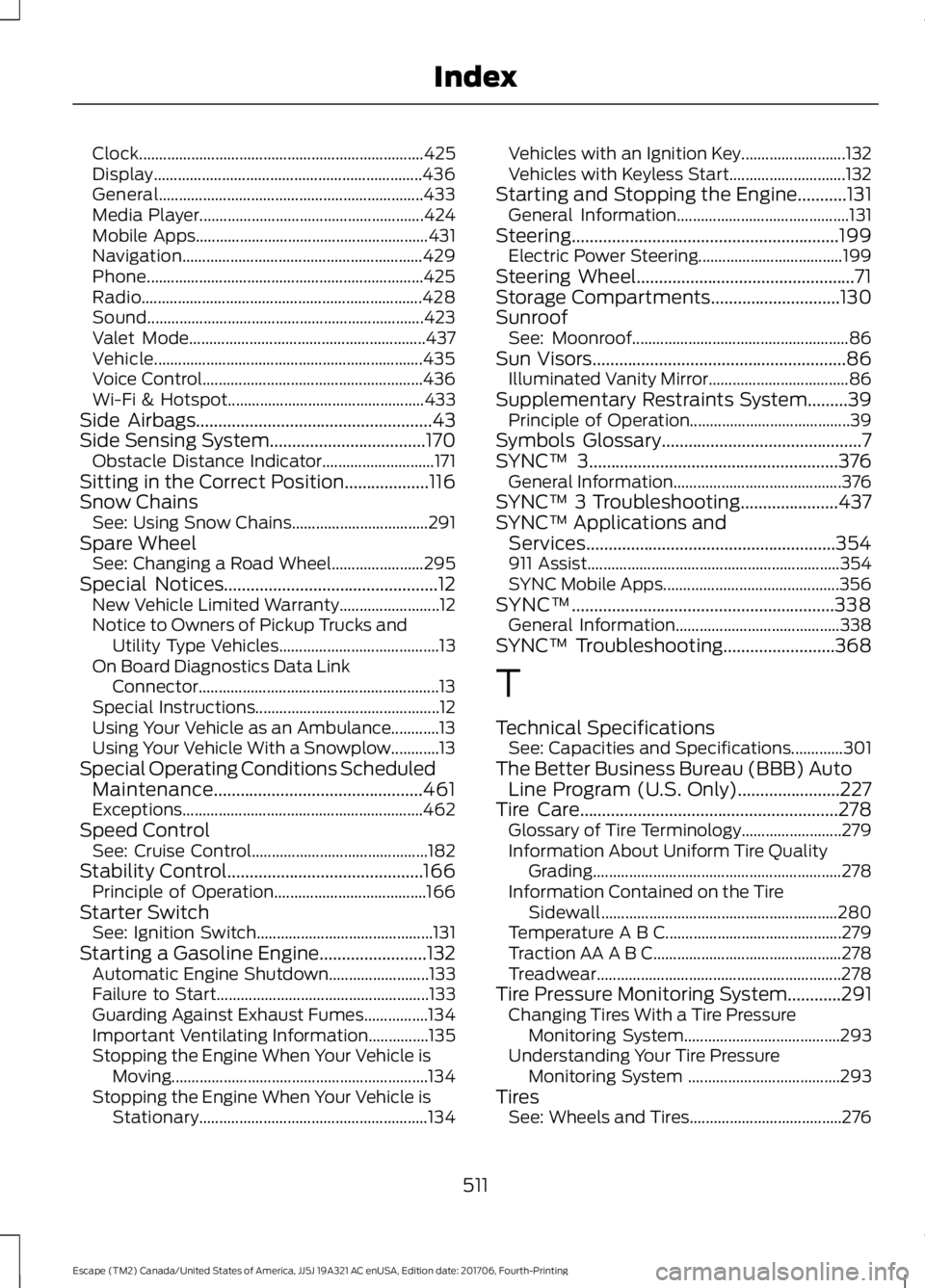
Clock.......................................................................
425
Display................................................................... 436
General.................................................................. 433
Media Player........................................................ 424
Mobile Apps.......................................................... 431
Navigation............................................................ 429
Phone..................................................................... 425
Radio...................................................................... 428
Sound..................................................................... 423
Valet Mode........................................................... 437
Vehicle................................................................... 435
Voice Control....................................................... 436
Wi-Fi & Hotspot................................................. 433
Side Airbags
.....................................................43
Side Sensing System...................................170 Obstacle Distance Indicator............................ 171
Sitting in the Correct Position...................116
Snow Chains See: Using Snow Chains.................................. 291
Spare Wheel See: Changing a Road Wheel....................... 295
Special Notices................................................12 New Vehicle Limited Warranty......................... 12
Notice to Owners of Pickup Trucks and Utility Type Vehicles........................................ 13
On Board Diagnostics Data Link Connector............................................................ 13
Special Instructions.............................................. 12
Using Your Vehicle as an Ambulance............13
Using Your Vehicle With a Snowplow............13
Special Operating Conditions Scheduled Maintenance...............................................461
Exceptions............................................................ 462
Speed Control See: Cruise Control............................................ 182
Stability Control............................................166 Principle of Operation...................................... 166
Starter Switch See: Ignition Switch............................................ 131
Starting a Gasoline Engine
........................132
Automatic Engine Shutdown......................... 133
Failure to Start..................................................... 133
Guarding Against Exhaust Fumes................134
Important Ventilating Information...............135
Stopping the Engine When Your Vehicle is Moving................................................................134
Stopping the Engine When Your Vehicle is Stationary......................................................... 134Vehicles with an Ignition Key..........................
132
Vehicles with Keyless Start............................. 132
Starting and Stopping the Engine...........131 General Information........................................... 131
Steering............................................................199 Electric Power Steering.................................... 199
Steering Wheel.................................................71
Storage Compartments.............................130
Sunroof See: Moonroof...................................................... 86
Sun Visors.........................................................86 Illuminated Vanity Mirror................................... 86
Supplementary Restraints System
.........39
Principle of Operation........................................ 39
Symbols Glossary
.............................................7
SYNC™ 3........................................................376
General Information.......................................... 376
SYNC™ 3 Troubleshooting......................437
SYNC™ Applications and Services........................................................354
911 Assist............................................................... 354
SYNC Mobile Apps............................................ 356
SYNC™...........................................................338 General Information......................................... 338
SYNC™ Troubleshooting
.........................368
T
Technical Specifications See: Capacities and Specifications.............301
The Better Business Bureau (BBB) Auto Line Program (U.S. Only).......................227
Tire Care..........................................................278 Glossary of Tire Terminology......................... 279
Information About Uniform Tire Quality Grading .............................................................. 278
Information Contained on the Tire Sidewall........................................................... 280
Temperature A B C............................................ 279
Traction AA A B C............................................... 278
Treadwear............................................................. 278
Tire Pressure Monitoring System............291 Changing Tires With a Tire Pressure
Monitoring System....................................... 293
Understanding Your Tire Pressure Monitoring System ...................................... 293
Tires See: Wheels and Tires...................................... 276
511
Escape (TM2) Canada/United States of America, JJ5J 19A321 AC enUSA, Edition date: 201706, Fourth-Printing Index
Page 516 of 517
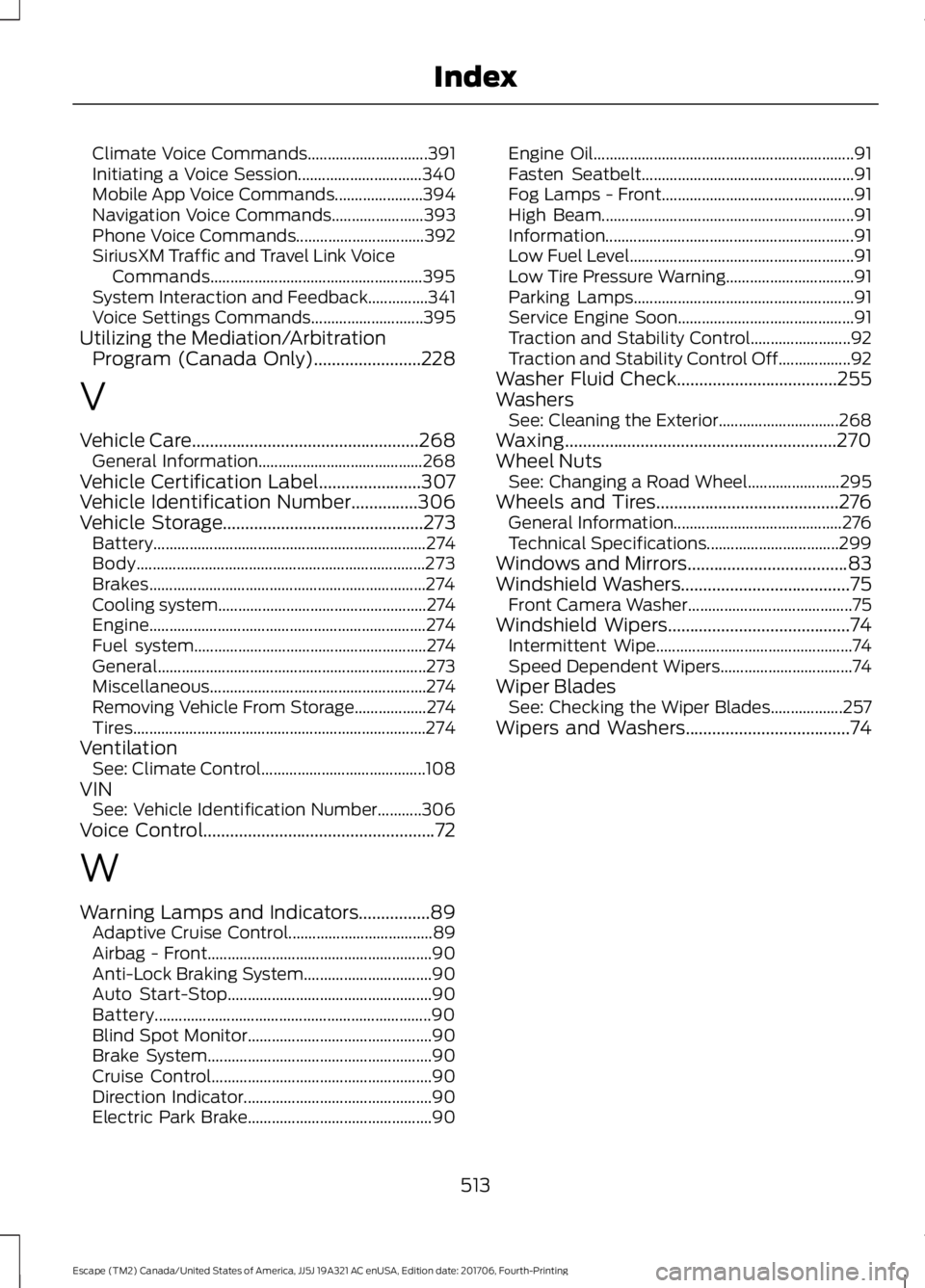
Climate Voice Commands..............................
391
Initiating a Voice Session............................... 340
Mobile App Voice Commands...................... 394
Navigation Voice Commands....................... 393
Phone Voice Commands................................ 392
SiriusXM Traffic and Travel Link Voice Commands..................................................... 395
System Interaction and Feedback...............341
Voice Settings Commands............................ 395
Utilizing the Mediation/Arbitration Program (Canada Only)........................228
V
Vehicle Care...................................................268 General Information......................................... 268
Vehicle Certification Label.......................307
Vehicle Identification Number
...............306
Vehicle Storage.............................................273
Battery.................................................................... 274
Body........................................................................\
273
Brakes..................................................................... 274
Cooling system.................................................... 274
Engine..................................................................... 274
Fuel system.......................................................... 274
General................................................................... 273
Miscellaneous...................................................... 274
Removing Vehicle From Storage.................. 274
Tires........................................................................\
. 274
Ventilation See: Climate Control......................................... 108
VIN See: Vehicle Identification Number...........306
Voice Control
....................................................72
W
Warning Lamps and Indicators................89 Adaptive Cruise Control.................................... 89
Airbag - Front........................................................ 90
Anti-Lock Braking System................................ 90
Auto Start-Stop................................................... 90
Battery..................................................................... 90
Blind Spot Monitor.............................................. 90
Brake System........................................................ 90
Cruise Control....................................................... 90
Direction Indicator............................................... 90
Electric Park Brake.............................................. 90Engine Oil.................................................................
91
Fasten Seatbelt..................................................... 91
Fog Lamps - Front................................................ 91
High Beam............................................................... 91
Information.............................................................. 91
Low Fuel Level........................................................ 91
Low Tire Pressure Warning................................ 91
Parking Lamps....................................................... 91
Service Engine Soon............................................ 91
Traction and Stability Control......................... 92
Traction and Stability Control Off.................. 92
Washer Fluid Check
....................................255
Washers See: Cleaning the Exterior.............................. 268
Waxing.............................................................270
Wheel Nuts See: Changing a Road Wheel....................... 295
Wheels and Tires
.........................................276
General Information.......................................... 276
Technical Specifications................................. 299
Windows and Mirrors
....................................83
Windshield Washers......................................75 Front Camera Washer......................................... 75
Windshield Wipers.........................................74 Intermittent Wipe................................................. 74
Speed Dependent Wipers................................. 74
Wiper Blades See: Checking the Wiper Blades.................. 257
Wipers and Washers.....................................74
513
Escape (TM2) Canada/United States of America, JJ5J 19A321 AC enUSA, Edition date: 201706, Fourth-Printing Index