Speed sensor FORD ESCAPE 2018 Owner's Manual
[x] Cancel search | Manufacturer: FORD, Model Year: 2018, Model line: ESCAPE, Model: FORD ESCAPE 2018Pages: 517, PDF Size: 6.62 MB
Page 294 of 517
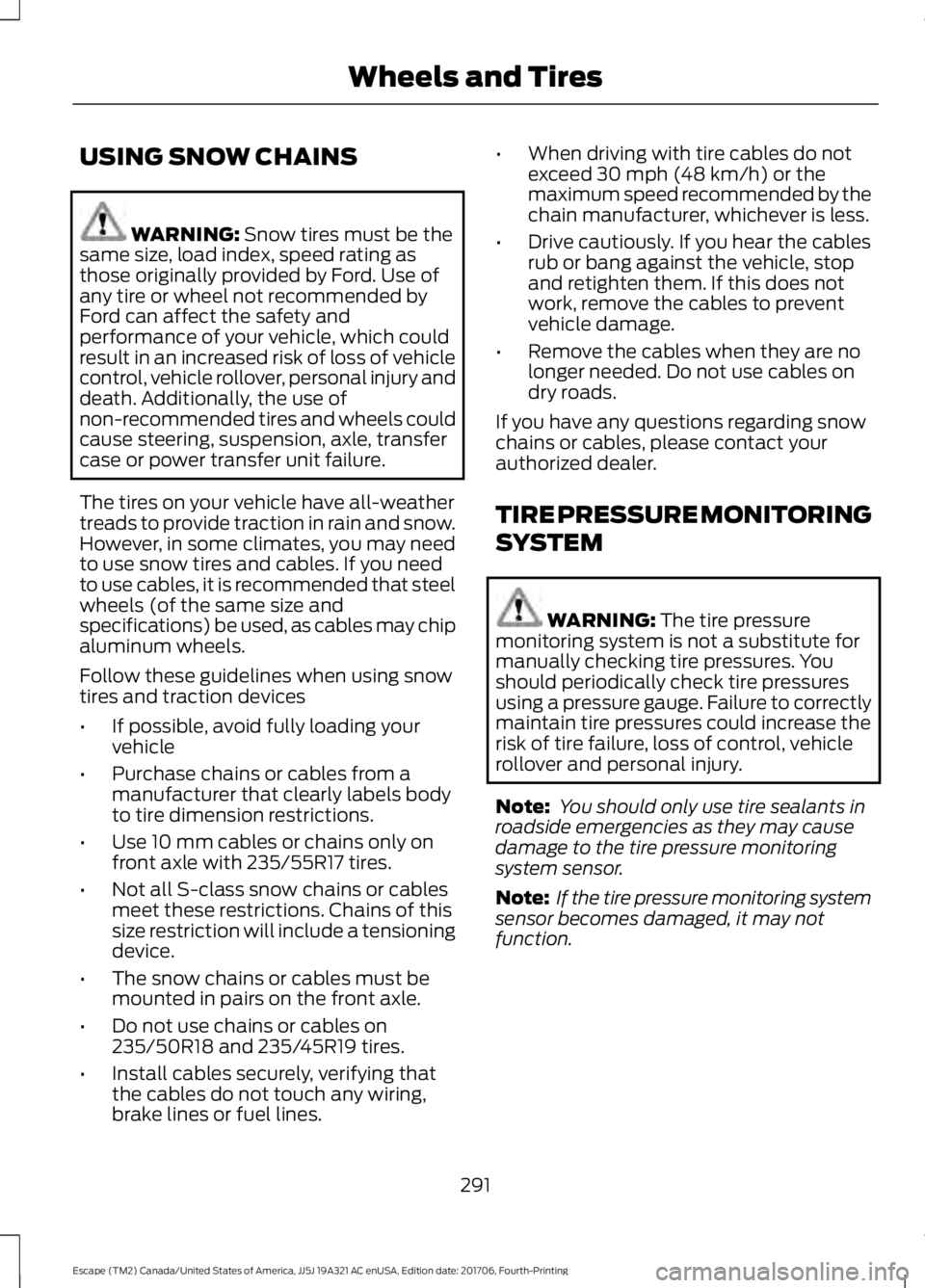
USING SNOW CHAINS
WARNING: Snow tires must be the
same size, load index, speed rating as
those originally provided by Ford. Use of
any tire or wheel not recommended by
Ford can affect the safety and
performance of your vehicle, which could
result in an increased risk of loss of vehicle
control, vehicle rollover, personal injury and
death. Additionally, the use of
non-recommended tires and wheels could
cause steering, suspension, axle, transfer
case or power transfer unit failure.
The tires on your vehicle have all-weather
treads to provide traction in rain and snow.
However, in some climates, you may need
to use snow tires and cables. If you need
to use cables, it is recommended that steel
wheels (of the same size and
specifications) be used, as cables may chip
aluminum wheels.
Follow these guidelines when using snow
tires and traction devices
• If possible, avoid fully loading your
vehicle
• Purchase chains or cables from a
manufacturer that clearly labels body
to tire dimension restrictions.
• Use 10 mm cables or chains only on
front axle with 235/55R17 tires.
• Not all S-class snow chains or cables
meet these restrictions. Chains of this
size restriction will include a tensioning
device.
• The snow chains or cables must be
mounted in pairs on the front axle.
• Do not use chains or cables on
235/50R18 and 235/45R19 tires.
• Install cables securely, verifying that
the cables do not touch any wiring,
brake lines or fuel lines. •
When driving with tire cables do not
exceed 30 mph (48 km/h) or the
maximum speed recommended by the
chain manufacturer, whichever is less.
• Drive cautiously. If you hear the cables
rub or bang against the vehicle, stop
and retighten them. If this does not
work, remove the cables to prevent
vehicle damage.
• Remove the cables when they are no
longer needed. Do not use cables on
dry roads.
If you have any questions regarding snow
chains or cables, please contact your
authorized dealer.
TIRE PRESSURE MONITORING
SYSTEM WARNING:
The tire pressure
monitoring system is not a substitute for
manually checking tire pressures. You
should periodically check tire pressures
using a pressure gauge. Failure to correctly
maintain tire pressures could increase the
risk of tire failure, loss of control, vehicle
rollover and personal injury.
Note: You should only use tire sealants in
roadside emergencies as they may cause
damage to the tire pressure monitoring
system sensor.
Note: If the tire pressure monitoring system
sensor becomes damaged, it may not
function.
291
Escape (TM2) Canada/United States of America, JJ5J 19A321 AC enUSA, Edition date: 201706, Fourth-Printing Wheels and Tires
Page 298 of 517
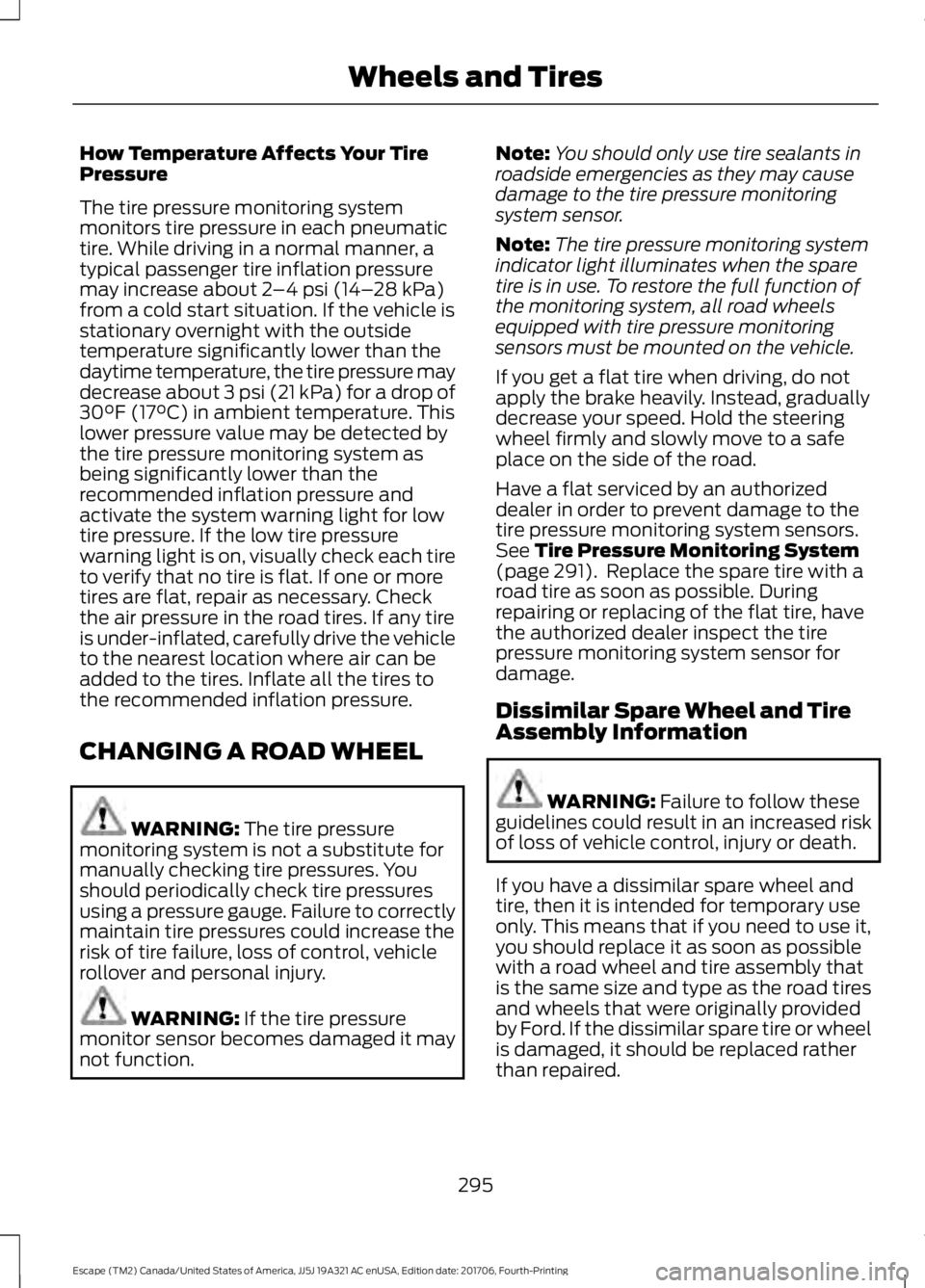
How Temperature Affects Your Tire
Pressure
The tire pressure monitoring system
monitors tire pressure in each pneumatic
tire. While driving in a normal manner, a
typical passenger tire inflation pressure
may increase about 2
–4 psi (14– 28 kPa)
from a cold start situation. If the vehicle is
stationary overnight with the outside
temperature significantly lower than the
daytime temperature, the tire pressure may
decrease about 3 psi (21 kPa) for a drop of
30°F (17°C) in ambient temperature. This
lower pressure value may be detected by
the tire pressure monitoring system as
being significantly lower than the
recommended inflation pressure and
activate the system warning light for low
tire pressure. If the low tire pressure
warning light is on, visually check each tire
to verify that no tire is flat. If one or more
tires are flat, repair as necessary. Check
the air pressure in the road tires. If any tire
is under-inflated, carefully drive the vehicle
to the nearest location where air can be
added to the tires. Inflate all the tires to
the recommended inflation pressure.
CHANGING A ROAD WHEEL WARNING:
The tire pressure
monitoring system is not a substitute for
manually checking tire pressures. You
should periodically check tire pressures
using a pressure gauge. Failure to correctly
maintain tire pressures could increase the
risk of tire failure, loss of control, vehicle
rollover and personal injury. WARNING:
If the tire pressure
monitor sensor becomes damaged it may
not function. Note:
You should only use tire sealants in
roadside emergencies as they may cause
damage to the tire pressure monitoring
system sensor.
Note: The tire pressure monitoring system
indicator light illuminates when the spare
tire is in use. To restore the full function of
the monitoring system, all road wheels
equipped with tire pressure monitoring
sensors must be mounted on the vehicle.
If you get a flat tire when driving, do not
apply the brake heavily. Instead, gradually
decrease your speed. Hold the steering
wheel firmly and slowly move to a safe
place on the side of the road.
Have a flat serviced by an authorized
dealer in order to prevent damage to the
tire pressure monitoring system sensors.
See
Tire Pressure Monitoring System
(page 291). Replace the spare tire with a
road tire as soon as possible. During
repairing or replacing of the flat tire, have
the authorized dealer inspect the tire
pressure monitoring system sensor for
damage.
Dissimilar Spare Wheel and Tire
Assembly Information WARNING:
Failure to follow these
guidelines could result in an increased risk
of loss of vehicle control, injury or death.
If you have a dissimilar spare wheel and
tire, then it is intended for temporary use
only. This means that if you need to use it,
you should replace it as soon as possible
with a road wheel and tire assembly that
is the same size and type as the road tires
and wheels that were originally provided
by Ford. If the dissimilar spare tire or wheel
is damaged, it should be replaced rather
than repaired.
295
Escape (TM2) Canada/United States of America, JJ5J 19A321 AC enUSA, Edition date: 201706, Fourth-Printing Wheels and Tires
Page 360 of 517
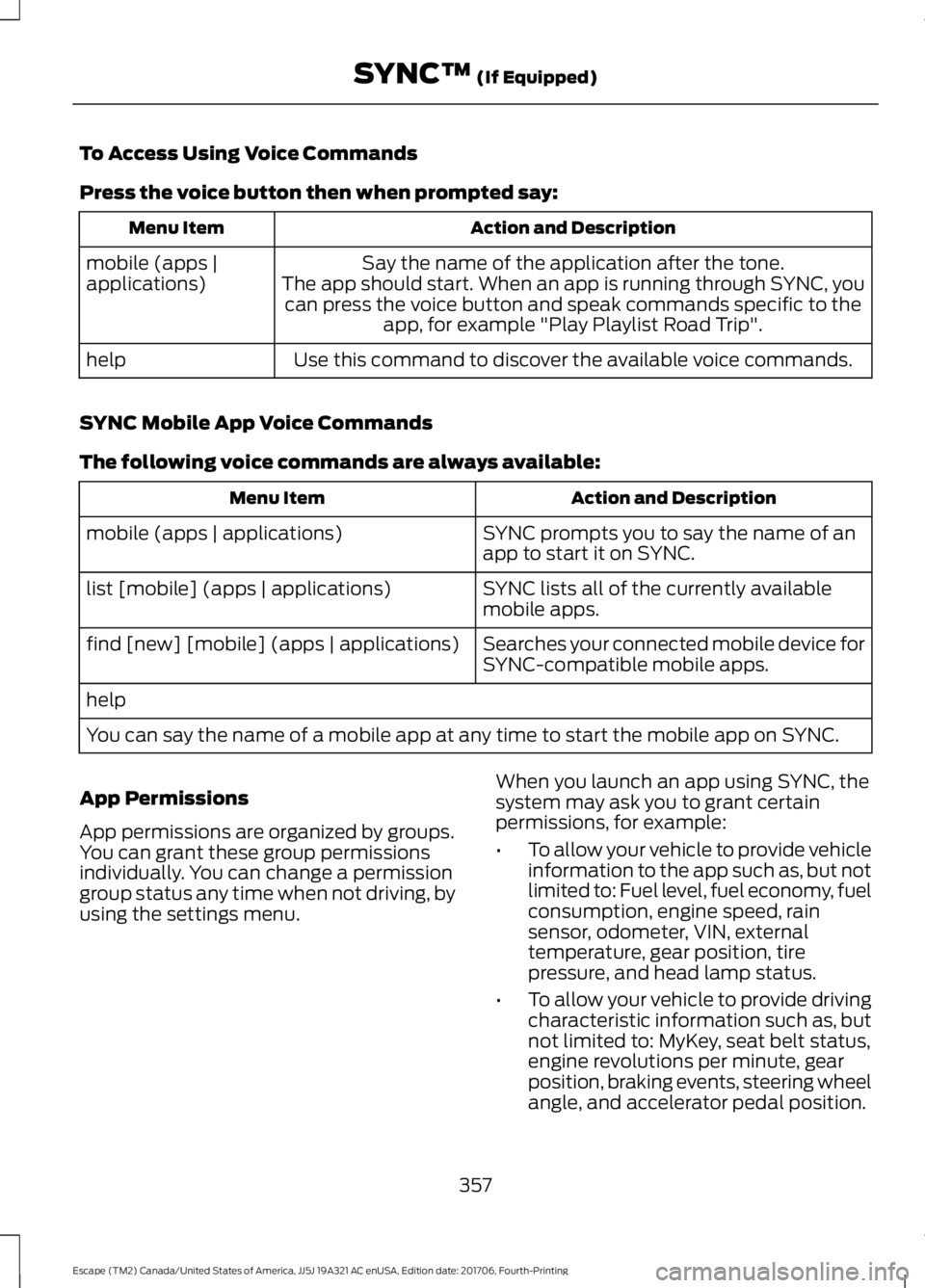
To Access Using Voice Commands
Press the voice button then when prompted say:
Action and Description
Menu Item
Say the name of the application after the tone.
The app should start. When an app is running through SYNC, you can press the voice button and speak commands specific to the app, for example "Play Playlist Road Trip".
mobile (apps |
applications)
Use this command to discover the available voice commands.
help
SYNC Mobile App Voice Commands
The following voice commands are always available: Action and Description
Menu Item
SYNC prompts you to say the name of an
app to start it on SYNC.
mobile (apps | applications)
SYNC lists all of the currently available
mobile apps.
list [mobile] (apps | applications)
Searches your connected mobile device for
SYNC-compatible mobile apps.
find [new] [mobile] (apps | applications)
help
You can say the name of a mobile app at any time to start the mobile app on SYNC.
App Permissions
App permissions are organized by groups.
You can grant these group permissions
individually. You can change a permission
group status any time when not driving, by
using the settings menu. When you launch an app using SYNC, the
system may ask you to grant certain
permissions, for example:
•
To allow your vehicle to provide vehicle
information to the app such as, but not
limited to: Fuel level, fuel economy, fuel
consumption, engine speed, rain
sensor, odometer, VIN, external
temperature, gear position, tire
pressure, and head lamp status.
• To allow your vehicle to provide driving
characteristic information such as, but
not limited to: MyKey, seat belt status,
engine revolutions per minute, gear
position, braking events, steering wheel
angle, and accelerator pedal position.
357
Escape (TM2) Canada/United States of America, JJ5J 19A321 AC enUSA, Edition date: 201706, Fourth-Printing SYNC™ (If Equipped)
Page 515 of 517
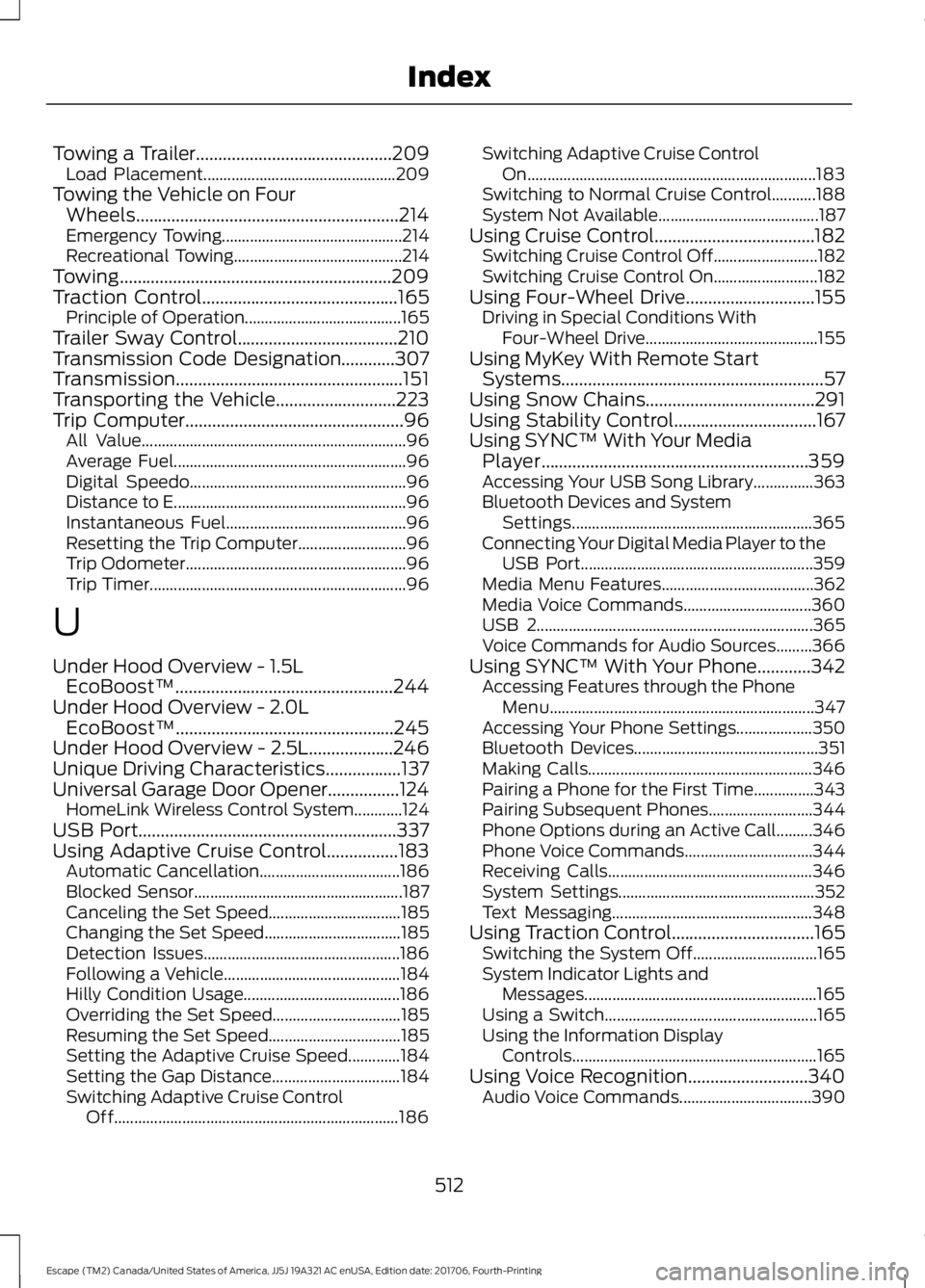
Towing a Trailer............................................209
Load Placement................................................ 209
Towing the Vehicle on Four Wheels...........................................................214
Emergency Towing............................................. 214
Recreational Towing.......................................... 214
Towing.............................................................209
Traction Control
............................................165
Principle of Operation....................................... 165
Trailer Sway Control
....................................210
Transmission Code Designation............307
Transmission...................................................151
Transporting the Vehicle
...........................223
Trip Computer.................................................96
All Value.................................................................. 96
Average Fuel.......................................................... 96
Digital Speedo...................................................... 96
Distance to E.......................................................... 96
Instantaneous Fuel............................................. 96
Resetting the Trip Computer........................... 96
Trip Odometer....................................................... 96
Trip Timer................................................................ 96
U
Under Hood Overview - 1.5L EcoBoost™.................................................244
Under Hood Overview - 2.0L EcoBoost™
.................................................245
Under Hood Overview - 2.5L...................246
Unique Driving Characteristics
.................137
Universal Garage Door Opener................124 HomeLink Wireless Control System............124
USB Port..........................................................337
Using Adaptive Cruise Control................183 Automatic Cancellation................................... 186
Blocked Sensor.................................................... 187
Canceling the Set Speed................................. 185
Changing the Set Speed.................................. 185
Detection Issues................................................. 186
Following a Vehicle............................................ 184
Hilly Condition Usage....................................... 186
Overriding the Set Speed................................ 185
Resuming the Set Speed................................. 185
Setting the Adaptive Cruise Speed.............184
Setting the Gap Distance................................ 184
Switching Adaptive Cruise Control Off....................................................................... 186Switching Adaptive Cruise Control
On........................................................................\
183
Switching to Normal Cruise Control...........188
System Not Available........................................ 187
Using Cruise Control....................................182 Switching Cruise Control Off.......................... 182
Switching Cruise Control On.......................... 182
Using Four-Wheel Drive.............................155 Driving in Special Conditions With
Four-Wheel Drive........................................... 155
Using MyKey With Remote Start Systems
...........................................................57
Using Snow Chains......................................291
Using Stability Control................................167
Using SYNC™ With Your Media Player............................................................359
Accessing Your USB Song Library...............363
Bluetooth Devices and System Settings............................................................ 365
Connecting Your Digital Media Player to the USB Port.......................................................... 359
Media Menu Features...................................... 362
Media Voice Commands................................ 360
USB 2..................................................................... 365
Voice Commands for Audio Sources.........366
Using SYNC™ With Your Phone............342 Accessing Features through the Phone
Menu.................................................................. 347
Accessing Your Phone Settings................... 350
Bluetooth Devices.............................................. 351
Making Calls........................................................ 346
Pairing a Phone for the First Time...............343
Pairing Subsequent Phones.......................... 344
Phone Options during an Active Call.........346
Phone Voice Commands................................ 344
Receiving Calls................................................... 346
System Settings................................................. 352
Text Messaging.................................................. 348
Using Traction Control
................................165
Switching the System Off............................... 165
System Indicator Lights and Messages.......................................................... 165
Using a Switch..................................................... 165
Using the Information Display Controls............................................................. 165
Using Voice Recognition...........................340 Audio Voice Commands................................. 390
512
Escape (TM2) Canada/United States of America, JJ5J 19A321 AC enUSA, Edition date: 201706, Fourth-Printing Index