SYNC FORD ESCAPE 2018 Owners Manual
[x] Cancel search | Manufacturer: FORD, Model Year: 2018, Model line: ESCAPE, Model: FORD ESCAPE 2018Pages: 517, PDF Size: 6.62 MB
Page 8 of 517
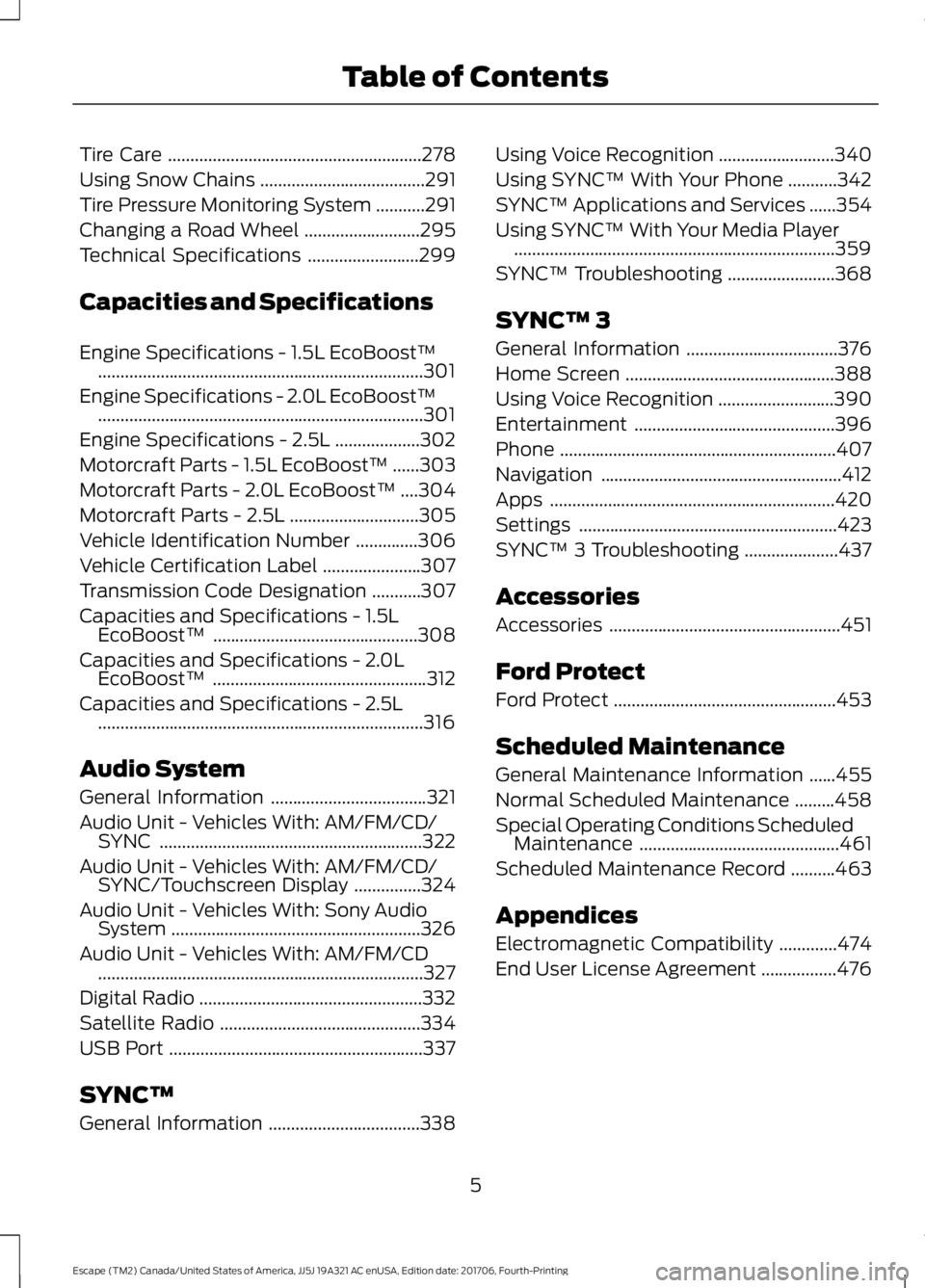
Tire Care
.........................................................278
Using Snow Chains .....................................
291
Tire Pressure Monitoring System ...........
291
Changing a Road Wheel ..........................
295
Technical Specifications .........................
299
Capacities and Specifications
Engine Specifications - 1.5L EcoBoost™ ........................................................................\
.
301
Engine Specifications - 2.0L EcoBoost™ ........................................................................\
.
301
Engine Specifications - 2.5L ...................
302
Motorcraft Parts - 1.5L EcoBoost™ ......
303
Motorcraft Parts - 2.0L EcoBoost™ ....
304
Motorcraft Parts - 2.5L .............................
305
Vehicle Identification Number ..............
306
Vehicle Certification Label ......................
307
Transmission Code Designation ...........
307
Capacities and Specifications - 1.5L EcoBoost™ ..............................................
308
Capacities and Specifications - 2.0L EcoBoost™ ................................................
312
Capacities and Specifications - 2.5L ........................................................................\
.
316
Audio System
General Information ...................................
321
Audio Unit - Vehicles With: AM/FM/CD/ SYNC ...........................................................
322
Audio Unit - Vehicles With: AM/FM/CD/ SYNC/Touchscreen Display ...............
324
Audio Unit - Vehicles With: Sony Audio System ........................................................
326
Audio Unit - Vehicles With: AM/FM/CD ........................................................................\
.
327
Digital Radio ..................................................
332
Satellite Radio .............................................
334
USB Port .........................................................
337
SYNC™
General Information ..................................
338Using Voice Recognition
..........................
340
Using SYNC™ With Your Phone ...........
342
SYNC™ Applications and Services ......
354
Using SYNC™ With Your Media Player ........................................................................\
359
SYNC™ Troubleshooting ........................
368
SYNC™ 3
General Information ..................................
376
Home Screen ...............................................
388
Using Voice Recognition ..........................
390
Entertainment .............................................
396
Phone ..............................................................
407
Navigation ......................................................
412
Apps ................................................................
420
Settings ..........................................................
423
SYNC™ 3 Troubleshooting .....................
437
Accessories
Accessories ....................................................
451
Ford Protect
Ford Protect ..................................................
453
Scheduled Maintenance
General Maintenance Information ......
455
Normal Scheduled Maintenance .........
458
Special Operating Conditions Scheduled Maintenance .............................................
461
Scheduled Maintenance Record ..........
463
Appendices
Electromagnetic Compatibility .............
474
End User License Agreement .................
476
5
Escape (TM2) Canada/United States of America, JJ5J 19A321 AC enUSA, Edition date: 201706, Fourth-Printing Table of Contents
Page 13 of 517
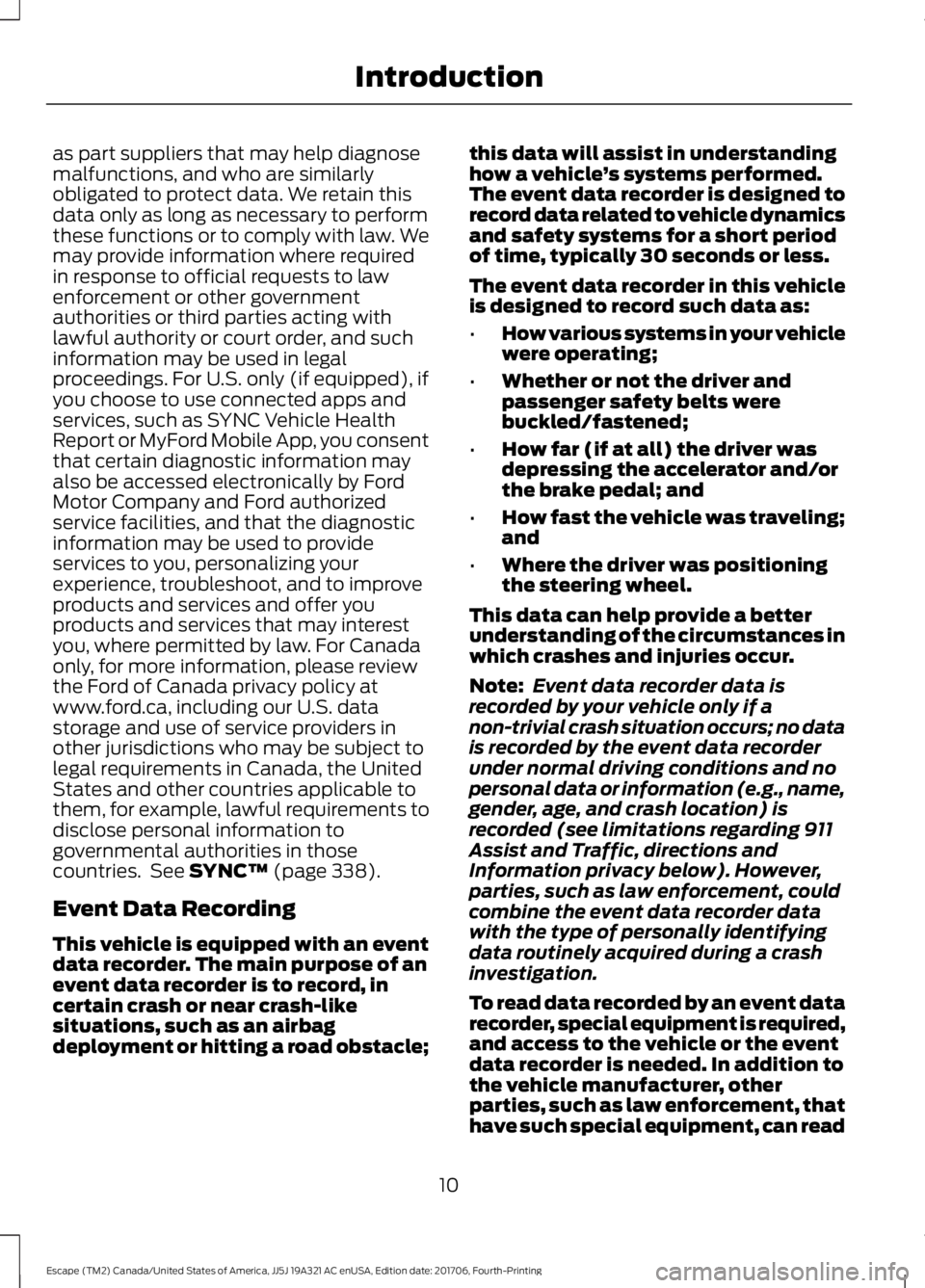
as part suppliers that may help diagnose
malfunctions, and who are similarly
obligated to protect data. We retain this
data only as long as necessary to perform
these functions or to comply with law. We
may provide information where required
in response to official requests to law
enforcement or other government
authorities or third parties acting with
lawful authority or court order, and such
information may be used in legal
proceedings. For U.S. only (if equipped), if
you choose to use connected apps and
services, such as SYNC Vehicle Health
Report or MyFord Mobile App, you consent
that certain diagnostic information may
also be accessed electronically by Ford
Motor Company and Ford authorized
service facilities, and that the diagnostic
information may be used to provide
services to you, personalizing your
experience, troubleshoot, and to improve
products and services and offer you
products and services that may interest
you, where permitted by law. For Canada
only, for more information, please review
the Ford of Canada privacy policy at
www.ford.ca, including our U.S. data
storage and use of service providers in
other jurisdictions who may be subject to
legal requirements in Canada, the United
States and other countries applicable to
them, for example, lawful requirements to
disclose personal information to
governmental authorities in those
countries. See SYNC™ (page 338).
Event Data Recording
This vehicle is equipped with an event
data recorder. The main purpose of an
event data recorder is to record, in
certain crash or near crash-like
situations, such as an airbag
deployment or hitting a road obstacle; this data will assist in understanding
how a vehicle
’s systems performed.
The event data recorder is designed to
record data related to vehicle dynamics
and safety systems for a short period
of time, typically 30 seconds or less.
The event data recorder in this vehicle
is designed to record such data as:
• How various systems in your vehicle
were operating;
• Whether or not the driver and
passenger safety belts were
buckled/fastened;
• How far (if at all) the driver was
depressing the accelerator and/or
the brake pedal; and
• How fast the vehicle was traveling;
and
• Where the driver was positioning
the steering wheel.
This data can help provide a better
understanding of the circumstances in
which crashes and injuries occur.
Note: Event data recorder data is
recorded by your vehicle only if a
non-trivial crash situation occurs; no data
is recorded by the event data recorder
under normal driving conditions and no
personal data or information (e.g., name,
gender, age, and crash location) is
recorded (see limitations regarding 911
Assist and Traffic, directions and
Information privacy below). However,
parties, such as law enforcement, could
combine the event data recorder data
with the type of personally identifying
data routinely acquired during a crash
investigation.
To read data recorded by an event data
recorder, special equipment is required,
and access to the vehicle or the event
data recorder is needed. In addition to
the vehicle manufacturer, other
parties, such as law enforcement, that
have such special equipment, can read
10
Escape (TM2) Canada/United States of America, JJ5J 19A321 AC enUSA, Edition date: 201706, Fourth-Printing Introduction
Page 14 of 517
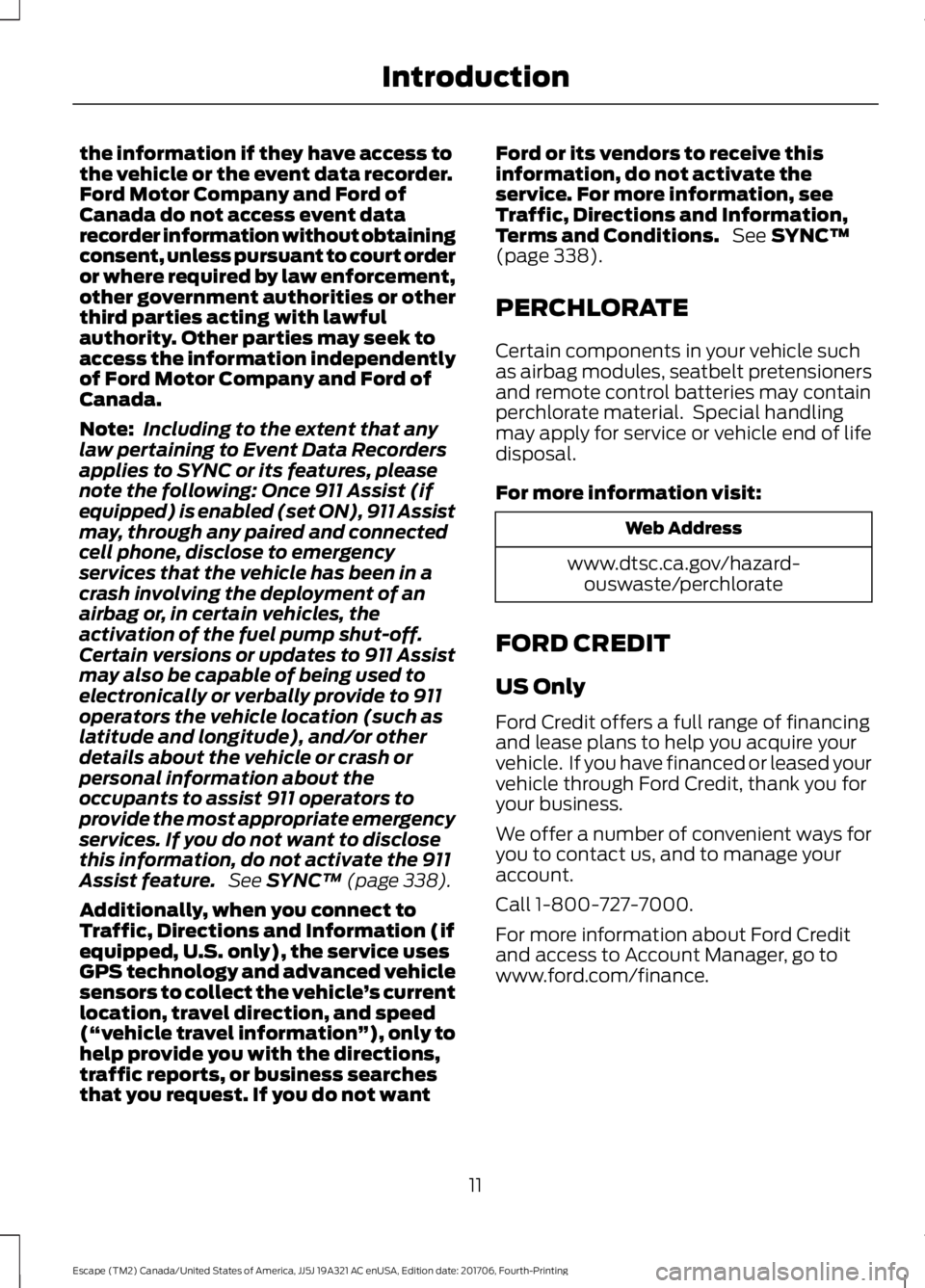
the information if they have access to
the vehicle or the event data recorder.
Ford Motor Company and Ford of
Canada do not access event data
recorder information without obtaining
consent, unless pursuant to court order
or where required by law enforcement,
other government authorities or other
third parties acting with lawful
authority. Other parties may seek to
access the information independently
of Ford Motor Company and Ford of
Canada.
Note:
Including to the extent that any
law pertaining to Event Data Recorders
applies to SYNC or its features, please
note the following: Once 911 Assist (if
equipped) is enabled (set ON), 911 Assist
may, through any paired and connected
cell phone, disclose to emergency
services that the vehicle has been in a
crash involving the deployment of an
airbag or, in certain vehicles, the
activation of the fuel pump shut-off.
Certain versions or updates to 911 Assist
may also be capable of being used to
electronically or verbally provide to 911
operators the vehicle location (such as
latitude and longitude), and/or other
details about the vehicle or crash or
personal information about the
occupants to assist 911 operators to
provide the most appropriate emergency
services. If you do not want to disclose
this information, do not activate the 911
Assist feature. See SYNC™ (page 338).
Additionally, when you connect to
Traffic, Directions and Information (if
equipped, U.S. only), the service uses
GPS technology and advanced vehicle
sensors to collect the vehicle ’s current
location, travel direction, and speed
(“ vehicle travel information ”), only to
help provide you with the directions,
traffic reports, or business searches
that you request. If you do not want Ford or its vendors to receive this
information, do not activate the
service. For more information, see
Traffic, Directions and Information,
Terms and Conditions.
See
SYNC™
(page 338).
PERCHLORATE
Certain components in your vehicle such
as airbag modules, seatbelt pretensioners
and remote control batteries may contain
perchlorate material. Special handling
may apply for service or vehicle end of life
disposal.
For more information visit: Web Address
www.dtsc.ca.gov/hazard- ouswaste/perchlorate
FORD CREDIT
US Only
Ford Credit offers a full range of financing
and lease plans to help you acquire your
vehicle. If you have financed or leased your
vehicle through Ford Credit, thank you for
your business.
We offer a number of convenient ways for
you to contact us, and to manage your
account.
Call 1-800-727-7000.
For more information about Ford Credit
and access to Account Manager, go to
www.ford.com/finance.
11
Escape (TM2) Canada/United States of America, JJ5J 19A321 AC enUSA, Edition date: 201706, Fourth-Printing Introduction
Page 240 of 517
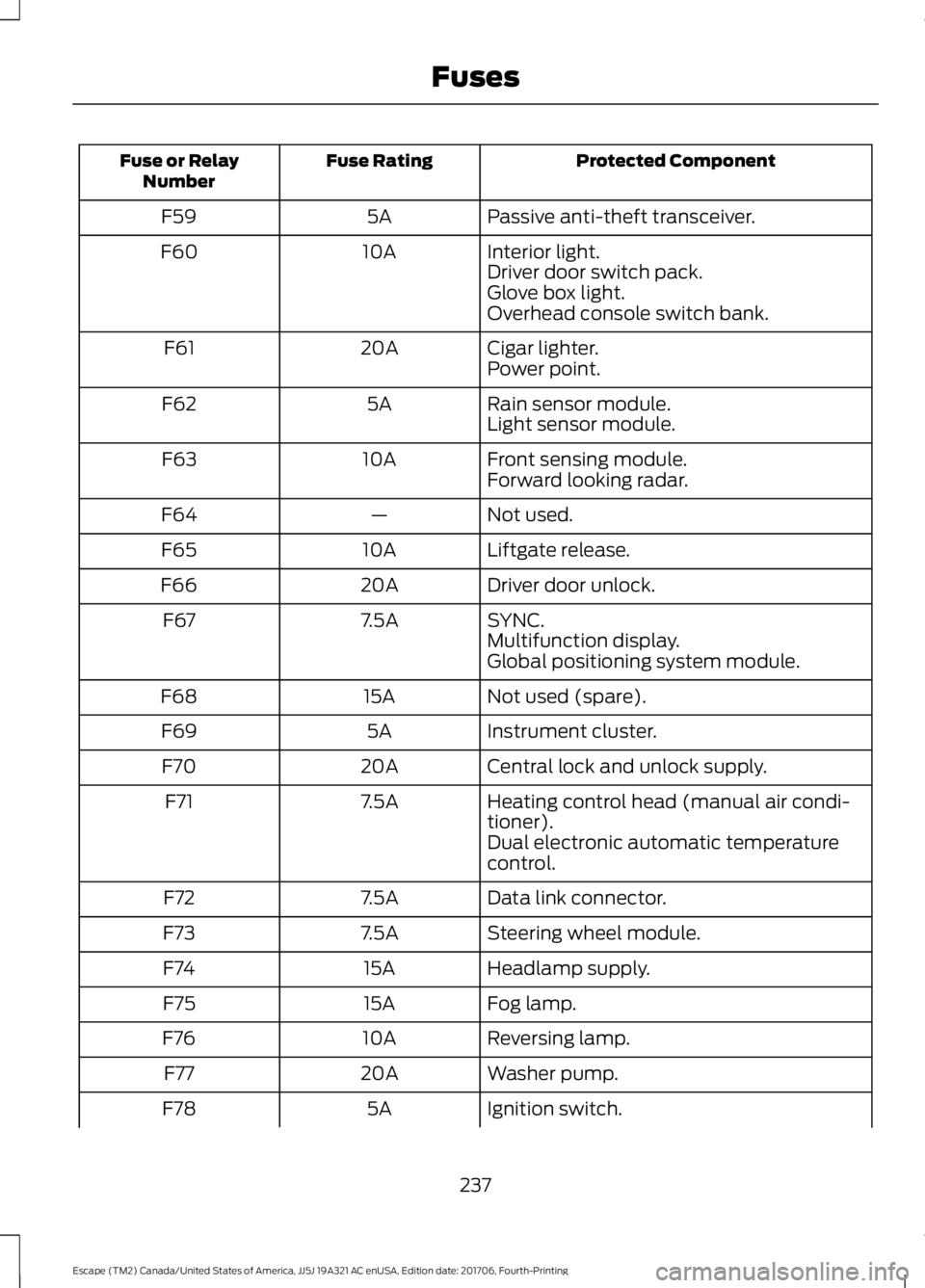
Protected Component
Fuse Rating
Fuse or Relay
Number
Passive anti-theft transceiver.
5A
F59
Interior light.
10A
F60
Driver door switch pack.
Glove box light.
Overhead console switch bank.
Cigar lighter.
20A
F61
Power point.
Rain sensor module.
5A
F62
Light sensor module.
Front sensing module.
10A
F63
Forward looking radar.
Not used.
—
F64
Liftgate release.
10A
F65
Driver door unlock.
20A
F66
SYNC.
7.5A
F67
Multifunction display.
Global positioning system module.
Not used (spare).
15A
F68
Instrument cluster.
5A
F69
Central lock and unlock supply.
20A
F70
Heating control head (manual air condi-
tioner).
7.5A
F71
Dual electronic automatic temperature
control.
Data link connector.
7.5A
F72
Steering wheel module.
7.5A
F73
Headlamp supply.
15A
F74
Fog lamp.
15A
F75
Reversing lamp.
10A
F76
Washer pump.
20A
F77
Ignition switch.
5A
F78
237
Escape (TM2) Canada/United States of America, JJ5J 19A321 AC enUSA, Edition date: 201706, Fourth-Printing Fuses
Page 325 of 517
MP3 and WMA Track and Folder
Structure
Audio systems capable of recognizing and
playing MP3 and WMA individual tracks
and folder structures work as follows:
•
There are two different modes for MP3
and WMA disc playback: MP3 and
WMA track mode (system default) and
MP3 and WMA folder mode.
• MP3 and WMA track mode ignores any
folder structure on the MP3 and WMA
disc. The player numbers each MP3
and WMA track on the disc (noted by
the MP3 or WMA file extension) from
T001 to a maximum of T255. The
maximum number of playable MP3 and
WMA files may be less depending on
the structure of the CD and exact
model of radio present.
• MP3 and WMA folder mode represents
a folder structure consisting of one
level of folders. The CD player numbers
all MP3 and WMA tracks on the disc
(noted by the MP3 or WMA file
extension) and all folders containing
MP3 and WMA files, from F001 (folder)
T001 (track) to F253 T255.
• Creating discs with only one level of
folders helps with navigation through
the disc files.
If you are burning your own MP3 and WMA
discs, it is important to understand how
the system reads the structures you create.
While various files may be present (files
with extensions other than MP3 and
WMA), only files with the MP3 and WMA extension are played; other files are
ignored by the system. This enables you to
use the same MP3 and WMA disc for a
variety of tasks on your work computer,
home computer and your in-vehicle
system.
In track mode, the system displays and
plays the structure as if it were only one
level deep (all MP3 and WMA files play,
regardless of being in a specific folder). In
folder mode, the system only plays the
MP3 and WMA files in the current folder.
AUDIO UNIT - VEHICLES WITH:
AM/FM/CD/SYNC
WARNING: Driving while distracted
can result in loss of vehicle control, crash
and injury. We strongly recommend that
you use extreme caution when using any
device that may take your focus off the
road. Your primary responsibility is the safe
operation of your vehicle. We recommend
against the use of any hand-held device
while driving and encourage the use of
voice-operated systems when possible.
Make sure you are aware of all applicable
local laws that may affect the use of
electronic devices while driving.
Note: Depending on your vehicle options,
your system may look different from what
you see here.
322
Escape (TM2) Canada/United States of America, JJ5J 19A321 AC enUSA, Edition date: 201706, Fourth-Printing Audio System
Page 327 of 517
Tune and Play or Pause: In
radio mode, press to search
through the radio frequency
band. In media mode, turn to
select a new track. Press to
either play or pause a track. This
button also mutes the radio
sources.
F
Phone:
Press to access the
phone features of the SYNC
system. See your SYNC
information.
G
Menu:
Press to access different
audio system features.
H
Clock:
Press to access the clock
setting. Use the center arrow
controls to change the hours and
minutes. You can also set the
clock by pressing
MENU and
scrolling to Clock Settings. If not
in phone mode, press to display
the clock.
I
Seek, Fast Forward and
Reverse:
In radio mode, select
a frequency band and press
either button. The system stops
at the first station it finds in that
direction. In CD mode, press to
select the next or previous track.
Press and hold to move quickly
forward or backward through the
current track.
J
OK and cursor arrows:
Press
the up and down arrow buttons
to select the various settings.
When you make your selection,
press the left and right arrow
buttons to change the settings.
Press OK to set, or press MENU
to exit.
K Sound:
Press to access settings
for Treble, Midrange, Bass, Fade
and Balance. Use the up and
down arrow buttons to select
the various settings. When you
make your selection, press the
L
left and right arrow buttons to
change the settings. Press OK to
set or press
MENU to exit.
Sound settings can be set for
each audio source
independently.
Radio:
Press to listen to the
radio or change radio stations.
Press the function buttons
below the radio screen to select
different radio functions.
M
Media:
Press to open the media
source menu. You can press this
multiple times to change to CD
or to a SYNC-Media device or
scroll through the media sources
using the arrow buttons. Press
OK
to select a source.
N
AUDIO UNIT - VEHICLES WITH:
AM/FM/CD/SYNC/
TOUCHSCREEN DISPLAY WARNING:
Driving while distracted
can result in loss of vehicle control, crash
and injury. We strongly recommend that
you use extreme caution when using any
device that may take your focus off the
road. Your primary responsibility is the safe
operation of your vehicle. We recommend
against the use of any hand-held device
while driving and encourage the use of
voice-operated systems when possible.
Make sure you are aware of all applicable
local laws that may affect the use of
electronic devices while driving.
324
Escape (TM2) Canada/United States of America, JJ5J 19A321 AC enUSA, Edition date: 201706, Fourth-Printing Audio System
Page 328 of 517
Note:
Some features, such as SIRIUS
satellite radio, may not be available in your
location. Check with an authorized dealer. Note:
The touchscreen system controls
most of the audio features. See your SYNC
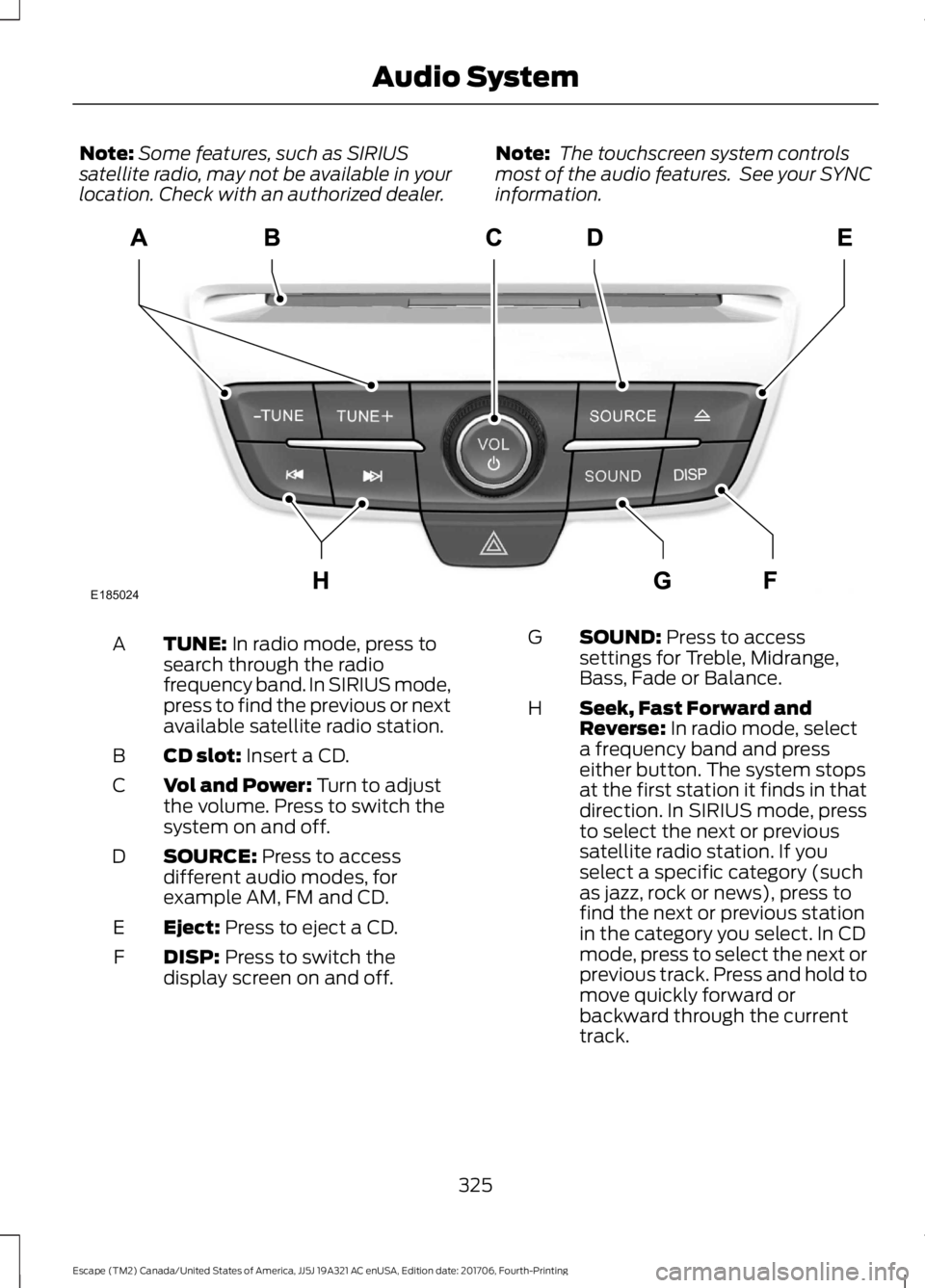
information. TUNE: In radio mode, press to
search through the radio
frequency band. In SIRIUS mode,
press to find the previous or next
available satellite radio station.
A
CD slot:
Insert a CD.
B
Vol and Power:
Turn to adjust
the volume. Press to switch the
system on and off.
C
SOURCE:
Press to access
different audio modes, for
example AM, FM and CD.
D
Eject:
Press to eject a CD.
E
DISP:
Press to switch the
display screen on and off.
F SOUND:
Press to access
settings for Treble, Midrange,
Bass, Fade or Balance.
G
Seek, Fast Forward and
Reverse:
In radio mode, select
a frequency band and press
either button. The system stops
at the first station it finds in that
direction. In SIRIUS mode, press
H
to select the next or previous
satellite radio station. If you
select a specific category (such
as jazz, rock or news), press to
find the next or previous station
in the category you select. In CD
mode, press to select the next or
previous track. Press and hold to
move quickly forward or
backward through the current
track.
325
Escape (TM2) Canada/United States of America, JJ5J 19A321 AC enUSA, Edition date: 201706, Fourth-Printing Audio SystemE185024
Page 329 of 517
AUDIO UNIT - VEHICLES WITH:
SONY AUDIO SYSTEM
WARNING: Driving while distracted
can result in loss of vehicle control, crash
and injury. We strongly recommend that
you use extreme caution when using any
device that may take your focus off the
road. Your primary responsibility is the safe
operation of your vehicle. We recommend against the use of any hand-held device
while driving and encourage the use of
voice-operated systems when possible.
Make sure you are aware of all applicable
local laws that may affect the use of
electronic devices while driving.
Note:
Some features, such as SIRIUS
satellite radio, may not be available in your
location. Check with an authorized dealer.
Note: The touchscreen system controls
most of the audio features. See your SYNC
information.
Note: The CD slot is directly above the
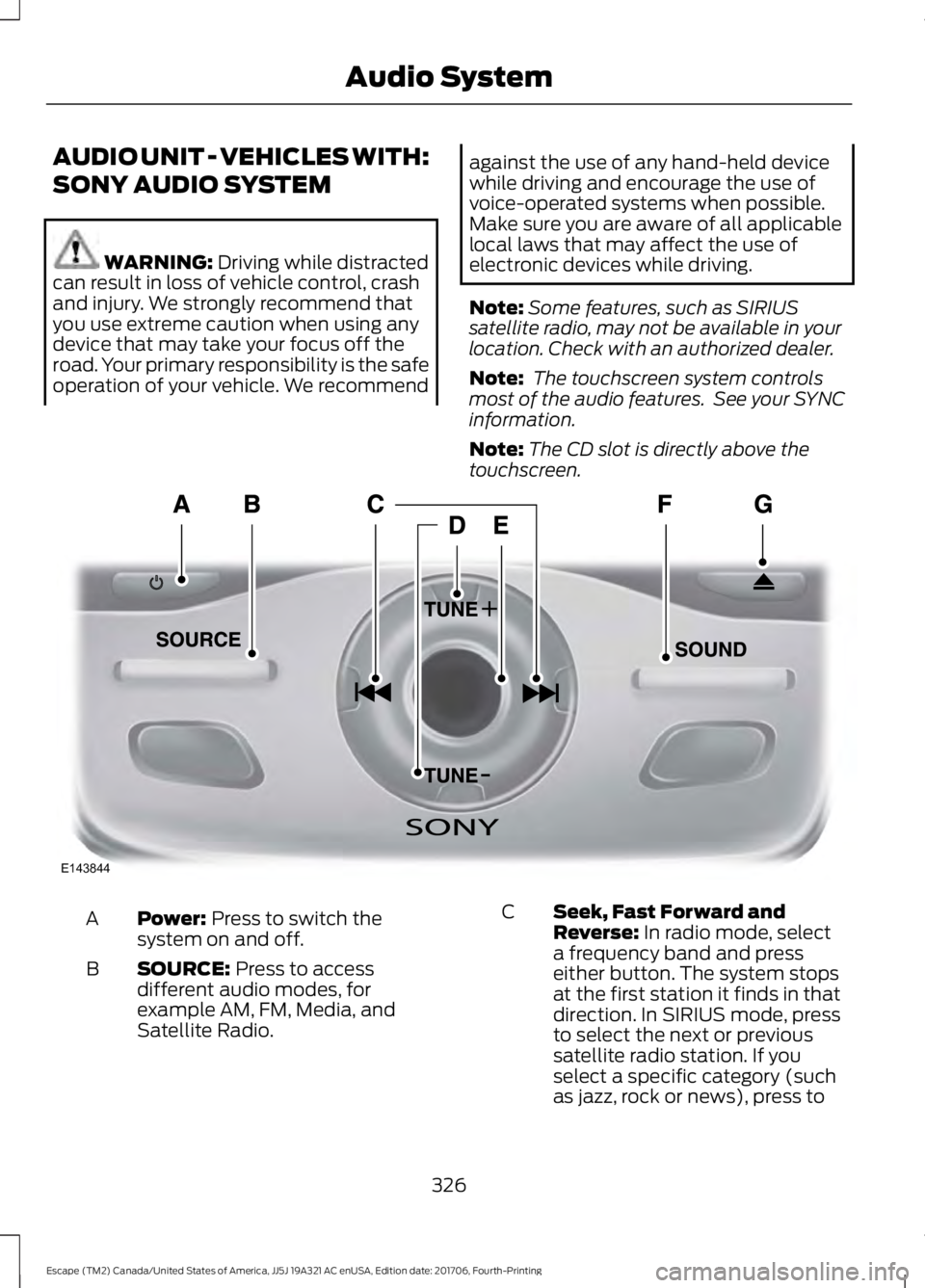
touchscreen. Power:
Press to switch the
system on and off.
A
SOURCE:
Press to access
different audio modes, for
example AM, FM, Media, and
Satellite Radio.
B
Seek, Fast Forward and
Reverse:
In radio mode, select
a frequency band and press
either button. The system stops
at the first station it finds in that
direction. In SIRIUS mode, press
C
to select the next or previous
satellite radio station. If you
select a specific category (such
as jazz, rock or news), press to
326
Escape (TM2) Canada/United States of America, JJ5J 19A321 AC enUSA, Edition date: 201706, Fourth-Printing Audio SystemE143844
Page 332 of 517
INFO: Press to access any
available radio or CD
information.
G
Clock:
Press to access the clock
setting. Use the center arrow
controls to change the hours and
minutes. You can also set the
clock by pressing
MENU and
scrolling to Clock Settings. If not
in phone mode, press to display
the clock.
H
OK and cursor arrows:
Press
the up and down arrow buttons
to select the various settings.
When you make your selection,
press the left and right arrow
buttons to change the settings.
Press OK to set, or press MENU
to exit.
I
Seek, Fast Forward and
Reverse:
In radio mode, select
a frequency band and press
either button. The system stops
at the first station it finds in that
direction. In SIRIUS mode, press
J
to select the next or previous
satellite radio station. If a
specific category is selected
(such as jazz, rock or news),
press to find the next or previous
station in the selected category.
In CD mode, press to select the
next or previous track. Press and
hold to move quickly forward or
backward through the current
track. SOUND:
Press to access
settings for Treble, Midrange,
Bass, Fade and Balance. Use the
up and down arrow buttons to
select the various settings. When
you make your selection, press
K
the left and right arrow buttons
to change the settings. Press OK
to set or press
MENU to exit.
Sound settings can be set for
each audio source
independently.
RADIO:
Press to listen to the
radio or change radio stations.
Press the function buttons
below the radio screen to select
different radio functions.
L
MEDIA: Press to open the media
source menu. You can press this
multiple times to change to CD
or to a SYNC-Media device or
scroll through the media sources
using the arrow buttons. Press
OK
to select a source.
M
Menu Structure
Note: Depending on your system, some
options may appear slightly different.
Press
MENU.
Press the up and down arrow buttons to
scroll through the options.
Press the right arrow to enter a menu.
Press the left arrow to exit a menu.
Press
OK to confirm a selection.
329
Escape (TM2) Canada/United States of America, JJ5J 19A321 AC enUSA, Edition date: 201706, Fourth-Printing Audio System
Page 340 of 517
USB PORT
WARNING: Driving while distracted
can result in loss of vehicle control, crash
and injury. We strongly recommend that
you use extreme caution when using any
device that may take your focus off the
road. Your primary responsibility is the safe
operation of your vehicle. We recommend
against the use of any hand-held device
while driving and encourage the use of
voice-operated systems when possible.
Make sure you are aware of all applicable
local laws that may affect the use of
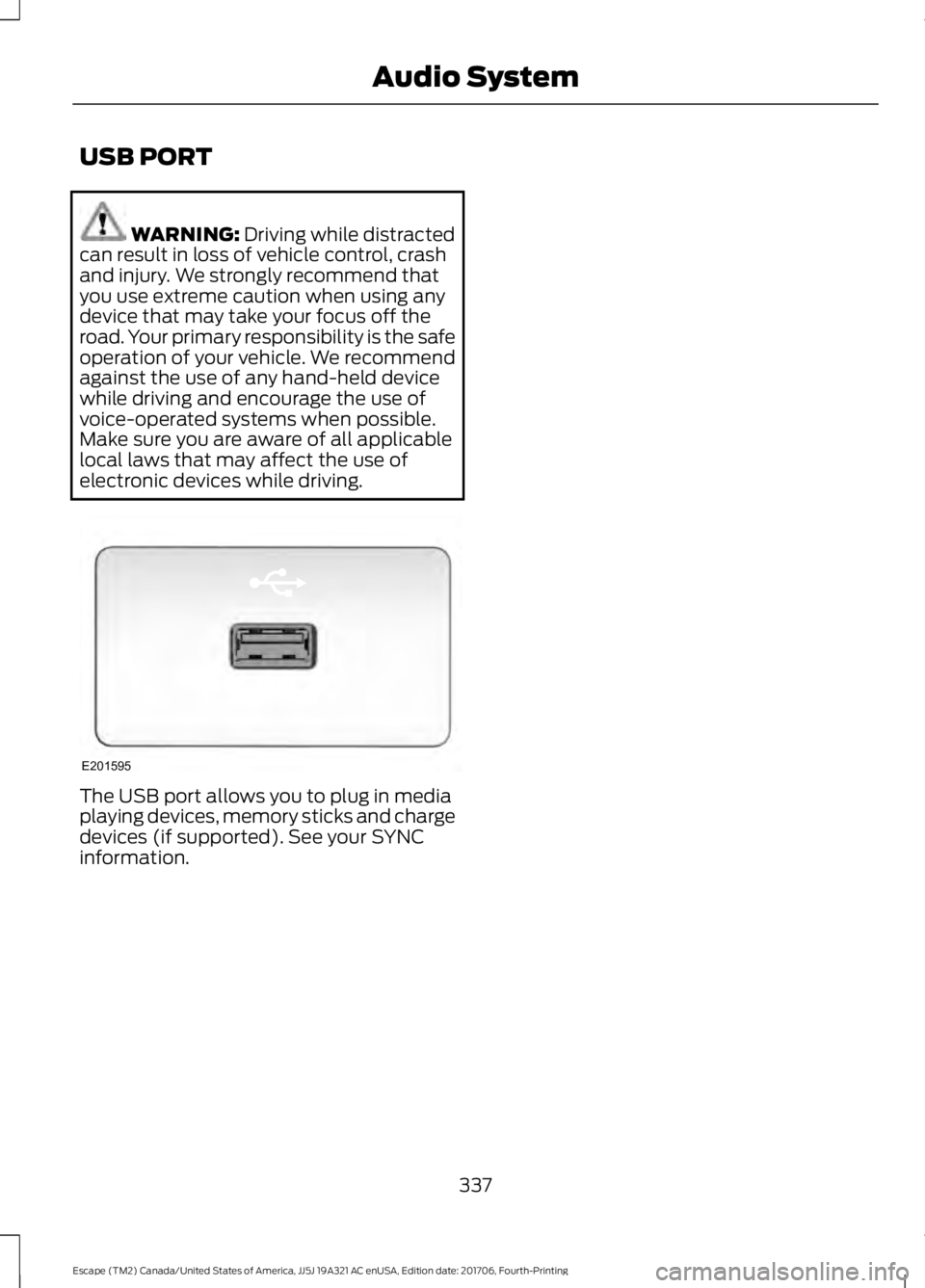
electronic devices while driving. The USB port allows you to plug in media
playing devices, memory sticks and charge
devices (if supported). See your SYNC
information.
337
Escape (TM2) Canada/United States of America, JJ5J 19A321 AC enUSA, Edition date: 201706, Fourth-Printing Audio SystemE201595