audio FORD ESCAPE 2018 Owners Manual
[x] Cancel search | Manufacturer: FORD, Model Year: 2018, Model line: ESCAPE, Model: FORD ESCAPE 2018Pages: 517, PDF Size: 6.62 MB
Page 5 of 517
Steering Wheel
Adjusting the Steering Wheel
....................71
Audio Control ...................................................
71
Voice Control ...................................................
72
Cruise Control .................................................
72
Information Display Control ......................
73
Heated Steering Wheel ...............................
73
Wipers and Washers
Windshield Wipers ........................................
74
Autowipers .......................................................
74
Windshield Washers .....................................
75
Rear Window Wiper and Washers ..........
75
Lighting
General Information ......................................
77
Lighting Control ..............................................
77
Autolamps .......................................................
78
Instrument Lighting Dimmer .....................
78
Headlamp Exit Delay ...................................
79
Daytime Running Lamps ............................
79
Automatic High Beam Control .................
79
Front Fog Lamps ...........................................
80
Direction Indicators .......................................
81
Interior Lamps .................................................
81
Ambient Lighting ............................................
81
Windows and Mirrors
Power Windows .............................................
83
Exterior Mirrors ...............................................
84
Interior Mirror ..................................................
85
Sun Visors ........................................................
86
Moonroof .........................................................
86
Instrument Cluster
Gauges ..............................................................
88
Warning Lamps and Indicators ...............
89
Audible Warnings and Indicators ............
92Information Displays
General Information
.....................................
93
Trip Computer ................................................
96
Information Messages ................................
96
Climate Control
Manual Climate Control ...........................
108
Automatic Climate Control .....................
109
Hints on Controlling the Interior Climate ........................................................................\
...
111
Heated Windows and Mirrors ..................
114
Cabin Air Filter ................................................
114
Remote Start ..................................................
115
Seats
Sitting in the Correct Position ..................
116
Head Restraints ............................................
116
Manual Seats .................................................
118
Power Seats ...................................................
119
Memory Function ..........................................
121
Rear Seats .......................................................
122
Heated Seats .................................................
123
Universal Garage Door Opener
Universal Garage Door Opener ..............
124
Auxiliary Power Points
Auxiliary Power Points ...............................
128
Storage Compartments
Center Console .............................................
130
Overhead Console ......................................
130
Rear Seat Armrest .......................................
130
Starting and Stopping the Engine
General Information ....................................
131
Ignition Switch ...............................................
131
2
Escape (TM2) Canada/United States of America, JJ5J 19A321 AC enUSA, Edition date: 201706, Fourth-Printing Table of Contents
Page 8 of 517
Tire Care
.........................................................278
Using Snow Chains .....................................
291
Tire Pressure Monitoring System ...........
291
Changing a Road Wheel ..........................
295
Technical Specifications .........................
299
Capacities and Specifications
Engine Specifications - 1.5L EcoBoost™ ........................................................................\
.
301
Engine Specifications - 2.0L EcoBoost™ ........................................................................\
.
301
Engine Specifications - 2.5L ...................
302
Motorcraft Parts - 1.5L EcoBoost™ ......
303
Motorcraft Parts - 2.0L EcoBoost™ ....
304
Motorcraft Parts - 2.5L .............................
305
Vehicle Identification Number ..............
306
Vehicle Certification Label ......................
307
Transmission Code Designation ...........
307
Capacities and Specifications - 1.5L EcoBoost™ ..............................................
308
Capacities and Specifications - 2.0L EcoBoost™ ................................................
312
Capacities and Specifications - 2.5L ........................................................................\
.
316
Audio System
General Information ...................................
321
Audio Unit - Vehicles With: AM/FM/CD/ SYNC ...........................................................
322
Audio Unit - Vehicles With: AM/FM/CD/ SYNC/Touchscreen Display ...............
324
Audio Unit - Vehicles With: Sony Audio System ........................................................
326
Audio Unit - Vehicles With: AM/FM/CD ........................................................................\
.
327
Digital Radio ..................................................
332
Satellite Radio .............................................
334
USB Port .........................................................
337
SYNC™
General Information ..................................
338Using Voice Recognition
..........................
340
Using SYNC™ With Your Phone ...........
342
SYNC™ Applications and Services ......
354
Using SYNC™ With Your Media Player ........................................................................\
359
SYNC™ Troubleshooting ........................
368
SYNC™ 3
General Information ..................................
376
Home Screen ...............................................
388
Using Voice Recognition ..........................
390
Entertainment .............................................
396
Phone ..............................................................
407
Navigation ......................................................
412
Apps ................................................................
420
Settings ..........................................................
423
SYNC™ 3 Troubleshooting .....................
437
Accessories
Accessories ....................................................
451
Ford Protect
Ford Protect ..................................................
453
Scheduled Maintenance
General Maintenance Information ......
455
Normal Scheduled Maintenance .........
458
Special Operating Conditions Scheduled Maintenance .............................................
461
Scheduled Maintenance Record ..........
463
Appendices
Electromagnetic Compatibility .............
474
End User License Agreement .................
476
5
Escape (TM2) Canada/United States of America, JJ5J 19A321 AC enUSA, Edition date: 201706, Fourth-Printing Table of Contents
Page 19 of 517
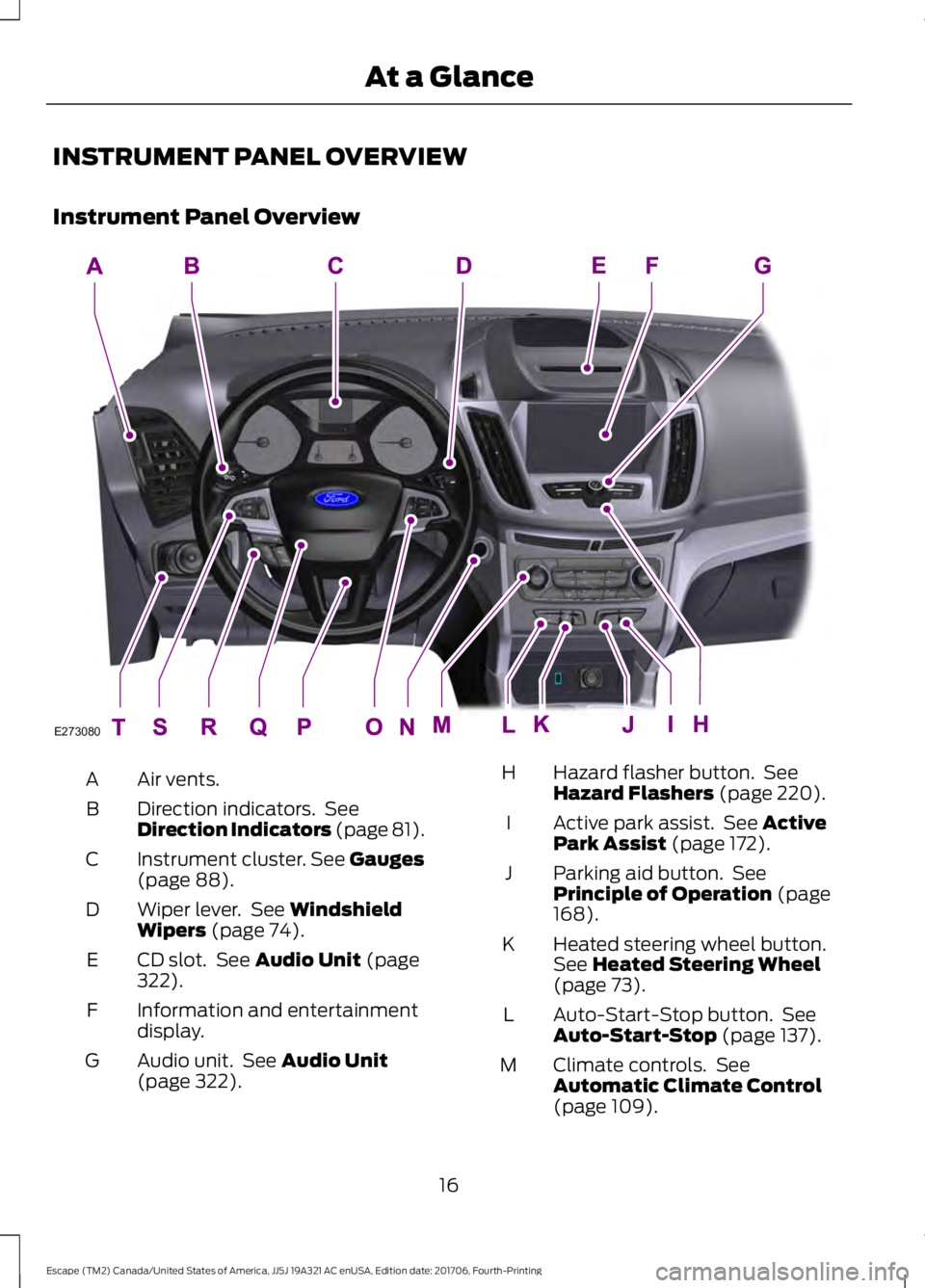
INSTRUMENT PANEL OVERVIEW
Instrument Panel Overview
Air vents.
A
Direction indicators. See
Direction Indicators (page 81).
B
Instrument cluster. See Gauges
(page 88).
C
Wiper lever. See
Windshield
Wipers (page 74).
D
CD slot. See
Audio Unit (page
322).
E
Information and entertainment
display.
F
Audio unit. See
Audio Unit
(page 322).
G Hazard flasher button. See
Hazard Flashers
(page 220).
H
Active park assist. See
Active
Park Assist (page 172).
I
Parking aid button. See
Principle of Operation
(page
168).
J
Heated steering wheel button.
See
Heated Steering Wheel
(page 73).
K
Auto-Start-Stop button. See
Auto-Start-Stop
(page 137).
L
Climate controls. See
Automatic Climate Control
(page
109).
M
16
Escape (TM2) Canada/United States of America, JJ5J 19A321 AC enUSA, Edition date: 201706, Fourth-Printing At a GlanceE273080
Page 20 of 517
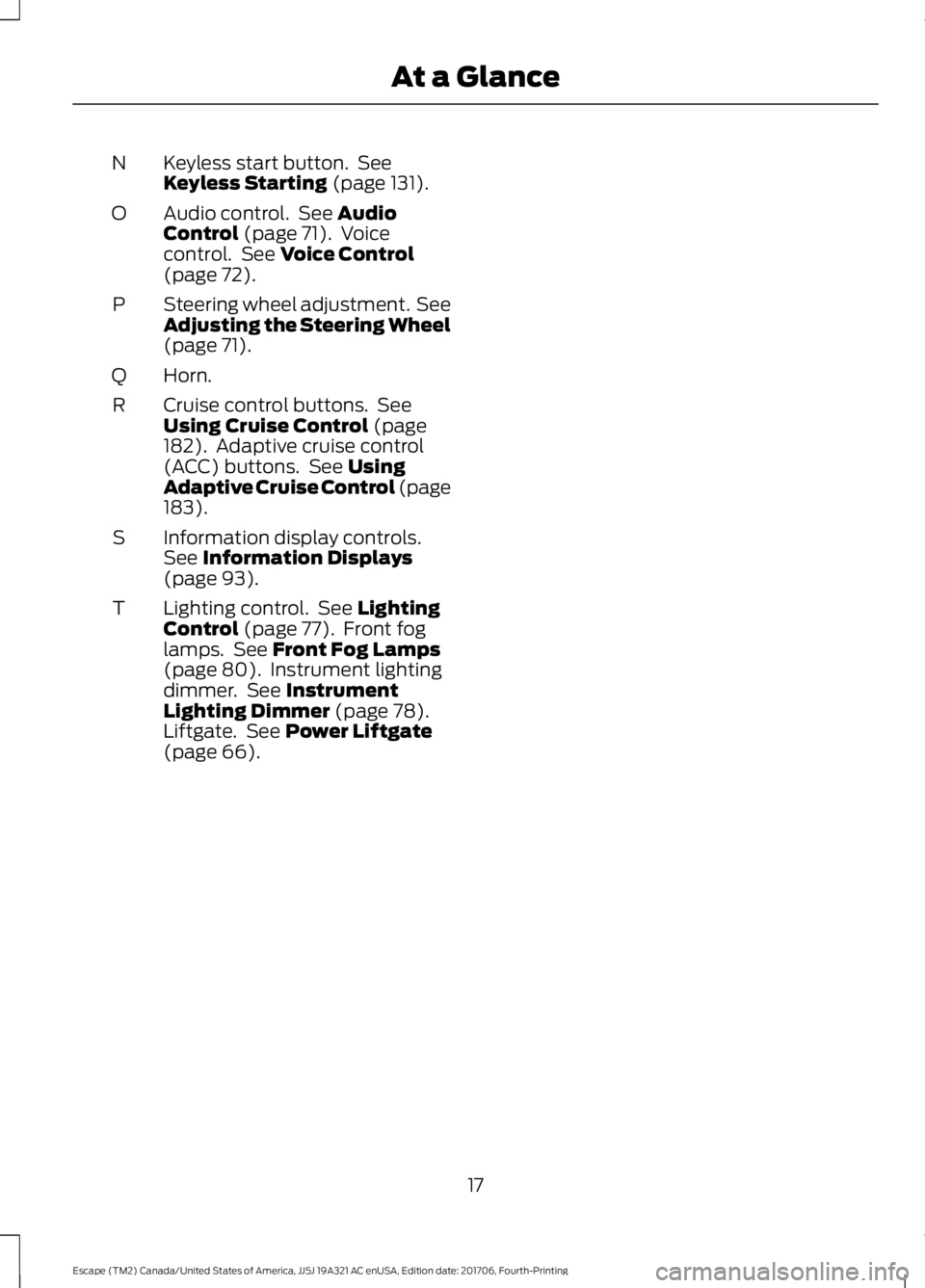
Keyless start button. See
Keyless Starting (page 131).
N
Audio control. See
Audio
Control (page 71). Voice
control. See Voice Control
(page 72).
O
Steering wheel adjustment. See
Adjusting the Steering Wheel
(page
71).
P
Horn.
Q
Cruise control buttons. See
Using Cruise Control
(page
182). Adaptive cruise control
(ACC) buttons. See Using
Adaptive Cruise Control (page
183
).
R
Information display controls.
See
Information Displays
(page 93).
S
Lighting control. See
Lighting
Control (page 77). Front fog
lamps. See Front Fog Lamps
(page 80). Instrument lighting
dimmer. See Instrument
Lighting Dimmer (page 78).
Liftgate. See Power Liftgate
(page 66).
T
17
Escape (TM2) Canada/United States of America, JJ5J 19A321 AC enUSA, Edition date: 201706, Fourth-Printing At a Glance
Page 56 of 517
PRINCIPLE OF OPERATION
MyKey allows you to program keys with
restricted driving modes to promote good
driving habits. All but one of the keys
programmed to the vehicle can be
activated with these restricted modes.
Any keys that have not been programmed
are referred to as administrator keys or
admin keys. These can be used to:
•
Create a MyKey.
• Program configurable MyKey settings.
• Clear all MyKey features.
When you have created a MyKey, you can
access the following information using the
information display:
• How many admin keys and MyKeys are
programmed to your vehicle.
• The total distance your vehicle has
traveled using any MyKey.
Note: All MyKeys are programmed to the
same settings. You cannot program them
individually.
Note: For vehicles with keyless start, when
both a MyKey transmitter and an admin
transmitter are present, the admin
transmitter will be recognized by the vehicle
to start the engine. Non-configurable Settings
The following settings cannot be changed
by an admin key user:
•
Belt-minder. You cannot disable this
feature. The audio system will mute
when the safety belts are not fastened.
• Early low fuel warning. The low-fuel
warning activates earlier, giving the
MyKey user more time to refuel.
• Driver assist features, if equipped on
your vehicle, are forced on: parking aid,
blind spot information system (BLIS)
with cross traffic alert, lane departure
warning and forward collision warning
system.
Configurable Settings
With an admin key, you can configure
certain MyKey settings when you first
create a MyKey and before you recycle the
key or restart the vehicle.
You can also change the settings
afterward with an admin key:
• A vehicle speed limit can be set.
Warnings will be shown in the display
followed by an audible tone when your
vehicle reaches the set speed. You
cannot override the set speed by fully
depressing the accelerator pedal or by
setting the cruise control. WARNING: Do not set MyKey
maximum speed limit to a limit that will
prevent the driver from maintaining a safe
speed considering posted speed limits and
prevailing road conditions. The driver is
always responsible to drive in accordance
with local laws and prevailing conditions.
Failure to do so could result in accident or
injury.
53
Escape (TM2) Canada/United States of America, JJ5J 19A321 AC enUSA, Edition date: 201706, Fourth-Printing MyKey
™
Page 57 of 517
•
Vehicle speed minders. Once you select
a speed, it will be shown in the display
followed by an audible tone when the
set vehicle speed is exceeded.
• Audio system maximum volume of
45%. A message will be shown in the
display when you attempt to exceed
the limited volume. Also, the speed
sensitive compensated volume
(automatic volume control) feature
will be disabled.
• Always on setting. When this is
selected you will not be able to disable
the traction control system (if your
vehicle is equipped with this feature).
CREATING A MYKEY
Use the information display to create a
MyKey:
1. Insert the key you want to program into
the ignition. If your vehicle is equipped with
a push-button start, hold the intelligent
access key next to the steering column.
Details on the correct fob placement and
position is in another chapter. See
Starting and Stopping the Engine (page
131).
2. Switch the ignition on.
3. Access the main menu on the
information display controls, and select
Settings
and then MyKey by pressing OK
or the > button.
4. Press
OK or the > button to select
Create MyKey.
5. When prompted, hold the
OK button
until you see a message informing you to
label this key as a MyKey. The programmed
restrictions apply when you key off, open
and close the driver door and restart your
vehicle with the programmed key or
transmitter. MyKey is successfully created. Make sure
you label it so you can distinguish it from
the admin keys.
You can also program configurable
settings for the key(s). Refer to
Programming/Changing Configurable
Settings
.
Programming/Changing
Configurable Settings
Use the information display to access your
configurable MyKey settings:
1. Switch the ignition on using an admin key or fob.
2. Access the main menu on the information display controls, and select
Settings
, then MyKey by pressing OK
or the > button.
3. Use the arrow buttons to get to a configurable feature.
4. Press OK or > to make a selection. The
programmed restrictions apply when
you key off, open and close the driver
door and restart your vehicle with the
programmed key or transmitter.
Note: You can clear or change your MyKey
settings at any time during the same key
cycle as you created the MyKey. Once you
have switched the engine off, however, you
will need an admin key to change or clear
your MyKey settings.
CLEARING ALL MYKEYS
You can clear or change your MyKey
settings using the information display
control on the steering wheel. See
Information Displays
(page 93).
Switch the ignition on using an admin key.
54
Escape (TM2) Canada/United States of America, JJ5J 19A321 AC enUSA, Edition date: 201706, Fourth-Printing MyKey
™
Page 74 of 517
ADJUSTING THE STEERING
WHEEL
WARNING: Do not adjust the
steering wheel when your vehicle is
moving.
Note: Make sure that you are sitting in the
correct position. See Sitting in the Correct
Position
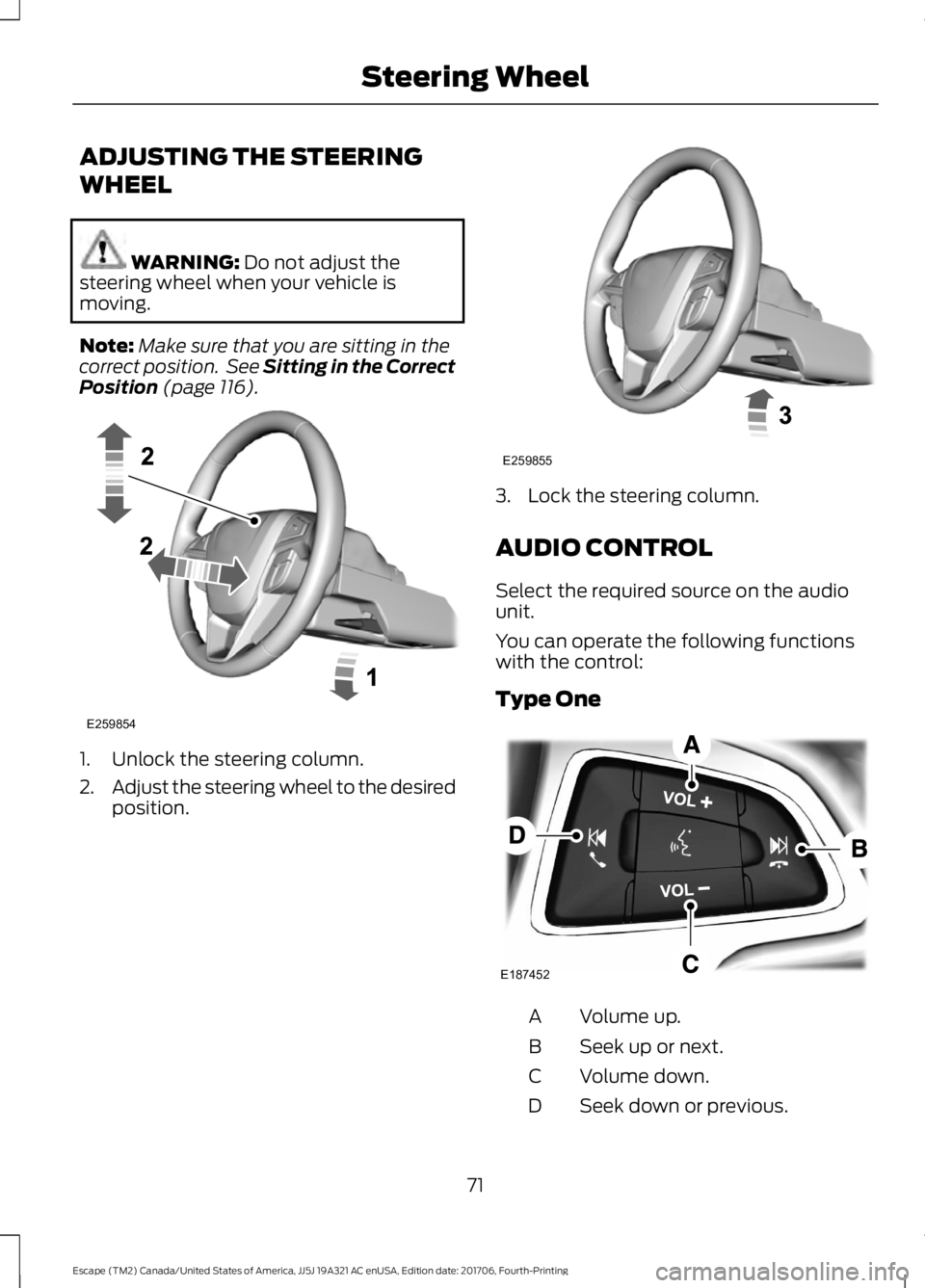
(page 116). 1. Unlock the steering column.
2.
Adjust the steering wheel to the desired
position. 3. Lock the steering column.
AUDIO CONTROL
Select the required source on the audio
unit.
You can operate the following functions
with the control:
Type One
Volume up.
A
Seek up or next.
B
Volume down.
C
Seek down or previous.
D
71
Escape (TM2) Canada/United States of America, JJ5J 19A321 AC enUSA, Edition date: 201706, Fourth-Printing Steering WheelE259854 E259855 E187452
Page 107 of 517
Action
Message
Indicator
Message
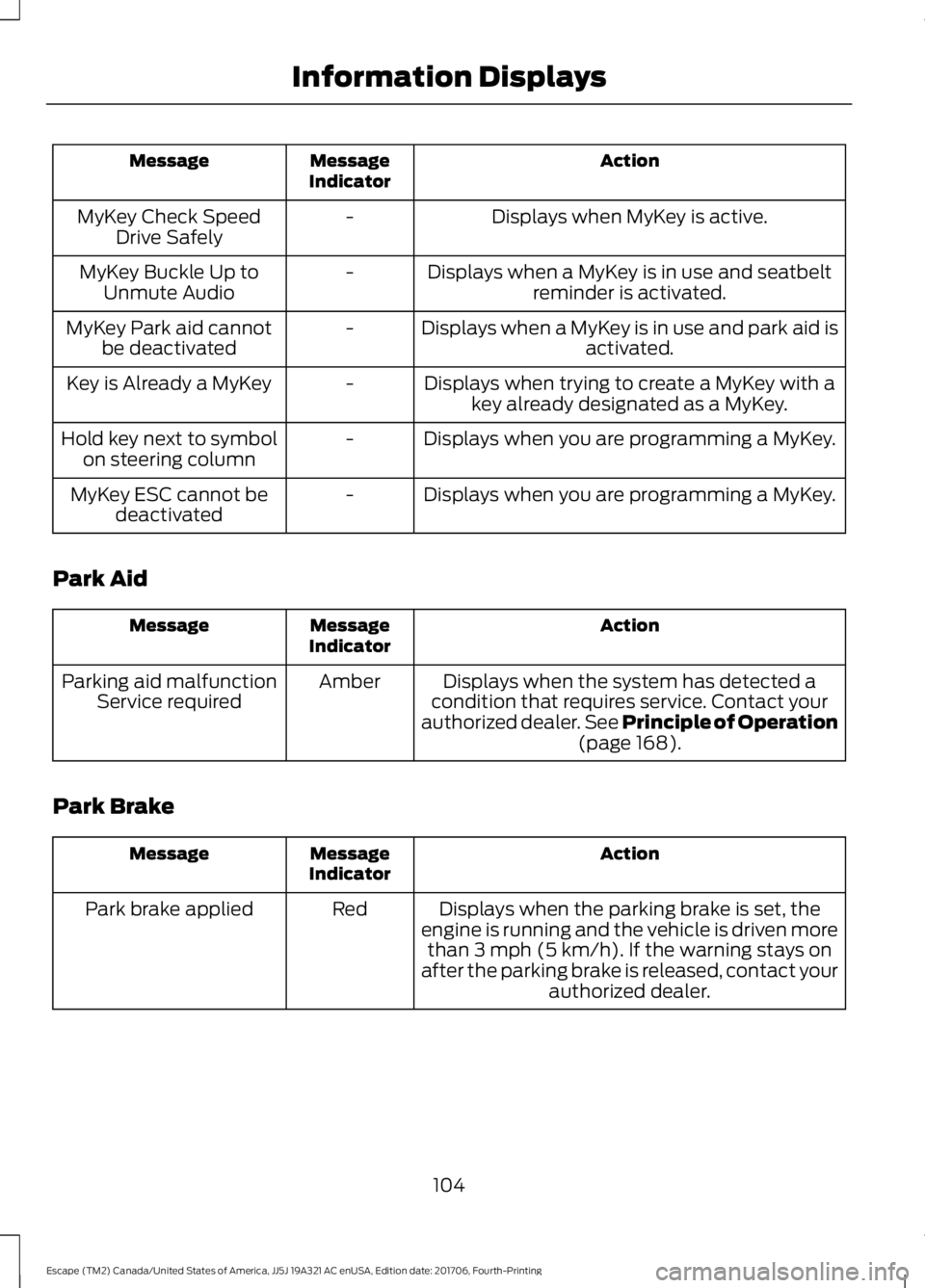
Displays when MyKey is active.
-
MyKey Check Speed
Drive Safely
Displays when a MyKey is in use and seatbeltreminder is activated.
-
MyKey Buckle Up to
Unmute Audio
Displays when a MyKey is in use and park aid isactivated.
-
MyKey Park aid cannot
be deactivated
Displays when trying to create a MyKey with akey already designated as a MyKey.
-
Key is Already a MyKey
Displays when you are programming a MyKey.
-
Hold key next to symbol
on steering column
Displays when you are programming a MyKey.
-
MyKey ESC cannot be
deactivated
Park Aid Action
Message
Indicator
Message
Displays when the system has detected a
condition that requires service. Contact your
authorized dealer. See Principle of Operation
(page 168).
Amber
Parking aid malfunction
Service required
Park Brake Action
Message
Indicator
Message
Displays when the parking brake is set, the
engine is running and the vehicle is driven more than
3 mph (5 km/h). If the warning stays on
after the parking brake is released, contact your authorized dealer.
Red
Park brake applied
104
Escape (TM2) Canada/United States of America, JJ5J 19A321 AC enUSA, Edition date: 201706, Fourth-Printing Information Displays
Page 172 of 517
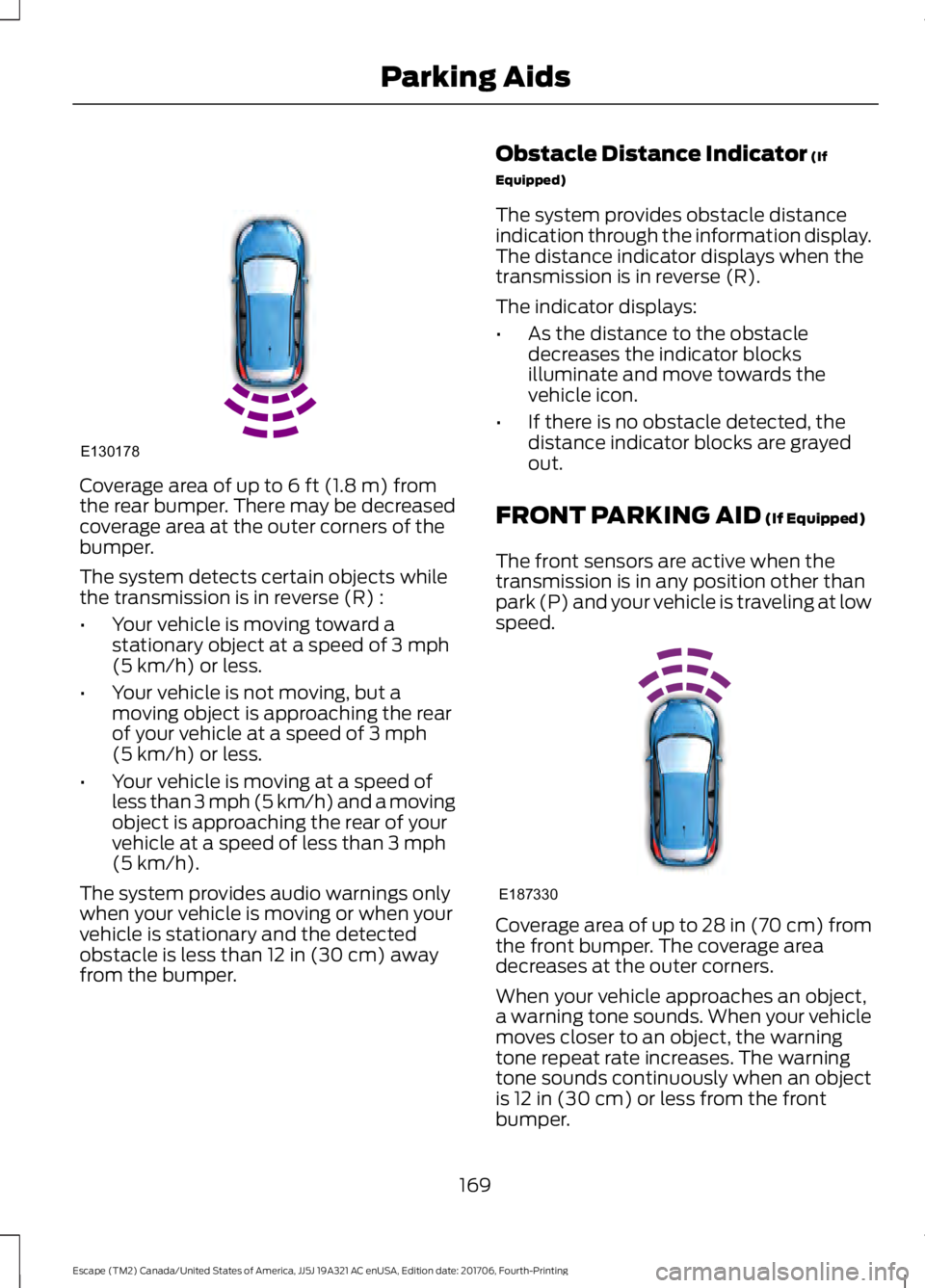
Coverage area of up to 6 ft (1.8 m) from
the rear bumper. There may be decreased
coverage area at the outer corners of the
bumper.
The system detects certain objects while
the transmission is in reverse (R) :
• Your vehicle is moving toward a
stationary object at a speed of
3 mph
(5 km/h) or less.
• Your vehicle is not moving, but a
moving object is approaching the rear
of your vehicle at a speed of
3 mph
(5 km/h) or less.
• Your vehicle is moving at a speed of
less than 3 mph (5 km/h) and a moving
object is approaching the rear of your
vehicle at a speed of less than
3 mph
(5 km/h).
The system provides audio warnings only
when your vehicle is moving or when your
vehicle is stationary and the detected
obstacle is less than
12 in (30 cm) away
from the bumper. Obstacle Distance Indicator
(If
Equipped)
The system provides obstacle distance
indication through the information display.
The distance indicator displays when the
transmission is in reverse (R).
The indicator displays:
• As the distance to the obstacle
decreases the indicator blocks
illuminate and move towards the
vehicle icon.
• If there is no obstacle detected, the
distance indicator blocks are grayed
out.
FRONT PARKING AID
(If Equipped)
The front sensors are active when the
transmission is in any position other than
park (P) and your vehicle is traveling at low
speed. Coverage area of up to
28 in (70 cm) from
the front bumper. The coverage area
decreases at the outer corners.
When your vehicle approaches an object,
a warning tone sounds. When your vehicle
moves closer to an object, the warning
tone repeat rate increases. The warning
tone sounds continuously when an object
is
12 in (30 cm) or less from the front
bumper.
169
Escape (TM2) Canada/United States of America, JJ5J 19A321 AC enUSA, Edition date: 201706, Fourth-Printing Parking AidsE130178 E187330
Page 173 of 517
You can switch the system off through the
information display menu or from the
pop-up message that appears once you
shift the transmission into reverse (R). See
General Information (page 93). If your
vehicle has a parking aid button, you can
switch the system off by pressing the
button.
Obstacle Distance Indicator
(If
Equipped)
The system provides obstacle distance
indication through the information display.
The indicator displays:
• As the distance to the obstacle
decreases the indicator blocks
illuminate and move towards the
vehicle icon.
• If there is no obstacle detected, the
distance indicator blocks are grayed
out.
If the transmission is in reverse (R), the
front sensing system provides audio
warnings when your vehicle is moving and
the detected obstacle is moving towards
your vehicle. Once the vehicle is stationary,
the audio warning will be stopped after 2
seconds. Visual indication is always
present in reverse (R).
If the transmission is in drive (D) or any
other forward gear (for example, low (L),
sport (S) or any forward gear in a manual
transmission), the front sensing system
provides audio and visual warnings when
your vehicle is moving below a speed of
5 mph (8 km/h) and an obstacle is located
inside the detection area. Once the vehicle
is stationary, the audio warning will be
stopped after 2 seconds and the visual
indication stops after 4 seconds. If the
obstacles detected are within
12 in
(30 cm), the visual indication remains on. If the transmission is in neutral (N), the
system provides visual indication only
when your vehicle is moving at
5 mph
(8 km/h) or below and an obstacle is
located inside the detection area. Once
your vehicle is stationary, the visual
indication will stop after 4 seconds.
SIDE SENSING SYSTEM
(If
Equipped)
The side sensing system uses the front and
rear side sensors to detect and map
obstacles within the vehicle's driving path,
located near the sides of your vehicle. The
side sensors are active when the
transmission is in any position other than
park (P).
Note: Obstacles that enter the side
detection area without being detected and
mapped by the front or rear side sensors will
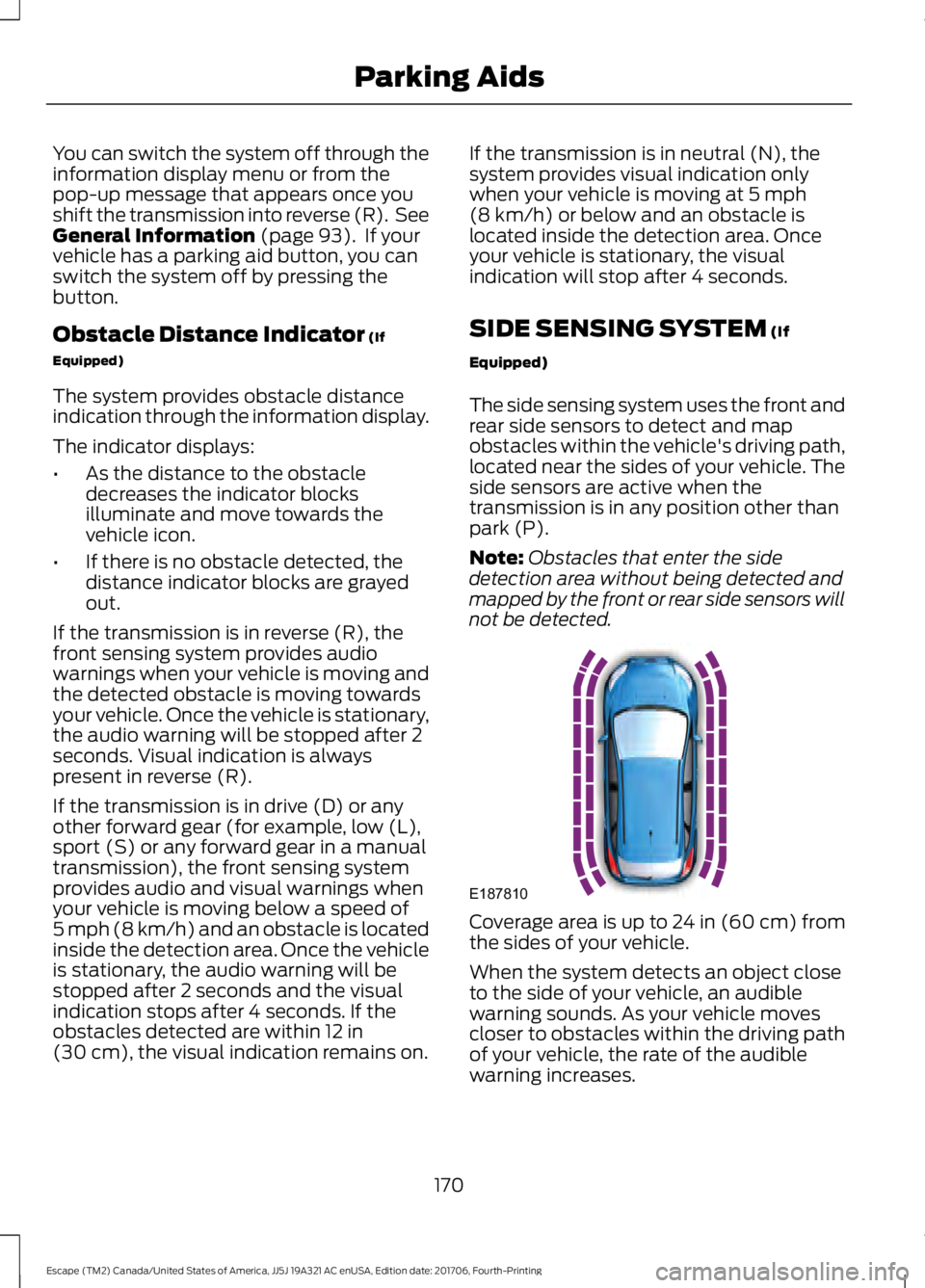
not be detected. Coverage area is up to 24 in (60 cm) from
the sides of your vehicle.
When the system detects an object close
to the side of your vehicle, an audible
warning sounds. As your vehicle moves
closer to obstacles within the driving path
of your vehicle, the rate of the audible
warning increases.
170
Escape (TM2) Canada/United States of America, JJ5J 19A321 AC enUSA, Edition date: 201706, Fourth-Printing Parking AidsE187810