mirror FORD ESCAPE 2018 Owners Manual
[x] Cancel search | Manufacturer: FORD, Model Year: 2018, Model line: ESCAPE, Model: FORD ESCAPE 2018Pages: 517, PDF Size: 6.62 MB
Page 5 of 517
Steering Wheel
Adjusting the Steering Wheel
....................71
Audio Control ...................................................
71
Voice Control ...................................................
72
Cruise Control .................................................
72
Information Display Control ......................
73
Heated Steering Wheel ...............................
73
Wipers and Washers
Windshield Wipers ........................................
74
Autowipers .......................................................
74
Windshield Washers .....................................
75
Rear Window Wiper and Washers ..........
75
Lighting
General Information ......................................
77
Lighting Control ..............................................
77
Autolamps .......................................................
78
Instrument Lighting Dimmer .....................
78
Headlamp Exit Delay ...................................
79
Daytime Running Lamps ............................
79
Automatic High Beam Control .................
79
Front Fog Lamps ...........................................
80
Direction Indicators .......................................
81
Interior Lamps .................................................
81
Ambient Lighting ............................................
81
Windows and Mirrors
Power Windows .............................................
83
Exterior Mirrors ...............................................
84
Interior Mirror ..................................................
85
Sun Visors ........................................................
86
Moonroof .........................................................
86
Instrument Cluster
Gauges ..............................................................
88
Warning Lamps and Indicators ...............
89
Audible Warnings and Indicators ............
92Information Displays
General Information
.....................................
93
Trip Computer ................................................
96
Information Messages ................................
96
Climate Control
Manual Climate Control ...........................
108
Automatic Climate Control .....................
109
Hints on Controlling the Interior Climate ........................................................................\
...
111
Heated Windows and Mirrors ..................
114
Cabin Air Filter ................................................
114
Remote Start ..................................................
115
Seats
Sitting in the Correct Position ..................
116
Head Restraints ............................................
116
Manual Seats .................................................
118
Power Seats ...................................................
119
Memory Function ..........................................
121
Rear Seats .......................................................
122
Heated Seats .................................................
123
Universal Garage Door Opener
Universal Garage Door Opener ..............
124
Auxiliary Power Points
Auxiliary Power Points ...............................
128
Storage Compartments
Center Console .............................................
130
Overhead Console ......................................
130
Rear Seat Armrest .......................................
130
Starting and Stopping the Engine
General Information ....................................
131
Ignition Switch ...............................................
131
2
Escape (TM2) Canada/United States of America, JJ5J 19A321 AC enUSA, Edition date: 201706, Fourth-Printing Table of Contents
Page 86 of 517
POWER WINDOWS
WARNING: Do not leave children
unattended in your vehicle and do not let
them play with the power windows. Failure
to follow this instruction could result in
personal injury. WARNING: When closing the power
windows, verify they are free of obstruction
and make sure that children and pets are
not in the proximity of the window
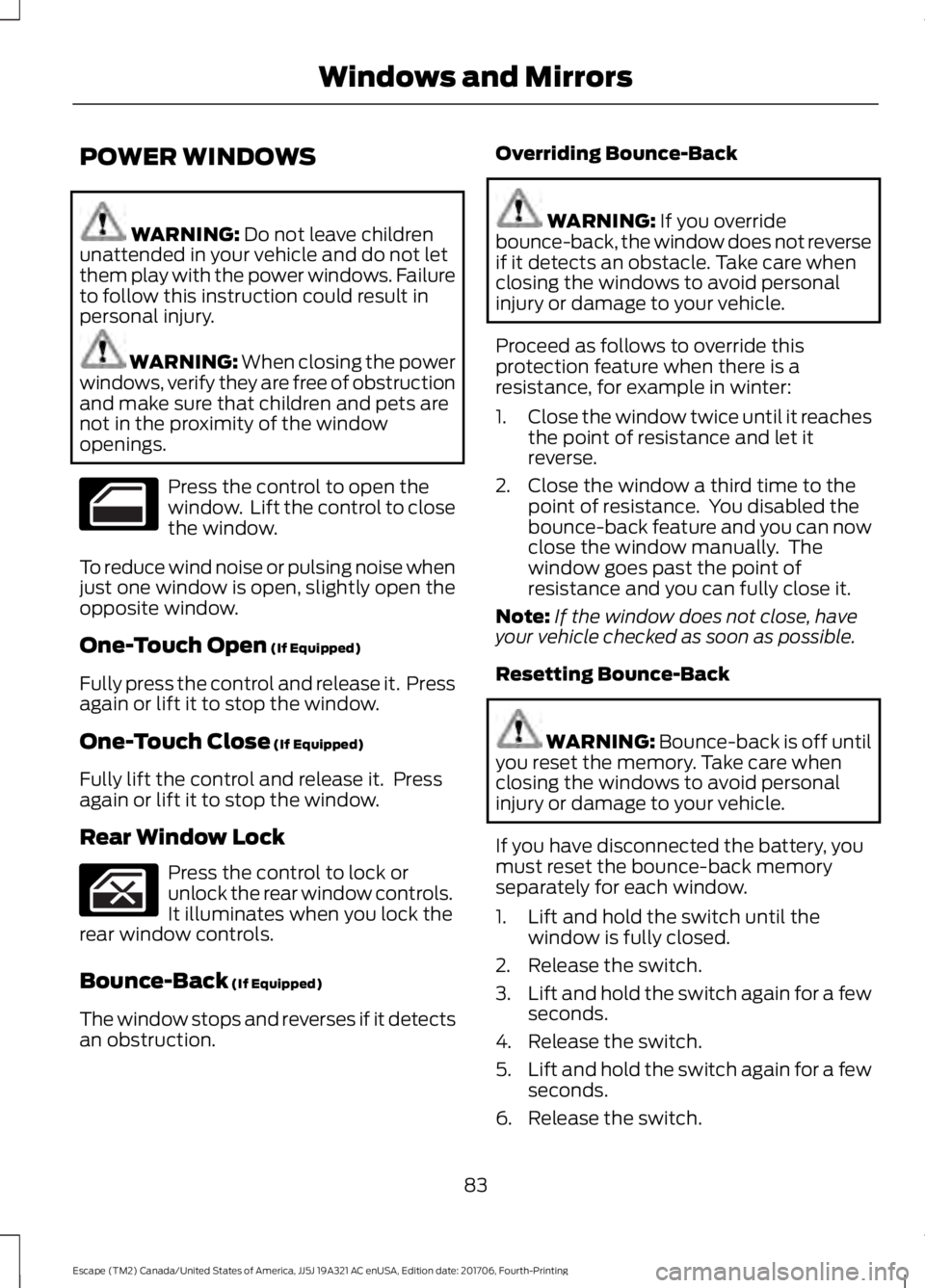
openings. Press the control to open the
window. Lift the control to close
the window.
To reduce wind noise or pulsing noise when
just one window is open, slightly open the
opposite window.
One-Touch Open
(If Equipped)
Fully press the control and release it. Press
again or lift it to stop the window.
One-Touch Close
(If Equipped)
Fully lift the control and release it. Press
again or lift it to stop the window.
Rear Window Lock Press the control to lock or
unlock the rear window controls.
It illuminates when you lock the
rear window controls.
Bounce-Back
(If Equipped)
The window stops and reverses if it detects
an obstruction. Overriding Bounce-Back WARNING:
If you override
bounce-back, the window does not reverse
if it detects an obstacle. Take care when
closing the windows to avoid personal
injury or damage to your vehicle.
Proceed as follows to override this
protection feature when there is a
resistance, for example in winter:
1. Close the window twice until it reaches
the point of resistance and let it
reverse.
2. Close the window a third time to the point of resistance. You disabled the
bounce-back feature and you can now
close the window manually. The
window goes past the point of
resistance and you can fully close it.
Note: If the window does not close, have
your vehicle checked as soon as possible.
Resetting Bounce-Back WARNING:
Bounce-back is off until
you reset the memory. Take care when
closing the windows to avoid personal
injury or damage to your vehicle.
If you have disconnected the battery, you
must reset the bounce-back memory
separately for each window.
1. Lift and hold the switch until the window is fully closed.
2. Release the switch.
3. Lift and hold the switch again for a few
seconds.
4. Release the switch.
5. Lift and hold the switch again for a few
seconds.
6. Release the switch.
83
Escape (TM2) Canada/United States of America, JJ5J 19A321 AC enUSA, Edition date: 201706, Fourth-Printing Windows and Mirrors
Page 87 of 517
7. Press and hold the switch until the
window is fully open.
8. Lift and hold the switch until the window is fully closed.
9. Release the switch.
10. Open the window and then try to close it using one-touch close.
Note: Repeat the procedure if the window
does not close when you use one-touch.
Accessory Delay
You can use the window controls for
several minutes after switching off the
ignition or until opening either front door.
EXTERIOR MIRRORS
Power Exterior Mirrors WARNING: Do not adjust the mirrors
when your vehicle is moving. This could
result in the loss of control of your vehicle,
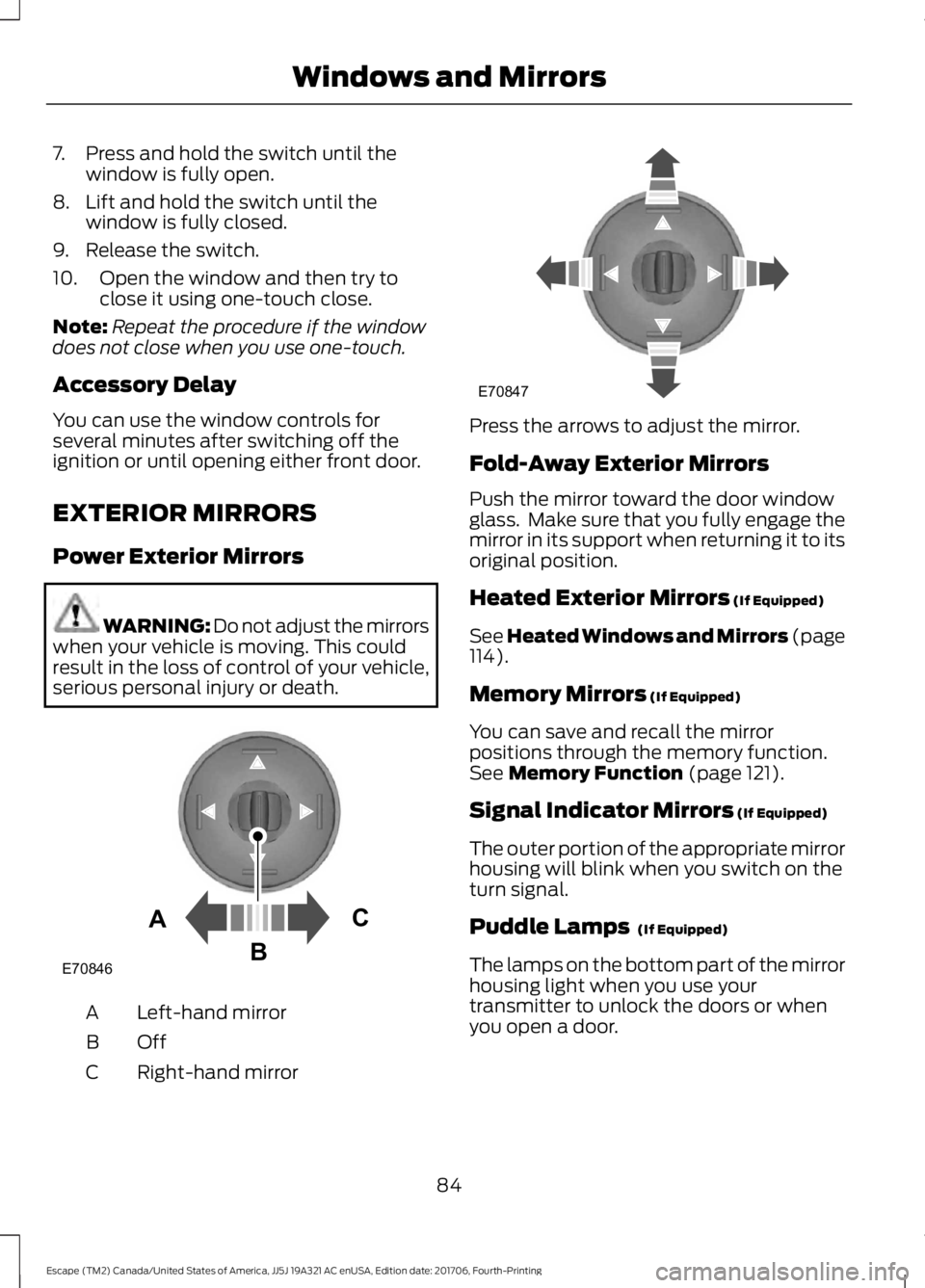
serious personal injury or death. Left-hand mirror
A
OffB
Right-hand mirror
C Press the arrows to adjust the mirror.
Fold-Away Exterior Mirrors
Push the mirror toward the door window
glass. Make sure that you fully engage the
mirror in its support when returning it to its
original position.
Heated Exterior Mirrors (If Equipped)
See Heated Windows and Mirrors (page
114
).
Memory Mirrors
(If Equipped)
You can save and recall the mirror
positions through the memory function.
See
Memory Function (page 121).
Signal Indicator Mirrors
(If Equipped)
The outer portion of the appropriate mirror
housing will blink when you switch on the
turn signal.
Puddle Lamps
(If Equipped)
The lamps on the bottom part of the mirror
housing light when you use your
transmitter to unlock the doors or when
you open a door.
84
Escape (TM2) Canada/United States of America, JJ5J 19A321 AC enUSA, Edition date: 201706, Fourth-Printing Windows and MirrorsE70846A
C
B E70847
Page 88 of 517
Integrated Blind Spot Mirrors (If
Equipped) WARNING:
Objects in the mirror are
closer than they appear.
Blind spot mirrors have an integrated
convex mirror built into the upper outboard
corner of the exterior mirrors. They are
designed to increase your visibility along
the side of your vehicle.
Check the main mirror first before a lane
change, then check the blind spot mirror.
If no vehicles are present in the blind spot
mirror and the traffic in the adjacent lane
is at a safe distance, signal that you intend
to change lanes. Glance over your shoulder
to verify traffic is clear and carefully
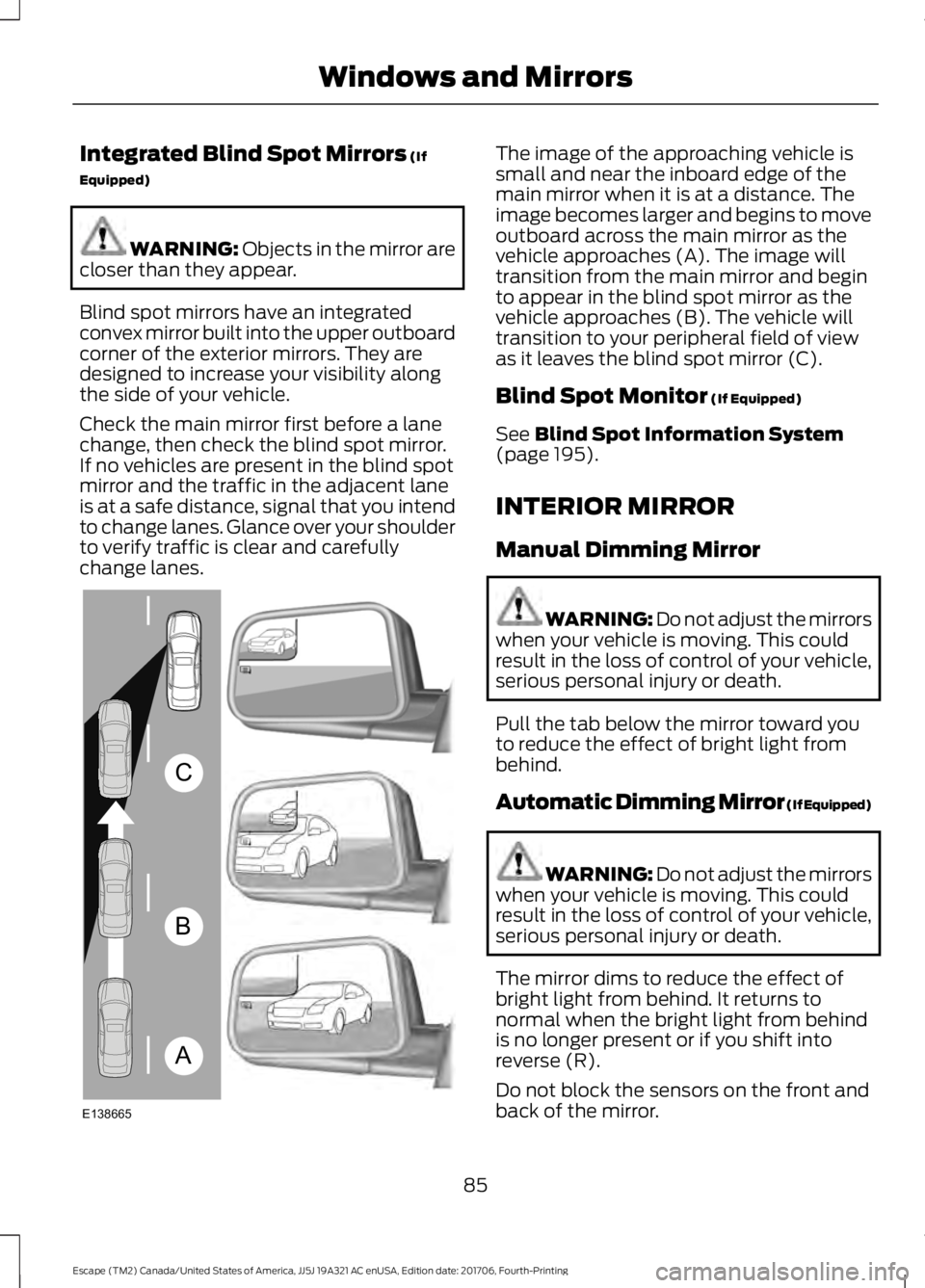
change lanes. The image of the approaching vehicle is
small and near the inboard edge of the
main mirror when it is at a distance. The
image becomes larger and begins to move
outboard across the main mirror as the
vehicle approaches (A). The image will
transition from the main mirror and begin
to appear in the blind spot mirror as the
vehicle approaches (B). The vehicle will
transition to your peripheral field of view
as it leaves the blind spot mirror (C).
Blind Spot Monitor
(If Equipped)
See
Blind Spot Information System
(page 195).
INTERIOR MIRROR
Manual Dimming Mirror WARNING: Do not adjust the mirrors
when your vehicle is moving. This could
result in the loss of control of your vehicle,
serious personal injury or death.
Pull the tab below the mirror toward you
to reduce the effect of bright light from
behind.
Automatic Dimming Mirror (If Equipped) WARNING: Do not adjust the mirrors
when your vehicle is moving. This could
result in the loss of control of your vehicle,
serious personal injury or death.
The mirror dims to reduce the effect of
bright light from behind. It returns to
normal when the bright light from behind
is no longer present or if you shift into
reverse (R).
Do not block the sensors on the front and
back of the mirror.
85
Escape (TM2) Canada/United States of America, JJ5J 19A321 AC enUSA, Edition date: 201706, Fourth-Printing Windows and MirrorsA
B
C
E138665
Page 89 of 517
Note:
A rear center passenger or raised rear
center head restraint could prevent light
from reaching the sensor.
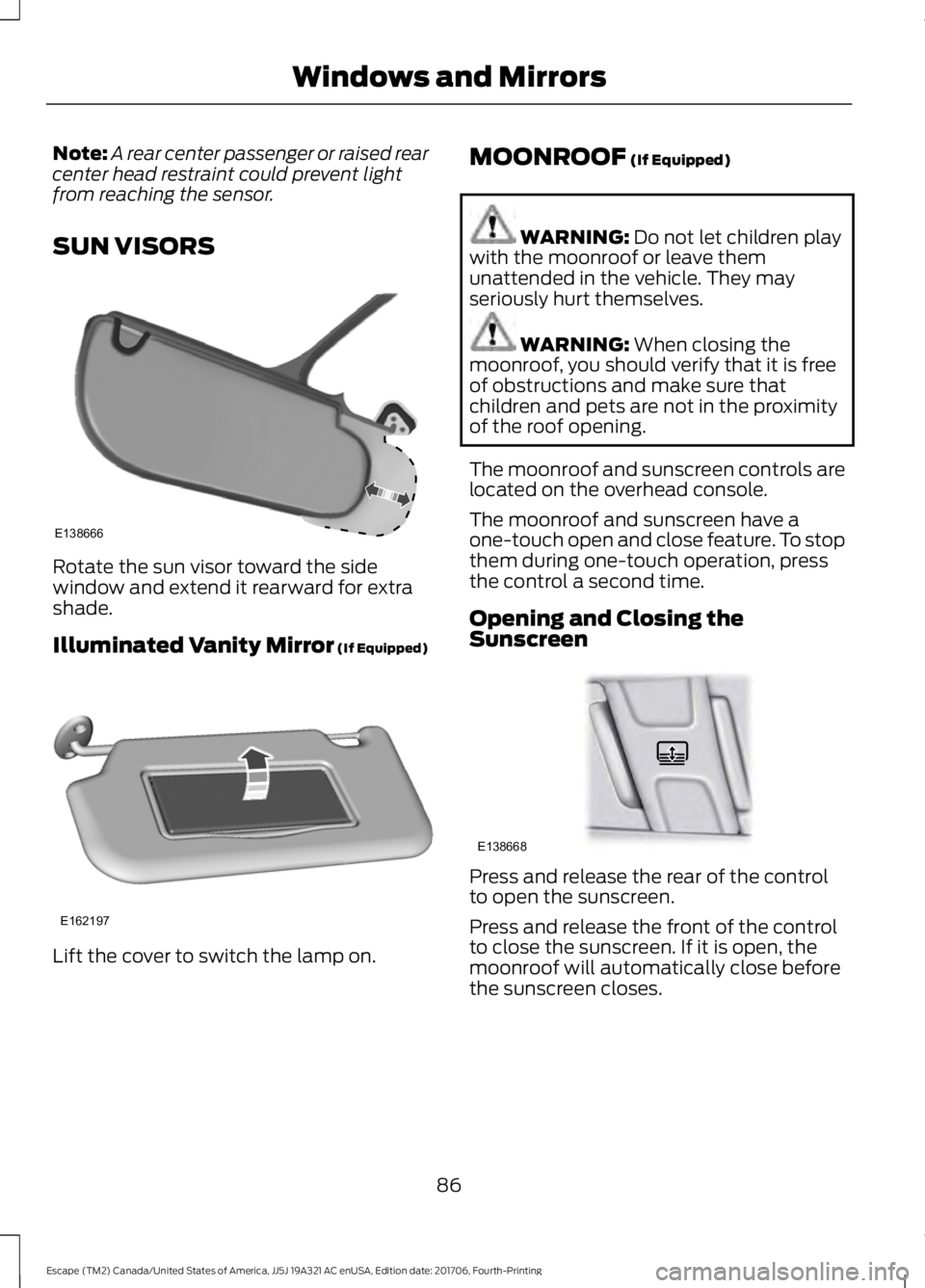
SUN VISORS Rotate the sun visor toward the side
window and extend it rearward for extra
shade.
Illuminated Vanity Mirror (If Equipped)
Lift the cover to switch the lamp on. MOONROOF
(If Equipped) WARNING:
Do not let children play
with the moonroof or leave them
unattended in the vehicle. They may
seriously hurt themselves. WARNING:
When closing the
moonroof, you should verify that it is free
of obstructions and make sure that
children and pets are not in the proximity
of the roof opening.
The moonroof and sunscreen controls are
located on the overhead console.
The moonroof and sunscreen have a
one-touch open and close feature. To stop
them during one-touch operation, press
the control a second time.
Opening and Closing the
Sunscreen Press and release the rear of the control
to open the sunscreen.
Press and release the front of the control
to close the sunscreen. If it is open, the
moonroof will automatically close before
the sunscreen closes.
86
Escape (TM2) Canada/United States of America, JJ5J 19A321 AC enUSA, Edition date: 201706, Fourth-Printing Windows and MirrorsE138666 E162197 E138668
Page 90 of 517
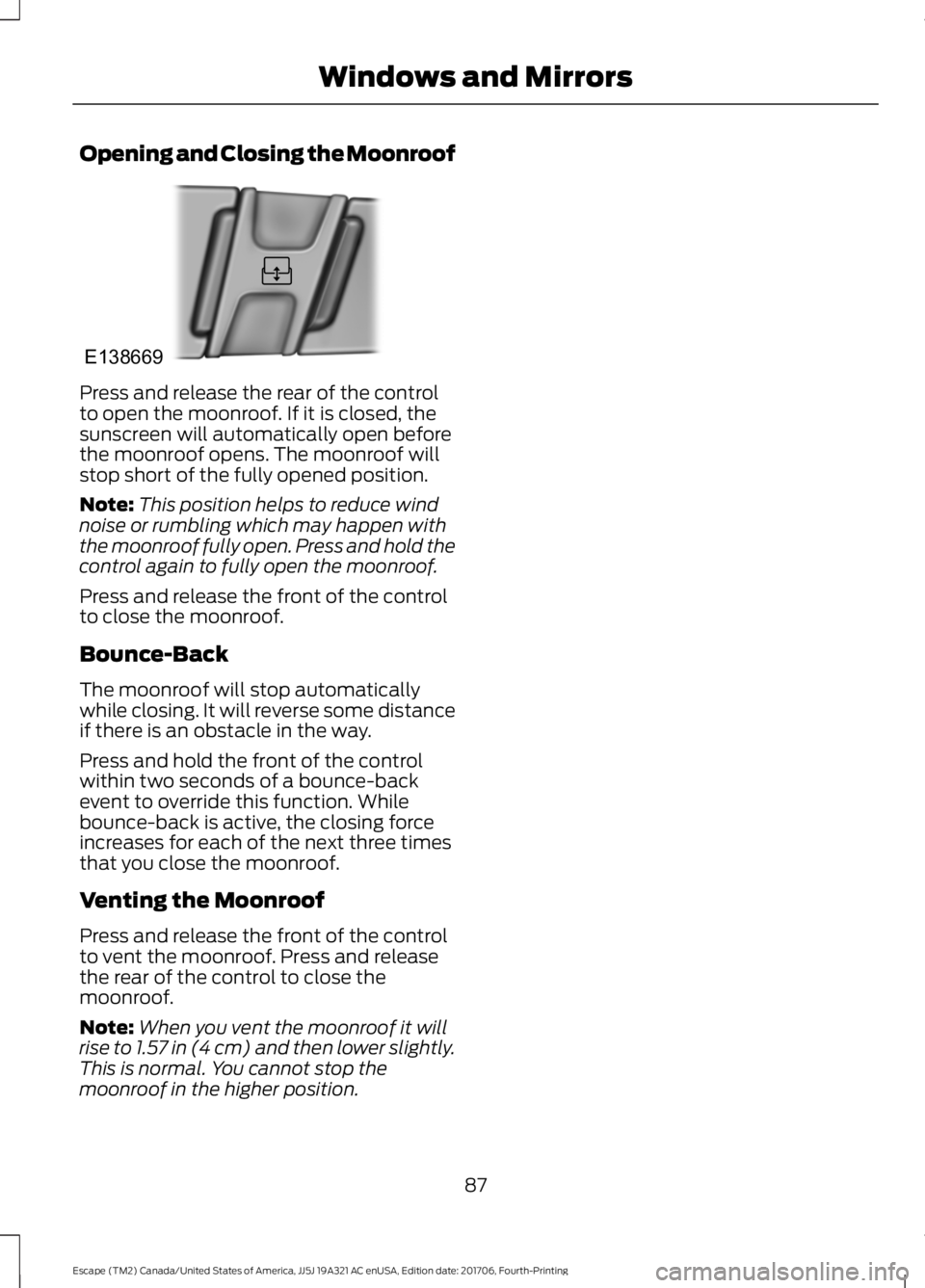
Opening and Closing the Moonroof
Press and release the rear of the control
to open the moonroof. If it is closed, the
sunscreen will automatically open before
the moonroof opens. The moonroof will
stop short of the fully opened position.
Note:
This position helps to reduce wind
noise or rumbling which may happen with
the moonroof fully open. Press and hold the
control again to fully open the moonroof.
Press and release the front of the control
to close the moonroof.
Bounce-Back
The moonroof will stop automatically
while closing. It will reverse some distance
if there is an obstacle in the way.
Press and hold the front of the control
within two seconds of a bounce-back
event to override this function. While
bounce-back is active, the closing force
increases for each of the next three times
that you close the moonroof.
Venting the Moonroof
Press and release the front of the control
to vent the moonroof. Press and release
the rear of the control to close the
moonroof.
Note: When you vent the moonroof it will
rise to 1.57 in (4 cm) and then lower slightly.
This is normal. You cannot stop the
moonroof in the higher position.
87
Escape (TM2) Canada/United States of America, JJ5J 19A321 AC enUSA, Edition date: 201706, Fourth-Printing Windows and MirrorsE138669
Page 111 of 517
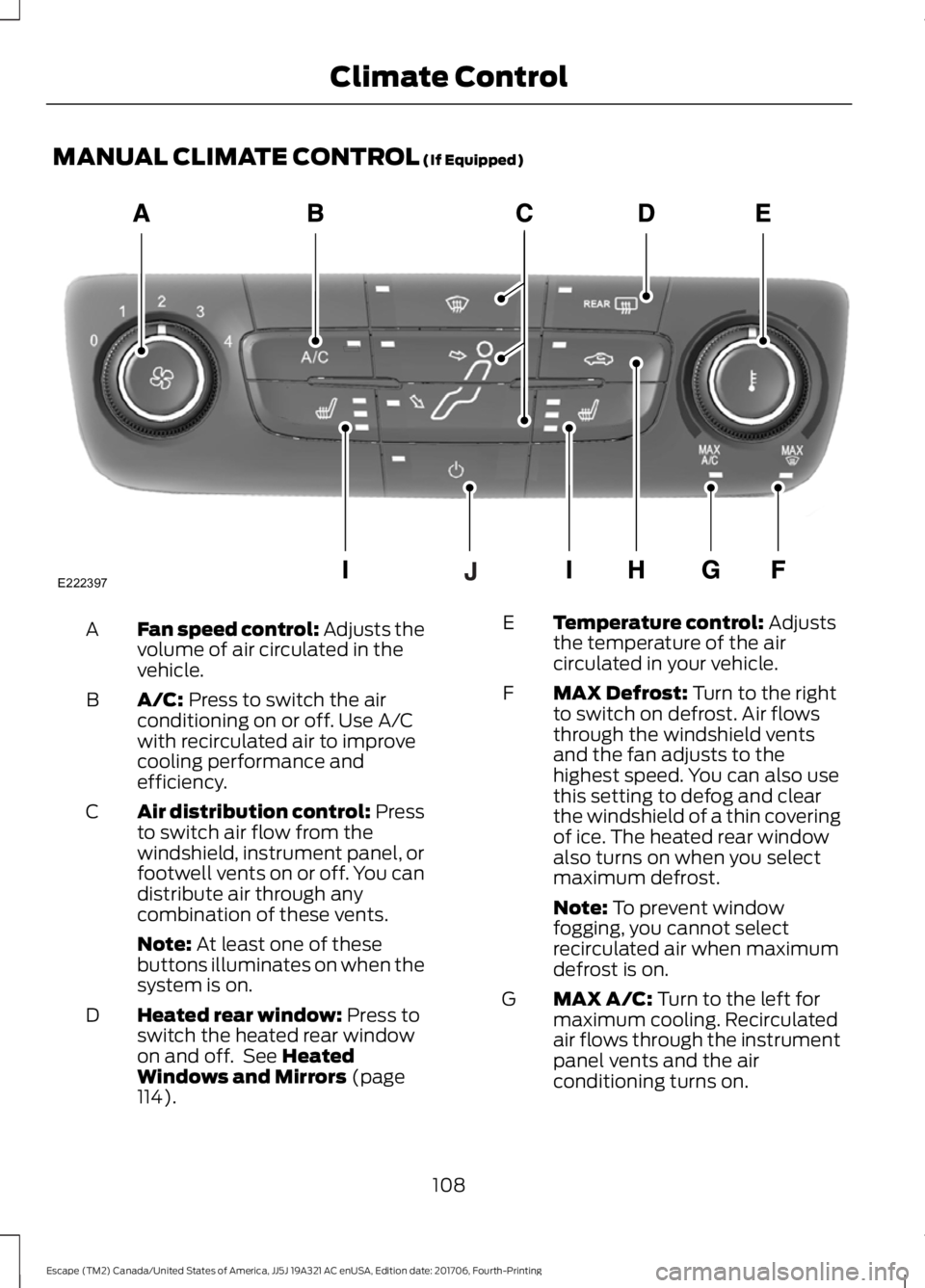
MANUAL CLIMATE CONTROL (If Equipped)
Fan speed control: Adjusts the
volume of air circulated in the
vehicle.
A
A/C:
Press to switch the air
conditioning on or off. Use A/C
with recirculated air to improve
cooling performance and
efficiency.
B
Air distribution control: Press
to switch air flow from the
windshield, instrument panel, or
footwell vents on or off. You can
distribute air through any
combination of these vents.
C
Note:
At least one of these
buttons illuminates on when the
system is on.
Heated rear window:
Press to
switch the heated rear window
on and off. See
Heated
Windows and Mirrors (page
114).
D Temperature control:
Adjusts
the temperature of the air
circulated in your vehicle.
E
MAX Defrost:
Turn to the right
to switch on defrost. Air flows
through the windshield vents
and the fan adjusts to the
highest speed. You can also use
this setting to defog and clear
the windshield of a thin covering
of ice. The heated rear window
also turns on when you select
maximum defrost.
F
Note:
To prevent window
fogging, you cannot select
recirculated air when maximum
defrost is on.
MAX A/C:
Turn to the left for
maximum cooling. Recirculated
air flows through the instrument
panel vents and the air
conditioning turns on.
G
108
Escape (TM2) Canada/United States of America, JJ5J 19A321 AC enUSA, Edition date: 201706, Fourth-Printing Climate ControlE222397
Page 113 of 517
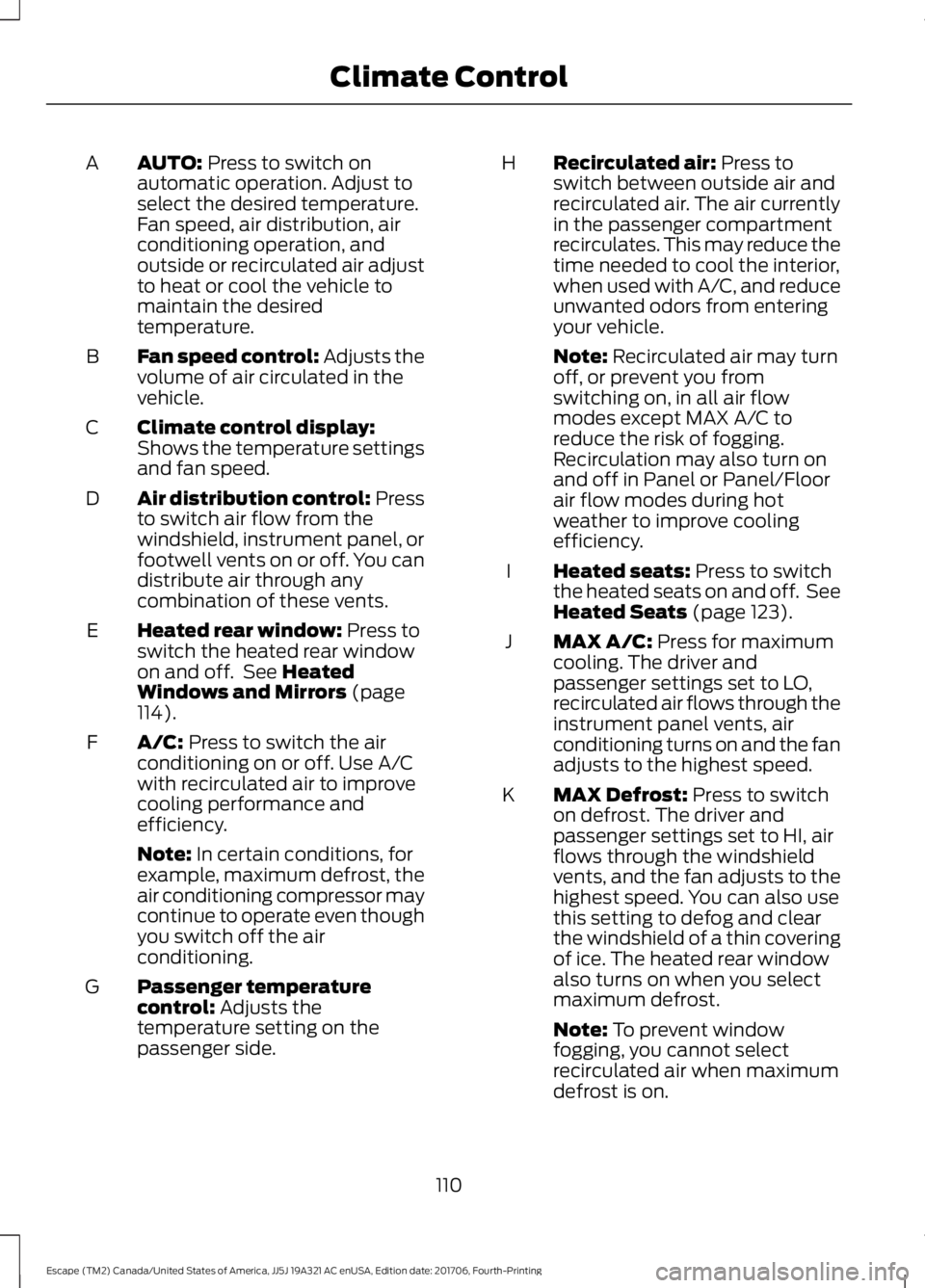
AUTO: Press to switch on
automatic operation. Adjust to
select the desired temperature.
Fan speed, air distribution, air
conditioning operation, and
outside or recirculated air adjust
to heat or cool the vehicle to
maintain the desired
temperature.
A
Fan speed control: Adjusts the
volume of air circulated in the
vehicle.
B
Climate control display:
Shows the temperature settings
and fan speed.
C
Air distribution control: Press
to switch air flow from the
windshield, instrument panel, or
footwell vents on or off. You can
distribute air through any
combination of these vents.
D
Heated rear window:
Press to
switch the heated rear window
on and off. See
Heated
Windows and Mirrors (page
114).
E
A/C:
Press to switch the air
conditioning on or off. Use A/C
with recirculated air to improve
cooling performance and
efficiency.
F
Note:
In certain conditions, for
example, maximum defrost, the
air conditioning compressor may
continue to operate even though
you switch off the air
conditioning.
Passenger temperature
control:
Adjusts the
temperature setting on the
passenger side.
G Recirculated air:
Press to
switch between outside air and
recirculated air. The air currently
in the passenger compartment
recirculates. This may reduce the
time needed to cool the interior,
when used with A/C, and reduce
unwanted odors from entering
your vehicle.
H
Note:
Recirculated air may turn
off, or prevent you from
switching on, in all air flow
modes except MAX A/C to
reduce the risk of fogging.
Recirculation may also turn on
and off in Panel or Panel/Floor
air flow modes during hot
weather to improve cooling
efficiency.
Heated seats:
Press to switch
the heated seats on and off. See
Heated Seats
(page 123).
I
MAX A/C:
Press for maximum
cooling. The driver and
passenger settings set to LO,
recirculated air flows through the
instrument panel vents, air
conditioning turns on and the fan
adjusts to the highest speed.
J
MAX Defrost:
Press to switch
on defrost. The driver and
passenger settings set to HI, air
flows through the windshield
vents, and the fan adjusts to the
highest speed. You can also use
this setting to defog and clear
the windshield of a thin covering
of ice. The heated rear window
also turns on when you select
maximum defrost.
K
Note:
To prevent window
fogging, you cannot select
recirculated air when maximum
defrost is on.
110
Escape (TM2) Canada/United States of America, JJ5J 19A321 AC enUSA, Edition date: 201706, Fourth-Printing Climate Control
Page 117 of 517
Defogging the Side Windows in Cold Weather
Automatic climate control
Manual climate control
Press the defrost button.
Direct air to the windshield using the air
distribution buttons.
1
Adjust the temperature control to the
desired setting. Use 72°F (22°C) as a
starting point, then adjust the setting as
necessary.
Press A/C.
2
Adjust the temperature control to the
desired setting.
3
Adjust the fan speed to the highest
setting.
4
HEATED WINDOWS AND
MIRRORS
Note: Make sure the vehicle is running
before operating the heated windows.
Heated Rear Window Press the button to clear the
heated rear window of thin ice
and fog. The heated rear
window automatically turns off after a
short period of time. Press the button
again to switch it off.
Note: Do not use razor blades or other
sharp objects to clean or remove decals
from the inside of the heated rear window.
The vehicle warranty does not cover
damage caused to the heated rear window
grid lines.
Heated Exterior Mirrors
(If Equipped)
When you switch the heated rear window
on, the heated exterior mirrors
automatically turn on. Note:
Do not remove ice from the mirrors
with a scraper or adjust the mirror glass
when it is frozen in place.
Note: Do not clean the mirror housing or
glass with harsh abrasives, fuel or other
petroleum-based cleaning products.
Windshield Wiper De-icer
(If Equipped)
When you switch the heated rear window
on, the windshield wiper de-icer
automatically turns on.
CABIN AIR FILTER
Your vehicle is equipped with a cabin air
filter, which gives you and your passengers
the following benefits:
• It improves your driving comfort by
reducing particle concentration.
• It improves the interior compartment
cleanliness.
• It protects the climate control
components from particle deposits.
You can locate the cabin air filter behind
the glove box.
114
Escape (TM2) Canada/United States of America, JJ5J 19A321 AC enUSA, Edition date: 201706, Fourth-Printing Climate ControlE72507
Page 118 of 517
Note:
Make sure you have a cabin air filter
installed at all times. This prevents foreign
objects from entering the system. Running
the system without a filter in place could
result in degradation or damage to the
system.
Replace the filter at regular intervals. See
Scheduled Maintenance (page 455).
For additional cabin air filter information,
or to replace the filter, see an authorized
dealer.
REMOTE START
(If Equipped)
The system adjusts the interior
temperature depending on your chosen
settings during remote start.
You cannot adjust the climate control
setting during remote start operation.
When you switch the ignition on, the
climate control system returns to the
previous settings. You can now make
adjustments.
You need to switch on certain
vehicle-dependent features, such as:
• Heated seats.
• Heated steering wheel.
• Heated mirrors.
• Heated rear window.
You can adjust the default remote start
settings using the information display
controls.
Automatic Settings
You can set the system to operate in AUTO
mode through the information display. The
system sets the interior temperature to
72°F (22°C)
.
In hot weather, the system is set to
72°F
(22°C). The cooled seats are set to high
(if available, and selected to AUTO in the
information display). In cold weather, the system is set to
72°F
(22°C). The heated rear window and
heated mirrors automatically turn on.
Previous Settings
You can set the system to operate using
your previous settings prior to switching
the vehicle off through the information
display. See Information Displays (page
93
).
115
Escape (TM2) Canada/United States of America, JJ5J 19A321 AC enUSA, Edition date: 201706, Fourth-Printing Climate Control