clock FORD ESCAPE 2019 User Guide
[x] Cancel search | Manufacturer: FORD, Model Year: 2019, Model line: ESCAPE, Model: FORD ESCAPE 2019Pages: 509, PDF Size: 6.69 MB
Page 266 of 509
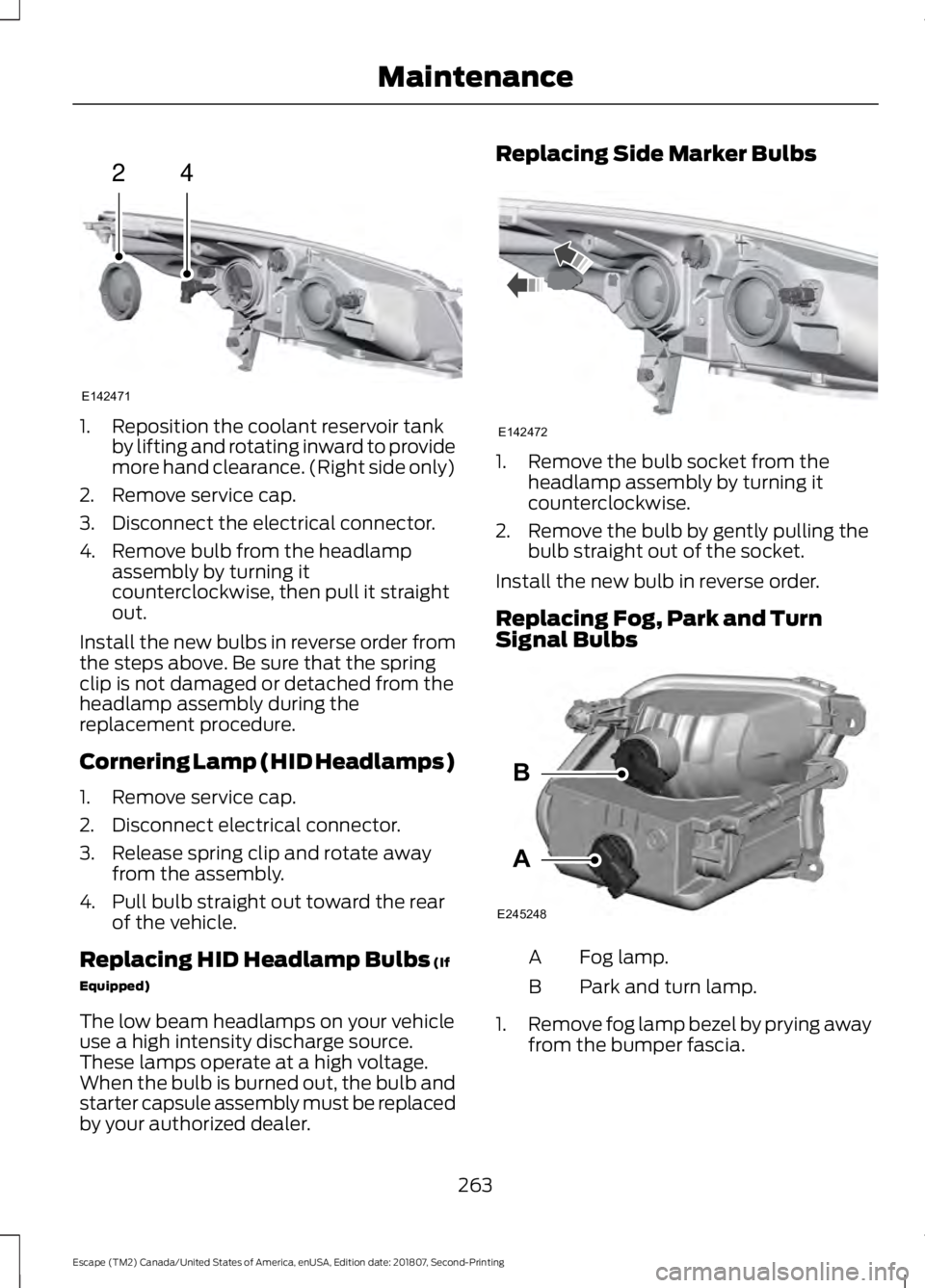
1. Reposition the coolant reservoir tank
by lifting and rotating inward to provide
more hand clearance. (Right side only)
2. Remove service cap.
3. Disconnect the electrical connector.
4. Remove bulb from the headlamp assembly by turning it
counterclockwise, then pull it straight
out.
Install the new bulbs in reverse order from
the steps above. Be sure that the spring
clip is not damaged or detached from the
headlamp assembly during the
replacement procedure.
Cornering Lamp (HID Headlamps)
1. Remove service cap.
2. Disconnect electrical connector.
3. Release spring clip and rotate away from the assembly.
4. Pull bulb straight out toward the rear of the vehicle.
Replacing HID Headlamp Bulbs (If
Equipped)
The low beam headlamps on your vehicle
use a high intensity discharge source.
These lamps operate at a high voltage.
When the bulb is burned out, the bulb and
starter capsule assembly must be replaced
by your authorized dealer. Replacing Side Marker Bulbs
1. Remove the bulb socket from the
headlamp assembly by turning it
counterclockwise.
2. Remove the bulb by gently pulling the bulb straight out of the socket.
Install the new bulb in reverse order.
Replacing Fog, Park and Turn
Signal Bulbs Fog lamp.
A
Park and turn lamp.
B
1. Remove fog lamp bezel by prying away
from the bumper fascia.
263
Escape (TM2) Canada/United States of America, enUSA, Edition date: 201807, Second-Printing Maintenance24
E142471 E142472 A
B
E245248
Page 267 of 509
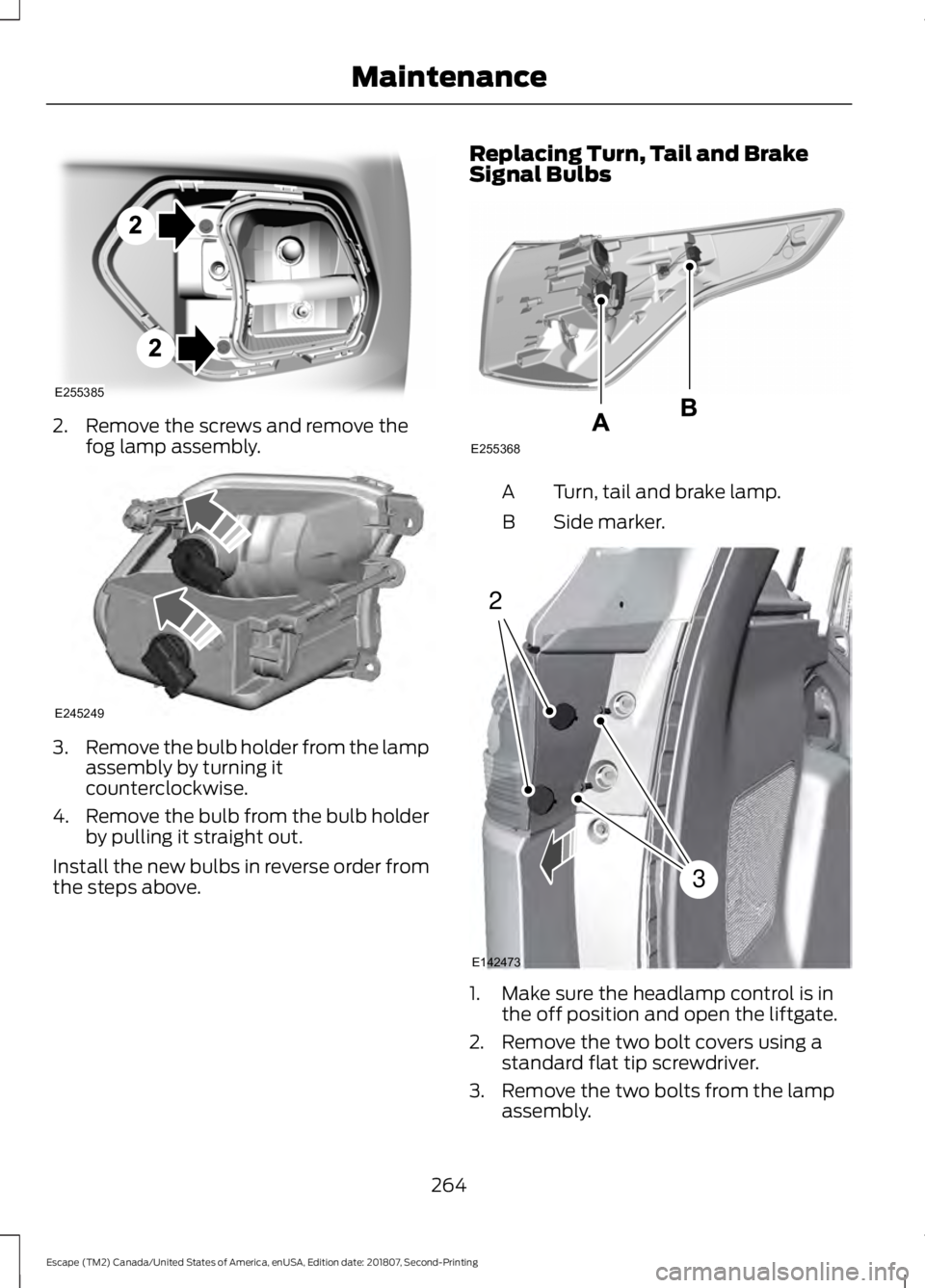
2. Remove the screws and remove the
fog lamp assembly. 3.
Remove the bulb holder from the lamp
assembly by turning it
counterclockwise.
4. Remove the bulb from the bulb holder
by pulling it straight out.
Install the new bulbs in reverse order from
the steps above. Replacing Turn, Tail and Brake
Signal Bulbs Turn, tail and brake lamp.
A
Side marker.
B 1. Make sure the headlamp control is in
the off position and open the liftgate.
2. Remove the two bolt covers using a standard flat tip screwdriver.
3. Remove the two bolts from the lamp assembly.
264
Escape (TM2) Canada/United States of America, enUSA, Edition date: 201807, Second-Printing MaintenanceE255385 E245249 E255368 2
3
E142473
Page 268 of 509
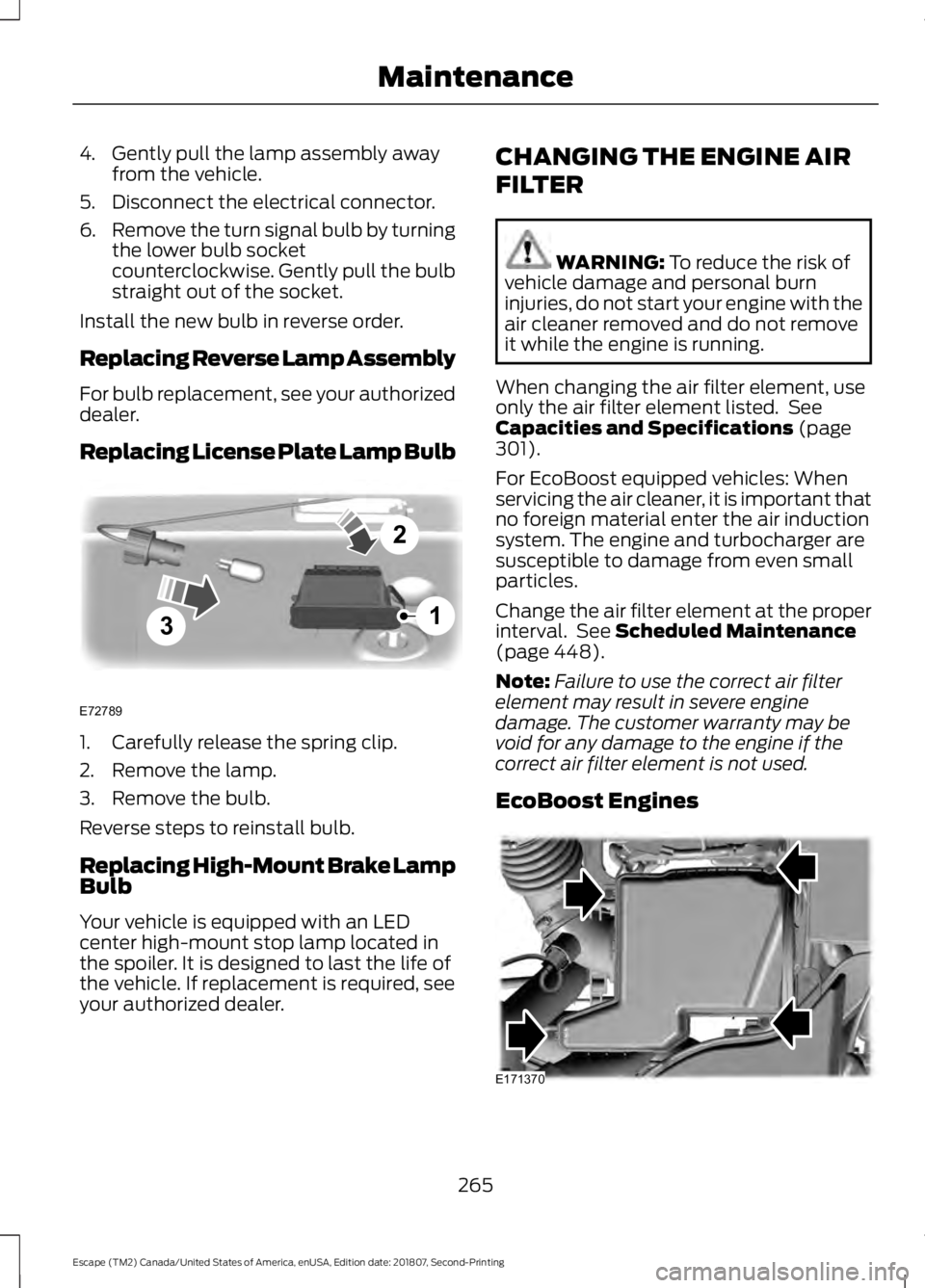
4. Gently pull the lamp assembly away
from the vehicle.
5. Disconnect the electrical connector.
6. Remove the turn signal bulb by turning
the lower bulb socket
counterclockwise. Gently pull the bulb
straight out of the socket.
Install the new bulb in reverse order.
Replacing Reverse Lamp Assembly
For bulb replacement, see your authorized
dealer.
Replacing License Plate Lamp Bulb 1. Carefully release the spring clip.
2. Remove the lamp.
3. Remove the bulb.
Reverse steps to reinstall bulb.
Replacing High-Mount Brake Lamp
Bulb
Your vehicle is equipped with an LED
center high-mount stop lamp located in
the spoiler. It is designed to last the life of
the vehicle. If replacement is required, see
your authorized dealer. CHANGING THE ENGINE AIR
FILTER WARNING: To reduce the risk of
vehicle damage and personal burn
injuries, do not start your engine with the
air cleaner removed and do not remove
it while the engine is running.
When changing the air filter element, use
only the air filter element listed. See
Capacities and Specifications
(page
301).
For EcoBoost equipped vehicles: When
servicing the air cleaner, it is important that
no foreign material enter the air induction
system. The engine and turbocharger are
susceptible to damage from even small
particles.
Change the air filter element at the proper
interval. See
Scheduled Maintenance
(page 448).
Note: Failure to use the correct air filter
element may result in severe engine
damage. The customer warranty may be
void for any damage to the engine if the
correct air filter element is not used.
EcoBoost Engines 265
Escape (TM2) Canada/United States of America, enUSA, Edition date: 201807, Second-Printing Maintenance3
2
1
E72789 E171370
Page 300 of 509
WARNING: It is recommended
that the wheels of the vehicle be
chocked, and that no person should
remain in a vehicle that is being jacked. WARNING: The jack supplied with
this vehicle is only intended for changing
wheels. Do not use the vehicle jack other
than when you are changing a wheel in
an emergency. WARNING:
Check that the vehicle
jack is not damaged or deformed and
the thread is lubricated and clean. WARNING:
The jack should be
used on level firm ground wherever
possible. WARNING:
Use only the specified
jacking points. If you use other positions,
you may damage the body, steering,
suspension, engine, braking system or
the fuel lines. WARNING:
No person should
place any portion of their body under a
vehicle that is supported by a jack.
Note: The jack does not require
maintenance or additional lubrication over
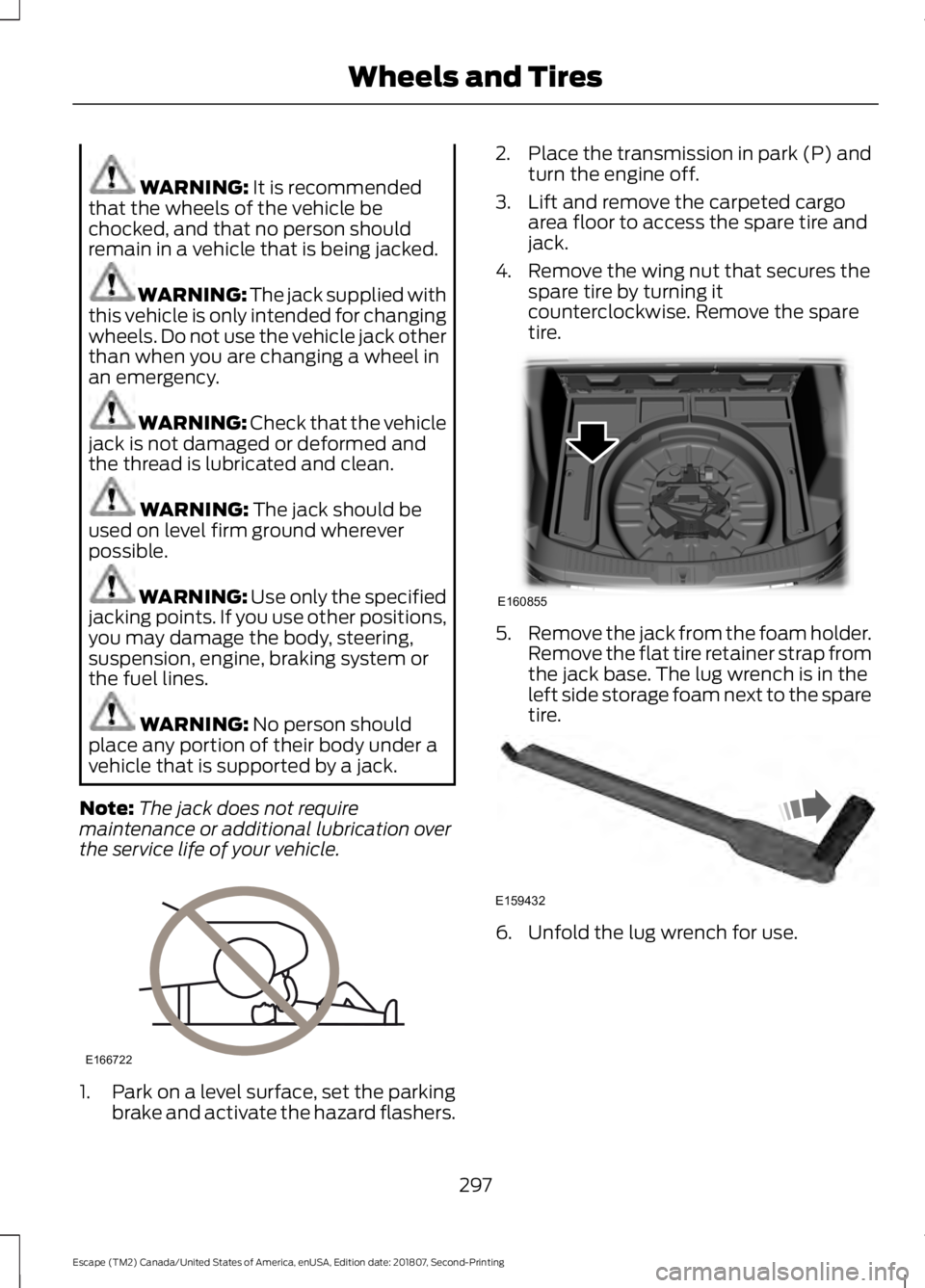
the service life of your vehicle. 1.
Park on a level surface, set the parking
brake and activate the hazard flashers. 2.
Place the transmission in park (P) and
turn the engine off.
3. Lift and remove the carpeted cargo area floor to access the spare tire and
jack.
4. Remove the wing nut that secures the spare tire by turning it
counterclockwise. Remove the spare
tire. 5.
Remove the jack from the foam holder.
Remove the flat tire retainer strap from
the jack base. The lug wrench is in the
left side storage foam next to the spare
tire. 6. Unfold the lug wrench for use.
297
Escape (TM2) Canada/United States of America, enUSA, Edition date: 201807, Second-Printing Wheels and TiresE166722 E160855 E159432
Page 301 of 509
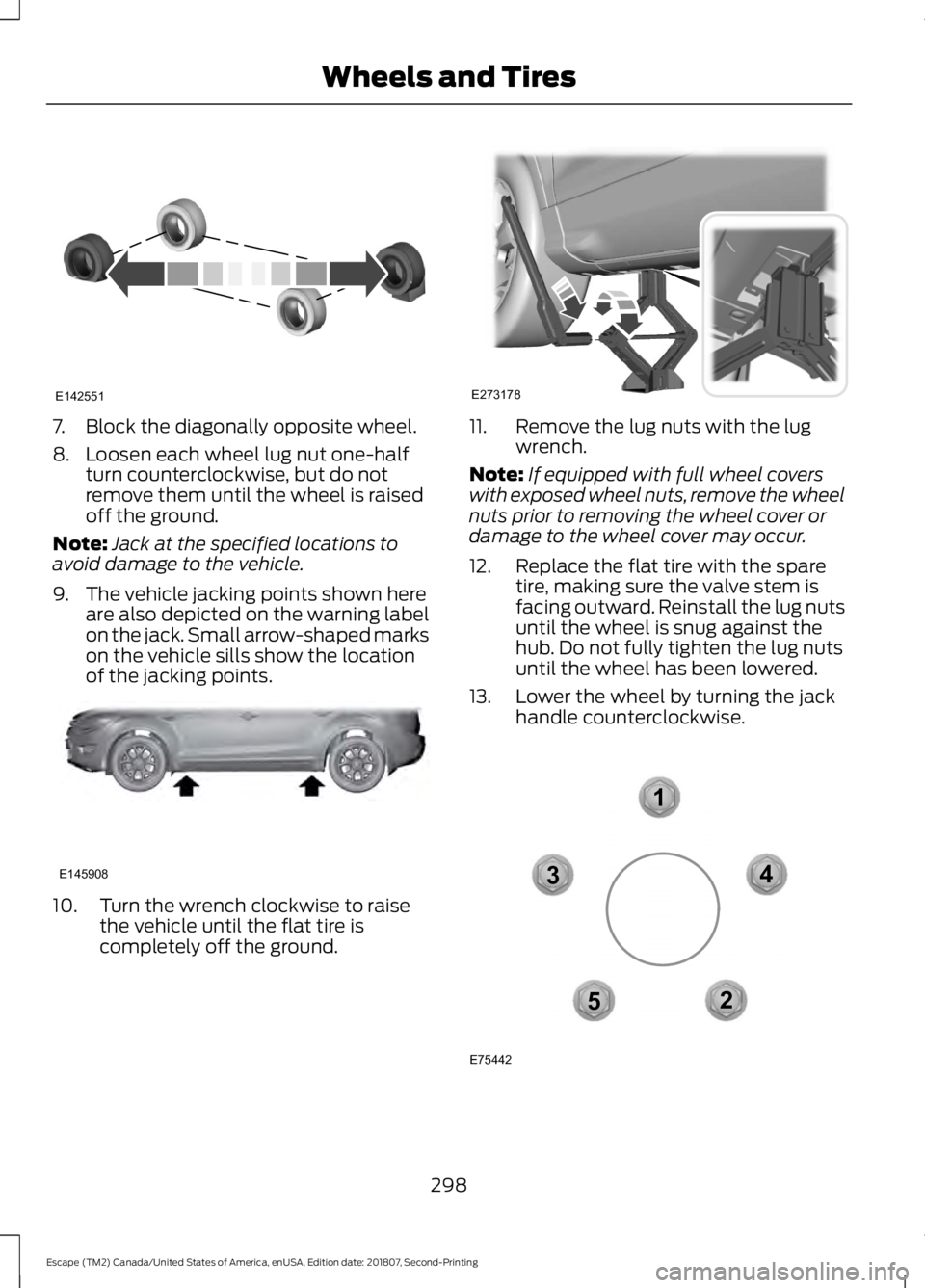
7. Block the diagonally opposite wheel.
8. Loosen each wheel lug nut one-half
turn counterclockwise, but do not
remove them until the wheel is raised
off the ground.
Note: Jack at the specified locations to
avoid damage to the vehicle.
9. The vehicle jacking points shown here are also depicted on the warning label
on the jack. Small arrow-shaped marks
on the vehicle sills show the location
of the jacking points. 10. Turn the wrench clockwise to raise
the vehicle until the flat tire is
completely off the ground. 11. Remove the lug nuts with the lug
wrench.
Note: If equipped with full wheel covers
with exposed wheel nuts, remove the wheel
nuts prior to removing the wheel cover or
damage to the wheel cover may occur.
12. Replace the flat tire with the spare tire, making sure the valve stem is
facing outward. Reinstall the lug nuts
until the wheel is snug against the
hub. Do not fully tighten the lug nuts
until the wheel has been lowered.
13. Lower the wheel by turning the jack handle counterclockwise. 298
Escape (TM2) Canada/United States of America, enUSA, Edition date: 201807, Second-Printing Wheels and TiresE142551 E145908 E273178 12
3
4
5
E75442
Page 325 of 509
GENERAL INFORMATION
Radio Frequencies and Reception
Factors
AM and FM frequencies are established by
the Federal Communications Commission
(FCC) and the Canadian Radio and
Telecommunications Commission (CRTC).
Those frequencies are:
•
AM: 530-1710 kHz
• FM: 87.9-107.9 MHz
Note: Listening to loud audio for long
periods of time could damage your hearing. Radio Reception Factors
The further you travel from an AM or FM station, the
weaker the signal and the weaker the reception.
Distance and strength
Hills, mountains, tall buildings, bridges, tunnels, freeway
overpasses, parking garages, dense tree foliage and
thunderstorms can interfere with the reception.
Terrain
When you pass a ground-based broadcast repeating
tower, a stronger signal may overtake a weaker one and
result in the audio system muting.
Station overload
AUDIO UNIT - VEHICLES WITH:
SYNC WARNING: Driving while
distracted can result in loss of vehicle
control, crash and injury. We strongly
recommend that you use extreme
caution when using any device that may
take your focus off the road. Your
primary responsibility is the safe
operation of your vehicle. We
recommend against the use of any
hand-held device while driving and
encourage the use of voice-operated
systems when possible. Make sure you
are aware of all applicable local laws
that may affect the use of electronic
devices while driving. Note:
Some features, such as satellite
radio, may not be available in your location.
Check with an authorized dealer.
Accessing the Clock Settings Press and release the button to
access the clock setting.
Use the center arrow controls to
change the hours and minutes.
Accessing the Media Source Menu Press and release the button to
open the media source menu.
You can press this multiple times to
change to a SYNC-Media device or scroll
through the media sources using the arrow
buttons. Press
OK to select a source.
322
Escape (TM2) Canada/United States of America, enUSA, Edition date: 201807, Second-Printing Audio SystemE265278 E265035
Page 375 of 509
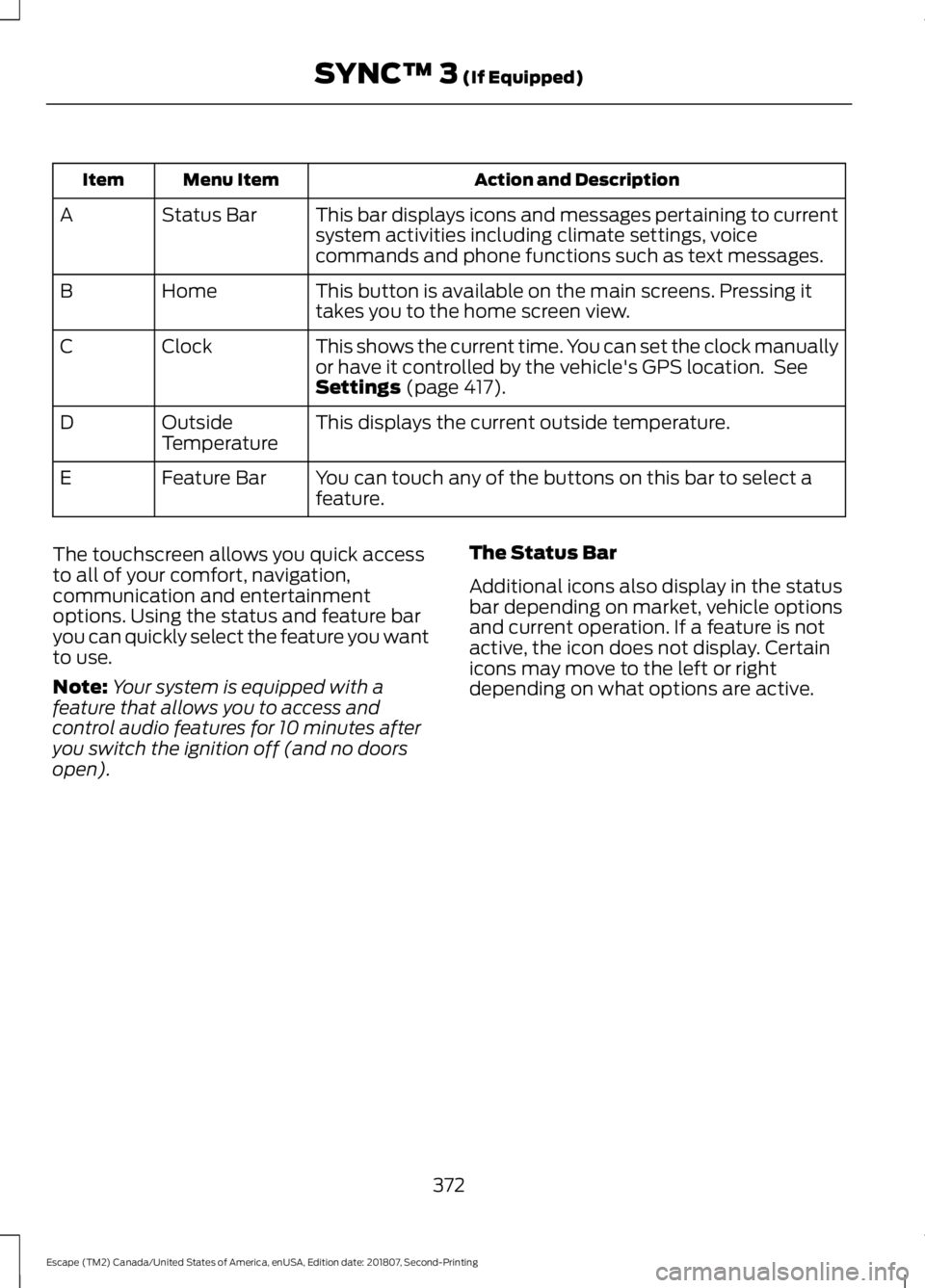
Action and Description
Menu Item
Item
This bar displays icons and messages pertaining to current
system activities including climate settings, voice
commands and phone functions such as text messages.
Status Bar
A
This button is available on the main screens. Pressing it
takes you to the home screen view.
Home
B
This shows the current time. You can set the clock manually
or have it controlled by the vehicle's GPS location. See
Settings (page 417).
Clock
C
This displays the current outside temperature.
Outside
Temperature
D
You can touch any of the buttons on this bar to select a
feature.
Feature Bar
E
The touchscreen allows you quick access
to all of your comfort, navigation,
communication and entertainment
options. Using the status and feature bar
you can quickly select the feature you want
to use.
Note: Your system is equipped with a
feature that allows you to access and
control audio features for 10 minutes after
you switch the ignition off (and no doors
open). The Status Bar
Additional icons also display in the status
bar depending on market, vehicle options
and current operation. If a feature is not
active, the icon does not display. Certain
icons may move to the left or right
depending on what options are active.
372
Escape (TM2) Canada/United States of America, enUSA, Edition date: 201807, Second-Printing SYNC™ 3
(If Equipped)
Page 422 of 509
Clock
To adjust the time, select the up and down
arrows on either side of the screen. The
arrows on the left adjust the hour and
arrows on the right adjust the minute. You
can then select AM or PM.
You can adjust the following features: Action and Description
Menu Item
Select how time displays.
Clock Format
When active, the clock adjusts to time zone changes.
Auto Time Zone
Update This feature is only available in vehicles with navigation.
When selected, the vehicle clock resets to GPS satellite time.
Reset Clock to
GPS Time
The system automatically saves any
updates you make to the settings. Bluetooth
Pressing this button allows you to access
the following: Action
Menu Item
Turning Bluetooth off disconnects all devices and does not permit
new connections.
Bluetooth
You must activate Bluetooth to pair a
Bluetooth enabled device.
The process of pairing a Bluetooth device
is the same as pairing a phone. See
Pairing a Device in Phone settings for how
to pair a device and the available options.
Phone
Pair your Bluetooth enabled phone with
the system before using the functions in
hands-free mode.
Switch on Bluetooth on your device to
begin pairing. See your phone ’s manual if
necessary. To add a phone, select: Menu Item
Add Phone
1. Follow the on-screen instructions.
2. A prompt alerts you to search for the system on your phone.
3. Select your vehicle's make and model as it displays on your phone.
4. Confirm that the six-digit number appearing on your phone matches the
six-digit number on the touchscreen.
5. The touchscreen indicates when the pairing is successful.
419
Escape (TM2) Canada/United States of America, enUSA, Edition date: 201807, Second-Printing SYNC™ 3 (If Equipped)
Page 498 of 509
4
4WD
See: Four-Wheel Drive..................................... 158
A
A/C See: Climate Control.......................................... 110
About This Manual...........................................7
ABS See: Brakes............................................................ 163
ABS driving hints See: Hints on Driving With Anti-Lock
Brakes................................................................ 163
Accessories....................................................444 Exterior Style....................................................... 444
Interior Style........................................................ 444
Lifestyle................................................................. 444
Peace of Mind..................................................... 444
Accessories See: Replacement Parts
Recommendation............................................ 14
ACC See: Using Adaptive Cruise Control............185
Active Park Assist..........................................174 Using Active Park Assist................................... 175
Adjusting the Headlamps
........................259
Horizontal Aim Adjustment............................ 261
Vertical Aim Adjustment................................ 259
Adjusting the Steering Wheel....................72
Airbag Disposal
...............................................49
Air Conditioning See: Climate Control.......................................... 110
Air Filter See: Changing the Engine Air Filter.............265
Alarm See: Anti-Theft Alarm........................................ 70
Ambient Lighting
............................................83
Adjusting the Brightness................................... 84
Changing the Color............................................. 84
Switching Ambient Lighting Off..................... 84
Switching Ambient Lighting On...................... 83
Anti-Theft Alarm............................................70 Arming the Alarm.................................................. 71
Disarming the Alarm............................................ 71
Appendices...................................................466 Apps..................................................................414
........................................................................\
........... 414
SiriusXM Traffic and Travel Link.................... 416
At a Glance........................................................18
Audible Warnings and Indicators
.............94
Automatic Transmission Warning
Chime.................................................................. 94
Engine On Warning Chime............................... 94
Headlamps On Warning Chime..................... 94
Key in Ignition Warning Chime........................ 94
Keyless Warning Alert ....................................... 94
Parking Brake On Warning Chime.................94
Audio Control
...................................................72
Type One.................................................................. 72
Type Two.................................................................. 73
Audio System................................................322 General Information.......................................... 322
Audio Unit - Vehicles With: Sony Audio System..........................................................325
Accessing the Sound Settings...................... 326
Adjusting the Volume....................................... 326
Changing Radio Stations................................ 326
Muting the Audio............................................... 326
Selecting the Audio Modes............................ 326
Switching the Audio Unit On and Off........326
Switching the Display On and Off...............326
Using Seek, Fast Forward and Reverse............................................................. 326
Audio Unit - Vehicles With: SYNC 3
.......................................................................324
Accessing the Sound Settings...................... 324
Adjusting the Volume....................................... 325
Changing Radio Stations................................ 325
Muting the Audio................................................ 325
Selecting the Audio Modes............................ 325
Switching the Audio Unit On and Off.........325
Switching the Display On and Off...............325
Using Seek, Fast Forward and Reverse............................................................. 325
Audio Unit - Vehicles With: SYNC..........322 Accessing the Clock Settings........................ 322
Accessing the Media Source Menu.............322
Accessing the Menu.......................................... 323
Accessing the Phone Features..................... 323
Accessing the Sound Settings...................... 323
Adjusting the Volume....................................... 323
Changing Radio Stations................................ 323
Listening to the Radio...................................... 323
495
Escape (TM2) Canada/United States of America, enUSA, Edition date: 201807, Second-Printing Index
Page 506 of 509
Recline Adjustment...........................................
124
Unfolding the Seatback................................... 124
Rear Under Floor Storage........................204 Adjustable Load Floor..................................... 204
Cargo Management System......................... 204
Rear View Camera.......................................180 Using the Rear View Camera System..........181
Rear View Camera See: Rear View Camera................................... 180
Rear Window Wiper and Washers............77 Rear Window Washer.......................................... 77
Recommended Towing Weights.............212
Refueling..........................................................145 Refueling System Overview............................ 145
Refueling System Warning.............................. 147
Refueling Your Vehicle...................................... 146
Remote Control..............................................50 Car Finder................................................................ 52
Integrated Keyhead Transmitter.................... 50
Intelligent Access Key........................................ 50
Remote Start......................................................... 52
Replacing the Battery.......................................... 51
Sounding a Panic Alarm.................................... 52
Remote Start..................................................116
Automatic Settings............................................. 117
Heated and Cooled Features........................... 117
Last Settings.......................................................... 117
Repairing Minor Paint Damage...............272
Replacement Parts Recommendation........................................14
Collision Repairs.................................................... 14
Scheduled Maintenance and Mechanical Repairs.................................................................. 14
Warranty on Replacement Parts..................... 14
Replacing a Lost Key or Remote Control............................................................54
Reporting Safety Defects (Canada Only)...............................................................231
Reporting Safety Defects (U.S. Only)...............................................................231
Roadside Assistance
...................................221
Vehicles Sold in Canada: Getting Roadside
Assistance........................................................ 222
Vehicles Sold in the United States: Getting Roadside Assistance.................................... 221
Vehicles Sold in the United States: Using Roadside Assistance.................................... 221
Roadside Emergencies...............................221 Roof Racks and Load Carriers
................205
Adjusting the Crossbar.................................... 205
Running-In See: Breaking-In.................................................. 218
Running Out of Fuel.....................................143 Adding Fuel From a Portable Fuel
Container.......................................................... 144
Filling a Portable Fuel Container.................. 144
S
Safety Canopy ™
.............................................47
Safety Precautions........................................141
Satellite Radio
..............................................329
Satellite Radio Electronic Serial Number
(ESN)................................................................ 330
Satellite Radio Reception Factors..............330
SiriusXM Satellite Radio Service.................330
Troubleshooting.................................................. 331
Scheduled Maintenance Record...........455
Scheduled Maintenance..........................448
Seatbelt Extension
........................................39
Seatbelt Height Adjustment......................36
Seatbelt Reminder.........................................37 Belt-Minder™......................................................... 37
Seatbelts...........................................................33 Principle of Operation......................................... 33
Seatbelt Warning Lamp and Indicator Chime...............................................................37
Conditions of operation..................................... 37
Seats..................................................................118
Security..............................................................70
Settings.............................................................417 911 Assist............................................................... 422
Ambient Lighting............................................... 428
Bluetooth............................................................... 419
Clock....................................................................... 419
Display................................................................... 429
General.................................................................. 426
Media Player......................................................... 418
Mobile Apps......................................................... 425
Navigation............................................................ 423
Phone...................................................................... 419
Radio....................................................................... 422
Sound...................................................................... 417
Valet Mode........................................................... 430
Vehicle................................................................... 428
Voice Control...................................................... 430
503
Escape (TM2) Canada/United States of America, enUSA, Edition date: 201807, Second-Printing Index