lights FORD ESCAPE 2019 User Guide
[x] Cancel search | Manufacturer: FORD, Model Year: 2019, Model line: ESCAPE, Model: FORD ESCAPE 2019Pages: 509, PDF Size: 6.69 MB
Page 217 of 509
ESSENTIAL TOWING CHECKS
Follow these guidelines for safe towing:
•
Do not tow a trailer until you drive your
vehicle at least 1,000 mi (1,600 km).
• Consult your local motor vehicle laws
for towing a trailer.
• See the instructions included with
towing accessories for the proper
installation and adjustment
specifications.
• Service your vehicle more frequently if
you tow a trailer. See your scheduled
maintenance information.
• If you use a rental trailer, follow the
instructions the rental agency gives
you.
You can find information on load
specification terms found on the tire label
and Safety Compliance label as well as
instructions on calculating your vehicle's
load in the Load Carrying chapter. See
Load Limit
(page 206).
Remember to account for the trailer
tongue weight as part of your vehicle load
when calculating the total vehicle weight.
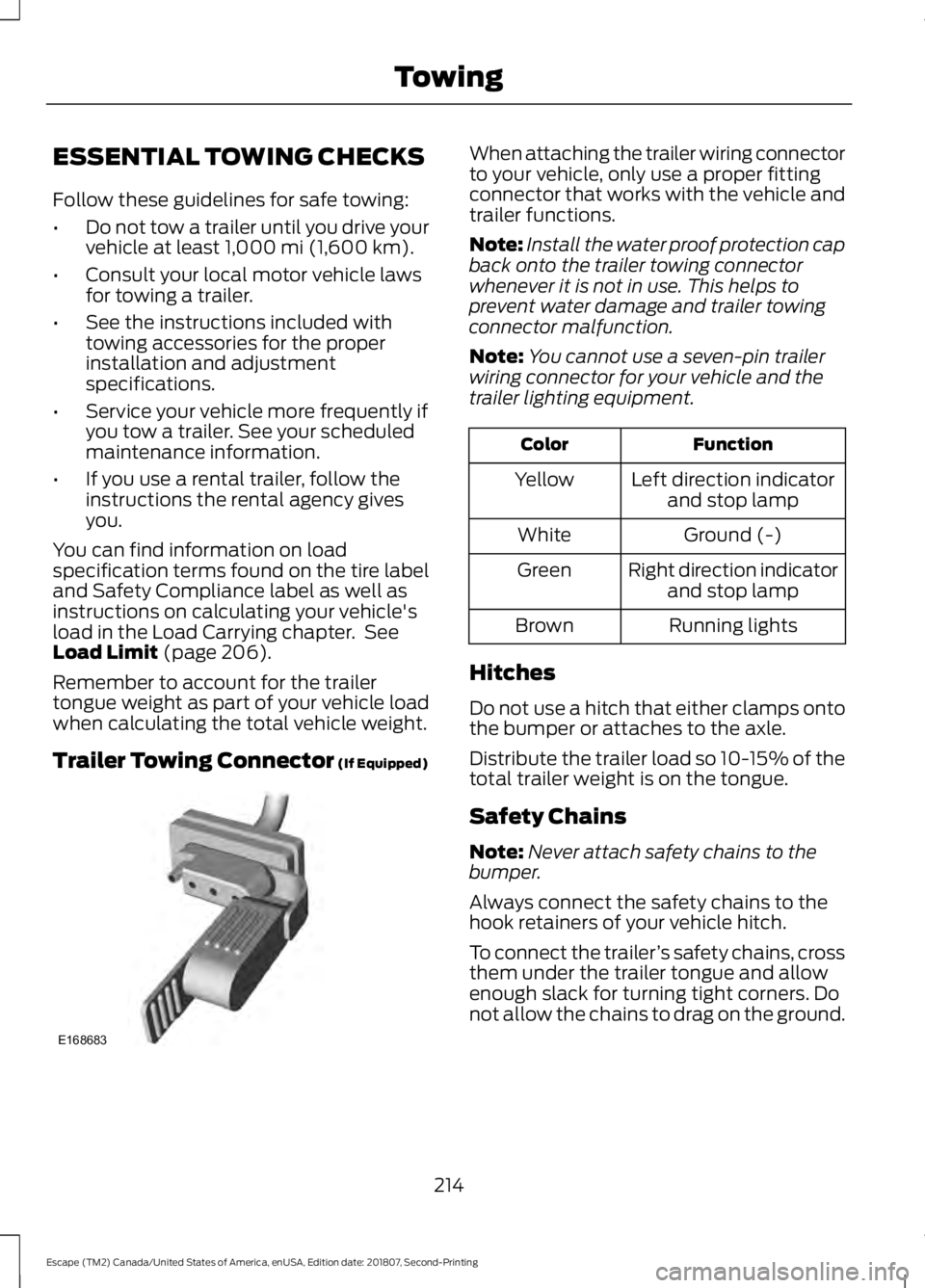
Trailer Towing Connector
(If Equipped) When attaching the trailer wiring connector
to your vehicle, only use a proper fitting
connector that works with the vehicle and
trailer functions.
Note:
Install the water proof protection cap
back onto the trailer towing connector
whenever it is not in use. This helps to
prevent water damage and trailer towing
connector malfunction.
Note: You cannot use a seven-pin trailer
wiring connector for your vehicle and the
trailer lighting equipment. Function
Color
Left direction indicatorand stop lamp
Yellow
Ground (-)
White
Right direction indicatorand stop lamp
Green
Running lights
Brown
Hitches
Do not use a hitch that either clamps onto
the bumper or attaches to the axle.
Distribute the trailer load so 10-15% of the
total trailer weight is on the tongue.
Safety Chains
Note: Never attach safety chains to the
bumper.
Always connect the safety chains to the
hook retainers of your vehicle hitch.
To connect the trailer ’s safety chains, cross
them under the trailer tongue and allow
enough slack for turning tight corners. Do
not allow the chains to drag on the ground.
214
Escape (TM2) Canada/United States of America, enUSA, Edition date: 201807, Second-Printing TowingE168683
Page 218 of 509
Trailer Brakes
WARNING: Do not connect a
trailer's hydraulic brake system directly
to your vehicle's brake system. Your
vehicle may not have enough braking
power and your chances of having a
collision greatly increase.
Electric brakes and manual, automatic or
surge-type trailer brakes are safe if you
install them properly and adjust them to
the manufacturer's specifications. The
trailer brakes must meet local and federal
regulations.
The rating for the tow vehicle's braking
system operation is at the gross vehicle
weight rating, not the gross combined
weight rating.
Separate functioning brake systems
are required for safe control of towed
vehicles and trailers weighing more
than 1500 lb (680 kg) when loaded.
Trailer Lamps WARNING:
Never connect any
trailer lamp wiring to the vehicle's tail
lamp wiring; this may damage the
electrical system resulting in fire. Contact
your authorized dealer as soon as
possible for assistance in proper trailer
tow wiring installation. Additional
electrical equipment may be required.
Trailer lamps are required on most towed
vehicles. Make sure all running lights, brake
lights, turn signals and hazard lights are
working. Before Towing a Trailer
Practice turning, stopping and backing up
to get the feel of your vehicle-trailer
combination before starting on a trip.
When turning, make wider turns so the
trailer wheels clear curbs and other
obstacles.
When Towing a Trailer
•
Do not drive faster than
70 mph
(113 km/h) during the first 500 mi
(800 km).
• Do not make full-throttle starts.
• Check your hitch, electrical connections
and trailer wheel lug nuts thoroughly
after you have traveled 50 mi (80 km).
• When stopped in congested or heavy
traffic during hot weather, place the
transmission in park (P) to aid engine
and transmission cooling and to help
A/C performance.
• Turn off the speed control with heavy
loads or in hilly terrain. The speed
control may turn off automatically
when you are towing on long, steep
grades.
• Shift to a lower gear when driving down
a long or steep hill. Do not apply the
brakes continuously, as they may
overheat and become less effective.
• If your transmission is equipped with a
Grade Assist or Tow/Haul feature, use
this feature when towing. This provides
engine braking and helps eliminate
excessive transmission shifting for
optimum fuel economy and
transmission cooling.
• Allow more distance for stopping with
a trailer attached. Anticipate stops and
brake gradually.
• Avoid parking on a grade. However, if
you must park on a grade:
1. Turn the steering wheel to point your vehicle tires away from traffic flow.
215
Escape (TM2) Canada/United States of America, enUSA, Edition date: 201807, Second-Printing Towing
Page 222 of 509
•
Transmissions give their best fuel
economy when operated in the top
cruise gear and with steady pressure
on the gas pedal.
• Four-wheel-drive operation (if
equipped) is less fuel efficient than
two-wheel-drive operation.
• Close the windows for high-speed
driving.
DRIVING THROUGH WATER WARNING: Do not drive through
flowing or deep water as you may lose
control of your vehicle.
Note: Driving through standing water can
cause vehicle damage.
Note: Engine damage can occur if water
enters the air filter.
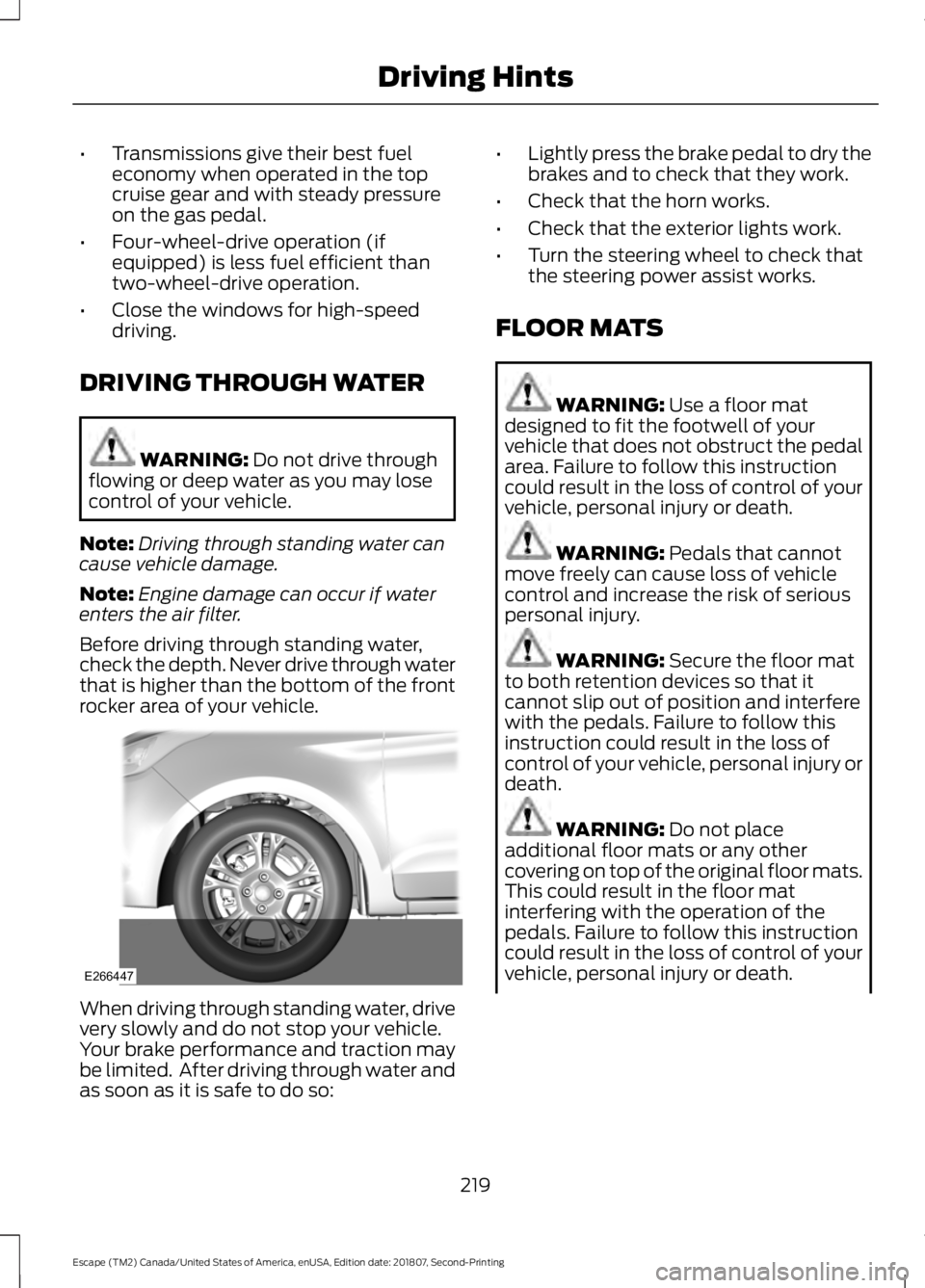
Before driving through standing water,
check the depth. Never drive through water
that is higher than the bottom of the front
rocker area of your vehicle. When driving through standing water, drive
very slowly and do not stop your vehicle.
Your brake performance and traction may
be limited. After driving through water and
as soon as it is safe to do so: •
Lightly press the brake pedal to dry the
brakes and to check that they work.
• Check that the horn works.
• Check that the exterior lights work.
• Turn the steering wheel to check that
the steering power assist works.
FLOOR MATS WARNING:
Use a floor mat
designed to fit the footwell of your
vehicle that does not obstruct the pedal
area. Failure to follow this instruction
could result in the loss of control of your
vehicle, personal injury or death. WARNING:
Pedals that cannot
move freely can cause loss of vehicle
control and increase the risk of serious
personal injury. WARNING:
Secure the floor mat
to both retention devices so that it
cannot slip out of position and interfere
with the pedals. Failure to follow this
instruction could result in the loss of
control of your vehicle, personal injury or
death. WARNING:
Do not place
additional floor mats or any other
covering on top of the original floor mats.
This could result in the floor mat
interfering with the operation of the
pedals. Failure to follow this instruction
could result in the loss of control of your
vehicle, personal injury or death.
219
Escape (TM2) Canada/United States of America, enUSA, Edition date: 201807, Second-Printing Driving HintsE266447
Page 240 of 509
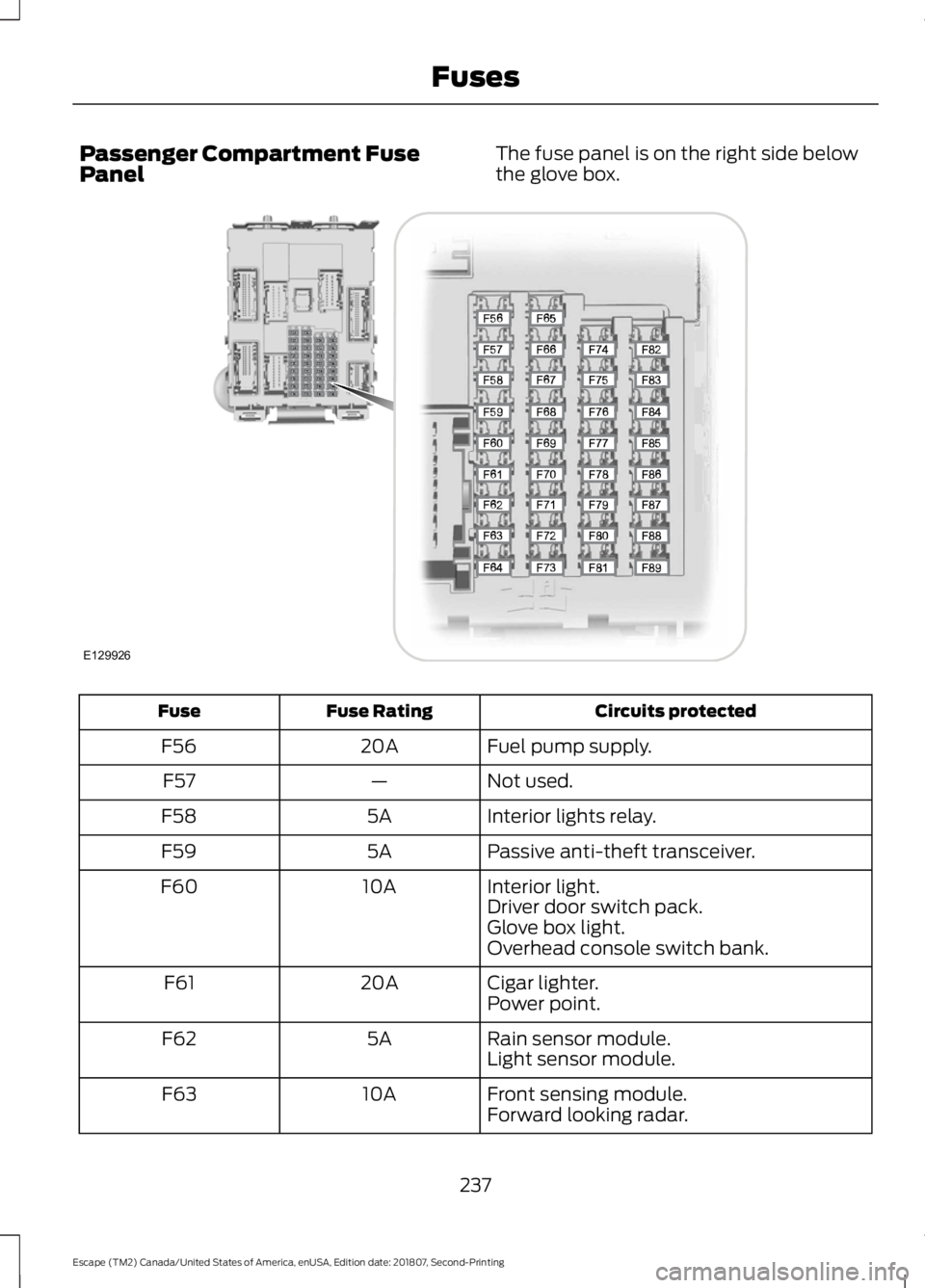
Passenger Compartment Fuse
Panel
The fuse panel is on the right side below
the glove box. Circuits protected
Fuse Rating
Fuse
Fuel pump supply.
20A
F56
Not used.
—
F57
Interior lights relay.
5A
F58
Passive anti-theft transceiver.
5A
F59
Interior light.
10A
F60
Driver door switch pack.
Glove box light.
Overhead console switch bank.
Cigar lighter.
20A
F61
Power point.
Rain sensor module.
5A
F62
Light sensor module.
Front sensing module.
10A
F63
Forward looking radar.
237
Escape (TM2) Canada/United States of America, enUSA, Edition date: 201807, Second-Printing FusesE129926
Page 324 of 509
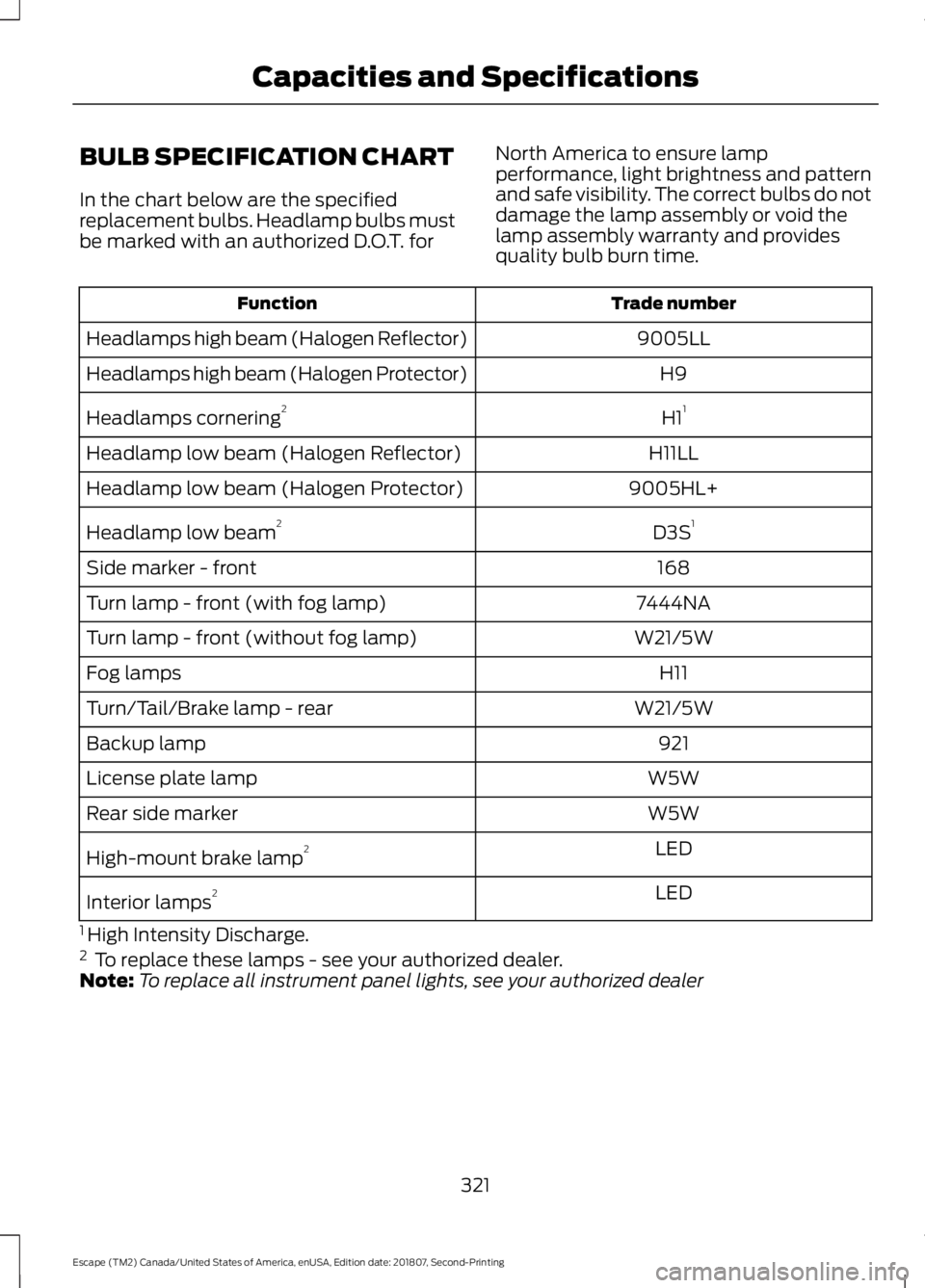
BULB SPECIFICATION CHART
In the chart below are the specified
replacement bulbs. Headlamp bulbs must
be marked with an authorized D.O.T. for
North America to ensure lamp
performance, light brightness and pattern
and safe visibility. The correct bulbs do not
damage the lamp assembly or void the
lamp assembly warranty and provides
quality bulb burn time. Trade number
Function
9005LL
Headlamps high beam (Halogen Reflector)
H9
Headlamps high beam (Halogen Protector)
H11
Headlamps cornering 2
H11LL
Headlamp low beam (Halogen Reflector)
9005HL+
Headlamp low beam (Halogen Protector)
D3S1
Headlamp low beam 2
168
Side marker - front
7444NA
Turn lamp - front (with fog lamp)
W21/5W
Turn lamp - front (without fog lamp)
H11
Fog lamps
W21/5W
Turn/Tail/Brake lamp - rear
921
Backup lamp
W5W
License plate lamp
W5W
Rear side marker
LED
High-mount brake lamp 2
LED
Interior lamps 2
1 High Intensity Discharge.
2 To replace these lamps - see your authorized dealer.
Note: To replace all instrument panel lights, see your authorized dealer
321
Escape (TM2) Canada/United States of America, enUSA, Edition date: 201807, Second-Printing Capacities and Specifications
Page 348 of 509
Sending a Text Message
Note:
You can only send a text message to
one recipient at a time.
1. Select the send option when the desired selection highlights in the audio
display.
2. Select the confirmation option when the contact appears.
3. Press the OK button again to confirm when the system asks if you want to
send the message. A pre-defined
signature appears on each text
message. Note:
You can send text messages either
by choosing a contact from the phonebook
and selecting the text option from the audio
display or by replying to a received message
in the inbox.
Accessing Your Phone Settings
These are phone-dependent features. Your
phone settings allow you to access and
adjust features such as your ring tone and
text message notification, modify your
phonebook, and set up automatic
download.
1. Press the PHONE button.
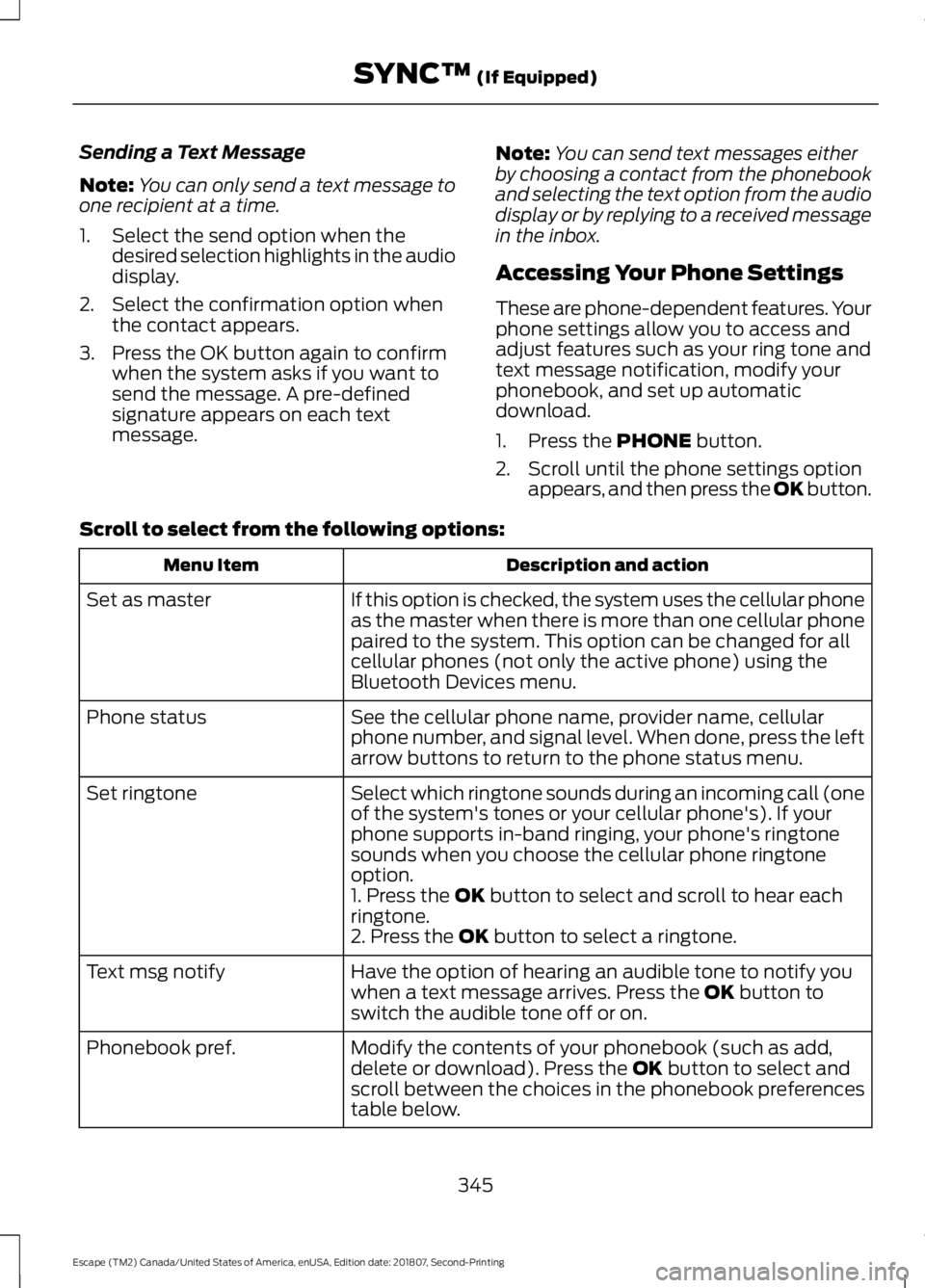
2. Scroll until the phone settings option appears, and then press the OK button.
Scroll to select from the following options: Description and action
Menu Item
If this option is checked, the system uses the cellular phone
as the master when there is more than one cellular phone
paired to the system. This option can be changed for all
cellular phones (not only the active phone) using the
Bluetooth Devices menu.
Set as master
See the cellular phone name, provider name, cellular
phone number, and signal level. When done, press the left
arrow buttons to return to the phone status menu.
Phone status
Select which ringtone sounds during an incoming call (one
of the system's tones or your cellular phone's). If your
phone supports in-band ringing, your phone's ringtone
sounds when you choose the cellular phone ringtone
option.
Set ringtone
1. Press the
OK button to select and scroll to hear each
ringtone.
2. Press the
OK button to select a ringtone.
Have the option of hearing an audible tone to notify you
when a text message arrives. Press the
OK button to
switch the audible tone off or on.
Text msg notify
Modify the contents of your phonebook (such as add,
delete or download). Press the
OK button to select and
scroll between the choices in the phonebook preferences
table below.
Phonebook pref.
345
Escape (TM2) Canada/United States of America, enUSA, Edition date: 201807, Second-Printing SYNC™
(If Equipped)
Page 410 of 509
3D city models are complete 3D models
of entire city areas including navigable
roads, parks, rivers and rendered buildings.
3D landmarks and city models appear in
3D map mode only. Coverage of these
varies and improves with updated map
releases.
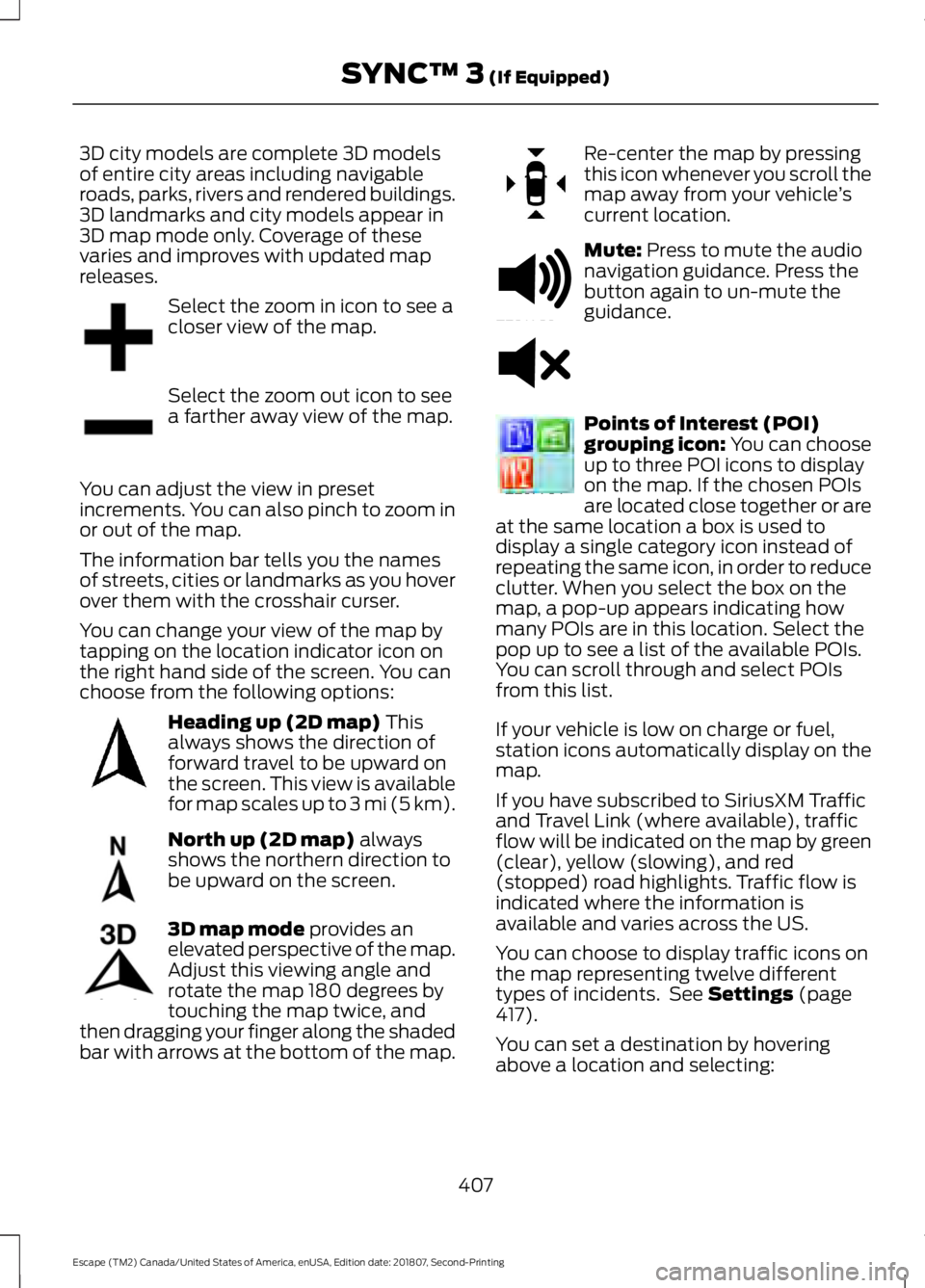
Select the zoom in icon to see a
closer view of the map.
Select the zoom out icon to see
a farther away view of the map.
You can adjust the view in preset
increments. You can also pinch to zoom in
or out of the map.
The information bar tells you the names
of streets, cities or landmarks as you hover
over them with the crosshair curser.
You can change your view of the map by
tapping on the location indicator icon on
the right hand side of the screen. You can
choose from the following options: Heading up (2D map) This
always shows the direction of
forward travel to be upward on
the screen. This view is available
for map scales up to
3 mi (5 km). North up (2D map)
always
shows the northern direction to
be upward on the screen. 3D map mode
provides an
elevated perspective of the map.
Adjust this viewing angle and
rotate the map 180 degrees by
touching the map twice, and
then dragging your finger along the shaded
bar with arrows at the bottom of the map. Re-center the map by pressing
this icon whenever you scroll the
map away from your vehicle
’s
current location. Mute:
Press to mute the audio
navigation guidance. Press the
button again to un-mute the
guidance. Points of Interest (POI)
grouping icon: You can choose
up to three POI icons to display
on the map. If the chosen POIs
are located close together or are
at the same location a box is used to
display a single category icon instead of
repeating the same icon, in order to reduce
clutter. When you select the box on the
map, a pop-up appears indicating how
many POIs are in this location. Select the
pop up to see a list of the available POIs.
You can scroll through and select POIs
from this list.
If your vehicle is low on charge or fuel,
station icons automatically display on the
map.
If you have subscribed to SiriusXM Traffic
and Travel Link (where available), traffic
flow will be indicated on the map by green
(clear), yellow (slowing), and red
(stopped) road highlights. Traffic flow is
indicated where the information is
available and varies across the US.
You can choose to display traffic icons on
the map representing twelve different
types of incidents. See
Settings (page
417).
You can set a destination by hovering
above a location and selecting:
407
Escape (TM2) Canada/United States of America, enUSA, Edition date: 201807, Second-Printing SYNC™ 3
(If Equipped)E207752 E207753 E207750 E207749 E207748 E207751 E251780 E251779 E207754
Page 452 of 509
When the oil change message appears in
the information display, it is time for an oil
change. Make sure you perform the oil
change within two weeks or 500 mi
(800 km) of the message appearing. Make
sure you reset the Intelligent Oil-Life
Monitor after each oil change. See
Oil
Change Indicator Reset (page 250).
If your information display resets
prematurely or becomes inoperative, you
should perform the oil change interval at
six months or
5,000 mi (8,000 km) from
your last oil change. Never exceed one year
or
10,000 mi (16,000 km) between oil
change intervals,
Your vehicle is very sophisticated and built
with multiple, complex, performance
systems. Every manufacturer develops
these systems using different
specifications and performance features.
That is why it is important to rely upon your
dealership to properly diagnose and repair
your vehicle.
We have recommended maintenance
intervals for various parts and component
systems based upon engineering testing.
We rely upon this testing to determine the
most appropriate mileage for replacement
of oils and fluids to protect your vehicle at
the lowest overall cost to you and
recommends against maintenance
schedules that deviate from the scheduled
maintenance information.
We strongly recommend the use of only
genuine Ford, Motorcraft or
Ford-authorized re-manufactured
replacement parts engineered for your
vehicle. Additives and Chemicals
This owner's manual and the our
Workshop Manual list the recommended
additives and chemicals for your vehicle.
We do not recommend using chemicals or
additives not approved by us as part of
your vehicle
’s normal maintenance. Please
consult your warranty information.
Oils, Fluids and Flushing
In many cases, fluid discoloration is a
normal operating characteristic and, by
itself, does not necessarily indicate a
concern or that the fluid needs to be
changed. However, a qualified expert, such
as the factory-trained technicians at your
dealership, should inspect discolored fluids
that also show signs of overheating or
foreign material contamination
immediately.
Make sure to change your vehicle ’s oils and
fluids at the specified intervals or in
conjunction with a repair. Flushing is a
viable way to change fluid for many vehicle
sub-systems during scheduled
maintenance. It is critical that systems are
flushed only with new fluid that is the same
as that required to fill and operate the
system or using a Ford-approved flushing
chemical.
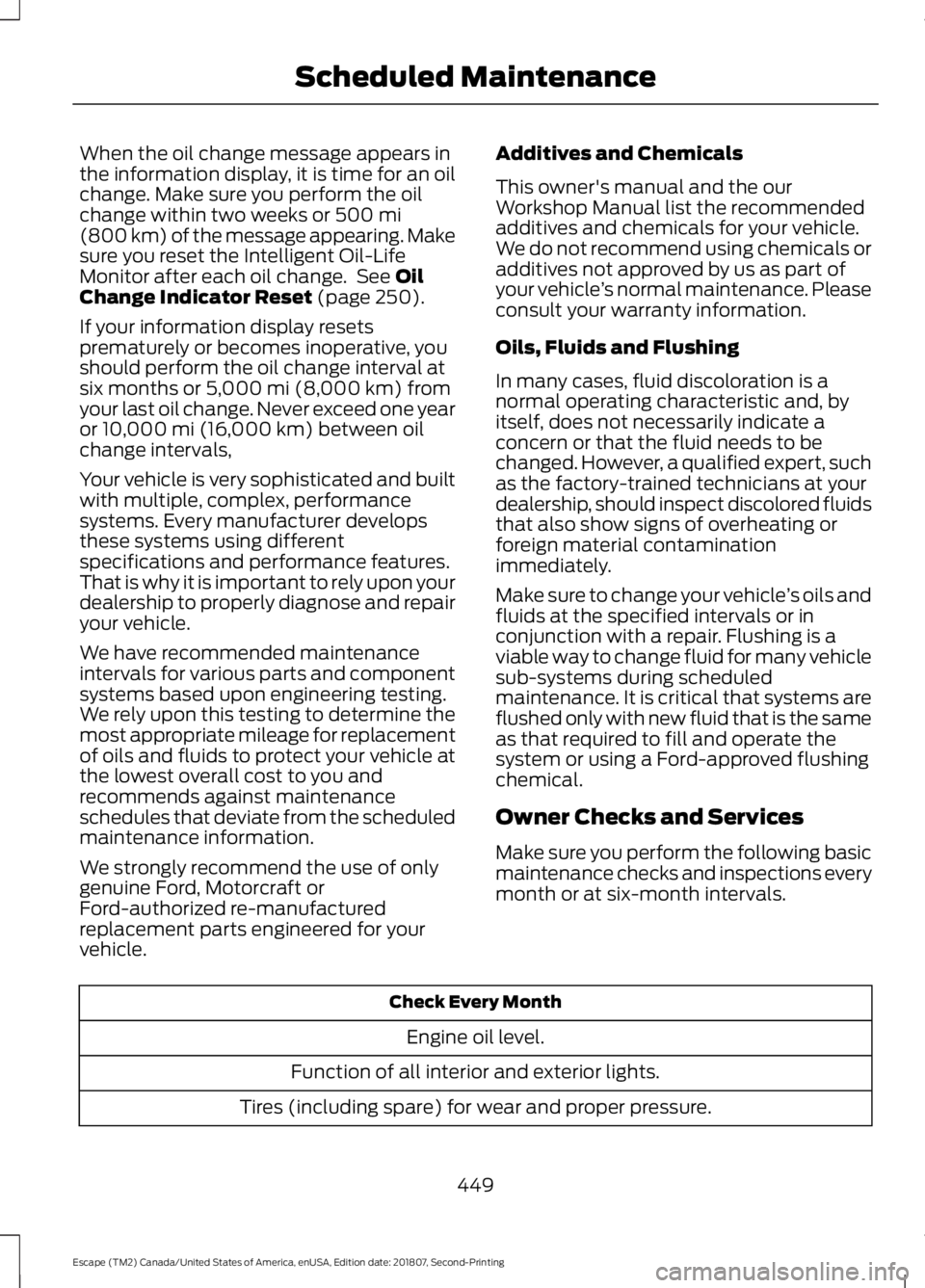
Owner Checks and Services
Make sure you perform the following basic
maintenance checks and inspections every
month or at six-month intervals. Check Every Month
Engine oil level.
Function of all interior and exterior lights.
Tires (including spare) for wear and proper pressure.
449
Escape (TM2) Canada/United States of America, enUSA, Edition date: 201807, Second-Printing Scheduled Maintenance
Page 500 of 509
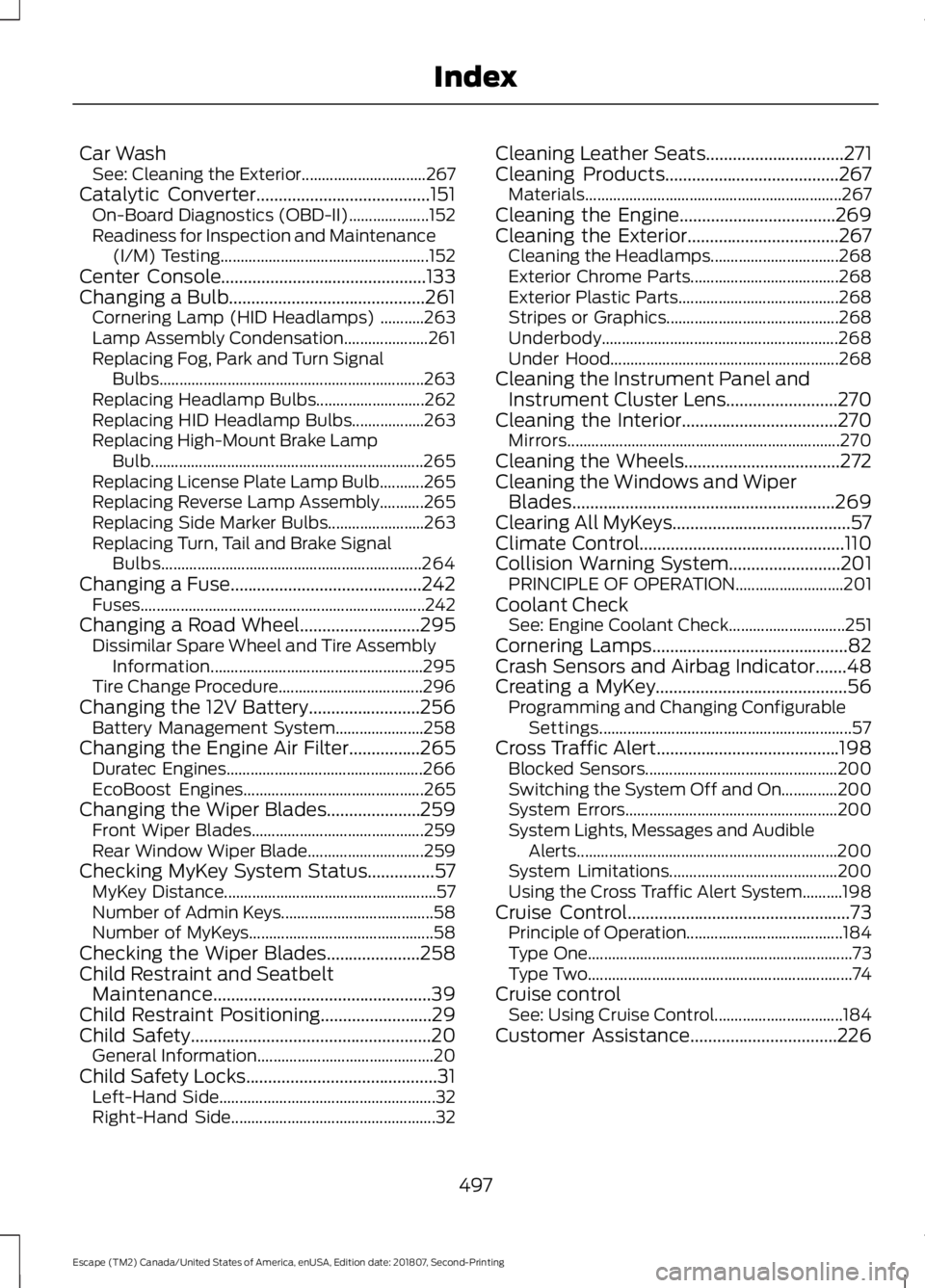
Car Wash
See: Cleaning the Exterior............................... 267
Catalytic Converter.......................................151 On-Board Diagnostics (OBD-II).................... 152
Readiness for Inspection and Maintenance (I/M) Testing.................................................... 152
Center Console..............................................133
Changing a Bulb............................................261 Cornering Lamp (HID Headlamps) ...........263
Lamp Assembly Condensation..................... 261
Replacing Fog, Park and Turn Signal Bulbs.................................................................. 263
Replacing Headlamp Bulbs........................... 262
Replacing HID Headlamp Bulbs.................. 263
Replacing High-Mount Brake Lamp Bulb.................................................................... 265
Replacing License Plate Lamp Bulb...........265
Replacing Reverse Lamp Assembly...........265
Replacing Side Marker Bulbs........................ 263
Replacing Turn, Tail and Brake Signal Bulbs................................................................. 264
Changing a Fuse...........................................242 Fuses....................................................................... 242
Changing a Road Wheel
...........................295
Dissimilar Spare Wheel and Tire Assembly
Information..................................................... 295
Tire Change Procedure.................................... 296
Changing the 12V Battery.........................256 Battery Management System...................... 258
Changing the Engine Air Filter................265 Duratec Engines................................................. 266
EcoBoost Engines............................................. 265
Changing the Wiper Blades.....................259 Front Wiper Blades........................................... 259
Rear Window Wiper Blade............................. 259
Checking MyKey System Status
...............57
MyKey Distance..................................................... 57
Number of Admin Keys...................................... 58
Number of MyKeys.............................................. 58
Checking the Wiper Blades
.....................258
Child Restraint and Seatbelt Maintenance.................................................39
Child Restraint Positioning.........................29
Child Safety......................................................20 General Information............................................ 20
Child Safety Locks...........................................31 Left-Hand Side...................................................... 32
Right-Hand Side................................................... 32Cleaning Leather Seats...............................271
Cleaning Products.......................................267
Materials................................................................ 267
Cleaning the Engine...................................269
Cleaning the Exterior..................................267 Cleaning the Headlamps................................ 268
Exterior Chrome Parts..................................... 268
Exterior Plastic Parts........................................ 268
Stripes or Graphics........................................... 268
Underbody........................................................... 268
Under Hood......................................................... 268
Cleaning the Instrument Panel and Instrument Cluster Lens
.........................270
Cleaning the Interior...................................270
Mirrors.................................................................... 270
Cleaning the Wheels...................................272
Cleaning the Windows and Wiper Blades...........................................................269
Clearing All MyKeys........................................57
Climate Control..............................................110
Collision Warning System.........................201 PRINCIPLE OF OPERATION........................... 201
Coolant Check See: Engine Coolant Check............................. 251
Cornering Lamps
............................................82
Crash Sensors and Airbag Indicator.......48
Creating a MyKey...........................................56 Programming and Changing Configurable
Settings............................................................... 57
Cross Traffic Alert.........................................198 Blocked Sensors................................................ 200
Switching the System Off and On..............200
System Errors..................................................... 200
System Lights, Messages and Audible Alerts................................................................. 200
System Limitations.......................................... 200
Using the Cross Traffic Alert System..........198
Cruise Control
..................................................73
Principle of Operation.......................................184
Type One.................................................................. 73
Type Two.................................................................. 74
Cruise control See: Using Cruise Control................................ 184
Customer Assistance
.................................226
497
Escape (TM2) Canada/United States of America, enUSA, Edition date: 201807, Second-Printing Index
Page 508 of 509
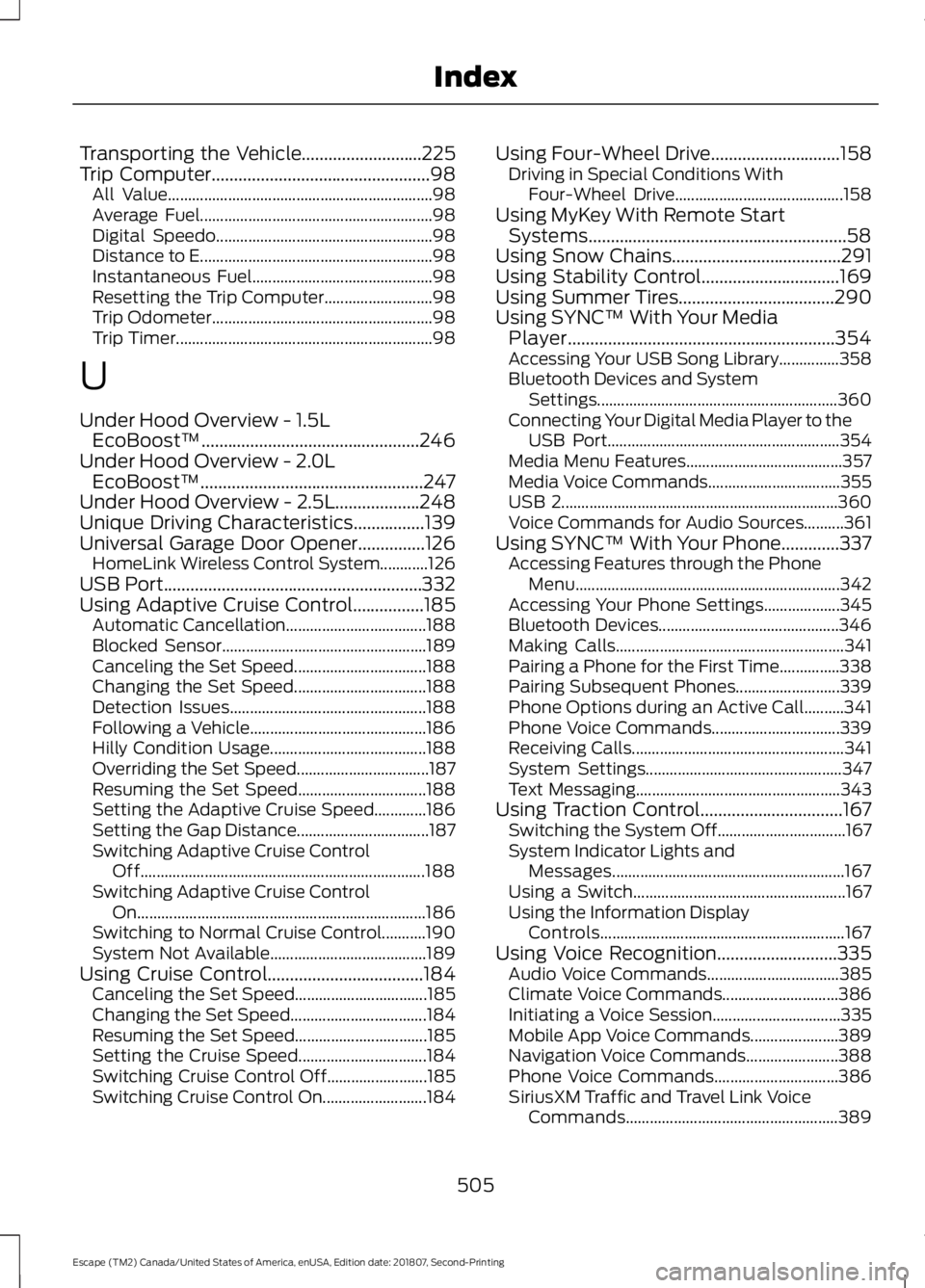
Transporting the Vehicle...........................225
Trip Computer.................................................98
All Value.................................................................. 98
Average Fuel.......................................................... 98
Digital Speedo...................................................... 98
Distance to E.......................................................... 98
Instantaneous Fuel............................................. 98
Resetting the Trip Computer........................... 98
Trip Odometer....................................................... 98
Trip Timer................................................................ 98
U
Under Hood Overview - 1.5L EcoBoost™.................................................246
Under Hood Overview - 2.0L EcoBoost™..................................................247
Under Hood Overview - 2.5L
...................248
Unique Driving Characteristics................139
Universal Garage Door Opener...............126 HomeLink Wireless Control System............126
USB Port..........................................................332
Using Adaptive Cruise Control................185 Automatic Cancellation................................... 188
Blocked Sensor................................................... 189
Canceling the Set Speed................................. 188
Changing the Set Speed................................. 188
Detection Issues................................................. 188
Following a Vehicle............................................ 186
Hilly Condition Usage....................................... 188
Overriding the Set Speed................................. 187
Resuming the Set Speed................................ 188
Setting the Adaptive Cruise Speed.............186
Setting the Gap Distance................................. 187
Switching Adaptive Cruise Control Off....................................................................... 188
Switching Adaptive Cruise Control On........................................................................\
186
Switching to Normal Cruise Control...........190
System Not Available....................................... 189
Using Cruise Control...................................184 Canceling the Set Speed................................. 185
Changing the Set Speed.................................. 184
Resuming the Set Speed................................. 185
Setting the Cruise Speed................................ 184
Switching Cruise Control Off......................... 185
Switching Cruise Control On.......................... 184Using Four-Wheel Drive
.............................158
Driving in Special Conditions With
Four-Wheel Drive.......................................... 158
Using MyKey With Remote Start Systems..........................................................58
Using Snow Chains......................................291
Using Stability Control
...............................169
Using Summer Tires...................................290
Using SYNC™ With Your Media Player............................................................354
Accessing Your USB Song Library...............358
Bluetooth Devices and System Settings............................................................ 360
Connecting Your Digital Media Player to the USB Port.......................................................... 354
Media Menu Features....................................... 357
Media Voice Commands................................. 355
USB 2..................................................................... 360
Voice Commands for Audio Sources..........361
Using SYNC™ With Your Phone.............337 Accessing Features through the Phone
Menu.................................................................. 342
Accessing Your Phone Settings................... 345
Bluetooth Devices............................................. 346
Making Calls......................................................... 341
Pairing a Phone for the First Time...............338
Pairing Subsequent Phones.......................... 339
Phone Options during an Active Call..........341
Phone Voice Commands................................ 339
Receiving Calls..................................................... 341
System Settings................................................. 347
Text Messaging................................................... 343
Using Traction Control
................................167
Switching the System Off................................ 167
System Indicator Lights and Messages.......................................................... 167
Using a Switch..................................................... 167
Using the Information Display Controls............................................................. 167
Using Voice Recognition
...........................335
Audio Voice Commands................................. 385
Climate Voice Commands............................. 386
Initiating a Voice Session................................ 335
Mobile App Voice Commands...................... 389
Navigation Voice Commands....................... 388
Phone Voice Commands............................... 386
SiriusXM Traffic and Travel Link Voice Commands..................................................... 389
505
Escape (TM2) Canada/United States of America, enUSA, Edition date: 201807, Second-Printing Index