manual transmission FORD ESCAPE 2019 User Guide
[x] Cancel search | Manufacturer: FORD, Model Year: 2019, Model line: ESCAPE, Model: FORD ESCAPE 2019Pages: 509, PDF Size: 6.69 MB
Page 214 of 509
TOWING A TRAILER
WARNING: Towing trailers
beyond the maximum
recommended gross trailer
weight exceeds the limit of your
vehicle and could result in engine
damage, transmission damage,
structural damage, loss of
vehicle control, vehicle rollover
and personal injury. WARNING:
Do not exceed
the GVWR or the GAWR
specified on the certification
label.
Note: See
Recommended
Towing Weights (page 212).
Your vehicle may have electrical
items, such as fuses or relays,
related to towing. See
Fuses
(page 233).
Your vehicle's load capacity
designation is by weight, not by
volume, so you cannot necessarily
use all available space when
loading a vehicle or trailer.
Towing a trailer places an extra
load on your vehicle's engine,
transmission, axle, brakes, tires
and suspension. Inspect these
components periodically during,
and after, any towing operation. Load Placement
To help minimize how trailer
movement affects your vehicle
when driving:
•
Load the heaviest items closest
to the trailer floor.
• Load the heaviest items
centered between the left and
right side trailer tires.
• Load the heaviest items above
the trailer axles or just slightly
forward toward the trailer
tongue. Do not allow the final
trailer tongue weight to go
above or below 10-15% of the
loaded trailer weight.
• Select a ball mount with the
correct rise or drop and load
capacity. When both the
loaded vehicle and trailer are
connected, the trailer frame
should be level, or slightly
angled down toward your
vehicle, when viewed from the
side.
When driving with a trailer or
payload, a slight takeoff vibration
or shudder may be present due to
the increased payload weight.
Additional information regarding
proper trailer loading and setting
your vehicle up for towing is
located in another chapter of this
manual. See
Load Limit (page
206).
You can also find information in
the
RV & Trailer Towing Guide
available at your authorized
dealer, or online.
211
Escape (TM2) Canada/United States of America, enUSA, Edition date: 201807, Second-Printing Towing
Page 218 of 509
Trailer Brakes
WARNING: Do not connect a
trailer's hydraulic brake system directly
to your vehicle's brake system. Your
vehicle may not have enough braking
power and your chances of having a
collision greatly increase.
Electric brakes and manual, automatic or
surge-type trailer brakes are safe if you
install them properly and adjust them to
the manufacturer's specifications. The
trailer brakes must meet local and federal
regulations.
The rating for the tow vehicle's braking
system operation is at the gross vehicle
weight rating, not the gross combined
weight rating.
Separate functioning brake systems
are required for safe control of towed
vehicles and trailers weighing more
than 1500 lb (680 kg) when loaded.
Trailer Lamps WARNING:
Never connect any
trailer lamp wiring to the vehicle's tail
lamp wiring; this may damage the
electrical system resulting in fire. Contact
your authorized dealer as soon as
possible for assistance in proper trailer
tow wiring installation. Additional
electrical equipment may be required.
Trailer lamps are required on most towed
vehicles. Make sure all running lights, brake
lights, turn signals and hazard lights are
working. Before Towing a Trailer
Practice turning, stopping and backing up
to get the feel of your vehicle-trailer
combination before starting on a trip.
When turning, make wider turns so the
trailer wheels clear curbs and other
obstacles.
When Towing a Trailer
•
Do not drive faster than
70 mph
(113 km/h) during the first 500 mi
(800 km).
• Do not make full-throttle starts.
• Check your hitch, electrical connections
and trailer wheel lug nuts thoroughly
after you have traveled 50 mi (80 km).
• When stopped in congested or heavy
traffic during hot weather, place the
transmission in park (P) to aid engine
and transmission cooling and to help
A/C performance.
• Turn off the speed control with heavy
loads or in hilly terrain. The speed
control may turn off automatically
when you are towing on long, steep
grades.
• Shift to a lower gear when driving down
a long or steep hill. Do not apply the
brakes continuously, as they may
overheat and become less effective.
• If your transmission is equipped with a
Grade Assist or Tow/Haul feature, use
this feature when towing. This provides
engine braking and helps eliminate
excessive transmission shifting for
optimum fuel economy and
transmission cooling.
• Allow more distance for stopping with
a trailer attached. Anticipate stops and
brake gradually.
• Avoid parking on a grade. However, if
you must park on a grade:
1. Turn the steering wheel to point your vehicle tires away from traffic flow.
215
Escape (TM2) Canada/United States of America, enUSA, Edition date: 201807, Second-Printing Towing
Page 228 of 509
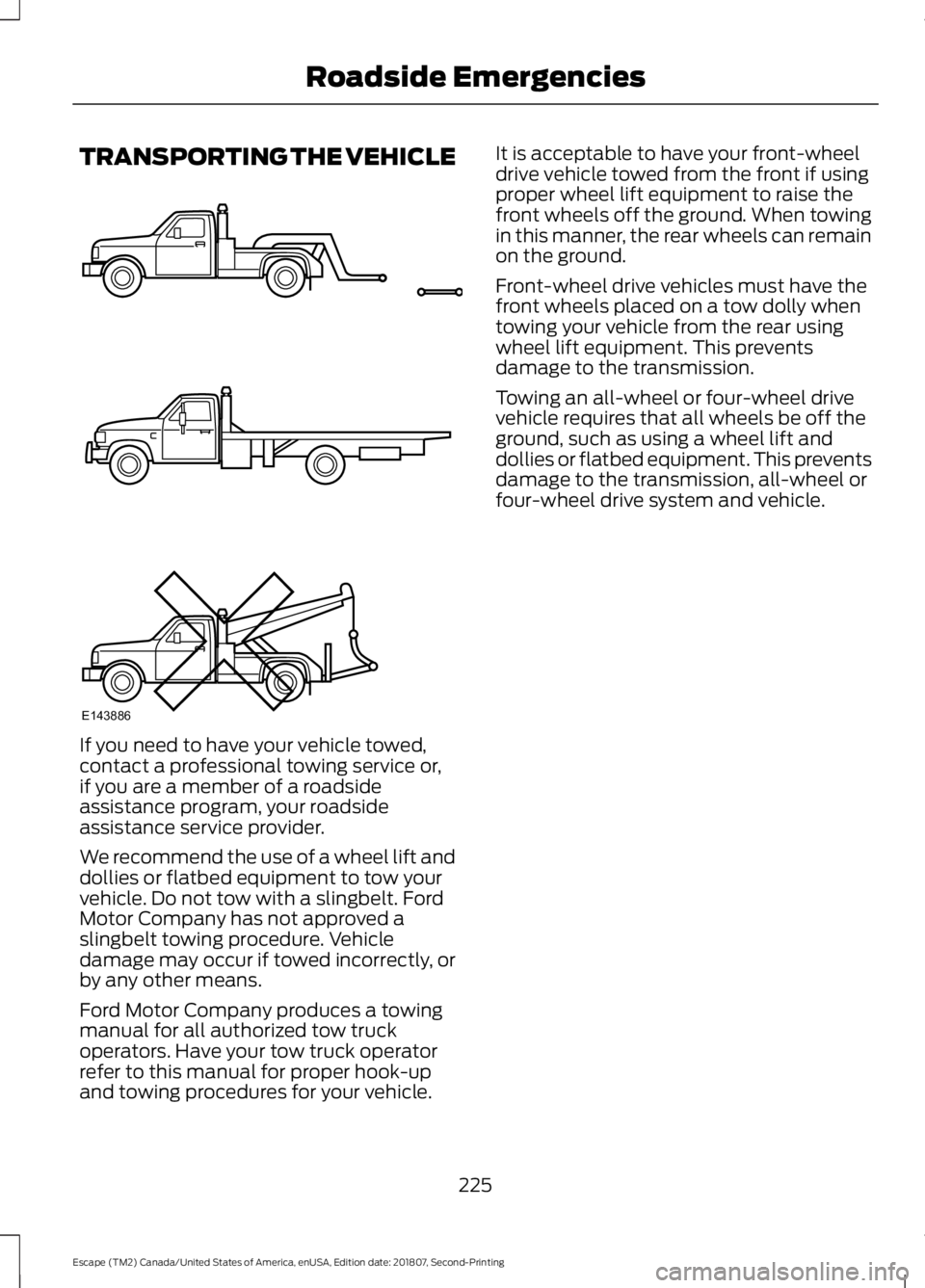
TRANSPORTING THE VEHICLE
If you need to have your vehicle towed,
contact a professional towing service or,
if you are a member of a roadside
assistance program, your roadside
assistance service provider.
We recommend the use of a wheel lift and
dollies or flatbed equipment to tow your
vehicle. Do not tow with a slingbelt. Ford
Motor Company has not approved a
slingbelt towing procedure. Vehicle
damage may occur if towed incorrectly, or
by any other means.
Ford Motor Company produces a towing
manual for all authorized tow truck
operators. Have your tow truck operator
refer to this manual for proper hook-up
and towing procedures for your vehicle. It is acceptable to have your front-wheel
drive vehicle towed from the front if using
proper wheel lift equipment to raise the
front wheels off the ground. When towing
in this manner, the rear wheels can remain
on the ground.
Front-wheel drive vehicles must have the
front wheels placed on a tow dolly when
towing your vehicle from the rear using
wheel lift equipment. This prevents
damage to the transmission.
Towing an all-wheel or four-wheel drive
vehicle requires that all wheels be off the
ground, such as using a wheel lift and
dollies or flatbed equipment. This prevents
damage to the transmission, all-wheel or
four-wheel drive system and vehicle.
225
Escape (TM2) Canada/United States of America, enUSA, Edition date: 201807, Second-Printing Roadside EmergenciesE143886
Page 341 of 509
Other features, such as text messaging
using Bluetooth and automatic phonebook
download, are phone-dependent features.
To check your phone's compatibility, see
your phone's manual and visit
www.SYNCMyRide.com,
www.SYNCMyRide.ca or
www.syncmaroute.ca.
Pairing a Phone for the First Time
Wirelessly pairing your phone with SYNC
allows you to make and receive hands-free
calls.
Note:
SYNC can support downloading up
to approximately 4000 entries per
Bluetooth-enabled cellular phone.
Note: Make sure to switch on the ignition
and the radio. Shift the transmission into
park (P) for automatic transmission or first
gear for manual transmission.
Using the Audio System
Note: To scroll through the menus, press
the up and down arrows on your audio
system.
1. Make sure to switch on your phone's Bluetooth feature before starting the
search. See your device's manual if
necessary.
2. Press the PHONE button. When the
audio display indicates there is no
paired phone, select the option to add.
3. When a message to begin pairing appears in the audio display, search for
SYNC on your phone to start the pairing
process. 4. When prompted on your cell phone
’s
display, confirm that the PIN provided
by SYNC matches the PIN displayed
on your cell phone. Your phone is now
paired and the display indicates that
the pairing was successful. If you are
prompted to enter a PIN on your device,
enter the PIN displayed on the screen.
The display indicates when the pairing
is successful.
Depending on your phone's capability and
your market, the system may prompt you
with questions, such as setting the current
phone as the primary phone (the phone
SYNC automatically tries to connect with
first upon vehicle start-up) and
downloading your phonebook.
Using Voice Commands Make sure to switch on your
phone's Bluetooth feature
before starting the search. See
your device's manual if necessary.
Press the voice and when prompted
say: Action and Descrip-
tion
Voice Command
Follow the instruc-
tions on the audio
display.
(pair ([Bluetooth]
device | phone |
Bluetooth audio) |
add phone)
You can say any of the voice commands
that appear within open and close brackets
that are separated by |. For example,
where; (what's | what is) appears you say;
what's or what is.
The commands that have [ ] around the
word means that the word is optional.
338
Escape (TM2) Canada/United States of America, enUSA, Edition date: 201807, Second-Printing SYNC™
(If Equipped)E142599
Page 342 of 509
Depending on your phone's capability and
your market, the system may prompt you
with questions, such as setting the current
phone as the primary phone (the phone
SYNC automatically tries to connect with
first upon vehicle start-up) and
downloading your phonebook.
Pairing Subsequent Phones
Note:
Make sure to switch on the ignition
and the radio. Shift the transmission into
park (P) for automatic transmission or first
gear for manual transmission.
Note: To scroll through the menus, press
the up and down arrows on your audio
system.
1. Make sure to switch on your phone's Bluetooth feature before starting the
search. See your device's manual if
necessary.
2. Press the PHONE button.
3. Select the option for Bluetooth Devices.
4. Press the
OK button.
5. Select the option to add. This starts the pairing process.
6. When a message to begin pairing appears in the audio display, search for
SYNC on your device.
7. When prompted on your cell phone ’s
display, confirm that the PIN provided
by SYNC matches the PIN displayed
on your cell phone. Your phone is now
paired and the display indicates that
the pairing was successful. If you are
prompted to enter a PIN on your device,
enter the PIN displayed on the screen.
The display indicates when the pairing
is successful. SYNC may prompt you with more cell
phone options. Your cell phone may also
prompt you to give SYNC permission to
access information. For more information
on your cell phone
’s capability, see your
cell phone ’s manual and visit the website.
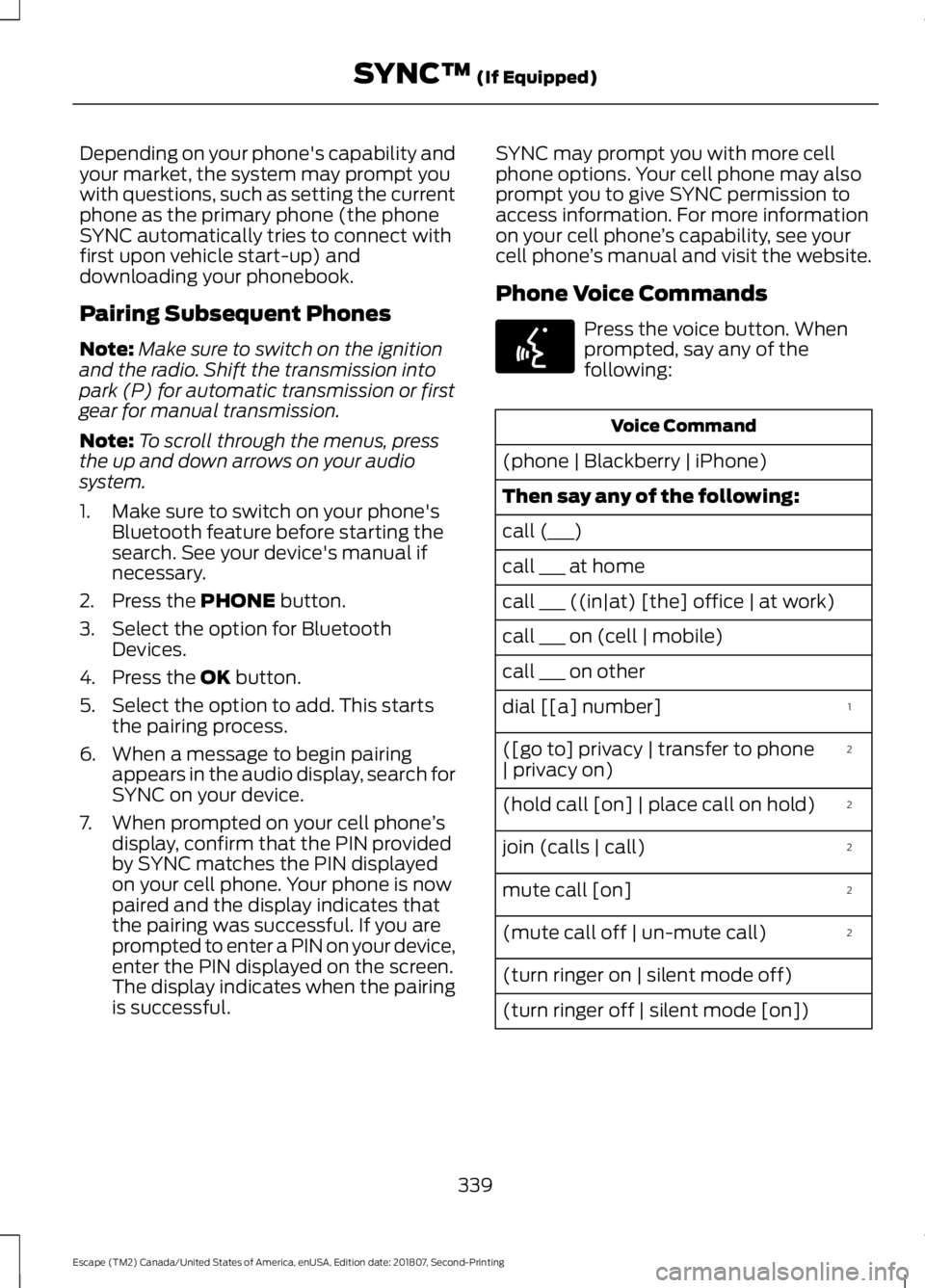
Phone Voice Commands Press the voice button. When
prompted, say any of the
following:
Voice Command
(phone | Blackberry | iPhone)
Then say any of the following:
call (___)
call ___ at home
call ___ ((in|at) [the] office | at work)
call ___ on (cell | mobile)
call ___ on other 1
dial [[a] number]
2
([go to] privacy | transfer to phone
| privacy on)
2
(hold call [on] | place call on hold)
2
join (calls | call)
2
mute call [on]
2
(mute call off | un-mute call)
(turn ringer on | silent mode off)
(turn ringer off | silent mode [on])
339
Escape (TM2) Canada/United States of America, enUSA, Edition date: 201807, Second-Printing SYNC™
(If Equipped)E142599
Page 498 of 509
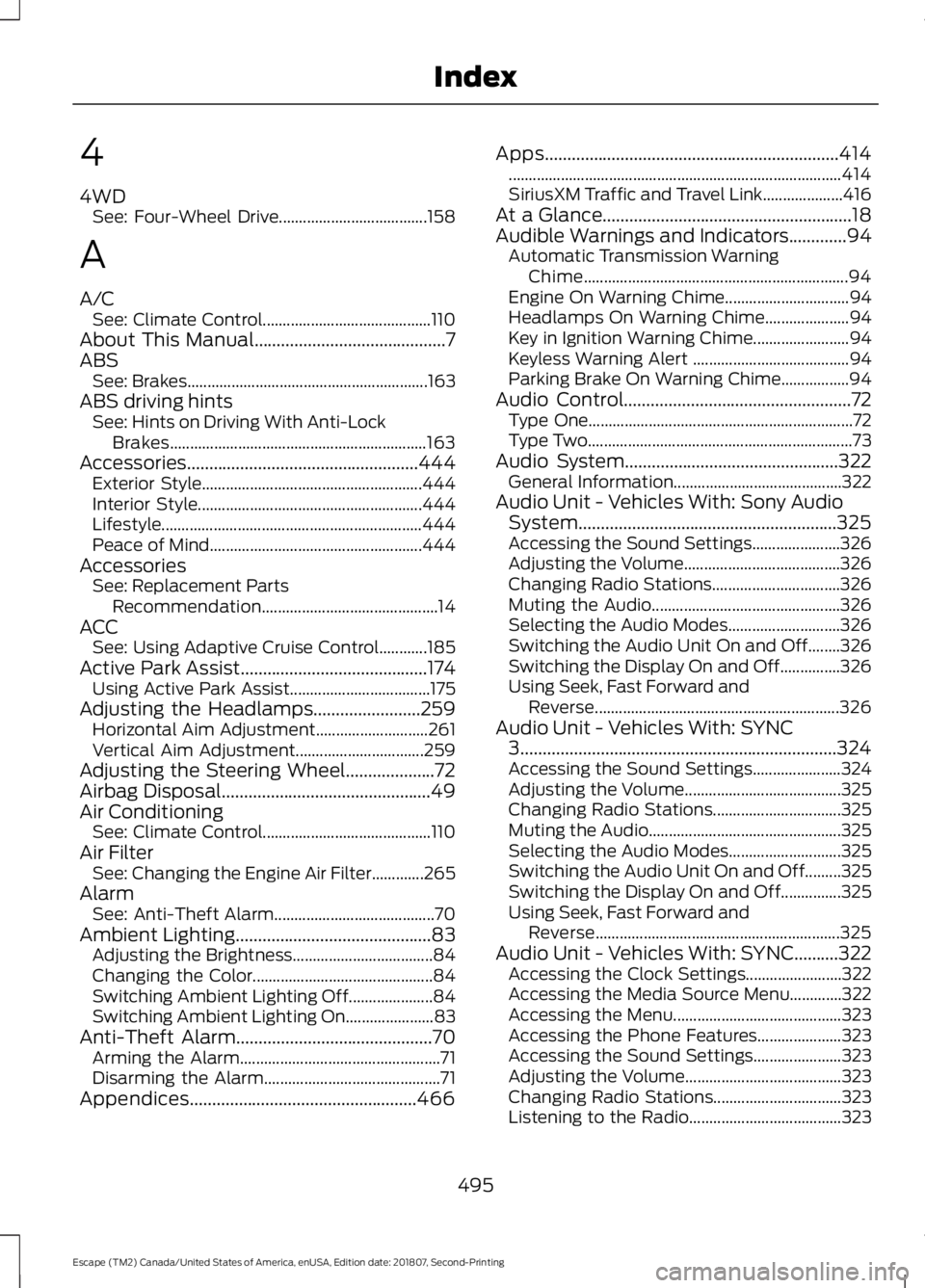
4
4WD
See: Four-Wheel Drive..................................... 158
A
A/C See: Climate Control.......................................... 110
About This Manual...........................................7
ABS See: Brakes............................................................ 163
ABS driving hints See: Hints on Driving With Anti-Lock
Brakes................................................................ 163
Accessories....................................................444 Exterior Style....................................................... 444
Interior Style........................................................ 444
Lifestyle................................................................. 444
Peace of Mind..................................................... 444
Accessories See: Replacement Parts
Recommendation............................................ 14
ACC See: Using Adaptive Cruise Control............185
Active Park Assist..........................................174 Using Active Park Assist................................... 175
Adjusting the Headlamps
........................259
Horizontal Aim Adjustment............................ 261
Vertical Aim Adjustment................................ 259
Adjusting the Steering Wheel....................72
Airbag Disposal
...............................................49
Air Conditioning See: Climate Control.......................................... 110
Air Filter See: Changing the Engine Air Filter.............265
Alarm See: Anti-Theft Alarm........................................ 70
Ambient Lighting
............................................83
Adjusting the Brightness................................... 84
Changing the Color............................................. 84
Switching Ambient Lighting Off..................... 84
Switching Ambient Lighting On...................... 83
Anti-Theft Alarm............................................70 Arming the Alarm.................................................. 71
Disarming the Alarm............................................ 71
Appendices...................................................466 Apps..................................................................414
........................................................................\
........... 414
SiriusXM Traffic and Travel Link.................... 416
At a Glance........................................................18
Audible Warnings and Indicators
.............94
Automatic Transmission Warning
Chime.................................................................. 94
Engine On Warning Chime............................... 94
Headlamps On Warning Chime..................... 94
Key in Ignition Warning Chime........................ 94
Keyless Warning Alert ....................................... 94
Parking Brake On Warning Chime.................94
Audio Control
...................................................72
Type One.................................................................. 72
Type Two.................................................................. 73
Audio System................................................322 General Information.......................................... 322
Audio Unit - Vehicles With: Sony Audio System..........................................................325
Accessing the Sound Settings...................... 326
Adjusting the Volume....................................... 326
Changing Radio Stations................................ 326
Muting the Audio............................................... 326
Selecting the Audio Modes............................ 326
Switching the Audio Unit On and Off........326
Switching the Display On and Off...............326
Using Seek, Fast Forward and Reverse............................................................. 326
Audio Unit - Vehicles With: SYNC 3
.......................................................................324
Accessing the Sound Settings...................... 324
Adjusting the Volume....................................... 325
Changing Radio Stations................................ 325
Muting the Audio................................................ 325
Selecting the Audio Modes............................ 325
Switching the Audio Unit On and Off.........325
Switching the Display On and Off...............325
Using Seek, Fast Forward and Reverse............................................................. 325
Audio Unit - Vehicles With: SYNC..........322 Accessing the Clock Settings........................ 322
Accessing the Media Source Menu.............322
Accessing the Menu.......................................... 323
Accessing the Phone Features..................... 323
Accessing the Sound Settings...................... 323
Adjusting the Volume....................................... 323
Changing Radio Stations................................ 323
Listening to the Radio...................................... 323
495
Escape (TM2) Canada/United States of America, enUSA, Edition date: 201807, Second-Printing Index
Page 503 of 509
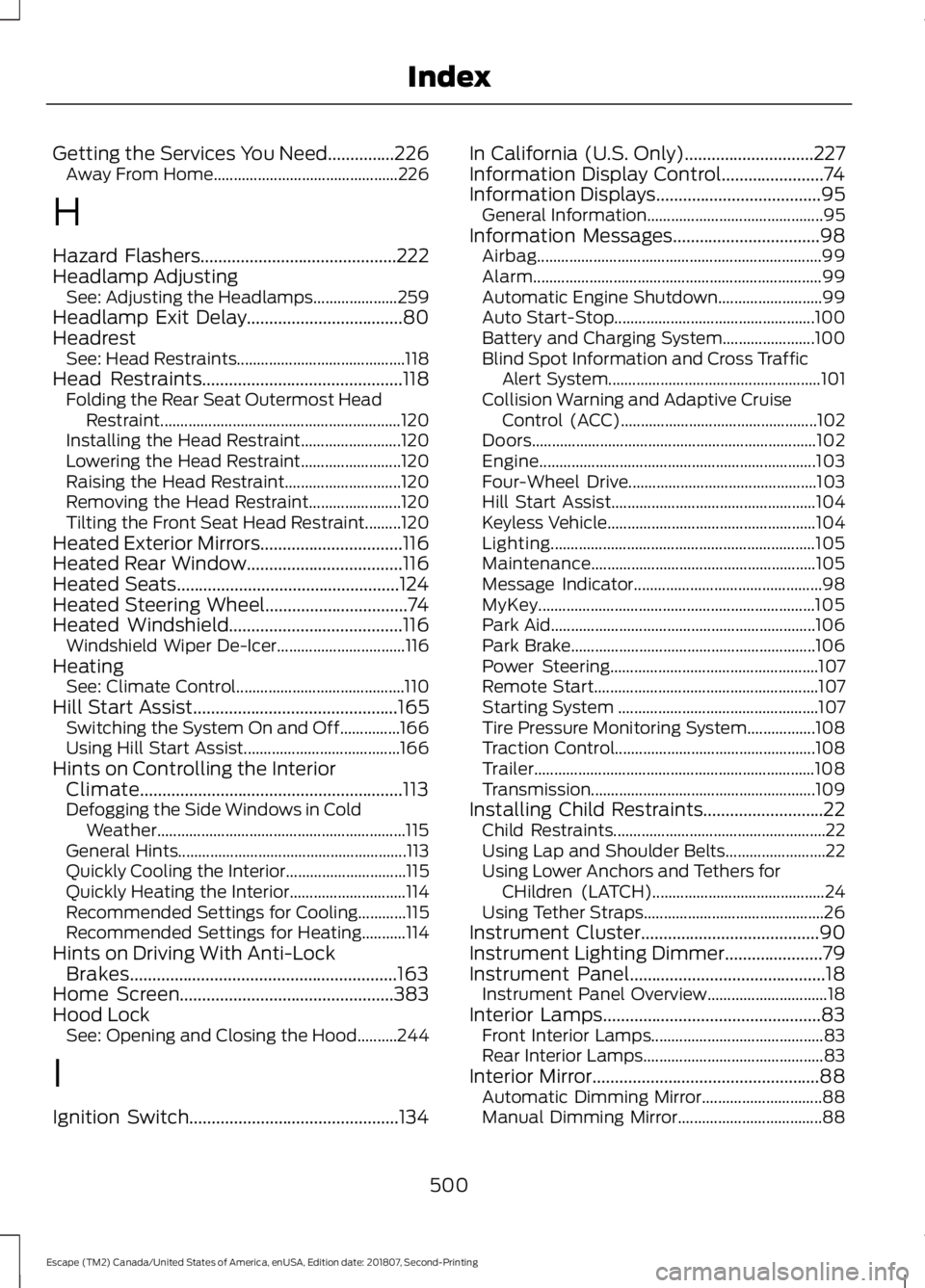
Getting the Services You Need...............226
Away From Home.............................................. 226
H
Hazard Flashers............................................222
Headlamp Adjusting See: Adjusting the Headlamps..................... 259
Headlamp Exit Delay
...................................80
Headrest See: Head Restraints.......................................... 118
Head Restraints
.............................................118
Folding the Rear Seat Outermost Head
Restraint............................................................ 120
Installing the Head Restraint......................... 120
Lowering the Head Restraint......................... 120
Raising the Head Restraint............................. 120
Removing the Head Restraint....................... 120
Tilting the Front Seat Head Restraint.........120
Heated Exterior Mirrors................................116
Heated Rear Window...................................116
Heated Seats
..................................................124
Heated Steering Wheel................................74
Heated Windshield
.......................................116
Windshield Wiper De-Icer................................ 116
Heating See: Climate Control.......................................... 110
Hill Start Assist
..............................................165
Switching the System On and Off...............166
Using Hill Start Assist....................................... 166
Hints on Controlling the Interior Climate...........................................................113
Defogging the Side Windows in Cold Weather.............................................................. 115
General Hints......................................................... 113
Quickly Cooling the Interior.............................. 115
Quickly Heating the Interior............................. 114
Recommended Settings for Cooling............115
Recommended Settings for Heating...........114
Hints on Driving With Anti-Lock Brakes............................................................163
Home Screen................................................383
Hood Lock See: Opening and Closing the Hood..........244
I
Ignition Switch
...............................................134 In California (U.S. Only).............................227
Information Display Control.......................74
Information Displays
.....................................95
General Information............................................ 95
Information Messages
.................................98
Airbag....................................................................... 99
Alarm........................................................................\
99
Automatic Engine Shutdown.......................... 99
Auto Start-Stop.................................................. 100
Battery and Charging System....................... 100
Blind Spot Information and Cross Traffic Alert System..................................................... 101
Collision Warning and Adaptive Cruise Control (ACC)................................................. 102
Doors....................................................................... 102
Engine..................................................................... 103
Four-Wheel Drive............................................... 103
Hill Start Assist................................................... 104
Keyless Vehicle.................................................... 104
Lighting.................................................................. 105
Maintenance........................................................ 105
Message Indicator............................................... 98
MyKey..................................................................... 105
Park Aid.................................................................. 106
Park Brake............................................................. 106
Power Steering.................................................... 107
Remote Start........................................................ 107
Starting System .................................................. 107
Tire Pressure Monitoring System.................108
Traction Control.................................................. 108
Trailer...................................................................... 108
Transmission........................................................ 109
Installing Child Restraints...........................22 Child Restraints..................................................... 22
Using Lap and Shoulder Belts......................... 22
Using Lower Anchors and Tethers for CHildren (LATCH)........................................... 24
Using Tether Straps............................................. 26
Instrument Cluster
........................................90
Instrument Lighting Dimmer......................79
Instrument Panel
............................................18
Instrument Panel Overview.............................. 18
Interior Lamps
.................................................83
Front Interior Lamps........................................... 83
Rear Interior Lamps............................................. 83
Interior Mirror...................................................88 Automatic Dimming Mirror.............................. 88
Manual Dimming Mirror.................................... 88
500
Escape (TM2) Canada/United States of America, enUSA, Edition date: 201807, Second-Printing Index