mirror FORD ESCAPE 2019 User Guide
[x] Cancel search | Manufacturer: FORD, Model Year: 2019, Model line: ESCAPE, Model: FORD ESCAPE 2019Pages: 509, PDF Size: 6.69 MB
Page 185 of 509
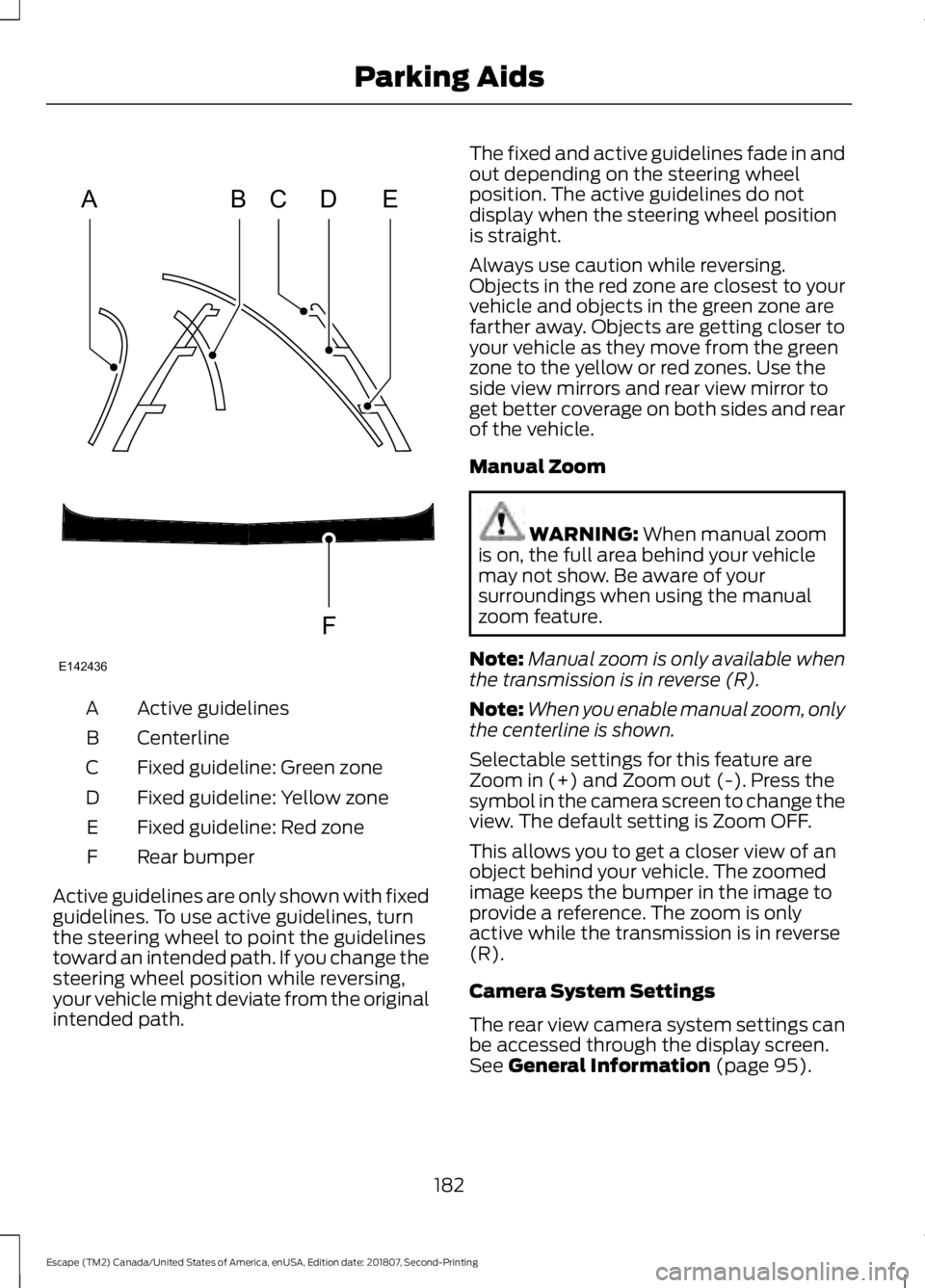
Active guidelines
A
Centerline
B
Fixed guideline: Green zone
C
Fixed guideline: Yellow zone
D
Fixed guideline: Red zone
E
Rear bumper
F
Active guidelines are only shown with fixed
guidelines. To use active guidelines, turn
the steering wheel to point the guidelines
toward an intended path. If you change the
steering wheel position while reversing,
your vehicle might deviate from the original
intended path. The fixed and active guidelines fade in and
out depending on the steering wheel
position. The active guidelines do not
display when the steering wheel position
is straight.
Always use caution while reversing.
Objects in the red zone are closest to your
vehicle and objects in the green zone are
farther away. Objects are getting closer to
your vehicle as they move from the green
zone to the yellow or red zones. Use the
side view mirrors and rear view mirror to
get better coverage on both sides and rear
of the vehicle.
Manual Zoom
WARNING: When manual zoom
is on, the full area behind your vehicle
may not show. Be aware of your
surroundings when using the manual
zoom feature.
Note: Manual zoom is only available when
the transmission is in reverse (R).
Note: When you enable manual zoom, only
the centerline is shown.
Selectable settings for this feature are
Zoom in (+) and Zoom out (-). Press the
symbol in the camera screen to change the
view. The default setting is Zoom OFF.
This allows you to get a closer view of an
object behind your vehicle. The zoomed
image keeps the bumper in the image to
provide a reference. The zoom is only
active while the transmission is in reverse
(R).
Camera System Settings
The rear view camera system settings can
be accessed through the display screen.
See
General Information (page 95).
182
Escape (TM2) Canada/United States of America, enUSA, Edition date: 201807, Second-Printing Parking AidsABCD
F
E
E142436
Page 200 of 509
BLIND SPOT INFORMATION
SYSTEM (IF EQUIPPED)
WARNING:
Do not use the blind
spot information system as a
replacement for using the interior and
exterior mirrors or looking over your
shoulder before changing lanes. The
blind spot information system is not a
replacement for careful driving. WARNING:
The system may not
operate properly during severe weather
conditions, for example snow, ice, heavy
rain and spray. Always drive with due
care and attention. Failure to take care
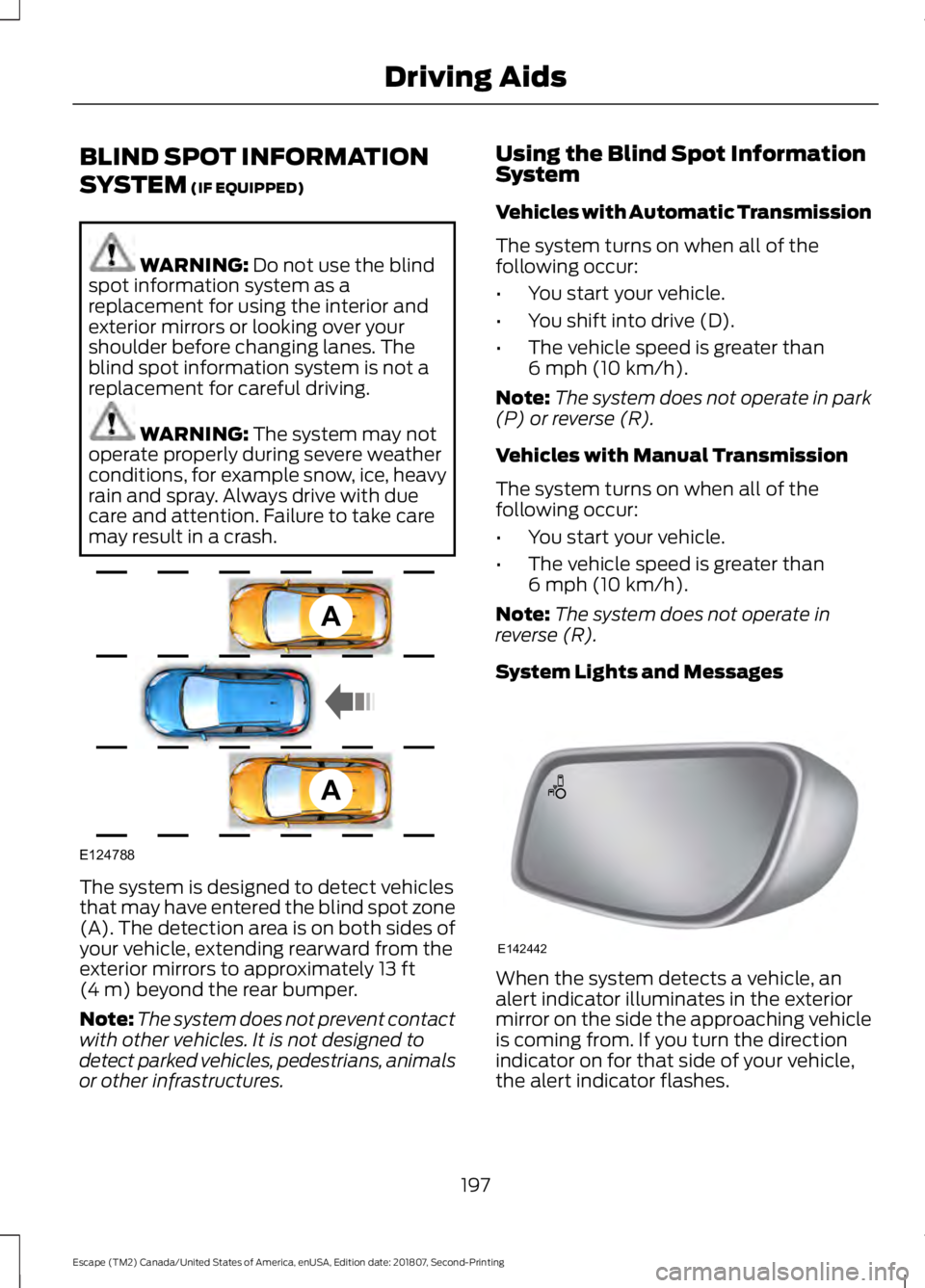
may result in a crash. The system is designed to detect vehicles
that may have entered the blind spot zone
(A). The detection area is on both sides of
your vehicle, extending rearward from the
exterior mirrors to approximately
13 ft
(4 m) beyond the rear bumper.
Note: The system does not prevent contact
with other vehicles. It is not designed to
detect parked vehicles, pedestrians, animals
or other infrastructures. Using the Blind Spot Information
System
Vehicles with Automatic Transmission
The system turns on when all of the
following occur:
•
You start your vehicle.
• You shift into drive (D).
• The vehicle speed is greater than
6 mph (10 km/h)
.
Note: The system does not operate in park
(P) or reverse (R).
Vehicles with Manual Transmission
The system turns on when all of the
following occur:
• You start your vehicle.
• The vehicle speed is greater than
6 mph (10 km/h)
.
Note: The system does not operate in
reverse (R).
System Lights and Messages When the system detects a vehicle, an
alert indicator illuminates in the exterior
mirror on the side the approaching vehicle
is coming from. If you turn the direction
indicator on for that side of your vehicle,
the alert indicator flashes.
197
Escape (TM2) Canada/United States of America, enUSA, Edition date: 201807, Second-Printing Driving AidsA
A
E124788 E142442
Page 201 of 509
Note:
The system may not alert you if a
vehicle quickly passes through the detection
zone.
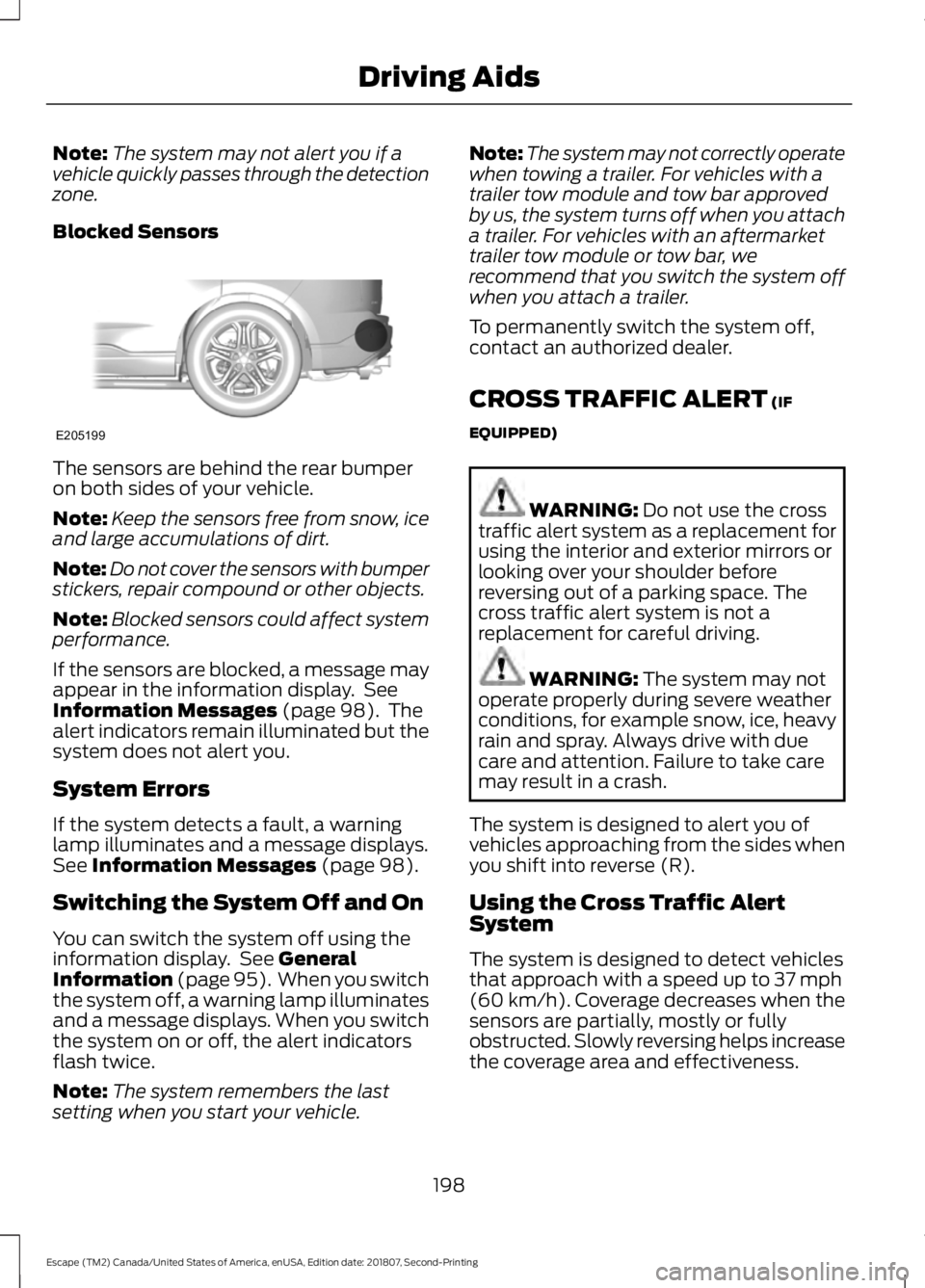
Blocked Sensors The sensors are behind the rear bumper
on both sides of your vehicle.
Note:
Keep the sensors free from snow, ice
and large accumulations of dirt.
Note: Do not cover the sensors with bumper
stickers, repair compound or other objects.
Note: Blocked sensors could affect system
performance.
If the sensors are blocked, a message may
appear in the information display. See
Information Messages (page 98). The
alert indicators remain illuminated but the
system does not alert you.
System Errors
If the system detects a fault, a warning
lamp illuminates and a message displays.
See
Information Messages (page 98).
Switching the System Off and On
You can switch the system off using the
information display. See
General
Information (page 95). When you switch
the system off, a warning lamp illuminates
and a message displays. When you switch
the system on or off, the alert indicators
flash twice.
Note: The system remembers the last
setting when you start your vehicle. Note:
The system may not correctly operate
when towing a trailer. For vehicles with a
trailer tow module and tow bar approved
by us, the system turns off when you attach
a trailer. For vehicles with an aftermarket
trailer tow module or tow bar, we
recommend that you switch the system off
when you attach a trailer.
To permanently switch the system off,
contact an authorized dealer.
CROSS TRAFFIC ALERT
(IF
EQUIPPED) WARNING:
Do not use the cross
traffic alert system as a replacement for
using the interior and exterior mirrors or
looking over your shoulder before
reversing out of a parking space. The
cross traffic alert system is not a
replacement for careful driving. WARNING:
The system may not
operate properly during severe weather
conditions, for example snow, ice, heavy
rain and spray. Always drive with due
care and attention. Failure to take care
may result in a crash.
The system is designed to alert you of
vehicles approaching from the sides when
you shift into reverse (R).
Using the Cross Traffic Alert
System
The system is designed to detect vehicles
that approach with a speed up to
37 mph
(60 km/h). Coverage decreases when the
sensors are partially, mostly or fully
obstructed. Slowly reversing helps increase
the coverage area and effectiveness.
198
Escape (TM2) Canada/United States of America, enUSA, Edition date: 201807, Second-Printing Driving AidsE205199
Page 203 of 509
Zone coverage also decreases when
parking at narrow angles. The sensor on
the left-hand side is mostly obstructed and
zone coverage on that side is severely
reduced.
System Lights, Messages and
Audible Alerts
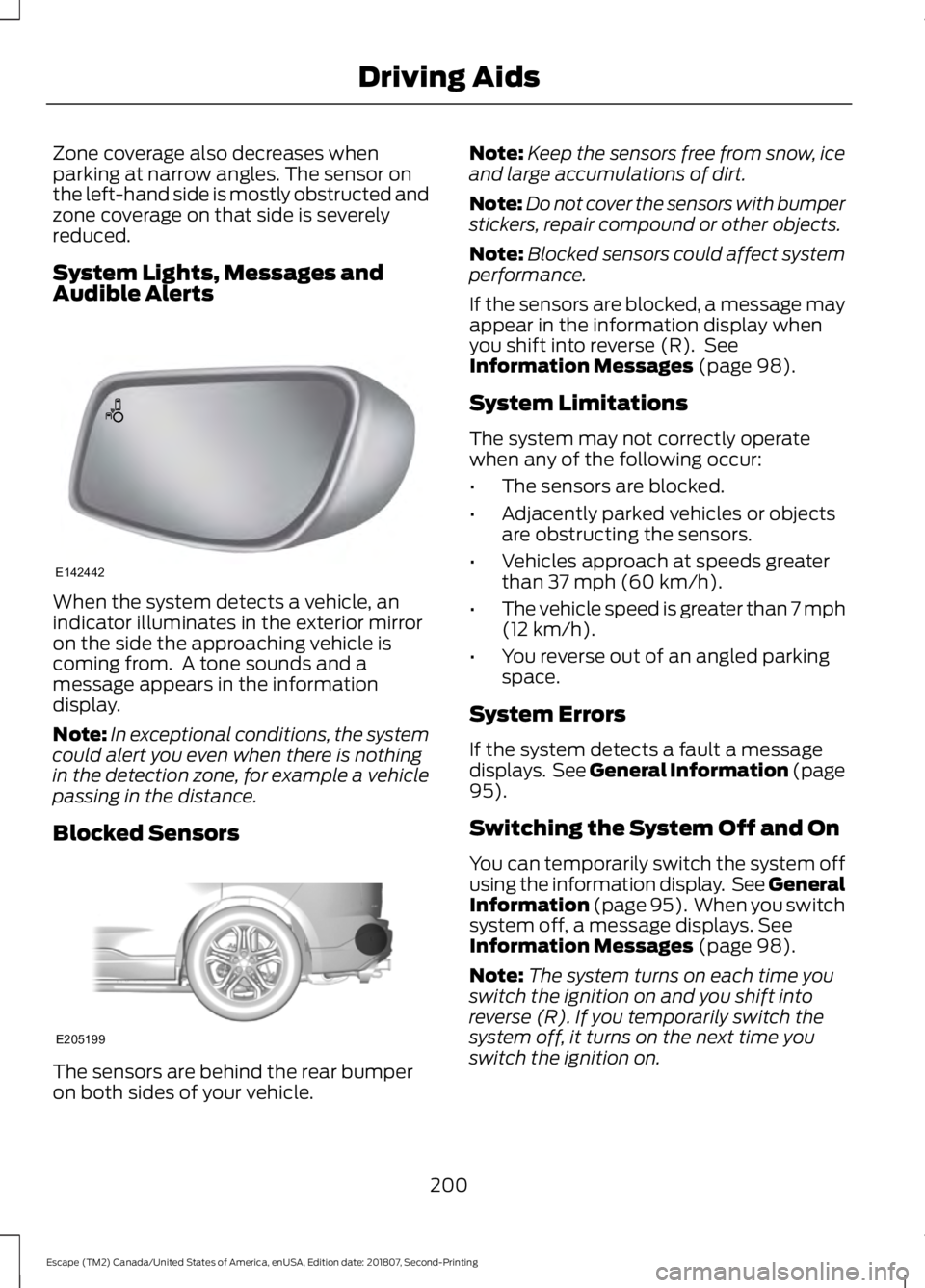
When the system detects a vehicle, an
indicator illuminates in the exterior mirror
on the side the approaching vehicle is
coming from. A tone sounds and a
message appears in the information
display.
Note:
In exceptional conditions, the system
could alert you even when there is nothing
in the detection zone, for example a vehicle
passing in the distance.
Blocked Sensors The sensors are behind the rear bumper
on both sides of your vehicle. Note:
Keep the sensors free from snow, ice
and large accumulations of dirt.
Note: Do not cover the sensors with bumper
stickers, repair compound or other objects.
Note: Blocked sensors could affect system
performance.
If the sensors are blocked, a message may
appear in the information display when
you shift into reverse (R). See
Information Messages (page 98).
System Limitations
The system may not correctly operate
when any of the following occur:
• The sensors are blocked.
• Adjacently parked vehicles or objects
are obstructing the sensors.
• Vehicles approach at speeds greater
than
37 mph (60 km/h).
• The vehicle speed is greater than 7 mph
(12 km/h)
.
• You reverse out of an angled parking
space.
System Errors
If the system detects a fault a message
displays. See General Information (page
95
).
Switching the System Off and On
You can temporarily switch the system off
using the information display. See
General
Information (page 95). When you switch
system off, a message displays. See
Information Messages (page 98).
Note: The system turns on each time you
switch the ignition on and you shift into
reverse (R). If you temporarily switch the
system off, it turns on the next time you
switch the ignition on.
200
Escape (TM2) Canada/United States of America, enUSA, Edition date: 201807, Second-Printing Driving AidsE142442 E205199
Page 242 of 509
Circuits protected
Fuse Rating
Fuse
Lock/unlock relay.
20A
F84
Liftgate relay.
Electronic 15 feed.
7.5A
F85
Airbag module.
10A
F86
Occupant classification system.
Passenger airbag deactivation indicator.
Heated steering wheel.
15A
F87
Not used.
—
F88
Not used.
—
F89
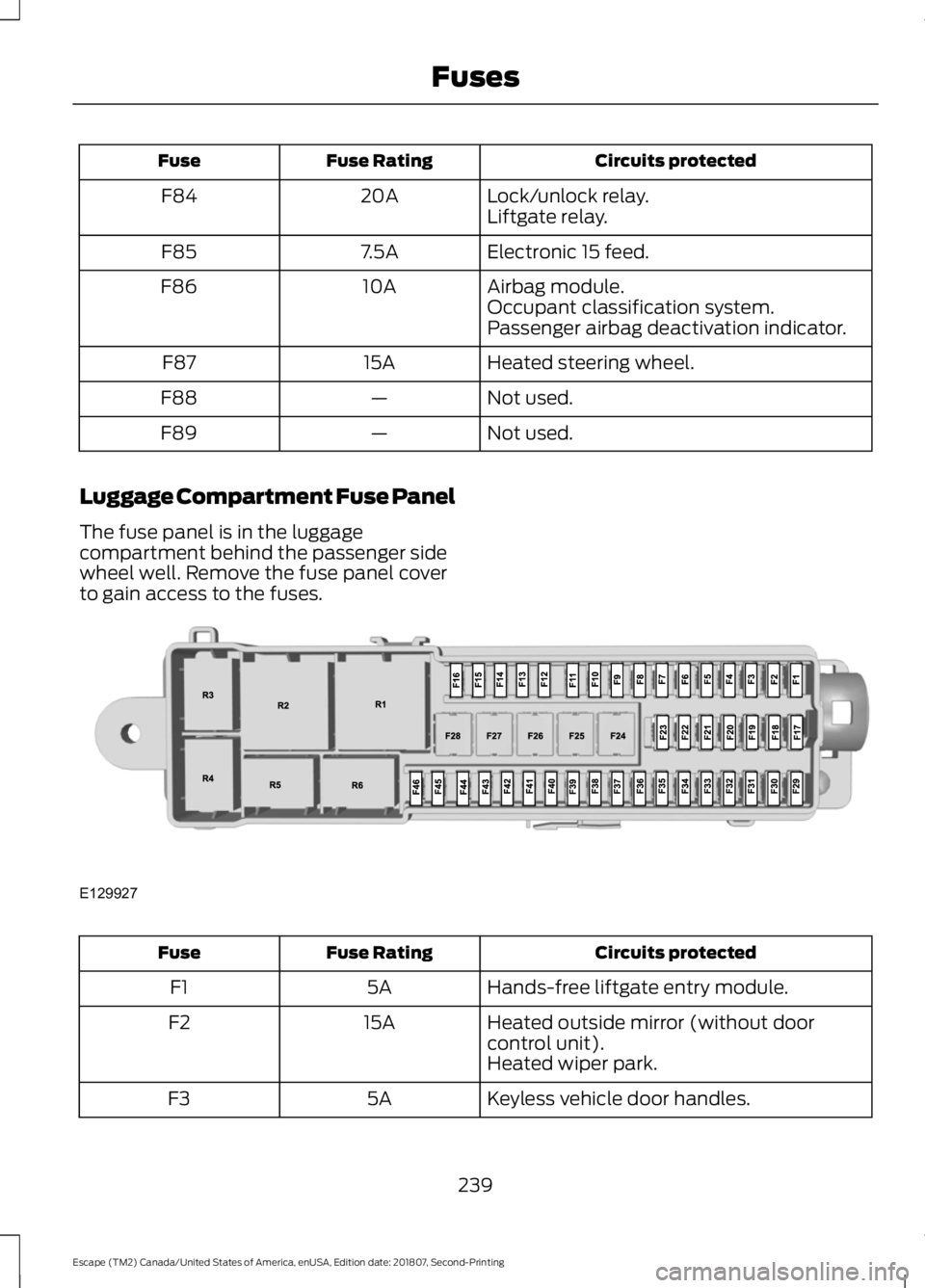
Luggage Compartment Fuse Panel
The fuse panel is in the luggage
compartment behind the passenger side
wheel well. Remove the fuse panel cover
to gain access to the fuses. Circuits protected
Fuse Rating
Fuse
Hands-free liftgate entry module.
5A
F1
Heated outside mirror (without door
control unit).
15A
F2
Heated wiper park.
Keyless vehicle door handles.
5A
F3
239
Escape (TM2) Canada/United States of America, enUSA, Edition date: 201807, Second-Printing FusesE129927
Page 244 of 509
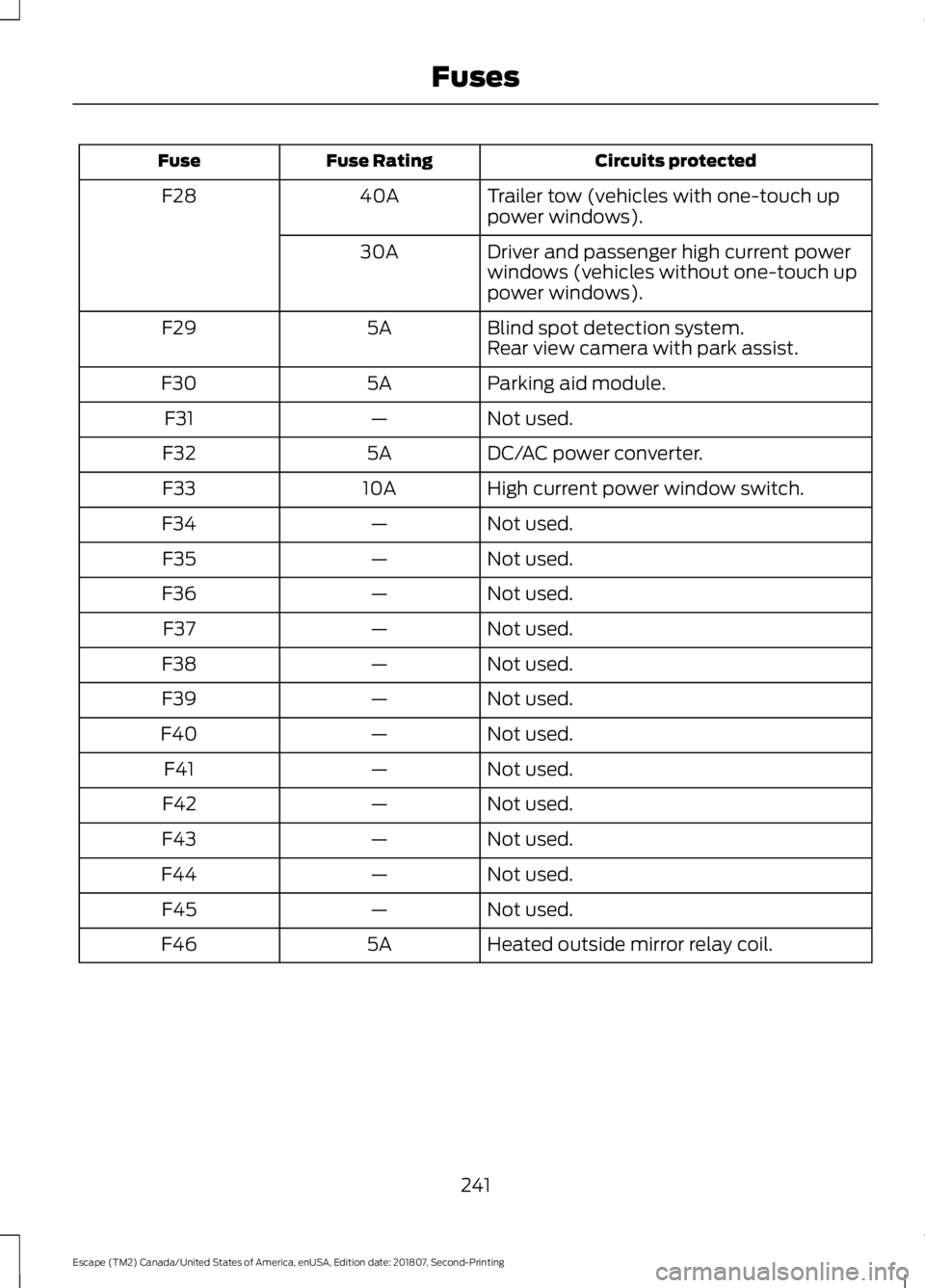
Circuits protected
Fuse Rating
Fuse
Trailer tow (vehicles with one-touch up
power windows).
40A
F28
Driver and passenger high current power
windows (vehicles without one-touch up
power windows).
30A
Blind spot detection system.
5A
F29
Rear view camera with park assist.
Parking aid module.
5A
F30
Not used.
—
F31
DC/AC power converter.
5A
F32
High current power window switch.
10A
F33
Not used.
—
F34
Not used.
—
F35
Not used.
—
F36
Not used.
—
F37
Not used.
—
F38
Not used.
—
F39
Not used.
—
F40
Not used.
—
F41
Not used.
—
F42
Not used.
—
F43
Not used.
—
F44
Not used.
—
F45
Heated outside mirror relay coil.
5A
F46
241
Escape (TM2) Canada/United States of America, enUSA, Edition date: 201807, Second-Printing Fuses
Page 245 of 509
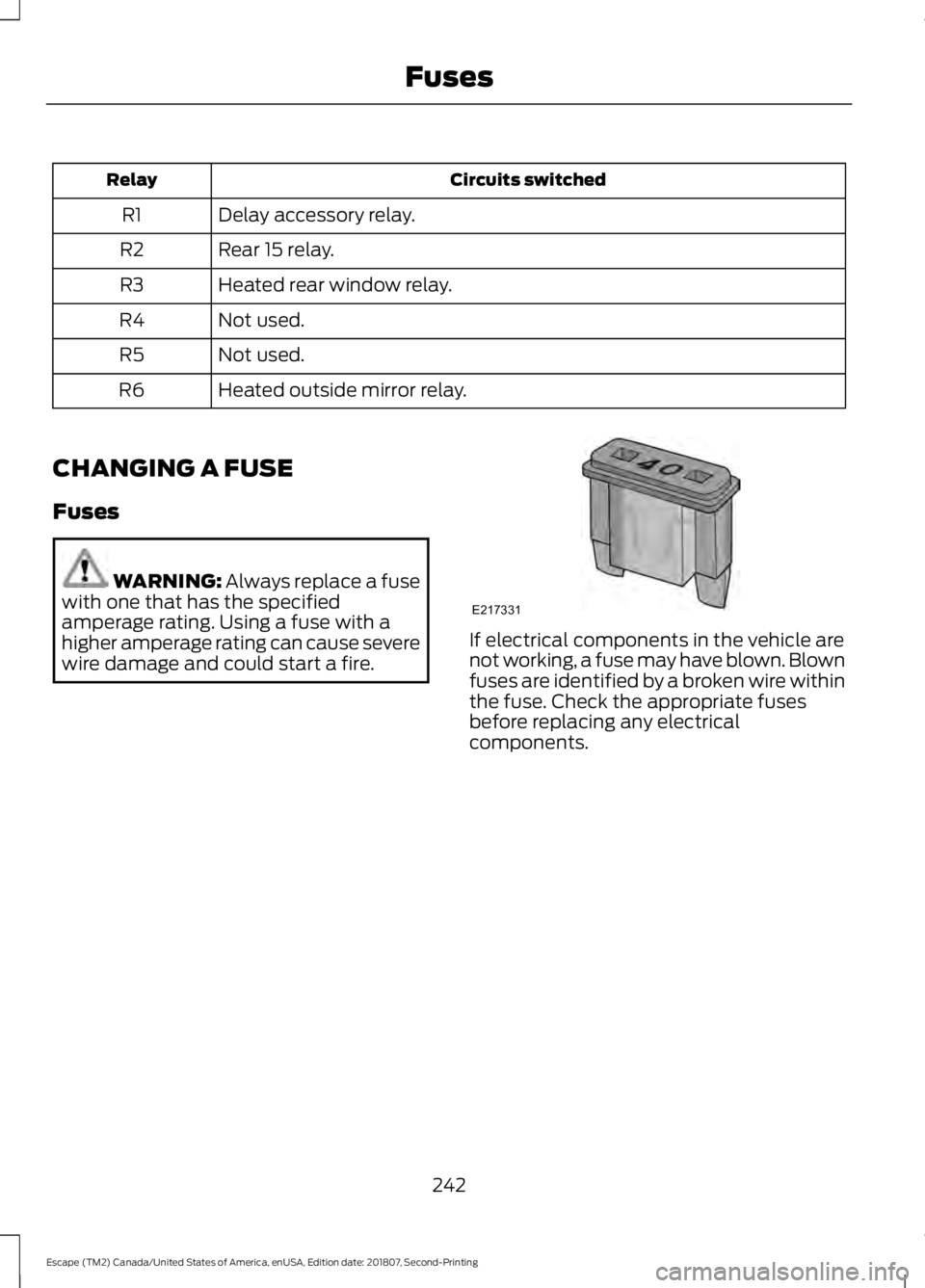
Circuits switched
Relay
Delay accessory relay.
R1
Rear 15 relay.
R2
Heated rear window relay.
R3
Not used.
R4
Not used.
R5
Heated outside mirror relay.
R6
CHANGING A FUSE
Fuses WARNING: Always replace a fuse
with one that has the specified
amperage rating. Using a fuse with a
higher amperage rating can cause severe
wire damage and could start a fire. If electrical components in the vehicle are
not working, a fuse may have blown. Blown
fuses are identified by a broken wire within
the fuse. Check the appropriate fuses
before replacing any electrical
components.
242
Escape (TM2) Canada/United States of America, enUSA, Edition date: 201807, Second-Printing FusesE217331
Page 272 of 509
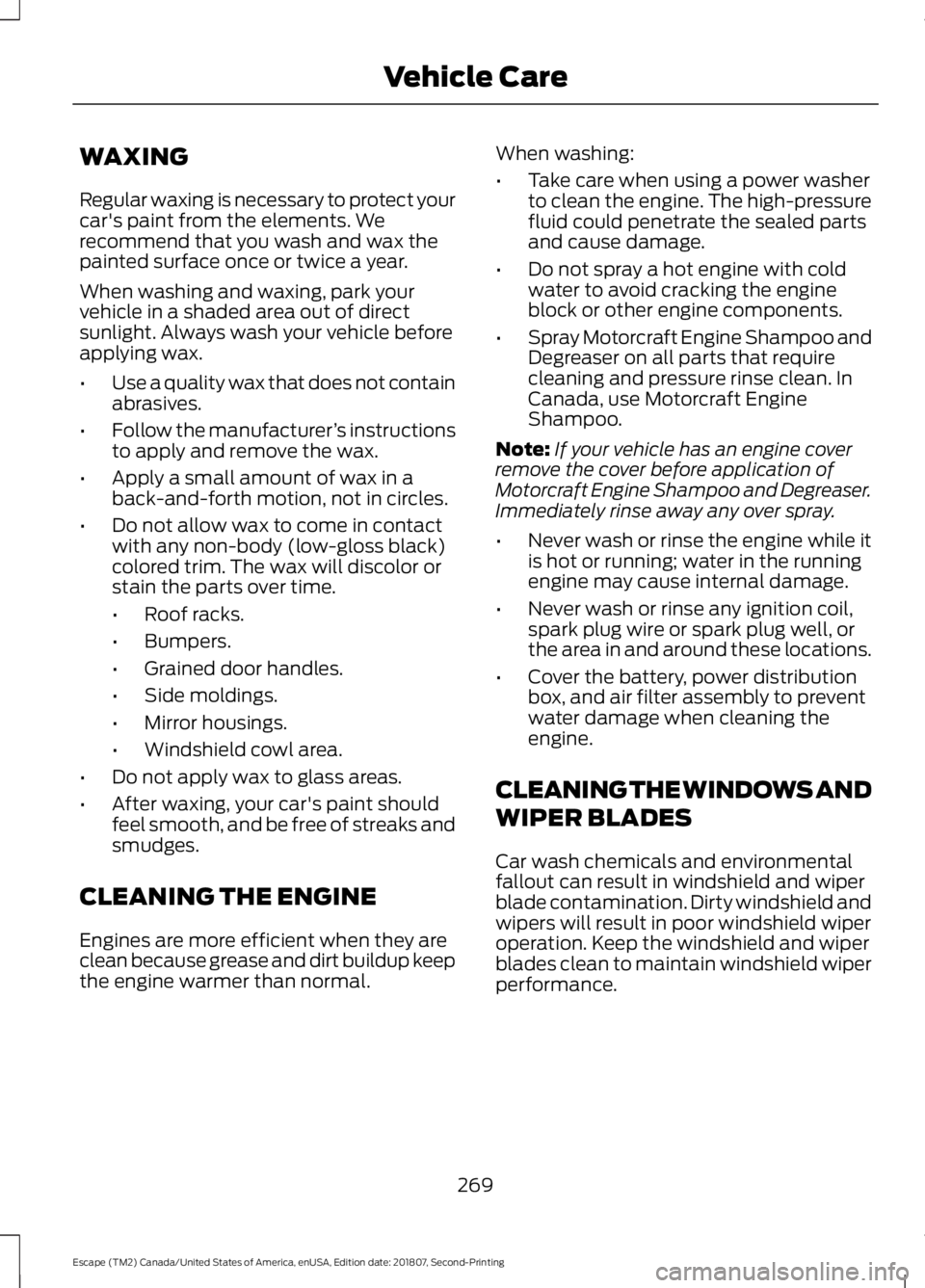
WAXING
Regular waxing is necessary to protect your
car's paint from the elements. We
recommend that you wash and wax the
painted surface once or twice a year.
When washing and waxing, park your
vehicle in a shaded area out of direct
sunlight. Always wash your vehicle before
applying wax.
•
Use a quality wax that does not contain
abrasives.
• Follow the manufacturer ’s instructions
to apply and remove the wax.
• Apply a small amount of wax in a
back-and-forth motion, not in circles.
• Do not allow wax to come in contact
with any non-body (low-gloss black)
colored trim. The wax will discolor or
stain the parts over time.
•Roof racks.
• Bumpers.
• Grained door handles.
• Side moldings.
• Mirror housings.
• Windshield cowl area.
• Do not apply wax to glass areas.
• After waxing, your car's paint should
feel smooth, and be free of streaks and
smudges.
CLEANING THE ENGINE
Engines are more efficient when they are
clean because grease and dirt buildup keep
the engine warmer than normal. When washing:
•
Take care when using a power washer
to clean the engine. The high-pressure
fluid could penetrate the sealed parts
and cause damage.
• Do not spray a hot engine with cold
water to avoid cracking the engine
block or other engine components.
• Spray Motorcraft Engine Shampoo and
Degreaser on all parts that require
cleaning and pressure rinse clean. In
Canada, use Motorcraft Engine
Shampoo.
Note: If your vehicle has an engine cover
remove the cover before application of
Motorcraft Engine Shampoo and Degreaser.
Immediately rinse away any over spray.
• Never wash or rinse the engine while it
is hot or running; water in the running
engine may cause internal damage.
• Never wash or rinse any ignition coil,
spark plug wire or spark plug well, or
the area in and around these locations.
• Cover the battery, power distribution
box, and air filter assembly to prevent
water damage when cleaning the
engine.
CLEANING THE WINDOWS AND
WIPER BLADES
Car wash chemicals and environmental
fallout can result in windshield and wiper
blade contamination. Dirty windshield and
wipers will result in poor windshield wiper
operation. Keep the windshield and wiper
blades clean to maintain windshield wiper
performance.
269
Escape (TM2) Canada/United States of America, enUSA, Edition date: 201807, Second-Printing Vehicle Care
Page 273 of 509
To clean the windshield and wiper blades:
•
Clean the windshield with a
non-abrasive glass cleaner. When
cleaning the interior of the windshield,
avoid getting any glass cleaner on the
instrument panel or door panels. Wipe
any glass cleaner off these surfaces
immediately.
• For windshields contaminated with
tree sap, chemicals, wax or bugs, clean
the entire windshield using steel wool
(no greater than 0000 grade) in a
circular motion and rinse with water.
• Clean the wiper blades with isopropyl
rubbing alcohol or windshield washer
concentrate.
Note: Do not use razor blades or other
sharp objects to clean or remove decals
from the inside of the heated rear window.
The vehicle warranty does not cover
damage caused to the heated rear window
grid lines.
CLEANING THE INTERIOR WARNING: Do not use cleaning
solvents, bleach or dye on the vehicle's
seatbelts, as these actions may weaken
the belt webbing. WARNING:
On vehicles equipped
with seat-mounted airbags, do not use
chemical solvents or strong detergents.
Such products could contaminate the
side airbag system and affect
performance of the side airbag in a crash. For fabric, carpets, cloth seats and seats
equipped with side airbags:
•
Remove dust and loose dirt with a
vacuum cleaner.
• Remove light stains and soil with
Motorcraft Professional Strength
Carpet & Upholstery Cleaner.
• If grease or tar is present on the
material, spot-clean the area first with
Motorcraft Spot and Stain Remover. In
Canada, use Motorcraft Multi-Purpose
Cleaner.
• If a ring forms on the fabric after spot
cleaning, clean the entire area
immediately (but do not oversaturate)
or the ring will set.
• Do not use household cleaning
products or glass cleaners, which can
stain and discolor the fabric and affect
the flame retardant abilities of the seat
materials.
Mirrors
Do not clean the housing or glass of any
mirror with harsh abrasives, fuel or other
petroleum or ammonia-based cleaning
products.
CLEANING THE INSTRUMENT
PANEL AND INSTRUMENT
CLUSTER LENS WARNING:
Do not use chemical
solvents or strong detergents when
cleaning the steering wheel or
instrument panel to avoid contamination
of the airbag system.
Note: Follow the same procedure as
cleaning leather seats for cleaning leather
instrument panels and leather interior trim
surfaces. See
Cleaning Leather Seats
(page 271).
270
Escape (TM2) Canada/United States of America, enUSA, Edition date: 201807, Second-Printing Vehicle Care
Page 500 of 509
Car Wash
See: Cleaning the Exterior............................... 267
Catalytic Converter.......................................151 On-Board Diagnostics (OBD-II).................... 152
Readiness for Inspection and Maintenance (I/M) Testing.................................................... 152
Center Console..............................................133
Changing a Bulb............................................261 Cornering Lamp (HID Headlamps) ...........263
Lamp Assembly Condensation..................... 261
Replacing Fog, Park and Turn Signal Bulbs.................................................................. 263
Replacing Headlamp Bulbs........................... 262
Replacing HID Headlamp Bulbs.................. 263
Replacing High-Mount Brake Lamp Bulb.................................................................... 265
Replacing License Plate Lamp Bulb...........265
Replacing Reverse Lamp Assembly...........265
Replacing Side Marker Bulbs........................ 263
Replacing Turn, Tail and Brake Signal Bulbs................................................................. 264
Changing a Fuse...........................................242 Fuses....................................................................... 242
Changing a Road Wheel
...........................295
Dissimilar Spare Wheel and Tire Assembly
Information..................................................... 295
Tire Change Procedure.................................... 296
Changing the 12V Battery.........................256 Battery Management System...................... 258
Changing the Engine Air Filter................265 Duratec Engines................................................. 266
EcoBoost Engines............................................. 265
Changing the Wiper Blades.....................259 Front Wiper Blades........................................... 259
Rear Window Wiper Blade............................. 259
Checking MyKey System Status
...............57
MyKey Distance..................................................... 57
Number of Admin Keys...................................... 58
Number of MyKeys.............................................. 58
Checking the Wiper Blades
.....................258
Child Restraint and Seatbelt Maintenance.................................................39
Child Restraint Positioning.........................29
Child Safety......................................................20 General Information............................................ 20
Child Safety Locks...........................................31 Left-Hand Side...................................................... 32
Right-Hand Side................................................... 32Cleaning Leather Seats...............................271
Cleaning Products.......................................267
Materials................................................................ 267
Cleaning the Engine...................................269
Cleaning the Exterior..................................267 Cleaning the Headlamps................................ 268
Exterior Chrome Parts..................................... 268
Exterior Plastic Parts........................................ 268
Stripes or Graphics........................................... 268
Underbody........................................................... 268
Under Hood......................................................... 268
Cleaning the Instrument Panel and Instrument Cluster Lens
.........................270
Cleaning the Interior...................................270
Mirrors.................................................................... 270
Cleaning the Wheels...................................272
Cleaning the Windows and Wiper Blades...........................................................269
Clearing All MyKeys........................................57
Climate Control..............................................110
Collision Warning System.........................201 PRINCIPLE OF OPERATION........................... 201
Coolant Check See: Engine Coolant Check............................. 251
Cornering Lamps
............................................82
Crash Sensors and Airbag Indicator.......48
Creating a MyKey...........................................56 Programming and Changing Configurable
Settings............................................................... 57
Cross Traffic Alert.........................................198 Blocked Sensors................................................ 200
Switching the System Off and On..............200
System Errors..................................................... 200
System Lights, Messages and Audible Alerts................................................................. 200
System Limitations.......................................... 200
Using the Cross Traffic Alert System..........198
Cruise Control
..................................................73
Principle of Operation.......................................184
Type One.................................................................. 73
Type Two.................................................................. 74
Cruise control See: Using Cruise Control................................ 184
Customer Assistance
.................................226
497
Escape (TM2) Canada/United States of America, enUSA, Edition date: 201807, Second-Printing Index