lock FORD ESCAPE 2019 Owner's Guide
[x] Cancel search | Manufacturer: FORD, Model Year: 2019, Model line: ESCAPE, Model: FORD ESCAPE 2019Pages: 509, PDF Size: 6.69 MB
Page 83 of 509
Press repeatedly or press and hold until
you reach the desired level.
HEADLAMP EXIT DELAY
After you switch the ignition off, you can
switch the headlamps on by pulling the
direction indicator lever toward you. You
will hear a short tone. The headlamps will
switch off automatically after three
minutes with any door open or 30 seconds
after the last door has been closed. You
can cancel this feature by pulling the
direction indicator toward you again or
switching the ignition on.
DAYTIME RUNNING LAMPS
WARNING: The daytime running
lamps system does not activate the rear
lamps and may not provide adequate
lighting during low visibility driving
conditions. Make sure you switch the
headlamps on, as appropriate, during all
low visibility conditions. Failure to do so
may result in a crash.
Type One - Conventional (Non-
Configurable)
The daytime running lamps turn on when:
1. Switching the ignition on.
2. The transmission is not in park (P) for vehicles with automatic transmissions,
or releasing the parking brake for
vehicles with manual transmissions.
3. The lighting control is in the off, parking
lamp or autolamps positions.
4. The headlamps are off. Type Two - Configurable
Switch the daytime running lamps on or
off using the information display. See
Information Displays
(page 95).
The daytime running lamps turn on when:
1. The lamps are on in the information display.
2. Switching the ignition on.
3. The transmission is not in park (P) for vehicles with automatic transmissions,
or releasing the parking brake for
vehicles with manual transmissions.
4. The lighting control is in the autolamps
position.
5. The headlamps are off.
The other lighting control switch positions
do not turn on the daytime running lamps.
If the daytime running lamps are off in the
information display, the lamps stay off in
all switch positions.
AUTOMATIC HIGH BEAM
CONTROL
(IF EQUIPPED) WARNING:
The system does not
relieve you of your responsibility to drive
with due care and attention. You may
need to override the system if it does not
turn the high beams on or off.
The system turns on high beams if it is dark
enough and no other traffic is present. If it
detects an approaching vehicle ’s
headlamps or tail lamps, or street lighting
ahead, the system turns off high beams
before they can distract other road users.
Low beams remain on.
Note: The system may not operate properly
if the sensor is blocked. Keep the windshield
free from obstruction or damage.
80
Escape (TM2) Canada/United States of America, enUSA, Edition date: 201807, Second-Printing Lighting
Page 84 of 509
Note:
The system may not operate properly
in cold or inclement conditions. You can
switch on the high beams by overriding the
system.
Note: If the system detects a blockage, for
example bird droppings, bug splatter, snow
or ice, the system goes into low beam mode
until you clear the blockage. A message may
appear in the information display if the
camera is blocked.
Note: Using much larger tires or equipping
vehicle accessories such as snowplows can
modify your vehicle's ride height and
degrade automatic high beam control
performance.
A camera sensor, centrally mounted
behind the windshield of your vehicle,
continuously monitors conditions to turn
the high beams on and off.
Once the system is active, the high beams
turn on if:
• The ambient light level is low enough.
• There is no traffic in front of your
vehicle.
• The vehicle speed is greater than
approximately 32 mph (51 km/h).
The system turns the high beams off if:
• The ambient light level is high enough
that high beams are not required.
• The system detects an approaching
vehicle's headlamps or tail lamps.
• The vehicle speed falls below
approximately
27 mph (44 km/h).
• The system detects severe rain, snow
or fog.
• The camera is blocked.
Switching the System On and Off
Switch the system on using the information
display. See Information Displays (page
95
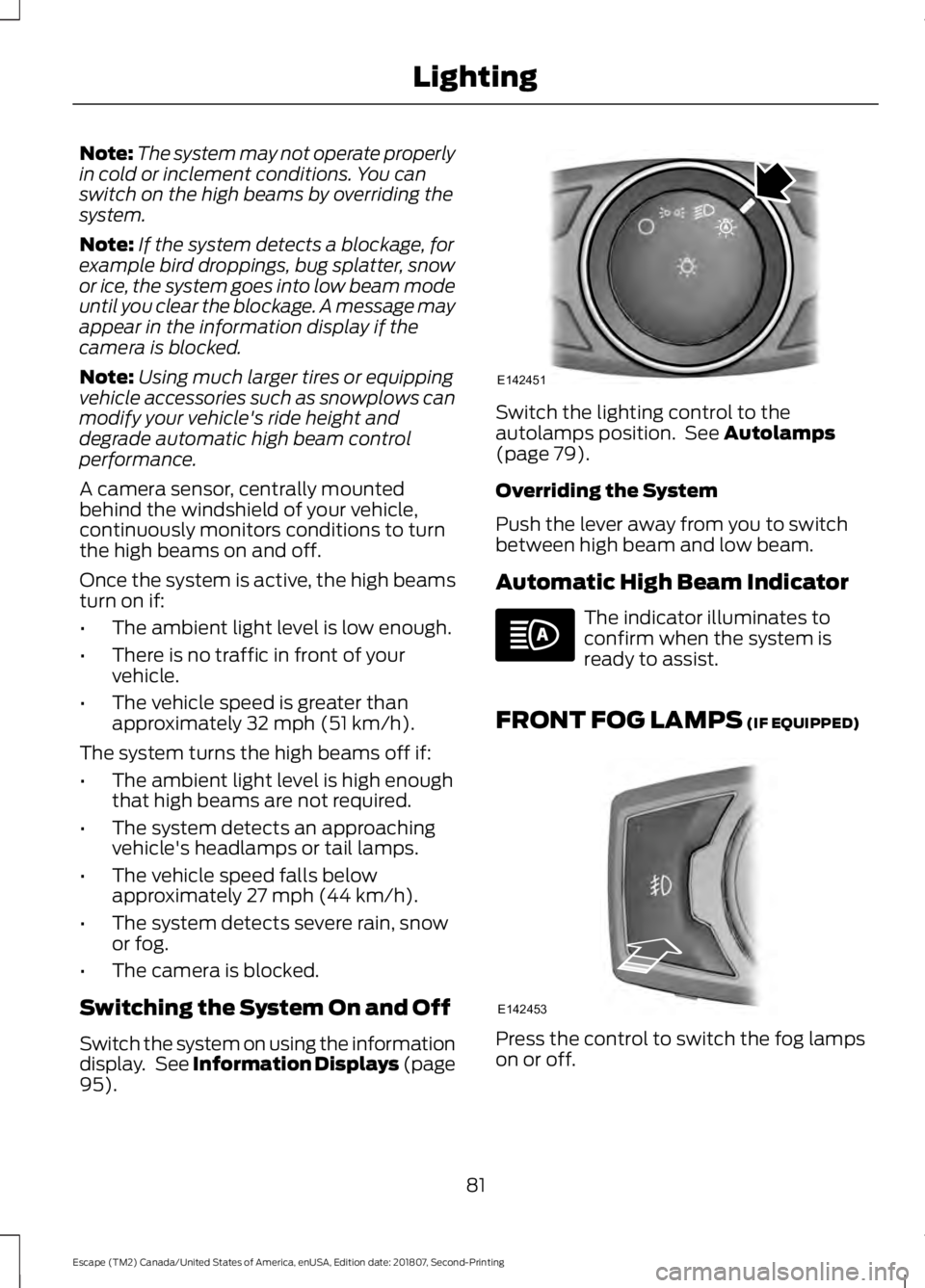
). Switch the lighting control to the
autolamps position. See
Autolamps
(page 79).
Overriding the System
Push the lever away from you to switch
between high beam and low beam.
Automatic High Beam Indicator The indicator illuminates to
confirm when the system is
ready to assist.
FRONT FOG LAMPS
(IF EQUIPPED) Press the control to switch the fog lamps
on or off.
81
Escape (TM2) Canada/United States of America, enUSA, Edition date: 201807, Second-Printing LightingE142451 E142453
Page 88 of 509
POWER WINDOWS
WARNING: Do not leave children
unattended in your vehicle and do not
let them play with the power windows.
Failure to follow this instruction could
result in personal injury. WARNING:
When closing the
power windows, verify they are free of
obstruction and make sure that children
and pets are not in the proximity of the
window openings. Press the control to open the
window. Lift the control to close
the window.
To reduce wind noise or pulsing noise when
just one window is open, slightly open the
opposite window.
One-Touch Open
(If Equipped)
Fully press the control and release it. Press
again or lift it to stop the window.
One-Touch Close
(If Equipped)
Fully lift the control and release it. Press
again or lift it to stop the window.
Rear Window Lock Press the control to lock or
unlock the rear window controls.
It illuminates when you lock the
rear window controls.
Bounce-Back
(If Equipped)
The window stops and reverses if it detects
an obstruction. Overriding Bounce-Back WARNING:
If you override
bounce-back, the window does not
reverse if it detects an obstacle. Take
care when closing the windows to avoid
personal injury or damage to your
vehicle.
Proceed as follows to override this
protection feature when there is a
resistance, for example in winter:
1. Close the window twice until it reaches
the point of resistance and let it
reverse.
2. Close the window a third time to the point of resistance. You disabled the
bounce-back feature and you can now
close the window manually. The
window goes past the point of
resistance and you can fully close it.
Note: If the window does not close, have
your vehicle checked as soon as possible.
Resetting Bounce-Back WARNING:
Bounce-back is off
until you reset the memory. Take care
when closing the windows to avoid
personal injury or damage to your
vehicle.
If you have disconnected the battery, you
must reset the bounce-back memory
separately for each window.
1. Lift and hold the switch until the window is fully closed.
2. Release the switch.
3. Lift and hold the switch again for a few
seconds.
4. Release the switch.
85
Escape (TM2) Canada/United States of America, enUSA, Edition date: 201807, Second-Printing Windows and Mirrors
Page 90 of 509
Signal Indicator Mirrors (If Equipped)
The outer portion of the appropriate mirror
housing will blink when you switch on the
turn signal.
Puddle Lamps
(If Equipped)
The lamps on the bottom part of the mirror
housing light when you use your
transmitter to unlock the doors or when
you open a door.
Integrated Blind Spot Mirrors
(If
Equipped) WARNING:
Objects in the mirror
are closer than they appear.
Blind spot mirrors have an integrated
convex mirror built into the upper outboard
corner of the exterior mirrors. They are
designed to increase your visibility along
the side of your vehicle.
Check the main mirror first before a lane
change, then check the blind spot mirror.
If no vehicles are present in the blind spot
mirror and the traffic in the adjacent lane
is at a safe distance, signal that you intend
to change lanes. Glance over your shoulder
to verify traffic is clear and carefully
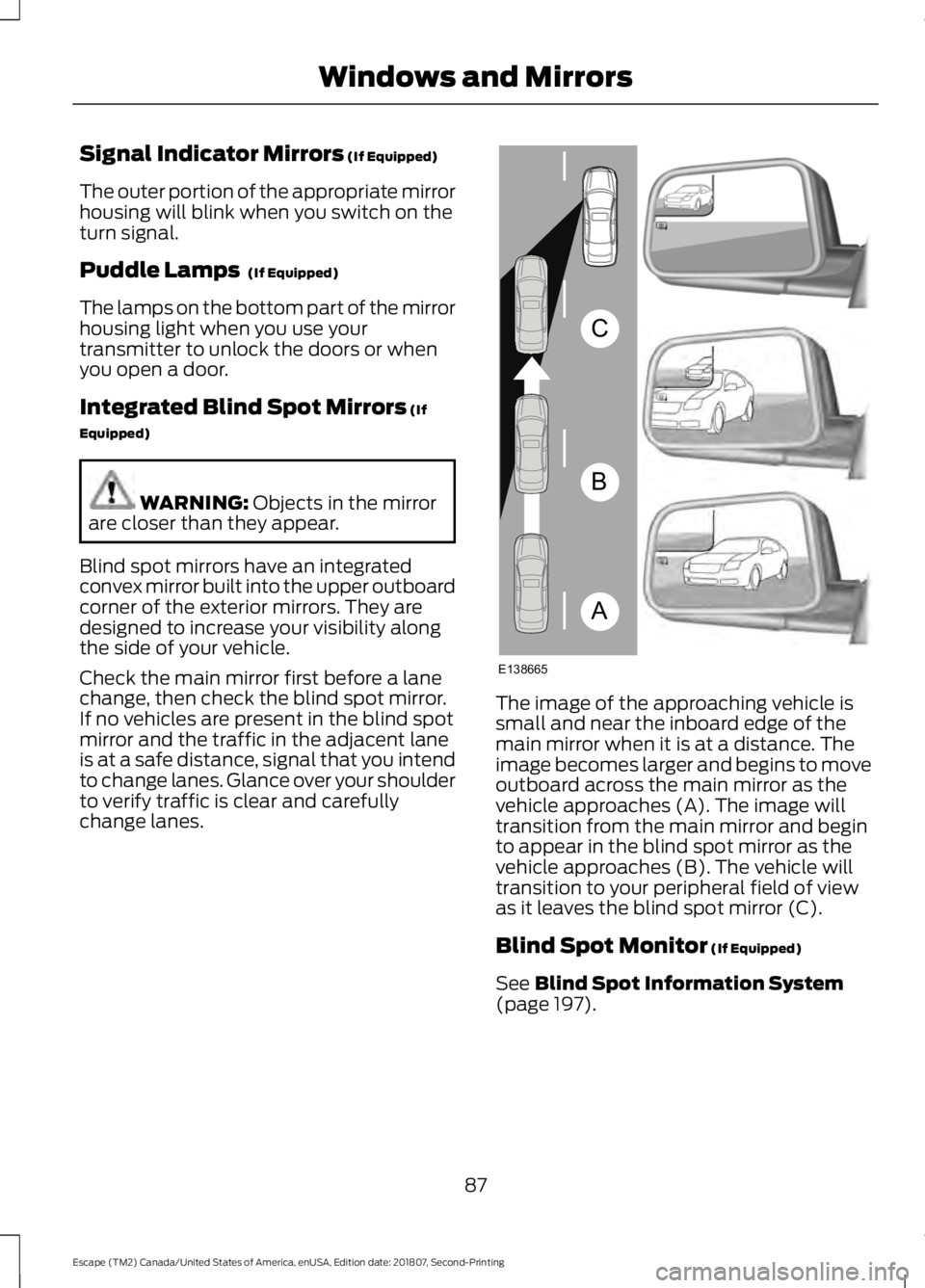
change lanes. The image of the approaching vehicle is
small and near the inboard edge of the
main mirror when it is at a distance. The
image becomes larger and begins to move
outboard across the main mirror as the
vehicle approaches (A). The image will
transition from the main mirror and begin
to appear in the blind spot mirror as the
vehicle approaches (B). The vehicle will
transition to your peripheral field of view
as it leaves the blind spot mirror (C).
Blind Spot Monitor
(If Equipped)
See
Blind Spot Information System
(page 197).
87
Escape (TM2) Canada/United States of America, enUSA, Edition date: 201807, Second-Printing Windows and MirrorsA
B
C
E138665
Page 91 of 509
INTERIOR MIRROR
WARNING: Do not adjust the
mirrors when your vehicle is moving. This
could result in the loss of control of your
vehicle, serious personal injury or death.
Note: Do not clean the mirror housing or
glass with harsh abrasives, fuel or other
petroleum-based cleaning products.
You can adjust the interior mirror to your
preference. Some mirrors also have a
second pivot point. This lets you move the
mirror head up or down and from side to
side.
Manual Dimming Mirror
Pull the tab below the mirror toward you
to reduce the effect of bright light from
behind.
Automatic Dimming Mirror (If Equipped)
Note: Do not block the sensors on the front
and back of the mirror. A rear center
passenger or raised rear center head
restraint may also block light from reaching
the sensor.
The mirror dims to reduce the effect of
bright light from behind. It returns to
normal when the bright light from behind
is no longer present or if you shift into
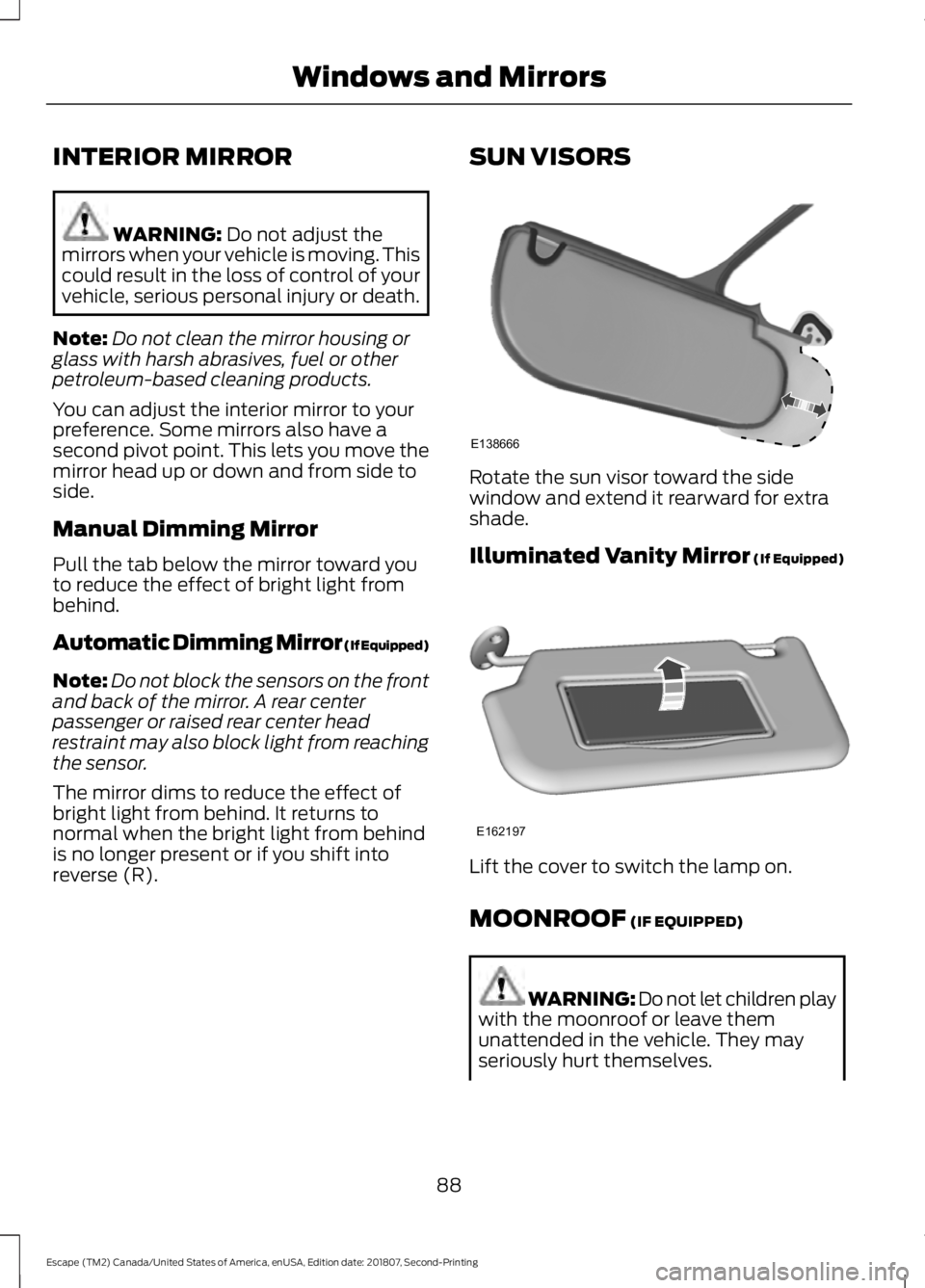
reverse (R). SUN VISORS Rotate the sun visor toward the side
window and extend it rearward for extra
shade.
Illuminated Vanity Mirror
(If Equipped)
Lift the cover to switch the lamp on.
MOONROOF
(IF EQUIPPED)
WARNING: Do not let children play
with the moonroof or leave them
unattended in the vehicle. They may
seriously hurt themselves.
88
Escape (TM2) Canada/United States of America, enUSA, Edition date: 201807, Second-Printing Windows and MirrorsE138666 E162197
Page 95 of 509
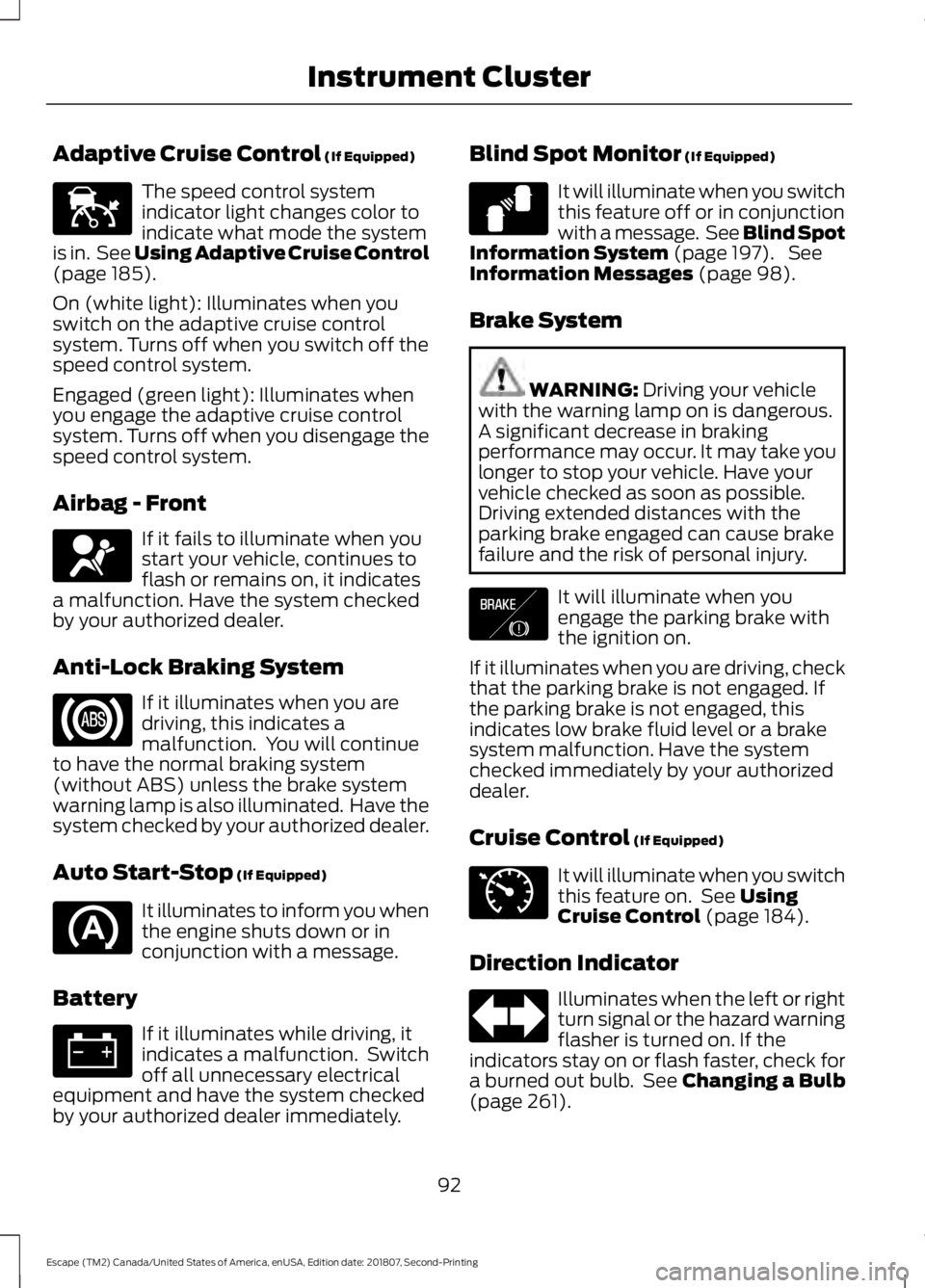
Adaptive Cruise Control (If Equipped)
The speed control system
indicator light changes color to
indicate what mode the system
is in. See Using Adaptive Cruise Control
(page
185).
On (white light): Illuminates when you
switch on the adaptive cruise control
system. Turns off when you switch off the
speed control system.
Engaged (green light): Illuminates when
you engage the adaptive cruise control
system. Turns off when you disengage the
speed control system.
Airbag - Front If it fails to illuminate when you
start your vehicle, continues to
flash or remains on, it indicates
a malfunction. Have the system checked
by your authorized dealer.
Anti-Lock Braking System If it illuminates when you are
driving, this indicates a
malfunction. You will continue
to have the normal braking system
(without ABS) unless the brake system
warning lamp is also illuminated. Have the
system checked by your authorized dealer.
Auto Start-Stop
(If Equipped) It illuminates to inform you when
the engine shuts down or in
conjunction with a message.
Battery If it illuminates while driving, it
indicates a malfunction. Switch
off all unnecessary electrical
equipment and have the system checked
by your authorized dealer immediately. Blind Spot Monitor
(If Equipped) It will illuminate when you switch
this feature off or in conjunction
with a message. See Blind Spot
Information System
(page 197). See
Information Messages (page 98).
Brake System WARNING:
Driving your vehicle
with the warning lamp on is dangerous.
A significant decrease in braking
performance may occur. It may take you
longer to stop your vehicle. Have your
vehicle checked as soon as possible.
Driving extended distances with the
parking brake engaged can cause brake
failure and the risk of personal injury. It will illuminate when you
engage the parking brake with
the ignition on.
If it illuminates when you are driving, check
that the parking brake is not engaged. If
the parking brake is not engaged, this
indicates low brake fluid level or a brake
system malfunction. Have the system
checked immediately by your authorized
dealer.
Cruise Control
(If Equipped) It will illuminate when you switch
this feature on. See
Using
Cruise Control (page 184).
Direction Indicator Illuminates when the left or right
turn signal or the hazard warning
flasher is turned on. If the
indicators stay on or flash faster, check for
a burned out bulb. See
Changing a Bulb
(page 261).
92
Escape (TM2) Canada/United States of America, enUSA, Edition date: 201807, Second-Printing Instrument ClusterE144524 E67017 E124823 E138644 E71340
Page 104 of 509
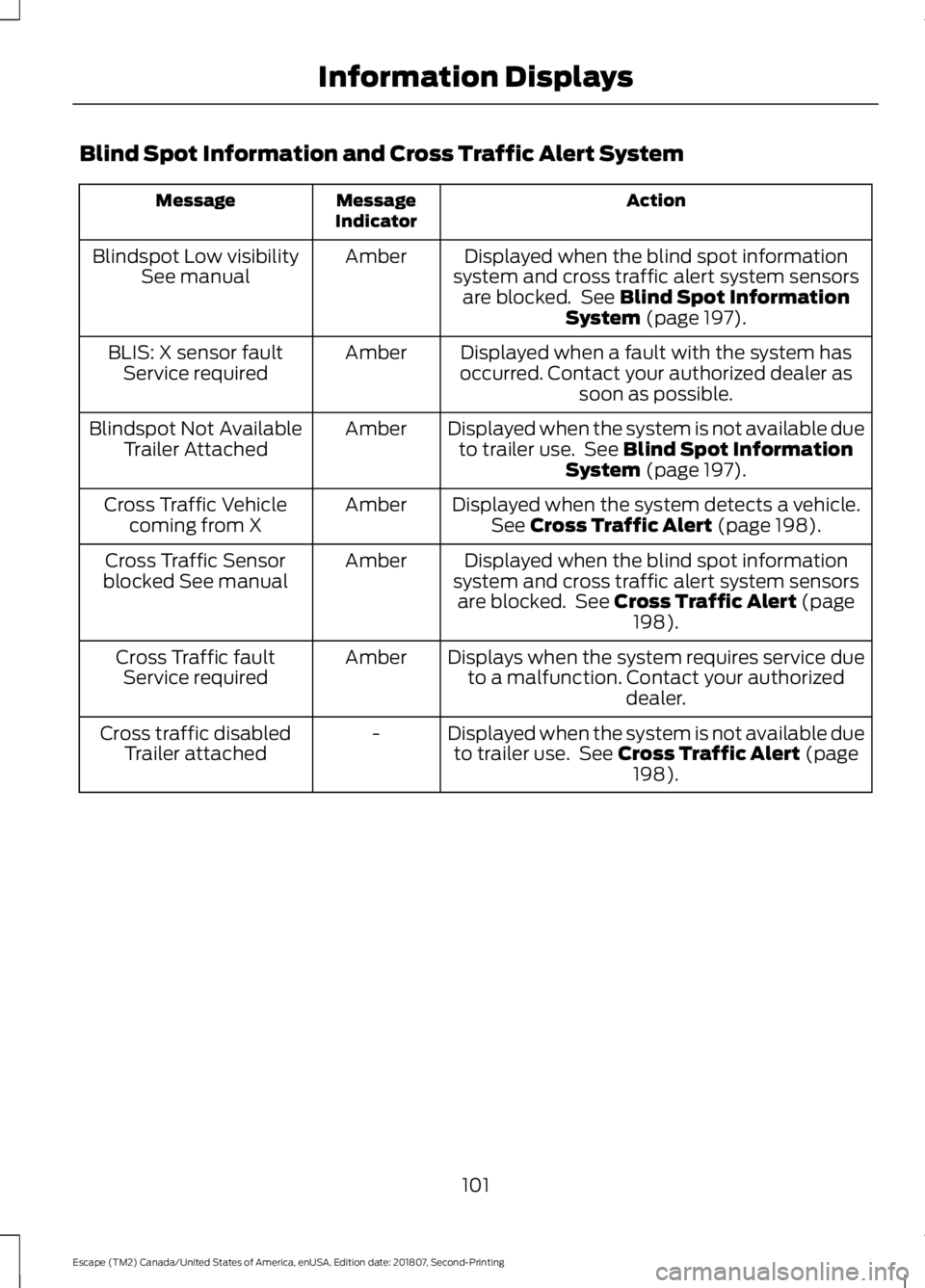
Blind Spot Information and Cross Traffic Alert System
Action
Message
Indicator
Message
Displayed when the blind spot information
system and cross traffic alert system sensors are blocked. See Blind Spot Information
System (page 197).
Amber
Blindspot Low visibility
See manual
Displayed when a fault with the system has
occurred. Contact your authorized dealer as soon as possible.
Amber
BLIS: X sensor fault
Service required
Displayed when the system is not available dueto trailer use. See
Blind Spot Information
System (page 197).
Amber
Blindspot Not Available
Trailer Attached
Displayed when the system detects a vehicle.See
Cross Traffic Alert (page 198).
Amber
Cross Traffic Vehicle
coming from X
Displayed when the blind spot information
system and cross traffic alert system sensors are blocked. See
Cross Traffic Alert (page
198).
Amber
Cross Traffic Sensor
blocked See manual
Displays when the system requires service dueto a malfunction. Contact your authorized dealer.
Amber
Cross Traffic fault
Service required
Displayed when the system is not available dueto trailer use. See
Cross Traffic Alert (page
198).
-
Cross traffic disabled
Trailer attached
101
Escape (TM2) Canada/United States of America, enUSA, Edition date: 201807, Second-Printing Information Displays
Page 105 of 509
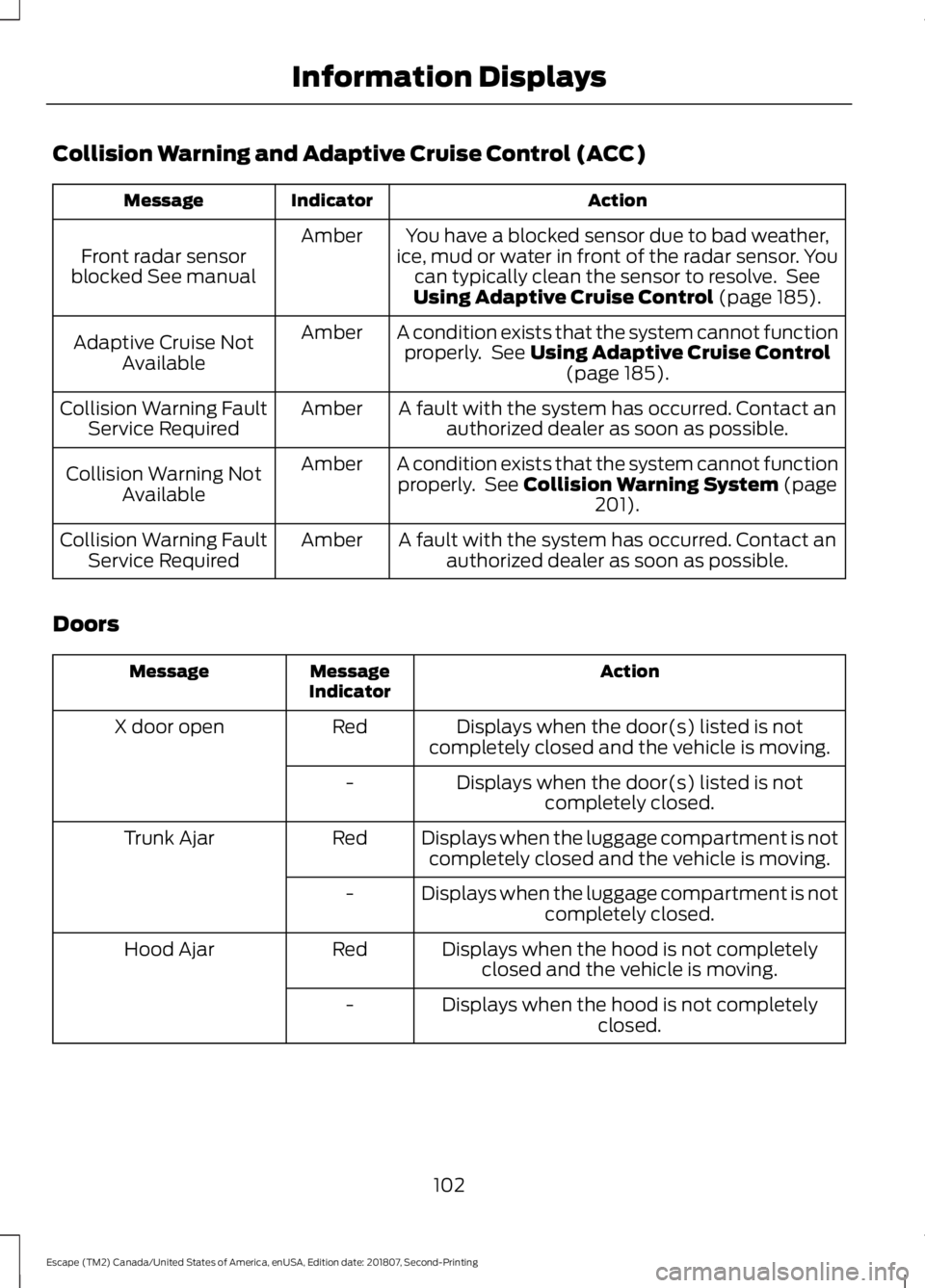
Collision Warning and Adaptive Cruise Control (ACC)
Action
Indicator
Message
You have a blocked sensor due to bad weather,
ice, mud or water in front of the radar sensor. You can typically clean the sensor to resolve. See
Using Adaptive Cruise Control (page 185).
Amber
Front radar sensor
blocked See manual
A condition exists that the system cannot functionproperly. See
Using Adaptive Cruise Control (page 185).
Amber
Adaptive Cruise Not
Available
A fault with the system has occurred. Contact anauthorized dealer as soon as possible.
Amber
Collision Warning Fault
Service Required
A condition exists that the system cannot functionproperly. See
Collision Warning System (page
201).
Amber
Collision Warning Not
Available
A fault with the system has occurred. Contact anauthorized dealer as soon as possible.
Amber
Collision Warning Fault
Service Required
Doors Action
Message
Indicator
Message
Displays when the door(s) listed is not
completely closed and the vehicle is moving.
Red
X door open
Displays when the door(s) listed is notcompletely closed.
-
Displays when the luggage compartment is notcompletely closed and the vehicle is moving.
Red
Trunk Ajar
Displays when the luggage compartment is notcompletely closed.
-
Displays when the hood is not completelyclosed and the vehicle is moving.
Red
Hood Ajar
Displays when the hood is not completelyclosed.
-
102
Escape (TM2) Canada/United States of America, enUSA, Edition date: 201807, Second-Printing Information Displays
Page 112 of 509
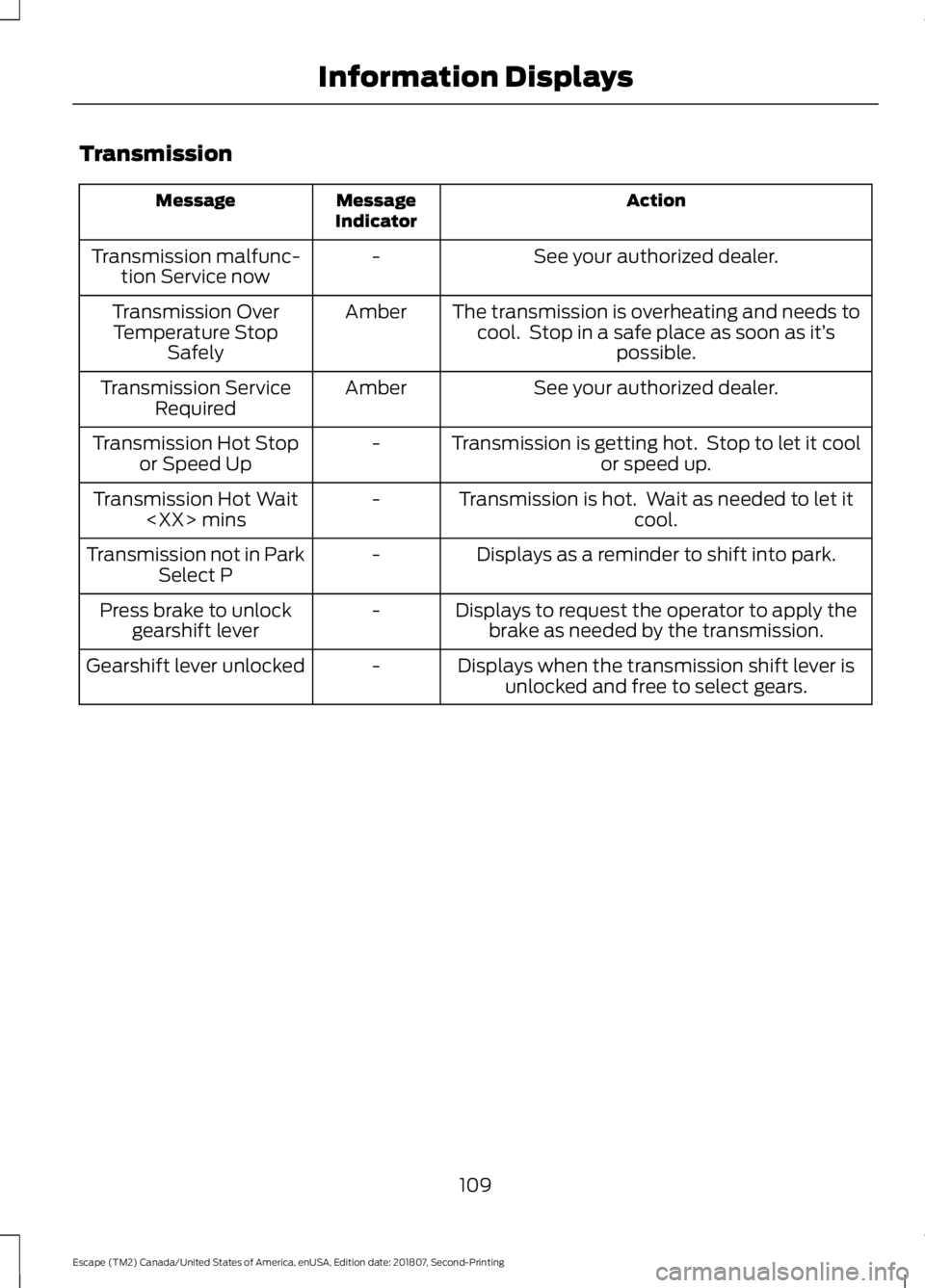
Transmission
Action
Message
Indicator
Message
See your authorized dealer.
-
Transmission malfunc-
tion Service now
The transmission is overheating and needs tocool. Stop in a safe place as soon as it’ s
possible.
Amber
Transmission Over
Temperature Stop Safely
See your authorized dealer.
Amber
Transmission Service
Required
Transmission is getting hot. Stop to let it coolor speed up.
-
Transmission Hot Stop
or Speed Up
Transmission is hot. Wait as needed to let itcool.
-
Transmission Hot Wait
Displays as a reminder to shift into park.
-
Transmission not in Park
Select P
Displays to request the operator to apply thebrake as needed by the transmission.
-
Press brake to unlock
gearshift lever
Displays when the transmission shift lever isunlocked and free to select gears.
-
Gearshift lever unlocked
109
Escape (TM2) Canada/United States of America, enUSA, Edition date: 201807, Second-Printing Information Displays
Page 114 of 509
See Heated Seats (page 124).
Switching Maximum Air
Conditioning On and Off Turn the temperature control
counterclockwise to the lowest
setting, then select a blower
motor speed.
Switching Maximum Defrost On
and Off Turn the temperature control
clockwise to the highest setting,
then select a blower motor
speed.
You can also use this setting to defog and
clear the windshield of a thin covering of
ice. The heated rear window also turns on
when you select maximum defrost.
Note: To prevent window fogging, you
cannot select recirculated air when
maximum defrost is on.
Switching Recirculated Air On and
Off Press and release the button to
switch between outside air and
recirculated air.
The air currently in the passenger
compartment recirculates. This may
reduce the time needed to cool the interior,
when used with A/C, and reduce unwanted
odors from entering your vehicle.
Note: Recirculated air may turn off, or
prevent you from switching on, in all air flow
modes except MAX A/C to reduce the risk
of fogging. Recirculation may also turn on
and off in various air distribution control
combinations during hot weather in order
to improve cooling efficiency. AUTOMATIC CLIMATE
CONTROL
Directing the Airflow Press and release the button to
direct airflow to the windshield
air vents and de-mister.
Press and release the button to
direct airflow to the instrument
panel air vents.
Press and release the button to
direct airflow to the footwell air
vents.
You can direct air through any combination
of these air vents.
Setting the Blower Motor Speed Press and release + or - to adjust
the volume of air circulated in
the vehicle.
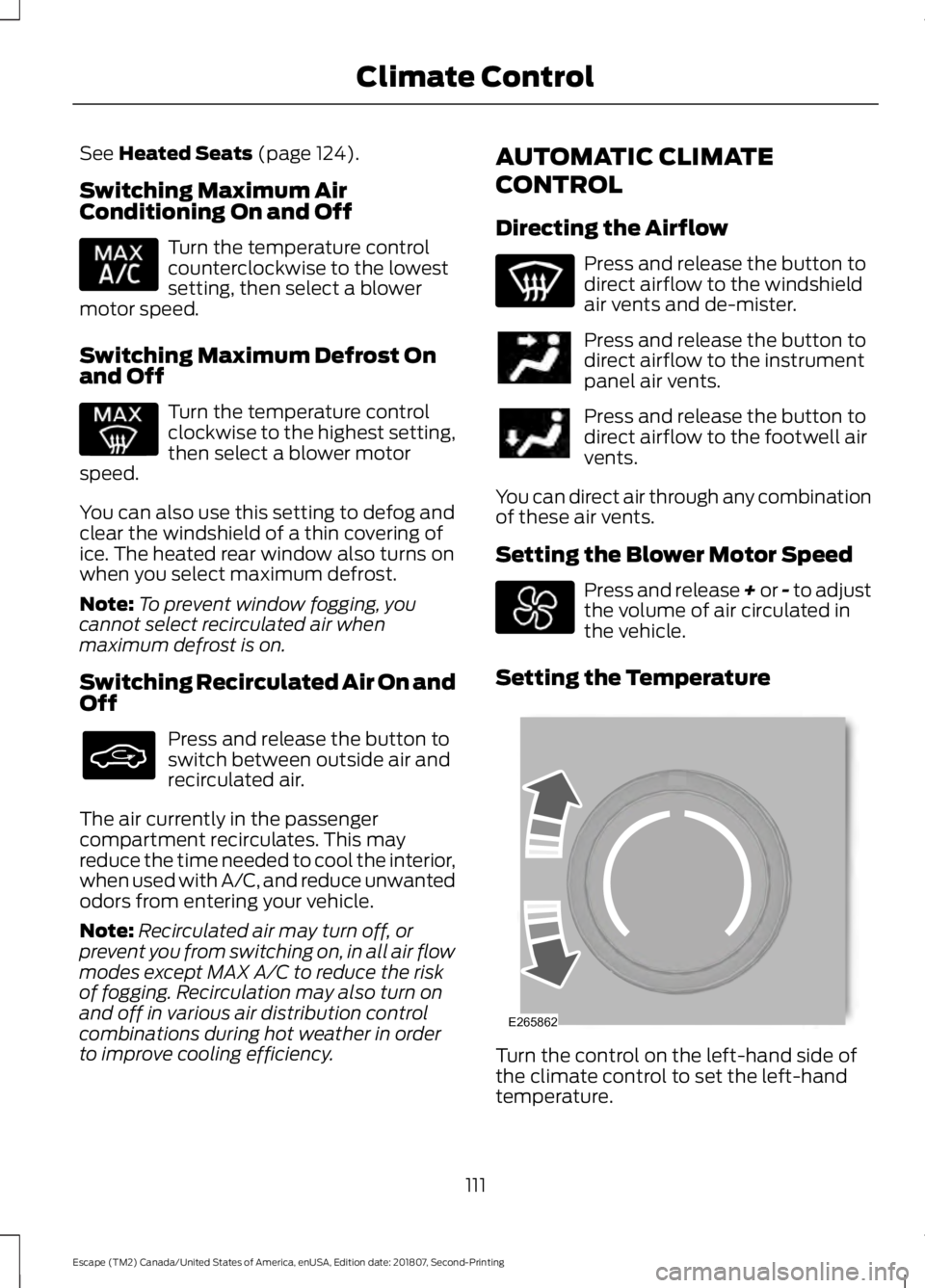
Setting the Temperature Turn the control on the left-hand side of
the climate control to set the left-hand
temperature.
111
Escape (TM2) Canada/United States of America, enUSA, Edition date: 201807, Second-Printing Climate Control E265862