reset FORD ESCAPE 2019 Repair Manual
[x] Cancel search | Manufacturer: FORD, Model Year: 2019, Model line: ESCAPE, Model: FORD ESCAPE 2019Pages: 509, PDF Size: 6.69 MB
Page 437 of 509
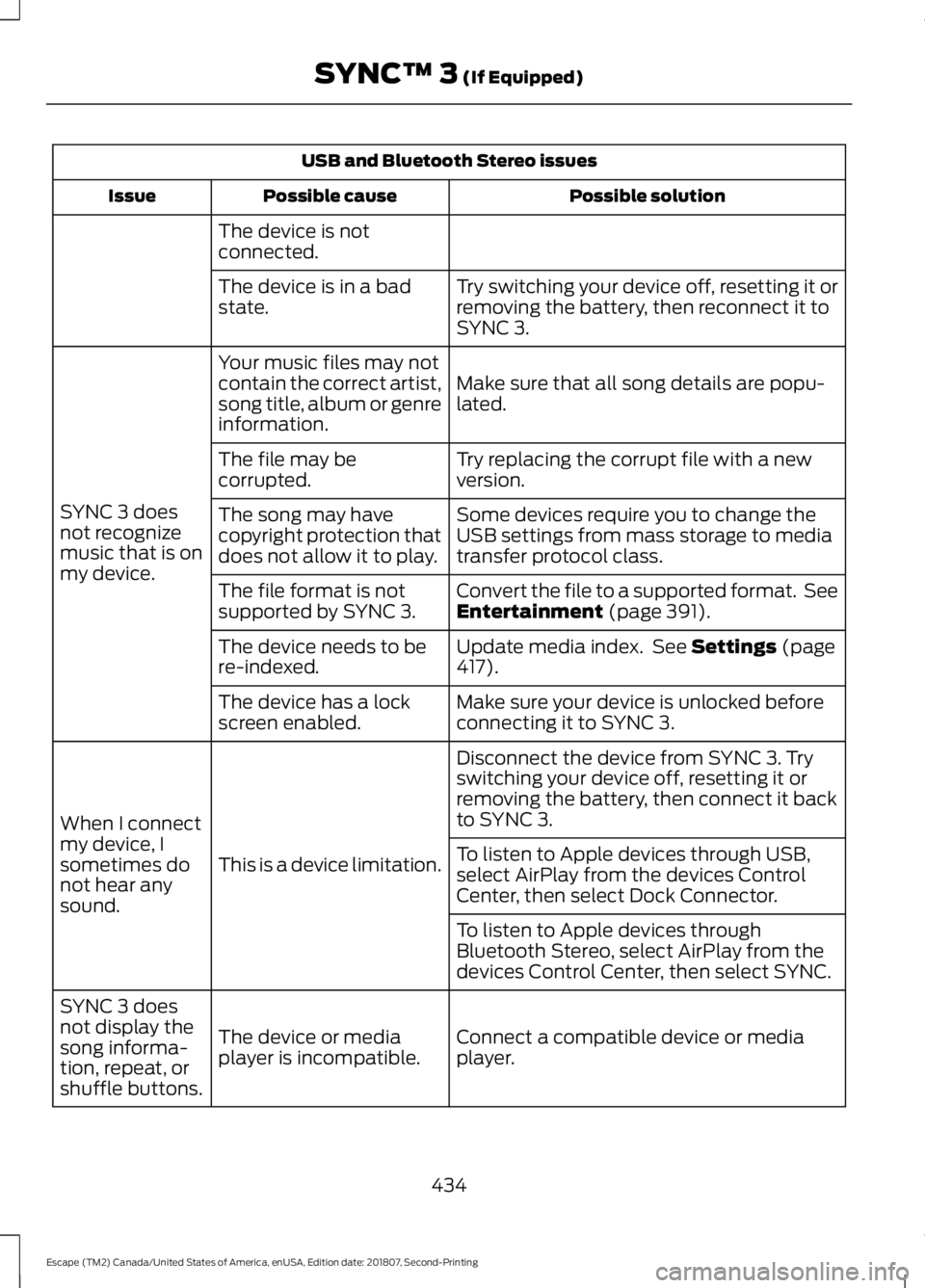
USB and Bluetooth Stereo issues
Possible solution
Possible cause
Issue
The device is not
connected. Try switching your device off, resetting it or
removing the battery, then reconnect it to
SYNC 3.
The device is in a bad
state.
Make sure that all song details are popu-
lated.
Your music files may not
contain the correct artist,
song title, album or genre
information.
SYNC 3 does
not recognize
music that is on
my device. Try replacing the corrupt file with a new
version.
The file may be
corrupted.
Some devices require you to change the
USB settings from mass storage to media
transfer protocol class.
The song may have
copyright protection that
does not allow it to play.
Convert the file to a supported format. See
Entertainment (page 391).
The file format is not
supported by SYNC 3.
Update media index. See
Settings (page
417).
The device needs to be
re-indexed.
Make sure your device is unlocked before
connecting it to SYNC 3.
The device has a lock
screen enabled.
Disconnect the device from SYNC 3. Try
switching your device off, resetting it or
removing the battery, then connect it back
to SYNC 3.
This is a device limitation.
When I connect
my device, I
sometimes do
not hear any
sound. To listen to Apple devices through USB,
select AirPlay from the devices Control
Center, then select Dock Connector.
To listen to Apple devices through
Bluetooth Stereo, select AirPlay from the
devices Control Center, then select SYNC.
Connect a compatible device or media
player.
The device or media
player is incompatible.
SYNC 3 does
not display the
song informa-
tion, repeat, or
shuffle buttons.
434
Escape (TM2) Canada/United States of America, enUSA, Edition date: 201807, Second-Printing SYNC™ 3
(If Equipped)
Page 441 of 509
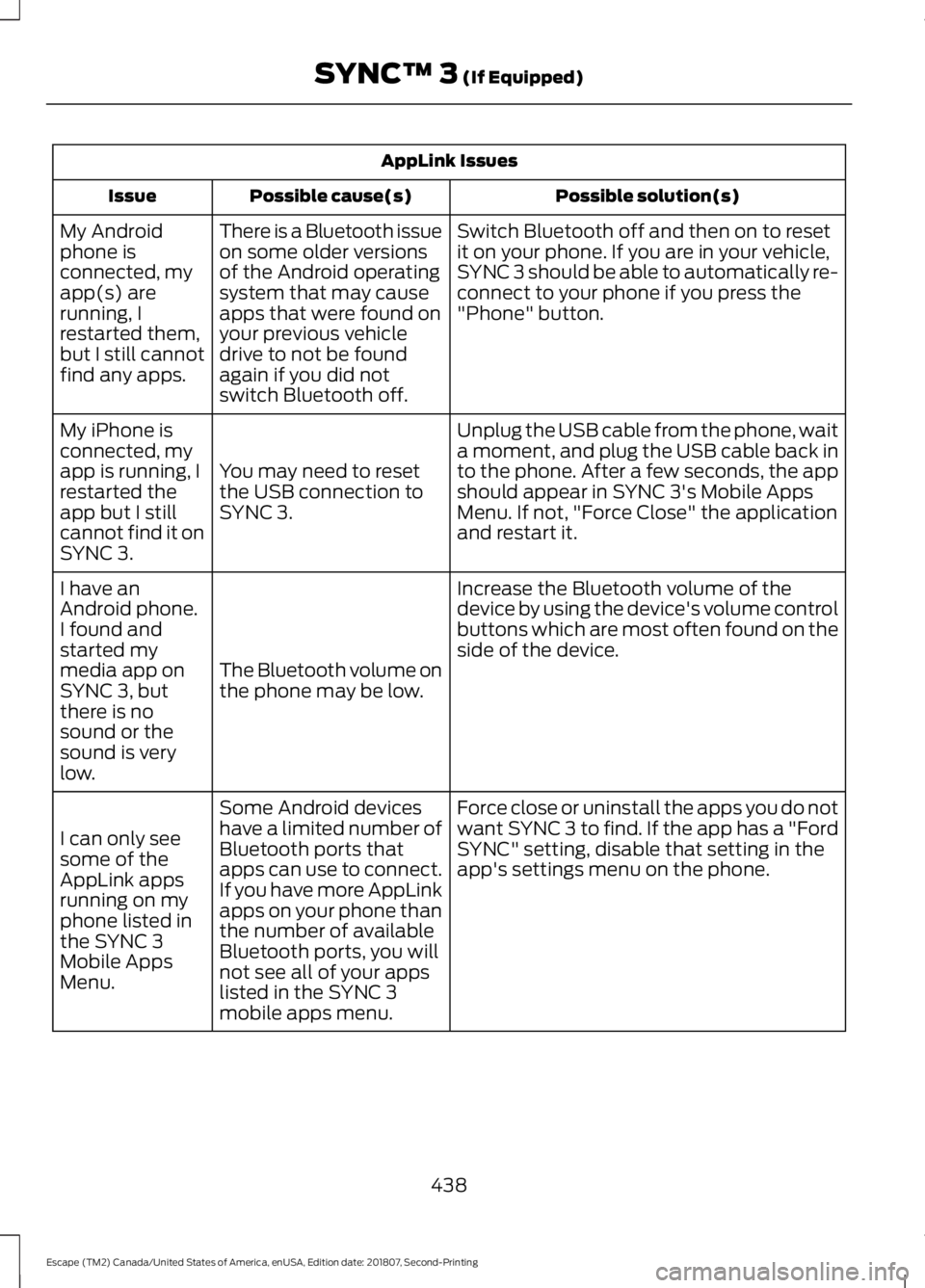
AppLink Issues
Possible solution(s)
Possible cause(s)
Issue
Switch Bluetooth off and then on to reset
it on your phone. If you are in your vehicle,
SYNC 3 should be able to automatically re-
connect to your phone if you press the
"Phone" button.
There is a Bluetooth issue
on some older versions
of the Android operating
system that may cause
apps that were found on
your previous vehicle
drive to not be found
again if you did not
switch Bluetooth off.
My Android
phone is
connected, my
app(s) are
running, I
restarted them,
but I still cannot
find any apps.
Unplug the USB cable from the phone, wait
a moment, and plug the USB cable back in
to the phone. After a few seconds, the app
should appear in SYNC 3's Mobile Apps
Menu. If not, "Force Close" the application
and restart it.
You may need to reset
the USB connection to
SYNC 3.
My iPhone is
connected, my
app is running, I
restarted the
app but I still
cannot find it on
SYNC 3.
Increase the Bluetooth volume of the
device by using the device's volume control
buttons which are most often found on the
side of the device.
The Bluetooth volume on
the phone may be low.
I have an
Android phone.
I found and
started my
media app on
SYNC 3, but
there is no
sound or the
sound is very
low.
Force close or uninstall the apps you do not
want SYNC 3 to find. If the app has a "Ford
SYNC" setting, disable that setting in the
app's settings menu on the phone.
Some Android devices
have a limited number of
Bluetooth ports that
apps can use to connect.
If you have more AppLink
apps on your phone than
the number of available
Bluetooth ports, you will
not see all of your apps
listed in the SYNC 3
mobile apps menu.
I can only see
some of the
AppLink apps
running on my
phone listed in
the SYNC 3
Mobile Apps
Menu.
438
Escape (TM2) Canada/United States of America, enUSA, Edition date: 201807, Second-Printing SYNC™ 3 (If Equipped)
Page 445 of 509
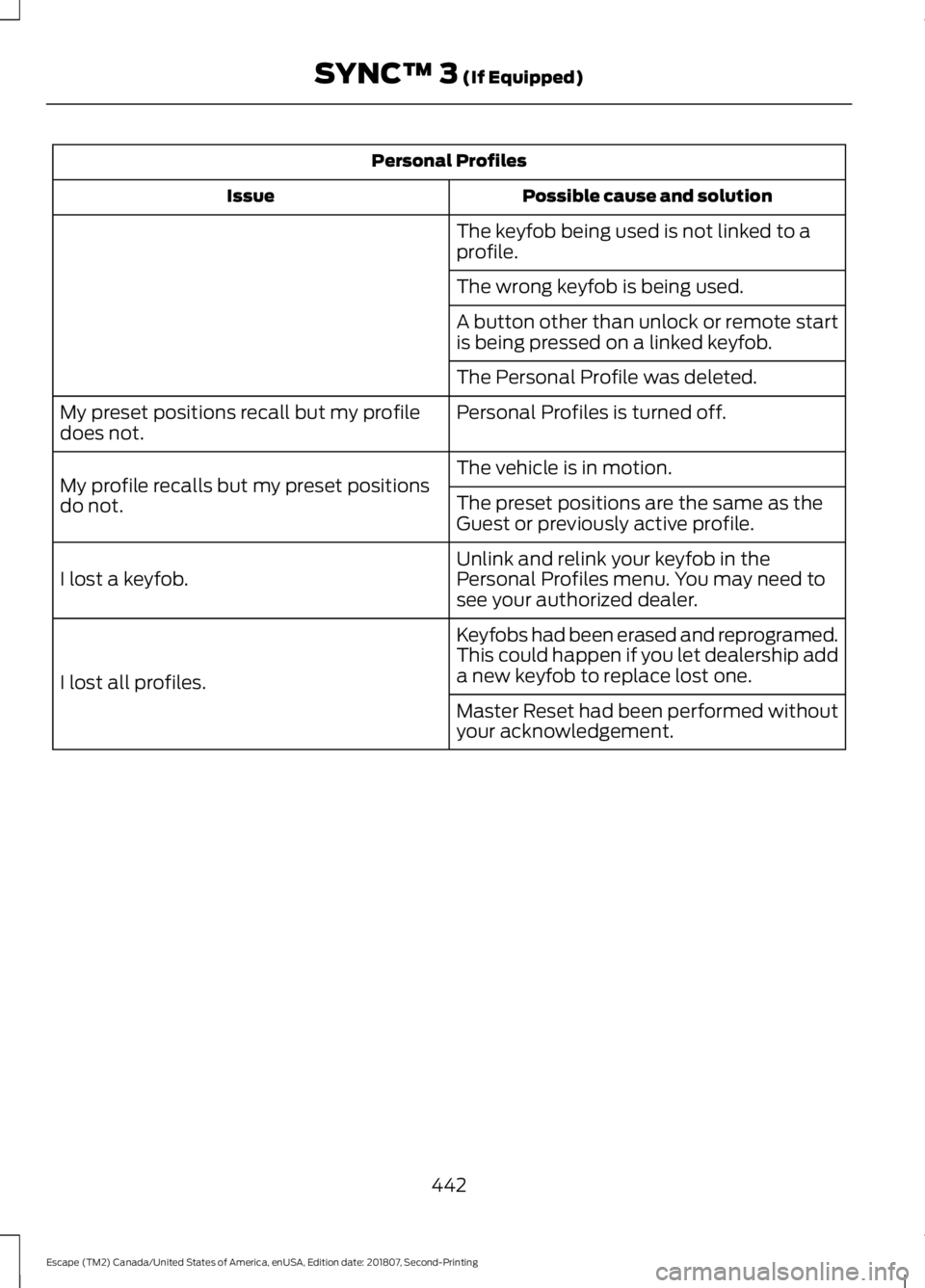
Personal Profiles
Possible cause and solution
Issue
The keyfob being used is not linked to a
profile.
The wrong keyfob is being used.
A button other than unlock or remote start
is being pressed on a linked keyfob.
The Personal Profile was deleted.
Personal Profiles is turned off.
My preset positions recall but my profile
does not.
The vehicle is in motion.
My profile recalls but my preset positions
do not. The preset positions are the same as the
Guest or previously active profile.
Unlink and relink your keyfob in the
Personal Profiles menu. You may need to
see your authorized dealer.
I lost a keyfob.
Keyfobs had been erased and reprogramed.
This could happen if you let dealership add
a new keyfob to replace lost one.
I lost all profiles.
Master Reset had been performed without
your acknowledgement.
442
Escape (TM2) Canada/United States of America, enUSA, Edition date: 201807, Second-Printing SYNC™ 3 (If Equipped)
Page 446 of 509
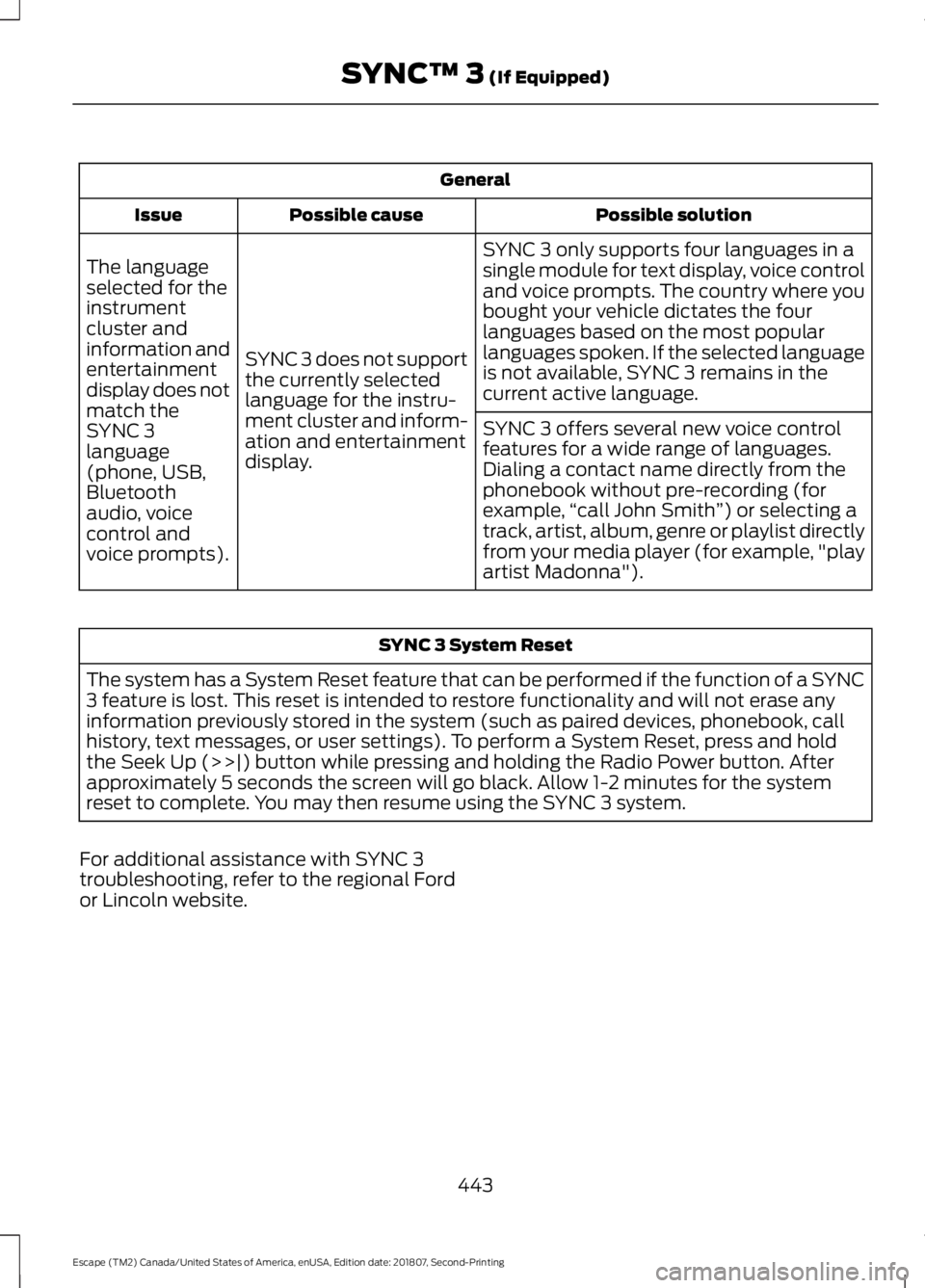
General
Possible solution
Possible cause
Issue
SYNC 3 only supports four languages in a
single module for text display, voice control
and voice prompts. The country where you
bought your vehicle dictates the four
languages based on the most popular
languages spoken. If the selected language
is not available, SYNC 3 remains in the
current active language.
SYNC 3 does not support
the currently selected
language for the instru-
ment cluster and inform-
ation and entertainment
display.
The language
selected for the
instrument
cluster and
information and
entertainment
display does not
match the
SYNC 3
SYNC 3 offers several new voice control
features for a wide range of languages.
Dialing a contact name directly from the
phonebook without pre-recording (for
example,
“call John Smith ”) or selecting a
track, artist, album, genre or playlist directly
from your media player (for example, "play
artist Madonna").
language
(phone, USB,
Bluetooth
audio, voice
control and
voice prompts). SYNC 3 System Reset
The system has a System Reset feature that can be performed if the function of a SYNC
3 feature is lost. This reset is intended to restore functionality and will not erase any
information previously stored in the system (such as paired devices, phonebook, call
history, text messages, or user settings). To perform a System Reset, press and hold
the Seek Up (>>|) button while pressing and holding the Radio Power button. After
approximately 5 seconds the screen will go black. Allow 1-2 minutes for the system
reset to complete. You may then resume using the SYNC 3 system.
For additional assistance with SYNC 3
troubleshooting, refer to the regional Ford
or Lincoln website.
443
Escape (TM2) Canada/United States of America, enUSA, Edition date: 201807, Second-Printing SYNC™ 3 (If Equipped)
Page 452 of 509
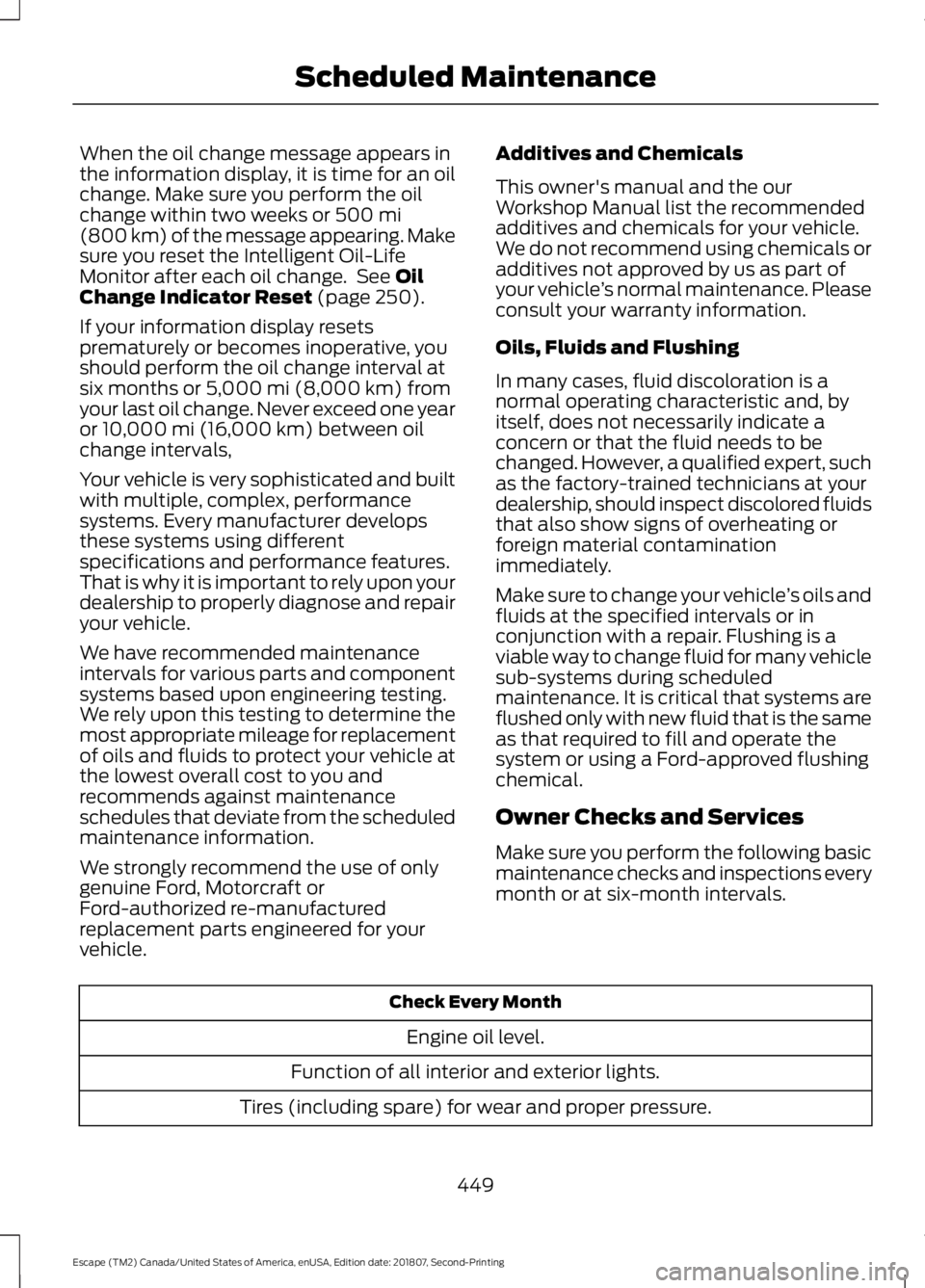
When the oil change message appears in
the information display, it is time for an oil
change. Make sure you perform the oil
change within two weeks or 500 mi
(800 km) of the message appearing. Make
sure you reset the Intelligent Oil-Life
Monitor after each oil change. See
Oil
Change Indicator Reset (page 250).
If your information display resets
prematurely or becomes inoperative, you
should perform the oil change interval at
six months or
5,000 mi (8,000 km) from
your last oil change. Never exceed one year
or
10,000 mi (16,000 km) between oil
change intervals,
Your vehicle is very sophisticated and built
with multiple, complex, performance
systems. Every manufacturer develops
these systems using different
specifications and performance features.
That is why it is important to rely upon your
dealership to properly diagnose and repair
your vehicle.
We have recommended maintenance
intervals for various parts and component
systems based upon engineering testing.
We rely upon this testing to determine the
most appropriate mileage for replacement
of oils and fluids to protect your vehicle at
the lowest overall cost to you and
recommends against maintenance
schedules that deviate from the scheduled
maintenance information.
We strongly recommend the use of only
genuine Ford, Motorcraft or
Ford-authorized re-manufactured
replacement parts engineered for your
vehicle. Additives and Chemicals
This owner's manual and the our
Workshop Manual list the recommended
additives and chemicals for your vehicle.
We do not recommend using chemicals or
additives not approved by us as part of
your vehicle
’s normal maintenance. Please
consult your warranty information.
Oils, Fluids and Flushing
In many cases, fluid discoloration is a
normal operating characteristic and, by
itself, does not necessarily indicate a
concern or that the fluid needs to be
changed. However, a qualified expert, such
as the factory-trained technicians at your
dealership, should inspect discolored fluids
that also show signs of overheating or
foreign material contamination
immediately.
Make sure to change your vehicle ’s oils and
fluids at the specified intervals or in
conjunction with a repair. Flushing is a
viable way to change fluid for many vehicle
sub-systems during scheduled
maintenance. It is critical that systems are
flushed only with new fluid that is the same
as that required to fill and operate the
system or using a Ford-approved flushing
chemical.
Owner Checks and Services
Make sure you perform the following basic
maintenance checks and inspections every
month or at six-month intervals. Check Every Month
Engine oil level.
Function of all interior and exterior lights.
Tires (including spare) for wear and proper pressure.
449
Escape (TM2) Canada/United States of America, enUSA, Edition date: 201807, Second-Printing Scheduled Maintenance
Page 456 of 509
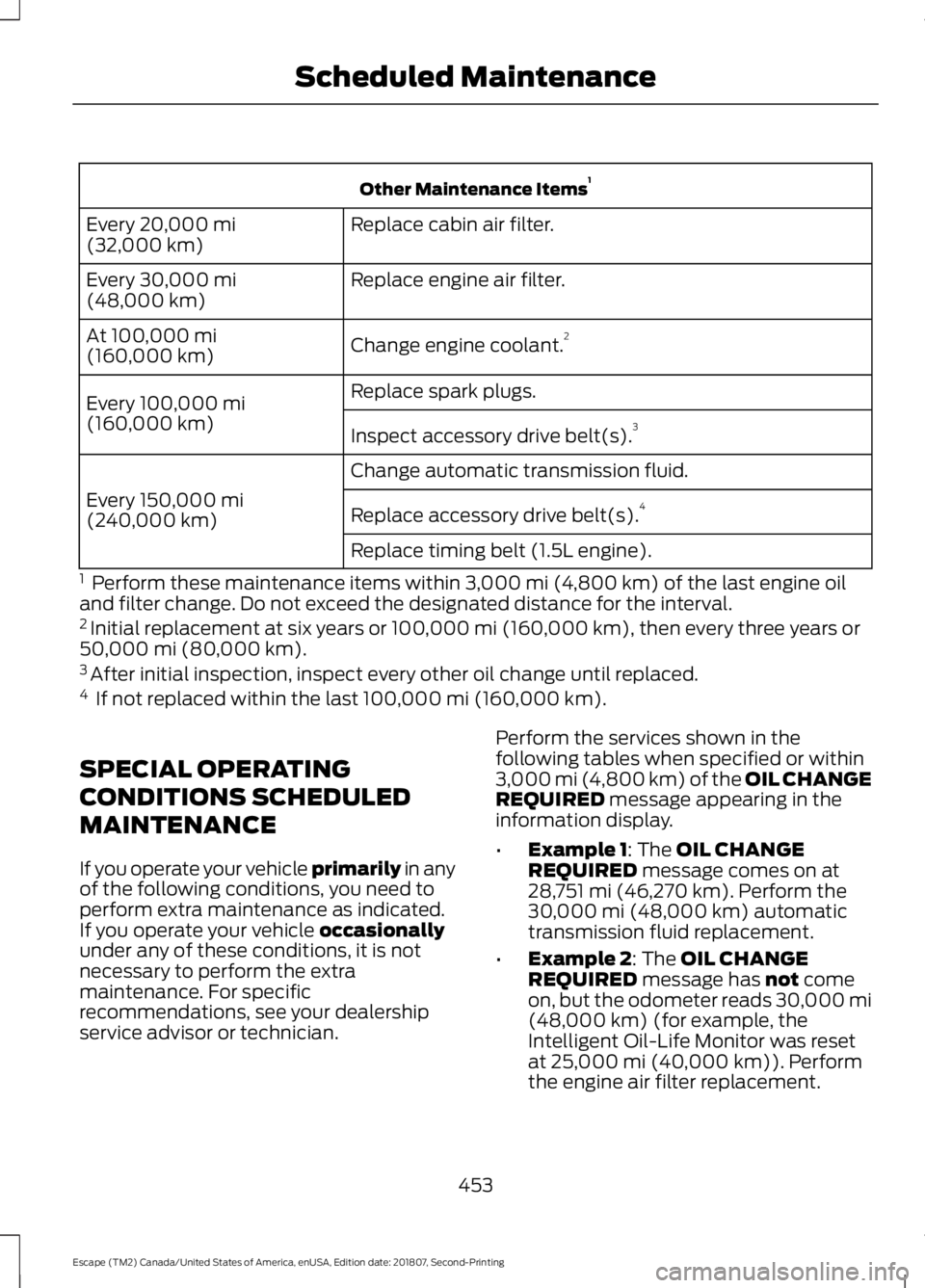
Other Maintenance Items
1
Replace cabin air filter.
Every 20,000 mi
(32,000 km)
Replace engine air filter.
Every
30,000 mi
(48,000 km)
Change engine coolant.2
At
100,000 mi
(160,000 km)
Replace spark plugs.
Every
100,000 mi
(160,000 km) Inspect accessory drive belt(s). 3
Change automatic transmission fluid.
Every
150,000 mi
(240,000 km) Replace accessory drive belt(s). 4
Replace timing belt (1.5L engine).
1 Perform these maintenance items within
3,000 mi (4,800 km) of the last engine oil
and filter change. Do not exceed the designated distance for the interval.
2 Initial replacement at six years or
100,000 mi (160,000 km), then every three years or
50,000 mi (80,000 km).
3 After initial inspection, inspect every other oil change until replaced.
4 If not replaced within the last
100,000 mi (160,000 km).
SPECIAL OPERATING
CONDITIONS SCHEDULED
MAINTENANCE
If you operate your vehicle primarily
in any
of the following conditions, you need to
perform extra maintenance as indicated.
If you operate your vehicle
occasionally
under any of these conditions, it is not
necessary to perform the extra
maintenance. For specific
recommendations, see your dealership
service advisor or technician. Perform the services shown in the
following tables when specified or within
3,000 mi (4,800 km) of the OIL CHANGE
REQUIRED
message appearing in the
information display.
• Example 1
: The OIL CHANGE
REQUIRED message comes on at
28,751 mi (46,270 km). Perform the
30,000 mi (48,000 km) automatic
transmission fluid replacement.
• Example 2
: The OIL CHANGE
REQUIRED message has not come
on, but the odometer reads 30,000 mi
(48,000 km)
(for example, the
Intelligent Oil-Life Monitor was reset
at
25,000 mi (40,000 km)). Perform
the engine air filter replacement.
453
Escape (TM2) Canada/United States of America, enUSA, Edition date: 201807, Second-Printing Scheduled Maintenance
Page 504 of 509
Introduction.........................................................7
J
Jump Starting the Vehicle.........................223
To Connect the Booster Cables.................... 223
To Start the Engine............................................ 224
K
Keyless Entry....................................................63
SECURICODE™ KEYLESS ENTRY
KEYPAD.............................................................. 63
Keyless Starting
............................................134
Ignition Modes..................................................... 135
Keys and Remote Controls........................50
L
Lane Keeping System.................................192 Switching the System On and Off...............193
Liftgate...............................................................66
Lighting Control
..............................................78
Flashing the Headlamp High Beam..............79
Headlamp High Beam........................................ 78
Lighting...............................................................78 General Information............................................ 78
Load Carriers See: Roof Racks and Load Carriers............205
Load Carrying
................................................204
Load Limit......................................................206
Special Loading Instructions for Owners of
Pick-up Trucks and Utility-type
Vehicles............................................................. 210
Vehicle Loading - with and without a Trailer................................................................ 206
Locking and Unlocking................................60 Activating Intelligent Access............................. 61
Autolock................................................................... 62
Battery Saver......................................................... 63
Illuminated Entry.................................................. 63
Illuminated Exit..................................................... 63
Locking and Unlocking the Doors with the Key Blade........................................................... 60
Opening a Rear Door from the Inside............61
Power Door Locks................................................ 60
Remote Control.................................................... 60Smart Unlocks for Integrated Keyhead
Transmitter........................................................ 62
Smart Unlocks for Intelligent Access Keys...................................................................... 62
Luggage Covers
............................................204
Lug Nuts See: Changing a Road Wheel....................... 295
M
Maintenance.................................................244 General Information......................................... 244
Manual Climate Control
.............................110
Directing the Airflow........................................... 110
Setting the Blower Motor Speed................... 110
Setting the Temperature.................................. 110
Switching Maximum Air Conditioning On and Off................................................................. 111
Switching Maximum Defrost On and Off........................................................................\
.. 111
Switching Recirculated Air On and Off.........111
Switching the Air Conditioning On and Off........................................................................\
110
Switching the Climate Control On and Off........................................................................\
110
Switching the Heated Seats On and Off........................................................................\
110
Manual Liftgate
..............................................66
Closing the Liftgate............................................. 66
Opening the Liftgate........................................... 66
Manual Seats.................................................120 Adjusting the Seat Backrest............................ 121
Adjusting the Seat Height................................. 121
Moving the Seat Backward and Forward............................................................... 121
Media Hub
......................................................332
Memory Function..........................................122 Saving a PreSet Position.................................. 123
Message Center See: Information Displays................................. 95
Mirrors See: Windows and Mirrors................................ 85
Mobile Communications Equipment.......15
Moonroof..........................................................88 Bounce-Back......................................................... 89
Opening and Closing the Moonroof.............89
Opening and Closing the Sunscreen............89
Venting the Moonroof........................................ 89
501
Escape (TM2) Canada/United States of America, enUSA, Edition date: 201807, Second-Printing Index
Page 505 of 509
Motorcraft Parts - 1.5L
EcoBoost™.................................................303
Motorcraft Parts - 2.0L EcoBoost™................................................304
Motorcraft Parts - 2.5L..............................305
MyKey – Troubleshooting...........................58
MyKey ™.............................................................55
Principle of Operation........................................ 55
N
Navigation.....................................................406 cityseeker............................................................... 413
Destination Mode............................................. 408
Map Mode............................................................ 406
Navigation Map Updates................................. 414
Navigation Menu.................................................. 411
SiriusXM Traffic and Travel Link.................... 414
SYNC AppLink..................................................... 413
Waypoints.............................................................. 412
Normal Scheduled Maintenance...........451 Intelligent Oil-Life Monitor™......................... 451
Normal Maintenance Intervals..................... 452
O
Oil Change Indicator Reset......................250
Oil Check See: Engine Oil Check...................................... 249
Opening and Closing the Hood..............244 Closing the Hood............................................... 245
Opening the Hood............................................. 244
Ordering Additional Owner's Literature.......................................................231
Obtaining a French Owner ’s Manual...........231
Overhead Console........................................133
P
Parking Aids....................................................170 Principle of Operation....................................... 170
Passive Anti-Theft System.........................70 SecuriLock®........................................................... 70
PATS See: Passive Anti-Theft System..................... 70
Perchlorate........................................................13 Personal Safety System
™.........................40
How Does the Personal Safety System
Work?.................................................................. 40
Phone...............................................................401 During a Phone Call......................................... 404
Making Calls........................................................ 403
Pairing Your Cell Phone for the First Time................................................................... 401
Phone Menu........................................................ 402
Receiving Calls................................................... 404
Smartphone Connectivity............................. 405
Text Messaging.................................................. 405
Post-Crash Alert System..........................224
Power Door Locks See: Locking and Unlocking............................ 60
Power Liftgate.................................................67 Hands-Free Feature............................................ 69
Obstacle Detection............................................. 69
Opening and Closing the Liftgate.................. 67
Setting the Liftgate Open Height.................. 68
Stopping the Liftgate Movement.................. 68
Switching the Power Liftgate On or Off........................................................................\
. 69
Power Seats
.....................................................121
Adjusting the Lumbar Support...................... 122
Adjusting the Seat Backrest........................... 122
Adjusting the Seat Cushion............................. 122
Adjusting the Seat Height................................ 122
Moving the Seat Backward and Forward.............................................................. 122
Power Steering Fluid Check.....................256
Power Windows.............................................85 Accessory Delay................................................... 86
Bounce-Back......................................................... 85
One-Touch Close................................................. 85
One-Touch Open................................................. 85
Rear Window Lock............................................... 85
Protecting the Environment........................17
Puncture See: Changing a Road Wheel....................... 295
R
Rear Parking Aid
............................................170
Obstacle Distance Indicator............................ 171
Rear Seat Armrest........................................133
Rear Seats
.......................................................124
Folding the Seatback........................................ 124
502
Escape (TM2) Canada/United States of America, enUSA, Edition date: 201807, Second-Printing Index
Page 508 of 509
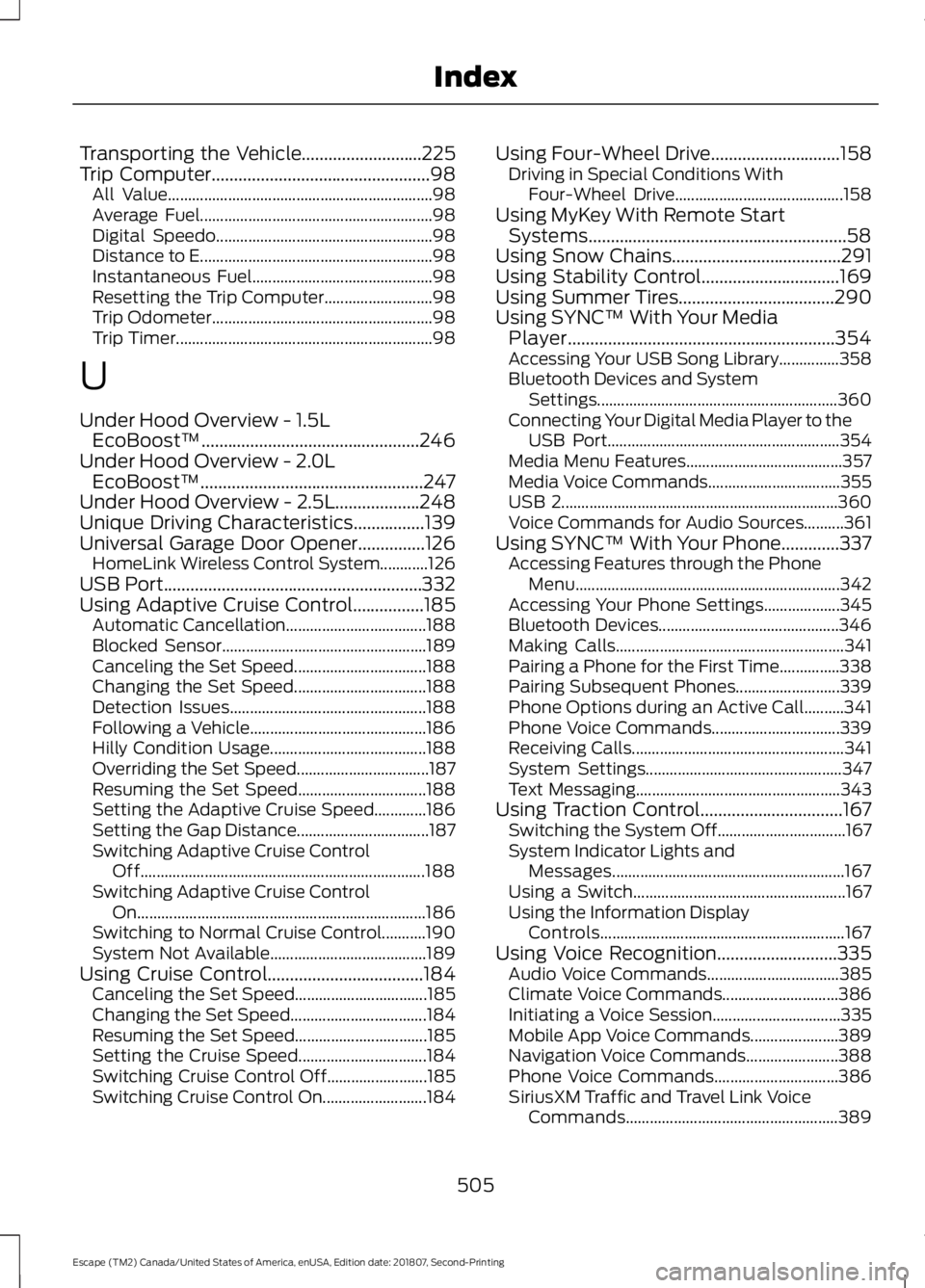
Transporting the Vehicle...........................225
Trip Computer.................................................98
All Value.................................................................. 98
Average Fuel.......................................................... 98
Digital Speedo...................................................... 98
Distance to E.......................................................... 98
Instantaneous Fuel............................................. 98
Resetting the Trip Computer........................... 98
Trip Odometer....................................................... 98
Trip Timer................................................................ 98
U
Under Hood Overview - 1.5L EcoBoost™.................................................246
Under Hood Overview - 2.0L EcoBoost™..................................................247
Under Hood Overview - 2.5L
...................248
Unique Driving Characteristics................139
Universal Garage Door Opener...............126 HomeLink Wireless Control System............126
USB Port..........................................................332
Using Adaptive Cruise Control................185 Automatic Cancellation................................... 188
Blocked Sensor................................................... 189
Canceling the Set Speed................................. 188
Changing the Set Speed................................. 188
Detection Issues................................................. 188
Following a Vehicle............................................ 186
Hilly Condition Usage....................................... 188
Overriding the Set Speed................................. 187
Resuming the Set Speed................................ 188
Setting the Adaptive Cruise Speed.............186
Setting the Gap Distance................................. 187
Switching Adaptive Cruise Control Off....................................................................... 188
Switching Adaptive Cruise Control On........................................................................\
186
Switching to Normal Cruise Control...........190
System Not Available....................................... 189
Using Cruise Control...................................184 Canceling the Set Speed................................. 185
Changing the Set Speed.................................. 184
Resuming the Set Speed................................. 185
Setting the Cruise Speed................................ 184
Switching Cruise Control Off......................... 185
Switching Cruise Control On.......................... 184Using Four-Wheel Drive
.............................158
Driving in Special Conditions With
Four-Wheel Drive.......................................... 158
Using MyKey With Remote Start Systems..........................................................58
Using Snow Chains......................................291
Using Stability Control
...............................169
Using Summer Tires...................................290
Using SYNC™ With Your Media Player............................................................354
Accessing Your USB Song Library...............358
Bluetooth Devices and System Settings............................................................ 360
Connecting Your Digital Media Player to the USB Port.......................................................... 354
Media Menu Features....................................... 357
Media Voice Commands................................. 355
USB 2..................................................................... 360
Voice Commands for Audio Sources..........361
Using SYNC™ With Your Phone.............337 Accessing Features through the Phone
Menu.................................................................. 342
Accessing Your Phone Settings................... 345
Bluetooth Devices............................................. 346
Making Calls......................................................... 341
Pairing a Phone for the First Time...............338
Pairing Subsequent Phones.......................... 339
Phone Options during an Active Call..........341
Phone Voice Commands................................ 339
Receiving Calls..................................................... 341
System Settings................................................. 347
Text Messaging................................................... 343
Using Traction Control
................................167
Switching the System Off................................ 167
System Indicator Lights and Messages.......................................................... 167
Using a Switch..................................................... 167
Using the Information Display Controls............................................................. 167
Using Voice Recognition
...........................335
Audio Voice Commands................................. 385
Climate Voice Commands............................. 386
Initiating a Voice Session................................ 335
Mobile App Voice Commands...................... 389
Navigation Voice Commands....................... 388
Phone Voice Commands............................... 386
SiriusXM Traffic and Travel Link Voice Commands..................................................... 389
505
Escape (TM2) Canada/United States of America, enUSA, Edition date: 201807, Second-Printing Index