Rear park aid FORD ESCAPE 2020 User Guide
[x] Cancel search | Manufacturer: FORD, Model Year: 2020, Model line: ESCAPE, Model: FORD ESCAPE 2020Pages: 553, PDF Size: 7.73 MB
Page 237 of 553
WARNING: Use caution when the
rear cargo door is ajar. If the rear cargo
door is ajar, the camera will be out of
position and the video image could be
incorrect. All guide lines disappear when
the rear cargo door is ajar. Failure to
follow this instruction could result in
personal injury. WARNING:
Use caution when
turning camera features on or off when
the transmission is not in park (P). Make
sure your vehicle is not moving.
Note: Back up as slow as possible since
higher speeds might limit your reaction time
to stop your vehicle.
The rear view camera system provides a
video image of the area behind your
vehicle.
During operation, lines appear in the
display which represent your vehicle ’s path
and proximity to objects behind your
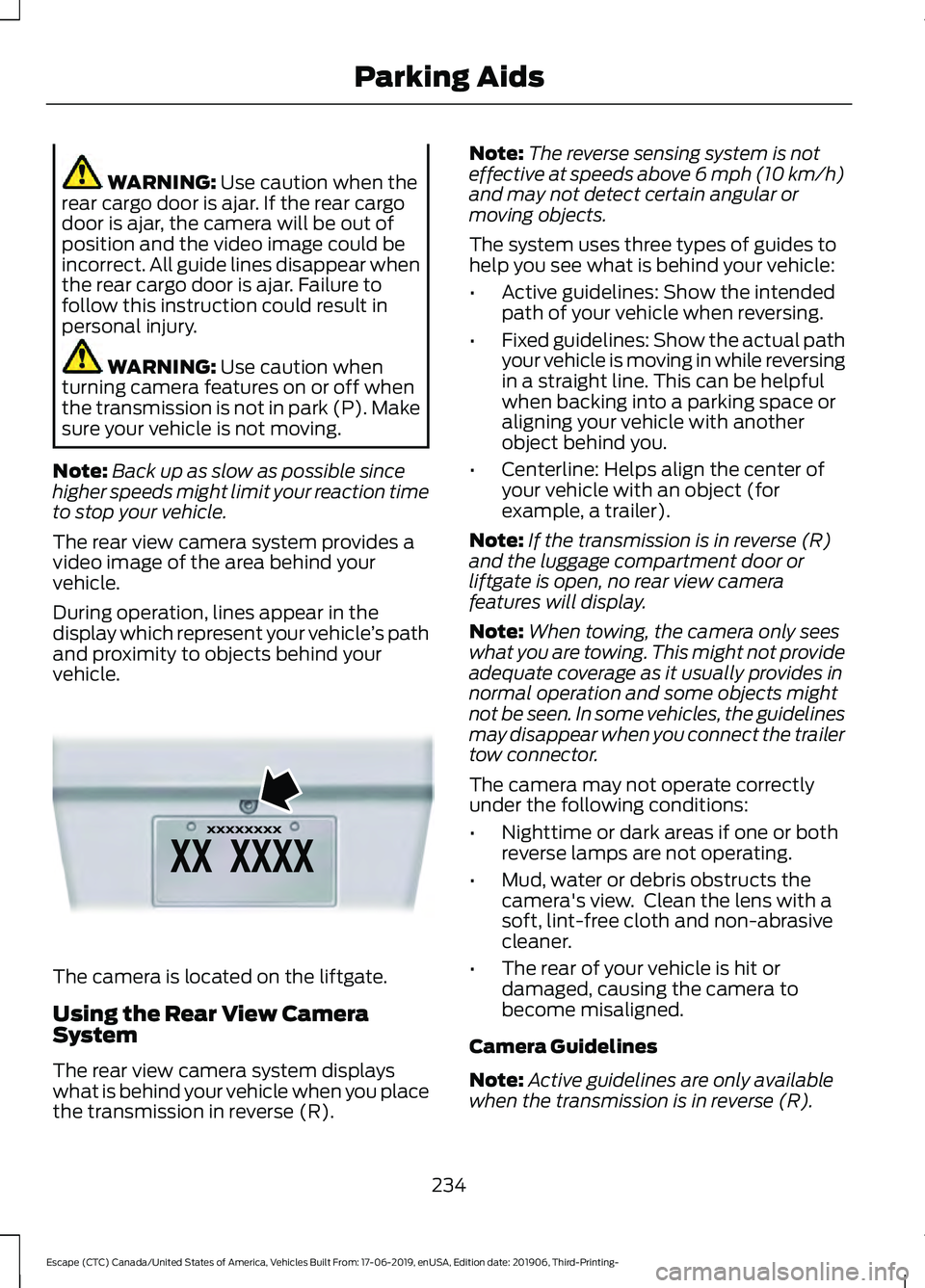
vehicle. The camera is located on the liftgate.
Using the Rear View Camera
System
The rear view camera system displays
what is behind your vehicle when you place
the transmission in reverse (R). Note:
The reverse sensing system is not
effective at speeds above 6 mph (10 km/h)
and may not detect certain angular or
moving objects.
The system uses three types of guides to
help you see what is behind your vehicle:
• Active guidelines: Show the intended
path of your vehicle when reversing.
• Fixed guidelines: Show the actual path
your vehicle is moving in while reversing
in a straight line. This can be helpful
when backing into a parking space or
aligning your vehicle with another
object behind you.
• Centerline: Helps align the center of
your vehicle with an object (for
example, a trailer).
Note: If the transmission is in reverse (R)
and the luggage compartment door or
liftgate is open, no rear view camera
features will display.
Note: When towing, the camera only sees
what you are towing. This might not provide
adequate coverage as it usually provides in
normal operation and some objects might
not be seen. In some vehicles, the guidelines
may disappear when you connect the trailer
tow connector.
The camera may not operate correctly
under the following conditions:
• Nighttime or dark areas if one or both
reverse lamps are not operating.
• Mud, water or debris obstructs the
camera's view. Clean the lens with a
soft, lint-free cloth and non-abrasive
cleaner.
• The rear of your vehicle is hit or
damaged, causing the camera to
become misaligned.
Camera Guidelines
Note: Active guidelines are only available
when the transmission is in reverse (R).
234
Escape (CTC) Canada/United States of America, Vehicles Built From: 17-06-2019, enUSA, Edition date: 201906, Third-Printing- Parking AidsE142435
Page 238 of 553
Note:
Upon a battery disconnect, the active
guidelines may not be functional until your
vehicle has been driven a short distance and
exceeds a speed of 12 mph (20 km/h). Active guidelines
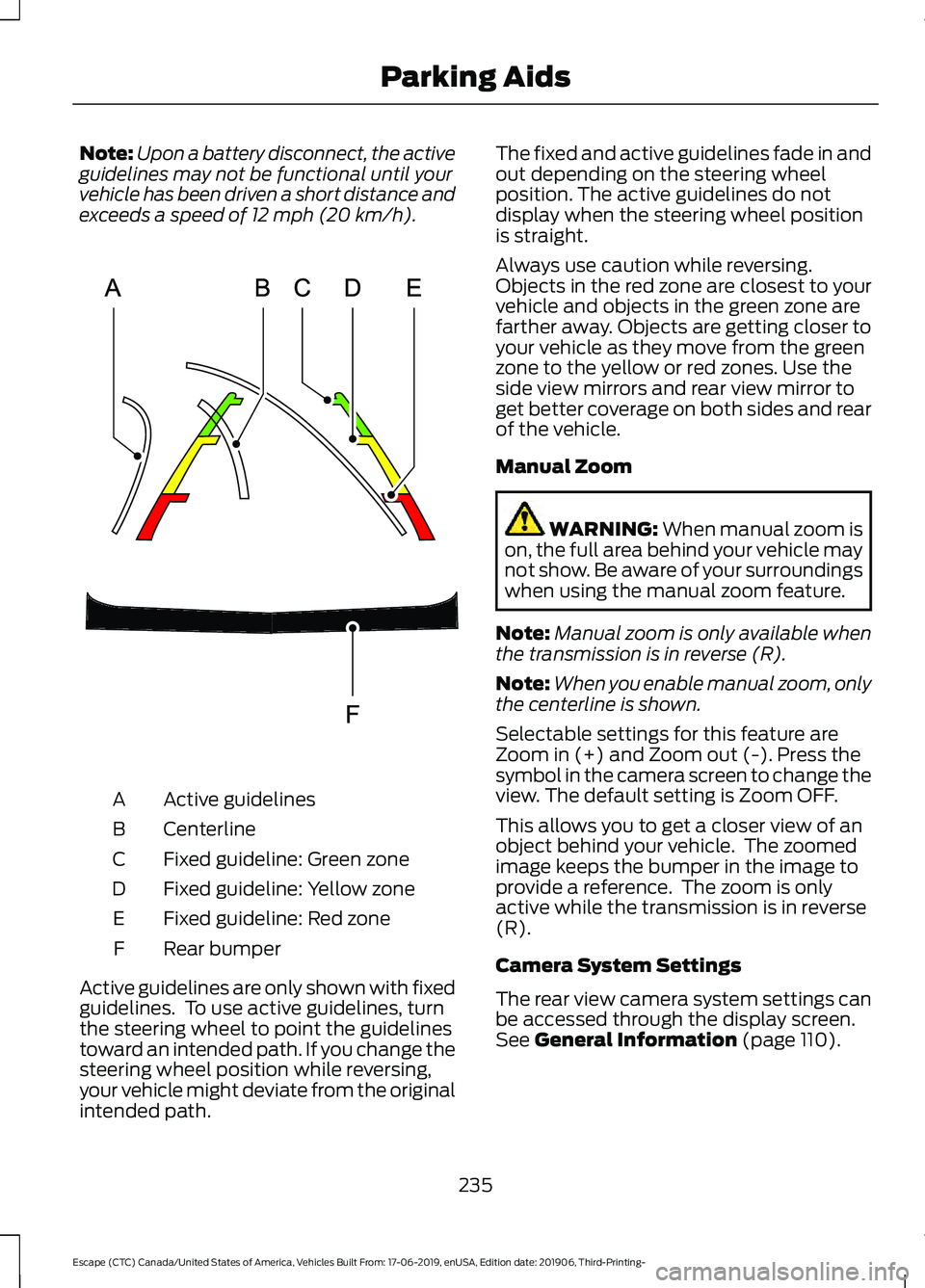
A
Centerline
B
Fixed guideline: Green zone
C
Fixed guideline: Yellow zone
D
Fixed guideline: Red zone
E
Rear bumper
F
Active guidelines are only shown with fixed
guidelines. To use active guidelines, turn
the steering wheel to point the guidelines
toward an intended path. If you change the
steering wheel position while reversing,
your vehicle might deviate from the original
intended path. The fixed and active guidelines fade in and
out depending on the steering wheel
position. The active guidelines do not
display when the steering wheel position
is straight.
Always use caution while reversing.
Objects in the red zone are closest to your
vehicle and objects in the green zone are
farther away. Objects are getting closer to
your vehicle as they move from the green
zone to the yellow or red zones. Use the
side view mirrors and rear view mirror to
get better coverage on both sides and rear
of the vehicle.
Manual Zoom
WARNING:
When manual zoom is
on, the full area behind your vehicle may
not show. Be aware of your surroundings
when using the manual zoom feature.
Note: Manual zoom is only available when
the transmission is in reverse (R).
Note: When you enable manual zoom, only
the centerline is shown.
Selectable settings for this feature are
Zoom in (+) and Zoom out (-). Press the
symbol in the camera screen to change the
view. The default setting is Zoom OFF.
This allows you to get a closer view of an
object behind your vehicle. The zoomed
image keeps the bumper in the image to
provide a reference. The zoom is only
active while the transmission is in reverse
(R).
Camera System Settings
The rear view camera system settings can
be accessed through the display screen.
See
General Information (page 110).
235
Escape (CTC) Canada/United States of America, Vehicles Built From: 17-06-2019, enUSA, Edition date: 201906, Third-Printing- Parking AidsE306774
Page 239 of 553
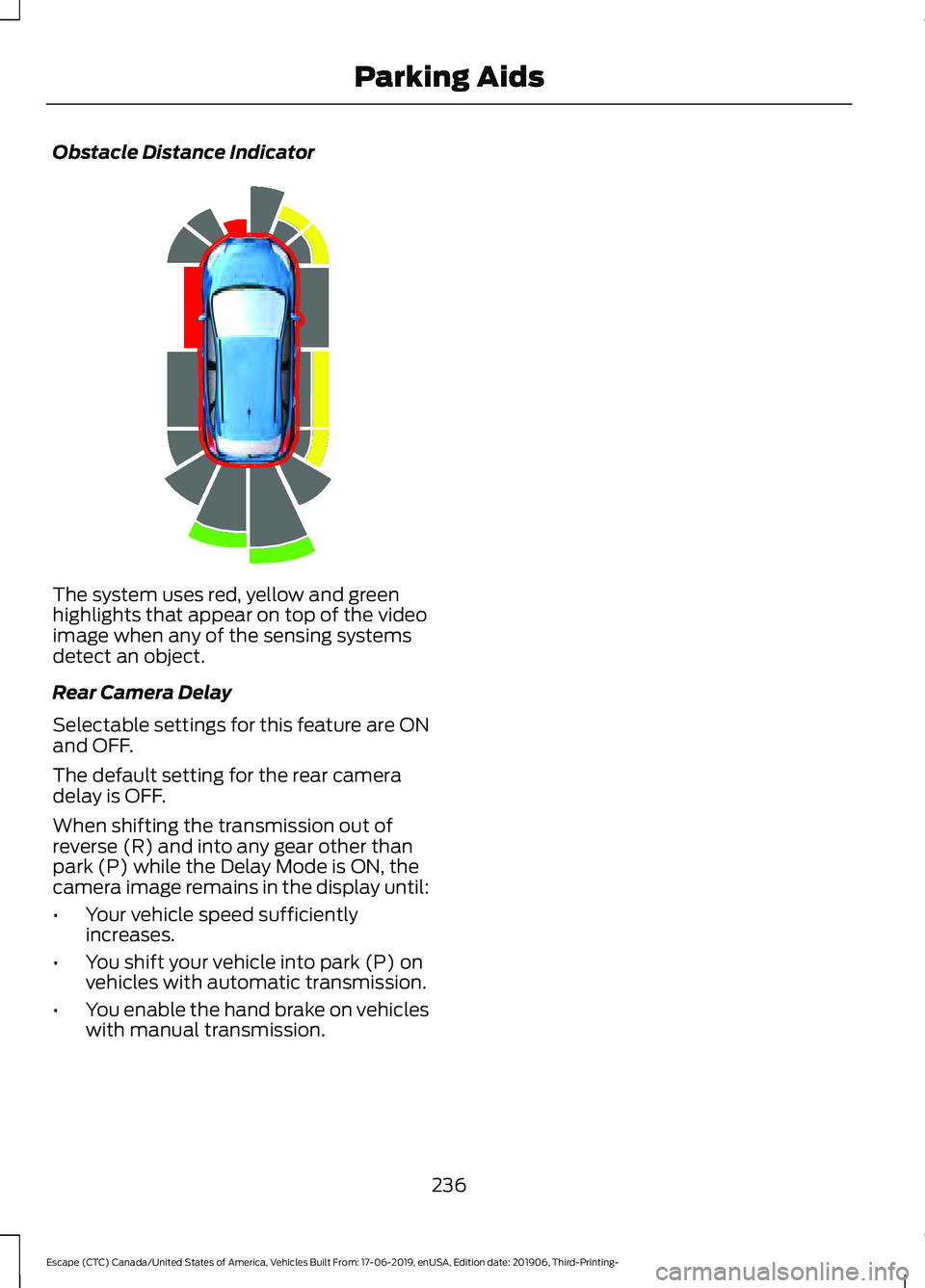
Obstacle Distance Indicator
The system uses red, yellow and green
highlights that appear on top of the video
image when any of the sensing systems
detect an object.
Rear Camera Delay
Selectable settings for this feature are ON
and OFF.
The default setting for the rear camera
delay is OFF.
When shifting the transmission out of
reverse (R) and into any gear other than
park (P) while the Delay Mode is ON, the
camera image remains in the display until:
•
Your vehicle speed sufficiently
increases.
• You shift your vehicle into park (P) on
vehicles with automatic transmission.
• You enable the hand brake on vehicles
with manual transmission.
236
Escape (CTC) Canada/United States of America, Vehicles Built From: 17-06-2019, enUSA, Edition date: 201906, Third-Printing- Parking AidsE190459
Page 259 of 553
The system is designed to detect vehicles
that may have entered the blind spot zone.
The detection area is on both sides of your
vehicle, extending rearward from the
exterior mirrors to approximately 13 ft
(4 m) beyond the rear bumper. The
detection area extends to approximately
59 ft (18 m)
beyond the rear bumper when
the vehicle speed is greater than 30 mph
(48 km/h) to alert you of faster
approaching vehicles.
Note: The system does not prevent contact
with other vehicles. It is not designed to
detect parked vehicles, pedestrians, animals
or other infrastructures.
Using the Blind Spot Information
System
Vehicles with Automatic Transmission
The system turns on when all of the
following occur:
• You start your vehicle.
• You shift into drive (D).
• The vehicle speed is greater than
6 mph (10 km/h)
.
Note: The system does not operate in park
(P) or reverse (R).
Vehicles with Manual Transmission
The system turns on when all of the
following occur:
• You start your vehicle.
• The vehicle speed is greater than
6 mph (10 km/h)
.
Note: The system does not operate in
reverse (R). System Lights and Messages
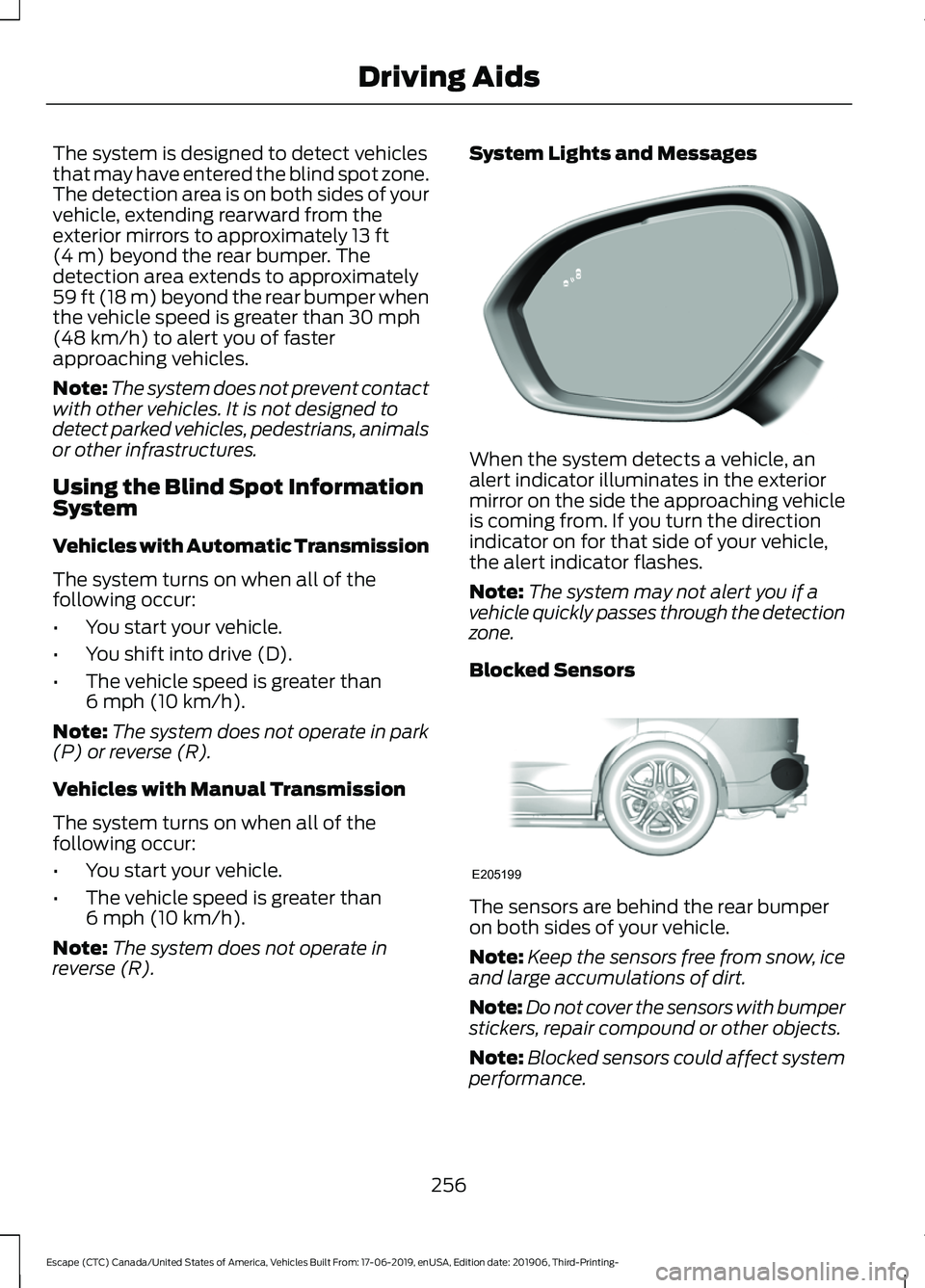
When the system detects a vehicle, an
alert indicator illuminates in the exterior
mirror on the side the approaching vehicle
is coming from. If you turn the direction
indicator on for that side of your vehicle,
the alert indicator flashes.
Note:
The system may not alert you if a
vehicle quickly passes through the detection
zone.
Blocked Sensors The sensors are behind the rear bumper
on both sides of your vehicle.
Note:
Keep the sensors free from snow, ice
and large accumulations of dirt.
Note: Do not cover the sensors with bumper
stickers, repair compound or other objects.
Note: Blocked sensors could affect system
performance.
256
Escape (CTC) Canada/United States of America, Vehicles Built From: 17-06-2019, enUSA, Edition date: 201906, Third-Printing- Driving AidsE309221 E205199
Page 262 of 553
Zone coverage also decreases when
parking at narrow angles. The sensor on
the left-hand side is mostly obstructed and
zone coverage on that side is severely
reduced.
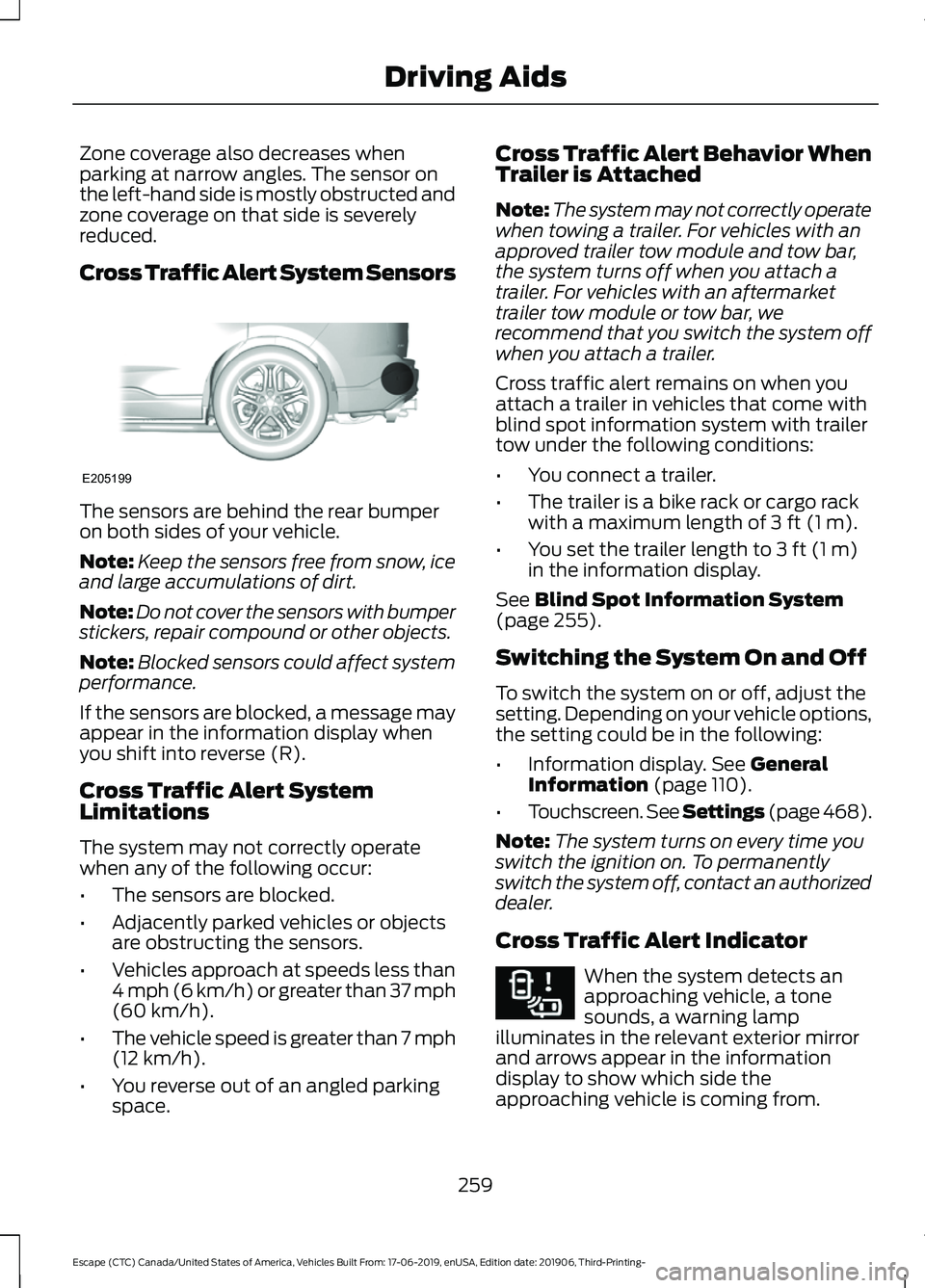
Cross Traffic Alert System Sensors
The sensors are behind the rear bumper
on both sides of your vehicle.
Note:
Keep the sensors free from snow, ice
and large accumulations of dirt.
Note: Do not cover the sensors with bumper
stickers, repair compound or other objects.
Note: Blocked sensors could affect system
performance.
If the sensors are blocked, a message may
appear in the information display when
you shift into reverse (R).
Cross Traffic Alert System
Limitations
The system may not correctly operate
when any of the following occur:
• The sensors are blocked.
• Adjacently parked vehicles or objects
are obstructing the sensors.
• Vehicles approach at speeds less than
4 mph (6 km/h) or greater than 37 mph
(60 km/h).
• The vehicle speed is greater than 7 mph
(12 km/h)
.
• You reverse out of an angled parking
space. Cross Traffic Alert Behavior When
Trailer is Attached
Note:
The system may not correctly operate
when towing a trailer. For vehicles with an
approved trailer tow module and tow bar,
the system turns off when you attach a
trailer. For vehicles with an aftermarket
trailer tow module or tow bar, we
recommend that you switch the system off
when you attach a trailer.
Cross traffic alert remains on when you
attach a trailer in vehicles that come with
blind spot information system with trailer
tow under the following conditions:
• You connect a trailer.
• The trailer is a bike rack or cargo rack
with a maximum length of
3 ft (1 m).
• You set the trailer length to
3 ft (1 m)
in the information display.
See
Blind Spot Information System
(page 255).
Switching the System On and Off
To switch the system on or off, adjust the
setting. Depending on your vehicle options,
the setting could be in the following:
• Information display.
See General
Information (page 110).
• Touchscreen. See Settings (page 468).
Note: The system turns on every time you
switch the ignition on. To permanently
switch the system off, contact an authorized
dealer.
Cross Traffic Alert Indicator When the system detects an
approaching vehicle, a tone
sounds, a warning lamp
illuminates in the relevant exterior mirror
and arrows appear in the information
display to show which side the
approaching vehicle is coming from.
259
Escape (CTC) Canada/United States of America, Vehicles Built From: 17-06-2019, enUSA, Edition date: 201906, Third-Printing- Driving AidsE205199 E268294
Page 309 of 553
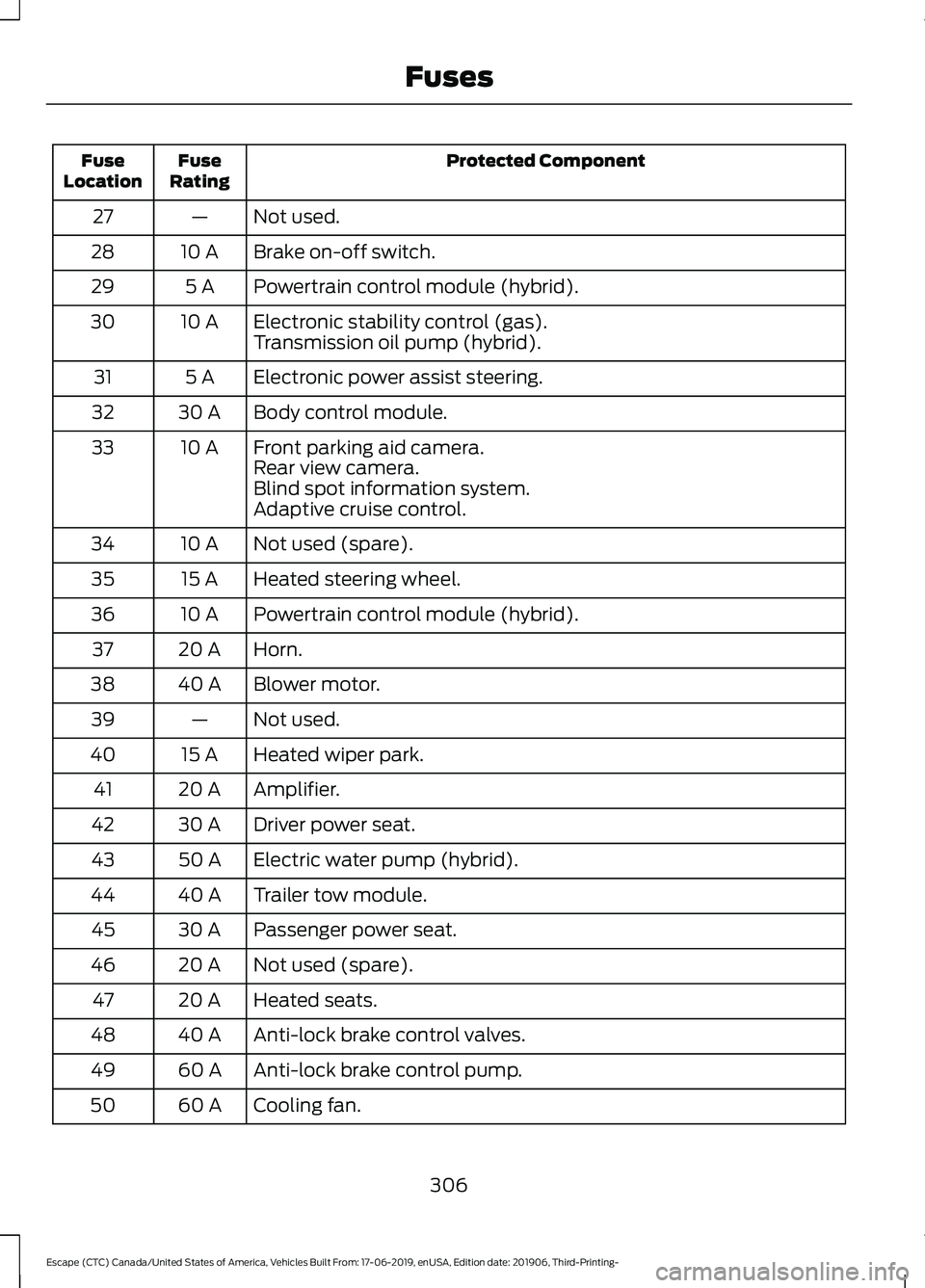
Protected Component
Fuse
Rating
Fuse
Location
Not used.
—
27
Brake on-off switch.
10 A
28
Powertrain control module (hybrid).
5 A
29
Electronic stability control (gas).
10 A
30
Transmission oil pump (hybrid).
Electronic power assist steering.
5 A
31
Body control module.
30 A
32
Front parking aid camera.
10 A
33
Rear view camera.
Blind spot information system.
Adaptive cruise control.
Not used (spare).
10 A
34
Heated steering wheel.
15 A
35
Powertrain control module (hybrid).
10 A
36
Horn.
20 A
37
Blower motor.
40 A
38
Not used.
—
39
Heated wiper park.
15 A
40
Amplifier.
20 A
41
Driver power seat.
30 A
42
Electric water pump (hybrid).
50 A
43
Trailer tow module.
40 A
44
Passenger power seat.
30 A
45
Not used (spare).
20 A
46
Heated seats.
20 A
47
Anti-lock brake control valves.
40 A
48
Anti-lock brake control pump.
60 A
49
Cooling fan.
60 A
50
306
Escape (CTC) Canada/United States of America, Vehicles Built From: 17-06-2019, enUSA, Edition date: 201906, Third-Printing- Fuses
Page 546 of 553

Fuel........................................................................\
...
124
Hill Start Assist.................................................... 124
Keys and Intelligent Access............................ 124
Lane Keeping System........................................ 125
Maintenance......................................................... 126
MyKey...................................................................... 127
Park Aid................................................................... 127
Park Brake............................................................. 128
Power Steering.................................................... 129
Pre-Collision Assist............................................ 129
Remote Start....................................................... 130
Seats....................................................................... 130
Starting System ................................................. 130
Tire Pressure Monitoring System................... 131
Trailer........................................................................\
131
Transmission.........................................................132
Installing Child Restraints...........................24
Child Restraints..................................................... 24
Using Lap and Shoulder Belts......................... 24
Using Lower Anchors and Tethers for CHildren (LATCH)........................................... 26
Using Tether Straps............................................. 28
Instrument Cluster
........................................98
Instrument Lighting Dimmer......................87
Instrument Panel
...........................................20
Interior Lamps.................................................89
Interior Lamp Function...................................... 89
Switching All of the Interior Lamps Off........................................................................\
. 89
Switching All of the Interior Lamps On........................................................................\
. 89
Switching the Front Interior Lamps On and Off........................................................................\
. 90
Switching the Rear Interior Lamps On and Off........................................................................\
. 90
Interior Mirror
...................................................95
Automatic Dimming Mirror.............................. 96
Manual Dimming Mirror..................................... 96
Introduction........................................................9
J
Jump Starting the Vehicle - Excluding: Hybrid Electric Vehicle (HEV)/Plug-In
Hybrid Electric Vehicle (PHEV)...........289
Connecting the Jumper Cables ................... 289
Preparing Your Vehicle.................................... 289
Removing the Jumper Cables...................... 290Starting the Engine...........................................
290
Jump Starting the Vehicle - Hybrid Electric Vehicle (HEV)/Plug-In Hybrid
Electric Vehicle (PHEV)..........................291
Connecting the Jumper Cables ................... 292
Preparing Your Vehicle...................................... 291
Removing the Jumper Cables....................... 293
Starting the Engine........................................... 293
K
Keyless Entry...................................................69 SECURICODE™ KEYLESS ENTRY
KEYPAD.............................................................. 69
Keyless Starting.............................................167 Ignition Modes..................................................... 168
Keys and Remote Controls.........................54
L
Lane Keeping System
.................................251
Switching the System On and Off...............252
Liftgate................................................................71
Lighting Control..............................................86 Flashing High Beam Headlamps.................... 87
Lighting Control Selections.............................. 86
Switching High Beam Headlamps On and Off........................................................................\
. 86
Lighting..............................................................86 General Information........................................... 86
Load Carriers See: Roof Racks and Load Carriers............269
Load Carrying
................................................268
Load Limit.......................................................270
Special Loading Instructions for Owners of
Pick-up Trucks and Utility-type
Vehicles............................................................. 274
Vehicle Loading - with and without a Trailer................................................................. 270
Locking and Unlocking................................66 Activating Intelligent Access............................ 67
Autolock.................................................................. 68
Battery Saver......................................................... 69
Illuminated Entry.................................................. 68
Illuminated Exit..................................................... 69
Locking and Unlocking the Doors with the Key Blade........................................................... 66
Opening a Rear Door from the Inside...........67
543
Escape (CTC) Canada/United States of America, Vehicles Built From: 17-06-2019, enUSA, Edition date: 201906, Third-Printing- Index
Page 548 of 553
P
Parking Aids...................................................225
Principle of Operation...................................... 225
Passive Anti-Theft System.........................76
SecuriLock®........................................................... 76
PATS See: Passive Anti-Theft System..................... 76
Pedestrian Alert System..............................53
Pedestrian Protection
...................................53
Perchlorate........................................................15
Personalized Settings
..................................115
Fuel Economy....................................................... 116
Hybrid Information.............................................. 116
Trip 1 and 2.............................................................. 116
Personal Safety System ™
..........................43
How Does the Personal Safety System
Work?.................................................................. 43
Phone...............................................................454 Android Auto....................................................... 455
Apple CarPlay..................................................... 455
Pairing Your Cell Phone for the First Time................................................................... 454
Text Messaging................................................... 454
Using Your Cell Phone..................................... 454
Plug-In Hybrid Vehicle Operation
...........178
Electric Vehicle (EV) Modes........................... 178
Low Engine Use.................................................. 180
Post-Crash Alert System..........................295
Power Door Locks See: Locking and Unlocking............................. 66
Power Liftgate
..................................................72
Hands-Free Feature............................................. 74
Obstacle Detection.............................................. 74
Opening and Closing the Liftgate................... 72
Setting the Liftgate Open Height................... 73
Stopping the Liftgate Movement................... 73
Switching the Power Liftgate On or Off........................................................................\
.. 74
Power Seats
....................................................152
Adjusting the Lumbar Support...................... 153
Adjusting the Seat Backrest........................... 152
Adjusting the Seat Cushion............................. 152
Adjusting the Seat Height................................ 152
Moving the Seat Backward and Forward............................................................. 152
Power Steering Fluid Check
.....................326 Power Windows..............................................93
Accessory Delay................................................... 94
Bounce-Back......................................................... 93
One-Touch Down................................................. 93
One-Touch Up....................................................... 93
Rear Window Lock............................................... 93
Pre-Collision Assist......................................261 Adjusting the Pre-Collision Assist
Settings............................................................ 263
Blocked Sensors................................................ 264
Distance Indication and Alert........................ 262
Evasive Steering Assist.................................... 263
Using the Pre-Collision Assist System............................................................... 261
Protecting the Environment
........................19
Puncture See: Changing a Road Wheel....................... 369
R
Rear Occupant Alert System Audible Warnings.......................................................158
Rear Occupant Alert System Indicators - Vehicles With: SYNC 3..........................158
Rear Occupant Alert System Indicators - Vehicles With: SYNC.............................158
Rear Occupant Alert System Limitations....................................................157
Rear Occupant Alert System Precautions..................................................157
Rear Occupant Alert System....................157
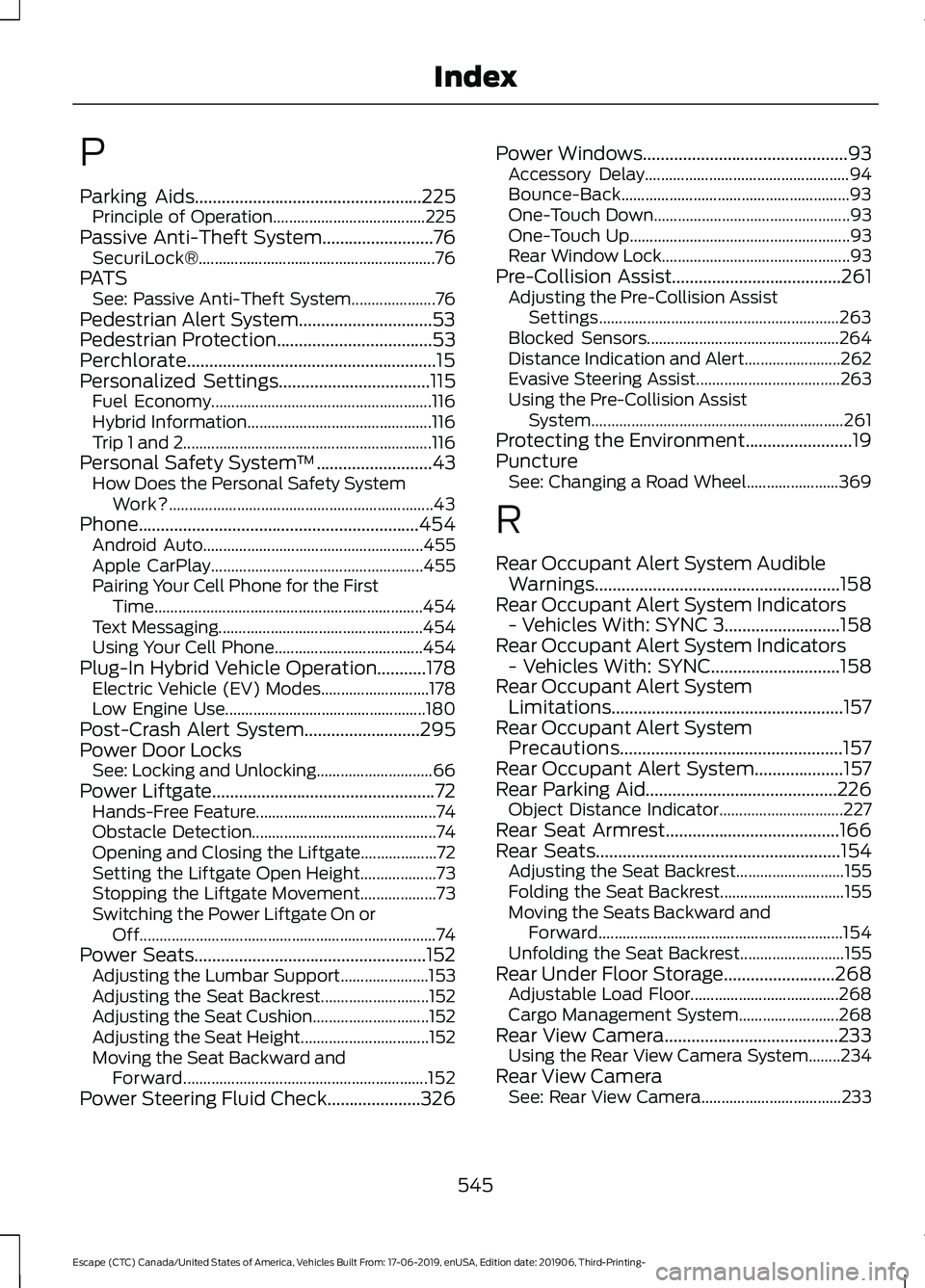
Rear Parking Aid
...........................................226
Object Distance Indicator............................... 227
Rear Seat Armrest.......................................166
Rear Seats
.......................................................154
Adjusting the Seat Backrest........................... 155
Folding the Seat Backrest............................... 155
Moving the Seats Backward and Forward............................................................. 154
Unfolding the Seat Backrest.......................... 155
Rear Under Floor Storage
.........................268
Adjustable Load Floor..................................... 268
Cargo Management System......................... 268
Rear View Camera.......................................233 Using the Rear View Camera System........234
Rear View Camera See: Rear View Camera................................... 233
545
Escape (CTC) Canada/United States of America, Vehicles Built From: 17-06-2019, enUSA, Edition date: 201906, Third-Printing- Index