instrument panel FORD ESCAPE 2020 User Guide
[x] Cancel search | Manufacturer: FORD, Model Year: 2020, Model line: ESCAPE, Model: FORD ESCAPE 2020Pages: 553, PDF Size: 7.73 MB
Page 142 of 553
Press and release the button to
direct airflow to the instrument
panel air vents.
Press and release the button to
direct airflow to the footwell air
vents.
You can direct air through any combination
of these air vents.
Setting the Blower Motor Speed Press and release + or - to adjust
the volume of air circulated in
the vehicle.
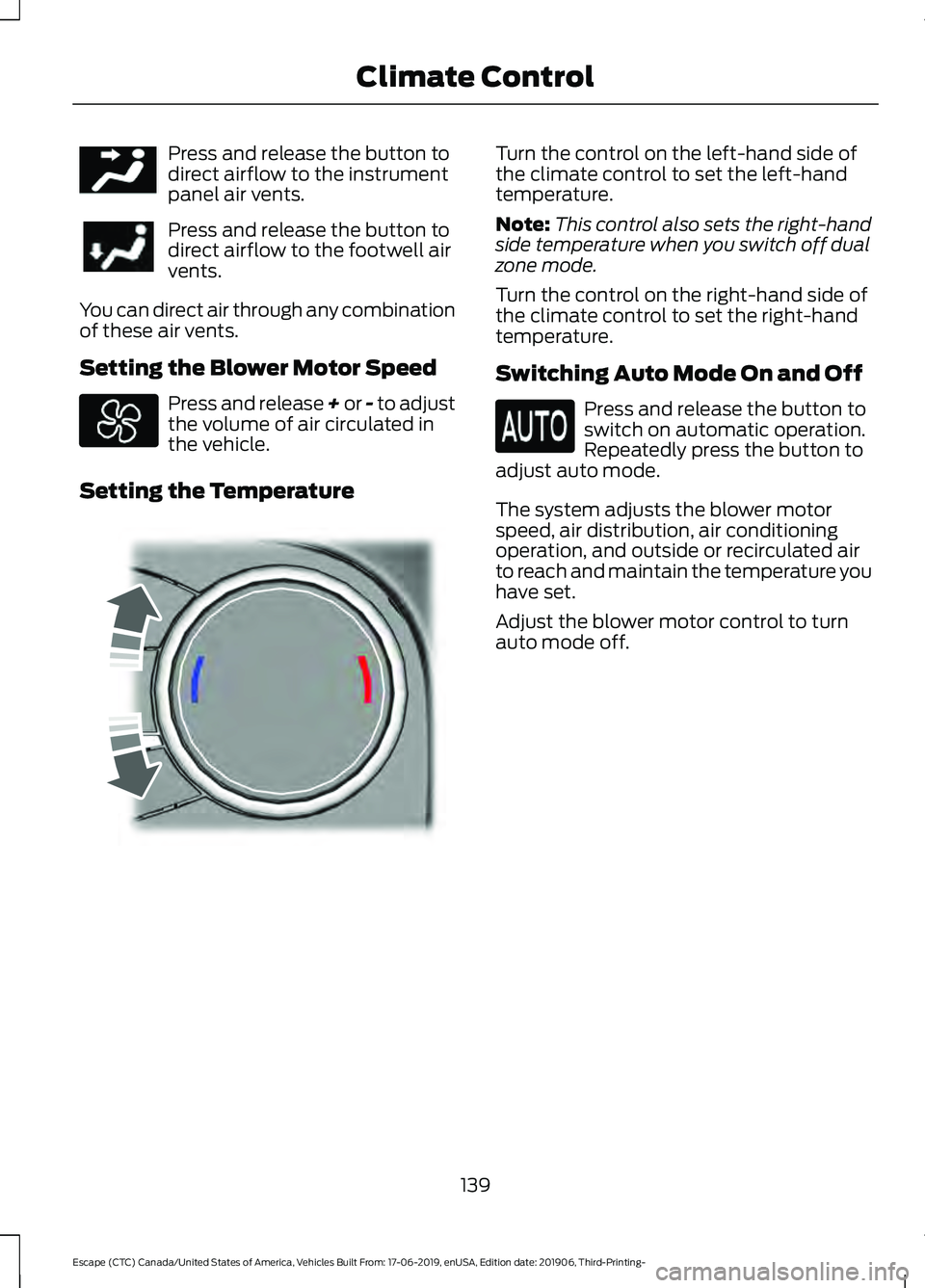
Setting the Temperature Turn the control on the left-hand side of
the climate control to set the left-hand
temperature.
Note:
This control also sets the right-hand
side temperature when you switch off dual
zone mode.
Turn the control on the right-hand side of
the climate control to set the right-hand
temperature.
Switching Auto Mode On and Off Press and release the button to
switch on automatic operation.
Repeatedly press the button to
adjust auto mode.
The system adjusts the blower motor
speed, air distribution, air conditioning
operation, and outside or recirculated air
to reach and maintain the temperature you
have set.
Adjust the blower motor control to turn
auto mode off.
139
Escape (CTC) Canada/United States of America, Vehicles Built From: 17-06-2019, enUSA, Edition date: 201906, Third-Printing- Climate ControlE244097 E244115
Page 143 of 553
Auto Mode Indicator Status
Description
Auto Mode Indicator
Status
One indicator illumin-
ated. •
The blower motor speed is reduced.
•Use this setting to minimize the amount of noise from
the blower motor.
• This setting increases the time taken to cool the
interior.
Two indicators illumin-
ated. •
The blower motor speed is moderate.
Three indicators illumin-
ated. •
The blower motor speed is increased.
•This setting increases the amount of noise from the
blower motor.
• Use this setting to reduce the time taken to cool the
interior.
Switching the Air Conditioning On
and Off Press and release the button to
switch the air conditioning on or
off.
Use air conditioning with recirculated air
to improve cooling performance and
efficiency.
Note: In certain conditions, for example,
maximum defrost, the air conditioning
compressor may continue to operate even
though you switch off the air conditioning.
Switching the Climate Control On
and Off Press and release the button.
Note: The button may be on the
temperature control. Switching Dual Zone Mode On and
Off Press and release the button to
switch on temperature control
for the right-hand side of the
vehicle.
Note: The button may be on the
temperature control.
Switching Maximum Air
Conditioning On and Off Press and release the button for
maximum cooling.
The system sets the left-hand and
right-hand settings to LO, recirculated air
flows through the instrument panel air
vents, air conditioning turns on and the
blower motor adjusts to the highest speed.
140
Escape (CTC) Canada/United States of America, Vehicles Built From: 17-06-2019, enUSA, Edition date: 201906, Third-Printing- Climate Control E265280
Page 144 of 553
Switching Maximum Defrost On
and Off
Press and release the button to
switch on maximum defrost.
The system sets the left-hand and
right-hand settings to HI, air flows through
the windshield air vents, and the blower
motor adjusts to the highest speed. You
can also use this setting to defog and clear
the windshield of a thin covering of ice. The
heated rear window also turns on when
you select maximum defrost.
Note: To prevent window fogging, you
cannot select recirculated air when
maximum defrost is on.
Switching Recirculated Air On and
Off Press and release the button to
switch between outside air and
recirculated air.
The air currently in the passenger
compartment recirculates. This may
reduce the time needed to cool the interior,
when used with A/C, and reduce unwanted
odors from entering your vehicle.
Note: Recirculated air may turn off, or
prevent you from switching on, in all air flow
modes except MAX A/C to reduce the risk
of fogging. Recirculation may also turn on
and off in various air distribution control
combinations during hot weather to improve
cooling efficiency. AUTOMATIC CLIMATE
CONTROL - VEHICLES WITH:
ELECTRONIC AUTOMATIC
TEMPERATURE CONTROL
(EATC)
Note:
Depending on your vehicle option
package, the controls may look different
from what you see here.
Directing the Airflow Press and release the button to
direct airflow to the windshield
air vents and de-mister.
Press and release the button to
direct airflow to the instrument
panel air vents.
Press and release the button to
direct airflow to the footwell air
vents.
You can direct air through any combination
of these air vents.
141
Escape (CTC) Canada/United States of America, Vehicles Built From: 17-06-2019, enUSA, Edition date: 201906, Third-Printing- Climate Control E289733 E244097
Page 146 of 553
Auto Mode Indicator Status
Description
Auto Mode Indicator
Status
One indicator illumin-
ated. •
The blower motor speed is reduced.
•Use this setting to minimize the amount of noise from
the blower motor.
• This setting increases the time taken to cool the
interior.
Two indicators illumin-
ated. •
The blower motor speed is moderate.
Three indicators illumin-
ated. •
The blower motor speed is increased.
•This setting increases the amount of noise from the
blower motor.
• Use this setting to reduce the time taken to cool the
interior.
Switching the Air Conditioning On
and Off Press and release the button to
switch the air conditioning on or
off.
Use air conditioning with recirculated air
to improve cooling performance and
efficiency.
Note: In certain conditions, for example,
maximum defrost, the air conditioning
compressor may continue to operate even
though you switch off the air conditioning.
Switching the Climate Control On
and Off Press and release the button.
Note: The button may be on the
temperature control. Switching Maximum Air
Conditioning On and Off Press and release the button for
maximum cooling.
Recirculated air flows through the
instrument panel air vents, air conditioning
turns on and the blower motor adjusts to
the highest speed.
Switching Maximum Defrost On
and Off Press and release the button for
maximum defrosting.
Air flows through the windshield air vents,
and the blower motor adjusts to the
highest speed.
You can also use this setting to defog and
clear the windshield of a thin covering of
ice.
143
Escape (CTC) Canada/United States of America, Vehicles Built From: 17-06-2019, enUSA, Edition date: 201906, Third-Printing- Climate Control
Page 147 of 553
Note:
To prevent window fogging, you
cannot select recirculated air when
maximum defrost is on.
Note: The heated rear window also turns
on when you select maximum defrost.
Switching Recirculated Air On and
Off Press and release the button to
switch between outside air and
recirculated air.
The air currently in the passenger
compartment recirculates. This may
reduce the time needed to cool the interior,
when used with A/C, and reduce unwanted
odors from entering your vehicle.
Note: Recirculated air may turn off, or
prevent you from switching on, in all air flow
modes except MAX A/C to reduce the risk
of fogging. Recirculation may also turn on
and off in various air distribution control
combinations during hot weather to improve
cooling efficiency.
HINTS ON CONTROLLING THE
INTERIOR CLIMATE -
VEHICLES WITH: AUTOMATIC
TEMPERATURE CONTROL
General Hints
Note: Prolonged use of recirculated air may
cause the windows to fog up.
Note: You may feel a small amount of air
from the footwell air vents regardless of the
air distribution setting.
Note: To reduce humidity build-up inside
your vehicle, do not drive with the system
switched off or with recirculated air always
switched on.
Note: Do not place objects under the front
seats as this may interfere with the airflow
to the rear seats. Note:
Remove any snow, ice or leaves from
the air intake area at the base of the
windshield.
Note: To improve the time to reach a
comfortable temperature in hot weather,
drive with the windows open until you feel
cold air through the air vents.
Automatic Climate Control
Note: Adjusting the settings when your
vehicle interior is extremely hot or cold is
not necessary. Automatic mode is best
recommended to maintain set temperature.
Note: The system adjusts to heat or cool
the interior to the temperature you select
as quickly as possible.
Note: For the system to function efficiently,
the instrument panel and side air vents
should be fully open.
Note: If you select AUTO during cold
outside temperatures, the system directs
air flow to the windshield and side window
air vents. In addition, the blower motor may
run at a slower speed until the engine warms
up.
Note: If you select
AUTO during hot
temperatures and the inside of the vehicle
is hot, the system uses recirculated air to
maximize interior cooling. Blower motor
speed may also reduce until the air cools.
Quickly Heating the Interior
1. Press and release
AUTO.
2. Adjust the temperature function to the
setting you prefer.
Recommended Settings for
Heating
1. Press and release
AUTO.
2. Adjust the temperature function to the
setting you prefer. Use
72°F (22°C) as
a starting point, then adjust the setting
as necessary.
144
Escape (CTC) Canada/United States of America, Vehicles Built From: 17-06-2019, enUSA, Edition date: 201906, Third-Printing- Climate Control
Page 148 of 553
Quickly Cooling the Interior
1. Press and release MAX A/C.
Recommended Settings for
Cooling
1. Press and release
AUTO.
2. Adjust the temperature function to the
setting you prefer. Use
72°F (22°C) as
a starting point, then adjust the setting
as necessary.
Defogging the Side Windows in
Cold Weather
1. Press and release defrost or maximum
defrost.
2. Adjust the temperature control to the setting you prefer. Use
72°F (22°C) as
a starting point, then adjust the setting
as necessary.
HINTS ON CONTROLLING THE
INTERIOR CLIMATE -
VEHICLES WITH: MANUAL
TEMPERATURE CONTROL
General Hints
Note: Prolonged use of recirculated air may
cause the windows to fog up.
Note: You may feel a small amount of air
from the footwell air vents regardless of the
air distribution setting.
Note: To reduce humidity build-up inside
your vehicle, do not drive with the system
switched off or with recirculated air always
switched on.
Note: Do not place objects under the front
seats as this may interfere with the airflow
to the rear seats.
Note: Remove any snow, ice or leaves from
the air intake area at the base of the
windshield. Note:
To improve the time to reach a
comfortable temperature in hot weather,
drive with the windows open until you feel
cold air through the air vents.
Quickly Heating the Interior
1. Adjust the blower motor speed to the highest speed setting.
2. Adjust the temperature control to the highest setting.
3. Direct air to the footwell air vents.
Recommended Settings for
Heating
1. Adjust the blower motor speed to the center setting.
2. Adjust the temperature control to the midway point of the hot settings.
3. Direct air to the footwell air vents.
Quickly Cooling the Interior
1. Select
MAX A/C.
2. Drive with the windows open for a short
period of time.
Recommended Settings for
Cooling
1. Adjust the blower motor speed to the center setting.
2. Adjust the temperature control to the midway point of the cold settings.
3. Direct air to the instrument panel air vents.
Vehicle Stationary for Extended
Periods During Extreme High
Ambient Temperatures
1. Apply the parking brake.
2. Place your vehicle in park (P) or neutral.
3. Select
MAX A/C.
145
Escape (CTC) Canada/United States of America, Vehicles Built From: 17-06-2019, enUSA, Edition date: 201906, Third-Printing- Climate Control
Page 149 of 553
4. Adjust the blower motor speed to the
lowest speed setting.
Defogging the Side Windows in
Cold Weather
1. Direct air to the instrument panel and windshield air vents.
2. Press and release A/C.
3. Adjust the temperature control to the setting you prefer.
4. Adjust the blower motor speed to the highest setting.
5. Direct air toward the side windows.
6. Close the instrument panel air vents.
HEATED WINDSHIELD
(IF
EQUIPPED)
Windshield Wiper De-Icer When you switch the heated rear
window on, the windshield wiper
de-icer turns on.
HEATED REAR WINDOW Press the button to clear the rear
window of thin ice and fog. The
heated rear window turns off
after a short period of time.
Note: Make sure the engine is on before
operating the heated windows.
Note: Do not use harsh chemicals, razor
blades or other sharp objects to clean or
remove decals from the inside of the heated
rear window. The vehicle warranty may not
cover damage to the heated rear window
grid lines. HEATED EXTERIOR MIRRORS
(IF EQUIPPED)
When you switch the heated rear window
on, the heated exterior mirrors turn on.
Note:
Do not remove ice from the mirrors
with a scraper or adjust the mirror glass
when it is frozen in place.
Note: Do not clean the mirror housing or
glass with harsh abrasives, fuel or other
petroleum-based cleaning products. The
vehicle warranty may not cover damage
caused to the mirror housing or glass.
CABIN AIR FILTER
Your vehicle is equipped with a cabin air
filter, which gives you and your passengers
the following benefits:
• It improves your driving comfort by
reducing particle concentration.
• It improves the interior compartment
cleanliness.
• It protects the climate control
components from particle deposits.
You can locate the cabin air filter behind
the glove box.
Note: Make sure you have a cabin air filter
installed at all times. This prevents foreign
objects from entering the system. Running
the system without a filter in place could
result in degradation or damage to the
system.
Replace the filter at regular intervals. See
Scheduled Maintenance
(page 486).
For additional cabin air filter information,
or to replace the filter, see an authorized
dealer.
146
Escape (CTC) Canada/United States of America, Vehicles Built From: 17-06-2019, enUSA, Edition date: 201906, Third-Printing- Climate ControlE184884
Page 168 of 553
Do not place items with a magnetic strip,
for example passports, parking tickets or
credit cards, near the charging area when
charging a device. Damage may occur to
the magnetic strip.
Do not place metal objects, for example
remote controls, coins and candy
wrappers, on or near the charging area
when charging a device. Metal objects may
heat up and degrade the charging
performance.
Note:
The device controls the rate of
charge, or charging power. During charging,
the device and the charger may heat up, this
is normal. If the battery gets hotter than
usual, the charger may stop charging. The charging area is on the
center console or lower
instrument panel.
You can charge a device if the vehicle is
on, when in accessory mode, or anytime
SYNC is on.
To begin charging, place the device on the
center of the charging surface with the
charging side down. The charging stops
after your device reaches a full charge.
Note:
If the system detects a foreign object
or if the device is misaligned on the charging
area, a message appears in the display.
Note: Software and firmware updates may
affect device compatibility, including the
use of unofficial software or firmware. You
should verify charging functionality with your
specific devices when in your vehicle. Description
Behavior
Message
This message appears whenwireless charging begins.
Message on screen display
or pop-up window.
Wireless Charger Active
The system stops chargingyour device if the system detects the phone is
misaligned, or a foreign
metal object is on the char- ging surface.
Pop-up window.
Charging Terminated
Phone misaligned or object
between phone and charger
detected. Correct the condi- tion to resume charging.
165
Escape (CTC) Canada/United States of America, Vehicles Built From: 17-06-2019, enUSA, Edition date: 201906, Third-Printing- Auxiliary Power PointsE297549
Page 210 of 553
Note:
If vehicle battery is dead, for example,
no electrical power is available, you could
use an external power to apply the parking
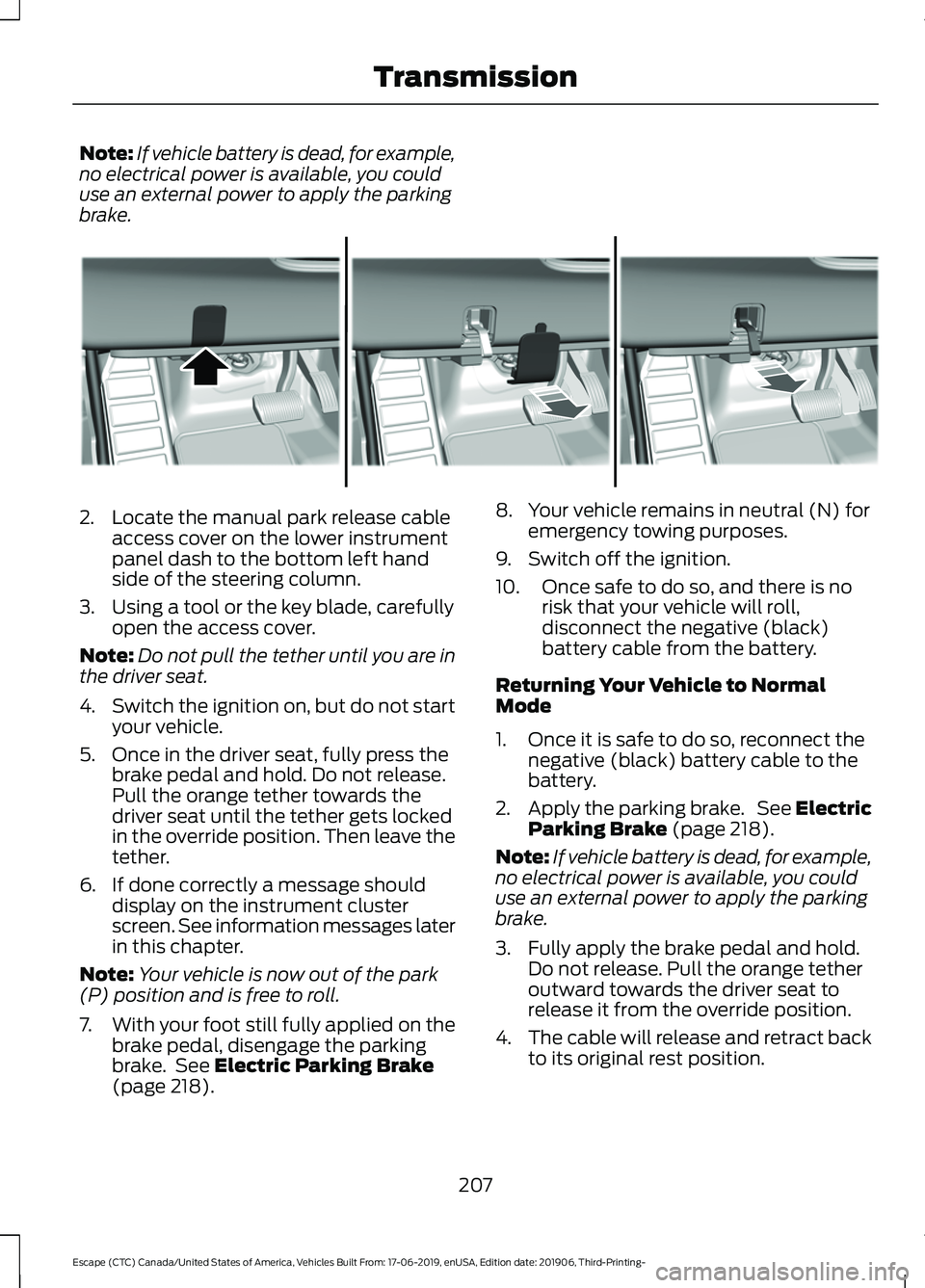
brake. 2. Locate the manual park release cable
access cover on the lower instrument
panel dash to the bottom left hand
side of the steering column.
3. Using a tool or the key blade, carefully open the access cover.
Note: Do not pull the tether until you are in
the driver seat.
4. Switch the ignition on, but do not start
your vehicle.
5. Once in the driver seat, fully press the brake pedal and hold. Do not release.
Pull the orange tether towards the
driver seat until the tether gets locked
in the override position. Then leave the
tether.
6. If done correctly a message should display on the instrument cluster
screen. See information messages later
in this chapter.
Note: Your vehicle is now out of the park
(P) position and is free to roll.
7. With your foot still fully applied on the
brake pedal, disengage the parking
brake. See Electric Parking Brake
(page 218). 8. Your vehicle remains in neutral (N) for
emergency towing purposes.
9. Switch off the ignition.
10. Once safe to do so, and there is no risk that your vehicle will roll,
disconnect the negative (black)
battery cable from the battery.
Returning Your Vehicle to Normal
Mode
1. Once it is safe to do so, reconnect the negative (black) battery cable to the
battery.
2. Apply the parking brake. See Electric
Parking Brake
(page 218).
Note: If vehicle battery is dead, for example,
no electrical power is available, you could
use an external power to apply the parking
brake.
3. Fully apply the brake pedal and hold. Do not release. Pull the orange tether
outward towards the driver seat to
release it from the override position.
4. The cable will release and retract back
to its original rest position.
207
Escape (CTC) Canada/United States of America, Vehicles Built From: 17-06-2019, enUSA, Edition date: 201906, Third-Printing- TransmissionE307867
Page 211 of 553
5. Stow the manual park release cable
tether back inside the instrument panel
dash hole, install the access cover by
pressing it back in position.
6. With your foot fully applied on the brake pedal, start your vehicle. Confirm
that your vehicle is in the park (P)
position and that the instrument
cluster indicates park (P).
7. If the instrument cluster is not displaying the park (P) position or a
message displays on the instrument
cluster screen, make sure you apply the
parking brake before exiting your
vehicle. Contact an authorized dealer
for service.
Information Messages Description
Message
The electric parkingbrake is not fully applied.
Park Brake Not
Applied
A reminder to shiftinto park. In addi-
tion, this message is typically afterreconnecting or recharging the
battery until you
cycle the ignition to the on mode.
Transmission Not in
Park
Displays when
there is a system
fault and the park
brake needs to be depressed before
exiting the vehicle.
See your authorized dealer.
SHIFT SYS FAULT
Apply Park Brake
Before Exiting the Vehicle Description
Message
The system has
detected a fault that requires
service. Have your
vehicle checked as soon as possible.
Transmission
Malfunction Service Now
Displays when youshift into neutral (N).
Select M To
Confirm Stay In Neutral Mode
Displays to confirmthat your vehicle
has entered Stay in Neutral Mode.
Stay in Neutral
Mode Engaged
If Your Vehicle Gets Stuck in Mud
or Snow
Note: Do not rock the vehicle if the engine
is not at normal operating temperature or
damage to the transmission could occur.
Note: Do not rock the vehicle for more than
a minute or damage to the transmission and
tires could occur, or the engine may
overheat.
If your vehicle gets stuck in mud or snow,
rock it out by shifting between forward and
reverse gears, stopping between shifts in
a steady pattern. Press lightly on the
accelerator in each gear.
AUTOMATIC TRANSMISSION
- HYBRID ELECTRIC VEHICLE
(HEV)/PLUG-IN HYBRID
ELECTRIC VEHICLE (PHEV) WARNING: Always fully apply the
parking brake and make sure you shift
into park (P). Failure to follow this
instruction could result in personal injury
or death.
208
Escape (CTC) Canada/United States of America, Vehicles Built From: 17-06-2019, enUSA, Edition date: 201906, Third-Printing- Transmission