keyless FORD ESCAPE 2020 User Guide
[x] Cancel search | Manufacturer: FORD, Model Year: 2020, Model line: ESCAPE, Model: FORD ESCAPE 2020Pages: 553, PDF Size: 7.73 MB
Page 171 of 553
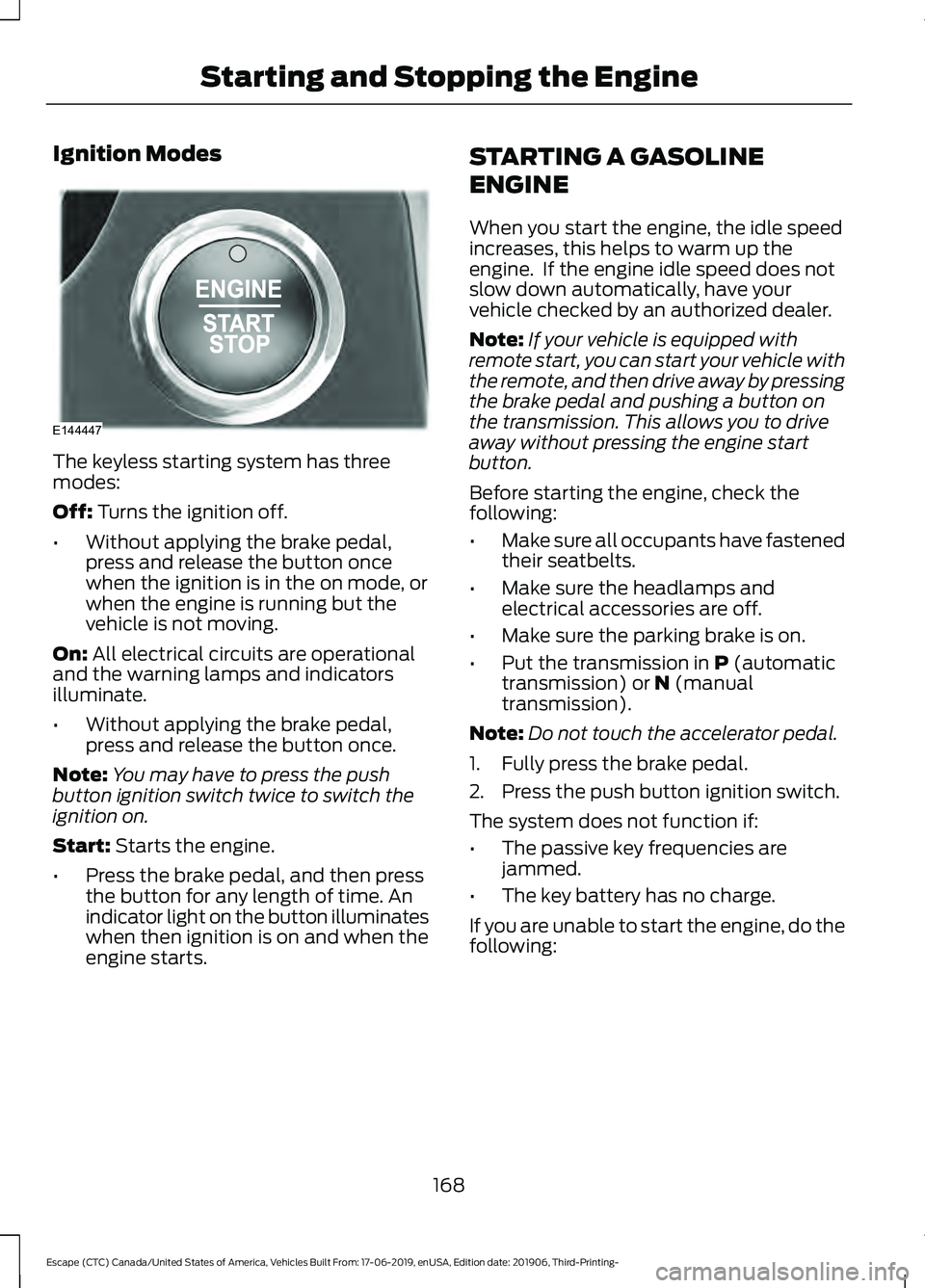
Ignition Modes
The keyless starting system has three
modes:
Off: Turns the ignition off.
• Without applying the brake pedal,
press and release the button once
when the ignition is in the on mode, or
when the engine is running but the
vehicle is not moving.
On:
All electrical circuits are operational
and the warning lamps and indicators
illuminate.
• Without applying the brake pedal,
press and release the button once.
Note: You may have to press the push
button ignition switch twice to switch the
ignition on.
Start:
Starts the engine.
• Press the brake pedal, and then press
the button for any length of time. An
indicator light on the button illuminates
when then ignition is on and when the
engine starts. STARTING A GASOLINE
ENGINE
When you start the engine, the idle speed
increases, this helps to warm up the
engine. If the engine idle speed does not
slow down automatically, have your
vehicle checked by an authorized dealer.
Note:
If your vehicle is equipped with
remote start, you can start your vehicle with
the remote, and then drive away by pressing
the brake pedal and pushing a button on
the transmission. This allows you to drive
away without pressing the engine start
button.
Before starting the engine, check the
following:
• Make sure all occupants have fastened
their seatbelts.
• Make sure the headlamps and
electrical accessories are off.
• Make sure the parking brake is on.
• Put the transmission in
P (automatic
transmission) or N (manual
transmission).
Note: Do not touch the accelerator pedal.
1. Fully press the brake pedal.
2. Press the push button ignition switch.
The system does not function if:
• The passive key frequencies are
jammed.
• The key battery has no charge.
If you are unable to start the engine, do the
following:
168
Escape (CTC) Canada/United States of America, Vehicles Built From: 17-06-2019, enUSA, Edition date: 201906, Third-Printing- Starting and Stopping the EngineE144447
Page 172 of 553
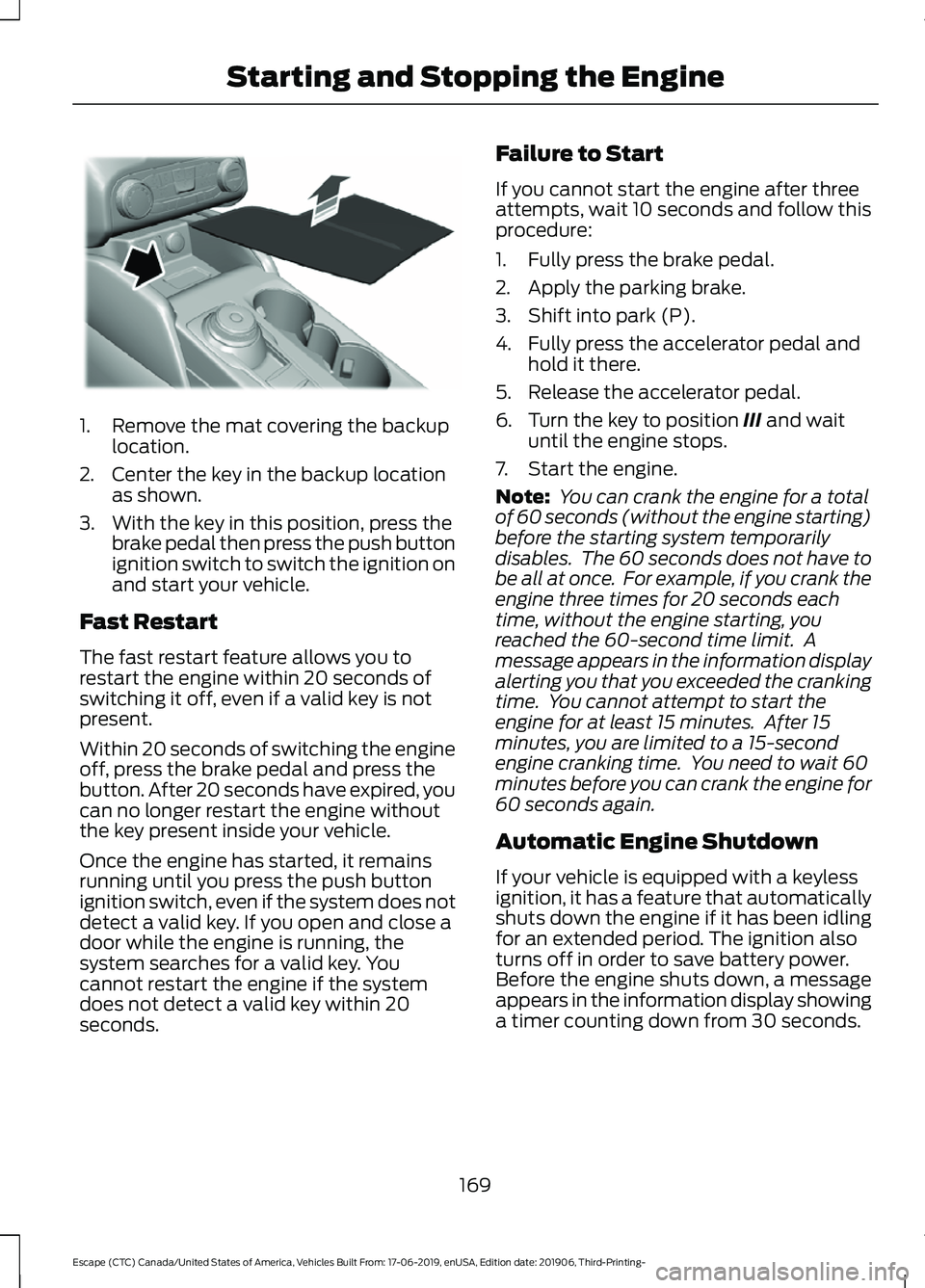
1. Remove the mat covering the backup
location.
2. Center the key in the backup location as shown.
3. With the key in this position, press the brake pedal then press the push button
ignition switch to switch the ignition on
and start your vehicle.
Fast Restart
The fast restart feature allows you to
restart the engine within 20 seconds of
switching it off, even if a valid key is not
present.
Within 20 seconds of switching the engine
off, press the brake pedal and press the
button. After 20 seconds have expired, you
can no longer restart the engine without
the key present inside your vehicle.
Once the engine has started, it remains
running until you press the push button
ignition switch, even if the system does not
detect a valid key. If you open and close a
door while the engine is running, the
system searches for a valid key. You
cannot restart the engine if the system
does not detect a valid key within 20
seconds. Failure to Start
If you cannot start the engine after three
attempts, wait 10 seconds and follow this
procedure:
1. Fully press the brake pedal.
2. Apply the parking brake.
3. Shift into park (P).
4. Fully press the accelerator pedal and
hold it there.
5. Release the accelerator pedal.
6. Turn the key to position III and wait
until the engine stops.
7. Start the engine.
Note: You can crank the engine for a total
of 60 seconds (without the engine starting)
before the starting system temporarily
disables. The 60 seconds does not have to
be all at once. For example, if you crank the
engine three times for 20 seconds each
time, without the engine starting, you
reached the 60-second time limit. A
message appears in the information display
alerting you that you exceeded the cranking
time. You cannot attempt to start the
engine for at least 15 minutes. After 15
minutes, you are limited to a 15-second
engine cranking time. You need to wait 60
minutes before you can crank the engine for
60 seconds again.
Automatic Engine Shutdown
If your vehicle is equipped with a keyless
ignition, it has a feature that automatically
shuts down the engine if it has been idling
for an extended period. The ignition also
turns off in order to save battery power.
Before the engine shuts down, a message
appears in the information display showing
a timer counting down from 30 seconds.
169
Escape (CTC) Canada/United States of America, Vehicles Built From: 17-06-2019, enUSA, Edition date: 201906, Third-Printing- Starting and Stopping the EngineE306769
Page 209 of 553
Note:
If you have waited for more than two
minutes before switching the ignition on,
unfastening your seatbelt causes this
feature to activate, even with the driver door
closed.
Note: This feature may not work properly
if the door ajar switch is malfunctioning. If
your door ajar indicator does not illuminate
when you open the driver door or the
indicator illuminates with the driver door
closed, see your authorized dealer.
Stay in Neutral Mode
Note: Stay in neutral is a temporary vehicle
state with the ignition off. Once in this
mode, sufficient battery voltage must be
maintained or your vehicle will return to
park. Failure to follow this instruction could
result in vehicle damage not covered by the
vehicle warranty.
Note: When entering an automatic car
wash, always shift to neutral (N). If you are
exiting the vehicle before the car wash, stay
in neutral mode is available.
Stay in neutral mode allows your vehicle
to stay in neutral when you exit your
vehicle. Your vehicle must be stationary to
enter this mode.
Note: Failure to follow this instruction could
result in vehicle damage not covered by the
vehicle warranty.
Do not tow your vehicle in this mode.
To enter stay in neutral mode
1. Switch your vehicle on but do not start
the engine. See Keyless Starting
(page 167).
2. Place your foot on the brake pedal and
rotate the transmission selector to
neutral (N).
Note: When in neutral (N), a message
appears in the display screen informing you
how to access stay in neutral mode. 3. Press the manual (M) or Low (L)
button in the middle of the
transmission selector to enter stay in
neutral mode.
A message appears in the display screen
confirming your vehicle is in stay in neutral
mode. The neutral (N) indicator light on
the transmission selector also flashes.
To exit stay in neutral mode, place your
foot on the brake pedal and rotate the
transmission selector to park (P).
Manual Park Release WARNING:
When doing this
procedure, you need to take the
transmission out of park (P) which
means your vehicle can roll freely. To
avoid unwanted vehicle movement,
always fully apply the parking brake prior
to doing this procedure. Use wheels
chocks if appropriate. WARNING:
If the parking brake is
fully released, but the brake warning
lamp remains illuminated, the brakes
may not be working properly. Have your
vehicle checked as soon as possible. WARNING:
Do not drive your
vehicle until you verify that the
stoplamps are working.
Use the manual park release to move your
transmission from the park (P) position in
the event of an electrical malfunction or
emergency.
Activating the Manual Park Release
Cable
1. Apply the parking brake. See Electric
Parking Brake
(page 218).
206
Escape (CTC) Canada/United States of America, Vehicles Built From: 17-06-2019, enUSA, Edition date: 201906, Third-Printing- Transmission
Page 213 of 553
Automatic Return to Park
Note:
This feature does not operate when
your vehicle is in stay in neutral mode.
Your vehicle has a feature that shifts your
vehicle into park (P) when any of the
following conditions occur:
• You turn the vehicle off.
• You open the driver door with your
seatbelt unlatched.
• You unlatch your seatbelt when the
driver door is open.
Note: This feature may not work properly
if the door ajar switch is malfunctioning. If
your door ajar indicator does not illuminate
when you open the driver door or the
indicator illuminates with the driver door
closed, see your authorized dealer.
Stay in Neutral Mode WARNING: When doing this
procedure, you need to take the
transmission out of park (P) which
means your vehicle can roll freely. To
avoid unwanted vehicle movement,
always fully apply the parking brake prior
to doing this procedure. Use wheels
chocks if appropriate.
Stay in neutral mode allows your vehicle
to stay in neutral when you exit your
vehicle. Your vehicle must be stationary to
enter this mode.
Do not tow your vehicle in this mode.
Note: Stay in neutral is a temporary vehicle
state with the ignition off. Once in this
mode, sufficient battery voltage must be
maintained or your vehicle will return to
park. Not maintaining sufficient voltage
could result in vehicle damage not covered
by the vehicle warranty. Note:
When entering an automatic car
wash, always shift to neutral (N). If you are
exiting the vehicle before the car wash, stay
in neutral mode is available.
To enter Stay in Neutral Mode
1. Switch on your vehicle. Make sure it is in ready to drive mode. See
Keyless
Starting (page 167).
2. Press and hold the brake pedal.
3. Shift into neutral (N).
Note: When in neutral (N), a message
appears in the display screen informing you
how to access stay in neutral mode.
4. Press the low (L) button in the middle of the transmission selector to enter
stay in neutral mode.
Note: A message appears in the display
screen confirming your vehicle is in stay in
neutral mode. The neutral (N) indicator light
on the transmission selector flashes slowly.
5. Release the brake pedal.
6. Switch the ignition off.
To exit stay in neutral mode, place your
foot on the brake pedal and rotate the
transmission selector to park (P), or start
the engine and shift into drive (D) or
reverse (R).
Grade Assist Press the grade assist button to
activate grade assist. The grade
assist lamp appears in the
instrument cluster. Press the button again
to switch it off.
• Provides additional grade braking with
a combination of engine motoring and
high-voltage battery charging to help
maintain vehicle speed when
descending a slope.
210
Escape (CTC) Canada/United States of America, Vehicles Built From: 17-06-2019, enUSA, Edition date: 201906, Third-Printing- Transmission
Page 312 of 553
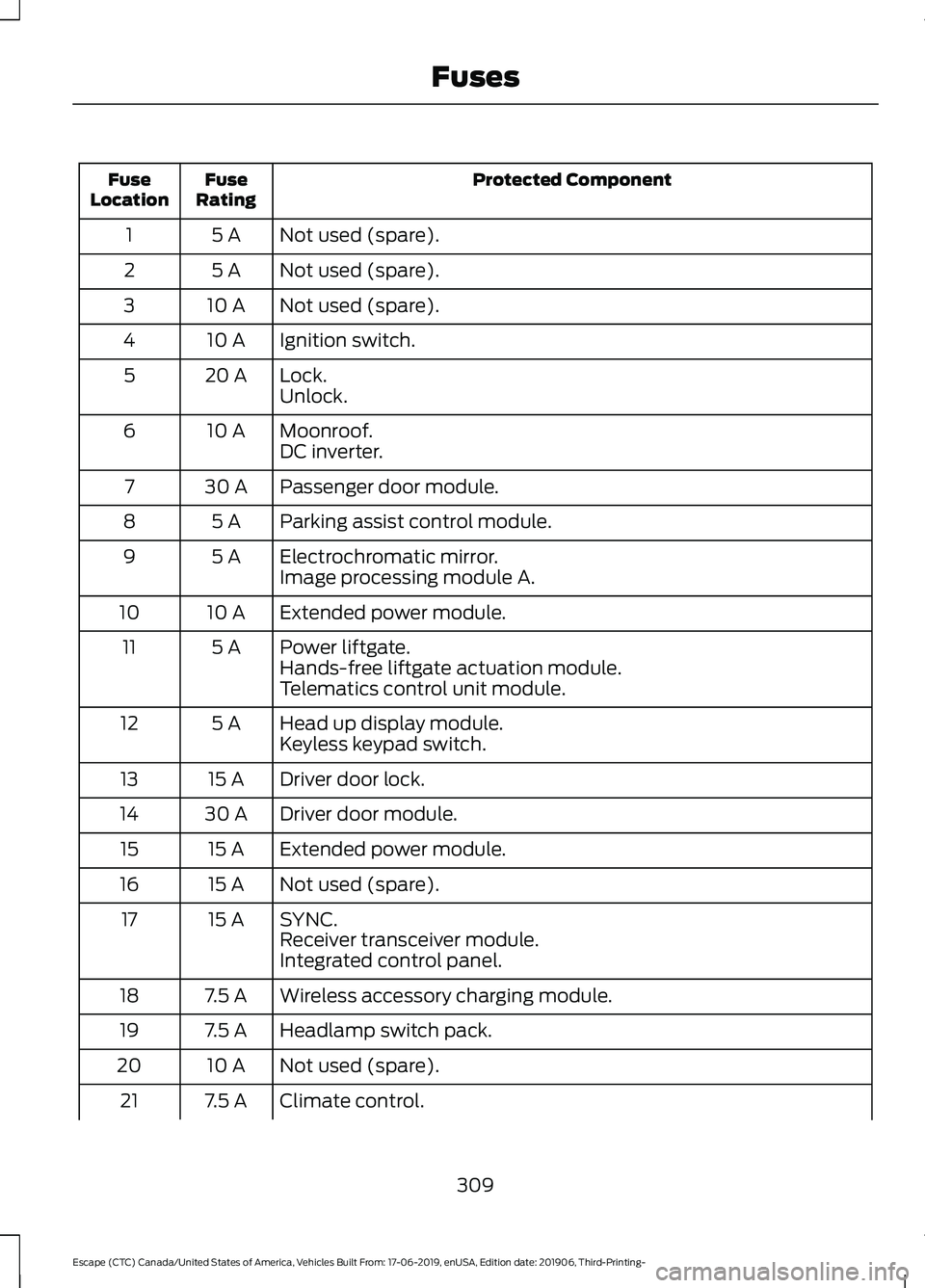
Protected Component
Fuse
Rating
Fuse
Location
Not used (spare).
5 A
1
Not used (spare).
5 A
2
Not used (spare).
10 A
3
Ignition switch.
10 A
4
Lock.
20 A
5
Unlock.
Moonroof.
10 A
6
DC inverter.
Passenger door module.
30 A
7
Parking assist control module.
5 A
8
Electrochromatic mirror.
5 A
9
Image processing module A.
Extended power module.
10 A
10
Power liftgate.
5 A
11
Hands-free liftgate actuation module.
Telematics control unit module.
Head up display module.
5 A
12
Keyless keypad switch.
Driver door lock.
15 A
13
Driver door module.
30 A
14
Extended power module.
15 A
15
Not used (spare).
15 A
16
SYNC.
15 A
17
Receiver transceiver module.
Integrated control panel.
Wireless accessory charging module.
7.5 A
18
Headlamp switch pack.
7.5 A
19
Not used (spare).
10 A
20
Climate control.
7.5 A
21
309
Escape (CTC) Canada/United States of America, Vehicles Built From: 17-06-2019, enUSA, Edition date: 201906, Third-Printing- Fuses
Page 538 of 553
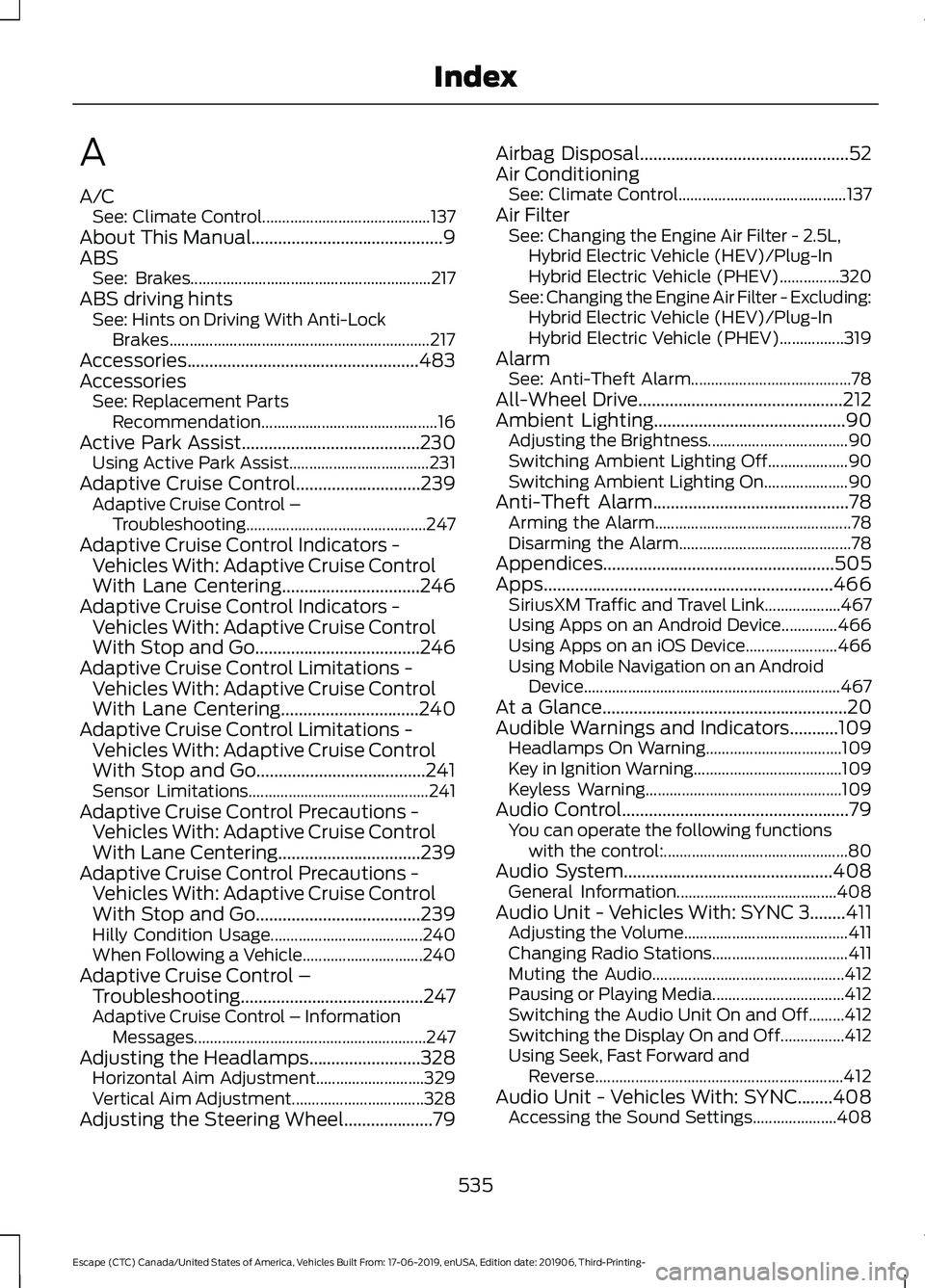
A
A/C
See: Climate Control.......................................... 137
About This Manual...........................................9
ABS See: Brakes............................................................ 217
ABS driving hints See: Hints on Driving With Anti-Lock
Brakes................................................................. 217
Accessories....................................................483
Accessories See: Replacement Parts
Recommendation............................................ 16
Active Park Assist........................................230
Using Active Park Assist................................... 231
Adaptive Cruise Control
............................239
Adaptive Cruise Control –
Troubleshooting............................................. 247
Adaptive Cruise Control Indicators - Vehicles With: Adaptive Cruise Control
With Lane Centering
...............................246
Adaptive Cruise Control Indicators - Vehicles With: Adaptive Cruise Control
With Stop and Go.....................................246
Adaptive Cruise Control Limitations - Vehicles With: Adaptive Cruise Control
With Lane Centering...............................240
Adaptive Cruise Control Limitations - Vehicles With: Adaptive Cruise Control
With Stop and Go......................................241
Sensor Limitations............................................. 241
Adaptive Cruise Control Precautions - Vehicles With: Adaptive Cruise Control
With Lane Centering................................239
Adaptive Cruise Control Precautions - Vehicles With: Adaptive Cruise Control
With Stop and Go.....................................239
Hilly Condition Usage...................................... 240
When Following a Vehicle.............................. 240
Adaptive Cruise Control – Troubleshooting.........................................247
Adaptive Cruise Control – Information Messages.......................................................... 247
Adjusting the Headlamps.........................328 Horizontal Aim Adjustment........................... 329
Vertical Aim Adjustment................................. 328
Adjusting the Steering Wheel
....................79 Airbag Disposal
...............................................52
Air Conditioning See: Climate Control.......................................... 137
Air Filter See: Changing the Engine Air Filter - 2.5L,
Hybrid Electric Vehicle (HEV)/Plug-In
Hybrid Electric Vehicle (PHEV)...............320
See: Changing the Engine Air Filter - Excluding: Hybrid Electric Vehicle (HEV)/Plug-In
Hybrid Electric Vehicle (PHEV)................319
Alarm See: Anti-Theft Alarm........................................ 78
All-Wheel Drive
..............................................212
Ambient Lighting...........................................90 Adjusting the Brightness................................... 90
Switching Ambient Lighting Off.................... 90
Switching Ambient Lighting On..................... 90
Anti-Theft Alarm............................................78 Arming the Alarm................................................. 78
Disarming the Alarm........................................... 78
Appendices....................................................505
Apps.................................................................466 SiriusXM Traffic and Travel Link................... 467
Using Apps on an Android Device..............466
Using Apps on an iOS Device....................... 466
Using Mobile Navigation on an Android Device................................................................ 467
At a Glance.......................................................20
Audible Warnings and Indicators...........109 Headlamps On Warning.................................. 109
Key in Ignition Warning..................................... 109
Keyless Warning................................................. 109
Audio Control
...................................................79
You can operate the following functions
with the control:.............................................. 80
Audio System
...............................................408
General Information........................................ 408
Audio Unit - Vehicles With: SYNC 3........411 Adjusting the Volume......................................... 411
Changing Radio Stations.................................. 411
Muting the Audio................................................ 412
Pausing or Playing Media................................. 412
Switching the Audio Unit On and Off.........412
Switching the Display On and Off................412
Using Seek, Fast Forward and Reverse.............................................................. 412
Audio Unit - Vehicles With: SYNC........408 Accessing the Sound Settings..................... 408
535
Escape (CTC) Canada/United States of America, Vehicles Built From: 17-06-2019, enUSA, Edition date: 201906, Third-Printing- Index
Page 546 of 553

Fuel........................................................................\
...
124
Hill Start Assist.................................................... 124
Keys and Intelligent Access............................ 124
Lane Keeping System........................................ 125
Maintenance......................................................... 126
MyKey...................................................................... 127
Park Aid................................................................... 127
Park Brake............................................................. 128
Power Steering.................................................... 129
Pre-Collision Assist............................................ 129
Remote Start....................................................... 130
Seats....................................................................... 130
Starting System ................................................. 130
Tire Pressure Monitoring System................... 131
Trailer........................................................................\
131
Transmission.........................................................132
Installing Child Restraints...........................24
Child Restraints..................................................... 24
Using Lap and Shoulder Belts......................... 24
Using Lower Anchors and Tethers for CHildren (LATCH)........................................... 26
Using Tether Straps............................................. 28
Instrument Cluster
........................................98
Instrument Lighting Dimmer......................87
Instrument Panel
...........................................20
Interior Lamps.................................................89
Interior Lamp Function...................................... 89
Switching All of the Interior Lamps Off........................................................................\
. 89
Switching All of the Interior Lamps On........................................................................\
. 89
Switching the Front Interior Lamps On and Off........................................................................\
. 90
Switching the Rear Interior Lamps On and Off........................................................................\
. 90
Interior Mirror
...................................................95
Automatic Dimming Mirror.............................. 96
Manual Dimming Mirror..................................... 96
Introduction........................................................9
J
Jump Starting the Vehicle - Excluding: Hybrid Electric Vehicle (HEV)/Plug-In
Hybrid Electric Vehicle (PHEV)...........289
Connecting the Jumper Cables ................... 289
Preparing Your Vehicle.................................... 289
Removing the Jumper Cables...................... 290Starting the Engine...........................................
290
Jump Starting the Vehicle - Hybrid Electric Vehicle (HEV)/Plug-In Hybrid
Electric Vehicle (PHEV)..........................291
Connecting the Jumper Cables ................... 292
Preparing Your Vehicle...................................... 291
Removing the Jumper Cables....................... 293
Starting the Engine........................................... 293
K
Keyless Entry...................................................69 SECURICODE™ KEYLESS ENTRY
KEYPAD.............................................................. 69
Keyless Starting.............................................167 Ignition Modes..................................................... 168
Keys and Remote Controls.........................54
L
Lane Keeping System
.................................251
Switching the System On and Off...............252
Liftgate................................................................71
Lighting Control..............................................86 Flashing High Beam Headlamps.................... 87
Lighting Control Selections.............................. 86
Switching High Beam Headlamps On and Off........................................................................\
. 86
Lighting..............................................................86 General Information........................................... 86
Load Carriers See: Roof Racks and Load Carriers............269
Load Carrying
................................................268
Load Limit.......................................................270
Special Loading Instructions for Owners of
Pick-up Trucks and Utility-type
Vehicles............................................................. 274
Vehicle Loading - with and without a Trailer................................................................. 270
Locking and Unlocking................................66 Activating Intelligent Access............................ 67
Autolock.................................................................. 68
Battery Saver......................................................... 69
Illuminated Entry.................................................. 68
Illuminated Exit..................................................... 69
Locking and Unlocking the Doors with the Key Blade........................................................... 66
Opening a Rear Door from the Inside...........67
543
Escape (CTC) Canada/United States of America, Vehicles Built From: 17-06-2019, enUSA, Edition date: 201906, Third-Printing- Index