cruise control FORD ESCAPE 2020 Owner's Manual
[x] Cancel search | Manufacturer: FORD, Model Year: 2020, Model line: ESCAPE, Model: FORD ESCAPE 2020Pages: 553, PDF Size: 7.73 MB
Page 249 of 553
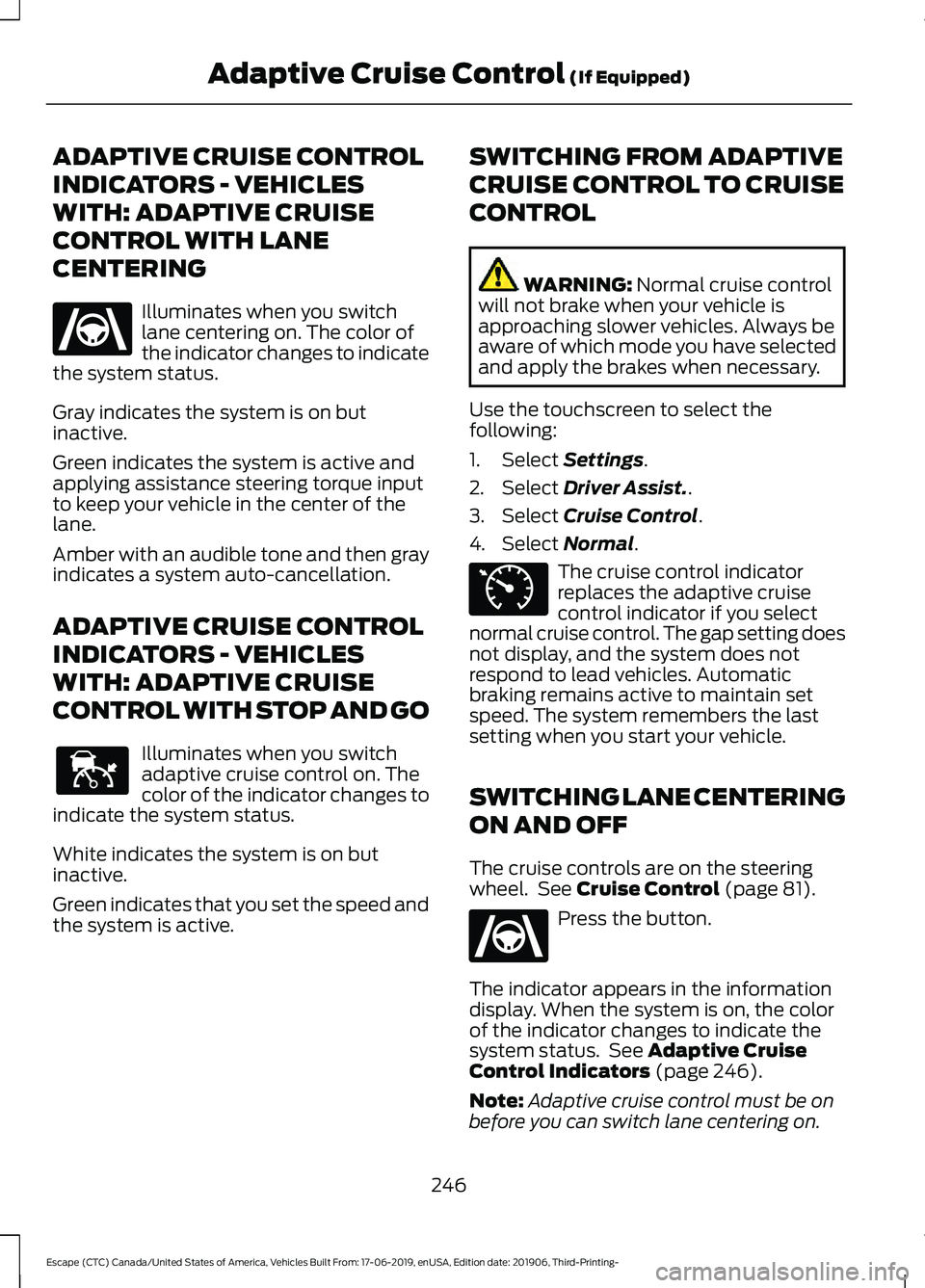
ADAPTIVE CRUISE CONTROL
INDICATORS - VEHICLES
WITH: ADAPTIVE CRUISE
CONTROL WITH LANE
CENTERING
Illuminates when you switch
lane centering on. The color of
the indicator changes to indicate
the system status.
Gray indicates the system is on but
inactive.
Green indicates the system is active and
applying assistance steering torque input
to keep your vehicle in the center of the
lane.
Amber with an audible tone and then gray
indicates a system auto-cancellation.
ADAPTIVE CRUISE CONTROL
INDICATORS - VEHICLES
WITH: ADAPTIVE CRUISE
CONTROL WITH STOP AND GO Illuminates when you switch
adaptive cruise control on. The
color of the indicator changes to
indicate the system status.
White indicates the system is on but
inactive.
Green indicates that you set the speed and
the system is active. SWITCHING FROM ADAPTIVE
CRUISE CONTROL TO CRUISE
CONTROL WARNING: Normal cruise control
will not brake when your vehicle is
approaching slower vehicles. Always be
aware of which mode you have selected
and apply the brakes when necessary.
Use the touchscreen to select the
following:
1. Select
Settings.
2. Select
Driver Assist..
3. Select
Cruise Control.
4. Select
Normal. The cruise control indicator
replaces the adaptive cruise
control indicator if you select
normal cruise control. The gap setting does
not display, and the system does not
respond to lead vehicles. Automatic
braking remains active to maintain set
speed. The system remembers the last
setting when you start your vehicle.
SWITCHING LANE CENTERING
ON AND OFF
The cruise controls are on the steering
wheel. See
Cruise Control (page 81). Press the button.
The indicator appears in the information
display. When the system is on, the color
of the indicator changes to indicate the
system status. See
Adaptive Cruise
Control Indicators (page 246).
Note: Adaptive cruise control must be on
before you can switch lane centering on.
246
Escape (CTC) Canada/United States of America, Vehicles Built From: 17-06-2019, enUSA, Edition date: 201906, Third-Printing- Adaptive Cruise Control
(If Equipped)E262175 E144529 E71340 E262175
Page 250 of 553
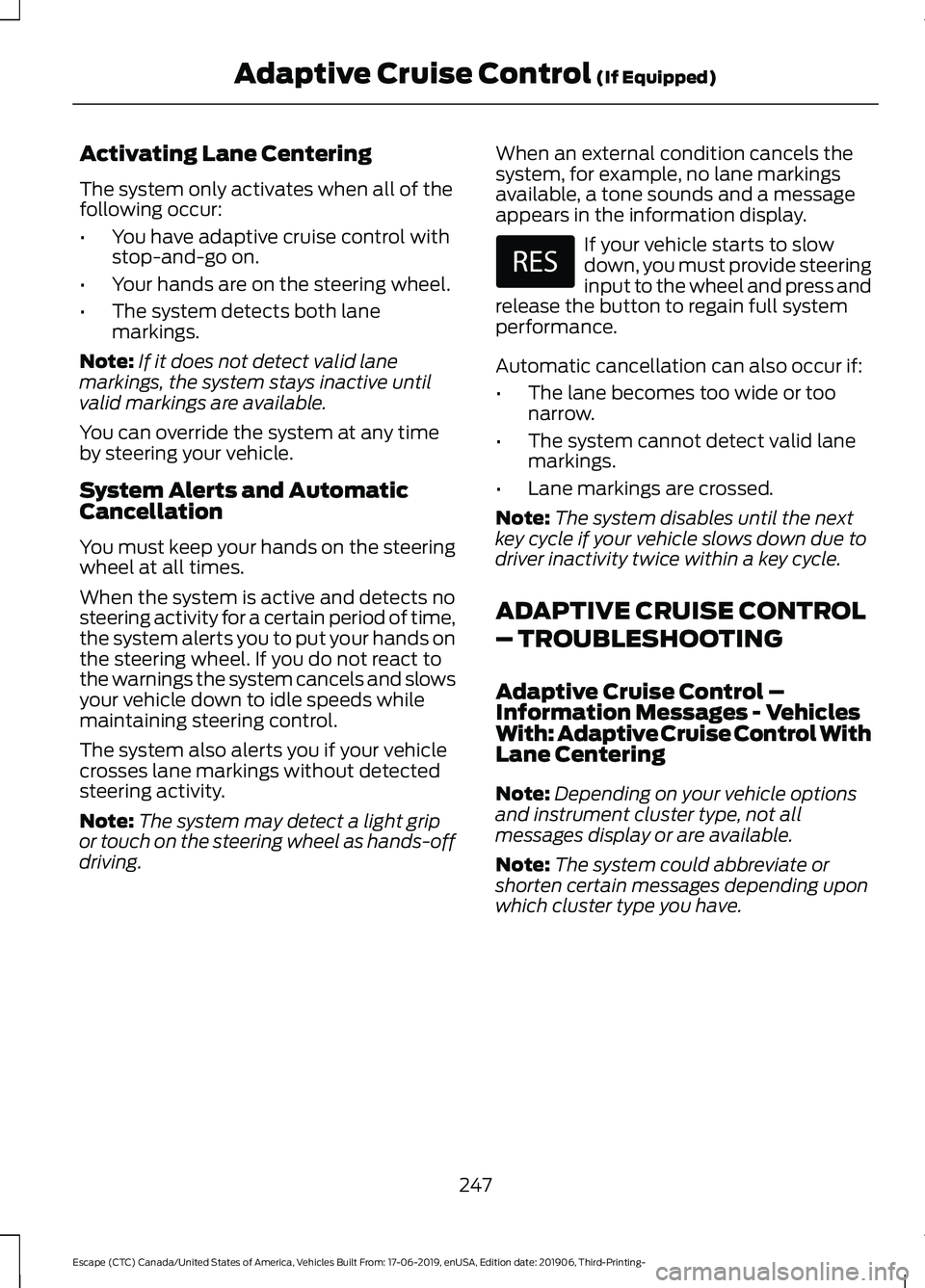
Activating Lane Centering
The system only activates when all of the
following occur:
•
You have adaptive cruise control with
stop-and-go on.
• Your hands are on the steering wheel.
• The system detects both lane
markings.
Note: If it does not detect valid lane
markings, the system stays inactive until
valid markings are available.
You can override the system at any time
by steering your vehicle.
System Alerts and Automatic
Cancellation
You must keep your hands on the steering
wheel at all times.
When the system is active and detects no
steering activity for a certain period of time,
the system alerts you to put your hands on
the steering wheel. If you do not react to
the warnings the system cancels and slows
your vehicle down to idle speeds while
maintaining steering control.
The system also alerts you if your vehicle
crosses lane markings without detected
steering activity.
Note: The system may detect a light grip
or touch on the steering wheel as hands-off
driving. When an external condition cancels the
system, for example, no lane markings
available, a tone sounds and a message
appears in the information display. If your vehicle starts to slow
down, you must provide steering
input to the wheel and press and
release the button to regain full system
performance.
Automatic cancellation can also occur if:
• The lane becomes too wide or too
narrow.
• The system cannot detect valid lane
markings.
• Lane markings are crossed.
Note: The system disables until the next
key cycle if your vehicle slows down due to
driver inactivity twice within a key cycle.
ADAPTIVE CRUISE CONTROL
– TROUBLESHOOTING
Adaptive Cruise Control –
Information Messages - Vehicles
With: Adaptive Cruise Control With
Lane Centering
Note: Depending on your vehicle options
and instrument cluster type, not all
messages display or are available.
Note: The system could abbreviate or
shorten certain messages depending upon
which cluster type you have.
247
Escape (CTC) Canada/United States of America, Vehicles Built From: 17-06-2019, enUSA, Edition date: 201906, Third-Printing- Adaptive Cruise Control (If Equipped)
Page 251 of 553
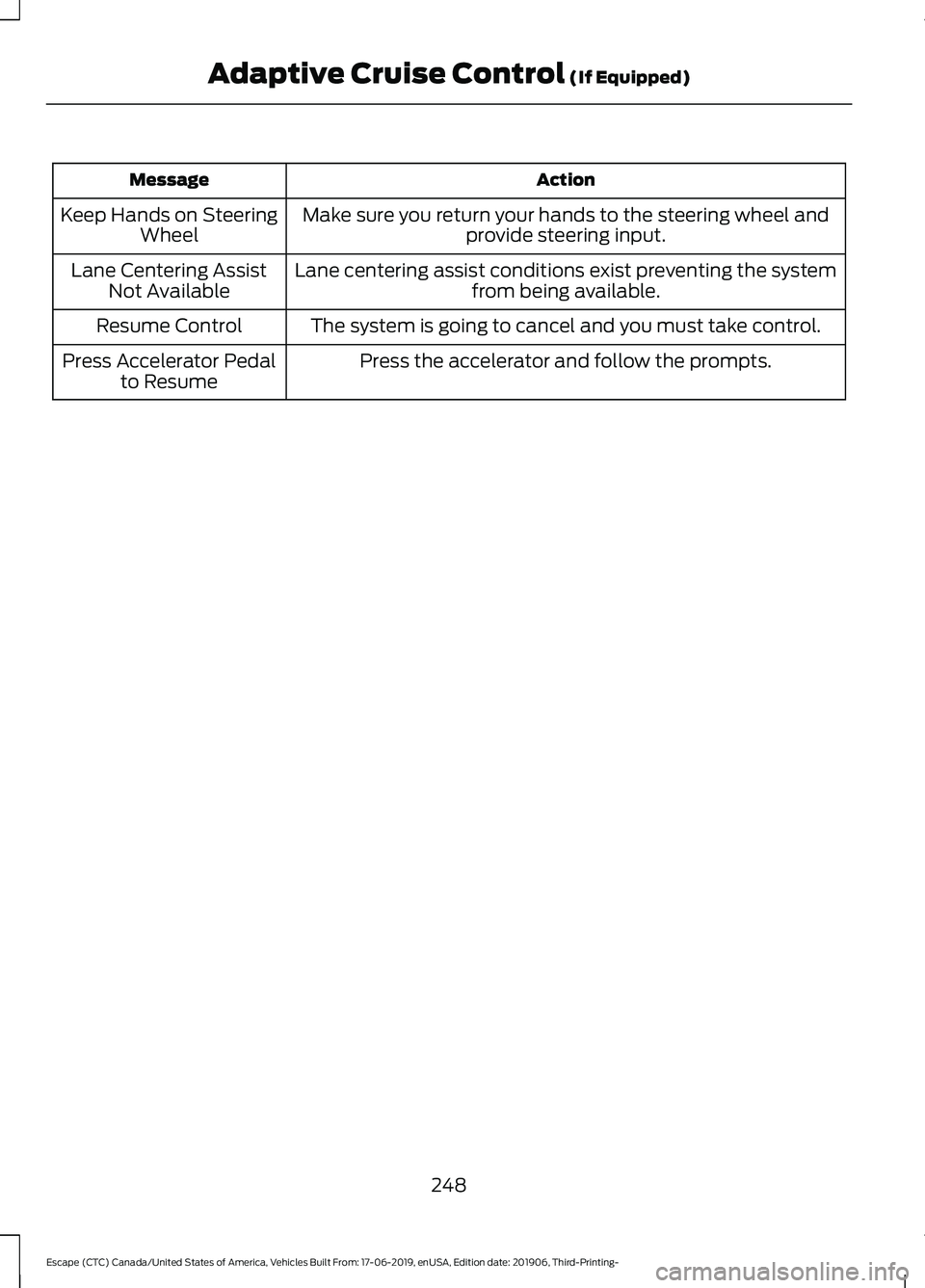
Action
Message
Make sure you return your hands to the steering wheel andprovide steering input.
Keep Hands on Steering
Wheel
Lane centering assist conditions exist preventing the system from being available.
Lane Centering Assist
Not Available
The system is going to cancel and you must take control.
Resume Control
Press the accelerator and follow the prompts.
Press Accelerator Pedal
to Resume
248
Escape (CTC) Canada/United States of America, Vehicles Built From: 17-06-2019, enUSA, Edition date: 201906, Third-Printing- Adaptive Cruise Control (If Equipped)
Page 252 of 553
Adaptive Cruise Control –
Information Messages - Vehicles
With: Adaptive Cruise Control With
Stop and Go
Note:
Depending on your vehicle options
and instrument cluster type, not all
messages display or are available.
Note: The system could abbreviate or
shorten certain messages depending upon
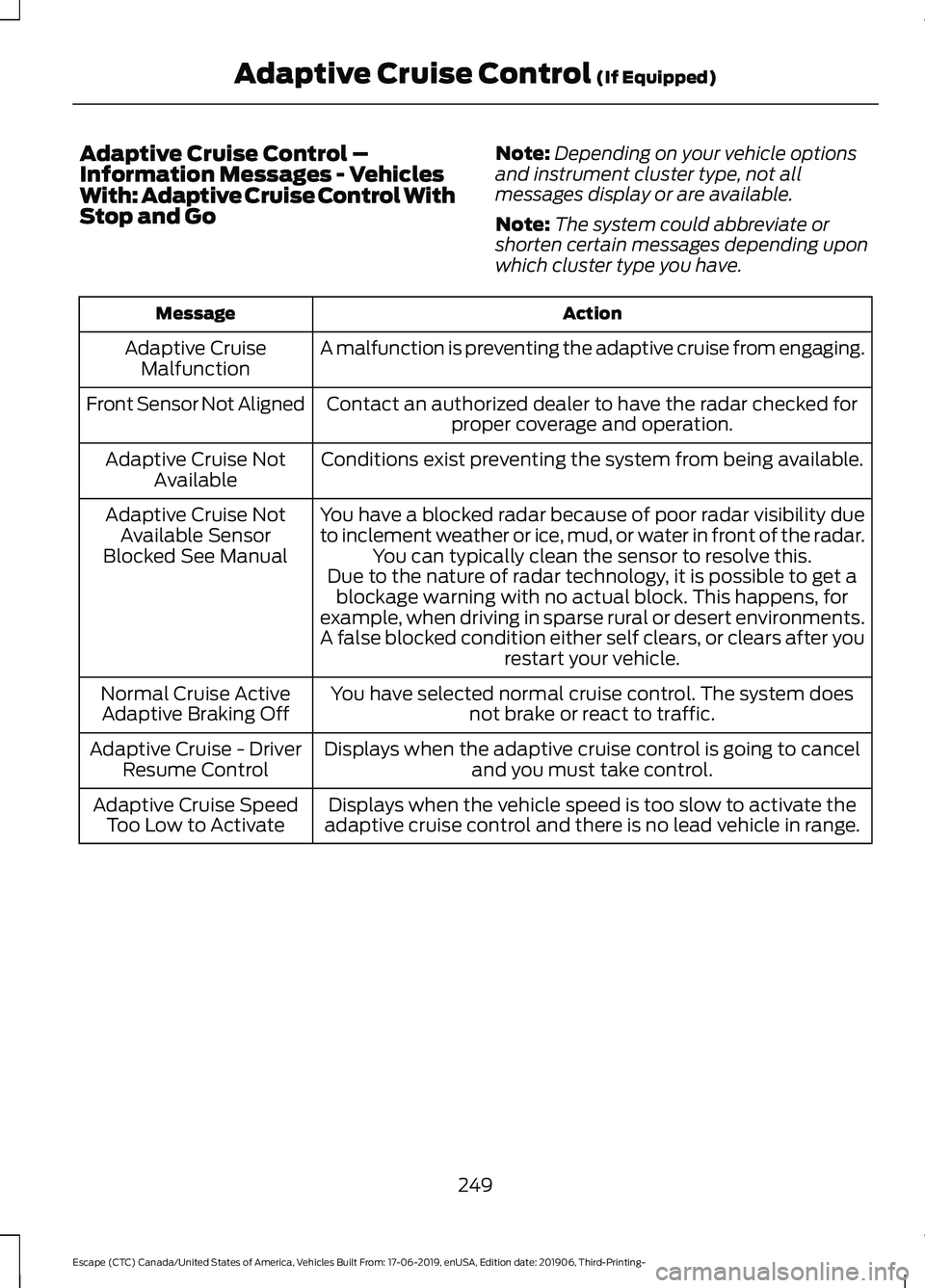
which cluster type you have. Action
Message
A malfunction is preventing the adaptive cruise from engaging.
Adaptive Cruise
Malfunction
Front Sensor Not Aligned Contact an authorized dealer to have the radar checked for
proper coverage and operation.
Conditions exist preventing the system from being available.
Adaptive Cruise Not
Available
You have a blocked radar because of poor radar visibility due
to inclement weather or ice, mud, or water in front of the radar.You can typically clean the sensor to resolve this.
Adaptive Cruise Not
Available Sensor
Blocked See Manual Due to the nature of radar technology, it is possible to get ablockage warning with no actual block. This happens, for
example, when driving in sparse rural or desert environments.
A false blocked condition either self clears, or clears after you restart your vehicle.
You have selected normal cruise control. The system does not brake or react to traffic.
Normal Cruise Active
Adaptive Braking Off
Displays when the adaptive cruise control is going to canceland you must take control.
Adaptive Cruise - Driver
Resume Control
Displays when the vehicle speed is too slow to activate the
adaptive cruise control and there is no lead vehicle in range.
Adaptive Cruise Speed
Too Low to Activate
249
Escape (CTC) Canada/United States of America, Vehicles Built From: 17-06-2019, enUSA, Edition date: 201906, Third-Printing- Adaptive Cruise Control (If Equipped)
Page 265 of 553
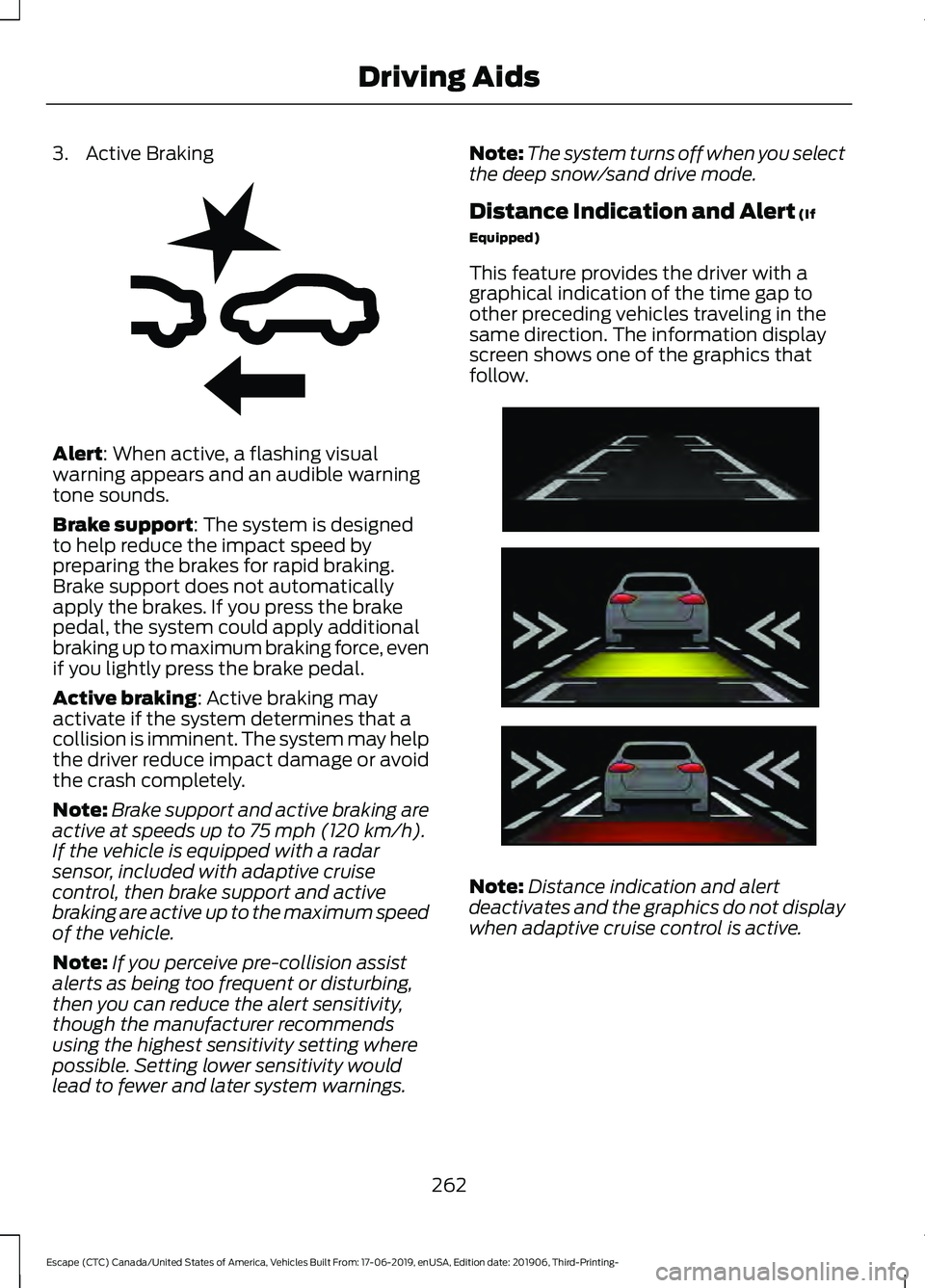
3. Active Braking
Alert: When active, a flashing visual
warning appears and an audible warning
tone sounds.
Brake support
: The system is designed
to help reduce the impact speed by
preparing the brakes for rapid braking.
Brake support does not automatically
apply the brakes. If you press the brake
pedal, the system could apply additional
braking up to maximum braking force, even
if you lightly press the brake pedal.
Active braking
: Active braking may
activate if the system determines that a
collision is imminent. The system may help
the driver reduce impact damage or avoid
the crash completely.
Note: Brake support and active braking are
active at speeds up to
75 mph (120 km/h).
If the vehicle is equipped with a radar
sensor, included with adaptive cruise
control, then brake support and active
braking are active up to the maximum speed
of the vehicle.
Note: If you perceive pre-collision assist
alerts as being too frequent or disturbing,
then you can reduce the alert sensitivity,
though the manufacturer recommends
using the highest sensitivity setting where
possible. Setting lower sensitivity would
lead to fewer and later system warnings. Note:
The system turns off when you select
the deep snow/sand drive mode.
Distance Indication and Alert
(If
Equipped)
This feature provides the driver with a
graphical indication of the time gap to
other preceding vehicles traveling in the
same direction. The information display
screen shows one of the graphics that
follow. Note:
Distance indication and alert
deactivates and the graphics do not display
when adaptive cruise control is active.
262
Escape (CTC) Canada/United States of America, Vehicles Built From: 17-06-2019, enUSA, Edition date: 201906, Third-Printing- Driving AidsE255268 E254791
Page 287 of 553
ECONOMICAL DRIVING
Your fuel economy is affected by several
things, such as how you drive, the
conditions you drive under, and how you
maintain your vehicle.
You may improve your fuel economy by
keeping these things in mind:
•
Accelerate and slow down in a smooth,
moderate fashion.
• Drive at steady speeds without
stopping.
• Anticipate stops; slowing down may
eliminate the need to stop.
• Combine errands and minimize
stop-and-go driving.
• Close the windows for high-speed
driving.
• Drive at reasonable speeds (traveling
at 55 mph [88 km/h] uses 15% less
fuel than traveling at 65 mph [105
km/h]).
• Keep the tires properly inflated and use
only the recommended size.
• Use the recommended engine oil.
• Perform all regularly scheduled
maintenance.
Avoid these actions; they reduce your fuel
economy:
• Sudden accelerations or hard
accelerations.
• Revving the engine before turning it off.
• Idle for periods longer than one minute.
• Warm up your vehicle on cold
mornings.
• Use the air conditioner or front
defroster.
• Use the speed control in hilly terrain.
• Rest your foot on the brake pedal while
driving. •
Drive a heavily loaded vehicle or tow a
trailer.
• Carry unnecessary weight
(approximately 1 mpg [0.4 km/L] is
lost for every 400 lb [180 kilogram] of
weight carried).
• Driving with the wheels out of
alignment.
Conditions
• Heavily loading a vehicle or towing a
trailer may reduce fuel economy at any
speed.
• Adding certain accessories to your
vehicle (for example bug deflectors,
rollbars, light bars, running boards, ski
racks or luggage racks) may reduce
fuel economy.
• To maximize the fuel economy, drive
with the tonneau cover installed (if
equipped).
• Using fuel blended with alcohol may
lower fuel economy.
• Fuel economy may decrease with lower
temperatures during the first 5–10 mi
(12 –16 km) of driving.
• Driving on flat terrain offers improved
fuel economy as compared to driving
on hilly terrain.
• Transmissions give their best fuel
economy when operated in the top
cruise gear and with steady pressure
on the gas pedal.
• Four-wheel-drive operation (if
equipped) is less fuel efficient than
two-wheel-drive operation.
BREAKING-IN
You need to break in new tires for
approximately
300 mi (480 km). During
this time, your vehicle may exhibit some
unusual driving characteristics.
284
Escape (CTC) Canada/United States of America, Vehicles Built From: 17-06-2019, enUSA, Edition date: 201906, Third-Printing- Driving Hints
Page 309 of 553
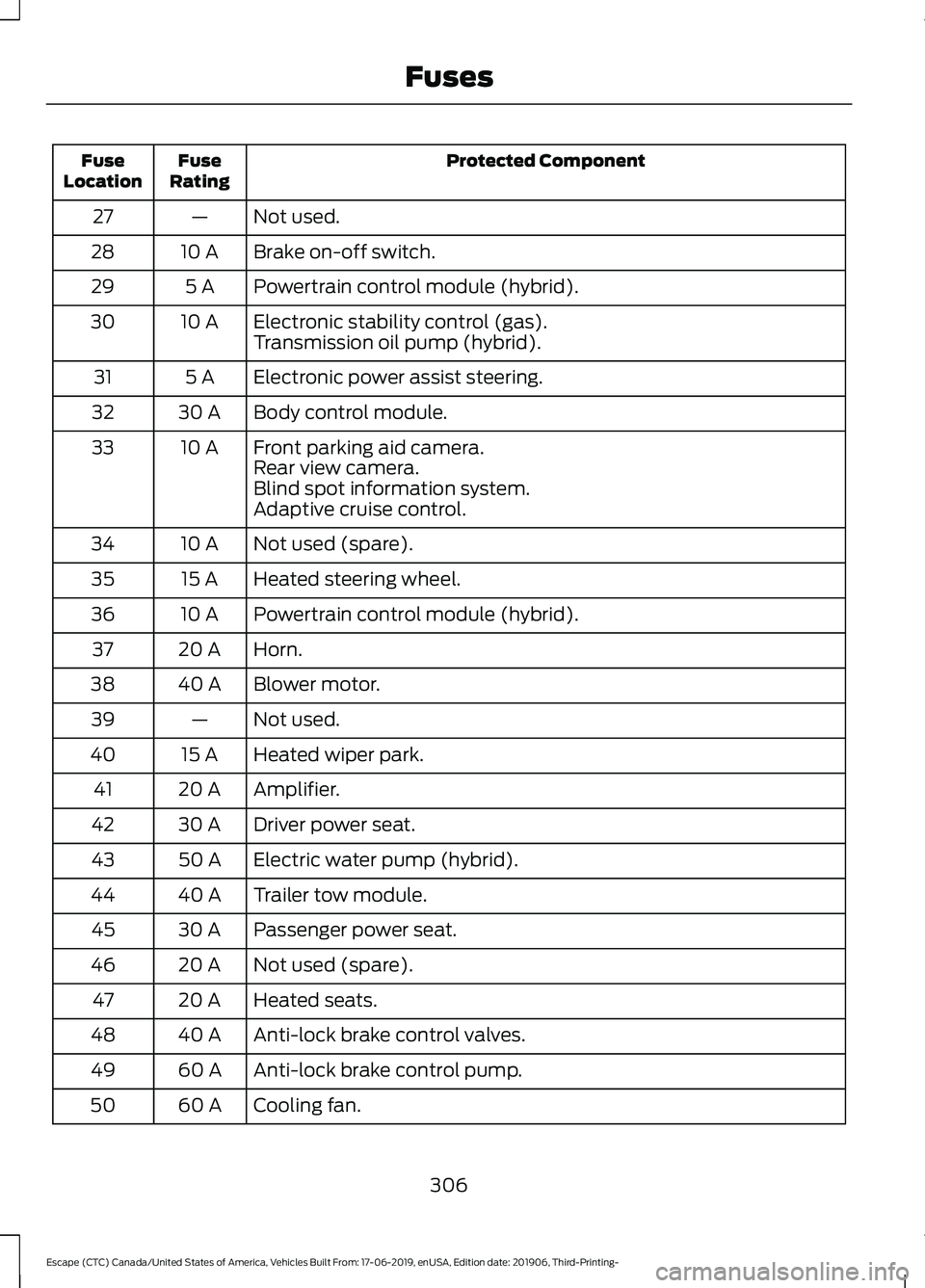
Protected Component
Fuse
Rating
Fuse
Location
Not used.
—
27
Brake on-off switch.
10 A
28
Powertrain control module (hybrid).
5 A
29
Electronic stability control (gas).
10 A
30
Transmission oil pump (hybrid).
Electronic power assist steering.
5 A
31
Body control module.
30 A
32
Front parking aid camera.
10 A
33
Rear view camera.
Blind spot information system.
Adaptive cruise control.
Not used (spare).
10 A
34
Heated steering wheel.
15 A
35
Powertrain control module (hybrid).
10 A
36
Horn.
20 A
37
Blower motor.
40 A
38
Not used.
—
39
Heated wiper park.
15 A
40
Amplifier.
20 A
41
Driver power seat.
30 A
42
Electric water pump (hybrid).
50 A
43
Trailer tow module.
40 A
44
Passenger power seat.
30 A
45
Not used (spare).
20 A
46
Heated seats.
20 A
47
Anti-lock brake control valves.
40 A
48
Anti-lock brake control pump.
60 A
49
Cooling fan.
60 A
50
306
Escape (CTC) Canada/United States of America, Vehicles Built From: 17-06-2019, enUSA, Edition date: 201906, Third-Printing- Fuses
Page 538 of 553
A
A/C
See: Climate Control.......................................... 137
About This Manual...........................................9
ABS See: Brakes............................................................ 217
ABS driving hints See: Hints on Driving With Anti-Lock
Brakes................................................................. 217
Accessories....................................................483
Accessories See: Replacement Parts
Recommendation............................................ 16
Active Park Assist........................................230
Using Active Park Assist................................... 231
Adaptive Cruise Control
............................239
Adaptive Cruise Control –
Troubleshooting............................................. 247
Adaptive Cruise Control Indicators - Vehicles With: Adaptive Cruise Control
With Lane Centering
...............................246
Adaptive Cruise Control Indicators - Vehicles With: Adaptive Cruise Control
With Stop and Go.....................................246
Adaptive Cruise Control Limitations - Vehicles With: Adaptive Cruise Control
With Lane Centering...............................240
Adaptive Cruise Control Limitations - Vehicles With: Adaptive Cruise Control
With Stop and Go......................................241
Sensor Limitations............................................. 241
Adaptive Cruise Control Precautions - Vehicles With: Adaptive Cruise Control
With Lane Centering................................239
Adaptive Cruise Control Precautions - Vehicles With: Adaptive Cruise Control
With Stop and Go.....................................239
Hilly Condition Usage...................................... 240
When Following a Vehicle.............................. 240
Adaptive Cruise Control – Troubleshooting.........................................247
Adaptive Cruise Control – Information Messages.......................................................... 247
Adjusting the Headlamps.........................328 Horizontal Aim Adjustment........................... 329
Vertical Aim Adjustment................................. 328
Adjusting the Steering Wheel
....................79 Airbag Disposal
...............................................52
Air Conditioning See: Climate Control.......................................... 137
Air Filter See: Changing the Engine Air Filter - 2.5L,
Hybrid Electric Vehicle (HEV)/Plug-In
Hybrid Electric Vehicle (PHEV)...............320
See: Changing the Engine Air Filter - Excluding: Hybrid Electric Vehicle (HEV)/Plug-In
Hybrid Electric Vehicle (PHEV)................319
Alarm See: Anti-Theft Alarm........................................ 78
All-Wheel Drive
..............................................212
Ambient Lighting...........................................90 Adjusting the Brightness................................... 90
Switching Ambient Lighting Off.................... 90
Switching Ambient Lighting On..................... 90
Anti-Theft Alarm............................................78 Arming the Alarm................................................. 78
Disarming the Alarm........................................... 78
Appendices....................................................505
Apps.................................................................466 SiriusXM Traffic and Travel Link................... 467
Using Apps on an Android Device..............466
Using Apps on an iOS Device....................... 466
Using Mobile Navigation on an Android Device................................................................ 467
At a Glance.......................................................20
Audible Warnings and Indicators...........109 Headlamps On Warning.................................. 109
Key in Ignition Warning..................................... 109
Keyless Warning................................................. 109
Audio Control
...................................................79
You can operate the following functions
with the control:.............................................. 80
Audio System
...............................................408
General Information........................................ 408
Audio Unit - Vehicles With: SYNC 3........411 Adjusting the Volume......................................... 411
Changing Radio Stations.................................. 411
Muting the Audio................................................ 412
Pausing or Playing Media................................. 412
Switching the Audio Unit On and Off.........412
Switching the Display On and Off................412
Using Seek, Fast Forward and Reverse.............................................................. 412
Audio Unit - Vehicles With: SYNC........408 Accessing the Sound Settings..................... 408
535
Escape (CTC) Canada/United States of America, Vehicles Built From: 17-06-2019, enUSA, Edition date: 201906, Third-Printing- Index
Page 542 of 553
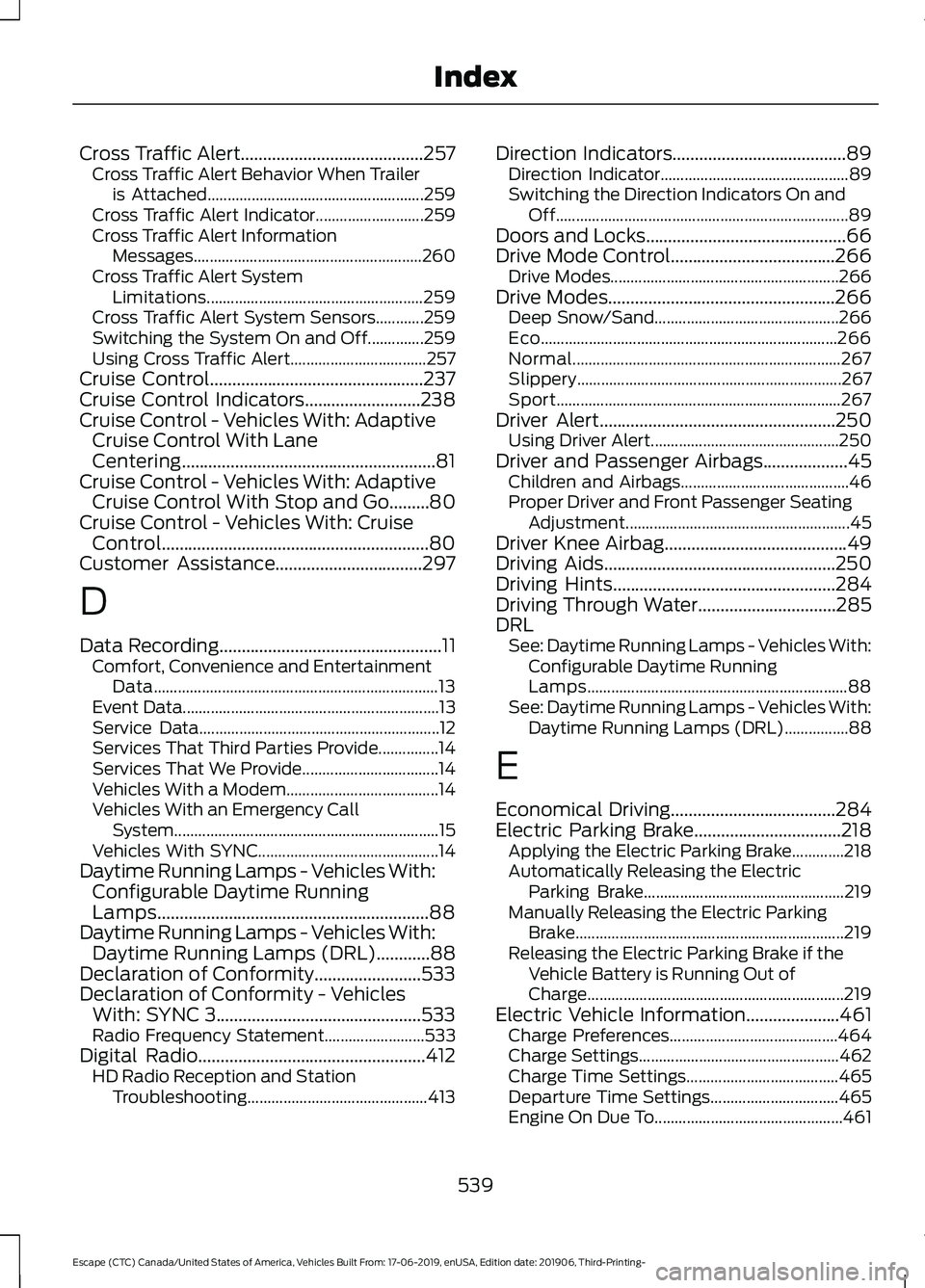
Cross Traffic Alert.........................................257
Cross Traffic Alert Behavior When Trailer
is Attached...................................................... 259
Cross Traffic Alert Indicator........................... 259
Cross Traffic Alert Information Messages......................................................... 260
Cross Traffic Alert System Limitations...................................................... 259
Cross Traffic Alert System Sensors............259
Switching the System On and Off..............259
Using Cross Traffic Alert.................................. 257
Cruise Control................................................237
Cruise Control Indicators..........................238
Cruise Control - Vehicles With: Adaptive Cruise Control With Lane
Centering.........................................................81
Cruise Control - Vehicles With: Adaptive Cruise Control With Stop and Go
.........80
Cruise Control - Vehicles With: Cruise Control............................................................80
Customer Assistance
.................................297
D
Data Recording
..................................................11
Comfort, Convenience and Entertainment
Data....................................................................... 13
Event Data................................................................ 13
Service Data............................................................ 12
Services That Third Parties Provide...............14
Services That We Provide.................................. 14
Vehicles With a Modem...................................... 14
Vehicles With an Emergency Call System.................................................................. 15
Vehicles With SYNC............................................. 14
Daytime Running Lamps - Vehicles With: Configurable Daytime Running
Lamps.............................................................88
Daytime Running Lamps - Vehicles With: Daytime Running Lamps (DRL)............88
Declaration of Conformity........................533
Declaration of Conformity - Vehicles With: SYNC 3..............................................533
Radio Frequency Statement......................... 533
Digital Radio
...................................................412
HD Radio Reception and Station
Troubleshooting............................................. 413Direction Indicators
.......................................89
Direction Indicator............................................... 89
Switching the Direction Indicators On and Off........................................................................\
. 89
Doors and Locks.............................................66
Drive Mode Control.....................................266 Drive Modes......................................................... 266
Drive Modes
...................................................266
Deep Snow/Sand.............................................. 266
Eco........................................................................\
.. 266
Normal................................................................... 267
Slippery.................................................................. 267
Sport....................................................................... 267
Driver Alert.....................................................250 Using Driver Alert............................................... 250
Driver and Passenger Airbags...................45 Children and Airbags.......................................... 46
Proper Driver and Front Passenger Seating Adjustment........................................................ 45
Driver Knee Airbag
.........................................49
Driving Aids....................................................250
Driving Hints..................................................284
Driving Through Water...............................285
DRL See: Daytime Running Lamps - Vehicles With:
Configurable Daytime Running
Lamps................................................................. 88
See: Daytime Running Lamps - Vehicles With: Daytime Running Lamps (DRL)................88
E
Economical Driving
.....................................284
Electric Parking Brake.................................218 Applying the Electric Parking Brake.............218
Automatically Releasing the Electric
Parking Brake.................................................. 219
Manually Releasing the Electric Parking Brake................................................................... 219
Releasing the Electric Parking Brake if the Vehicle Battery is Running Out of
Charge................................................................ 219
Electric Vehicle Information.....................461 Charge Preferences.......................................... 464
Charge Settings.................................................. 462
Charge Time Settings...................................... 465
Departure Time Settings................................ 465
Engine On Due To............................................... 461
539
Escape (CTC) Canada/United States of America, Vehicles Built From: 17-06-2019, enUSA, Edition date: 201906, Third-Printing- Index
Page 545 of 553
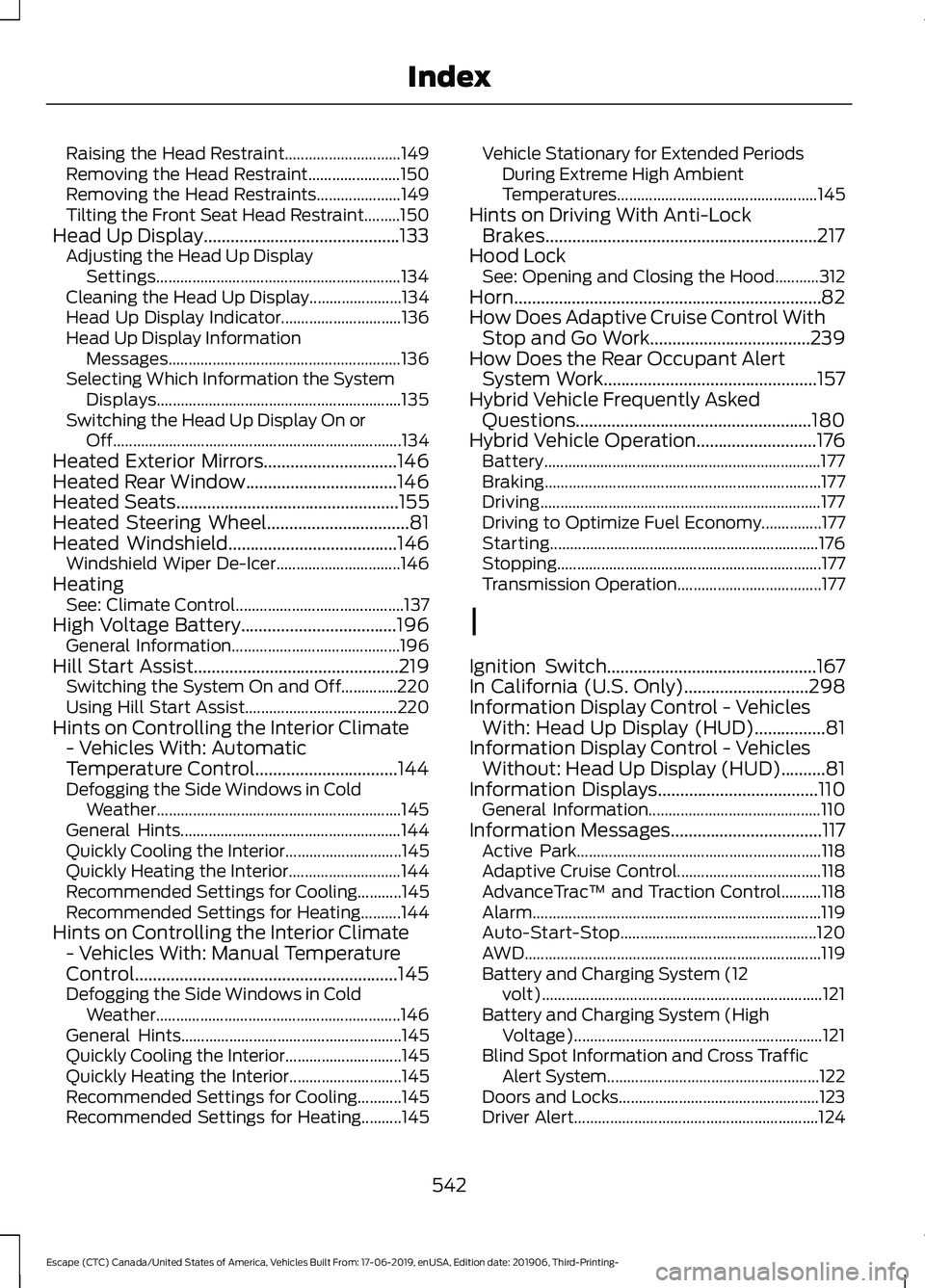
Raising the Head Restraint.............................
149
Removing the Head Restraint....................... 150
Removing the Head Restraints..................... 149
Tilting the Front Seat Head Restraint.........150
Head Up Display............................................133 Adjusting the Head Up Display
Settings............................................................. 134
Cleaning the Head Up Display....................... 134
Head Up Display Indicator.............................. 136
Head Up Display Information Messages.......................................................... 136
Selecting Which Information the System Displays............................................................. 135
Switching the Head Up Display On or Off........................................................................\
134
Heated Exterior Mirrors..............................146
Heated Rear Window..................................146
Heated Seats..................................................155
Heated Steering Wheel................................81
Heated Windshield......................................146
Windshield Wiper De-Icer............................... 146
Heating See: Climate Control.......................................... 137
High Voltage Battery...................................196 General Information.......................................... 196
Hill Start Assist
..............................................219
Switching the System On and Off..............220
Using Hill Start Assist...................................... 220
Hints on Controlling the Interior Climate - Vehicles With: Automatic
Temperature Control
................................144
Defogging the Side Windows in Cold
Weather............................................................. 145
General Hints....................................................... 144
Quickly Cooling the Interior............................. 145
Quickly Heating the Interior............................ 144
Recommended Settings for Cooling...........145
Recommended Settings for Heating..........144
Hints on Controlling the Interior Climate - Vehicles With: Manual Temperature
Control...........................................................145
Defogging the Side Windows in Cold Weather............................................................. 146
General Hints....................................................... 145
Quickly Cooling the Interior............................. 145
Quickly Heating the Interior............................ 145
Recommended Settings for Cooling...........145
Recommended Settings for Heating..........145 Vehicle Stationary for Extended Periods
During Extreme High Ambient
Temperatures.................................................. 145
Hints on Driving With Anti-Lock Brakes.............................................................217
Hood Lock See: Opening and Closing the Hood...........312
Horn.....................................................................82
How Does Adaptive Cruise Control With Stop and Go Work....................................239
How Does the Rear Occupant Alert System Work
................................................157
Hybrid Vehicle Frequently Asked Questions.....................................................180
Hybrid Vehicle Operation...........................176 Battery..................................................................... 177
Braking..................................................................... 177
Driving...................................................................... 177
Driving to Optimize Fuel Economy...............177
Starting................................................................... 176
Stopping.................................................................. 177
Transmission Operation.................................... 177
I
Ignition Switch
...............................................167
In California (U.S. Only)............................298
Information Display Control - Vehicles With: Head Up Display (HUD)................81
Information Display Control - Vehicles Without: Head Up Display (HUD)
..........81
Information Displays....................................110
General Information........................................... 110
Information Messages
..................................117
Active Park............................................................. 118
Adaptive Cruise Control.................................... 118
AdvanceTrac ™ and Traction Control..........118
Alarm........................................................................\
119
Auto-Start-Stop................................................. 120
AWD
........................................................................\
.. 119
Battery and Charging System (12 volt)...................................................................... 121
Battery and Charging System (High Voltage).............................................................. 121
Blind Spot Information and Cross Traffic Alert System..................................................... 122
Doors and Locks.................................................. 123
Driver Alert............................................................. 124
542
Escape (CTC) Canada/United States of America, Vehicles Built From: 17-06-2019, enUSA, Edition date: 201906, Third-Printing- Index