rear parking aid sensor FORD ESCAPE 2020 Owners Manual
[x] Cancel search | Manufacturer: FORD, Model Year: 2020, Model line: ESCAPE, Model: FORD ESCAPE 2020Pages: 553, PDF Size: 7.73 MB
Page 130 of 553
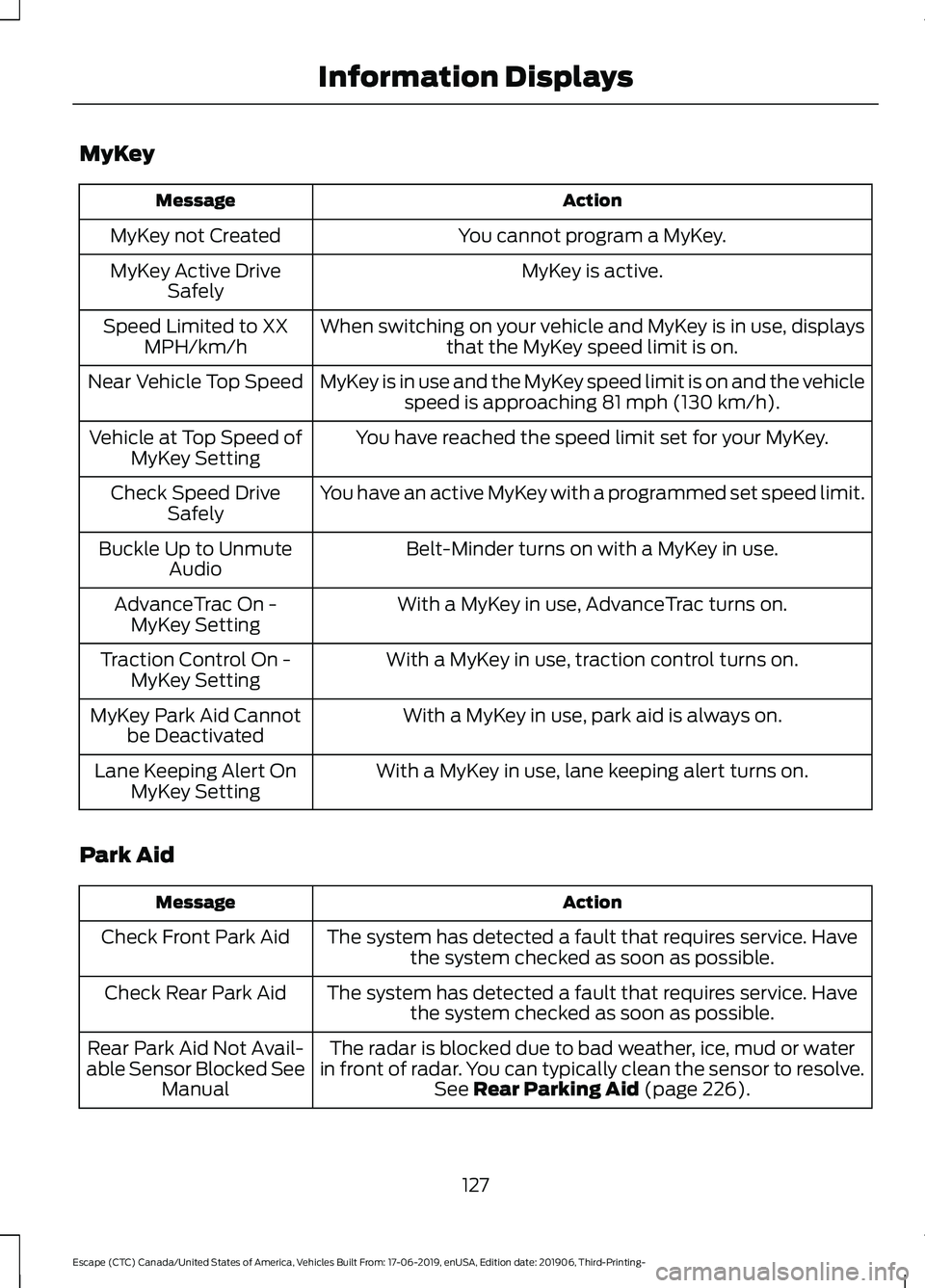
MyKey
Action
Message
You cannot program a MyKey.
MyKey not Created
MyKey is active.
MyKey Active Drive
Safely
When switching on your vehicle and MyKey is in use, displaysthat the MyKey speed limit is on.
Speed Limited to XX
MPH/km/h
MyKey is in use and the MyKey speed limit is on and the vehiclespeed is approaching 81 mph (130 km/h).
Near Vehicle Top Speed
You have reached the speed limit set for your MyKey.
Vehicle at Top Speed of
MyKey Setting
You have an active MyKey with a programmed set speed limit.
Check Speed Drive
Safely
Belt-Minder turns on with a MyKey in use.
Buckle Up to Unmute
Audio
With a MyKey in use, AdvanceTrac turns on.
AdvanceTrac On -
MyKey Setting
With a MyKey in use, traction control turns on.
Traction Control On -
MyKey Setting
With a MyKey in use, park aid is always on.
MyKey Park Aid Cannot
be Deactivated
With a MyKey in use, lane keeping alert turns on.
Lane Keeping Alert On
MyKey Setting
Park Aid Action
Message
The system has detected a fault that requires service. Havethe system checked as soon as possible.
Check Front Park Aid
The system has detected a fault that requires service. Havethe system checked as soon as possible.
Check Rear Park Aid
The radar is blocked due to bad weather, ice, mud or water
in front of radar. You can typically clean the sensor to resolve. See
Rear Parking Aid (page 226).
Rear Park Aid Not Avail-
able Sensor Blocked See Manual
127
Escape (CTC) Canada/United States of America, Vehicles Built From: 17-06-2019, enUSA, Edition date: 201906, Third-Printing- Information Displays
Page 131 of 553
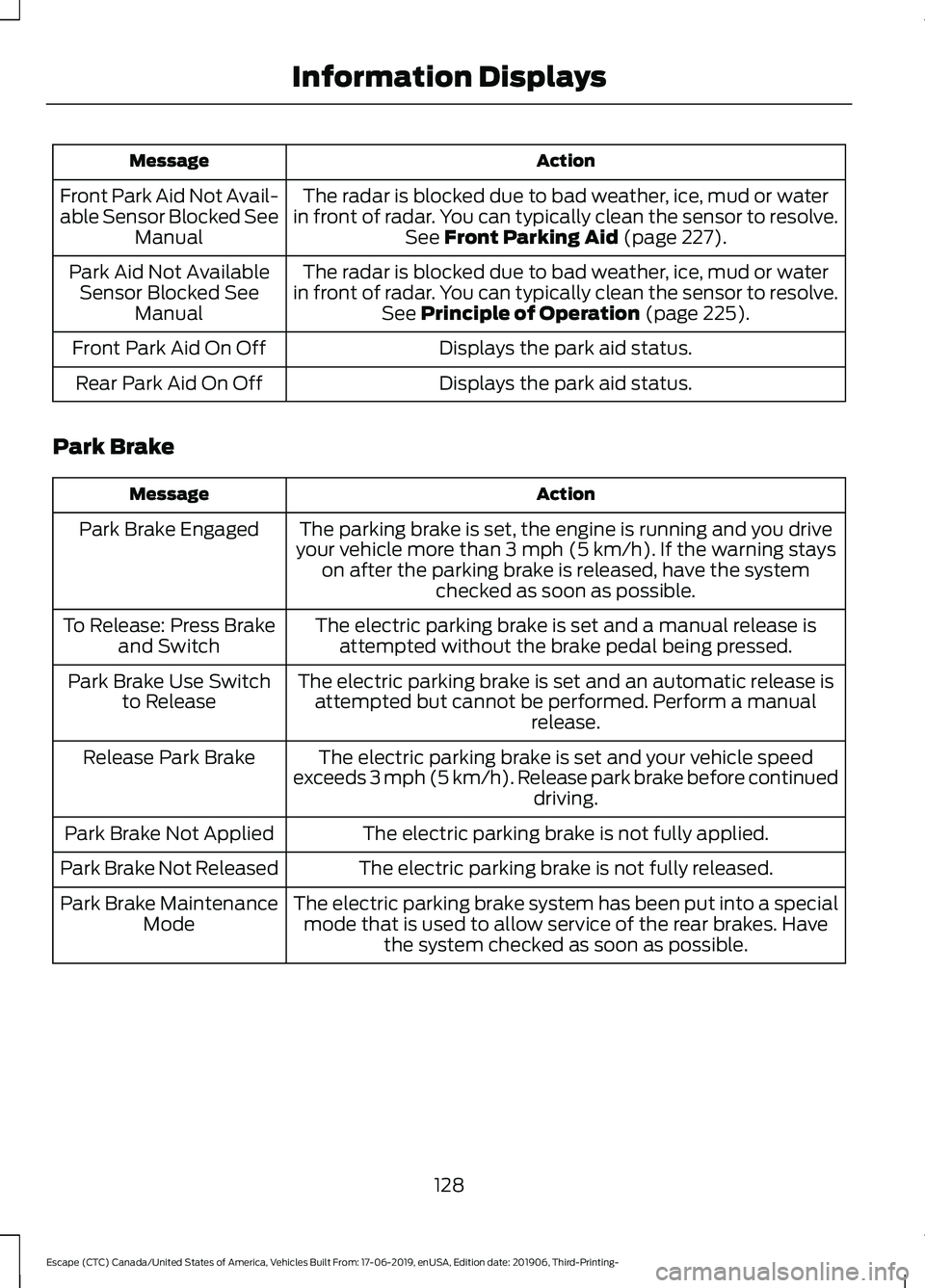
Action
Message
The radar is blocked due to bad weather, ice, mud or water
in front of radar. You can typically clean the sensor to resolve. See Front Parking Aid (page 227).
Front Park Aid Not Avail-
able Sensor Blocked See
Manual
The radar is blocked due to bad weather, ice, mud or water
in front of radar. You can typically clean the sensor to resolve. See
Principle of Operation (page 225).
Park Aid Not Available
Sensor Blocked See Manual
Displays the park aid status.
Front Park Aid On Off
Displays the park aid status.
Rear Park Aid On Off
Park Brake Action
Message
The parking brake is set, the engine is running and you drive
your vehicle more than
3 mph (5 km/h). If the warning stays
on after the parking brake is released, have the system checked as soon as possible.
Park Brake Engaged
The electric parking brake is set and a manual release isattempted without the brake pedal being pressed.
To Release: Press Brake
and Switch
The electric parking brake is set and an automatic release isattempted but cannot be performed. Perform a manual release.
Park Brake Use Switch
to Release
The electric parking brake is set and your vehicle speed
exceeds 3 mph (5 km/h). Release park brake before continued driving.
Release Park Brake
The electric parking brake is not fully applied.
Park Brake Not Applied
The electric parking brake is not fully released.
Park Brake Not Released
The electric parking brake system has been put into a specialmode that is used to allow service of the rear brakes. Have the system checked as soon as possible.
Park Brake Maintenance
Mode
128
Escape (CTC) Canada/United States of America, Vehicles Built From: 17-06-2019, enUSA, Edition date: 201906, Third-Printing- Information Displays
Page 228 of 553
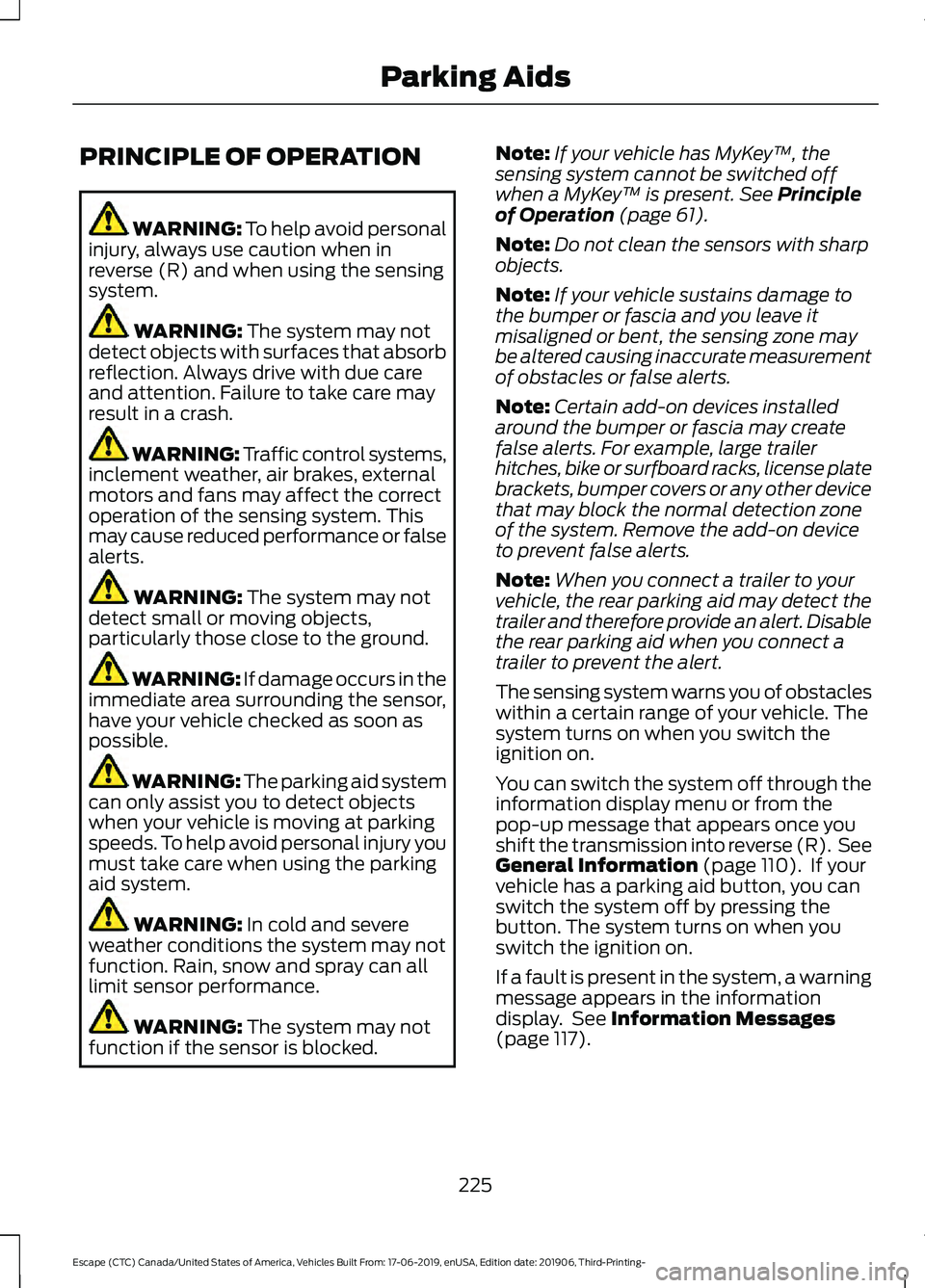
PRINCIPLE OF OPERATION
WARNING: To help avoid personal
injury, always use caution when in
reverse (R) and when using the sensing
system. WARNING:
The system may not
detect objects with surfaces that absorb
reflection. Always drive with due care
and attention. Failure to take care may
result in a crash. WARNING: Traffic control systems,
inclement weather, air brakes, external
motors and fans may affect the correct
operation of the sensing system. This
may cause reduced performance or false
alerts. WARNING:
The system may not
detect small or moving objects,
particularly those close to the ground. WARNING:
If damage occurs in the
immediate area surrounding the sensor,
have your vehicle checked as soon as
possible. WARNING:
The parking aid system
can only assist you to detect objects
when your vehicle is moving at parking
speeds. To help avoid personal injury you
must take care when using the parking
aid system. WARNING:
In cold and severe
weather conditions the system may not
function. Rain, snow and spray can all
limit sensor performance. WARNING:
The system may not
function if the sensor is blocked. Note:
If your vehicle has MyKey ™, the
sensing system cannot be switched off
when a MyKey ™ is present.
See Principle
of Operation (page 61).
Note: Do not clean the sensors with sharp
objects.
Note: If your vehicle sustains damage to
the bumper or fascia and you leave it
misaligned or bent, the sensing zone may
be altered causing inaccurate measurement
of obstacles or false alerts.
Note: Certain add-on devices installed
around the bumper or fascia may create
false alerts. For example, large trailer
hitches, bike or surfboard racks, license plate
brackets, bumper covers or any other device
that may block the normal detection zone
of the system. Remove the add-on device
to prevent false alerts.
Note: When you connect a trailer to your
vehicle, the rear parking aid may detect the
trailer and therefore provide an alert. Disable
the rear parking aid when you connect a
trailer to prevent the alert.
The sensing system warns you of obstacles
within a certain range of your vehicle. The
system turns on when you switch the
ignition on.
You can switch the system off through the
information display menu or from the
pop-up message that appears once you
shift the transmission into reverse (R). See
General Information
(page 110). If your
vehicle has a parking aid button, you can
switch the system off by pressing the
button. The system turns on when you
switch the ignition on.
If a fault is present in the system, a warning
message appears in the information
display. See
Information Messages
(page 117).
225
Escape (CTC) Canada/United States of America, Vehicles Built From: 17-06-2019, enUSA, Edition date: 201906, Third-Printing- Parking Aids
Page 229 of 553
REAR PARKING AID (IF EQUIPPED)
WARNING:
The system may not
detect objects with surfaces that absorb
reflection. Always drive with due care
and attention. Failure to take care may
result in a crash. WARNING:
The system may not
detect small or moving objects,
particularly those close to the ground. WARNING:
To help avoid personal
injury, always use caution when in
reverse (R) and when using the sensing
system. WARNING:
The parking aid system
can only assist you to detect objects
when your vehicle is moving at parking
speeds. To help avoid personal injury you
must take care when using the parking
aid system.
Note: Keep the sensors free from snow, ice
and large accumulations of dirt.
Note: Do not cover up the sensors.
Note: Do not clean the sensors with sharp
objects.
Note: If your vehicle sustains damage
leaving the sensors misaligned, this may
cause inaccurate measurements or false
alerts.
Note: Some accessories, for example large
trailer hitches or bike or surfboard racks can
cause reduced performance or false alerts.
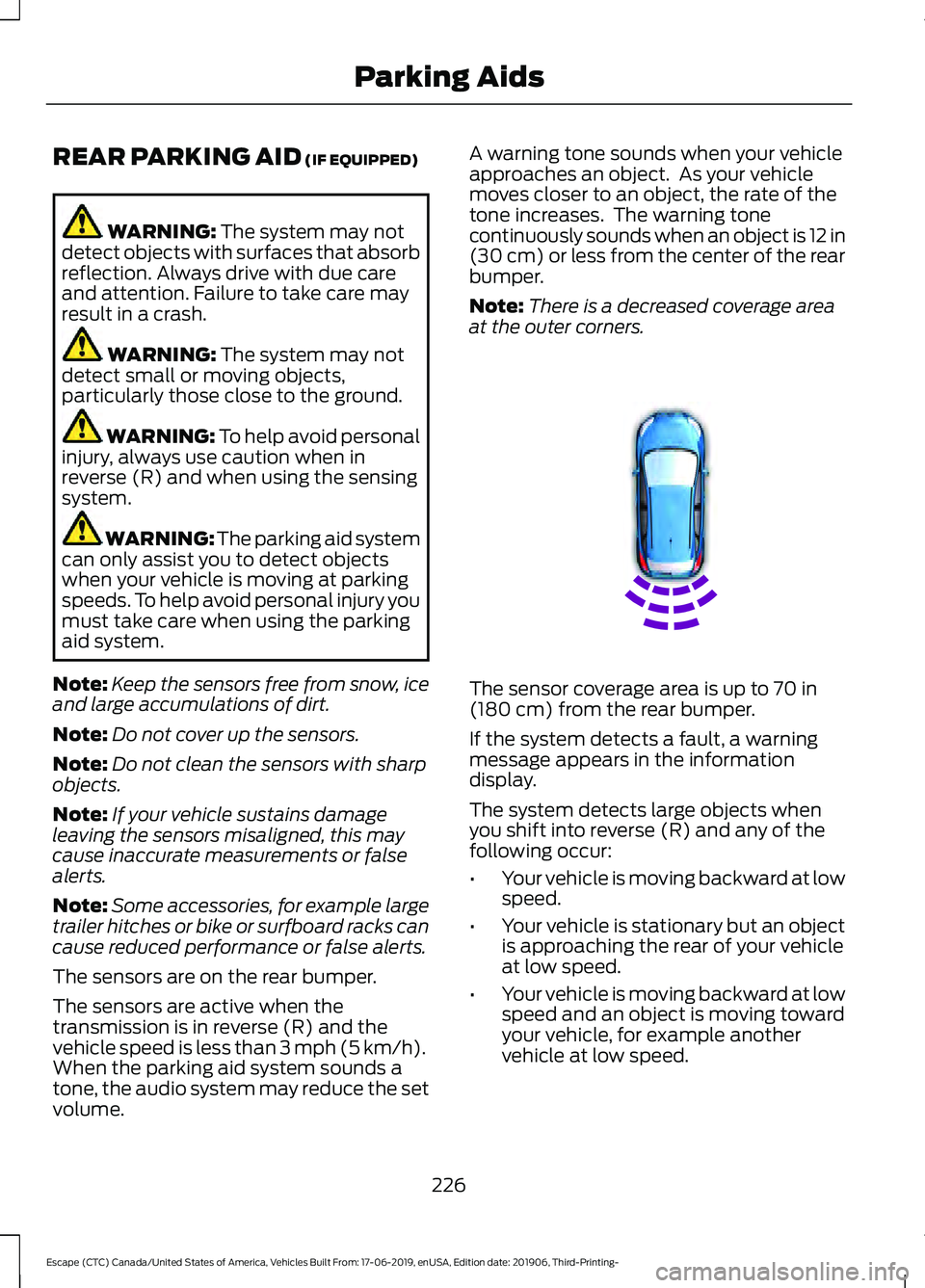
The sensors are on the rear bumper.
The sensors are active when the
transmission is in reverse (R) and the
vehicle speed is less than 3 mph (5 km/h).
When the parking aid system sounds a
tone, the audio system may reduce the set
volume. A warning tone sounds when your vehicle
approaches an object. As your vehicle
moves closer to an object, the rate of the
tone increases. The warning tone
continuously sounds when an object is 12 in
(30 cm)
or less from the center of the rear
bumper.
Note: There is a decreased coverage area
at the outer corners. The sensor coverage area is up to
70 in
(180 cm) from the rear bumper.
If the system detects a fault, a warning
message appears in the information
display.
The system detects large objects when
you shift into reverse (R) and any of the
following occur:
• Your vehicle is moving backward at low
speed.
• Your vehicle is stationary but an object
is approaching the rear of your vehicle
at low speed.
• Your vehicle is moving backward at low
speed and an object is moving toward
your vehicle, for example another
vehicle at low speed.
226
Escape (CTC) Canada/United States of America, Vehicles Built From: 17-06-2019, enUSA, Edition date: 201906, Third-Printing- Parking AidsE130178
Page 230 of 553
If your vehicle remains stationary for two
seconds the audible warning turns off. If
your vehicle moves backward the tone
sounds again.
Note:
If the detected object is 12 in (30 cm)
or less from the rear bumper, the audible
warning does not turn off.
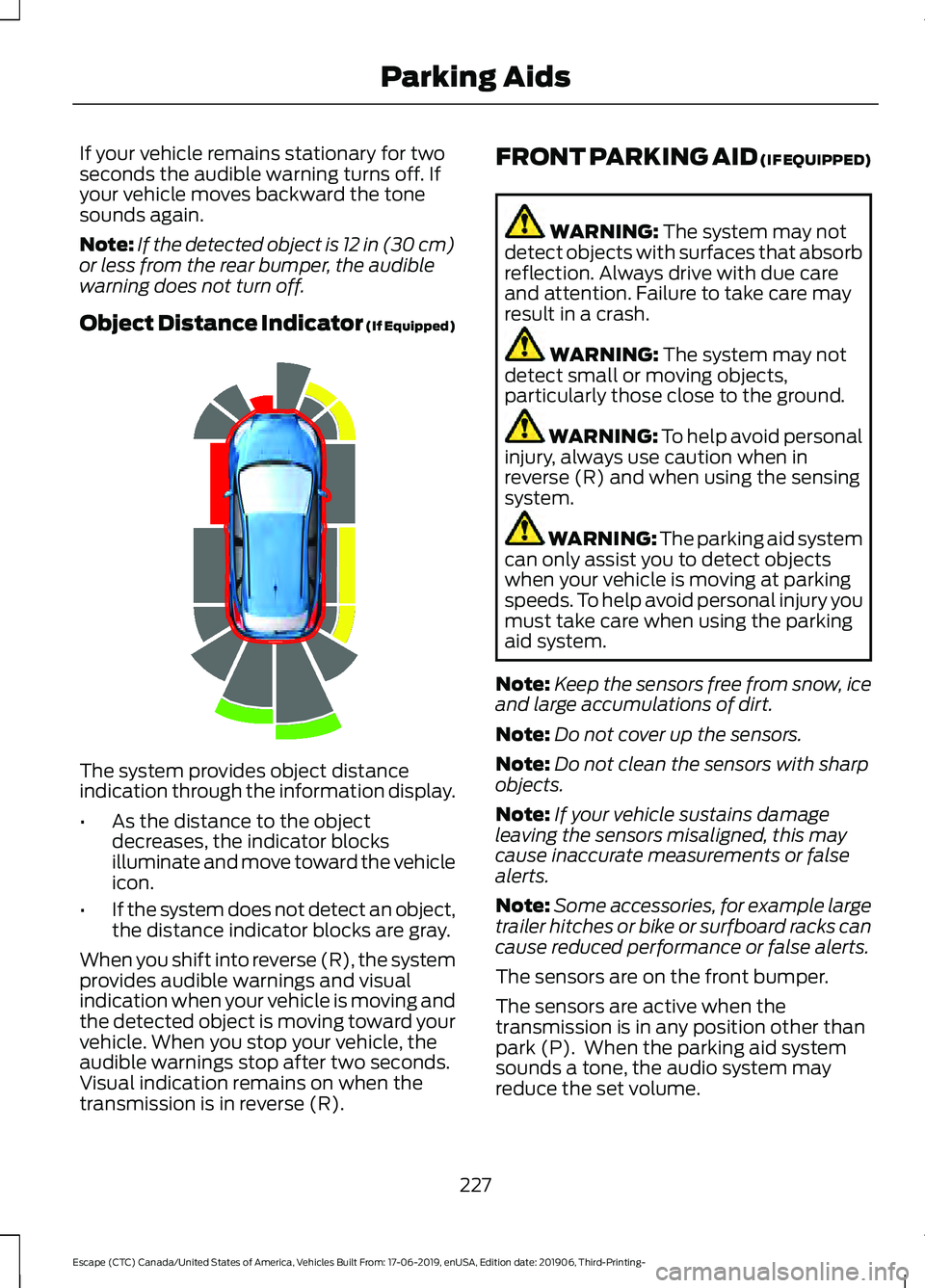
Object Distance Indicator (If Equipped) The system provides object distance
indication through the information display.
•
As the distance to the object
decreases, the indicator blocks
illuminate and move toward the vehicle
icon.
• If the system does not detect an object,
the distance indicator blocks are gray.
When you shift into reverse (R), the system
provides audible warnings and visual
indication when your vehicle is moving and
the detected object is moving toward your
vehicle. When you stop your vehicle, the
audible warnings stop after two seconds.
Visual indication remains on when the
transmission is in reverse (R). FRONT PARKING AID (IF EQUIPPED) WARNING: The system may not
detect objects with surfaces that absorb
reflection. Always drive with due care
and attention. Failure to take care may
result in a crash. WARNING:
The system may not
detect small or moving objects,
particularly those close to the ground. WARNING:
To help avoid personal
injury, always use caution when in
reverse (R) and when using the sensing
system. WARNING:
The parking aid system
can only assist you to detect objects
when your vehicle is moving at parking
speeds. To help avoid personal injury you
must take care when using the parking
aid system.
Note: Keep the sensors free from snow, ice
and large accumulations of dirt.
Note: Do not cover up the sensors.
Note: Do not clean the sensors with sharp
objects.
Note: If your vehicle sustains damage
leaving the sensors misaligned, this may
cause inaccurate measurements or false
alerts.
Note: Some accessories, for example large
trailer hitches or bike or surfboard racks can
cause reduced performance or false alerts.
The sensors are on the front bumper.
The sensors are active when the
transmission is in any position other than
park (P). When the parking aid system
sounds a tone, the audio system may
reduce the set volume.
227
Escape (CTC) Canada/United States of America, Vehicles Built From: 17-06-2019, enUSA, Edition date: 201906, Third-Printing- Parking AidsE190459
Page 232 of 553
When you shift into neutral (N), the system
only provides visual indication if your
vehicle is moving at a speed of
approximately 5 mph (8 km/h) or below,
for example, your vehicle is moving on a
slope, and the system detects an object
moving toward your vehicle. When you
stop your vehicle, visual indication stops
after four seconds.
SIDE SENSING SYSTEM
(IF
EQUIPPED) WARNING:
The system may not
detect objects with surfaces that absorb
reflection. Always drive with due care
and attention. Failure to take care may
result in a crash. WARNING:
The system may not
detect small or moving objects,
particularly those close to the ground. WARNING:
To help avoid personal
injury, always use caution when in
reverse (R) and when using the sensing
system. WARNING:
The parking aid system
can only assist you to detect objects
when your vehicle is moving at parking
speeds. To help avoid personal injury you
must take care when using the parking
aid system.
Note: Keep the sensors free from snow, ice
and large accumulations of dirt.
Note: Do not cover up the sensors.
Note: Do not clean the sensors with sharp
objects.
Note: If your vehicle sustains damage
leaving the sensors misaligned, this may
cause inaccurate measurements or false
alerts. Note:
If you switch traction control off, the
side sensing system also turns off.
Note: Some accessories, for example large
trailer hitches or bike or surfboard racks can
cause reduced performance or false alerts.
Note: The system does not detect an object
that is moving toward the side of your
vehicle, for example another vehicle moving
at low speed, if it does not pass a front or
rear sensor.
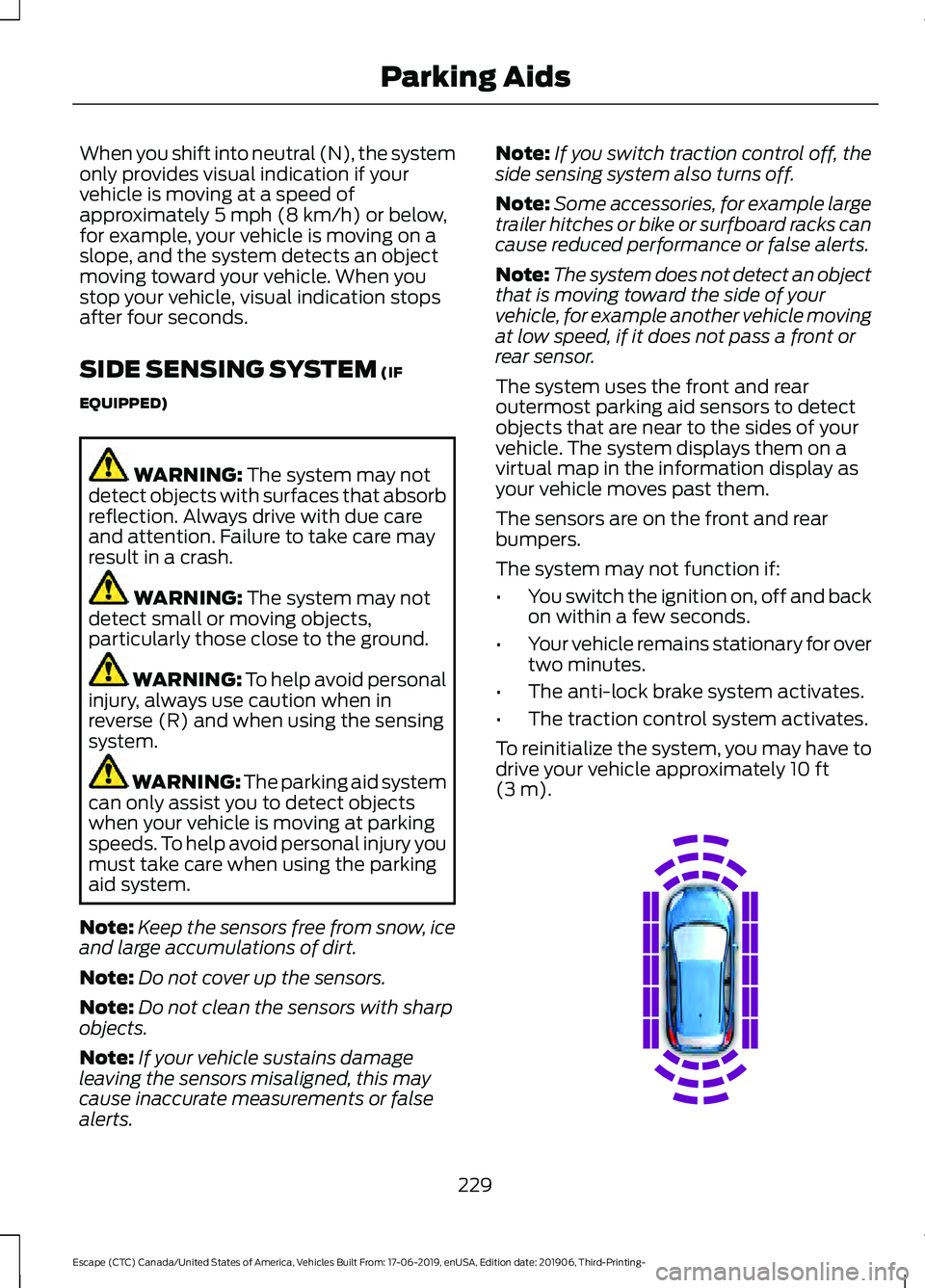
The system uses the front and rear
outermost parking aid sensors to detect
objects that are near to the sides of your
vehicle. The system displays them on a
virtual map in the information display as
your vehicle moves past them.
The sensors are on the front and rear
bumpers.
The system may not function if:
• You switch the ignition on, off and back
on within a few seconds.
• Your vehicle remains stationary for over
two minutes.
• The anti-lock brake system activates.
• The traction control system activates.
To reinitialize the system, you may have to
drive your vehicle approximately 10 ft
(3 m). 229
Escape (CTC) Canada/United States of America, Vehicles Built From: 17-06-2019, enUSA, Edition date: 201906, Third-Printing- Parking AidsE190458
Page 235 of 553
4. Release the steering wheel and shift
into neutral (N).
5. Release the parking brake.
6. Press and hold the active park assist button.
7. Release the brake pedal to allow the vehicle to move.
Note: You can slow down your vehicle at
any time by pressing the brake pedal.
Note: After the system drives your vehicle
to a position where you can exit the parking
space in a forward movement, a message
appears instructing you to take full control
of your vehicle. Canceling Active Park Assist
To cancel parking assistance at any time,
shift out of neutral (N).
Note:
If you turn the steering wheel or open
the driver door the parking assistance also
cancels.
Pausing Active Park Assist
To pause parking assistance at any time,
release the active park assist button.
The vehicle stops moving until you press
and hold the active park assist button
again.
Note: If you open the passenger or rear
doors the parking assistance also pauses.
Active Park Assist Troubleshooting Possible Cause
Symptom
The system is unable to detect a vehicle, curb or object
to park next to, or in-between. This could occur because
of sensors not operating correctly, not enough room
for your vehicle, or the traction control is off.
The system does not correctly
operate.
You may have switched traction control off.
The system does not search for
a parking space.
The transmission is in reverse (R). Your vehicle must
be moving forward to be able to detect a parking space.
There could be blockage on the sensors. For example,
snow, ice or large accumulations of dirt. Blocked
sensors can affect how the system functions.
The system does not offer a
parking space.
The sensors in the front or rear bumper could be
damaged.
There is not enough room in the parking space for your
vehicle to safely park.
There is not enough space for the parking maneuver on
the opposite side of the parking space.
The parking space is more than 5 ft (1.5 m) or less than
2 ft (0.5 m) away.
232
Escape (CTC) Canada/United States of America, Vehicles Built From: 17-06-2019, enUSA, Edition date: 201906, Third-Printing- Parking Aids
Page 262 of 553
Zone coverage also decreases when
parking at narrow angles. The sensor on
the left-hand side is mostly obstructed and
zone coverage on that side is severely
reduced.
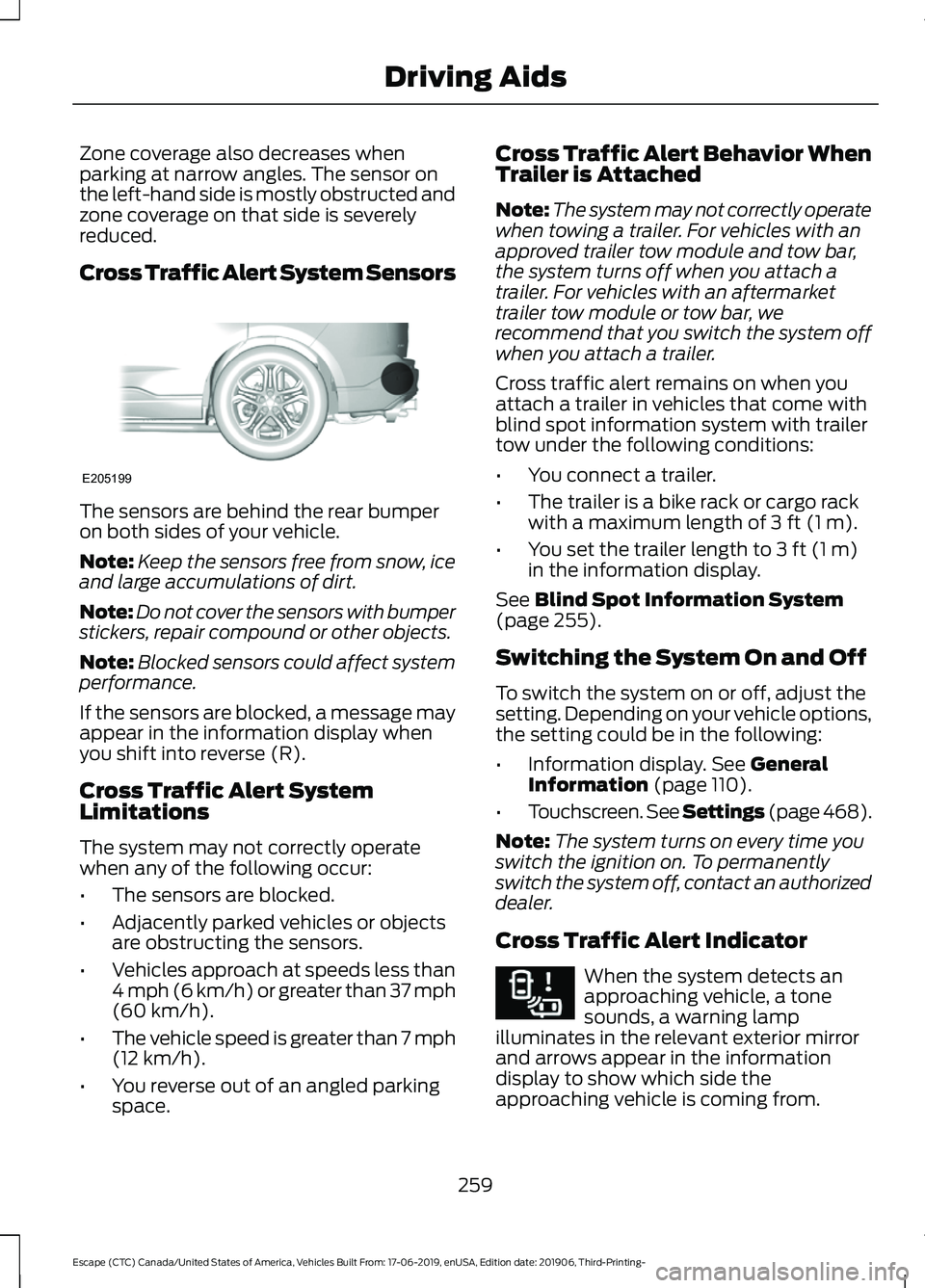
Cross Traffic Alert System Sensors
The sensors are behind the rear bumper
on both sides of your vehicle.
Note:
Keep the sensors free from snow, ice
and large accumulations of dirt.
Note: Do not cover the sensors with bumper
stickers, repair compound or other objects.
Note: Blocked sensors could affect system
performance.
If the sensors are blocked, a message may
appear in the information display when
you shift into reverse (R).
Cross Traffic Alert System
Limitations
The system may not correctly operate
when any of the following occur:
• The sensors are blocked.
• Adjacently parked vehicles or objects
are obstructing the sensors.
• Vehicles approach at speeds less than
4 mph (6 km/h) or greater than 37 mph
(60 km/h).
• The vehicle speed is greater than 7 mph
(12 km/h)
.
• You reverse out of an angled parking
space. Cross Traffic Alert Behavior When
Trailer is Attached
Note:
The system may not correctly operate
when towing a trailer. For vehicles with an
approved trailer tow module and tow bar,
the system turns off when you attach a
trailer. For vehicles with an aftermarket
trailer tow module or tow bar, we
recommend that you switch the system off
when you attach a trailer.
Cross traffic alert remains on when you
attach a trailer in vehicles that come with
blind spot information system with trailer
tow under the following conditions:
• You connect a trailer.
• The trailer is a bike rack or cargo rack
with a maximum length of
3 ft (1 m).
• You set the trailer length to
3 ft (1 m)
in the information display.
See
Blind Spot Information System
(page 255).
Switching the System On and Off
To switch the system on or off, adjust the
setting. Depending on your vehicle options,
the setting could be in the following:
• Information display.
See General
Information (page 110).
• Touchscreen. See Settings (page 468).
Note: The system turns on every time you
switch the ignition on. To permanently
switch the system off, contact an authorized
dealer.
Cross Traffic Alert Indicator When the system detects an
approaching vehicle, a tone
sounds, a warning lamp
illuminates in the relevant exterior mirror
and arrows appear in the information
display to show which side the
approaching vehicle is coming from.
259
Escape (CTC) Canada/United States of America, Vehicles Built From: 17-06-2019, enUSA, Edition date: 201906, Third-Printing- Driving AidsE205199 E268294
Page 548 of 553
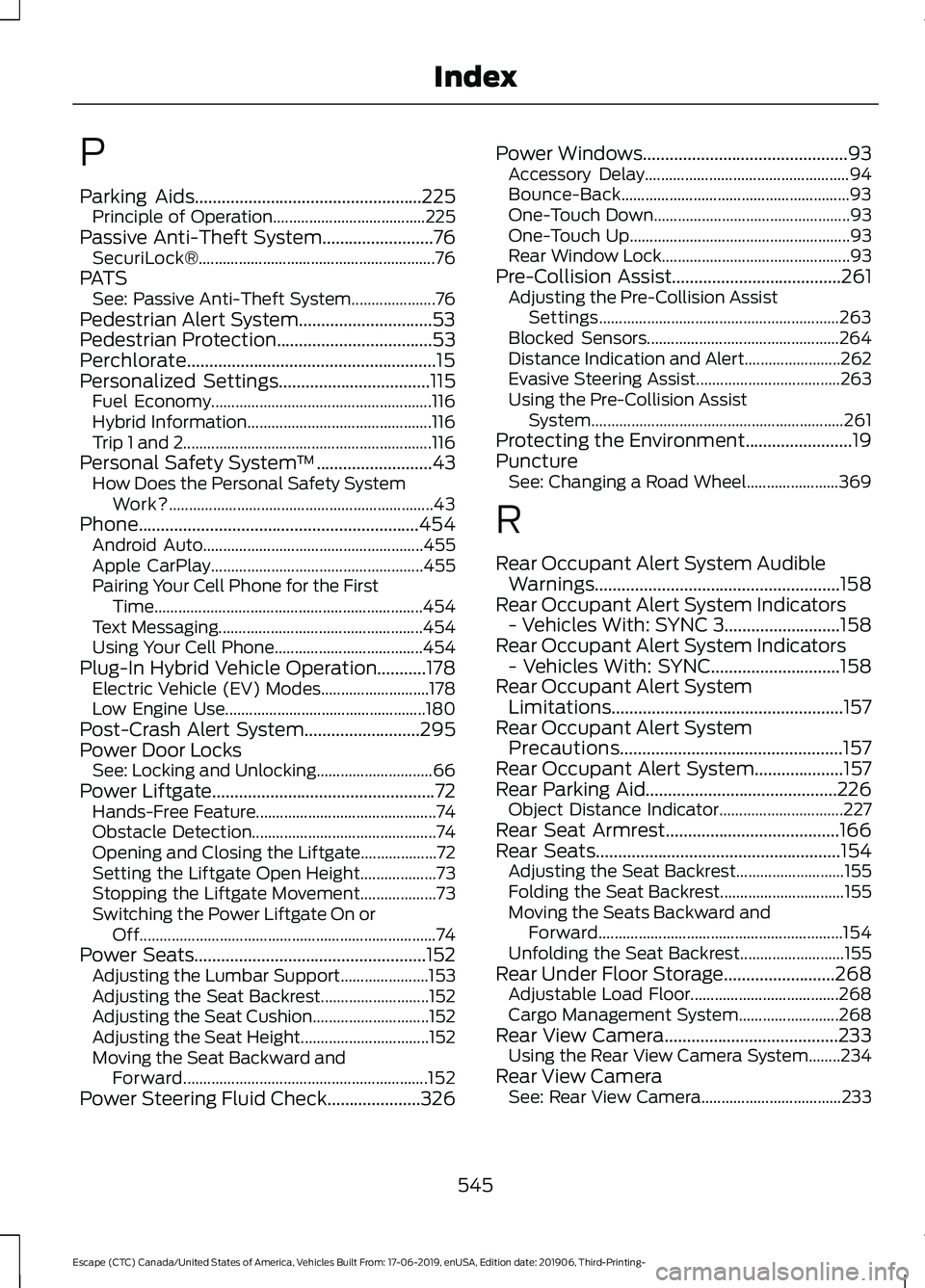
P
Parking Aids...................................................225
Principle of Operation...................................... 225
Passive Anti-Theft System.........................76
SecuriLock®........................................................... 76
PATS See: Passive Anti-Theft System..................... 76
Pedestrian Alert System..............................53
Pedestrian Protection
...................................53
Perchlorate........................................................15
Personalized Settings
..................................115
Fuel Economy....................................................... 116
Hybrid Information.............................................. 116
Trip 1 and 2.............................................................. 116
Personal Safety System ™
..........................43
How Does the Personal Safety System
Work?.................................................................. 43
Phone...............................................................454 Android Auto....................................................... 455
Apple CarPlay..................................................... 455
Pairing Your Cell Phone for the First Time................................................................... 454
Text Messaging................................................... 454
Using Your Cell Phone..................................... 454
Plug-In Hybrid Vehicle Operation
...........178
Electric Vehicle (EV) Modes........................... 178
Low Engine Use.................................................. 180
Post-Crash Alert System..........................295
Power Door Locks See: Locking and Unlocking............................. 66
Power Liftgate
..................................................72
Hands-Free Feature............................................. 74
Obstacle Detection.............................................. 74
Opening and Closing the Liftgate................... 72
Setting the Liftgate Open Height................... 73
Stopping the Liftgate Movement................... 73
Switching the Power Liftgate On or Off........................................................................\
.. 74
Power Seats
....................................................152
Adjusting the Lumbar Support...................... 153
Adjusting the Seat Backrest........................... 152
Adjusting the Seat Cushion............................. 152
Adjusting the Seat Height................................ 152
Moving the Seat Backward and Forward............................................................. 152
Power Steering Fluid Check
.....................326 Power Windows..............................................93
Accessory Delay................................................... 94
Bounce-Back......................................................... 93
One-Touch Down................................................. 93
One-Touch Up....................................................... 93
Rear Window Lock............................................... 93
Pre-Collision Assist......................................261 Adjusting the Pre-Collision Assist
Settings............................................................ 263
Blocked Sensors................................................ 264
Distance Indication and Alert........................ 262
Evasive Steering Assist.................................... 263
Using the Pre-Collision Assist System............................................................... 261
Protecting the Environment
........................19
Puncture See: Changing a Road Wheel....................... 369
R
Rear Occupant Alert System Audible Warnings.......................................................158
Rear Occupant Alert System Indicators - Vehicles With: SYNC 3..........................158
Rear Occupant Alert System Indicators - Vehicles With: SYNC.............................158
Rear Occupant Alert System Limitations....................................................157
Rear Occupant Alert System Precautions..................................................157
Rear Occupant Alert System....................157
Rear Parking Aid
...........................................226
Object Distance Indicator............................... 227
Rear Seat Armrest.......................................166
Rear Seats
.......................................................154
Adjusting the Seat Backrest........................... 155
Folding the Seat Backrest............................... 155
Moving the Seats Backward and Forward............................................................. 154
Unfolding the Seat Backrest.......................... 155
Rear Under Floor Storage
.........................268
Adjustable Load Floor..................................... 268
Cargo Management System......................... 268
Rear View Camera.......................................233 Using the Rear View Camera System........234
Rear View Camera See: Rear View Camera................................... 233
545
Escape (CTC) Canada/United States of America, Vehicles Built From: 17-06-2019, enUSA, Edition date: 201906, Third-Printing- Index