climate settings FORD ESCAPE 2021 User Guide
[x] Cancel search | Manufacturer: FORD, Model Year: 2021, Model line: ESCAPE, Model: FORD ESCAPE 2021Pages: 589, PDF Size: 9.2 MB
Page 350 of 589
Note:
The engine management system has
a power hold function and remains powered
for a period of time after you switch the
ignition off. This is to allow diagnostic and
adaptive tables to be stored. Disconnecting
the battery without waiting can cause
damage not covered by the vehicle
Warranty.
4. Disconnect the negative battery cable terminal.
5. Disconnect the positive battery cable terminal.
6. Remove the battery securing clamp.
7. Remove the battery.
8. To install, reverse the removal procedure.
Note: Before reconnecting the battery,
make sure the ignition remains switched off.
Note: Make sure the battery cable terminals
are fully tightened.
Note: After cleaning or replacing the
battery, make sure you reinstall the battery
cover or shield.
If you disconnect or replace the vehicle
battery, you must reset the following
features:
• Window bounce-back. See Windows
(page 105).
• Clock Settings.
• Pre-set radio stations.
• Steering Angle Sensor.
Note: To calibrate the steering angle
sensor, drive the vehicle above
30 mph
(50 km/h) for a minimum of 1.2 mi (2 km).
Make sure to drive straight ahead for a
minimum of 30 seconds. Several vehicle
functions are disabled and a warning light
could appear until the sensor is calibrated. Battery Management System
The battery management system monitors
battery conditions and takes actions to
extend battery life. If excessive battery
drain is detected, the system temporarily
disables some of the following features:
•
Heated rear window.
• Heated seats.
• Climate control.
• Heated steering wheel.
• Audio unit.
• Navigation system.
A message may appear in the information
display to alert you that battery protection
actions are active.
After battery replacement, or in some
cases after charging the battery with an
external charger, the battery management
system requires eight hours of vehicle sleep
time to relearn the battery state of charge.
During this time your vehicle must remain
fully locked with the ignition off.
Note: If you add electrical accessories or
components to the vehicle, it may adversely
affect battery performance and durability.
This may also affect the performance of
other electrical systems in the vehicle.
Battery Disposal Make sure that you dispose of
old batteries in an
environmentally friendly way.
Seek advice from your local authority
about recycling old batteries.
347
Escape (CTC) Canada/United States of America, Vehicles Built From: 02-11-2020, enUSA, Edition date: 202011, First-Printing MaintenanceE107998
Page 440 of 589
Automatic crash notification
system off.
Cell phone network signal
strength.
Vehicle data sharing on.
Vehicle location sharing on.
Vehicle data and vehicle location
sharing on.
Wireless charger active.
Feature Bar Select to use the radio, a USB, a
media player or a Bluetooth
device. See Entertainment
(page 445). Select to adjust climate settings
See
Manual Climate Control
(page 137). Select to make calls and access
the phonebook on your cell
phone. See
Phone (page 455).
Select to use the navigation
system.
See Navigation (page
457). Select to search for and use
compatible apps on your iOS or
Android device. See Apps (page
467
). Select to adjust system settings.
See
Settings (page 469).Cleaning the Touchscreen
See
Cleaning Displays and Screens
(page 354).
Updating the System
Updating the System Using a USB Drive
Downloading an Update
1. Go to the SYNC update page on the local Ford website.
2. Download the update.
Note: The website notifies you if an update
is available.
3. Insert a USB drive into your computer.
Note: The USB drive needs to be empty and
meet the minimum requirements detailed
on the website.
4. Follow the instructions provided to download the update to the USB drive.
Installing an Update
Note: You can use the system when an
installation is in progress.
1. Disconnect all other USB devices from
the USB ports.
2. Connect the USB drive with the update
to a USB port.
Note: Installation starts automatically
within 10 minutes.
Updating the System Using a Wi-Fi
Network Connection
Connecting to a Wi-Fi Network Select the settings option on the
feature bar.
1. Select
Automatic Updates.
2. Select
System Wi-Fi.
3. Switch
System Wi-Fi on.
4. Select
Available Wi-Fi Networks.
437
Escape (CTC) Canada/United States of America, Vehicles Built From: 02-11-2020, enUSA, Edition date: 202011, First-Printing SYNC™ 3
(If Equipped) E100027 E283811 E280315 E280315
Page 441 of 589
5. Select an available Wi-Fi network.
Note:
Enter the network password to
connect to a secure network.
Switching Automatic System Updates
On Select the settings option on the
feature bar.
1. Select Automatic Updates.
2. Switch
Automatic System Updates
on.
The system is now set to check for and
receive system updates when it is
connected to a Wi-Fi network.
Note: You can use the system when a
download is in progress.
Note: If the system is disconnected from
the Wi-Fi network when a download is in
progress, the download continues the next
time the system is connected to a Wi-Fi
network. Additional Information and
Assistance
For additional information and assistance,
we recommend that you contact an
authorized dealer or refer to the local Ford
website.
USING VOICE RECOGNITION
The SYNC 3 system allows you to use voice
commands, to control features like audio
and climate controls. By using voice
commands, you can keep your hands on
the wheel and your eyes on the road.
You can access each feature controlled by
SYNC 3 through a variety of commands. To activate the SYNC 3 voice
commands push the voice
button on the steering wheel and
wait for the prompt.
___ is a dynamic listing, meaning that it can
be the name of anything, such as artist, the
name of contact or number. The context
and the description of the command tell
you what to say for this dynamic option.
There are some commands that work for
every feature, these commands are: Action and Description
Voice Command
Brings you to the main menu.
Main Menu
Returns you to the previous screen.
Go back
Ends the voice session.
Cancel
Gives you a list of possible voice commands.
List of Commands
You can name any feature and the system gives a list of
commands available for the feature. For example, you could
say:
___ List of Commands
Phone List of Commands
Navigation List of Commands
438
Escape (CTC) Canada/United States of America, Vehicles Built From: 02-11-2020, enUSA, Edition date: 202011, First-Printing SYNC™ 3
(If Equipped)E280315 E142599
Page 443 of 589
Description
Voice command
Play Audiobook ___ For USB audio only, you can say the name of an
artist, album, or a genre to browse by that selec-
tion. Your system must finish indexing before this
option is available. For example you can say
"Browse artist The Beatles" or "Browse genre
folk".
Browse ___
Browse Artist ___
Browse Album ___
Browse Genre ___
Browse Playlist ___
Browse Audiobook ___
Browse Podcast ___
1 This option may not be available in all markets or may require a subscription.
Climate Voice Commands (If Equipped)
You can control the temperature of the
vehicle using voice commands. ___ is a dynamic listing, meaning that for
climate voice commands it can be the
desired degrees for the temperature
setting.
To adjust the temperature, say: Description
Voice command
Adjust the temperature between 60–85°F
(15.5– 29.5°C).
Set the Temperature to ____
Phone Voice Commands
Pairing a Phone
You can use voice commands to connect
your Bluetooth enabled phone to the
system.
To pair your phone, press the voice button and when prompted, say: Description
Voice command
Follow the on-screen instructions to complete the pairingprocess. See
Settings (page 469).
Pair Phone
440
Escape (CTC) Canada/United States of America, Vehicles Built From: 02-11-2020, enUSA, Edition date: 202011, First-Printing SYNC™ 3
(If Equipped)
Page 448 of 589
Description
Voice command
The system does not confirm before placing a call.
Phone Confirmation Off
The system displays a short list of available commands.
Voice Command Lists On
The system does not display the list of commands.
Voice Command Lists Off
You can use the volume control to adjust
the volume of the system voice prompts.
While prompt is active, adjust the volume
control up or down to your desired setting.
Note: Depending on the current climate
control settings, the fan speed may
automatically go down while issuing voice
commands or while making and receiving
phone calls via SYNC to reduce the amount
of background noise in the vehicle. The fan
speed will automatically return to normal
operation once the voice session ends. You
can adjust the fan speed during a voice
session, simply press the fan buttons (or
turn the fan knob) to increase or decrease
the fan speed to the setting you prefer.
To disable this automatic fan speed
reduction feature during voice sessions,
press and hold the climate control AC and
Recirculated air buttons simultaneously,
release and then increase fan speed within
2 seconds. To re-enable this feature, repeat
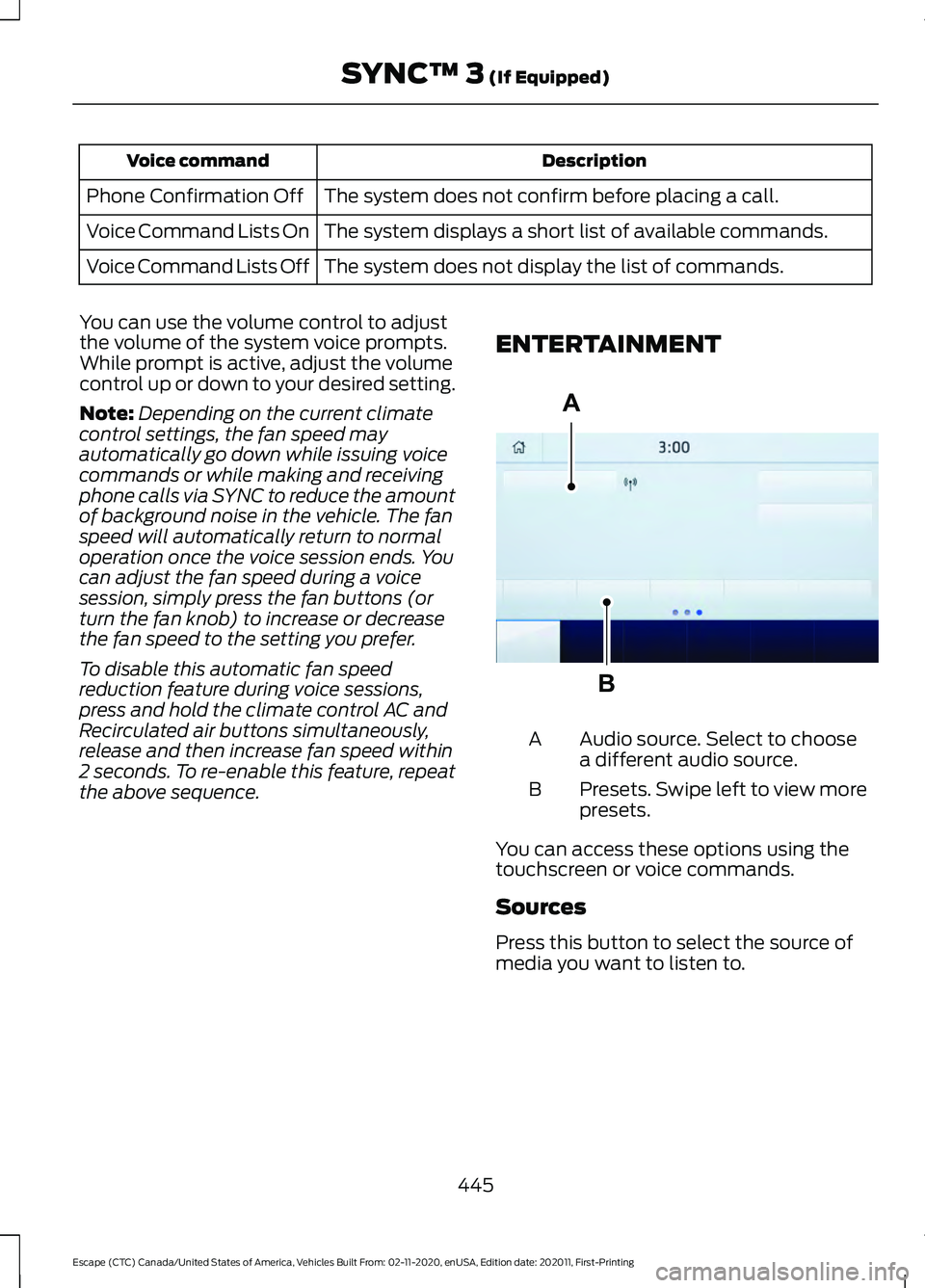
the above sequence. ENTERTAINMENT Audio source. Select to choose
a different audio source.
A
Presets. Swipe left to view more
presets.
B
You can access these options using the
touchscreen or voice commands.
Sources
Press this button to select the source of
media you want to listen to.
445
Escape (CTC) Canada/United States of America, Vehicles Built From: 02-11-2020, enUSA, Edition date: 202011, First-Printing SYNC™ 3 (If Equipped)A
BE293491
Page 566 of 589
9
911 Assist............................................................57
A
A/C See: Climate Control.......................................... 137
About This Publication..................................17 Features and Options.......................................... 17
Illustrations.............................................................. 17
Location of Components.................................... 17
ABS See: Brakes............................................................ 221
Accessing the Trip Computer - Vehicles With: 4.2 Inch Instrument Cluster
Display Screen
............................................129
Accessing the Trip Computer - Vehicles With: 6.5 Inch Instrument Cluster
Display Screen/12.3 Inch Instrument
Cluster Display Screen.............................129
Using Select Screens........................................ 129
Using the Home Screen................................... 129
Accessories...................................................484
AC Charging
...................................................205
Connecting the Charger.................................. 205
Stopping Charging............................................ 206
Active Park Assist........................................243 Active Park Assist –
Troubleshooting............................................ 245
Active Park Assist Precautions...............243
Active Park Assist – Troubleshooting........................................245
Active Park Assist – Frequently Asked Questions......................................................... 245
Active Park Assist – Information Messages......................................................... 245
Adaptive Cruise Control
............................249
Adaptive Cruise Control –
Troubleshooting............................................ 258
Intelligent Adaptive Cruise Control.............257
Lane Centering.................................................... 255
Adaptive Cruise Control Automatic Cancellation................................................252
Adaptive Cruise Control Indicators.......255
Adaptive Cruise Control Limitations
..................................................250
Sensor Limitations............................................ 250Adaptive Cruise Control
Precautions.................................................249
Hilly Condition Usage....................................... 249
When Following a Vehicle.............................. 249
Adaptive Cruise Control – Troubleshooting........................................
258
Adaptive Cruise Control – Information
Messages......................................................... 258
Adjusting the Exterior Mirrors..................108
Adjusting the Headlamps........................348 Horizontal Aim Adjustment........................... 348
Vertical Aim Adjustment................................ 348
Adjusting the Instrument Panel Lighting Brightness....................................................103
Adjusting the Seatbelt Height...................42
Adjusting the Seatbelts During Pregnancy......................................................42
Adjusting the Sound Settings..................415 Balance and Fade.............................................. 415
Occupancy Mode............................................... 415
Sound Mode......................................................... 415
Speed Compensated Volume....................... 415
Tone Settings....................................................... 415
Adjusting the Steering Wheel....................91
Adjusting the Volume.................................414
Aid Mode
........................................................268
How Does Aid Mode Work............................. 268
What Is Aid Mode.............................................. 268
Airbag Precautions
........................................49
Airbags................................................................47 Front Passenger Sensing System................... 51
Air Conditioning See: Climate Control.......................................... 137
Air Conditioning System Capacity and Specification - 1.5L EcoBoost™.........404
Air Conditioning System Capacity and Specification - 2.0L EcoBoost™........405
Air Conditioning System Capacity and Specification - 2.5L, Hybrid Electric
Vehicle (HEV)/Plug-In Hybrid Electric
Vehicle (PHEV).........................................406
Air Filter See: Changing the Engine Air Filter - 1.5L
EcoBoost™/2.0L EcoBoost™.................343
See: Changing the Engine Air Filter - 2.5L, Hybrid Electric Vehicle (HEV)/Plug-In
Hybrid Electric Vehicle (PHEV)...............344
563
Escape (CTC) Canada/United States of America, Vehicles Built From: 02-11-2020, enUSA, Edition date: 202011, First-Printing Index
Page 567 of 589
Alert and Aid Mode.....................................268
How Does Alert and Aid Mode Work.........269
What Is Alert and Aid Mode.......................... 268
Alert Mode......................................................267
Adjusting the Steering Wheel Vibration
Intensity........................................................... 268
How Does Alert Mode Work.......................... 268
What Is Alert Mode............................................ 267
All-Wheel Drive
..............................................217
All-Wheel Drive Driving Hints......................... 217
All-Wheel Drive – Troubleshooting............220
All-Wheel Drive Driving Hints...................217 Driving In Sand..................................................... 218
Driving on Hilly or Sloping Terrain.................218
Driving on Snow and Ice................................... 219
Driving Through Mud and Water................... 218
Emergency Maneuvers...................................... 217
All-Wheel Drive Limitations
......................217
All-Wheel Drive Precautions.....................217
All-Wheel Drive – Troubleshooting........................................220
All-Wheel Drive – Information Messages......................................................... 220
AM/FM Radio
.................................................416
AM/FM Radio Limitations............................... 416
Selecting a Radio Station................................ 416
Ambient Lighting
..........................................103
Adjusting Ambient Lighting............................ 103
Switching Ambient Lighting On and Off....................................................................... 103
Anti-Lock Braking System.........................221 Anti-Lock Braking System Indicators..........221
Anti-Lock Braking System
Limitations........................................................ 221
Anti-Theft Alarm System............................87 Arming the Anti-Theft Alarm System..........87
Disarming the Anti-Theft Alarm
System................................................................ 88
How Does the Anti-Theft Alarm System Work..................................................................... 87
What Are the Inclination Sensors.................. 87
What Are the Interior Sensors......................... 87
What Is the Anti-Theft Alarm System..........87
What Is the Battery Backup Alarm................87
What Is the Perimeter Alarm........................... 87
Anti-Theft Alarm System Settings.........88 Setting the Alarm Security Level................... 88
Switching Ask on Exit On and Off.................88 What are the Alarm Security Levels.............88
What Is Ask on Exit.............................................
88
Appendices...................................................560
Applying the Electric Parking Brake..............................................................224
Applying the Electric Parking Brake in an Emergency...................................................224
Apps..................................................................467 SiriusXM Traffic and Travel Link.................. 468
Using Apps on an Android Device...............467
Using Apps on an iOS Device........................ 467
Using Mobile Navigation on an Android Device............................................................... 468
At a Glance
.......................................................26
Audio System.................................................414
AM/FM Radio....................................................... 416
Digital Radio......................................................... 416
Satellite Radio..................................................... 418
Audio System Precautions
.......................414
Auto-Dimming Interior Mirror...................107 Auto-Dimming Interior Mirror
Limitations........................................................ 107
What Is the Auto-Dimming Interior Mirror................................................................... 107
Auto Hold........................................................228
Auto Hold Indicators
...................................228
Autolamps........................................................98
Autolamp Settings.............................................. 98
What Are Autolamps.......................................... 98
Autolock.............................................................70 Autolock Requirements..................................... 70
What Is Autolock.................................................. 70
Automatically Releasing the Electric Parking Brake
..............................................225
Automatic Climate Control - Vehicles With: Dual Automatic Temperature
Control (DATC)
...........................................138
Directing the Airflow.......................................... 139
Setting the Blower Motor Speed.................. 139
Setting the Temperature................................. 139
Switching Auto Mode On and Off................139
Switching Dual Zone Mode On and Off....................................................................... 140
Switching Maximum Air Conditioning On and Off.............................................................. 140
Switching Maximum Defrost On and Off........................................................................\
. 141
564
Escape (CTC) Canada/United States of America, Vehicles Built From: 02-11-2020, enUSA, Edition date: 202011, First-Printing Index
Page 573 of 589
Electric Power Steering.............................233
Electric Power Steering Adaptive
Steering............................................................. 233
Electric Power Steering Precautions..........233
Electric Vehicle Information....................462 Charge Preferences.......................................... 465
Charge Settings................................................. 463
Charge Time Settings...................................... 466
Departure Time Settings................................ 466
Engine On Due To.............................................. 462
Power Flow.......................................................... 462
Vehicle Operational States............................ 462
Electromagnetic Compatibility.............560
Emergency Call Limitations........................57
Emergency Call Requirements..................57
Emergency Call System Data....................25
Emergency Towing - 8-Speed Automatic Transmission – 8F24...............................322
Emergency Towing - 8-Speed Automatic Transmission – 8F35...............................322
Emergency Towing - Hybrid Electric Vehicle (HEV)/Plug-In Hybrid Electric
Vehicle (PHEV)
..........................................322
Emission Law................................................558 Noise Emissions Warranty, Prohibited
Tampering Acts and Maintenance.........559
Tampering With a Noise Control System.............................................................. 559
Enabling Remote Start...............................134
End User License Agreement..................533 VEHICLE SOFTWARE END USER LICENSE
AGREEMENT (EULA) ................................. 533
Engine Block Heater.....................................175 Engine Block Heater Precautions.................. 175
How Does the Engine Block Heater Work.................................................................... 175
Using the Engine Block Heater....................... 175
Engine Oil Capacity and Specification - 1.5L EcoBoost™........................................396
Alternative Engine Oil for Extremely Cold Climates........................................................... 397
Engine Oil Capacity and Specification - 2.0L EcoBoost™
.......................................397
Alternative Engine Oil for Extremely Cold
Climates........................................................... 398Engine Oil Capacity and Specification -
2.5L, Hybrid Electric Vehicle (HEV)/
Plug-In Hybrid Electric Vehicle
(PHEV).........................................................399
Engine Oil
.......................................................338
Adding Engine Oil.............................................. 338
Checking the Engine Oil Level...................... 338
Engine Oil Capacity and Specification.................................................. 339
Engine Oil Dipstick Overview........................ 338
Resetting the Engine Oil Change Reminder......................................................... 338
Engine Specifications - 1.5L EcoBoost™..................................................391
Engine Specifications - 2.0L EcoBoost™.................................................392
Engine Specifications - 2.5L, Hybrid Electric Vehicle (HEV)/Plug-In Hybrid
Electric Vehicle (PHEV).........................393
Entering a Parallel Parking Space.........243
Entering a Perpendicular Parking Space............................................................244
Entertainment..............................................445 AM/FM Radio...................................................... 446
Apps....................................................................... 454
Bluetooth Stereo or USB................................ 453
CD........................................................................\
.... 452
HD Radio ™ Information (If
Available)........................................................ 449
SiriusXM® Satellite Radio (If Activated)........................................................ 447
Sources................................................................. 445
Supported Media Players, Formats and Metadata Information................................ 454
USB Ports............................................................. 454
Evasive Steering Assist
..............................284
Evasive Steering Assist Limitations............284
Switching Evasive Steering Assist On and
Off...................................................................... 284
What Is Evasive Steering Assist................... 284
EV Coach - Hybrid Electric Vehicle (HEV)/Plug-In Hybrid Electric Vehicle
(PHEV)...........................................................127
Event Data
.........................................................23
Exiting a Parking Space.............................244
Extending the Remote Start Duration.........................................................134
570
Escape (CTC) Canada/United States of America, Vehicles Built From: 02-11-2020, enUSA, Edition date: 202011, First-Printing Index
Page 575 of 589
Fuses – Troubleshooting..........................332
Fuses – Frequently Asked Questions.........332
G
Garage Door Opener...................................162
Garage Door Opener Limitations
...........162
Garage Door Opener Precautions..........162
Garage Door Opener Radio Frequencies.................................................165
FCC and RSS-210 Industry Canada Compliance..................................................... 165
General Maintenance Information........487 Multi-Point Inspection.................................... 489
Owner Checks and Services......................... 488
Protecting Your Investment........................... 487
Why Maintain Your Vehicle?......................... 487
Why Maintain Your Vehicle at Your Dealership?..................................................... 487
Glasses Holder
................................................171
Locating the Glasses Holder............................ 171
Glossary of Tire Terminology..................366
Grade Assist - Hybrid Electric Vehicle (HEV)
..............................................................212
Grade Assist Indicators..................................... 213
Switching Grade Assist On and Off.............213
What Is Grade Assist......................................... 212
H
Headlamp Adjusting See: Adjusting the Headlamps.................... 348
Headlamps.......................................................97 Headlamp Indicators.......................................... 97
Switching Headlamp Exit Delay On and Off........................................................................\
. 97
Using the High Beam Headlamps.................. 97
Headlamps – Troubleshooting................98 Headlamps – Frequently Asked
Questions ........................................................... 98
Head Up Display
.............................................131
Head Up Display – Troubleshooting............133
Head Up Display Indicators.......................132
Head Up Display Settings...........................131 Selecting Which Information the System
Displays .............................................................. 132Head Up Display –
Troubleshooting.........................................133
Head Up Display – Information Messages.......................................................... 133
Heated Exterior Mirrors..............................146
Heated Rear Window..................................146
Heated Seats
..................................................153
Heated Seat Precautions................................. 153
Switching the Heated Seats On and Off....................................................................... 154
Heated Windshield
......................................146
Windshield Wiper De-Icer............................... 146
Heating See: Climate Control.......................................... 137
High Voltage Battery..................................200
High Voltage Battery Precautions........200
High Voltage Battery Vehicle Precautions - Hybrid Electric Vehicle
(HEV).............................................................314
Crashes................................................................... 314
Fires........................................................................\
.. 314
Post-Incident........................................................ 315
Hill Start Assist..............................................227 Hill Start Assist – Troubleshooting..............227
Hill Start Assist Precautions....................227
Hill Start Assist – Troubleshooting........227 Hill Start Assist – Information
Messages.......................................................... 227
Hints on Controlling the Interior Climate - Vehicles With: Automatic
Temperature Control
................................144
Defogging the Side Windows in Cold
Weather............................................................. 145
General Hints....................................................... 144
Quickly Cooling the Interior............................. 145
Quickly Heating the Interior............................ 144
Recommended Settings for Cooling...........145
Recommended Settings for Heating..........144
Hints on Controlling the Interior Climate - Vehicles With: Manual Temperature
Control...........................................................145
Defogging the Side Windows in Cold Weather............................................................. 146
General Hints....................................................... 145
Quickly Cooling the Interior............................. 145
Quickly Heating the Interior............................ 145
Recommended Settings for Cooling...........145
Recommended Settings for Heating..........145
572
Escape (CTC) Canada/United States of America, Vehicles Built From: 02-11-2020, enUSA, Edition date: 202011, First-Printing Index
Page 583 of 589
Remote Start Remote Control
Indicators......................................................135
Remote Control Feedback.............................. 135
Remote Start..................................................134
Remote Start Settings...................................... 135
Remote Start Settings
................................135
Setting the Remote Start Duration..............136
Switching Climate Control Auto Mode On
and Off............................................................... 135
Switching Climate Control Last Settings On and Off........................................................ 135
Switching the Heated Seat Settings On and Off........................................................................\
135
Switching the Heated Steering Wheel Settings On and Off...................................... 135
Removing the Key Blade.............................59
Removing Your Vehicle From Storage.........................................................359
Repairing Minor Paint Damage
..............356
Replacement Parts Recommendation.....................................532
Collision Repairs................................................. 532
Scheduled Maintenance and Mechanical Repairs.............................................................. 532
Warranty on Replacement Parts.................532
Replacing a Lost Key or Remote Control.............................................................62
Replacing the Cabin Air Filter
...................147
Replacing the Front Wiper Blades..........94
Replacing the Rear Wiper Blades............94
Reporting Safety Defects in Canada.........................................................497
Reporting Safety Defects in the United States............................................................497
Reprogramming the Garage Door Opener...........................................................165
Resetting the Individual Trip Values - Vehicles With: 4.2 Inch Instrument
Cluster Display Screen.............................129
Resetting the Trip Computer....................129
Restarting the Engine.................................185
Resuming the Set Speed..........................248 Resuming the Set Speed from a Complete
Stop................................................................... 254
Reverse Wipe
...................................................93
Reverse Wipe Settings....................................... 93
What Is Reverse Wipe........................................ 93Roadside Assistance...................................313
Vehicles Sold in Canada: Getting Roadside
Assistance........................................................ 314
Vehicles Sold in the United States: Getting Roadside Assistance.................................... 313
Vehicles Sold in the United States: Using Roadside Assistance.................................... 313
Rollover Warning
.........................................495
Roof Rack........................................................297 Adjusting a Roof Rack Crossbar................... 297
Removing and Installing Roof Rack Crossbars......................................................... 297
Roof Rack Load Capacities............................ 297
Roof Rack Precautions.................................... 297
Running-In See: Breaking-In................................................... 311
Running Out of Fuel
....................................190
Adding Fuel From a Portable Fuel
Container........................................................... 191
Filling a Portable Fuel Container.................. 190
S
Satellite Radio...............................................418 Locating the Satellite Radio Identification
Number............................................................. 418
Satellite Radio Limitations............................. 418
What Is Satellite Radio.................................... 418
Saving a Preset Position
............................160
Scheduled Maintenance...........................487
Seatbelt Extensions......................................45
Seatbelt Precautions....................................39
Seatbelt Reminder.........................................42 How Does the Seatbelt Reminder
Work..................................................................... 42
Seatbelt Reminder Audible Warnings..........43
Seatbelt Reminder Indicators.......................... 43
Switching the Seatbelt Reminder On and Off........................................................................\
. 44
Seatbelts...........................................................39 Automatic Locking Mode................................... 41
Seatbelt Reminder............................................... 42
Sensitive Locking Mode.................................... 40
Security
..............................................................87
Anti-Theft Alarm System.................................. 87
Anti-Theft Alarm System Settings...............88
Passive Anti-Theft System............................... 87
Security – Troubleshooting.............................. 89
580
Escape (CTC) Canada/United States of America, Vehicles Built From: 02-11-2020, enUSA, Edition date: 202011, First-Printing Index