mirror FORD ESCAPE 2021 User Guide
[x] Cancel search | Manufacturer: FORD, Model Year: 2021, Model line: ESCAPE, Model: FORD ESCAPE 2021Pages: 589, PDF Size: 9.2 MB
Page 277 of 589
When you switch blind spot information
system off, a warning lamp illuminates and
a message displays. When you switch the
system on or off, the alert indicators flash
twice.
Note:
The system remembers the last
setting when you start your vehicle.
To permanently switch the system off,
contact an authorized dealer.
LOCATING THE BLIND SPOT
INFORMATION SYSTEM
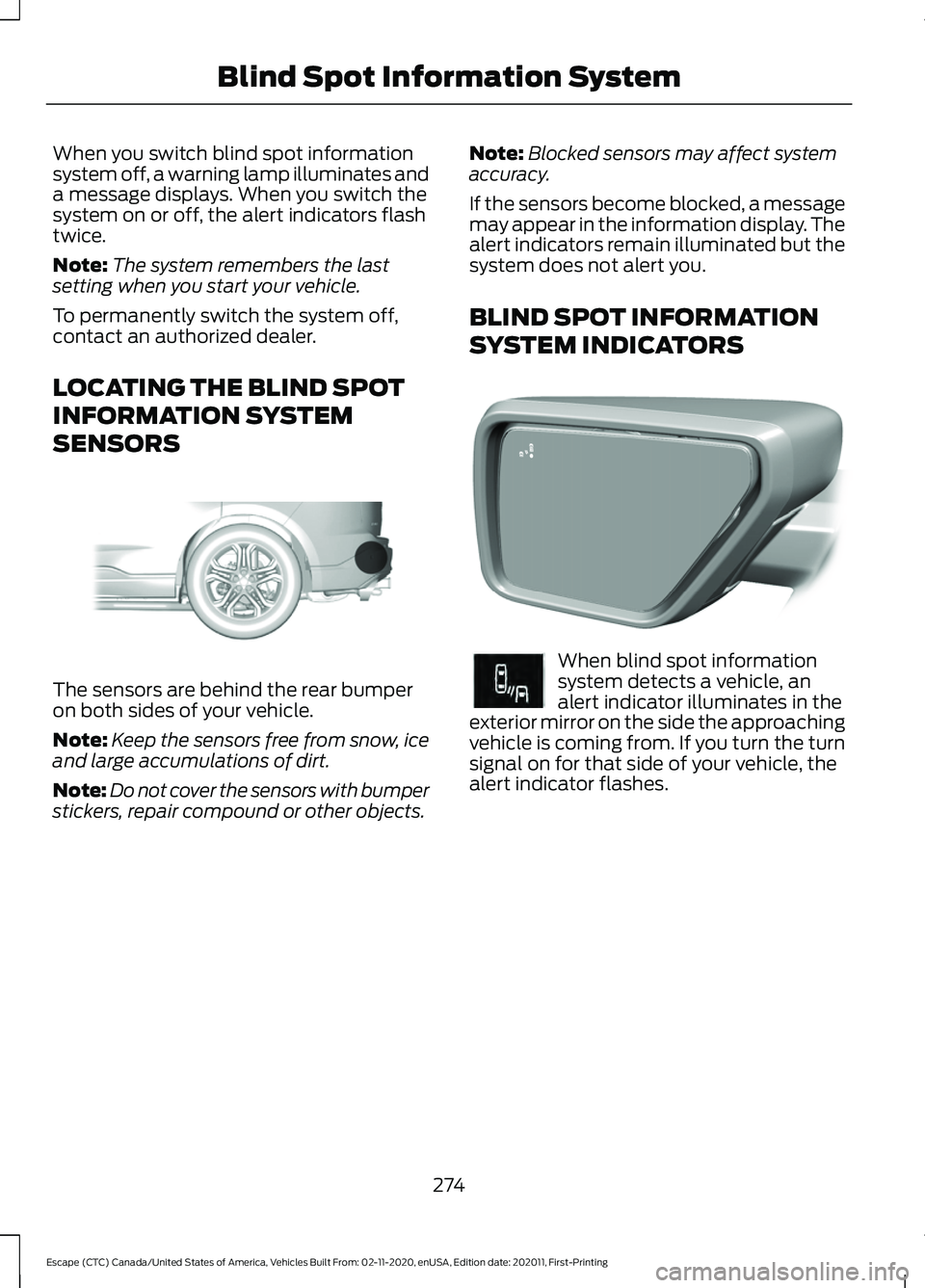
SENSORS The sensors are behind the rear bumper
on both sides of your vehicle.
Note:
Keep the sensors free from snow, ice
and large accumulations of dirt.
Note: Do not cover the sensors with bumper
stickers, repair compound or other objects. Note:
Blocked sensors may affect system
accuracy.
If the sensors become blocked, a message
may appear in the information display. The
alert indicators remain illuminated but the
system does not alert you.
BLIND SPOT INFORMATION
SYSTEM INDICATORS When blind spot information
system detects a vehicle, an
alert indicator illuminates in the
exterior mirror on the side the approaching
vehicle is coming from. If you turn the turn
signal on for that side of your vehicle, the
alert indicator flashes.
274
Escape (CTC) Canada/United States of America, Vehicles Built From: 02-11-2020, enUSA, Edition date: 202011, First-Printing Blind Spot Information SystemE205199 E309137 E249861E249861
Page 279 of 589
WHAT IS CROSS TRAFFIC
ALERT
The system alerts you of vehicles
approaching from the sides behind your
vehicle when you shift into reverse (R).
HOW DOES CROSS TRAFFIC
ALERT WORK
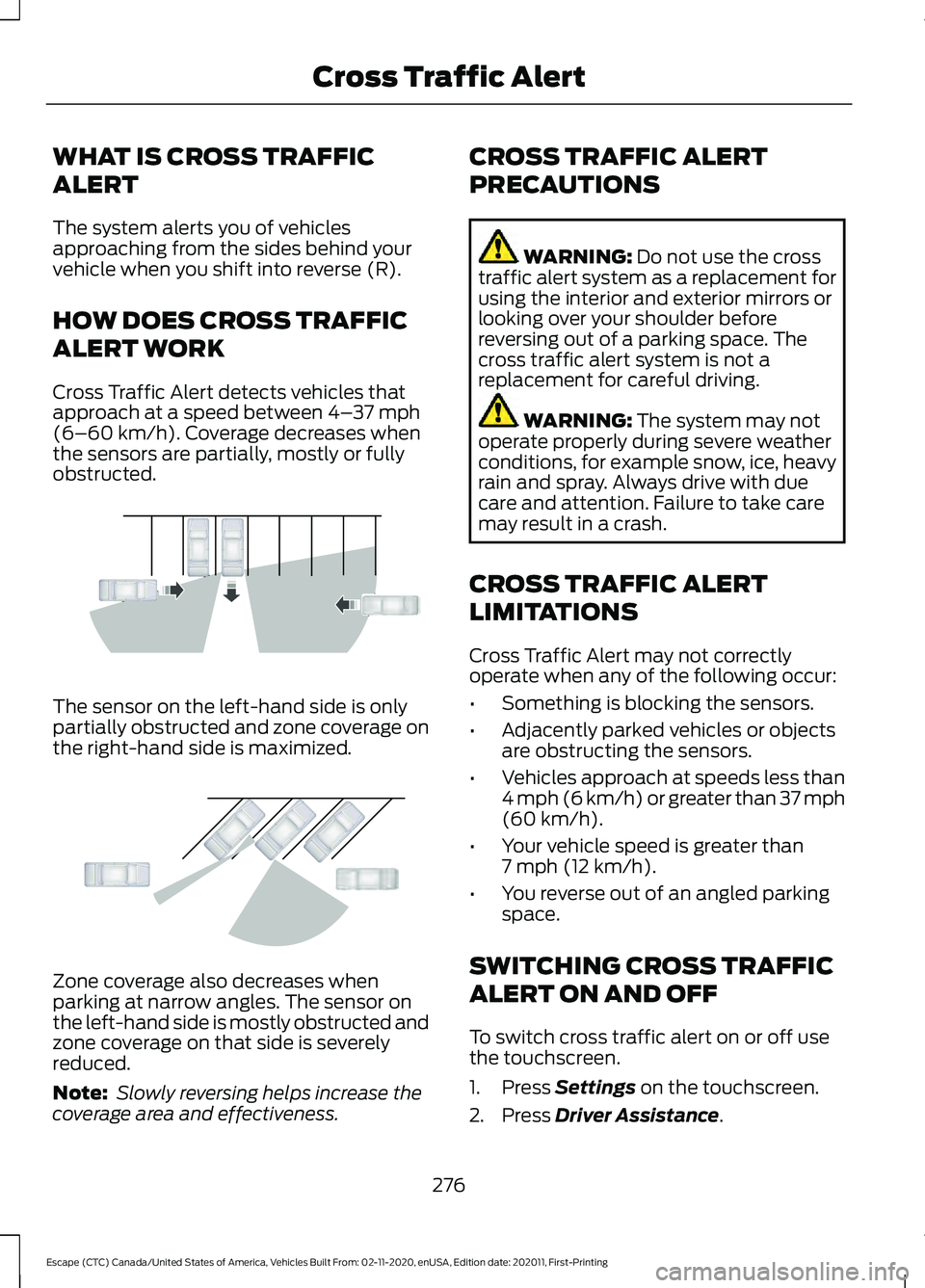
Cross Traffic Alert detects vehicles that
approach at a speed between 4–
37 mph
(6–60 km/h). Coverage decreases when
the sensors are partially, mostly or fully
obstructed. The sensor on the left-hand side is only
partially obstructed and zone coverage on
the right-hand side is maximized.
Zone coverage also decreases when
parking at narrow angles. The sensor on
the left-hand side is mostly obstructed and
zone coverage on that side is severely
reduced.
Note:
Slowly reversing helps increase the
coverage area and effectiveness. CROSS TRAFFIC ALERT
PRECAUTIONS WARNING:
Do not use the cross
traffic alert system as a replacement for
using the interior and exterior mirrors or
looking over your shoulder before
reversing out of a parking space. The
cross traffic alert system is not a
replacement for careful driving. WARNING:
The system may not
operate properly during severe weather
conditions, for example snow, ice, heavy
rain and spray. Always drive with due
care and attention. Failure to take care
may result in a crash.
CROSS TRAFFIC ALERT
LIMITATIONS
Cross Traffic Alert may not correctly
operate when any of the following occur:
• Something is blocking the sensors.
• Adjacently parked vehicles or objects
are obstructing the sensors.
• Vehicles approach at speeds less than
4 mph (6 km/h) or greater than 37 mph
(60 km/h)
.
• Your vehicle speed is greater than
7 mph (12 km/h)
.
• You reverse out of an angled parking
space.
SWITCHING CROSS TRAFFIC
ALERT ON AND OFF
To switch cross traffic alert on or off use
the touchscreen.
1. Press
Settings on the touchscreen.
2. Press
Driver Assistance.
276
Escape (CTC) Canada/United States of America, Vehicles Built From: 02-11-2020, enUSA, Edition date: 202011, First-Printing Cross Traffic AlertE142440 E142441
Page 280 of 589
3. Switch Cross Traffic Alert on or off.
Note: The system switches on every time
you switch the ignition on. To permanently
switch the system off, contact an authorized
dealer.
LOCATING THE CROSS
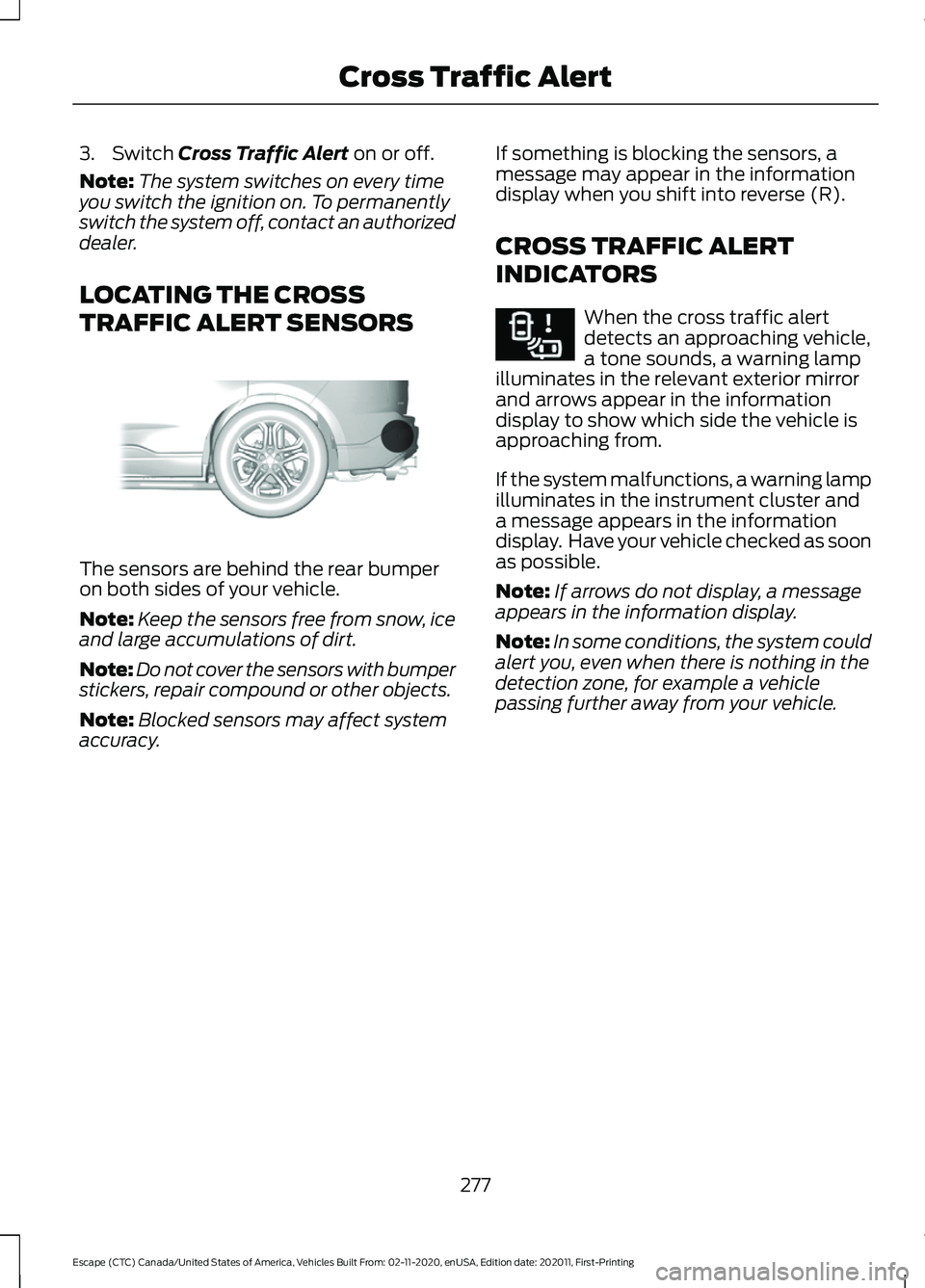
TRAFFIC ALERT SENSORS The sensors are behind the rear bumper
on both sides of your vehicle.
Note:
Keep the sensors free from snow, ice
and large accumulations of dirt.
Note: Do not cover the sensors with bumper
stickers, repair compound or other objects.
Note: Blocked sensors may affect system
accuracy. If something is blocking the sensors, a
message may appear in the information
display when you shift into reverse (R).
CROSS TRAFFIC ALERT
INDICATORS When the cross traffic alert
detects an approaching vehicle,
a tone sounds, a warning lamp
illuminates in the relevant exterior mirror
and arrows appear in the information
display to show which side the vehicle is
approaching from.
If the system malfunctions, a warning lamp
illuminates in the instrument cluster and
a message appears in the information
display. Have your vehicle checked as soon
as possible.
Note: If arrows do not display, a message
appears in the information display.
Note: In some conditions, the system could
alert you, even when there is nothing in the
detection zone, for example a vehicle
passing further away from your vehicle.
277
Escape (CTC) Canada/United States of America, Vehicles Built From: 02-11-2020, enUSA, Edition date: 202011, First-Printing Cross Traffic AlertE205199 E268294
Page 290 of 589
WHAT IS DRIVER ALERT
Driver alert alerts you if it determines that
you are becoming drowsy or if your driving
deteriorates.
HOW DOES DRIVER ALERT
WORK
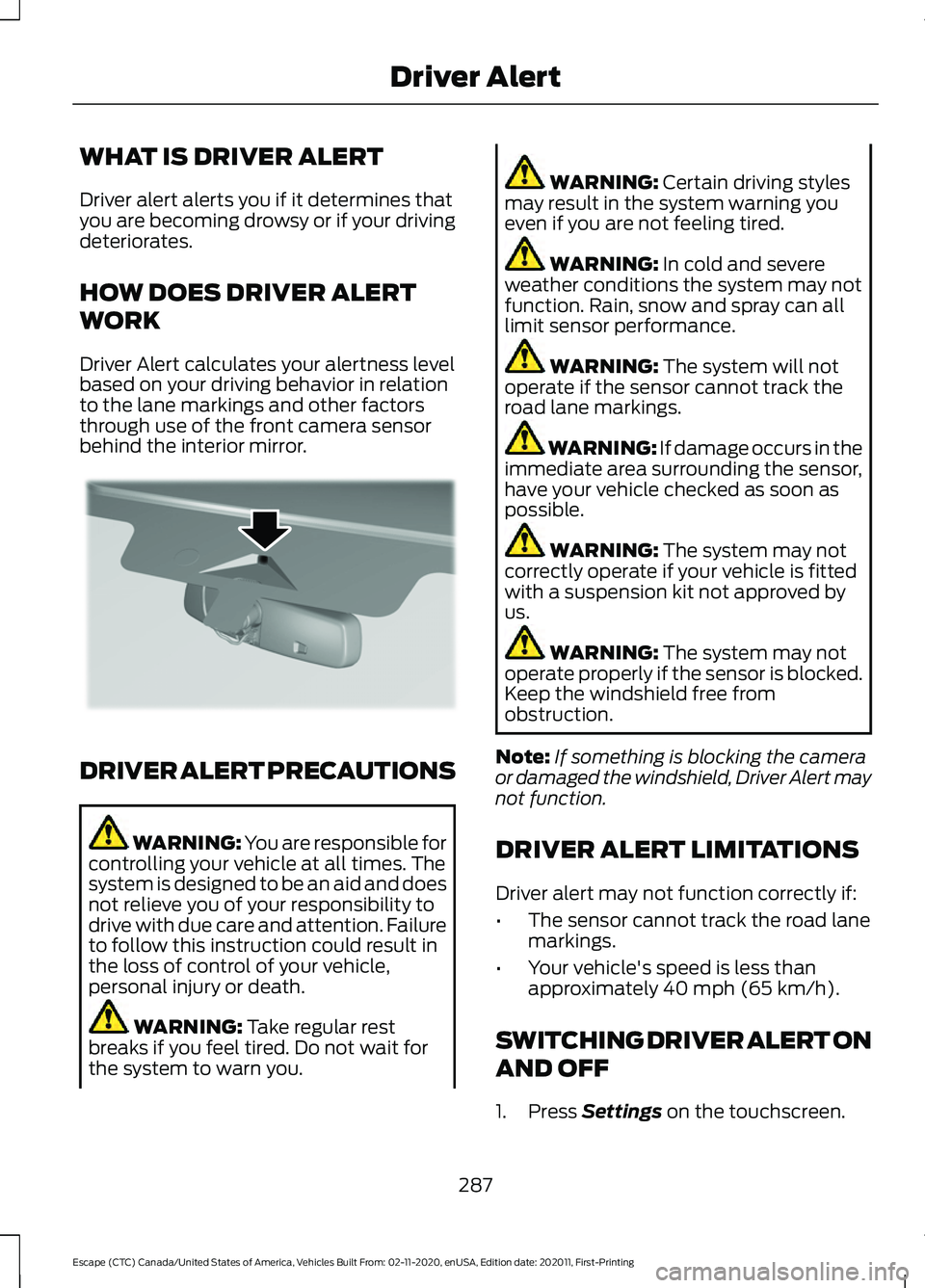
Driver Alert calculates your alertness level
based on your driving behavior in relation
to the lane markings and other factors
through use of the front camera sensor
behind the interior mirror.
DRIVER ALERT PRECAUTIONS
WARNING: You are responsible for
controlling your vehicle at all times. The
system is designed to be an aid and does
not relieve you of your responsibility to
drive with due care and attention. Failure
to follow this instruction could result in
the loss of control of your vehicle,
personal injury or death. WARNING: Take regular rest
breaks if you feel tired. Do not wait for
the system to warn you. WARNING:
Certain driving styles
may result in the system warning you
even if you are not feeling tired. WARNING:
In cold and severe
weather conditions the system may not
function. Rain, snow and spray can all
limit sensor performance. WARNING:
The system will not
operate if the sensor cannot track the
road lane markings. WARNING:
If damage occurs in the
immediate area surrounding the sensor,
have your vehicle checked as soon as
possible. WARNING:
The system may not
correctly operate if your vehicle is fitted
with a suspension kit not approved by
us. WARNING:
The system may not
operate properly if the sensor is blocked.
Keep the windshield free from
obstruction.
Note: If something is blocking the camera
or damaged the windshield, Driver Alert may
not function.
DRIVER ALERT LIMITATIONS
Driver alert may not function correctly if:
• The sensor cannot track the road lane
markings.
• Your vehicle's speed is less than
approximately
40 mph (65 km/h).
SWITCHING DRIVER ALERT ON
AND OFF
1. Press
Settings on the touchscreen.
287
Escape (CTC) Canada/United States of America, Vehicles Built From: 02-11-2020, enUSA, Edition date: 202011, First-Printing Driver AlertE309385
Page 292 of 589
WHAT IS SPEED SIGN
RECOGNITION
Speed sign recognition detects speed limit
signs to inform you of the current speed
limit. Detected speed signs appear in the
information display.
HOW DOES SPEED SIGN
RECOGNITION WORK
Speed sign recognition uses a sensor
behind the interior mirror to detect speed
signs.
If your vehicle has speed sign recognition
with navigation, stored speed sign data
may influence the indicated speed limit
value.
SPEED SIGN RECOGNITION
PRECAUTIONS
WARNING: You are responsible for
controlling your vehicle at all times. The
system is designed to be an aid and does
not relieve you of your responsibility to
drive with due care and attention. Failure
to follow this instruction could result in
the loss of control of your vehicle,
personal injury or death. WARNING: In cold and severe
weather conditions the system may not
function. Rain, snow and spray can all
limit sensor performance. WARNING:
The system may not
operate properly if the sensor is blocked.
Keep the windshield free from
obstruction. Note:
Do not carry out windshield repairs
in the immediate area surrounding the
sensor.
Note: If your vehicle has a suspension kit
not approved by us, the system may not
correctly function.
Note: The system may not detect all speed
signs and may incorrectly read signs.
Note: Always fit our original parts when
replacing headlamp bulbs. Other bulbs may
reduce system performance.
SPEED SIGN RECOGNITION
LIMITATIONS
Speed sign recognition may not operate
correctly due to:
• Outdated map data.
• Incorrect recognition of speed limits by
the sensor of signs on parallel roads or
exit ramps.
• Missed recognition of faded, dirty, or
distorted signs.
SPEED SIGN RECOGNITION
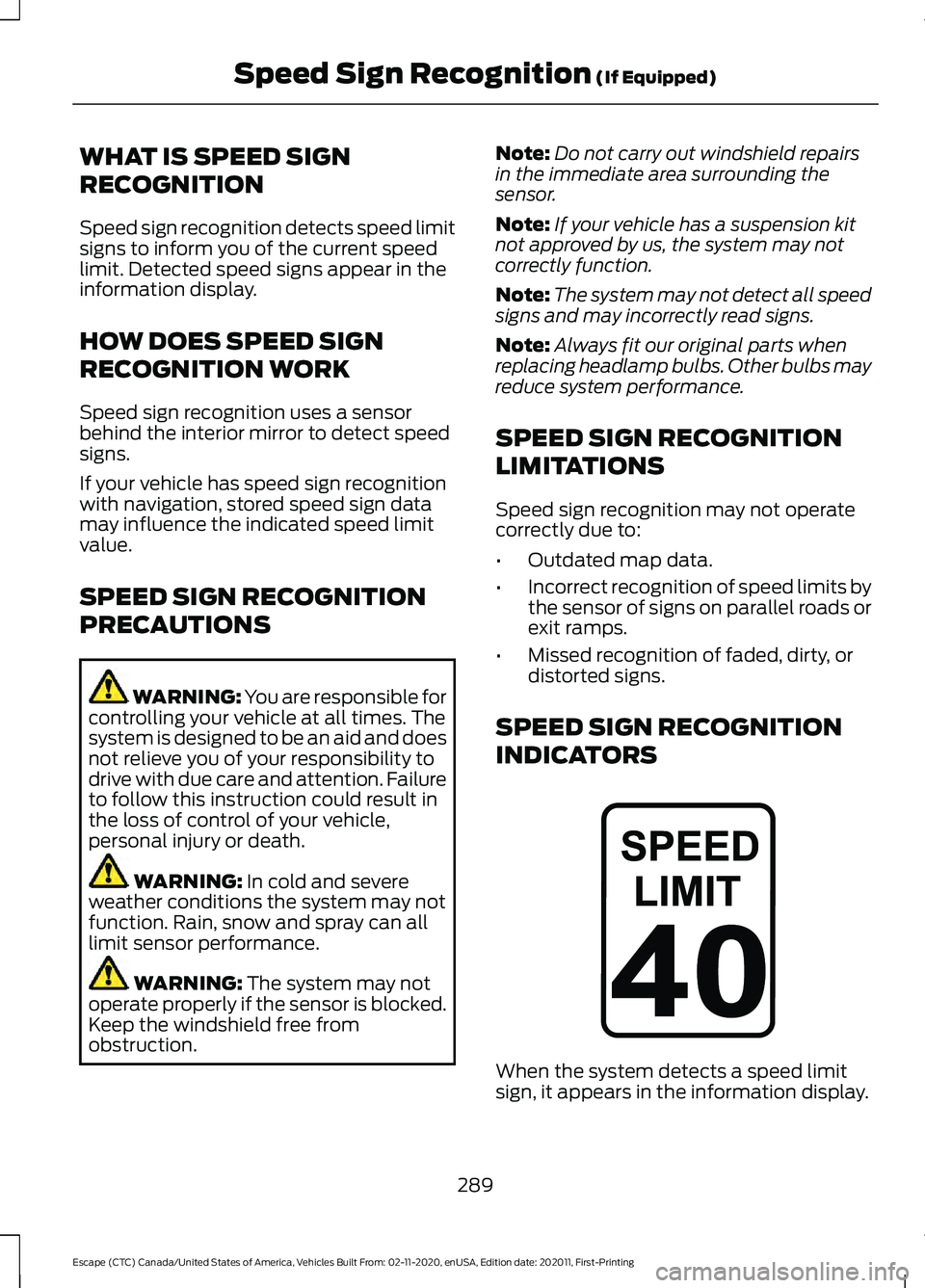
INDICATORS When the system detects a speed limit
sign, it appears in the information display.
289
Escape (CTC) Canada/United States of America, Vehicles Built From: 02-11-2020, enUSA, Edition date: 202011, First-Printing Speed Sign Recognition
(If Equipped)E317824
Page 332 of 589
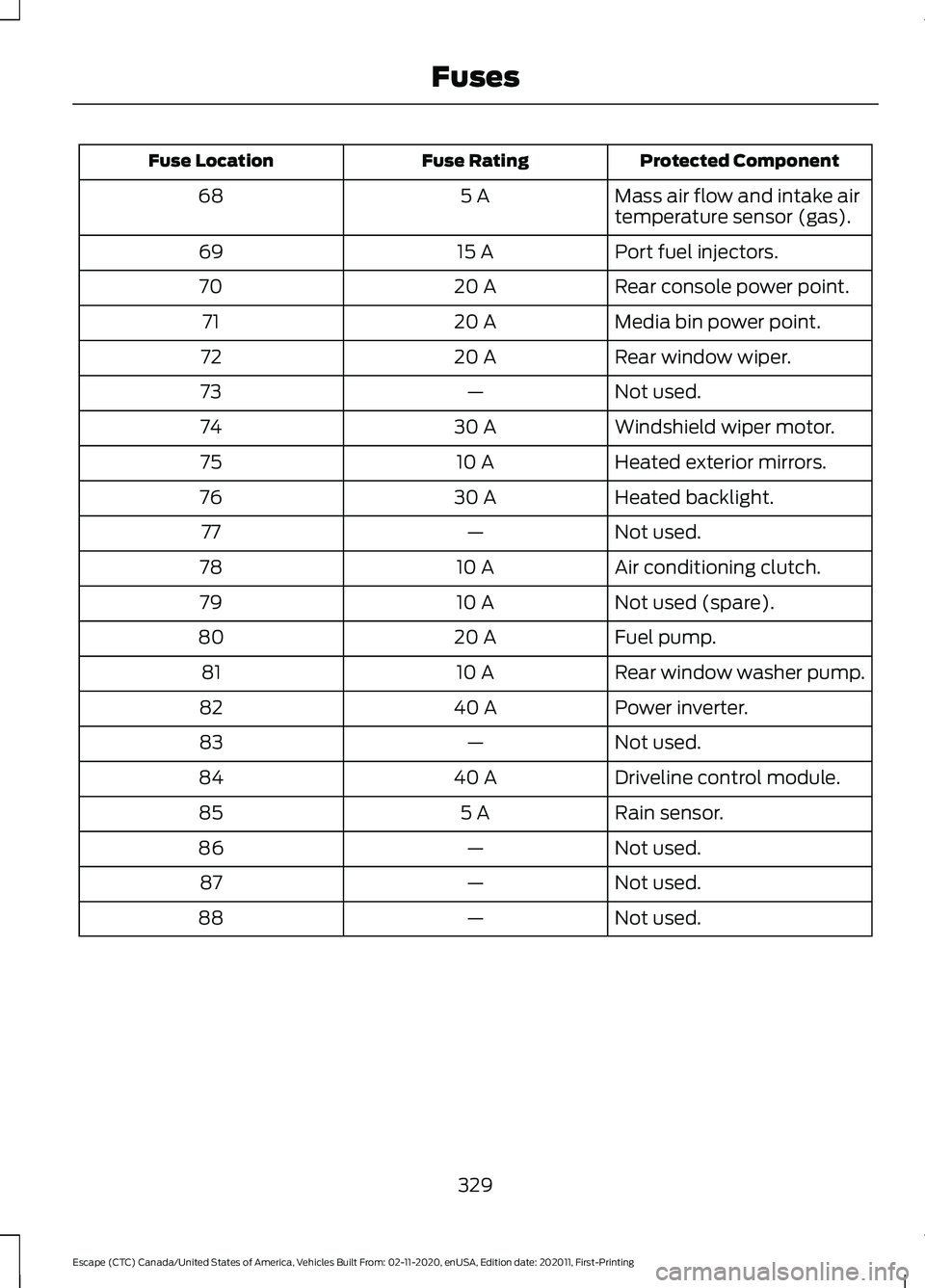
Protected Component
Fuse Rating
Fuse Location
Mass air flow and intake air
temperature sensor (gas).
5 A
68
Port fuel injectors.
15 A
69
Rear console power point.
20 A
70
Media bin power point.
20 A
71
Rear window wiper.
20 A
72
Not used.
—
73
Windshield wiper motor.
30 A
74
Heated exterior mirrors.
10 A
75
Heated backlight.
30 A
76
Not used.
—
77
Air conditioning clutch.
10 A
78
Not used (spare).
10 A
79
Fuel pump.
20 A
80
Rear window washer pump.
10 A
81
Power inverter.
40 A
82
Not used.
—
83
Driveline control module.
40 A
84
Rain sensor.
5 A
85
Not used.
—
86
Not used.
—
87
Not used.
—
88
329
Escape (CTC) Canada/United States of America, Vehicles Built From: 02-11-2020, enUSA, Edition date: 202011, First-Printing Fuses
Page 334 of 589
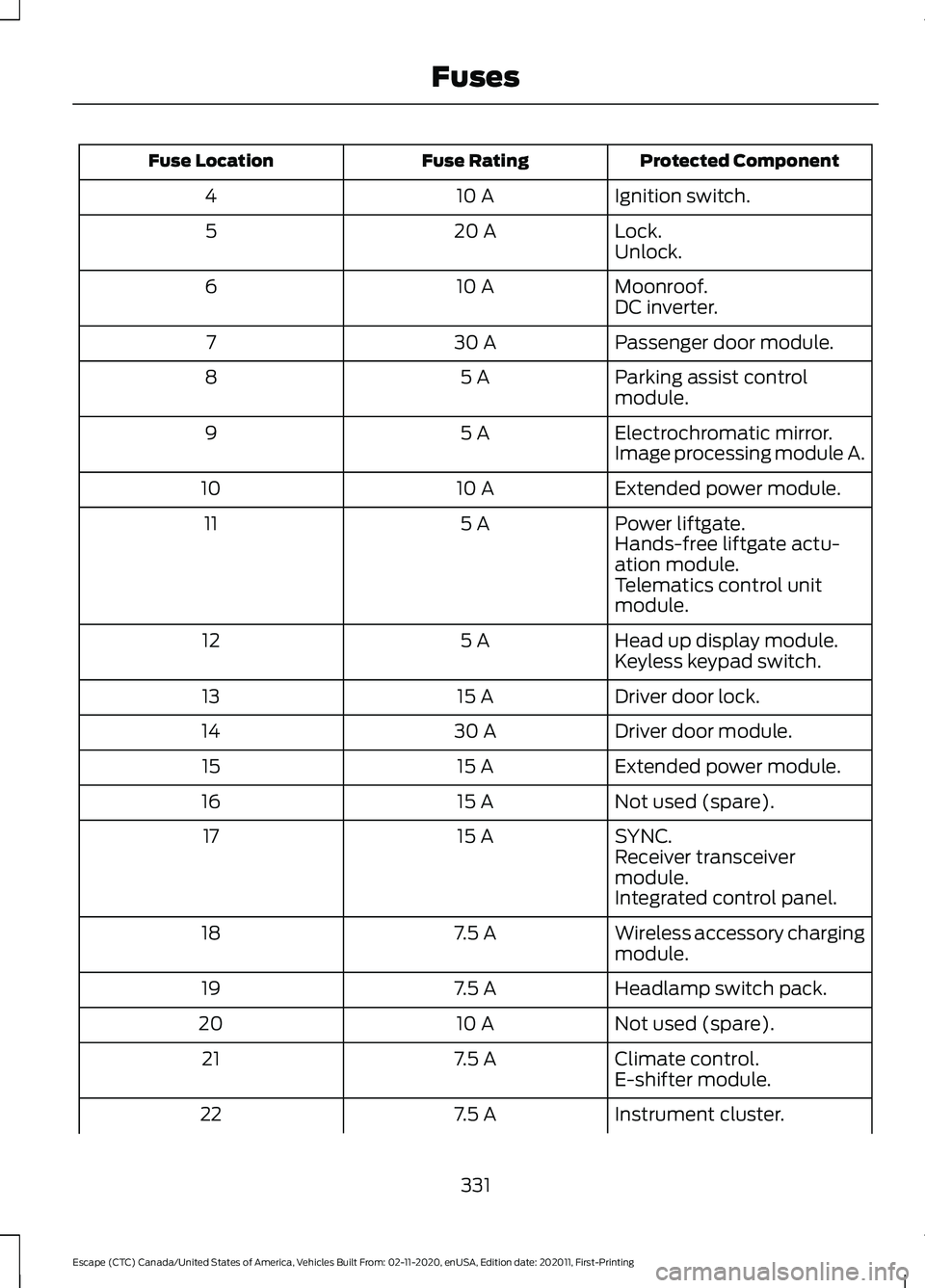
Protected Component
Fuse Rating
Fuse Location
Ignition switch.
10 A
4
Lock.
20 A
5
Unlock.
Moonroof.
10 A
6
DC inverter.
Passenger door module.
30 A
7
Parking assist control
module.
5 A
8
Electrochromatic mirror.
5 A
9
Image processing module A.
Extended power module.
10 A
10
Power liftgate.
5 A
11
Hands-free liftgate actu-
ation module.
Telematics control unit
module.
Head up display module.
5 A
12
Keyless keypad switch.
Driver door lock.
15 A
13
Driver door module.
30 A
14
Extended power module.
15 A
15
Not used (spare).
15 A
16
SYNC.
15 A
17
Receiver transceiver
module.
Integrated control panel.
Wireless accessory charging
module.
7.5 A
18
Headlamp switch pack.
7.5 A
19
Not used (spare).
10 A
20
Climate control.
7.5 A
21
E-shifter module.
Instrument cluster.
7.5 A
22
331
Escape (CTC) Canada/United States of America, Vehicles Built From: 02-11-2020, enUSA, Edition date: 202011, First-Printing Fuses
Page 335 of 589
Protected Component
Fuse Rating
Fuse Location
Gateway module.
Steering column control
module.
Audio unit.
20 A
23
Not used (spare).
20 A
24
Power windows.
30 A
25
Exterior mirrors.
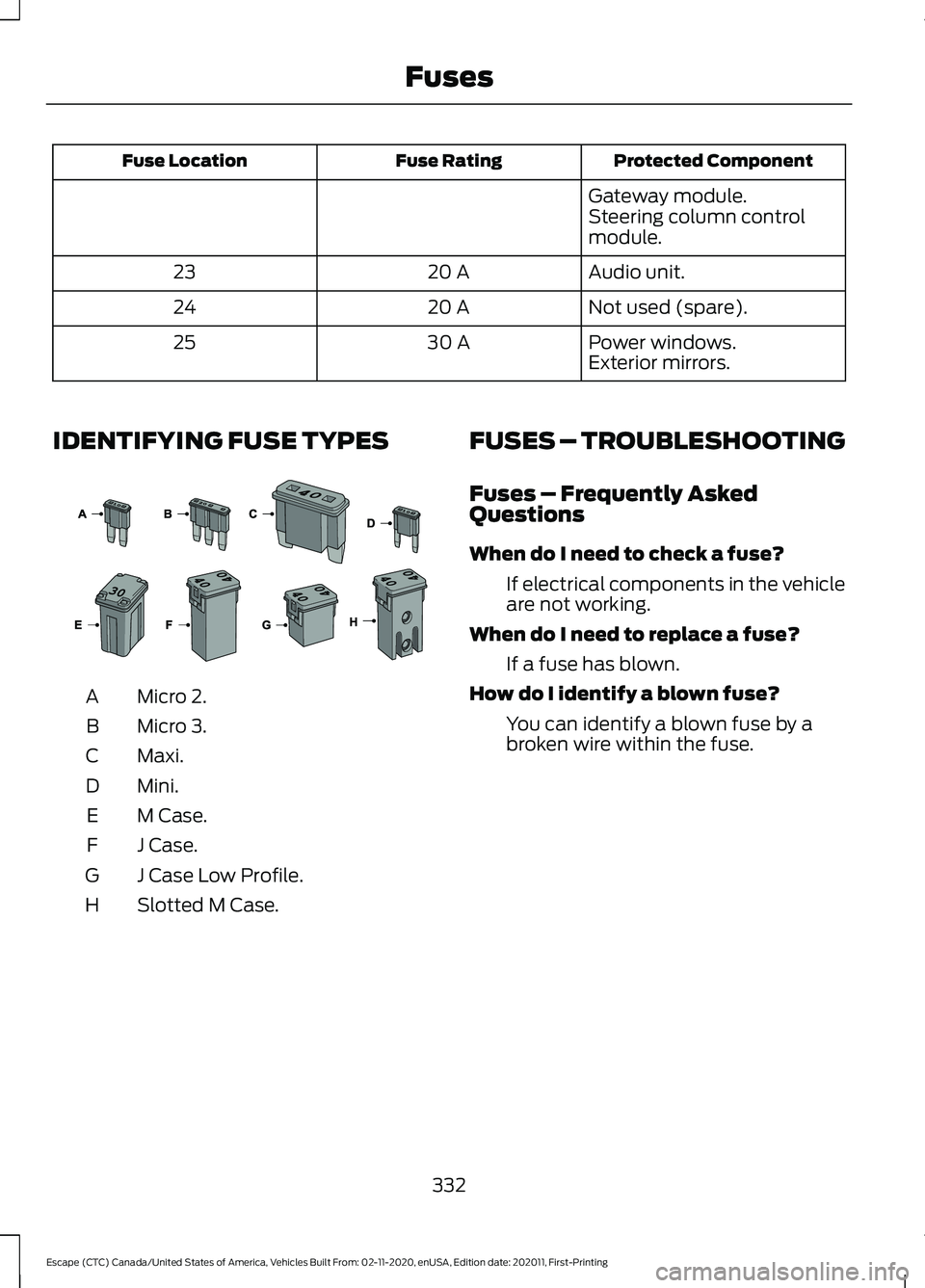
IDENTIFYING FUSE TYPES Micro 2.
A
Micro 3.
B
Maxi.
C
Mini.
D
M Case.
E
J Case.
F
J Case Low Profile.
G
Slotted M Case.
H FUSES – TROUBLESHOOTING
Fuses – Frequently Asked
Questions
When do I need to check a fuse?
If electrical components in the vehicle
are not working.
When do I need to replace a fuse? If a fuse has blown.
How do I identify a blown fuse? You can identify a blown fuse by a
broken wire within the fuse.
332
Escape (CTC) Canada/United States of America, Vehicles Built From: 02-11-2020, enUSA, Edition date: 202011, First-Printing Fuses E267379
Page 566 of 589
9
911 Assist............................................................57
A
A/C See: Climate Control.......................................... 137
About This Publication..................................17 Features and Options.......................................... 17
Illustrations.............................................................. 17
Location of Components.................................... 17
ABS See: Brakes............................................................ 221
Accessing the Trip Computer - Vehicles With: 4.2 Inch Instrument Cluster
Display Screen
............................................129
Accessing the Trip Computer - Vehicles With: 6.5 Inch Instrument Cluster
Display Screen/12.3 Inch Instrument
Cluster Display Screen.............................129
Using Select Screens........................................ 129
Using the Home Screen................................... 129
Accessories...................................................484
AC Charging
...................................................205
Connecting the Charger.................................. 205
Stopping Charging............................................ 206
Active Park Assist........................................243 Active Park Assist –
Troubleshooting............................................ 245
Active Park Assist Precautions...............243
Active Park Assist – Troubleshooting........................................245
Active Park Assist – Frequently Asked Questions......................................................... 245
Active Park Assist – Information Messages......................................................... 245
Adaptive Cruise Control
............................249
Adaptive Cruise Control –
Troubleshooting............................................ 258
Intelligent Adaptive Cruise Control.............257
Lane Centering.................................................... 255
Adaptive Cruise Control Automatic Cancellation................................................252
Adaptive Cruise Control Indicators.......255
Adaptive Cruise Control Limitations
..................................................250
Sensor Limitations............................................ 250Adaptive Cruise Control
Precautions.................................................249
Hilly Condition Usage....................................... 249
When Following a Vehicle.............................. 249
Adaptive Cruise Control – Troubleshooting........................................
258
Adaptive Cruise Control – Information
Messages......................................................... 258
Adjusting the Exterior Mirrors..................108
Adjusting the Headlamps........................348 Horizontal Aim Adjustment........................... 348
Vertical Aim Adjustment................................ 348
Adjusting the Instrument Panel Lighting Brightness....................................................103
Adjusting the Seatbelt Height...................42
Adjusting the Seatbelts During Pregnancy......................................................42
Adjusting the Sound Settings..................415 Balance and Fade.............................................. 415
Occupancy Mode............................................... 415
Sound Mode......................................................... 415
Speed Compensated Volume....................... 415
Tone Settings....................................................... 415
Adjusting the Steering Wheel....................91
Adjusting the Volume.................................414
Aid Mode
........................................................268
How Does Aid Mode Work............................. 268
What Is Aid Mode.............................................. 268
Airbag Precautions
........................................49
Airbags................................................................47 Front Passenger Sensing System................... 51
Air Conditioning See: Climate Control.......................................... 137
Air Conditioning System Capacity and Specification - 1.5L EcoBoost™.........404
Air Conditioning System Capacity and Specification - 2.0L EcoBoost™........405
Air Conditioning System Capacity and Specification - 2.5L, Hybrid Electric
Vehicle (HEV)/Plug-In Hybrid Electric
Vehicle (PHEV).........................................406
Air Filter See: Changing the Engine Air Filter - 1.5L
EcoBoost™/2.0L EcoBoost™.................343
See: Changing the Engine Air Filter - 2.5L, Hybrid Electric Vehicle (HEV)/Plug-In
Hybrid Electric Vehicle (PHEV)...............344
563
Escape (CTC) Canada/United States of America, Vehicles Built From: 02-11-2020, enUSA, Edition date: 202011, First-Printing Index
Page 567 of 589
Alert and Aid Mode.....................................268
How Does Alert and Aid Mode Work.........269
What Is Alert and Aid Mode.......................... 268
Alert Mode......................................................267
Adjusting the Steering Wheel Vibration
Intensity........................................................... 268
How Does Alert Mode Work.......................... 268
What Is Alert Mode............................................ 267
All-Wheel Drive
..............................................217
All-Wheel Drive Driving Hints......................... 217
All-Wheel Drive – Troubleshooting............220
All-Wheel Drive Driving Hints...................217 Driving In Sand..................................................... 218
Driving on Hilly or Sloping Terrain.................218
Driving on Snow and Ice................................... 219
Driving Through Mud and Water................... 218
Emergency Maneuvers...................................... 217
All-Wheel Drive Limitations
......................217
All-Wheel Drive Precautions.....................217
All-Wheel Drive – Troubleshooting........................................220
All-Wheel Drive – Information Messages......................................................... 220
AM/FM Radio
.................................................416
AM/FM Radio Limitations............................... 416
Selecting a Radio Station................................ 416
Ambient Lighting
..........................................103
Adjusting Ambient Lighting............................ 103
Switching Ambient Lighting On and Off....................................................................... 103
Anti-Lock Braking System.........................221 Anti-Lock Braking System Indicators..........221
Anti-Lock Braking System
Limitations........................................................ 221
Anti-Theft Alarm System............................87 Arming the Anti-Theft Alarm System..........87
Disarming the Anti-Theft Alarm
System................................................................ 88
How Does the Anti-Theft Alarm System Work..................................................................... 87
What Are the Inclination Sensors.................. 87
What Are the Interior Sensors......................... 87
What Is the Anti-Theft Alarm System..........87
What Is the Battery Backup Alarm................87
What Is the Perimeter Alarm........................... 87
Anti-Theft Alarm System Settings.........88 Setting the Alarm Security Level................... 88
Switching Ask on Exit On and Off.................88 What are the Alarm Security Levels.............88
What Is Ask on Exit.............................................
88
Appendices...................................................560
Applying the Electric Parking Brake..............................................................224
Applying the Electric Parking Brake in an Emergency...................................................224
Apps..................................................................467 SiriusXM Traffic and Travel Link.................. 468
Using Apps on an Android Device...............467
Using Apps on an iOS Device........................ 467
Using Mobile Navigation on an Android Device............................................................... 468
At a Glance
.......................................................26
Audio System.................................................414
AM/FM Radio....................................................... 416
Digital Radio......................................................... 416
Satellite Radio..................................................... 418
Audio System Precautions
.......................414
Auto-Dimming Interior Mirror...................107 Auto-Dimming Interior Mirror
Limitations........................................................ 107
What Is the Auto-Dimming Interior Mirror................................................................... 107
Auto Hold........................................................228
Auto Hold Indicators
...................................228
Autolamps........................................................98
Autolamp Settings.............................................. 98
What Are Autolamps.......................................... 98
Autolock.............................................................70 Autolock Requirements..................................... 70
What Is Autolock.................................................. 70
Automatically Releasing the Electric Parking Brake
..............................................225
Automatic Climate Control - Vehicles With: Dual Automatic Temperature
Control (DATC)
...........................................138
Directing the Airflow.......................................... 139
Setting the Blower Motor Speed.................. 139
Setting the Temperature................................. 139
Switching Auto Mode On and Off................139
Switching Dual Zone Mode On and Off....................................................................... 140
Switching Maximum Air Conditioning On and Off.............................................................. 140
Switching Maximum Defrost On and Off........................................................................\
. 141
564
Escape (CTC) Canada/United States of America, Vehicles Built From: 02-11-2020, enUSA, Edition date: 202011, First-Printing Index