window FORD ESCAPE 2021 Owner's Guide
[x] Cancel search | Manufacturer: FORD, Model Year: 2021, Model line: ESCAPE, Model: FORD ESCAPE 2021Pages: 589, PDF Size: 9.2 MB
Page 424 of 589
Helpful Hints
•
Make sure the interior of your vehicle is
as quiet as possible. Wind noise from
open windows and road vibrations may
prevent the system from correctly
recognizing spoken commands.
• Before giving a voice command, wait
for the system announcement to finish,
followed by a single tone. Any
command spoken before this does not
register with the system.
• Speak naturally, without long pauses
between words.
• You can interrupt the system at any
time while it is speaking by pressing the
voice button. You can cancel a voice
session by pressing and holding the
voice button. System Interaction and Feedback
The system provides feedback through
audible tones, prompts, questions and
spoken confirmations depending on the
situation and the chosen level of
interaction. You can customize the voice
recognition system to provide more or less
instruction and feedback.
The default setting is to a higher level of
interaction in order to help you learn to use
the system. You can change these settings
at any time.
Adjusting the Interaction Level Press the voice button. When
prompted, say:
Action and Description
Voice Command
Provides more detailed interaction and
guidance. (Recommended for first time
users.)
Interaction Mode Standard
Provides less audible interaction and guid-
ance.
Interaction Mode Advanced
Phone Confirmation
Using phone confirmations the system
asks you to verify before placing any calls.
To adjust this setting press the voice button, when prompted say: Action and Description
Voice Command
When enabled, this feature will prompt you
to confirm any voice initiated call command
prior to the call being placed.
Phone Confirmation Off
The system will make a best guess; you
may still occasionally be asked to confirm
settings.
Phone Confirmation On
421
Escape (CTC) Canada/United States of America, Vehicles Built From: 02-11-2020, enUSA, Edition date: 202011, First-Printing SYNC™ (If Equipped)E142599
Page 427 of 589
![FORD ESCAPE 2021 Owners Guide If a crash deploys an airbag (excluding
knee airbags and rear inflatable safety
belts [if equipped]) or activates the fuel
pump shut-off, your SYNC-equipped
vehicle may be able to contact emergency
se](/img/11/40602/w960_40602-426.png "FORD ESCAPE 2021 Owners Guide If a crash deploys an airbag (excluding
knee airbags and rear inflatable safety
belts [if equipped]) or activates the fuel
pump shut-off, your SYNC-equipped
vehicle may be able to contact emergency
se")
If a crash deploys an airbag (excluding
knee airbags and rear inflatable safety
belts [if equipped]) or activates the fuel
pump shut-off, your SYNC-equipped
vehicle may be able to contact emergency
services by dialing 911 through a paired and
connected Bluetooth-enabled phone.
See Airbags (page 47). Important
information about airbag deployment is in
this chapter.
See
Crash and Breakdown Information
(page 313). Important information about
the fuel pump shut-off is in this chapter.
Setting 911 Assist On or Off
Press the Settings button then select: Action and Description
Menu
Item
Select the desired option, on
or off.
911 Assist
To make sure that 911 Assist works
properly:
• SYNC must be powered and working
properly at the time of the incident and
throughout feature activation and use.
• The 911 Assist feature must be set on
before the incident.
• You must pair and connect a Bluetooth
enabled and compatible cell phone to
SYNC.
• A connected Bluetooth enabled phone
must have the ability to make and
maintain an outgoing call at the time
of the incident.
• A connected Bluetooth enabled phone
must have adequate network coverage,
battery power and signal strength.
• The vehicle must have battery power
and be located in the U.S., Canada or
in a territory in which 911 is the
emergency number. In the Event of a Crash
Not all crashes deploy an airbag or activate
the fuel pump shut-off (the triggers for 911
Assist). If a connected cell phone sustains
damage or loses its connection to SYNC
during a crash, SYNC searches for and tries
to connect to a previously paired cell
phone; SYNC then attempts to call the
emergency services.
Before making the call:
•
SYNC provides a short window of time
(about 10 seconds) to cancel the call.
If you fail to cancel the call, SYNC
attempts to dial 911.
• SYNC says the following, or a similar
message: "SYNC will attempt to call
911, to cancel the call, press Cancel on
your screen or press and hold the
phone button on your steering wheel".
If you do not cancel the call, and SYNC
makes a successful call, a pre-recorded
message plays for the 911 operator, and
then the occupant(s) in your vehicle are
able to talk with the operator. Be prepared
to provide your name, phone number and
location immediately, because not all 911
systems are capable of receiving this
information electronically.
911 Assist May Not Work If
• Your cellular phone or 911 Assist
hardware sustains damage in a crash.
• The vehicle's battery or the SYNC
system has no power.
• The phone(s) thrown from your vehicle
are the ones paired and connected to
the system.
424
Escape (CTC) Canada/United States of America, Vehicles Built From: 02-11-2020, enUSA, Edition date: 202011, First-Printing SYNC™
(If Equipped)
Page 466 of 589
•
Drive Power: The engine is on due to
accelerator pedal pressure or speed
control activation. Reduce pressure on
the accelerator pedal or switch off the
speed control to return to full electric
mode.
• High Speed: The engine is on because
the vehicle speed exceeds the level for
full electric operation. Reduce the
speed to return to electric operation.
• Heater Setting: The engine is on
because of the heater setting. Reduce
or turn off the heater setting to return
to electric operation.
• Neutral Gear: The engine is on because
the vehicle is in Neutral (N). Shift out
of neutral gear to return to electric
operation.
• Engine Cold: The engine is on because
it is cold. The vehicle returns to electric
operation once the engine is sufficiently
warm.
• Battery Charging: The engine is on to
charge the high-voltage battery. The
vehicle returns to electric operation
once the battery is charged.
• Low Gear: The engine is on because
the vehicle is in low gear. Shift out of
low gear to return to electric operation.
• Normal Operation: The engine is on to
optimize vehicle operation. The vehicle
returns to electric operation when
possible.
• Low Use: The engine is on to maintain
engine oil quality. The vehicle returns
to electric operation when low engine
use mode is complete. See How Does
Low Engine Use Mode Work (page
183). •
Engine Braking Active: The engine is on
to provide increased powertrain
braking. This can occur when you turn
on the grade assist feature, when
speed control is on or when driving with
your foot off the accelerator pedal.
Turning off grade assist or speed
control may allow the vehicle to return
to electric operation.
• Battery Temperature: The engine is on
due to high or low high-voltage battery
temperature. This is a normal operating
condition. The vehicle returns to
electric operation when possible.
• Drive Mode: The engine is on due to the
drive mode selection. Select an
appropriate drive mode for electric only
operation.
Charge Settings The Charge Settings information
for your plug-in hybrid vehicle is
available through the Home
screen or under Vehicle Settings. To
Improve your charging experience, your
vehicle has the following convenience
features.
Charge Times
Once you set up Charge Times for a
specific charging location, your vehicle
prioritizes charging based on your preferred
time settings. You can set two preferred
charging time windows for weekdays and
two for weekends. This feature allows you
to take advantage of electric utility rate
plans that offer lower pricing during certain
times of day. Contact your utility company
to see what plans are available.
Note: You can also set up and use these
features using the FordPass app.
463
Escape (CTC) Canada/United States of America, Vehicles Built From: 02-11-2020, enUSA, Edition date: 202011, First-Printing SYNC™ 3
(If Equipped)E304452
Page 469 of 589
Departure Times On and Off Switch
This switch is visible when you have at
least one departure time set. Use this
switch to turn all departure times on and
off. Switching departure times off does not
delete your settings.
Next Departure Times and Cabin
Temperature
Displays the next departure time and
associated cabin temperature setting.
Charge Time Settings
Follow these steps to set a preferred
charge time for a charging location.
1. Select Charge Preferences on the
Charge Settings screen.
2. Select Charge Time Setup on the Edit Charge Preferences screen.
3. Select Add New Location on the Charge Times screen. You can also edit
settings for previously saved locations
from this screen.
4. Select an address from the Recent Charge Locations screen.
5. On the Confirm Location for Charge Times screen, you can edit the location
name and set a max charge level as
desired. Once you have your desired
location name and max charge level,
select Continue to Schedule.
Note: Charging will stop when your vehicle
reaches the max charge level.
6. Select WEEKDAY or WEEKEND on the
Preferred Charge Times screen.
7. On the Select preferred WEEKDAY or WEEKEND Charge Times screen, use
the circular 24 hour clock to select your
charging time windows. You can select
up to two time windows by pressing
and dragging across the hour buttons. When you have selected your preferred
times then press Next to return to the
Preferred Charge Times screen. Repeat
for WEEKEND or WEEKDAY as desired.
Once you are done setting preferred
charge times, press Save.
Note: Selecting all or none of the 24 hours
results in any time of day given equal priority
for charging.
8. Your saved location now shows on the
Charge Times screen. Select Done to
return to the main charge settings
screen. Whenever your vehicle is at a
saved charging location the charge
settings screen displays the location
name, and the charging times are
based on your Charge Time settings for
that location plus the next Departure
Time.
Note: Reaching your max charge level by
your next Departure Time is always the
priority. When Charge Times are set,
charging outside your preferred charging
time windows could be necessary in order
to finish by your next Departure Time.
Departure Time Settings
1. Select Charge Preferences on the Charge Settings screen.
2. Select Departure Time Setup on the Edit Charge Preferences screen.
3. Two time settings show for each day of the week on the Departure Times
schedule screen. Select any one.
4. On the Departure Time settings screen,
set your desired departure time, cabin
temperature and days of the week to
repeat. Press Save.
5. Your settings are now shown on the Departure Times schedule screen.
Press Back two times to return to the
main charge settings screen. The next
departure time and cabin temperature
setting display.
466
Escape (CTC) Canada/United States of America, Vehicles Built From: 02-11-2020, enUSA, Edition date: 202011, First-Printing SYNC™ 3 (If Equipped)
Page 472 of 589
Action and Description
Menu Item
Touch this button to view the nearby weather, current weather,
or the five-day forecast for the chosen area.
Weather
Select to see the weather map,
which can show storms, radar
information, charts and winds.
Map
Select to choose from a listing of
weather locations.
Area
Touch this button to view scores and schedules from a variety
of sports. You can also save up to 10 favorite teams for easier
access. The score automatically refreshes when a game is in
progress.
Sports Info
Touch this button to view ski conditions for a specific area.
Ski Conditions
SETTINGS Press the button to enter the
settings menu.
Once you select a tile, press the
button next to a menu item to
view an explanation of the
feature or setting.
Sound
Select this tile to adjust the sound settings.
Clock
Select this tile to adjust the clock settings.
Bluetooth
Select this tile to switch Bluetooth on and
off and adjust the settings.
Phone
Select this tile to connect, disconnect, and
manage the connected device settings. Audio
Select this tile to adjust the audio settings.
Driver Assist (If Equipped)
Select this tile to adjust Driver Assist
features like Parking Aids, Lane Keeping
System, Pedestrian Detection, and
Auto-Start-Stop.
Vehicle
Select this tile to adjust vehicle settings
like windows, alarm, lighting, and MyKey
settings.
FordPass
Select this tile to adjust the FordPass
settings
General
Select this tile to adjust settings like
language, measurement units, or to reset
the system.
911 Assist
(If Equipped)
Select this tile to switch 911 Assist on and
off.
469
Escape (CTC) Canada/United States of America, Vehicles Built From: 02-11-2020, enUSA, Edition date: 202011, First-Printing SYNC™ 3
(If Equipped)E280315 E268570
Page 483 of 589
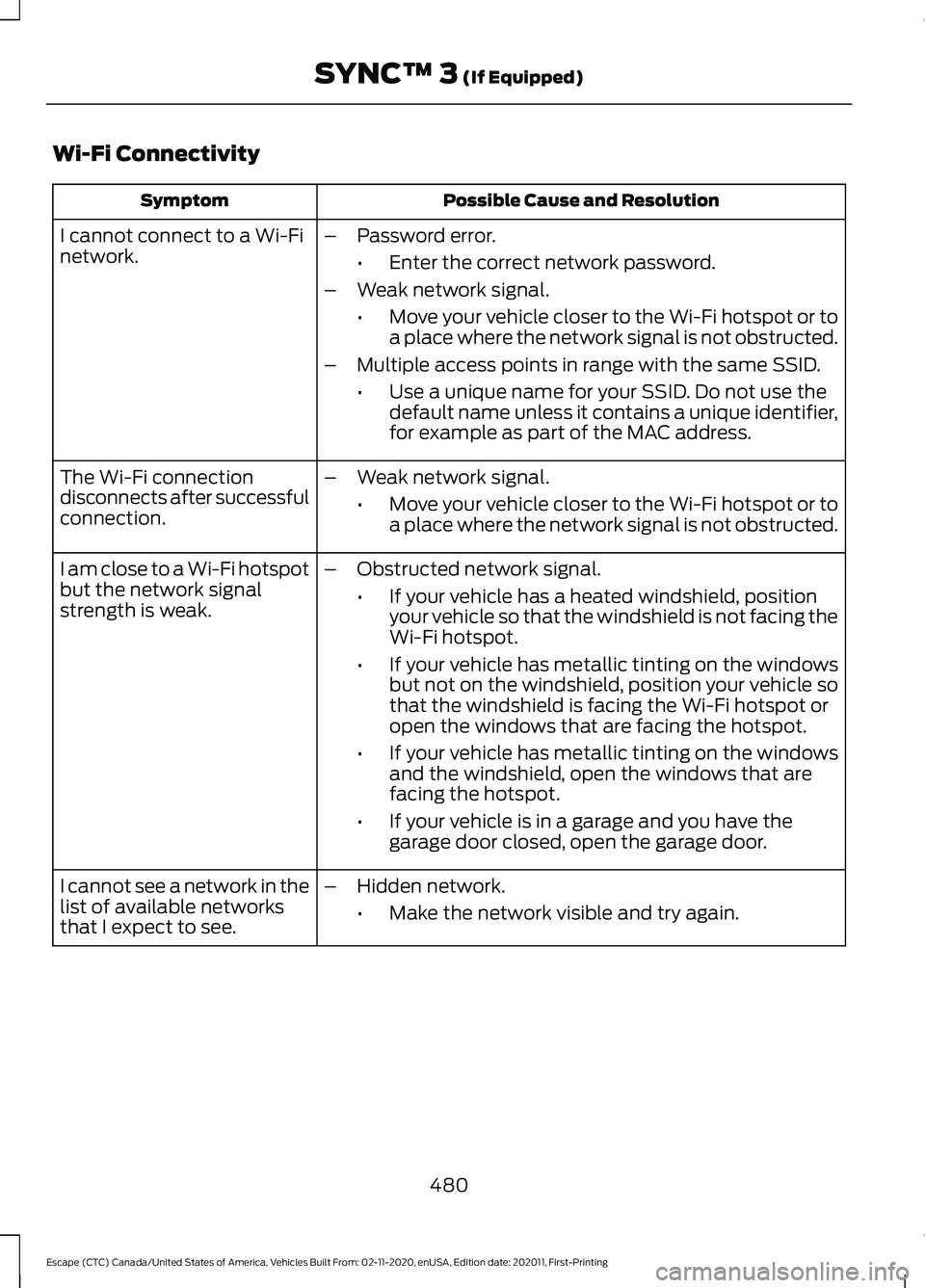
Wi-Fi Connectivity
Possible Cause and Resolution
Symptom
I cannot connect to a Wi-Fi
network. –
Password error.
•Enter the correct network password.
– Weak network signal.
•Move your vehicle closer to the Wi-Fi hotspot or to
a place where the network signal is not obstructed.
– Multiple access points in range with the same SSID.
•Use a unique name for your SSID. Do not use the
default name unless it contains a unique identifier,
for example as part of the MAC address.
The Wi-Fi connection
disconnects after successful
connection. –
Weak network signal.
•Move your vehicle closer to the Wi-Fi hotspot or to
a place where the network signal is not obstructed.
I am close to a Wi-Fi hotspot
but the network signal
strength is weak. –
Obstructed network signal.
•If your vehicle has a heated windshield, position
your vehicle so that the windshield is not facing the
Wi-Fi hotspot.
• If your vehicle has metallic tinting on the windows
but not on the windshield, position your vehicle so
that the windshield is facing the Wi-Fi hotspot or
open the windows that are facing the hotspot.
• If your vehicle has metallic tinting on the windows
and the windshield, open the windows that are
facing the hotspot.
• If your vehicle is in a garage and you have the
garage door closed, open the garage door.
I cannot see a network in the
list of available networks
that I expect to see. –
Hidden network.
•Make the network visible and try again.
480
Escape (CTC) Canada/United States of America, Vehicles Built From: 02-11-2020, enUSA, Edition date: 202011, First-Printing SYNC™ 3 (If Equipped)
Page 492 of 589
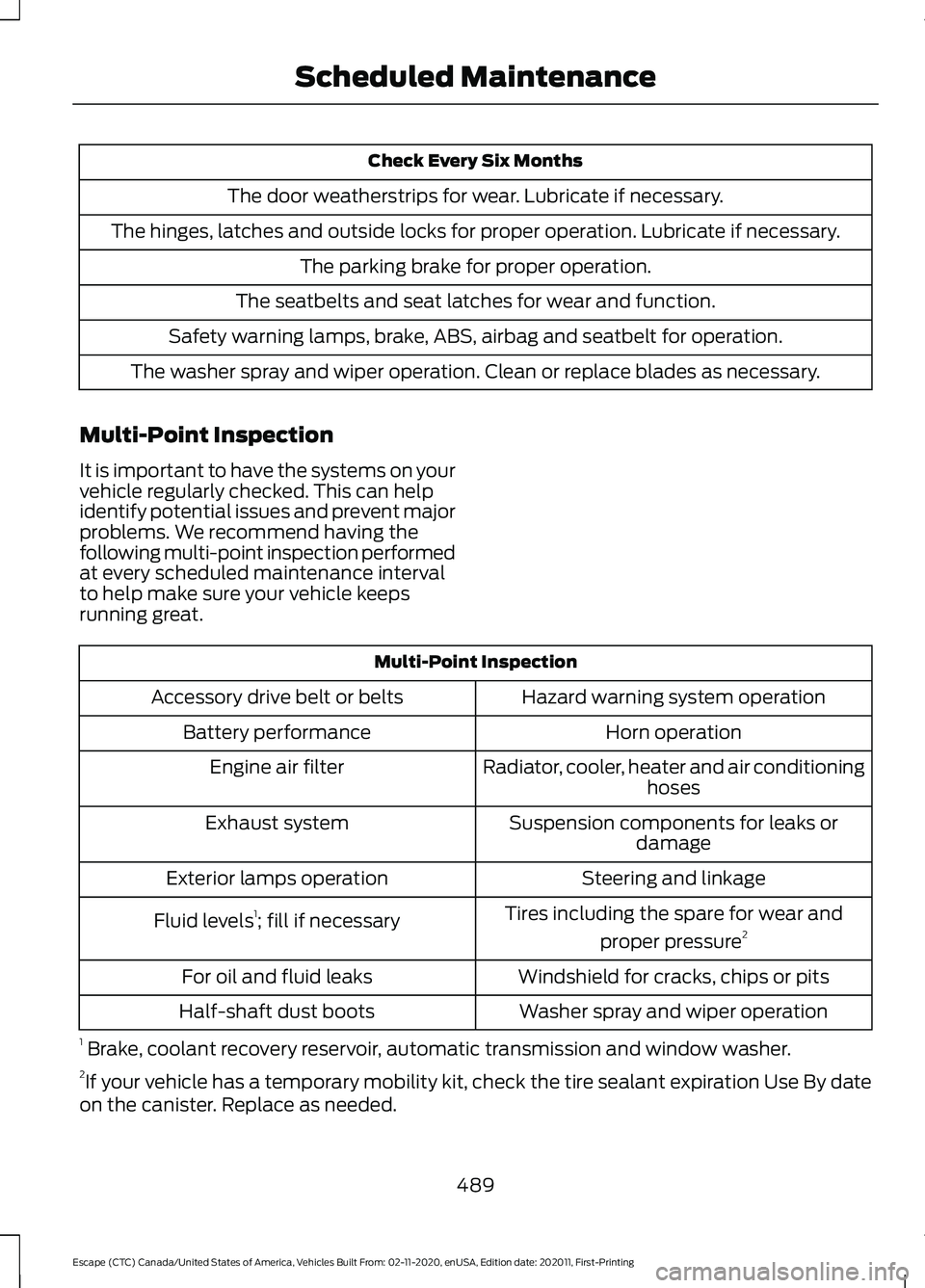
Check Every Six Months
The door weatherstrips for wear. Lubricate if necessary.
The hinges, latches and outside locks for proper operation. Lubricate if necessary. The parking brake for proper operation.
The seatbelts and seat latches for wear and function.
Safety warning lamps, brake, ABS, airbag and seatbelt for operation.
The washer spray and wiper operation. Clean or replace blades as necessary.
Multi-Point Inspection
It is important to have the systems on your
vehicle regularly checked. This can help
identify potential issues and prevent major
problems. We recommend having the
following multi-point inspection performed
at every scheduled maintenance interval
to help make sure your vehicle keeps
running great. Multi-Point Inspection
Hazard warning system operation
Accessory drive belt or belts
Horn operation
Battery performance
Radiator, cooler, heater and air conditioninghoses
Engine air filter
Suspension components for leaks ordamage
Exhaust system
Steering and linkage
Exterior lamps operation
Tires including the spare for wear andproper pressure 2
Fluid levels 1
; fill if necessary
Windshield for cracks, chips or pits
For oil and fluid leaks
Washer spray and wiper operation
Half-shaft dust boots
1 Brake, coolant recovery reservoir, automatic transmission and window washer.
2 If your vehicle has a temporary mobility kit, check the tire sealant expiration Use By date
on the canister. Replace as needed.
489
Escape (CTC) Canada/United States of America, Vehicles Built From: 02-11-2020, enUSA, Edition date: 202011, First-Printing Scheduled Maintenance
Page 570 of 589
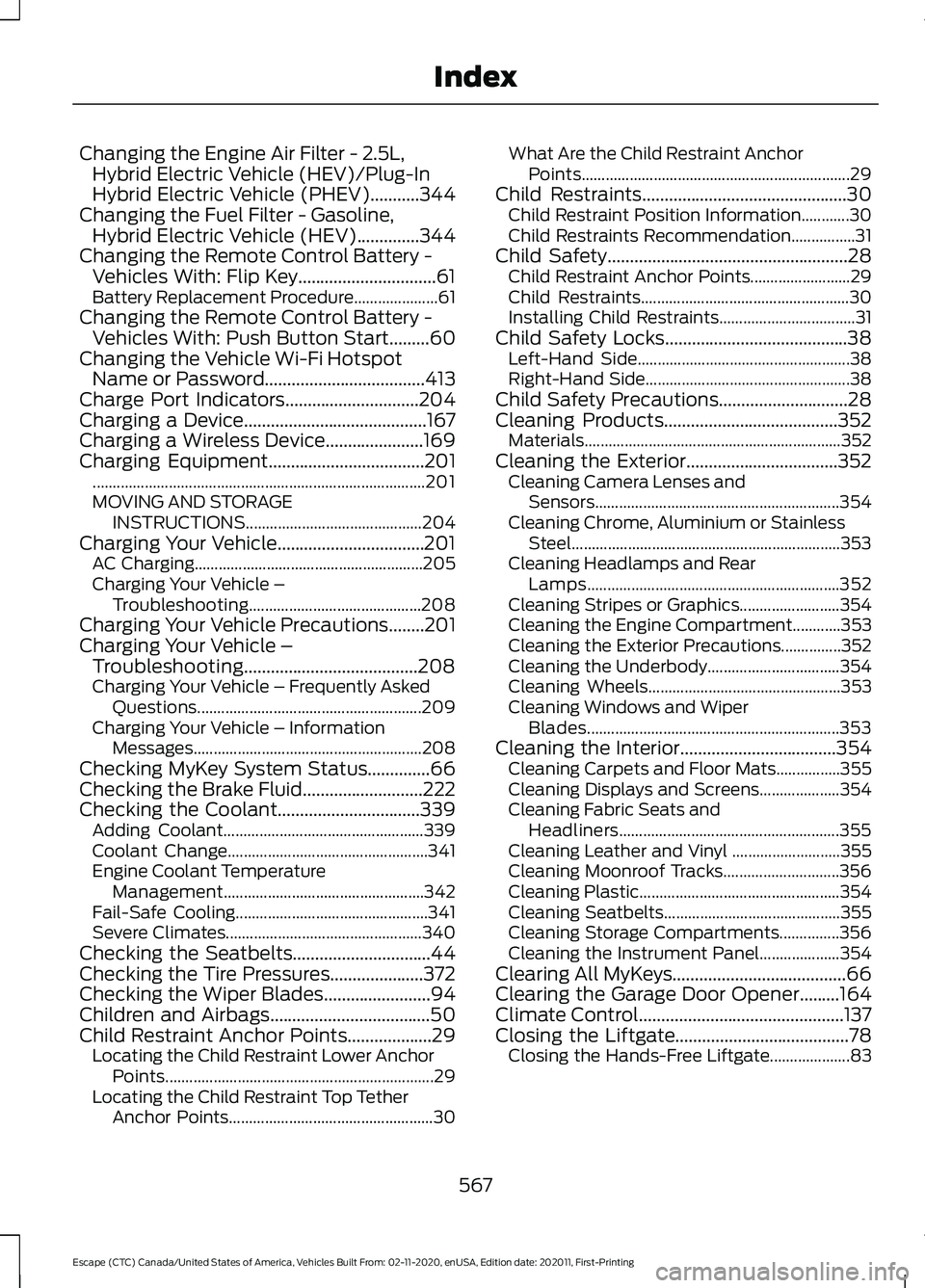
Changing the Engine Air Filter - 2.5L,
Hybrid Electric Vehicle (HEV)/Plug-In
Hybrid Electric Vehicle (PHEV)...........344
Changing the Fuel Filter - Gasoline, Hybrid Electric Vehicle (HEV)..............344
Changing the Remote Control Battery - Vehicles With: Flip Key...............................61
Battery Replacement Procedure..................... 61
Changing the Remote Control Battery - Vehicles With: Push Button Start.........60
Changing the Vehicle Wi-Fi Hotspot Name or Password
....................................413
Charge Port Indicators..............................204
Charging a Device.........................................167
Charging a Wireless Device
......................169
Charging Equipment...................................201
........................................................................\
........... 201
MOVING AND STORAGE INSTRUCTIONS............................................ 204
Charging Your Vehicle.................................201 AC Charging......................................................... 205
Charging Your Vehicle – Troubleshooting........................................... 208
Charging Your Vehicle Precautions
........201
Charging Your Vehicle – Troubleshooting.......................................208
Charging Your Vehicle – Frequently Asked Questions........................................................ 209
Charging Your Vehicle – Information Messages......................................................... 208
Checking MyKey System Status..............66
Checking the Brake Fluid...........................222
Checking the Coolant................................339 Adding Coolant.................................................. 339
Coolant Change.................................................. 341
Engine Coolant Temperature Management
.................................................. 342
Fail-Safe Cooling................................................ 341
Severe Climates................................................. 340
Checking the Seatbelts...............................44
Checking the Tire Pressures.....................372
Checking the Wiper Blades
........................94
Children and Airbags....................................50
Child Restraint Anchor Points...................29 Locating the Child Restraint Lower Anchor
Points................................................................... 29
Locating the Child Restraint Top Tether Anchor Points................................................... 30What Are the Child Restraint Anchor
Points................................................................... 29
Child Restraints
..............................................30
Child Restraint Position Information............30
Child Restraints Recommendation................31
Child Safety......................................................28 Child Restraint Anchor Points......................... 29
Child Restraints.................................................... 30
Installing Child Restraints.................................. 31
Child Safety Locks.........................................38 Left-Hand Side..................................................... 38
Right-Hand Side................................................... 38
Child Safety Precautions
.............................28
Cleaning Products.......................................352
Materials................................................................ 352
Cleaning the Exterior
..................................352
Cleaning Camera Lenses and
Sensors............................................................. 354
Cleaning Chrome, Aluminium or Stainless Steel................................................................... 353
Cleaning Headlamps and Rear Lamps............................................................... 352
Cleaning Stripes or Graphics......................... 354
Cleaning the Engine Compartment............353
Cleaning the Exterior Precautions...............352
Cleaning the Underbody................................. 354
Cleaning Wheels................................................ 353
Cleaning Windows and Wiper Blades............................................................... 353
Cleaning the Interior...................................354 Cleaning Carpets and Floor Mats................355
Cleaning Displays and Screens.................... 354
Cleaning Fabric Seats and Headliners....................................................... 355
Cleaning Leather and Vinyl ........................... 355
Cleaning Moonroof Tracks............................. 356
Cleaning Plastic.................................................. 354
Cleaning Seatbelts............................................ 355
Cleaning Storage Compartments...............356
Cleaning the Instrument Panel.................... 354
Clearing All MyKeys.......................................66
Clearing the Garage Door Opener.........164
Climate Control
..............................................137
Closing the Liftgate.......................................78 Closing the Hands-Free Liftgate.................... 83
567
Escape (CTC) Canada/United States of America, Vehicles Built From: 02-11-2020, enUSA, Edition date: 202011, First-Printing Index
Page 575 of 589
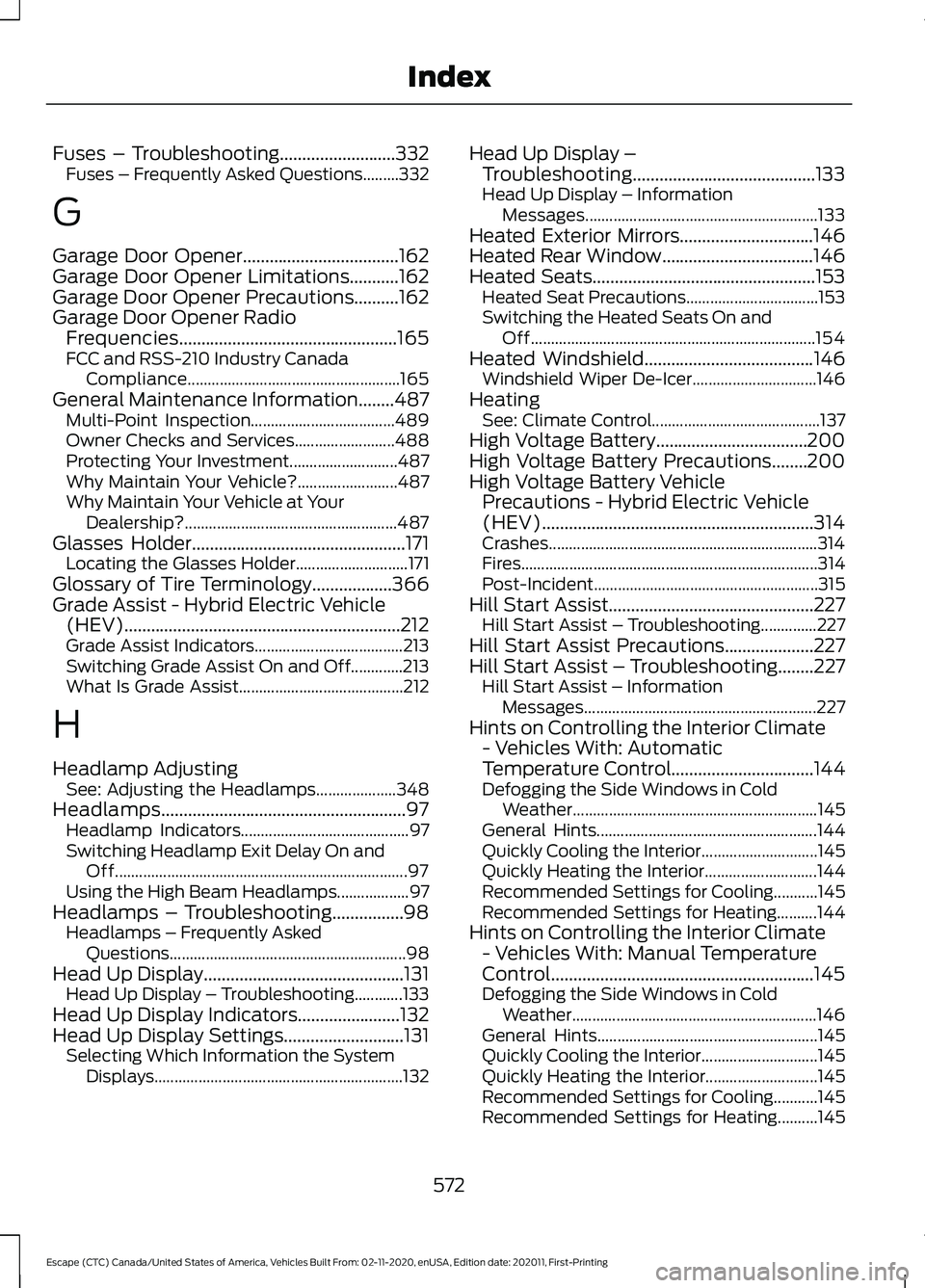
Fuses – Troubleshooting..........................332
Fuses – Frequently Asked Questions.........332
G
Garage Door Opener...................................162
Garage Door Opener Limitations
...........162
Garage Door Opener Precautions..........162
Garage Door Opener Radio Frequencies.................................................165
FCC and RSS-210 Industry Canada Compliance..................................................... 165
General Maintenance Information........487 Multi-Point Inspection.................................... 489
Owner Checks and Services......................... 488
Protecting Your Investment........................... 487
Why Maintain Your Vehicle?......................... 487
Why Maintain Your Vehicle at Your Dealership?..................................................... 487
Glasses Holder
................................................171
Locating the Glasses Holder............................ 171
Glossary of Tire Terminology..................366
Grade Assist - Hybrid Electric Vehicle (HEV)
..............................................................212
Grade Assist Indicators..................................... 213
Switching Grade Assist On and Off.............213
What Is Grade Assist......................................... 212
H
Headlamp Adjusting See: Adjusting the Headlamps.................... 348
Headlamps.......................................................97 Headlamp Indicators.......................................... 97
Switching Headlamp Exit Delay On and Off........................................................................\
. 97
Using the High Beam Headlamps.................. 97
Headlamps – Troubleshooting................98 Headlamps – Frequently Asked
Questions ........................................................... 98
Head Up Display
.............................................131
Head Up Display – Troubleshooting............133
Head Up Display Indicators.......................132
Head Up Display Settings...........................131 Selecting Which Information the System
Displays .............................................................. 132Head Up Display –
Troubleshooting.........................................133
Head Up Display – Information Messages.......................................................... 133
Heated Exterior Mirrors..............................146
Heated Rear Window..................................146
Heated Seats
..................................................153
Heated Seat Precautions................................. 153
Switching the Heated Seats On and Off....................................................................... 154
Heated Windshield
......................................146
Windshield Wiper De-Icer............................... 146
Heating See: Climate Control.......................................... 137
High Voltage Battery..................................200
High Voltage Battery Precautions........200
High Voltage Battery Vehicle Precautions - Hybrid Electric Vehicle
(HEV).............................................................314
Crashes................................................................... 314
Fires........................................................................\
.. 314
Post-Incident........................................................ 315
Hill Start Assist..............................................227 Hill Start Assist – Troubleshooting..............227
Hill Start Assist Precautions....................227
Hill Start Assist – Troubleshooting........227 Hill Start Assist – Information
Messages.......................................................... 227
Hints on Controlling the Interior Climate - Vehicles With: Automatic
Temperature Control
................................144
Defogging the Side Windows in Cold
Weather............................................................. 145
General Hints....................................................... 144
Quickly Cooling the Interior............................. 145
Quickly Heating the Interior............................ 144
Recommended Settings for Cooling...........145
Recommended Settings for Heating..........144
Hints on Controlling the Interior Climate - Vehicles With: Manual Temperature
Control...........................................................145
Defogging the Side Windows in Cold Weather............................................................. 146
General Hints....................................................... 145
Quickly Cooling the Interior............................. 145
Quickly Heating the Interior............................ 145
Recommended Settings for Cooling...........145
Recommended Settings for Heating..........145
572
Escape (CTC) Canada/United States of America, Vehicles Built From: 02-11-2020, enUSA, Edition date: 202011, First-Printing Index
Page 579 of 589
Liftgate – Warning Lamps................................
85
Load Carrying................................................292 Roof Rack.............................................................. 297
Load Carrying Precautions.......................292
Loading Your Trailer....................................304
Locating the Blind Spot Information System Sensors.........................................274
Locating the Brake Fluid Reservoir........222
Locating the Charge Port.........................204
Locating the Cross Traffic Alert Sensors..........................................................277
Locating the Fuel Filler Funnel
................190
Locating the Keyless Entry Keypad..........73
Locating the Memory Function Buttons.........................................................160
Locating the Power Outlet.......................168
Locating the Pre-Collision Assist Sensors
..........................................................281
Locating the Rear View Camera............240
Locating the Safety Compliance Certification Labels..................................293
Locating the Tire label..............................360
Locating the Tire Sealant and Inflator Kit
....................................................................376
Locating the USB Ports.............................166 Charge Only USB Ports.................................... 166
Data Transfer USB Ports................................. 166
Locating the Wireless Accessory Charger..........................................................169
Locating Your Vehicle...................................59
Locking and Unlocking the Doors Using Keyless Entry.................................................75
Locking the Doors................................................. 75
Unlocking the Doors............................................ 75
Locking the Rear Window Controls........................................................106
Luggage Compartment............................299
M
Maintenance..................................................333 Engine Oil.............................................................. 338
Exterior Bulbs...................................................... 349
Interior Bulbs........................................................ 351
Maintenance Precautions
........................333
Manual Climate Control.............................137 Directing the Airflow.......................................... 137
Setting the Blower Motor Speed................... 137Setting the Temperature..................................
137
Switching Maximum Air Conditioning On and Off............................................................... 138
Switching Maximum Defrost On and Off....................................................................... 138
Switching Recirculated Air On and Off....................................................................... 138
Switching the Air Conditioning On and Off........................................................................\
137
Switching the Climate Control On and Off....................................................................... 138
Manually Dimming the Interior Mirror..............................................................107
Manually Releasing the Electric Parking Brake..............................................................224
........................................................................\
.......... 224
Manual Park Release - Gasoline.............213 Manual Park Release Precautions................213
Using Manual Park Release............................ 213
What Is Manual Park Release........................ 213
Manual Seats
.................................................149
Adjusting the Head Restraint......................... 149
Adjusting the Seat Backrest........................... 150
Adjusting the Seat Height................................ 151
Folding the Seat Backrest............................... 156
Head Restraint Components......................... 149
Installing the Head Restraint......................... 150
Moving the Seat Backward and Forward............................................................. 150
Removing the Head Restraint....................... 150
Unfolding the Seat Backrest........................... 157
Master Access Code......................................73 Displaying the Master Access Code..............73
What Is the Master Access Code.................... 73
Memory Function
.........................................160
Memory Function Precautions................160
Mislock...............................................................70 Mislock Limitations.............................................. 70
Switching Mislock On and Off.......................... 71
What Is Mislock..................................................... 70
Mobile Communications Equipment...................................................532
Mobile Device Data........................................25
Moonroof Bounce-Back.............................110 Overriding Moonroof Bounce-Back.............110
What Is Moonroof Bounce-Back................... 110
Moonroof.........................................................109 Moonroof Bounce-Back................................... 110
576
Escape (CTC) Canada/United States of America, Vehicles Built From: 02-11-2020, enUSA, Edition date: 202011, First-Printing Index