battery FORD ESCAPE 2021 Service Manual
[x] Cancel search | Manufacturer: FORD, Model Year: 2021, Model line: ESCAPE, Model: FORD ESCAPE 2021Pages: 589, PDF Size: 9.2 MB
Page 203 of 589
WHAT IS THE HIGH VOLTAGE
BATTERY
The high voltage battery is a highly
sophisticated lithium ion battery system,
used to store electrified energy to power
the vehicle.
HIGH VOLTAGE BATTERY
PRECAUTIONS
WARNING: This battery pack
should only be serviced by an authorized
electric vehicle technician. Improper
handling can result in personal injury or
death. WARNING:
Keep your hands and
clothing clear of the cooling fan. WARNING:
Apply the parking
brake, shift into park (P), switch the
ignition off and remove the key before
you open the hood or have any service
or repair work completed. If you do not
switch the ignition off, the engine could
restart at any time. Failure to follow this
instruction could result in personal injury
or death. WARNING:
Do not touch the
electronic ignition system parts after you
have switched the ignition on or when
the engine is running. The system
operates at high voltage. Failure to
adhere to this warning could result in
serious personal injury or death.
Your vehicle consists of various
high-voltage components and wiring. All
of the high-voltage power flows through
specific wiring assemblies labeled as such
or covered with a solid orange convolute,
or orange striped tape, or both. Do not
come in contact with these components.
200
Escape (CTC) Canada/United States of America, Vehicles Built From: 02-11-2020, enUSA, Edition date: 202011, First-Printing High Voltage Battery
(If Equipped)
Page 204 of 589
WHAT IS AC CHARGING
AC charging is the preferred method of
charging. AC charging preserves the health
of the battery for longer battery life.
CHARGING YOUR VEHICLE
PRECAUTIONS
WARNING: In Canada, do not use
the 120 volt convenience cord in
commercial garages. WARNING:
This equipment has
arcing or sparking parts. Do not expose
to flammable vapors. Position this
equipment at least
18 in (450 mm)
above the floor. WARNING:
The AC wall plug must
fit firmly into the AC outlet. If the
connection feels loose, worn or the AC
outlet is damaged, please have a
qualified electrician replace the AC
outlet. Using a convenience cord with a
worn outlet may cause burns, property
damage and increase the risk of electric
shock. WARNING:
Do not use the 120 V
convenience cord with an extension cord,
two-prong adapter, surge protector,
timer or other adapter. WARNING:
Do not allow charging
equipment to be immersed in water or
liquids. Failure to follow this warning
could result in fire, serious personal injury
or death. WARNING: Do not attempt to open
the charging equipment. Failure to follow
this instruction could result in personal
injury, death or property damage. WARNING: Do not use the charging
equipment if it is faulty or has been
damaged. Failure to follow this
instruction could result in personal injury,
death or property damage. WARNING:
You risk death or
serious injury to yourself and others if you
do not follow the instruction highlighted
by the warning symbol. Failure to follow
the specific warnings and instructions
could result in personal injury. WARNING:
Install charging
equipment in compliance with local
regulations. Failure to follow this warning
could result in fire, serious personal injury
or death. WARNING:
Do not use an
ungrounded wall outlet. If you suspect
that the wall outlet is not properly
grounded, have a qualified electrician
inspect the wall outlet. Failure to follow
this instruction could result in personal
injury or death. WARNING:
Do not modify the
convenience cord plug. If the
convenience cord plug does not properly
fit into the wall outlet, have a qualified
electrician install the correct wall outlet.
Failure to follow this instruction could
result in personal injury or death.
CHARGING EQUIPMENT
• Read all the instructions before using
this product.
• Supervise this device when in use
around children.
• Do not put fingers into the electric
vehicle connector.
201
Escape (CTC) Canada/United States of America, Vehicles Built From: 02-11-2020, enUSA, Edition date: 202011, First-Printing Charging Your Vehicle - Plug-In Hybrid Electric Vehicle
(PHEV)
(If Equipped)
Page 207 of 589
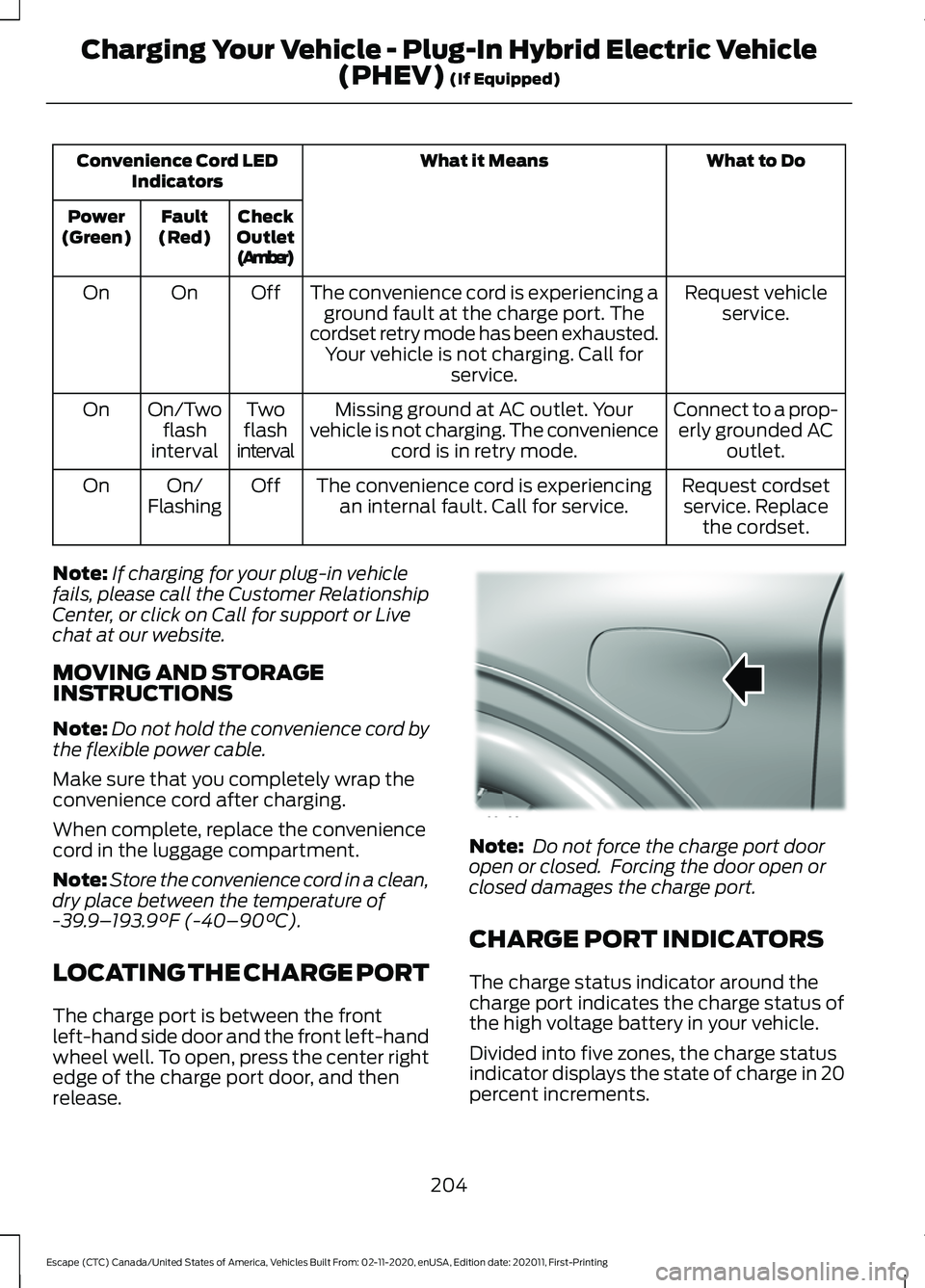
What to Do
What it Means
Convenience Cord LED
Indicators
Check
Outlet
(Amber)
Fault
(Red)
Power
(Green)
Request vehicleservice.
The convenience cord is experiencing a
ground fault at the charge port. The
cordset retry mode has been exhausted. Your vehicle is not charging. Call for service.
Off
On
On
Connect to a prop-erly grounded AC outlet.
Missing ground at AC outlet. Your
vehicle is not charging. The convenience cord is in retry mode.
Two
flash
interval
On/Two
flash
interval
On
Request cordsetservice. Replace the cordset.
The convenience cord is experiencing
an internal fault. Call for service.
Off
On/
Flashing
On
Note: If charging for your plug-in vehicle
fails, please call the Customer Relationship
Center, or click on Call for support or Live
chat at our website.
MOVING AND STORAGE
INSTRUCTIONS
Note: Do not hold the convenience cord by
the flexible power cable.
Make sure that you completely wrap the
convenience cord after charging.
When complete, replace the convenience
cord in the luggage compartment.
Note: Store the convenience cord in a clean,
dry place between the temperature of
-39.9– 193.9°F (-40–90°C).
LOCATING THE CHARGE PORT
The charge port is between the front
left-hand side door and the front left-hand
wheel well. To open, press the center right
edge of the charge port door, and then
release. Note:
Do not force the charge port door
open or closed. Forcing the door open or
closed damages the charge port.
CHARGE PORT INDICATORS
The charge status indicator around the
charge port indicates the charge status of
the high voltage battery in your vehicle.
Divided into five zones, the charge status
indicator displays the state of charge in 20
percent increments.
204
Escape (CTC) Canada/United States of America, Vehicles Built From: 02-11-2020, enUSA, Edition date: 202011, First-Printing Charging Your Vehicle - Plug-In Hybrid Electric Vehicle
(PHEV)
(If Equipped)E295258
Page 208 of 589
We use the color white as a courtesy light
to help with plugging in and to
acknowledge actions such as plugging in,
unplugging or pressing the charge times
button.
We use the color blue when you plug the
vehicle in and are either charging or waiting
to charge.
We use the color orange to indicate charge
faults.
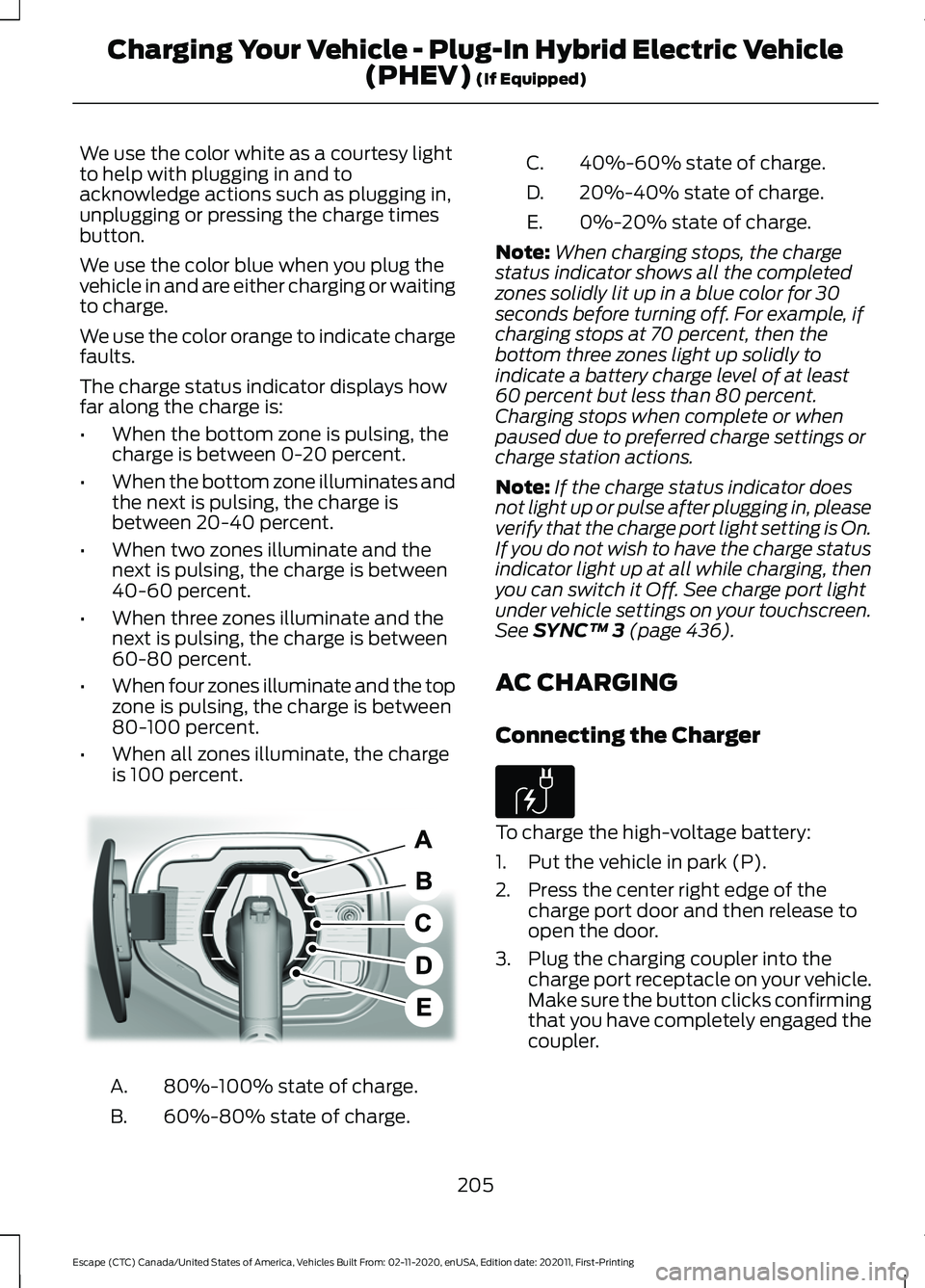
The charge status indicator displays how
far along the charge is:
•
When the bottom zone is pulsing, the
charge is between 0-20 percent.
• When the bottom zone illuminates and
the next is pulsing, the charge is
between 20-40 percent.
• When two zones illuminate and the
next is pulsing, the charge is between
40-60 percent.
• When three zones illuminate and the
next is pulsing, the charge is between
60-80 percent.
• When four zones illuminate and the top
zone is pulsing, the charge is between
80-100 percent.
• When all zones illuminate, the charge
is 100 percent. 80%-100% state of charge.
A.
60%-80% state of charge.
B. 40%-60% state of charge.
C.
20%-40% state of charge.
D.
0%-20% state of charge.
E.
Note: When charging stops, the charge
status indicator shows all the completed
zones solidly lit up in a blue color for 30
seconds before turning off. For example, if
charging stops at 70 percent, then the
bottom three zones light up solidly to
indicate a battery charge level of at least
60 percent but less than 80 percent.
Charging stops when complete or when
paused due to preferred charge settings or
charge station actions.
Note: If the charge status indicator does
not light up or pulse after plugging in, please
verify that the charge port light setting is On.
If you do not wish to have the charge status
indicator light up at all while charging, then
you can switch it Off. See charge port light
under vehicle settings on your touchscreen.
See SYNC™ 3 (page 436).
AC CHARGING
Connecting the Charger To charge the high-voltage battery:
1. Put the vehicle in park (P).
2. Press the center right edge of the
charge port door and then release to
open the door.
3. Plug the charging coupler into the charge port receptacle on your vehicle.
Make sure the button clicks confirming
that you have completely engaged the
coupler.
205
Escape (CTC) Canada/United States of America, Vehicles Built From: 02-11-2020, enUSA, Edition date: 202011, First-Printing Charging Your Vehicle - Plug-In Hybrid Electric Vehicle
(PHEV)
(If Equipped)E301197 E306676
Page 210 of 589
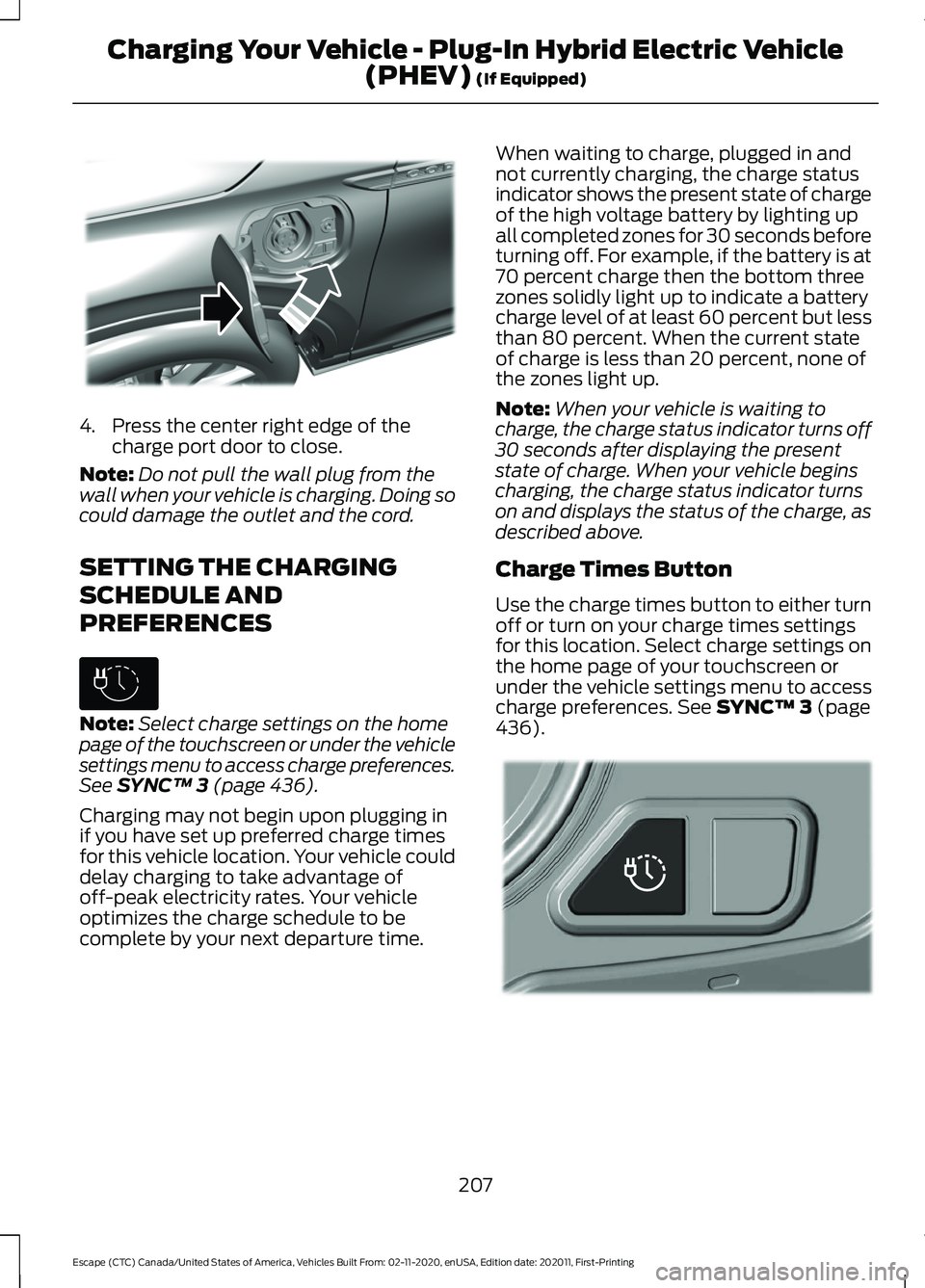
4. Press the center right edge of the
charge port door to close.
Note: Do not pull the wall plug from the
wall when your vehicle is charging. Doing so
could damage the outlet and the cord.
SETTING THE CHARGING
SCHEDULE AND
PREFERENCES Note:
Select charge settings on the home
page of the touchscreen or under the vehicle
settings menu to access charge preferences.
See SYNC™ 3 (page 436).
Charging may not begin upon plugging in
if you have set up preferred charge times
for this vehicle location. Your vehicle could
delay charging to take advantage of
off-peak electricity rates. Your vehicle
optimizes the charge schedule to be
complete by your next departure time. When waiting to charge, plugged in and
not currently charging, the charge status
indicator shows the present state of charge
of the high voltage battery by lighting up
all completed zones for 30 seconds before
turning off. For example, if the battery is at
70 percent charge then the bottom three
zones solidly light up to indicate a battery
charge level of at least 60 percent but less
than 80 percent. When the current state
of charge is less than 20 percent, none of
the zones light up.
Note:
When your vehicle is waiting to
charge, the charge status indicator turns off
30 seconds after displaying the present
state of charge. When your vehicle begins
charging, the charge status indicator turns
on and displays the status of the charge, as
described above.
Charge Times Button
Use the charge times button to either turn
off or turn on your charge times settings
for this location. Select charge settings on
the home page of your touchscreen or
under the vehicle settings menu to access
charge preferences.
See SYNC™ 3 (page
436). 207
Escape (CTC) Canada/United States of America, Vehicles Built From: 02-11-2020, enUSA, Edition date: 202011, First-Printing Charging Your Vehicle - Plug-In Hybrid Electric Vehicle
(PHEV)
(If Equipped)E295444 E306678 E301111
Page 212 of 589
Charging Your Vehicle –
Frequently Asked Questions
Why does my vehicle have a hum or fan
noise when charging?
A hum or a fan noise could be present
when charging the high voltage
battery. This is a normal operation as
your vehicle is keeping the battery cool
while charging.
209
Escape (CTC) Canada/United States of America, Vehicles Built From: 02-11-2020, enUSA, Edition date: 202011, First-Printing Charging Your Vehicle - Plug-In Hybrid Electric Vehicle
(PHEV) (If Equipped)
Page 214 of 589
SHIFTING YOUR VEHICLE INTO
GEAR
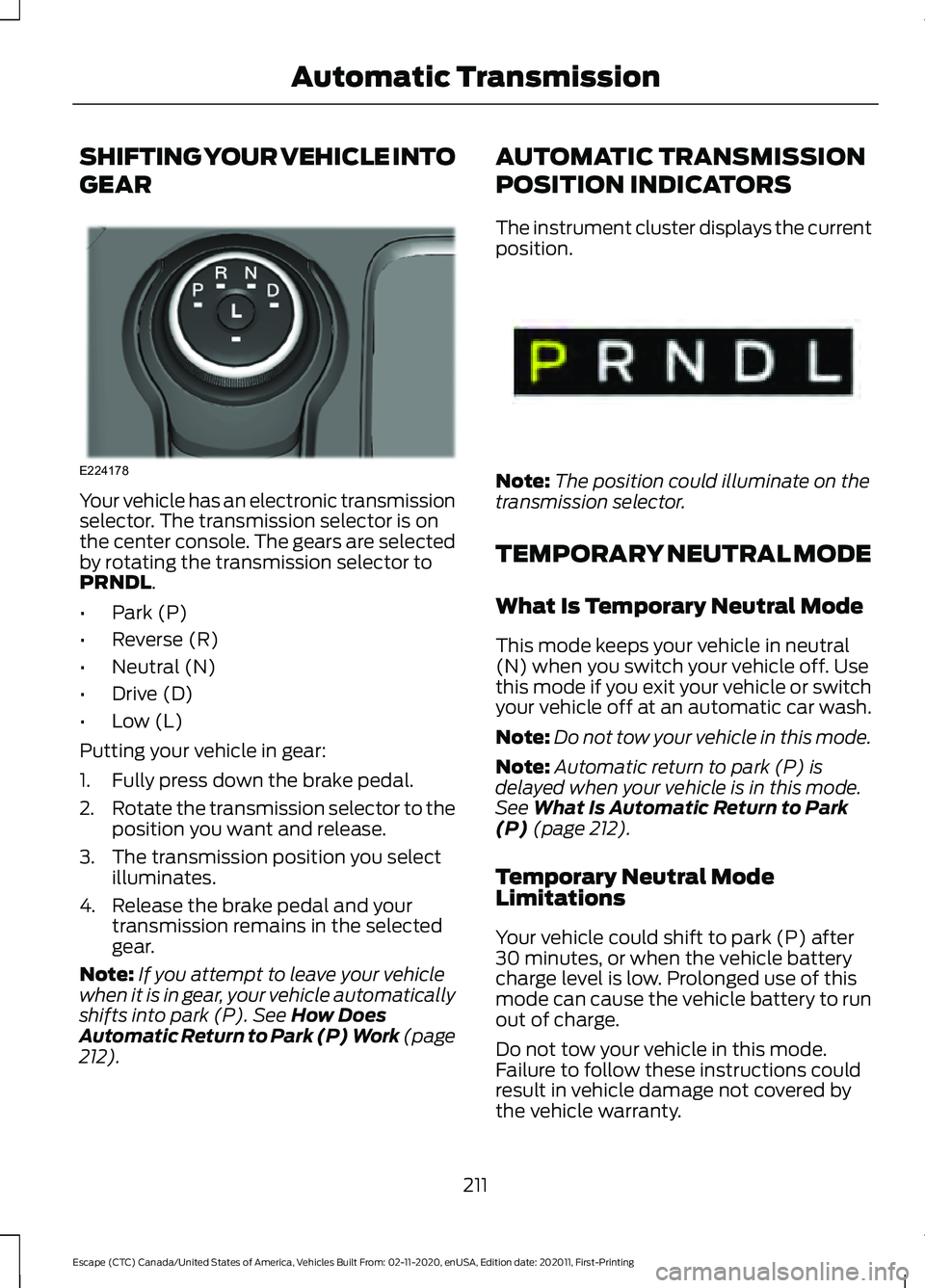
Your vehicle has an electronic transmission
selector. The transmission selector is on
the center console. The gears are selected
by rotating the transmission selector to
PRNDL.
• Park (P)
• Reverse (R)
• Neutral (N)
• Drive (D)
• Low (L)
Putting your vehicle in gear:
1. Fully press down the brake pedal.
2. Rotate the transmission selector to the
position you want and release.
3. The transmission position you select illuminates.
4. Release the brake pedal and your transmission remains in the selected
gear.
Note: If you attempt to leave your vehicle
when it is in gear, your vehicle automatically
shifts into park (P).
See How Does
Automatic Return to Park (P) Work (page
212
). AUTOMATIC TRANSMISSION
POSITION INDICATORS
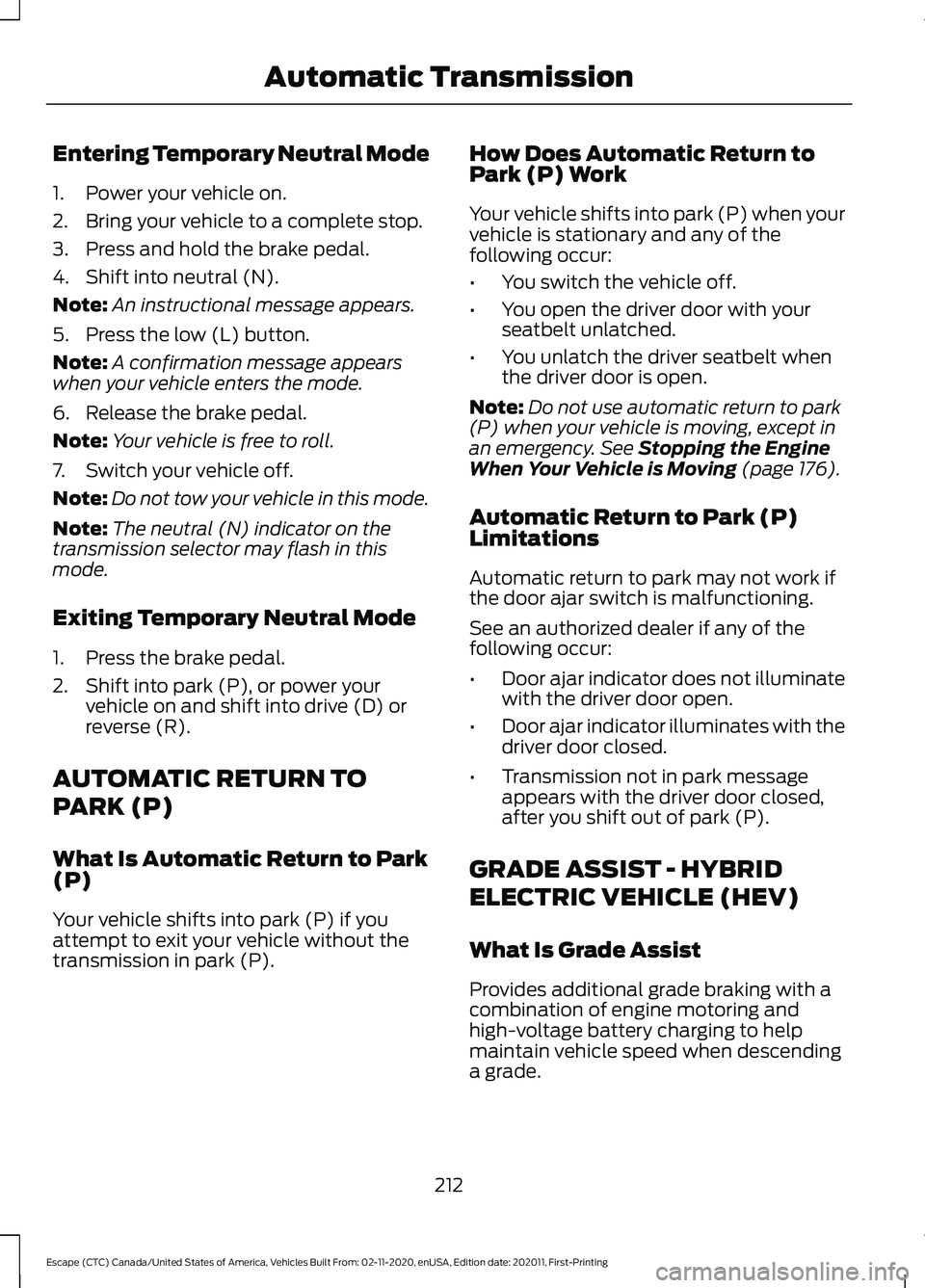
The instrument cluster displays the current
position.
Note:
The position could illuminate on the
transmission selector.
TEMPORARY NEUTRAL MODE
What Is Temporary Neutral Mode
This mode keeps your vehicle in neutral
(N) when you switch your vehicle off. Use
this mode if you exit your vehicle or switch
your vehicle off at an automatic car wash.
Note: Do not tow your vehicle in this mode.
Note: Automatic return to park (P) is
delayed when your vehicle is in this mode.
See
What Is Automatic Return to Park
(P) (page 212).
Temporary Neutral Mode
Limitations
Your vehicle could shift to park (P) after
30 minutes, or when the vehicle battery
charge level is low. Prolonged use of this
mode can cause the vehicle battery to run
out of charge.
Do not tow your vehicle in this mode.
Failure to follow these instructions could
result in vehicle damage not covered by
the vehicle warranty.
211
Escape (CTC) Canada/United States of America, Vehicles Built From: 02-11-2020, enUSA, Edition date: 202011, First-Printing Automatic TransmissionE224178 E341619
Page 215 of 589
Entering Temporary Neutral Mode
1. Power your vehicle on.
2. Bring your vehicle to a complete stop.
3. Press and hold the brake pedal.
4. Shift into neutral (N).
Note:
An instructional message appears.
5. Press the low (L) button.
Note: A confirmation message appears
when your vehicle enters the mode.
6. Release the brake pedal.
Note: Your vehicle is free to roll.
7. Switch your vehicle off.
Note: Do not tow your vehicle in this mode.
Note: The neutral (N) indicator on the
transmission selector may flash in this
mode.
Exiting Temporary Neutral Mode
1. Press the brake pedal.
2. Shift into park (P), or power your vehicle on and shift into drive (D) or
reverse (R).
AUTOMATIC RETURN TO
PARK (P)
What Is Automatic Return to Park
(P)
Your vehicle shifts into park (P) if you
attempt to exit your vehicle without the
transmission in park (P). How Does Automatic Return to
Park (P) Work
Your vehicle shifts into park (P) when your
vehicle is stationary and any of the
following occur:
•
You switch the vehicle off.
• You open the driver door with your
seatbelt unlatched.
• You unlatch the driver seatbelt when
the driver door is open.
Note: Do not use automatic return to park
(P) when your vehicle is moving, except in
an emergency. See Stopping the Engine
When Your Vehicle is Moving (page 176).
Automatic Return to Park (P)
Limitations
Automatic return to park may not work if
the door ajar switch is malfunctioning.
See an authorized dealer if any of the
following occur:
• Door ajar indicator does not illuminate
with the driver door open.
• Door ajar indicator illuminates with the
driver door closed.
• Transmission not in park message
appears with the driver door closed,
after you shift out of park (P).
GRADE ASSIST - HYBRID
ELECTRIC VEHICLE (HEV)
What Is Grade Assist
Provides additional grade braking with a
combination of engine motoring and
high-voltage battery charging to help
maintain vehicle speed when descending
a grade.
212
Escape (CTC) Canada/United States of America, Vehicles Built From: 02-11-2020, enUSA, Edition date: 202011, First-Printing Automatic Transmission
Page 216 of 589
Switching Grade Assist On and Off
Press the grade assist button to activate
grade assist. The grade assist lamp
appears in the instrument cluster. Press
the button again to switch it off.
Your vehicle determines the amount of
engine motoring and high-voltage battery
charging. You could notice the engine
speed increasing and decreasing to help
maintain your vehicle speed when
descending a slope.
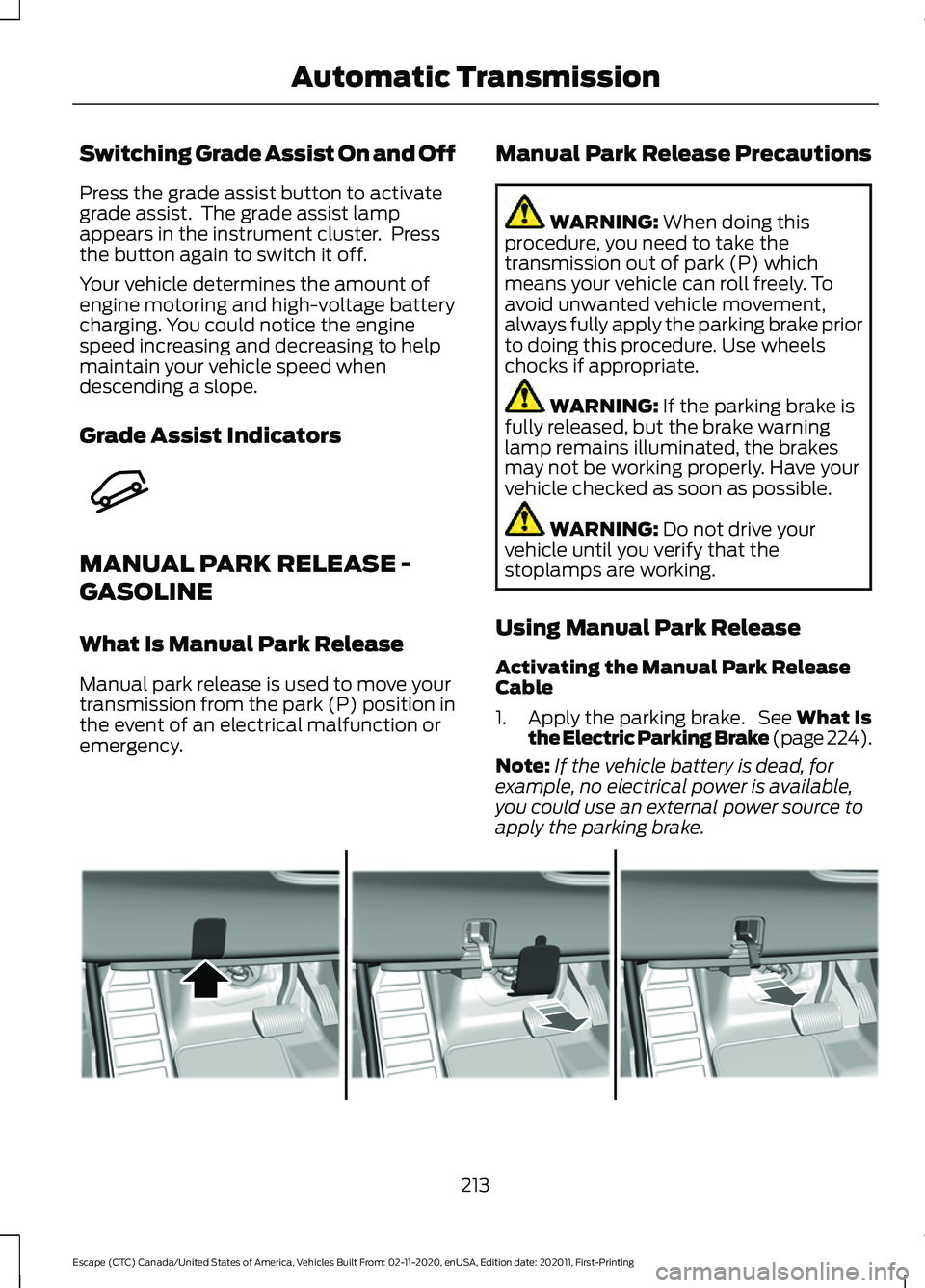
Grade Assist Indicators
MANUAL PARK RELEASE -
GASOLINE
What Is Manual Park Release
Manual park release is used to move your
transmission from the park (P) position in
the event of an electrical malfunction or
emergency.
Manual Park Release Precautions WARNING: When doing this
procedure, you need to take the
transmission out of park (P) which
means your vehicle can roll freely. To
avoid unwanted vehicle movement,
always fully apply the parking brake prior
to doing this procedure. Use wheels
chocks if appropriate. WARNING:
If the parking brake is
fully released, but the brake warning
lamp remains illuminated, the brakes
may not be working properly. Have your
vehicle checked as soon as possible. WARNING:
Do not drive your
vehicle until you verify that the
stoplamps are working.
Using Manual Park Release
Activating the Manual Park Release
Cable
1. Apply the parking brake. See What Is
the Electric Parking Brake (page 224).
Note: If the vehicle battery is dead, for
example, no electrical power is available,
you could use an external power source to
apply the parking brake. 213
Escape (CTC) Canada/United States of America, Vehicles Built From: 02-11-2020, enUSA, Edition date: 202011, First-Printing Automatic TransmissionE345122 E307867
Page 217 of 589
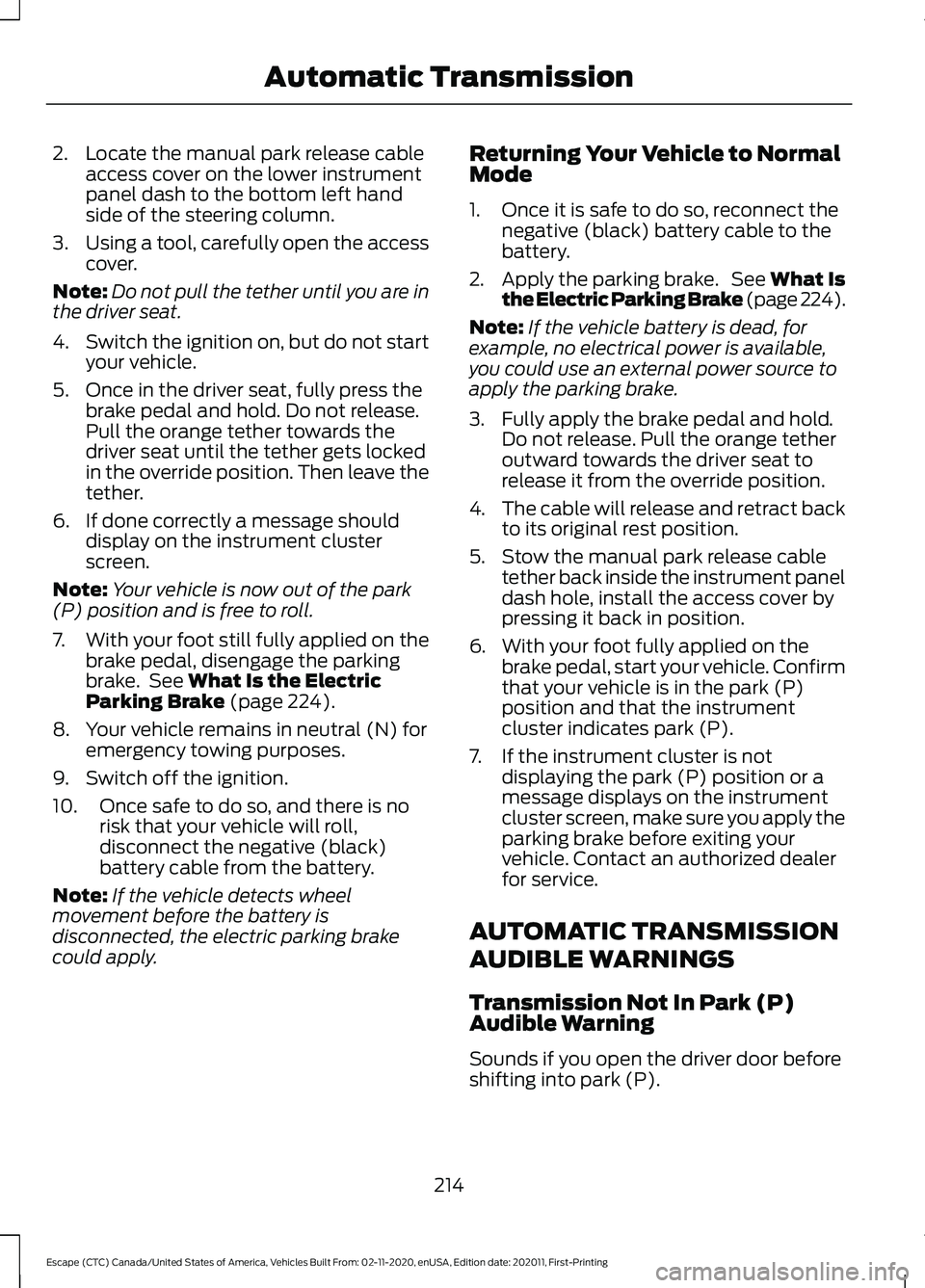
2. Locate the manual park release cable
access cover on the lower instrument
panel dash to the bottom left hand
side of the steering column.
3. Using a tool, carefully open the access
cover.
Note: Do not pull the tether until you are in
the driver seat.
4. Switch the ignition on, but do not start
your vehicle.
5. Once in the driver seat, fully press the brake pedal and hold. Do not release.
Pull the orange tether towards the
driver seat until the tether gets locked
in the override position. Then leave the
tether.
6. If done correctly a message should display on the instrument cluster
screen.
Note: Your vehicle is now out of the park
(P) position and is free to roll.
7. With your foot still fully applied on the
brake pedal, disengage the parking
brake. See What Is the Electric
Parking Brake (page 224).
8. Your vehicle remains in neutral (N) for emergency towing purposes.
9. Switch off the ignition.
10. Once safe to do so, and there is no risk that your vehicle will roll,
disconnect the negative (black)
battery cable from the battery.
Note: If the vehicle detects wheel
movement before the battery is
disconnected, the electric parking brake
could apply. Returning Your Vehicle to Normal
Mode
1. Once it is safe to do so, reconnect the
negative (black) battery cable to the
battery.
2. Apply the parking brake. See What Is
the Electric Parking Brake (page 224).
Note: If the vehicle battery is dead, for
example, no electrical power is available,
you could use an external power source to
apply the parking brake.
3. Fully apply the brake pedal and hold. Do not release. Pull the orange tether
outward towards the driver seat to
release it from the override position.
4. The cable will release and retract back
to its original rest position.
5. Stow the manual park release cable tether back inside the instrument panel
dash hole, install the access cover by
pressing it back in position.
6. With your foot fully applied on the brake pedal, start your vehicle. Confirm
that your vehicle is in the park (P)
position and that the instrument
cluster indicates park (P).
7. If the instrument cluster is not displaying the park (P) position or a
message displays on the instrument
cluster screen, make sure you apply the
parking brake before exiting your
vehicle. Contact an authorized dealer
for service.
AUTOMATIC TRANSMISSION
AUDIBLE WARNINGS
Transmission Not In Park (P)
Audible Warning
Sounds if you open the driver door before
shifting into park (P).
214
Escape (CTC) Canada/United States of America, Vehicles Built From: 02-11-2020, enUSA, Edition date: 202011, First-Printing Automatic Transmission