instrument cluster FORD ESCAPE 2021 Service Manual
[x] Cancel search | Manufacturer: FORD, Model Year: 2021, Model line: ESCAPE, Model: FORD ESCAPE 2021Pages: 589, PDF Size: 9.2 MB
Page 280 of 589
3. Switch Cross Traffic Alert on or off.
Note: The system switches on every time
you switch the ignition on. To permanently
switch the system off, contact an authorized
dealer.
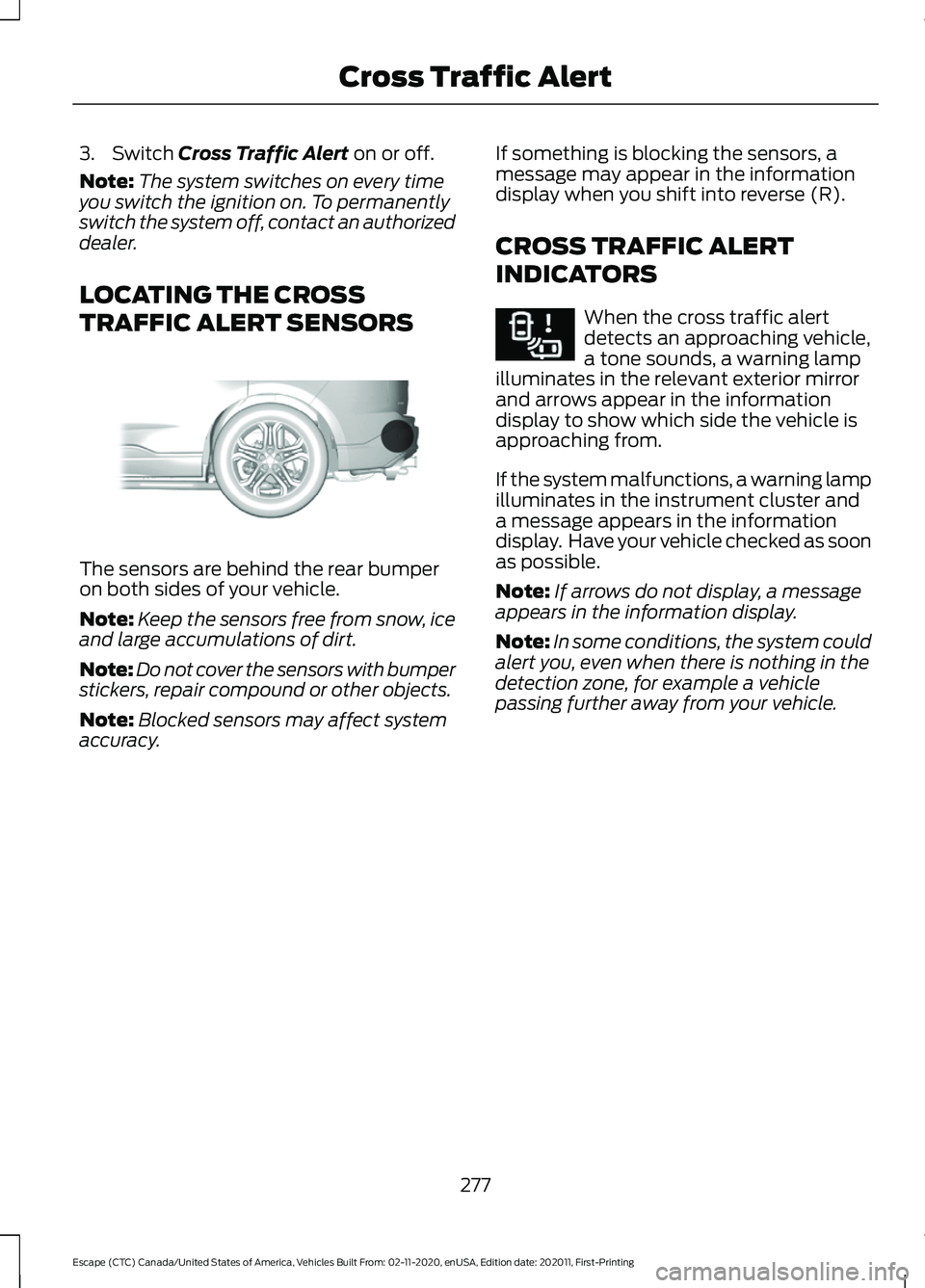
LOCATING THE CROSS
TRAFFIC ALERT SENSORS The sensors are behind the rear bumper
on both sides of your vehicle.
Note:
Keep the sensors free from snow, ice
and large accumulations of dirt.
Note: Do not cover the sensors with bumper
stickers, repair compound or other objects.
Note: Blocked sensors may affect system
accuracy. If something is blocking the sensors, a
message may appear in the information
display when you shift into reverse (R).
CROSS TRAFFIC ALERT
INDICATORS When the cross traffic alert
detects an approaching vehicle,
a tone sounds, a warning lamp
illuminates in the relevant exterior mirror
and arrows appear in the information
display to show which side the vehicle is
approaching from.
If the system malfunctions, a warning lamp
illuminates in the instrument cluster and
a message appears in the information
display. Have your vehicle checked as soon
as possible.
Note: If arrows do not display, a message
appears in the information display.
Note: In some conditions, the system could
alert you, even when there is nothing in the
detection zone, for example a vehicle
passing further away from your vehicle.
277
Escape (CTC) Canada/United States of America, Vehicles Built From: 02-11-2020, enUSA, Edition date: 202011, First-Printing Cross Traffic AlertE205199 E268294
Page 289 of 589
Pre-Collision Assist – Frequently
Asked Questions
Camera Troubleshooting
The windshield in front of the camera
is dirty or obstructed.
Clean the outside of the windshield in
front of the camera.
The windshield in front of the camera
is clean, but the message remains in
the instrument cluster display. Wait a short time. It could take several
minutes for the camera to detect that
there is no obstruction.
Radar Troubleshooting (If Equipped)
The surface of the radar in the grille is
dirty or obstructed. Clean the grille surface in front of the
radar or remove the object causing the
obstruction.
The surface of the radar in the grille is
clean, but the message remains in the
instrument cluster display. Wait a short time. It could take several
minutes for the radar to detect that
there is no obstruction.
Heavy rain, spray or fog is interfering
with the radar signals. The pre-collision assist system is
temporarily disabled. Pre-collision
assist reactivates a short time after
the weather conditions improve.
Swirling water or snow or ice on the
surface of the road could interfere with
the radar signals. The pre-collision assist system is
temporarily disabled. Pre-collision
assist reactivates a short time after
the weather conditions improve. Radar is out of alignment due to a front
end impact.
Have your vehicle serviced to have the
radar checked for proper coverage and
operation.
286
Escape (CTC) Canada/United States of America, Vehicles Built From: 02-11-2020, enUSA, Edition date: 202011, First-Printing Pre-Collision Assist
Page 291 of 589
2. Press Driver Assistance.
3. Switch
Driver Alert on or off.
Note: The system remains on or off
depending on how it was last set.
Resetting Driver Alert
You can reset the system by either:
• Switching the ignition off and on.
• Stopping the vehicle and then opening
and closing the driver door. DRIVER ALERT INDICATORS
System Warnings
The warning system has two stages:
1.
A temporary warning is issued to advise
you to take a rest. This message only
appears for a short time.
2. If you do not rest and the system continues to detect that your driving
deteriorates, it issues a further warning.
This remains in the instrument cluster
display until you cancel it.
Note: The system does not warn you if the
vehicle speed falls below approximately
40 mph (65 km/h)
.
DRIVER ALERT – TROUBLESHOOTING
Driver Alert – Information Messages Action
Message
Stop and rest as soon as it is safe to do so.
Driver Alert Warning Rest Now
Take a rest soon.
Driver Alert Warning Rest Suggested
288
Escape (CTC) Canada/United States of America, Vehicles Built From: 02-11-2020, enUSA, Edition date: 202011, First-Printing Driver Alert
Page 334 of 589
Protected Component
Fuse Rating
Fuse Location
Ignition switch.
10 A
4
Lock.
20 A
5
Unlock.
Moonroof.
10 A
6
DC inverter.
Passenger door module.
30 A
7
Parking assist control
module.
5 A
8
Electrochromatic mirror.
5 A
9
Image processing module A.
Extended power module.
10 A
10
Power liftgate.
5 A
11
Hands-free liftgate actu-
ation module.
Telematics control unit
module.
Head up display module.
5 A
12
Keyless keypad switch.
Driver door lock.
15 A
13
Driver door module.
30 A
14
Extended power module.
15 A
15
Not used (spare).
15 A
16
SYNC.
15 A
17
Receiver transceiver
module.
Integrated control panel.
Wireless accessory charging
module.
7.5 A
18
Headlamp switch pack.
7.5 A
19
Not used (spare).
10 A
20
Climate control.
7.5 A
21
E-shifter module.
Instrument cluster.
7.5 A
22
331
Escape (CTC) Canada/United States of America, Vehicles Built From: 02-11-2020, enUSA, Edition date: 202011, First-Printing Fuses
Page 342 of 589
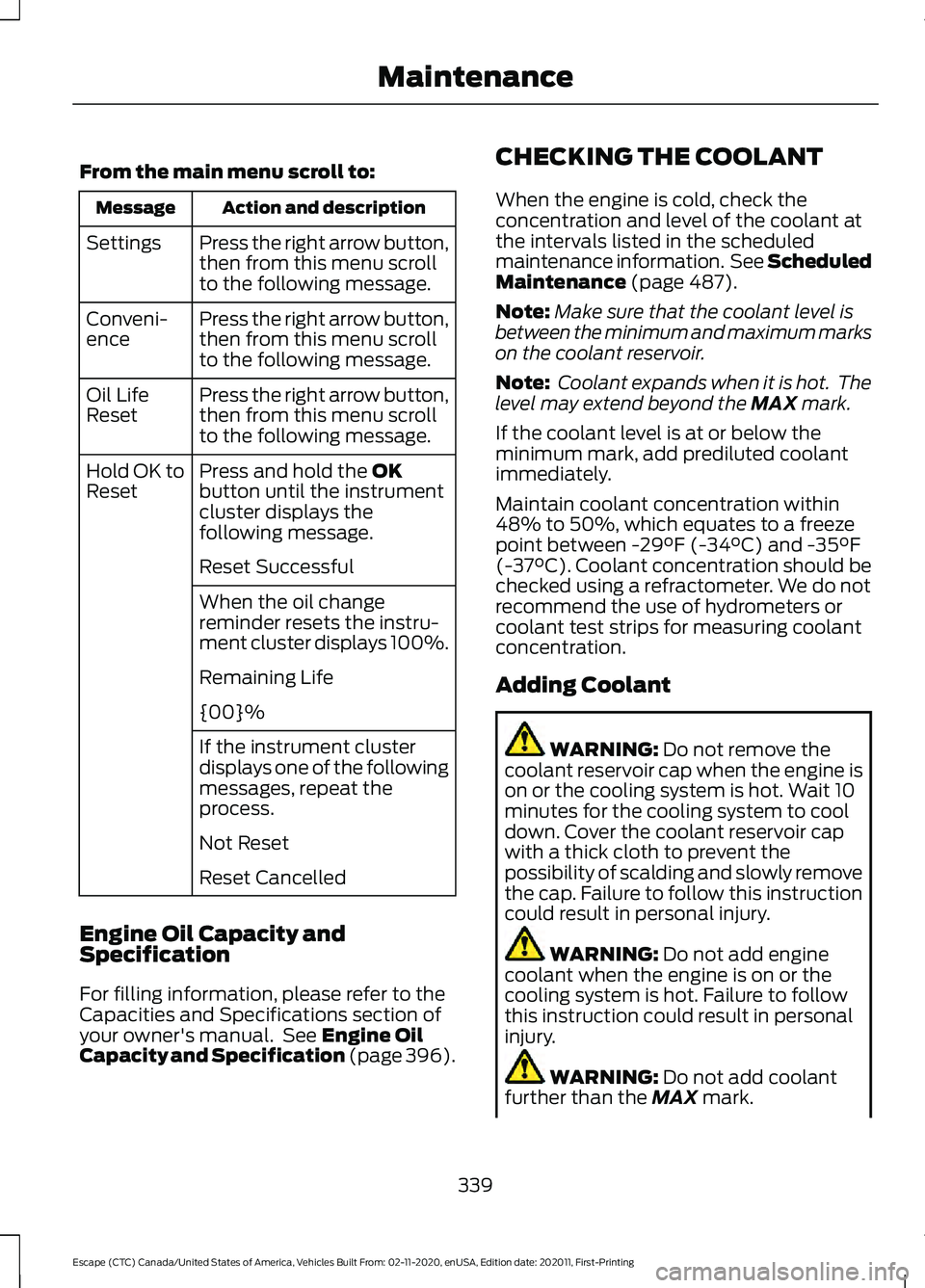
From the main menu scroll to:
Action and description
Message
Press the right arrow button,
then from this menu scroll
to the following message.
Settings
Press the right arrow button,
then from this menu scroll
to the following message.
Conveni-
ence
Press the right arrow button,
then from this menu scroll
to the following message.
Oil Life
Reset
Press and hold the OK
button until the instrument
cluster displays the
following message.
Hold OK to
Reset
Reset Successful
When the oil change
reminder resets the instru-
ment cluster displays 100%.
Remaining Life
{00}%
If the instrument cluster
displays one of the following
messages, repeat the
process.
Not Reset
Reset Cancelled
Engine Oil Capacity and
Specification
For filling information, please refer to the
Capacities and Specifications section of
your owner's manual. See
Engine Oil
Capacity and Specification (page 396). CHECKING THE COOLANT
When the engine is cold, check the
concentration and level of the coolant at
the intervals listed in the scheduled
maintenance information. See Scheduled
Maintenance
(page 487).
Note: Make sure that the coolant level is
between the minimum and maximum marks
on the coolant reservoir.
Note: Coolant expands when it is hot. The
level may extend beyond the
MAX mark.
If the coolant level is at or below the
minimum mark, add prediluted coolant
immediately.
Maintain coolant concentration within
48% to 50%, which equates to a freeze
point between
-29°F (-34°C) and -35°F
(-37°C). Coolant concentration should be
checked using a refractometer. We do not
recommend the use of hydrometers or
coolant test strips for measuring coolant
concentration.
Adding Coolant WARNING:
Do not remove the
coolant reservoir cap when the engine is
on or the cooling system is hot. Wait 10
minutes for the cooling system to cool
down. Cover the coolant reservoir cap
with a thick cloth to prevent the
possibility of scalding and slowly remove
the cap. Failure to follow this instruction
could result in personal injury. WARNING:
Do not add engine
coolant when the engine is on or the
cooling system is hot. Failure to follow
this instruction could result in personal
injury. WARNING:
Do not add coolant
further than the MAX mark.
339
Escape (CTC) Canada/United States of America, Vehicles Built From: 02-11-2020, enUSA, Edition date: 202011, First-Printing Maintenance
Page 357 of 589
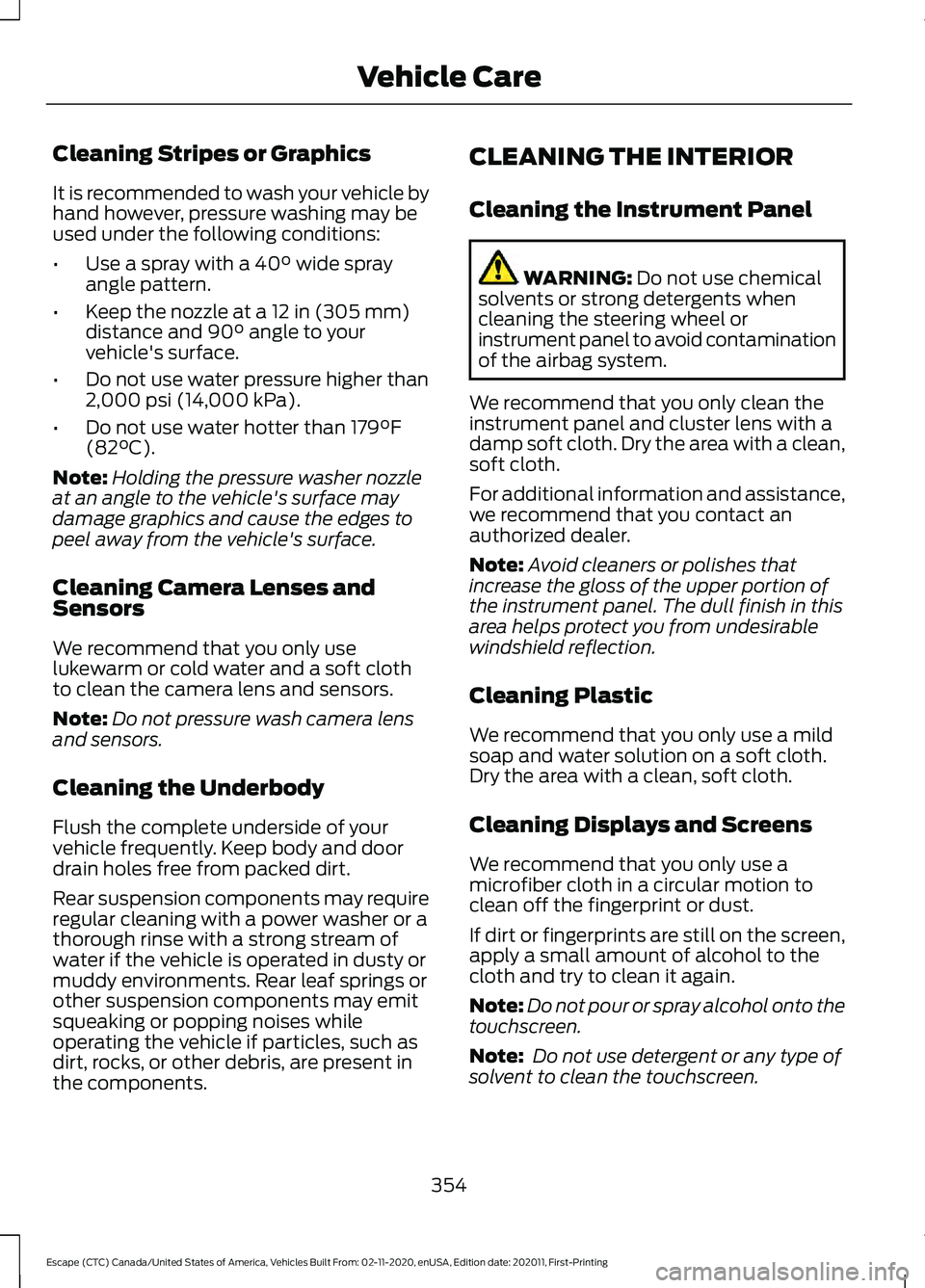
Cleaning Stripes or Graphics
It is recommended to wash your vehicle by
hand however, pressure washing may be
used under the following conditions:
•
Use a spray with a 40° wide spray
angle pattern.
• Keep the nozzle at a
12 in (305 mm)
distance and 90° angle to your
vehicle's surface.
• Do not use water pressure higher than
2,000 psi (14,000 kPa)
.
• Do not use water hotter than
179°F
(82°C).
Note: Holding the pressure washer nozzle
at an angle to the vehicle's surface may
damage graphics and cause the edges to
peel away from the vehicle's surface.
Cleaning Camera Lenses and
Sensors
We recommend that you only use
lukewarm or cold water and a soft cloth
to clean the camera lens and sensors.
Note: Do not pressure wash camera lens
and sensors.
Cleaning the Underbody
Flush the complete underside of your
vehicle frequently. Keep body and door
drain holes free from packed dirt.
Rear suspension components may require
regular cleaning with a power washer or a
thorough rinse with a strong stream of
water if the vehicle is operated in dusty or
muddy environments. Rear leaf springs or
other suspension components may emit
squeaking or popping noises while
operating the vehicle if particles, such as
dirt, rocks, or other debris, are present in
the components. CLEANING THE INTERIOR
Cleaning the Instrument Panel WARNING:
Do not use chemical
solvents or strong detergents when
cleaning the steering wheel or
instrument panel to avoid contamination
of the airbag system.
We recommend that you only clean the
instrument panel and cluster lens with a
damp soft cloth. Dry the area with a clean,
soft cloth.
For additional information and assistance,
we recommend that you contact an
authorized dealer.
Note: Avoid cleaners or polishes that
increase the gloss of the upper portion of
the instrument panel. The dull finish in this
area helps protect you from undesirable
windshield reflection.
Cleaning Plastic
We recommend that you only use a mild
soap and water solution on a soft cloth.
Dry the area with a clean, soft cloth.
Cleaning Displays and Screens
We recommend that you only use a
microfiber cloth in a circular motion to
clean off the fingerprint or dust.
If dirt or fingerprints are still on the screen,
apply a small amount of alcohol to the
cloth and try to clean it again.
Note: Do not pour or spray alcohol onto the
touchscreen.
Note: Do not use detergent or any type of
solvent to clean the touchscreen.
354
Escape (CTC) Canada/United States of America, Vehicles Built From: 02-11-2020, enUSA, Edition date: 202011, First-Printing Vehicle Care
Page 566 of 589
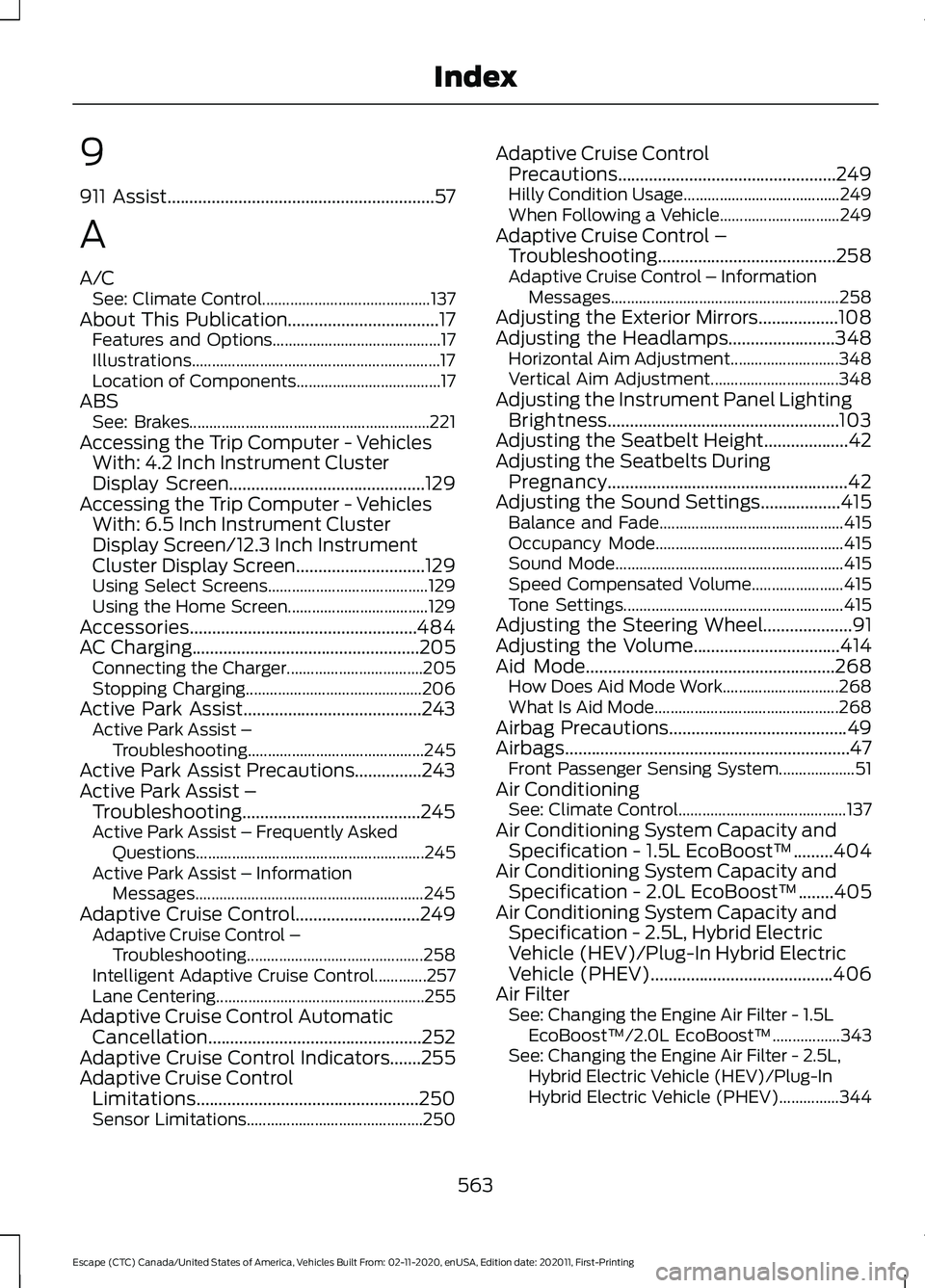
9
911 Assist............................................................57
A
A/C See: Climate Control.......................................... 137
About This Publication..................................17 Features and Options.......................................... 17
Illustrations.............................................................. 17
Location of Components.................................... 17
ABS See: Brakes............................................................ 221
Accessing the Trip Computer - Vehicles With: 4.2 Inch Instrument Cluster
Display Screen
............................................129
Accessing the Trip Computer - Vehicles With: 6.5 Inch Instrument Cluster
Display Screen/12.3 Inch Instrument
Cluster Display Screen.............................129
Using Select Screens........................................ 129
Using the Home Screen................................... 129
Accessories...................................................484
AC Charging
...................................................205
Connecting the Charger.................................. 205
Stopping Charging............................................ 206
Active Park Assist........................................243 Active Park Assist –
Troubleshooting............................................ 245
Active Park Assist Precautions...............243
Active Park Assist – Troubleshooting........................................245
Active Park Assist – Frequently Asked Questions......................................................... 245
Active Park Assist – Information Messages......................................................... 245
Adaptive Cruise Control
............................249
Adaptive Cruise Control –
Troubleshooting............................................ 258
Intelligent Adaptive Cruise Control.............257
Lane Centering.................................................... 255
Adaptive Cruise Control Automatic Cancellation................................................252
Adaptive Cruise Control Indicators.......255
Adaptive Cruise Control Limitations
..................................................250
Sensor Limitations............................................ 250Adaptive Cruise Control
Precautions.................................................249
Hilly Condition Usage....................................... 249
When Following a Vehicle.............................. 249
Adaptive Cruise Control – Troubleshooting........................................
258
Adaptive Cruise Control – Information
Messages......................................................... 258
Adjusting the Exterior Mirrors..................108
Adjusting the Headlamps........................348 Horizontal Aim Adjustment........................... 348
Vertical Aim Adjustment................................ 348
Adjusting the Instrument Panel Lighting Brightness....................................................103
Adjusting the Seatbelt Height...................42
Adjusting the Seatbelts During Pregnancy......................................................42
Adjusting the Sound Settings..................415 Balance and Fade.............................................. 415
Occupancy Mode............................................... 415
Sound Mode......................................................... 415
Speed Compensated Volume....................... 415
Tone Settings....................................................... 415
Adjusting the Steering Wheel....................91
Adjusting the Volume.................................414
Aid Mode
........................................................268
How Does Aid Mode Work............................. 268
What Is Aid Mode.............................................. 268
Airbag Precautions
........................................49
Airbags................................................................47 Front Passenger Sensing System................... 51
Air Conditioning See: Climate Control.......................................... 137
Air Conditioning System Capacity and Specification - 1.5L EcoBoost™.........404
Air Conditioning System Capacity and Specification - 2.0L EcoBoost™........405
Air Conditioning System Capacity and Specification - 2.5L, Hybrid Electric
Vehicle (HEV)/Plug-In Hybrid Electric
Vehicle (PHEV).........................................406
Air Filter See: Changing the Engine Air Filter - 1.5L
EcoBoost™/2.0L EcoBoost™.................343
See: Changing the Engine Air Filter - 2.5L, Hybrid Electric Vehicle (HEV)/Plug-In
Hybrid Electric Vehicle (PHEV)...............344
563
Escape (CTC) Canada/United States of America, Vehicles Built From: 02-11-2020, enUSA, Edition date: 202011, First-Printing Index
Page 571 of 589
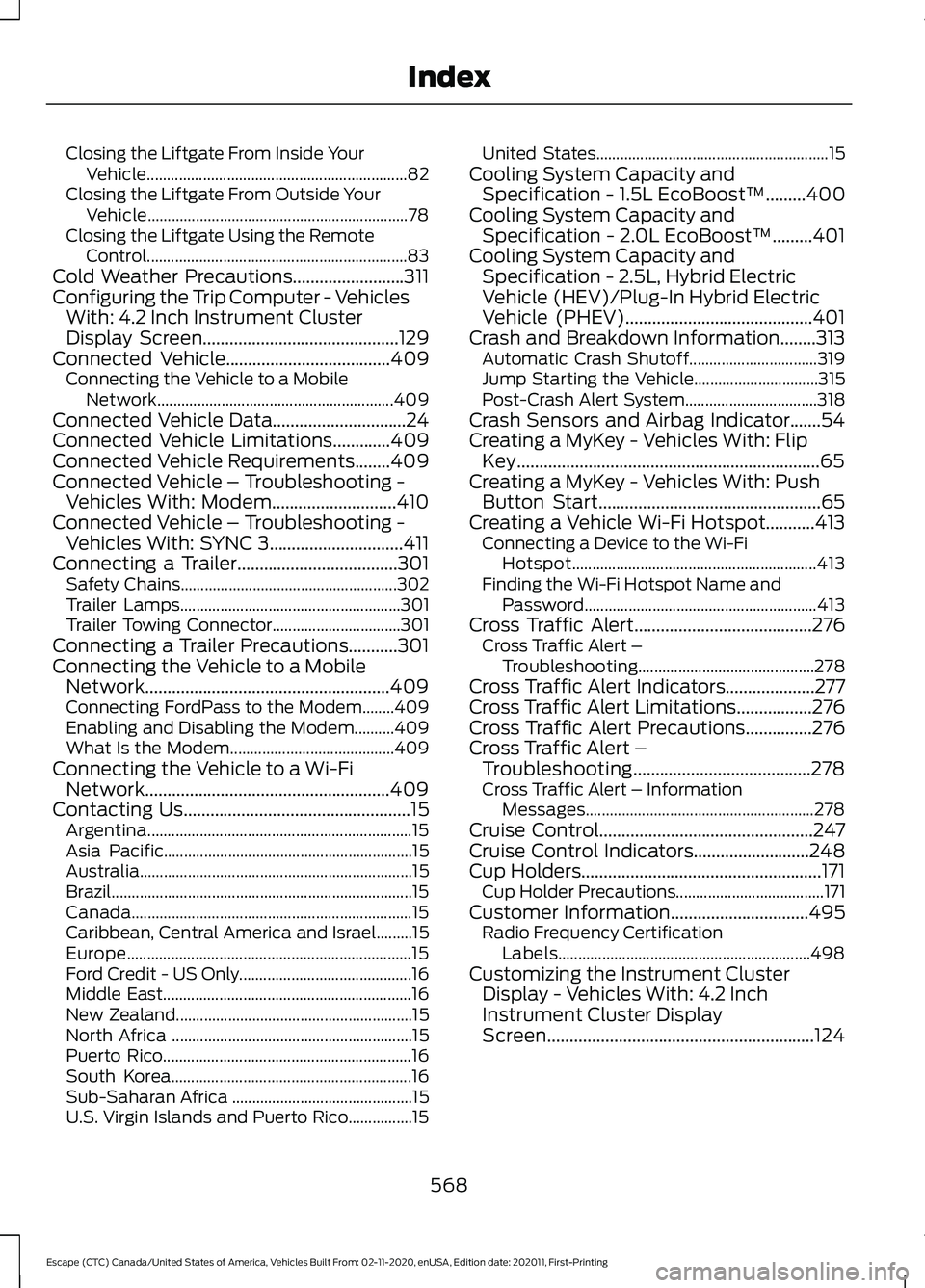
Closing the Liftgate From Inside Your
Vehicle................................................................. 82
Closing the Liftgate From Outside Your Vehicle................................................................. 78
Closing the Liftgate Using the Remote Control................................................................. 83
Cold Weather Precautions.........................311
Configuring the Trip Computer - Vehicles With: 4.2 Inch Instrument Cluster
Display Screen
............................................129
Connected Vehicle.....................................409
Connecting the Vehicle to a Mobile
Network........................................................... 409
Connected Vehicle Data
..............................24
Connected Vehicle Limitations.............409
Connected Vehicle Requirements........409
Connected Vehicle – Troubleshooting - Vehicles With: Modem............................410
Connected Vehicle – Troubleshooting - Vehicles With: SYNC 3..............................411
Connecting a Trailer....................................301 Safety Chains...................................................... 302
Trailer Lamps....................................................... 301
Trailer Towing Connector................................ 301
Connecting a Trailer Precautions
...........301
Connecting the Vehicle to a Mobile Network.......................................................409
Connecting FordPass to the Modem........409
Enabling and Disabling the Modem..........409
What Is the Modem......................................... 409
Connecting the Vehicle to a Wi-Fi Network.......................................................409
Contacting Us
...................................................15
Argentina.................................................................. 15
Asia Pacific.............................................................. 15
Australia.................................................................... 15
Brazil........................................................................\
... 15
Canada...................................................................... 15
Caribbean, Central America and Israel.........15
Europe....................................................................... 15
Ford Credit - US Only........................................... 16
Middle East.............................................................. 16
New Zealand........................................................... 15
North Africa ............................................................ 15
Puerto Rico.............................................................. 16
South Korea............................................................ 16
Sub-Saharan Africa ............................................. 15
U.S. Virgin Islands and Puerto Rico................15 United States..........................................................
15
Cooling System Capacity and Specification - 1.5L EcoBoost™
.........400
Cooling System Capacity and Specification - 2.0L EcoBoost™.........401
Cooling System Capacity and Specification - 2.5L, Hybrid Electric
Vehicle (HEV)/Plug-In Hybrid Electric
Vehicle (PHEV)
..........................................401
Crash and Breakdown Information........313 Automatic Crash Shutoff................................ 319
Jump Starting the Vehicle............................... 315
Post-Crash Alert System................................. 318
Crash Sensors and Airbag Indicator.......54
Creating a MyKey - Vehicles With: Flip Key....................................................................65
Creating a MyKey - Vehicles With: Push Button Start..................................................65
Creating a Vehicle Wi-Fi Hotspot...........413 Connecting a Device to the Wi-Fi
Hotspot............................................................. 413
Finding the Wi-Fi Hotspot Name and Password.......................................................... 413
Cross Traffic Alert........................................276 Cross Traffic Alert –
Troubleshooting............................................ 278
Cross Traffic Alert Indicators....................277
Cross Traffic Alert Limitations.................276
Cross Traffic Alert Precautions...............276
Cross Traffic Alert – Troubleshooting........................................278
Cross Traffic Alert – Information Messages......................................................... 278
Cruise Control
................................................247
Cruise Control Indicators..........................248
Cup Holders
......................................................171
Cup Holder Precautions..................................... 171
Customer Information...............................495 Radio Frequency Certification
Labels............................................................... 498
Customizing the Instrument Cluster Display - Vehicles With: 4.2 Inch
Instrument Cluster Display
Screen............................................................124
568
Escape (CTC) Canada/United States of America, Vehicles Built From: 02-11-2020, enUSA, Edition date: 202011, First-Printing Index
Page 572 of 589
Customizing the Instrument Cluster
Display - Vehicles With: 6.5 Inch
Instrument Cluster Display Screen/12.3
Inch Instrument Cluster Display
Screen............................................................124
Adding Screens Using Select Screens.............................................................. 124
Configuring Gauges............................................ 125
D
Data Privacy......................................................22 Services That Third Parties Provide...............22
Services That We Provide.................................. 22
Declaration of Conformity.......................562
Radio Frequency Statement......................... 562
Department of Transportation Uniform Tire Quality Grades..................................360
Temperature A B C............................................. 361
Traction AA A B C............................................... 361
Treadwear............................................................ 360
Digital Radio
...................................................416
Digital Radio Indicators..................................... 417
Digital Radio Limitations.................................. 417
How Does Digital Radio Work....................... 416
Switching Digital Radio Reception On and Off........................................................................\
417
What Is Digital Radio........................................ 416
Disposing of Airbags.....................................55
Distance Alert
...............................................283
Adjusting the Sensitivity of Distance
Alert................................................................... 283
What Is Distance Alert..................................... 283
Distance Indication......................................281 Distance Indication Indicator........................ 283
Switching Distance Indication On and Off....................................................................... 283
What Is Distance Indication............................ 281
Doors and Locks Audible Warnings..........71 Door Ajar Audible Warning................................. 71
Doors and Locks.............................................69 Autolock................................................................... 70
Autounlock............................................................. 70
Doors and Locks – Troubleshooting...............71
Mislock..................................................................... 70
Operating the Doors From Inside Your Vehicle................................................................. 69Operating the Doors From Outside Your
Vehicle................................................................. 69
Doors and Locks – Troubleshooting........71 Doors and Locks – Frequently Asked
Questions............................................................ 72
Doors and Locks – Information Messages............................................................. 71
Doors and Locks – Warning Lamps................71
Drive Belt Routing Overview - 1.5L EcoBoost™.................................................345
Drive Belt Routing Overview - 2.0L EcoBoost™.................................................345
Drive Mode Control.....................................262 Drive Modes......................................................... 263
Plug-In Hybrid Electric Vehicle Drive Modes............................................................... 264
Drive Modes
...................................................263
Deep Snow/Sand.............................................. 263
Eco........................................................................\
... 263
Normal................................................................... 263
Slippery................................................................. 263
Sport....................................................................... 263
Driver Alert
......................................................287
Driver Alert – Troubleshooting..................... 288
Driver Alert Indicators................................288 System Warnings.............................................. 288
Driver Alert Limitations..............................287
Driver Alert Precautions.............................287
Driver Alert – Troubleshooting...............288 Driver Alert – Information Messages.........288
Driving Economically
....................................311
Driving Hints.....................................................311
Driving Through Shallow Water...............311
E
Easy Entry and Exit.........................................77
Electric Parking Brake Audible Warning........................................................225
Electric Parking Brake
................................224
Electric Parking Brake –
Troubleshooting............................................ 225
Electric Parking Brake – Troubleshooting........................................225
Electric Parking Brake – Information Messages......................................................... 226
Electric Parking Brake – Warning Lamps................................................................ 225
569
Escape (CTC) Canada/United States of America, Vehicles Built From: 02-11-2020, enUSA, Edition date: 202011, First-Printing Index
Page 577 of 589
Instrument Cluster Display........................123
Personalized Settings....................................... 125
Instrument Cluster Display Main Menu - Vehicles With: 12.3 Inch Instrument
Cluster Display Screen.............................124
Instrument Cluster Display Main Menu - Vehicles With: 4.2 Inch Instrument
Cluster Display Screen.............................124
Instrument Cluster Display Main Menu - Vehicles With: 6.5 Inch Instrument
Cluster Display Screen.............................123
Instrument Cluster Indicators...................121 Adaptive Cruise Control.................................... 121
Auto Hold............................................................... 122
Automatic High Beam Control....................... 121
Auto-Start-Stop.................................................. 122
Blind Spot Monitor............................................. 122
Cruise Control....................................................... 122
EV Charge.............................................................. 122
EV Later.................................................................. 122
EV Now................................................................... 122
Front Airbag.......................................................... 122
Front Fog Lamps................................................. 122
High Beam............................................................. 122
Lamps On.............................................................. 122
Ready to Drive...................................................... 122
Stability Control................................................... 122
Turn Signal............................................................. 122
Instrument Cluster
.........................................111
Fuel Gauge............................................................. 118
Instrument Cluster Overview - Gasoline, Vehicles With: 12.3 Inch Instrument
Cluster Display Screen..............................113
Instrument Cluster Overview - Gasoline, Vehicles With: 4.2 Inch Instrument
Cluster Display Screen...............................111
Instrument Cluster Overview - Gasoline, Vehicles With: 6.5 Inch Instrument
Cluster Display Screen..............................112
Instrument Cluster Overview - Hybrid Electric Vehicle (HEV), Vehicles With:
12.3 Inch Instrument Cluster Display
Screen.............................................................115
Instrument Cluster Overview - Hybrid Electric Vehicle (HEV), Vehicles With:
6.5 Inch Instrument Cluster Display
Screen.............................................................114 Instrument Cluster Overview - Plug-In
Hybrid Electric Vehicle (PHEV),
Vehicles With: 12.3 Inch Instrument
Cluster Display Screen..............................117
Instrument Cluster Overview - Plug-In Hybrid Electric Vehicle (PHEV),
Vehicles With: 6.5 Inch Instrument
Cluster Display Screen..............................116
Instrument Cluster Warning Lamps
............................................................120
Anti-Lock Braking System............................... 120
Battery.................................................................... 120
Brake System....................................................... 120
Door Ajar................................................................ 120
Electric Park Brake............................................. 120
Engine or Motor Coolant Temperature.................................................... 120
Fasten Rear Seatbelt........................................ 120
Fasten Seatbelt................................................... 120
High Voltage Electric System Failure..........120
Hood Ajar............................................................... 120
Liftgate Ajar............................................................ 121
Low Beam Warning............................................. 121
Low Fuel Level....................................................... 121
Low Tire Pressure Warning............................... 121
Low Washer Fluid................................................. 121
Malfunction Indicator Lamp............................ 121
Oil Pressure............................................................ 121
Powertrain Fault................................................... 121
Vehicle Plugged In............................................... 121
Instrument Panel...........................................26
Intelligent Adaptive Cruise Control.......257 Adjusting the Set Speed Tolerance............258
How Does Intelligent Adaptive Cruise
Control Work................................................... 257
Intelligent Adaptive Cruise Control Alerts................................................................. 258
Intelligent Adaptive Cruise Control Indicators......................................................... 258
Intelligent Adaptive Cruise Control Limitations...................................................... 258
Intelligent Adaptive Cruise Control Precautions...................................................... 257
Intelligent Adaptive Cruise Control Requirements................................................. 257
Switching Intelligent Mode On and Off...................................................................... 258
Interior Air Quality
.........................................147
574
Escape (CTC) Canada/United States of America, Vehicles Built From: 02-11-2020, enUSA, Edition date: 202011, First-Printing Index