brake FORD ESCAPE 2021 Owners Manual
[x] Cancel search | Manufacturer: FORD, Model Year: 2021, Model line: ESCAPE, Model: FORD ESCAPE 2021Pages: 589, PDF Size: 9.2 MB
Page 7 of 589
What Is the Power Gauge - Hybrid
Electric Vehicle (HEV)/Plug-In Hybrid
Electric Vehicle (PHEV), Vehicles With:
6.5 Inch Instrument Cluster Display
Screen ...........................................................118
What Is the Power Gauge - Hybrid Electric Vehicle (HEV)/Plug-In Hybrid
Electric Vehicle (PHEV), Vehicles With:
12.3 Inch Instrument Cluster Display
Screen ...........................................................
118
What Is the Speedometer .........................
118
Fuel Gauge ......................................................
118
What Is the Vehicle Range Display - Plug-In Hybrid Electric Vehicle (PHEV)
........................................................................\
..
119
What Is the High Voltage Battery Gauge - Plug-In Hybrid Electric Vehicle
(PHEV) .........................................................
119
What Is the Engine Coolant Temperature Gauge ............................................................
119
What Is the Information Bar .....................
119
What Are the Instrument Cluster Warning Lamps .........................................
119
Instrument Cluster Warning Lamps ......
120
What Are the Instrument Cluster Indicators .....................................................
121
Instrument Cluster Indicators ..................
121
Instrument Cluster Display
Using the Instrument Cluster Display Controls .......................................................
123
Instrument Cluster Display Main Menu - Vehicles With: 6.5 Inch Instrument
Cluster Display Screen ...........................
123
Instrument Cluster Display Main Menu - Vehicles With: 4.2 Inch Instrument
Cluster Display Screen ..........................
124
Instrument Cluster Display Main Menu - Vehicles With: 12.3 Inch Instrument
Cluster Display Screen ..........................
124
Customizing the Instrument Cluster Display - Vehicles With: 4.2 Inch
Instrument Cluster Display Screen
........................................................................\
.
124 Customizing the Instrument Cluster
Display - Vehicles With: 6.5 Inch
Instrument Cluster Display Screen/12.3
Inch Instrument Cluster Display Screen
........................................................................\
.
124
Personalized Settings ................................
125
Fuel Economy Display - Gasoline ..........
126
Fuel Economy Display - Hybrid Electric Vehicle (HEV) ...........................................
126
Fuel Economy Display - Plug-In Hybrid Electric Vehicle (PHEV) .........................
127
EV Coach - Hybrid Electric Vehicle (HEV)/Plug-In Hybrid Electric Vehicle
(PHEV) .........................................................
127
What Is Electric Efficiency - Plug-In Hybrid Electric Vehicle (PHEV) ..........
127
What Is Brake Coach - Hybrid Electric Vehicle (HEV)/Plug-In Hybrid Electric
Vehicle (PHEV) ........................................
128
What Is the Trip Summary - Hybrid Electric Vehicle (HEV)/Plug-In Hybrid
Electric Vehicle (PHEV) ........................
128
Vehicle Charging Status - Plug-In Hybrid Electric Vehicle (PHEV) ........................
128
Trip Computer
Accessing the Trip Computer - Vehicles With: 4.2 Inch Instrument Cluster
Display Screen ..........................................
129
Accessing the Trip Computer - Vehicles With: 6.5 Inch Instrument Cluster
Display Screen/12.3 Inch Instrument
Cluster Display Screen ..........................
129
Resetting the Trip Computer ...................
129
Resetting the Individual Trip Values - Vehicles With: 4.2 Inch Instrument
Cluster Display Screen ..........................
129
Configuring the Trip Computer - Vehicles With: 4.2 Inch Instrument Cluster
Display Screen ..........................................
129
Trip Data .........................................................
130
Head Up Display
What Is the Head Up Display ...................
131
4
Escape (CTC) Canada/United States of America, Vehicles Built From: 02-11-2020, enUSA, Edition date: 202011, First-Printing Table of Contents
Page 10 of 589
Locating the Fuel Filler Funnel
...............190
Running Out of Fuel ...................................
190
Refueling .........................................................
192
Fuel Tank Capacity .....................................
196
Fuel and Refueling – Troubleshooting ........................................................................\
.
197
Catalytic Converter
What Is the Catalytic Converter ............
199
Catalytic Converter Precautions ...........
199
Catalytic Converter – Troubleshooting ........................................................................\
199
High Voltage Battery
What Is the High Voltage Battery ........
200
High Voltage Battery Precautions .......
200
Charging Your Vehicle - Plug- In Hybrid Electric Vehicle
(PHEV)
What is AC Charging ..................................
201
Charging Your Vehicle Precautions .......
201
Charging Equipment ..................................
201
Locating the Charge Port ........................
204
Charge Port Indicators .............................
204
AC Charging ..................................................
205
Setting the Charging Schedule and Preferences ...............................................
207
Charging Your Vehicle – Troubleshooting .......................................................................
208
Automatic Transmission
Automatic Transmission Precautions ........................................................................\
.
210
Automatic Transmission Positions .......
210
Shifting Your Vehicle Into Gear ................
211
Automatic Transmission Position Indicators .....................................................
211
Temporary Neutral Mode ...........................
211
Automatic Return to Park (P) .................
212Grade Assist - Hybrid Electric Vehicle
(HEV) ...........................................................
212
Manual Park Release - Gasoline ............
213
Automatic Transmission Audible Warnings .....................................................
214
Automatic Transmission – Troubleshooting .......................................
215
All-Wheel Drive
How Does All-Wheel Drive Work ...........
217
All-Wheel Drive Precautions ....................
217
All-Wheel Drive Limitations .....................
217
All-Wheel Drive Driving Hints ..................
217
All-Wheel Drive – Troubleshooting ......
220
Brakes
Brake Precautions ........................................
221
Anti-Lock Braking System ........................
221
Brake Over Accelerator ..............................
221
Locating the Brake Fluid Reservoir .......
222
Checking the Brake Fluid ..........................
222
Brake Fluid Specification .........................
222
Brakes – Troubleshooting ........................
223
Electric Parking Brake
What Is the Electric Parking Brake .......
224
Applying the Electric Parking Brake ......
224
Applying the Electric Parking Brake in an Emergency ................................................
224
Manually Releasing the Electric Parking Brake ............................................................
224
Automatically Releasing the Electric Parking Brake ...........................................
225
Electric Parking Brake Audible Warning ........................................................................\
225
Releasing the Electric Parking Brake if the Vehicle Battery Has Run Out of
Charge .........................................................
225
Electric Parking Brake – Troubleshooting ........................................................................\
225
7
Escape (CTC) Canada/United States of America, Vehicles Built From: 02-11-2020, enUSA, Edition date: 202011, First-Printing Table of Contents
Page 13 of 589

Locating the Pre-Collision Assist Sensors
........................................................................\
.281
Distance Indication .....................................
281
Distance Alert ..............................................
283
Automatic Emergency Braking ..............
283
Evasive Steering Assist .............................
284
Pre-Collision Assist – Troubleshooting ........................................................................\
285
Driver Alert
What Is Driver Alert ....................................
287
How Does Driver Alert Work ...................
287
Driver Alert Precautions ............................
287
Driver Alert Limitations .............................
287
Switching Driver Alert On and Off ........
287
Driver Alert Indicators ...............................
288
Driver Alert – Troubleshooting ..............
288
Speed Sign Recognition
What Is Speed Sign Recognition ..........
289
How Does Speed Sign Recognition Work ........................................................................\
289
Speed Sign Recognition Precautions ........................................................................\
289
Speed Sign Recognition Limitations ........................................................................\
289
Speed Sign Recognition Indicators ......
289
Setting the Speed Sign Recognition Speed Warning .......................................
290
Setting the Speed Sign Recognition Speed Tolerance ....................................
290
Speed Sign Recognition – Troubleshooting .....................................
290
Load Carrying
Load Carrying Precautions ......................
292
Locating the Safety Compliance Certification Labels ...............................
293
What Is the Gross Axle Weight Rating ........................................................................\
293
What Is the Gross Vehicle Weight Rating ........................................................................\
293 What Is the Gross Combined Weight
Rating ..........................................................
293
Calculating Payload ...................................
295
Calculating the Load Limit ......................
295
Roof Rack .......................................................
297
Luggage Compartment
Installing and Removing the Luggage Compartment Cover .............................
299
Connecting a Trailer
Connecting a Trailer Precautions ..........
301
Connecting a Trailer ...................................
301
Towing a Trailer
Towing a Trailer Precautions ..................
303
Trailer Brake Precautions ........................
303
Towing a Trailer Limitations ...................
304
Loading Your Trailer ...................................
304
Trailer Towing Hints ...................................
304
Launching or Retrieving a Boat or Personal Watercraft ..............................
305
Towing Weights and Dimensions ........
306
Trailer Sway Control
How Does Trailer Sway Control Work ........................................................................\
.
310
Trailer Sway Control Precautions ..........
310
Switching Trailer Sway Control On and Off .................................................................
310
Driving Hints
Cold Weather Precautions ........................
311
Breaking-In ......................................................
311
Driving Economically ...................................
311
Driving Through Shallow Water ..............
311
Floor Mats .......................................................
312
Crash and Breakdown Information
Roadside Assistance ..................................
313
10
Escape (CTC) Canada/United States of America, Vehicles Built From: 02-11-2020, enUSA, Edition date: 202011, First-Printing Table of Contents
Page 16 of 589
Brake Fluid Specification
.........................407
Vehicle Identification
Vehicle Identification Number ..............
408
Connected Vehicle
Connected Vehicle Requirements .......
409
Connected Vehicle Limitations ............
409
Connecting the Vehicle to a Mobile Network .....................................................
409
Connecting the Vehicle to a Wi-Fi Network .....................................................
409
Connected Vehicle – Troubleshooting - Vehicles With: Modem ..........................
410
Connected Vehicle – Troubleshooting - Vehicles With: SYNC 3 ............................
411
Vehicle Wi-Fi Hotspot
Creating a Vehicle Wi-Fi Hotspot ..........
413
Changing the Vehicle Wi-Fi Hotspot Name or Password .................................
413
Audio System
Audio System Precautions ......................
414
Switching the Audio Unit On and Off ........................................................................\
.
414
Selecting the Audio Source .....................
414
Playing or Pausing the Audio Source ........................................................................\
.
414
Adjusting the Volume ................................
414
Switching Shuffle Mode On and Off ........................................................................\
.
414
Switching Repeat Mode On and Off ........................................................................\
.
414
Setting a Memory Preset ..........................
414
Muting the Audio .........................................
415
Adjusting the Sound Settings .................
415
Setting the Clock and Date ......................
415
AM/FM Radio ................................................
416
Digital Radio ..................................................
416
Satellite Radio ..............................................
418SYNC™
General Information
...................................
419
Using Voice Recognition ..........................
420
Using SYNC™ With Your Phone ...........
422
SYNC™ Applications and Services ......
423
Using SYNC™ With Your Media Player ........................................................................\
426
SYNC™ Troubleshooting .........................
427
SYNC™ 3
General Information ..................................
436
Using Voice Recognition ..........................
438
Entertainment .............................................
445
Phone ..............................................................
455
Navigation .....................................................
457
Electric Vehicle Information ...................
462
Apps .................................................................
467
Settings ..........................................................
469
SYNC™ 3 Troubleshooting ......................
471
Accessories
Accessories ..................................................
484
Ford Protect
What Is Ford Protect .................................
485
Scheduled Maintenance
General Maintenance Information .......
487
Normal Scheduled Maintenance .........
490
Special Operating Conditions Scheduled Maintenance ............................................
492
Customer Information
Rollover Warning ........................................
495
The Better Business Bureau Auto Line Program .....................................................
495
The Mediation and Arbitration Program .......................................................................
496
Ordering a Canadian French Owner's Manual .......................................................
496
13
Escape (CTC) Canada/United States of America, Vehicles Built From: 02-11-2020, enUSA, Edition date: 202011, First-Printing Table of Contents
Page 22 of 589
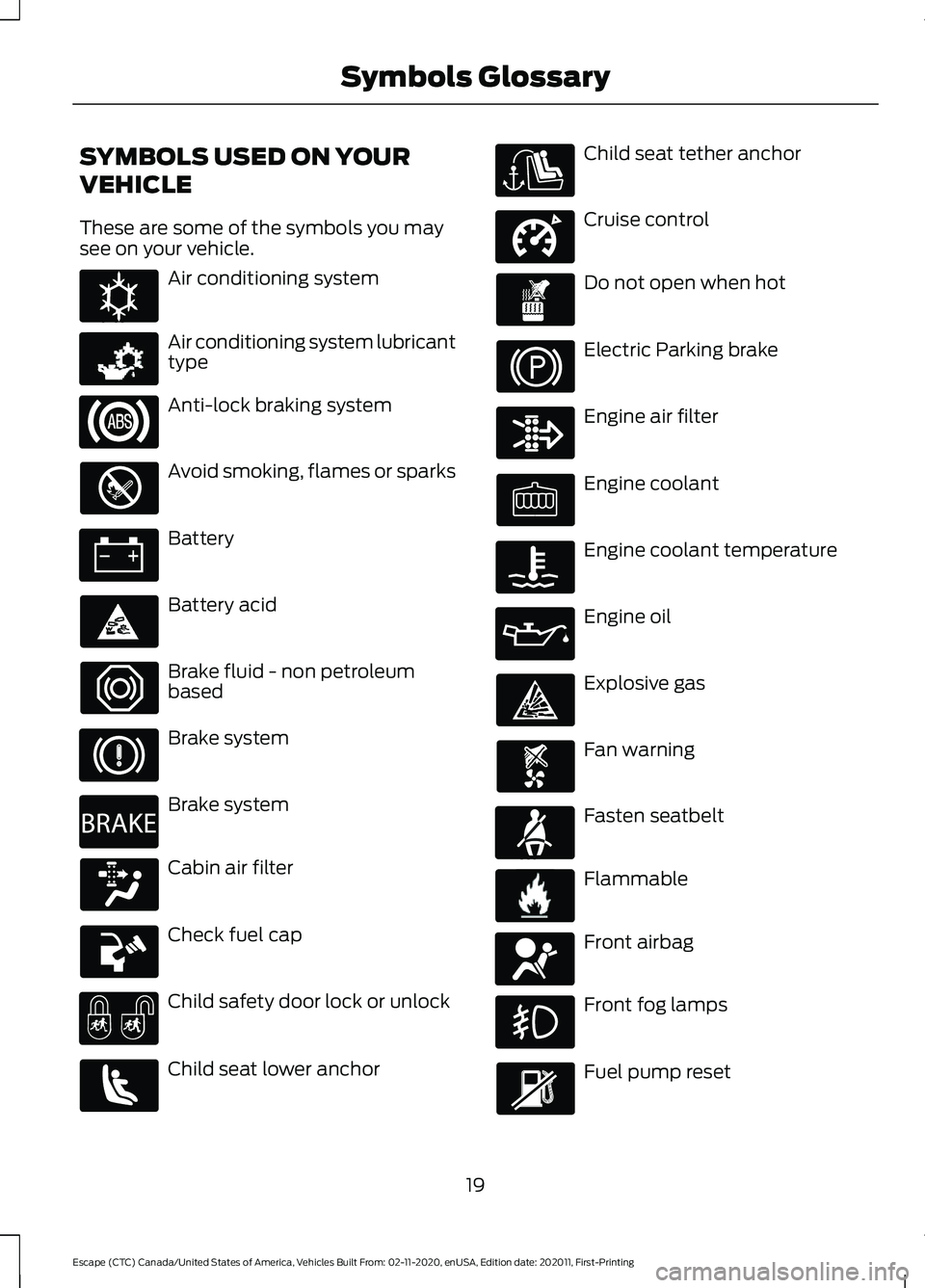
SYMBOLS USED ON YOUR
VEHICLE
These are some of the symbols you may
see on your vehicle.
Air conditioning system
Air conditioning system lubricant
type
Anti-lock braking system
Avoid smoking, flames or sparks
Battery
Battery acid
Brake fluid - non petroleum
based
Brake system
Brake system
Cabin air filter
Check fuel cap
Child safety door lock or unlock
Child seat lower anchor Child seat tether anchor
Cruise control
Do not open when hot
Electric Parking brake
Engine air filter
Engine coolant
Engine coolant temperature
Engine oil
Explosive gas
Fan warning
Fasten seatbelt
Flammable
Front airbag
Front fog lamps
Fuel pump reset
19
Escape (CTC) Canada/United States of America, Vehicles Built From: 02-11-2020, enUSA, Edition date: 202011, First-Printing Symbols GlossaryE162384 E231157 E270480 E332905 E71880 E231160 E67017
Page 25 of 589
WARNING: Do not connect
wireless plug-in devices to the data link
connector. Unauthorized third parties
could gain access to vehicle data and
impair the performance of safety related
systems. Only allow repair facilities that
follow our service and repair instructions
to connect their equipment to the data
link connector.
We respect your privacy and are
committed to protecting it. The
information contained in this manual was
correct at the time of publication, but as
technology rapidly changes, we
recommend that you visit the local Ford
website for the latest information.
Your vehicle has electronic control units
that have data recording functionality and
the ability to permanently or temporarily
store data. This data could include
information on the condition and status of
your vehicle, vehicle maintenance
requirements, events and malfunctions.
The types of data that can be recorded are
described in this section. Some of the data
recorded is stored in event logs or error
logs.
Note: Error logs are reset following a service
or repair.
Note: We may provide information in
response to requests from law enforcement,
other government authorities and third
parties acting with lawful authority or
through a legal process. Such information
could be used by them in legal proceedings.
Data recorded includes, for example:
• Operating states of system
components, for example fuel level,
tire pressure and battery charge level.
• Vehicle and component status, for
example wheel speed, deceleration,
lateral acceleration and seatbelt
status. •
Events or errors in essential systems,
for example headlamps and brakes.
• System responses to driving situations,
for example airbag deployment and
stability control.
• Environmental conditions, for example
temperature.
Some of this data, when used in
combination with other information, for
example an accident report, damage to a
vehicle or eyewitness statements, could
be associated with a specific person.
Services That We Provide
If you use our services, we collect and use
data, for example account information,
vehicle location and driving characteristics,
that could identify you. We transmit this
data through a dedicated, protected
connection. We only collect and use data
to enable your use of our services to which
you have subscribed, with your consent or
where permitted by law. For additional
information, see the terms and conditions
of the services to which you have
subscribed.
For additional information about our
privacy policy, refer to the local Ford
website.
Services That Third Parties
Provide
We recommend that you review the terms
and conditions and data privacy
information for any services equipped with
your vehicle or to which you subscribe. We
take no responsibility for services that third
parties provide.
22
Escape (CTC) Canada/United States of America, Vehicles Built From: 02-11-2020, enUSA, Edition date: 202011, First-Printing Data Privacy
Page 26 of 589
SERVICE DATA
Service data recorders in your vehicle are
capable of collecting and storing
diagnostic information about your vehicle.
This potentially includes information about
the performance or status of various
systems and modules in the vehicle, such
as engine, throttle, steering or brake
systems. In order to properly diagnose and
service your vehicle, Ford Motor Company
(Ford of Canada in Canada), and service
and repair facilities may access or share
among them vehicle diagnostic
information received through a direct
connection to your vehicle when
diagnosing or servicing your vehicle.
Additionally, Ford Motor Company (Ford
of Canada, in Canada) may, where
permitted by law, use vehicle diagnostic
information for vehicle improvement or
with other information we may have about
you, for example, your contact information,
to offer you products or services that may
interest you. Data may be provided to our
service providers such as part suppliers
that may help diagnose malfunctions, and
who are similarly obligated to protect data.
We retain this data only as long as
necessary to perform these functions or to
comply with law. We may provide
information where required in response to
official requests to law enforcement or
other government authorities or third
parties acting with lawful authority or court
order, and such information may be used
in legal proceedings. For U.S. only (if
equipped), if you choose to use connected
apps and services, you consent that certain
diagnostic information may also be
accessed electronically by Ford Motor
Company and Ford authorized service
facilities, and that the diagnostic
information may be used to provide
services to you, personalizing your
experience, troubleshoot, and to improve
products and services and offer you
products and services that may interest
you, where permitted by law. For Canada
only, for more information, please review
the Ford of Canada privacy policy at
www.ford.ca, including our U.S. data
storage and use of service providers in
other jurisdictions who may be subject to
legal requirements in Canada, the United
States and other countries applicable to
them, for example, lawful requirements to
disclose personal information to
governmental authorities in those
countries.
EVENT DATA
This vehicle is equipped with an event data
recorder. The main purpose of an event
data recorder is to record, in certain crash
or near crash-like situations, such as an
airbag deployment or hitting a road
obstacle; this data will assist in
understanding how a vehicle
’s systems
performed. The event data recorder is
designed to record data related to vehicle
dynamics and safety systems for a short
period of time, typically 30 seconds or less.
The event data recorder in this vehicle is
designed to record such data as:
• How various systems in your vehicle
were operating.
• Whether or not the driver and
passenger seatbelts were
buckled/fastened.
• How far (if at all) the driver was
depressing the accelerator and/or the
brake pedal.
• How fast the vehicle was traveling.
• Where the driver was positioning the
steering wheel.
This data can help provide a better
understanding of the circumstances in
which crashes and injuries occur.
23
Escape (CTC) Canada/United States of America, Vehicles Built From: 02-11-2020, enUSA, Edition date: 202011, First-Printing Data Privacy
Page 44 of 589
How Does Sensitive Locking Mode
Work
If the driver suddenly brakes, turns a corner
sharply, or the vehicle receives an impact
of about 5 mph (8 km/h) or more, the
seatbelts lock to help reduce forward
movement of the driver and passengers.
In addition, the seatbelt retractor locks if
you pull the seatbelt webbing out too
quickly. If the retractor locks, slowly lower
the height adjuster to allow the seatbelt
to retract.
If the retractor does not unlock, pull the
seatbelt out slowly then feed a small
length of webbing back toward the stowed
position.
AUTOMATIC LOCKING MODE
What Is Automatic Locking Mode
This is a safety feature built into the
seatbelt retractors that keeps the
seatbelts pre-locked.
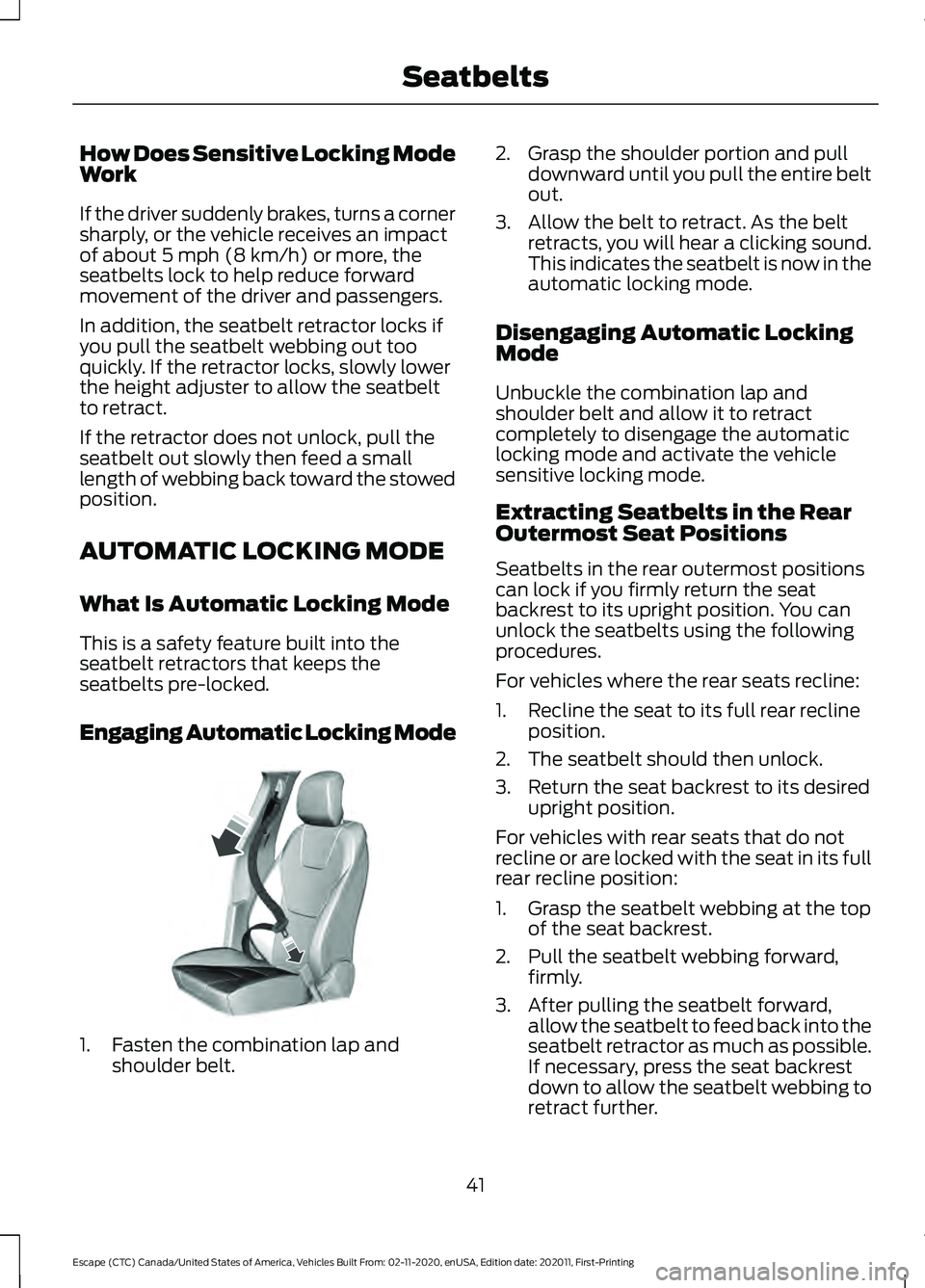
Engaging Automatic Locking Mode 1. Fasten the combination lap and
shoulder belt. 2. Grasp the shoulder portion and pull
downward until you pull the entire belt
out.
3. Allow the belt to retract. As the belt retracts, you will hear a clicking sound.
This indicates the seatbelt is now in the
automatic locking mode.
Disengaging Automatic Locking
Mode
Unbuckle the combination lap and
shoulder belt and allow it to retract
completely to disengage the automatic
locking mode and activate the vehicle
sensitive locking mode.
Extracting Seatbelts in the Rear
Outermost Seat Positions
Seatbelts in the rear outermost positions
can lock if you firmly return the seat
backrest to its upright position. You can
unlock the seatbelts using the following
procedures.
For vehicles where the rear seats recline:
1. Recline the seat to its full rear recline position.
2. The seatbelt should then unlock.
3. Return the seat backrest to its desired upright position.
For vehicles with rear seats that do not
recline or are locked with the seat in its full
rear recline position:
1. Grasp the seatbelt webbing at the top of the seat backrest.
2. Pull the seatbelt webbing forward, firmly.
3. After pulling the seatbelt forward, allow the seatbelt to feed back into the
seatbelt retractor as much as possible.
If necessary, press the seat backrest
down to allow the seatbelt webbing to
retract further.
41
Escape (CTC) Canada/United States of America, Vehicles Built From: 02-11-2020, enUSA, Edition date: 202011, First-Printing SeatbeltsE142591
Page 47 of 589
When the initial warning expires for the
driver, more warnings are provided for the
driver and front passenger. This warning
tone sounds if you or your front passenger
do not fasten the seatbelt buckle and the
vehicle speed exceeds 6 mph (10 km/h).
This tone also sounds if an occupant
unfastens the rear seatbelt buckle or it
becomes unfastened.
Switching the Seatbelt Reminder
On and Off WARNING:
While the system
allows you to deactivate it, this system
is designed to improve your chances of
being safely belted and surviving an
accident. We recommend you leave the
system activated for yourself and others
who may use the vehicle.
Note: The driver and front passenger
warnings switch off independently. When
you perform this procedure for one seating
position, do not buckle the other position as
this cancels the process.
Read Steps 1 - 4 before proceeding with
the programming procedure.
Make sure that:
• You set the parking brake.
• The transmission is in park (P).
• The ignition is off.
• You close all vehicle doors.
• You unfasten the driver and front
passenger seatbelts.
1. Switch the ignition on. Do not start the
engine. 2. Wait about one minute until the
seatbelt warning light switches off.
After Step 2, wait an additional five
seconds before proceeding with Step
3. Once you start Step 3, you must
complete the procedure within 60
seconds.
3. For the seating position you are switching off, fasten then unfasten the
seatbelt three times at a moderate
speed, ending in the unfastened state.
After Step 3, the seatbelt warning light
switches on.
4. When the seatbelt warning light is on, fasten then unfasten the seatbelt. After
Step 4, the seatbelt warning light
flashes for confirmation.
This switches the feature off for that
seating position if it is currently on.
This switches the feature on for that
seating position if it is currently off.
CHECKING THE SEATBELTS
Check the seatbelts and child restraints
periodically to make sure they work
properly and are not damaged. Make sure
there are no nicks, tears or cuts. Replace if
necessary.
Check the following seatbelt assemblies
after a crash.
• Retractors.
• Buckles.
• Front seatbelt buckle assemblies.
• Shoulder belt height adjusters.
• Shoulder belt guide on seat backrest.
• Child restraint LATCH and tether
anchors.
• Attaching hardware.
44
Escape (CTC) Canada/United States of America, Vehicles Built From: 02-11-2020, enUSA, Edition date: 202011, First-Printing Seatbelts
Page 102 of 589
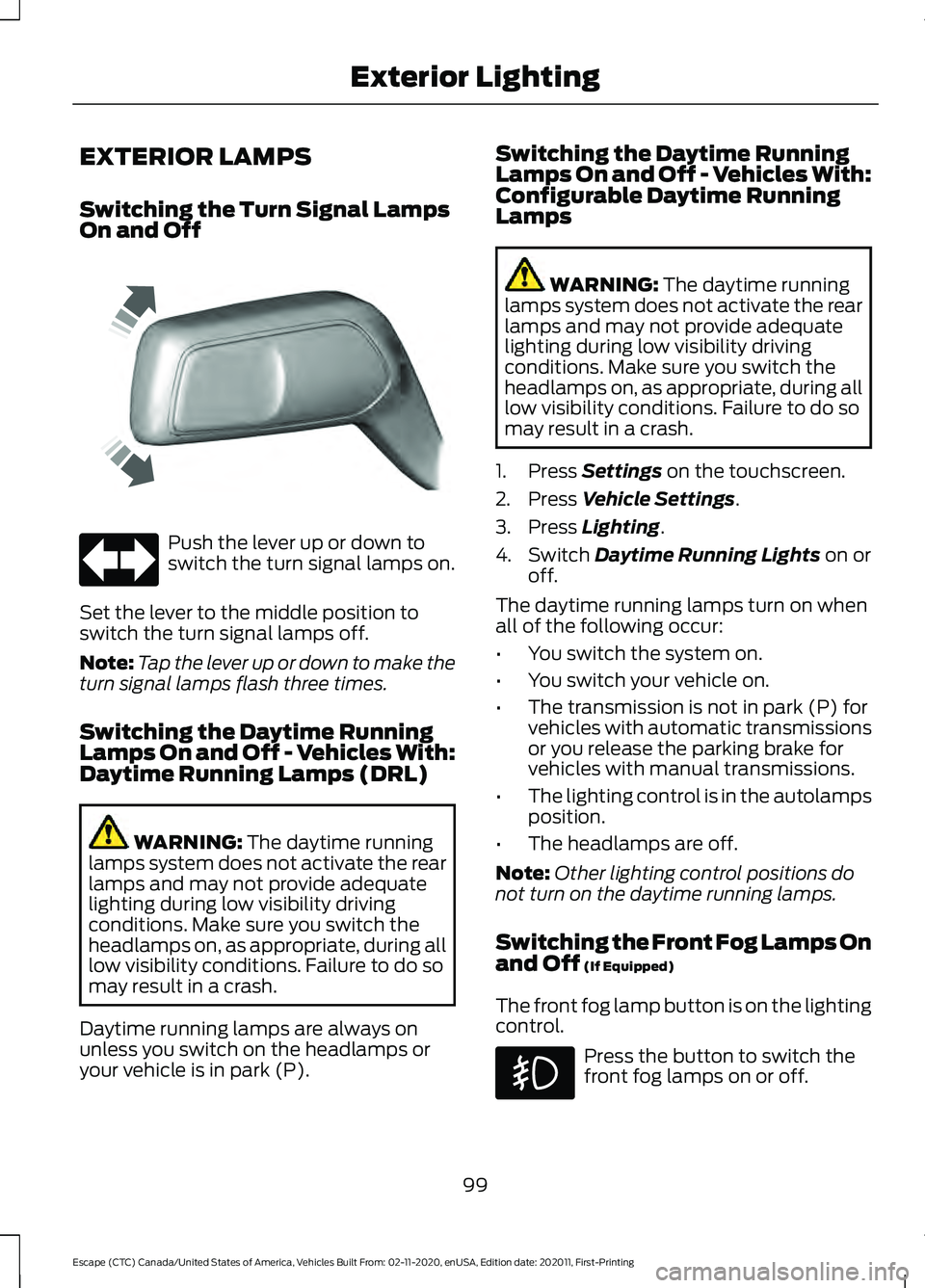
EXTERIOR LAMPS
Switching the Turn Signal Lamps
On and Off
Push the lever up or down to
switch the turn signal lamps on.
Set the lever to the middle position to
switch the turn signal lamps off.
Note: Tap the lever up or down to make the
turn signal lamps flash three times.
Switching the Daytime Running
Lamps On and Off - Vehicles With:
Daytime Running Lamps (DRL) WARNING: The daytime running
lamps system does not activate the rear
lamps and may not provide adequate
lighting during low visibility driving
conditions. Make sure you switch the
headlamps on, as appropriate, during all
low visibility conditions. Failure to do so
may result in a crash.
Daytime running lamps are always on
unless you switch on the headlamps or
your vehicle is in park (P). Switching the Daytime Running
Lamps On and Off - Vehicles With:
Configurable Daytime Running
Lamps WARNING:
The daytime running
lamps system does not activate the rear
lamps and may not provide adequate
lighting during low visibility driving
conditions. Make sure you switch the
headlamps on, as appropriate, during all
low visibility conditions. Failure to do so
may result in a crash.
1. Press
Settings on the touchscreen.
2. Press
Vehicle Settings.
3. Press
Lighting.
4. Switch
Daytime Running Lights on or
off.
The daytime running lamps turn on when
all of the following occur:
• You switch the system on.
• You switch your vehicle on.
• The transmission is not in park (P) for
vehicles with automatic transmissions
or you release the parking brake for
vehicles with manual transmissions.
• The lighting control is in the autolamps
position.
• The headlamps are off.
Note: Other lighting control positions do
not turn on the daytime running lamps.
Switching the Front Fog Lamps On
and Off
(If Equipped)
The front fog lamp button is on the lighting
control. Press the button to switch the
front fog lamps on or off.
99
Escape (CTC) Canada/United States of America, Vehicles Built From: 02-11-2020, enUSA, Edition date: 202011, First-Printing Exterior LightingE242676