Electri FORD ESCAPE 2022 Owners Manual
[x] Cancel search | Manufacturer: FORD, Model Year: 2022, Model line: ESCAPE, Model: FORD ESCAPE 2022Pages: 585, PDF Size: 6.15 MB
Page 462 of 585
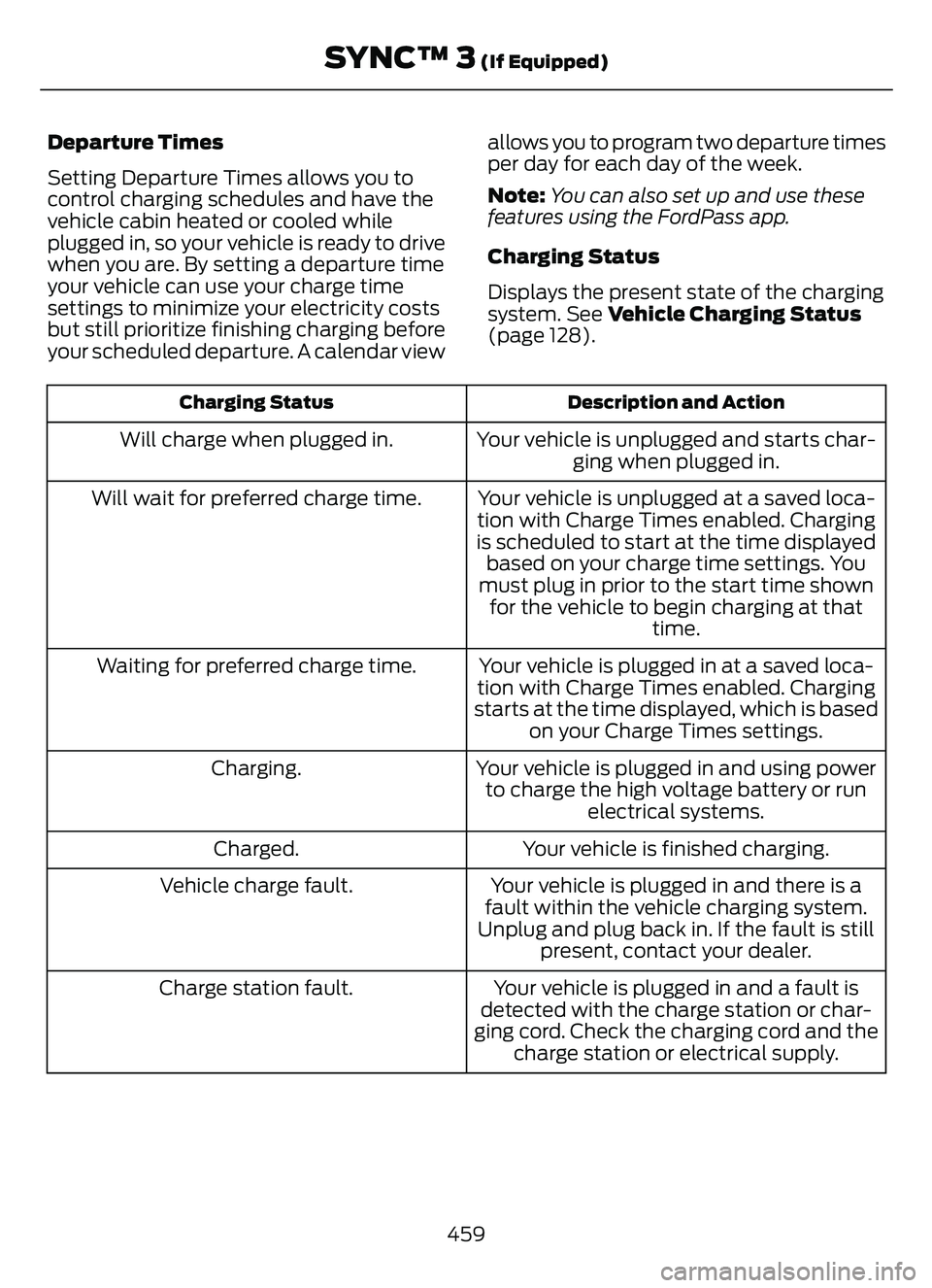
Departure Times
Setting Departure Times allows you to
control charging schedules and have the
vehicle cabin heated or cooled while
plugged in, so your vehicle is ready to drive
when you are. By setting a departure time
your vehicle can use your charge time
settings to minimize your electricity costs
but still prioritize finishing charging before
your scheduled departure. A calendar viewallows you to program two departure times
per day for each day of the week.
Note:
You can also set up and use these
features using the FordPass app.
Charging Status
Displays the present state of the charging
system. See Vehicle Charging Status
(page 128).
Description and Action
Charging Status
Your vehicle is unplugged and starts char-
ging when plugged in.
Will charge when plugged in.
Your vehicle is unplugged at a saved loca-
tion with Charge Times enabled. Charging
is scheduled to start at the time displayed based on your charge time settings. You
must plug in prior to the start time shown for the vehicle to begin charging at that time.
Will wait for preferred charge time.
Your vehicle is plugged in at a saved loca-
tion with Charge Times enabled. Charging
starts at the time displayed, which is based on your Charge Times settings.
Waiting for preferred charge time.
Your vehicle is plugged in and using powerto charge the high voltage battery or run electrical systems.
Charging.
Your vehicle is finished charging.
Charged.
Your vehicle is plugged in and there is a
fault within the vehicle charging system.
Unplug and plug back in. If the fault is still present, contact your dealer.
Vehicle charge fault.
Your vehicle is plugged in and a fault is
detected with the charge station or char-
ging cord. Check the charging cord and the charge station or electrical supply.
Charge station fault.
459
SYNC™ 3 (If Equipped)
Page 468 of 585
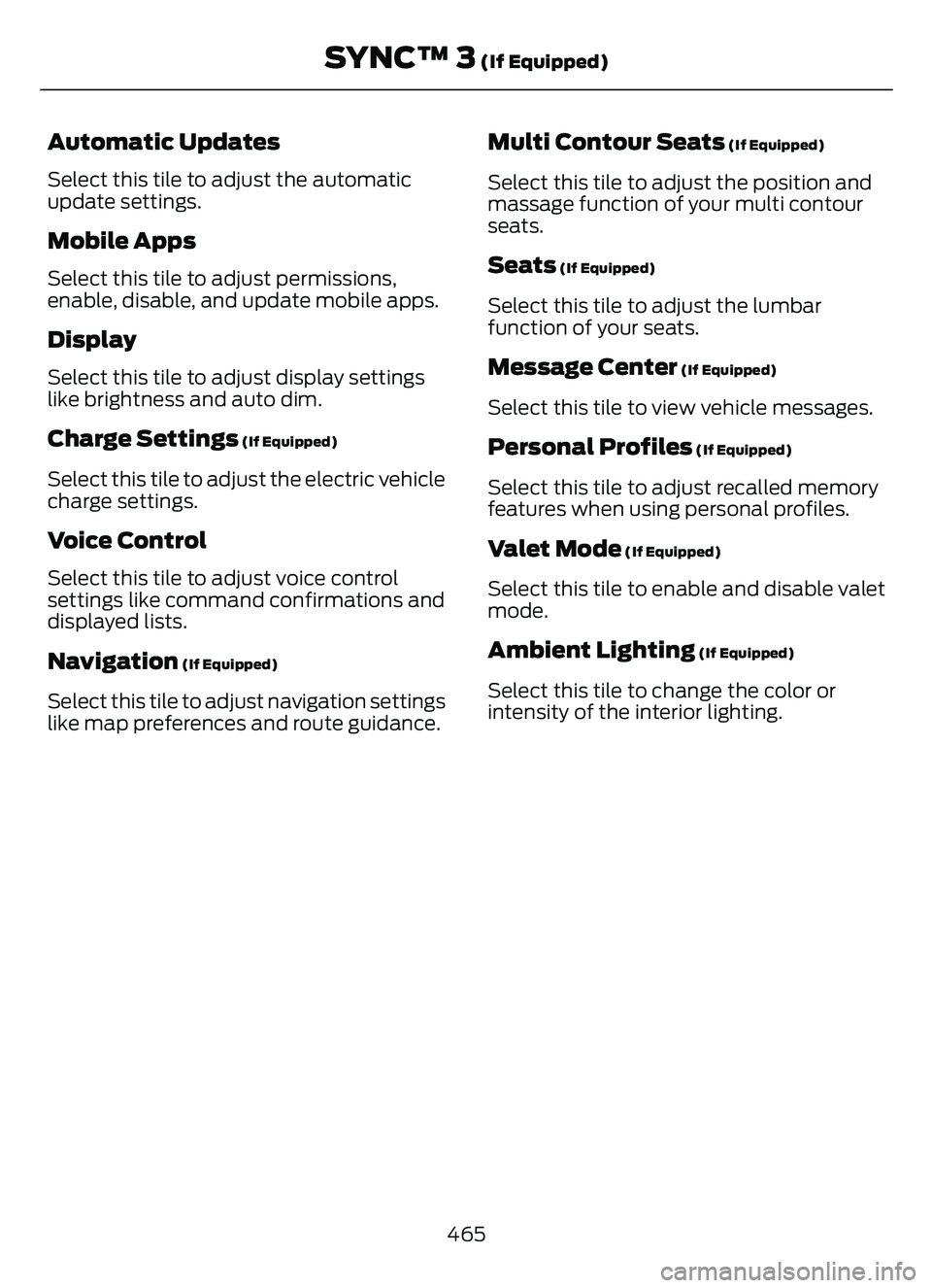
Automatic Updates
Select this tile to adjust the automatic
update settings.
Mobile Apps
Select this tile to adjust permissions,
enable, disable, and update mobile apps.
Display
Select this tile to adjust display settings
like brightness and auto dim.
Charge Settings (If Equipped)
Select this tile to adjust the electric vehicle
charge settings.
Voice Control
Select this tile to adjust voice control
settings like command confirmations and
displayed lists.
Navigation (If Equipped)
Select this tile to adjust navigation settings
like map preferences and route guidance.
Multi Contour Seats (If Equipped)
Select this tile to adjust the position and
massage function of your multi contour
seats.
Seats (If Equipped)
Select this tile to adjust the lumbar
function of your seats.
Message Center (If Equipped)
Select this tile to view vehicle messages.
Personal Profiles (If Equipped)
Select this tile to adjust recalled memory
features when using personal profiles.
Valet Mode (If Equipped)
Select this tile to enable and disable valet
mode.
Ambient Lighting (If Equipped)
Select this tile to change the color or
intensity of the interior lighting.
465
SYNC™ 3 (If Equipped)
Page 482 of 585
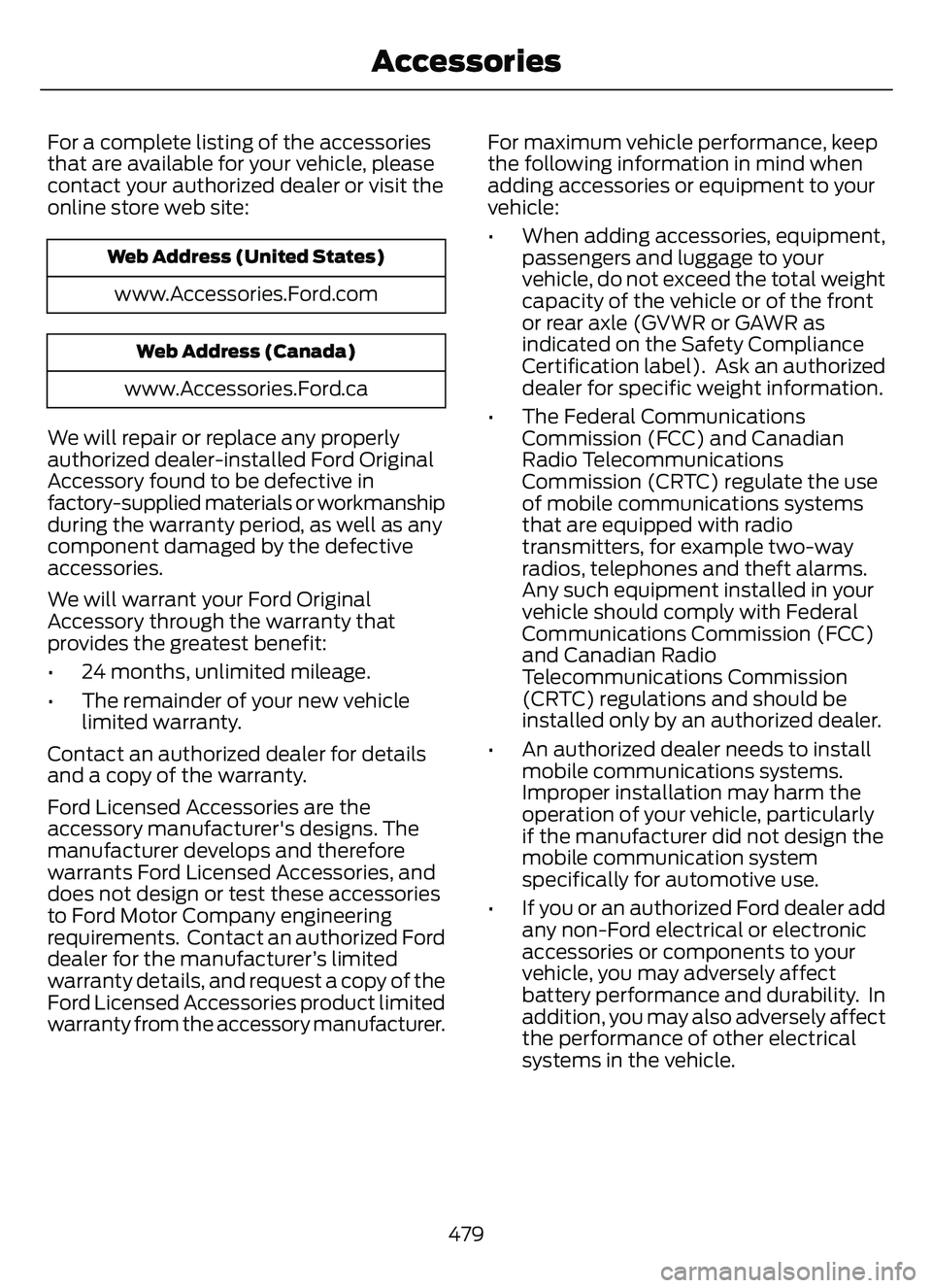
For a complete listing of the accessories
that are available for your vehicle, please
contact your authorized dealer or visit the
online store web site:
Web Address (United States)
www.Accessories.Ford.com
Web Address (Canada)
www.Accessories.Ford.ca
We will repair or replace any properly
authorized dealer-installed Ford Original
Accessory found to be defective in
factory-supplied materials or workmanship
during the warranty period, as well as any
component damaged by the defective
accessories.
We will warrant your Ford Original
Accessory through the warranty that
provides the greatest benefit:
• 24 months, unlimited mileage.
• The remainder of your new vehicle limited warranty.
Contact an authorized dealer for details
and a copy of the warranty.
Ford Licensed Accessories are the
accessory manufacturer's designs. The
manufacturer develops and therefore
warrants Ford Licensed Accessories, and
does not design or test these accessories
to Ford Motor Company engineering
requirements. Contact an authorized Ford
dealer for the manufacturer’s limited
warranty details, and request a copy of the
Ford Licensed Accessories product limited
warranty from the accessory manufacturer. For maximum vehicle performance, keep
the following information in mind when
adding accessories or equipment to your
vehicle:
• When adding accessories, equipment,
passengers and luggage to your
vehicle, do not exceed the total weight
capacity of the vehicle or of the front
or rear axle (GVWR or GAWR as
indicated on the Safety Compliance
Certification label). Ask an authorized
dealer for specific weight information.
• The Federal Communications Commission (FCC) and Canadian
Radio Telecommunications
Commission (CRTC) regulate the use
of mobile communications systems
that are equipped with radio
transmitters, for example two-way
radios, telephones and theft alarms.
Any such equipment installed in your
vehicle should comply with Federal
Communications Commission (FCC)
and Canadian Radio
Telecommunications Commission
(CRTC) regulations and should be
installed only by an authorized dealer.
• An authorized dealer needs to install mobile communications systems.
Improper installation may harm the
operation of your vehicle, particularly
if the manufacturer did not design the
mobile communication system
specifically for automotive use.
• If you or an authorized Ford dealer add any non-Ford electrical or electronic
accessories or components to your
vehicle, you may adversely affect
battery performance and durability. In
addition, you may also adversely affect
the performance of other electrical
systems in the vehicle.
479
Accessories
Page 484 of 585
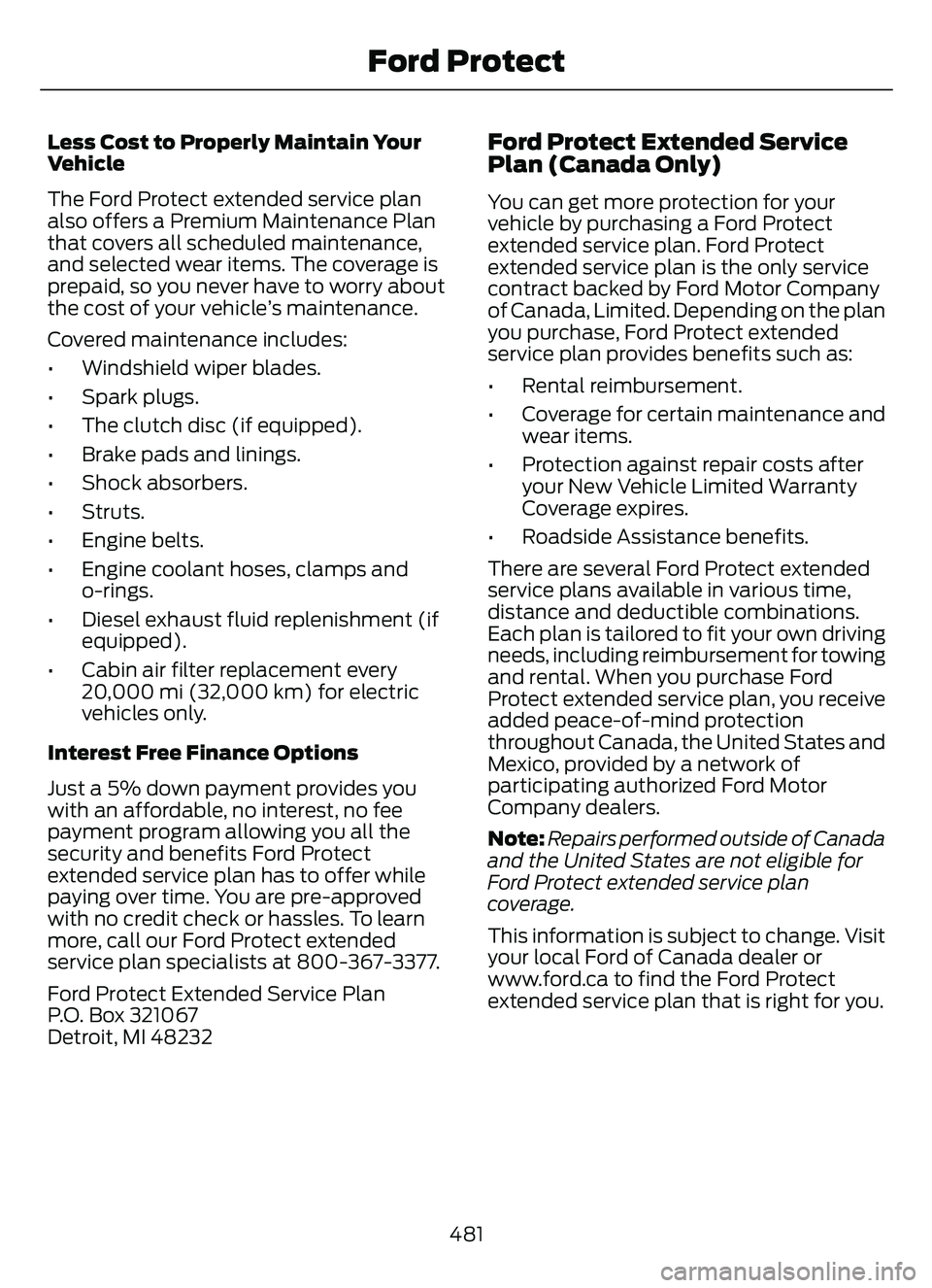
Less Cost to Properly Maintain Your
Vehicle
The Ford Protect extended service plan
also offers a Premium Maintenance Plan
that covers all scheduled maintenance,
and selected wear items. The coverage is
prepaid, so you never have to worry about
the cost of your vehicle’s maintenance.
Covered maintenance includes:
• Windshield wiper blades.
• Spark plugs.
• The clutch disc (if equipped).
• Brake pads and linings.
• Shock absorbers.
• Struts.
• Engine belts.
• Engine coolant hoses, clamps and o-rings.
• Diesel exhaust fluid replenishment (if equipped).
• Cabin air filter replacement every 20,000 mi (32,000 km) for electric
vehicles only.
Interest Free Finance Options
Just a 5% down payment provides you
with an affordable, no interest, no fee
payment program allowing you all the
security and benefits Ford Protect
extended service plan has to offer while
paying over time. You are pre-approved
with no credit check or hassles. To learn
more, call our Ford Protect extended
service plan specialists at 800-367-3377.
Ford Protect Extended Service Plan
P.O. Box 321067
Detroit, MI 48232Ford Protect Extended Service
Plan (Canada Only)
You can get more protection for your
vehicle by purchasing a Ford Protect
extended service plan. Ford Protect
extended service plan is the only service
contract backed by Ford Motor Company
of Canada, Limited. Depending on the plan
you purchase, Ford Protect extended
service plan provides benefits such as:
• Rental reimbursement.
• Coverage for cert ain maintenance and
wear items.
• Protection against repair costs after your New Vehicle Limited Warranty
Coverage expires.
• Roadside Assistance benefits.
There are several Ford Protect extended
service plans available in various time,
distance and deductible combinations.
Each plan is tailored to fit your own driving
needs, including reimbursement for towing
and rental. When you purchase Ford
Protect extended service plan, you receive
added peace-of-mind protection
throughout Canada, the United States and
Mexico, provided by a network of
participating authorized Ford Motor
Company dealers.
Note: Repairs performed outside of Canada
and the United States are not eligible for
Ford Protect extended service plan
coverage.
This information is subject to change. Visit
your local Ford of Canada dealer or
www.ford.ca to find the Ford Protect
extended service plan that is right for you.
481
Ford Protect
Page 564 of 585
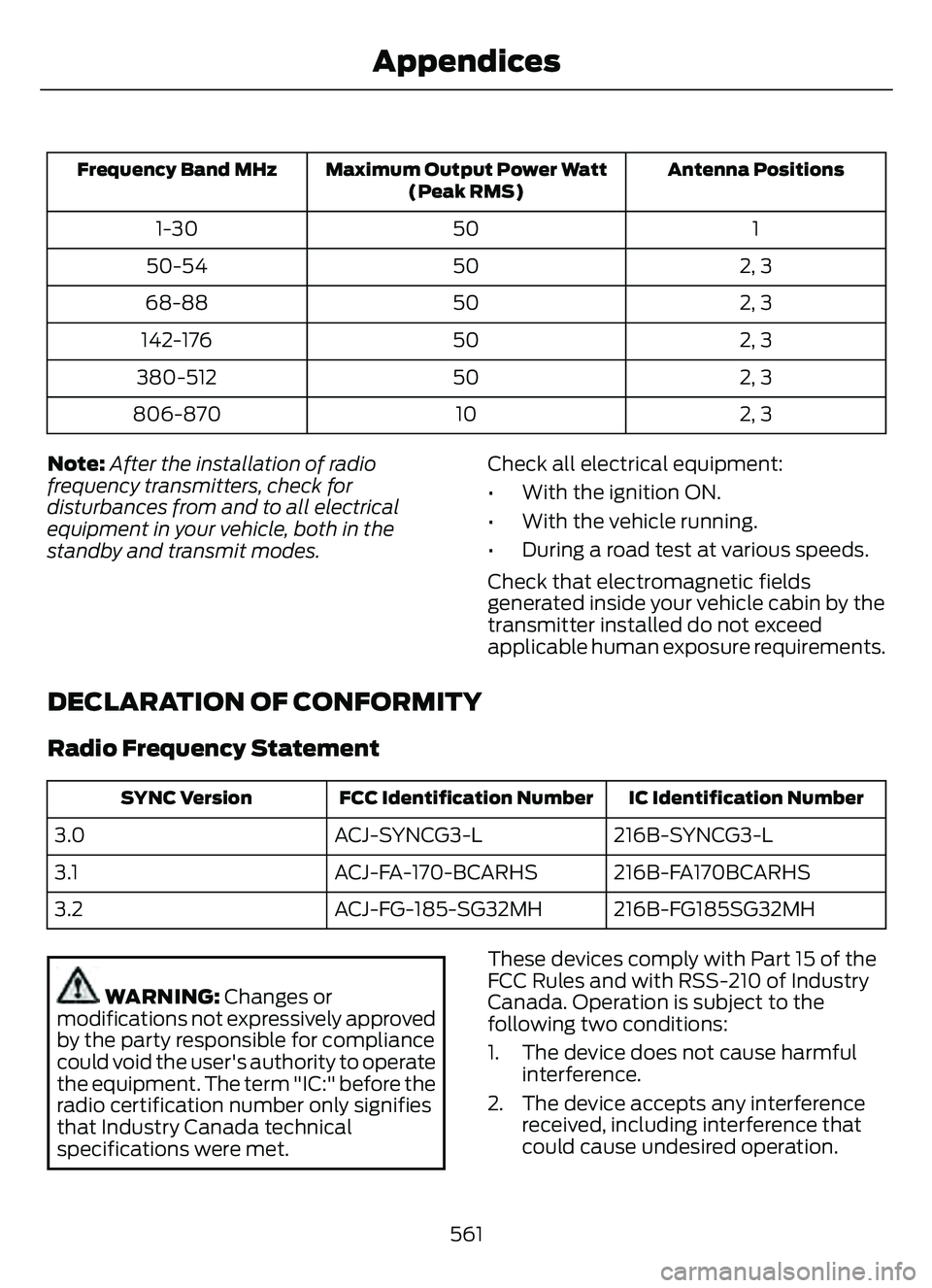
Antenna Positions
Maximum Output Power Watt
(Peak RMS)
Frequency Band MHz
1
50
1-30
2, 3
50
50-54
2, 3
50
68-88
2, 3
50
142-176
2, 3
50
380-512
2, 3
10
806-870
Note: After the installation of radio
frequency transmitters, check for
disturbances from and to all electrical
equipment in your vehicle, both in the
standby and transmit modes. Check all electrical equipment:
• With the ignition ON.
• With the vehicle running.
• During a road test at various speeds.
Check that electromagnetic fields
generated inside your vehicle cabin by the
transmitter installed do not exceed
applicable human exposure requirements.
DECLARATION OF CONFORMITY
Radio Frequency Statement
IC Identification Number
FCC Identification Number
SYNC Version
216B-SYNCG3-L
ACJ-SYNCG3-L
3.0
216B-FA170BCARHS
ACJ-FA-170-BCARHS
3.1
216B-FG185SG32MH
ACJ-FG-185-SG32MH
3.2
WARNING: Changes or
modifications not expressively approved
by the party responsible for compliance
could void the user's authority to operate
the equipment. The term "IC:" before the
radio certification number only signifies
that Industry Canada technical
specifications were met. These devices comply with Part 15 of the
FCC Rules and with RSS-210 of Industry
Canada. Operation is subject to the
following two conditions:
1. The device does not cause harmful
interference.
2. The device accepts any interference received, including interference that
could cause undesired operation.
561
Appendices
Page 566 of 585
1
12V Battery......................................................34112V Battery Precautions...................................341
Battery Management SystemLimitations.......................................................342
How Does the Battery Management System Work..................................................342
Recycling and Disposing of the 12V Battery..............................................................342
Resetting the Battery Sensor........................342
What Is the Battery Management System..............................................................342
9
911 Assist............................................................57
A
A/CSee: Climate Control..........................................137About This Publication..................................17
ABS
See: Brakes............................................................217Accessing the Trip Computer - VehiclesWith: 4.2 Inch Instrument Cluster
Display Screen............................................129
Accessing the Trip Computer - Vehicles With: 6.5 Inch Instrument Cluster
Display Screen/ 12.3 Inch Instrument
Cluster Display Screen.............................129
Accessories....................................................479
AC Charging...................................................205
Connecting the Charger..................................205
Stopping Charging............................................206
Active Park Assist........................................238Active Park Assist –
Trouble shooting............................................240
Active Park Assist Precautions...............238
Active Park Assist –
Troubleshooting........................................240
Active Park Assist – Frequently Asked
Questions ........................................................240
Active Park Assist – Information Messages.........................................................240
Adaptive Cruise Control............................244Adaptive Cruise Control –Troubleshooting............................................ 254
Intelligent Adaptive Cruise Control.............253
Lane Centering...................................................250
Adaptive Cruise Control Automatic Cancellation................................................247
Adaptive Cruise Control Indicators.......250
Adaptive Cruise Control Limitations..................................................245
Adaptive Cruise Control Precautions.................................................244
Adaptive Cruise Control – Troubleshooting........................................254
Adaptive Cruise Control – Information
Messages.........................................................254
Adjusting the Exterior Mirrors..................108
Adjusting the Headlamps........................344
Adjusting the Instrument Panel LightingBrightness....................................................103
Adjusting the Seatbelt Height...................42
Adjusting the Seatbelts During Pregnancy......................................................42
Adjusting the Sound Settings...................411
Adjusting the Steering Wheel....................91
Adjusting the Volume.................................410
Aid Mode.........................................................263
How Does Aid Mode Work.............................263
What Is Aid Mode..............................................263
Airbag Precautions........................................49
Airbags................................................................47
Front Passenger Sensing System...................51Air ConditioningSee: Climate Control..........................................137Air Conditioning System Capacity and Specification - 1.5L EcoBoost™.........400
Air Conditioning System Capacity and Specification - 2.0L EcoBoost™.........401
Air Conditioning System Capacity and Specification - 2.5L, Hybrid Electric
Vehicle (HEV)/Plug-In Hybrid Electric
Vehicle (PHEV).........................................402
Air Filter
See: Changing the Engine Air Filter - 1.5L
EcoBoost™/2.0L EcoBoost™.................338
See: Changing the Engine Air Filter - 2.5L, Hybrid Electric Vehicle (HEV)/Plug-In
Hybrid Electric Vehicle (PHEV)...............339
563
Index
Page 567 of 585
Alert and Aid Mode.....................................263How Does Alert and Aid Mode Work.........264
What Is Alert and Aid Mode...........................263
Alert Mode......................................................262Adjusting the Steering Wheel VibrationIntensit y............................................................263
How Does Alert Mode Work..........................263
What Is Alert Mode...........................................262
All-Wheel Drive.............................................216All-Wheel Drive – Troubleshooting.............216All-Wheel Drive Limitations.....................216
All-Wheel Drive Precautions....................216
All-Wheel Drive – Troubleshooting.......216
All-Wheel Drive – Information Messages..........................................................216
AM/FM Radio.................................................412AM/FM Radio Limitations...............................412
Selecting a Radio Station................................412
Ambient Lighting..........................................103Adjusting Ambient Lighting............................103
Switching Ambient Lighting On andOff.......................................................................1\
03
Anti-Lock Braking System.........................217Anti-Lock Braking System Indicators..........217
Anti-Lock Braking SystemLimitations........................................................217
Anti-Theft Alarm System............................87Arming the Anti-Theft Alarm System..........88
Disarming the Anti-Theft AlarmSystem................................................................88
How Does the Anti-Theft Alarm System Work.....................................................................87
What Are the Inclination Sensors..................87
What Are the Interior Sensors.........................87
What Is the Anti-Theft Alarm System..........87
What Is the Battery Backup Alarm...............88
What Is the Perimeter Alarm...........................87
Anti-Theft Alarm System Settings.........88Setting the Alarm Security Level...................88
Switching Ask on Exit On and Off.................88
What are the Alarm Security Levels.............88
What Is Ask on Exit.............................................88
Appendices ....................................................559
Applying the Electric Parking Brake.............................................................220
Applying the Electric Parking Brake in an Emergency..................................................220
Apps.................................................................462 At a Glance.......................................................26
Audio System................................................410
AM/FM Radio.......................................................412
Digital Radio.........................................................412
Satellite Radio.....................................................414
Audio System Precautions.......................410
Auto-Dimming Interior Mirror...................107
Auto-Dimming Interior Mirror
Limitations........................................................107
What Is the Auto-Dimming Interior Mirror...................................................................107
Auto Hold........................................................224
Auto Hold Indicators...................................224
Autolamps........................................................98
Autolamp Settings..............................................98
What Are Autolamps..........................................98
Autolock.............................................................70Autolock Requirements.....................................70
What Is Autolock..................................................70
Automatically Releasing the ElectricParking Brake...............................................221
Automatic Climate Control - Vehicles With: Dual Automatic Temperature
Control (DATC)...........................................138
Automatic Climate Control - Vehicles With: Electronic Automatic
Temperature Control (EATC).................141
Automatic Crash Shutoff..........................314
Automatic Crash Shutoff
Precautions......................................................314
Re-Enabling Your Vehicle................................314
What Is Automatic Crash Shutoff................314
Automatic Emergency Braking...............278Switching Automatic Emergency Braking On and Off.......................................................279
What Is Automatic Emergency Braking..............................................................278
Automatic Engine Stop..............................176How Does Automatic Engine StopWork....................................................................176
Overriding Automatic Engine Stop...............176
Switching Automatic Engine Stop On and Off........................................................................\
176
What Is Automatic Engine Stop....................176
Automatic High Beam Control...............100Automatic High Beam Control Indicator s........................................................... 101
564
Index
Page 568 of 585
Automatic High Beam ControlLimitations........................................................101
Automatic High Beam Control Precautions.......................................................101
Automatic High Beam Control Requirements..................................................101
How Does Automatic High Beam Control Work...................................................................100
Overriding Automatic High Beam Control............................................................... 102
Switching Automatic High Beam Control On and Off........................................................101
Automatic High Beam Control –Trouble shooting.........................................102
Automatic High Beam Control –
Information Messages.................................102
Automatic Locking Mode.............................41Disengaging Automatic Locking Mode.........41
Engaging Automatic Locking Mode...............41
What Is Automatic Locking Mode..................41
Automatic Return to Park (P)...................211Automatic Return to Park (P)Limitations........................................................212
How Does Automatic Return to Park (P) Work....................................................................212
What Is Automatic Return to Park (P).........211
Automatic Transmission Audible Warnings.......................................................214
Automatic Transmission..........................209
Automatic Return to Park (P).........................211
Automatic Transmission Positions............209
Automatic Transmission –
Troubleshooting .............................................214
Grade Assist - Hybrid Electric Vehicle (HEV)..................................................................212
Manual Park Release - Gasoline...................212
Temporary Neutral Mode..................................211
Automatic Transmission Position Indicator s...................................................... 210
Automatic Transmission Positions......................................................209
Drive (D).................................................................210
Low (L).................................................................\
..210
Neutral (N)............................................................210
Park (P)...............................................................\
..209
Reverse (R)..........................................................209
Automatic TransmissionPrecautions................................................209 Automatic Transmission –
Troubleshooting .........................................214
Automatic Transmission – Information
Messages..........................................................214
Auto-Start-Stop...........................................184Auto-Start-Stop – Troubleshooting...........185Auto-Start-Stop Indicators......................184
Auto-Start-Stop Precautions..................184
Auto-Start-Stop –Troubleshooting.........................................185
Auto-Start-Stop – Frequently Asked
Questions.........................................................186
Auto-Start-Stop – Information Messages..........................................................185
Autounlock.......................................................70Autounlock Requirements................................70
Switching Autounlock On and Off.................70
What Is Autounlock.............................................70
Autowipers........................................................92Adjusting the Sensitivity of the RainSensor.................................................................93
Autowipers Settings............................................92
What Are Autowipers.........................................92
AW DSee: All-Wheel Drive.........................................216
B
BatterySee: Changing the 12V Battery.....................343Blind Spot Information System.............268Blind Spot Information System – Troubleshooti ng............................................270
Blind Spot Information System
Indicator s.....................................................269
Blind Spot Information System Limitations..................................................268
Blind Spot Information System Precautions................................................268
Blind Spot Information System Requirements............................................268
Blind Spot Information System – Troubleshooting ........................................270
Blind Spot Information System –
Information Messages................................270
Body Control Module Fuse Box..............325Accessing the Body Control Module FuseBox......................................................................325
565
Index
Page 569 of 585
Identifying the Fuses in the Body ControlModule Fuse Box...........................................325
Locating the Body Control Module Fuse Box......................................................................325
Body Styling Kit Precautions...................354
Body Styling Kits..........................................354
Bonnet Lock
See: Opening and Closing the Hood..........328Booster Seats..................................................36
Brake Fluid Specification...........................218
Brake Over Accelerator...............................217
Brake Precautions.........................................217
Brakes................................................................217
Anti-Lock Braking System...............................217
Brakes – Troubleshooting...............................219
Brakes – Troubleshooting.........................219Brakes – Frequently AskedQuestions.........................................................219
Brakes – Warning Lamps.................................219
Breaking-In....................................................304
C
Calculating Payload...................................290
Calculating the Load Limit......................290
Canceling the Set Speed..........................243
Capacities and Specifications................387
Catalytic Converter......................................198
Catalytic Converter – Troubleshooting.............................................198
Catalytic Converter Precautions............198
Catalytic Converter –Troubleshooting........................................198
Catalytic Converter – Warning
Lamps................................................................198
Changing a Flat Tire....................................382
Changing a Road Wheel...........................382
Changing the 12V Battery.........................343
Changing the Engine Air Filter - 1.5LEcoBoost™/2.0L EcoBoost™.............338
Changing the Engine Air Filter - 2.5L, Hybrid Electric Vehicle (HEV)/Plug-In
Hybrid Electric Vehicle (PHEV)...........339
Changing the Fuel Filter - Gasoline, Hybrid Electric Vehicle (HEV)..............340
Changing the Remote Control Battery - Vehicles With: Flip Key...............................61 Changing the Remote Control Battery -
Vehicles With: Push Button Start.........60
Changing the Vehicle Wi-Fi Hotspot Name or Password..................................409
Charge Port Indicators..............................204
Charging a Device.........................................167
Charging a Wireless Device......................169
Charging Equipment..................................200
Charging Your Vehicle...............................200
AC Charging.........................................................205
Charging Your Vehicle –
Troubleshooting............................................207
Charging Your VehiclePrecautions................................................200
Charging Your Vehicle – Troubleshooting........................................207
Charging Your Vehicle – Frequently Asked
Questions........................................................ 208
Charging Your Vehicle – Information Messages.........................................................207
Checking MyKey System Status..............66
Checking the Brake Fluid...........................218
Checking the Coolant................................334
Checking the Seatbelts...............................44
Checking the Tire Pressures....................368
Checking the Wiper Blades........................94
Children and Airbags....................................50
Child Restraint Anchor Points...................29
Locating the Child Restraint Lower AnchorPoints...................................................................29
Locating the Child Restraint Top Tether Anchor Points...................................................30
What Are the Child Restraint Anchor Points...................................................................29
Child Restraints..............................................30Child Restraint Position Information............30
Child Restraints Recommendation................31
Child Safety......................................................28Child Restraint Anchor Points.........................29
Child Restraints....................................................30
Installing Child Restraints..................................31
Child Safety Locks.........................................38
Child Safety Precautions.............................28
Cleaning Products.......................................349
Cleaning the Exterior..................................349
Cleaning Camera Lenses andSensors..............................................................351
566
Index
Page 570 of 585
Cleaning Chrome, Aluminium or StainlessSteel..................................................................350
Cleaning Headlamps and Rear Lamps...............................................................349
Cleaning Stripes or Graphics..........................351
Cleaning the Engine Compartment...........350
Cleaning the Exterior Precautions...............349
Cleaning the Underbody..................................351
Cleaning Wheels................................................350
Cleaning Windows and Wiper Blades...............................................................350
Cleaning the Interior....................................351Cleaning Carpets and Floor Mats................352
Cleaning Displays and Screens....................352
Cleaning Fabric Seats andHeadliners........................................................352
Cleaning Leather and Vinyl............................352
Cleaning Moonroof Tracks.............................353
Cleaning Plastic...................................................351
Cleaning Seatbelts............................................353
Cleaning Storage Compartments...............353
Cleaning the Instrument Panel.....................351
Clearing All MyKeys.......................................66
Clearing the Garage Door Opener.........164
Climate Control..............................................137
Closing the Liftgate.......................................78
Closing the Hands-Free Liftgate....................83
Closing the Liftgate From Inside Your Vehicle.................................................................82
Closing the Liftgate From Outside Your Vehicle.................................................................78
Closing the Liftgate Using the Remote Control.................................................................83
Cold Weather Precautions......................304
Configuring the Trip Computer - VehiclesWith: 4.2 Inch Instrument Cluster
Display Screen............................................129
Connected Vehicle.....................................405
Connecting the Vehicle to a Mobile
Network...........................................................405
Connected Vehicle Data..............................24
Connected Vehicle Limitations..............405
Connected Vehicle Requirements........405
Connected Vehicle – Troubleshooting -Vehicles With: Modem...........................406
Connected Vehicle – Troubleshooting - Vehicles With: SYNC 3............................407
Connecting a Trailer...................................296 Connecting a Trailer Precautions..........296
Connecting the Vehicle to a Mobile
Network.......................................................405
Connecting FordPass to the Modem.........405
Enabling and Disabling the Modem..........405
What Is the Modem.........................................405
Connecting the Vehicle to a Wi-FiNetwork.......................................................405
Contacting Us...................................................15
Cooling System Capacity and Specification - 1.5L EcoBoost™.........396
Cooling System Capacity and Specification - 2.0L EcoBoost™.........397
Cooling System Capacity and Specification - 2.5L, Hybrid Electric
Vehicle (HEV)/Plug-In Hybrid Electric
Vehicle (PHEV)..........................................397
Crash and Breakdown Information.................................................308
Automatic Crash Shutoff.................................314
Jump Starting the Vehicle...............................310
Post-Crash Alert System.................................313
Crash Sensors and Airbag Indicator.......54
Creating a MyKey - Vehicles With: FlipKey....................................................................65
Creating a MyKey - Vehicles With: Push Button Start..................................................65
Creating a Vehicle Wi-Fi Hotspot.........409
Cross Traffic Alert..........................................271
Cross Traffic Alert –
Troubleshooting.............................................273
Cross Traffic Alert Indicators....................272
Cross Traffic Alert Limitations..................271
Cross Traffic Alert Precautions................271
Cross Traffic Alert –Troubleshooting.........................................273
Cross Traffic Alert – Information
Messages..........................................................273
Cruise Control................................................242
Cruise Control Indicators..........................243
Cup Holders....................................................170
Cup Holder Precautions...................................170Customer Information..............................490Radio Frequency CertificationLabels...............................................................493
567
Index