brake light FORD ESCAPE 2022 User Guide
[x] Cancel search | Manufacturer: FORD, Model Year: 2022, Model line: ESCAPE, Model: FORD ESCAPE 2022Pages: 585, PDF Size: 6.15 MB
Page 299 of 585
CONNECTING A TRAILER
PRECAUTIONS
Do not tow a trailer until you drive your
vehicle at least 1,000 mi (1,600 km).
Consult your local motor vehicle laws for
towing a trailer.
See the instructions included with towing
accessories for the proper installation and
adjustment specifications.
Service your vehicle more frequently if you
tow a trailer. See Normal Scheduled
Maintenance (page 485).
If you use a rental trailer, follow the
instructions the rental agency gives you.
When attaching the trailer wiring connector
to your vehicle, only use a proper fitting
connector that works with the vehicle and
trailer functions.
Account for the trailer coupler weight as
part of your vehicle load when calculating
the total vehicle weight.
Do not exceed the load limits. See
Calculating the Load Limit (page 290).
CONNECTING A TRAILER
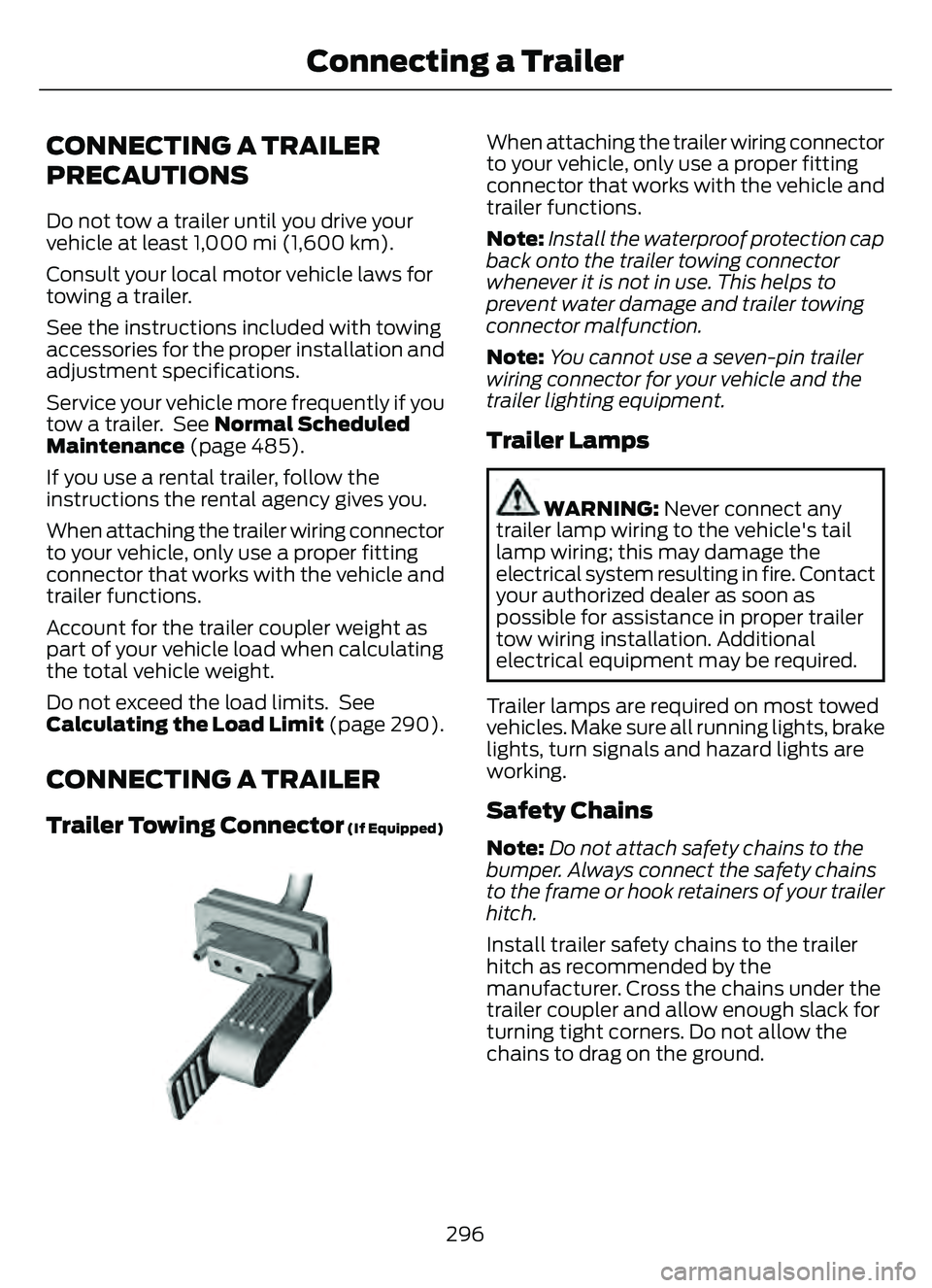
Trailer Towing Connector (If Equipped)
E168683E168683
When attaching the trailer wiring connector
to your vehicle, only use a proper fitting
connector that works with the vehicle and
trailer functions.
Note:Install the waterproof protection cap
back onto the trailer towing connector
whenever it is not in use. This helps to
prevent water damage and trailer towing
connector malfunction.
Note: You cannot use a seven-pin trailer
wiring connector for your vehicle and the
trailer lighting equipment.
Trailer Lamps
WARNING: Never connect any
trailer lamp wiring to the vehicle's tail
lamp wiring; this may damage the
electrical system resulting in fire. Contact
your authorized dealer as soon as
possible for assistance in proper trailer
tow wiring installation. Additional
electrical equipment may be required.
Trailer lamps are required on most towed
vehicles. Make sure all running lights, brake
lights, turn signals and hazard lights are
working.
Safety Chains
Note:Do not attach safety chains to the
bumper. Always connect the safety chains
to the frame or hook retainers of your trailer
hitch.
Install trailer safety chains to the trailer
hitch as recommended by the
manufacturer. Cross the chains under the
trailer coupler and allow enough slack for
turning tight corners. Do not allow the
chains to drag on the ground.
296
Connecting a Trailer
Page 302 of 585
Certain states require functioning trailer
brakes for trailers over a specified weight.
Be sure to check state regulations for this
specified weight.
Ford Motor Company recommends
separate functioning brake systems for
trailers weighing more than 1,500 lb
(680 kg) when loaded.
TOWING A TRAILER
LIMITATIONS
The vehicle's load capacity
designation is by weight, not by
volume, so you cannot necessarily
use all available space when
loading a vehicle or trailer.
Note:Your vehicle could have
reduced performance when
operating at high altitudes and
when heavily loaded or towing a
trailer. When driving at elevation,
to match driving performance as
perceived at sea level, reduce gross
vehicle weight and gross
combination weight by 2% per
1,000 ft (300 m) elevation.
LOADING YOUR TRAILER
To help minimize how trailer
movement affects your vehicle
when driving:
• Load the heaviest items closest to the trailer floor.
• Load the heaviest items centered between the left and
right side trailer tires. • Load the heaviest items above
the trailer axles or just slightly
forward toward the trailer
tongue. Do not allow the final
trailer tongue weight to go
above or below 10-15% of the
loaded trailer weight. The
trailer tongue weight should
never exceed 10% of the
maximum towing capacity.
• Select a ball mount with the correct rise or drop. When both
the loaded vehicle and trailer
are connected, the trailer frame
should be level, or slightly
angled down toward your
vehicle, when viewed from the
side.
TRAILER TOWING HINTS
Towing a trailer places an extra load on
your vehicle's engine, transmission, axle,
brakes, tires and suspension. Periodically
inspect these components during and after
any towing operation.
When driving with a trailer or payload, a
slight takeoff vibration or shudder may be
present due to the increased payload
weight.
Your vehicle may have a temporary or
conventional spare tire. A temporary spare
tire is different in diameter or width,
tread-type, or is from a different
manufacturer than the road tires on your
vehicle. Consult information on the tire
label or Safety Compliance label for
limitations when using.
299
Towing a Trailer
Page 308 of 585
Note:If your vehicle gets stuck in mud, it
could be rocked out by shifting between
forward and reverse gears, stopping
between shifts in a steady pattern. Press
lightly on the accelerator in each gear.
Note: Do not rock your vehicle if the engine
is not at normal operating temperature, as
damage to the transmission could occur.
Note: Do not rock your vehicle for more
than a minute, as damage to the
transmission and tires could occur or the
engine could overheat.
Wa t e r
If you must drive though deep water, drive
slowly. The water could limit traction or
brake capability. See Driving Through
Shallow Water (page 306).
When driving though water, determine the
depth and avoid water higher than the
center of the wheel.
Once through water, always try the brakes.
Wet brakes do not stop your vehicle as
quickly as dry brakes. Apply light pressure
to the brake pedal while slowly moving the
vehicle to dry the brakes.
Note: Driving through deep water could
cause damage to the transmission. If the
front or rear axle is submerged in water,
have the axle lubricant and power transfer
unit lubricant checked and changed if
necessary.
DRIVING ON HILLY OR SLOPING
TERRAIN
WARNING: Extreme care should
be used when steering the vehicle in
reverse down a slope so as not to cause
the vehicle to swerve out of control. Although natural obstacles could make it
necessary to travel diagonally up or down
a hill or steep incline, you should try to drive
straight up or straight down.
Note:
Avoid turning on steep slopes or hills.
A danger lies in losing traction, slipping
sideways and possible vehicle roll over.
Whenever driving on a hill, determine
beforehand the route you can use. Do not
drive over the crest of a hill without seeing
what conditions are on the other side. Do
not drive in reverse over a hill without the
aid of an observer.
Apply just enough power to the wheels to
climb the hill. Too much power causes the
tires to slip, spin or lose traction, and you
could lose control of your vehicle. When
descending a steep hill, do not descend
the hill in neutral. Avoid sudden hard
braking to keep the front wheels rolling and
to maintain your vehicle's steering.
Note: Your vehicle has anti-lock brakes,
apply the brakes steadily. Do not pump the
brakes.
Note: If your vehicle gets stuck driving on
hilly or sloping terrain, it could be rocked out
by shifting between forward and reverse
gears, stopping between shifts in a steady
pattern. Press lightly on the accelerator in
each gear.
Note: Do not rock your vehicle if the engine
is not at normal operating temperature, as
damage to the transmission could occur.
Note: Do not rock your vehicle for more
than a minute, as damage to the
transmission and tires could occur or the
engine could overheat.
305
Driving Hints
Page 309 of 585
DRIVING IN SAND
When driving over sand, try to keep all four
wheels on the most solid area of the trail.
Steadily drive through the terrain. Apply
the accelerator slowly and avoid excessive
wheel slip. Do not drive your vehicle in
deep sand for an extended period of time.
This could overheat the system. A
message appears in the instrument cluster
display.
Note:If your vehicle gets stuck driving on
hilly or sloping terrain, it could be rocked out
by shifting between forward and reverse
gears, stopping between shifts in a steady
pattern. Press lightly on the accelerator in
each gear.
Note: Do not rock your vehicle if the engine
is not at normal operating temperature, as
damage to the transmission could occur.
Note: Do not rock your vehicle for more
than a minute, as damage to the
transmission and tires could occur or the
engine could overheat
DRIVING THROUGH SHALLOW
WATER
WARNING: Do not attempt to
cross a deep or flowing body of water.
Failure to follow this instruction could
result in the loss of control of your
vehicle, personal injury or death.
Note: Driving through standing water can
cause vehicle damage.
Note: Engine damage can occur if water
enters the air filter.
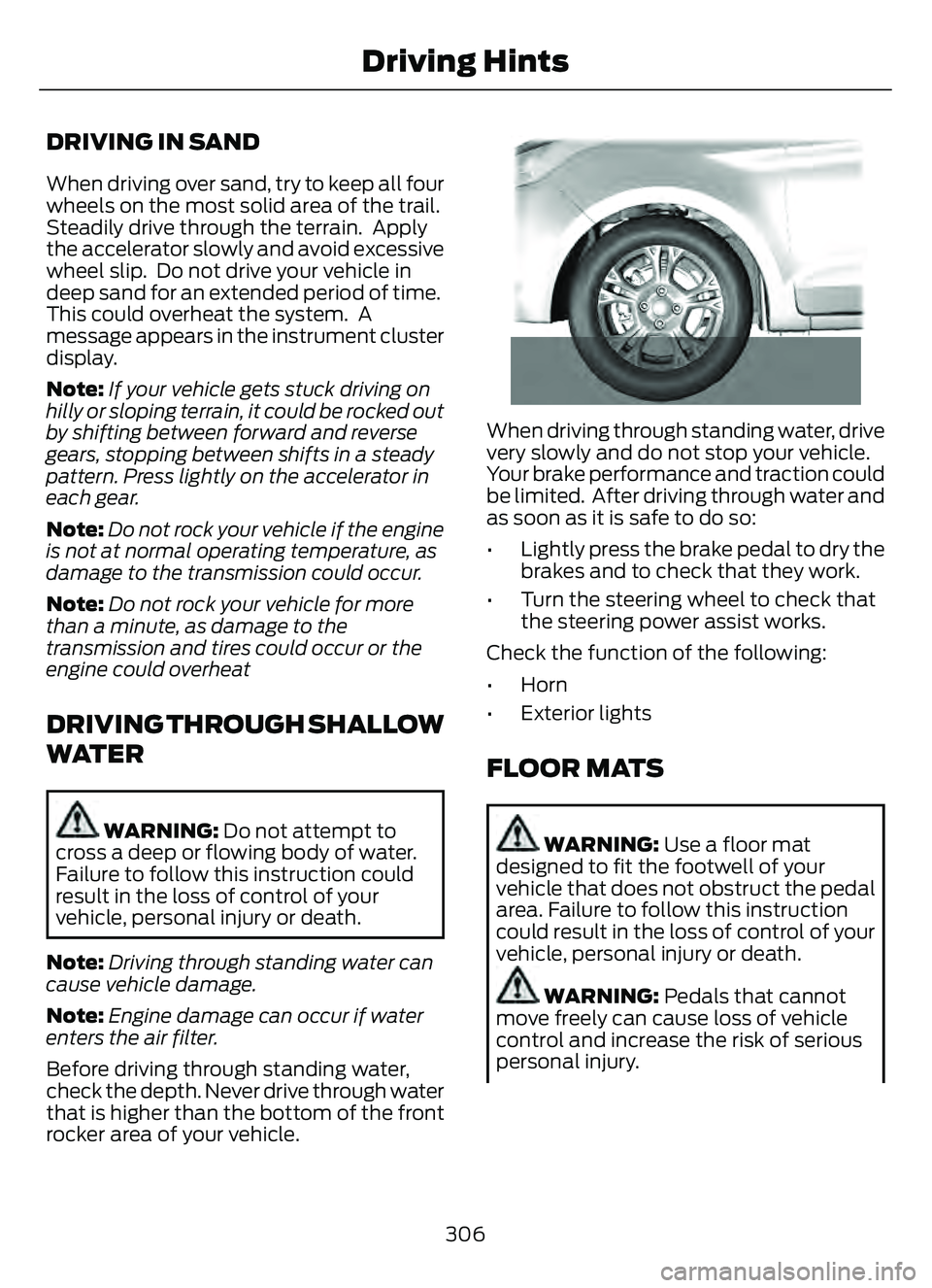
Before driving through standing water,
check the depth. Never drive through water
that is higher than the bottom of the front
rocker area of your vehicle.
66E266447
When driving through standing water, drive
very slowly and do not stop your vehicle.
Your brake performance and traction could
be limited. After driving through water and
as soon as it is safe to do so:
• Lightly press the brake pedal to dry the brakes and to check that they work.
• Turn the steering wheel to check that the steering power assist works.
Check the function of the following:
• Horn
• Exterior lights
FLOOR MATS
WARNING: Use a floor mat
designed to fit the footwell of your
vehicle that does not obstruct the pedal
area. Failure to follow this instruction
could result in the loss of control of your
vehicle, personal injury or death.
WARNING: Pedals that cannot
move freely can cause loss of vehicle
control and increase the risk of serious
personal injury.
306
Driving Hints
Page 324 of 585
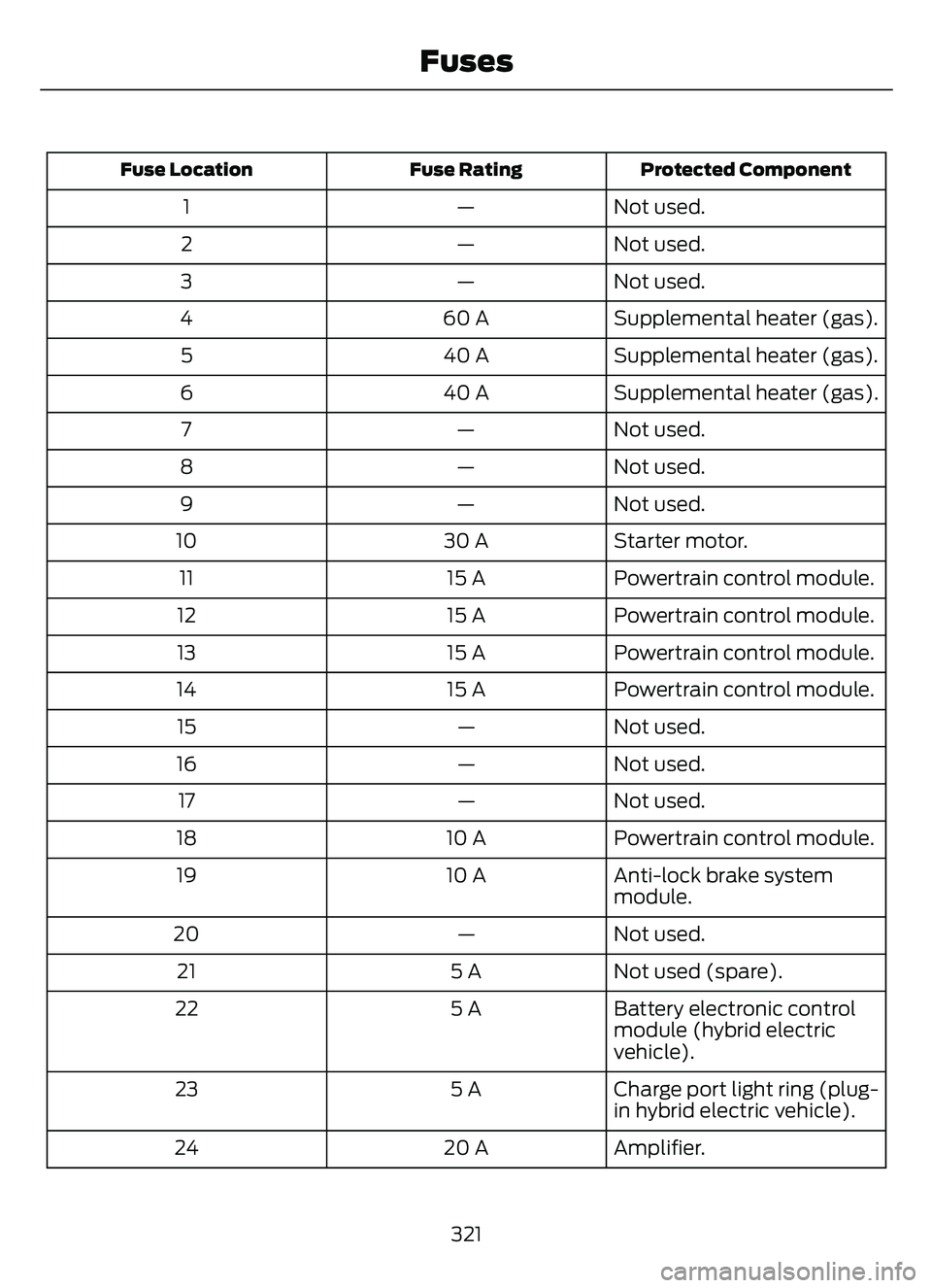
Protected Component
Fuse Rating
Fuse Location
Not used.
—
1
Not used.
—
2
Not used.
—
3
Supplemental heater (gas).
60 A
4
Supplemental heater (gas).
40 A
5
Supplemental heater (gas).
40 A
6
Not used.
—
7
Not used.
—
8
Not used.
—
9
Starter motor.
30 A
10
Powertrain control module.
15 A
11
Powertrain control module.
15 A
12
Powertrain control module.
15 A
13
Powertrain control module.
15 A
14
Not used.
—
15
Not used.
—
16
Not used.
—
17
Powertrain control module.
10 A
18
Anti-lock brake system
module.
10 A
19
Not used.
—
20
Not used (spare).
5 A
21
Battery electronic control
module (hybrid electric
vehicle).
5 A
22
Charge port light ring (plug-
in hybrid electric vehicle).
5 A
23
Amplifier.
20 A
24
321
Fuses
Page 346 of 585
CHANGING THE 12V BATTERY
The battery is in the engine compartment.
See Under Hood Overview (page 330).
Your vehicle has a maintenance-free
battery. It does not require additional
water during service.
For longer, trouble-free operation, keep the
top of the battery clean and dry and the
battery cables tightly fastened to the
battery terminals. If any corrosion is
present on the battery or terminals, remove
the cables from the terminals and clean
with a wire brush. You can neutralize the
acid with a solution of baking soda and
water.
We recommend that you disconnect the
negative battery cable terminal from the
battery if you plan to store your vehicle for
an extended period.
Note: If you only disconnect the negative
battery cable terminal, make sure it is
isolated or placed away from the battery
terminal to avoid unintended connection or
arcing.
To maintain correct operation of the
battery management system, if you add
any electrical devices to your vehicle, do
not connect the ground connection directly
to the negative battery terminal. A
connection at the negative battery terminal
can cause inaccurate measurements of
the battery condition and potential
incorrect system operation.
Note: If you add electrical accessories or
components to your vehicle this may
adversely affect battery performance,
durability and the performance of other
electrical systems on your vehicle.
If you replace the battery make sure it
matches the electrical requirements of
your vehicle. If you disconnect or replace the battery
and your vehicle has an automatic
transmission, it must relearn its adaptive
strategy. Because of this, the transmission
may shift firmly when first driven. This is
normal operation while the transmission
fully updates its operation to optimum
shift feel.
Remove and Reinstall the Battery
To disconnect or remove the battery, do
the following:
1. Apply the parking brake and switch the
ignition off.
2. Switch all electrical equipment off, for example lights and radio.
3. Wait a minimum of two minutes before disconnecting the battery.
Note: The engine management system has
a power hold function and remains powered
for a period of time after you switch the
ignition off. This is to allow diagnostic and
adaptive tables to be stored. Disconnecting
the battery without waiting can cause
damage not covered by the vehicle
Warranty.
4. Disconnect the negative battery cable terminal.
5. Disconnect the positive battery cable terminal.
6. Remove the battery securing clamp.
7. Remove the battery.
8. To install, reverse the removal procedure.
Note: Before reconnecting the battery,
make sure the ignition remains switched off.
Note: Make sure the battery cable terminals
are fully tightened.
Note: After cleaning or replacing the
battery, make sure you reinstall the battery
cover or shield.
343
Maintenance
Page 348 of 585
E3007889E3007889
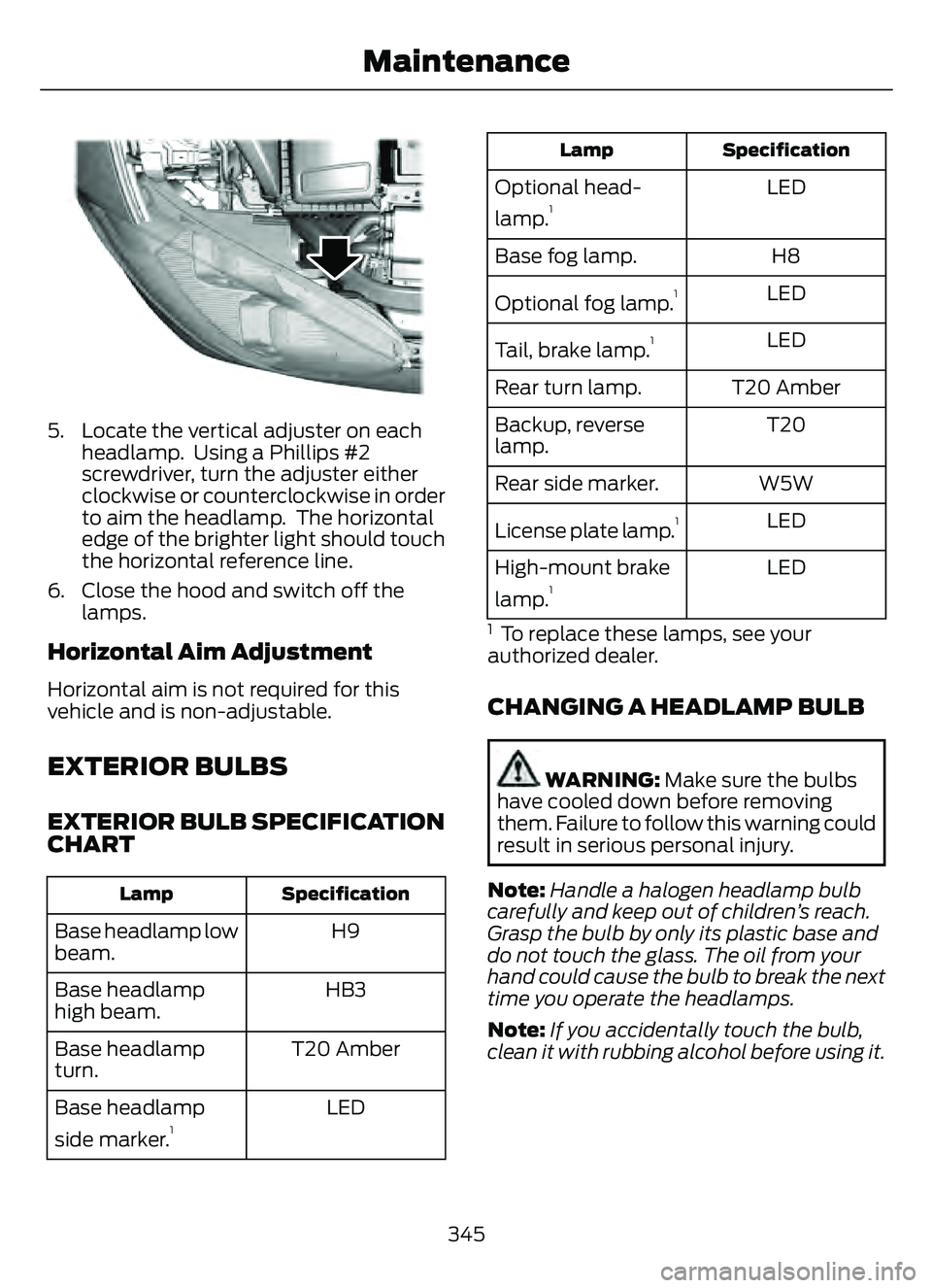
5. Locate the vertical adjuster on eachheadlamp. Using a Phillips #2
screwdriver, turn the adjuster either
clockwise or counterclockwise in order
to aim the headlamp. The horizontal
edge of the brighter light should touch
the horizontal reference line.
6. Close the hood and switch off the lamps.
Horizontal Aim Adjustment
Horizontal aim is not required for this
vehicle and is non-adjustable.
EXTERIOR BULBS
EXTERIOR BULB SPECIFICATION
CHART
Specification
Lamp
H9
Base headlamp low
beam.
HB3
Base headlamp
high beam.
T20 Amber
Base headlamp
turn.
LED
Base headlamp
side marker.
1
Specification
Lamp
LED
Optional head-
lamp.1
H8
Base fog lamp.
LED
Optional fog lamp.
1
LED
Tail, brake lamp.1
T20 Amber
Rear turn lamp.
T20
Backup, reverse
lamp.
W5W
Rear side marker.
LED
License plate lamp.
1
LED
High-mount brake
lamp.1
1 To replace these lamps, see your
authorized dealer.
CHANGING A HEADLAMP BULB
WARNING: Make sure the bulbs
have cooled down before removing
them. Failure to follow this warning could
result in serious personal injury.
Note: Handle a halogen headlamp bulb
carefully and keep out of children’s reach.
Grasp the bulb by only its plastic base and
do not touch the glass. The oil from your
hand could cause the bulb to break the next
time you operate the headlamps.
Note: If you accidentally touch the bulb,
clean it with rubbing alcohol before using it.
345
Maintenance
Page 358 of 585
PREPARING YOUR VEHICLE
FOR STORAGE
If you plan on storing your vehicle for 30
days or more, the following maintenance
recommendations ensures your vehicle
stays in good operating condition.
Under various conditions, long-term
storage may lead to degraded engine
performance or failure unless you use
specific precautions to preserve your
vehicle.
General
• Store all vehicles in a dry, ventilatedplace.
• If vehicles are stored outside, they require regular maintenance to protect
against rust and weather damage.
• Make sure all linkages, cables, levers and pins under your vehicle are covered
with grease to prevent rust.
• Move vehicles at least 25 ft (7.5 m) every 15 days to lubricate working parts
and prevent corrosion.
• Fill the fuel tank with high-quality fuel until the first automatic shutoff of the
fuel pump nozzle.
Engine
• Change the engine oil and filter prior tostorage because used engine oil
contains contaminants which may
cause engine damage.
• Start the engine every 15 days for a minimum of 15 minutes. Run at fast
idle with the climate controls set to
defrost until the engine reaches normal
operating temperature.
• With your foot on the brake, shift through all the gears while the engine
is running.
Body
• Wash your vehicle thoroughly toremove dirt, grease, oil, tar or mud from
exterior surfaces, rear-wheel housings
and the underside of front fenders.
• Periodically wash your vehicle if it is stored in exposed locations.
• Touch-up exposed or primed metal to prevent rust.
• Cover chrome and stainless steel parts with a thick coat of auto wax to prevent
discoloration. Re-wax as necessary
when you wash your vehicle.
• Lubricate all hood, door and luggage compartment hinges and latches with
a light grade oil.
• Cover interior trim to prevent fading.
• Keep all rubber parts free from oil and solvents.
Hybrid Battery Systems
We recommend the following actions for
your vehicle:
• When storing your vehicle for greaterthan 30 days the state of charge
should be approximately 50%.
Additionally we recommend
disconnecting the 12V battery which
will reduce system loads on the HV
battery.
12 Volt Battery
• Check and recharge as necessary. Keepconnections clean.
Note: It is necessary to reset memory
features if you disconnect the battery
cables.
Brakes
Make sure the brakes and parking brake
release fully.
355
Storing Your Vehicle
Page 376 of 585
Accessory power plug
H
Casing/housing
I
Bike/raft/sports ball adapters
J
USING THE TIRE SEALANT
AND INFLATOR KIT
Tips for use of the kit
To ensure safe operation of the kit:
• Before operating the kit, make sure
your vehicle is safely off the road and
away from moving traffic.
• Do not remove any foreign objects, such as nails or screws, from the tire.
• Do not allow the compressor to operate continuously for more than 15
minutes. This will help prevent the
compressor from overheating.
• Only use the kit when the ambient temperature is between -22°F (-30°C)
and 158°F (70°C).
• Only use the sealing compound before the use-by date. The use-by date is on
a label on the sealant canister and can
be seen through the rectangular
viewing window on the bottom of the
compressor. Check the use-by date
regularly and replace the canister when
the sealant expires.
Note: Sealant compound contains latex.
Use appropriate precautions to avoid any
allergic reactions.
E175978
When inflation only is required
for a tire or other objects, the
selector must be in the Air
position.
What to do when a tire is punctured
A tire puncture within the tire's tread area
can be repaired in two stages with the kit. • In the first stage, the tire will be
reinflated with a sealing compound
and air. After the tire has been inflated,
you will need to drive the vehicle a
short distance approximately 4 mi
(6 km) to distribute the sealant in the
tire.
• In the second stage, you will need to check the tire pressure and adjust, if
necessary, to the vehicle's specified
tire inflation pressure.
First Stage: Reinflating the Tire
with sealing compound and air
WARNING: Do not stand directly
over the kit while inflating the tire. If you
notice any unusual bulges or
deformations in the tire's sidewall during
inflation, stop and call roadside
assistance.
WARNING: If the tire does not
inflate to the recommended tire pressure
within 15 minutes, stop and call roadside
assistance.
Park the vehicle in a safe, level and secure
area, away from moving traffic.
Turn the hazard lights on. Apply the parking
brake and power off the vehicle. Inspect
the flat tire for visible damage.
If a puncture is located in the tire sidewall,
stop and call roadside assistance.
1. Remove the valve cap from the tire valve.
2. Unwrap the dual purpose hose (black tube) from the back of the compressor
housing.
3. Fasten the hose to the tire valve by turning the connector clockwise.
Tighten the connection securely.
373
Tire Sealant and Inflator Kit (If Equipped)
Page 566 of 585
1
12V Battery......................................................34112V Battery Precautions...................................341
Battery Management SystemLimitations.......................................................342
How Does the Battery Management System Work..................................................342
Recycling and Disposing of the 12V Battery..............................................................342
Resetting the Battery Sensor........................342
What Is the Battery Management System..............................................................342
9
911 Assist............................................................57
A
A/CSee: Climate Control..........................................137About This Publication..................................17
ABS
See: Brakes............................................................217Accessing the Trip Computer - VehiclesWith: 4.2 Inch Instrument Cluster
Display Screen............................................129
Accessing the Trip Computer - Vehicles With: 6.5 Inch Instrument Cluster
Display Screen/ 12.3 Inch Instrument
Cluster Display Screen.............................129
Accessories....................................................479
AC Charging...................................................205
Connecting the Charger..................................205
Stopping Charging............................................206
Active Park Assist........................................238Active Park Assist –
Trouble shooting............................................240
Active Park Assist Precautions...............238
Active Park Assist –
Troubleshooting........................................240
Active Park Assist – Frequently Asked
Questions ........................................................240
Active Park Assist – Information Messages.........................................................240
Adaptive Cruise Control............................244Adaptive Cruise Control –Troubleshooting............................................ 254
Intelligent Adaptive Cruise Control.............253
Lane Centering...................................................250
Adaptive Cruise Control Automatic Cancellation................................................247
Adaptive Cruise Control Indicators.......250
Adaptive Cruise Control Limitations..................................................245
Adaptive Cruise Control Precautions.................................................244
Adaptive Cruise Control – Troubleshooting........................................254
Adaptive Cruise Control – Information
Messages.........................................................254
Adjusting the Exterior Mirrors..................108
Adjusting the Headlamps........................344
Adjusting the Instrument Panel LightingBrightness....................................................103
Adjusting the Seatbelt Height...................42
Adjusting the Seatbelts During Pregnancy......................................................42
Adjusting the Sound Settings...................411
Adjusting the Steering Wheel....................91
Adjusting the Volume.................................410
Aid Mode.........................................................263
How Does Aid Mode Work.............................263
What Is Aid Mode..............................................263
Airbag Precautions........................................49
Airbags................................................................47
Front Passenger Sensing System...................51Air ConditioningSee: Climate Control..........................................137Air Conditioning System Capacity and Specification - 1.5L EcoBoost™.........400
Air Conditioning System Capacity and Specification - 2.0L EcoBoost™.........401
Air Conditioning System Capacity and Specification - 2.5L, Hybrid Electric
Vehicle (HEV)/Plug-In Hybrid Electric
Vehicle (PHEV).........................................402
Air Filter
See: Changing the Engine Air Filter - 1.5L
EcoBoost™/2.0L EcoBoost™.................338
See: Changing the Engine Air Filter - 2.5L, Hybrid Electric Vehicle (HEV)/Plug-In
Hybrid Electric Vehicle (PHEV)...............339
563
Index