wheel FORD ESCAPE 2022 User Guide
[x] Cancel search | Manufacturer: FORD, Model Year: 2022, Model line: ESCAPE, Model: FORD ESCAPE 2022Pages: 585, PDF Size: 6.15 MB
Page 90 of 585
PASSIVE ANTI-THEFT
SYSTEM
WHAT IS THE PASSIVE ANTI-
THEFT SYSTEM
The passive anti-theft system prevents
someone from starting the vehicle with an
incorrectly coded key.
Note:Do not leave a duplicate coded key
in your vehicle. Always take the keys and
lock all the doors when leaving your vehicle.
HOW DOES THE PASSIVE ANTI-
THEFT SYSTEM WORK
The passive anti-theft system arms when
you switch the ignition off.
It disarms when the ignition is switched on
with a correctly coded key.
Note: The system is not compatible with
non-Ford aftermarket remote start systems.
Note: Do not leave a duplicate coded key
in your vehicle. Always take the keys and
lock all doors when leaving your vehicle.
ANTI-THEFT ALARM SYSTEM
WHAT IS THE ANTI-THEFT ALARM
SYSTEM
The Anti-Theft Alarm System warns you
of an unauthorized entry to your vehicle.
HOW DOES THE ANTI-THEFT
ALARM SYSTEM WORK
When armed, the anti-theft alarm is
triggered in any of the following ways:
• If someone opens a door, the liftgate or the hood without a correctly coded
key or remote control.
• If you turn the power on without a correctly coded key.
• If the interior sensors detect movement inside your vehicle.
• If the inclination sensors detect an attempt to raise your vehicle.
• If someone disconnects the vehicle battery or the battery backup alarm.
If the anti-theft alarm is triggered, the
alarm horn sounds for 30 seconds and the
direction indicators flash for 5 minutes.
Any further attempts to carry out one of
the above sounds the alarm again.
WHAT IS THE PERIMETER ALARM
The perimeter alarm is designed to detect
unauthorized access to your vehicle.
WHAT ARE THE INTERIOR
SENSORS
The interior sensors are designed to detect
any movement inside your vehicle.
The interior sensors are in the overhead
console.
Note: Do not cover the interior sensors.
WHAT ARE THE INCLINATION
SENSORS
The inclination sensor is designed to detect
an attempt to raise your vehicle, for
example to remove a wheel or to tow it
away.
87
Security
Page 94 of 585
ADJUSTING THE STEERING
WHEEL
WARNING: Do not adjust the
steering wheel when your vehicle is
moving.
Note: Make sure that you are sitting in the
correct position. See Sitting in the Correct
Position (page 148).
E191039E191039
1. Unlock the steering column.
2. Adjust the steering wheel to the desired position.
E191047E191047
3. Lock the steering column.
HORN
E270945
Press on the center of the
steering wheel near the horn icon
to activate the horn.
SWITCHING THE HEATED
STEERING WHEEL ON AND OFF
(IF EQUIPPED)
To activate the heated steering
wheel, press the button on the
climate control unit.
On some vehicles, an indicator on the
button illuminates when the heated
steering wheel is on.
Note: A sensor regulates the temperature
of the steering wheel.
91
Steering Wheel
Page 121 of 585
POWER GAUGE - HYBRID
ELECTRIC VEHICLE (HEV)/
PLUG-IN HYBRID ELECTRIC
VEHICLE (PHEV), VEHICLES
WITH: 6.5 INCH INSTRUMENT
CLUSTER DISPLAY SCREEN
(IF
EQUIPPED)
The power gauge displays power to the
wheels when accelerating or maintaining
speed. When slowing down by lifting your
foot off the accelerator pedal or pressing
the brake, the gauge displays the power
captured by the regenerative braking
system and returned to the high voltage
battery.
POWER GAUGE - HYBRID
ELECTRIC VEHICLE (HEV)/
PLUG-IN HYBRID ELECTRIC
VEHICLE (PHEV), VEHICLES
WITH: 12.3 INCH INSTRUMENT
CLUSTER DISPLAY SCREEN
(IF
EQUIPPED)
The power gauge displays power to the
wheels when accelerating or maintaining
speed. The high voltage battery power and
engine power contributions are
distinguished by color and added together
to indicate total power to the wheels.
When slowing down by lifting your foot off
the accelerator pedal or pressing the brake,
the gauge displays the power captured by
the regenerative braking system and
returned to the high voltage battery.
SPEEDOMETER
Indicates the vehicle speed.
FUEL GAUGE
WHAT IS THE FUEL GAUGE
Indicates approximately how much fuel is
in the fuel tank.
FUEL GAUGE LIMITATIONS
The fuel gauge may not provide an
accurate reading when your vehicle is on
an incline.
LOCATING THE FUEL FILLER
DOOR
The arrow adjacent to the fuel pump
symbol indicates on which side of your
vehicle the fuel filler door is located.
WHAT IS THE LOW FUEL
REMINDER
A low fuel level reminder displays and
sounds when the distance to empty
reaches 75 mi (120 km) to empty for
MyKey, and at 50 mi (80 km), 25 mi
(40 km), 12 mi (20 km) and 0 mi (0 km)
for all vehicle keys.
Note: The low fuel reminder can appear at
different fuel gauge positions depending on
fuel economy conditions. This variation is
normal.
WHAT IS DISTANCE TO EMPTY -
GASOLINE, HYBRID ELECTRIC
VEHICLE (HEV)
Indicates the approximate distance your
vehicle can travel on the fuel remaining in
the tank. Changes in driving pattern can
cause the value to not only decrease but
also increase or stay constant for periods
of time.
118
Instrument Cluster
Page 126 of 585
USING THE INSTRUMENT
CLUSTER DISPLAY CONTROLS
WARNING: Driving while distracted
can result in loss of vehicle control, crash
and injury. We strongly recommend that
you use extreme caution when using any
device that may take your focus off the
road. Your primary responsibility is the
safe operation of your vehicle. We
recommend against the use of any
hand-held device while driving and
encourage the use of voice-operated
systems when possible. Make sure you
are aware of all applicable local laws
that may affect the use of electronic
devices while driving.
The controls are on the steering wheel.
5003E2500320032
Return button.
A
OK button.
B
Menu button.
C
Return Button
Press to go back or exit a menu.
OK Button
Press to make a selection.
Toggle Buttons
Press the toggle up or down button to
scroll through menu items.
Status Indicator
E204495
Menu items with a check box
indicate a feature's status. A
check in the box indicates the
feature is on, and unchecked indicates the
feature is off.
INSTRUMENT CLUSTER
DISPLAY MAIN MENU -
VEHICLES WITH: 6.5 INCH
INSTRUMENT CLUSTER
DISPLAY SCREEN
Menu Item
Select Screens
Audio
Navigation Phone
Settings
Display Setup
123
Instrument Cluster Display
Page 127 of 585
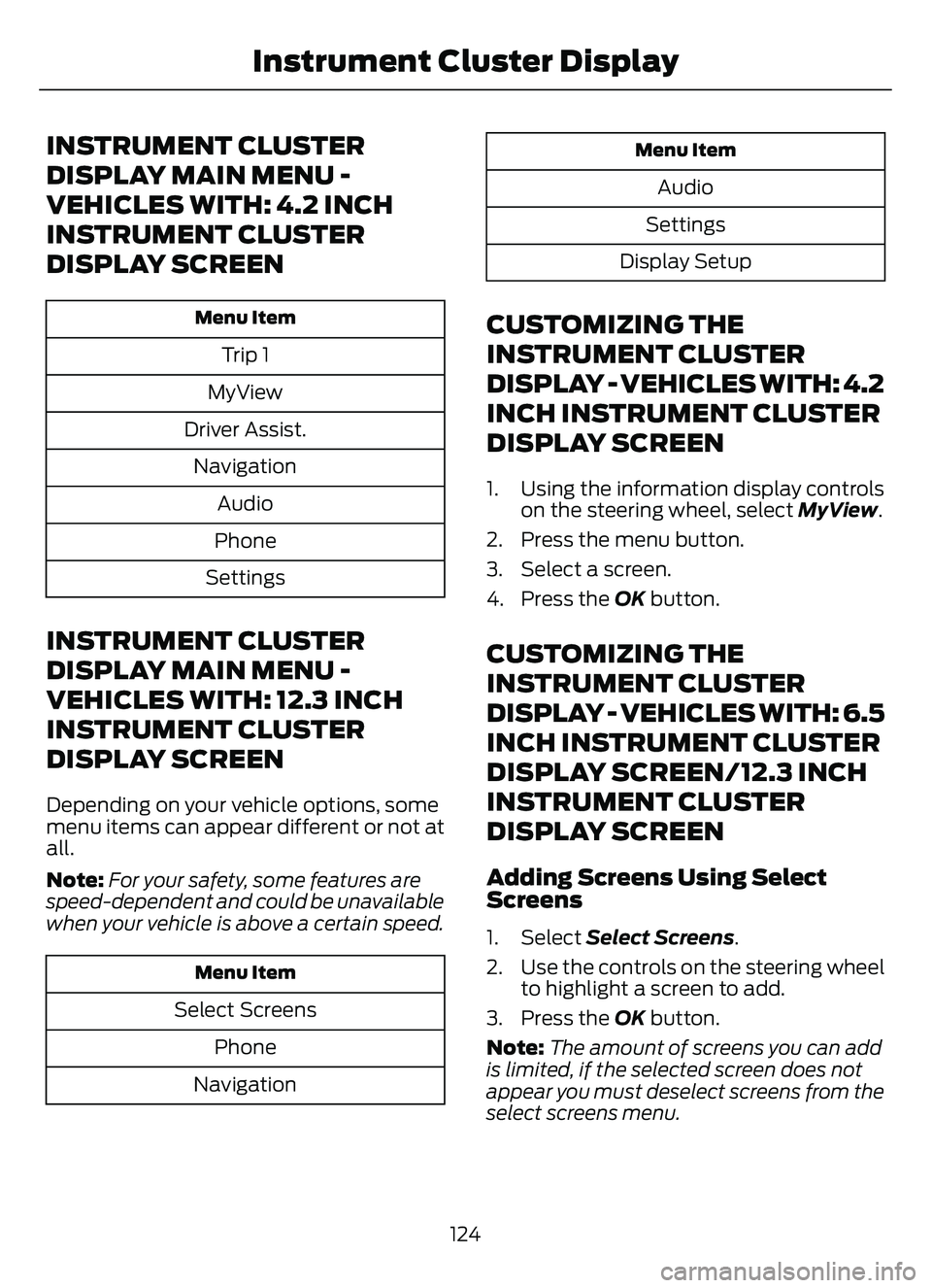
INSTRUMENT CLUSTER
DISPLAY MAIN MENU -
VEHICLES WITH: 4.2 INCH
INSTRUMENT CLUSTER
DISPLAY SCREEN
Menu Item
Trip 1
MyView
Driver Assist. Navigation Audio
Phone
Settings
INSTRUMENT CLUSTER
DISPLAY MAIN MENU -
VEHICLES WITH: 12.3 INCH
INSTRUMENT CLUSTER
DISPLAY SCREEN
Depending on your vehicle options, some
menu items can appear different or not at
all.
Note: For your safety, some features are
speed-dependent and could be unavailable
when your vehicle is above a certain speed.
Menu Item
Select Screens
Phone
Navigation
Menu Item
Audio
Settings
Display Setup
CUSTOMIZING THE
INSTRUMENT CLUSTER
DISPLAY - VEHICLES WITH: 4.2
INCH INSTRUMENT CLUSTER
DISPLAY SCREEN
1. Using the information display controls on the steering wheel, select MyView.
2. Press the menu button.
3. Select a screen.
4. Press the OK button.
CUSTOMIZING THE
INSTRUMENT CLUSTER
DISPLAY - VEHICLES WITH: 6.5
INCH INSTRUMENT CLUSTER
DISPLAY SCREEN/12.3 INCH
INSTRUMENT CLUSTER
DISPLAY SCREEN
Adding Screens Using Select
Screens
1. Select Select Screens .
2. Use the controls on the steering wheel to highlight a screen to add.
3. Press the OK button.
Note: The amount of screens you can add
is limited, if the selected screen does not
appear you must deselect screens from the
select screens menu.
124
Instrument Cluster Display
Page 129 of 585
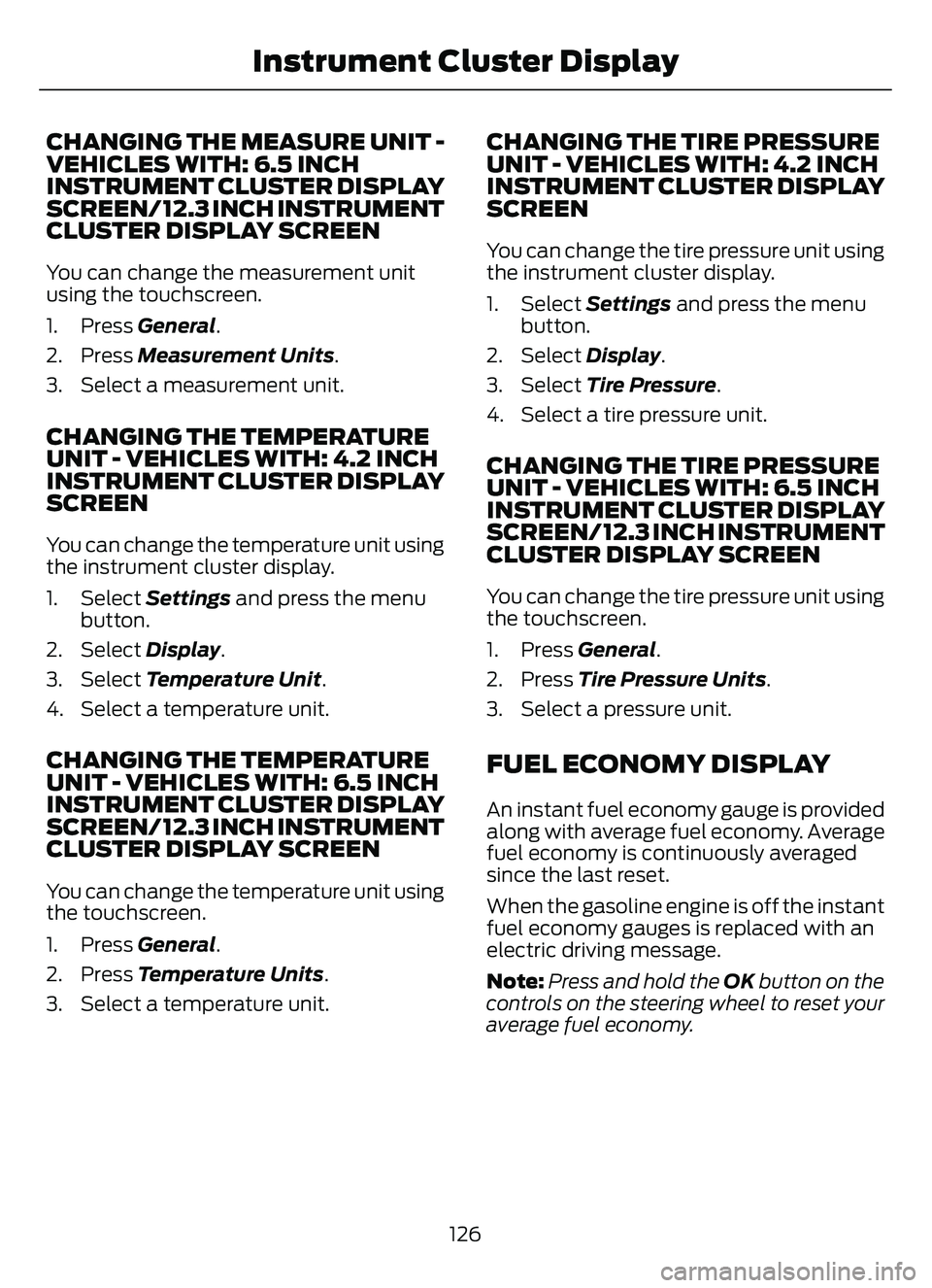
CHANGING THE MEASURE UNIT -
VEHICLES WITH: 6.5 INCH
INSTRUMENT CLUSTER DISPLAY
SCREEN/ 12.3 INCH INSTRUMENT
CLUSTER DISPLAY SCREEN
You can change the measurement unit
using the touchscreen.
1. Press General.
2. Press Measurement Units.
3. Select a measurement unit.
CHANGING THE TEMPERATURE
UNIT - VEHICLES WITH: 4.2 INCH
INSTRUMENT CLUSTER DISPLAY
SCREEN
You can change the temperature unit using
the instrument cluster display.
1. Select Settings and press the menu
button.
2. Select Display.
3. Select Temperature Unit.
4. Select a temperature unit.
CHANGING THE TEMPERATURE
UNIT - VEHICLES WITH: 6.5 INCH
INSTRUMENT CLUSTER DISPLAY
SCREEN/ 12.3 INCH INSTRUMENT
CLUSTER DISPLAY SCREEN
You can change the temperature unit using
the touchscreen.
1. Press General.
2. Press Temperature Units .
3. Select a temperature unit.
CHANGING THE TIRE PRESSURE
UNIT - VEHICLES WITH: 4.2 INCH
INSTRUMENT CLUSTER DISPLAY
SCREEN
You can change the tire pressure unit using
the instrument cluster display.
1. Select Settings and press the menu
button.
2. Select Display.
3. Select Tire Pressure.
4. Select a tire pressure unit.
CHANGING THE TIRE PRESSURE
UNIT - VEHICLES WITH: 6.5 INCH
INSTRUMENT CLUSTER DISPLAY
SCREEN/ 12.3 INCH INSTRUMENT
CLUSTER DISPLAY SCREEN
You can change the tire pressure unit using
the touchscreen.
1. Press General.
2. Press Tire Pressure Units .
3. Select a pressure unit.
FUEL ECONOMY DISPLAY
An instant fuel economy gauge is provided
along with average fuel economy. Average
fuel economy is continuously averaged
since the last reset.
When the gasoline engine is off the instant
fuel economy gauges is replaced with an
electric driving message.
Note: Press and hold the OK button on the
controls on the steering wheel to reset your
average fuel economy.
126
Instrument Cluster Display
Page 130 of 585
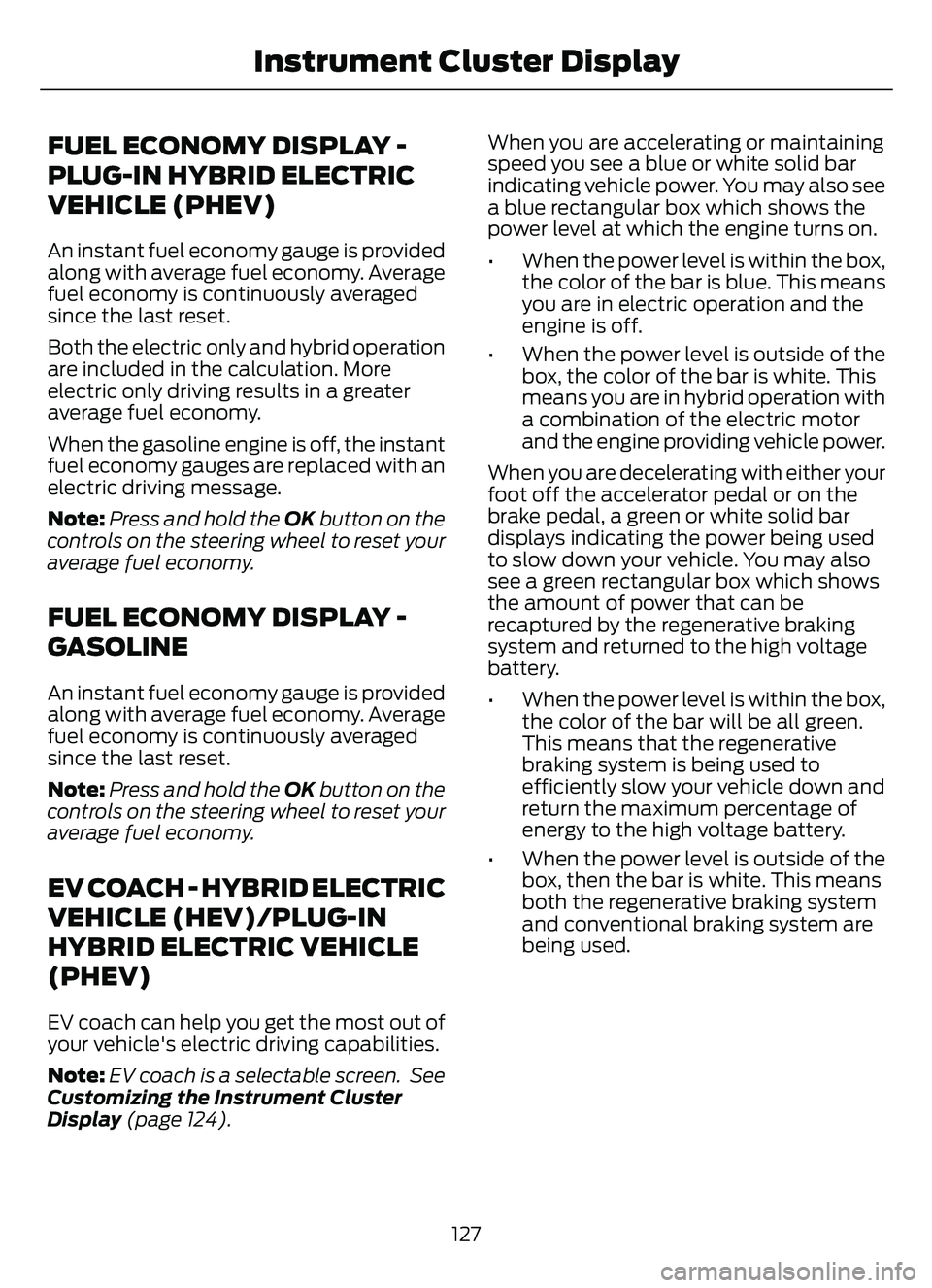
FUEL ECONOMY DISPLAY -
PLUG-IN HYBRID ELECTRIC
VEHICLE (PHEV)
An instant fuel economy gauge is provided
along with average fuel economy. Average
fuel economy is continuously averaged
since the last reset.
Both the electric only and hybrid operation
are included in the calculation. More
electric only driving results in a greater
average fuel economy.
When the gasoline engine is off, the instant
fuel economy gauges are replaced with an
electric driving message.
Note:Press and hold the OK button on the
controls on the steering wheel to reset your
average fuel economy.
FUEL ECONOMY DISPLAY -
GASOLINE
An instant fuel economy gauge is provided
along with average fuel economy. Average
fuel economy is continuously averaged
since the last reset.
Note: Press and hold the OK button on the
controls on the steering wheel to reset your
average fuel economy.
EV COACH - HYBRID ELECTRIC
VEHICLE (HEV)/PLUG-IN
HYBRID ELECTRIC VEHICLE
(PHEV)
EV coach can help you get the most out of
your vehicle's electric driving capabilities.
Note: EV coach is a selectable screen. See
Customizing the Instrument Cluster
Display (page 124). When you are accelerating or maintaining
speed you see a blue or white solid bar
indicating vehicle power. You may also see
a blue rectangular box which shows the
power level at which the engine turns on.
• When the power level is within the box,
the color of the bar is blue. This means
you are in electric operation and the
engine is off.
• When the power level is outside of the box, the color of the bar is white. This
means you are in hybrid operation with
a combination of the electric motor
and the engine providing vehicle power.
When you are decelerating with either your
foot off the accelerator pedal or on the
brake pedal, a green or white solid bar
displays indicating the power being used
to slow down your vehicle. You may also
see a green rectangular box which shows
the amount of power that can be
recaptured by the regenerative braking
system and returned to the high voltage
battery.
• When the power level is within the box, the color of the bar will be all green.
This means that the regenerative
braking system is being used to
efficiently slow your vehicle down and
return the maximum percentage of
energy to the high voltage battery.
• When the power level is outside of the box, then the bar is white. This means
both the regenerative braking system
and conventional braking system are
being used.
127
Instrument Cluster Display
Page 132 of 585
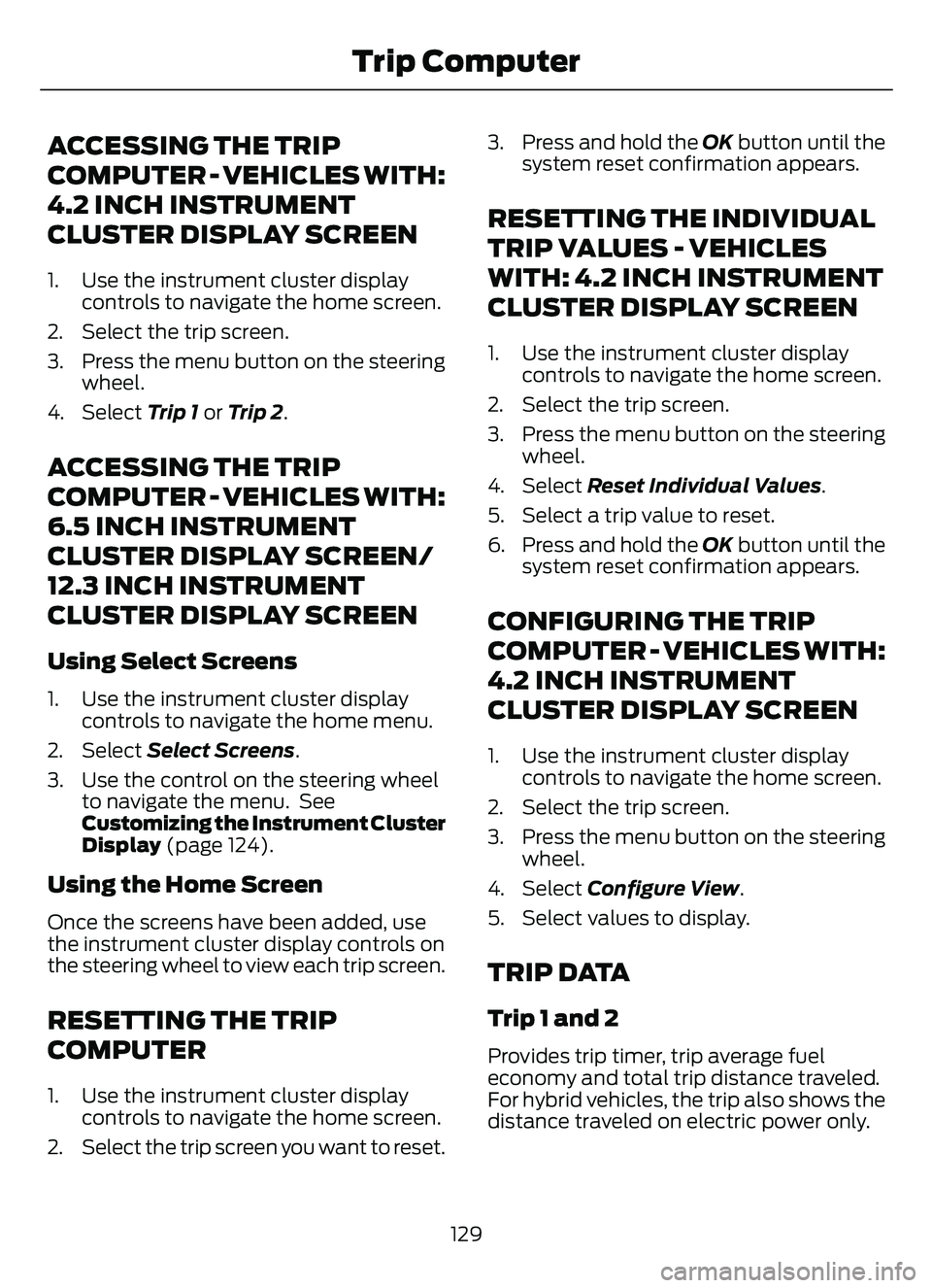
ACCESSING THE TRIP
COMPUTER - VEHICLES WITH:
4.2 INCH INSTRUMENT
CLUSTER DISPLAY SCREEN
1. Use the instrument cluster displaycontrols to navigate the home screen.
2. Select the trip screen.
3. Press the menu button on the steering wheel.
4. Select Trip 1 or Trip 2.
ACCESSING THE TRIP
COMPUTER - VEHICLES WITH:
6.5 INCH INSTRUMENT
CLUSTER DISPLAY SCREEN/
12.3 INCH INSTRUMENT
CLUSTER DISPLAY SCREEN
Using Select Screens
1. Use the instrument cluster display
controls to navigate the home menu.
2. Select Select Screens .
3. Use the control on the steering wheel to navigate the menu. See
Customizing the Instrument Cluster
Display (page 124).
Using the Home Screen
Once the screens have been added, use
the instrument cluster display controls on
the steering wheel to view each trip screen.
RESETTING THE TRIP
COMPUTER
1. Use the instrument cluster display
controls to navigate the home screen.
2. Select the trip screen you want to reset. 3. Press and hold the OK button until the
system reset confirmation appears.
RESETTING THE INDIVIDUAL
TRIP VALUES - VEHICLES
WITH: 4.2 INCH INSTRUMENT
CLUSTER DISPLAY SCREEN
1. Use the instrument cluster displaycontrols to navigate the home screen.
2. Select the trip screen.
3. Press the menu button on the steering wheel.
4. Select Reset Individual Values .
5. Select a trip value to reset.
6. Press and hold the OK button until the system reset confirmation appears.
CONFIGURING THE TRIP
COMPUTER - VEHICLES WITH:
4.2 INCH INSTRUMENT
CLUSTER DISPLAY SCREEN
1. Use the instrument cluster displaycontrols to navigate the home screen.
2. Select the trip screen.
3. Press the menu button on the steering wheel.
4. Select Configure View .
5. Select values to display.
TRIP DATA
Trip 1 and 2
Provides trip timer, trip average fuel
economy and total trip distance traveled.
For hybrid vehicles, the trip also shows the
distance traveled on electric power only.
129
Trip Computer
Page 134 of 585
WHAT IS THE HEAD UP
DISPLAY
The system displays information on a
display screen in your field of vision,
allowing you to keep your eyes on the road.
You can select which information the
system displays.
SWITCHING THE HEAD UP
DISPLAY ON AND OFF
E265900Press the button on the steering
wheel or center console.Note:
The head up display menu appears
in the information display.
Action
Menu Item
Press the OK
button.
Head-Up Display
(HUD)
Press the OKbutton.
Note: The system remembers the last
setting when you start the engine.
HEAD UP DISPLAY SETTINGS
Action
Menu Item
Press the OK button.
Adjustment
Position 1. Press the OK button.
2. Use the up and down toggle buttons to adjust the
vertical position of the blue frame.
• Make sure that you can see all of the blue frame.
• Do not physically move the screen. This can causedamage not covered by the vehicle Warranty.
Brightness 1. Press the OK button.
2. Use the up and down toggle buttons to adjust the brightness of the display screen.
• The system adjusts the brightness based on howdark it is. If you set the brightness to a high level,
the system reduces the brightness at night.
Vertical Size 1. Press the OK button.
2. Use the up and down toggle buttons to adjust the vertical size of the display screen.
• A small vertical size could be more suitable if yousit in a high position.
131
Head Up Display (If Equipped)
Page 135 of 585
Selecting Which Information the
System Displays
Start the engine and switch the system on.
Note:Press the head up display button if
you do not see the head up display menu in
the instrument cluster display. Note:
For your safety, some features are
speed-dependent. The system limits their
use to when your vehicle is not moving.
Use the instrument cluster display controls
on the steering wheel to select which
information the system displays.
Action
Menu Item
Press the OK button.
Content
Press the OK button.
Distance Indication
Eco Advice
Incoming Calls
Lane Keeping System
Navigation
Speed Assistance
Speed Sign Recognition
HEAD UP DISPLAY
INDICATORS
E265900
Note:
The head up display indicator could
illuminate to supplement an information
message.
132
Head Up Display (If Equipped)