ECO mode FORD ESCAPE 2022 Owner's Manual
[x] Cancel search | Manufacturer: FORD, Model Year: 2022, Model line: ESCAPE, Model: FORD ESCAPE 2022Pages: 585, PDF Size: 6.15 MB
Page 255 of 585
Note:Adaptive cruise control must be
switched on before you can switch lane
centering on.
When the system is active and the
direction indicator is switched on, the
system immediately cancels. The system
remains in standby mode as long as the
direction indicator is engaged. The system
automatically re-activates once the vehicle
is centered in a lane and the direction
indicator is switched off.
LANE CENTERING ALERTS
You must keep your hands on the steering
wheel at all times.
When the system is active and detects no
steering activity for a period of time, the
system alerts you to put your hands on the
steering wheel. If you do not react to the
warnings the system cancels and slows
your vehicle down to idle speeds while
maintaining steering control.
The system also alerts you if your vehicle
crosses lane markings without detected
steering activity.
Note: The system could detect a light grip
or touch on the steering wheel as hands-off
driving.
When the system cancels due to an
external condition, for example, no lane
markings are available and your hands are
not on the steering wheel, the system
immediately alerts you to take control of
the vehicle. If you ignore this alert, the
system slows the vehicle while maintaining
steering control.
LANE CENTERING AUTOMATIC
CANCELLATION
When an external condition cancels the
system, for example, no lane markings
available, a tone sounds and a message
appears in the instrument cluster display.
E308130
If your vehicle starts to slow
down, you must provide steering
input to the wheel and press and
release the button to regain full system
performance.
Automatic cancellation can also occur if:
• The lane becomes too wide or too narrow.
• The system cannot detect valid lane markings.
• Lane markings cross over one another.
Note: The system disables until the next
key cycle if your vehicle slows down due to
driver inactivity twice within a key cycle.
LANE CENTERING INDICATORS
E297977
Illuminates when you switch
lane centering on. The color of
the indicator changes to indicate
the system status.
Gray indicates the system is on but
inactive.
Green indicates the system is active and
applying steering torque assistance input
to keep your vehicle in the center of the
lane.
Amber with an audible tone and then gray
indicates a system automatic cancellation.
252
Adaptive Cruise Control (If Equipped)
Page 256 of 585
INTELLIGENT ADAPTIVE
CRUISE CONTROL
HOW DOES INTELLIGENT
ADAPTIVE CRUISE CONTROL
WORK
Intelligent adaptive cruise control
combines speed sign recognition and
navigation map data with adaptive cruise
control to adjust the cruise set speed to
the speed limit detected by the speed sign
recognition system. As the system detects
new speed signs, the set speed updates.
There are limitations that affect the
accuracy of the speed sign recognition
system and its ability to determine the
current speed limit. The intelligent
adaptive cruise control system and its
ability to determine the current speed limit
shares these limitations. See Speed Sign
Recognition (page 284).
Note: The adaptive cruise control gap
setting operates normally when the feature
is enabled.
INTELLIGENT ADAPTIVE CRUISE
CONTROL PRECAUTIONS
WARNING: You are responsible for
controlling your vehicle at all times. The
system is designed to be an aid and does
not relieve you of your responsibility to
drive with due care and attention. Failure
to follow this instruction could result in
the loss of control of your vehicle,
personal injury or death.
INTELLIGENT ADAPTIVE CRUISE
CONTROL REQUIREMENTS
Traffic sign recognition must be enabled
for intelligent adaptive cruise control to be
active.
INTELLIGENT ADAPTIVE CRUISE
CONTROL LIMITATIONS
The speed limit information provided by
the navigation map data could be
inaccurate or out of date.
The system may not detect and read
speed limit signs with conditional
information, for example, when a sign is
flashing, during specific time ranges, or
when children are present.
Note: The system does not set the vehicle
speed to speed limits shown with a
supplementary traffic sign.
Under certain conditions, the system may
not adjust the vehicle speed until after your
vehicle passes the speed limit.
SWITCHING INTELLIGENT MODE
ON AND OFF
1. Press Settings on the touchscreen.
2. Press Driver Assistance.
3. Press Cruise Control .
4. Press Intelligent.
ADJUSTING THE SET SPEED
TOLERANCE
You can set a permanent speed tolerance
that is above or below the detected speed
limit.
1. Press Settings on the touchscreen.
2. Press Driver Assistance.
3. Press Cruise Control .
4. Press Intelligent.
253
Adaptive Cruise Control (If Equipped)
Page 260 of 585
WHAT IS DRIVE MODE
CONTROL
The system delivers a driving experience
through a suite of sophisticated electronic
vehicle systems. These systems optimize
steering, handling and powertrain
response. This provides a single location
to control multiple systems performance
settings.
Changing the drive mode changes the
functionality of the following systems:
• Electric power-assisted steeringsystem adjusts steering effort and feel
based on the mode you select. See
Electric Power Steering
Precautions (page 229).
• Electronic stability control and traction control maintain your vehicle control
in adverse conditions or high
performance driving. See Stability
Control (page 227).
• Electronic throttle control enhances the powertrain response to your driving
inputs.
• Transmission controls become optimized with shift schedules tuned
to each mode.
• Four-wheel drive settings are optimized and tuned to each mode.
• Electric vehicle mode selections may be limited.
The system tailors your vehicle
configuration for each mode you select.
Note: Not all settings may be available.
Note: The system has diagnostic checks
that continuously monitor the system for
proper operation. If a mode is unavailable
due to a system fault or change in gear
shifter position, the mode defaults to
Normal.
SELECTING A DRIVE MODE -
EXCLUDING: PLUG-IN HYBRID
ELECTRIC VEHICLE (PHEV)
Note: Drive mode changes may not be
available when the ignition is off.
Note: Button icon shown may vary from
your vehicle.
Note: Selected drive mode displays in the
information display.
E306303E306303E306E306EE306E306E306E306E3063066E306EE306EE3063333333303033033033033303303303
To select drive modes, use the console
mounted control.
SELECTING A DRIVE MODE
E356781E356EEE356E356EE356E356E3566E356E356EE3566777777787817817817817817781781
To select drive modes, use the console
mounted control.
257
Drive Mode Control
Page 261 of 585
Note:Drive mode changes may not be
available when the ignition is off.
Note: Button icon shown may vary from
your vehicle.
Note: Selected drive mode displays in the
information cluster display.
DRIVE MODES
DEEP SNOW/SAND (If Equipped)
E295420
Use this mode to aid you in
getting your vehicle unstuck
from deep snow or sand.
Note: The intent of your all-wheel drive
vehicle is not for off-road use. The all-wheel
drive feature allows for driving on relatively
level surfaces, obstruction free and similar
to normal on-road driving conditions.
Operating your vehicle in other conditions
could lead to excessive stress that could
result in damage not covered by the
warranty.
Note: This mode is not intended for driving
on snowy roads. For snowy roads use
slippery mode.
Note: Using deep snow/sand mode on dry,
hard surfaces could produce some vibration,
driveline bind up, and potential excessive
tire wear. This mode is for slippery and loose
surfaces.
ECO
E295413
For efficient driving. This mode
helps deliver maximum fuel
efficiency and helps to increase
driving range.
NORMAL
E225310
For everyday driving. This mode
is a perfect balance of
excitement, comfort and
convenience. This is the default mode after
each ignition cycle.
SLIPPERY
E295414
For less than ideal road
conditions such as snow or ice
covered roads. T his mode lowers
throttle response, adjusts transmission
shift points, and optimizes vehicle stability
controls to help mitigate wheel spin and
maintain vehicle control when driving in
winter conditions.
Note: Using slippery mode on dry, hard
surfaces could produce some vibration,
driveline bind up, and potential excessive
tire wear.
SPORT
E246593
For sporty driving with improved
performance handling and
response. This mode increases
accelerator pedal response, enhances
steering to provide a sportier feel, and
adjusts transmission shift points for quicker
vehicle acceleration.
258
Drive Mode Control
Page 317 of 585
AUTOMATIC CRASH SHUTOFF
WHAT IS AUTOMATIC CRASH
SHUTOFF
The automatic crash shutoff is designed
to stop the fuel going to the engine in the
event of a moderate or severe crash.
Note:Not every impact causes a shutoff.
AUTOMATIC CRASH SHUTOFF
PRECAUTIONS
WARNING: If your vehicle has been
involved in a crash, have the fuel system
checked. Failure to follow this instruction
could result in fire, personal injury or
death.
RE-ENABLING YOUR VEHICLE
1. Switch the ignition off.
2. Attempt to start your vehicle.
3. Switch the ignition off.
4. Attempt to start your vehicle.
Note: If your vehicle does not start after the
third attempt, have your vehicle checked as
soon as possible.
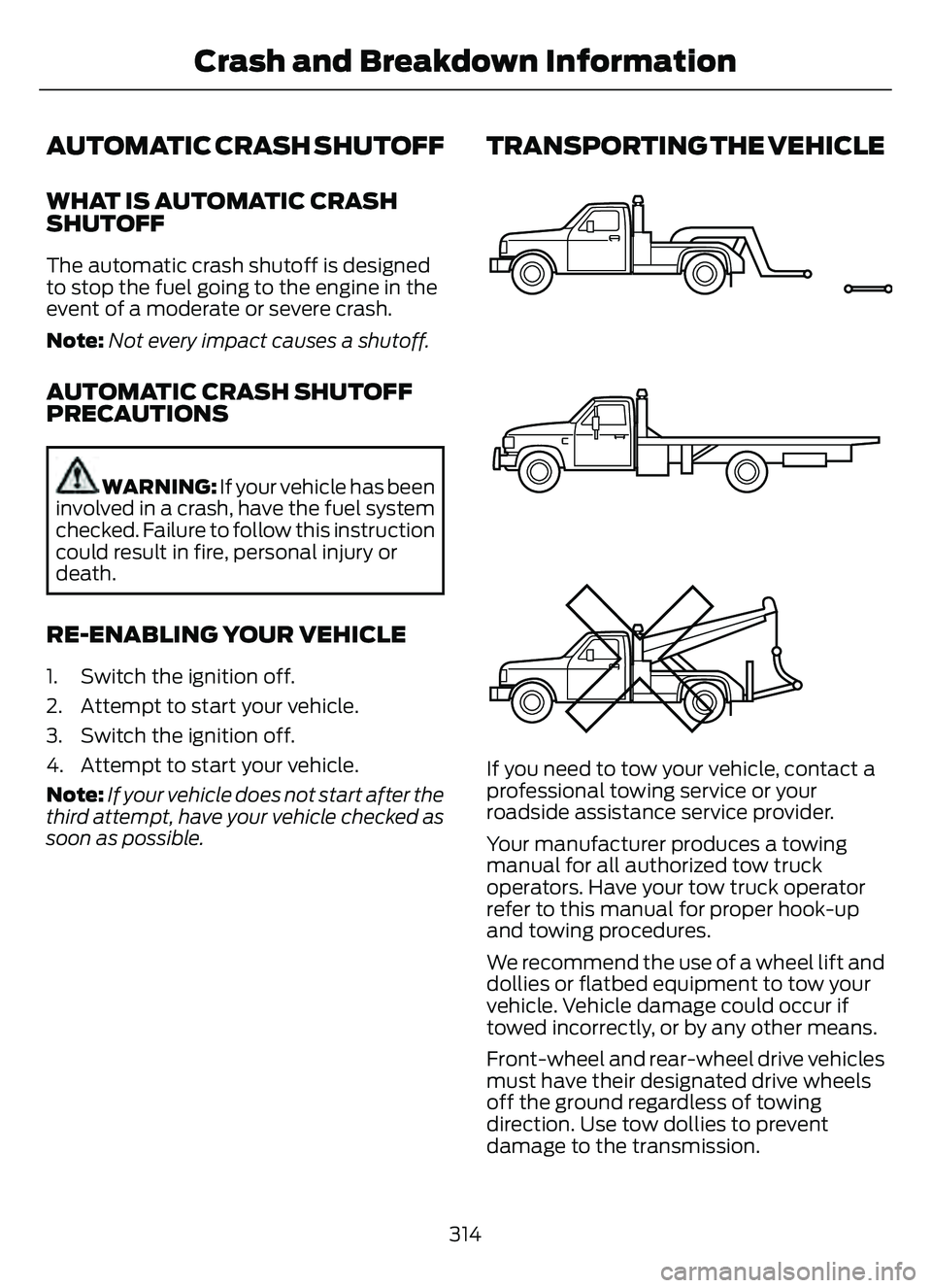
TRANSPORTING THE VEHICLE
E143886
If you need to tow your vehicle, contact a
professional towing service or your
roadside assistance service provider.
Your manufacturer produces a towing
manual for all authorized tow truck
operators. Have your tow truck operator
refer to this manual for proper hook-up
and towing procedures.
We recommend the use of a wheel lift and
dollies or flatbed equipment to tow your
vehicle. Vehicle damage could occur if
towed incorrectly, or by any other means.
Front-wheel and rear-wheel drive vehicles
must have their designated drive wheels
off the ground regardless of towing
direction. Use tow dollies to prevent
damage to the transmission.
314
Crash and Breakdown Information
Page 320 of 585
Note:If the parking brake is applied, a
message appears in the information display.
Note: If your vehicle has an ignition key, you
cannot remove the key from the ignition
when the transmission is in neutral (N) and
your vehicle is off.
Note: Start the engine and allow it to run
for a few minutes at the beginning of each
day, and every six hours or fewer. With the
engine running and your foot on the brake,
shift into drive (D) and then into reverse (R)
before shifting back into neutral (N). Before
continuing to tow, switch neutral tow on.
EMERGENCY TOWING -
HYBRID ELECTRIC VEHICLE
(HEV)/PLUG-IN HYBRID
ELECTRIC VEHICLE (PHEV)
If your vehicle becomes inoperable without
access to wheel dollies or a vehicle
transport trailer, it can be flat-towed with
all wheels on the ground, regardless of the
powertrain and transmission configuration,
under the following conditions:
• Your vehicle is facing forward for towing in a forward direction.
• You switch Neutral Tow on.
• You release the parking brake.
• Maximum speed is 35 mph (55 km/h).
• Maximum distance is 50 mi (80 km).
Switching Neutral Tow On
1. Switch your vehicle on in accessory mode.
2. Press the menu button on the steering wheel to enter the instrument cluster
display main menu.
3. Select Settings .
4. Select Neutral Tow.
5. Follow the instructions on the information display. 6. Fully press the brake pedal.
7. Shift into neutral (N).
8. Switch the ignition off.
Note:
Failure to follow these instructions
could result in damage to the transmission.
Note: Switching neutral tow on requires
battery power.
Note: Put your climate control system in
recirculated air mode to prevent exhaust
fumes from entering your vehicle. See
Climate Control (page 137).
Switching Neutral Tow Off
1. Switch your vehicle on in accessory
mode.
2. Fully press the brake pedal.
3. Shift into park (P).
EMERGENCY TOWING - 8-
SPEED AUTOMATIC
TRANSMISSION – 8F24
If you need to tow your vehicle, contact a
professional towing service or, if you are a
member of a roadside assistance program,
your roadside assistance service provider.
317
Towing Your Vehicle
Page 340 of 585
When Fail-Safe Mode Is Activated
WARNING: Fail-safe mode is for
use during emergencies only. Operate
your vehicle in fail-safe mode only as
long as necessary to bring your vehicle
to rest in a safe location and seek
immediate repairs. When in fail-safe
mode, your vehicle will have limited
power, will not be able to maintain
high-speed operation, and may
completely shut down without warning,
potentially losing engine power, power
steering assist, and power brake assist,
which may increase the possibility of a
crash resulting in serious injury.
WARNING: Do not remove the
coolant reservoir cap when the engine is
on or the cooling system is hot. Wait 10
minutes for the cooling system to cool
down. Cover the coolant reservoir cap
with a thick cloth to prevent the
possibility of scalding and slowly remove
the cap. Failure to follow this instruction
could result in personal injury.
Your vehicle has limited engine power
when in the fail-safe mode, drive your
vehicle with caution. Your vehicle does not
maintain high-speed operation and the
engine could operate poorly.
Remember that the engine is capable of
automatically shutting down to prevent
engine damage. In this situation:
1. Pull off the road as soon as safely possible and switch the engine off.
2. If you are a member of a roadside assistance program, we recommend
that you contact your roadside
assistance service provider.
3. If this is not possible, wait for a short period of time for the engine to cool. 4. Check the coolant level. If the coolant
level is at or below the minimum mark,
add prediluted coolant immediately.
5. When the engine temperature cools, you can re-start the engine. Have your
vehicle checked as soon as possible to
minimize engine damage.
Note: Driving your vehicle without repair
increases the chance of engine damage.
Engine Coolant Temperature
Management (If Equipped)
WARNING: To reduce the risk of
crash and injury, be prepared that the
vehicle speed may reduce and the
vehicle may not be able to accelerate
with full power until the coolant
temperature reduces.
If you tow a trailer with your vehicle, the
engine may temporarily reach a higher
temperature during severe operating
conditions, for example ascending a long
or steep grade in high ambient
temperatures.
At this time, you may notice the coolant
temperature gauge moves toward the red
zone and a message may appear in the
information display.
You may notice a reduction in vehicle
speed caused by reduced engine power in
order to manage the engine coolant
temperature. Your vehicle may enter this
mode if certain high-temperature and
high-load conditions take place. The
amount of speed reduction depends on
vehicle loading, grade and ambient
temperature. If this occurs, there is no
need to stop your vehicle. You can
continue to drive.
337
Maintenance
Page 413 of 585
AUDIO SYSTEM
PRECAUTIONS
WARNING: Driving while distracted
can result in loss of vehicle control, crash
and injury. We strongly recommend that
you use extreme caution when using any
device that may take your focus off the
road. Your primary responsibility is the
safe operation of your vehicle. We
recommend against the use of any
hand-held device while driving and
encourage the use of voice-operated
systems when possible. Make sure you
are aware of all applicable local laws
that may affect the use of electronic
devices while driving.
Listening to loud audio for long periods of
time could damage your hearing.
SWITCHING THE AUDIO UNIT
ON AND OFF
Press the button on the volume
control.
SELECTING THE AUDIO
SOURCE
1. Press your preferred audio source.
Note: Available audio sources are listed
along the top of the radio screen.
PLAYING OR PAUSING THE
AUDIO SOURCE
Press to pause playback. Press
again to resume playback.
Note: Not all sources can be paused.
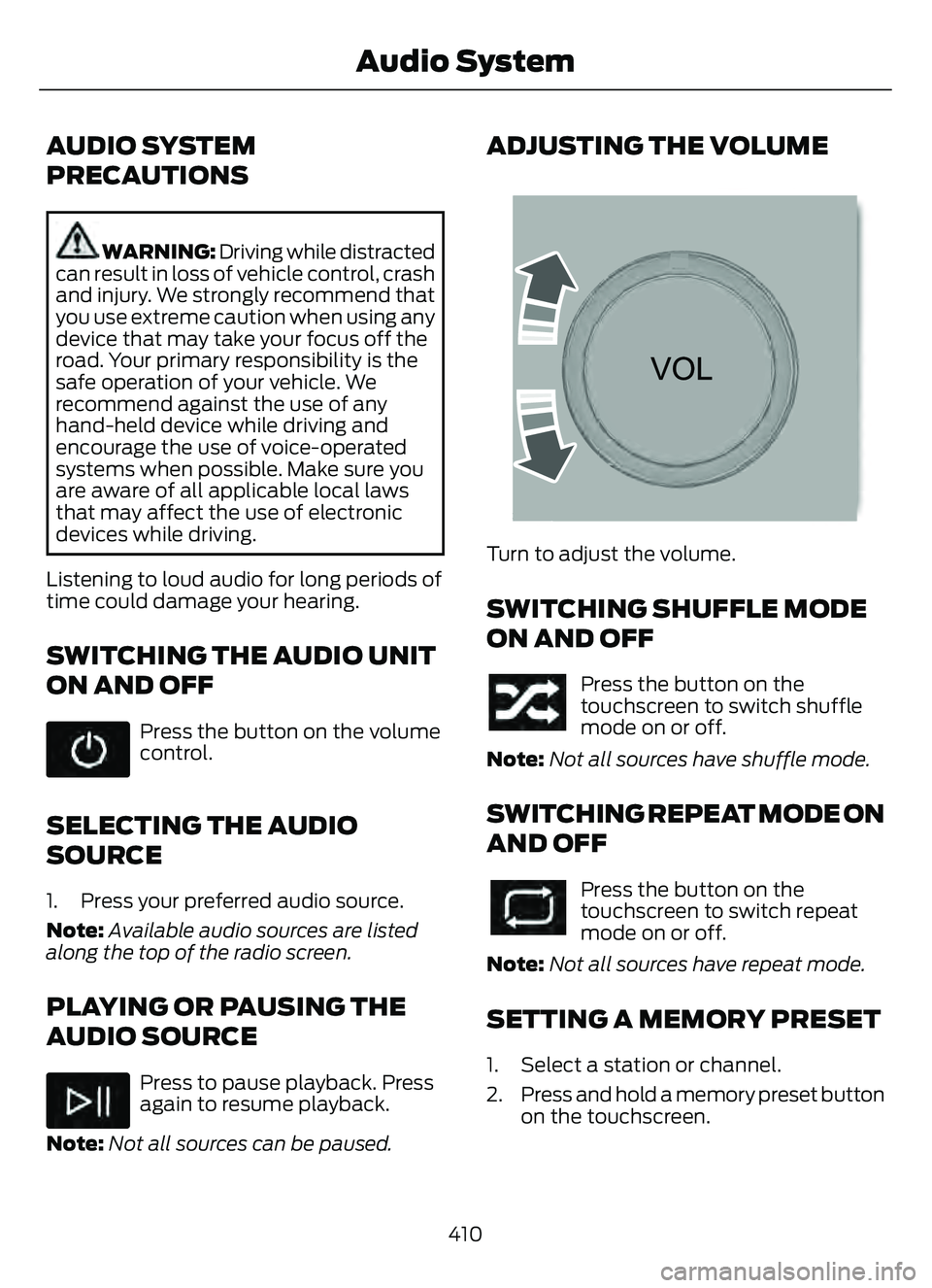
ADJUSTING THE VOLUME
E2265373E2265373265373
Turn to adjust the volume.
SWITCHING SHUFFLE MODE
ON AND OFF
Press the button on the
touchscreen to switch shuffle
mode on or off.
Note: Not all sources have shuffle mode.
SWITCHING REPEAT MODE ON
AND OFF
Press the button on the
touchscreen to switch repeat
mode on or off.
Note: Not all sources have repeat mode.
SETTING A MEMORY PRESET
1. Select a station or channel.
2. Press and hold a memory preset button
on the touchscreen.
410
Audio System
Page 420 of 585
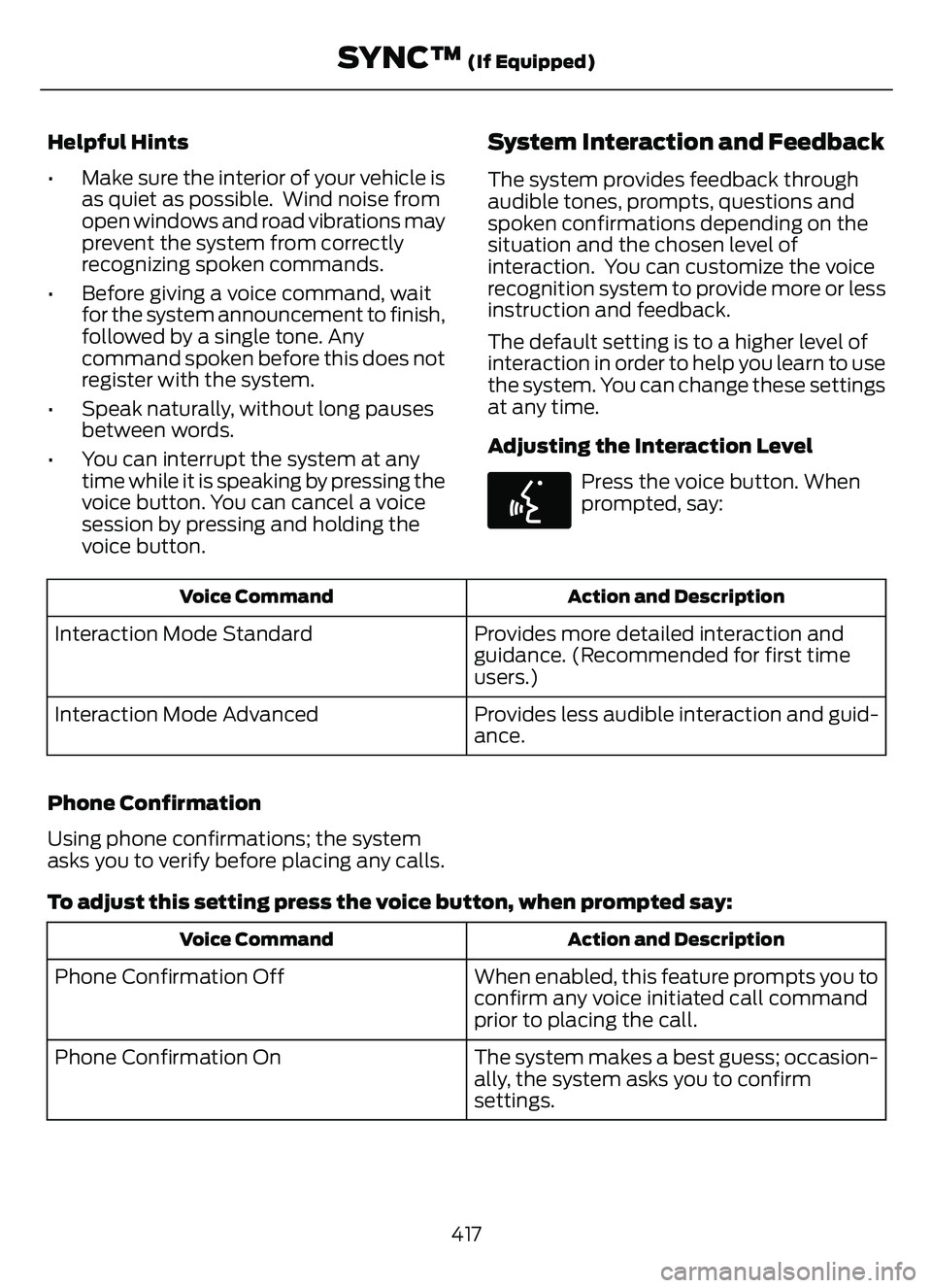
Helpful Hints
• Make sure the interior of your vehicle isas quiet as possible. Wind noise from
open windows and road vibrations may
prevent the system from correctly
recognizing spoken commands.
• Before giving a voice command, wait for the system announcement to finish,
followed by a single tone. Any
command spoken before this does not
register with the system.
• Speak naturally, without long pauses between words.
• You can interrupt the system at any time while it is speaking by pressing the
voice button. You can cancel a voice
session by pressing and holding the
voice button.System Interaction and Feedback
The system provides feedback through
audible tones, prompts, questions and
spoken confirmations depending on the
situation and the chosen level of
interaction. You can customize the voice
recognition system to provide more or less
instruction and feedback.
The default setting is to a higher level of
interaction in order to help you learn to use
the system. You can change these settings
at any time.
Adjusting the Interaction Level
E142599
Press the voice button. When
prompted, say:
Action and Description
Voice Command
Provides more detailed interaction and
guidance. (Recommended for first time
users.)
Interaction Mode Standard
Provides less audible interaction and guid-
ance.
Interaction Mode Advanced
Phone Confirmation
Using phone confirmations; the system
asks you to verify before placing any calls.
To adjust this setting press the voice button, when prompted say:
Action and Description
Voice Command
When enabled, this feature prompts you to
confirm any voice initiated call command
prior to placing the call.
Phone Confirmation Off
The system makes a best guess; occasion-
ally, the system asks you to confirm
settings.
Phone Confirmation On
417
SYNC™ (If Equipped)
Page 451 of 585
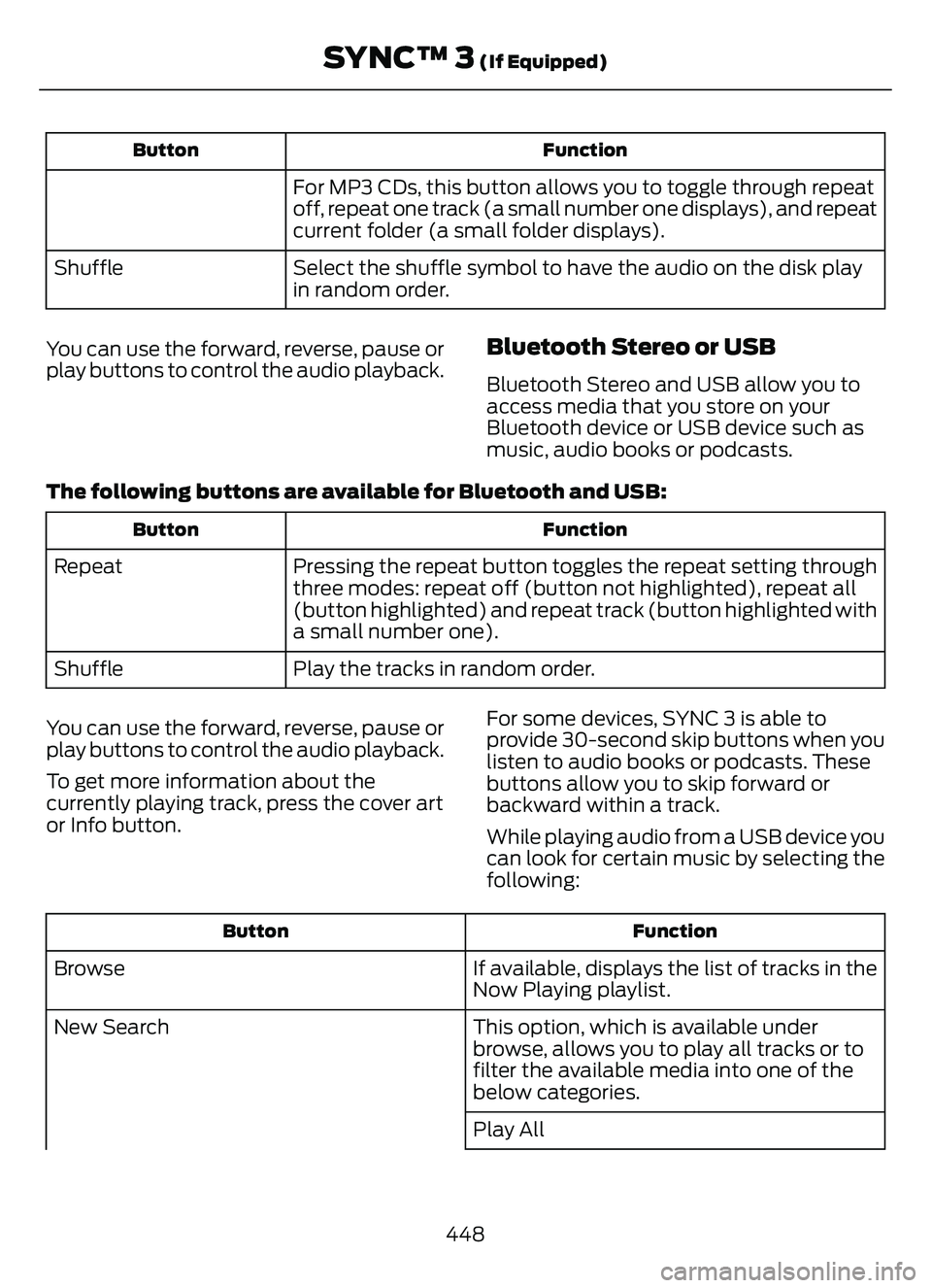
Function
Button
For MP3 CDs, this button allows you to toggle through repeat
off, repeat one track (a small number one displays), and repeat
current folder (a small folder displays).
Select the shuffle symbol to have the audio on the disk play
in random order.
Shuffle
You can use the forward, reverse, pause or
play buttons to control the audio playback.
Bluetooth Stereo or USB
Bluetooth Stereo and USB allow you to
access media that you store on your
Bluetooth device or USB device such as
music, audio books or podcasts.
The following buttons are available for Bluetooth and USB:
Function
Button
Pressing the repeat button toggles the repeat setting through
three modes: repeat off (button not highlighted), repeat all
(button highlighted) and repeat track (button highlighted with
a small number one).
Repeat
Play the tracks in random order.
Shuffle
You can use the forward, reverse, pause or
play buttons to control the audio playback.
To get more information about the
currently playing track, press the cover art
or Info button. For some devices, SYNC 3 is able to
provide 30-second skip buttons when you
listen to audio books or podcasts. These
buttons allow you to skip forward or
backward within a track.
While playing audio from a USB device you
can look for certain music by selecting the
following:
Function
Button
If available, displays the list of tracks in the
Now Playing playlist.
Browse
This option, which is available under
browse, allows you to play all tracks or to
filter the available media into one of the
below categories.
New Search
Play All
448
SYNC™ 3 (If Equipped)