radio FORD ESCAPE 2022 Service Manual
[x] Cancel search | Manufacturer: FORD, Model Year: 2022, Model line: ESCAPE, Model: FORD ESCAPE 2022Pages: 585, PDF Size: 6.15 MB
Page 524 of 585
Nigeria
E337972E337972
Singapore
3399E339944
Taiwan
E339821E339821
United States and Canada
WARNING: Changes or
modifications not expressively approved
by the party responsible for compliance
could void the user's authority to operate
the equipment. The term "IC:" before the
radio certification number only signifies
that Industry Canada technical
specifications were met.
FCC ID: MRXAG2SM3
IC: 2546A-AG2SM3
This device complies with Part 15 of the
FCC Rules and with Innovation, Science
and Economic Development Canada’s
licence-exempt RSS(s). Operation is
subject to the following two conditions:
1. This device may not cause harmful interference, and
2. This device must accept any interference received, including
interference that may cause undesired
operation.
TIRE PRESSURE MONITORING
SYSTEM SENSORS - VEHICLES
WITH: 433 MHZ SENSORS
Argentina
E339822E339822
521
Customer Information
Page 528 of 585
South Korea
E339675E339675
R-CRM-SRD-AG2SM4
Taiwan
E339826E339826
Ukraine
E338024
United Arab Emirates (U.A.E.)
E341835E341835
United States and Canada
WARNING: Changes or
modifications not expressively approved
by the party responsible for compliance
could void the user's authority to operate
the equipment. The term "IC:" before the
radio certification number only signifies
that Industry Canada technical
specifications were met.
FCC ID: 2546A- AG2SM4
IC: MRXAG2SM4
This device complies with Part 15 of the
FCC Rules and with Innovation, Science
and Economic Development Canada’s
licence-exempt RSS(s). Operation is
subject to the following two conditions:
1. This device may not cause harmful interference, and
2. This device must accept any interference received, including
interference that may cause undesired
operation.
525
Customer Information
Page 532 of 585
Taiwan, China
E338220E338220
Ukraine
E269682
United Arab Emirates (U.A.E.)
E340526E340526
United States and Canada
WARNING: Changes or
modifications not expressively approved
by the party responsible for compliance
could void the user's authority to operate
the equipment. The term "IC:" before the
radio certification number only signifies
that Industry Canada technical
specifications were met.
FCC ID: L2C0066T
This device complies with Part 15 of the
FCC Rules and with Innovation, Science
and Economic Development Canada’s
licence-exempt RSS(s). Operation is
subject to the following two conditions:
1. This device may not cause harmful interference, and
2. This device must accept any interference received, including
interference that may cause undesired
operation.
Vietnam
E278262
529
Customer Information
Page 534 of 585
MOBILE COMMUNICATIONS
EQUIPMENT
WARNING: Driving while distracted
can result in loss of vehicle control, crash
and injury. We strongly recommend that
you use extreme caution when using any
device that may take your focus off the
road. Your primary responsibility is the
safe operation of your vehicle. We
recommend against the use of any
hand-held device while driving and
encourage the use of voice-operated
systems when possible. Make sure you
are aware of all applicable local laws
that may affect the use of electronic
devices while driving.
Using mobile communications equipment
is becoming increasingly important in the
conduct of business and personal affairs.
However, you must not compromise your
own or others’ safety when using such
equipment. Mobile communications can
enhance personal safety and security when
appropriately used, particularly in
emergency situations. Safety must be
paramount when using mobile
communications equipment to avoid
negating these benefits. Mobile
communication equipment includes, but
is not limited to, cellular phones, pagers,
portable email devices, text messaging
devices and portable two-way radios.
FEDERAL HIGHWAY
ADMINISTRATION
REGULATION
Regulations such as those issued by the
Federal Highway Administration or issued
pursuant to the Occupational Safety and
Health Act (OSHA), and state and local
laws and regulations may require
additional equipment for the way you
intend to use your vehicle. It is the
responsibility of the registered owner to
determine the applicability of such laws
and regulations to your intended use for
the vehicle, and to arrange for the
installation of required equipment. The
dealer has information about the
availability of equipment which can be
ordered for your vehicle.
531
Customer Information
Page 558 of 585
including any copyrighted material or
music file information. You agree that
Gracenote may enforce its respective
rights, collectively or separately, under this
agreement against you, directly in each
company's own name.
Gracenote uses a unique identifier to track
queries for statistical purposes. The
purpose of a randomly assigned numeric
identifier is to allow Gracenote to count
queries without knowing anything about
who you are. For more information, see the
web page at www.gracenote.com for the
Gracenote Privacy Policy.
THE GRACENOTE SOFTWARE, EACH ITEM
OF GRACENOTE DATA AND THE
GRACENOTE CONTENT ARE LICENSED
TO YOU "AS IS". NEITHER GRACENOTE
MAKES ANY REPRESENTATIONS OR
WARRANTIES, EXPRESS OR IMPLIED,
REGARDING THE ACCURACY OF ANY
GRACENOTE DATA FROM THE
GRACENOTE SERVERS OR GRACENOTE
CONTENT. GRACENOTE COLLECTIVELY
AND SEPARATELY RESERVE THE RIGHT
TO DELETE DATA AND/OR CONTENT
FROM THE COMPANIES' RESPECTIVE
SERVERS OR, IN THE CASE OF
GRACENOTE, CHANGE DATA
CATEGORIES FOR ANY CAUSE THAT
GRACENOTE DEEMS SUFFICIENT. NO
WARRANTY IS MADE THAT EITHER
GRACENOTE CONTENT OR THE
GRACENOTE SOFTWARE OR
GRACENOTE SERVERS ARE ERROR-FREE
OR THAT THE FUNCTIONING OF THE
GRACENOTE SOFTWARE OR
GRACENOTE SERVERS WILL BE
UNINTERRUPTED. GRACENOTE IS NOT
OBLIGATED TO PROVIDE YOU WITH ANY
ENHANCED OR ADDITIONAL DATA TYPES
THAT GRACENOTE MAY CHOOSE TO
PROVIDE IN THE FUTURE AND IS FREE
TO DISCONTINUE ITS ONLINE SERVICES
AT ANY TIME. GRACENOTE DISCLAIM ALL
WARRANTIES EXPRESS OR IMPLIED,
INCLUDING, BUT NOT LIMITED TO,IMPLIED WARRANTIES OF
MERCHANTABILITY, FITNESS FOR A
PARTICULAR PURPOSE, TITLE, AND
NON-INFRINGEMENT. NEITHER
GRACENOTE WARRANTS THE RESULTS
THAT WILL BE OBTAINED BY YOUR USE
OF THE GRACENOTE SOFTWARE OR ANY
GRACENOTE SERVER. IN NO CASE WILL
GRACENOTE BE LIABLE FOR ANY
CONSEQUENTIAL OR INCIDENTAL
DAMAGES OR FOR ANY LOST PROFITS
OR LOST REVENUES FOR ANY REASON
WHATSOEVER. © Gracenote 2007.
Taiwan Territory
Note: In accordance with the management
approach of low-power radio wave
radiation motors:
Article 12: For approved and certified
low-power radiation motor models,
companies, firms or users must not alter
the frequency, increase the power or
change the characteristics and functions
of the original design without authorization.
Article 14: The usage of low-power
radio-frequency motors must not affect
aviation safety and interfere with legal
telecommunications. Should interference
be detected, immediately stop using the
device and only resume usage after
ensuring that there is no longer any
interference. For the legal
telecommunication and wireless
telecommunication of the telco, the
low-power radio frequency motor must be
able to tolerate legal limits of interference
from telecommunication, industrial,
scientific and radio wave equipment.
555
Customer Information
Page 562 of 585
ELECTROMAGNETIC
COMPATIBILITY
WARNING: Do not place objects
or mount equipment on or near the
airbag cover, on the side of the front or
rear seatbacks, or in areas that may
come into contact with a deploying
airbag. Failure to follow these
instructions may increase the risk of
personal injury in the event of a crash.
WARNING: Do not fasten antenna
cables to vehicle wiring, fuel pipes and
brake pipes.
WARNING: Keep antenna and
power cables at least 4 in (10 cm) from
any electronic modules and airbags. Note:
We test and certify your vehicle to
meet electromagnetic compatibility
legislation. It is your responsibility to make
sure that any equipment an authorized
dealer installs on your vehicle complies with
applicable local legislation and other
requirements. Installation of some
aftermarket electronic devices could
degrade the performance of vehicle
functions, which use radio frequency signals
such as broadcast radio receiver, tire
pressure monitoring system, push button
start, Bluetooth® connectivity or satellite
navigation.
Note: Any radio frequency transmitter
equipment in your vehicle (such as cellular
telephones and amateur radio transmitters)
must keep to the parameters in the
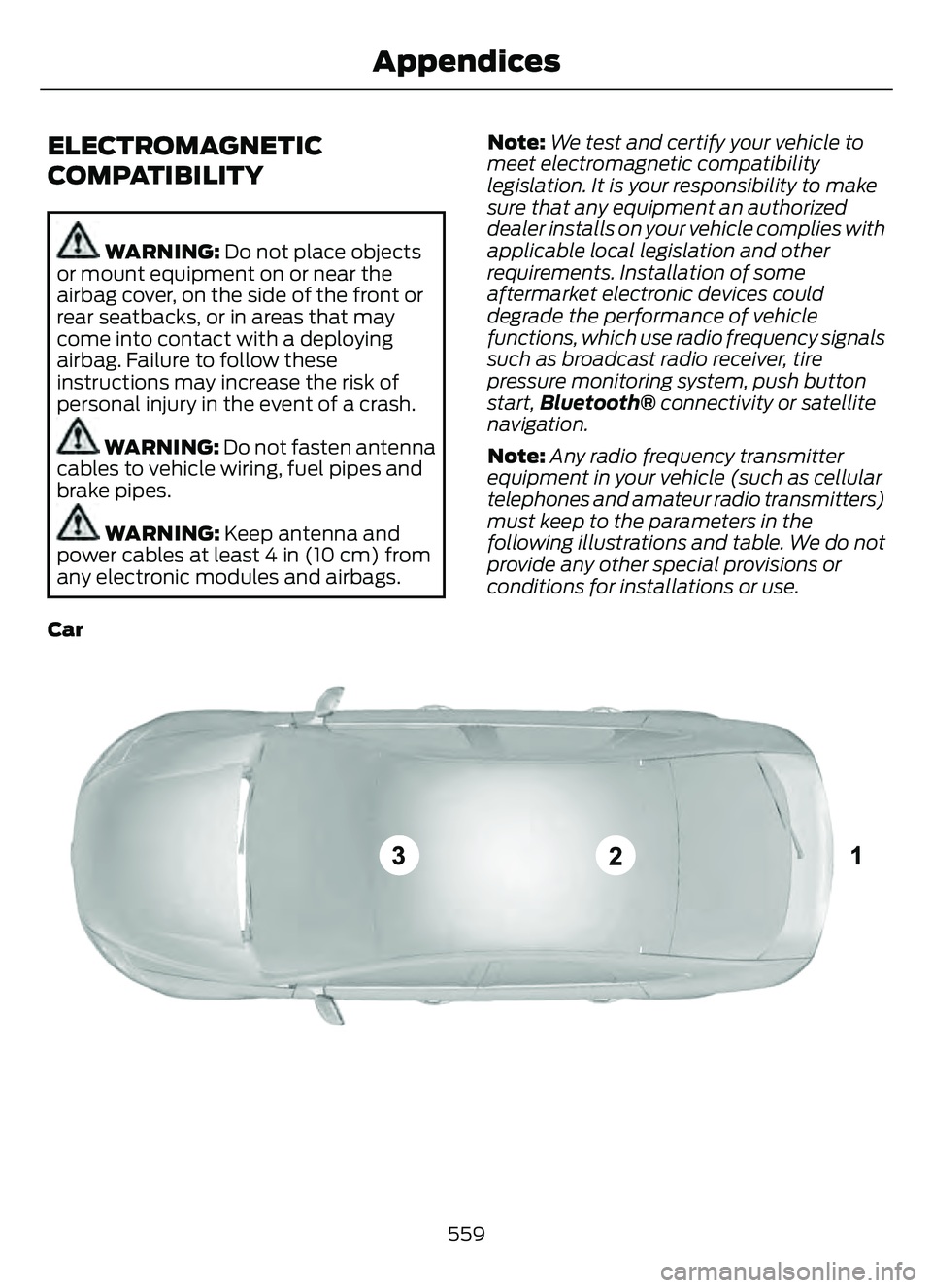
following illustrations and table. We do not
provide any other special provisions or
conditions for installations or use.
Car
E239120
559
Appendices
Page 564 of 585
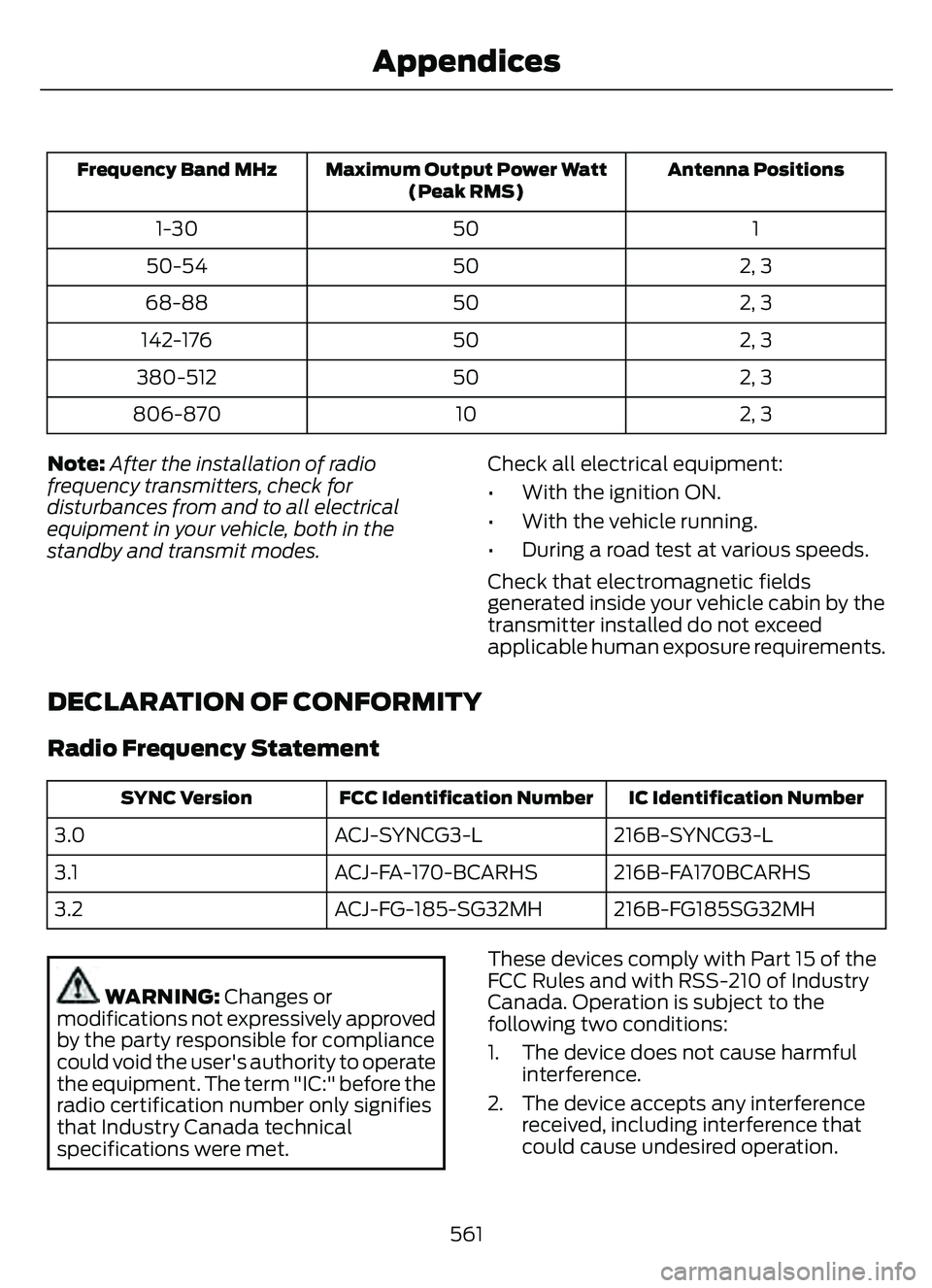
Antenna Positions
Maximum Output Power Watt
(Peak RMS)
Frequency Band MHz
1
50
1-30
2, 3
50
50-54
2, 3
50
68-88
2, 3
50
142-176
2, 3
50
380-512
2, 3
10
806-870
Note: After the installation of radio
frequency transmitters, check for
disturbances from and to all electrical
equipment in your vehicle, both in the
standby and transmit modes. Check all electrical equipment:
• With the ignition ON.
• With the vehicle running.
• During a road test at various speeds.
Check that electromagnetic fields
generated inside your vehicle cabin by the
transmitter installed do not exceed
applicable human exposure requirements.
DECLARATION OF CONFORMITY
Radio Frequency Statement
IC Identification Number
FCC Identification Number
SYNC Version
216B-SYNCG3-L
ACJ-SYNCG3-L
3.0
216B-FA170BCARHS
ACJ-FA-170-BCARHS
3.1
216B-FG185SG32MH
ACJ-FG-185-SG32MH
3.2
WARNING: Changes or
modifications not expressively approved
by the party responsible for compliance
could void the user's authority to operate
the equipment. The term "IC:" before the
radio certification number only signifies
that Industry Canada technical
specifications were met. These devices comply with Part 15 of the
FCC Rules and with RSS-210 of Industry
Canada. Operation is subject to the
following two conditions:
1. The device does not cause harmful
interference.
2. The device accepts any interference received, including interference that
could cause undesired operation.
561
Appendices
Page 567 of 585
Alert and Aid Mode.....................................263How Does Alert and Aid Mode Work.........264
What Is Alert and Aid Mode...........................263
Alert Mode......................................................262Adjusting the Steering Wheel VibrationIntensit y............................................................263
How Does Alert Mode Work..........................263
What Is Alert Mode...........................................262
All-Wheel Drive.............................................216All-Wheel Drive – Troubleshooting.............216All-Wheel Drive Limitations.....................216
All-Wheel Drive Precautions....................216
All-Wheel Drive – Troubleshooting.......216
All-Wheel Drive – Information Messages..........................................................216
AM/FM Radio.................................................412AM/FM Radio Limitations...............................412
Selecting a Radio Station................................412
Ambient Lighting..........................................103Adjusting Ambient Lighting............................103
Switching Ambient Lighting On andOff.......................................................................1\
03
Anti-Lock Braking System.........................217Anti-Lock Braking System Indicators..........217
Anti-Lock Braking SystemLimitations........................................................217
Anti-Theft Alarm System............................87Arming the Anti-Theft Alarm System..........88
Disarming the Anti-Theft AlarmSystem................................................................88
How Does the Anti-Theft Alarm System Work.....................................................................87
What Are the Inclination Sensors..................87
What Are the Interior Sensors.........................87
What Is the Anti-Theft Alarm System..........87
What Is the Battery Backup Alarm...............88
What Is the Perimeter Alarm...........................87
Anti-Theft Alarm System Settings.........88Setting the Alarm Security Level...................88
Switching Ask on Exit On and Off.................88
What are the Alarm Security Levels.............88
What Is Ask on Exit.............................................88
Appendices ....................................................559
Applying the Electric Parking Brake.............................................................220
Applying the Electric Parking Brake in an Emergency..................................................220
Apps.................................................................462 At a Glance.......................................................26
Audio System................................................410
AM/FM Radio.......................................................412
Digital Radio.........................................................412
Satellite Radio.....................................................414
Audio System Precautions.......................410
Auto-Dimming Interior Mirror...................107
Auto-Dimming Interior Mirror
Limitations........................................................107
What Is the Auto-Dimming Interior Mirror...................................................................107
Auto Hold........................................................224
Auto Hold Indicators...................................224
Autolamps........................................................98
Autolamp Settings..............................................98
What Are Autolamps..........................................98
Autolock.............................................................70Autolock Requirements.....................................70
What Is Autolock..................................................70
Automatically Releasing the ElectricParking Brake...............................................221
Automatic Climate Control - Vehicles With: Dual Automatic Temperature
Control (DATC)...........................................138
Automatic Climate Control - Vehicles With: Electronic Automatic
Temperature Control (EATC).................141
Automatic Crash Shutoff..........................314
Automatic Crash Shutoff
Precautions......................................................314
Re-Enabling Your Vehicle................................314
What Is Automatic Crash Shutoff................314
Automatic Emergency Braking...............278Switching Automatic Emergency Braking On and Off.......................................................279
What Is Automatic Emergency Braking..............................................................278
Automatic Engine Stop..............................176How Does Automatic Engine StopWork....................................................................176
Overriding Automatic Engine Stop...............176
Switching Automatic Engine Stop On and Off........................................................................\
176
What Is Automatic Engine Stop....................176
Automatic High Beam Control...............100Automatic High Beam Control Indicator s........................................................... 101
564
Index
Page 570 of 585
Cleaning Chrome, Aluminium or StainlessSteel..................................................................350
Cleaning Headlamps and Rear Lamps...............................................................349
Cleaning Stripes or Graphics..........................351
Cleaning the Engine Compartment...........350
Cleaning the Exterior Precautions...............349
Cleaning the Underbody..................................351
Cleaning Wheels................................................350
Cleaning Windows and Wiper Blades...............................................................350
Cleaning the Interior....................................351Cleaning Carpets and Floor Mats................352
Cleaning Displays and Screens....................352
Cleaning Fabric Seats andHeadliners........................................................352
Cleaning Leather and Vinyl............................352
Cleaning Moonroof Tracks.............................353
Cleaning Plastic...................................................351
Cleaning Seatbelts............................................353
Cleaning Storage Compartments...............353
Cleaning the Instrument Panel.....................351
Clearing All MyKeys.......................................66
Clearing the Garage Door Opener.........164
Climate Control..............................................137
Closing the Liftgate.......................................78
Closing the Hands-Free Liftgate....................83
Closing the Liftgate From Inside Your Vehicle.................................................................82
Closing the Liftgate From Outside Your Vehicle.................................................................78
Closing the Liftgate Using the Remote Control.................................................................83
Cold Weather Precautions......................304
Configuring the Trip Computer - VehiclesWith: 4.2 Inch Instrument Cluster
Display Screen............................................129
Connected Vehicle.....................................405
Connecting the Vehicle to a Mobile
Network...........................................................405
Connected Vehicle Data..............................24
Connected Vehicle Limitations..............405
Connected Vehicle Requirements........405
Connected Vehicle – Troubleshooting -Vehicles With: Modem...........................406
Connected Vehicle – Troubleshooting - Vehicles With: SYNC 3............................407
Connecting a Trailer...................................296 Connecting a Trailer Precautions..........296
Connecting the Vehicle to a Mobile
Network.......................................................405
Connecting FordPass to the Modem.........405
Enabling and Disabling the Modem..........405
What Is the Modem.........................................405
Connecting the Vehicle to a Wi-FiNetwork.......................................................405
Contacting Us...................................................15
Cooling System Capacity and Specification - 1.5L EcoBoost™.........396
Cooling System Capacity and Specification - 2.0L EcoBoost™.........397
Cooling System Capacity and Specification - 2.5L, Hybrid Electric
Vehicle (HEV)/Plug-In Hybrid Electric
Vehicle (PHEV)..........................................397
Crash and Breakdown Information.................................................308
Automatic Crash Shutoff.................................314
Jump Starting the Vehicle...............................310
Post-Crash Alert System.................................313
Crash Sensors and Airbag Indicator.......54
Creating a MyKey - Vehicles With: FlipKey....................................................................65
Creating a MyKey - Vehicles With: Push Button Start..................................................65
Creating a Vehicle Wi-Fi Hotspot.........409
Cross Traffic Alert..........................................271
Cross Traffic Alert –
Troubleshooting.............................................273
Cross Traffic Alert Indicators....................272
Cross Traffic Alert Limitations..................271
Cross Traffic Alert Precautions................271
Cross Traffic Alert –Troubleshooting.........................................273
Cross Traffic Alert – Information
Messages..........................................................273
Cruise Control................................................242
Cruise Control Indicators..........................243
Cup Holders....................................................170
Cup Holder Precautions...................................170Customer Information..............................490Radio Frequency CertificationLabels...............................................................493
567
Index
Page 571 of 585
Customizing the Instrument ClusterDisplay - Vehicles With: 4.2 Inch
Instrument Cluster Display
Screen............................................................124
Customizing the Instrument Cluster Display - Vehicles With: 6.5 Inch
Instrument Cluster Display Screen/ 12.3
Inch Instrument Cluster Display
Screen............................................................124
D
Data Privacy......................................................22
Declaration of Conformity........................561
Department of Transportation UniformTire Quality Grades...................................357
Digital Radio...................................................412
Digital Radio Indicators....................................413
Digital Radio Limitations.................................413
How Does Digital Radio Work........................412
Switching Digital Radio Reception On and
Off.....................................................................\
...413
What Is Digital Radio.........................................412
Disposing of Airbags.....................................55
Distance Alert................................................278
Adjusting the Sensitivity of Distance Alert....................................................................278
What Is Distance Alert.....................................278
Distance Indication......................................276Distance Indication Indicator.........................278
Switching Distance Indication On and Off.......................................................................2\
78
What Is Distance Indication...........................276
Doors and Locks Audible Warnings..........71
Doors and Locks.............................................69
Autolock...................................................................70\
Autounlock.............................................................70
Doors and Locks – Troubleshooting...............71
Mislock.....................................................................70
Operating the Doors From Inside Your Vehicle.................................................................69
Operating the Doors From Outside Your Vehicle.................................................................69
Doors and Locks – Troubleshooting........71Doors and Locks – Frequently AskedQuestions............................................................72
Doors and Locks – Information Messages.............................................................71 Doors and Locks – Warning Lamps................71
Drive Belt Routing Overview - 1.5L
EcoBoost™................................................340
Drive Belt Routing Overview - 2.0L EcoBoost™..................................................341
Drive Mode Control......................................257
Drive Modes.........................................................258
Plug-In Hybrid Electric Vehicle Drive
Modes...............................................................259
Drive Modes...................................................258Deep Snow/Sand..............................................258
Eco........................................................................\
..258
Normal...................................................................258
Slippery.................................................................258
Sport....................................................................\
...258
Driver Alert......................................................282Driver Alert – Troubleshooting.....................283Driver Alert Indicators................................283
Driver Alert Limitations..............................282
Driver Alert Precautions............................282
Driver Alert – Troubleshooting...............283
Driver Alert – Information Messages..........283Driving Economically.................................304
Driving Hints..................................................304
Driving in Special Conditions........................304Driving in Special Conditions..................304Driving In Sand...................................................306
Driving on Hilly or Sloping Terrain...............305
Driving Through Mud and Water.................304
Emergency Maneuvers....................................304
Driving Through Shallow Water............306
E
Easy Entry and Exit.........................................77
Electric Parking Brake AudibleWarning..........................................................221
Electric Parking Brake................................220
Electric Parking Brake –
Troubleshooting .............................................221
Electric Parking Brake –
Troubleshooting.........................................221
Electric Parking Brake – Information
Messages..........................................................222
Electric Parking Brake – Warning Lamps.................................................................22\
1
Electric Power Steering.............................229Electric Power Steering Precautions..........229
568
Index