manual transmission FORD ESCAPE 2022 Owners Manual
[x] Cancel search | Manufacturer: FORD, Model Year: 2022, Model line: ESCAPE, Model: FORD ESCAPE 2022Pages: 585, PDF Size: 6.15 MB
Page 10 of 585
Catalytic Converter
What Is the Catalytic Converter ............198
Catalytic Converter Precautions ...........198
Catalytic Converter – Troubleshooting........................................................................\
1 9 8
High Voltage Battery
What Is the High Voltage Battery ..........199
High Voltage Battery Precautions .........199
Charging Your Vehicle - Plug-In Hybrid Electric Vehicle
(PHEV)
What is AC Charging .................................200
Charging Your Vehicle Precautions ......200
Charging Equipment .................................200
Locating the Charge Port ........................203
Charge Port Indicators .............................204
AC Charging ..................................................205
Setting the Charging Schedule andPreferences ..............................................206
Charging Your Vehicle – Troubleshooting ........................................................................\
207
Automatic Transmission
Automatic Transmission Precautions.......................................................................2\
0 9
Automatic Transmission Positions ......209
Shifting Your Vehicle Into Gear ..............210
Automatic Transmission Position Indicators ....................................................210
Temporary Neutral Mode ...........................211
Automatic Return to Park (P) ..................211
Grade Assist - Hybrid Electric Vehicle (HEV) ...........................................................212
Manual Park Release - Gasoline ............212
Automatic Transmission Audible Warnings .....................................................214
Automatic Transmission – Troubleshooting .......................................214
All-Wheel Drive
How Does All-Wheel Drive Work ...........216
All-Wheel Drive Precautions ...................216
All-Wheel Drive Limitations ....................216
All-Wheel Drive – Troubleshooting ......216
Brakes
Brake Precautions ........................................217
Anti-Lock Braking System ........................217
Brake Over Accelerator ..............................217
Locating the Brake Fluid Reservoir ........218
Checking the Brake Fluid ..........................218
Brake Fluid Specification ..........................218
Brakes – Troubleshooting ........................219
Electric Parking Brake
What Is the Electric Parking Brake .......220
Applying the Electric Parking Brake ......220
Applying the Electric Parking Brake in anEmergency ................................................220
Manually Releasing the Electric Parking Brake ...........................................................220
Automatically Releasing the Electric Parking Brake .............................................221
Electric Parking Brake Audible Warning ........................................................................\
.2 2 1
Releasing the Electric Parking Brake if the Vehicle Battery Has Run Out of
Charge ..........................................................221
Electric Parking Brake – Troubleshooting ........................................................................\
.2 2 1
Hill Start Assist
What Is Hill Start Assist ............................223
How Does Hill Start Assist Work ...........223
Hill Start Assist Precautions ...................223
Hill Start Assist – Troubleshooting ......223
Auto Hold
How Does Auto Hold Work .....................224
Switching Auto Hold On and Off ..........224
7
Table of Contents
Page 83 of 585
LIFTGATE PRECAUTIONS
WARNING: It is extremely
dangerous to ride in a cargo area, inside
or outside of a vehicle. In a crash, people
riding in these areas are more likely to be
seriously injured or killed. Do not allow
people to ride in any area of your vehicle
that is not equipped with seats and
seatbelts. Make sure everyone in your
vehicle is in a seat and properly using a
seatbelt. Failure to follow this warning
could result in serious personal injury or
death.
WARNING: Make sure that you fully
close the liftgate to prevent exhaust
fumes from entering your vehicle. If you
are unable to fully close the liftgate,
open the air vents or the windows to
allow fresh air to enter your vehicle.
Failure to follow this instruction could
result in personal injury or death.
WARNING: Keep keys out of reach
of children. Do not allow children to
operate or play near an open or moving
power liftgate. You should supervise the
operation of the power liftgate at all
times.
OPENING THE LIFTGATE
OPENING THE LIFTGATE FROM
INSIDE YOUR VEHICLE
E138633
With the transmission in park
(P), press the button on the
instrument panel.
Note: Be careful when opening or closing
the liftgate in a garage or other enclosed
area to avoid damaging the liftgate. Note:
Do not hang anything, for example
a bike rack, from the glass or liftgate. This
could damage the liftgate and its
components.
Note: Do not leave the liftgate open while
driving. This could damage the liftgate and
its components.
OPENING THE LIFTGATE FROM
OUTSIDE YOUR VEHICLE
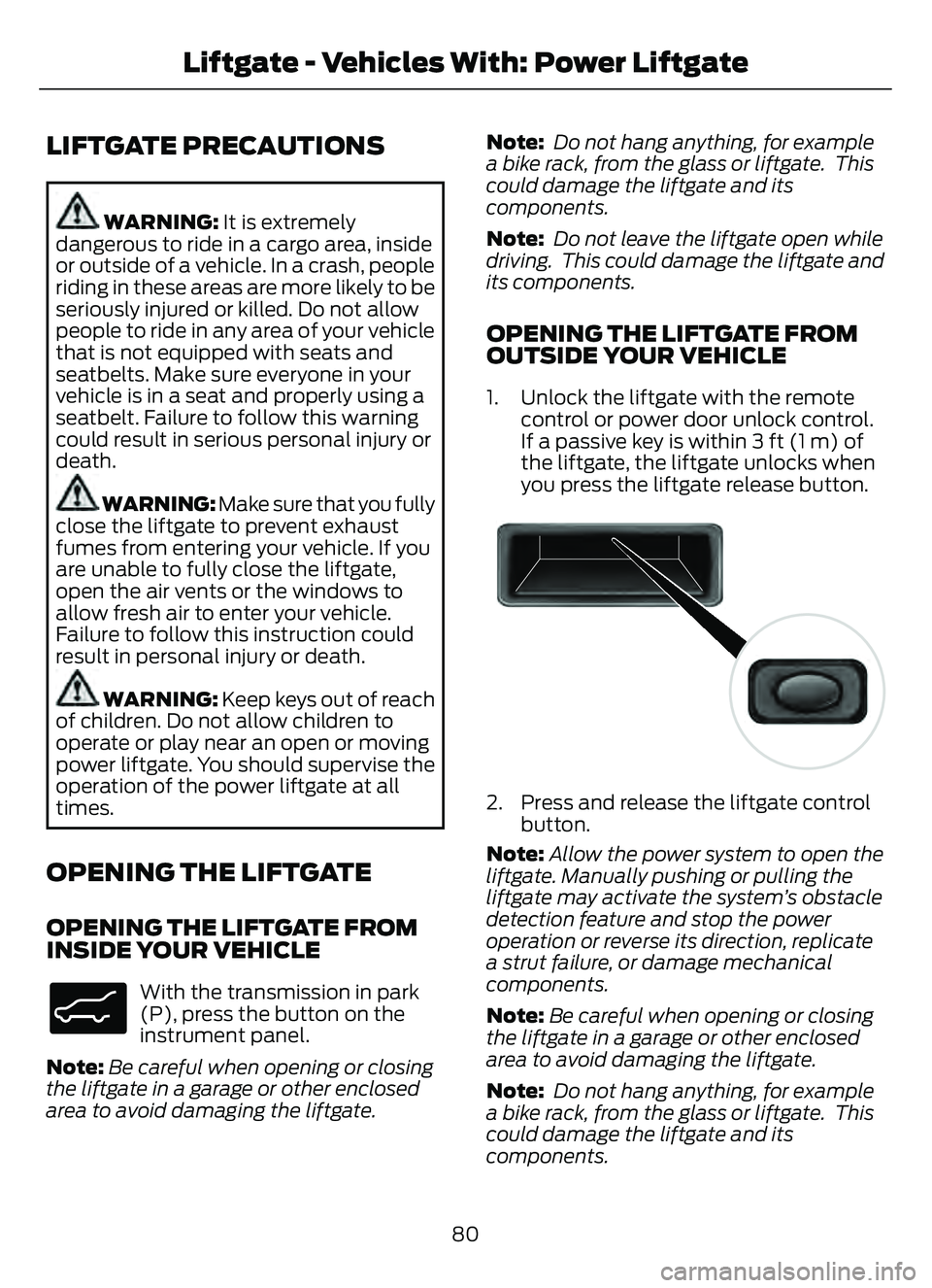
1. Unlock the liftgate with the remote control or power door unlock control.
If a passive key is within 3 ft (1 m) of
the liftgate, the liftgate unlocks when
you press the liftgate release button.
E138632
2. Press and release the liftgate controlbutton.
Note: Allow the power system to open the
liftgate. Manually pushing or pulling the
liftgate may activate the system’s obstacle
detection feature and stop the power
operation or reverse its direction, replicate
a strut failure, or damage mechanical
components.
Note: Be careful when opening or closing
the liftgate in a garage or other enclosed
area to avoid damaging the liftgate.
Note: Do not hang anything, for example
a bike rack, from the glass or liftgate. This
could damage the liftgate and its
components.
80
Liftgate - Vehicles With: Power Liftgate
Page 85 of 585
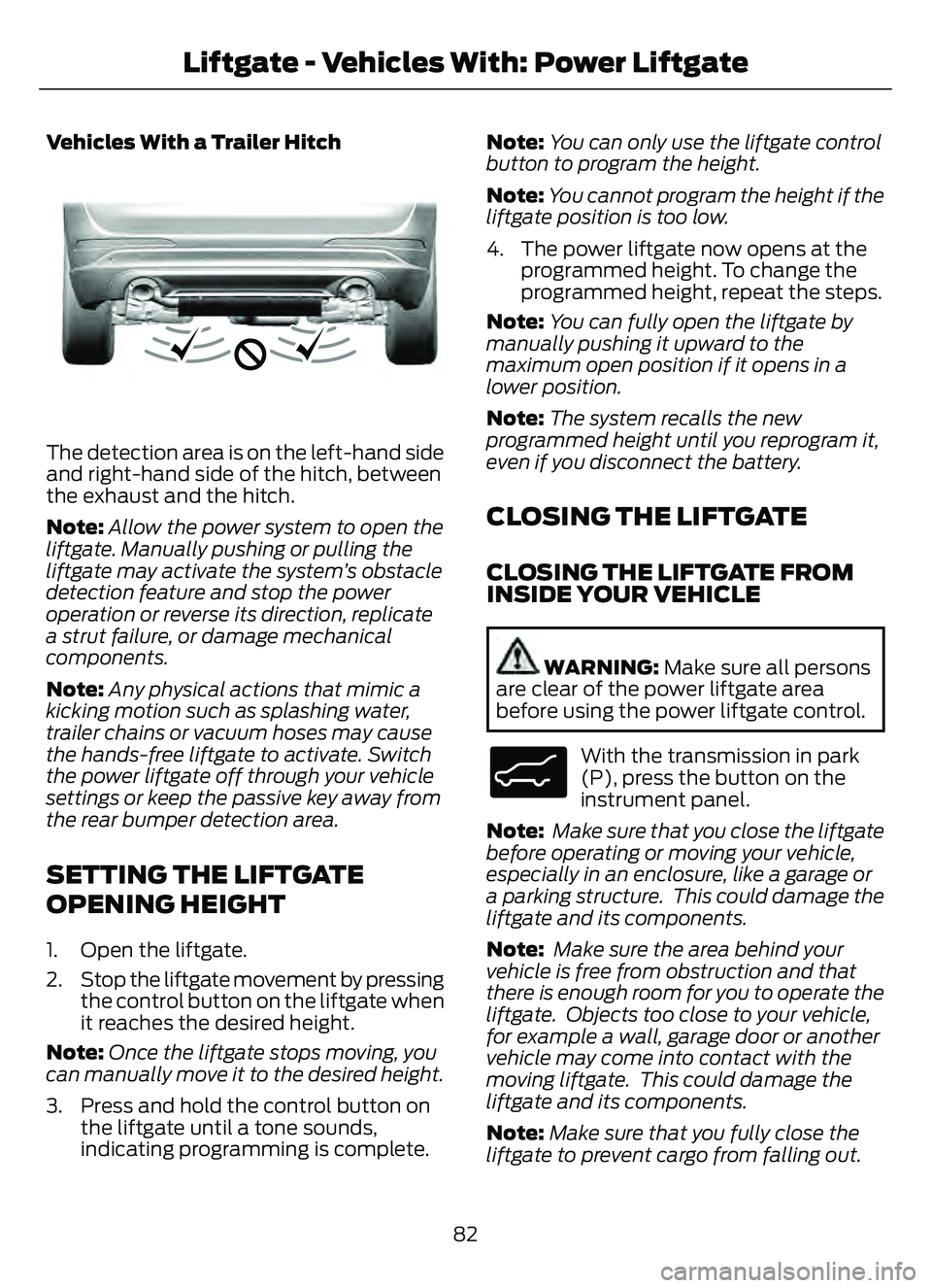
Vehicles With a Trailer Hitch
E310718E310718
The detection area is on the left-hand side
and right-hand side of the hitch, between
the exhaust and the hitch.
Note:Allow the power system to open the
liftgate. Manually pushing or pulling the
liftgate may activate the system’s obstacle
detection feature and stop the power
operation or reverse its direction, replicate
a strut failure, or damage mechanical
components.
Note: Any physical actions that mimic a
kicking motion such as splashing water,
trailer chains or vacuum hoses may cause
the hands-free liftgate to activate. Switch
the power liftgate off through your vehicle
settings or keep the passive key away from
the rear bumper detection area.
SETTING THE LIFTGATE
OPENING HEIGHT
1. Open the liftgate.
2. Stop the liftgate movement by pressing the control button on the liftgate when
it reaches the desired height.
Note: Once the liftgate stops moving, you
can manually move it to the desired height.
3. Press and hold the control button on the liftgate until a tone sounds,
indicating programming is complete. Note:
You can only use the liftgate control
button to program the height.
Note: You cannot program the height if the
liftgate position is too low.
4. The power liftgate now opens at the programmed height. To change the
programmed height, repeat the steps.
Note: You can fully open the liftgate by
manually pushing it upward to the
maximum open position if it opens in a
lower position.
Note: The system recalls the new
programmed height until you reprogram it,
even if you disconnect the battery.
CLOSING THE LIFTGATE
CLOSING THE LIFTGATE FROM
INSIDE YOUR VEHICLE
WARNING: Make sure all persons
are clear of the power liftgate area
before using the power liftgate control.
E138633
With the transmission in park
(P), press the button on the
instrument panel.
Note: Make sure that you close the liftgate
before operating or moving your vehicle,
especially in an enclosure, like a garage or
a parking structure. This could damage the
liftgate and its components.
Note: Make sure the area behind your
vehicle is free from obstruction and that
there is enough room for you to operate the
liftgate. Objects too close to your vehicle,
for example a wall, garage door or another
vehicle may come into contact with the
moving liftgate. This could damage the
liftgate and its components.
Note: Make sure that you fully close the
liftgate to prevent cargo from falling out.
82
Liftgate - Vehicles With: Power Liftgate
Page 102 of 585
EXTERIOR LAMPS
SWITCHING THE TURN SIGNAL
LAMPS ON AND OFF
66E242676
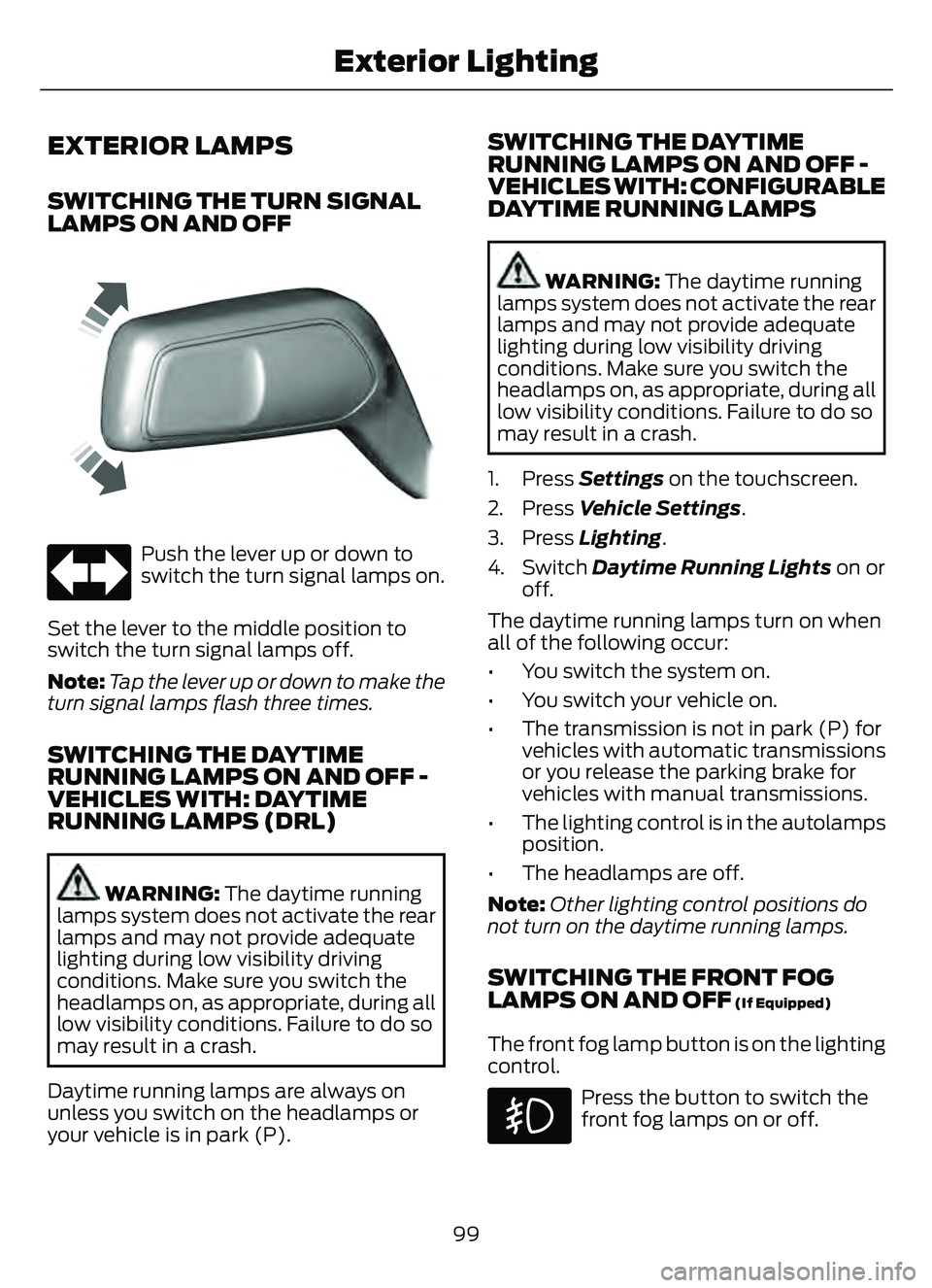
Push the lever up or down to
switch the turn signal lamps on.
Set the lever to the middle position to
switch the turn signal lamps off.
Note: Tap the lever up or down to make the
turn signal lamps flash three times.
SWITCHING THE DAYTIME
RUNNING LAMPS ON AND OFF -
VEHICLES WITH: DAYTIME
RUNNING LAMPS (DRL)
WARNING: The daytime running
lamps system does not activate the rear
lamps and may not provide adequate
lighting during low visibility driving
conditions. Make sure you switch the
headlamps on, as appropriate, during all
low visibility conditions. Failure to do so
may result in a crash.
Daytime running lamps are always on
unless you switch on the headlamps or
your vehicle is in park (P).
SWITCHING THE DAYTIME
RUNNING LAMPS ON AND OFF -
VEHICLES WITH: CONFIGURABLE
DAYTIME RUNNING LAMPS
WARNING: The daytime running
lamps system does not activate the rear
lamps and may not provide adequate
lighting during low visibility driving
conditions. Make sure you switch the
headlamps on, as appropriate, during all
low visibility conditions. Failure to do so
may result in a crash.
1. Press Settings on the touchscreen.
2. Press Vehicle Settings .
3. Press Lighting.
4. Switch Daytime Running Lights on or
off.
The daytime running lamps turn on when
all of the following occur:
• You switch the system on.
• You switch your vehicle on.
• The transmission is not in park (P) for vehicles with automatic transmissions
or you release the parking brake for
vehicles with manual transmissions.
• The lighting control is in the autolamps position.
• The headlamps are off.
Note: Other lighting control positions do
not turn on the daytime running lamps.
SWITCHING THE FRONT FOG
LAMPS ON AND OFF (If Equipped)
The front fog lamp button is on the lighting
control.
Press the button to switch the
front fog lamps on or off.
99
Exterior Lighting
Page 198 of 585

Left-hand side. Pull the rear of
the fuel filler door to open it.
C
Right-hand side. Pull the rear of
the fuel filler door to open it.
D
MANUALLY OPENING THE FUEL
FILLER DOOR
WARNING: The fuel system may
be under pressure. If you hear a hissing
sound near the fuel filler inlet, do not
refuel until the sound stops. Otherwise,
fuel may spray out, which could cause
serious personal injury.
Note: The transmission must be in park (P)
or neutral (N).
When using the manual override lever do
the following:
1. Switch the ignition on.
E297793E297793
Note: The manual override lever is in the
driver side rear wheel well area.
2. Pull the manual override lever.
3. Switch the ignition off.
4. Complete the refueling process within 20 minutes.
Note: Only follow this procedure if the fuel
filler door fails to open. If the problem
remains, have your vehicle checked as soon
as possible.
FUEL TANK CAPACITY
Advertised Capacity
The advertised capacity is the maximum
amount of fuel that you can add to the fuel
tank when the fuel gauge indicates empty.
195
Fuel and Refueling
Page 215 of 585
HOW DOES AUTOMATIC RETURN
TO PARK (P) WORK
Your vehicle shifts into park (P) when your
vehicle is stationary and any of the
following occur:
• You switch the vehicle off.
• You open the driver door with yourseatbelt unlatched.
• You unlatch the driver seatbelt when the driver door is open.
Note: Do not use automatic return to park
(P) when your vehicle is moving, except in
an emergency. See Stopping the Engine
When Your Vehicle is Moving (page 175).
AUTOMATIC RETURN TO PARK
(P) LIMITATIONS
Automatic return to park may not work if
the door ajar switch is malfunctioning.
See an authorized dealer if any of the
following occur:
• Door ajar indicator does not illuminate with the driver door open.
• Door ajar indicator illuminates with the driver door closed.
• Transmission not in park message appears with the driver door closed,
after you shift out of park (P).
GRADE ASSIST - HYBRID
ELECTRIC VEHICLE (HEV)
WHAT IS GRADE ASSIST
Provides additional grade braking with a
combination of engine motoring and
high-voltage battery charging to help
maintain vehicle speed when descending
a grade.
SWITCHING GRADE ASSIST ON
AND OFF
1. Press Settings on the touchscreen.
2. Select Driver Assistance Settings .
3. Select Grade Assist.
The grade assist lamp appears in the
instrument cluster.
Your vehicle determines the amount of
engine motoring and high-voltage battery
charging. You could notice the engine
speed increasing and decreasing to help
maintain your vehicle speed when
descending a slope.
GRADE ASSIST INDICATORS
E345122E345122
MANUAL PARK RELEASE -
GASOLINE
WHAT IS MANUAL PARK RELEASE
Manual park release is used to move your
transmission from the park (P) position in
the event of an electrical malfunction or
emergency.
MANUAL PARK RELEASE
PRECAUTIONS
WARNING: When doing this
procedure, you need to take the
transmission out of park (P) which
means your vehicle can roll freely. To
avoid unwanted vehicle movement,
always fully apply the parking brake prior
to doing this procedure. Use wheel
chocks if appropriate.
212
Automatic Transmission
Page 216 of 585
WARNING: If the parking brake is
fully released, but the brake warning
lamp remains illuminated, the brakes
may not be working properly. Have your
vehicle checked as soon as possible.
WARNING: Do not drive your
vehicle until you verify that the
stoplamps are working.
USING MANUAL PARK RELEASE
Activating the Manual Park Release
Cable
1. Apply the parking brake. See What Is
the Electric Parking Brake (page 220).
Note: If the vehicle battery is dead, for
example, no electrical power is available,
you could use an external power source to
apply the parking brake.
E307867E307867
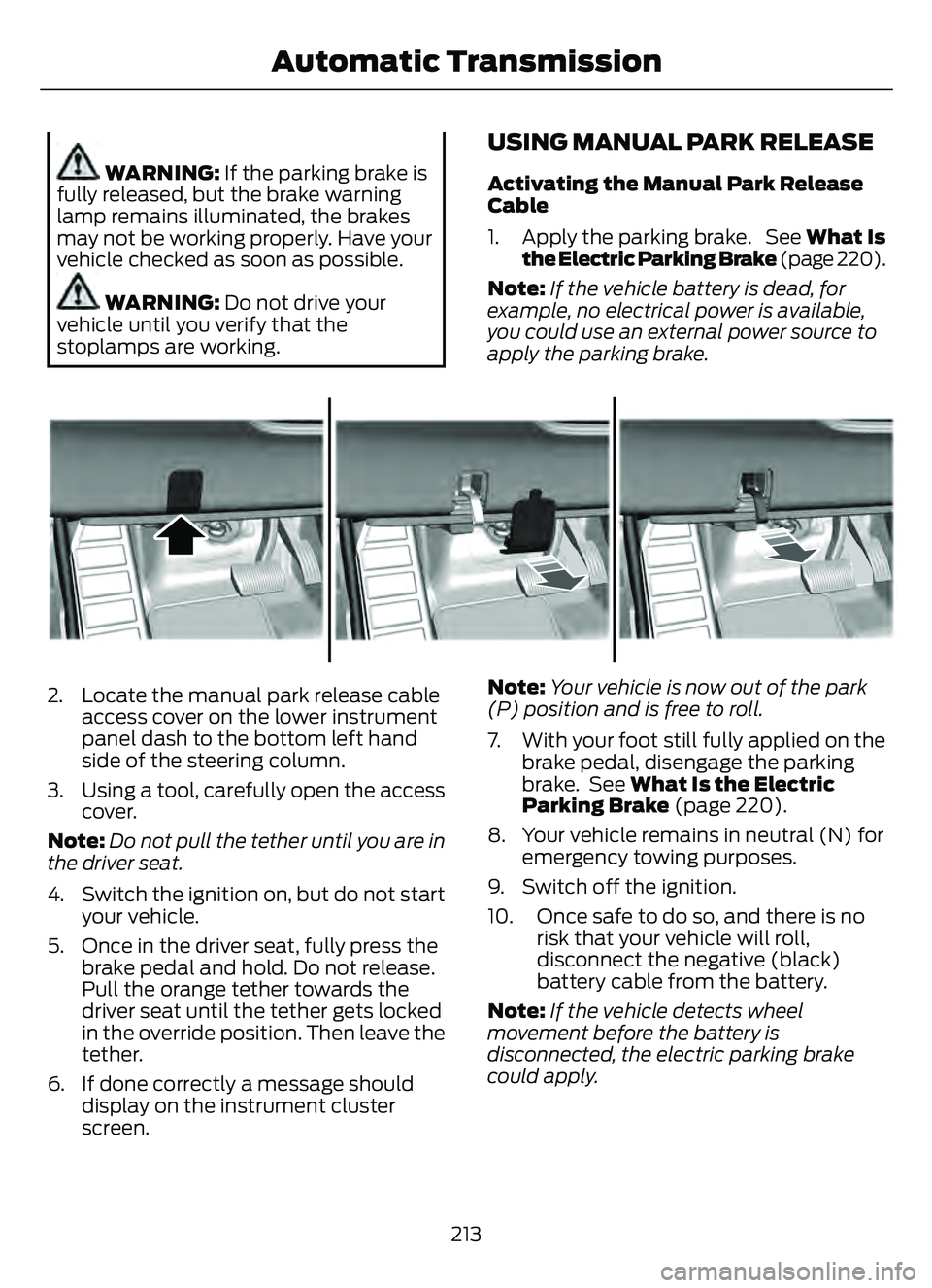
2. Locate the manual park release cable access cover on the lower instrument
panel dash to the bottom left hand
side of the steering column.
3. Using a tool, carefully open the access cover.
Note: Do not pull the tether until you are in
the driver seat.
4. Switch the ignition on, but do not start your vehicle.
5. Once in the driver seat, fully press the brake pedal and hold. Do not release.
Pull the orange tether towards the
driver seat until the tether gets locked
in the override position. Then leave the
tether.
6. If done correctly a message should display on the instrument cluster
screen. Note:
Your vehicle is now out of the park
(P) position and is free to roll.
7. With your foot still fully applied on the brake pedal, disengage the parking
brake. See What Is the Electric
Parking Brake (page 220).
8. Your vehicle remains in neutral (N) for emergency towing purposes.
9. Switch off the ignition.
10. Once safe to do so, and there is no risk that your vehicle will roll,
disconnect the negative (black)
battery cable from the battery.
Note: If the vehicle detects wheel
movement before the battery is
disconnected, the electric parking brake
could apply.
213
Automatic Transmission
Page 217 of 585
Returning Your Vehicle to Normal
Mode
1. Once it is safe to do so, reconnect thenegative (black) battery cable to the
battery.
2. Apply the parking brake. See What Is
the Electric Parking Brake (page 220).
Note: If the vehicle battery is dead, for
example, no electrical power is available,
you could use an external power source to
apply the parking brake.
3. Fully apply the brake pedal and hold. Do not release. Pull the orange tether
outward towards the driver seat to
release it from the override position.
4. The cable will release and retract back to its original rest position.
5. Stow the manual park release cable tether back inside the instrument panel
dash hole, install the access cover by
pressing it back in position.
6. With your foot fully applied on the brake pedal, start your vehicle. Confirm
that your vehicle is in the park (P)
position and that the instrument
cluster indicates park (P).
7. If the instrument cluster is not displaying the park (P) position or a
message displays on the instrument
cluster screen, make sure you apply the
parking brake before exiting your
vehicle. Contact an authorized dealer
for service.
AUTOMATIC TRANSMISSION
AUDIBLE WARNINGS
Transmission Not In Park (P)
Audible Warning
Sounds if you open the driver door before
shifting into park (P).
AUTOMATIC TRANSMISSION
– TROUBLESHOOTING
AUTOMATIC TRANSMISSION –
INFORMATION MESSAGES
Description
Message
The electric parking
brake is not fully applied.
Park Brake Not
Applied
A reminder to shiftinto park. In addi-
tion, this message is typically afterreconnecting or recharging the
battery until you
cycle the ignition to the on mode.
Transmission Not in
Park
Displays when
there is a system
fault and the park
brake needs to be depressed before
exiting the vehicle.
See your authorized dealer.
SHIFT SYS FAULT
Apply Park Brake
Before Exiting the Vehicle
The system has
detected a fault that requires
service. Have your
vehicle checked as soon as possible.
Transmission
Malfunction Service Now
214
Automatic Transmission
Page 239 of 585
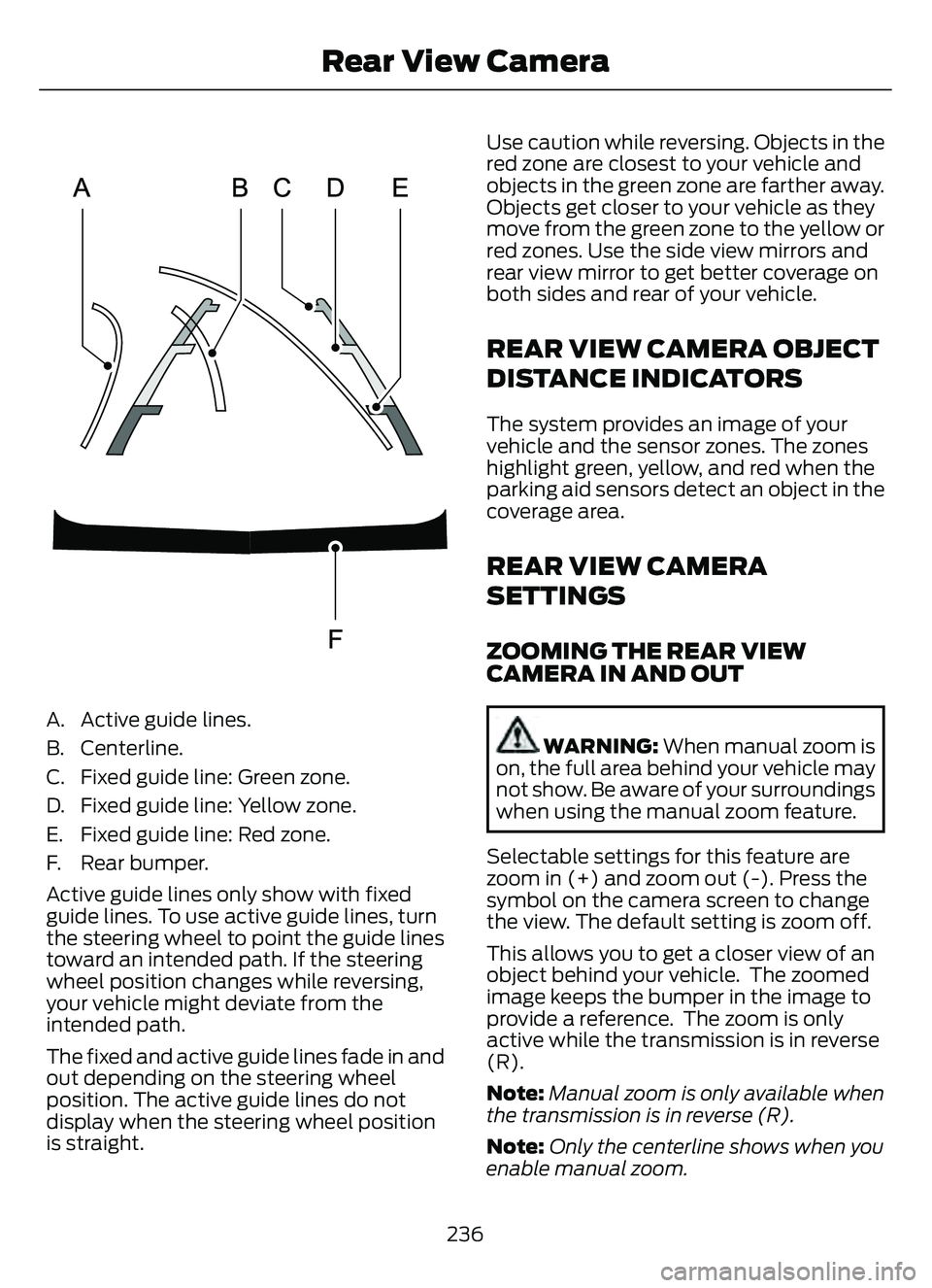
A. Active guide lines.
B. Centerline.
C. Fixed guide line: Green zone.
D. Fixed guide line: Yellow zone.
E. Fixed guide line: Red zone.
F. Rear bumper.
Active guide lines only show with fixed
guide lines. To use active guide lines, turn
the steering wheel to point the guide lines
toward an intended path. If the steering
wheel position changes while reversing,
your vehicle might deviate from the
intended path.
The fixed and active guide lines fade in and
out depending on the steering wheel
position. The active guide lines do not
display when the steering wheel position
is straight.Use caution while reversing. Objects in the
red zone are closest to your vehicle and
objects in the green zone are farther away.
Objects get closer to your vehicle as they
move from the green zone to the yellow or
red zones. Use the side view mirrors and
rear view mirror to get better coverage on
both sides and rear of your vehicle.
REAR VIEW CAMERA OBJECT
DISTANCE INDICATORS
The system provides an image of your
vehicle and the sensor zones. The zones
highlight green, yellow, and red when the
parking aid sensors detect an object in the
coverage area.
REAR VIEW CAMERA
SETTINGS
ZOOMING THE REAR VIEW
CAMERA IN AND OUT
WARNING:
When manual zoom is
on, the full area behind your vehicle may
not show. Be aware of your surroundings
when using the manual zoom feature.
Selectable settings for this feature are
zoom in (+) and zoom out (-). Press the
symbol on the camera screen to change
the view. The default setting is zoom off.
This allows you to get a closer view of an
object behind your vehicle. The zoomed
image keeps the bumper in the image to
provide a reference. The zoom is only
active while the transmission is in reverse
(R).
Note: Manual zoom is only available when
the transmission is in reverse (R).
Note: Only the centerline shows when you
enable manual zoom.
236
Rear View Camera
Page 301 of 585
TOWING A TRAILER
PRECAUTIONS
WARNING: Do not exceed
the GVWR or the GAWR
specified on the certification
label.
WARNING: Towing trailers
beyond the maximum
recommended gross trailer
weight exceeds the limit of your
vehicle and could result in engine
damage, transmission damage,
structural damage, loss of
vehicle control, vehicle rollover
and personal injury.
WARNING: Do not exceed
the lowest rating capacity for
your vehicle or trailer hitch.
Overloading your vehicle or
trailer hitch can impair your
vehicle stability and handling.
Failure to follow this instruction
could result in the loss of control
of your vehicle, personal injury or
death.
WARNING: Make sure that
the vertical load on the tow ball
is between the minimum and
maximum recommended weight
at all times. Failure to follow this
instruction could result in the
loss of control of your vehicle,
personal injury or death.
WARNING: Do not cut,
drill, weld or modify the trailer
hitch. Modifying the trailer hitch
could reduce the hitch rating.
WARNING: The anti-lock
brake system does not control
the trailer brakes.
TRAILER BRAKE
PRECAUTIONS
WARNING: Do not connect a
trailer's hydraulic brake system directly
to your vehicle's brake system. Your
vehicle may not have enough braking
power and your chances of having a
collision greatly increase.
WARNING: Do not tow a trailer
fitted with electric trailer brakes unless
your vehicle is fitted with a compatible
aftermarket electronic trailer brake
controller. Failure to follow this
instruction could result in the loss of
control of your vehicle, personal injury or
death. For additional information and
assistance, we recommend that you
contact an authorized dealer.
Electric brakes and manual, automatic or
surge-type trailer brakes are safe if you
install them properly and adjust them to
the manufacturer's specifications. The
trailer brakes must meet local and federal
regulations.
The rating for the tow vehicle's braking
system operation is at the gross vehicle
weight rating, not the gross combined
weight rating.
298
Towing a Trailer