parking brake FORD ESCAPE 2022 Owners Manual
[x] Cancel search | Manufacturer: FORD, Model Year: 2022, Model line: ESCAPE, Model: FORD ESCAPE 2022Pages: 585, PDF Size: 6.15 MB
Page 10 of 585
Catalytic Converter
What Is the Catalytic Converter ............198
Catalytic Converter Precautions ...........198
Catalytic Converter – Troubleshooting........................................................................\
1 9 8
High Voltage Battery
What Is the High Voltage Battery ..........199
High Voltage Battery Precautions .........199
Charging Your Vehicle - Plug-In Hybrid Electric Vehicle
(PHEV)
What is AC Charging .................................200
Charging Your Vehicle Precautions ......200
Charging Equipment .................................200
Locating the Charge Port ........................203
Charge Port Indicators .............................204
AC Charging ..................................................205
Setting the Charging Schedule andPreferences ..............................................206
Charging Your Vehicle – Troubleshooting ........................................................................\
207
Automatic Transmission
Automatic Transmission Precautions.......................................................................2\
0 9
Automatic Transmission Positions ......209
Shifting Your Vehicle Into Gear ..............210
Automatic Transmission Position Indicators ....................................................210
Temporary Neutral Mode ...........................211
Automatic Return to Park (P) ..................211
Grade Assist - Hybrid Electric Vehicle (HEV) ...........................................................212
Manual Park Release - Gasoline ............212
Automatic Transmission Audible Warnings .....................................................214
Automatic Transmission – Troubleshooting .......................................214
All-Wheel Drive
How Does All-Wheel Drive Work ...........216
All-Wheel Drive Precautions ...................216
All-Wheel Drive Limitations ....................216
All-Wheel Drive – Troubleshooting ......216
Brakes
Brake Precautions ........................................217
Anti-Lock Braking System ........................217
Brake Over Accelerator ..............................217
Locating the Brake Fluid Reservoir ........218
Checking the Brake Fluid ..........................218
Brake Fluid Specification ..........................218
Brakes – Troubleshooting ........................219
Electric Parking Brake
What Is the Electric Parking Brake .......220
Applying the Electric Parking Brake ......220
Applying the Electric Parking Brake in anEmergency ................................................220
Manually Releasing the Electric Parking Brake ...........................................................220
Automatically Releasing the Electric Parking Brake .............................................221
Electric Parking Brake Audible Warning ........................................................................\
.2 2 1
Releasing the Electric Parking Brake if the Vehicle Battery Has Run Out of
Charge ..........................................................221
Electric Parking Brake – Troubleshooting ........................................................................\
.2 2 1
Hill Start Assist
What Is Hill Start Assist ............................223
How Does Hill Start Assist Work ...........223
Hill Start Assist Precautions ...................223
Hill Start Assist – Troubleshooting ......223
Auto Hold
How Does Auto Hold Work .....................224
Switching Auto Hold On and Off ..........224
7
Table of Contents
Page 22 of 585
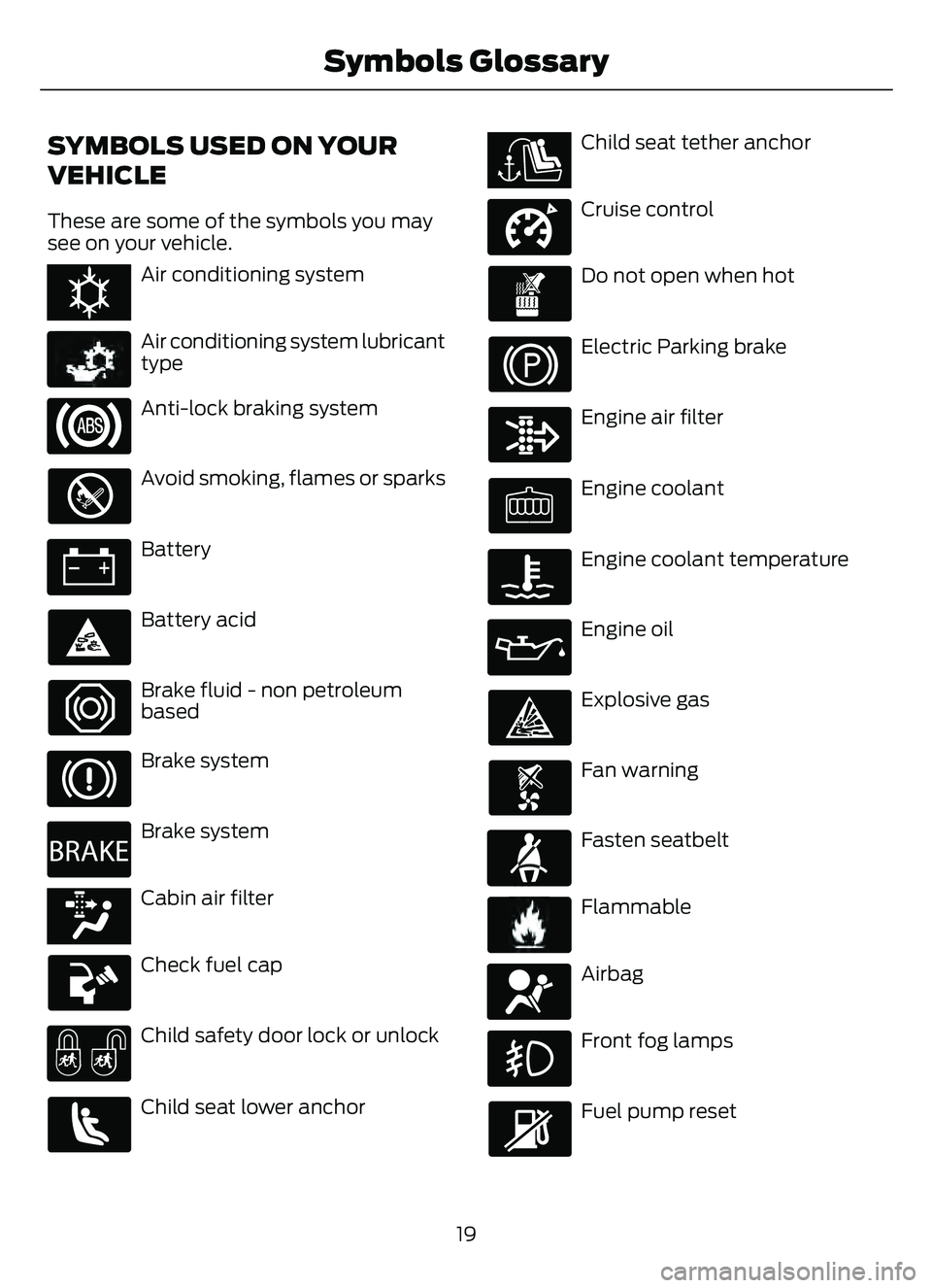
SYMBOLS USED ON YOUR
VEHICLE
These are some of the symbols you may
see on your vehicle.
E162384E162384Air conditioning system
E231157
Air conditioning system lubricant
type
Anti-lock braking system
Avoid smoking, flames or sparks
Battery
Battery acid
Brake fluid - non petroleum
based
Brake system
E270480
Brake system
E139223E139223Cabin air filter
Check fuel cap
Child safety door lock or unlock
Child seat lower anchor
E141E141128128Child seat tether anchor
E332905
Cruise control
Do not open when hot
Electric Parking brake
Engine air filter
Engine coolant
Engine coolant temperature
Engine oil
Explosive gas
Fan warning
E71880
Fasten seatbelt
E231160
Flammable
E67017
Airbag
Front fog lamps
Fuel pump reset
19
Symbols Glossary
Page 47 of 585
When the initial warning expires for the
driver, more warnings are provided for the
driver and front passenger. This warning
tone sounds if you or your front passenger
do not fasten the seatbelt buckle and the
vehicle speed exceeds 6 mph (10 km/h).
This tone also sounds if an occupant
unfastens the rear seatbelt buckle or it
becomes unfastened.
SWITCHING THE SEATBELT
REMINDER ON AND OFF
WARNING: While the system
allows you to deactivate it, this system
is designed to improve your chances of
being safely belted and surviving an
accident. We recommend you leave the
system activated for yourself and others
who may use the vehicle.
Note: The driver and front passenger
warnings switch off independently. When
you perform this procedure for one seating
position, do not buckle the other position as
this cancels the process.
Read Steps 1 - 4 before proceeding with
the programming procedure.
Make sure that:
• You set the parking brake.
• The transmission is in park (P).
• The ignition is off.
• You close all vehicle doors.
• You unfasten the driver and front passenger seatbelts.
1. Switch the ignition on. Do not start the engine. 2. Wait about one minute until the
seatbelt warning light switches off.
After Step 2, wait an additional five
seconds before proceeding with Step
3. Once you start Step 3, you must
complete the procedure within 30
seconds.
3. For the seating position you are switching off, fasten then unfasten the
seatbelt three times at a moderate
speed, ending in the unfastened state.
After Step 3, the seatbelt warning light
switches on.
4. When the seatbelt warning light is on, fasten then unfasten the seatbelt. After
Step 4, the seatbelt warning light
flashes for confirmation.
This switches the feature off for that
seating position if it is currently on.
This switches the feature on for that
seating position if it is currently off.
CHECKING THE SEATBELTS
Check the seatbelts and child restraints
periodically to make sure they work
properly and are not damaged. Make sure
there are no nicks, tears or cuts. Replace if
necessary.
Check the following seatbelt assemblies
after a crash.
• Retractors.
• Buckles.
• Front seatbelt buckle assemblies.
• Shoulder belt height adjusters.
• Shoulder belt guide on seat backrest.
• Child restraint LATCH and tether anchors.
• Attaching hardware.
44
Seatbelts
Page 102 of 585
EXTERIOR LAMPS
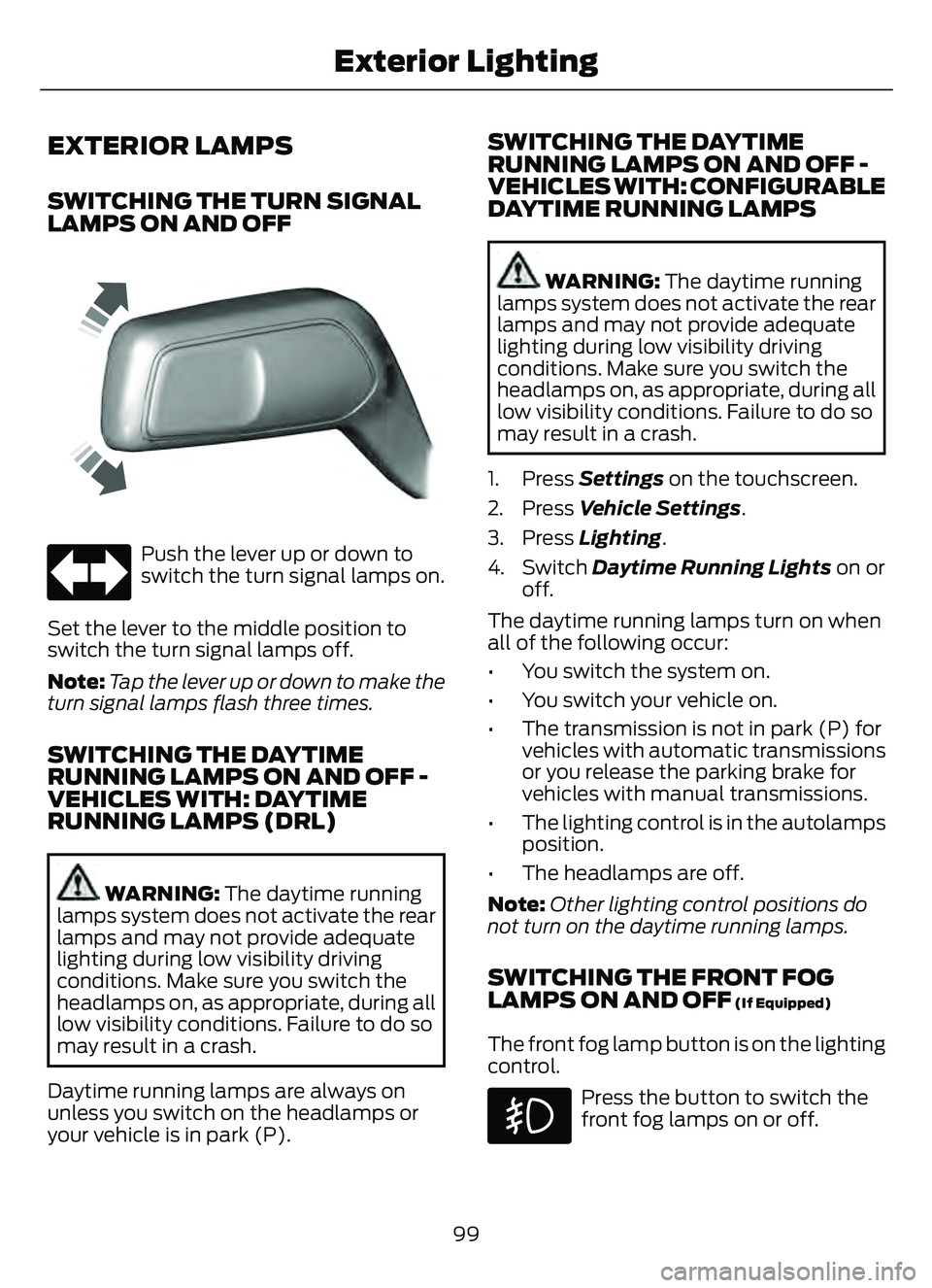
SWITCHING THE TURN SIGNAL
LAMPS ON AND OFF
66E242676
Push the lever up or down to
switch the turn signal lamps on.
Set the lever to the middle position to
switch the turn signal lamps off.
Note: Tap the lever up or down to make the
turn signal lamps flash three times.
SWITCHING THE DAYTIME
RUNNING LAMPS ON AND OFF -
VEHICLES WITH: DAYTIME
RUNNING LAMPS (DRL)
WARNING: The daytime running
lamps system does not activate the rear
lamps and may not provide adequate
lighting during low visibility driving
conditions. Make sure you switch the
headlamps on, as appropriate, during all
low visibility conditions. Failure to do so
may result in a crash.
Daytime running lamps are always on
unless you switch on the headlamps or
your vehicle is in park (P).
SWITCHING THE DAYTIME
RUNNING LAMPS ON AND OFF -
VEHICLES WITH: CONFIGURABLE
DAYTIME RUNNING LAMPS
WARNING: The daytime running
lamps system does not activate the rear
lamps and may not provide adequate
lighting during low visibility driving
conditions. Make sure you switch the
headlamps on, as appropriate, during all
low visibility conditions. Failure to do so
may result in a crash.
1. Press Settings on the touchscreen.
2. Press Vehicle Settings .
3. Press Lighting.
4. Switch Daytime Running Lights on or
off.
The daytime running lamps turn on when
all of the following occur:
• You switch the system on.
• You switch your vehicle on.
• The transmission is not in park (P) for vehicles with automatic transmissions
or you release the parking brake for
vehicles with manual transmissions.
• The lighting control is in the autolamps position.
• The headlamps are off.
Note: Other lighting control positions do
not turn on the daytime running lamps.
SWITCHING THE FRONT FOG
LAMPS ON AND OFF (If Equipped)
The front fog lamp button is on the lighting
control.
Press the button to switch the
front fog lamps on or off.
99
Exterior Lighting
Page 123 of 585
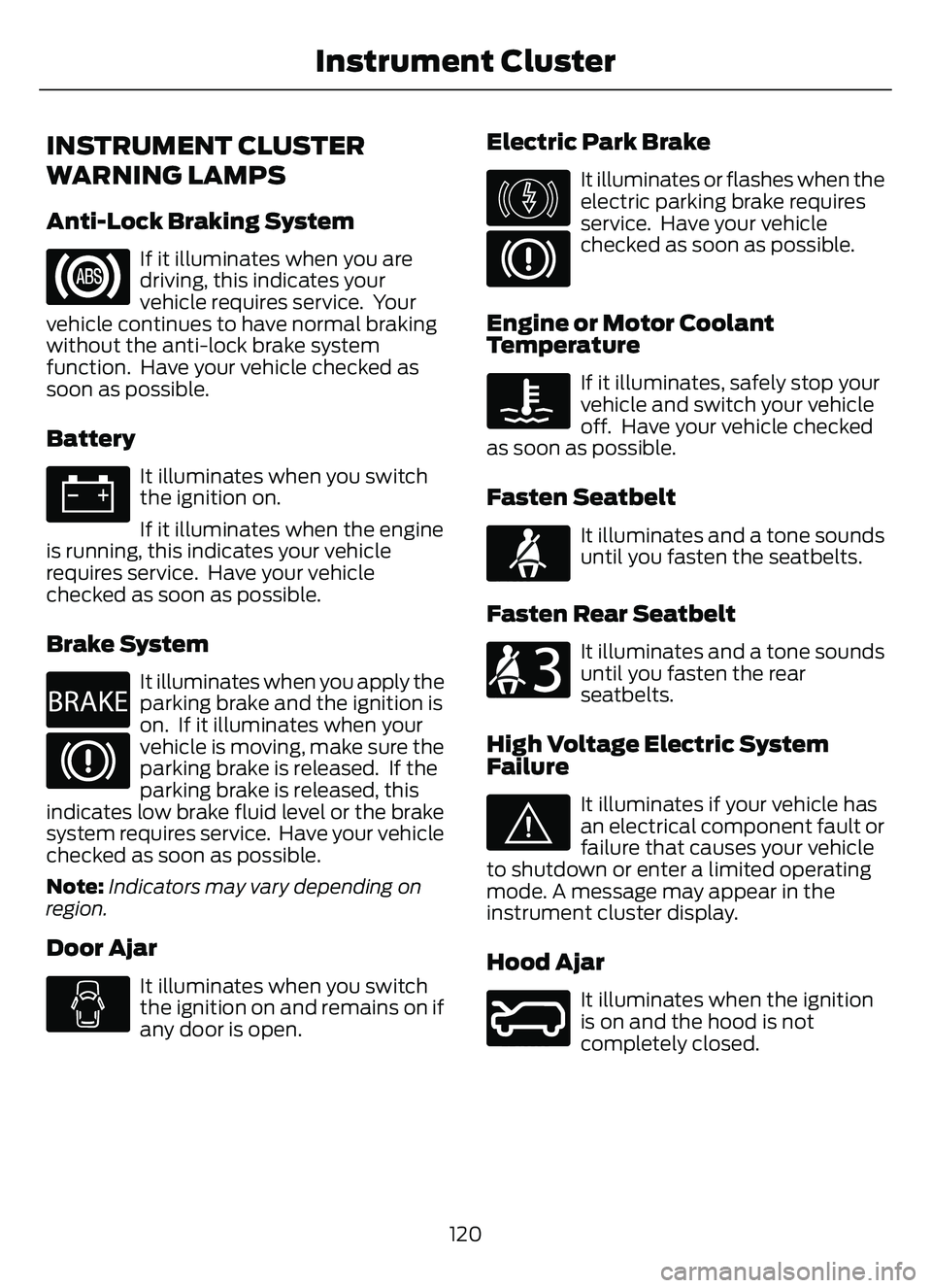
INSTRUMENT CLUSTER
WARNING LAMPS
Anti-Lock Braking System
If it illuminates when you are
driving, this indicates your
vehicle requires service. Your
vehicle continues to have normal braking
without the anti-lock brake system
function. Have your vehicle checked as
soon as possible.
Battery
It illuminates when you switch
the ignition on.
If it illuminates when the engine
is running, this indicates your vehicle
requires service. Have your vehicle
checked as soon as possible.
Brake System
E270480
It illuminates when you apply the
parking brake and the ignition is
on. If it illuminates when your
vehicle is moving, make sure the
parking brake is released. If the
parking brake is released, this
indicates low brake fluid level or the brake
system requires service. Have your vehicle
checked as soon as possible.
Note: Indicators may vary depending on
region.
Door Ajar
It illuminates when you switch
the ignition on and remains on if
any door is open.
Electric Park Brake
E146190
It illuminates or flashes when the
electric parking brake requires
service. Have your vehicle
checked as soon as possible.
Engine or Motor Coolant
Temperature
If it illuminates, safely stop your
vehicle and switch your vehicle
off. Have your vehicle checked
as soon as possible.
Fasten Seatbelt
E71880
It illuminates and a tone sounds
until you fasten the seatbelts.
Fasten Rear Seatbelt
E206718
It illuminates and a tone sounds
until you fasten the rear
seatbelts.
High Voltage Electric System
Failure
E144693
It illuminates if your vehicle has
an electrical component fault or
failure that causes your vehicle
to shutdown or enter a limited operating
mode. A message may appear in the
instrument cluster display.
Hood Ajar
E246598
It illuminates when the ignition
is on and the hood is not
completely closed.
120
Instrument Cluster
Page 148 of 585
Quickly Cooling the Interior
1. Press and release MAX A/C.
Recommended Settings for
Cooling
1. Press and release AUTO.
2. Adjust the temperature function to the setting you prefer. Use 72°F (22°C) as
a starting point, then adjust the setting
as necessary.
Defogging the Side Windows in
Cold Weather
1. Press and release defrost or maximumdefrost.
2. Adjust the temperature control to the setting you prefer. Use 72°F (22°C) as
a starting point, then adjust the setting
as necessary.
HINTS ON CONTROLLING THE
INTERIOR CLIMATE -
VEHICLES WITH: MANUAL
TEMPERATURE CONTROL
General Hints
Note: Prolonged use of recirculated air may
cause the windows to fog up.
Note: You may feel a small amount of air
from the footwell air vents regardless of the
air distribution setting.
Note: To reduce humidity build-up inside
your vehicle, do not drive with the system
switched off or with recirculated air always
switched on.
Note: Do not place objects under the front
seats as this may interfere with the airflow
to the rear seats.
Note: Remove any snow, ice or leaves from
the air intake area at the base of the
windshield. Note:
To improve the time to reach a
comfortable temperature in hot weather,
drive with the windows open until you feel
cold air through the air vents.
Quickly Heating the Interior
1. Adjust the blower motor speed to the highest speed setting.
2. Adjust the temperature control to the highest setting.
3. Direct air to the footwell air vents.
Recommended Settings for
Heating
1. Adjust the blower motor speed to the center setting.
2. Adjust the temperature control to the midway point of the hot settings.
3. Direct air to the footwell air vents.
Quickly Cooling the Interior
1. Switch MAX A/C on.
2. Drive with the windows open for a short period of time.
Recommended Settings for
Cooling
1. Adjust the blower motor speed to thecenter setting.
2. Adjust the temperature control to the midway point of the cold settings.
3. Direct air to the instrument panel air vents.
Vehicle Stationary for Extended
Periods During Extreme High
Ambient Temperatures
1. Apply the parking brake.
2. Place your vehicle in park (P) or neutral(N).
3. Switch MAX A/C on.
145
Climate Control
Page 175 of 585
Starting the Engine
Turn the key to position III. Release the
key when the engine starts.
PUSH BUTTON IGNITION
SWITCH
E321258E321258
Switching the Ignition Off
When the ignition is on or in accessory
mode, press the push button ignition
switch once without your foot on the brake
pedal.
Switching the Ignition to
Accessory Mode
When the ignition is off, press the push
button ignition switch once without your
foot on the brake pedal.
All electrical circuits and accessories are
operational and the warning lamps and
indicators illuminate.
Note:Your vehicle has a battery saver
feature that shuts your vehicle off when it
detects a certain amount of battery drain,
or after approximately 30 minutes of
inactivity in accessory mode.
Starting the Engine
With the transmission in park (P), press
the brake pedal and press the push button
ignition switch. An indicator light on the
button illuminates when the ignition is on
and when the engine starts. Note:
The system may not function if the
passive key is close to metal objects or
electronic devices, for example keys or a cell
phone.
Note: A valid key must be inside your
vehicle to switch the ignition on and start
the engine.
STARTING THE ENGINE
STARTING A GASOLINE ENGINE
Vehicles Without Push Button
Start
Before starting the engine, check the
following:
• Make sure the headlamps and electrical accessories are off.
• Make sure the parking brake is on.
• Make sure the transmission is in park (P).
1. Fully press the brake pedal.
Note: Do not touch the accelerator pedal.
E322354E322354
2. Turn the key to position III.
Note: The engine may continue cranking
for up to 15 seconds or until it starts.
Note: The engine takes longer to start at
lower temperatures. It may crank for several
seconds when very cold.
172
Starting and Stopping the Engine
Page 176 of 585
Vehicles With Push Button Start
Before starting the engine, check the
following:
• Make sure the headlamps andelectrical accessories are off.
• Make sure the parking brake is on.
• Make sure the transmission is in park (P).
1. Fully press the brake pedal.
Note: Do not touch the accelerator pedal.
E321258E321258
2. Press the push button ignition switch.
Note:The engine may continue cranking
for up to 15 seconds or until it starts.
Note: The engine takes longer to start at
lower temperatures. It may crank for several
seconds when very cold.
STARTING A HYBRID ELECTRIC
VEHICLE SYSTEM
Before starting your vehicle, check the
following:
• Make sure the headlamps and electrical accessories are off.
• Make sure the parking brake is on.
• Make sure the transmission is in park (P).
Note: Do not touch the accelerator pedal.
1. Fully press the brake pedal.
E321258E321258
2. Press the push button ignition switch.
Note: The green ready indicator illuminates
letting you know that your vehicle is ready
for driving. Since your vehicle is equipped
with a silent key start, the engine may not
start when your vehicle starts.
When the engine starts for the first time
on your drive, the idle speed increases, this
helps to warm up the engine. If the engine
idle speed does not slow down, have your
vehicle checked by an authorized dealer.
The system does not function if:
• The passive key frequencies are jammed.
• The key battery has no charge.
RESTARTING THE ENGINE AFTER
STOPPING IT
The system allows you to start the engine
within 10 seconds of switching it off, even
if it does not detect a valid passive key.
Within 10 seconds of switching the engine
off, fully press the brake pedal and press
the push button ignition switch. After 10
seconds, you can no longer start the engine
if the system does not detect a valid
passive key.
When you start the engine, it remains
running until you press the push button
ignition switch, even if your vehicle does
not detect a valid passive key. If you open
and close a door when the engine is
running, the system searches for a valid
passive key.
173
Starting and Stopping the Engine
Page 178 of 585
The heater uses 0.4 to 1.0 kilowatt-hours
of energy per hour of use. The system does
not have a thermostat. It achieves
maximum temperature after
approximately three hours of operation.
Using the engine block heater longer than
three hours does not improve system
performance and unnecessarily uses
electricity.
STOPPING THE ENGINE
STOPPING THE ENGINE WHEN
YOUR VEHICLE IS STATIONARY
Vehicles Without Push Button
Start
1. Shift into park (P).
2. Apply the parking brake.
3. Wait until the engine reaches idlespeed.
E322405E322405
4. Turn the key to position 0.
Vehicles With Push Button Start
1. Shift into park (P).
2. Apply the parking brake.
3. Wait until the engine reaches idle
speed.
E321258E321258
4. Press the push button ignition switch.
STOPPING THE ENGINE WHEN
YOUR VEHICLE IS MOVING
WARNING: Switching off the
engine when your vehicle is still moving
results in a significant decrease in
braking assistance. Higher effort is
required to apply the brakes and to stop
your vehicle. A significant decrease in
steering assistance could also occur. The
steering does not lock, but higher effort
could be required to steer your vehicle.
When you switch the ignition off, some
electrical circuits, for example airbags,
also turn off. If you unintentionally switch
the ignition off, shift into neutral (N) and
restart the engine.
Vehicles Without Push Button
Start
E322405E322405
1. Turn the key to position 0.
2. Shift into neutral and use the brakes to bring your vehicle to a safe stop.
3. Shift into park (P).
4. Apply the parking brake.
Vehicles With Push Button Start
E321258E321258
1. Press and hold the push button ignition switch until the engine stops, or press
it three times within two seconds.
175
Starting and Stopping the Engine
Page 179 of 585
2. Shift into neutral and use the brakes tobring your vehicle to a safe stop.
3. Shift into park (P).
4. Apply the parking brake.
AUTOMATIC ENGINE STOP (IF
EQUIPPED)
WHAT IS AUTOMATIC ENGINE
STOP
Automatic engine stop is a feature that
switches the engine off if it has been idling
for an extended period to help you save
fuel.
HOW DOES AUTOMATIC ENGINE
STOP WORK
Automatic engine stop turns the engine
off. The ignition also turns off in order to
save battery power. Before the engine
shuts down, a message appears in the
information display showing a timer
counting down. If you do not intervene
within 30 seconds, the engine shuts down.
Another message appears in the
information display to inform you that the
engine has shut down in order to save fuel.
Start your vehicle as you normally do.
SWITCHING AUTOMATIC ENGINE
STOP ON AND OFF
1. Press Settings on the touchscreen.
2. Press Vehicle Settings .
3. Switch 30min Max Idle on or off.
Note: You cannot permanently switch off
the automatic shutdown. If you switch it
off, it turns on each time you switch the
ignition on.
OVERRIDING AUTOMATIC ENGINE
STOP
You can stop the engine shutdown, or reset
the timer, at any point before the
30-second countdown has expired by
doing any of the following:
• Pressing the brake pedal or accelerator pedal.
• Pressing the OK or RESET button during the countdown.
Note: You cannot permanently switch off
the automatic engine shutdown feature.
When you switch it off temporarily, it turns
on at the next ignition cycle.
STARTING AND STOPPING
THE ENGINE –
TROUBLESHOOTING
STARTING AND STOPPING THE
ENGINE – WARNING LAMPS
Malfunction Indicator Lamp
If it illuminates when the engine
is running, the on-board
diagnostics system is detecting
a malfunction of the vehicle emission
control system.
If it flashes, engine misfire could be
occurring. Increased exhaust gas
temperatures could damage the catalytic
converter or other vehicle components.
Avoid heavy acceleration and deceleration,
and have your vehicle checked as soon as
possible.
176
Starting and Stopping the Engine