schedule FORD ESCAPE 2022 Owners Manual
[x] Cancel search | Manufacturer: FORD, Model Year: 2022, Model line: ESCAPE, Model: FORD ESCAPE 2022Pages: 585, PDF Size: 6.15 MB
Page 10 of 585
Catalytic Converter
What Is the Catalytic Converter ............198
Catalytic Converter Precautions ...........198
Catalytic Converter – Troubleshooting........................................................................\
1 9 8
High Voltage Battery
What Is the High Voltage Battery ..........199
High Voltage Battery Precautions .........199
Charging Your Vehicle - Plug-In Hybrid Electric Vehicle
(PHEV)
What is AC Charging .................................200
Charging Your Vehicle Precautions ......200
Charging Equipment .................................200
Locating the Charge Port ........................203
Charge Port Indicators .............................204
AC Charging ..................................................205
Setting the Charging Schedule andPreferences ..............................................206
Charging Your Vehicle – Troubleshooting ........................................................................\
207
Automatic Transmission
Automatic Transmission Precautions.......................................................................2\
0 9
Automatic Transmission Positions ......209
Shifting Your Vehicle Into Gear ..............210
Automatic Transmission Position Indicators ....................................................210
Temporary Neutral Mode ...........................211
Automatic Return to Park (P) ..................211
Grade Assist - Hybrid Electric Vehicle (HEV) ...........................................................212
Manual Park Release - Gasoline ............212
Automatic Transmission Audible Warnings .....................................................214
Automatic Transmission – Troubleshooting .......................................214
All-Wheel Drive
How Does All-Wheel Drive Work ...........216
All-Wheel Drive Precautions ...................216
All-Wheel Drive Limitations ....................216
All-Wheel Drive – Troubleshooting ......216
Brakes
Brake Precautions ........................................217
Anti-Lock Braking System ........................217
Brake Over Accelerator ..............................217
Locating the Brake Fluid Reservoir ........218
Checking the Brake Fluid ..........................218
Brake Fluid Specification ..........................218
Brakes – Troubleshooting ........................219
Electric Parking Brake
What Is the Electric Parking Brake .......220
Applying the Electric Parking Brake ......220
Applying the Electric Parking Brake in anEmergency ................................................220
Manually Releasing the Electric Parking Brake ...........................................................220
Automatically Releasing the Electric Parking Brake .............................................221
Electric Parking Brake Audible Warning ........................................................................\
.2 2 1
Releasing the Electric Parking Brake if the Vehicle Battery Has Run Out of
Charge ..........................................................221
Electric Parking Brake – Troubleshooting ........................................................................\
.2 2 1
Hill Start Assist
What Is Hill Start Assist ............................223
How Does Hill Start Assist Work ...........223
Hill Start Assist Precautions ...................223
Hill Start Assist – Troubleshooting ......223
Auto Hold
How Does Auto Hold Work .....................224
Switching Auto Hold On and Off ..........224
7
Table of Contents
Page 16 of 585
Connecting the Vehicle to a MobileNetwork .....................................................405
Connecting the Vehicle to a Wi-Fi Network .....................................................405
Connected Vehicle – Troubleshooting - Vehicles With: Modem .........................406
Connected Vehicle – Troubleshooting - Vehicles With: SYNC 3 ..........................407
Vehicle Wi-Fi Hotspot
Creating a Vehicle Wi-Fi Hotspot ........409
Changing the Vehicle Wi-Fi HotspotName or Password ................................409
Audio System
Audio System Precautions ......................410
Switching the Audio Unit On and Off........................................................................\
4 1 0
Selecting the Audio Source .....................410
Playing or Pausing the Audio Source ........................................................................\
4 1 0
Adjusting the Volume ................................410
Switching Shuffle Mode On and Off ........................................................................\
4 1 0
Switching Repeat Mode On and Off ........................................................................\
4 1 0
Setting a Memory Preset .........................410
Muting the Audio ..........................................411
Adjusting the Sound Settings ..................411
Setting the Clock and Date .......................411
AM/FM Radio ................................................412
Digital Radio ..................................................412
Satellite Radio ..............................................414
SYNC™
General Information ...................................415
Using Voice Recognition ...........................416
Using SYNC™ With Your Phone ............418
SYNC™ Applications and Services ......419
Using SYNC™ With Your Media Player ........................................................................\
.421
SYNC™ Troubleshooting .........................421
SYNC™ 3
General Information ...................................431
Using Voice Recognition ..........................433
Entertainment .............................................440
Phone .............................................................450
Navigation .....................................................452
Electric Vehicle Information ....................457
Apps ................................................................462
Settings ..........................................................464
SYNC™ 3 Troubleshooting ....................466
Accessories
Accessories ...................................................479
Ford Protect
What Is Ford Protect ................................480
Scheduled Maintenance
General Maintenance Information ......482
Normal Scheduled Maintenance .........485
Special Operating Conditions Scheduled Maintenance ............................................487
Customer Information
Rollover Warning ........................................490
The Better Business Bureau Auto LineProgram .....................................................490
The Mediation and Arbitration Program ........................................................................\
.491
Ordering a Canadian French Owner's Manual ........................................................491
Reporting Safety Defects in the United States .........................................................492
Reporting Safety Defects in Canada ........................................................................\
492
Radio Frequency Certification Labels ........................................................................\
493
Perchlorate ...................................................530
Replacement Parts Recommendation ........................................................................\
530
13
Table of Contents
Page 150 of 585
WHAT IS THE CABIN AIR
FILTER
The cabin air filter improves the quality of
air in your vehicle by trapping dust, pollen
and other particles.
REPLACING THE CABIN AIR
FILTER
Replace the filter at regular intervals. See
Scheduled Maintenance (page 482).
The cabin air filter is behind the glove
compartment.
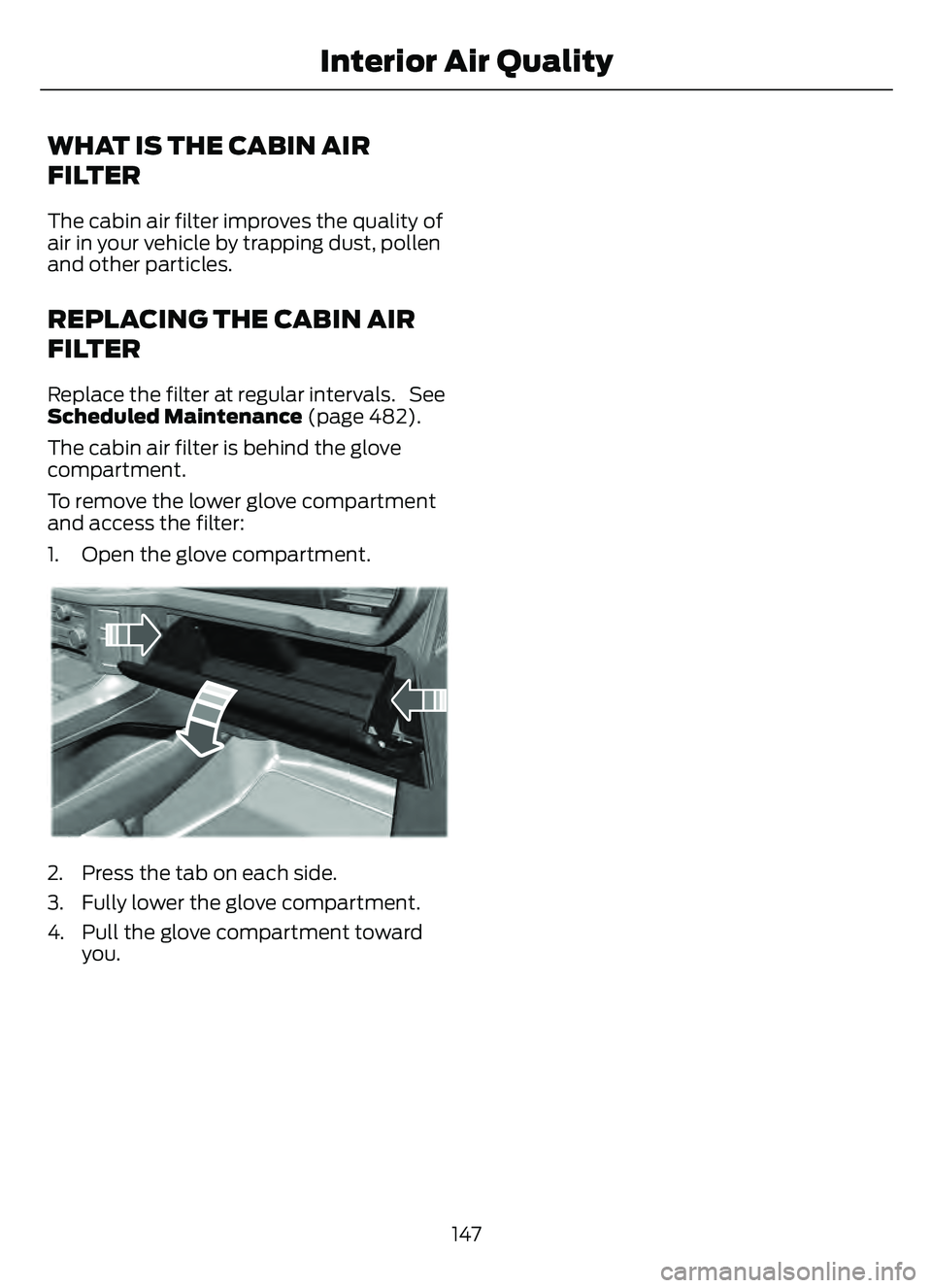
To remove the lower glove compartment
and access the filter:
1. Open the glove compartment.
E31E31E31E1296129612
2. Press the tab on each side.
3. Fully lower the glove compartment.
4. Pull the glove compartment towardyou.
147
Interior Air Quality
Page 201 of 585
WHAT IS THE CATALYTIC
CONVERTER
The catalytic converter is part of your
vehicle's emissions system and filters
harmful pollutants from the exhaust gas.
CATALYTIC CONVERTER
PRECAUTIONS
WARNING: Do not park, idle or
drive your vehicle on dry grass or other
dry ground cover. The emission system
heats up the engine compartment and
exhaust system, creating the risk of fire.
WARNING: The normal operating
temperature of the exhaust system is
very high. Never work around or attempt
to repair any part of the exhaust system
until it has cooled. Use special care when
working around the catalytic converter.
The catalytic converter heats up to a very
high temperature after only a short
period of engine operation and stays hot
after the engine is switched off.
WARNING: Exhaust leaks may
result in entry of harmful and potentially
lethal fumes into the passenger
compartment. If you smell exhaust
fumes inside your vehicle, have your
vehicle inspected immediately. Do not
drive if you smell exhaust fumes.
To avoid damaging the catalytic converter:
• Do not crank the engine for more than 10 seconds at a time.
• Do not run the engine with a spark plug lead disconnected.
• Do not push-start or tow-start your vehicle. Use booster cables. See Jump
Starting the Vehicle (page 311). • Use the correct fuel. See Fuel and
Refueling (page 187).
• Do not switch the ignition off when your vehicle is moving.
• Avoid running out of fuel.
• Have the items listed in scheduled maintenance information performed
according to the specified schedule.
Note: Do not make any unauthorized
changes to your vehicle or engine. By law,
vehicle owners and anyone who
manufactures, repairs, or services a fleet of
vehicles are not permitted to intentionally
remove an emission control device or
prevent it from working.
CATALYTIC CONVERTER –
TROUBLESHOOTING
CATALYTIC CONVERTER –
WARNING LAMPS
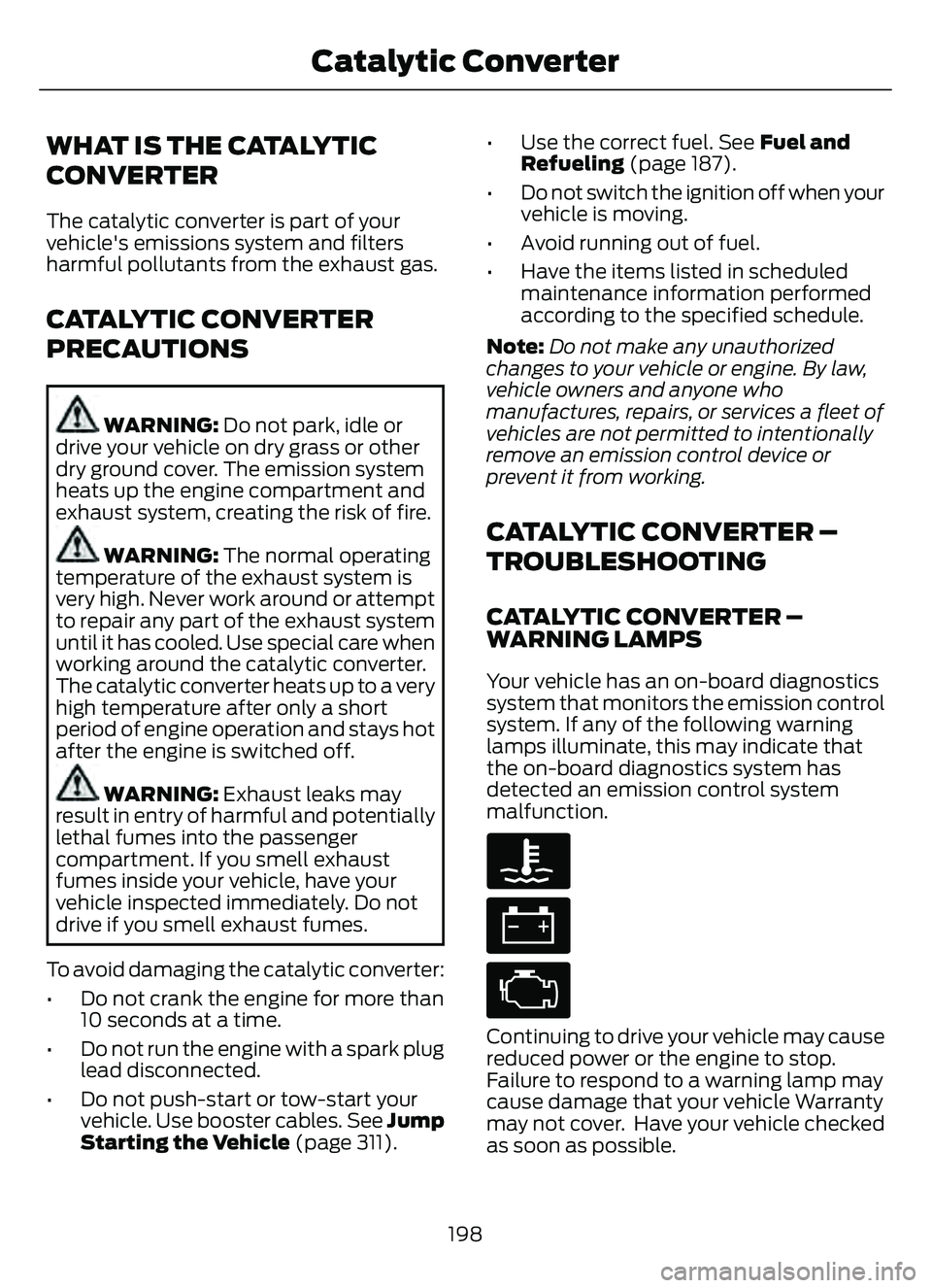
Your vehicle has an on-board diagnostics
system that monitors the emission control
system. If any of the following warning
lamps illuminate, this may indicate that
the on-board diagnostics system has
detected an emission control system
malfunction.
Continuing to drive your vehicle may cause
reduced power or the engine to stop.
Failure to respond to a warning lamp may
cause damage that your vehicle Warranty
may not cover. Have y our vehicle checked
as soon as possible.
198
Catalytic Converter
Page 209 of 585
Note:You need a padlock or a combination
lock with a shackle diameter of 0.2 in
(5 mm) or less, and the straight portion of
the shackle of 1.0 in (25.4 mm) of length or
more.
1. Insert the lock through the hole in the charging coupler button.
2. Lock the padlock or combination lock.
STOPPING CHARGING
1. If you have installed a padlock or combination lock, then remove it.
2. Press the button on the charging coupler.
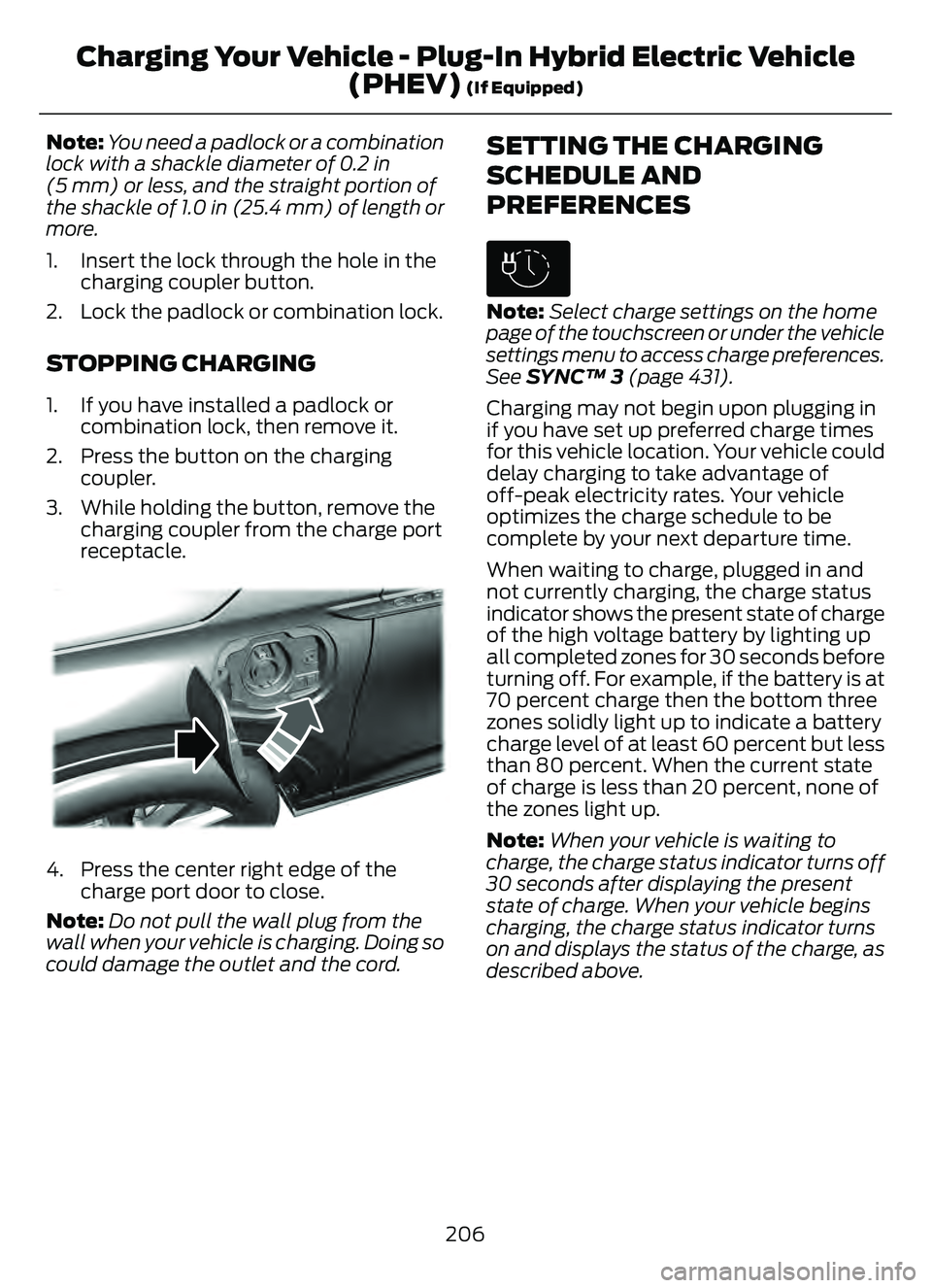
3. While holding the button, remove the charging coupler from the charge port
receptacle.
E295444E295444E295444
4. Press the center right edge of thecharge port door to close.
Note: Do not pull the wall plug from the
wall when your vehicle is charging. Doing so
could damage the outlet and the cord.
SETTING THE CHARGING
SCHEDULE AND
PREFERENCES
E306678
Note: Select charge settings on the home
page of the touchscreen or under the vehicle
settings menu to access charge preferences.
See SYNC™ 3 (page 431).
Charging may not begin upon plugging in
if you have set up preferred charge times
for this vehicle location. Your vehicle could
delay charging to take advantage of
off-peak electricity rates. Your vehicle
optimizes the charge schedule to be
complete by your next departure time.
When waiting to charge, plugged in and
not currently charging, the charge status
indicator shows the present state of charge
of the high voltage battery by lighting up
all completed zones for 30 seconds before
turning off. For example, if the battery is at
70 percent charge then the bottom three
zones solidly light up to indicate a battery
charge level of at least 60 percent but less
than 80 percent. When the current state
of charge is less than 20 percent, none of
the zones light up.
Note: When your vehicle is waiting to
charge, the charge status indicator turns off
30 seconds after displaying the present
state of charge. When your vehicle begins
charging, the charge status indicator turns
on and displays the status of the charge, as
described above.
206
Charging Your Vehicle - Plug-In Hybrid Electric Vehicle (PHEV)
(If Equipped)
Page 222 of 585
BRAKES –
TROUBLESHOOTING
BRAKES – WARNING LAMPS
If the ABS indicator illuminates
when you are driving, this
indicates a malfunction. Your
vehicle continues to have normal braking
without the anti-lock braking system
function. See an authorized dealer.
It also momentarily illuminates when you
switch the ignition on to confirm the lamp
is functional. If it does not illuminate when
you switch the ignition on, or begins to
flash at any time, have the system checked
by an authorized dealer.
E270480The brake indicator momentarily
illuminates when you switch the
ignition on to confirm the lamp
is functional. It may also illuminate when
you apply the parking brake and the
ignition is on. If it illuminates when your
vehicle is moving, make sure the parking
brake is disengaged. If the parking brake
is disengaged, this indicates low brake fluid
level or a brake system fault. See an
authorized dealer.
BRAKES – FREQUENTLY ASKED
QUESTIONS
Is brake dust on the wheels normal?
Brake dust could accumulate on the
wheels, even under normal driving
conditions. Some dust is inevitable as
the brakes wear and does not
contribute to brake noise. See
Cleaning Wheels (page 350). Will wet driving conditions effect my
braking abilities?
Wet brakes result in reduced braking
efficiency. Gently press the brake
pedal a few times when driving from
a car wash or standing water to dry the
brakes.
Is brake noise considered normal? Occasional brake noise is normal. If a
metal-to-metal, continuous grinding
or continuous squeal sound is present,
the brake linings may be worn-out and
an authorized dealer should check
them. If the vehicle has continuous
vibration or shudder in the steering
wheel while braking, an authorized
dealer should check your vehicle.
When should you replace the brake
fluid? Brake fluid absorbs water over time
which degrades the effectiveness of
the brake fluid. Change the brake fluid
at the specified intervals to prevent
degraded braking performance. See
Normal Scheduled Maintenance
(page 485).
219
Brakes
Page 260 of 585
WHAT IS DRIVE MODE
CONTROL
The system delivers a driving experience
through a suite of sophisticated electronic
vehicle systems. These systems optimize
steering, handling and powertrain
response. This provides a single location
to control multiple systems performance
settings.
Changing the drive mode changes the
functionality of the following systems:
• Electric power-assisted steeringsystem adjusts steering effort and feel
based on the mode you select. See
Electric Power Steering
Precautions (page 229).
• Electronic stability control and traction control maintain your vehicle control
in adverse conditions or high
performance driving. See Stability
Control (page 227).
• Electronic throttle control enhances the powertrain response to your driving
inputs.
• Transmission controls become optimized with shift schedules tuned
to each mode.
• Four-wheel drive settings are optimized and tuned to each mode.
• Electric vehicle mode selections may be limited.
The system tailors your vehicle
configuration for each mode you select.
Note: Not all settings may be available.
Note: The system has diagnostic checks
that continuously monitor the system for
proper operation. If a mode is unavailable
due to a system fault or change in gear
shifter position, the mode defaults to
Normal.
SELECTING A DRIVE MODE -
EXCLUDING: PLUG-IN HYBRID
ELECTRIC VEHICLE (PHEV)
Note: Drive mode changes may not be
available when the ignition is off.
Note: Button icon shown may vary from
your vehicle.
Note: Selected drive mode displays in the
information display.
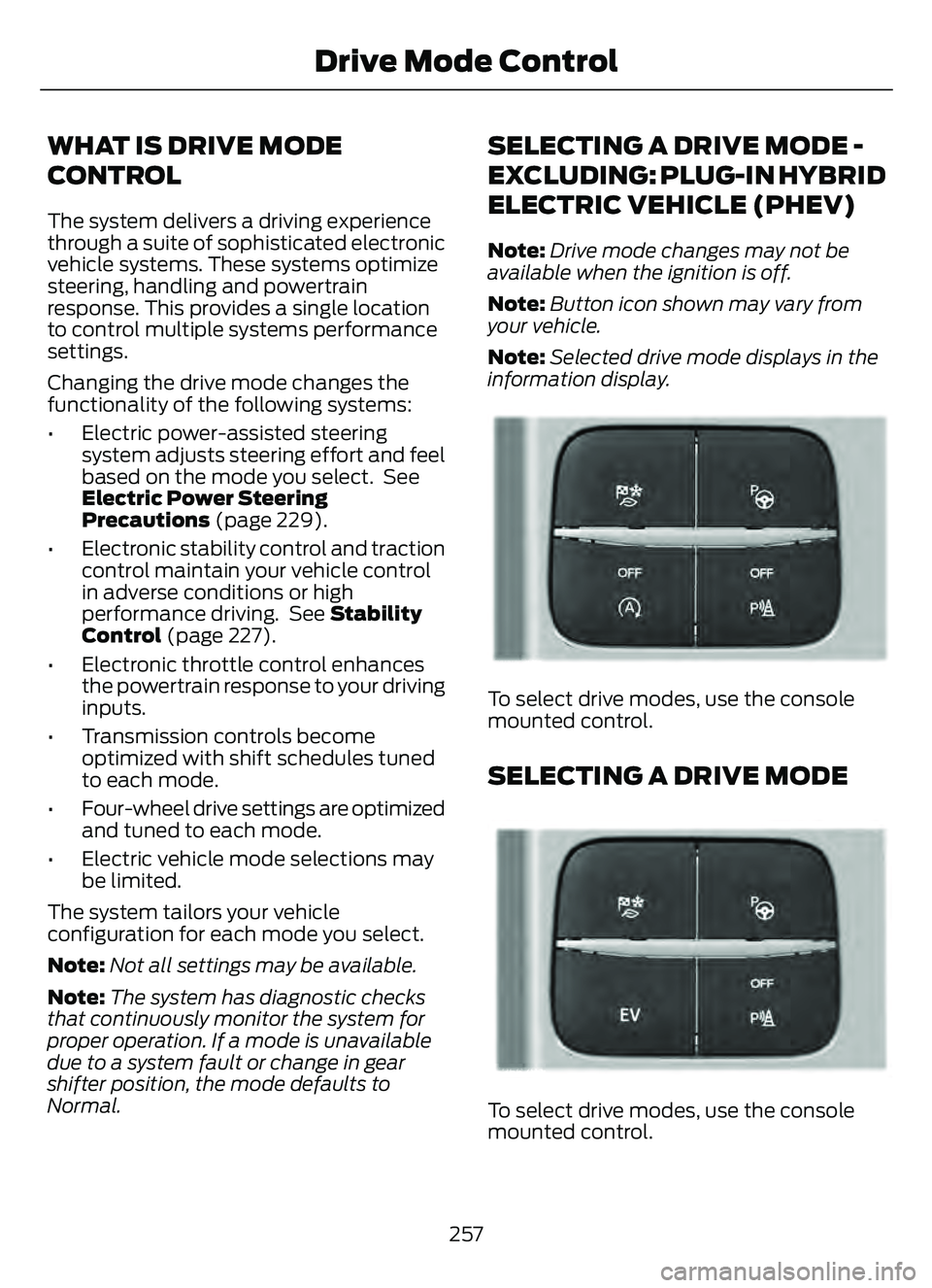
E306303E306303E306E306EE306E306E306E306E3063066E306EE306EE3063333333303033033033033303303303
To select drive modes, use the console
mounted control.
SELECTING A DRIVE MODE
E356781E356EEE356E356EE356E356E3566E356E356EE3566777777787817817817817817781781
To select drive modes, use the console
mounted control.
257
Drive Mode Control
Page 299 of 585
CONNECTING A TRAILER
PRECAUTIONS
Do not tow a trailer until you drive your
vehicle at least 1,000 mi (1,600 km).
Consult your local motor vehicle laws for
towing a trailer.
See the instructions included with towing
accessories for the proper installation and
adjustment specifications.
Service your vehicle more frequently if you
tow a trailer. See Normal Scheduled
Maintenance (page 485).
If you use a rental trailer, follow the
instructions the rental agency gives you.
When attaching the trailer wiring connector
to your vehicle, only use a proper fitting
connector that works with the vehicle and
trailer functions.
Account for the trailer coupler weight as
part of your vehicle load when calculating
the total vehicle weight.
Do not exceed the load limits. See
Calculating the Load Limit (page 290).
CONNECTING A TRAILER
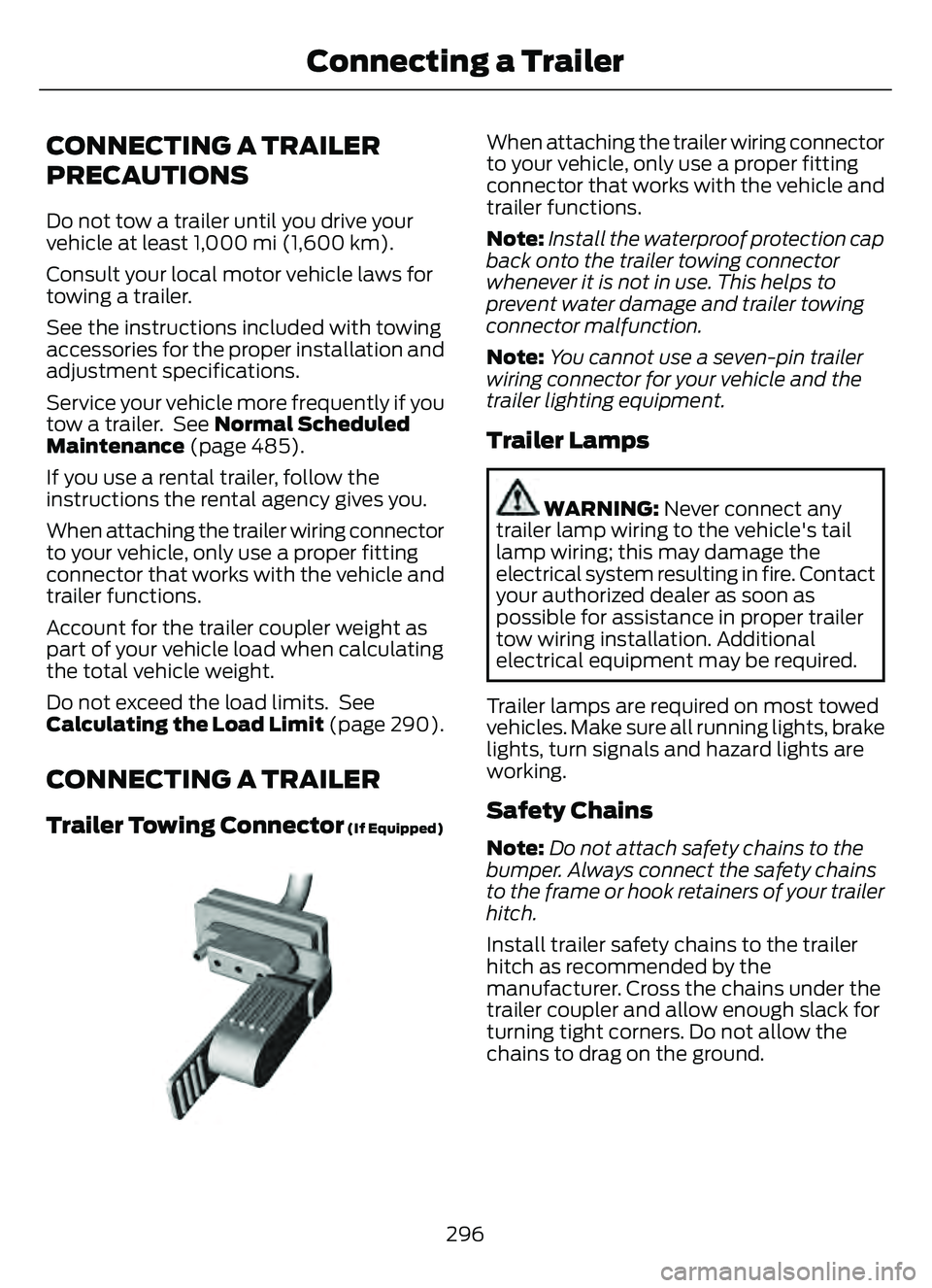
Trailer Towing Connector (If Equipped)
E168683E168683
When attaching the trailer wiring connector
to your vehicle, only use a proper fitting
connector that works with the vehicle and
trailer functions.
Note:Install the waterproof protection cap
back onto the trailer towing connector
whenever it is not in use. This helps to
prevent water damage and trailer towing
connector malfunction.
Note: You cannot use a seven-pin trailer
wiring connector for your vehicle and the
trailer lighting equipment.
Trailer Lamps
WARNING: Never connect any
trailer lamp wiring to the vehicle's tail
lamp wiring; this may damage the
electrical system resulting in fire. Contact
your authorized dealer as soon as
possible for assistance in proper trailer
tow wiring installation. Additional
electrical equipment may be required.
Trailer lamps are required on most towed
vehicles. Make sure all running lights, brake
lights, turn signals and hazard lights are
working.
Safety Chains
Note:Do not attach safety chains to the
bumper. Always connect the safety chains
to the frame or hook retainers of your trailer
hitch.
Install trailer safety chains to the trailer
hitch as recommended by the
manufacturer. Cross the chains under the
trailer coupler and allow enough slack for
turning tight corners. Do not allow the
chains to drag on the ground.
296
Connecting a Trailer
Page 307 of 585
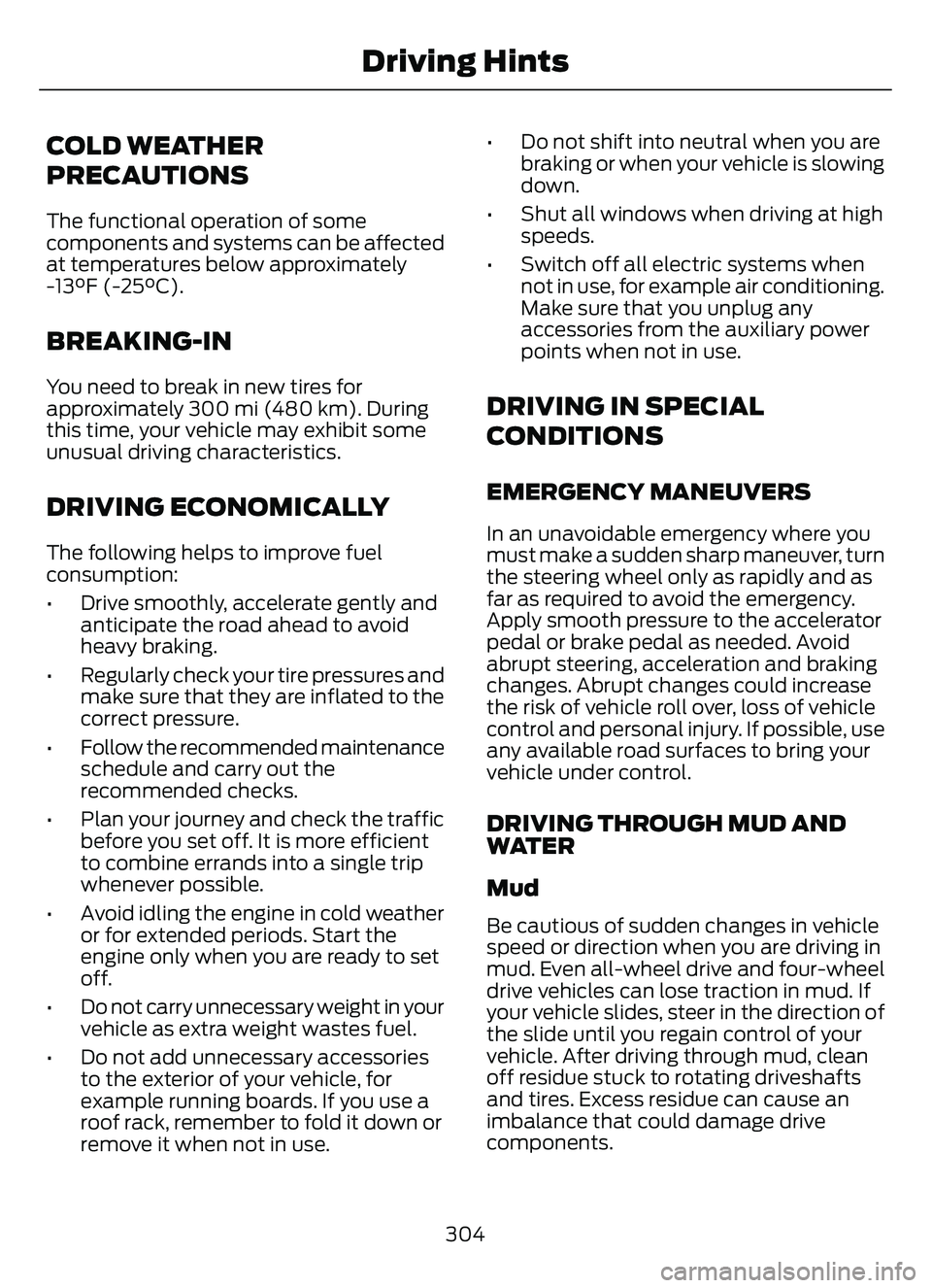
COLD WEATHER
PRECAUTIONS
The functional operation of some
components and systems can be affected
at temperatures below approximately
-13°F (-25°C).
BREAKING-IN
You need to break in new tires for
approximately 300 mi (480 km). During
this time, your vehicle may exhibit some
unusual driving characteristics.
DRIVING ECONOMICALLY
The following helps to improve fuel
consumption:
• Drive smoothly, accelerate gently andanticipate the road ahead to avoid
heavy braking.
• Regularly check your tire pressures and make sure that they are inflated to the
correct pressure.
• Follow the recommended maintenance schedule and carry out the
recommended checks.
• Plan your journey and check the traffic before you set off. It is more efficient
to combine errands into a single trip
whenever possible.
• Avoid idling the engine in cold weather or for extended periods. Start the
engine only when you are ready to set
off.
• Do not carry unnecessary weight in your vehicle as extra weight wastes fuel.
• Do not add unnecessary accessories to the exterior of your vehicle, for
example running boards. If you use a
roof rack, remember to fold it down or
remove it when not in use. • Do not shift into neutral when you are
braking or when your vehicle is slowing
down.
• Shut all windows when driving at high speeds.
• Switch off all electric systems when not in use, for example air conditioning.
Make sure that you unplug any
accessories from the auxiliary power
points when not in use.
DRIVING IN SPECIAL
CONDITIONS
EMERGENCY MANEUVERS
In an unavoidable emergency where you
must make a sudden sharp maneuver, turn
the steering wheel only as rapidly and as
far as required to avoid the emergency.
Apply smooth pressure to the accelerator
pedal or brake pedal as needed. Avoid
abrupt steering, acceleration and braking
changes. Abrupt changes could increase
the risk of vehicle roll over, loss of vehicle
control and personal injury. If possible, use
any available road surfaces to bring your
vehicle under control.
DRIVING THROUGH MUD AND
WATER
Mud
Be cautious of sudden changes in vehicle
speed or direction when you are driving in
mud. Even all-wheel drive and four-wheel
drive vehicles can lose traction in mud. If
your vehicle slides, steer in the direction of
the slide until you regain control of your
vehicle. After driving through mud, clean
off residue stuck to rotating driveshafts
and tires. Excess residue can cause an
imbalance that could damage drive
components.
304
Driving Hints
Page 337 of 585
3. Add engine oil that meets ourspecifications. See Capacities and
Specifications (page 387).
4. Reinstall the engine oil filler cap. Turn it clockwise until you feel a strong
resistance.
Note: Do not add oil further than the
maximum mark. Oil levels above the
maximum mark may cause engine damage.
Note: Immediately soak up any oil spillage
with an absorbent cloth.
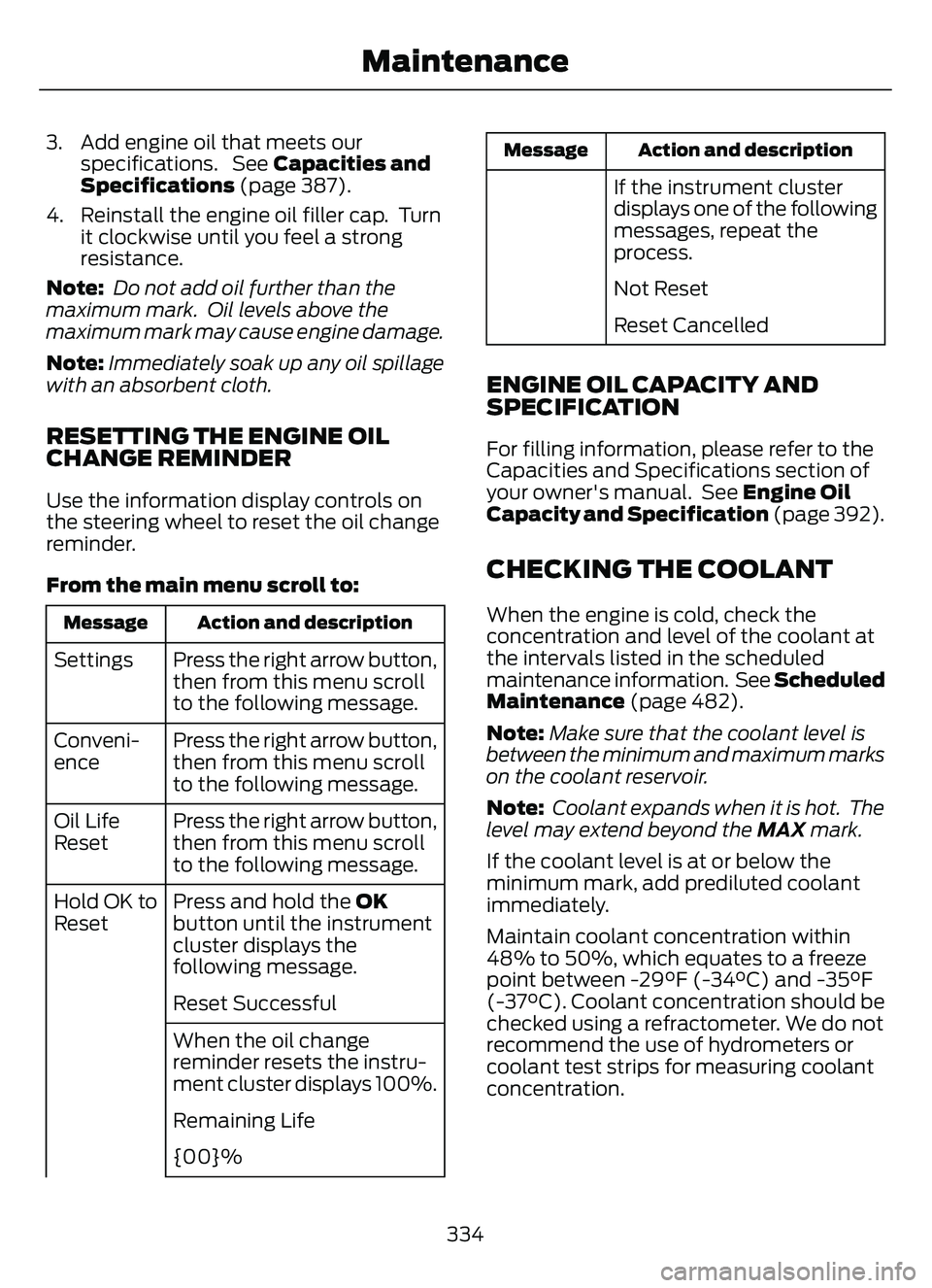
RESETTING THE ENGINE OIL
CHANGE REMINDER
Use the information display controls on
the steering wheel to reset the oil change
reminder.
From the main menu scroll to:
Action and description
Message
Press the right arrow button,
then from this menu scroll
to the following message.
Settings
Press the right arrow button,
then from this menu scroll
to the following message.
Conveni-
ence
Press the right arrow button,
then from this menu scroll
to the following message.
Oil Life
Reset
Press and hold the OK
button until the instrument
cluster displays the
following message.
Hold OK to
Reset
Reset Successful
When the oil change
reminder resets the instru-
ment cluster displays 100%.
Remaining Life
{00}%
Action and description
Message
If the instrument cluster
displays one of the following
messages, repeat the
process.
Not Reset
Reset Cancelled
ENGINE OIL CAPACITY AND
SPECIFICATION
For filling information, please refer to the
Capacities and Specifications section of
your owner's manual. See Engine Oil
Capacity and Specification (page 392).
CHECKING THE COOLANT
When the engine is cold, check the
concentration and level of the coolant at
the intervals listed in the scheduled
maintenance information. See Scheduled
Maintenance (page 482).
Note:Make sure that the coolant level is
between the minimum and maximum marks
on the coolant reservoir.
Note: Coolant expands when it is hot. The
level may extend beyond the MAX mark.
If the coolant level is at or below the
minimum mark, add prediluted coolant
immediately.
Maintain coolant concentration within
48% to 50%, which equates to a freeze
point between -29°F (-34°C) and -35°F
(-37°C). Coolant concentration should be
checked using a refractometer. We do not
recommend the use of hydrometers or
coolant test strips for measuring coolant
concentration.
334
Maintenance