key FORD EXCURSION 2000 1.G User Guide
[x] Cancel search | Manufacturer: FORD, Model Year: 2000, Model line: EXCURSION, Model: FORD EXCURSION 2000 1.GPages: 232, PDF Size: 2.01 MB
Page 70 of 232
Unlocking the doors with the keyless entry system
To unlock the driver's door, enter either the factory-set code or personal
code (each digit pressed within five seconds of the prior digit). The
interior lamps will illuminate.
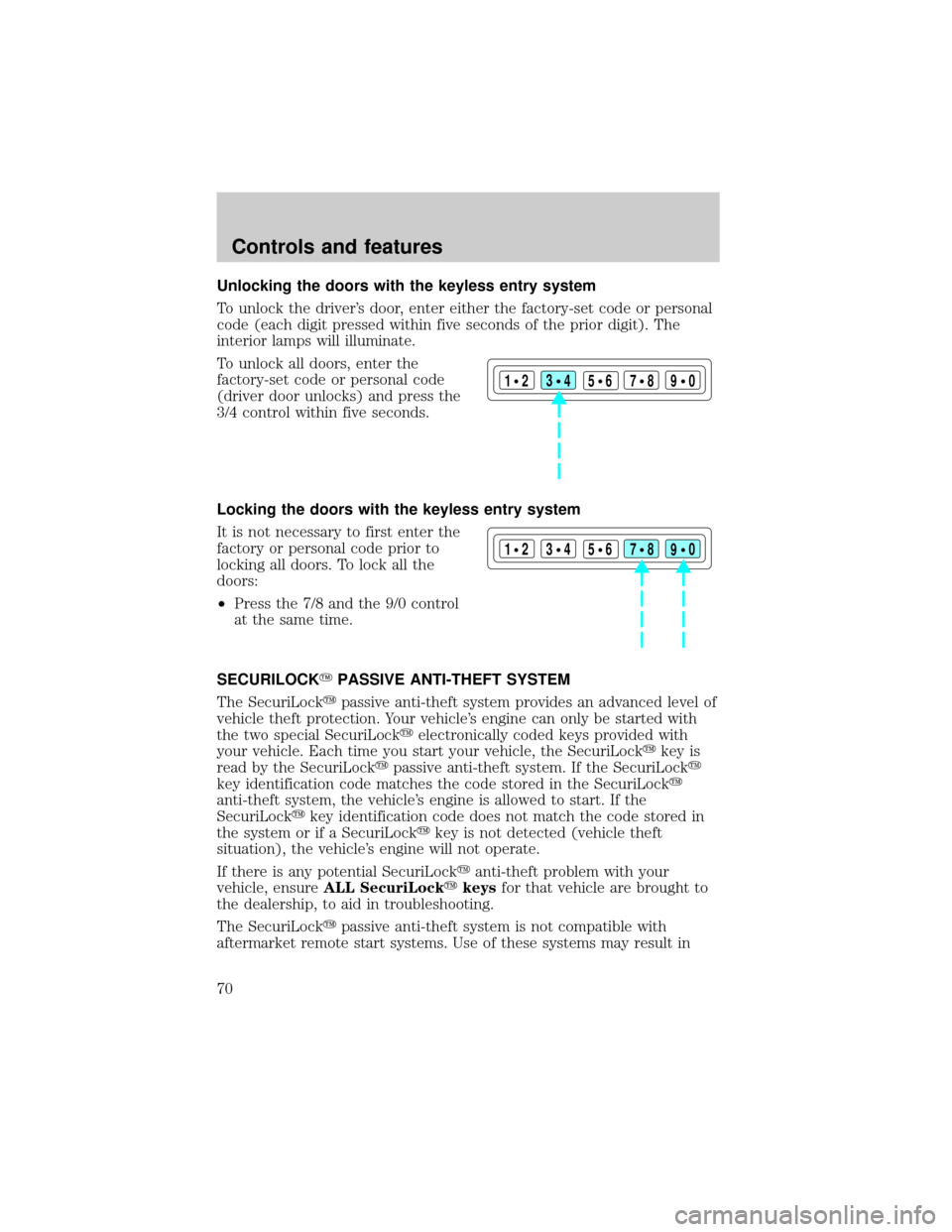
To unlock all doors, enter the
factory-set code or personal code
(driver door unlocks) and press the
3/4 control within five seconds.
Locking the doors with the keyless entry system
It is not necessary to first enter the
factory or personal code prior to
locking all doors. To lock all the
doors:
²Press the 7/8 and the 9/0 control
at the same time.
SECURILOCKYPASSIVE ANTI-THEFT SYSTEM
The SecuriLockypassive anti-theft system provides an advanced level of
vehicle theft protection. Your vehicle's engine can only be started with
the two special SecuriLockyelectronically coded keys provided with
your vehicle. Each time you start your vehicle, the SecuriLockykey is
read by the SecuriLockypassive anti-theft system. If the SecuriLocky
key identification code matches the code stored in the SecuriLocky
anti-theft system, the vehicle's engine is allowed to start. If the
SecuriLockykey identification code does not match the code stored in
the system or if a SecuriLockykey is not detected (vehicle theft
situation), the vehicle's engine will not operate.
If there is any potential SecuriLockyanti-theft problem with your
vehicle, ensureALL SecuriLockykeysfor that vehicle are brought to
the dealership, to aid in troubleshooting.
The SecuriLockypassive anti-theft system is not compatible with
aftermarket remote start systems. Use of these systems may result in
123
45678
90
123
45678
90
Controls and features
70
Page 71 of 232

vehicle starting problems and a loss of security protection. Large metallic
objects, a second key or electronic devices used to purchase gasoline or
similar items on the same key ring as the PATS ignition key may cause
vehicle starting problems. If present, you need to keep these objects
from touching the PATS ignition key while starting the engine. These
objects cannot damage the PATS ignition key, but can cause a
momentary problem if they are too close to the key during engine start.
If a problem occurs, turn the ignition OFF and restart the engine with all
other objects on the key ring held away from the ignition key. Check to
make sure the encoded ignition key is an approved Ford encoded
ignition key.
Spare SecuriLockykeys can be purchased from your dealership and
programmed to your SecuriLockypassive anti-theft system. Refer to
Programming spare SecuriLockykeysfor more information.
If one or both of your SecuriLockykeys are lost or stolen and you want
to ensure the lost or stolen key will not operate your vehicle, bring your
vehicle and all available SecuriLockykeys to your dealership for
reinitialization.
Theft indicator
The theft indicator on the instrument cluster will operate as follows:
²When the ignition is OFF, the theft indicator will flash briefly every
two seconds to indicate the SecuriLockysystem is protecting your
vehicle.
²When the ignition is turned to ON or START, the theft indicator will
light for three seconds and then go out. If the theft indicator stays on
for an extended period of time or flashes rapidly, have the system
serviced by your dealership or a qualified technician.
Programming spare SecuriLockYkeys
Spare SecuriLockykeys can be purchased from your dealership and
programmed to your SecuriLockypassive anti-theft system (up to a
total of eight keys). Your dealership can program your new SecuriLocky
key(s) to your vehicle or you can do it yourself using the following
simple procedure. To program a new SecuriLockykey yourself, you will
need two previously programmed SecuriLockykeys (keys that already
operate your vehicle's engine). If two previously programmed
SecuriLockykeys are not available (one or both of your original keys
were lost or stolen), you must bring your vehicle to your dealership to
have the spare SecuriLockykey(s) programmed.
Controls and features
71
Page 72 of 232

Procedure to program spare SecuriLockYkeys to your vehicle
New SecuriLockykeys must have the correct mechanical key cut for
your vehicle.
Conventional (non-SecuriLocky) keyscannotbe programmed to your
vehicle.
You will need to have two previously programmed SecuriLockykeys and
the new unprogrammed SecuriLockykey readily accessible for the
procedure. Please read and understand the entire procedure before you
begin.
1. Insert the first previously programmed SecuriLockykey into the
ignition and turn the ignition from OFF to ON (maintain ignition in ON
for at least one second).
2. Turn ignition to OFF and remove the first SecuriLockykey from the
ignition.
3. Within five seconds of turning the ignition to OFF, insert the second
previously programmed SecuriLockykey into the ignition and turn the
ignition from OFF to ON (maintain ignition in ON for at least one second
but no more than five seconds).
4. Turn the ignition to OFF and remove the second SecuriLockykey
from the ignition.
5. Within 10 seconds of turning the ignition to OFF, insert the
unprogrammed SecuriLockykey (new key/valet key) into the ignition
and turn the ignition from OFF to ON (maintain ignition in ON for at
least one second). This step will program your new SecuriLockykey.
6. To program additional SecuriLockykey(s), repeat this procedure from
step 1.
If the programming procedure was successful, the new SecuriLocky
key(s) will start the vehicle's engine. The theft indicator (located on the
instrument cluster) will light for three seconds and then go out.
If the programming procedure was not successful, the new SecuriLocky
key(s) will not operate the vehicle's engine. The theft indicator will flash
on and off. Wait at least one minute and then repeat the procedure from
step 1. If failure repeats, bring your vehicle to your dealership to have
the spare SecuriLockykey(s) programmed.
Controls and features
72
Page 73 of 232
CARGO NET (IF EQUIPPED)
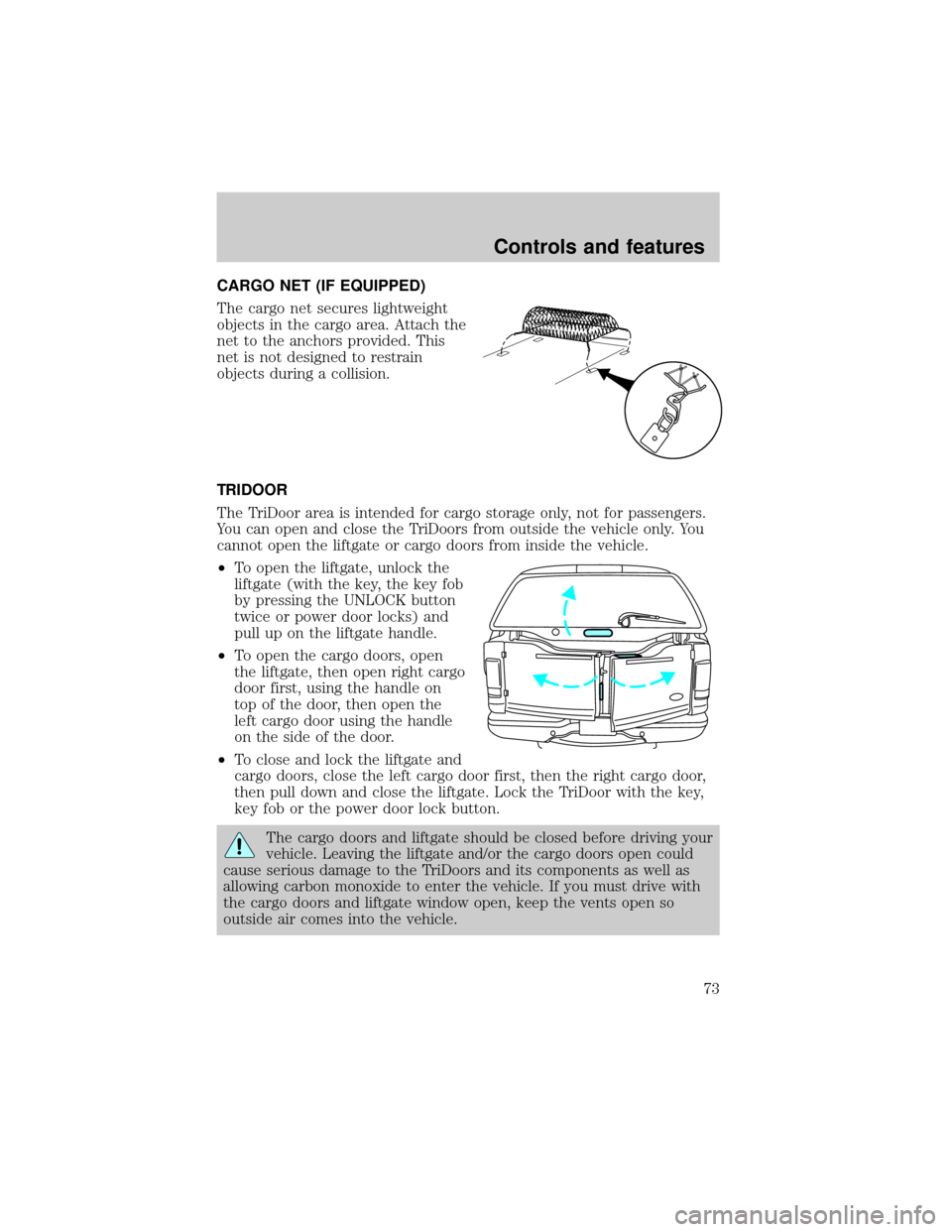
The cargo net secures lightweight
objects in the cargo area. Attach the
net to the anchors provided. This
net is not designed to restrain
objects during a collision.
TRIDOOR
The TriDoor area is intended for cargo storage only, not for passengers.
You can open and close the TriDoors from outside the vehicle only. You
cannot open the liftgate or cargo doors from inside the vehicle.
²To open the liftgate, unlock the
liftgate (with the key, the key fob
by pressing the UNLOCK button
twice or power door locks) and
pull up on the liftgate handle.
²To open the cargo doors, open
the liftgate, then open right cargo
door first, using the handle on
top of the door, then open the
left cargo door using the handle
on the side of the door.
²To close and lock the liftgate and
cargo doors, close the left cargo door first, then the right cargo door,
then pull down and close the liftgate. Lock the TriDoor with the key,
key fob or the power door lock button.
The cargo doors and liftgate should be closed before driving your
vehicle. Leaving the liftgate and/or the cargo doors open could
cause serious damage to the TriDoors and its components as well as
allowing carbon monoxide to enter the vehicle. If you must drive with
the cargo doors and liftgate window open, keep the vents open so
outside air comes into the vehicle.
Controls and features
73
Page 109 of 232
2. Make sure the headlamps and vehicle accessories are off.
3. Make sure the parking brake is
set.
4. Make sure the gearshift is in P
(Park).
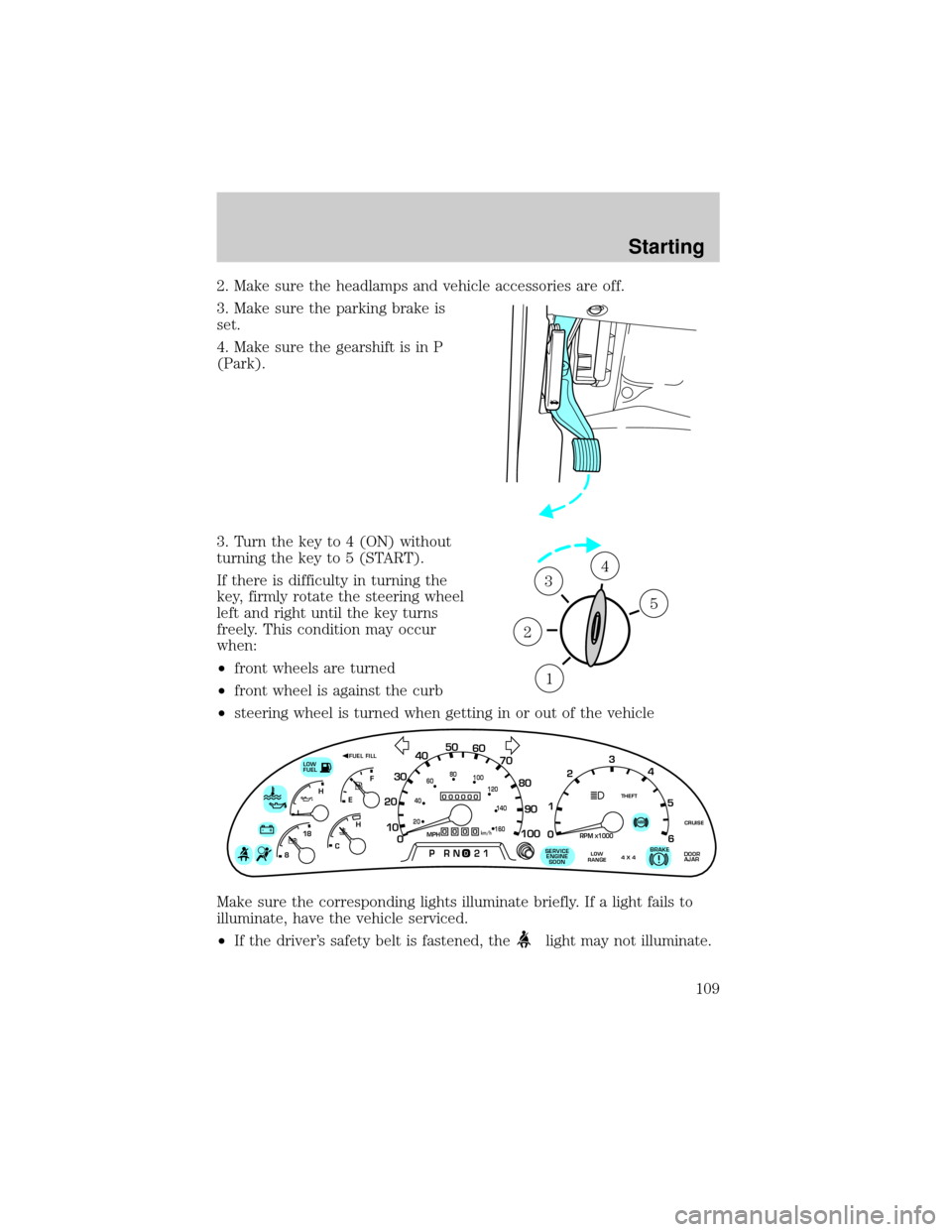
3. Turn the key to 4 (ON) without
turning the key to 5 (START).
If there is difficulty in turning the
key, firmly rotate the steering wheel
left and right until the key turns
freely. This condition may occur
when:
²front wheels are turned
²front wheel is against the curb
²steering wheel is turned when getting in or out of the vehicle
Make sure the corresponding lights illuminate briefly. If a light fails to
illuminate, have the vehicle serviced.
²If the driver's safety belt is fastened, the
light may not illuminate.
1
2
34
5
0
000000000
MPH20km/h
406080
100
120
140
160
010 20304050
60
70
80
90
100
LOW
FUEL
CRUISEABS+ -
LEF
H
RPM1000X0123
5
6 4
PRN 218C 18
H
D
FUEL FILL
DOOR
AJARLOW
RANGE4 X 4BRAKE!SERVICE
ENGINE
SOON
THEFT
Starting
109
Page 110 of 232
STARTING THE ENGINE
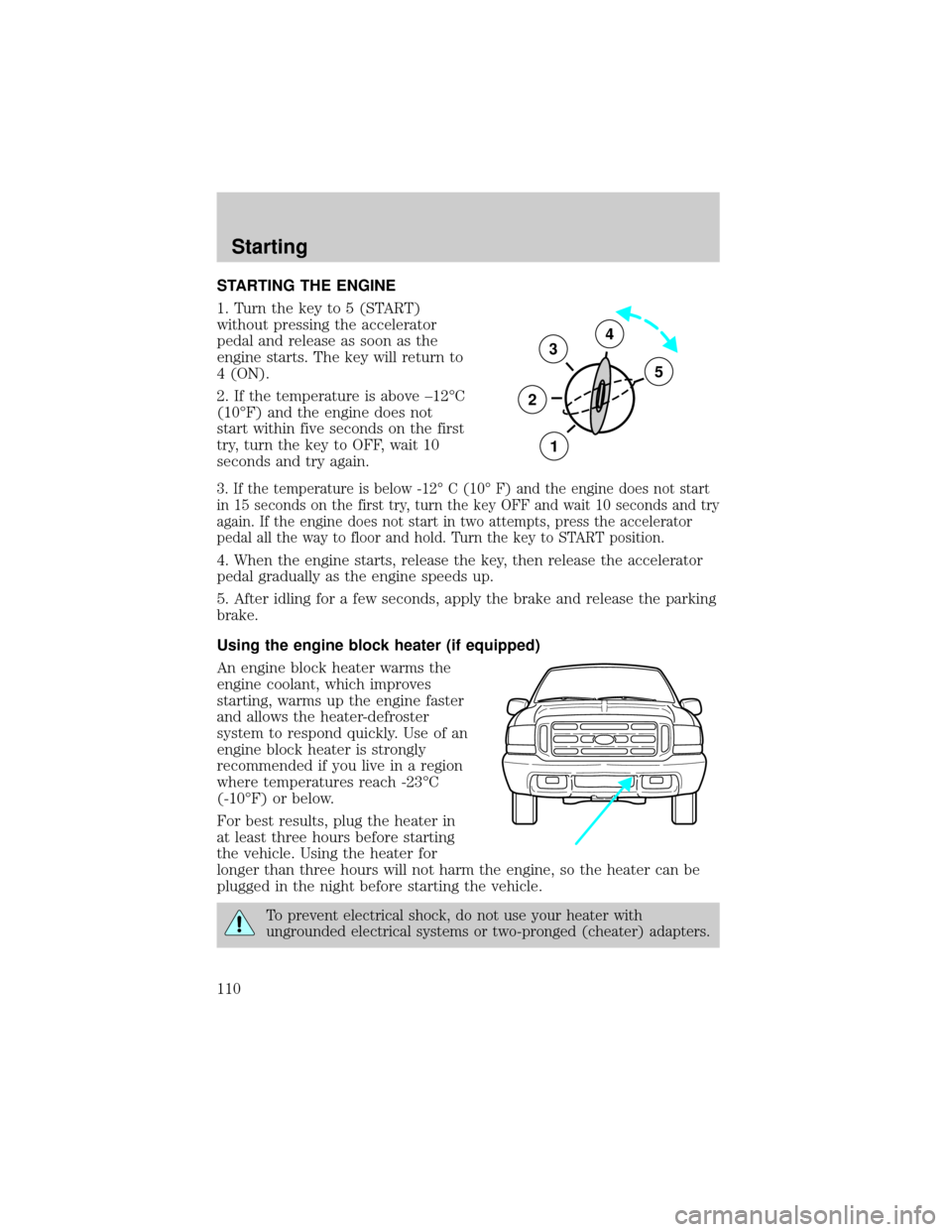
1. Turn the key to 5 (START)
without pressing the accelerator
pedal and release as soon as the
engine starts. The key will return to
4 (ON).
2. If the temperature is above ±12ÉC
(10ÉF) and the engine does not
start within five seconds on the first
try, turn the key to OFF, wait 10
seconds and try again.
3. If the temperature is below -12É C (10É F) and the engine does not start
in 15 seconds on the first try, turn the key OFF and wait 10 seconds and try
again. If the engine does not start in two attempts, press the accelerator
pedal all the way to floor and hold. Turn the key to START position.
4. When the engine starts, release the key, then release the accelerator
pedal gradually as the engine speeds up.
5. After idling for a few seconds, apply the brake and release the parking
brake.
Using the engine block heater (if equipped)
An engine block heater warms the
engine coolant, which improves
starting, warms up the engine faster
and allows the heater-defroster
system to respond quickly. Use of an
engine block heater is strongly
recommended if you live in a region
where temperatures reach -23ÉC
(-10ÉF) or below.
For best results, plug the heater in
at least three hours before starting
the vehicle. Using the heater for
longer than three hours will not harm the engine, so the heater can be
plugged in the night before starting the vehicle.
To prevent electrical shock, do not use your heater with
ungrounded electrical systems or two-pronged (cheater) adapters.
3
2
1
5
4
Starting
110
Page 116 of 232
If you cannot move the gearshift lever out of P (Park) with ignition in
the ON position and the brake pedal depressed:
1. Apply the parking brake, turn ignition to the LOCK position, then
remove the key.
2. Reinsert the key and turn the ignition to the OFF position.
3. Press and hold down the brake pedal and shift into N (Neutral).
4. Start the vehicle.
If it is necessary to use the above procedure to move the gearshift lever,
it is possible that a fuse has blown or the vehicle's brakelamps are not
operating properly. Refer toFuses and relaysin theRoadside
emergencieschapter.
Do not drive your vehicle until you verify that the brakelamps
are working.
If your vehicle gets stuck in mud or snow it may be rocked out by
shifting from forward and reverse gears, stopping between shifts, in a
steady pattern. Press lightly on the accelerator in each gear.
Do not rock the vehicle for more than a few minutes. The
transmission and tires may be damaged or the engine may
overheat.
Always set the parking brake fully and make sure the gearshift is
latched in P (Park). Turn off the ignition whenever you leave
your vehicle.
If the parking brake is fully released, but the brake warning lamp
remains illuminated, the brakes may not be working properly.
See your dealer or a qualified service technician.
Driving with a 4±speed automatic transmission
Understanding gearshift positions
To put your vehicle in gear, start the engine, depress the brake pedal,
then move gearshift lever out of P (Park).
Driving
116
Page 138 of 232
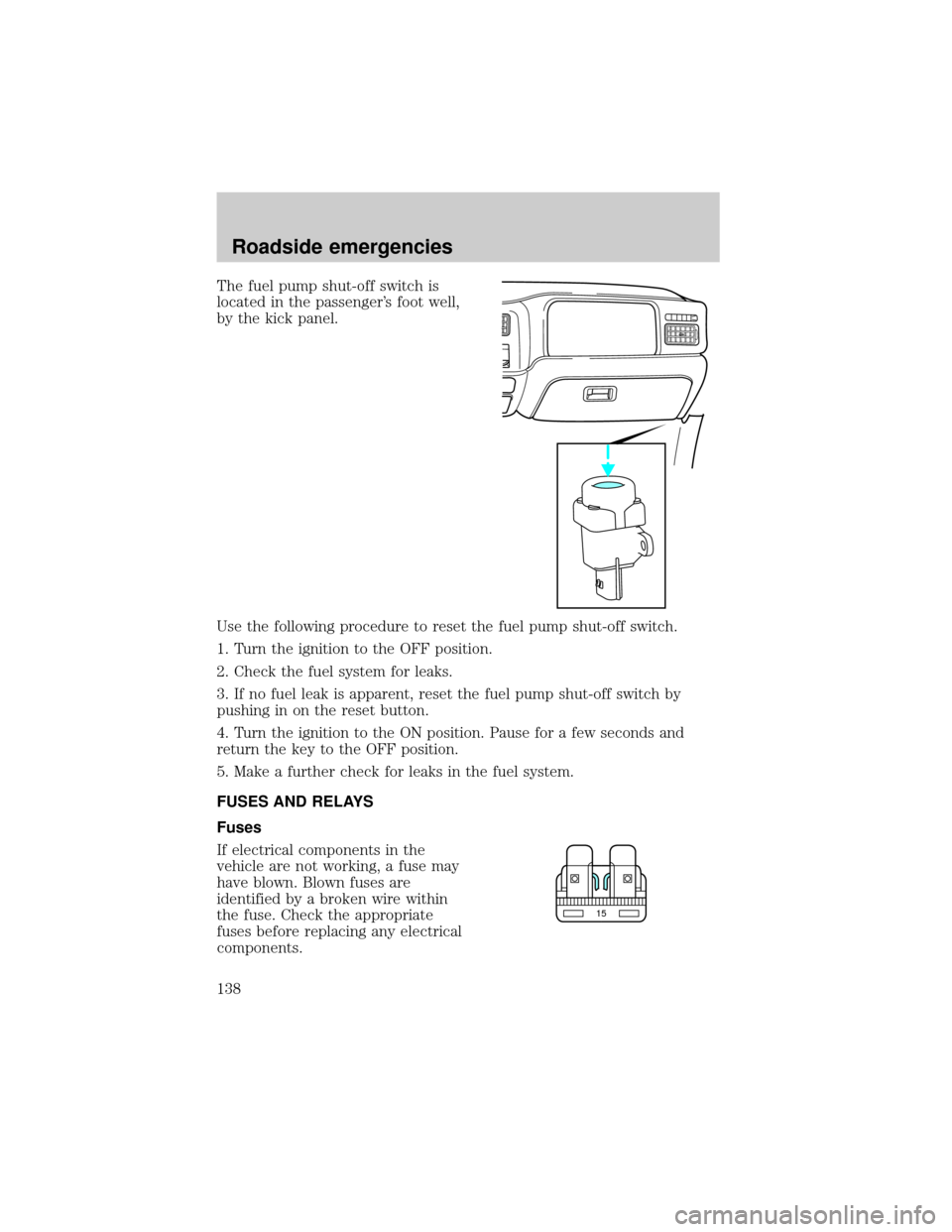
The fuel pump shut-off switch is
located in the passenger's foot well,
by the kick panel.
Use the following procedure to reset the fuel pump shut-off switch.
1. Turn the ignition to the OFF position.
2. Check the fuel system for leaks.
3. If no fuel leak is apparent, reset the fuel pump shut-off switch by
pushing in on the reset button.
4. Turn the ignition to the ON position. Pause for a few seconds and
return the key to the OFF position.
5. Make a further check for leaks in the fuel system.
FUSES AND RELAYS
Fuses
If electrical components in the
vehicle are not working, a fuse may
have blown. Blown fuses are
identified by a broken wire within
the fuse. Check the appropriate
fuses before replacing any electrical
components.
15
Roadside emergencies
138
Page 158 of 232

SERVICE RECOMMENDATIONS
To help you service your vehicle:
²We highlight do-it-yourself items in the engine compartment for easy
location.
²We provide a scheduled maintenance guide which makes tracking
routine service easy.
If your vehicle requires professional service, your dealership can provide
necessary parts and service. Check your ªWarranty Guideº to find out
which parts and services are covered.
Use only recommended fuels, lubricants, fluids and service parts
conforming to specifications. Motorcraft parts are designed and built to
provide the best performance in your vehicle.
PRECAUTIONS WHEN SERVICING YOUR VEHICLE
Be especially careful when inspecting or servicing your vehicle.
²Do not work on a hot engine.
²When the engine is running, keep loose clothing, jewelry or long hair
away from moving parts.
²Do not work on a vehicle with the engine running in an enclosed
space, unless you are sure you have enough ventilation.
²Keep all lit cigarettes, open flames and other lit material away from
the battery and all fuel related parts.
If you disconnect the battery, the engine must ªrelearnº its idle
conditions before your vehicle will drive properly, as explained in the
Batterysection in this chapter.
Working with the engine off
1. Set the parking brake and ensure the gearshift is securely latched in P
(Park).
2. Turn off the engine and remove the key.
3. Block the wheels to prevent the vehicle from moving unexpectedly.
Working with the engine on
1. Set the parking brake and ensure the gearshift is securely latched in P
(Park).
2. Block the wheels to prevent the vehicle from moving unexpectedly.
Maintenance and care
158
Page 228 of 232

bulb specifications ..................198
daytime running lights .............18
flash to pass ..............................51
high beam ...........................12, 50
replacing bulbs .......................195
turning on and off ....................18
warning chime ..........................14
Heating ........................................22
heating and air conditioning
system .......................................22
Hood ..........................................159
I
Ignition .................................44, 209
Infant seats (see Safety seats)..101
Inspection/maintenance
(I/M) testing ..............................194
Instrument panel
cleaning ...................................202
cluster ..................................8, 202
lighting up panel and interior...18
location of components ..............8
J
Jump-starting your vehicle ......151
K
Keyless entry system
locking and unlocking doors ....70
programming entry code .........69
Keys
key in ignition chime ...............14
positions of the ignition ...........44L
Lamps
autolamp system .....................194
bulb replacement
specifications chart ................198
cargo lamps ...............................18
daytime running light ...............18
headlamps .................................18
headlamps, flash to pass ..........51
instrument panel, dimming .....18
interior lamps .............62±63, 198
replacing
bulbs ................194±195, 197±198
Lane change indicator
(see Turn signal) ........................44
Liftgate ........................................73
Lights, warning and indicator ......8
air bag ........................................11
anti-lock brakes (ABS) ....12, 113
anti-theft ...................................13
brake ..........................................11
charging system ........................12
check coolant ............................13
cruise indicator .........................13
door ajar ....................................13
engine oil pressure ...................13
high beam .................................12
low fuel ........................................8
safety belt .................................11
service engine soon ................8±9
turn signal indicator .................12
Load limits .................................125
GAWR ......................................125
GVWR ......................................125
trailer towing ..........................125
Loading instructions .................127
Index
228