ECO mode FORD EXPEDITION 2006 2.G User Guide
[x] Cancel search | Manufacturer: FORD, Model Year: 2006, Model line: EXPEDITION, Model: FORD EXPEDITION 2006 2.GPages: 360, PDF Size: 3.6 MB
Page 42 of 360
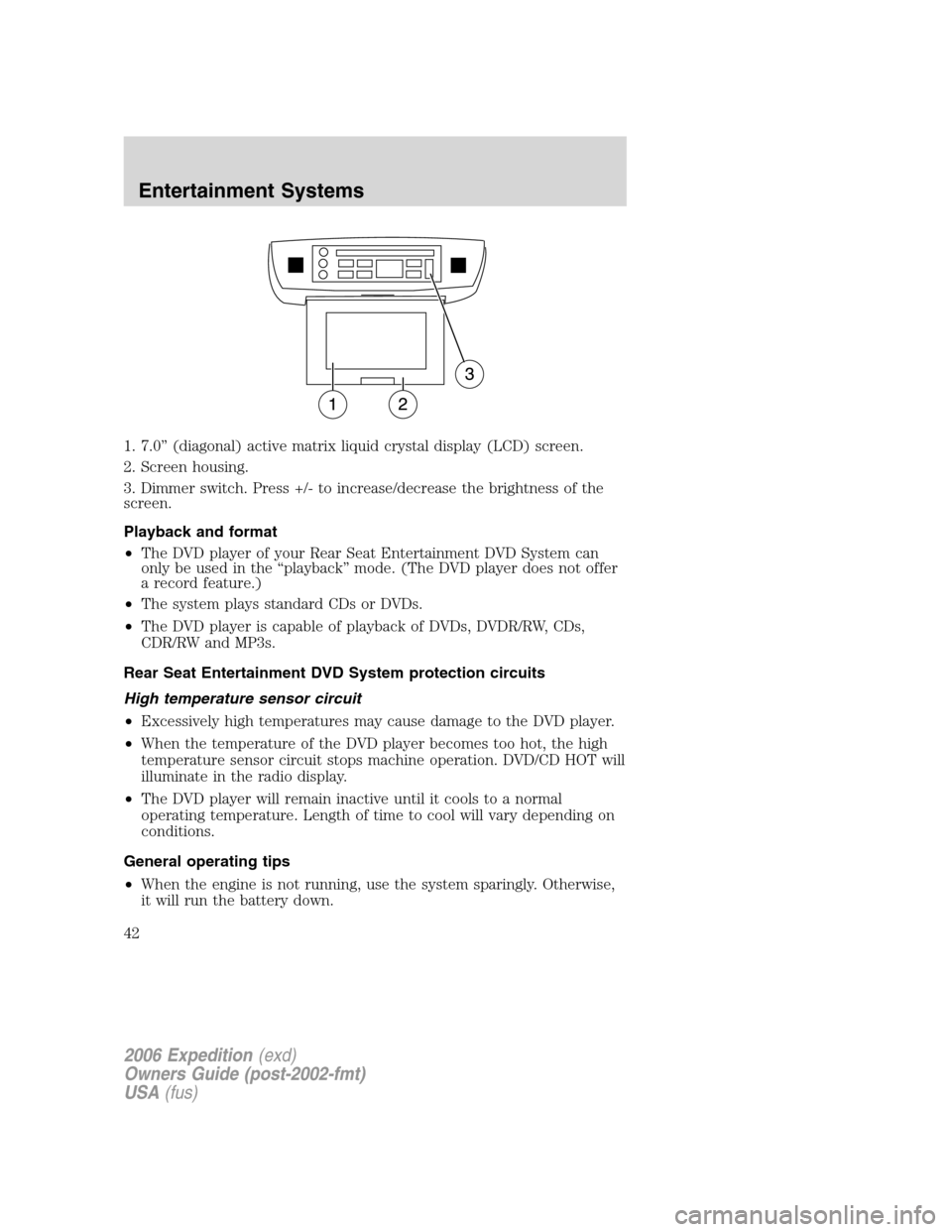
1. 7.0” (diagonal) active matrix liquid crystal display (LCD) screen.
2. Screen housing.
3. Dimmer switch. Press +/- to increase/decrease the brightness of the
screen.
Playback and format
•The DVD player of your Rear Seat Entertainment DVD System can
only be used in the “playback” mode. (The DVD player does not offer
a record feature.)
•The system plays standard CDs or DVDs.
•The DVD player is capable of playback of DVDs, DVDR/RW, CDs,
CDR/RW and MP3s.
Rear Seat Entertainment DVD System protection circuits
High temperature sensor circuit
•Excessively high temperatures may cause damage to the DVD player.
•When the temperature of the DVD player becomes too hot, the high
temperature sensor circuit stops machine operation. DVD/CD HOT will
illuminate in the radio display.
•The DVD player will remain inactive until it cools to a normal
operating temperature. Length of time to cool will vary depending on
conditions.
General operating tips
•When the engine is not running, use the system sparingly. Otherwise,
it will run the battery down.
2006 Expedition(exd)
Owners Guide (post-2002-fmt)
USA(fus)
Entertainment Systems
42
Page 44 of 360
CD/DVD will not eject from the system, press and hold the EJECT
control for approximately 2 seconds. The disc should eject whether the
vehicle ignition is ON or OFF.
Playing a video game/auxiliary device
1. Connect the video line from your video game device to the YELLOW
auxiliary input jack.
2. Connect the left and right audio lines to the WHITE and RED auxiliary
input jacks respectively.
3. Press the MODE control until DVD/CD AUX (no disc in player) or
DVD/CD play (disc in player) illuminates in the radio display. If a disc is
in the system, playback should begin. To enable the aux inputs, press the
STOP control or press the AUX control on the DVD player.
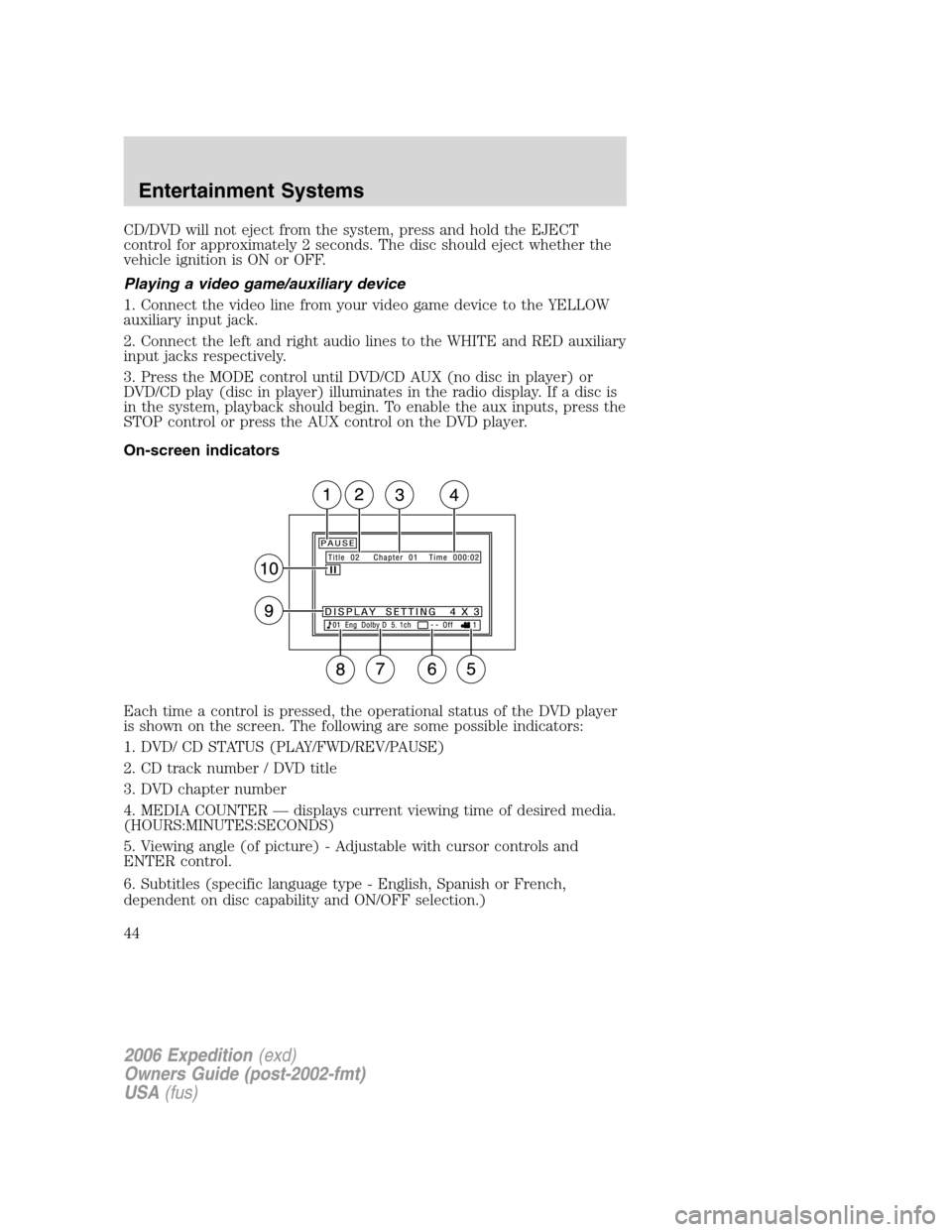
On-screen indicators
Each time a control is pressed, the operational status of the DVD player
is shown on the screen. The following are some possible indicators:
1. DVD/ CD STATUS (PLAY/FWD/REV/PAUSE)
2. CD track number / DVD title
3. DVD chapter number
4. MEDIA COUNTER — displays current viewing time of desired media.
(HOURS:MINUTES:SECONDS)
5. Viewing angle (of picture) - Adjustable with cursor controls and
ENTER control.
6. Subtitles (specific language type - English, Spanish or French,
dependent on disc capability and ON/OFF selection.)
2006 Expedition(exd)
Owners Guide (post-2002-fmt)
USA(fus)
Entertainment Systems
44
Page 58 of 360
Seek in CD or CD DJ mode
•Press
to seek to the previous track of the current disc. If a
selection has been playing for three seconds or more and you
press
, the CD changer will replay that selection from the
beginning.
•Press
to seek forward to the next track of the current disc. After
the last track has been completed, the first track of the current disc
will automatically replay.
Seek in navigation mode
•Press
orto access the next audio station if in radio mode, and
next track if in CD mode.
Radio station memory preset
The radio is equipped with six station memory preset controls. These
controls can be used to select up to six preset AM stations and twelve
FM stations (six in FM1 and six in FM2).
The presets will also allow you to access CDs which are loaded in the CD
DJ. When in CD mode, simply press the preset number which
corresponds to the desired disc.
Setting memory preset stations
1. Select the frequency band with the AM/FM select control.
2. Select a station. Refer toTune adjustorSeek functionfor more
information on selecting a station.
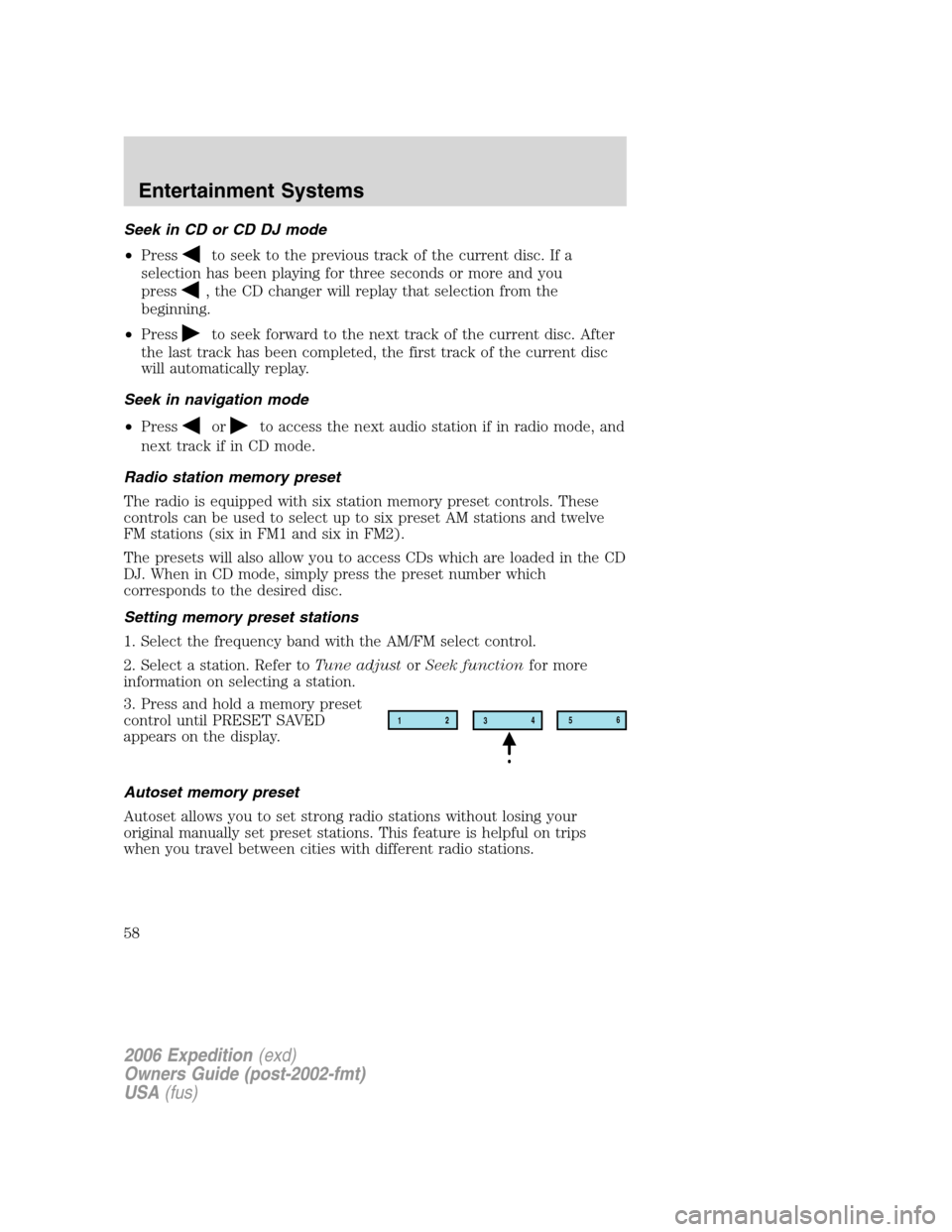
3. Press and hold a memory preset
control until PRESET SAVED
appears on the display.
Autoset memory preset
Autoset allows you to set strong radio stations without losing your
original manually set preset stations. This feature is helpful on trips
when you travel between cities with different radio stations.
12
3456
2006 Expedition(exd)
Owners Guide (post-2002-fmt)
USA(fus)
Entertainment Systems
58
Page 79 of 360
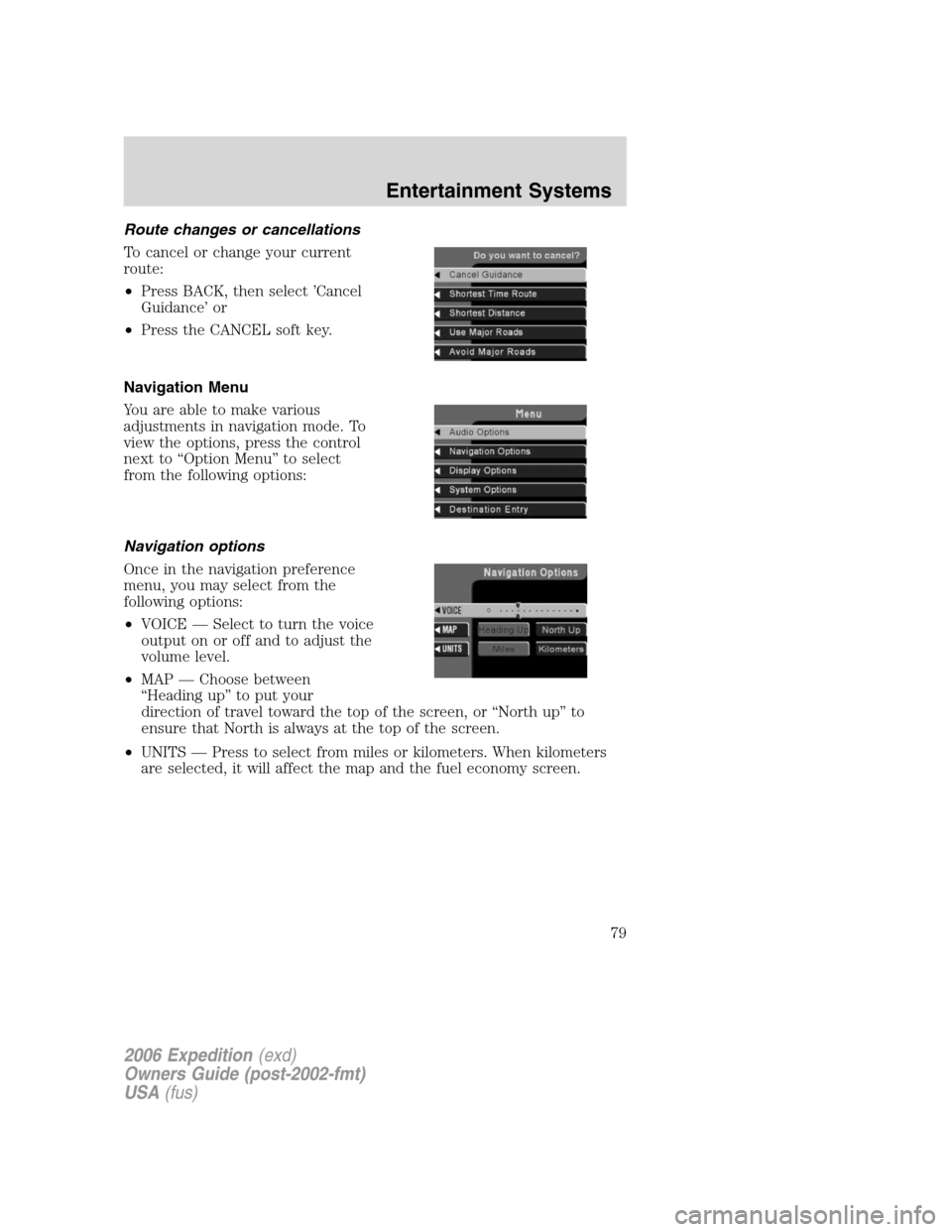
Route changes or cancellations
To cancel or change your current
route:
•Press BACK, then select ’Cancel
Guidance’ or
•Press the CANCEL soft key.
Navigation Menu
You are able to make various
adjustments in navigation mode. To
view the options, press the control
next to “Option Menu” to select
from the following options:
Navigation options
Once in the navigation preference
menu, you may select from the
following options:
•VOICE — Select to turn the voice
output on or off and to adjust the
volume level.
•MAP — Choose between
“Heading up” to put your
direction of travel toward the top of the screen, or “North up” to
ensure that North is always at the top of the screen.
•UNITS — Press to select from miles or kilometers. When kilometers
are selected, it will affect the map and the fuel economy screen.
2006 Expedition(exd)
Owners Guide (post-2002-fmt)
USA(fus)
Entertainment Systems
79
Page 80 of 360
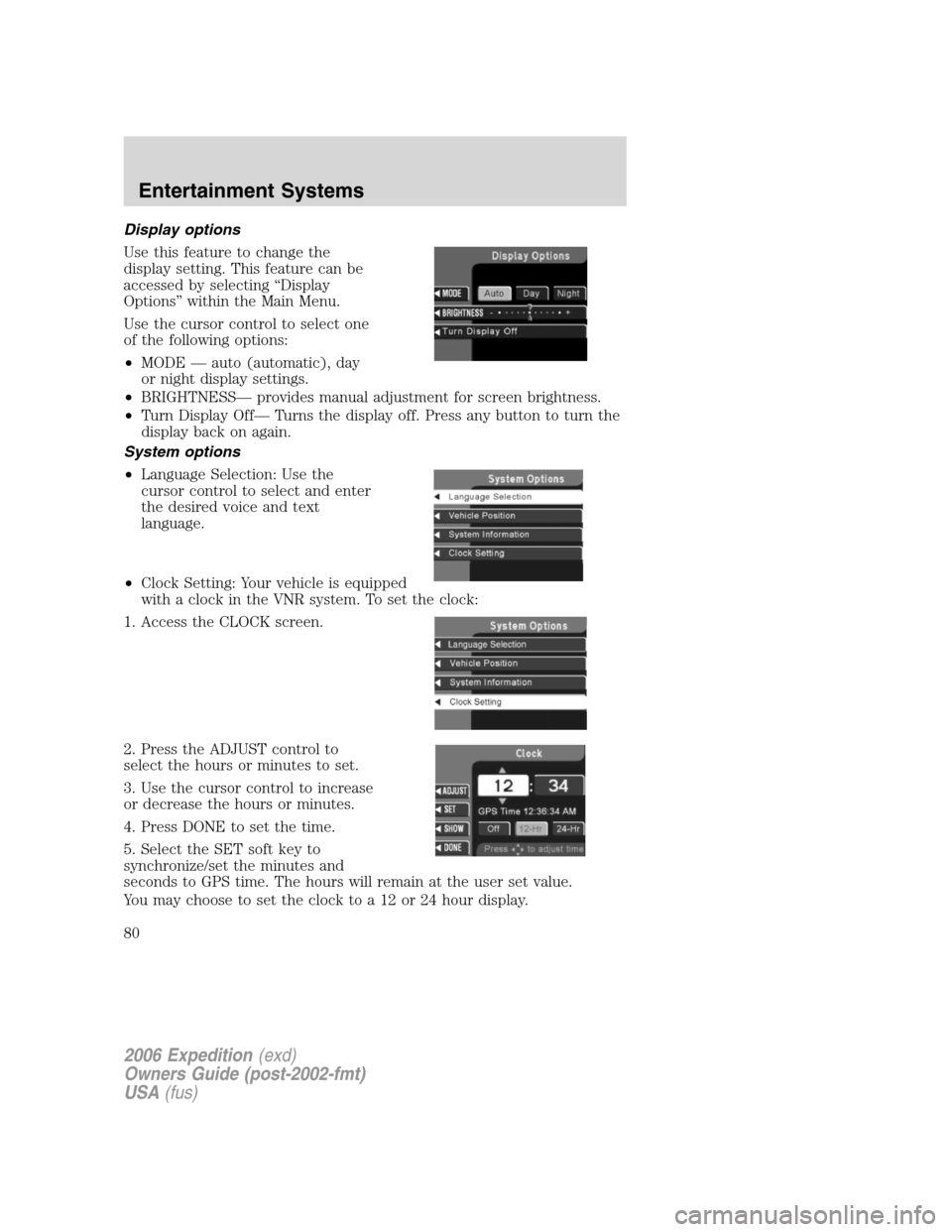
Display options
Use this feature to change the
display setting. This feature can be
accessed by selecting “Display
Options” within the Main Menu.
Use the cursor control to select one
of the following options:
•MODE — auto (automatic), day
or night display settings.
•BRIGHTNESS— provides manual adjustment for screen brightness.
•Turn Display Off— Turns the display off. Press any button to turn the
display back on again.
System options
•Language Selection: Use the
cursor control to select and enter
the desired voice and text
language.
•Clock Setting: Your vehicle is equipped
with a clock in the VNR system. To set the clock:
1. Access the CLOCK screen.
2. Press the ADJUST control to
select the hours or minutes to set.
3. Use the cursor control to increase
or decrease the hours or minutes.
4. Press DONE to set the time.
5. Select the SET soft key to
synchronize/set the minutes and
seconds to GPS time. The hours will remain at the user set value.
You may choose to set the clock to a 12 or 24 hour display.
2006 Expedition(exd)
Owners Guide (post-2002-fmt)
USA(fus)
Entertainment Systems
80
Page 83 of 360
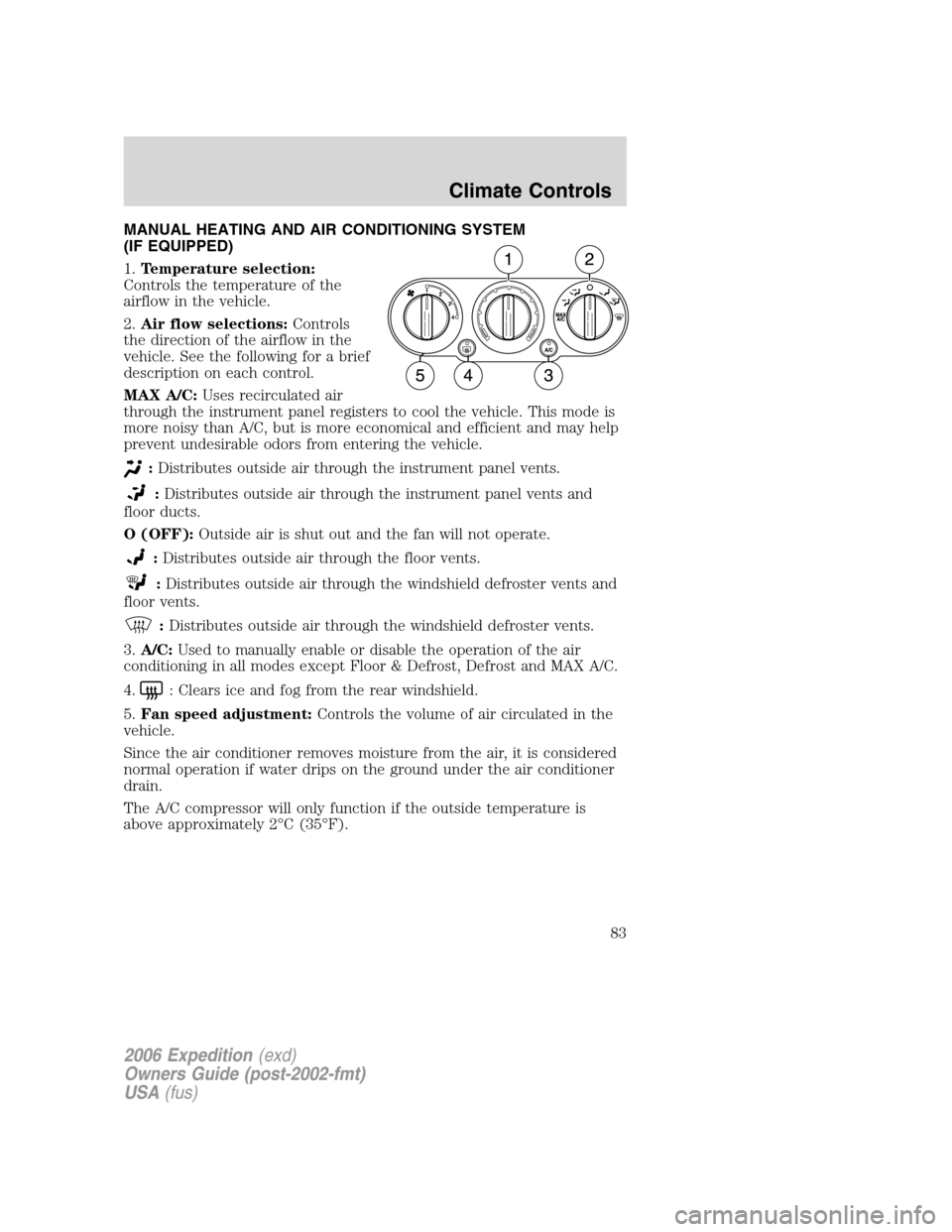
MANUAL HEATING AND AIR CONDITIONING SYSTEM
(IF EQUIPPED)
1.Temperature selection:
Controls the temperature of the
airflow in the vehicle.
2.Air flow selections:Controls
the direction of the airflow in the
vehicle. See the following for a brief
description on each control.
MAX A/C:Uses recirculated air
through the instrument panel registers to cool the vehicle. This mode is
more noisy than A/C, but is more economical and efficient and may help
prevent undesirable odors from entering the vehicle.
:Distributes outside air through the instrument panel vents.
:Distributes outside air through the instrument panel vents and
floor ducts.
O (OFF):Outside air is shut out and the fan will not operate.
:Distributes outside air through the floor vents.
:Distributes outside air through the windshield defroster vents and
floor vents.
:Distributes outside air through the windshield defroster vents.
3.A/C:Used to manually enable or disable the operation of the air
conditioning in all modes except Floor & Defrost, Defrost and MAX A/C.
4.
: Clears ice and fog from the rear windshield.
5.Fan speed adjustment:Controls the volume of air circulated in the
vehicle.
Since the air conditioner removes moisture from the air, it is considered
normal operation if water drips on the ground under the air conditioner
drain.
The A/C compressor will only function if the outside temperature is
above approximately 2°C (35°F).
2006 Expedition(exd)
Owners Guide (post-2002-fmt)
USA(fus)
Climate Controls
83
Page 88 of 360
Will work in all modes except defrost. In automatic operation, the
recirculated air operates automatically as necessary to achieve the
selected temperature.
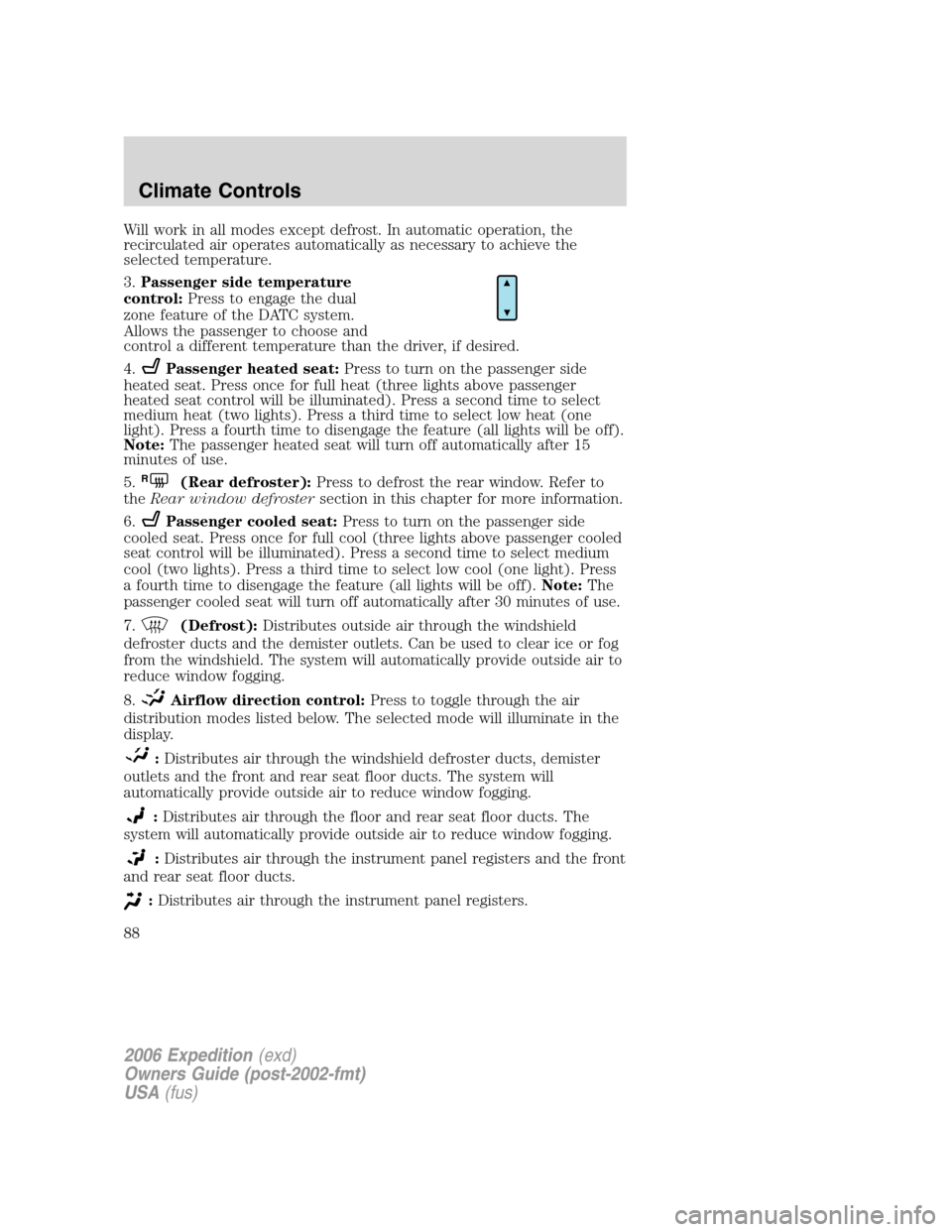
3.Passenger side temperature
control:Press to engage the dual
zone feature of the DATC system.
Allows the passenger to choose and
control a different temperature than the driver, if desired.
4.
Passenger heated seat:Press to turn on the passenger side
heated seat. Press once for full heat (three lights above passenger
heated seat control will be illuminated). Press a second time to select
medium heat (two lights). Press a third time to select low heat (one
light). Press a fourth time to disengage the feature (all lights will be off).
Note:The passenger heated seat will turn off automatically after 15
minutes of use.
5.
R(Rear defroster):Press to defrost the rear window. Refer to
theRear window defrostersection in this chapter for more information.
6.
Passenger cooled seat:Press to turn on the passenger side
cooled seat. Press once for full cool (three lights above passenger cooled
seat control will be illuminated). Press a second time to select medium
cool (two lights). Press a third time to select low cool (one light). Press
a fourth time to disengage the feature (all lights will be off).Note:The
passenger cooled seat will turn off automatically after 30 minutes of use.
7.
(Defrost):Distributes outside air through the windshield
defroster ducts and the demister outlets. Can be used to clear ice or fog
from the windshield. The system will automatically provide outside air to
reduce window fogging.
8.
Airflow direction control:Press to toggle through the air
distribution modes listed below. The selected mode will illuminate in the
display.
:Distributes air through the windshield defroster ducts, demister
outlets and the front and rear seat floor ducts. The system will
automatically provide outside air to reduce window fogging.
:Distributes air through the floor and rear seat floor ducts. The
system will automatically provide outside air to reduce window fogging.
:Distributes air through the instrument panel registers and the front
and rear seat floor ducts.
:Distributes air through the instrument panel registers.
2006 Expedition(exd)
Owners Guide (post-2002-fmt)
USA(fus)
Climate Controls
88
Page 89 of 360
9.OFF:Outside air is shut out and
the fan will not operate.
10.Manual override controls:Allows you to manually select where
airflow is directed. To return to full automatic control, press AUTO.
11.AUTO:Press to engage
automatic temperature control. Use
the temperature control to select
the desired temperature setting. The system will automatically determine
fan speed, airflow location, A/C on or off, and outside or recirculated air
to heat or cool the vehicle, allowing it to reach the desired temperature.
Press and hold AUTO for about two seconds to toggle between single
zone and dual zone temperature control.
12.
Driver heated seat:Press to turn on the driver side heated
seat. Press once for full heat (three lights above driver heated seat
control will be illuminated). Press a second time to select medium heat
(two lights). Press a third time to select low heat (one light). Press a
fourth time to disengage the feature (all lights will be off).Note:The
driver heated seat will turn off automatically after 15 minutes of use.
13.
Driver cooled seat:Press to turn on the driver side cooled seat.
Press once for full cool (three lights above driver cooled seat control will
be illuminated). Press a second time to select medium cool (two lights).
Press a third time to select low cool (one light). Press a fourth time to
disengage the feature (all lights will be off).Note:The driver cooled
seat will turn off automatically after 30 minutes of use.
14.Driver’s side temperature
control:Controls the temperature
on the driver side of the vehicle in
dual zone and controls the
temperature of both the driver and passenger sides in single zone.
15.Fan Speed:Press to manually
increase/decrease fan speed. In
manual mode, the display will
show
with a bar graph to
indicate fan speed. Fan speed can be manually adjusted in AUTO mode.
To allow the system to automatically control fan speed, press AUTO.
OFF
AUTO
2006 Expedition(exd)
Owners Guide (post-2002-fmt)
USA(fus)
Climate Controls
89
Page 91 of 360
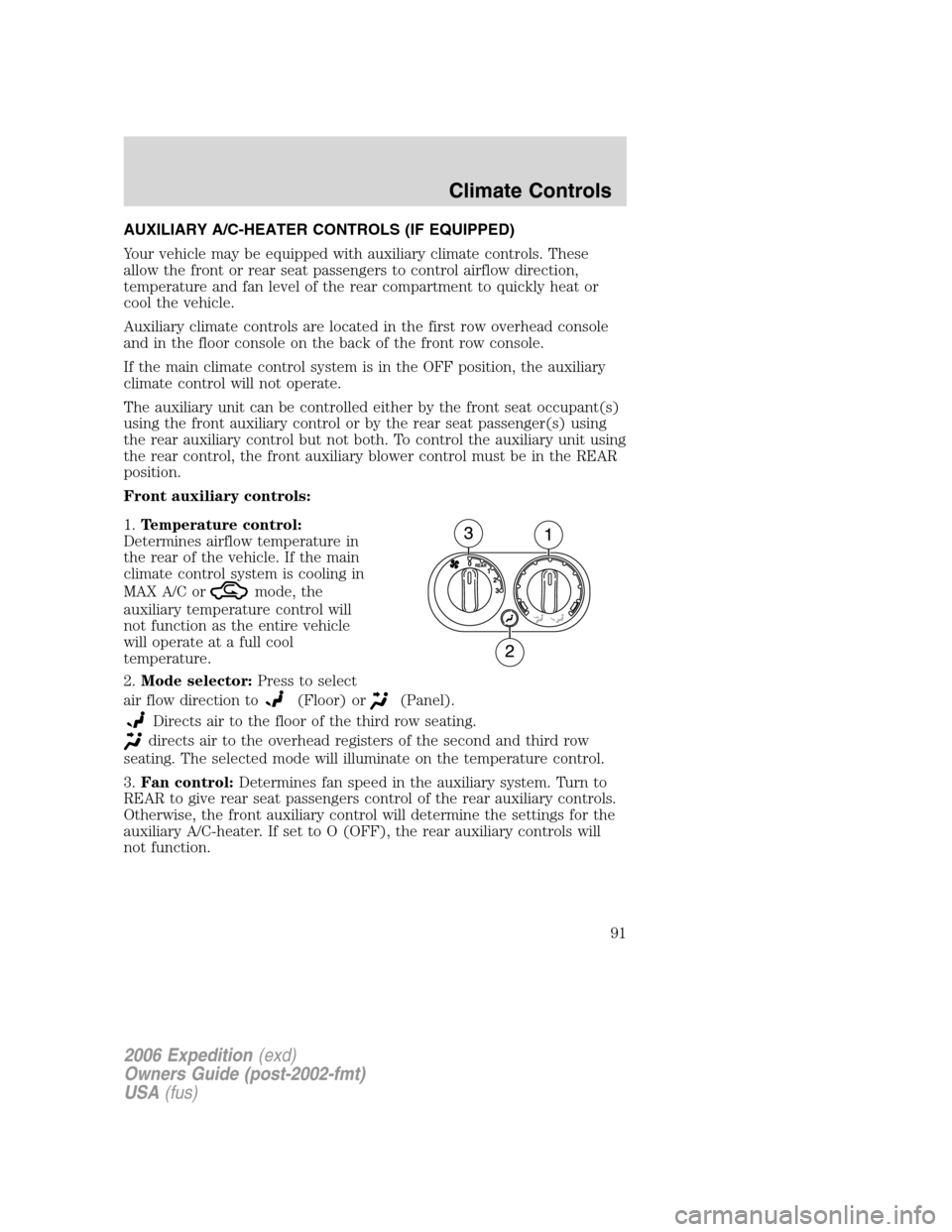
AUXILIARY A/C-HEATER CONTROLS (IF EQUIPPED)
Your vehicle may be equipped with auxiliary climate controls. These
allow the front or rear seat passengers to control airflow direction,
temperature and fan level of the rear compartment to quickly heat or
cool the vehicle.
Auxiliary climate controls are located in the first row overhead console
and in the floor console on the back of the front row console.
If the main climate control system is in the OFF position, the auxiliary
climate control will not operate.
The auxiliary unit can be controlled either by the front seat occupant(s)
using the front auxiliary control or by the rear seat passenger(s) using
the rear auxiliary control but not both. To control the auxiliary unit using
the rear control, the front auxiliary blower control must be in the REAR
position.
Front auxiliary controls:
1.Temperature control:
Determines airflow temperature in
the rear of the vehicle. If the main
climate control system is cooling in
MAX A/C or
mode, the
auxiliary temperature control will
not function as the entire vehicle
will operate at a full cool
temperature.
2.Mode selector:Press to select
air flow direction to
(Floor) or(Panel).
Directs air to the floor of the third row seating.
directs air to the overhead registers of the second and third row
seating. The selected mode will illuminate on the temperature control.
3.Fan control:Determines fan speed in the auxiliary system. Turn to
REAR to give rear seat passengers control of the rear auxiliary controls.
Otherwise, the front auxiliary control will determine the settings for the
auxiliary A/C-heater. If set to O (OFF), the rear auxiliary controls will
not function.
2006 Expedition(exd)
Owners Guide (post-2002-fmt)
USA(fus)
Climate Controls
91
Page 92 of 360
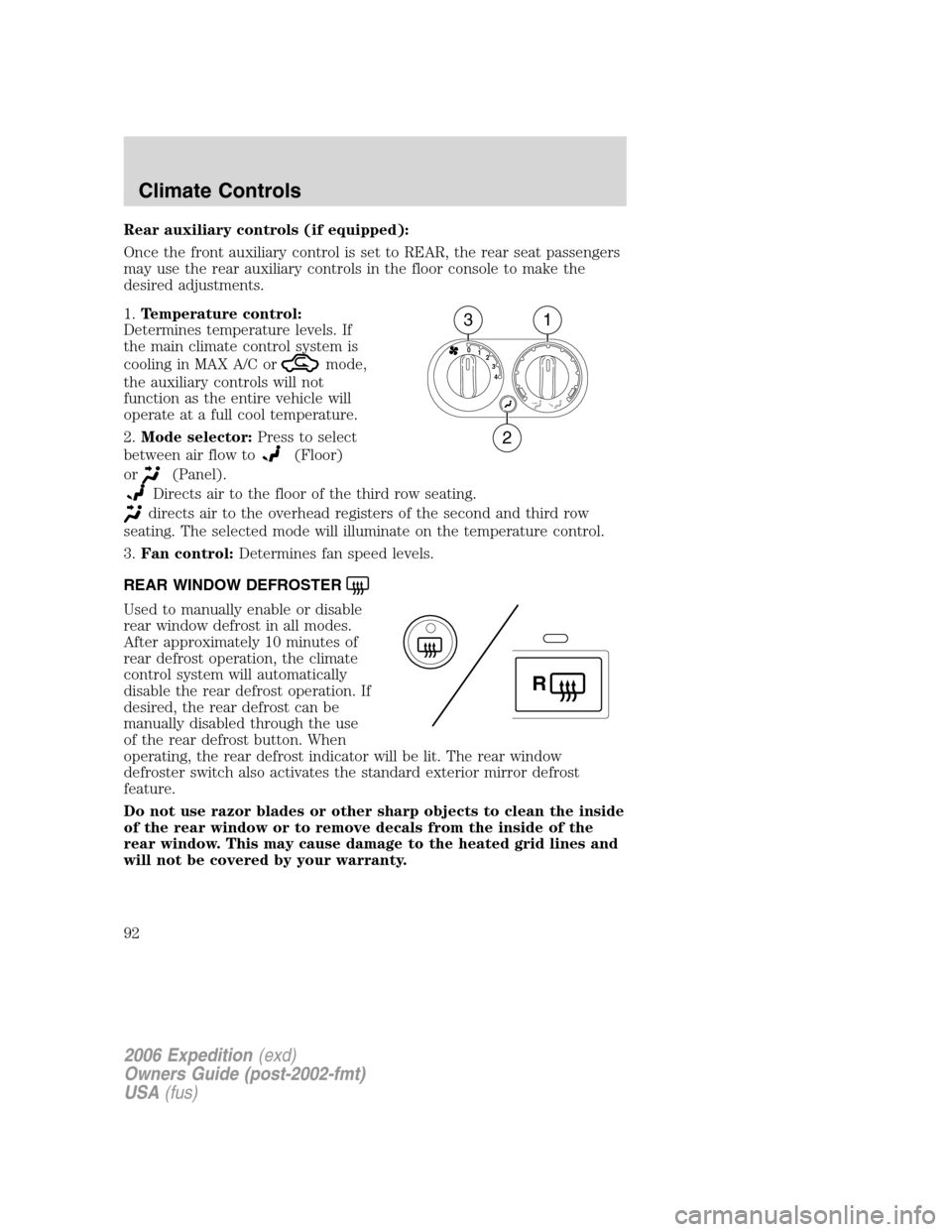
Rear auxiliary controls (if equipped):
Once the front auxiliary control is set to REAR, the rear seat passengers
may use the rear auxiliary controls in the floor console to make the
desired adjustments.
1.Temperature control:
Determines temperature levels. If
the main climate control system is
cooling in MAX A/C or
mode,
the auxiliary controls will not
function as the entire vehicle will
operate at a full cool temperature.
2.Mode selector:Press to select
between air flow to
(Floor)
or
(Panel).
Directs air to the floor of the third row seating.
directs air to the overhead registers of the second and third row
seating. The selected mode will illuminate on the temperature control.
3.Fan control:Determines fan speed levels.
REAR WINDOW DEFROSTER
Used to manually enable or disable
rear window defrost in all modes.
After approximately 10 minutes of
rear defrost operation, the climate
control system will automatically
disable the rear defrost operation. If
desired, the rear defrost can be
manually disabled through the use
of the rear defrost button. When
operating, the rear defrost indicator will be lit. The rear window
defroster switch also activates the standard exterior mirror defrost
feature.
Do not use razor blades or other sharp objects to clean the inside
of the rear window or to remove decals from the inside of the
rear window. This may cause damage to the heated grid lines and
will not be covered by your warranty.
4 3 2 1 0
31
2
R
2006 Expedition(exd)
Owners Guide (post-2002-fmt)
USA(fus)
Climate Controls
92