automatic FORD EXPEDITION 2008 3.G User Guide
[x] Cancel search | Manufacturer: FORD, Model Year: 2008, Model line: EXPEDITION, Model: FORD EXPEDITION 2008 3.GPages: 392, PDF Size: 3.34 MB
Page 60 of 392
When replacing the batteries, use two new batteries (alkaline
recommended) and install them with the correct orientation as indicated
in the battery housing.
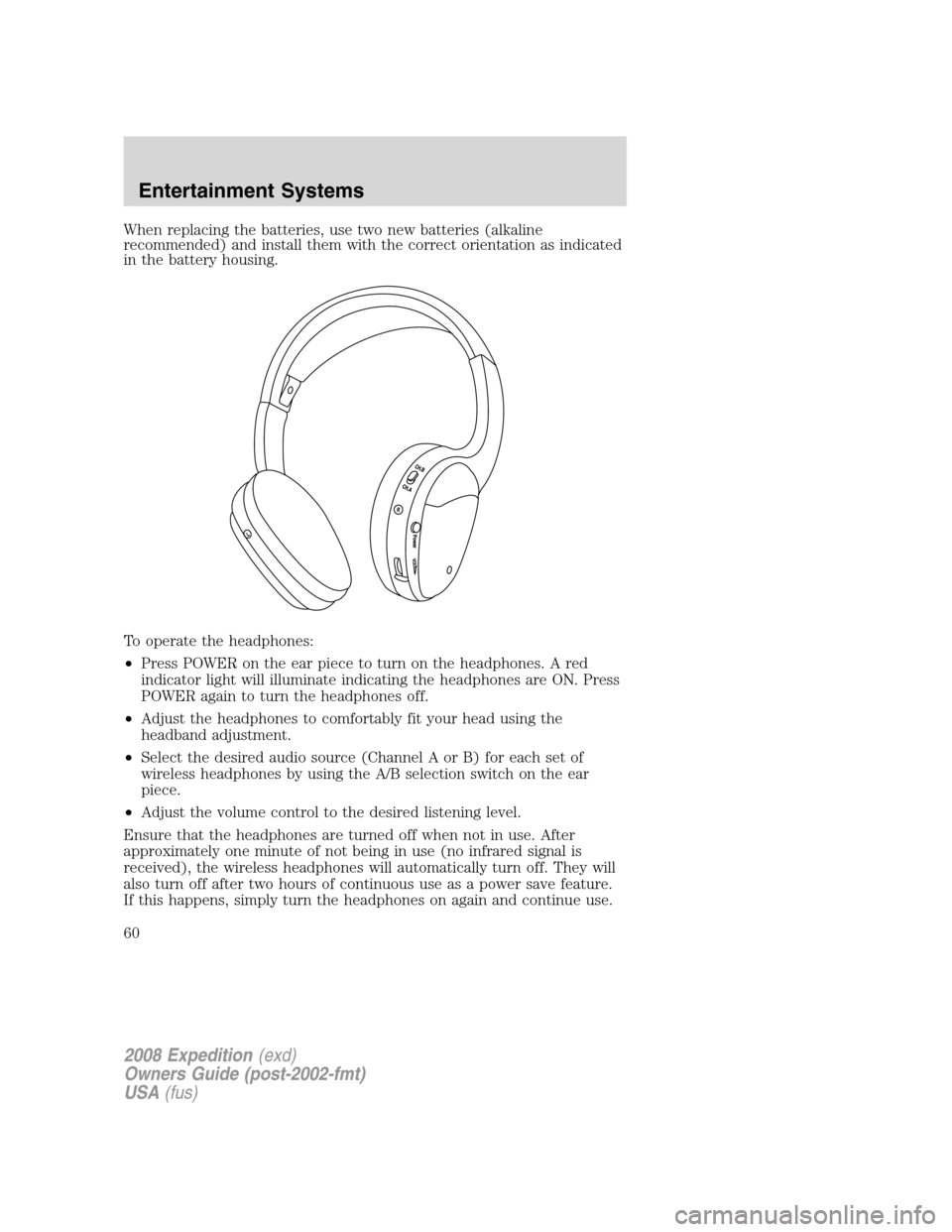
To operate the headphones:
•Press POWER on the ear piece to turn on the headphones. A red
indicator light will illuminate indicating the headphones are ON. Press
POWER again to turn the headphones off.
•Adjust the headphones to comfortably fit your head using the
headband adjustment.
•Select the desired audio source (Channel A or B) for each set of
wireless headphones by using the A/B selection switch on the ear
piece.
•Adjust the volume control to the desired listening level.
Ensure that the headphones are turned off when not in use. After
approximately one minute of not being in use (no infrared signal is
received), the wireless headphones will automatically turn off. They will
also turn off after two hours of continuous use as a power save feature.
If this happens, simply turn the headphones on again and continue use.
2008 Expedition(exd)
Owners Guide (post-2002-fmt)
USA(fus)
Entertainment Systems
60
Page 70 of 392
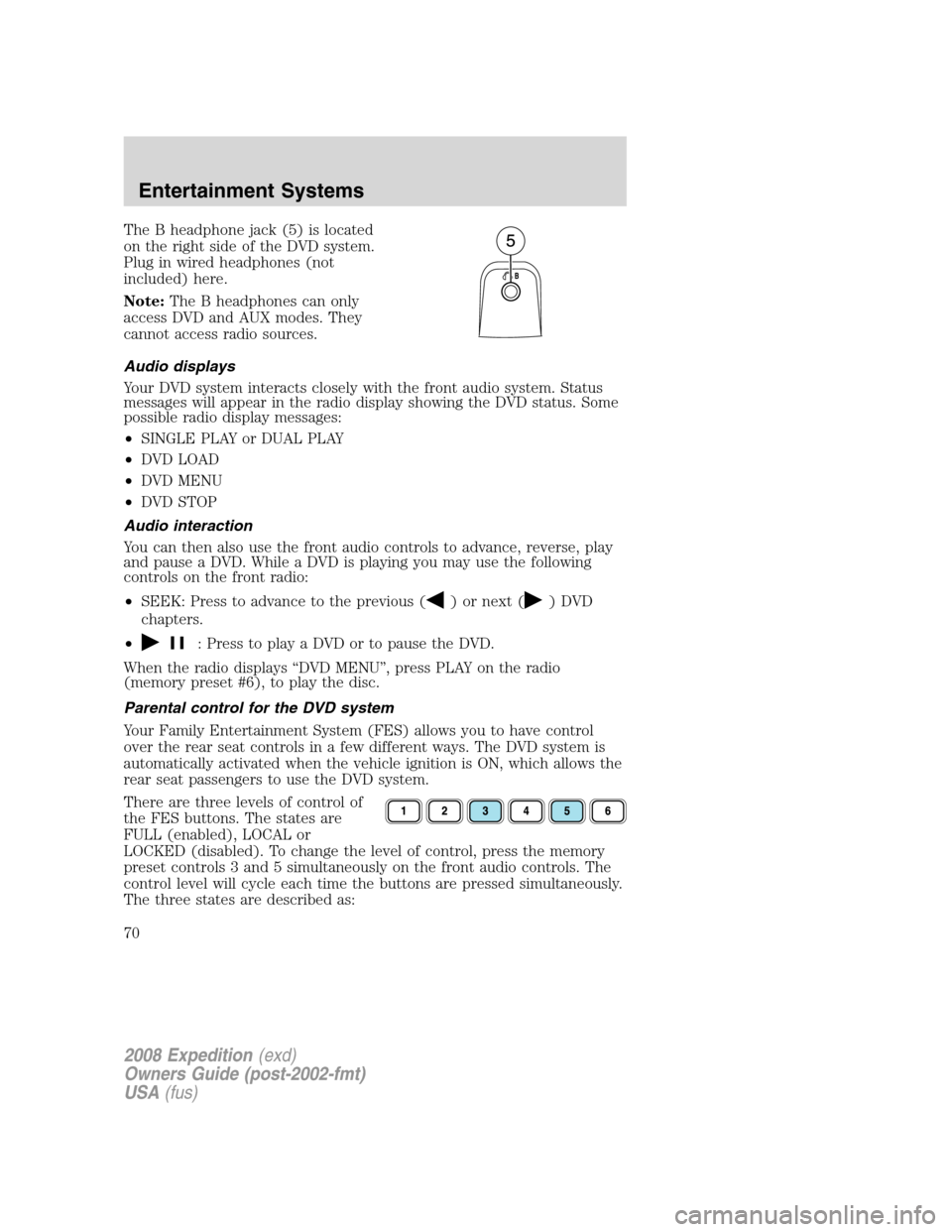
The B headphone jack (5) is located
on the right side of the DVD system.
Plug in wired headphones (not
included) here.
Note:The B headphones can only
access DVD and AUX modes. They
cannot access radio sources.
Audio displays
Your DVD system interacts closely with the front audio system. Status
messages will appear in the radio display showing the DVD status. Some
possible radio display messages:
•SINGLE PLAY or DUAL PLAY
•DVD LOAD
•DVD MENU
•DVD STOP
Audio interaction
You can then also use the front audio controls to advance, reverse, play
and pause a DVD. While a DVD is playing you may use the following
controls on the front radio:
•SEEK: Press to advance to the previous (
) or next () DVD
chapters.
•
: Press to play a DVD or to pause the DVD.
When the radio displays “DVD MENU”, press PLAY on the radio
(memory preset #6), to play the disc.
Parental control for the DVD system
Your Family Entertainment System (FES) allows you to have control
over the rear seat controls in a few different ways. The DVD system is
automatically activated when the vehicle ignition is ON, which allows the
rear seat passengers to use the DVD system.
There are three levels of control of
the FES buttons. The states are
FULL (enabled), LOCAL or
LOCKED (disabled). To change the level of control, press the memory
preset controls 3 and 5 simultaneously on the front audio controls. The
control level will cycle each time the buttons are pressed simultaneously.
The three states are described as:
2008 Expedition(exd)
Owners Guide (post-2002-fmt)
USA(fus)
Entertainment Systems
70
Page 76 of 392
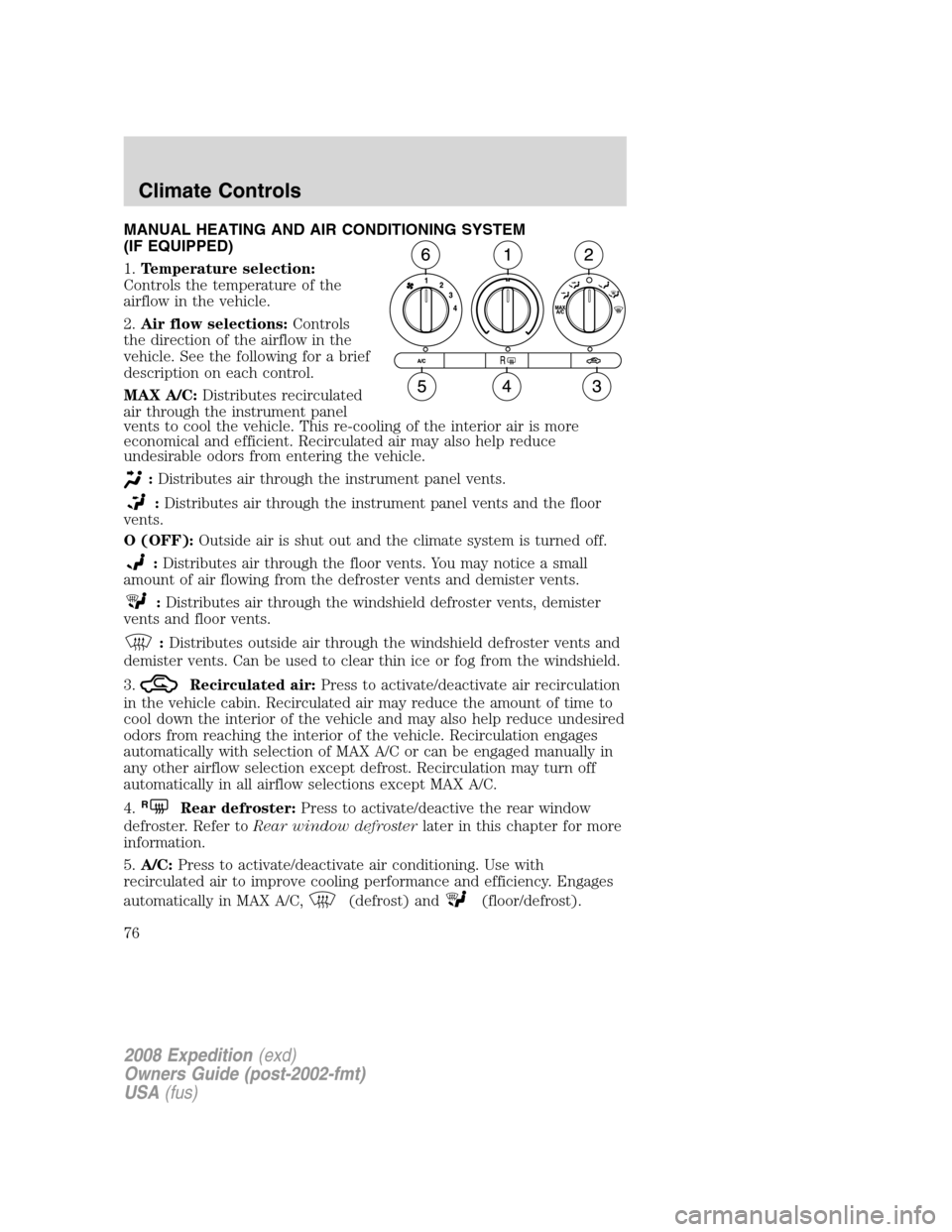
MANUAL HEATING AND AIR CONDITIONING SYSTEM
(IF EQUIPPED)
1.Temperature selection:
Controls the temperature of the
airflow in the vehicle.
2.Air flow selections:Controls
the direction of the airflow in the
vehicle. See the following for a brief
description on each control.
MAX A/C:Distributes recirculated
air through the instrument panel
vents to cool the vehicle. This re-cooling of the interior air is more
economical and efficient. Recirculated air may also help reduce
undesirable odors from entering the vehicle.
:Distributes air through the instrument panel vents.
:Distributes air through the instrument panel vents and the floor
vents.
O (OFF):Outside air is shut out and the climate system is turned off.
:Distributes air through the floor vents. You may notice a small
amount of air flowing from the defroster vents and demister vents.
:Distributes air through the windshield defroster vents, demister
vents and floor vents.
:Distributes outside air through the windshield defroster vents and
demister vents. Can be used to clear thin ice or fog from the windshield.
3.
Recirculated air:Press to activate/deactivate air recirculation
in the vehicle cabin. Recirculated air may reduce the amount of time to
cool down the interior of the vehicle and may also help reduce undesired
odors from reaching the interior of the vehicle. Recirculation engages
automatically with selection of MAX A/C or can be engaged manually in
any other airflow selection except defrost. Recirculation may turn off
automatically in all airflow selections except MAX A/C.
4.
RRear defroster:Press to activate/deactive the rear window
defroster. Refer toRear window defrosterlater in this chapter for more
information.
5.A/C:Press to activate/deactivate air conditioning. Use with
recirculated air to improve cooling performance and efficiency. Engages
automatically in MAX A/C,
(defrost) and(floor/defrost).
2008 Expedition(exd)
Owners Guide (post-2002-fmt)
USA(fus)
Climate Controls
76
Page 78 of 392
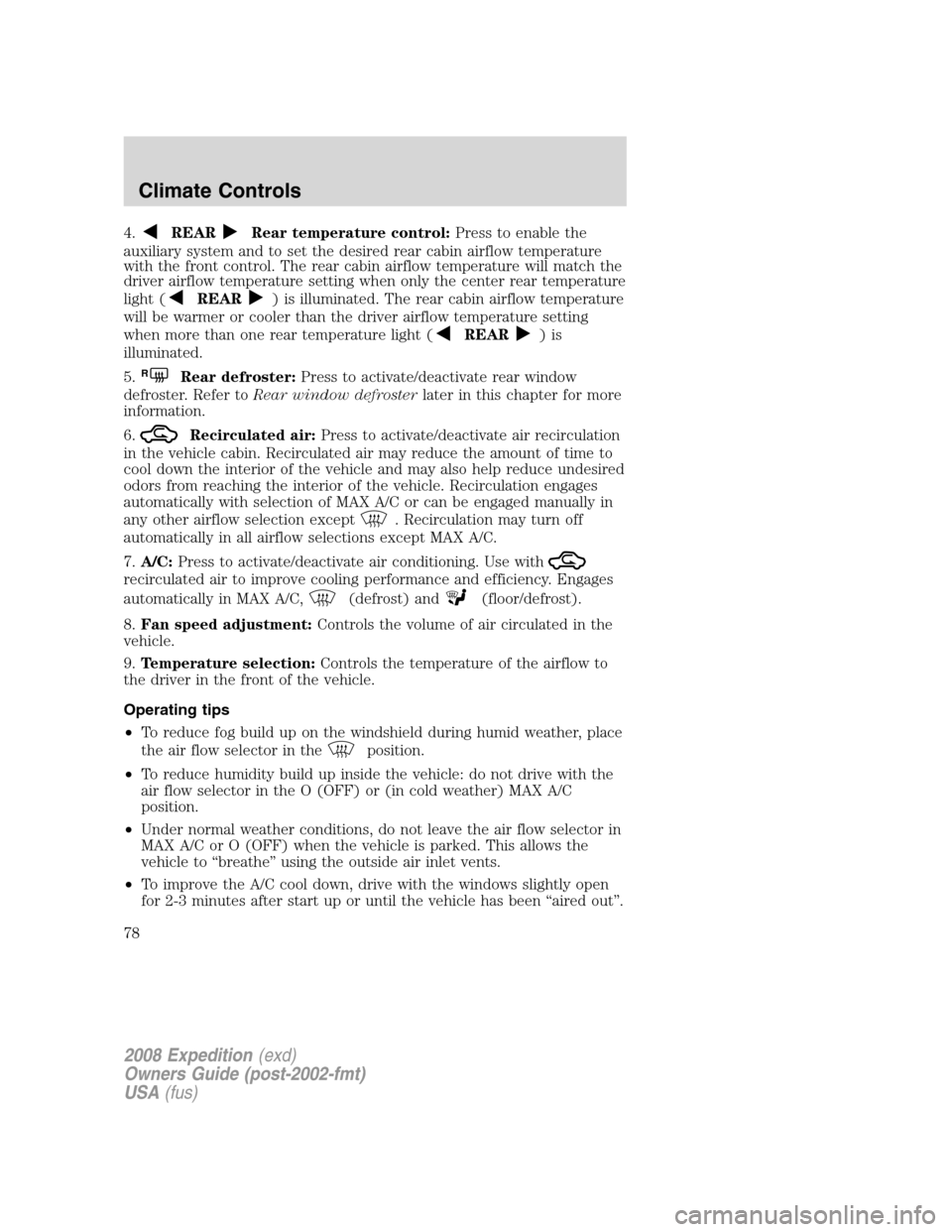
4.REARRear temperature control:Press to enable the
auxiliary system and to set the desired rear cabin airflow temperature
with the front control. The rear cabin airflow temperature will match the
driver airflow temperature setting when only the center rear temperature
light (
REAR) is illuminated. The rear cabin airflow temperature
will be warmer or cooler than the driver airflow temperature setting
when more than one rear temperature light (
REAR)is
illuminated.
5.
RRear defroster:Press to activate/deactivate rear window
defroster. Refer toRear window defrosterlater in this chapter for more
information.
6.
Recirculated air:Press to activate/deactivate air recirculation
in the vehicle cabin. Recirculated air may reduce the amount of time to
cool down the interior of the vehicle and may also help reduce undesired
odors from reaching the interior of the vehicle. Recirculation engages
automatically with selection of MAX A/C or can be engaged manually in
any other airflow selection except
. Recirculation may turn off
automatically in all airflow selections except MAX A/C.
7.A/C:Press to activate/deactivate air conditioning. Use with
recirculated air to improve cooling performance and efficiency. Engages
automatically in MAX A/C,
(defrost) and(floor/defrost).
8.Fan speed adjustment:Controls the volume of air circulated in the
vehicle.
9.Temperature selection:Controls the temperature of the airflow to
the driver in the front of the vehicle.
Operating tips
•To reduce fog build up on the windshield during humid weather, place
the air flow selector in the
position.
•To reduce humidity build up inside the vehicle: do not drive with the
air flow selector in the O (OFF) or (in cold weather) MAX A/C
position.
•Under normal weather conditions, do not leave the air flow selector in
MAX A/C or O (OFF) when the vehicle is parked. This allows the
vehicle to “breathe” using the outside air inlet vents.
•To improve the A/C cool down, drive with the windows slightly open
for 2-3 minutes after start up or until the vehicle has been “aired out”.
2008 Expedition(exd)
Owners Guide (post-2002-fmt)
USA(fus)
Climate Controls
78
Page 80 of 392
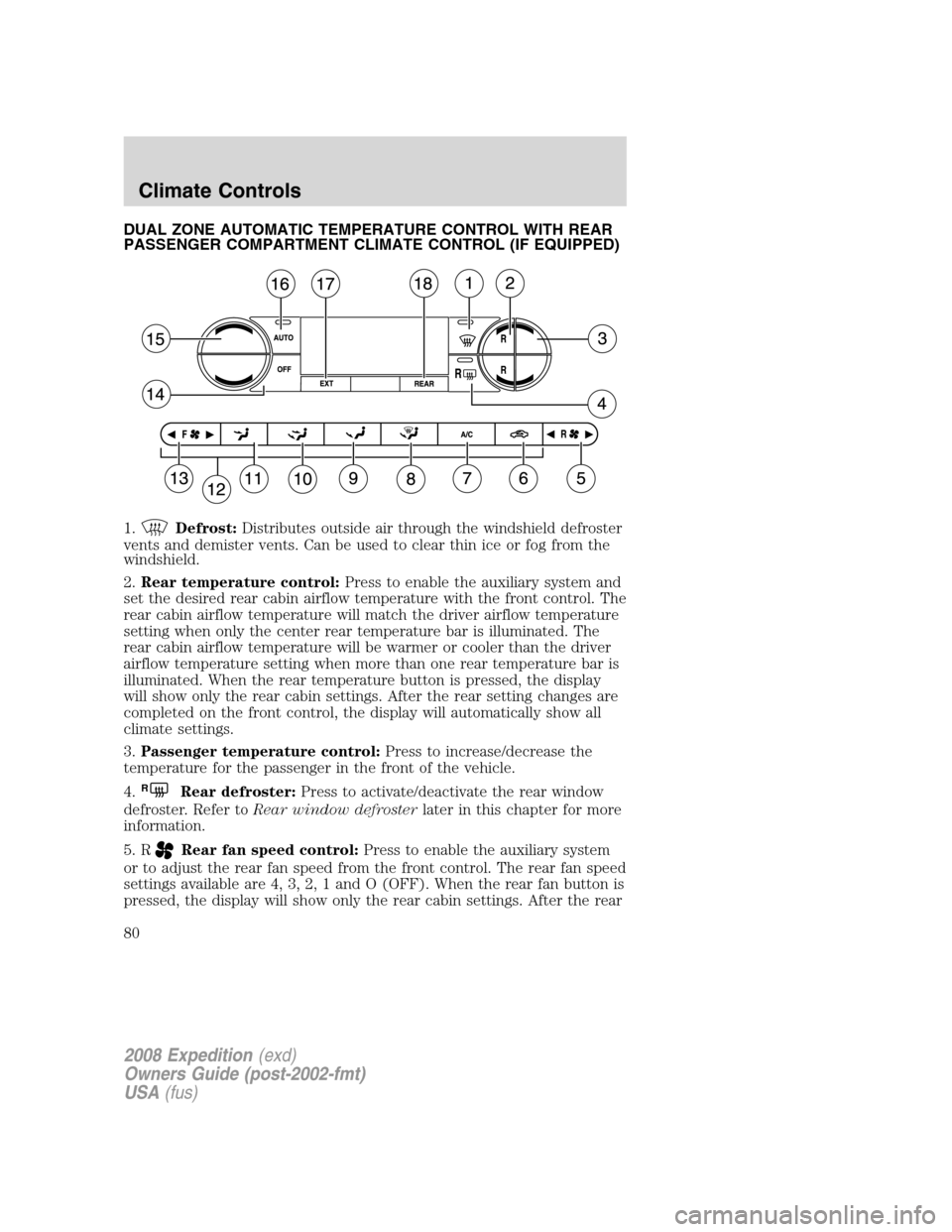
DUAL ZONE AUTOMATIC TEMPERATURE CONTROL WITH REAR
PASSENGER COMPARTMENT CLIMATE CONTROL (IF EQUIPPED)
1.
Defrost:Distributes outside air through the windshield defroster
vents and demister vents. Can be used to clear thin ice or fog from the
windshield.
2.Rear temperature control:Press to enable the auxiliary system and
set the desired rear cabin airflow temperature with the front control. The
rear cabin airflow temperature will match the driver airflow temperature
setting when only the center rear temperature bar is illuminated. The
rear cabin airflow temperature will be warmer or cooler than the driver
airflow temperature setting when more than one rear temperature bar is
illuminated. When the rear temperature button is pressed, the display
will show only the rear cabin settings. After the rear setting changes are
completed on the front control, the display will automatically show all
climate settings.
3.Passenger temperature control:Press to increase/decrease the
temperature for the passenger in the front of the vehicle.
4.
RRear defroster:Press to activate/deactivate the rear window
defroster. Refer toRear window defrosterlater in this chapter for more
information.
5. R
Rear fan speed control:Press to enable the auxiliary system
or to adjust the rear fan speed from the front control. The rear fan speed
settings available are 4, 3, 2, 1 and O (OFF). When the rear fan button is
pressed, the display will show only the rear cabin settings. After the rear
2008 Expedition(exd)
Owners Guide (post-2002-fmt)
USA(fus)
Climate Controls
80
Page 81 of 392
setting changes are completed on the front control, the display will
automatically show all climate settings.
6.
Recirculated air:Press to activate/deactivate air recirculation
in the vehicle cabin. Recirculated air may reduce the amount of time to
cool down the interior of the vehicle and may also help reduce undesired
odors from reaching the interior of the vehicle. Recirculated air can be
engaged manually in any airflow selection except
. Recirculated air
may turn off automatically in all airflow selections.
7.A/C:Press to activate/deactivate air conditioning. Use with
recirculated air to improve cooling performance and efficiency. Engages
automatically in AUTO,
(defrost), and(floor/defrost).
8.
:Distributes air through the windshield defroster vents, demister
vents and floor vents.
9.
:Distributes air through the floor vents.
10.
:Distributes air through the instrument panel vents and the floor
vents.
11.
:Distributes air through the instrument panel vents.
12.Manual override controls:Allows you to manually select where
airflow is distributed. To return to full automatic control, press AUTO.
13. F
Front fan speed control:Press to manually increase or
decrease the fan speed. To return to full automatic control, press AUTO.
14.OFF:Outside air is shut out and the climate system is turned off.
15.Driver temperature control:Press to increase or decrease the
temperature on the driver side of the cabin. Sets the passenger side
temperature also when DUAL is disengaged.Note:The recommended
vehicle cabin setting is between 72°F (22°C) and 75°F (24°C).
•Dual temperature control:Press and hold AUTO to
engage/disengage separate passenger side temperature control.
16.AUTO:Press to engage full automatic operation, and select the
desired temperature using the temperature control. The system will
automatically determine fan speed, airflow location, A/C on or off, and
outside or recirculated air, to heat or cool the vehicle to reach the
desired temperature.
17.EXT:Press to display the outside temperature. Press again to display
the cabin temperature settings.Note:Exterior readings are more
accurate when the vehicle is moving.
2008 Expedition(exd)
Owners Guide (post-2002-fmt)
USA(fus)
Climate Controls
81
Page 82 of 392
18.REAR:Press to enable the control located in the rear of the floor
console. Press again to turn the auxiliary system off. When the REAR
button is pressed, the display will show only the rear cabin settings.
After the rear setting changes are completed on the front control, the
display will automatically show all climate settings.
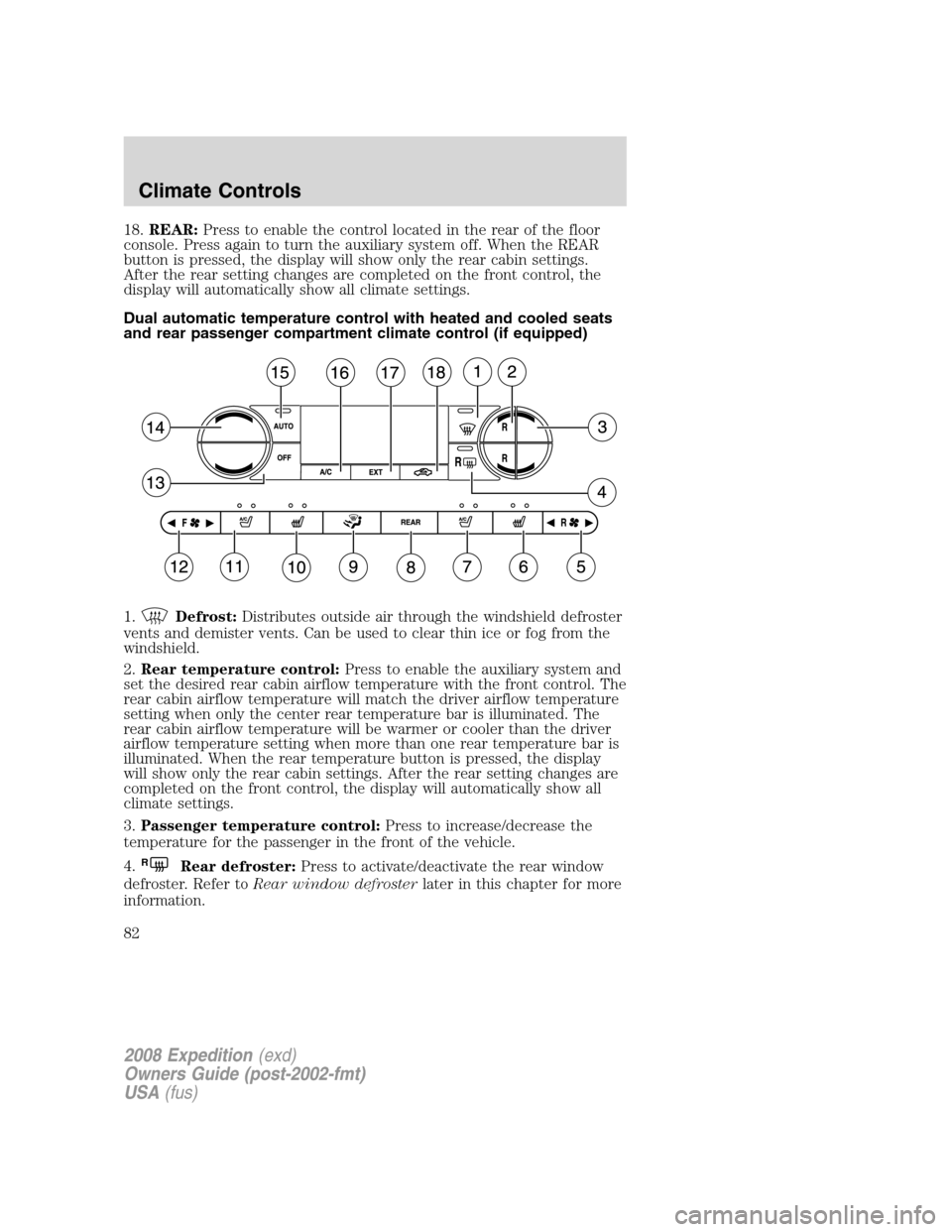
Dual automatic temperature control with heated and cooled seats
and rear passenger compartment climate control (if equipped)
1.
Defrost:Distributes outside air through the windshield defroster
vents and demister vents. Can be used to clear thin ice or fog from the
windshield.
2.Rear temperature control:Press to enable the auxiliary system and
set the desired rear cabin airflow temperature with the front control. The
rear cabin airflow temperature will match the driver airflow temperature
setting when only the center rear temperature bar is illuminated. The
rear cabin airflow temperature will be warmer or cooler than the driver
airflow temperature setting when more than one rear temperature bar is
illuminated. When the rear temperature button is pressed, the display
will show only the rear cabin settings. After the rear setting changes are
completed on the front control, the display will automatically show all
climate settings.
3.Passenger temperature control:Press to increase/decrease the
temperature for the passenger in the front of the vehicle.
4.
RRear defroster:Press to activate/deactivate the rear window
defroster. Refer toRear window defrosterlater in this chapter for more
information.
2008 Expedition(exd)
Owners Guide (post-2002-fmt)
USA(fus)
Climate Controls
82
Page 83 of 392
5. RRear fan speed control:Press to enable the auxiliary system
or to adjust the rear fan speed from the front control. The rear fan speed
settings available are 4, 3, 2, 1 and O (OFF). When the rear fan button is
pressed, the display will show only the rear cabin settings. After the rear
setting changes are completed on the front control, the display will
automatically show all climate settings.
6.
Passenger heated seat control:Press to activate/deactivate the
passenger heated seat. SeeClimate controlled seatsin theSeating and
Safety Restraintschapter.
7.
Passenger cooled seat control:Press to activate/deactivate the
passenger cooled seat. SeeClimate controlled seatsin theSeating and
Safety Restraintschapter.
8.REAR:Press to enable the control located in the rear floor console (if
equipped). Press again to turn the auxiliary system off. When the REAR
button is pressed, the display will show only the rear cabin settings.
After the rear setting changes are completed on the front control, the
display will automatically show all climate settings.
9.
Airflow direction control:Press to toggle through the air
distribution modes listed below. The selected mode will be shown in the
display.
:Distributes air through the instrument panel vents.
:Distributes air through the instrument panel and the floor vents.
:Distributes air through the floor vents.
:Distributes air through the windshield defroster vents, demister
vents and the floor vents.
10.
Driver heated seat control:Press to activate/deactivate the
driver heated seat. SeeClimate controlled seatsin theSeating and
Safety Restraintschapter.
11.
Driver cooled seat control:Press to activate/deactivate the
driver cooled seat. SeeClimate controlled seatsin theSeating and
Safety Restraintschapter.
12. F
Front fan speed control:Press to manually increase or
decrease the fan speed. To return to full automatic control, press AUTO.
13.OFF:Outside air is shut out and the climate system is turned off.
2008 Expedition(exd)
Owners Guide (post-2002-fmt)
USA(fus)
Climate Controls
83
Page 84 of 392
14.Driver temperature control:Press to increase or decrease the
temperature on the driver side of the cabin. Sets the passenger side
temperature also when DUAL is disengaged.Note:The recommended
vehicle cabin setting is between 72°F (22°C) and 75°F (24°C).
15.AUTO:Press to engage full automatic operation, and select the
desired temperature using the temperature control. The system will
automatically determine fan speed, airflow location, A/C on or off, and
outside or recirculated air, to heat or cool the vehicle to reach the
desired temperature.
16.A/C:Press to activate/deactivate air conditioning. Use with
recirculated air to improve cooling performance and efficiency. Engages
automatically in AUTO,
(defrost), and(floor/defrost).
17.EXT:Press to display the outside temperature. Press again to display
cabin temperature settings.Note:Exterior readings are more accurate
when the vehicle is moving.
18.
Recirculated air:Press to activate/deactivate air
recirculation in the vehicle cabin. Recirculated air may reduce the
amount of time to cool down the interior of the vehicle and may also
help reduce undesired odors from reaching the interior of the vehicle.
Recirculated air can be engaged manually in any airflow selection
except
. Recirculated air may turn off automatically in all airflow
selections.
Operating tips
•To reduce fog build up on the windshield during humid weather, place
the air flow selector in the
position.
•To reduce humidity build up inside the vehicle: do not drive with the
air flow selector in the O (OFF) or (in cold weather) MAX A/C
position.
•Under normal weather conditions, do not leave the air flow selector in
MAX A/C or O (OFF) when the vehicle is parked. This allows the
vehicle to “breathe” using the outside air inlet vents.
•To improve the A/C cool down, drive with the windows slightly open
for 2-3 minutes after start up or until the vehicle has been “aired out”.
2008 Expedition(exd)
Owners Guide (post-2002-fmt)
USA(fus)
Climate Controls
84
Page 86 of 392
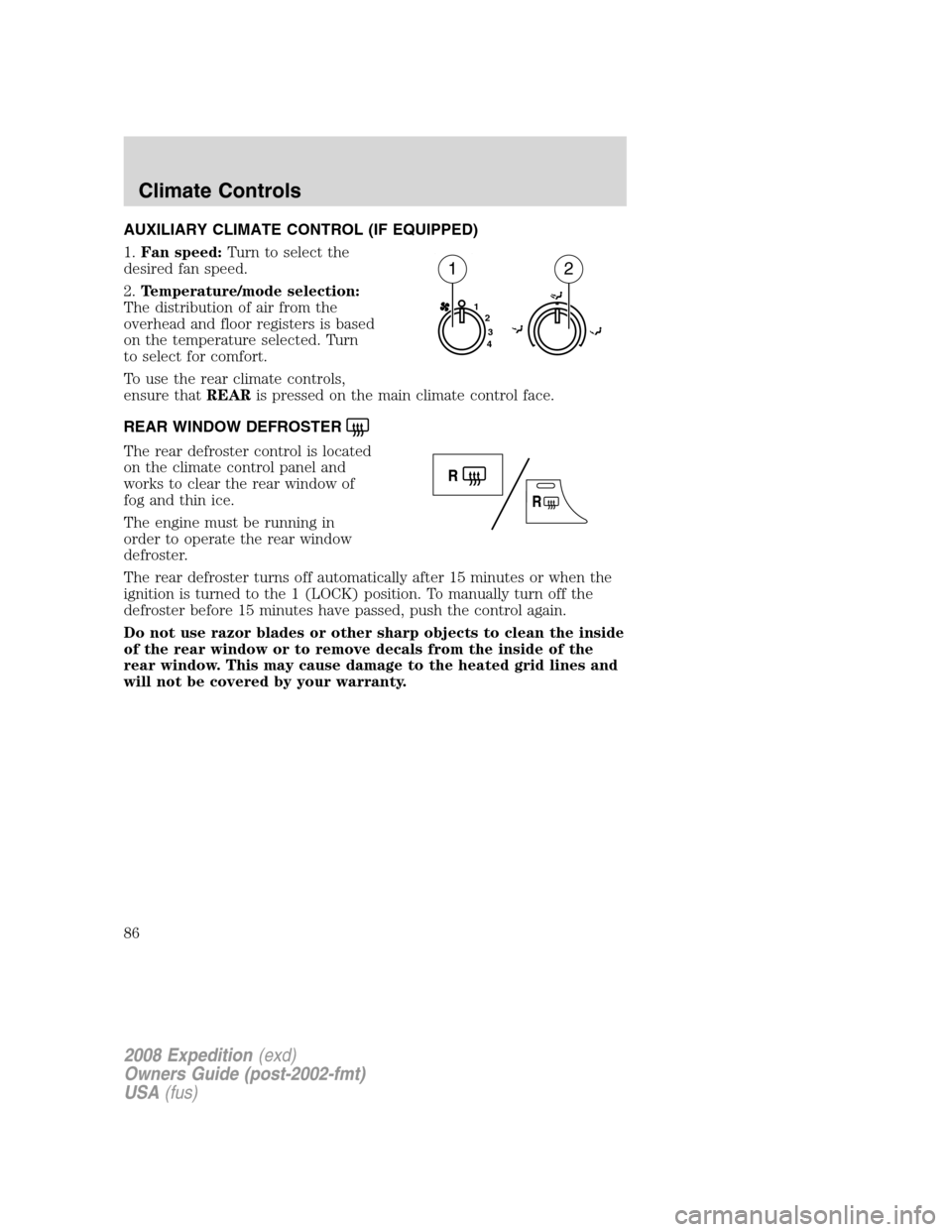
AUXILIARY CLIMATE CONTROL (IF EQUIPPED)
1.Fan speed:Turn to select the
desired fan speed.
2.Temperature/mode selection:
The distribution of air from the
overhead and floor registers is based
on the temperature selected. Turn
to select for comfort.
To use the rear climate controls,
ensure thatREARis pressed on the main climate control face.
REAR WINDOW DEFROSTER
The rear defroster control is located
on the climate control panel and
works to clear the rear window of
fog and thin ice.
The engine must be running in
order to operate the rear window
defroster.
The rear defroster turns off automatically after 15 minutes or when the
ignition is turned to the 1 (LOCK) position. To manually turn off the
defroster before 15 minutes have passed, push the control again.
Do not use razor blades or other sharp objects to clean the inside
of the rear window or to remove decals from the inside of the
rear window. This may cause damage to the heated grid lines and
will not be covered by your warranty.
1
2
3
4
12
2008 Expedition(exd)
Owners Guide (post-2002-fmt)
USA(fus)
Climate Controls
86