mirror FORD EXPEDITION 2008 3.G User Guide
[x] Cancel search | Manufacturer: FORD, Model Year: 2008, Model line: EXPEDITION, Model: FORD EXPEDITION 2008 3.GPages: 392, PDF Size: 3.34 MB
Page 125 of 392
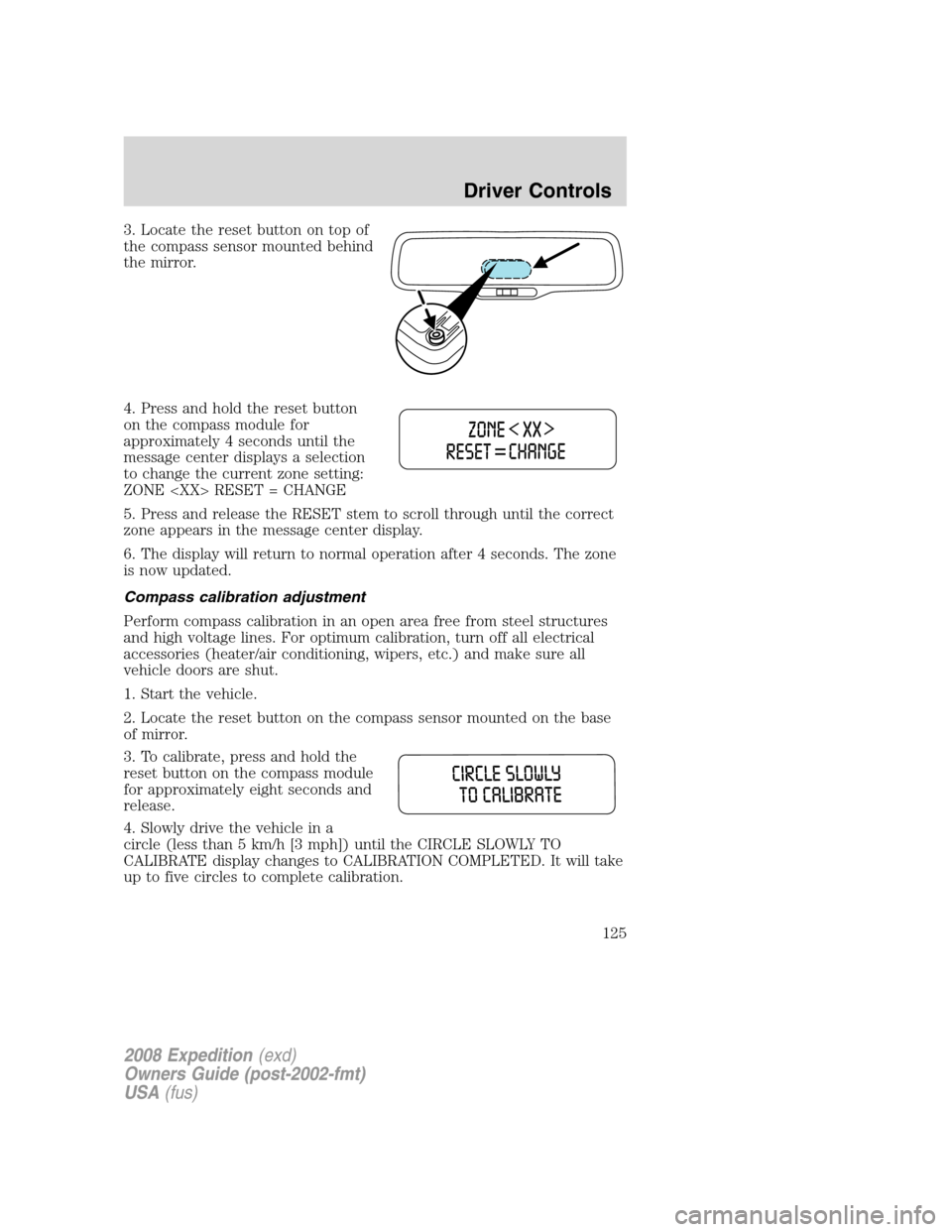
3. Locate the reset button on top of
the compass sensor mounted behind
the mirror.
4. Press and hold the reset button
on the compass module for
approximately 4 seconds until the
message center displays a selection
to change the current zone setting:
ZONE
5. Press and release the RESET stem to scroll through until the correct
zone appears in the message center display.
6. The display will return to normal operation after 4 seconds. The zone
is now updated.
Compass calibration adjustment
Perform compass calibration in an open area free from steel structures
and high voltage lines. For optimum calibration, turn off all electrical
accessories (heater/air conditioning, wipers, etc.) and make sure all
vehicle doors are shut.
1. Start the vehicle.
2. Locate the reset button on the compass sensor mounted on the base
of mirror.
3. To calibrate, press and hold the
reset button on the compass module
for approximately eight seconds and
release.
4. Slowly drive the vehicle in a
circle (less than 5 km/h [3 mph]) until the CIRCLE SLOWLY TO
CALIBRATE display changes to CALIBRATION COMPLETED. It will take
up to five circles to complete calibration.
2008 Expedition(exd)
Owners Guide (post-2002-fmt)
USA(fus)
Driver Controls
125
Page 161 of 392
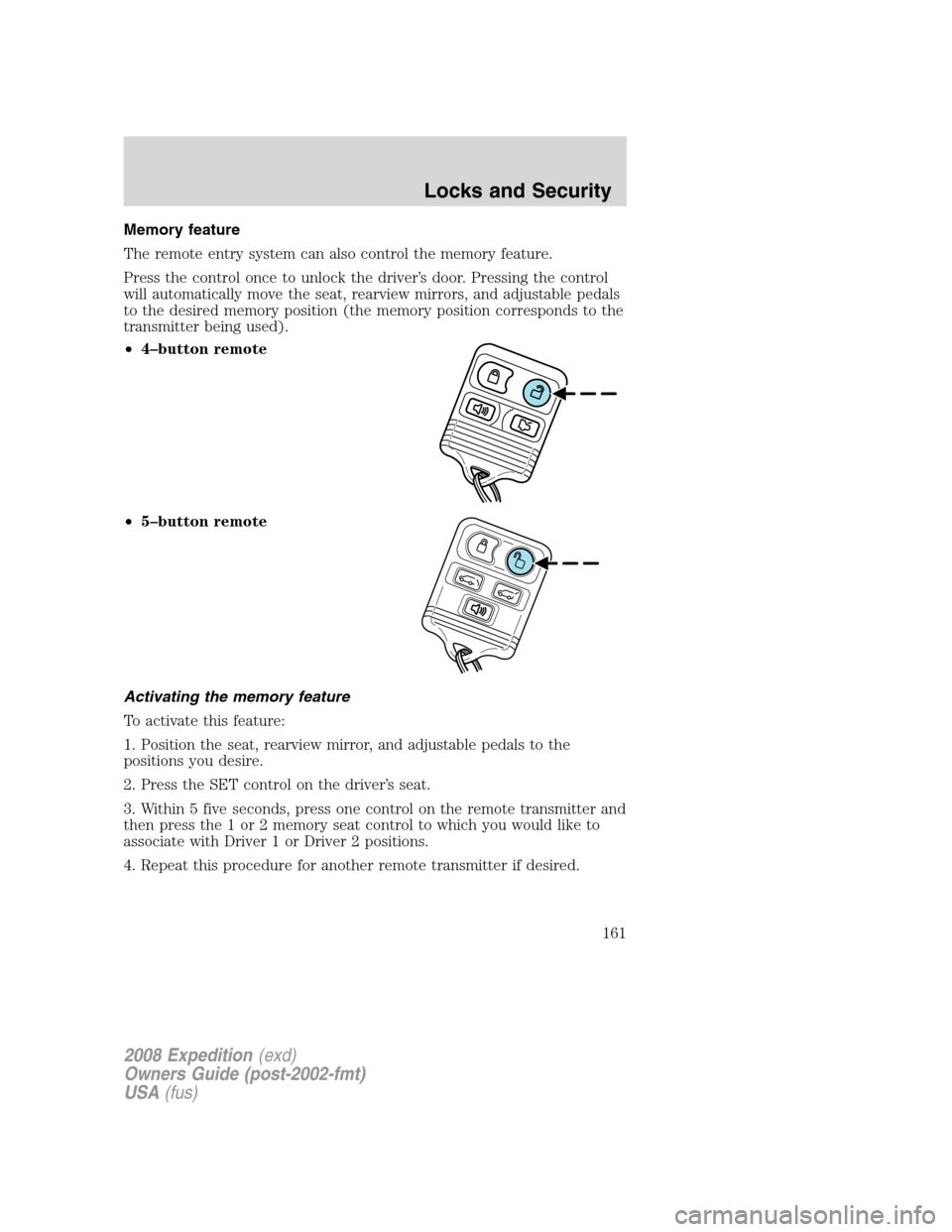
Memory feature
The remote entry system can also control the memory feature.
Press the control once to unlock the driver’s door. Pressing the control
will automatically move the seat, rearview mirrors, and adjustable pedals
to the desired memory position (the memory position corresponds to the
transmitter being used).
•4–button remote
•5–button remote
Activating the memory feature
To activate this feature:
1. Position the seat, rearview mirror, and adjustable pedals to the
positions you desire.
2. Press the SET control on the driver’s seat.
3. Within 5 five seconds, press one control on the remote transmitter and
then press the 1 or 2 memory seat control to which you would like to
associate with Driver 1 or Driver 2 positions.
4. Repeat this procedure for another remote transmitter if desired.
2008 Expedition(exd)
Owners Guide (post-2002-fmt)
USA(fus)
Locks and Security
161
Page 176 of 392
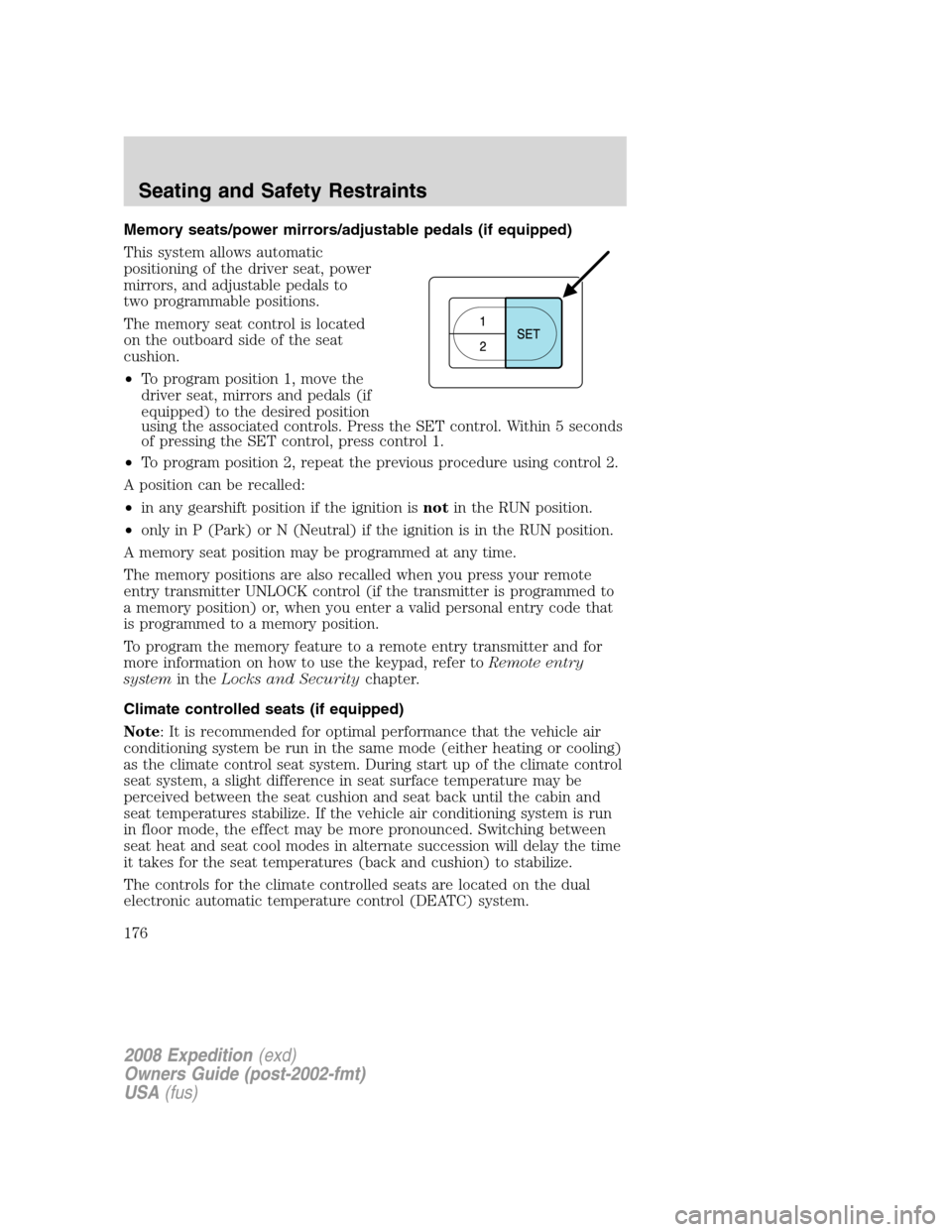
Memory seats/power mirrors/adjustable pedals (if equipped)
This system allows automatic
positioning of the driver seat, power
mirrors, and adjustable pedals to
two programmable positions.
The memory seat control is located
on the outboard side of the seat
cushion.
•To program position 1, move the
driver seat, mirrors and pedals (if
equipped) to the desired position
using the associated controls. Press the SET control. Within 5 seconds
of pressing the SET control, press control 1.
•To program position 2, repeat the previous procedure using control 2.
A position can be recalled:
•in any gearshift position if the ignition isnotin the RUN position.
•only in P (Park) or N (Neutral) if the ignition is in the RUN position.
A memory seat position may be programmed at any time.
The memory positions are also recalled when you press your remote
entry transmitter UNLOCK control (if the transmitter is programmed to
a memory position) or, when you enter a valid personal entry code that
is programmed to a memory position.
To program the memory feature to a remote entry transmitter and for
more information on how to use the keypad, refer toRemote entry
systemin theLocks and Securitychapter.
Climate controlled seats (if equipped)
Note: It is recommended for optimal performance that the vehicle air
conditioning system be run in the same mode (either heating or cooling)
as the climate control seat system. During start up of the climate control
seat system, a slight difference in seat surface temperature may be
perceived between the seat cushion and seat back until the cabin and
seat temperatures stabilize. If the vehicle air conditioning system is run
in floor mode, the effect may be more pronounced. Switching between
seat heat and seat cool modes in alternate succession will delay the time
it takes for the seat temperatures (back and cushion) to stabilize.
The controls for the climate controlled seats are located on the dual
electronic automatic temperature control (DEATC) system.
2008 Expedition(exd)
Owners Guide (post-2002-fmt)
USA(fus)
Seating and Safety Restraints
176
Page 288 of 392
The radar sensor is located behind the rear bumper/fascia. Always
keep the rear bumper/fascia free from snow, ice and large
accumulations of dirt. These elements may cause the system to
operate inaccurately.
If the vehicle sustains damage to the rear bumper/fascia, leaving
it misaligned or bent, the sensing zone may be altered causing
inaccurate measurement of obstacles or false alarms.
REVERSE CAMERA SYSTEM (IF EQUIPPED)
The reverse camera system located
on the liftgate provides a video
image (which appears in the rear
view mirror) of the area behind the
vehicle. It adds assistance to the
driver while reversing or reverse
parking the vehicle.
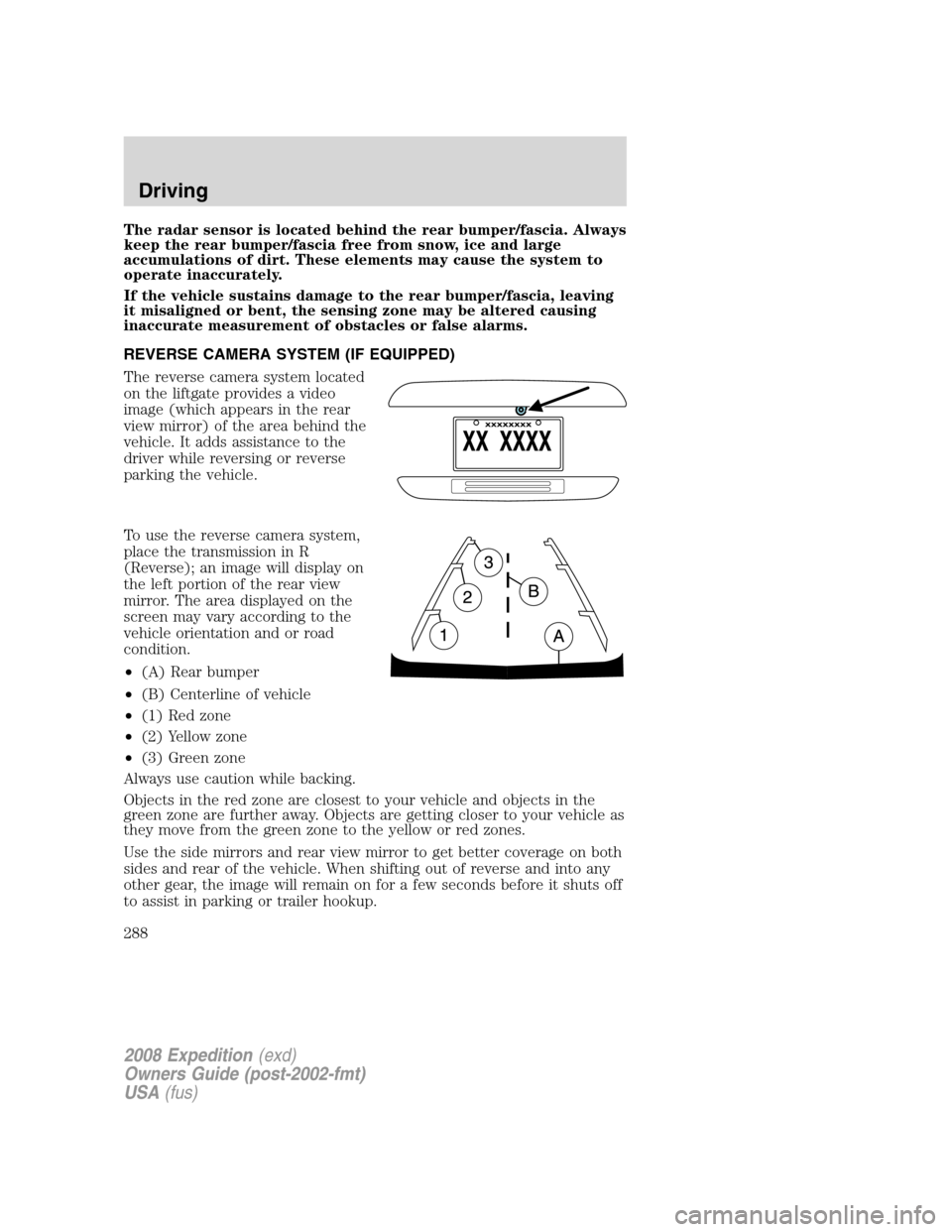
To use the reverse camera system,
place the transmission in R
(Reverse); an image will display on
the left portion of the rear view
mirror. The area displayed on the
screen may vary according to the
vehicle orientation and or road
condition.
•(A) Rear bumper
•(B) Centerline of vehicle
•(1) Red zone
•(2) Yellow zone
•(3) Green zone
Always use caution while backing.
Objects in the red zone are closest to your vehicle and objects in the
green zone are further away. Objects are getting closer to your vehicle as
they move from the green zone to the yellow or red zones.
Use the side mirrors and rear view mirror to get better coverage on both
sides and rear of the vehicle. When shifting out of reverse and into any
other gear, the image will remain on for a few seconds before it shuts off
to assist in parking or trailer hookup.
2008 Expedition(exd)
Owners Guide (post-2002-fmt)
USA(fus)
Driving
288
Page 289 of 392
When towing, the reverse camera system will only see what is being
towed behind the vehicle; this might not provide adequate coverage as it
usually provides in normal operation and some objects might not be
seen.
The camera lens for the reverse camera system is located on the liftgate,
above the license plate. Keep the lens clean so the video image remains
clear and undistorted. Clean the lens with a soft, lint-free cloth and
non-abrasive cleaner.
If the reverse camera system image is not clear or seems distorted it may
be covered with water droplets, snow, mud or any other substance. If
this occurs, clean the camera lens before using the reverse camera
system.
The reverse camera system is a reverse aid supplement device
that still requires the driver to use it in conjunction with the rear
view mirror and the side mirrors for maximum coverage.
Objects that are close to either corner of the bumper or under
the bumper, might not be seen on the screen due to the limited
coverage of the reverse camera system.
Backup as slow as possible since higher speeds might limit your
reaction time to stop the vehicle.
Do not use the reverse camera system with the liftgate open.
If the back end of the vehicle is hit or damaged, then check with your
authorized dealer to have your rear video system checked for proper
coverage and operation.
Nighttime and dark area use
At night time or in dark areas, the reverse camera system relies on the
reverse lamp lighting to produce an image. Therefore it is necessary that
both reverse lamps are operating in order to get a clear image in the
dark. If either of the lamps are not operating, stop using the reverse
camera system, at least in the dark, until the lamp(s) are replaced and
functioning.
2008 Expedition(exd)
Owners Guide (post-2002-fmt)
USA(fus)
Driving
289
Page 290 of 392
Servicing
•If the vehicle is in R (Reverse) and the screen in the rear view mirror
appears blue for three seconds and turns blank afterwards, the camera
is not working properly; have the system inspected by your authorized
dealer.
•If the image comes on while the vehicle is not in reverse, have the
system inspected by your authorized dealer.
•If the vehicle is in R (Reverse) and the screen is blank and no blue
screen is observed, the mirror is not working properly; have the
system inspected by your authorized dealer.
•If the image is not clear, then check if there is anything covering the
lens such as dirt, mud, ice, snow, etc. If the image is still not clear
after cleaning, have your system inspected by your authorized dealer.
CONTROL TRAC FOUR-WHEEL DRIVE (4X4) OPERATION
(IF EQUIPPED)
For important information regarding safe operation of this type
of vehicle, seePreparing to drive your vehiclein this chapter.
If equipped with the Control Trac 4x4 System, and 4L (4x4 LOW)
is selected while the vehicle is moving, the system will not
engage. This is normal and should be no reason for concern.
Before 4L (4x4 LOW) can be engaged, the vehicle must be
brought to a complete stop and the transmission placed in N
(Neutral).
Do not use 4H (4X4) or 4L (4X4 LOW) on dry, hard surfaced roads.
Doing so will produce excessive noise, increased tire wear and may
damage drive components. 4H (4X4) and 4L (4X4 LOW) are only
intended for consistently slippery or loose surfaces. Use of 4H (4X4) or
4L (4X4 LOW) on these surfaces may produce some noise (such as
occasional clunks) but will not damage drive components.
Your 4x4 features the heavy-duty Control Trac system which includes a
computer-operated transfer case. This unique system is interactive with
the road, continually monitoring and adjusting torque delivery to the
front and rear wheels to optimize vehicle control.
System indicator messages
The Control Trac system indicator messages display in the reconfigurable
telltale (RTT) location in the message center only under the following
2008 Expedition(exd)
Owners Guide (post-2002-fmt)
USA(fus)
Driving
290
Page 305 of 392
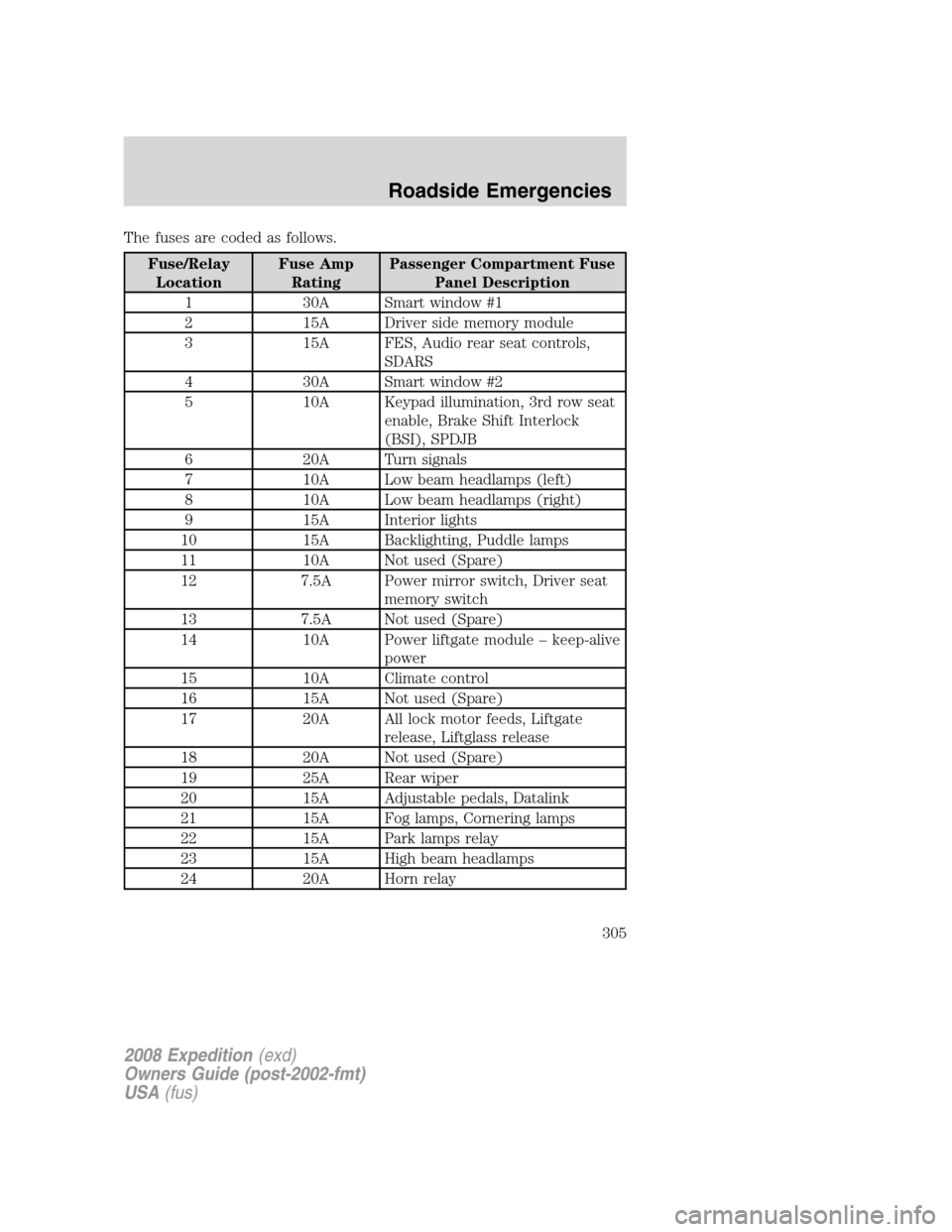
The fuses are coded as follows.
Fuse/Relay
LocationFuse Amp
RatingPassenger Compartment Fuse
Panel Description
1 30A Smart window #1
2 15A Driver side memory module
3 15A FES, Audio rear seat controls,
SDARS
4 30A Smart window #2
5 10A Keypad illumination, 3rd row seat
enable, Brake Shift Interlock
(BSI), SPDJB
6 20A Turn signals
7 10A Low beam headlamps (left)
8 10A Low beam headlamps (right)
9 15A Interior lights
10 15A Backlighting, Puddle lamps
11 10A Not used (Spare)
12 7.5A Power mirror switch, Driver seat
memory switch
13 7.5A Not used (Spare)
14 10A Power liftgate module – keep-alive
power
15 10A Climate control
16 15A Not used (Spare)
17 20A All lock motor feeds, Liftgate
release, Liftglass release
18 20A Not used (Spare)
19 25A Rear wiper
20 15A Adjustable pedals, Datalink
21 15A Fog lamps, Cornering lamps
22 15A Park lamps relay
23 15A High beam headlamps
24 20A Horn relay
2008 Expedition(exd)
Owners Guide (post-2002-fmt)
USA(fus)
Roadside Emergencies
305
Page 306 of 392
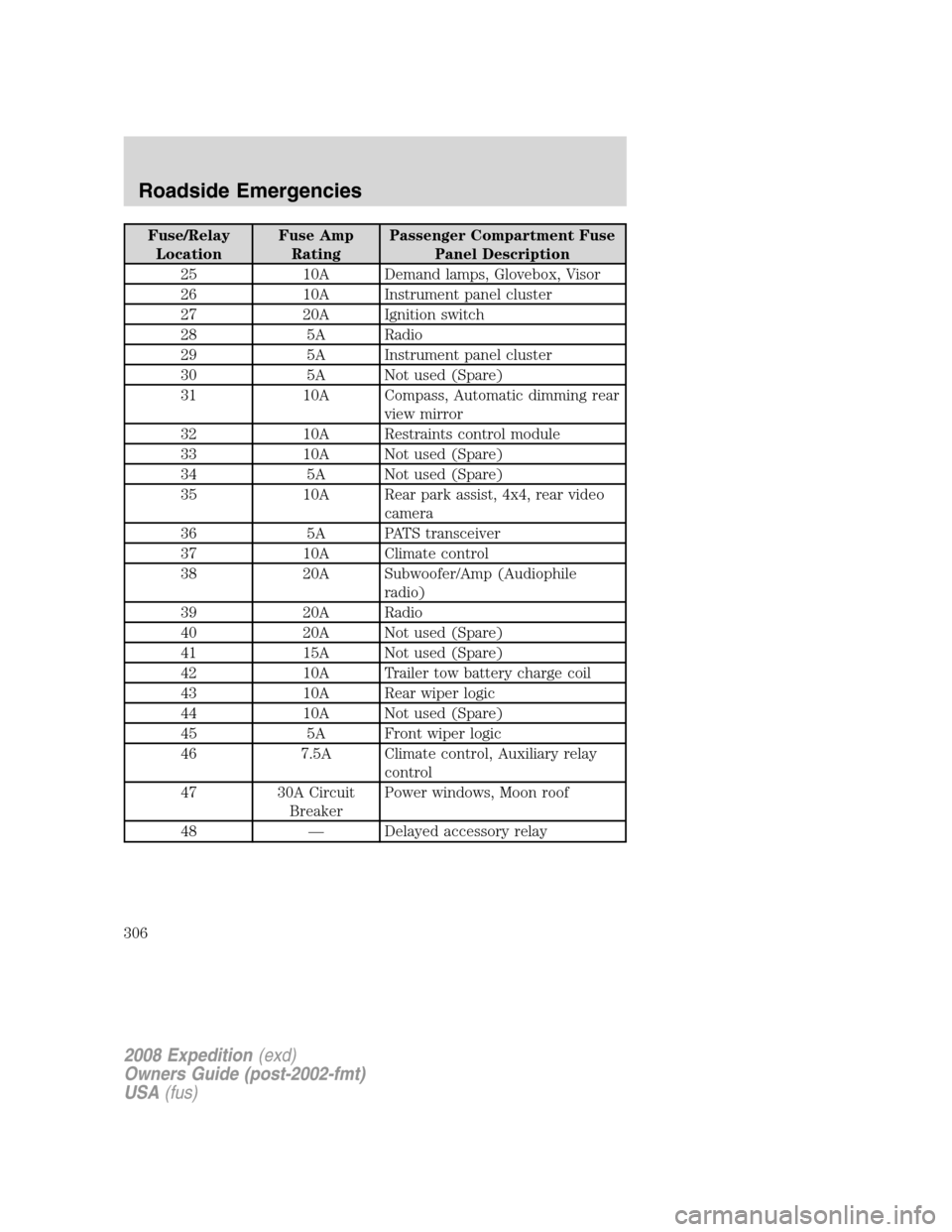
Fuse/Relay
LocationFuse Amp
RatingPassenger Compartment Fuse
Panel Description
25 10A Demand lamps, Glovebox, Visor
26 10A Instrument panel cluster
27 20A Ignition switch
28 5A Radio
29 5A Instrument panel cluster
30 5A Not used (Spare)
31 10A Compass, Automatic dimming rear
view mirror
32 10A Restraints control module
33 10A Not used (Spare)
34 5A Not used (Spare)
35 10A Rear park assist, 4x4, rear video
camera
36 5A PATS transceiver
37 10A Climate control
38 20A Subwoofer/Amp (Audiophile
radio)
39 20A Radio
40 20A Not used (Spare)
41 15A Not used (Spare)
42 10A Trailer tow battery charge coil
43 10A Rear wiper logic
44 10A Not used (Spare)
45 5A Front wiper logic
46 7.5A Climate control, Auxiliary relay
control
47 30A Circuit
BreakerPower windows, Moon roof
48 — Delayed accessory relay
2008 Expedition(exd)
Owners Guide (post-2002-fmt)
USA(fus)
Roadside Emergencies
306
Page 308 of 392
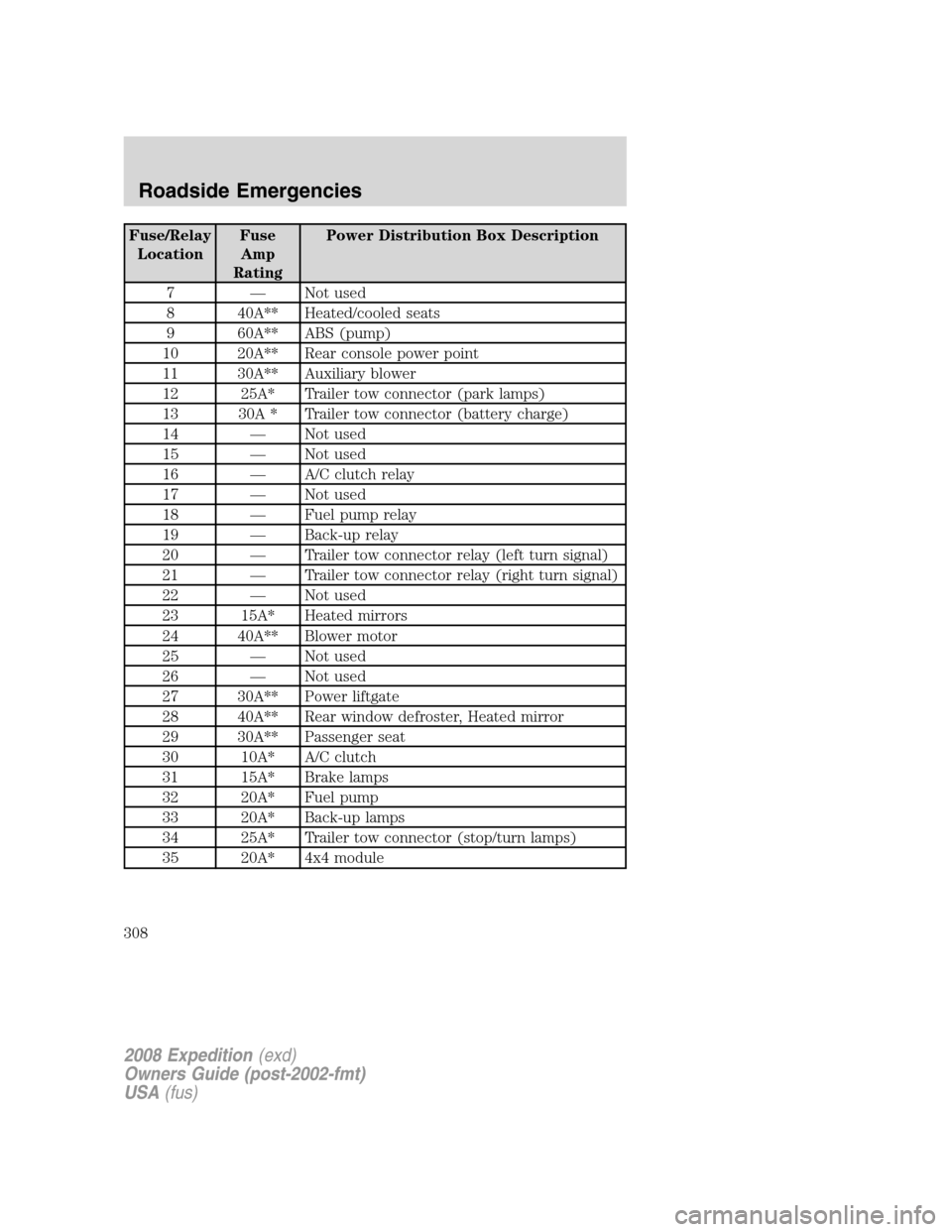
Fuse/Relay
LocationFuse
Amp
RatingPower Distribution Box Description
7 — Not used
8 40A** Heated/cooled seats
9 60A** ABS (pump)
10 20A** Rear console power point
11 30A** Auxiliary blower
12 25A* Trailer tow connector (park lamps)
13 30A * Trailer tow connector (battery charge)
14 — Not used
15 — Not used
16 — A/C clutch relay
17 — Not used
18 — Fuel pump relay
19 — Back-up relay
20 — Trailer tow connector relay (left turn signal)
21 — Trailer tow connector relay (right turn signal)
22 — Not used
23 15A* Heated mirrors
24 40A** Blower motor
25 — Not used
26 — Not used
27 30A** Power liftgate
28 40A** Rear window defroster, Heated mirror
29 30A** Passenger seat
30 10A* A/C clutch
31 15A* Brake lamps
32 20A* Fuel pump
33 20A* Back-up lamps
34 25A* Trailer tow connector (stop/turn lamps)
35 20A* 4x4 module
2008 Expedition(exd)
Owners Guide (post-2002-fmt)
USA(fus)
Roadside Emergencies
308
Page 337 of 392
racks, bumpers, side moldings, mirror housings or the windshield cowl
area. The paint sealant will “gray” or stain the parts over time.
PAINT CHIPS
Your authorized dealer has touch-up paint to match your vehicle’s color.
Take your color code (printed on a sticker in the driver’s door jamb) to
your authorized dealer to ensure you get the correct color.
•Remove particles such as bird droppings, tree sap, insect deposits, tar
spots, road salt and industrial fallout before repairing paint chips.
•Always read the instructions before using the products.
ALUMINUM WHEELS AND WHEEL COVERS
Aluminum wheels and wheel covers are coated with a clearcoat paint
finish. In order to maintain their shine:
•Clean weekly with Motorcraft Wheel and Tire Cleaner (ZC-37-A),
which is available from your authorized dealer. Heavy dirt and brake
dust accumulation may require agitation with a sponge. Rinse
thoroughly with a strong stream of water.
•Never apply any cleaning chemical to hot or warm wheel rims or
covers.
•Some automatic car washes may cause damage to the finish on your
wheel rims or covers. Chemical-strength cleaners, or cleaning
chemicals, in combination with brush agitation to remove brake dust
and dirt, could wear away the clearcoat finish over time.
•Do not use hydrofluoric acid-based or high caustic-based wheel
cleaners, steel wool, fuels or strong household detergent.
•To remove tar and grease, use Motorcraft Bug and Tar Remover
(ZC-42), available from your authorized dealer.
ENGINE
Engines are more efficient when they are clean because grease and dirt
buildup keep the engine warmer than normal. When washing:
•Take care when using a power washer to clean the engine. The
high-pressure fluid could penetrate the sealed parts and cause
damage.
•Do not spray a hot engine with cold water to avoid cracking the
engine block or other engine components.
•Spray Motorcraft Engine Shampoo and Degreaser (ZC-20) on all parts
that require cleaning and pressure rinse clean.
2008 Expedition(exd)
Owners Guide (post-2002-fmt)
USA(fus)
Cleaning
337