navigation FORD EXPEDITION 2009 3.G User Guide
[x] Cancel search | Manufacturer: FORD, Model Year: 2009, Model line: EXPEDITION, Model: FORD EXPEDITION 2009 3.GPages: 416, PDF Size: 3.39 MB
Page 76 of 416
Playing a DVD
1. Ensure that the vehicle is on or the ignition is in accessory mode.
2. Ensure that the navigation system is on.
3. Insert a DVD label-side up into the system.
4. Use the DVD bezel controls to:
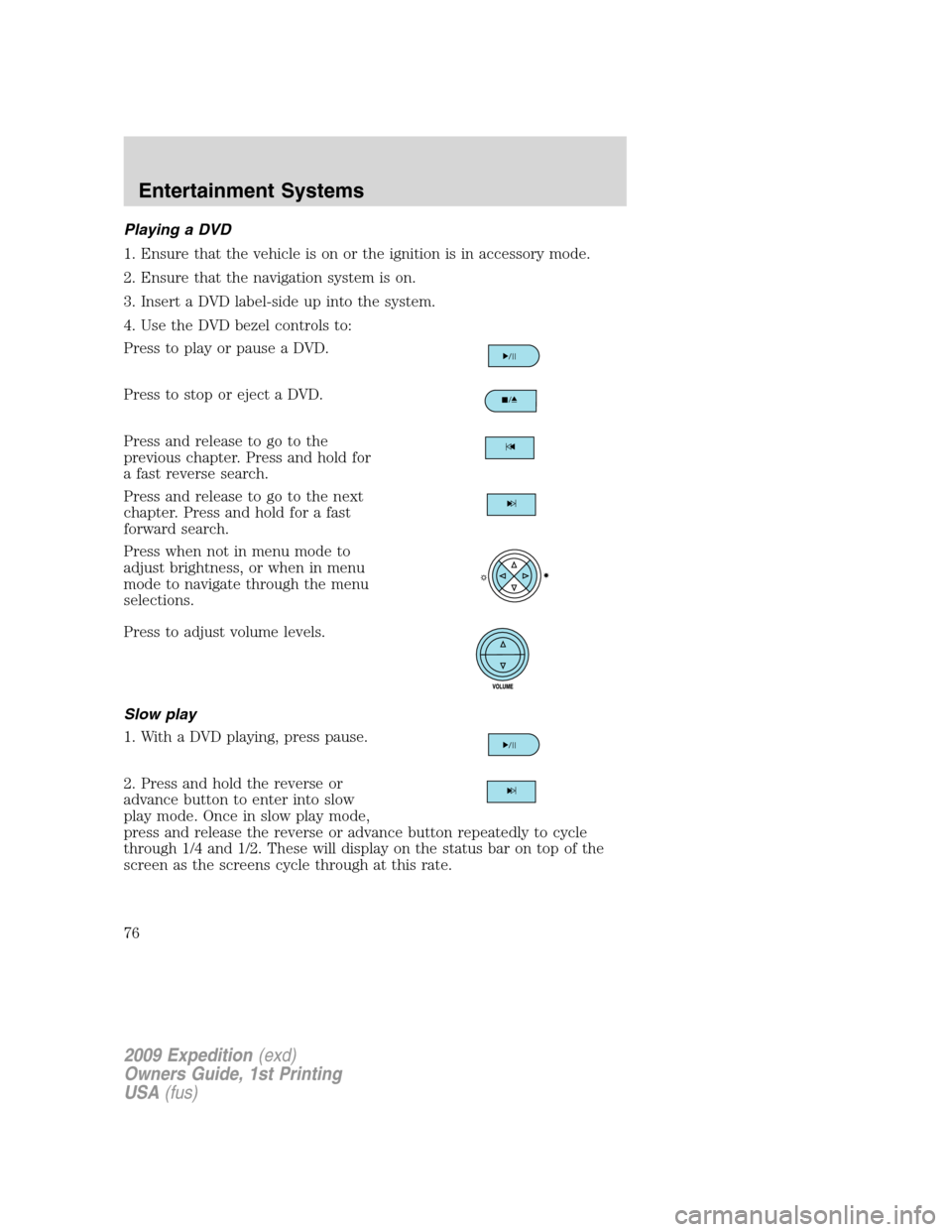
Press to play or pause a DVD.
Press to stop or eject a DVD.
Press and release to go to the
previous chapter. Press and hold for
a fast reverse search.
Press and release to go to the next
chapter. Press and hold for a fast
forward search.
Press when not in menu mode to
adjust brightness, or when in menu
mode to navigate through the menu
selections.
Press to adjust volume levels.
Slow play
1. With a DVD playing, press pause.
2. Press and hold the reverse or
advance button to enter into slow
play mode. Once in slow play mode,
press and release the reverse or advance button repeatedly to cycle
through 1/4 and 1/2. These will display on the status bar on top of the
screen as the screens cycle through at this rate.
2009 Expedition(exd)
Owners Guide, 1st Printing
USA(fus)
Entertainment Systems
76
Page 83 of 416
Cleaning DVD and CD discs
Inspect all discs for contamination before playing. If necessary, clean
discs only with an approved DVD and CD cleaner and wipe from the
center out to the edge. Do not use circular motion.
Compatibility with aftermarket audio systems
(headphone only mode)
When the Family Entertainment System (FES) detects that the original
radio supplied by Ford Motor Company has been removed from the
vehicle, the FES will work in a state referred to as “Headphone Only
Mode.” This mode allows the FES to operate as a standalone system,
without interface to the radio.
While operating in Headphone Only Mode, the system will have limited
functionality.
•The system will only output audio to the headphones. It will not be
capable of providing audio to the speakers.
•The available sources in FES Headphone Only Mode are DVD-DISC
and DVD-AUX, regardless of headphone channel (A or B).
•When a disc is inserted into the FES while in Headphone Only Mode,
both headphone channels (A and B) will be connected to FES-DISC.
NAVIGATION SYSTEM (IF EQUIPPED)
Your vehicle may be equipped with a navigation system. Refer to the
Navigation systemsupplement for further information.
SYNC (IF EQUIPPED)
Your vehicle may be equipped with SYNC, a hands-free communications
and entertainment system with special phone and media features. For
more information, please refer to theSYNCsupplement or to theSYNC
section in theNavigation systemsupplement (if equipped).
2009 Expedition(exd)
Owners Guide, 1st Printing
USA(fus)
Entertainment Systems
83
Page 116 of 416
Automatic dimming interior rear view mirror
Your vehicle is equipped with an interior rear view mirror which has an
auto-dimming function. The electronic day/night mirror will change from
the normal (high reflective) state to the non-glare (darkened) state
when bright lights (glare) reach the mirror. When the mirror detects
bright light from behind the vehicle, it will automatically adjust (darken)
to minimize glare.
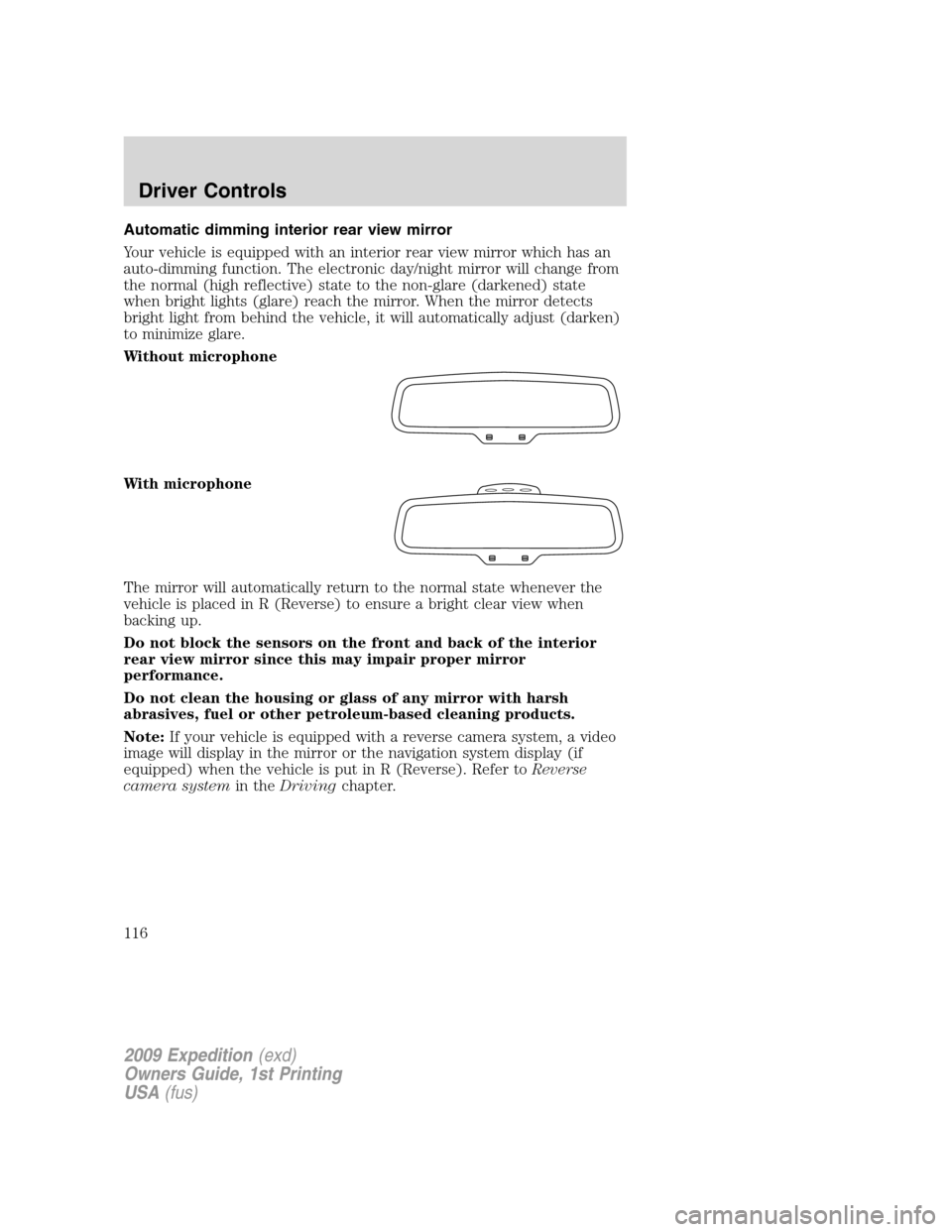
Without microphone
With microphone
The mirror will automatically return to the normal state whenever the
vehicle is placed in R (Reverse) to ensure a bright clear view when
backing up.
Do not block the sensors on the front and back of the interior
rear view mirror since this may impair proper mirror
performance.
Do not clean the housing or glass of any mirror with harsh
abrasives, fuel or other petroleum-based cleaning products.
Note:If your vehicle is equipped with a reverse camera system, a video
image will display in the mirror or the navigation system display (if
equipped) when the vehicle is put in R (Reverse). Refer toReverse
camera systemin theDrivingchapter.
2009 Expedition(exd)
Owners Guide, 1st Printing
USA(fus)
Driver Controls
116
Page 125 of 416
In DVD mode (if equipped):
•Refer to theFamily entertainment DVD systemin the
Entertainment Systemschapter.
In any mode:
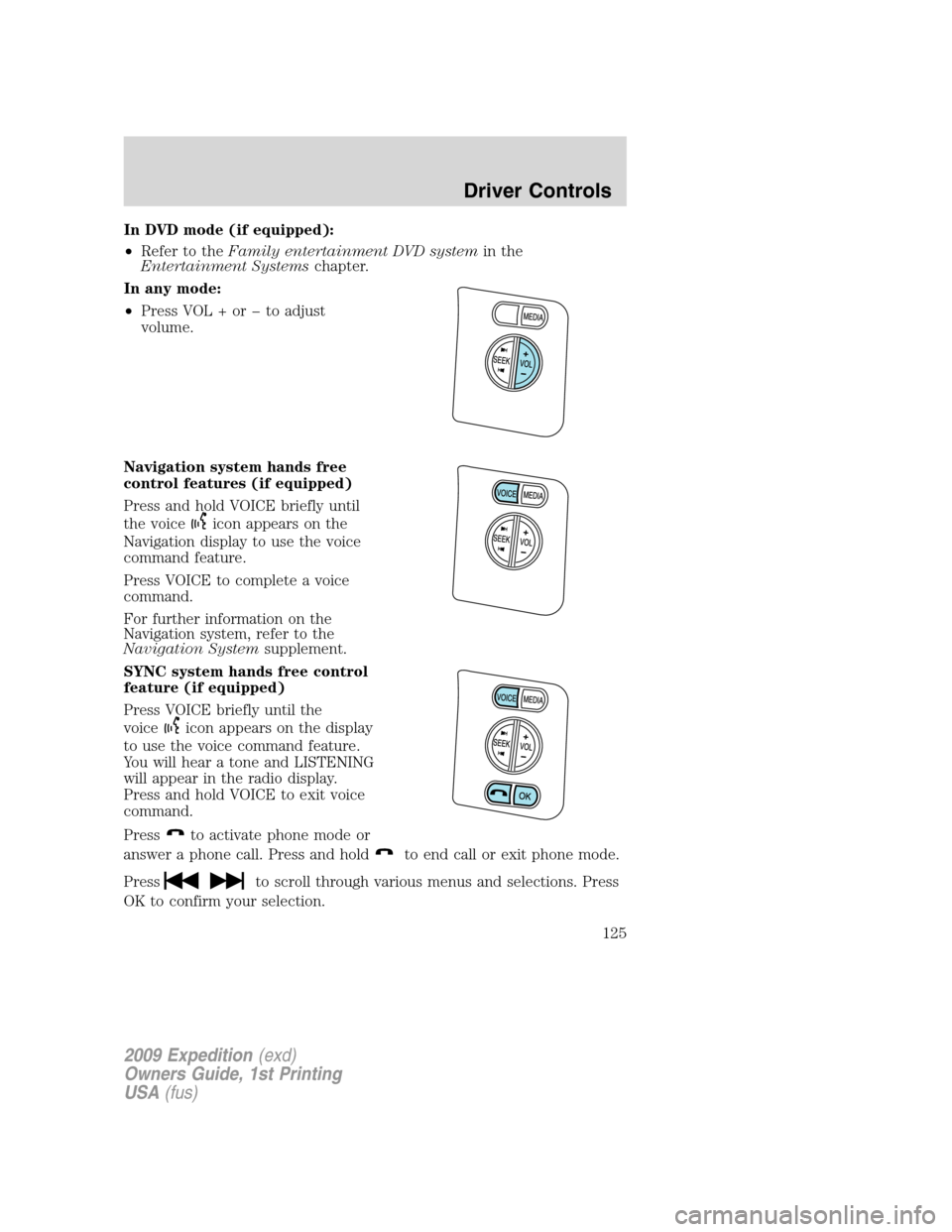
•Press VOL + or to adjust
volume.
Navigation system hands free
control features (if equipped)
Press and hold VOICE briefly until
the voice
icon appears on the
Navigation display to use the voice
command feature.
Press VOICE to complete a voice
command.
For further information on the
Navigation system, refer to the
Navigation Systemsupplement.
SYNC system hands free control
feature (if equipped)
Press VOICE briefly until the
voice
icon appears on the display
to use the voice command feature.
You will hear a tone and LISTENING
will appear in the radio display.
Press and hold VOICE to exit voice
command.
Press
to activate phone mode or
answer a phone call. Press and hold
to end call or exit phone mode.
Press
to scroll through various menus and selections. Press
OK to confirm your selection.
2009 Expedition(exd)
Owners Guide, 1st Printing
USA(fus)
Driver Controls
125
Page 126 of 416
For further information on the SYNC system, refer to theSYNC
supplement.
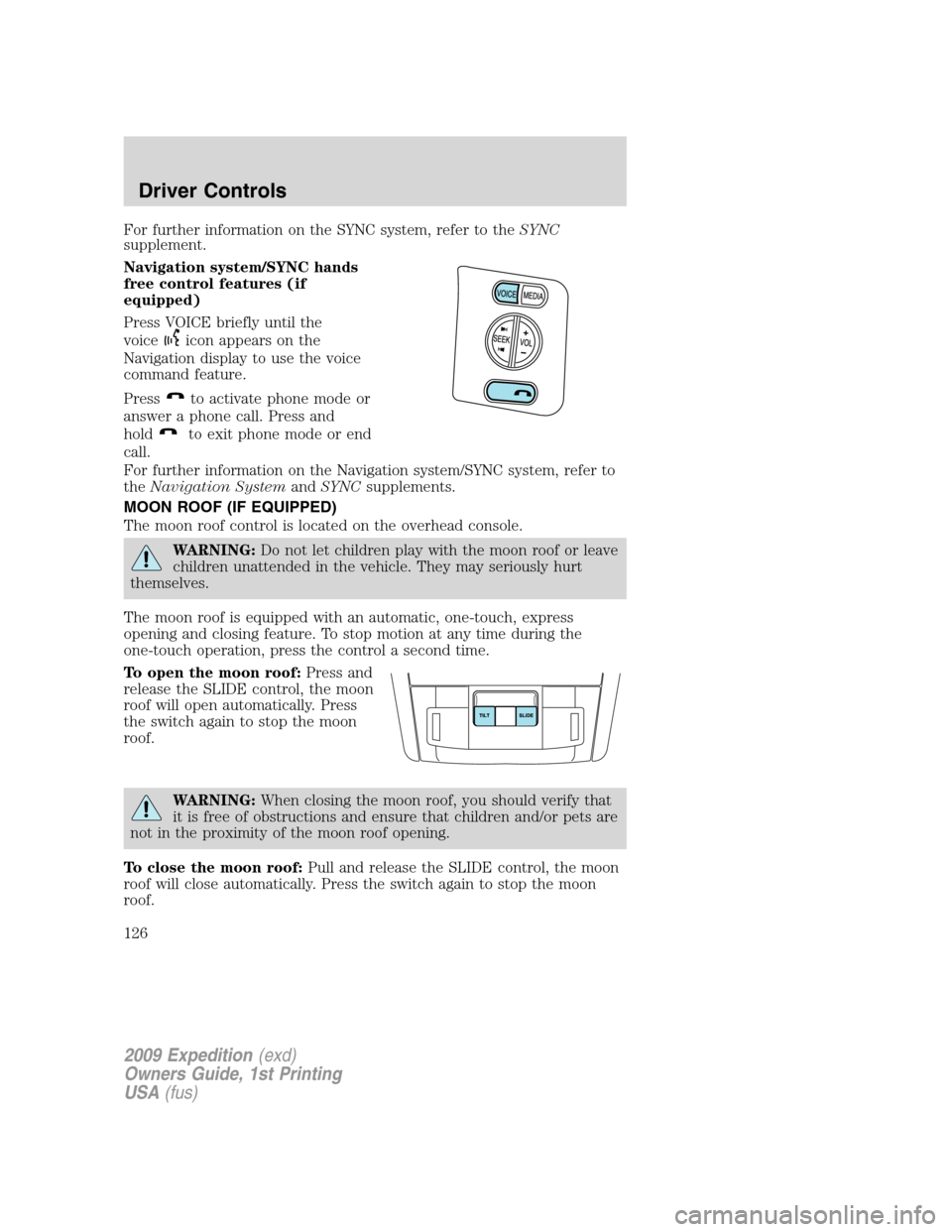
Navigation system/SYNC hands
free control features (if
equipped)
Press VOICE briefly until the
voice
icon appears on the
Navigation display to use the voice
command feature.
Press
to activate phone mode or
answer a phone call. Press and
hold
to exit phone mode or end
call.
For further information on the Navigation system/SYNC system, refer to
theNavigation SystemandSYNCsupplements.
MOON ROOF (IF EQUIPPED)
The moon roof control is located on the overhead console.
WARNING:Do not let children play with the moon roof or leave
children unattended in the vehicle. They may seriously hurt
themselves.
The moon roof is equipped with an automatic, one-touch, express
opening and closing feature. To stop motion at any time during the
one-touch operation, press the control a second time.
To open the moon roof:Press and
release the SLIDE control, the moon
roof will open automatically. Press
the switch again to stop the moon
roof.
WARNING:When closing the moon roof, you should verify that
it is free of obstructions and ensure that children and/or pets are
not in the proximity of the moon roof opening.
To close the moon roof:Pull and release the SLIDE control, the moon
roof will close automatically. Press the switch again to stop the moon
roof.
2009 Expedition(exd)
Owners Guide, 1st Printing
USA(fus)
Driver Controls
126
Page 309 of 416
REVERSE CAMERA SYSTEM (IF EQUIPPED)
The reverse camera system located
on the liftgate provides a video
image, which appears in the rear
view mirror or on the navigation
screen (if equipped), of the area
behind the vehicle. It adds
assistance to the driver while
reversing or reverse parking the
vehicle.
To use the reverse camera system,
place the transmission in R
(Reverse); an image will display on
the left portion of the rear view
mirror or on the navigation screen
(if equipped). The area displayed on
the screen may vary according to
the vehicle orientation and/or road
condition.
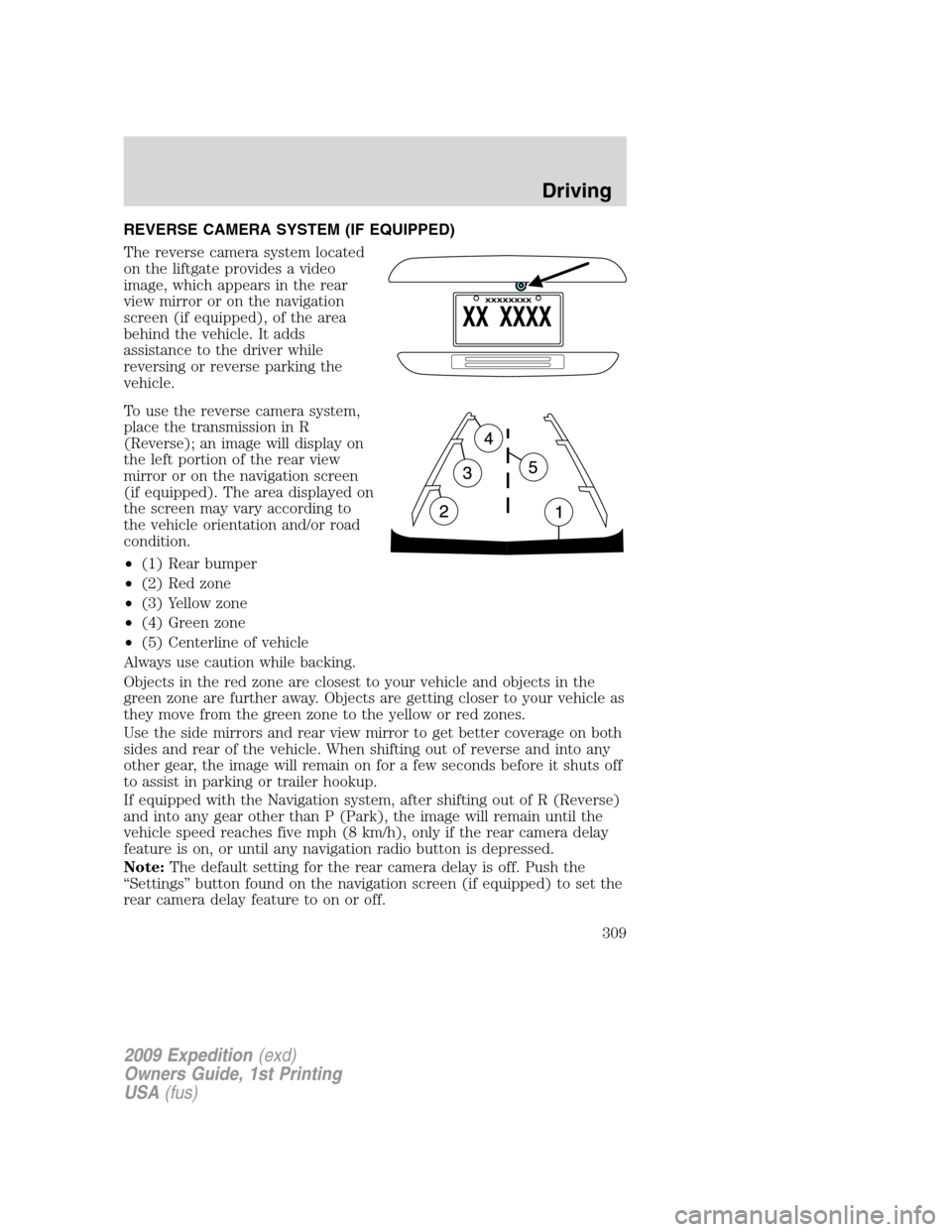
•(1) Rear bumper
•(2) Red zone
•(3) Yellow zone
•(4) Green zone
•(5) Centerline of vehicle
Always use caution while backing.
Objects in the red zone are closest to your vehicle and objects in the
green zone are further away. Objects are getting closer to your vehicle as
they move from the green zone to the yellow or red zones.
Use the side mirrors and rear view mirror to get better coverage on both
sides and rear of the vehicle. When shifting out of reverse and into any
other gear, the image will remain on for a few seconds before it shuts off
to assist in parking or trailer hookup.
If equipped with the Navigation system, after shifting out of R (Reverse)
and into any gear other than P (Park), the image will remain until the
vehicle speed reaches five mph (8 km/h), only if the rear camera delay
feature is on, or until any navigation radio button is depressed.
Note:The default setting for the rear camera delay is off. Push the
“Settings” button found on the navigation screen (if equipped) to set the
rear camera delay feature to on or off.
2009 Expedition(exd)
Owners Guide, 1st Printing
USA(fus)
Driving
309
Page 327 of 416
Fuse/Relay
LocationFuse Amp
RatingProtected Circuits
25 10A Demand lamps, Glovebox, Visor
26 10A Instrument panel cluster
27 20A Ignition switch
28 5A Radio
29 5A Instrument panel cluster
30 5A Not used (Spare)
31 10A Not used (Spare)
32 10A Restraints control module
33 10A Not used (Spare)
34 5A Not used (Spare)
35 10A Rear park assist, 4x4, rear video
camera
36 5A PATS transceiver
37 10A Climate control
38 20A Subwoofer/Amp (Audiophile
radio)
39 20A Radio
40 20A Navigation system amplifier
41 15A Power windows, Power vents,
Power moon roof, Auto dimming
rear view mirror
42 10A Not used (Spare)
43 10A Rear wiper logic, Rain sensor
44 10A Trailer tow battery charge relay
coil
45 5A Front wiper logic
46 7.5A Climate control, Auxiliary relay
control
47 30A Circuit
BreakerPower windows, Moon roof
48 — Delayed accessory relay
2009 Expedition(exd)
Owners Guide, 1st Printing
USA(fus)
Roadside Emergencies
327
Page 413 of 416
Illuminated visor mirror ...........109
Infant seats
(see Safety seats) .....................232
Inspection/maintenance (I/M)
testing ........................................395
Instrument panel
cleaning ...................................361
cluster ........................................12
lighting up panel and
interior .......................................97
J
Jack ............................................331
positioning ...............................331
storage .....................................331
Jump-starting your vehicle ......341
K
Keyless entry system ...............176
autolock ...................................165
keypad .....................................176
locking and unlocking doors ..177
programming entry code .......176
Keys ...................................163, 179
positions of the ignition .........284
L
Lamps
autolamp system .......................95
bulb replacement
specifications chart ................101
daytime running light ...............96
fog lamps ...................................96
headlamps .................................95
headlamps, flash to pass ..........96
instrument panel, dimming .....97
interior lamps ...................99, 102
replacing bulbs ...............102, 105LATCH anchors .........................235
Liftgate ......................155, 159, 171
Lights, warning and indicator ....12
anti-lock brakes (ABS) ..........291
Limited-slip axle .......................299
Load limits .................................269
Loading instructions .................275
Locks
autolock ...................................165
childproof ................................169
doors ........................................165
Lubricant specifications ...........401
Lug nuts ....................................340
Lumbar support, seats .....188–189
M
Message center .................131, 141
english/metric button .....136, 146
system check button ......135, 144
warning messages ...........138, 151
Mirrors ...............................115, 117
automatic dimming rearview
mirror ......................................116
fold away .................................117
heated ..............................118–119
programmable memory ..........172
signal .......................................119
Moon roof ..................................126
Motorcraft parts ........365, 383, 400
N
Navigation system .......................83
O
Octane rating ....................387–388
Oil (see Engine oil) ..................372
2009 Expedition(exd)
Owners Guide, 1st Printing
USA(fus)
Index
413