AUX FORD EXPEDITION 2009 3.G Owner's Guide
[x] Cancel search | Manufacturer: FORD, Model Year: 2009, Model line: EXPEDITION, Model: FORD EXPEDITION 2009 3.GPages: 416, PDF Size: 3.39 MB
Page 90 of 416
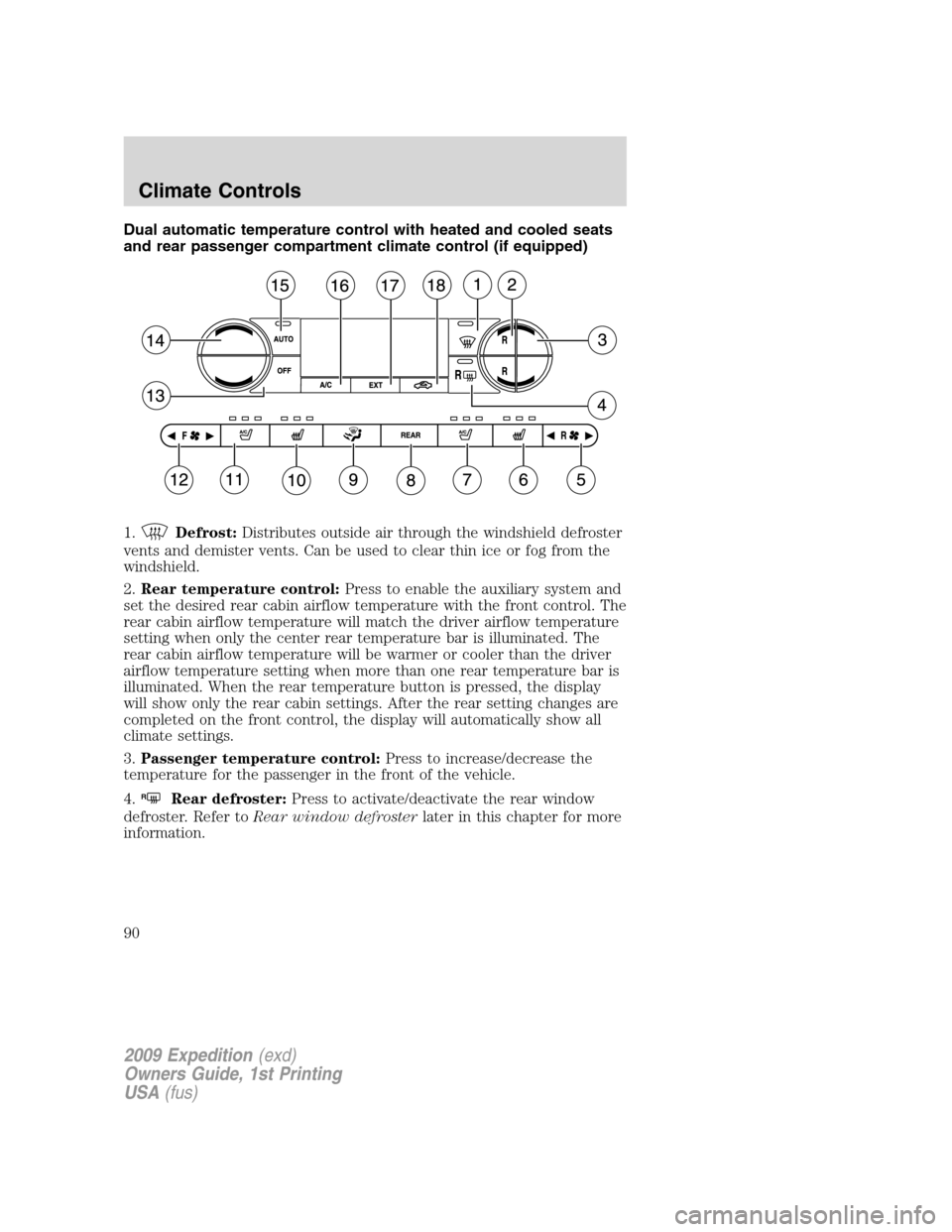
Dual automatic temperature control with heated and cooled seats
and rear passenger compartment climate control (if equipped)
1.
Defrost:Distributes outside air through the windshield defroster
vents and demister vents. Can be used to clear thin ice or fog from the
windshield.
2.Rear temperature control:Press to enable the auxiliary system and
set the desired rear cabin airflow temperature with the front control. The
rear cabin airflow temperature will match the driver airflow temperature
setting when only the center rear temperature bar is illuminated. The
rear cabin airflow temperature will be warmer or cooler than the driver
airflow temperature setting when more than one rear temperature bar is
illuminated. When the rear temperature button is pressed, the display
will show only the rear cabin settings. After the rear setting changes are
completed on the front control, the display will automatically show all
climate settings.
3.Passenger temperature control:Press to increase/decrease the
temperature for the passenger in the front of the vehicle.
4.
RRear defroster:Press to activate/deactivate the rear window
defroster. Refer toRear window defrosterlater in this chapter for more
information.
2009 Expedition(exd)
Owners Guide, 1st Printing
USA(fus)
Climate Controls
90
Page 91 of 416
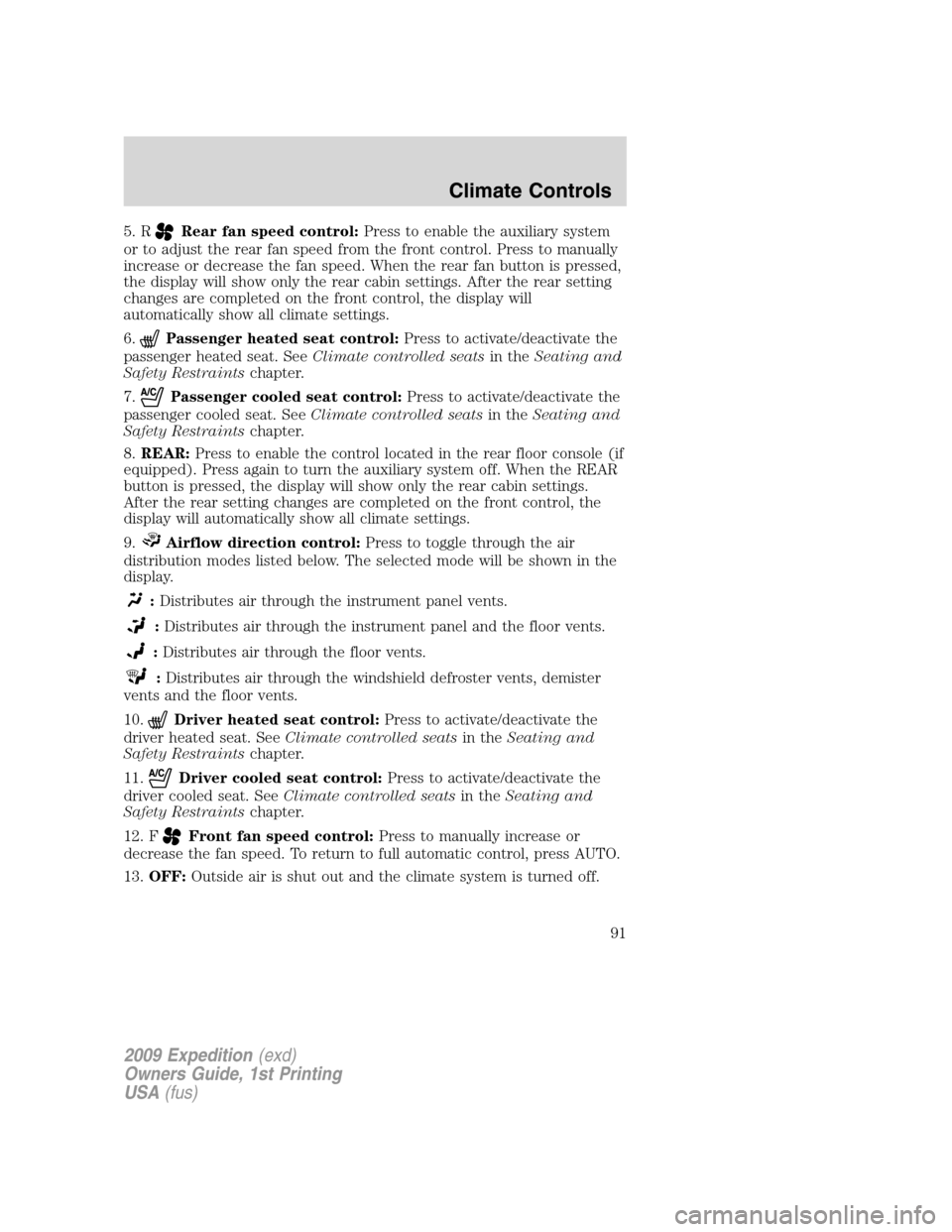
5. RRear fan speed control:Press to enable the auxiliary system
or to adjust the rear fan speed from the front control. Press to manually
increase or decrease the fan speed. When the rear fan button is pressed,
the display will show only the rear cabin settings. After the rear setting
changes are completed on the front control, the display will
automatically show all climate settings.
6.
Passenger heated seat control:Press to activate/deactivate the
passenger heated seat. SeeClimate controlled seatsin theSeating and
Safety Restraintschapter.
7.
Passenger cooled seat control:Press to activate/deactivate the
passenger cooled seat. SeeClimate controlled seatsin theSeating and
Safety Restraintschapter.
8.REAR:Press to enable the control located in the rear floor console (if
equipped). Press again to turn the auxiliary system off. When the REAR
button is pressed, the display will show only the rear cabin settings.
After the rear setting changes are completed on the front control, the
display will automatically show all climate settings.
9.
Airflow direction control:Press to toggle through the air
distribution modes listed below. The selected mode will be shown in the
display.
:Distributes air through the instrument panel vents.
:Distributes air through the instrument panel and the floor vents.
:Distributes air through the floor vents.
:Distributes air through the windshield defroster vents, demister
vents and the floor vents.
10.
Driver heated seat control:Press to activate/deactivate the
driver heated seat. SeeClimate controlled seatsin theSeating and
Safety Restraintschapter.
11.
Driver cooled seat control:Press to activate/deactivate the
driver cooled seat. SeeClimate controlled seatsin theSeating and
Safety Restraintschapter.
12. F
Front fan speed control:Press to manually increase or
decrease the fan speed. To return to full automatic control, press AUTO.
13.OFF:Outside air is shut out and the climate system is turned off.
2009 Expedition(exd)
Owners Guide, 1st Printing
USA(fus)
Climate Controls
91
Page 93 of 416
•For maximum cooling performance, (MAX A/C):
In AUTO: Press AUTO control and set to desired temperature.
In Manual Override: Press the
(panel), A/C, and recirculated
air
, set the temperature to 60°F (16°C) and the fan to the highest
blower setting.
•Do not put objects under the front seats that will interfere with the
airflow to the back seats.
•Remove any snow, ice or leaves from the air intake area at the base of
the windshield.
To aid in side window defogging/demisting in cold weather:
1. Select
.
2. Select A/C.
3. Adjust the temperature control to maintain comfort.
4. Set the fan speed to the highest setting.
5. Direct the outer instrument panel vents towards the side windows.
To increase airflow to the outer instrument panel vents, close the vents
located in the middle of the instrument panel.
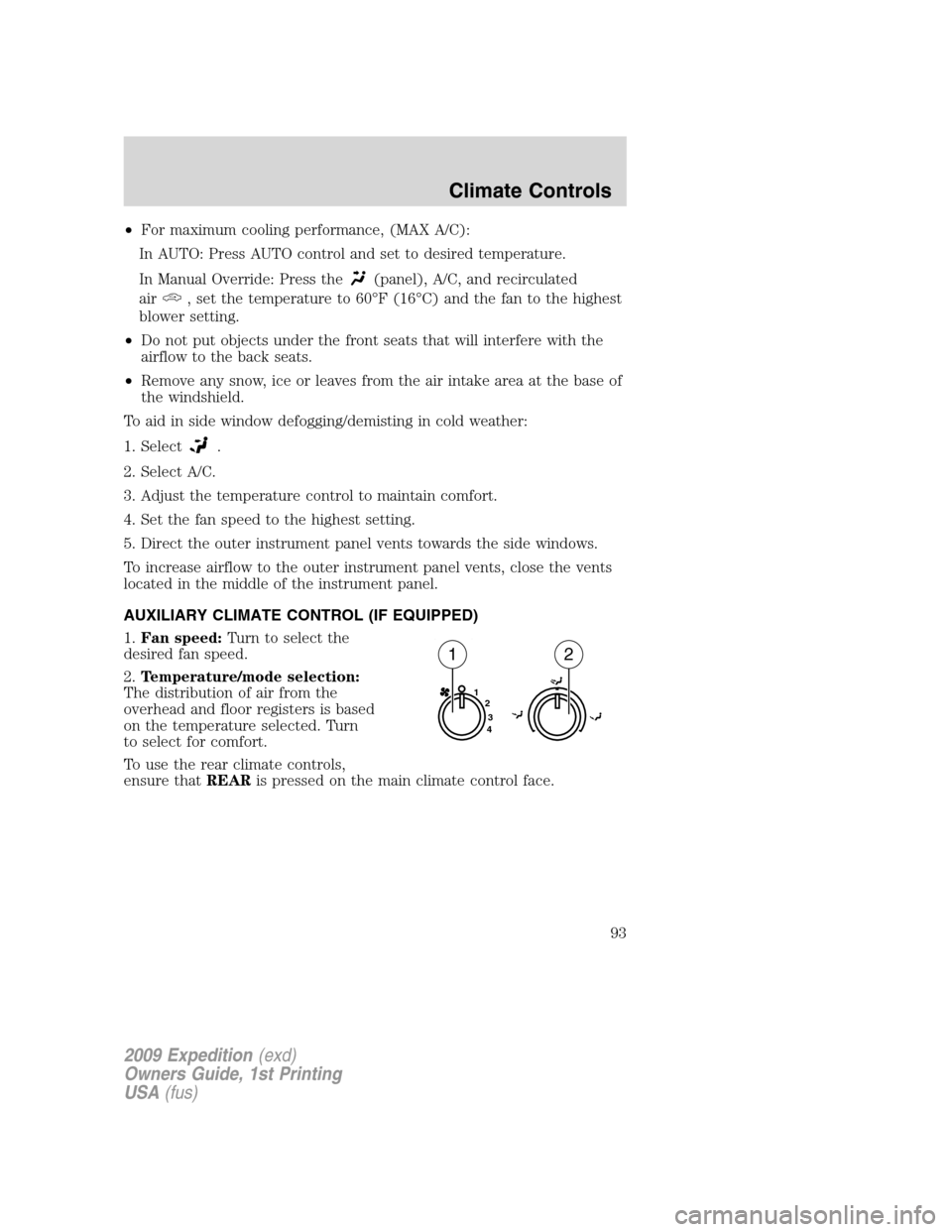
AUXILIARY CLIMATE CONTROL (IF EQUIPPED)
1.Fan speed:Turn to select the
desired fan speed.
2.Temperature/mode selection:
The distribution of air from the
overhead and floor registers is based
on the temperature selected. Turn
to select for comfort.
To use the rear climate controls,
ensure thatREARis pressed on the main climate control face.
1
2
3
4
12
2009 Expedition(exd)
Owners Guide, 1st Printing
USA(fus)
Climate Controls
93
Page 111 of 416
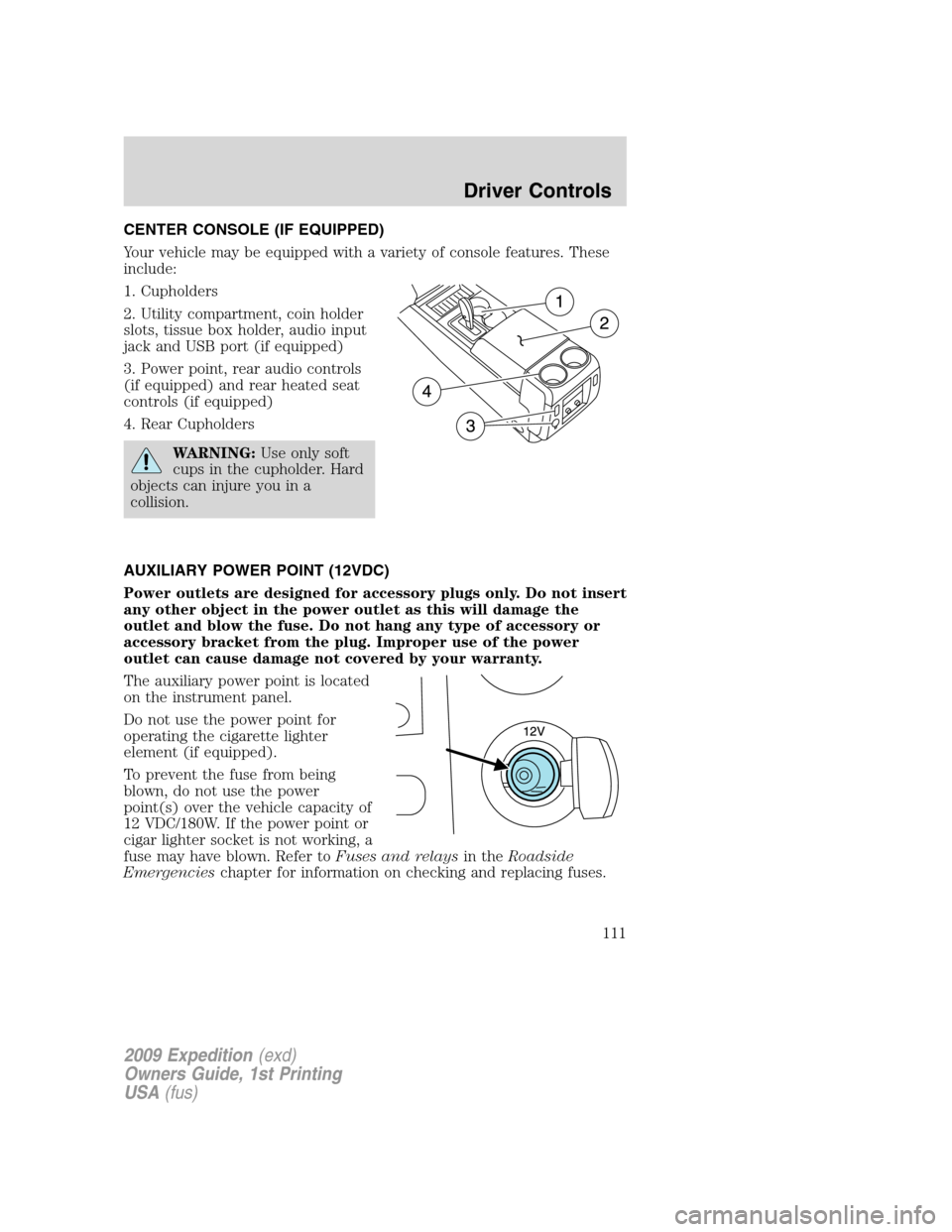
CENTER CONSOLE (IF EQUIPPED)
Your vehicle may be equipped with a variety of console features. These
include:
1. Cupholders
2. Utility compartment, coin holder
slots, tissue box holder, audio input
jack and USB port (if equipped)
3. Power point, rear audio controls
(if equipped) and rear heated seat
controls (if equipped)
4. Rear Cupholders
WARNING:Use only soft
cups in the cupholder. Hard
objects can injure you in a
collision.
AUXILIARY POWER POINT (12VDC)
Power outlets are designed for accessory plugs only. Do not insert
any other object in the power outlet as this will damage the
outlet and blow the fuse. Do not hang any type of accessory or
accessory bracket from the plug. Improper use of the power
outlet can cause damage not covered by your warranty.
The auxiliary power point is located
on the instrument panel.
Do not use the power point for
operating the cigarette lighter
element (if equipped).
To prevent the fuse from being
blown, do not use the power
point(s) over the vehicle capacity of
12 VDC/180W. If the power point or
cigar lighter socket is not working, a
fuse may have blown. Refer toFuses and relaysin theRoadside
Emergencieschapter for information on checking and replacing fuses.
2009 Expedition(exd)
Owners Guide, 1st Printing
USA(fus)
Driver Controls
111
Page 112 of 416
To have full capacity usage of your power point, the engine is required to
be running to avoid unintentional discharge of the battery. To prevent
the battery from being discharged:
•do not use the power point longer than necessary when the engine is
not running,
•do not leave battery chargers, video game adapters, computers and
other devices plugged in overnight or when the vehicle is parked for
extended periods.
Always keep the power point caps closed when not being used.
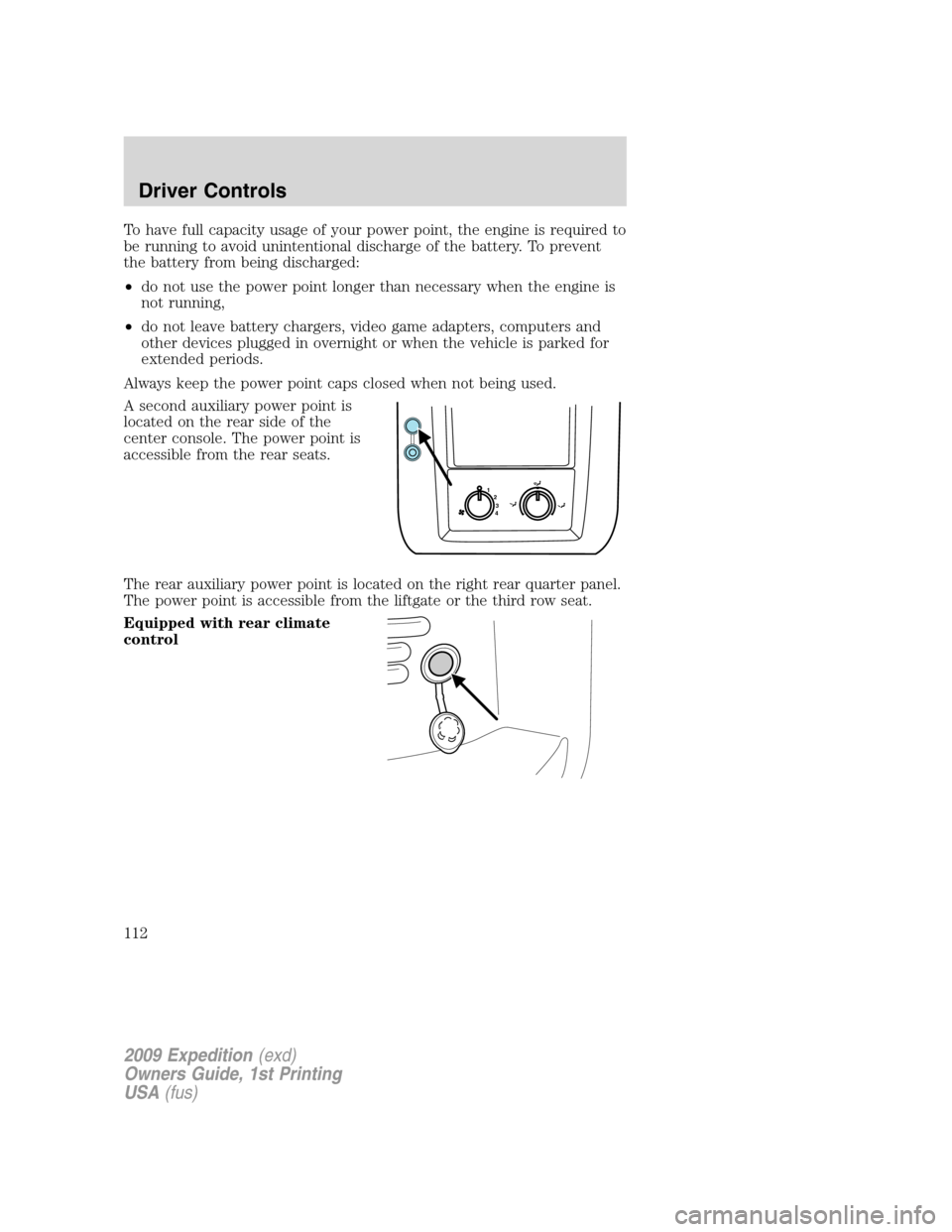
A second auxiliary power point is
located on the rear side of the
center console. The power point is
accessible from the rear seats.
The rear auxiliary power point is located on the right rear quarter panel.
The power point is accessible from the liftgate or the third row seat.
Equipped with rear climate
control
1
2
3
4
2009 Expedition(exd)
Owners Guide, 1st Printing
USA(fus)
Driver Controls
112
Page 124 of 416
•Press the speed control OFF
control.
Note:When you turn off the speed
control or the ignition, your speed
control set speed memory is erased.
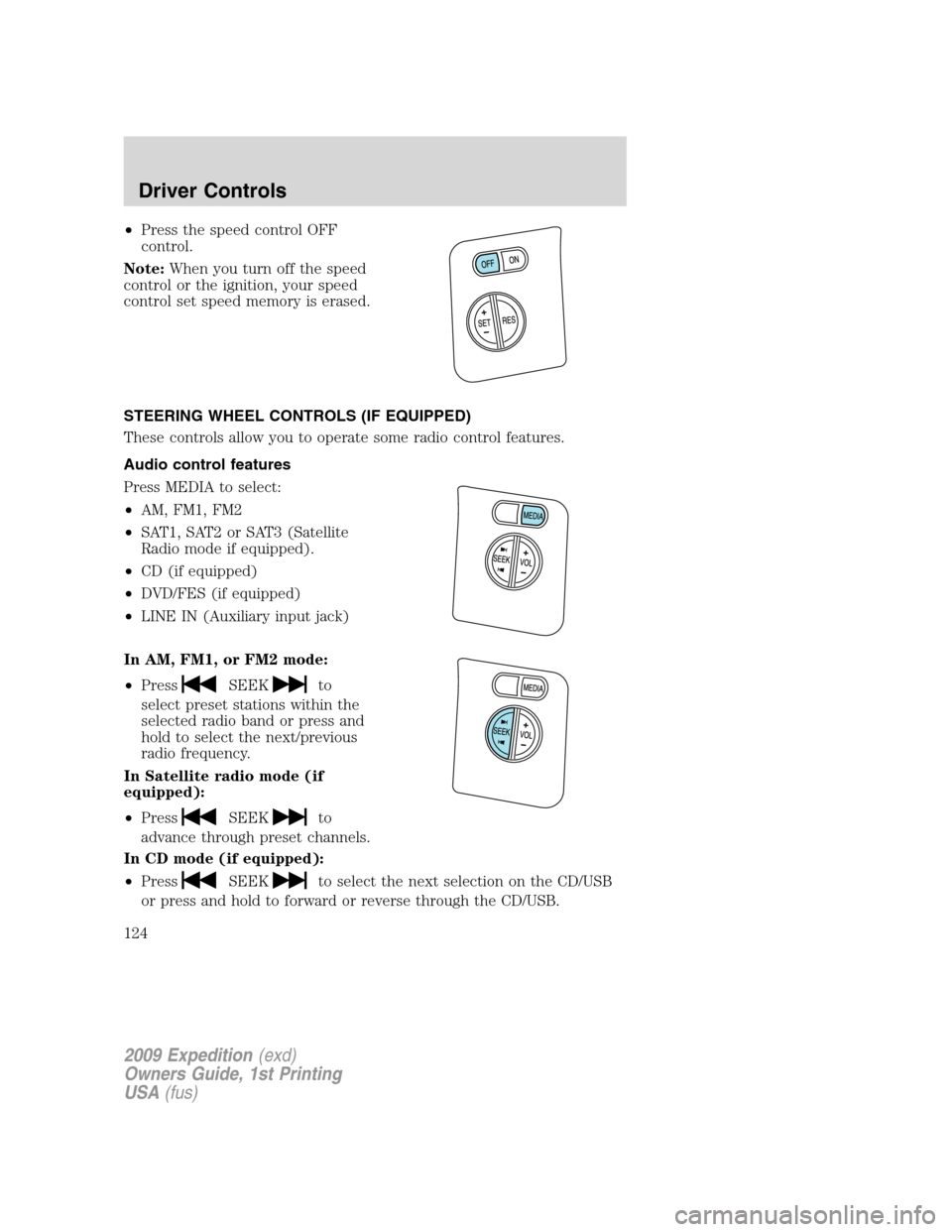
STEERING WHEEL CONTROLS (IF EQUIPPED)
These controls allow you to operate some radio control features.
Audio control features
Press MEDIA to select:
•AM, FM1, FM2
•SAT1, SAT2 or SAT3 (Satellite
Radio mode if equipped).
•CD (if equipped)
•DVD/FES (if equipped)
•LINE IN (Auxiliary input jack)
In AM, FM1, or FM2 mode:
•Press
SEEKto
select preset stations within the
selected radio band or press and
hold to select the next/previous
radio frequency.
In Satellite radio mode (if
equipped):
•Press
SEEKto
advance through preset channels.
In CD mode (if equipped):
•Press
SEEKto select the next selection on the CD/USB
or press and hold to forward or reverse through the CD/USB.
2009 Expedition(exd)
Owners Guide, 1st Printing
USA(fus)
Driver Controls
124
Page 327 of 416
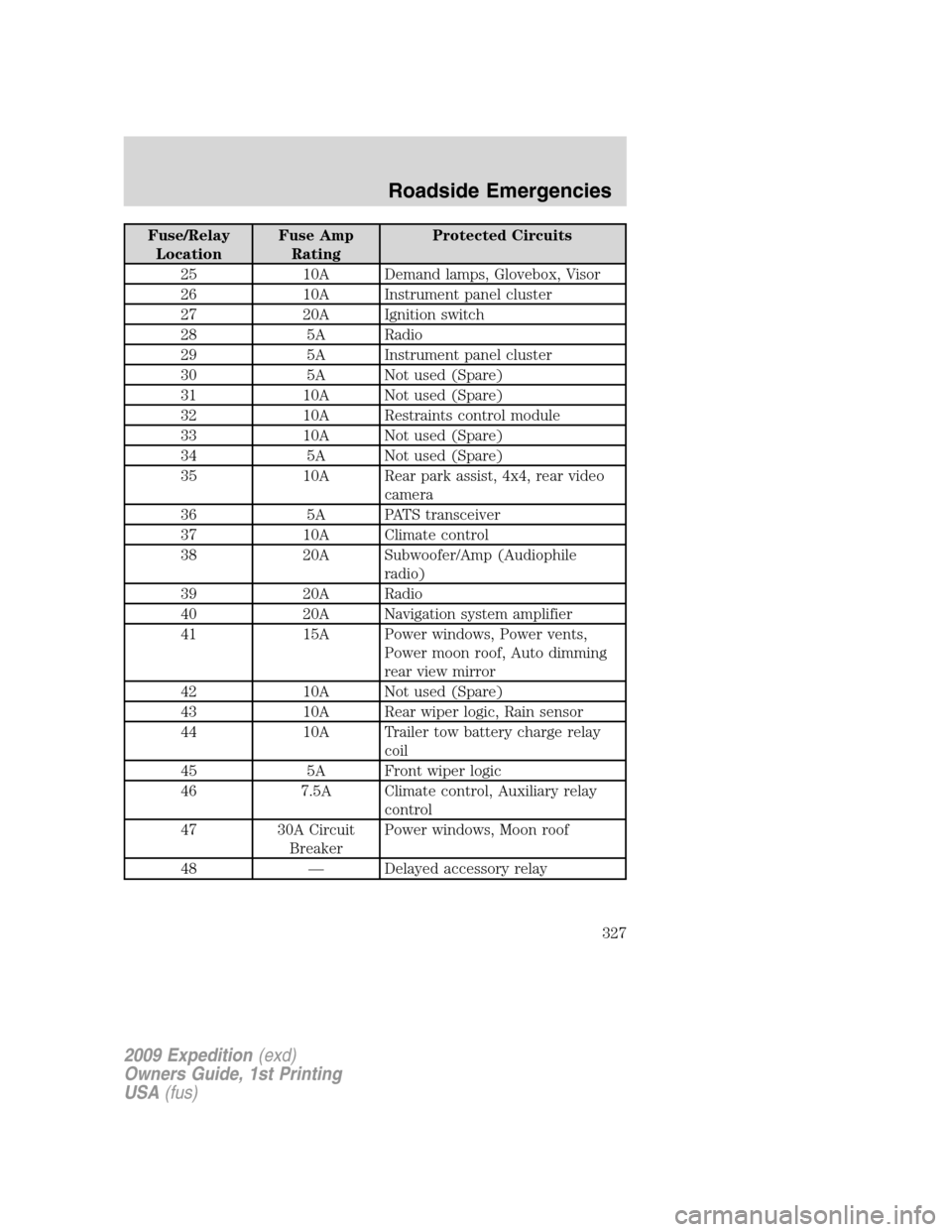
Fuse/Relay
LocationFuse Amp
RatingProtected Circuits
25 10A Demand lamps, Glovebox, Visor
26 10A Instrument panel cluster
27 20A Ignition switch
28 5A Radio
29 5A Instrument panel cluster
30 5A Not used (Spare)
31 10A Not used (Spare)
32 10A Restraints control module
33 10A Not used (Spare)
34 5A Not used (Spare)
35 10A Rear park assist, 4x4, rear video
camera
36 5A PATS transceiver
37 10A Climate control
38 20A Subwoofer/Amp (Audiophile
radio)
39 20A Radio
40 20A Navigation system amplifier
41 15A Power windows, Power vents,
Power moon roof, Auto dimming
rear view mirror
42 10A Not used (Spare)
43 10A Rear wiper logic, Rain sensor
44 10A Trailer tow battery charge relay
coil
45 5A Front wiper logic
46 7.5A Climate control, Auxiliary relay
control
47 30A Circuit
BreakerPower windows, Moon roof
48 — Delayed accessory relay
2009 Expedition(exd)
Owners Guide, 1st Printing
USA(fus)
Roadside Emergencies
327
Page 329 of 416
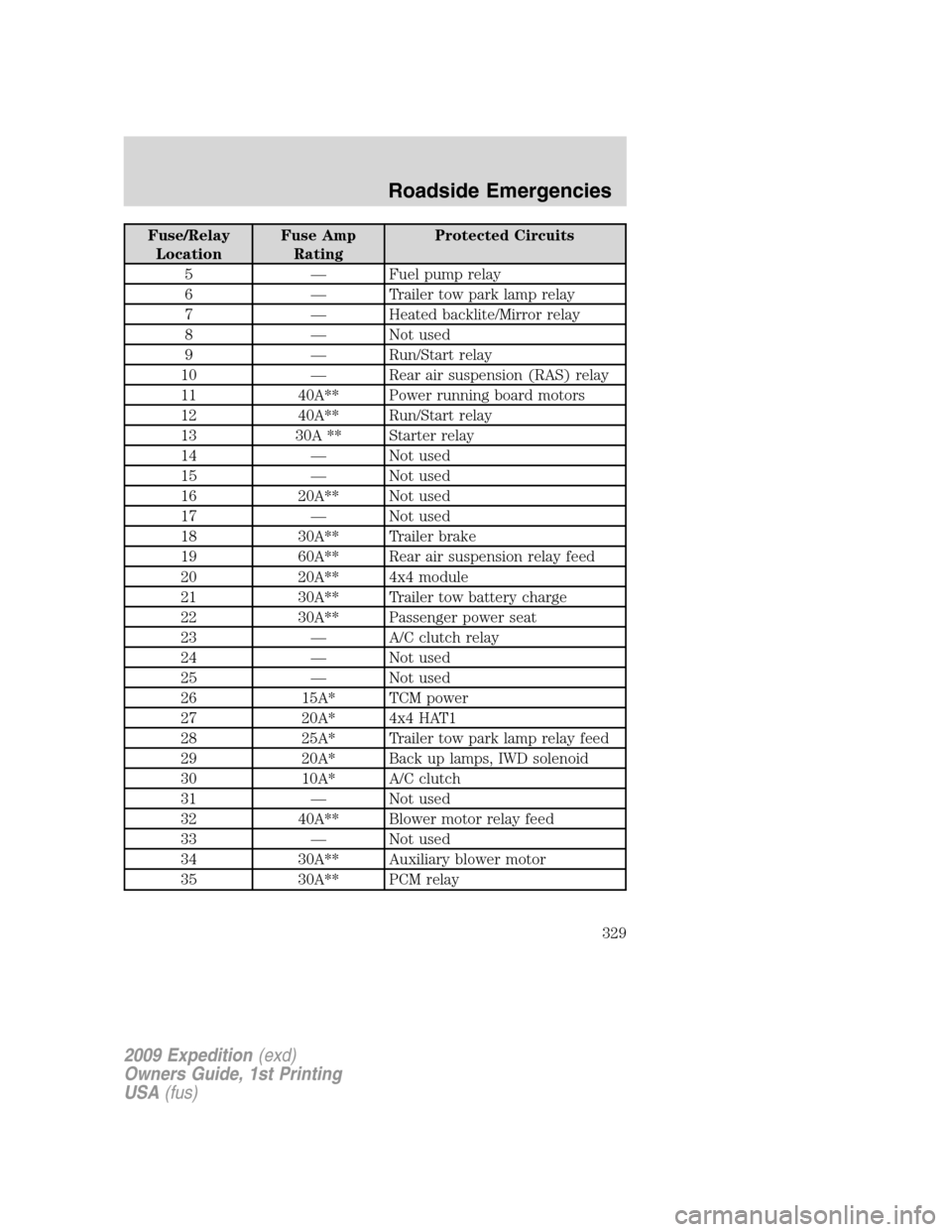
Fuse/Relay
LocationFuse Amp
RatingProtected Circuits
5 — Fuel pump relay
6 — Trailer tow park lamp relay
7 — Heated backlite/Mirror relay
8 — Not used
9 — Run/Start relay
10 — Rear air suspension (RAS) relay
11 40A** Power running board motors
12 40A** Run/Start relay
13 30A ** Starter relay
14 — Not used
15 — Not used
16 20A** Not used
17 — Not used
18 30A** Trailer brake
19 60A** Rear air suspension relay feed
20 20A** 4x4 module
21 30A** Trailer tow battery charge
22 30A** Passenger power seat
23 — A/C clutch relay
24 — Not used
25 — Not used
26 15A* TCM power
27 20A* 4x4 HAT1
28 25A* Trailer tow park lamp relay feed
29 20A* Back up lamps, IWD solenoid
30 10A* A/C clutch
31 — Not used
32 40A** Blower motor relay feed
33 — Not used
34 30A** Auxiliary blower motor
35 30A** PCM relay
2009 Expedition(exd)
Owners Guide, 1st Printing
USA(fus)
Roadside Emergencies
329
Page 331 of 416
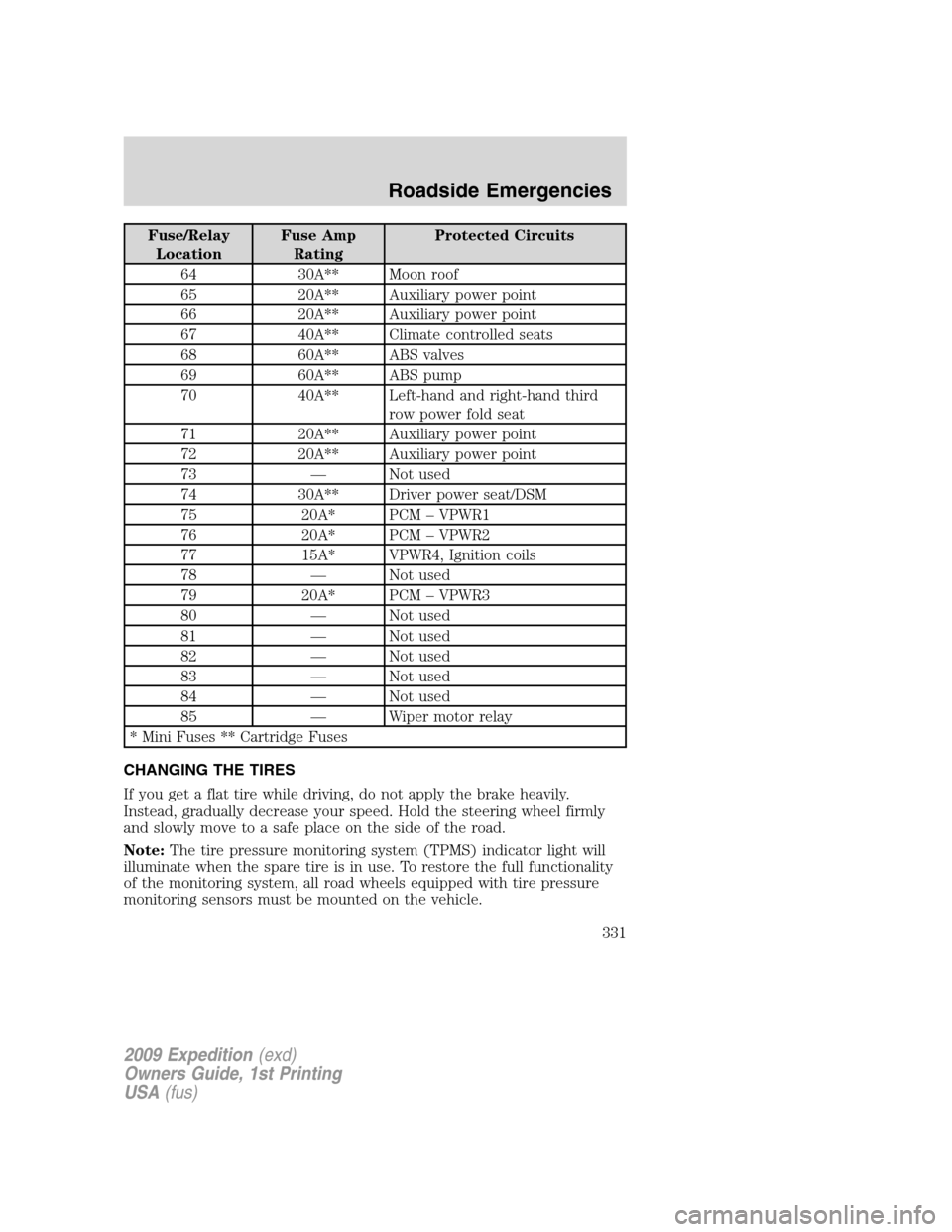
Fuse/Relay
LocationFuse Amp
RatingProtected Circuits
64 30A** Moon roof
65 20A** Auxiliary power point
66 20A** Auxiliary power point
67 40A** Climate controlled seats
68 60A** ABS valves
69 60A** ABS pump
70 40A** Left-hand and right-hand third
row power fold seat
71 20A** Auxiliary power point
72 20A** Auxiliary power point
73 — Not used
74 30A** Driver power seat/DSM
75 20A* PCM – VPWR1
76 20A* PCM – VPWR2
77 15A* VPWR4, Ignition coils
78 — Not used
79 20A* PCM – VPWR3
80 — Not used
81 — Not used
82 — Not used
83 — Not used
84 — Not used
85 — Wiper motor relay
* Mini Fuses ** Cartridge Fuses
CHANGING THE TIRES
If you get a flat tire while driving, do not apply the brake heavily.
Instead, gradually decrease your speed. Hold the steering wheel firmly
and slowly move to a safe place on the side of the road.
Note:The tire pressure monitoring system (TPMS) indicator light will
illuminate when the spare tire is in use. To restore the full functionality
of the monitoring system, all road wheels equipped with tire pressure
monitoring sensors must be mounted on the vehicle.
2009 Expedition(exd)
Owners Guide, 1st Printing
USA(fus)
Roadside Emergencies
331
Page 368 of 416
Working with the engine on
1. Set the parking brake and shift to P (Park).
2. Block the wheels.
WARNING:To reduce the risk of vehicle damage and/or
personal burn injuries, do not start your engine with the air
cleaner removed and do not remove it while the engine is running.
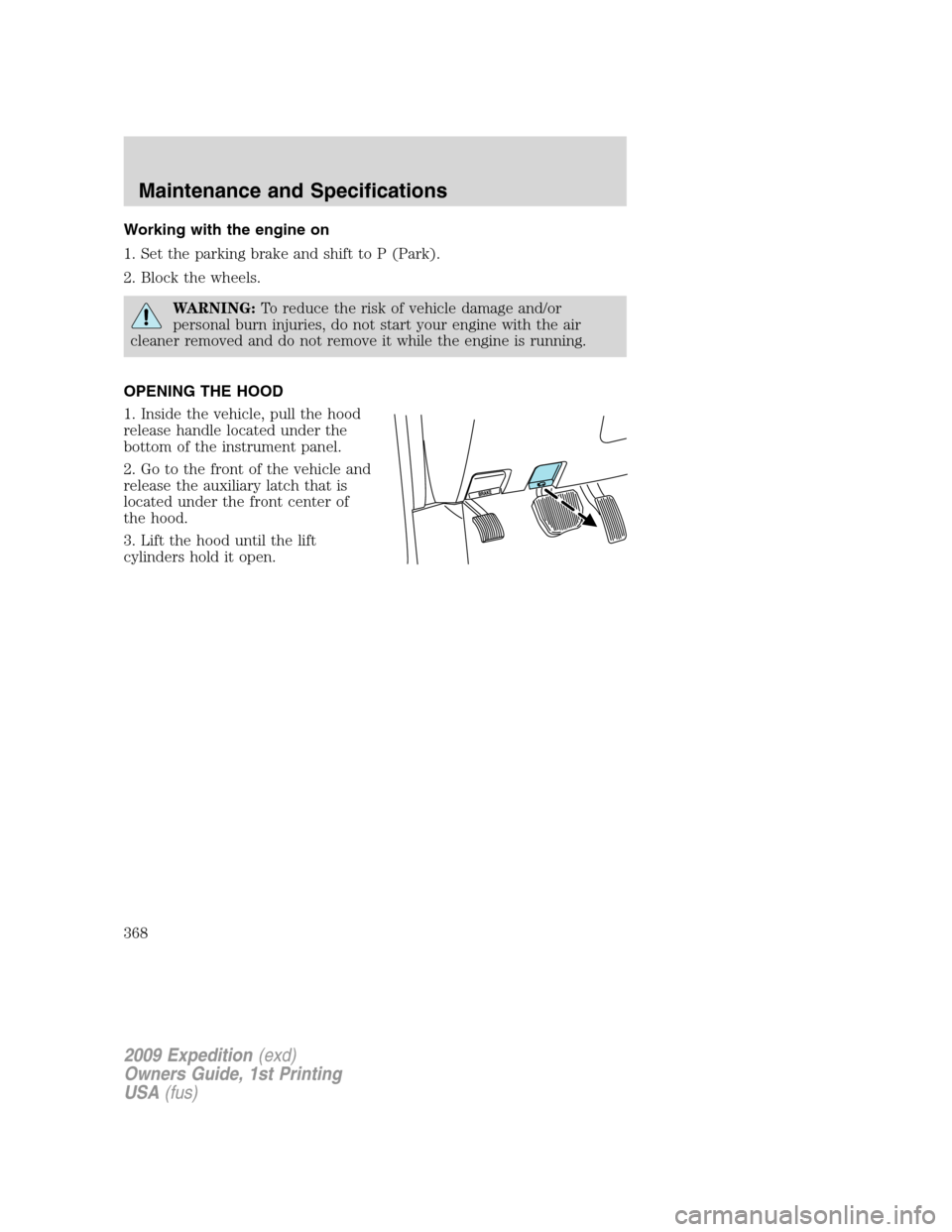
OPENING THE HOOD
1. Inside the vehicle, pull the hood
release handle located under the
bottom of the instrument panel.
2. Go to the front of the vehicle and
release the auxiliary latch that is
located under the front center of
the hood.
3. Lift the hood until the lift
cylinders hold it open.
2009 Expedition(exd)
Owners Guide, 1st Printing
USA(fus)
Maintenance and Specifications
368