lock FORD EXPEDITION 2014 3.G Owners Manual
[x] Cancel search | Manufacturer: FORD, Model Year: 2014, Model line: EXPEDITION, Model: FORD EXPEDITION 2014 3.GPages: 519, PDF Size: 6.9 MB
Page 332 of 519
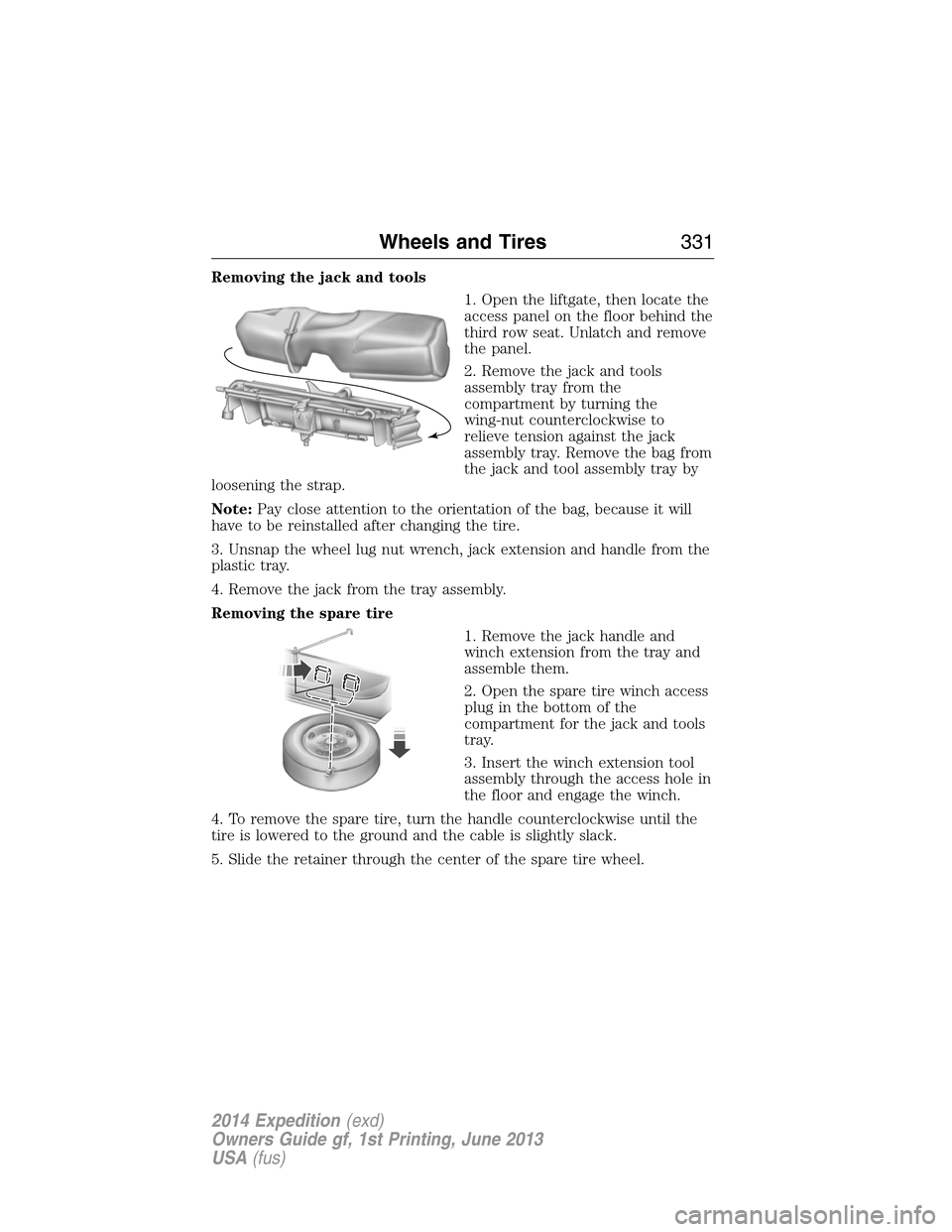
Removing the jack and tools
1. Open the liftgate, then locate the
access panel on the floor behind the
third row seat. Unlatch and remove
the panel.
2. Remove the jack and tools
assembly tray from the
compartment by turning the
wing-nut counterclockwise to
relieve tension against the jack
assembly tray. Remove the bag from
the jack and tool assembly tray by
loosening the strap.
Note:Pay close attention to the orientation of the bag, because it will
have to be reinstalled after changing the tire.
3. Unsnap the wheel lug nut wrench, jack extension and handle from the
plastic tray.
4. Remove the jack from the tray assembly.
Removing the spare tire
1. Remove the jack handle and
winch extension from the tray and
assemble them.
2. Open the spare tire winch access
plug in the bottom of the
compartment for the jack and tools
tray.
3. Insert the winch extension tool
assembly through the access hole in
the floor and engage the winch.
4. To remove the spare tire, turn the handle counterclockwise until the
tire is lowered to the ground and the cable is slightly slack.
5. Slide the retainer through the center of the spare tire wheel.
Wheels and Tires331
2014 Expedition(exd)
Owners Guide gf, 1st Printing, June 2013
USA(fus)
Page 333 of 519
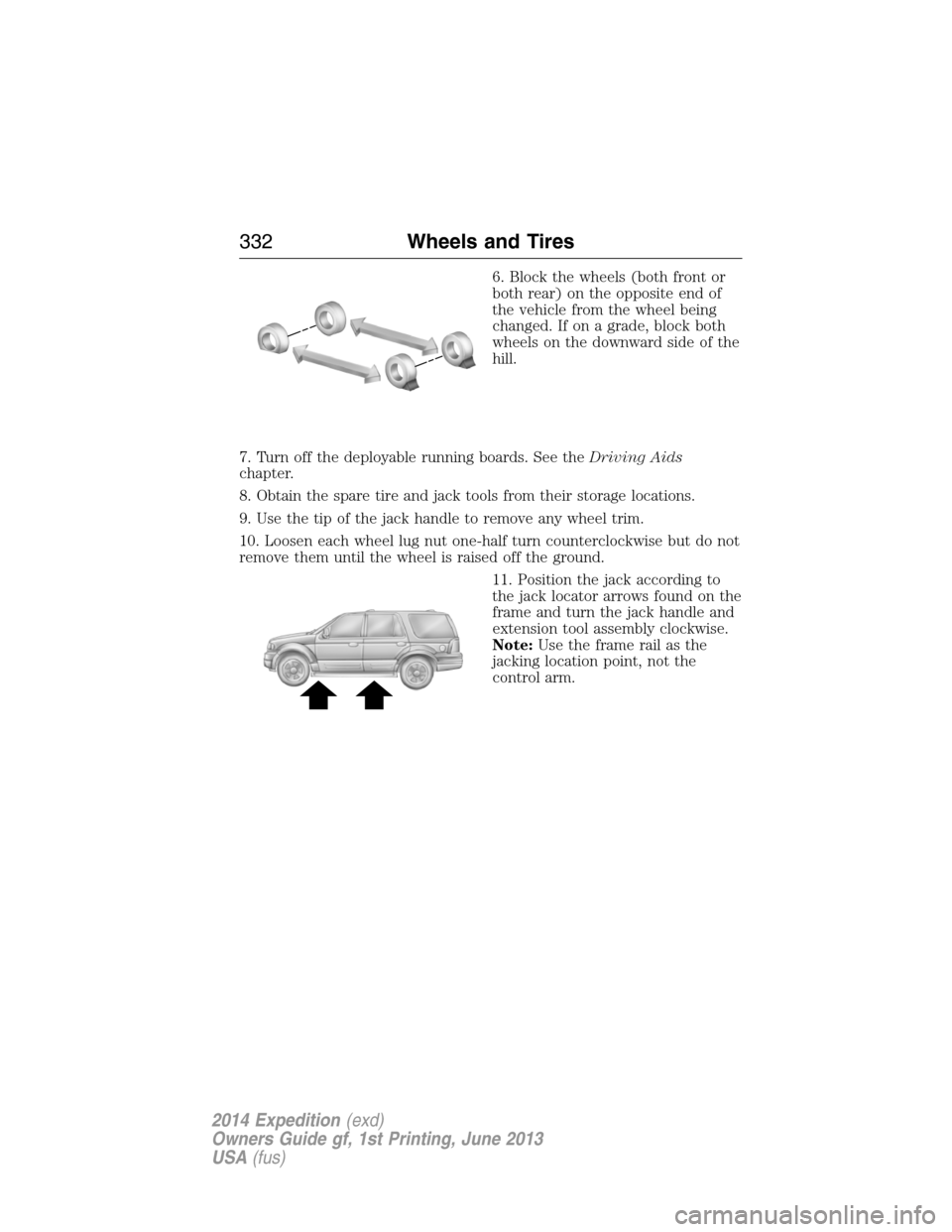
6. Block the wheels (both front or
both rear) on the opposite end of
the vehicle from the wheel being
changed. If on a grade, block both
wheels on the downward side of the
hill.
7. Turn off the deployable running boards. See theDriving Aids
chapter.
8. Obtain the spare tire and jack tools from their storage locations.
9. Use the tip of the jack handle to remove any wheel trim.
10. Loosen each wheel lug nut one-half turn counterclockwise but do not
remove them until the wheel is raised off the ground.
11. Position the jack according to
the jack locator arrows found on the
frame and turn the jack handle and
extension tool assembly clockwise.
Note:Use the frame rail as the
jacking location point, not the
control arm.
332Wheels and Tires
2014 Expedition(exd)
Owners Guide gf, 1st Printing, June 2013
USA(fus)
Page 334 of 519
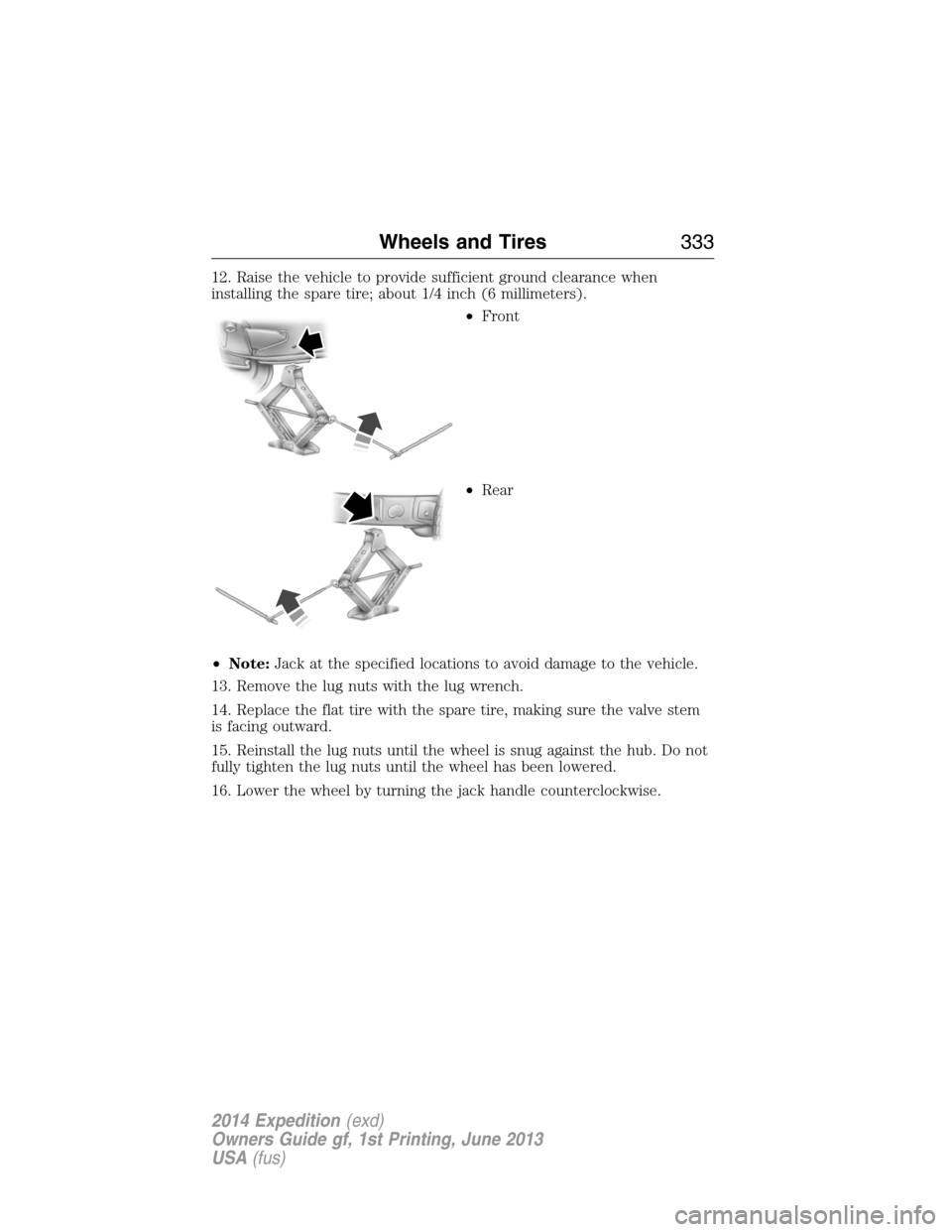
12. Raise the vehicle to provide sufficient ground clearance when
installing the spare tire; about 1/4 inch (6 millimeters).
•Front
•Rear
•Note:Jack at the specified locations to avoid damage to the vehicle.
13. Remove the lug nuts with the lug wrench.
14. Replace the flat tire with the spare tire, making sure the valve stem
is facing outward.
15. Reinstall the lug nuts until the wheel is snug against the hub. Do not
fully tighten the lug nuts until the wheel has been lowered.
16. Lower the wheel by turning the jack handle counterclockwise.
Wheels and Tires333
2014 Expedition(exd)
Owners Guide gf, 1st Printing, June 2013
USA(fus)
Page 335 of 519
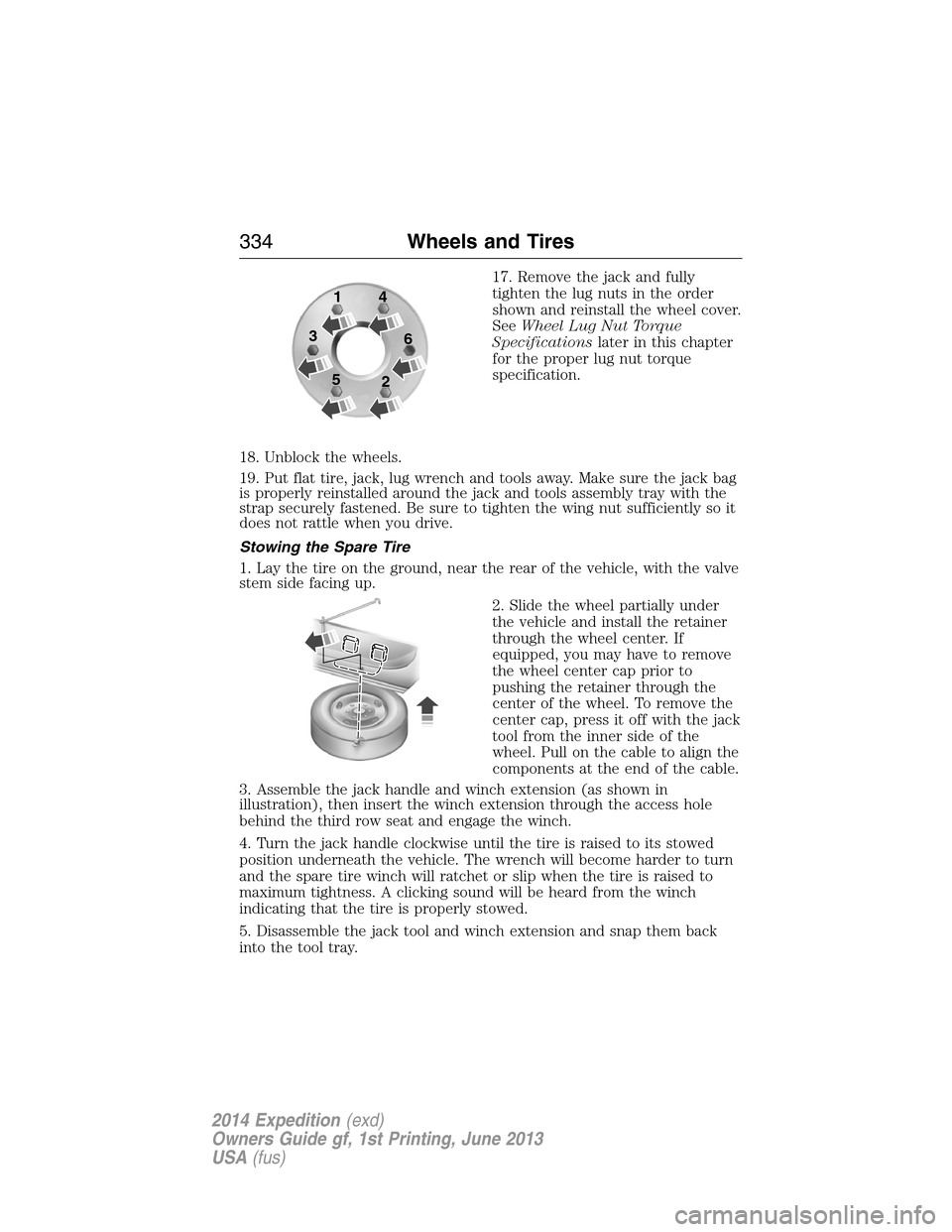
17. Remove the jack and fully
tighten the lug nuts in the order
shown and reinstall the wheel cover.
SeeWheel Lug Nut Torque
Specificationslater in this chapter
for the proper lug nut torque
specification.
18. Unblock the wheels.
19. Put flat tire, jack, lug wrench and tools away. Make sure the jack bag
is properly reinstalled around the jack and tools assembly tray with the
strap securely fastened. Be sure to tighten the wing nut sufficiently so it
does not rattle when you drive.
Stowing the Spare Tire
1. Lay the tire on the ground, near the rear of the vehicle, with the valve
stem side facing up.
2. Slide the wheel partially under
the vehicle and install the retainer
through the wheel center. If
equipped, you may have to remove
the wheel center cap prior to
pushing the retainer through the
center of the wheel. To remove the
center cap, press it off with the jack
tool from the inner side of the
wheel. Pull on the cable to align the
components at the end of the cable.
3. Assemble the jack handle and winch extension (as shown in
illustration), then insert the winch extension through the access hole
behind the third row seat and engage the winch.
4. Turn the jack handle clockwise until the tire is raised to its stowed
position underneath the vehicle. The wrench will become harder to turn
and the spare tire winch will ratchet or slip when the tire is raised to
maximum tightness. A clicking sound will be heard from the winch
indicating that the tire is properly stowed.
5. Disassemble the jack tool and winch extension and snap them back
into the tool tray.
1
3
54
6
2
334Wheels and Tires
2014 Expedition(exd)
Owners Guide gf, 1st Printing, June 2013
USA(fus)
Page 336 of 519
6. Reinstall the jack bag properly around the jack and tool assembly tray,
making sure the strap is securely fastened.
7. Close the access hole with the rubber plug.
8. Reinstall the tray into the vehicle and secure it with the wing nut
(turn clockwise until tight).
TECHNICAL SPECIFICATIONS
Wheel Lug Nut Torque Specifications
WARNING:When a wheel is installed, always remove any
corrosion, dirt or foreign materials present on the mounting
surfaces of the wheel or the surface of the wheel hub, brake drum or
brake disc that contacts the wheel. Make sure that any fasteners that
attach the rotor to the hub are secured so they do not interfere with
the mounting surfaces of the wheel. Installing wheels without correct
metal-to-metal contact at the wheel mounting surfaces can cause the
wheel nuts to loosen and the wheel to come off while the vehicle is in
motion, resulting in loss of control.
Retighten the lug nuts to the specified torque within 100 miles
(160 kilometers) after any wheel disturbance (such as rotation, flat tire,
wheel removal).
Bolt size Wheel lug nut torque*
ft-lb N•m
M14 x 2.0 150 200
* Torque specifications are for nut and bolt threads free of dirt and
rust. Use only Ford recommended replacement fasteners.
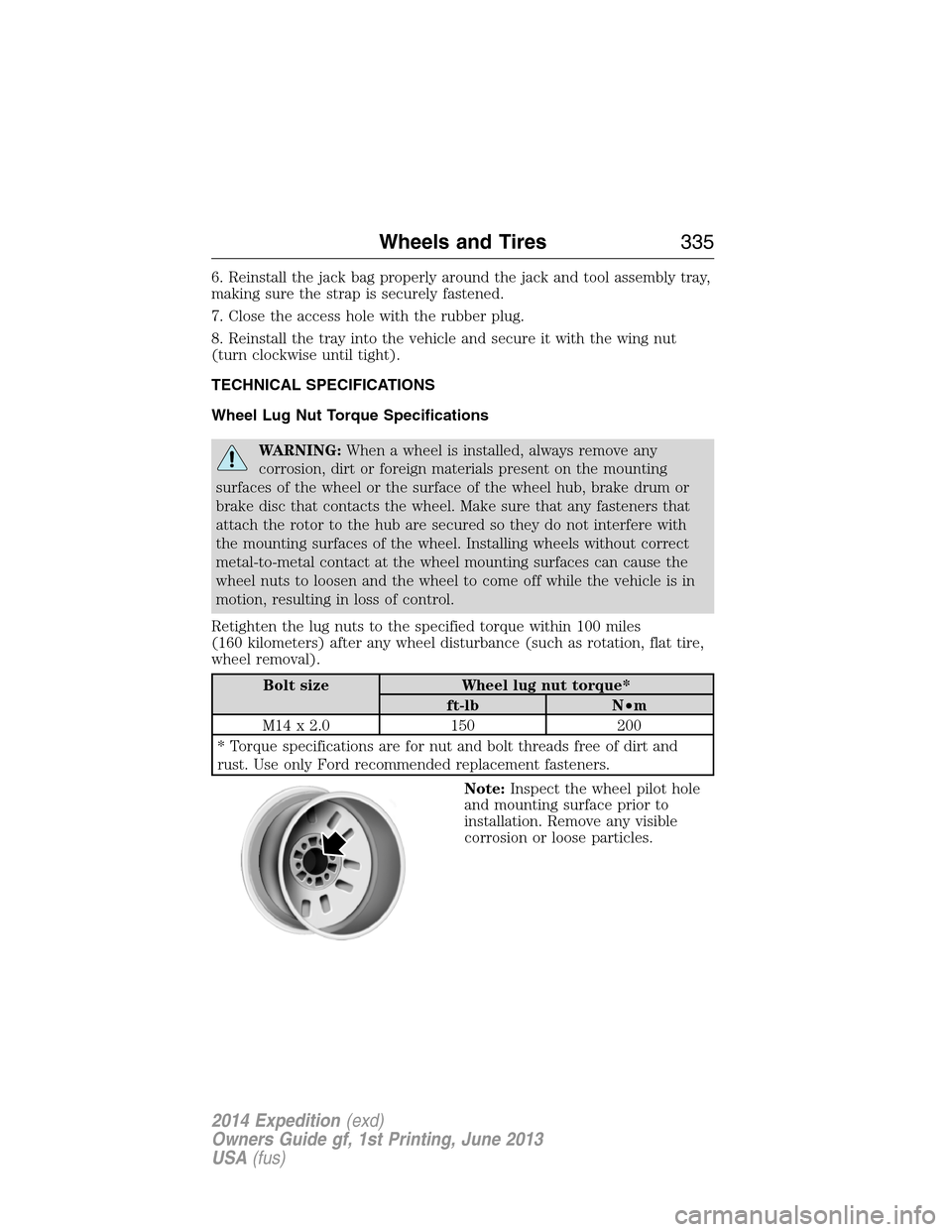
Note:Inspect the wheel pilot hole
and mounting surface prior to
installation. Remove any visible
corrosion or loose particles.
Wheels and Tires335
2014 Expedition(exd)
Owners Guide gf, 1st Printing, June 2013
USA(fus)
Page 338 of 519
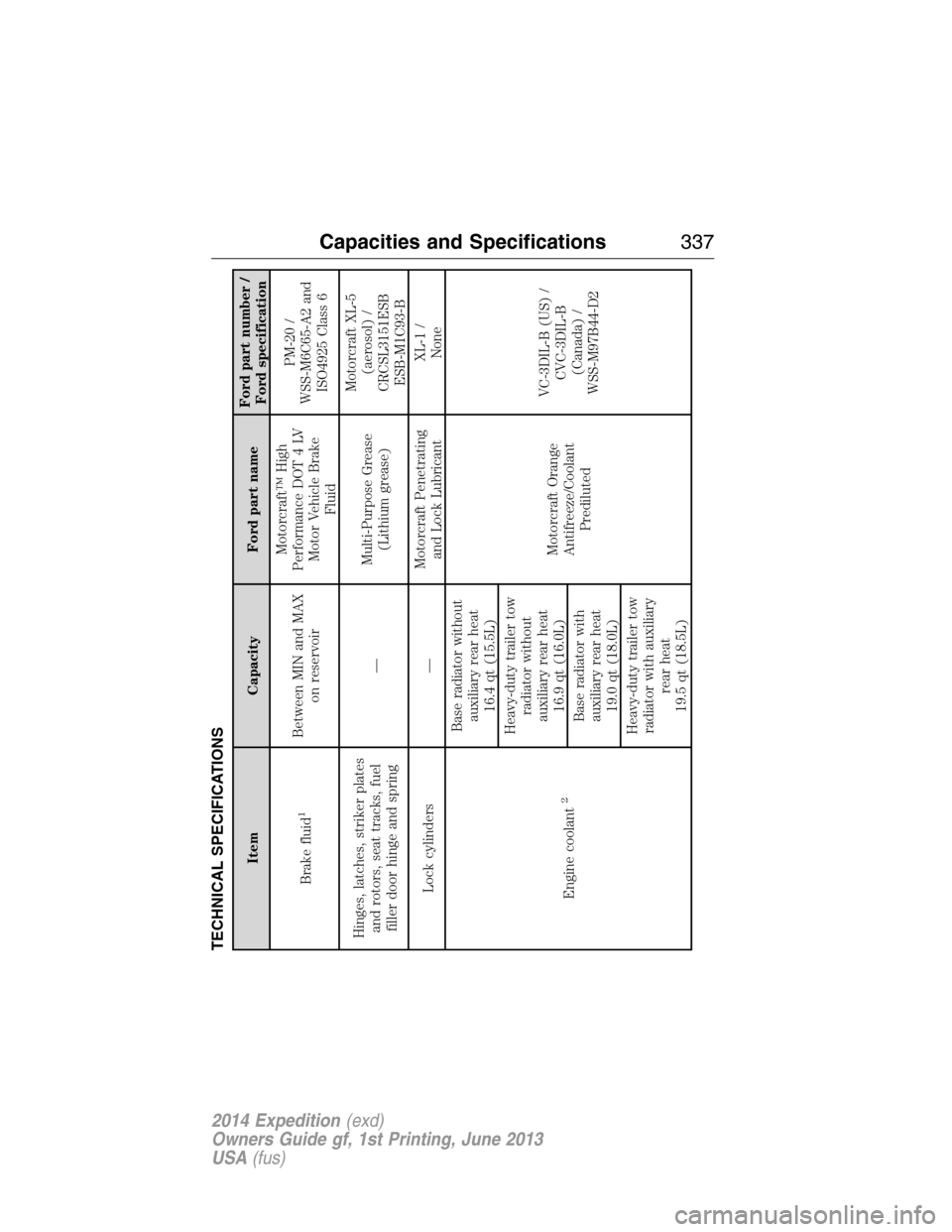
TECHNICAL SPECIFICATIONS
Item Capacity Ford part nameFord part number /
Ford specification
Brake fluid
1
Between MIN and MAX
on reservoirMotorcraft™ High
Performance DOT 4 LV
Motor Vehicle Brake
FluidPM-20 /
WSS-M6C65-A2 and
ISO4925 Class 6
Hinges, latches, striker plates
and rotors, seat tracks, fuel
filler door hinge and spring—Multi-Purpose Grease
(Lithium grease)Motorcraft XL-5
(aerosol) /
CRCSL3151ESB
ESB-M1C93-B
Lock cylinders —Motorcraft Penetrating
and Lock LubricantXL-1 /
None
Engine coolant
2
Base radiator without
auxiliary rear heat
16.4 qt (15.5L)
Motorcraft Orange
Antifreeze/Coolant
PredilutedVC-3DIL-B (US) /
CVC-3DIL-B
(Canada) /
WSS-M97B44-D2 Heavy-duty trailer tow
radiator without
auxiliary rear heat
16.9 qt (16.0L)
Base radiator with
auxiliary rear heat
19.0 qt (18.0L)
Heavy-duty trailer tow
radiator with auxiliary
rear heat
19.5 qt (18.5L)
Capacities and Specifications337
2014 Expedition(exd)
Owners Guide gf, 1st Printing, June 2013
USA(fus)
Page 345 of 519
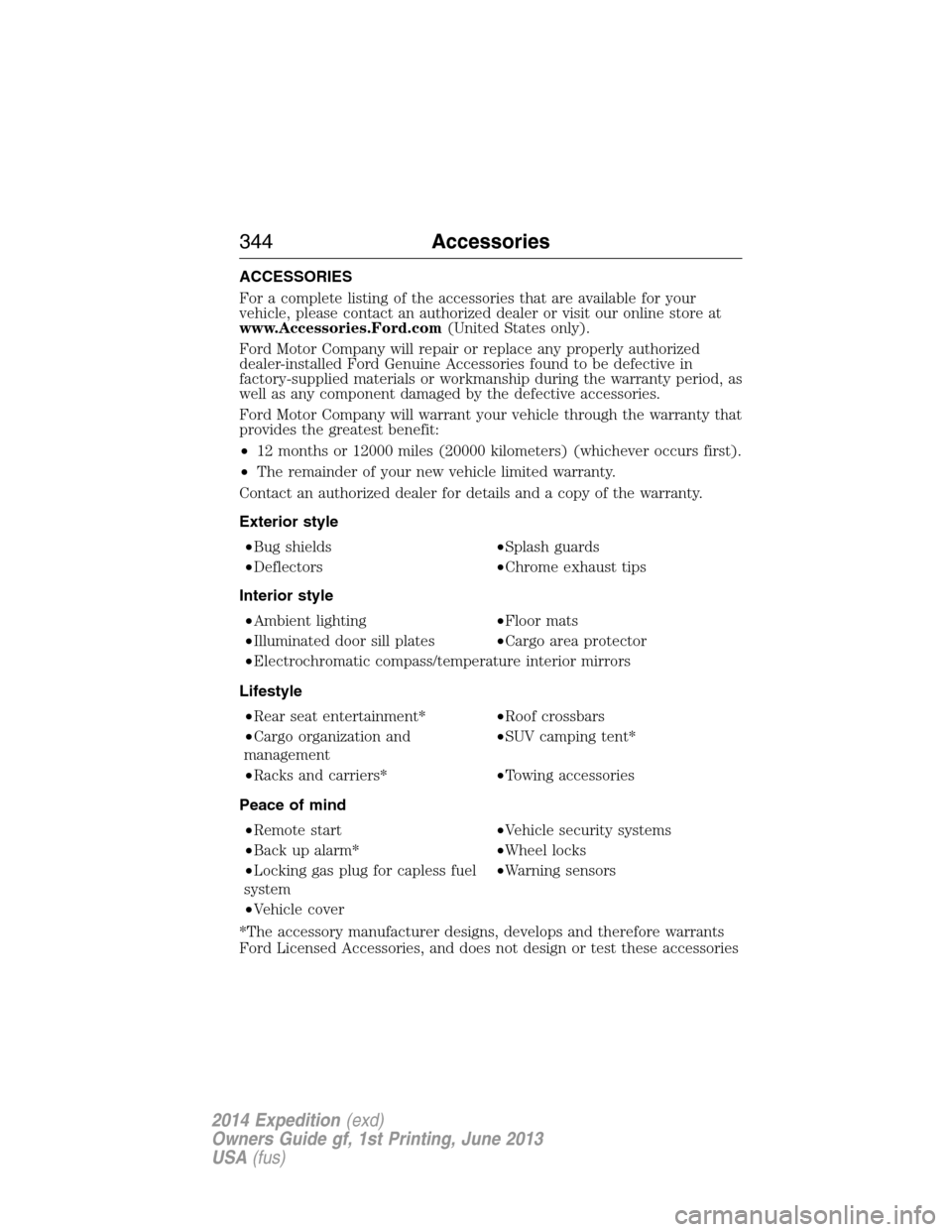
ACCESSORIES
For a complete listing of the accessories that are available for your
vehicle, please contact an authorized dealer or visit our online store at
www.Accessories.Ford.com(United States only).
Ford Motor Company will repair or replace any properly authorized
dealer-installed Ford Genuine Accessories found to be defective in
factory-supplied materials or workmanship during the warranty period, as
well as any component damaged by the defective accessories.
Ford Motor Company will warrant your vehicle through the warranty that
provides the greatest benefit:
•12 months or 12000 miles (20000 kilometers) (whichever occurs first).
•The remainder of your new vehicle limited warranty.
Contact an authorized dealer for details and a copy of the warranty.
Exterior style
•Bug shields•Splash guards
•Deflectors•Chrome exhaust tips
Interior style
•Ambient lighting•Floor mats
•Illuminated door sill plates•Cargo area protector
•Electrochromatic compass/temperature interior mirrors
Lifestyle
•Rear seat entertainment*•Roof crossbars
•Cargo organization and
management•SUV camping tent*
•Racks and carriers*•Towing accessories
Peace of mind
•Remote start•Vehicle security systems
•Back up alarm*•Wheel locks
•Locking gas plug for capless fuel
system•Warning sensors
•Vehicle cover
*The accessory manufacturer designs, develops and therefore warrants
Ford Licensed Accessories, and does not design or test these accessories
344Accessories
2014 Expedition(exd)
Owners Guide gf, 1st Printing, June 2013
USA(fus)
Page 348 of 519
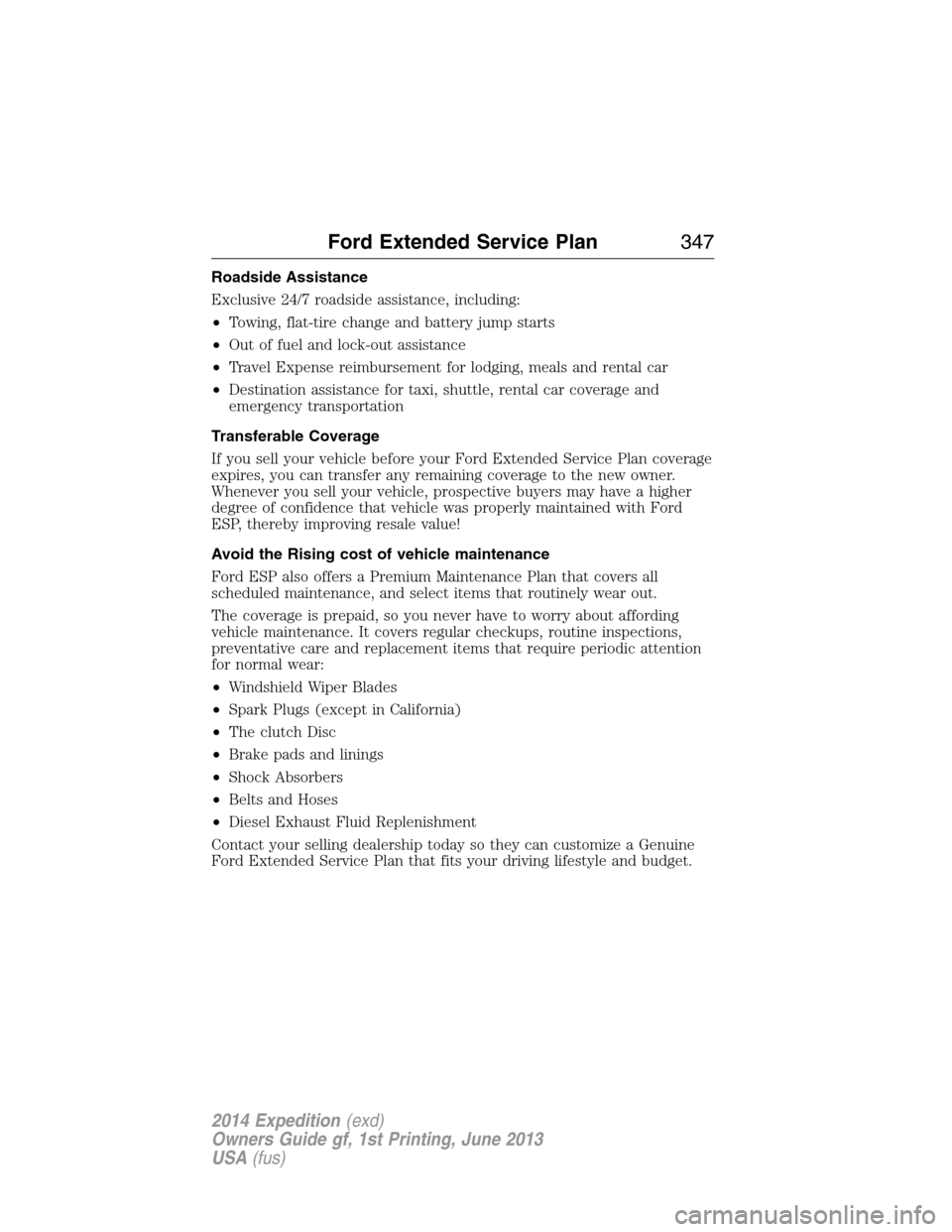
Roadside Assistance
Exclusive 24/7 roadside assistance, including:
•Towing, flat-tire change and battery jump starts
•Out of fuel and lock-out assistance
•Travel Expense reimbursement for lodging, meals and rental car
•Destination assistance for taxi, shuttle, rental car coverage and
emergency transportation
Transferable Coverage
If you sell your vehicle before your Ford Extended Service Plan coverage
expires, you can transfer any remaining coverage to the new owner.
Whenever you sell your vehicle, prospective buyers may have a higher
degree of confidence that vehicle was properly maintained with Ford
ESP, thereby improving resale value!
Avoid the Rising cost of vehicle maintenance
Ford ESP also offers a Premium Maintenance Plan that covers all
scheduled maintenance, and select items that routinely wear out.
The coverage is prepaid, so you never have to worry about affording
vehicle maintenance. It covers regular checkups, routine inspections,
preventative care and replacement items that require periodic attention
for normal wear:
•Windshield Wiper Blades
•Spark Plugs (except in California)
•The clutch Disc
•Brake pads and linings
•Shock Absorbers
•Belts and Hoses
•Diesel Exhaust Fluid Replenishment
Contact your selling dealership today so they can customize a Genuine
Ford Extended Service Plan that fits your driving lifestyle and budget.
Ford Extended Service Plan347
2014 Expedition(exd)
Owners Guide gf, 1st Printing, June 2013
USA(fus)
Page 356 of 519
E.Left arrow button
•In radio mode, press and release this button to scroll through
memory presets. Press and hold to go to the previous station
•In CD and SYNC modes, press and release this button to advance to
the previous track. Press and hold to rewind within that track.
F.Auxiliary audio input jacks:Plug in and play auxiliary audio
sources.
G.VOLUMEPress the up and down arrow buttons to increase or
decrease the headphone volume level. From the rear seat controls, the
volume cannot be higher than the current audio setting unless the
speakers are off.
H.Wired headphone jack
I.-Press the button to access the previous CD.
J.+Press to access the next CD.
Switching the Rear Audio Controls On
After you switch the ignition on, FULL rear controls are on and the
system is in Single Play mode.
Parental Control
The multimedia system allows for three varying levels of parental control.
By simultaneously pressing the 3 and 5 memory preset buttons, the rear
passengers may be allowed to access FULL or LOCAL control or be
LOCKED out of rear seat controls altogether.
1. Press the 3 and 5 memory preset buttons at the same time. LOCAL
illuminates in both front and rear audio displays, indicating that only
LOCAL rear control is available.Note:While in Single Play mode,
LOCAL is the same as LOCKED. In Dual Play mode, LOCAL allows
the driver to control the media selected at the radio, or over media
played through the rear auxiliary input jacks.
2. Pressing the 3 and 5 buttons a second time locks the rear control.
The rear passengers are restricted from control over media of any
kind (the rear controls are disabled).Note:If in Dual Play mode, the
headphone icon normally illuminated in the audio display when in
Dual Play turns off in the audio display.
3. Pressing the 3 and 5 buttons a third time restores full control to the
rear seat controls. Switching the ignition off and then on again has
the same effect.
Audio System355
2014 Expedition(exd)
Owners Guide gf, 1st Printing, June 2013
USA(fus)
Page 357 of 519
Switching Dual Play Mode On
You can switch Dual Play mode on by simultaneously pressing the 2 and
4 memory preset buttons on the audio or by doing the following:
1. Press the headphone/speaker control. The headphone icon
illuminates in both front and rear audio displays indicating the rear
seat speakers are off and the headphones are on.
2. Press MEDIA to change audio sources (as heard in the headphones
only).
3. Use the other controls to adjust the playing media.
Switching Off Dual Play Mode
Use any one of the following to switch off Dual Play mode:
•Press the 2 and 4 memory preset buttons simultaneously again.
•Press the 3 and 5 memory preset buttons simultaneously to LOCK
the rear seat controls.
•Press the headphone/speaker button again.
Using Dual Play Mode with Headphones
WARNING:Do not leave children unattended in your vehicle
and do not let children operate the system while unsupervised. If
wired headphones or auxiliary systems are used, children may become
entangled in the cords and seriously injure themselves.
Plug a 1/8–inch (3.5 millimeter) headphone (not included) into the
headphone jack. Press the speaker button, or the 2 and 4 memory preset
buttons simultaneously on the radio to switch on the headphones. DUAL
PLAY illuminates in the audio display, there is no sound from the rear
speakers and the fade control is inactive, signaling that Dual Play is on.
The front speakers remain on for the front passengers. Press the speaker
button, or the 2 and 4 memory preset buttons simultaneously on the
radio again to switch off the headphones and Dual Play mode. SINGLE
PLAY illuminates in the audio display; fade control is active and there is
sound from rear speakers, signaling that Single Play is on.
You need to switch the rear seat controls on to use any rear controls
(whether in Single Play or Dual Play mode). To use Dual Play, switch on
the rear seat controls; the headphone icon illuminates in the audio
display. SeeSwitching the rear audio controls onpreviously.
356Audio System
2014 Expedition(exd)
Owners Guide gf, 1st Printing, June 2013
USA(fus)