AUX FORD EXPEDITION 2014 3.G User Guide
[x] Cancel search | Manufacturer: FORD, Model Year: 2014, Model line: EXPEDITION, Model: FORD EXPEDITION 2014 3.GPages: 519, PDF Size: 6.9 MB
Page 166 of 519
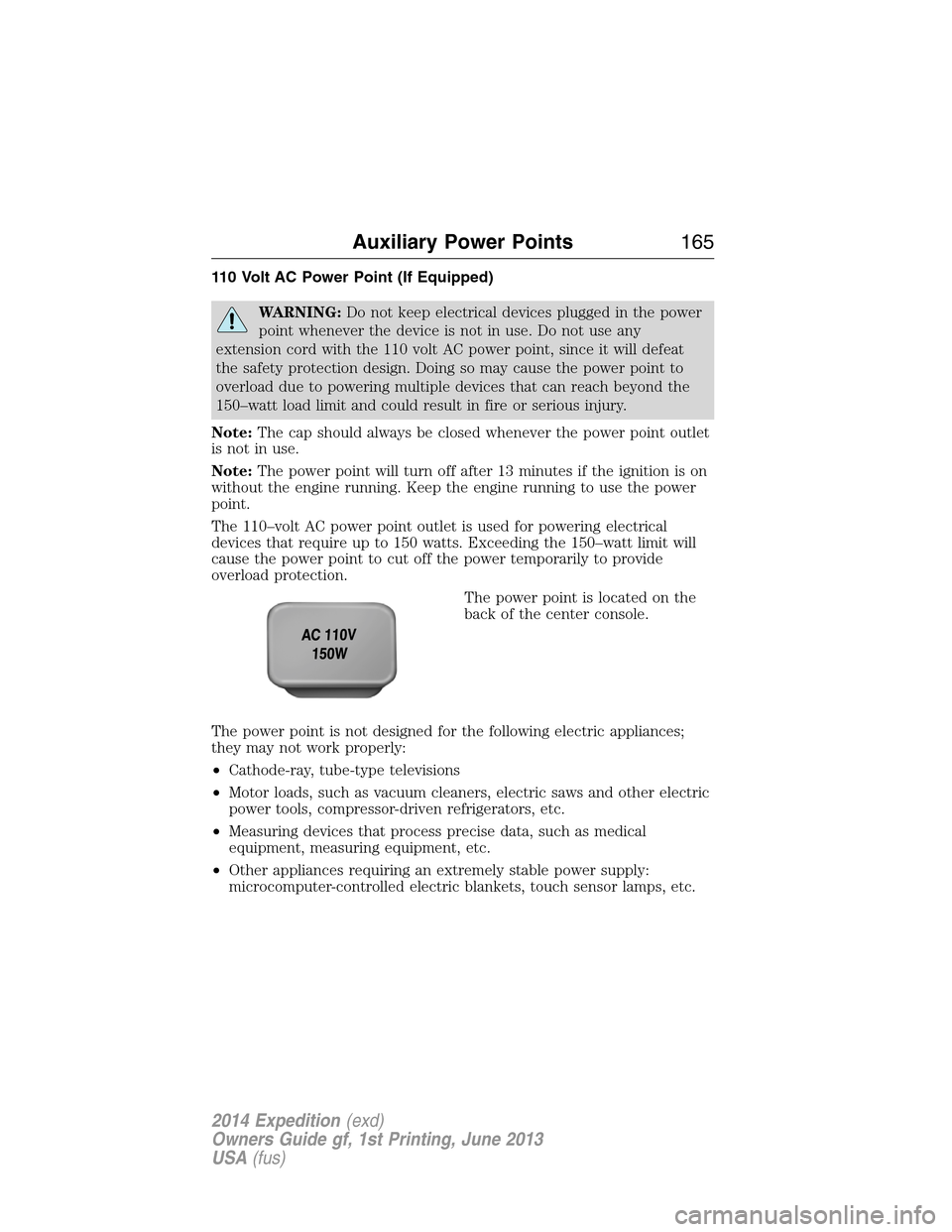
110 Volt AC Power Point (If Equipped)
WARNING:Do not keep electrical devices plugged in the power
point whenever the device is not in use. Do not use any
extension cord with the 110 volt AC power point, since it will defeat
the safety protection design. Doing so may cause the power point to
overload due to powering multiple devices that can reach beyond the
150–watt load limit and could result in fire or serious injury.
Note:The cap should always be closed whenever the power point outlet
is not in use.
Note:The power point will turn off after 13 minutes if the ignition is on
without the engine running. Keep the engine running to use the power
point.
The 110–volt AC power point outlet is used for powering electrical
devices that require up to 150 watts. Exceeding the 150–watt limit will
cause the power point to cut off the power temporarily to provide
overload protection.
The power point is located on the
back of the center console.
The power point is not designed for the following electric appliances;
they may not work properly:
•Cathode-ray, tube-type televisions
•Motor loads, such as vacuum cleaners, electric saws and other electric
power tools, compressor-driven refrigerators, etc.
•Measuring devices that process precise data, such as medical
equipment, measuring equipment, etc.
•Other appliances requiring an extremely stable power supply:
microcomputer-controlled electric blankets, touch sensor lamps, etc.
Auxiliary Power Points165
2014 Expedition(exd)
Owners Guide gf, 1st Printing, June 2013
USA(fus)
Page 167 of 519
The power point can switch to a fault mode when it is overloaded,
overheated or shorted. Unplug your device and turn the ignition off then
on for overloading and shorting conditions. Let the system cool off, then
turn the ignition off then on for an overheating condition.
The power point can provide power whenever the ignition is on and the
indicator light is on. The indicator light is located in the top left corner
of the power point.
When the indicator light is:
•on — power point is ready to supply power
•off — power point power supply is off; ignition is not on
•blinking — power point is in fault mode
166Auxiliary Power Points
2014 Expedition(exd)
Owners Guide gf, 1st Printing, June 2013
USA(fus)
Page 264 of 519
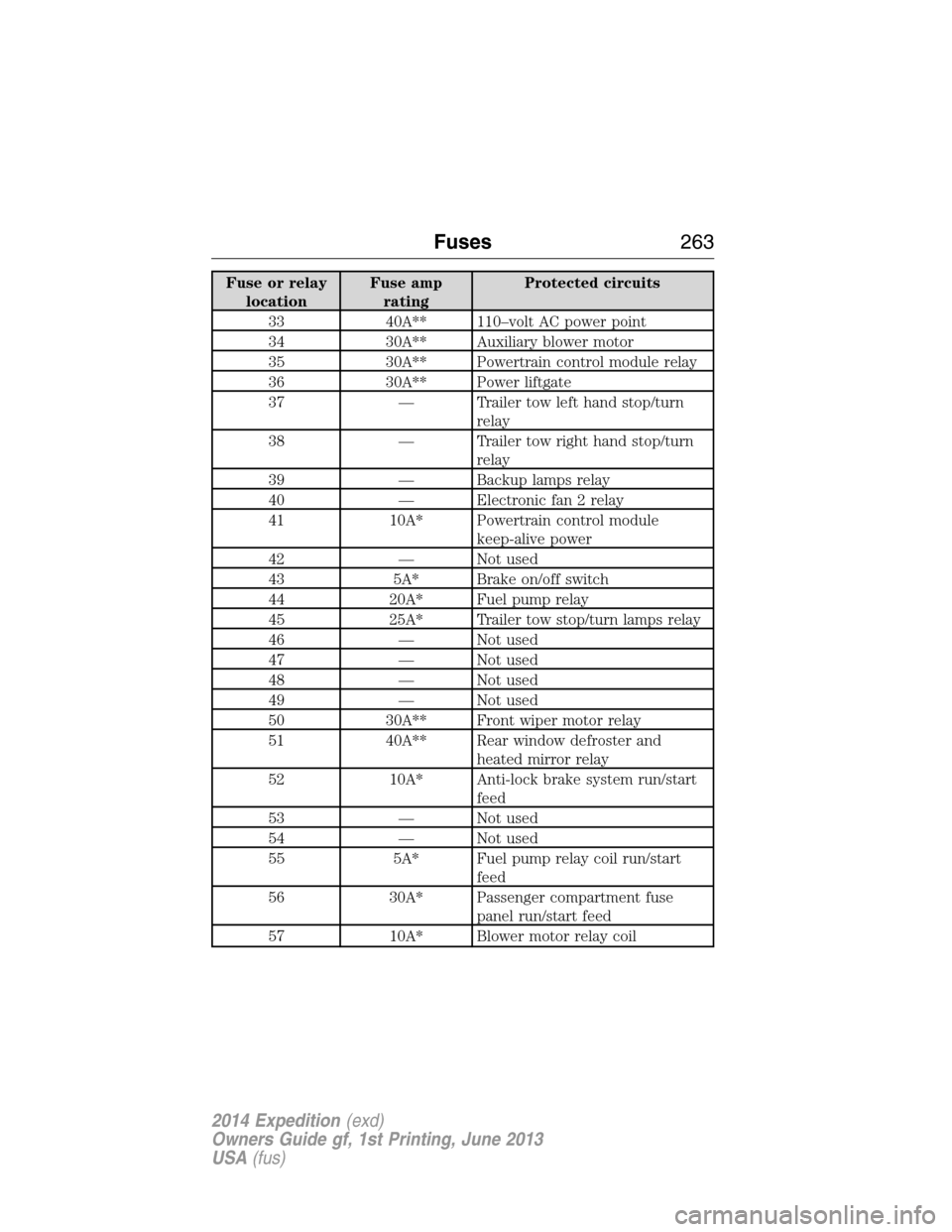
Fuse or relay
locationFuse amp
ratingProtected circuits
33 40A** 110–volt AC power point
34 30A** Auxiliary blower motor
35 30A** Powertrain control module relay
36 30A** Power liftgate
37 — Trailer tow left hand stop/turn
relay
38 — Trailer tow right hand stop/turn
relay
39 — Backup lamps relay
40 — Electronic fan 2 relay
41 10A* Powertrain control module
keep-alive power
42 — Not used
43 5A* Brake on/off switch
44 20A* Fuel pump relay
45 25A* Trailer tow stop/turn lamps relay
46 — Not used
47 — Not used
48 — Not used
49 — Not used
50 30A** Front wiper motor relay
51 40A** Rear window defroster and
heated mirror relay
52 10A* Anti-lock brake system run/start
feed
53 — Not used
54 — Not used
55 5A* Fuel pump relay coil run/start
feed
56 30A* Passenger compartment fuse
panel run/start feed
57 10A* Blower motor relay coil
Fuses263
2014 Expedition(exd)
Owners Guide gf, 1st Printing, June 2013
USA(fus)
Page 265 of 519
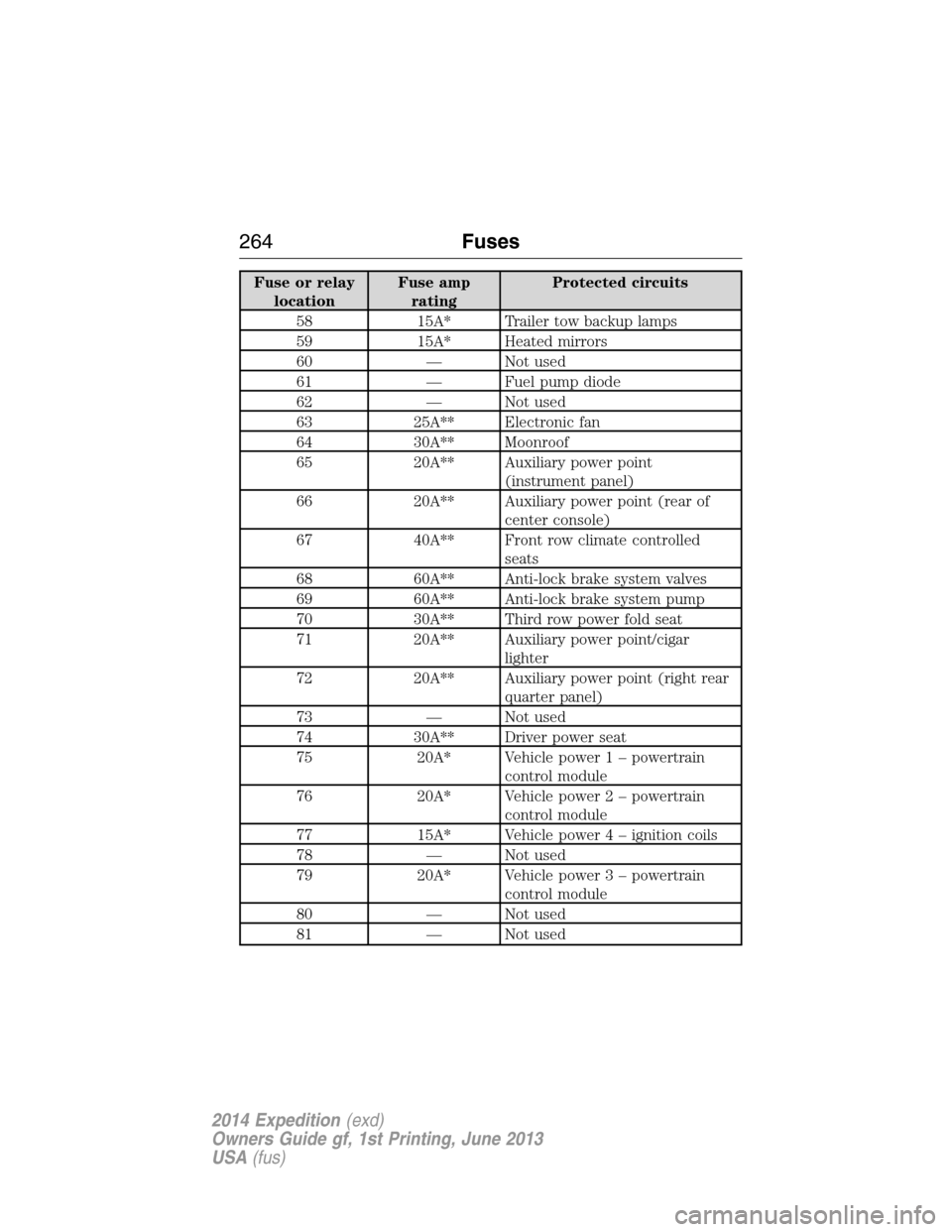
Fuse or relay
locationFuse amp
ratingProtected circuits
58 15A* Trailer tow backup lamps
59 15A* Heated mirrors
60 — Not used
61 — Fuel pump diode
62 — Not used
63 25A** Electronic fan
64 30A** Moonroof
65 20A** Auxiliary power point
(instrument panel)
66 20A** Auxiliary power point (rear of
center console)
67 40A** Front row climate controlled
seats
68 60A** Anti-lock brake system valves
69 60A** Anti-lock brake system pump
70 30A** Third row power fold seat
71 20A** Auxiliary power point/cigar
lighter
72 20A** Auxiliary power point (right rear
quarter panel)
73 — Not used
74 30A** Driver power seat
75 20A* Vehicle power 1 – powertrain
control module
76 20A* Vehicle power 2 – powertrain
control module
77 15A* Vehicle power4–ignition coils
78 — Not used
79 20A* Vehicle power 3 – powertrain
control module
80 — Not used
81 — Not used
264Fuses
2014 Expedition(exd)
Owners Guide gf, 1st Printing, June 2013
USA(fus)
Page 269 of 519
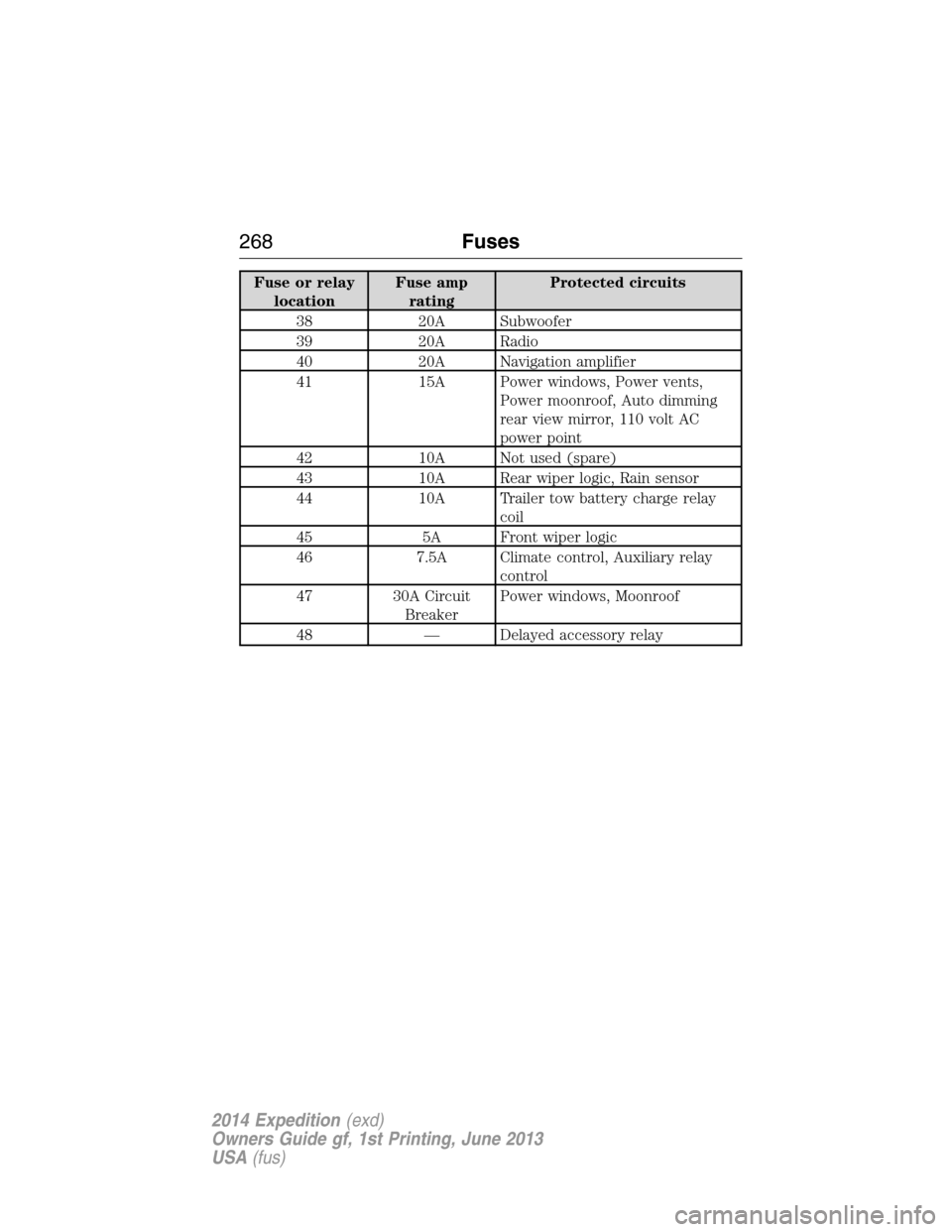
Fuse or relay
locationFuse amp
ratingProtected circuits
38 20A Subwoofer
39 20A Radio
40 20A Navigation amplifier
41 15A Power windows, Power vents,
Power moonroof, Auto dimming
rear view mirror, 110 volt AC
power point
42 10A Not used (spare)
43 10A Rear wiper logic, Rain sensor
44 10A Trailer tow battery charge relay
coil
45 5A Front wiper logic
46 7.5A Climate control, Auxiliary relay
control
47 30A Circuit
BreakerPower windows, Moonroof
48 — Delayed accessory relay
268Fuses
2014 Expedition(exd)
Owners Guide gf, 1st Printing, June 2013
USA(fus)
Page 271 of 519
Working with the Engine Off
1. Set the parking brake and shift toP(Park).
2. Turn off the engine and remove the key (if equipped).
3. Block the wheels.
Working with the Engine On
WARNING:To reduce the risk of vehicle damage or personal
burn injuries, do not start your engine with the air cleaner
removed and do not remove it while the engine is running.
1. Set the parking brake and shift to positionP.
2. Block the wheels.
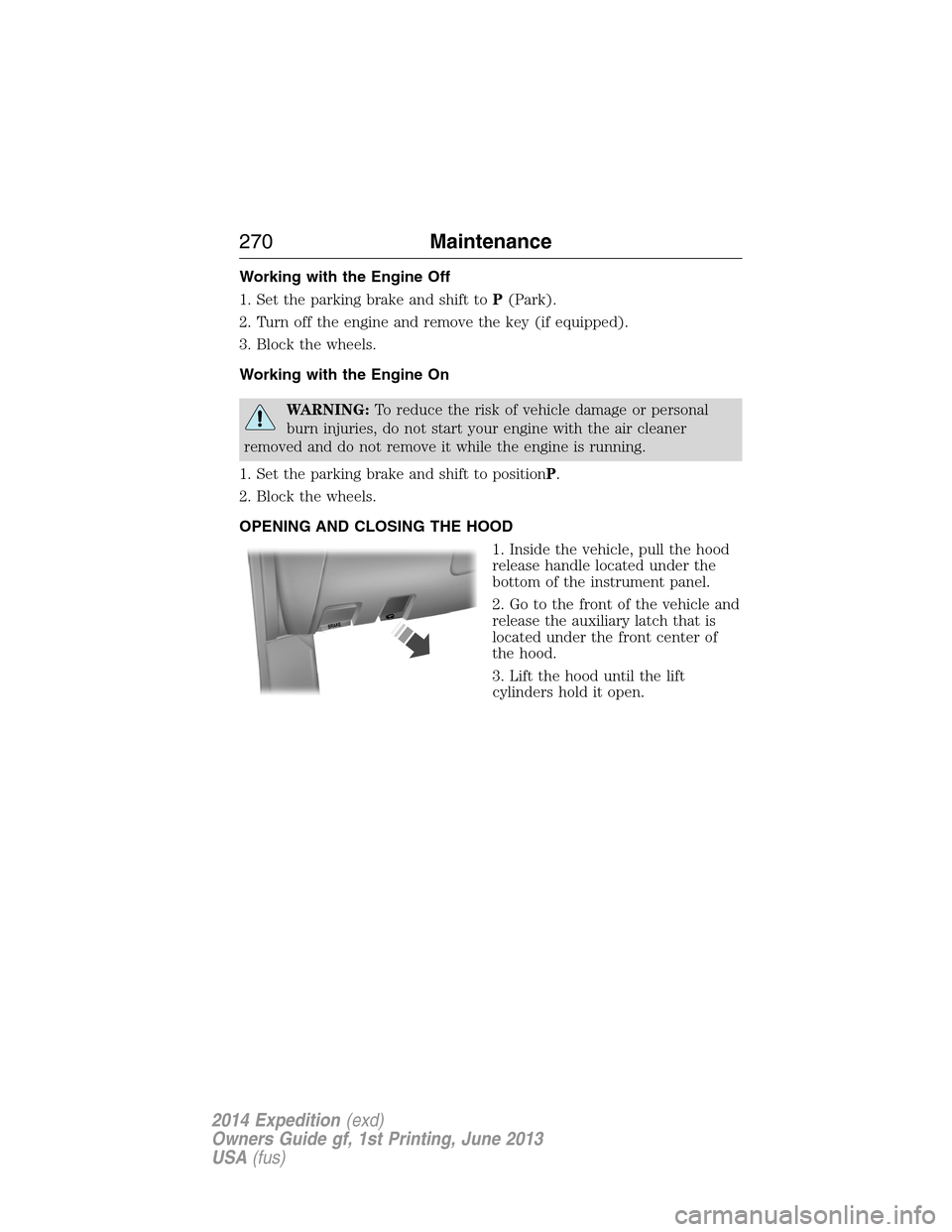
OPENING AND CLOSING THE HOOD
1. Inside the vehicle, pull the hood
release handle located under the
bottom of the instrument panel.
2. Go to the front of the vehicle and
release the auxiliary latch that is
located under the front center of
the hood.
3. Lift the hood until the lift
cylinders hold it open.
B
R
A
K
E
270Maintenance
2014 Expedition(exd)
Owners Guide gf, 1st Printing, June 2013
USA(fus)
Page 338 of 519
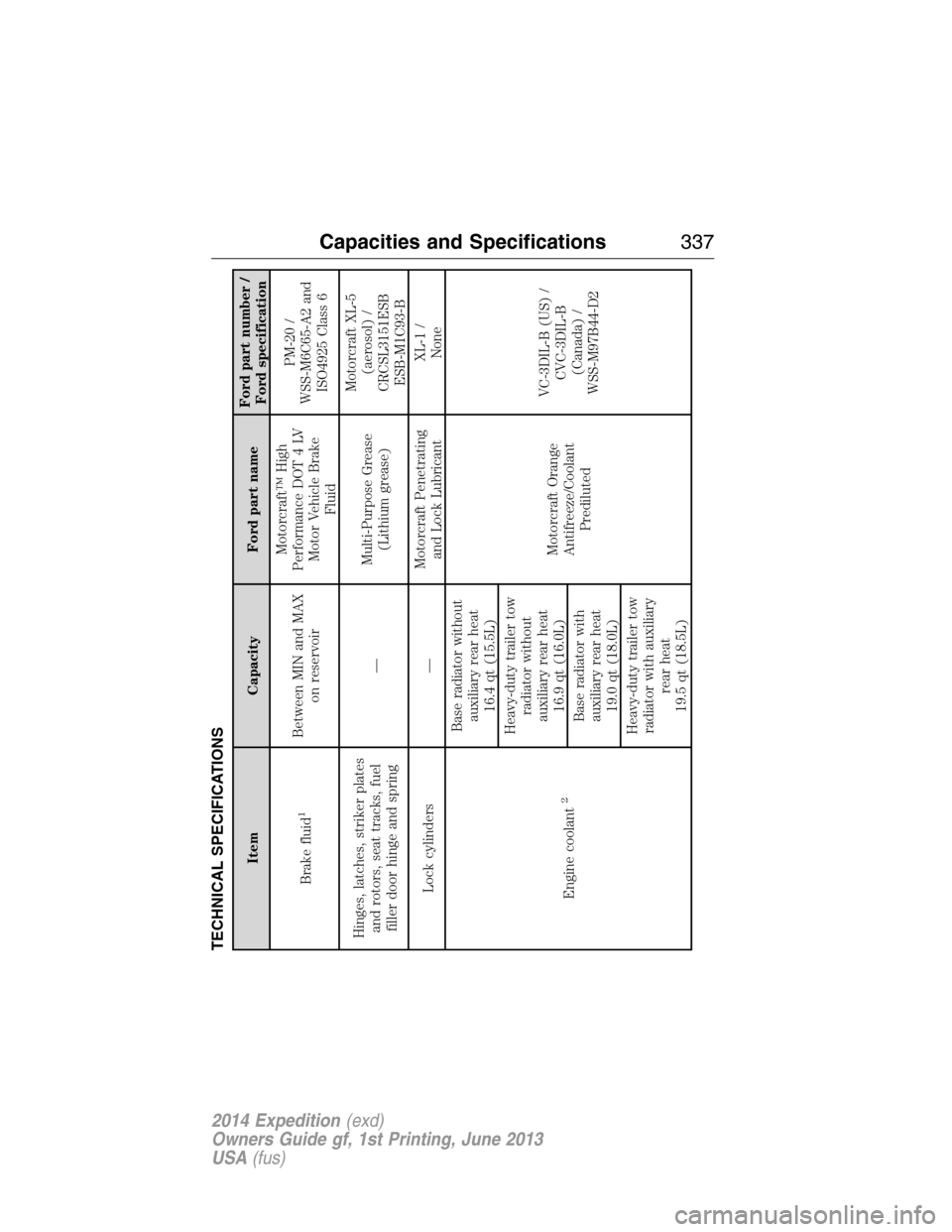
TECHNICAL SPECIFICATIONS
Item Capacity Ford part nameFord part number /
Ford specification
Brake fluid
1
Between MIN and MAX
on reservoirMotorcraft™ High
Performance DOT 4 LV
Motor Vehicle Brake
FluidPM-20 /
WSS-M6C65-A2 and
ISO4925 Class 6
Hinges, latches, striker plates
and rotors, seat tracks, fuel
filler door hinge and spring—Multi-Purpose Grease
(Lithium grease)Motorcraft XL-5
(aerosol) /
CRCSL3151ESB
ESB-M1C93-B
Lock cylinders —Motorcraft Penetrating
and Lock LubricantXL-1 /
None
Engine coolant
2
Base radiator without
auxiliary rear heat
16.4 qt (15.5L)
Motorcraft Orange
Antifreeze/Coolant
PredilutedVC-3DIL-B (US) /
CVC-3DIL-B
(Canada) /
WSS-M97B44-D2 Heavy-duty trailer tow
radiator without
auxiliary rear heat
16.9 qt (16.0L)
Base radiator with
auxiliary rear heat
19.0 qt (18.0L)
Heavy-duty trailer tow
radiator with auxiliary
rear heat
19.5 qt (18.5L)
Capacities and Specifications337
2014 Expedition(exd)
Owners Guide gf, 1st Printing, June 2013
USA(fus)
Page 353 of 519
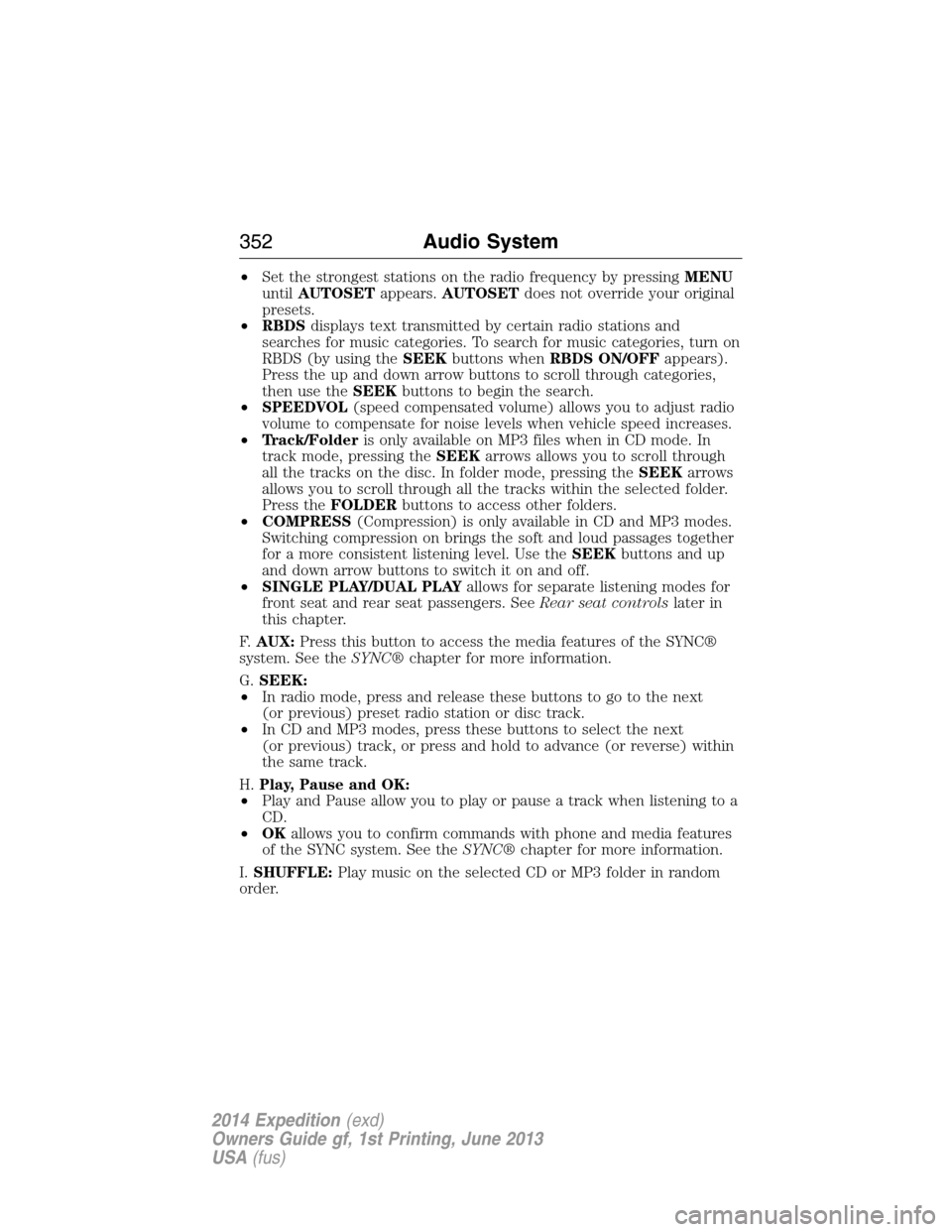
•Set the strongest stations on the radio frequency by pressingMENU
untilAUTOSETappears.AUTOSETdoes not override your original
presets.
•RBDSdisplays text transmitted by certain radio stations and
searches for music categories. To search for music categories, turn on
RBDS (by using theSEEKbuttons whenRBDS ON/OFFappears).
Press the up and down arrow buttons to scroll through categories,
then use theSEEKbuttons to begin the search.
•SPEEDVOL(speed compensated volume) allows you to adjust radio
volume to compensate for noise levels when vehicle speed increases.
•Track/Folderis only available on MP3 files when in CD mode. In
track mode, pressing theSEEKarrows allows you to scroll through
all the tracks on the disc. In folder mode, pressing theSEEKarrows
allows you to scroll through all the tracks within the selected folder.
Press theFOLDERbuttons to access other folders.
•COMPRESS(Compression) is only available in CD and MP3 modes.
Switching compression on brings the soft and loud passages together
for a more consistent listening level. Use theSEEKbuttons and up
and down arrow buttons to switch it on and off.
•SINGLE PLAY/DUAL PLAYallows for separate listening modes for
front seat and rear seat passengers. SeeRear seat controlslater in
this chapter.
F.AUX:Press this button to access the media features of the SYNC®
system. See theSYNC®chapter for more information.
G.SEEK:
•In radio mode, press and release these buttons to go to the next
(or previous) preset radio station or disc track.
•In CD and MP3 modes, press these buttons to select the next
(or previous) track, or press and hold to advance (or reverse) within
the same track.
H.Play, Pause and OK:
•Play and Pause allow you to play or pause a track when listening to a
CD.
•OKallows you to confirm commands with phone and media features
of the SYNC system. See theSYNC®chapter for more information.
I.SHUFFLE:Play music on the selected CD or MP3 folder in random
order.
352Audio System
2014 Expedition(exd)
Owners Guide gf, 1st Printing, June 2013
USA(fus)
Page 356 of 519
E.Left arrow button
•In radio mode, press and release this button to scroll through
memory presets. Press and hold to go to the previous station
•In CD and SYNC modes, press and release this button to advance to
the previous track. Press and hold to rewind within that track.
F.Auxiliary audio input jacks:Plug in and play auxiliary audio
sources.
G.VOLUMEPress the up and down arrow buttons to increase or
decrease the headphone volume level. From the rear seat controls, the
volume cannot be higher than the current audio setting unless the
speakers are off.
H.Wired headphone jack
I.-Press the button to access the previous CD.
J.+Press to access the next CD.
Switching the Rear Audio Controls On
After you switch the ignition on, FULL rear controls are on and the
system is in Single Play mode.
Parental Control
The multimedia system allows for three varying levels of parental control.
By simultaneously pressing the 3 and 5 memory preset buttons, the rear
passengers may be allowed to access FULL or LOCAL control or be
LOCKED out of rear seat controls altogether.
1. Press the 3 and 5 memory preset buttons at the same time. LOCAL
illuminates in both front and rear audio displays, indicating that only
LOCAL rear control is available.Note:While in Single Play mode,
LOCAL is the same as LOCKED. In Dual Play mode, LOCAL allows
the driver to control the media selected at the radio, or over media
played through the rear auxiliary input jacks.
2. Pressing the 3 and 5 buttons a second time locks the rear control.
The rear passengers are restricted from control over media of any
kind (the rear controls are disabled).Note:If in Dual Play mode, the
headphone icon normally illuminated in the audio display when in
Dual Play turns off in the audio display.
3. Pressing the 3 and 5 buttons a third time restores full control to the
rear seat controls. Switching the ignition off and then on again has
the same effect.
Audio System355
2014 Expedition(exd)
Owners Guide gf, 1st Printing, June 2013
USA(fus)
Page 357 of 519
Switching Dual Play Mode On
You can switch Dual Play mode on by simultaneously pressing the 2 and
4 memory preset buttons on the audio or by doing the following:
1. Press the headphone/speaker control. The headphone icon
illuminates in both front and rear audio displays indicating the rear
seat speakers are off and the headphones are on.
2. Press MEDIA to change audio sources (as heard in the headphones
only).
3. Use the other controls to adjust the playing media.
Switching Off Dual Play Mode
Use any one of the following to switch off Dual Play mode:
•Press the 2 and 4 memory preset buttons simultaneously again.
•Press the 3 and 5 memory preset buttons simultaneously to LOCK
the rear seat controls.
•Press the headphone/speaker button again.
Using Dual Play Mode with Headphones
WARNING:Do not leave children unattended in your vehicle
and do not let children operate the system while unsupervised. If
wired headphones or auxiliary systems are used, children may become
entangled in the cords and seriously injure themselves.
Plug a 1/8–inch (3.5 millimeter) headphone (not included) into the
headphone jack. Press the speaker button, or the 2 and 4 memory preset
buttons simultaneously on the radio to switch on the headphones. DUAL
PLAY illuminates in the audio display, there is no sound from the rear
speakers and the fade control is inactive, signaling that Dual Play is on.
The front speakers remain on for the front passengers. Press the speaker
button, or the 2 and 4 memory preset buttons simultaneously on the
radio again to switch off the headphones and Dual Play mode. SINGLE
PLAY illuminates in the audio display; fade control is active and there is
sound from rear speakers, signaling that Single Play is on.
You need to switch the rear seat controls on to use any rear controls
(whether in Single Play or Dual Play mode). To use Dual Play, switch on
the rear seat controls; the headphone icon illuminates in the audio
display. SeeSwitching the rear audio controls onpreviously.
356Audio System
2014 Expedition(exd)
Owners Guide gf, 1st Printing, June 2013
USA(fus)