lock FORD EXPEDITION 2016 3.G Owners Manual
[x] Cancel search | Manufacturer: FORD, Model Year: 2016, Model line: EXPEDITION, Model: FORD EXPEDITION 2016 3.GPages: 421, PDF Size: 6.3 MB
Page 346 of 421
Note:
This feature may not function
properly if you have enabled caller ID
blocking on your cellular phone. Before
running a report, review the Vehicle Health
Report Privacy Notice.
Note: In order to allow a break-in period for
your vehicle, you may not be able to create
a Vehicle Health Report until your vehicle
odometer has reached 200 miles.
Note: Cellular phone and SMS charges may
apply when making a report.
Register for Vehicle Health Report and set
your report preferences at
www.SYNCMyRide.com. After registering,
you can request a Vehicle Health Report
(inside your vehicle). Return to your
account at www.SYNCMyRide.com to view
your report. You can also choose for SYNC
to remind you automatically to run reports
at specific mileage intervals. The system allows you to check your
vehicle's overall health in the form of a
diagnostic report card. The Vehicle Health
Report contains valuable information, for
example:
•
Vehicle diagnostic information
• Scheduled maintenance
• Open recalls and Field Service Actions
• Items noted during vehicle inspections
by an authorized dealer that still need
servicing.
You can run a vehicle health report after
your vehicle has been running a minimum
of 60 seconds. Choose one of the following
options.
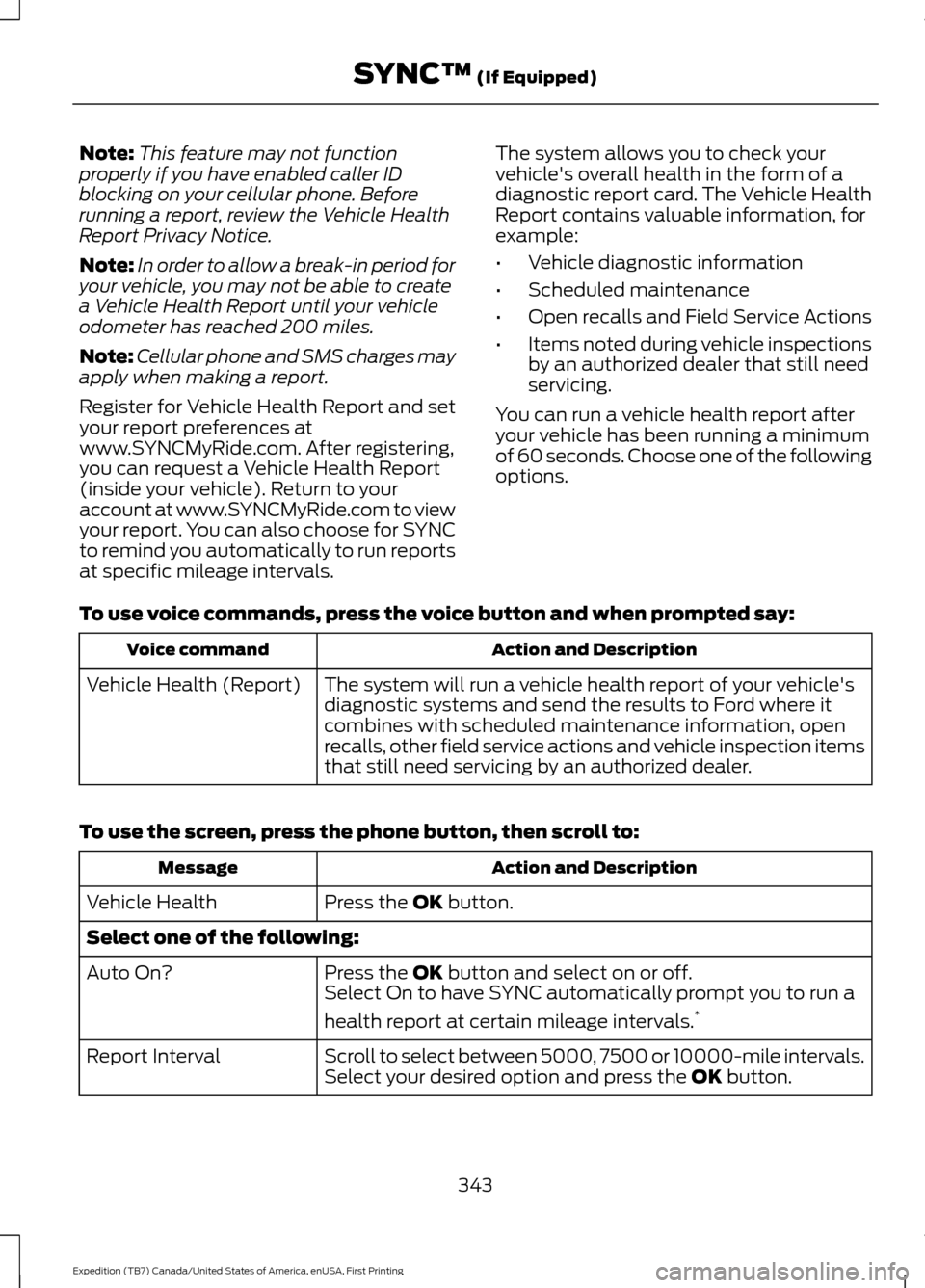
To use voice commands, press the voice button and when prompted say: Action and Description
Voice command
The system will run a vehicle health report of your vehicle's
diagnostic systems and send the results to Ford where it
combines with scheduled maintenance information, open
recalls, other field service actions and vehicle inspection items
that still need servicing by an authorized dealer.
Vehicle Health (Report)
To use the screen, press the phone button, then scroll to: Action and Description
Message
Press the OK button.
Vehicle Health
Select one of the following:
Press the
OK button and select on or off.
Auto On?
Select On to have SYNC automatically prompt you to run a
health report at certain mileage intervals. *
Scroll to select between 5000, 7500 or 10000-mile intervals.
Select your desired option and press the
OK button.
Report Interval
343
Expedition (TB7) Canada/United States of America, enUSA, First Printing SYNC™
(If Equipped)
Page 347 of 421
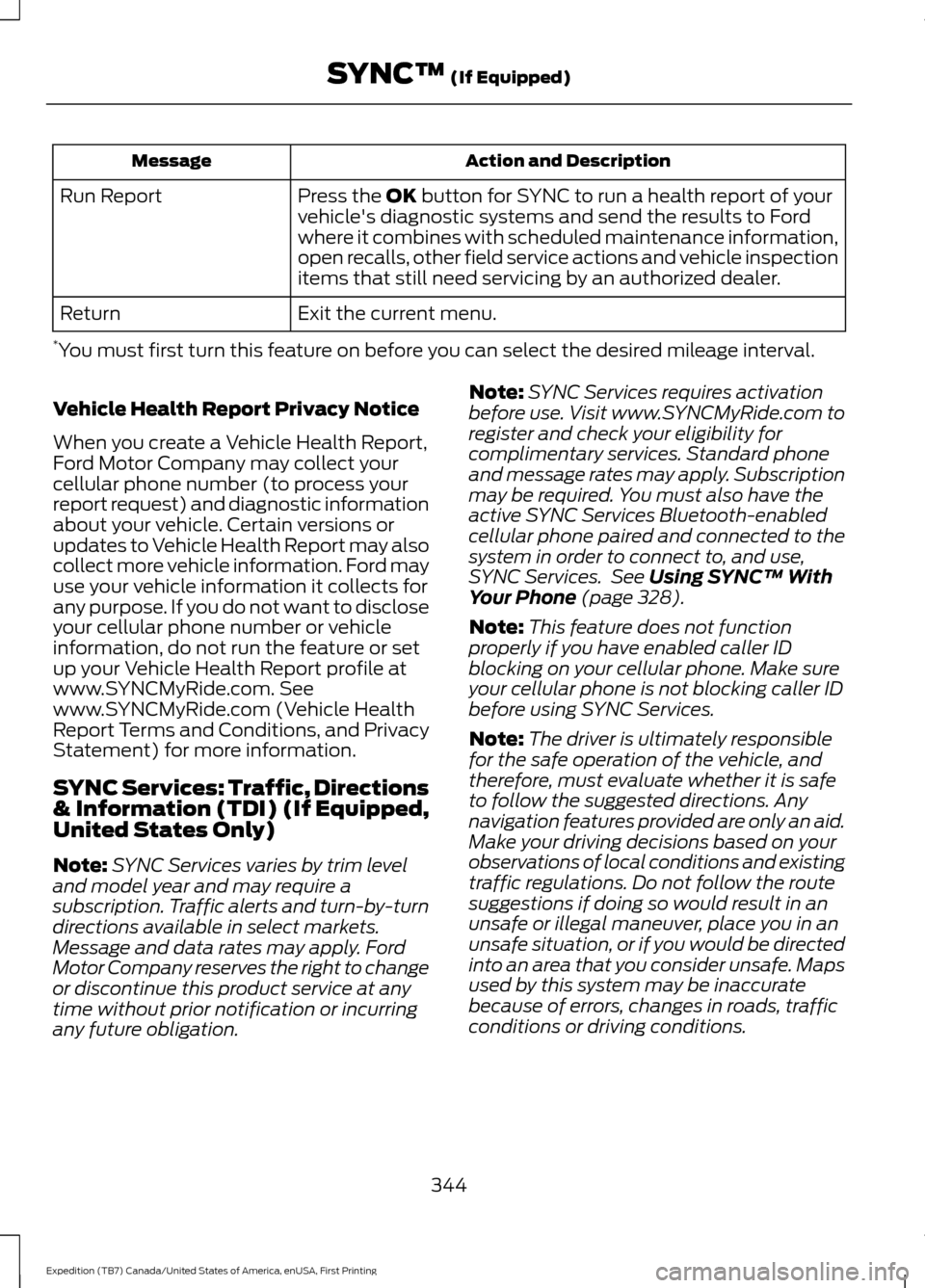
Action and Description
Message
Press the OK button for SYNC to run a health report of your
vehicle's diagnostic systems and send the results to Ford
where it combines with scheduled maintenance information,
open recalls, other field service actions and vehicle inspection
items that still need servicing by an authorized dealer.
Run Report
Exit the current menu.
Return
* You must first turn this feature on before you can select the desired mileage interval.
Vehicle Health Report Privacy Notice
When you create a Vehicle Health Report,
Ford Motor Company may collect your
cellular phone number (to process your
report request) and diagnostic information
about your vehicle. Certain versions or
updates to Vehicle Health Report may also
collect more vehicle information. Ford may
use your vehicle information it collects for
any purpose. If you do not want to disclose
your cellular phone number or vehicle
information, do not run the feature or set
up your Vehicle Health Report profile at
www.SYNCMyRide.com. See
www.SYNCMyRide.com (Vehicle Health
Report Terms and Conditions, and Privacy
Statement) for more information.
SYNC Services: Traffic, Directions
& Information (TDI) (If Equipped,
United States Only)
Note: SYNC Services varies by trim level
and model year and may require a
subscription. Traffic alerts and turn-by-turn
directions available in select markets.
Message and data rates may apply. Ford
Motor Company reserves the right to change
or discontinue this product service at any
time without prior notification or incurring
any future obligation. Note:
SYNC Services requires activation
before use. Visit www.SYNCMyRide.com to
register and check your eligibility for
complimentary services. Standard phone
and message rates may apply. Subscription
may be required. You must also have the
active SYNC Services Bluetooth-enabled
cellular phone paired and connected to the
system in order to connect to, and use,
SYNC Services. See
Using SYNC™ With
Your Phone (page 328).
Note: This feature does not function
properly if you have enabled caller ID
blocking on your cellular phone. Make sure
your cellular phone is not blocking caller ID
before using SYNC Services.
Note: The driver is ultimately responsible
for the safe operation of the vehicle, and
therefore, must evaluate whether it is safe
to follow the suggested directions. Any
navigation features provided are only an aid.
Make your driving decisions based on your
observations of local conditions and existing
traffic regulations. Do not follow the route
suggestions if doing so would result in an
unsafe or illegal maneuver, place you in an
unsafe situation, or if you would be directed
into an area that you consider unsafe. Maps
used by this system may be inaccurate
because of errors, changes in roads, traffic
conditions or driving conditions.
344
Expedition (TB7) Canada/United States of America, enUSA, First Printing SYNC™
(If Equipped)
Page 365 of 421
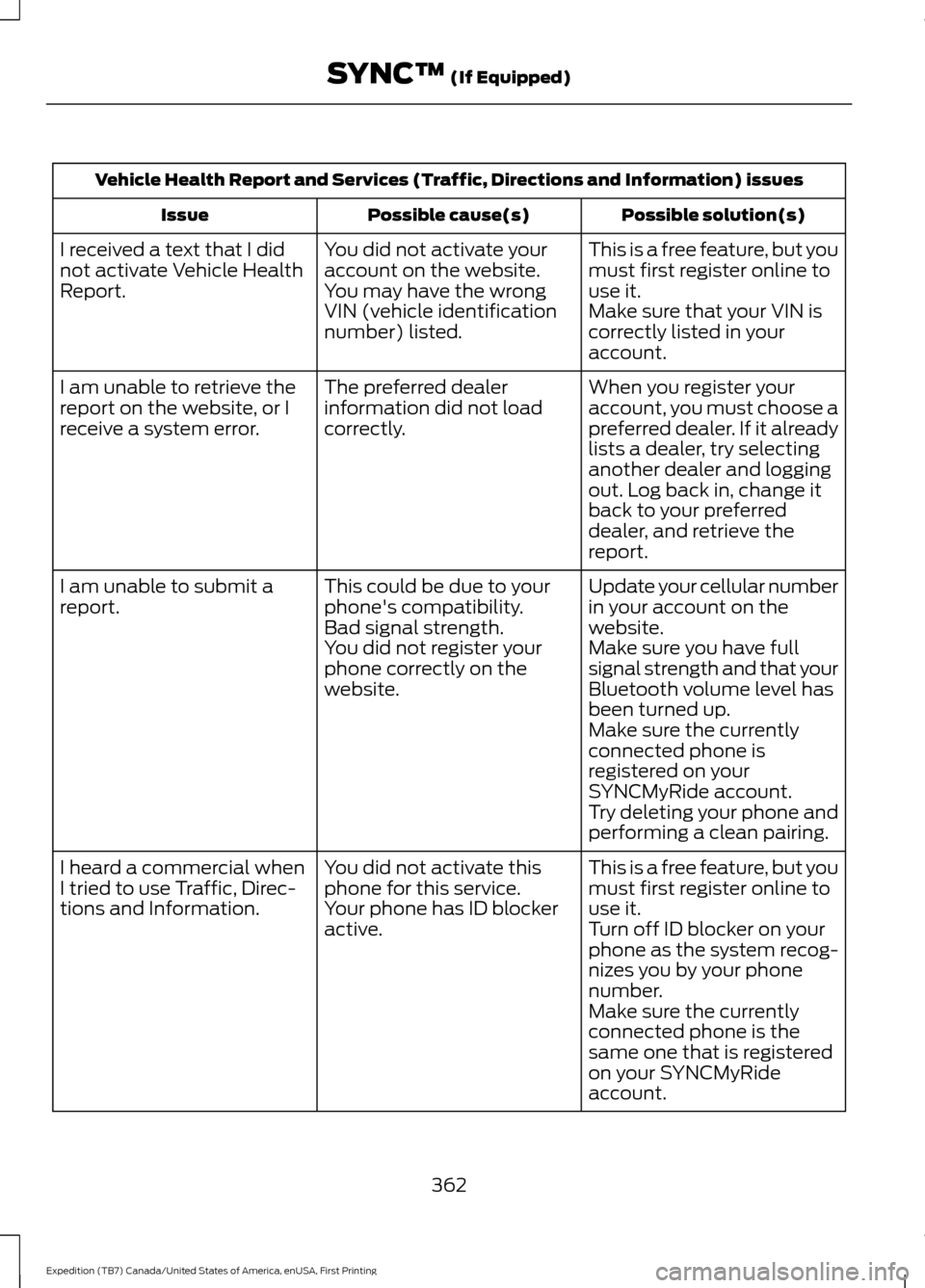
Vehicle Health Report and Services (Traffic, Directions and Information) issues
Possible solution(s)
Possible cause(s)
Issue
This is a free feature, but you
must first register online to
use it.
You did not activate your
account on the website.
You may have the wrong
VIN (vehicle identification
number) listed.
I received a text that I did
not activate Vehicle Health
Report.
Make sure that your VIN is
correctly listed in your
account.
When you register your
account, you must choose a
preferred dealer. If it already
lists a dealer, try selecting
another dealer and logging
out. Log back in, change it
back to your preferred
dealer, and retrieve the
report.
The preferred dealer
information did not load
correctly.
I am unable to retrieve the
report on the website, or I
receive a system error.
Update your cellular number
in your account on the
website.
This could be due to your
phone's compatibility.
Bad signal strength.
I am unable to submit a
report.
Make sure you have full
signal strength and that your
Bluetooth volume level has
been turned up.
You did not register your
phone correctly on the
website.
Make sure the currently
connected phone is
registered on your
SYNCMyRide account.
Try deleting your phone and
performing a clean pairing.
This is a free feature, but you
must first register online to
use it.
You did not activate this
phone for this service.
Your phone has ID blocker
active.
I heard a commercial when
I tried to use Traffic, Direc-
tions and Information.
Turn off ID blocker on your
phone as the system recog-
nizes you by your phone
number.
Make sure the currently
connected phone is the
same one that is registered
on your SYNCMyRide
account.
362
Expedition (TB7) Canada/United States of America, enUSA, First Printing SYNC™ (If Equipped)
Page 371 of 421
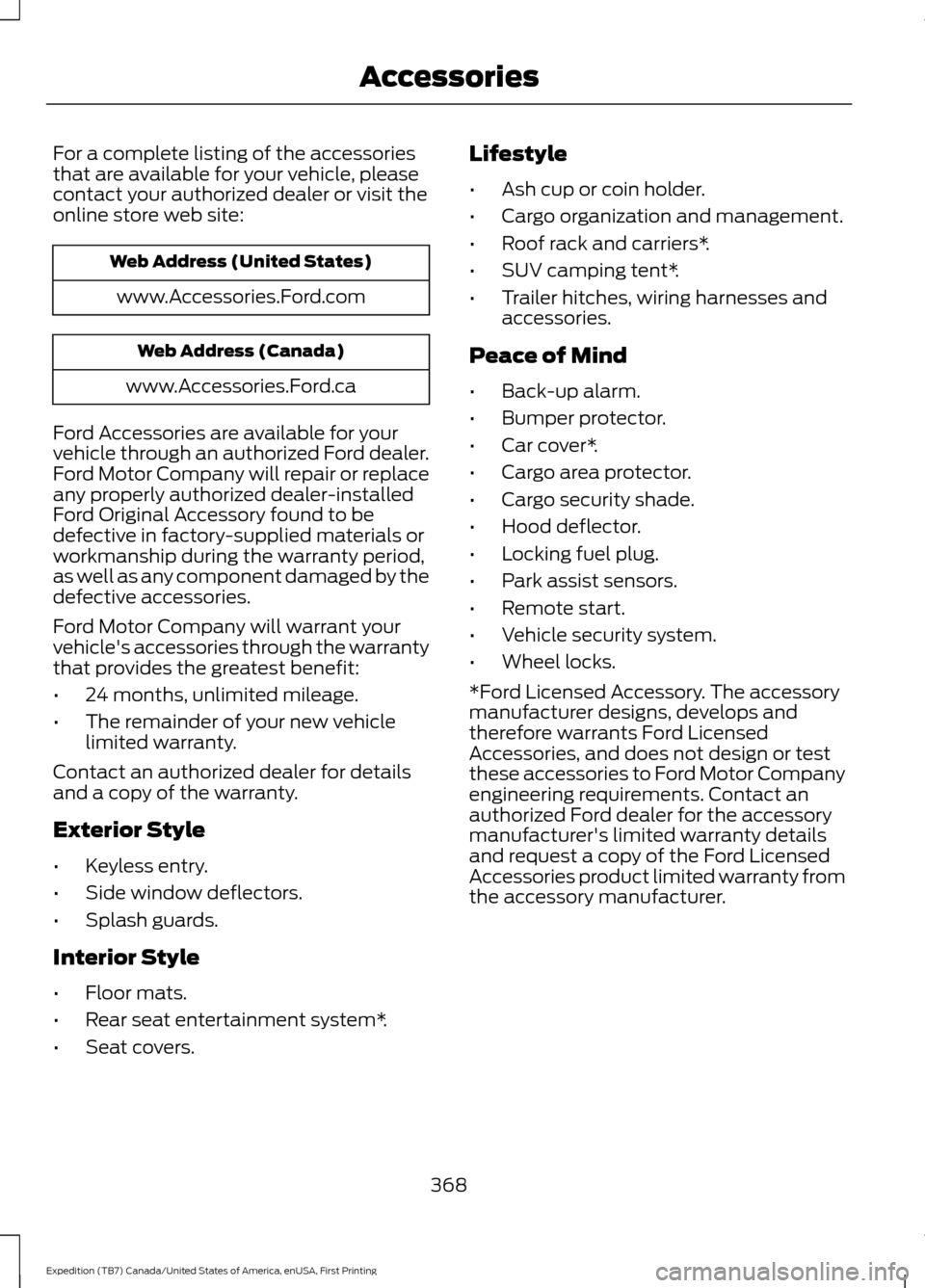
For a complete listing of the accessories
that are available for your vehicle, please
contact your authorized dealer or visit the
online store web site:
Web Address (United States)
www.Accessories.Ford.com Web Address (Canada)
www.Accessories.Ford.ca
Ford Accessories are available for your
vehicle through an authorized Ford dealer.
Ford Motor Company will repair or replace
any properly authorized dealer-installed
Ford Original Accessory found to be
defective in factory-supplied materials or
workmanship during the warranty period,
as well as any component damaged by the
defective accessories.
Ford Motor Company will warrant your
vehicle's accessories through the warranty
that provides the greatest benefit:
• 24 months, unlimited mileage.
• The remainder of your new vehicle
limited warranty.
Contact an authorized dealer for details
and a copy of the warranty.
Exterior Style
• Keyless entry.
• Side window deflectors.
• Splash guards.
Interior Style
• Floor mats.
• Rear seat entertainment system*.
• Seat covers. Lifestyle
•
Ash cup or coin holder.
• Cargo organization and management.
• Roof rack and carriers*.
• SUV camping tent*.
• Trailer hitches, wiring harnesses and
accessories.
Peace of Mind
• Back-up alarm.
• Bumper protector.
• Car cover*.
• Cargo area protector.
• Cargo security shade.
• Hood deflector.
• Locking fuel plug.
• Park assist sensors.
• Remote start.
• Vehicle security system.
• Wheel locks.
*Ford Licensed Accessory. The accessory
manufacturer designs, develops and
therefore warrants Ford Licensed
Accessories, and does not design or test
these accessories to Ford Motor Company
engineering requirements. Contact an
authorized Ford dealer for the accessory
manufacturer's limited warranty details
and request a copy of the Ford Licensed
Accessories product limited warranty from
the accessory manufacturer.
368
Expedition (TB7) Canada/United States of America, enUSA, First Printing Accessories
Page 373 of 421
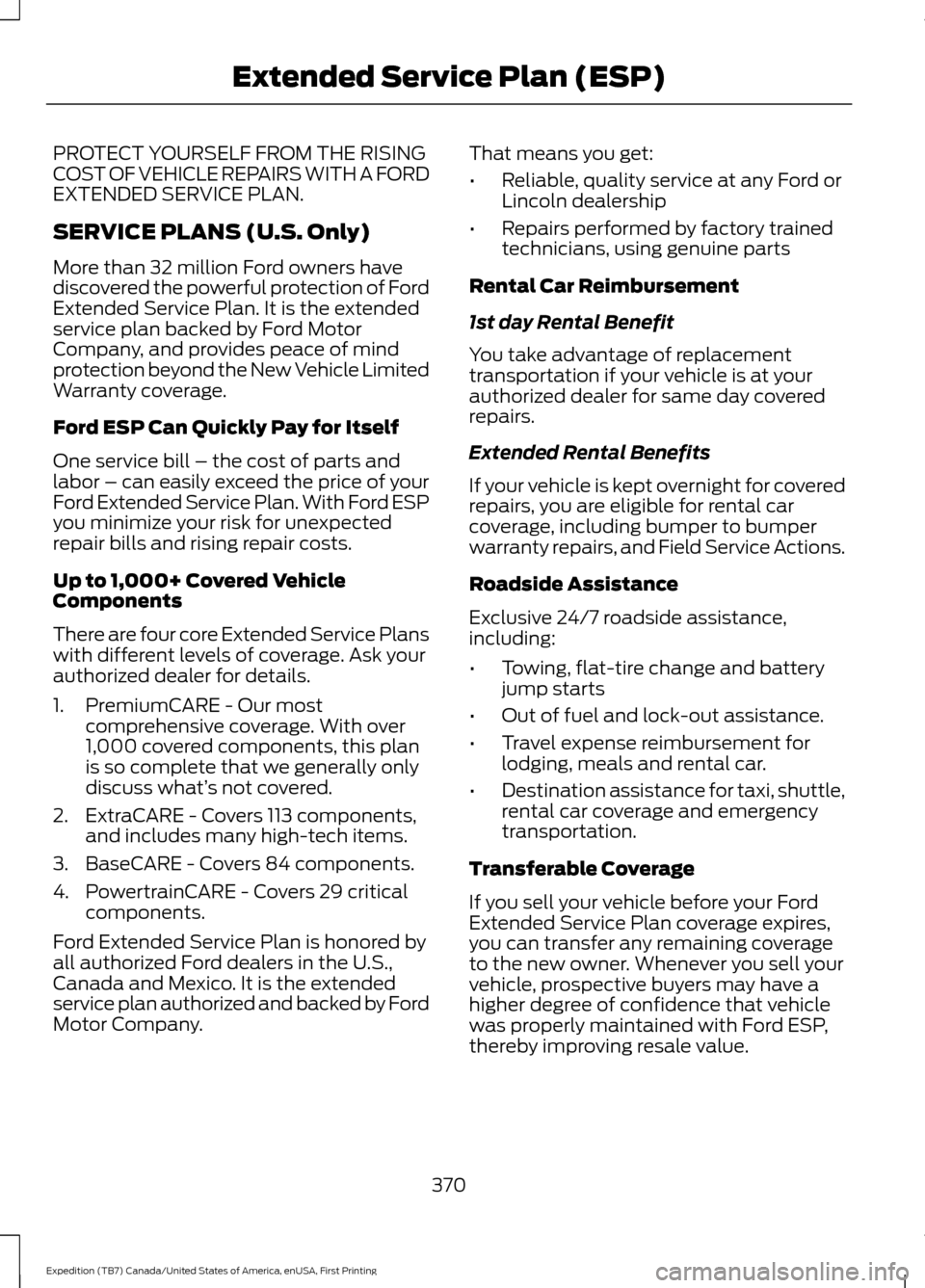
PROTECT YOURSELF FROM THE RISING
COST OF VEHICLE REPAIRS WITH A FORD
EXTENDED SERVICE PLAN.
SERVICE PLANS (U.S. Only)
More than 32 million Ford owners have
discovered the powerful protection of Ford
Extended Service Plan. It is the extended
service plan backed by Ford Motor
Company, and provides peace of mind
protection beyond the New Vehicle Limited
Warranty coverage.
Ford ESP Can Quickly Pay for Itself
One service bill – the cost of parts and
labor – can easily exceed the price of your
Ford Extended Service Plan. With Ford ESP
you minimize your risk for unexpected
repair bills and rising repair costs.
Up to 1,000+ Covered Vehicle
Components
There are four core Extended Service Plans
with different levels of coverage. Ask your
authorized dealer for details.
1. PremiumCARE - Our most
comprehensive coverage. With over
1,000 covered components, this plan
is so complete that we generally only
discuss what’ s not covered.
2. ExtraCARE - Covers 113 components, and includes many high-tech items.
3. BaseCARE - Covers 84 components.
4. PowertrainCARE - Covers 29 critical components.
Ford Extended Service Plan is honored by
all authorized Ford dealers in the U.S.,
Canada and Mexico. It is the extended
service plan authorized and backed by Ford
Motor Company. That means you get:
•
Reliable, quality service at any Ford or
Lincoln dealership
• Repairs performed by factory trained
technicians, using genuine parts
Rental Car Reimbursement
1st day Rental Benefit
You take advantage of replacement
transportation if your vehicle is at your
authorized dealer for same day covered
repairs.
Extended Rental Benefits
If your vehicle is kept overnight for covered
repairs, you are eligible for rental car
coverage, including bumper to bumper
warranty repairs, and Field Service Actions.
Roadside Assistance
Exclusive 24/7 roadside assistance,
including:
• Towing, flat-tire change and battery
jump starts
• Out of fuel and lock-out assistance.
• Travel expense reimbursement for
lodging, meals and rental car.
• Destination assistance for taxi, shuttle,
rental car coverage and emergency
transportation.
Transferable Coverage
If you sell your vehicle before your Ford
Extended Service Plan coverage expires,
you can transfer any remaining coverage
to the new owner. Whenever you sell your
vehicle, prospective buyers may have a
higher degree of confidence that vehicle
was properly maintained with Ford ESP,
thereby improving resale value.
370
Expedition (TB7) Canada/United States of America, enUSA, First Printing Extended Service Plan (ESP)
Page 377 of 421
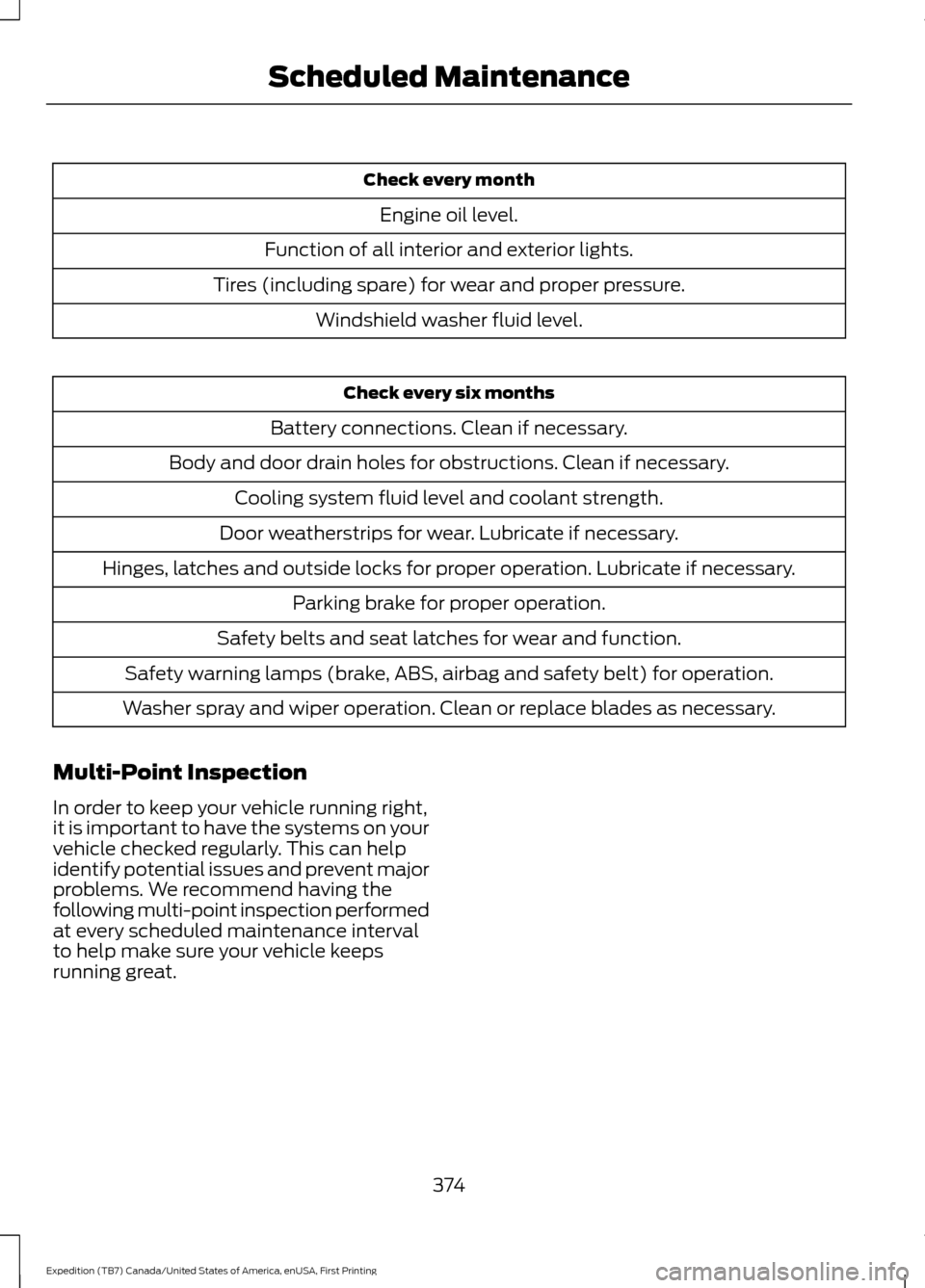
Check every month
Engine oil level.
Function of all interior and exterior lights.
Tires (including spare) for wear and proper pressure. Windshield washer fluid level. Check every six months
Battery connections. Clean if necessary.
Body and door drain holes for obstructions. Clean if necessary. Cooling system fluid level and coolant strength.
Door weatherstrips for wear. Lubricate if necessary.
Hinges, latches and outside locks for proper operation. Lubricate if necessary. Parking brake for proper operation.
Safety belts and seat latches for wear and function.
Safety warning lamps (brake, ABS, airbag and safety belt) for operation.
Washer spray and wiper operation. Clean or replace blades as necessary.
Multi-Point Inspection
In order to keep your vehicle running right,
it is important to have the systems on your
vehicle checked regularly. This can help
identify potential issues and prevent major
problems. We recommend having the
following multi-point inspection performed
at every scheduled maintenance interval
to help make sure your vehicle keeps
running great.
374
Expedition (TB7) Canada/United States of America, enUSA, First Printing Scheduled Maintenance
Page 410 of 421
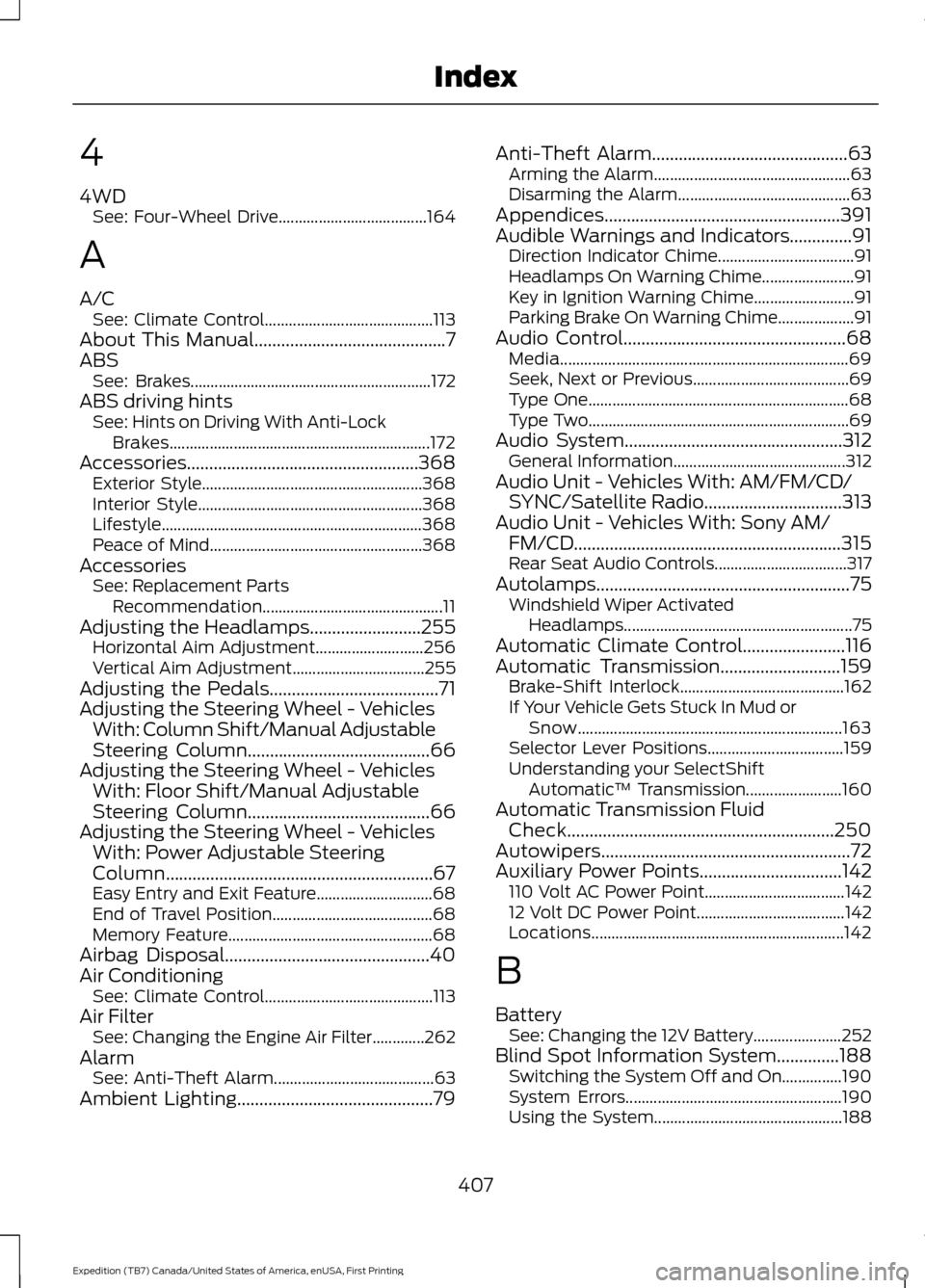
4
4WD
See: Four-Wheel Drive..................................... 164
A
A/C See: Climate Control.......................................... 113
About This Manual...........................................7
ABS See: Brakes............................................................ 172
ABS driving hints See: Hints on Driving With Anti-Lock
Brakes................................................................. 172
Accessories....................................................368 Exterior Style....................................................... 368
Interior Style........................................................ 368
Lifestyle................................................................. 368
Peace of Mind..................................................... 368
Accessories See: Replacement Parts
Recommendation............................................. 11
Adjusting the Headlamps.........................255 Horizontal Aim Adjustment........................... 256
Vertical Aim Adjustment................................. 255
Adjusting the Pedals......................................71
Adjusting the Steering Wheel - Vehicles With: Column Shift/Manual Adjustable
Steering Column
.........................................66
Adjusting the Steering Wheel - Vehicles With: Floor Shift/Manual Adjustable
Steering Column
.........................................66
Adjusting the Steering Wheel - Vehicles With: Power Adjustable Steering
Column............................................................67
Easy Entry and Exit Feature............................. 68
End of Travel Position........................................ 68
Memory Feature................................................... 68
Airbag Disposal..............................................40
Air Conditioning See: Climate Control.......................................... 113
Air Filter See: Changing the Engine Air Filter.............262
Alarm See: Anti-Theft Alarm........................................ 63
Ambient Lighting............................................79 Anti-Theft Alarm
............................................63
Arming the Alarm................................................. 63
Disarming the Alarm........................................... 63
Appendices.....................................................391
Audible Warnings and Indicators..............91 Direction Indicator Chime.................................. 91
Headlamps On Warning Chime....................... 91
Key in Ignition Warning Chime......................... 91
Parking Brake On Warning Chime................... 91
Audio Control..................................................68 Media........................................................................\
69
Seek, Next or Previous....................................... 69
Type One................................................................. 68
Type Two................................................................. 69
Audio System
.................................................312
General Information........................................... 312
Audio Unit - Vehicles With: AM/FM/CD/ SYNC/Satellite Radio...............................313
Audio Unit - Vehicles With: Sony AM/ FM/CD............................................................315
Rear Seat Audio Controls................................. 317
Autolamps.........................................................75 Windshield Wiper Activated
Headlamps......................................................... 75
Automatic Climate Control
.......................116
Automatic Transmission...........................159
Brake-Shift Interlock......................................... 162
If Your Vehicle Gets Stuck In Mud or Snow.................................................................. 163
Selector Lever Positions.................................. 159
Understanding your SelectShift Automatic ™ Transmission........................ 160
Automatic Transmission Fluid Check............................................................250
Autowipers
........................................................72
Auxiliary Power Points................................142
110 Volt AC Power Point................................... 142
12 Volt DC Power Point..................................... 142
Locations............................................................... 142
B
Battery See: Changing the 12V Battery...................... 252
Blind Spot Information System
..............188
Switching the System Off and On...............190
System Errors...................................................... 190
Using the System............................................... 188
407
Expedition (TB7) Canada/United States of America, enUSA, First Printing Index
Page 411 of 421
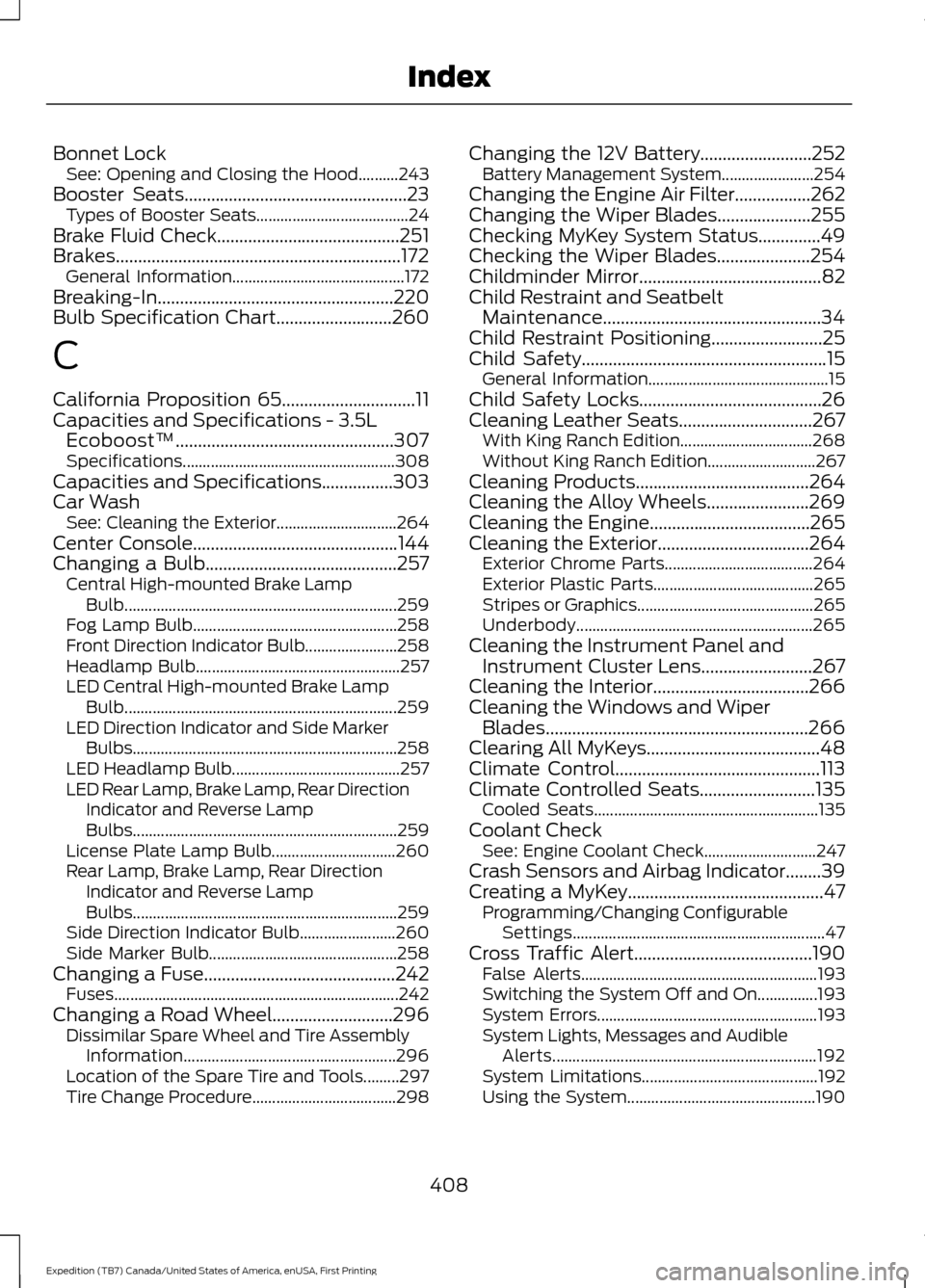
Bonnet Lock
See: Opening and Closing the Hood..........243
Booster Seats..................................................23
Types of Booster Seats...................................... 24
Brake Fluid Check.........................................251
Brakes................................................................172 General Information........................................... 172
Breaking-In.....................................................220
Bulb Specification Chart
..........................260
C
California Proposition 65..............................11
Capacities and Specifications - 3.5L Ecoboost™.................................................307
Specifications..................................................... 308
Capacities and Specifications................303
Car Wash See: Cleaning the Exterior.............................. 264
Center Console
..............................................144
Changing a Bulb...........................................257 Central High-mounted Brake Lamp
Bulb.................................................................... 259
Fog Lamp Bulb................................................... 258
Front Direction Indicator Bulb....................... 258
Headlamp Bulb................................................... 257
LED Central High-mounted Brake Lamp Bulb.................................................................... 259
LED Direction Indicator and Side Marker Bulbs.................................................................. 258
LED Headlamp Bulb.......................................... 257
LED Rear Lamp, Brake Lamp, Rear Direction Indicator and Reverse Lamp
Bulbs.................................................................. 259
License Plate Lamp Bulb............................... 260
Rear Lamp, Brake Lamp, Rear Direction Indicator and Reverse Lamp
Bulbs.................................................................. 259
Side Direction Indicator Bulb........................ 260
Side Marker Bulb............................................... 258
Changing a Fuse...........................................242 Fuses....................................................................... 242
Changing a Road Wheel...........................296 Dissimilar Spare Wheel and Tire Assembly
Information..................................................... 296
Location of the Spare Tire and Tools.........297
Tire Change Procedure.................................... 298Changing the 12V Battery.........................252
Battery Management System....................... 254
Changing the Engine Air Filter.................262
Changing the Wiper Blades.....................255
Checking MyKey System Status..............49
Checking the Wiper Blades.....................254
Childminder Mirror.........................................82
Child Restraint and Seatbelt Maintenance.................................................34
Child Restraint Positioning.........................25
Child Safety
.......................................................15
General Information............................................. 15
Child Safety Locks.........................................26
Cleaning Leather Seats..............................267 With King Ranch Edition................................. 268
Without King Ranch Edition........................... 267
Cleaning Products
.......................................264
Cleaning the Alloy Wheels.......................269
Cleaning the Engine....................................265
Cleaning the Exterior..................................264 Exterior Chrome Parts..................................... 264
Exterior Plastic Parts........................................ 265
Stripes or Graphics............................................ 265
Underbody........................................................... 265
Cleaning the Instrument Panel and Instrument Cluster Lens
.........................267
Cleaning the Interior...................................266
Cleaning the Windows and Wiper Blades...........................................................266
Clearing All MyKeys.......................................48
Climate Control..............................................113
Climate Controlled Seats
..........................135
Cooled Seats........................................................ 135
Coolant Check See: Engine Coolant Check............................ 247
Crash Sensors and Airbag Indicator........39
Creating a MyKey............................................47 Programming/Changing Configurable
Settings............................................................... 47
Cross Traffic Alert
........................................190
False Alerts........................................................... 193
Switching the System Off and On...............193
System Errors....................................................... 193
System Lights, Messages and Audible Alerts.................................................................. 192
System Limitations............................................ 192
Using the System............................................... 190
408
Expedition (TB7) Canada/United States of America, enUSA, First Printing Index
Page 412 of 421
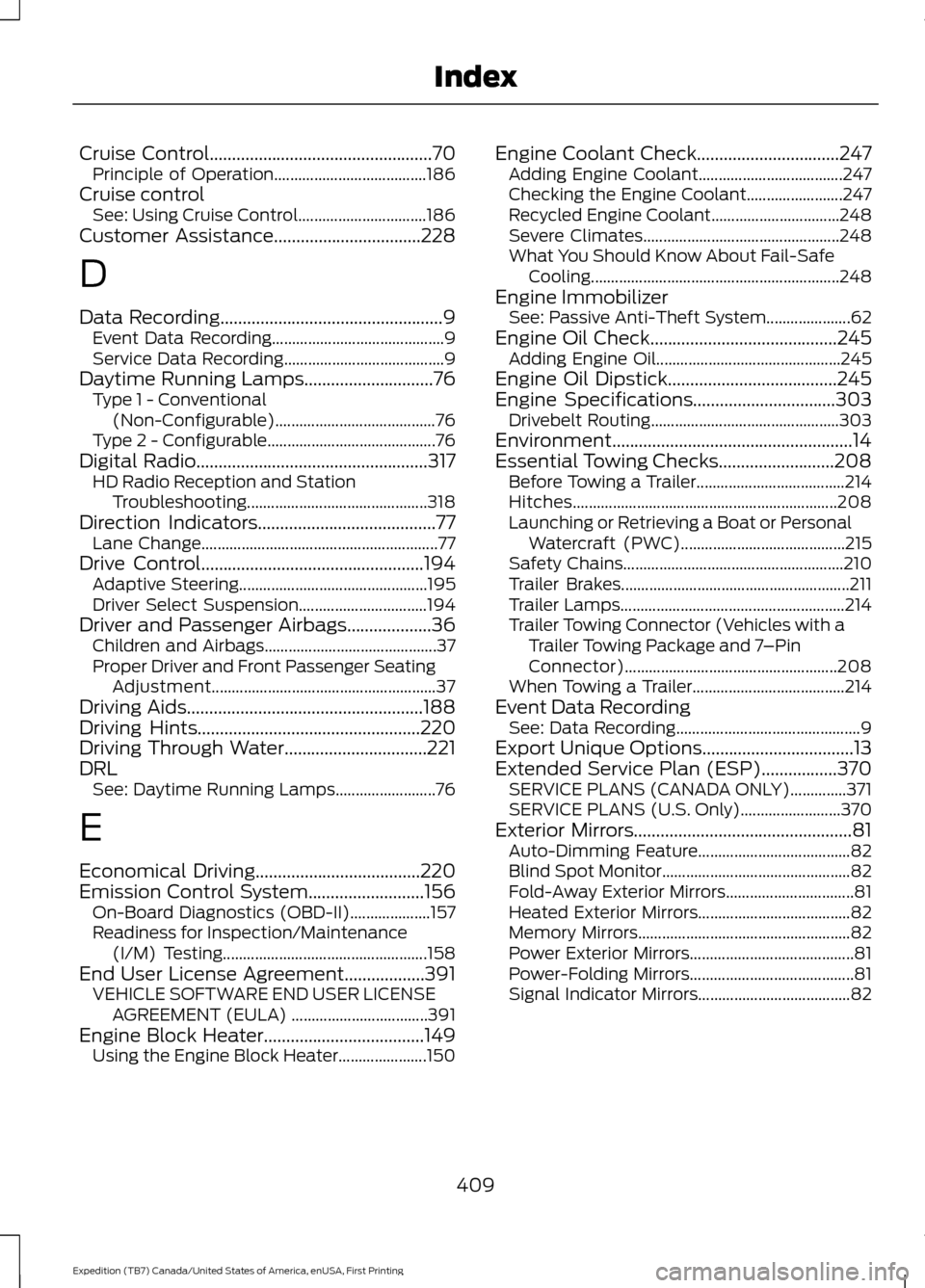
Cruise Control..................................................70
Principle of Operation...................................... 186
Cruise control See: Using Cruise Control................................ 186
Customer Assistance.................................228
D
Data Recording
..................................................9
Event Data Recording........................................... 9
Service Data Recording........................................ 9
Daytime Running Lamps.............................76 Type 1 - Conventional
(Non-Configurable)........................................ 76
Type 2 - Configurable.......................................... 76
Digital Radio
....................................................317
HD Radio Reception and Station
Troubleshooting............................................. 318
Direction Indicators
........................................77
Lane Change........................................................... 77
Drive Control
..................................................194
Adaptive Steering............................................... 195
Driver Select Suspension................................ 194
Driver and Passenger Airbags...................36 Children and Airbags........................................... 37
Proper Driver and Front Passenger Seating Adjustment........................................................ 37
Driving Aids
.....................................................188
Driving Hints..................................................220
Driving Through Water................................221
DRL See: Daytime Running Lamps......................... 76
E
Economical Driving
.....................................220
Emission Control System..........................156 On-Board Diagnostics (OBD-II).................... 157
Readiness for Inspection/Maintenance (I/M) Testing................................................... 158
End User License Agreement
..................391
VEHICLE SOFTWARE END USER LICENSE
AGREEMENT (EULA) .................................. 391
Engine Block Heater
....................................149
Using the Engine Block Heater...................... 150Engine Coolant Check................................247
Adding Engine Coolant.................................... 247
Checking the Engine Coolant........................ 247
Recycled Engine Coolant................................ 248
Severe Climates................................................. 248
What You Should Know About Fail-Safe Cooling.............................................................. 248
Engine Immobilizer See: Passive Anti-Theft System..................... 62
Engine Oil Check
..........................................245
Adding Engine Oil.............................................. 245
Engine Oil Dipstick......................................245
Engine Specifications
................................303
Drivebelt Routing............................................... 303
Environment......................................................14
Essential Towing Checks..........................208 Before Towing a Trailer..................................... 214
Hitches.................................................................. 208
Launching or Retrieving a Boat or Personal Watercraft (PWC)......................................... 215
Safety Chains....................................................... 210
Trailer Brakes......................................................... 211
Trailer Lamps........................................................ 214
Trailer Towing Connector (Vehicles with a Trailer Towing Package and 7 –Pin
Connector)..................................................... 208
When Towing a Trailer...................................... 214
Event Data Recording See: Data Recording.............................................. 9
Export Unique Options..................................13
Extended Service Plan (ESP)
.................370
SERVICE PLANS (CANADA ONLY)..............371
SERVICE PLANS (U.S. Only)......................... 370
Exterior Mirrors
.................................................81
Auto-Dimming Feature...................................... 82
Blind Spot Monitor............................................... 82
Fold-Away Exterior Mirrors................................ 81
Heated Exterior Mirrors...................................... 82
Memory Mirrors..................................................... 82
Power Exterior Mirrors......................................... 81
Power-Folding Mirrors......................................... 81
Signal Indicator Mirrors...................................... 82
409
Expedition (TB7) Canada/United States of America, enUSA, First Printing Index
Page 413 of 421
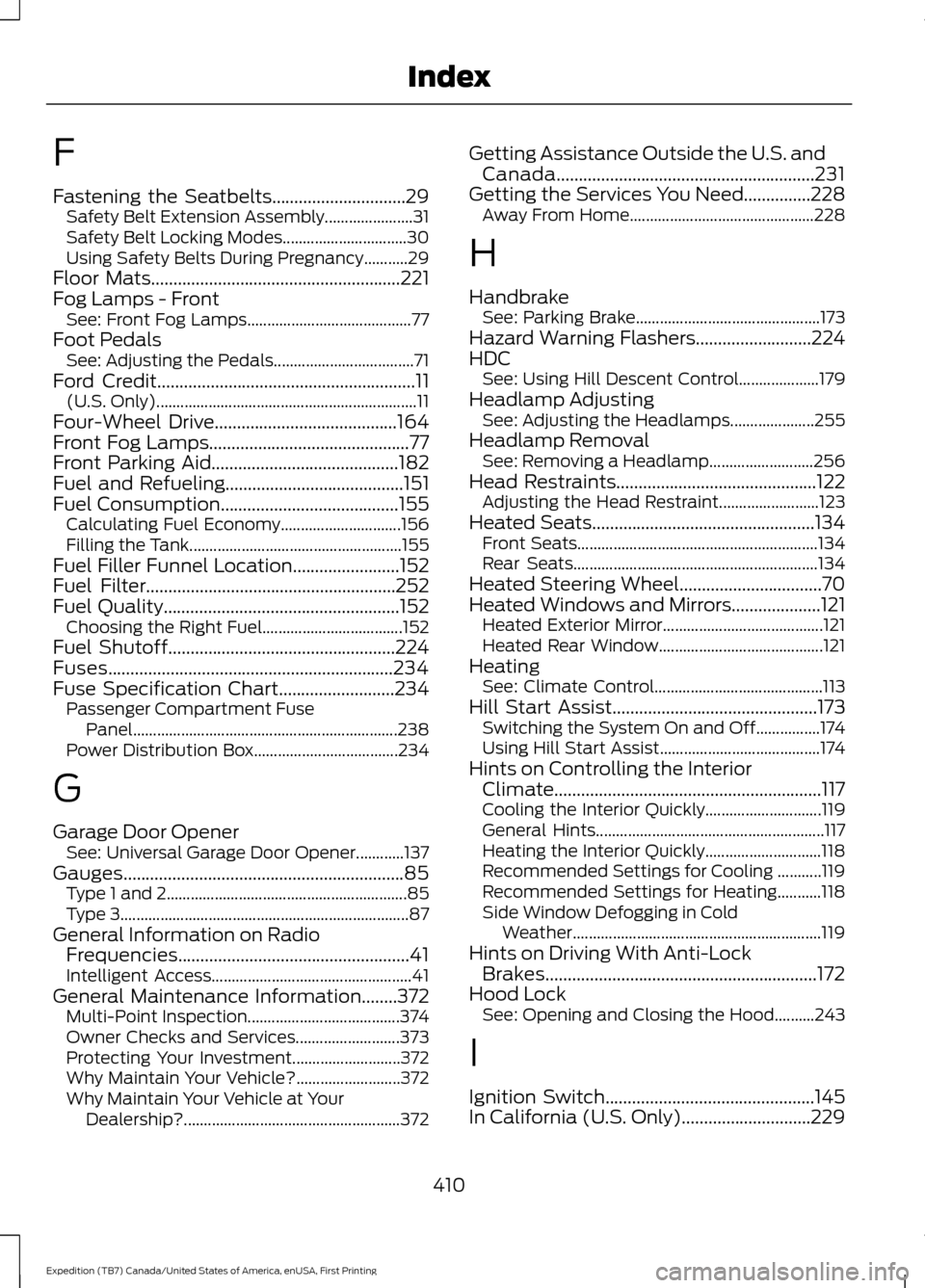
F
Fastening the Seatbelts..............................29
Safety Belt Extension Assembly...................... 31
Safety Belt Locking Modes............................... 30
Using Safety Belts During Pregnancy...........29
Floor Mats
........................................................221
Fog Lamps - Front See: Front Fog Lamps......................................... 77
Foot Pedals See: Adjusting the Pedals................................... 71
Ford Credit
..........................................................11
(U.S. Only)................................................................. 11
Four-Wheel Drive
.........................................164
Front Fog Lamps.............................................77
Front Parking Aid
..........................................182
Fuel and Refueling........................................151
Fuel Consumption
........................................155
Calculating Fuel Economy.............................. 156
Filling the Tank..................................................... 155
Fuel Filler Funnel Location
........................152
Fuel Filter........................................................252
Fuel Quality.....................................................152
Choosing the Right Fuel................................... 152
Fuel Shutoff
...................................................224
Fuses................................................................234
Fuse Specification Chart..........................234 Passenger Compartment Fuse
Panel.................................................................. 238
Power Distribution Box.................................... 234
G
Garage Door Opener See: Universal Garage Door Opener............137
Gauges...............................................................85 Type 1 and 2............................................................ 85
Type 3........................................................................\
87
General Information on Radio Frequencies....................................................41
Intelligent Access.................................................. 41
General Maintenance Information
........372
Multi-Point Inspection...................................... 374
Owner Checks and Services.......................... 373
Protecting Your Investment........................... 372
Why Maintain Your Vehicle?.......................... 372
Why Maintain Your Vehicle at Your Dealership?...................................................... 372Getting Assistance Outside the U.S. and
Canada..........................................................231
Getting the Services You Need...............228 Away From Home.............................................. 228
H
Handbrake See: Parking Brake.............................................. 173
Hazard Warning Flashers..........................224
HDC See: Using Hill Descent Control.................... 179
Headlamp Adjusting See: Adjusting the Headlamps..................... 255
Headlamp Removal See: Removing a Headlamp.......................... 256
Head Restraints.............................................122 Adjusting the Head Restraint......................... 123
Heated Seats
..................................................134
Front Seats............................................................ 134
Rear Seats............................................................. 134
Heated Steering Wheel................................70
Heated Windows and Mirrors
....................121
Heated Exterior Mirror........................................ 121
Heated Rear Window......................................... 121
Heating See: Climate Control.......................................... 113
Hill Start Assist
..............................................173
Switching the System On and Off................174
Using Hill Start Assist........................................ 174
Hints on Controlling the Interior Climate............................................................117
Cooling the Interior Quickly............................. 119
General Hints......................................................... 117
Heating the Interior Quickly............................. 118
Recommended Settings for Cooling ...........119
Recommended Settings for Heating...........118
Side Window Defogging in Cold Weather.............................................................. 119
Hints on Driving With Anti-Lock Brakes.............................................................172
Hood Lock See: Opening and Closing the Hood..........243
I
Ignition Switch
...............................................145
In California (U.S. Only).............................229
410
Expedition (TB7) Canada/United States of America, enUSA, First Printing Index