change wheel FORD EXPEDITION 2016 3.G Owner's Manual
[x] Cancel search | Manufacturer: FORD, Model Year: 2016, Model line: EXPEDITION, Model: FORD EXPEDITION 2016 3.GPages: 421, PDF Size: 6.3 MB
Page 286 of 421
Tire Label (affixed to either the
door hinge pillar, door-latch post,
or the door edge that meets the
door-latch post, next to the
driver's seating position), or Tire
Label located on the B-pillar or
the edge of the driver's door.
Failure to follow the tire pressure
recommendations can cause
uneven treadwear patterns and
adversely affect the way your
vehicle handles.
Note:
Do not reduce tire pressure
to change the ride characteristics
of the vehicle. If you do not
maintain the inflation pressure at
the levels specified by Ford, your
vehicle may experience a condition
known as shimmy. Shimmy is a
severe vibration and oscillation in
the steering wheel after the vehicle
travels over a bump or dip in the
road that does not dampen out by
itself. Shimmy may result from
significant under-inflation of the
tires, improper tires (load range,
size, or type), or vehicle
modifications such as lift-kits. In
the event that your vehicle
experiences shimmy, you should
slowly reduce speed by either lifting
off the accelerator pedal or lightly
applying the brakes. The shimmy
will cease as the vehicle speed
decreases.
Maximum Inflation Pressure is
the tire manufacturer's maximum
permissible pressure and the
pressure at which the maximum
load can be carried by the tire. This
pressure is normally higher than the manufacturer
’s recommended
cold inflation pressure which can
be found on the Safety
Compliance Certification Label
(affixed to either the door hinge
pillar, door-latch post, or the door
edge that meets the door-latch
post, next to the driver's seating
position), or Tire Label located on
the B-pillar or the edge of the
driver's door. The cold inflation
pressure should never be set lower
than the recommended pressure
on the Safety Compliance
Certification Label or Tire Label.
When weather temperature
changes occur, tire inflation
pressures also change. A 10°F
(6°C) temperature drop can
cause a corresponding drop of 1
psi (7 kPa) in inflation pressure.
Check your tire pressures
frequently and adjust them to the
proper pressure which can be
found on the Safety Compliance
Certification Label or Tire Label.
To check the pressure in your
tire(s):
1. Make sure the tires are cool,
meaning they are not hot from
driving even a mile.
283
Expedition (TB7) Canada/United States of America, enUSA, First Printing Wheels and Tires
Page 301 of 421
Tire Change Procedure
WARNINGS
Only use replacement tires and
wheels that are the same size, load
index, speed rating and type (such
as P-metric versus LT-metric or all-season
versus all-terrain) as those originally
provided by Ford. The recommended tire
and wheel size may be found on either the
Safety Compliance Certification Label
(affixed to either the door hinge pillar,
door-latch post, or the door edge that
meets the door-latch post, next to the
driver ’s seating position) or the Tire Label
which is located on the B-Pillar or edge of
the driver ’s door. If this information is not
found on these labels then you should
contact your authorized dealer as soon as
possible. Use of any tire or wheel not
recommended by Ford can affect the
safety and performance of your vehicle,
which could result in an increased risk of
loss of vehicle control, vehicle rollover,
personal injury and death. Additionally the
use of non-recommended tires and wheels
could cause steering, suspension, axle,
transfer case or power transfer unit failure.
If you have questions regarding tire
replacement, contact your authorized
dealer as soon as possible. When one of the front wheels is off
the ground, the transmission alone
will not prevent the vehicle from
moving or slipping off the jack. To help prevent the vehicle from
moving when you change a tire, be
sure to place the transmission in park
(P), set the parking brake and block (in
both directions) the wheel that is
diagonally opposite (other side and end of
the vehicle) to the tire being changed. Never get underneath a vehicle that
is supported only by a jack. If the
vehicle slips off the jack, you or
someone else could be seriously injured. WARNINGS
Do not attempt to change a tire on
the side of the vehicle close to
moving traffic. Pull far enough off the
road to avoid the danger of being hit when
operating the jack or changing the wheel. Always use the jack provided as
original equipment with your vehicle.
If using a jack other than the one
provided as original equipment with your
vehicle, make sure the jack capacity is
adequate for the vehicle weight, including
any vehicle cargo or modifications. Disable the power running boards
before jacking, lifting, or placing any
object under the vehicle. Never place
your hand between the power running
board and the vehicle as extended power
running boards will retract when the doors
are closed. Failure to follow these
instructions may result in personal injury. Failure to follow these instructions
when using the spare tire carrier
could cause loss of the wheel and
tire and lead to personal injury: Only use
the spare tire carrier to stow the tire and
wheel combination specified on the Tire
Label or Safety Compliance Certification
Label on the B-Pillar or the edge of the
driver door. Other tire and wheel
combinations could cause the carrier to
fail if it does not fit securely or is too heavy.
Do not use impact tools or power tools
operating over 200 RPM, which may cause
winch malfunction and prevent a secure
fit. Override the winch at least three times
(there will be an audible click each time)
to ensure a tight secure fit of the wheel and
tire. Note:
Passengers should not remain in the
vehicle when the vehicle is being jacked.
298
Expedition (TB7) Canada/United States of America, enUSA, First Printing Wheels and Tires
Page 303 of 421
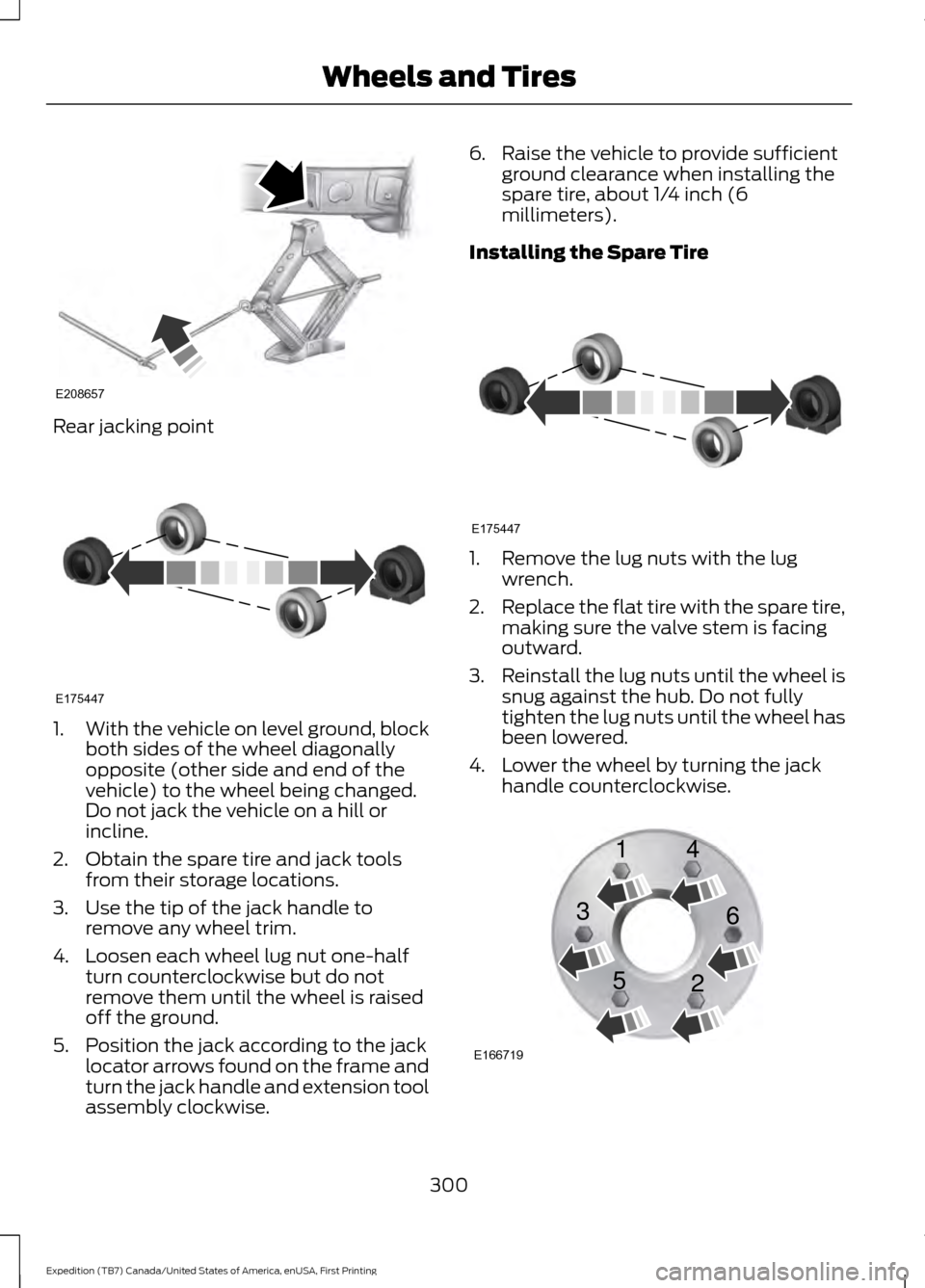
Rear jacking point
1.
With the vehicle on level ground, block
both sides of the wheel diagonally
opposite (other side and end of the
vehicle) to the wheel being changed.
Do not jack the vehicle on a hill or
incline.
2. Obtain the spare tire and jack tools from their storage locations.
3. Use the tip of the jack handle to remove any wheel trim.
4. Loosen each wheel lug nut one-half turn counterclockwise but do not
remove them until the wheel is raised
off the ground.
5. Position the jack according to the jack locator arrows found on the frame and
turn the jack handle and extension tool
assembly clockwise. 6. Raise the vehicle to provide sufficient
ground clearance when installing the
spare tire, about 1/4 inch (6
millimeters).
Installing the Spare Tire 1. Remove the lug nuts with the lug
wrench.
2. Replace the flat tire with the spare tire,
making sure the valve stem is facing
outward.
3. Reinstall the lug nuts until the wheel is
snug against the hub. Do not fully
tighten the lug nuts until the wheel has
been lowered.
4. Lower the wheel by turning the jack handle counterclockwise. 300
Expedition (TB7) Canada/United States of America, enUSA, First Printing Wheels and TiresE208657 E175447 E175447 E166719
1
3
5 4
6
2
Page 329 of 421
If you want the system to carry out the following
Voice command
Adjust the level of voice interaction and feedback.
Voice Settings | Voice
Preferences
Hear a list of voice commands available in the current mode.
Help
You can say any of the voice commands that appear within open and close brackets that
are separated by |. For example, where (cancel | stop | exit) appears you say; cancel or
stop or exit.
You must say any of the voice commands that appear outside of open and close brackets.
For example, where mobile (apps | applications) appears, you must say mobile followed
by either apps or applications.
You do not need to say words that appear within square brackets. For example, for where
(USB [stick] | iPOD | MP3 [player]) appears, you can say USB or USB stick.
Note: SYNC Services and Vehicle health report are only available in the United States of
America.
System Interaction and Feedback
The system provides feedback through
audible tones, prompts, questions and
spoken confirmations depending on the
situation and the chosen level of
interaction (voice settings). You can
customize the voice recognition system to
provide more or less instruction and
feedback. The default setting is to a higher level of
interaction in order to help you learn to use
the system. You can change these settings
at any time.
Adjusting the Interaction Level Initiate a voice session by
pressing the voice button on the
steering wheel controls. See
Voice Control (page 69).
When prompted say the following: If you want the system to carry out the following
Voice command
Voice Settings | Voice Preferences
Followed by either of the following: Provide more detailed interaction and guidance.
Interaction Mode
Standard
Provide less audible interaction and more tone prompts.
Interaction Mode
Advanced
The system defaults to the standard interaction mode.
326
Expedition (TB7) Canada/United States of America, enUSA, First Printing SYNC™
(If Equipped)E142599
Page 380 of 421
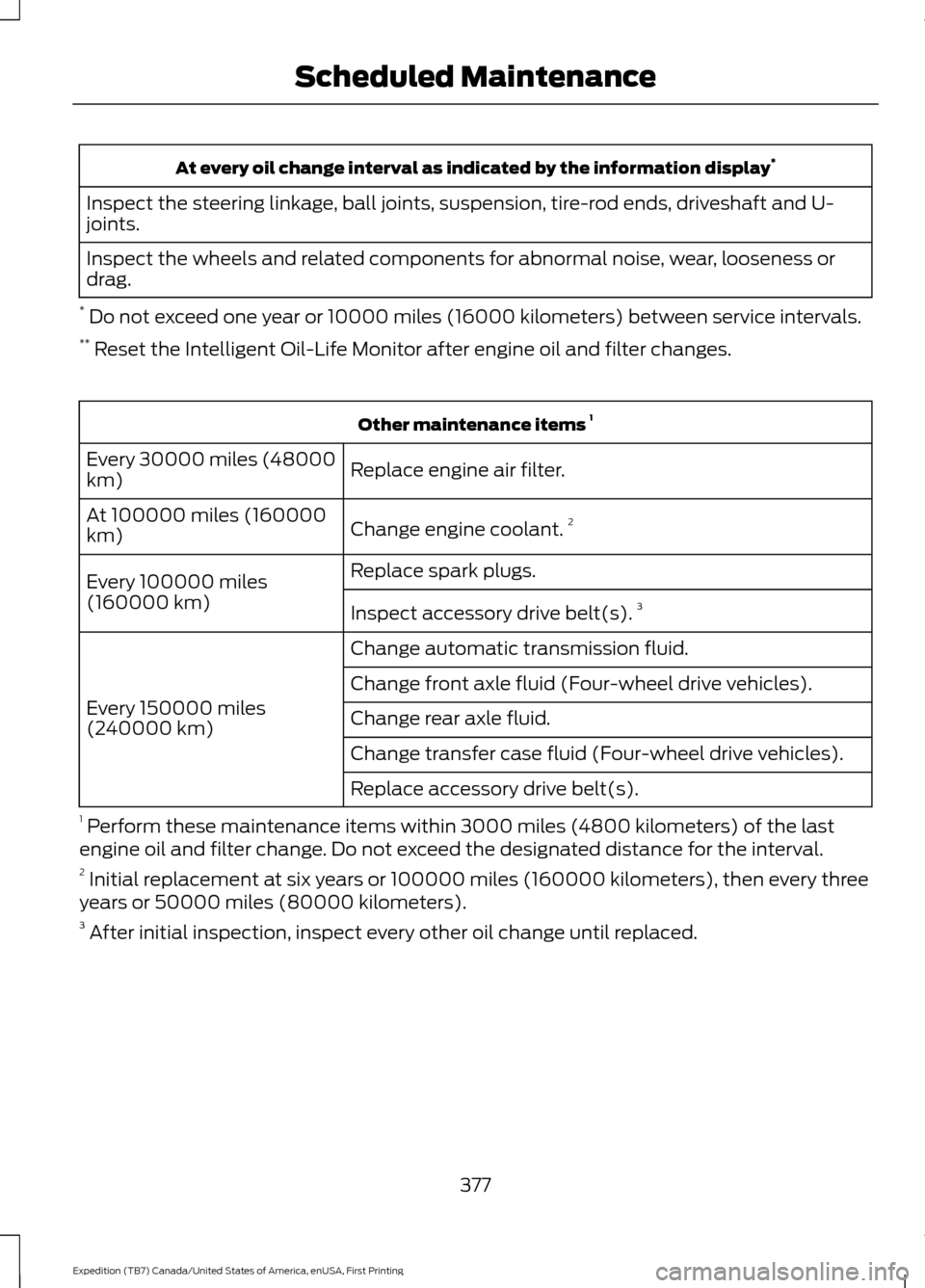
At every oil change interval as indicated by the information display
*
Inspect the steering linkage, ball joints, suspension, tire-rod ends, driveshaft and U-
joints.
Inspect the wheels and related components for abnormal noise, wear, looseness or
drag.
* Do not exceed one year or 10000 miles (16000 kilometers) between service intervals.
** Reset the Intelligent Oil-Life Monitor after engine oil and filter changes. Other maintenance items
1
Replace engine air filter.
Every 30000 miles (48000
km)
Change engine coolant.2
At 100000 miles (160000
km)
Replace spark plugs.
Every 100000 miles
(160000 km) Inspect accessory drive belt(s). 3
Change automatic transmission fluid.
Every 150000 miles
(240000 km) Change front axle fluid (Four-wheel drive vehicles).
Change rear axle fluid.
Change transfer case fluid (Four-wheel drive vehicles).
Replace accessory drive belt(s).
1 Perform these maintenance items within 3000 miles (4800 kilometers) of the last
engine oil and filter change. Do not exceed the designated distance for the interval.
2 Initial replacement at six years or 100000 miles (160000 kilometers), then every three
years or 50000 miles (80000 kilometers).
3 After initial inspection, inspect every other oil change until replaced.
377
Expedition (TB7) Canada/United States of America, enUSA, First Printing Scheduled Maintenance
Page 381 of 421
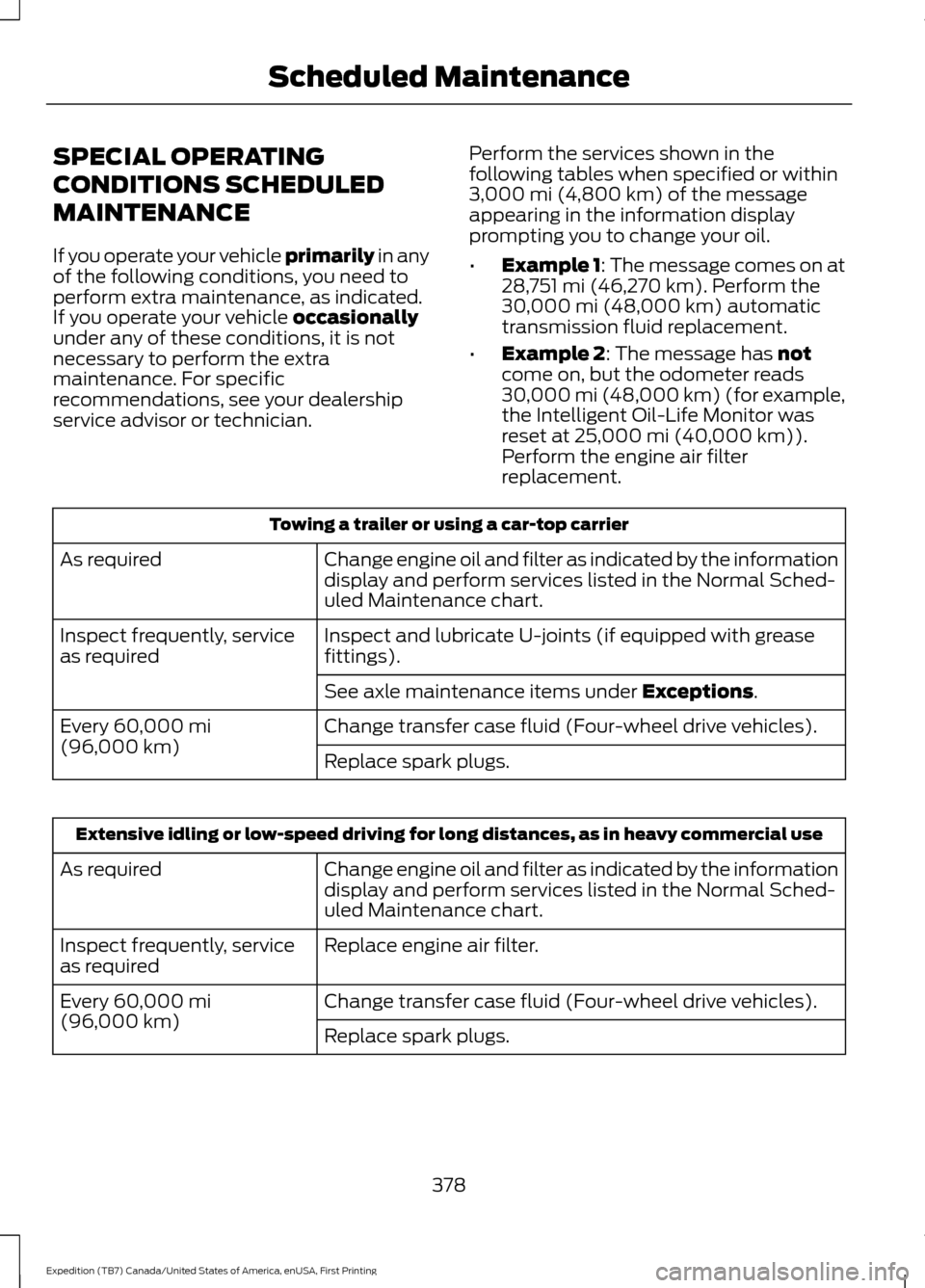
SPECIAL OPERATING
CONDITIONS SCHEDULED
MAINTENANCE
If you operate your vehicle primarily in any
of the following conditions, you need to
perform extra maintenance, as indicated.
If you operate your vehicle
occasionally
under any of these conditions, it is not
necessary to perform the extra
maintenance. For specific
recommendations, see your dealership
service advisor or technician. Perform the services shown in the
following tables when specified or within
3,000 mi (4,800 km)
of the message
appearing in the information display
prompting you to change your oil.
• Example 1: The message comes on at
28,751 mi (46,270 km)
. Perform the
30,000 mi (48,000 km) automatic
transmission fluid replacement.
• Example 2
: The message has not
come on, but the odometer reads
30,000 mi (48,000 km) (for example,
the Intelligent Oil-Life Monitor was
reset at
25,000 mi (40,000 km)).
Perform the engine air filter
replacement. Towing a trailer or using a car-top carrier
Change engine oil and filter as indicated by the information
display and perform services listed in the Normal Sched-
uled Maintenance chart.
As required
Inspect and lubricate U-joints (if equipped with grease
fittings).
Inspect frequently, service
as required
See axle maintenance items under
Exceptions.
Change transfer case fluid (Four-wheel drive vehicles).
Every
60,000 mi
(96,000 km) Replace spark plugs.Extensive idling or low-speed driving for long distances, as in heavy commercial use
Change engine oil and filter as indicated by the information
display and perform services listed in the Normal Sched-
uled Maintenance chart.
As required
Replace engine air filter.
Inspect frequently, service
as required
Change transfer case fluid (Four-wheel drive vehicles).
Every
60,000 mi
(96,000 km) Replace spark plugs.
378
Expedition (TB7) Canada/United States of America, enUSA, First Printing Scheduled Maintenance
Page 382 of 421
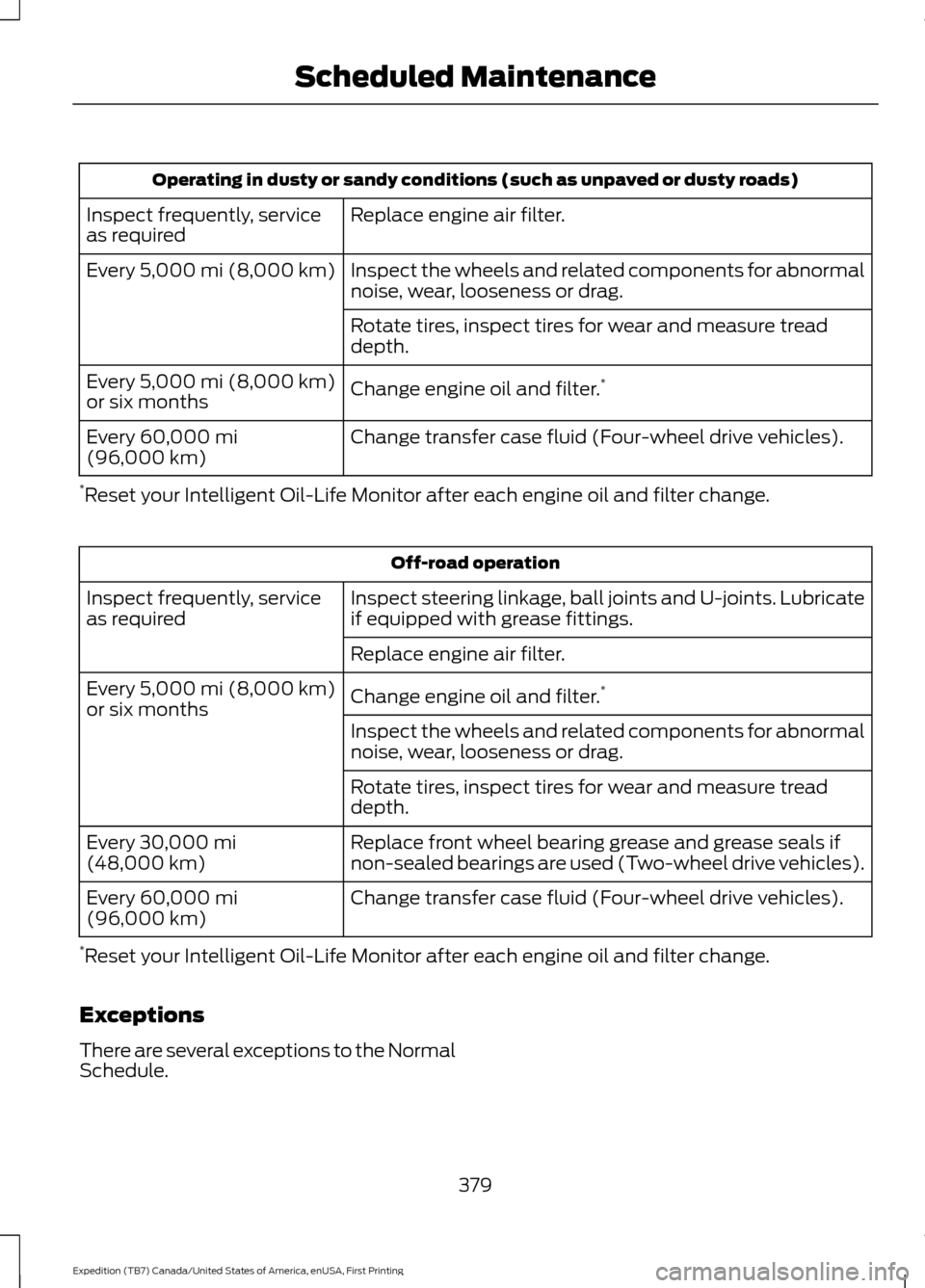
Operating in dusty or sandy conditions (such as unpaved or dusty roads)
Replace engine air filter.
Inspect frequently, service
as required
Inspect the wheels and related components for abnormal
noise, wear, looseness or drag.
Every 5,000 mi (8,000 km)
Rotate tires, inspect tires for wear and measure tread
depth.
Change engine oil and filter. *
Every
5,000 mi (8,000 km)
or six months
Change transfer case fluid (Four-wheel drive vehicles).
Every
60,000 mi
(96,000 km)
* Reset your Intelligent Oil-Life Monitor after each engine oil and filter change. Off-road operation
Inspect steering linkage, ball joints and U-joints. Lubricate
if equipped with grease fittings.
Inspect frequently, service
as required
Replace engine air filter.
Change engine oil and filter.*
Every
5,000 mi (8,000 km)
or six months
Inspect the wheels and related components for abnormal
noise, wear, looseness or drag.
Rotate tires, inspect tires for wear and measure tread
depth.
Replace front wheel bearing grease and grease seals if
non-sealed bearings are used (Two-wheel drive vehicles).
Every
30,000 mi
(48,000 km)
Change transfer case fluid (Four-wheel drive vehicles).
Every
60,000 mi
(96,000 km)
* Reset your Intelligent Oil-Life Monitor after each engine oil and filter change.
Exceptions
There are several exceptions to the Normal
Schedule.
379
Expedition (TB7) Canada/United States of America, enUSA, First Printing Scheduled Maintenance
Page 411 of 421
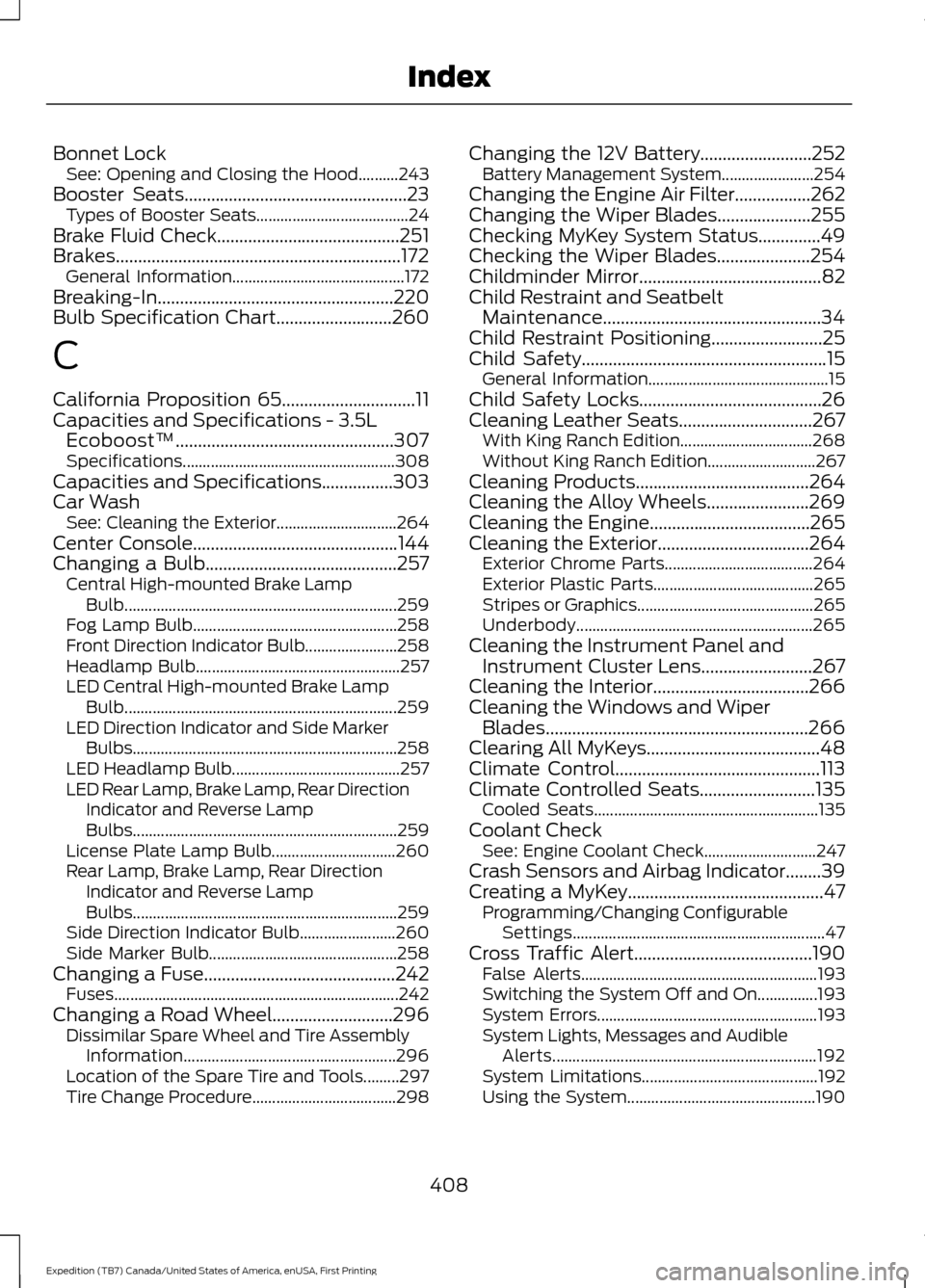
Bonnet Lock
See: Opening and Closing the Hood..........243
Booster Seats..................................................23
Types of Booster Seats...................................... 24
Brake Fluid Check.........................................251
Brakes................................................................172 General Information........................................... 172
Breaking-In.....................................................220
Bulb Specification Chart
..........................260
C
California Proposition 65..............................11
Capacities and Specifications - 3.5L Ecoboost™.................................................307
Specifications..................................................... 308
Capacities and Specifications................303
Car Wash See: Cleaning the Exterior.............................. 264
Center Console
..............................................144
Changing a Bulb...........................................257 Central High-mounted Brake Lamp
Bulb.................................................................... 259
Fog Lamp Bulb................................................... 258
Front Direction Indicator Bulb....................... 258
Headlamp Bulb................................................... 257
LED Central High-mounted Brake Lamp Bulb.................................................................... 259
LED Direction Indicator and Side Marker Bulbs.................................................................. 258
LED Headlamp Bulb.......................................... 257
LED Rear Lamp, Brake Lamp, Rear Direction Indicator and Reverse Lamp
Bulbs.................................................................. 259
License Plate Lamp Bulb............................... 260
Rear Lamp, Brake Lamp, Rear Direction Indicator and Reverse Lamp
Bulbs.................................................................. 259
Side Direction Indicator Bulb........................ 260
Side Marker Bulb............................................... 258
Changing a Fuse...........................................242 Fuses....................................................................... 242
Changing a Road Wheel...........................296 Dissimilar Spare Wheel and Tire Assembly
Information..................................................... 296
Location of the Spare Tire and Tools.........297
Tire Change Procedure.................................... 298Changing the 12V Battery.........................252
Battery Management System....................... 254
Changing the Engine Air Filter.................262
Changing the Wiper Blades.....................255
Checking MyKey System Status..............49
Checking the Wiper Blades.....................254
Childminder Mirror.........................................82
Child Restraint and Seatbelt Maintenance.................................................34
Child Restraint Positioning.........................25
Child Safety
.......................................................15
General Information............................................. 15
Child Safety Locks.........................................26
Cleaning Leather Seats..............................267 With King Ranch Edition................................. 268
Without King Ranch Edition........................... 267
Cleaning Products
.......................................264
Cleaning the Alloy Wheels.......................269
Cleaning the Engine....................................265
Cleaning the Exterior..................................264 Exterior Chrome Parts..................................... 264
Exterior Plastic Parts........................................ 265
Stripes or Graphics............................................ 265
Underbody........................................................... 265
Cleaning the Instrument Panel and Instrument Cluster Lens
.........................267
Cleaning the Interior...................................266
Cleaning the Windows and Wiper Blades...........................................................266
Clearing All MyKeys.......................................48
Climate Control..............................................113
Climate Controlled Seats
..........................135
Cooled Seats........................................................ 135
Coolant Check See: Engine Coolant Check............................ 247
Crash Sensors and Airbag Indicator........39
Creating a MyKey............................................47 Programming/Changing Configurable
Settings............................................................... 47
Cross Traffic Alert
........................................190
False Alerts........................................................... 193
Switching the System Off and On...............193
System Errors....................................................... 193
System Lights, Messages and Audible Alerts.................................................................. 192
System Limitations............................................ 192
Using the System............................................... 190
408
Expedition (TB7) Canada/United States of America, enUSA, First Printing Index
Page 415 of 421
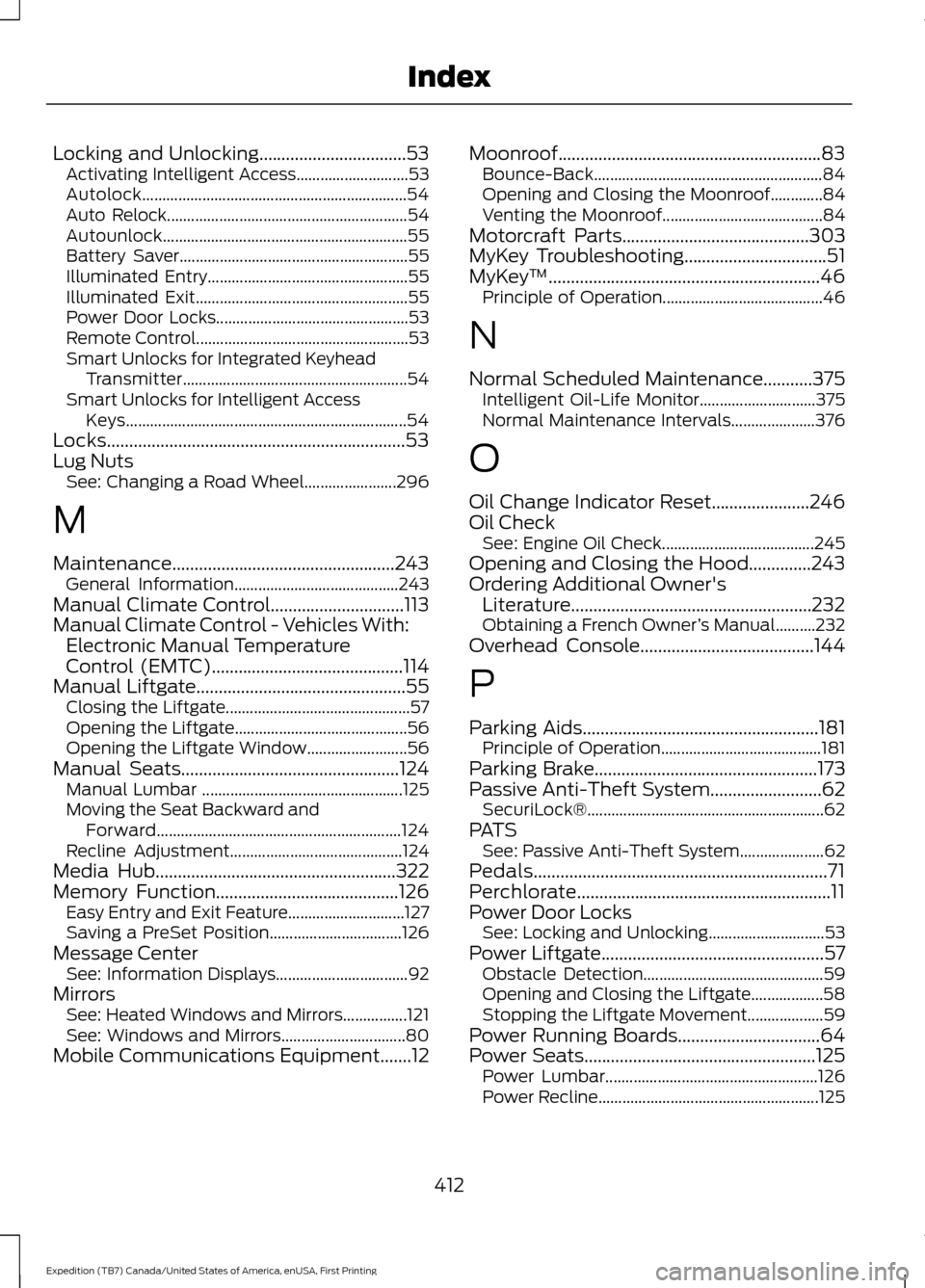
Locking and Unlocking.................................53
Activating Intelligent Access............................ 53
Autolock.................................................................. 54
Auto Relock............................................................ 54
Autounlock............................................................. 55
Battery Saver......................................................... 55
Illuminated Entry.................................................. 55
Illuminated Exit..................................................... 55
Power Door Locks................................................ 53
Remote Control..................................................... 53
Smart Unlocks for Integrated Keyhead Transmitter........................................................ 54
Smart Unlocks for Intelligent Access Keys...................................................................... 54
Locks...................................................................53
Lug Nuts See: Changing a Road Wheel....................... 296
M
Maintenance..................................................243 General Information......................................... 243
Manual Climate Control..............................113
Manual Climate Control - Vehicles With: Electronic Manual Temperature
Control (EMTC)
...........................................114
Manual Liftgate...............................................55
Closing the Liftgate.............................................. 57
Opening the Liftgate........................................... 56
Opening the Liftgate Window......................... 56
Manual Seats.................................................124 Manual Lumbar .................................................. 125
Moving the Seat Backward and Forward............................................................. 124
Recline Adjustment........................................... 124
Media Hub......................................................322
Memory Function.........................................126 Easy Entry and Exit Feature............................. 127
Saving a PreSet Position................................. 126
Message Center See: Information Displays................................. 92
Mirrors See: Heated Windows and Mirrors................121
See: Windows and Mirrors............................... 80
Mobile Communications Equipment
.......12 Moonroof...........................................................83
Bounce-Back......................................................... 84
Opening and Closing the Moonroof.............84
Venting the Moonroof........................................ 84
Motorcraft Parts
..........................................303
MyKey Troubleshooting................................51
MyKey ™.............................................................46
Principle of Operation........................................ 46
N
Normal Scheduled Maintenance...........375 Intelligent Oil-Life Monitor............................. 375
Normal Maintenance Intervals..................... 376
O
Oil Change Indicator Reset......................246
Oil Check See: Engine Oil Check...................................... 245
Opening and Closing the Hood..............243
Ordering Additional Owner's Literature......................................................232
Obtaining a French Owner ’s Manual..........232
Overhead Console
.......................................144
P
Parking Aids
.....................................................181
Principle of Operation........................................ 181
Parking Brake
..................................................173
Passive Anti-Theft System.........................62 SecuriLock®........................................................... 62
PATS See: Passive Anti-Theft System..................... 62
Pedals..................................................................71
Perchlorate.........................................................11
Power Door Locks See: Locking and Unlocking............................. 53
Power Liftgate
..................................................57
Obstacle Detection............................................. 59
Opening and Closing the Liftgate.................. 58
Stopping the Liftgate Movement................... 59
Power Running Boards
................................64
Power Seats....................................................125
Power Lumbar..................................................... 126
Power Recline....................................................... 125
412
Expedition (TB7) Canada/United States of America, enUSA, First Printing Index