navigation system FORD EXPEDITION 2017 3.G Owner's Manual
[x] Cancel search | Manufacturer: FORD, Model Year: 2017, Model line: EXPEDITION, Model: FORD EXPEDITION 2017 3.GPages: 500, PDF Size: 4.83 MB
Page 423 of 500
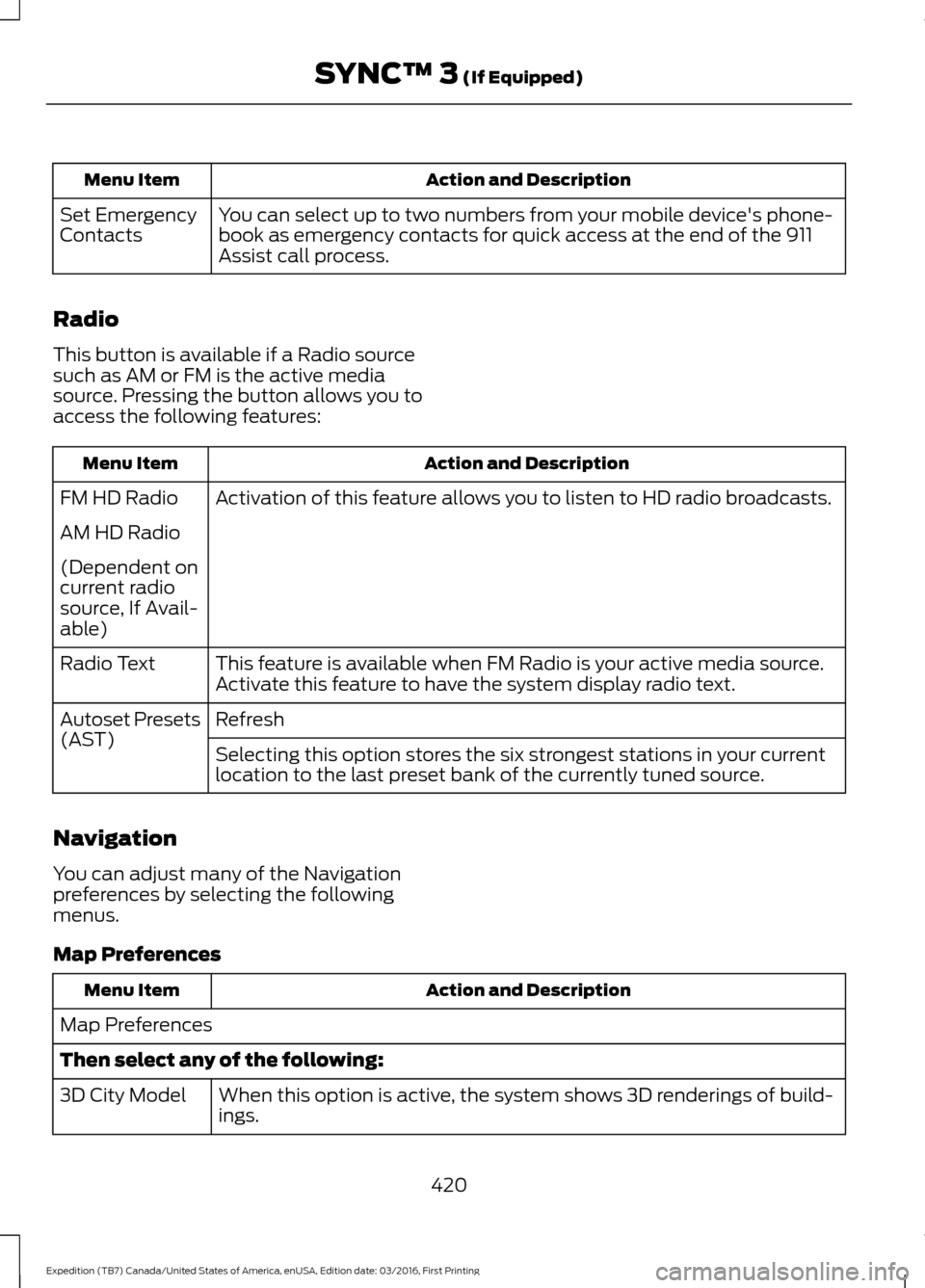
Action and Description
Menu Item
You can select up to two numbers from your mobile device's phone-
book as emergency contacts for quick access at the end of the 911
Assist call process.
Set Emergency
Contacts
Radio
This button is available if a Radio source
such as AM or FM is the active media
source. Pressing the button allows you to
access the following features: Action and Description
Menu Item
Activation of this feature allows you to listen to HD radio broadcasts.
FM HD Radio
AM HD Radio
(Dependent on
current radio
source, If Avail-
able)
This feature is available when FM Radio is your active media source.
Activate this feature to have the system display radio text.
Radio Text
Refresh
Autoset Presets
(AST)
Selecting this option stores the six strongest stations in your current
location to the last preset bank of the currently tuned source.
Navigation
You can adjust many of the Navigation
preferences by selecting the following
menus.
Map Preferences Action and Description
Menu Item
Map Preferences
Then select any of the following: When this option is active, the system shows 3D renderings of build-
ings.
3D City Model
420
Expedition (TB7) Canada/United States of America, enUSA, Edition date: 03/2016, First Printing SYNC™ 3 (If Equipped)
Page 424 of 500
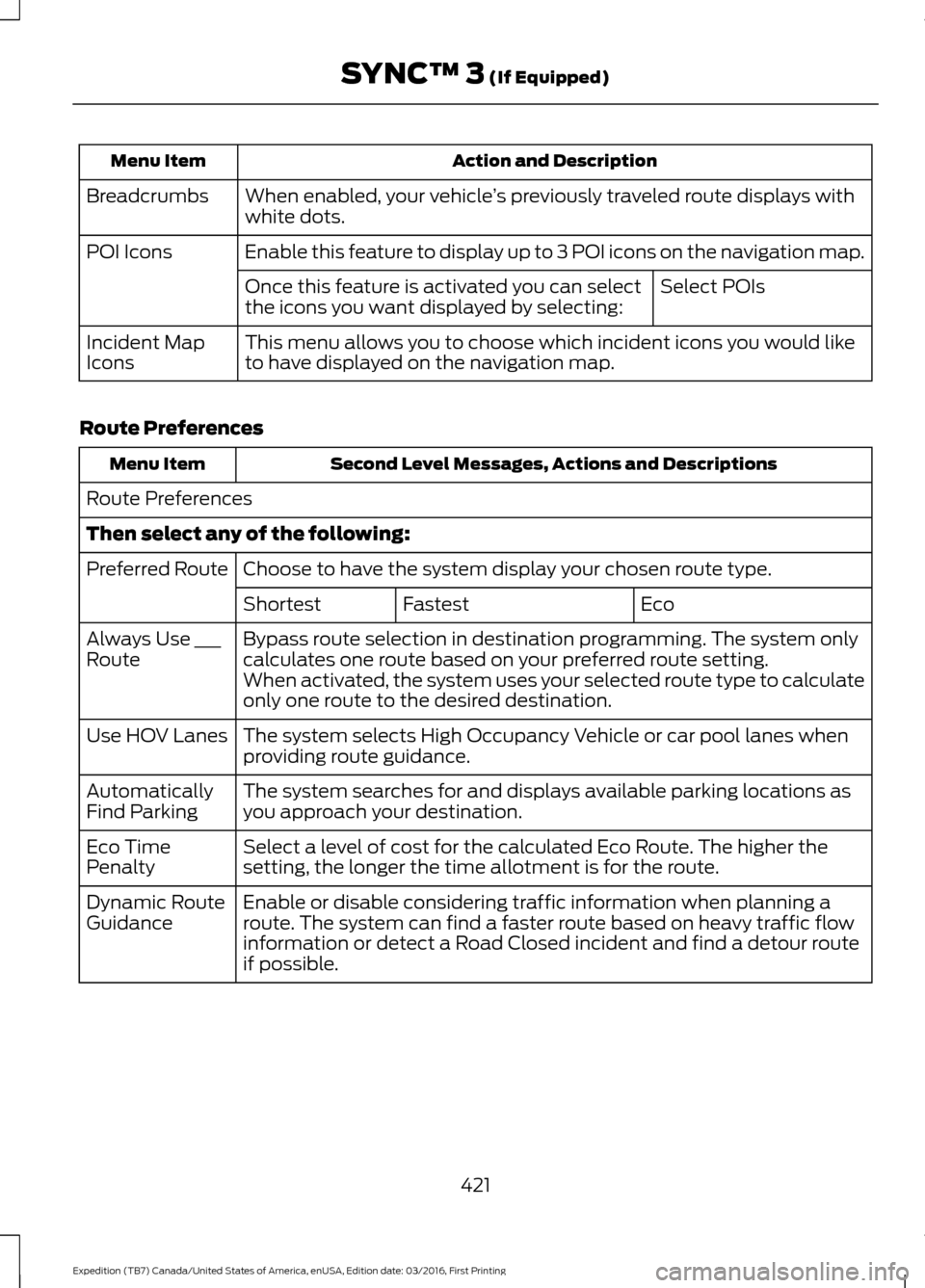
Action and Description
Menu Item
When enabled, your vehicle ’s previously traveled route displays with
white dots.
Breadcrumbs
Enable this feature to display up to 3 POI icons on the navigation map.
POI Icons
Select POIs
Once this feature is activated you can select
the icons you want displayed by selecting:
This menu allows you to choose which incident icons you would like
to have displayed on the navigation map.
Incident Map
Icons
Route Preferences Second Level Messages, Actions and Descriptions
Menu Item
Route Preferences
Then select any of the following: Choose to have the system display your chosen route type.
Preferred Route
Eco
Fastest
Shortest
Bypass route selection in destination programming. The system only
calculates one route based on your preferred route setting.
Always Use ___
Route
When activated, the system uses your selected route type to calculate
only one route to the desired destination.
The system selects High Occupancy Vehicle or car pool lanes when
providing route guidance.
Use HOV Lanes
The system searches for and displays available parking locations as
you approach your destination.
Automatically
Find Parking
Select a level of cost for the calculated Eco Route. The higher the
setting, the longer the time allotment is for the route.
Eco Time
Penalty
Enable or disable considering traffic information when planning a
route. The system can find a faster route based on heavy traffic flow
information or detect a Road Closed incident and find a detour route
if possible.
Dynamic Route
Guidance
421
Expedition (TB7) Canada/United States of America, enUSA, Edition date: 03/2016, First Printing SYNC™ 3 (If Equipped)
Page 425 of 500
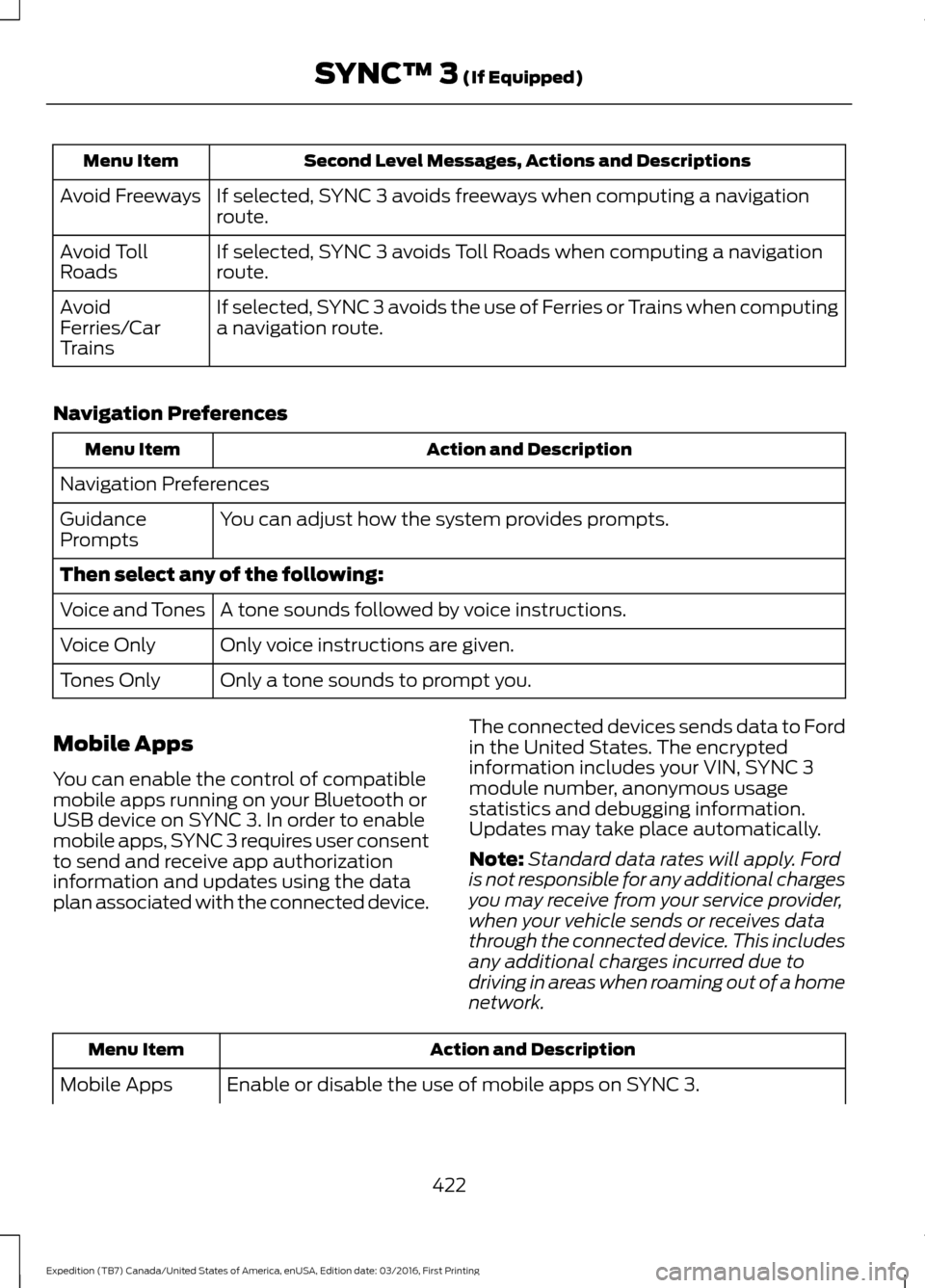
Second Level Messages, Actions and Descriptions
Menu Item
If selected, SYNC 3 avoids freeways when computing a navigation
route.
Avoid Freeways
If selected, SYNC 3 avoids Toll Roads when computing a navigation
route.
Avoid Toll
Roads
If selected, SYNC 3 avoids the use of Ferries or Trains when computing
a navigation route.
Avoid
Ferries/Car
Trains
Navigation Preferences Action and Description
Menu Item
Navigation Preferences You can adjust how the system provides prompts.
Guidance
Prompts
Then select any of the following:
A tone sounds followed by voice instructions.
Voice and Tones
Only voice instructions are given.
Voice Only
Only a tone sounds to prompt you.
Tones Only
Mobile Apps
You can enable the control of compatible
mobile apps running on your Bluetooth or
USB device on SYNC 3. In order to enable
mobile apps, SYNC 3 requires user consent
to send and receive app authorization
information and updates using the data
plan associated with the connected device. The connected devices sends data to Ford
in the United States. The encrypted
information includes your VIN, SYNC 3
module number, anonymous usage
statistics and debugging information.
Updates may take place automatically.
Note:
Standard data rates will apply. Ford
is not responsible for any additional charges
you may receive from your service provider,
when your vehicle sends or receives data
through the connected device. This includes
any additional charges incurred due to
driving in areas when roaming out of a home
network. Action and Description
Menu Item
Enable or disable the use of mobile apps on SYNC 3.
Mobile Apps
422
Expedition (TB7) Canada/United States of America, enUSA, Edition date: 03/2016, First Printing SYNC™ 3 (If Equipped)
Page 426 of 500
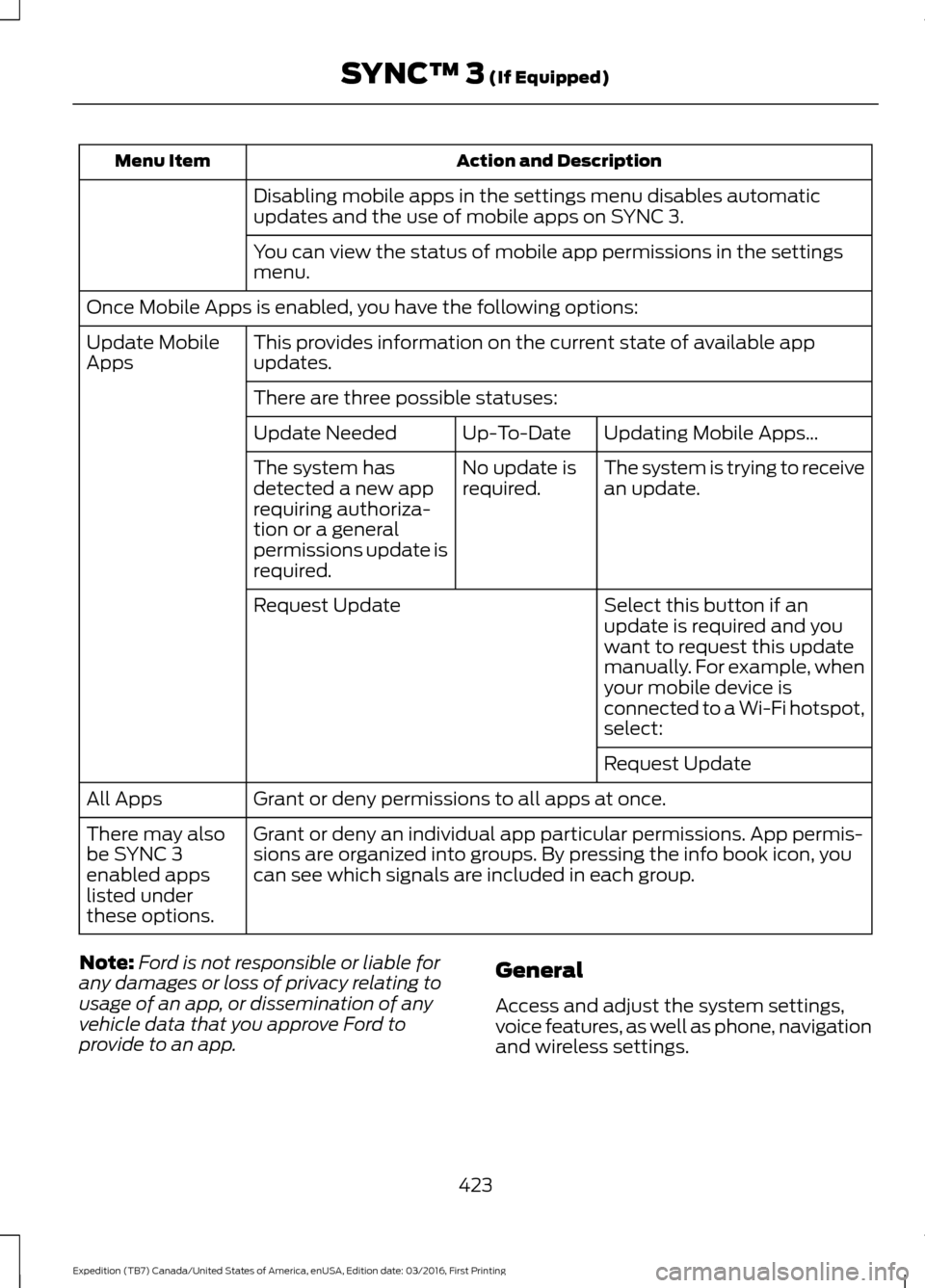
Action and Description
Menu Item
Disabling mobile apps in the settings menu disables automatic
updates and the use of mobile apps on SYNC 3.
You can view the status of mobile app permissions in the settings
menu.
Once Mobile Apps is enabled, you have the following options: This provides information on the current state of available app
updates.
Update Mobile
Apps
There are three possible statuses: Updating Mobile Apps…
Up-To-Date
Update Needed
The system is trying to receive
an update.
No update is
required.
The system has
detected a new app
requiring authoriza-
tion or a general
permissions update is
required.
Select this button if an
update is required and you
want to request this update
manually. For example, when
your mobile device is
connected to a Wi-Fi hotspot,
select:
Request Update
Request Update
Grant or deny permissions to all apps at once.
All Apps
Grant or deny an individual app particular permissions. App permis-
sions are organized into groups. By pressing the info book icon, you
can see which signals are included in each group.
There may also
be SYNC 3
enabled apps
listed under
these options.
Note: Ford is not responsible or liable for
any damages or loss of privacy relating to
usage of an app, or dissemination of any
vehicle data that you approve Ford to
provide to an app. General
Access and adjust the system settings,
voice features, as well as phone, navigation
and wireless settings.
423
Expedition (TB7) Canada/United States of America, enUSA, Edition date: 03/2016, First Printing SYNC™ 3 (If Equipped)
Page 468 of 500
TRADEMARKS: This EULA does not grant
you any rights in connection with any
trademarks or service marks of FORD
MOTOR COMPANY, its affiliates, and third
party software and service providers.
PRODUCT SUPPORT: Please refer to
FORD MOTOR COMPANY instructions
provided in the documentation for the
DEVICES product support, such as the
vehicle owner guide.
Should you have any questions concerning
this EULA, or if you desire to contact FORD
MOTOR COMPANY for any other reason,
please refer to the address provided in the
documentation for the DEVICES.
No Liability for Certain Damages:
EXCEPT AS PROHIBITED BY LAW, FORD
MOTOR COMPANY, ANY THIRD PARTY
SOFTWARE OR SERVICES SUPPLIERS,
AND THEIR AFFILIATES SHALL HAVE NO
LIABILITY FOR ANY INDIRECT, SPECIAL,
CONSEQUENTIAL OR INCIDENTAL
DAMAGES ARISING FROM OR IN
CONNECTION WITH THE USE OR
PERFORMANCE OF THE SOFTWARE. THIS
LIMITATION SHALL APPLY EVEN IF ANY
REMEDY FAILS OF ITS ESSENTIAL
PURPOSE. THERE ARE NO WARRANTIES
OTHER THAN THOSE THAT MAY BE
EXPRESSLY PROVIDED FOR YOUR NEW
VEHICLE.
SYNC® Automotive Important Safety
Information Read and follow
instructions:
• Before using your SYNC® system, read
and follow all instructions and safety
information provided in this end user
manual ("Owner Guide".) Not
following precautions found in the
Owner Guide can lead to an accident
or other serious injuries. General Operation
•
Voice Command Control
: Certain
functions within the SYNC® system
may be accomplished using voice
commands. Using voice commands
while driving helps you to operate the
system without removing your hands
from the wheel or eyes from the road.
• Prolonged Views of Screen:
Do not
access any function requiring a
prolonged view of the screen while you
are driving. Pull over in a safe and legal
manner before attempting to access a
function of the system requiring
prolonged attention.
• Volume Setting:
Do not raise the
volume excessively. Keep the volume
at a level where you can still hear
outside traffic and emergency signals
while driving. Driving while unable to
hear these sounds could cause an
accident.
• Navigation Features:
Any navigation
features included in the system are
intended to provide turn by turn
instructions to get you to a desired
destination. Please make certain all
persons using this system carefully
read and follow instructions and safety
information fully.
• Distraction Hazard:
Any navigation
features may require manual
(non-verbal) setup. Attempting to
perform such set-up or insert data
while driving can distract your attention
and could cause an accident or other
serious injury. Stop the vehicle in a safe
and legal manner before attempting
these operations.
• Let Your Judgment Prevail:
Any
navigation features are provided only
as an aid. Make your driving decisions
based on your observations of local
conditions and existing traffic
regulations. Any such feature is not a
465
Expedition (TB7) Canada/United States of America, enUSA, Edition date: 03/2016, First Printing Appendices
Page 469 of 500
substitute for your personal judgment.
Any route suggestions made by this
system should never replace any local
traffic regulations or your personal
judgment or knowledge of safe driving
practices.
• Route Safety: Do not follow the route
suggestions if doing so would result in
an unsafe or illegal maneuver, if you
would be placed in an unsafe situation,
or if you would be directed into an area
that you consider unsafe. The driver is
ultimately responsible for the safe
operation of the vehicle and therefore,
must evaluate whether it is safe to
follow the suggested directions.
• Potential Map Inaccuracy: Maps
used by this system may be inaccurate
because of changes in roads, traffic
controls or driving conditions. Always
use good judgment and common sense
when following the suggested routes.
• Emergency Services:
Do not rely on
any navigation features included in the
system to route you to emergency
services. Ask local authorities or an
emergency services operator for these
locations. Not all emergency services
such as police, fire stations, hospitals
and clinics are likely to be contained in
the map database for such navigation
features. Your Responsibilities and Assumptions of
Risk
•
You agree to each of the following:(a)
Any use of the SOFTWARE while
driving an automobile or other vehicle
in violation of applicable law or
otherwise driving in an unsafe manner
presents a significant risk of distracted
driving and should not be attempted
under any circumstances;(b) Use of
the SOFTWARE at excessive volume
poses a significant risk of hearing
damage and should not be attempted
under any circumstances;(c) The
SOFTWARE may not be compatible
with new or different versions of an
operating system, third party software,
or third party services, and the
SOFTWARE may potentially cause a
critical failure of an operating system,
third party software, or third party
service.(d) Any third party service
accessed by or third party software
used with the SOFTWARE (I) may
charge an additional fee for access, (ii)
may not work correctly, on an
uninterrupted basis, or error free, (iii)
may change streaming formats or
discontinue operation, (iv) may contain
adult, profane or offensive content; and
(v) may contain inaccurate, false or
misleading traffic, weather, financial
or safety information or other content;
and (e) Use of the SOFTWARE may
cause you to incur additional charges
from your wireless service provider
(WSP) and any data or minute
calculators that may be included in the
software program are for reference
only, are not warranted in any way and
should not be relied upon in anyway.
• When using the SOFTWARE, you agree
to be responsible for and assume the
entire risk to the items set forth in
Section (a) – (e) above.
466
Expedition (TB7) Canada/United States of America, enUSA, Edition date: 03/2016, First Printing Appendices
Page 477 of 500
HERE holds a non-exclusive license from
the United States Postal Service® to
publish and sell ZIP+4® information.
©United States Postal Service® 2014.
Prices are not established, controlled or
approved by the United States Postal
Service®. The following trademarks and
registrations are owned by the USPS:
United States Postal Service, USPS, and
ZIP+4
The Data for Mexico includes certain data
from Instituto Nacional de Estadística y
Geografía.
9.2 End User Terms Required by NAV2
(Shanghai) Co., Ltd
The data (“Data
”) is provided for your
personal, internal use only and not for
resale. It is protected by copyright, and is
subject to the following terms and
conditions which are agreed to by you, on
the one hand, and NAV2 (Shanghai) Co.,
Ltd (“NAV2”) and its licensors (including
their licensors and suppliers) on the other
hand. 20xx. All rights reserved
Terms and Conditions
Permitted Use. You agree to use this Data
together with the Telenav Software solely
for the internal business and personal
purposes for which you were licensed, and
not for service bureau, time-sharing or
other similar purposes. Accordingly, but
subject to the restrictions set forth in the
following paragraphs, you agree not to
otherwise reproduce, copy, modify,
decompile, disassemble, create any
derivative works of, or reverse engineer any
portion of this Data, and may not transfer
or distribute it in any form, for any purpose,
except to the extent permitted by
mandatory laws. Restrictions. Except where you have been
specifically licensed to do so by Telenav,
and without limiting the preceding
paragraph, you may not use this Data (a)
with any products, systems, or applications
installed or otherwise connected to or in
communication with vehicles, capable of
vehicle navigation, positioning, dispatch,
real time route guidance, fleet
management or similar applications; or (b)
with or in communication with any
positioning devices or any mobile or
wireless-connected electronic or computer
devices, including without limitation
cellular phones, palmtop and handheld
computers, pagers, and personal digital
assistants or PDAs.
Warning. The Data may contain
inaccurate or incomplete information due
to the passage of time, changing
circumstances, sources used and the
nature of collecting comprehensive
geographic data, any of which may lead to
incorrect results.
No Warranty.
This Data is provided to you
“ as is, ” and you agree to use it at your own
risk. Telenav and its licensors (and their
licensors and suppliers) make no
guarantees, representations or warranties
of any kind, express or implied, arising by
law or otherwise, including but not limited
to, content, quality, accuracy,
completeness, effectiveness, reliability,
fitness for a particular purpose, usefulness,
use or results to be obtained from this
Data, or that the Data or server will be
uninterrupted or error-free.
Disclaimer of Warranty:
TELENAV AND
ITS LICENSORS (INCLUDING THEIR
LICENSORS AND SUPPLIERS) DISCLAIM
ANY WARRANTIES, EXPRESS OR IMPLIED,
OF QUALITY, PERFORMANCE,
MERCHANTABILITY, FITNESS FOR A
474
Expedition (TB7) Canada/United States of America, enUSA, Edition date: 03/2016, First Printing Appendices
Page 484 of 500
Product incorporates data which is ©
20XX Telstra Corporation Limited, GM
Holden Limited, Intelematics Australia
Pty Ltd and Continental Pty Ltd.
B. Third Party Notices for Australia. In
addition to the foregoing, the End-User
Terms for any Application containing
RDS-TMC Traffic Codes for Australia
shall contain the following notice:
“Product incorporates traffic location
codes which is © 20XX Telstra Corpora-
tion Limited and its licensors. ”
VII. China Territory
Personal Use Only
You agree to use this Data together with
[insert name of Client Application] for the
solely personal, non-commercial purposes
for which you were licensed, and not for
service bureau, time-sharing or other
similar purposes. Accordingly, but subject
to the restrictions set forth in the following
paragraphs, you may copy this Data only
as necessary for your personal use to (i)
view it, and (ii) save it, provided that you
do not remove any copyright notices that
appear and do not modify the Data in any
way. You agree not to otherwise reproduce,
copy, modify, decompile, disassemble or
reverse engineer any portion of this Data,
and may not transfer or distribute it in any
form, for any purpose, except to the extent
permitted by mandatory laws.
Restrictions
Except where you have been specifically
licensed to do so by NAV2 , and without
limiting the preceding paragraph, you may
not (a) use this Data with any products,
systems, or applications installed or
otherwise connected to or in
communication with vehicles, capable of
vehicle navigation, positioning, dispatch,
real time route guidance, fleet
management or similar applications; or (b) with or in communication with any
positioning devices or any mobile or
wireless-connected electronic or computer
devices, including without limitation
cellular phones, palmtop and handheld
computers, pagers, and personal digital
assistants or PDAs. You agree to cease
using this Data if you fail to comply with
these terms and conditions.
Limited Warranty
NAV2 warrants that (a) the Data will
perform substantially in accordance with
the accompanying written materials for a
period of ninety (90) days from the date
of receipt, and (b) any support services
provided by NAV2 shall be substantially as
described in applicable written materials
provided to you by NAV2, and NAV2’
s
support engineers will make commercially
reasonable efforts to solve any problem
issues.
rigCustomer Remedies
NAV2 and its suppliers’ entire liability and
your exclusive remedy shall be, at NAV2’ s
sole discretion, either (a) return of the price
paid, if any, or (b) repair or replacement of
the Data that do not meet NAV2’ s Limited
Warranty and that are returned to NAV2
with a copy of your receipt. This Limited
Warranty is void if failure of the Data has
resulted from accident, abuse, or
misapplication. Any replacement Data will
be warranted for the remainder of the
original warranty period or thirty (30) days,
whichever is longer. Neither these remedies
nor any product support services offered
by NAV2 are available without proof of
purchase from an authorized international
source.
481
Expedition (TB7) Canada/United States of America, enUSA, Edition date: 03/2016, First Printing Appendices
Page 495 of 500
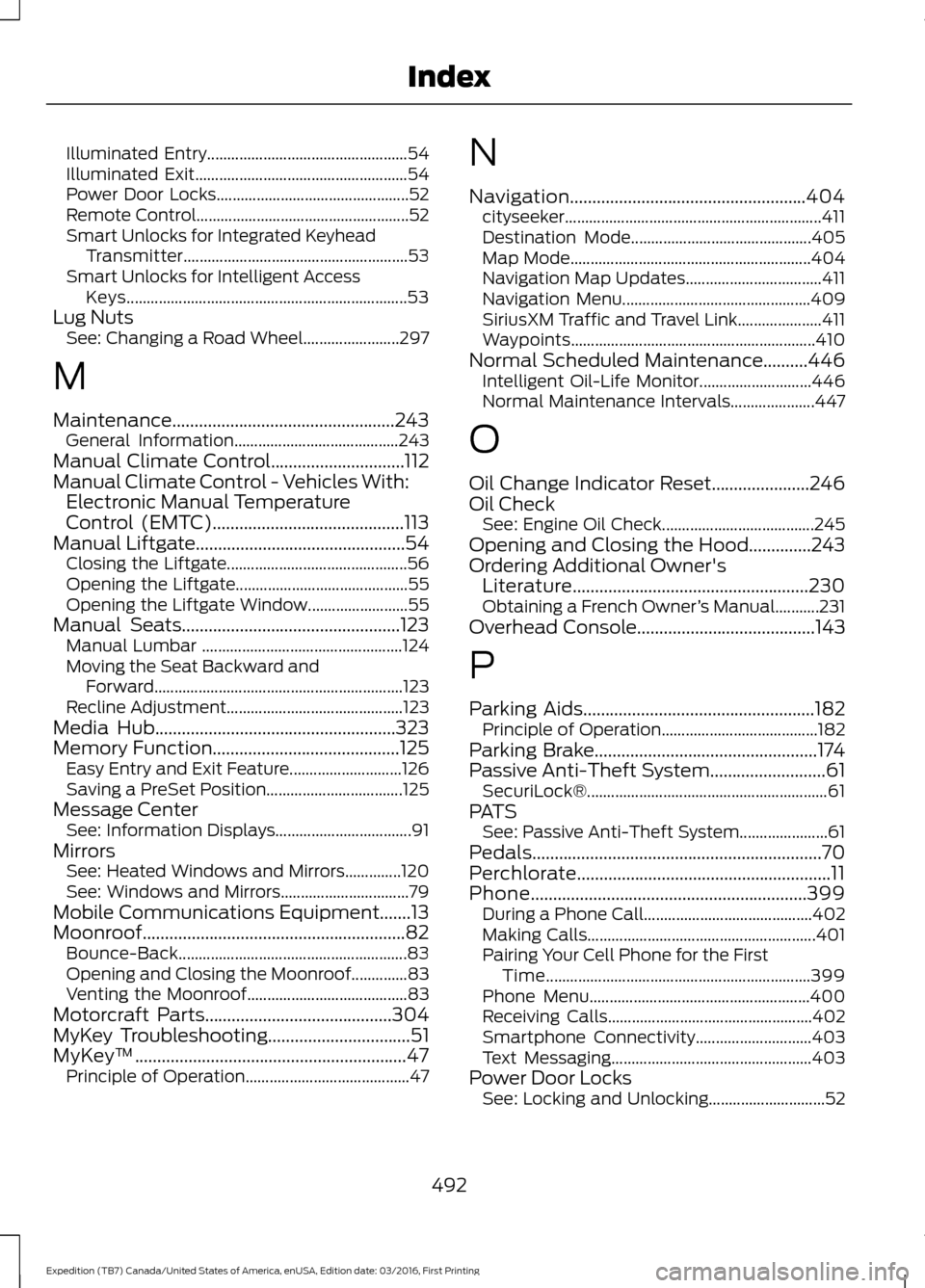
Illuminated Entry..................................................
54
Illuminated Exit..................................................... 54
Power Door Locks................................................ 52
Remote Control..................................................... 52
Smart Unlocks for Integrated Keyhead Transmitter........................................................ 53
Smart Unlocks for Intelligent Access Keys...................................................................... 53
Lug Nuts See: Changing a Road Wheel........................ 297
M
Maintenance..................................................243 General Information......................................... 243
Manual Climate Control..............................112
Manual Climate Control - Vehicles With: Electronic Manual Temperature
Control (EMTC)...........................................113
Manual Liftgate...............................................54
Closing the Liftgate............................................. 56
Opening the Liftgate........................................... 55
Opening the Liftgate Window......................... 55
Manual Seats.................................................123 Manual Lumbar .................................................. 124
Moving the Seat Backward and Forward.............................................................. 123
Recline Adjustment............................................ 123
Media Hub
......................................................323
Memory Function..........................................125
Easy Entry and Exit Feature............................ 126
Saving a PreSet Position.................................. 125
Message Center See: Information Displays.................................. 91
Mirrors See: Heated Windows and Mirrors..............120
See: Windows and Mirrors................................ 79
Mobile Communications Equipment.......13
Moonroof...........................................................82 Bounce-Back......................................................... 83
Opening and Closing the Moonroof..............83
Venting the Moonroof........................................ 83
Motorcraft Parts
..........................................304
MyKey Troubleshooting................................51
MyKey ™
.............................................................47
Principle of Operation......................................... 47N
Navigation.....................................................404
cityseeker................................................................ 411
Destination Mode............................................. 405
Map Mode............................................................ 404
Navigation Map Updates.................................. 411
Navigation Menu............................................... 409
SiriusXM Traffic and Travel Link..................... 411
Waypoints............................................................. 410
Normal Scheduled Maintenance..........446 Intelligent Oil-Life Monitor............................ 446
Normal Maintenance Intervals..................... 447
O
Oil Change Indicator Reset......................246
Oil Check See: Engine Oil Check...................................... 245
Opening and Closing the Hood..............243
Ordering Additional Owner's Literature
.....................................................230
Obtaining a French Owner ’s Manual...........231
Overhead Console
........................................143
P
Parking Aids
....................................................182
Principle of Operation....................................... 182
Parking Brake
..................................................174
Passive Anti-Theft System..........................61 SecuriLock®............................................................ 61
PATS See: Passive Anti-Theft System...................... 61
Pedals
.................................................................70
Perchlorate.........................................................11
Phone
..............................................................399
During a Phone Call.......................................... 402
Making Calls......................................................... 401
Pairing Your Cell Phone for the First Time.................................................................. 399
Phone Menu....................................................... 400
Receiving Calls................................................... 402
Smartphone Connectivity............................. 403
Text Messaging.................................................. 403
Power Door Locks See: Locking and Unlocking............................. 52
492
Expedition (TB7) Canada/United States of America, enUSA, Edition date: 03/2016, First Printing Index
Page 497 of 500
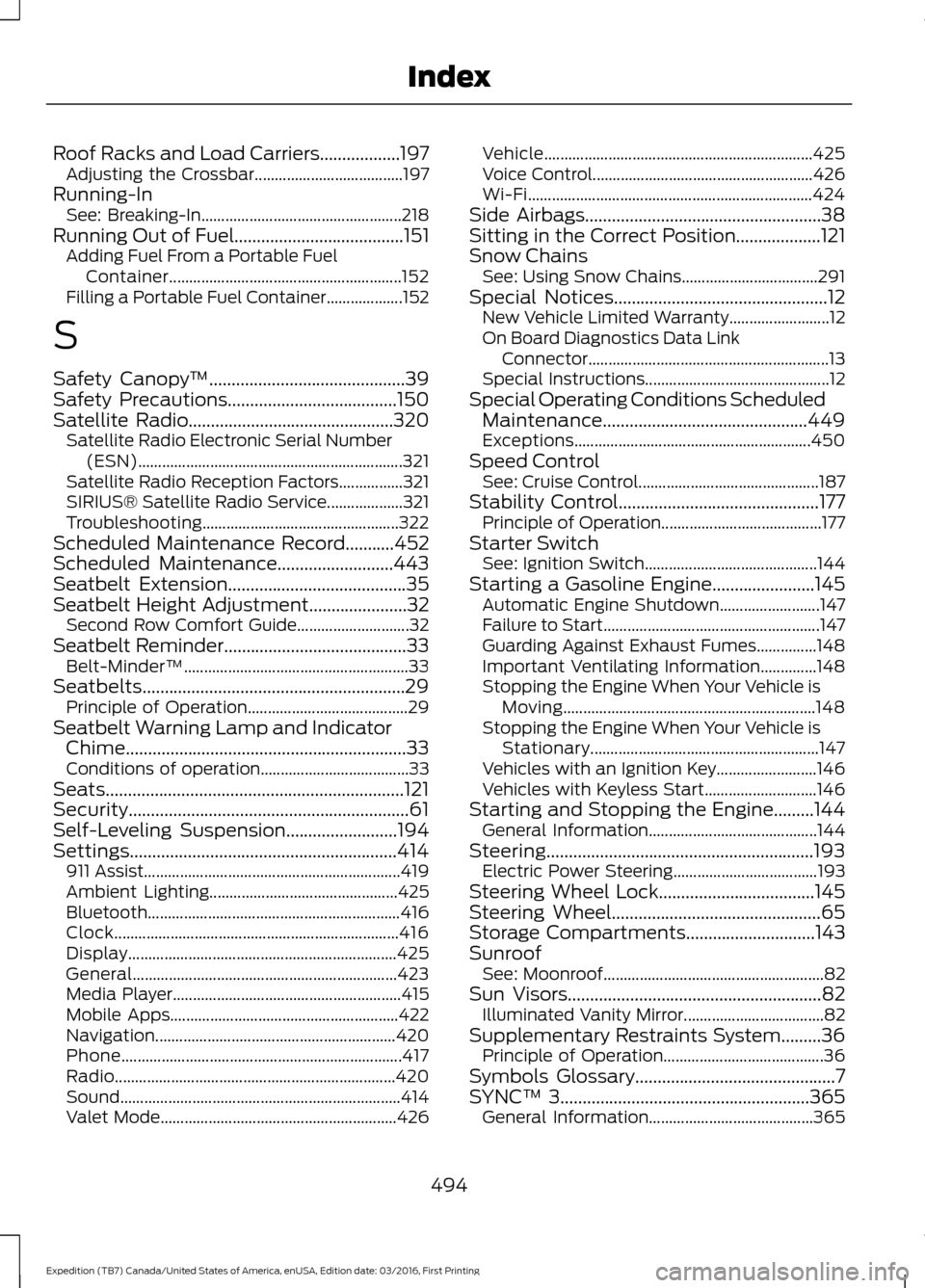
Roof Racks and Load Carriers..................197
Adjusting the Crossbar..................................... 197
Running-In See: Breaking-In.................................................. 218
Running Out of Fuel......................................151
Adding Fuel From a Portable Fuel
Container.......................................................... 152
Filling a Portable Fuel Container................... 152
S
Safety Canopy ™
............................................39
Safety Precautions......................................150
Satellite Radio..............................................320 Satellite Radio Electronic Serial Number
(ESN).................................................................. 321
Satellite Radio Reception Factors................321
SIRIUS® Satellite Radio Service................... 321
Troubleshooting................................................. 322
Scheduled Maintenance Record
...........452
Scheduled Maintenance..........................443
Seatbelt Extension
........................................35
Seatbelt Height Adjustment......................32 Second Row Comfort Guide............................ 32
Seatbelt Reminder
.........................................33
Belt-Minder™........................................................ 33
Seatbelts...........................................................29 Principle of Operation........................................ 29
Seatbelt Warning Lamp and Indicator Chime...............................................................33
Conditions of operation..................................... 33
Seats...................................................................121
Security...............................................................61
Self-Leveling Suspension
.........................194
Settings............................................................414 911 Assist................................................................ 419
Ambient Lighting............................................... 425
Bluetooth............................................................... 416
Clock....................................................................... 416
Display................................................................... 425
General.................................................................. 423
Media Player......................................................... 415
Mobile Apps......................................................... 422
Navigation............................................................ 420
Phone...................................................................... 417
Radio...................................................................... 420
Sound...................................................................... 414
Valet Mode........................................................... 426Vehicle...................................................................
425
Voice Control....................................................... 426
Wi-Fi....................................................................... 424
Side Airbags
.....................................................38
Sitting in the Correct Position...................121
Snow Chains See: Using Snow Chains.................................. 291
Special Notices................................................12 New Vehicle Limited Warranty......................... 12
On Board Diagnostics Data Link Connector............................................................ 13
Special Instructions.............................................. 12
Special Operating Conditions Scheduled Maintenance..............................................449
Exceptions........................................................... 450
Speed Control See: Cruise Control............................................. 187
Stability Control
.............................................177
Principle of Operation........................................ 177
Starter Switch See: Ignition Switch........................................... 144
Starting a Gasoline Engine
.......................145
Automatic Engine Shutdown......................... 147
Failure to Start...................................................... 147
Guarding Against Exhaust Fumes...............148
Important Ventilating Information..............148
Stopping the Engine When Your Vehicle is Moving............................................................... 148
Stopping the Engine When Your Vehicle is Stationary......................................................... 147
Vehicles with an Ignition Key......................... 146
Vehicles with Keyless Start............................ 146
Starting and Stopping the Engine.........144 General Information.......................................... 144
Steering............................................................193 Electric Power Steering.................................... 193
Steering Wheel Lock...................................145
Steering Wheel...............................................65
Storage Compartments
.............................143
Sunroof See: Moonroof....................................................... 82
Sun Visors
.........................................................82
Illuminated Vanity Mirror................................... 82
Supplementary Restraints System.........36 Principle of Operation........................................ 36
Symbols Glossary
.............................................7
SYNC™ 3........................................................365
General Information......................................... 365
494
Expedition (TB7) Canada/United States of America, enUSA, Edition date: 03/2016, First Printing Index