park assist FORD EXPEDITION 2018 Owner's Manual
[x] Cancel search | Manufacturer: FORD, Model Year: 2018, Model line: EXPEDITION, Model: FORD EXPEDITION 2018Pages: 571, PDF Size: 25.8 MB
Page 259 of 571
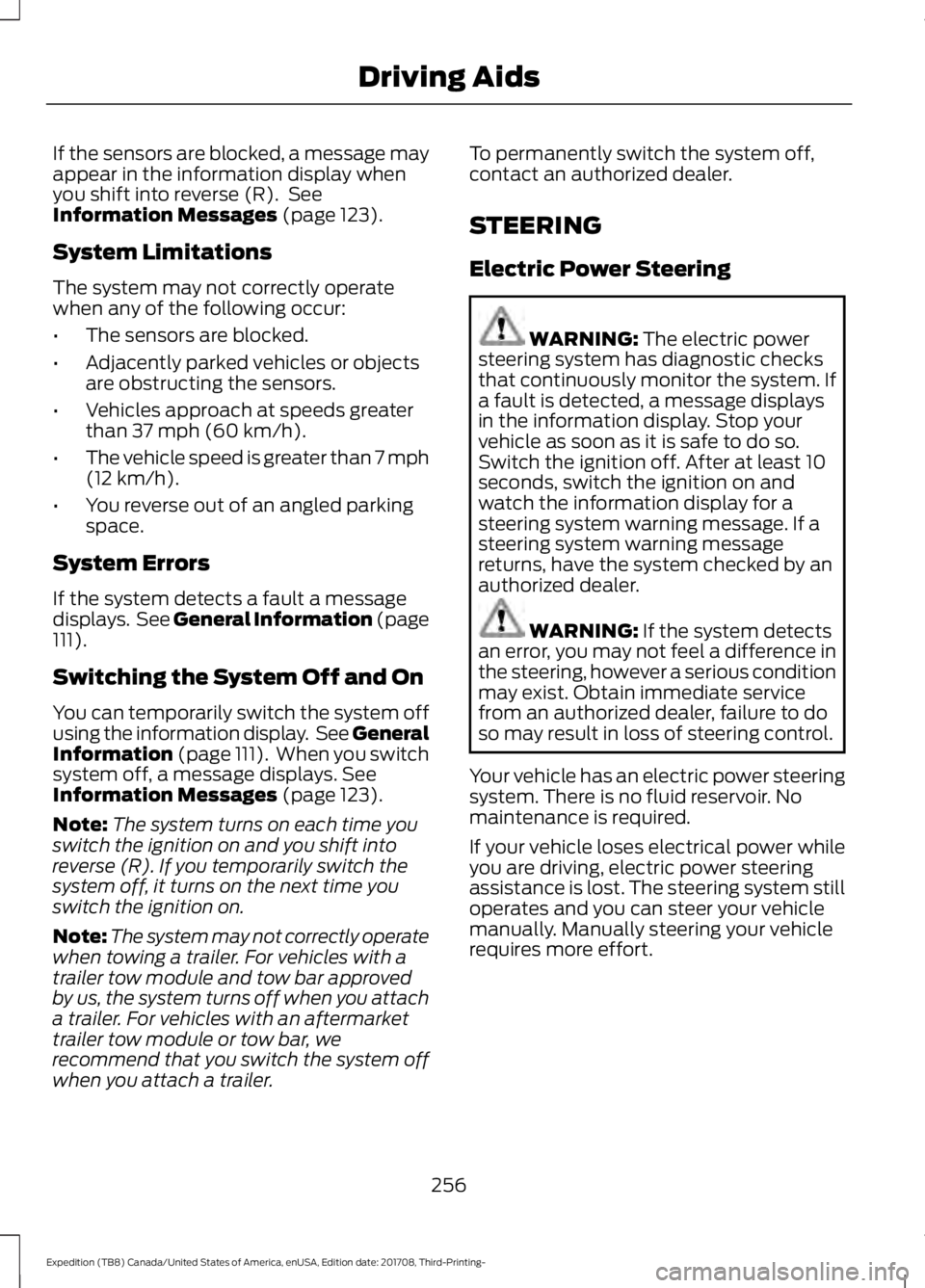
If the sensors are blocked, a message may
appear in the information display when
you shift into reverse (R). See
Information Messages (page 123).
System Limitations
The system may not correctly operate
when any of the following occur:
• The sensors are blocked.
• Adjacently parked vehicles or objects
are obstructing the sensors.
• Vehicles approach at speeds greater
than
37 mph (60 km/h).
• The vehicle speed is greater than 7 mph
(12 km/h)
.
• You reverse out of an angled parking
space.
System Errors
If the system detects a fault a message
displays. See General Information (page
111
).
Switching the System Off and On
You can temporarily switch the system off
using the information display. See
General
Information (page 111). When you switch
system off, a message displays. See
Information Messages (page 123).
Note: The system turns on each time you
switch the ignition on and you shift into
reverse (R). If you temporarily switch the
system off, it turns on the next time you
switch the ignition on.
Note: The system may not correctly operate
when towing a trailer. For vehicles with a
trailer tow module and tow bar approved
by us, the system turns off when you attach
a trailer. For vehicles with an aftermarket
trailer tow module or tow bar, we
recommend that you switch the system off
when you attach a trailer. To permanently switch the system off,
contact an authorized dealer.
STEERING
Electric Power Steering
WARNING:
The electric power
steering system has diagnostic checks
that continuously monitor the system. If
a fault is detected, a message displays
in the information display. Stop your
vehicle as soon as it is safe to do so.
Switch the ignition off. After at least 10
seconds, switch the ignition on and
watch the information display for a
steering system warning message. If a
steering system warning message
returns, have the system checked by an
authorized dealer. WARNING:
If the system detects
an error, you may not feel a difference in
the steering, however a serious condition
may exist. Obtain immediate service
from an authorized dealer, failure to do
so may result in loss of steering control.
Your vehicle has an electric power steering
system. There is no fluid reservoir. No
maintenance is required.
If your vehicle loses electrical power while
you are driving, electric power steering
assistance is lost. The steering system still
operates and you can steer your vehicle
manually. Manually steering your vehicle
requires more effort.
256
Expedition (TB8) Canada/United States of America, enUSA, Edition date: 201708, Third-Printing- Driving Aids
Page 296 of 571
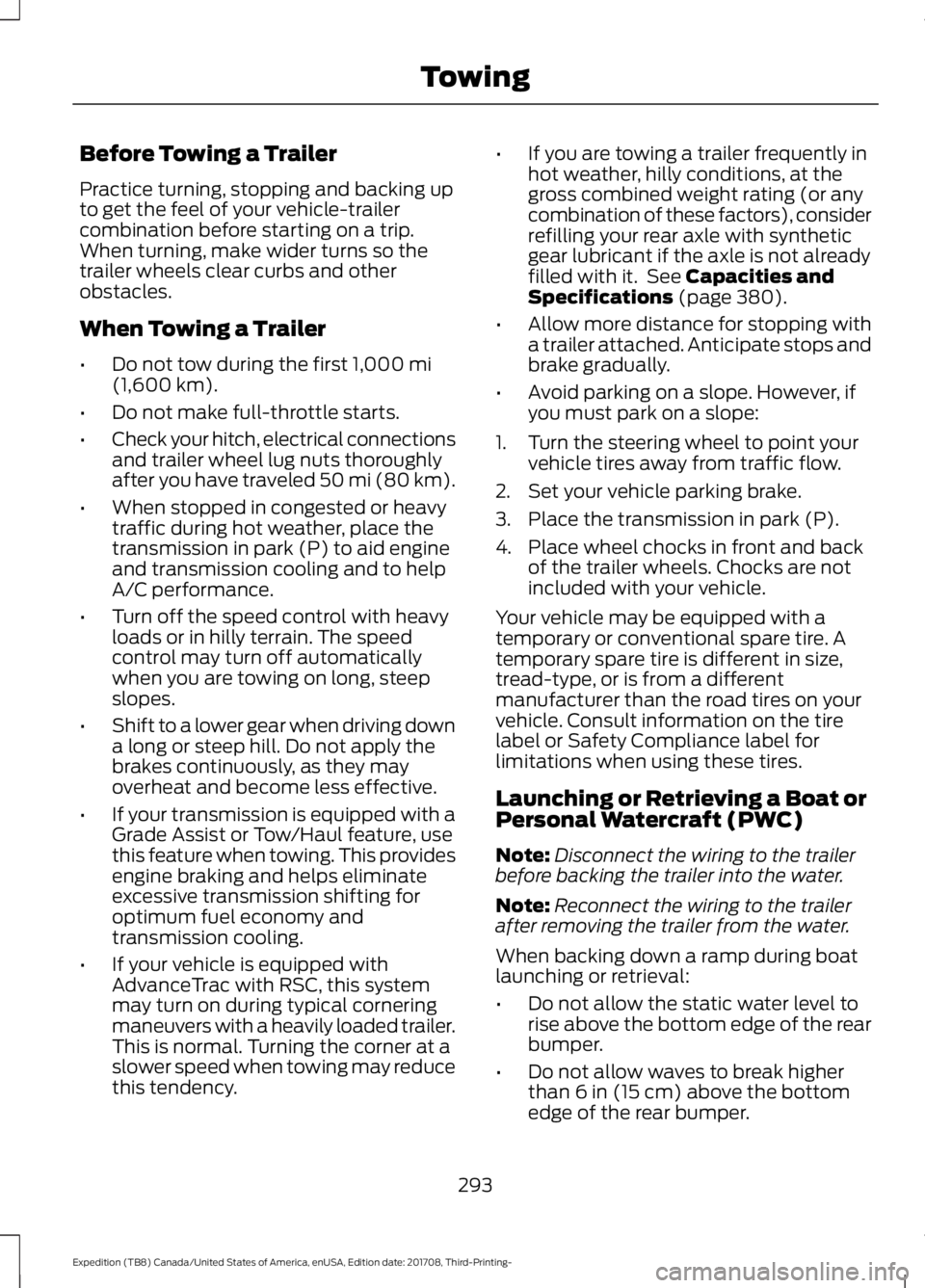
Before Towing a Trailer
Practice turning, stopping and backing up
to get the feel of your vehicle-trailer
combination before starting on a trip.
When turning, make wider turns so the
trailer wheels clear curbs and other
obstacles.
When Towing a Trailer
•
Do not tow during the first 1,000 mi
(1,600 km).
• Do not make full-throttle starts.
• Check your hitch, electrical connections
and trailer wheel lug nuts thoroughly
after you have traveled 50 mi (80 km).
• When stopped in congested or heavy
traffic during hot weather, place the
transmission in park (P) to aid engine
and transmission cooling and to help
A/C performance.
• Turn off the speed control with heavy
loads or in hilly terrain. The speed
control may turn off automatically
when you are towing on long, steep
slopes.
• Shift to a lower gear when driving down
a long or steep hill. Do not apply the
brakes continuously, as they may
overheat and become less effective.
• If your transmission is equipped with a
Grade Assist or Tow/Haul feature, use
this feature when towing. This provides
engine braking and helps eliminate
excessive transmission shifting for
optimum fuel economy and
transmission cooling.
• If your vehicle is equipped with
AdvanceTrac with RSC, this system
may turn on during typical cornering
maneuvers with a heavily loaded trailer.
This is normal. Turning the corner at a
slower speed when towing may reduce
this tendency. •
If you are towing a trailer frequently in
hot weather, hilly conditions, at the
gross combined weight rating (or any
combination of these factors), consider
refilling your rear axle with synthetic
gear lubricant if the axle is not already
filled with it. See
Capacities and
Specifications (page 380).
• Allow more distance for stopping with
a trailer attached. Anticipate stops and
brake gradually.
• Avoid parking on a slope. However, if
you must park on a slope:
1. Turn the steering wheel to point your vehicle tires away from traffic flow.
2. Set your vehicle parking brake.
3. Place the transmission in park (P).
4. Place wheel chocks in front and back of the trailer wheels. Chocks are not
included with your vehicle.
Your vehicle may be equipped with a
temporary or conventional spare tire. A
temporary spare tire is different in size,
tread-type, or is from a different
manufacturer than the road tires on your
vehicle. Consult information on the tire
label or Safety Compliance label for
limitations when using these tires.
Launching or Retrieving a Boat or
Personal Watercraft (PWC)
Note: Disconnect the wiring to the trailer
before backing the trailer into the water.
Note: Reconnect the wiring to the trailer
after removing the trailer from the water.
When backing down a ramp during boat
launching or retrieval:
• Do not allow the static water level to
rise above the bottom edge of the rear
bumper.
• Do not allow waves to break higher
than
6 in (15 cm) above the bottom
edge of the rear bumper.
293
Expedition (TB8) Canada/United States of America, enUSA, Edition date: 201708, Third-Printing- Towing
Page 319 of 571
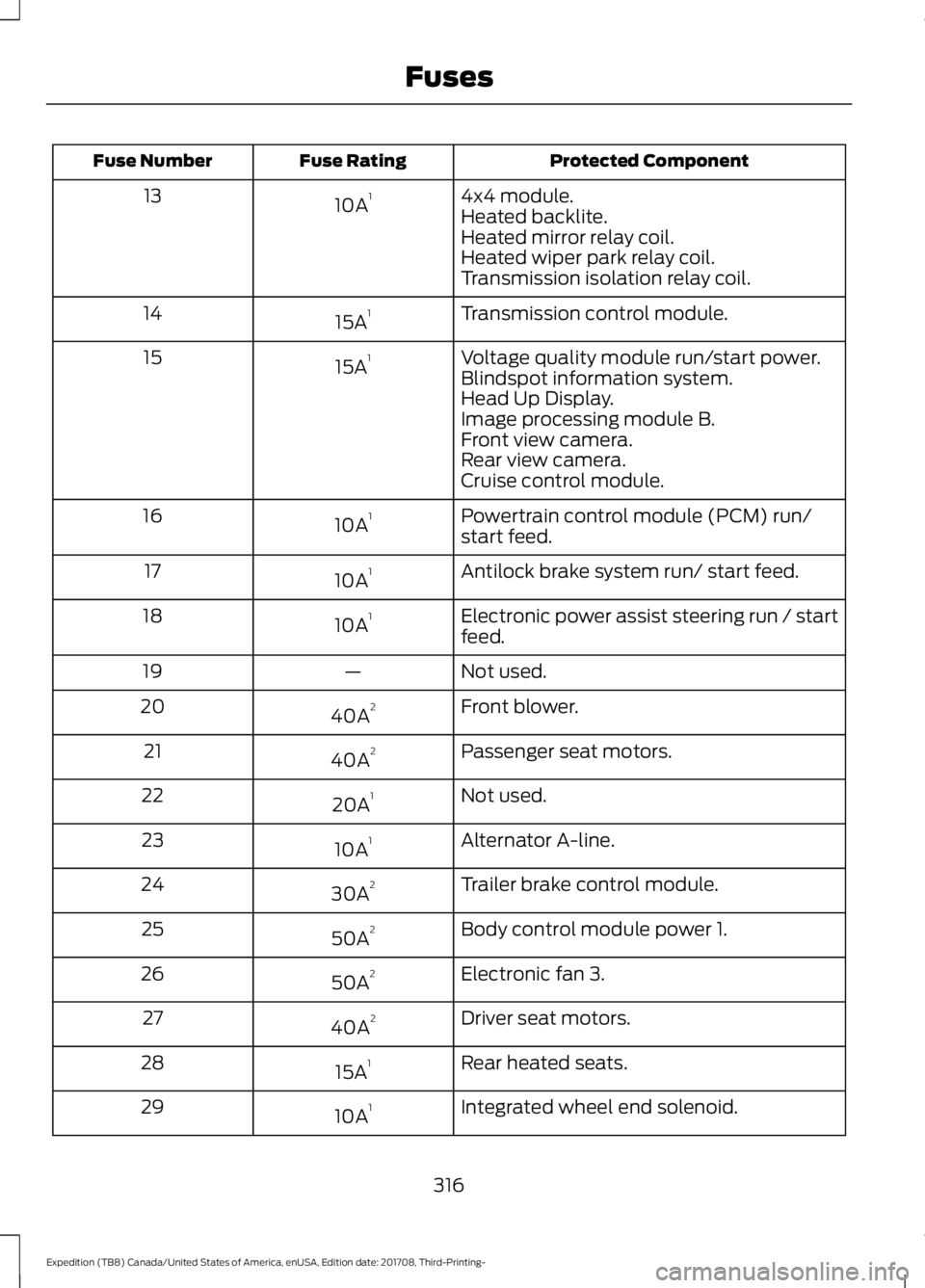
Protected Component
Fuse Rating
Fuse Number
4x4 module.
10A 1
13
Heated backlite.
Heated mirror relay coil.
Heated wiper park relay coil.
Transmission isolation relay coil.
Transmission control module.
15A 1
14
Voltage quality module run/start power.
15A 1
15
Blindspot information system.
Head Up Display.
Image processing module B.
Front view camera.
Rear view camera.
Cruise control module.
Powertrain control module (PCM) run/
start feed.
10A 1
16
Antilock brake system run/ start feed.
10A 1
17
Electronic power assist steering run / start
feed.
10A 1
18
Not used.
—
19
Front blower.
40A 2
20
Passenger seat motors.
40A 2
21
Not used.
20A 1
22
Alternator A-line.
10A 1
23
Trailer brake control module.
30A 2
24
Body control module power 1.
50A 2
25
Electronic fan 3.
50A 2
26
Driver seat motors.
40A 2
27
Rear heated seats.
15A 1
28
Integrated wheel end solenoid.
10A 1
29
316
Expedition (TB8) Canada/United States of America, enUSA, Edition date: 201708, Third-Printing- Fuses
Page 325 of 571
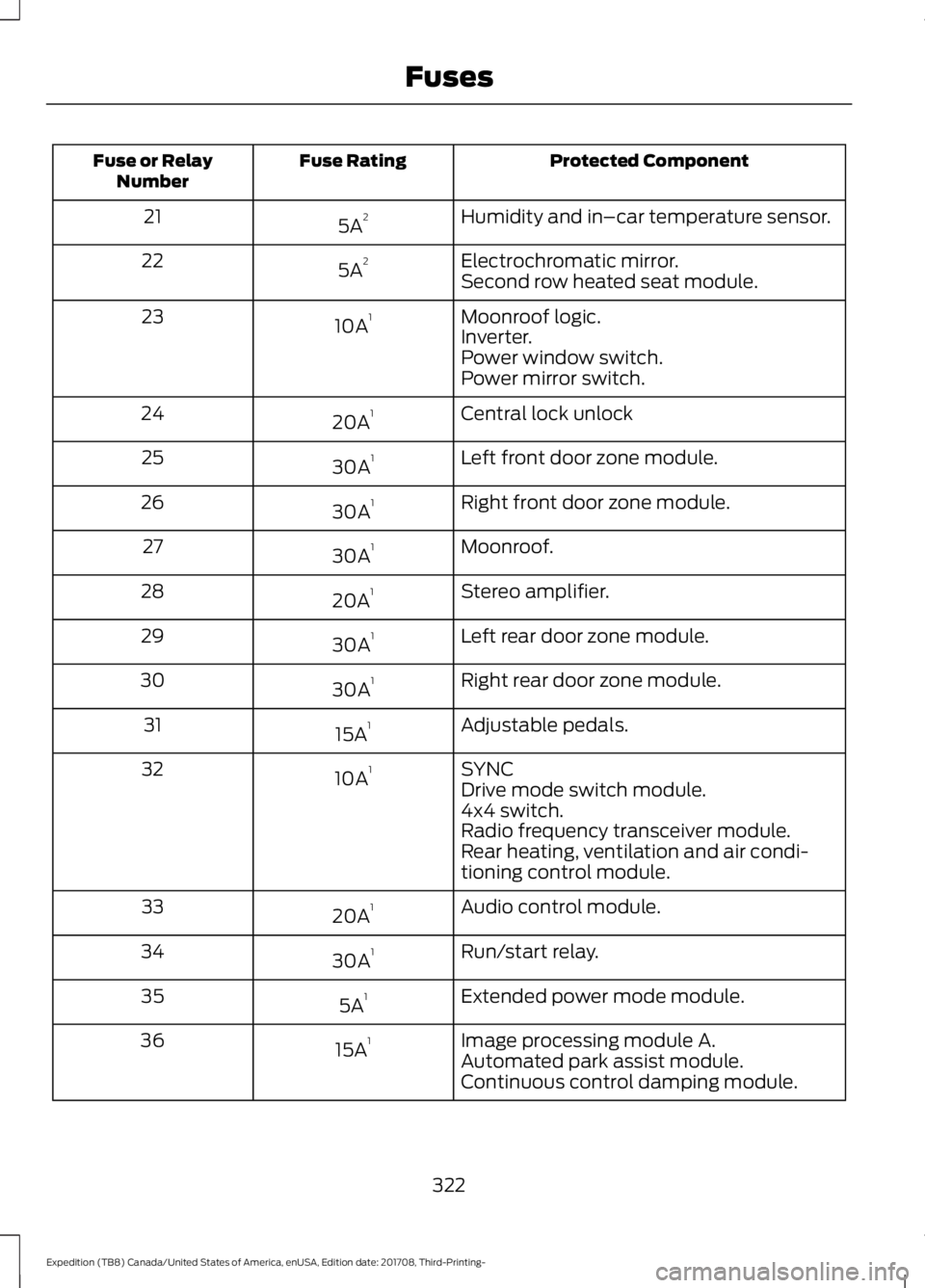
Protected Component
Fuse Rating
Fuse or Relay
Number
Humidity and in–car temperature sensor.
5A 2
21
Electrochromatic mirror.
5A 2
22
Second row heated seat module.
Moonroof logic.
10A 1
23
Inverter.
Power window switch.
Power mirror switch.
Central lock unlock
20A 1
24
Left front door zone module.
30A 1
25
Right front door zone module.
30A 1
26
Moonroof.
30A 1
27
Stereo amplifier.
20A 1
28
Left rear door zone module.
30A 1
29
Right rear door zone module.
30A 1
30
Adjustable pedals.
15A 1
31
SYNC
10A 1
32
Drive mode switch module.
4x4 switch.
Radio frequency transceiver module.
Rear heating, ventilation and air condi-
tioning control module.
Audio control module.
20A 1
33
Run/start relay.
30A 1
34
Extended power mode module.
5A 1
35
Image processing module A.
15A 1
36
Automated park assist module.
Continuous control damping module.
322
Expedition (TB8) Canada/United States of America, enUSA, Edition date: 201708, Third-Printing- Fuses
Page 429 of 571
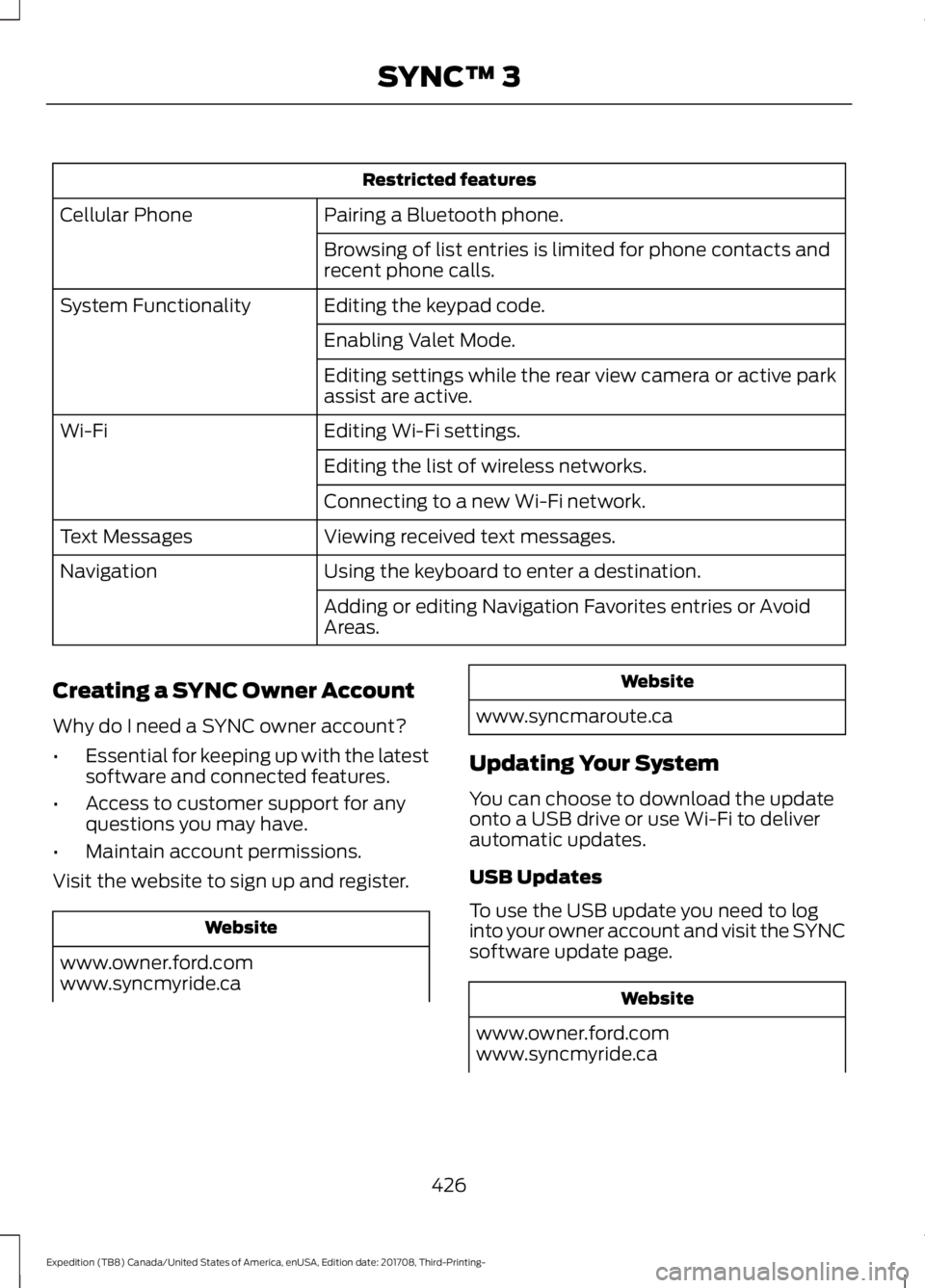
Restricted features
Pairing a Bluetooth phone.
Cellular Phone
Browsing of list entries is limited for phone contacts and
recent phone calls.
Editing the keypad code.
System Functionality
Enabling Valet Mode.
Editing settings while the rear view camera or active park
assist are active.
Editing Wi-Fi settings.
Wi-Fi
Editing the list of wireless networks.
Connecting to a new Wi-Fi network.
Viewing received text messages.
Text Messages
Using the keyboard to enter a destination.
Navigation
Adding or editing Navigation Favorites entries or Avoid
Areas.
Creating a SYNC Owner Account
Why do I need a SYNC owner account?
• Essential for keeping up with the latest
software and connected features.
• Access to customer support for any
questions you may have.
• Maintain account permissions.
Visit the website to sign up and register. Website
www.owner.ford.com
www.syncmyride.ca Website
www.syncmaroute.ca
Updating Your System
You can choose to download the update
onto a USB drive or use Wi-Fi to deliver
automatic updates.
USB Updates
To use the USB update you need to log
into your owner account and visit the SYNC
software update page. Website
www.owner.ford.com
www.syncmyride.ca
426
Expedition (TB8) Canada/United States of America, enUSA, Edition date: 201708, Third-Printing- SYNC™ 3
Page 497 of 571
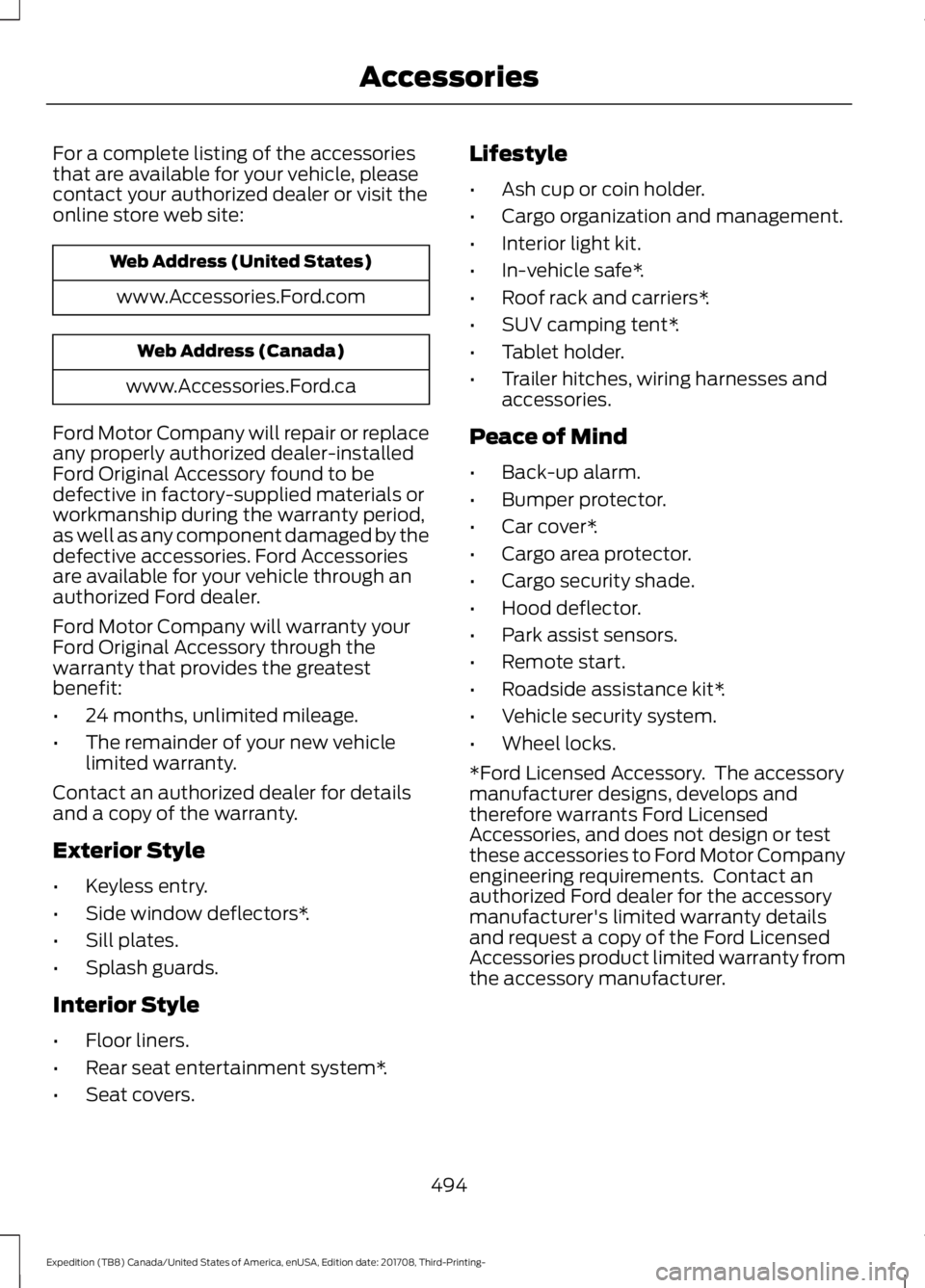
For a complete listing of the accessories
that are available for your vehicle, please
contact your authorized dealer or visit the
online store web site:
Web Address (United States)
www.Accessories.Ford.com Web Address (Canada)
www.Accessories.Ford.ca
Ford Motor Company will repair or replace
any properly authorized dealer-installed
Ford Original Accessory found to be
defective in factory-supplied materials or
workmanship during the warranty period,
as well as any component damaged by the
defective accessories. Ford Accessories
are available for your vehicle through an
authorized Ford dealer.
Ford Motor Company will warranty your
Ford Original Accessory through the
warranty that provides the greatest
benefit:
• 24 months, unlimited mileage.
• The remainder of your new vehicle
limited warranty.
Contact an authorized dealer for details
and a copy of the warranty.
Exterior Style
• Keyless entry.
• Side window deflectors*.
• Sill plates.
• Splash guards.
Interior Style
• Floor liners.
• Rear seat entertainment system*.
• Seat covers. Lifestyle
•
Ash cup or coin holder.
• Cargo organization and management.
• Interior light kit.
• In-vehicle safe*.
• Roof rack and carriers*.
• SUV camping tent*.
• Tablet holder.
• Trailer hitches, wiring harnesses and
accessories.
Peace of Mind
• Back-up alarm.
• Bumper protector.
• Car cover*.
• Cargo area protector.
• Cargo security shade.
• Hood deflector.
• Park assist sensors.
• Remote start.
• Roadside assistance kit*.
• Vehicle security system.
• Wheel locks.
*Ford Licensed Accessory. The accessory
manufacturer designs, develops and
therefore warrants Ford Licensed
Accessories, and does not design or test
these accessories to Ford Motor Company
engineering requirements. Contact an
authorized Ford dealer for the accessory
manufacturer's limited warranty details
and request a copy of the Ford Licensed
Accessories product limited warranty from
the accessory manufacturer.
494
Expedition (TB8) Canada/United States of America, enUSA, Edition date: 201708, Third-Printing- Accessories
Page 500 of 571
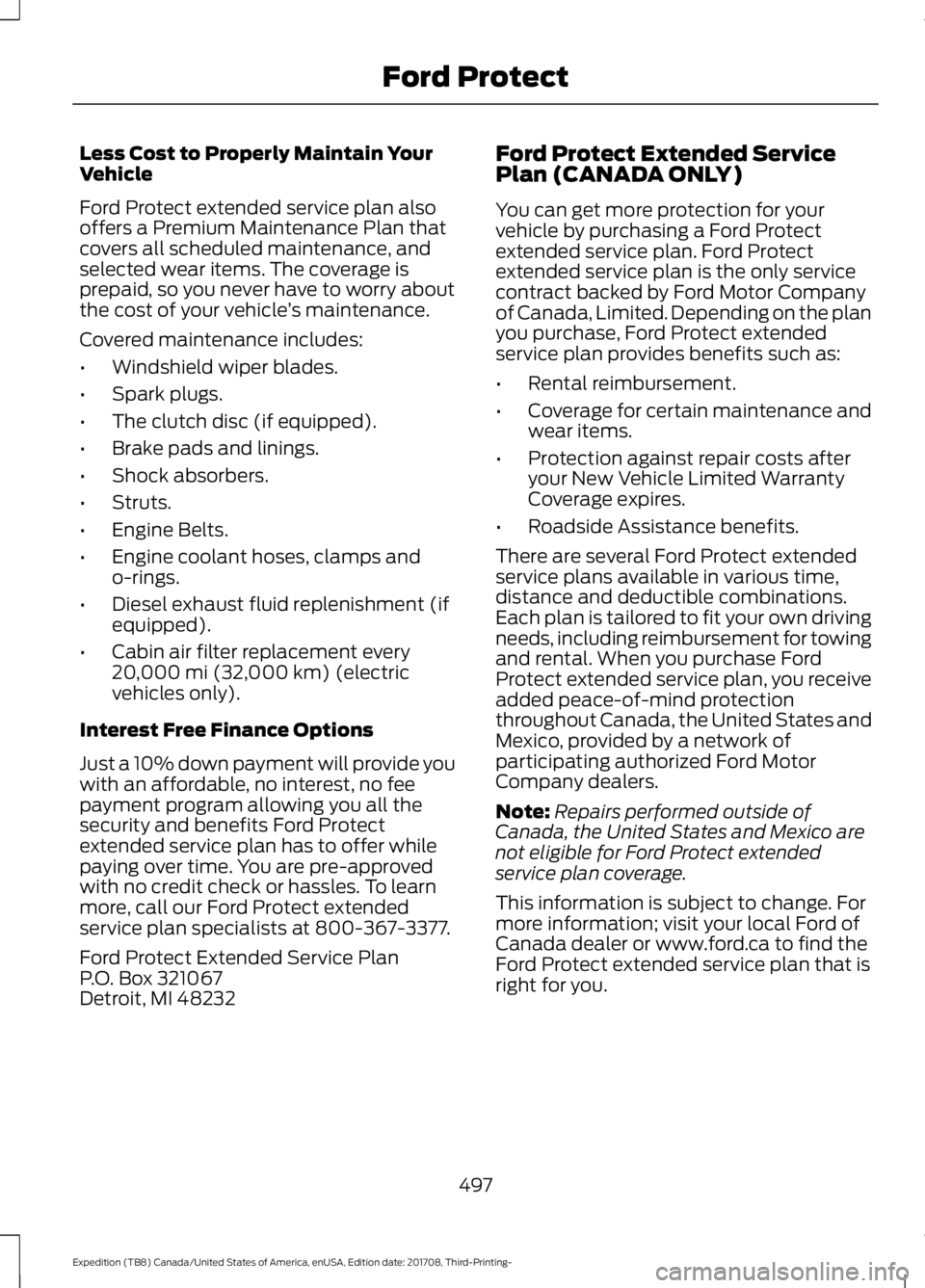
Less Cost to Properly Maintain Your
Vehicle
Ford Protect extended service plan also
offers a Premium Maintenance Plan that
covers all scheduled maintenance, and
selected wear items. The coverage is
prepaid, so you never have to worry about
the cost of your vehicle
’s maintenance.
Covered maintenance includes:
• Windshield wiper blades.
• Spark plugs.
• The clutch disc (if equipped).
• Brake pads and linings.
• Shock absorbers.
• Struts.
• Engine Belts.
• Engine coolant hoses, clamps and
o-rings.
• Diesel exhaust fluid replenishment (if
equipped).
• Cabin air filter replacement every
20,000 mi (32,000 km) (electric
vehicles only).
Interest Free Finance Options
Just a 10% down payment will provide you
with an affordable, no interest, no fee
payment program allowing you all the
security and benefits Ford Protect
extended service plan has to offer while
paying over time. You are pre-approved
with no credit check or hassles. To learn
more, call our Ford Protect extended
service plan specialists at 800-367-3377.
Ford Protect Extended Service Plan
P.O. Box 321067
Detroit, MI 48232 Ford Protect Extended Service
Plan (CANADA ONLY)
You can get more protection for your
vehicle by purchasing a Ford Protect
extended service plan. Ford Protect
extended service plan is the only service
contract backed by Ford Motor Company
of Canada, Limited. Depending on the plan
you purchase, Ford Protect extended
service plan provides benefits such as:
•
Rental reimbursement.
• Coverage for certain maintenance and
wear items.
• Protection against repair costs after
your New Vehicle Limited Warranty
Coverage expires.
• Roadside Assistance benefits.
There are several Ford Protect extended
service plans available in various time,
distance and deductible combinations.
Each plan is tailored to fit your own driving
needs, including reimbursement for towing
and rental. When you purchase Ford
Protect extended service plan, you receive
added peace-of-mind protection
throughout Canada, the United States and
Mexico, provided by a network of
participating authorized Ford Motor
Company dealers.
Note: Repairs performed outside of
Canada, the United States and Mexico are
not eligible for Ford Protect extended
service plan coverage.
This information is subject to change. For
more information; visit your local Ford of
Canada dealer or www.ford.ca to find the
Ford Protect extended service plan that is
right for you.
497
Expedition (TB8) Canada/United States of America, enUSA, Edition date: 201708, Third-Printing- Ford Protect
Page 560 of 571
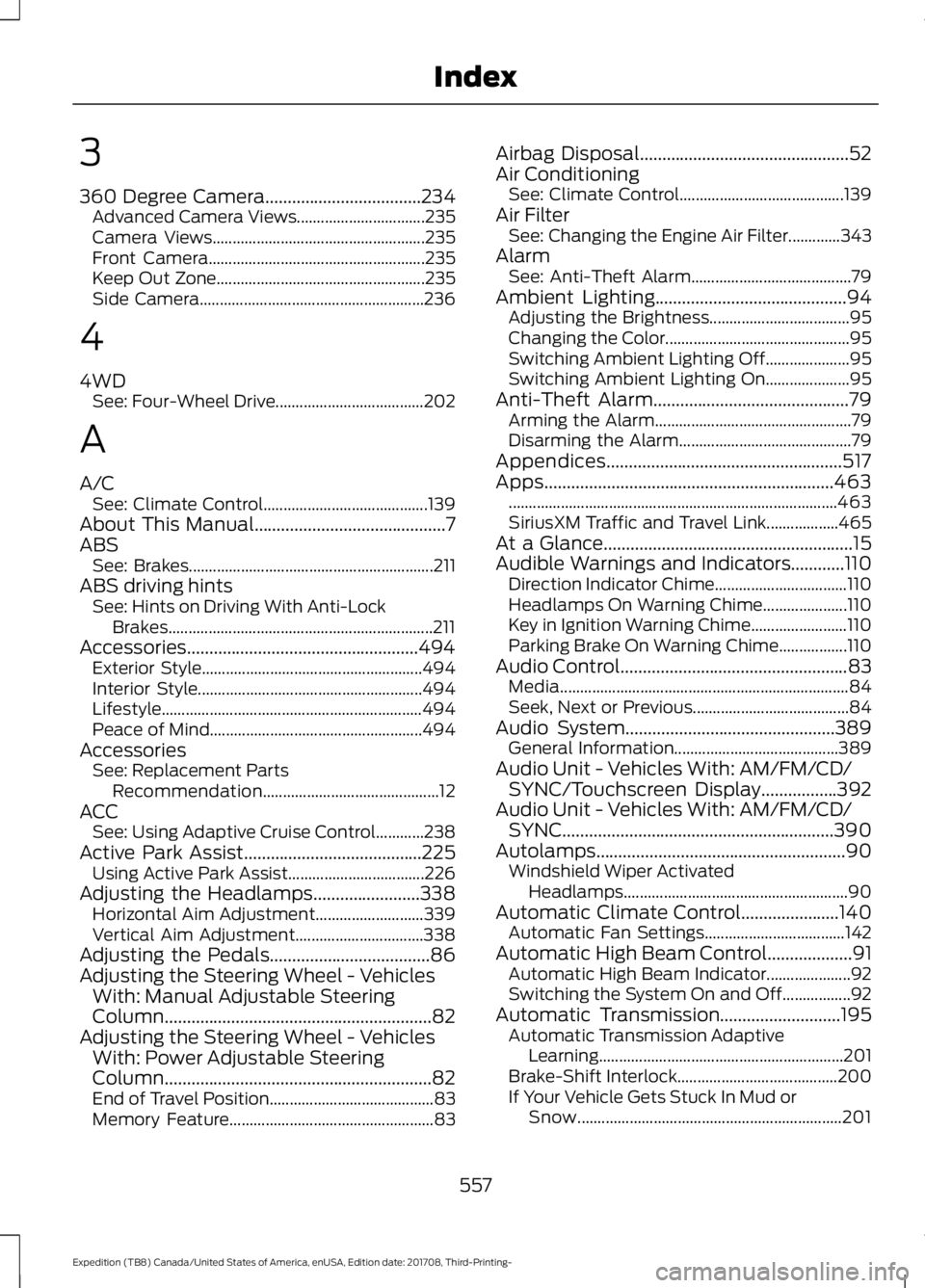
3
360 Degree Camera...................................234
Advanced Camera Views................................ 235
Camera Views..................................................... 235
Front Camera...................................................... 235
Keep Out Zone.................................................... 235
Side Camera........................................................ 236
4
4WD See: Four-Wheel Drive..................................... 202
A
A/C See: Climate Control......................................... 139
About This Manual...........................................7
ABS See: Brakes............................................................. 211
ABS driving hints See: Hints on Driving With Anti-Lock
Brakes.................................................................. 211
Accessories....................................................494 Exterior Style....................................................... 494
Interior Style........................................................ 494
Lifestyle................................................................. 494
Peace of Mind..................................................... 494
Accessories See: Replacement Parts
Recommendation............................................ 12
ACC See: Using Adaptive Cruise Control............238
Active Park Assist........................................225 Using Active Park Assist.................................. 226
Adjusting the Headlamps
........................338
Horizontal Aim Adjustment........................... 339
Vertical Aim Adjustment................................ 338
Adjusting the Pedals
....................................86
Adjusting the Steering Wheel - Vehicles With: Manual Adjustable Steering
Column............................................................82
Adjusting the Steering Wheel - Vehicles With: Power Adjustable Steering
Column............................................................82
End of Travel Position......................................... 83
Memory Feature................................................... 83Airbag Disposal
...............................................52
Air Conditioning See: Climate Control......................................... 139
Air Filter See: Changing the Engine Air Filter.............343
Alarm See: Anti-Theft Alarm........................................ 79
Ambient Lighting
...........................................94
Adjusting the Brightness................................... 95
Changing the Color.............................................. 95
Switching Ambient Lighting Off..................... 95
Switching Ambient Lighting On..................... 95
Anti-Theft Alarm
............................................79
Arming the Alarm................................................. 79
Disarming the Alarm........................................... 79
Appendices.....................................................517
Apps.................................................................463 ........................................................................\
.......... 463
SiriusXM Traffic and Travel Link..................465
At a Glance........................................................15
Audible Warnings and Indicators............110 Direction Indicator Chime................................. 110
Headlamps On Warning Chime.....................110
Key in Ignition Warning Chime........................110
Parking Brake On Warning Chime.................110
Audio Control
...................................................83
Media........................................................................\
84
Seek, Next or Previous....................................... 84
Audio System
...............................................389
General Information......................................... 389
Audio Unit - Vehicles With: AM/FM/CD/ SYNC/Touchscreen Display.................392
Audio Unit - Vehicles With: AM/FM/CD/ SYNC.............................................................390
Autolamps........................................................90 Windshield Wiper Activated
Headlamps........................................................ 90
Automatic Climate Control......................140 Automatic Fan Settings................................... 142
Automatic High Beam Control...................91 Automatic High Beam Indicator.....................92
Switching the System On and Off.................92
Automatic Transmission
...........................195
Automatic Transmission Adaptive
Learning............................................................. 201
Brake-Shift Interlock........................................ 200
If Your Vehicle Gets Stuck In Mud or Snow.................................................................. 201
557
Expedition (TB8) Canada/United States of America, enUSA, Edition date: 201708, Third-Printing- Index
Page 562 of 571
Cleaning the Exterior..................................344
Cleaning the Headlamps................................ 345
Exterior Chrome Parts...................................... 345
Exterior Plastic Parts........................................ 345
Stripes or Graphics............................................ 345
Underbody........................................................... 345
Under Hood......................................................... 345
Cleaning the Instrument Panel and Instrument Cluster Lens.........................347
Cleaning the Interior....................................347 Mirrors..................................................................... 347
Cleaning the Wheels..................................349
Cleaning the Windows and Wiper Blades...........................................................346
Clearing All MyKeys.......................................62
Climate............................................................447
Climate Control
.............................................139
Climate Controlled Seats..........................164 Ventilated Seats................................................. 164
Coolant Check See: Engine Coolant Check............................ 329
Crash Sensors and Airbag Indicator.........51
Creating a MyKey
............................................62
Programming and Changing Configurable
Settings............................................................... 62
Cross Traffic Alert
........................................254
Blocked Sensors................................................. 255
Switching the System Off and On..............256
System Errors...................................................... 256
System Lights, Messages and Audible Alerts................................................................. 255
System Limitations........................................... 256
Using the Cross Traffic Alert System.........254
Cruise Control
.................................................84
Principle of Operation....................................... 237
Cruise control See: Using Cruise Control................................ 237
Customer Assistance.................................307
D
Data Recording
..................................................9
Event Data Recording.......................................... 10
Service Data Recording........................................ 9
Daytime Running Lamps..............................91 Type One - Conventional
(Non-Configurable)........................................ 91
Type Two - Configurable.................................... 91Digital Radio..................................................393
HD Radio Reception and Station
Troubleshooting............................................ 394
Direction Indicators
.......................................93
Doors and Locks.............................................65
Drive Control...................................................261 Selectable Drive Modes................................... 261
Driver Alert
......................................................245
Using Driver Alert............................................... 245
Driver and Passenger Airbags...................45 Children and Airbags.......................................... 46
Proper Driver and Front Passenger Seating Adjustment........................................................ 45
Driving Aids
....................................................245
Driving Hints...................................................297
Driving Through Water..............................298
DRL See: Daytime Running Lamps.......................... 91
E
Economical Driving
.....................................297
Electric Parking Brake..................................212 Applying the Electric Parking Brake.............212
Automatically Releasing the Electric
Parking Brake................................................... 213
Manually Releasing the Electric Parking Brake................................................................... 212
Releasing the Electric Parking Brake if the Vehicle Battery is Running Out of
Charge................................................................ 213
Electromagnetic Compatibility
................517
Emission Law..................................................191
Noise Emissions Warranty, Prohibited
Tampering Acts and Maintenance..........192
Tampering With a Noise Control System................................................................ 191
End User License Agreement
..................519
VEHICLE SOFTWARE END USER LICENSE
AGREEMENT (EULA) .................................. 519
Engine Block Heater.....................................179 Using the Engine Block Heater..................... 180
Engine Coolant Check...............................329 Adding Coolant................................................... 329
Coolant Change................................................... 331
Engine Coolant Temperature Management.................................................. 332
Fail-Safe Cooling................................................ 331
559
Expedition (TB8) Canada/United States of America, enUSA, Edition date: 201708, Third-Printing- Index
Page 564 of 571
Passenger Compartment Fuse Box...........320
G
Garage Door Opener See: Universal Garage Door Opener...........166
Gauges.............................................................104
Engine Coolant Temperature Gauge..........106
Engine Oil Pressure Gauge............................. 105
Fuel Gauge............................................................ 106
Transmission Fluid Temperature Gauge................................................................ 106
Turbo Boost Gauge........................................... 106
Type 1 and 2.......................................................... 104
Type 3..................................................................... 105
Gearbox See: Transmission.............................................. 195
General Information on Radio Frequencies...................................................53
Intelligent Access................................................. 53
General Maintenance Information.......498 Multi-Point Inspection.................................... 500
Owner Checks and Services......................... 499
Protecting Your Investment.......................... 498
Why Maintain Your Vehicle?......................... 498
Why Maintain Your Vehicle at Your Dealership?.................................................... 498
Getting Assistance Outside the U.S. and Canada..........................................................310
Getting the Services You Need
...............307
Away From Home.............................................. 307
Global Opening and Closing......................97 Global Closing........................................................ 97
Global Opening..................................................... 97
H
Hazard Flashers............................................301
Headlamp Adjusting See: Adjusting the Headlamps..................... 338
Headlamp Exit Delay.....................................91
Headlamp Removal See: Removing a Headlamp.......................... 339
Headrest See: Head Restraints......................................... 149
Head Restraints
............................................149
Adjusting the Head Restraint......................... 150
Front Seat Manual Head Restraints............150 Heated Seats
..................................................162
Front Seats............................................................ 162
Rear Seats............................................................. 163
Heated Steering Wheel...............................85
Heated Windows and Mirrors...................147 Heated Exterior Mirrors.................................... 148
Heated Rear Window........................................ 147
Windshield Wiper De-icer............................... 148
Heating See: Climate Control......................................... 139
Hill Descent Control
....................................219
Principle of Operation....................................... 219
Hill Start Assist..............................................213 Switching the System On and Off................214
Using Hill Start Assist........................................ 214
Hints on Controlling the Interior Climate..........................................................143
Defogging the Side Windows in Cold Weather............................................................. 145
General Hints........................................................ 143
Quickly Cooling the Interior............................ 144
Quickly Heating the Interior............................ 144
Recommended Settings for Cooling...........145
Recommended Settings for Heating..........144
Hints on Driving With Anti-Lock Brakes..............................................................211
Home Screen
................................................429
Hood Lock See: Opening and Closing the Hood..........325
I
Ignition Switch
................................................175
In California (U.S. Only)............................308
Information Display Control......................85
Information Displays.....................................111 General Information............................................ 111
Information Messages................................123 Active Park............................................................. 123
Adaptive Cruise Control................................... 123
AdvanceTrac and Traction Control..............124
Airbag...................................................................... 124
Alarm and Security............................................. 125
Automatic Engine Shutdown......................... 125
Battery and Charging System........................ 125
Blind Spot Information and Cross Traffic Alert System.................................................... 126
Collision Warning System................................ 127
561
Expedition (TB8) Canada/United States of America, enUSA, Edition date: 201708, Third-Printing- Index