battery FORD EXPEDITION 2018 Owners Manual
[x] Cancel search | Manufacturer: FORD, Model Year: 2018, Model line: EXPEDITION, Model: FORD EXPEDITION 2018Pages: 571, PDF Size: 25.8 MB
Page 2 of 571

The information contained in this publication was correct at the time of going to print. In the interest of
continuous development, we reserve the right to change specifications, design or equipment at any time
without notice or obligation. No part of this publication may be reproduced, transmitted, stored in a
retrieval system or translated into any language in any form by any means without our written permission.
Errors and omissions excepted.
© Ford Motor Company 2018
All rights reserved.
Part Number: 201708 20180710152707
California Proposition 65
WARNING: Operating, servicing and
maintaining a passenger vehicle or off-highway
motor vehicle can expose you to chemicals
including engine exhaust, carbon monoxide,
phthalates, and lead, which are known to the
State of California to cause cancer and birth
defects or other reproductive harm. To minimize
exposure, avoid breathing exhaust, do not idle the
engine except as necessary, service your vehicle
in a well-ventilated area and wear gloves or wash
your hands frequently when servicing your vehicle.
For more information go to
www.P65Warnings.ca.gov/passenger-vehicle. WARNING:
Battery posts, terminals and
related accessories contain lead and lead
compounds, chemicals known to the State of
California to cause cancer and reproductive harm.
Wash your hands after handling
.
Page 7 of 571
Blind Spot Information System
............250
Cross Traffic Alert .......................................
254
Steering ..........................................................
256
Pre-Collision Assist ....................................
257
Drive Control ..................................................
261
Load Carrying
Rear Under Floor Storage ........................
264
Cargo Nets ....................................................
266
Roof Racks and Load Carriers ................
267
Load Limit .....................................................
268
Towing
Towing a Trailer ............................................
274
Trailer Reversing Aids .................................
275
Trailer Sway Control ..................................
284
Recommended Towing Weights ..........
285
Essential Towing Checks .........................
287
Towing the Vehicle on Four Wheels .....
294
Driving Hints
Breaking-In ....................................................
297
Reduced Engine Performance ...............
297
Economical Driving ....................................
297
Driving Through Water .............................
298
Floor Mats .....................................................
298
Roadside Emergencies
Roadside Assistance ................................
300
Hazard Flashers ...........................................
301
Fuel Shutoff ...................................................
301
Jump Starting the Vehicle .......................
302
Post-Crash Alert System .........................
304
Transporting the Vehicle .........................
304
Towing Points ..............................................
305
Customer Assistance
Getting the Services You Need ..............
307
In California (U.S. Only) ...........................
308The Better Business Bureau (BBB) Auto
Line Program (U.S. Only) ....................
309
Utilizing the Mediation/Arbitration Program (Canada Only) .......................
310
Getting Assistance Outside the U.S. and Canada ........................................................
310
Ordering Additional Owner's Literature ........................................................................\
.
312
Reporting Safety Defects (U.S. Only) ........................................................................\
.
312
Reporting Safety Defects (Canada Only) ........................................................................\
.
312
Fuses
Fuse Box Locations .....................................
314
Fuse Specification Chart ..........................
314
Changing a Fuse ..........................................
323
Maintenance
General Information ..................................
325
Opening and Closing the Hood .............
325
Under Hood Overview ..............................
326
Engine Oil Dipstick ......................................
327
Engine Oil Check ..........................................
327
Oil Change Indicator Reset .....................
328
Engine Coolant Check ..............................
329
Automatic Transmission Fluid Check ........................................................................\
333
Transfer Case Fluid Check .......................
333
Brake Fluid Check .......................................
334
Washer Fluid Check ...................................
334
Fuel Filter .......................................................
335
Changing the 12V Battery ........................
335
Checking the Wiper Blades .....................
337
Changing the Wiper Blades ....................
337
Adjusting the Headlamps .......................
338
Removing a Headlamp .............................
339
Changing a Bulb ..........................................
339
Bulb Specification Chart ...........................
341
Changing the Engine Air Filter ...............
343
4
Expedition (TB8) Canada/United States of America, enUSA, Edition date: 201708, Third-Printing- Table of Contents
Page 10 of 571
ABOUT THIS MANUAL
Thank you for choosing Ford. We
recommend that you take some time to
get to know your vehicle by reading this
manual. The more that you know about
your vehicle, the greater the safety and
pleasure you will get from driving it.
WARNING: Driving while
distracted can result in loss of vehicle
control, crash and injury. We strongly
recommend that you use extreme
caution when using any device that may
take your focus off the road. Your
primary responsibility is the safe
operation of your vehicle. We
recommend against the use of any
hand-held device while driving and
encourage the use of voice-operated
systems when possible. Make sure you
are aware of all applicable local laws
that may affect the use of electronic
devices while driving.
Note: This manual describes product
features and options available throughout
the range of available models, sometimes
even before they are generally available. It
may describe options not fitted to the
vehicle you have purchased.
Note: Some of the illustrations in this
manual may show features as used in
different models, so may appear different
to you on your vehicle.
Note: Always use and operate your vehicle
in line with all applicable laws and
regulations.
Note: Pass on this manual when selling
your vehicle. It is an integral part of your
vehicle.
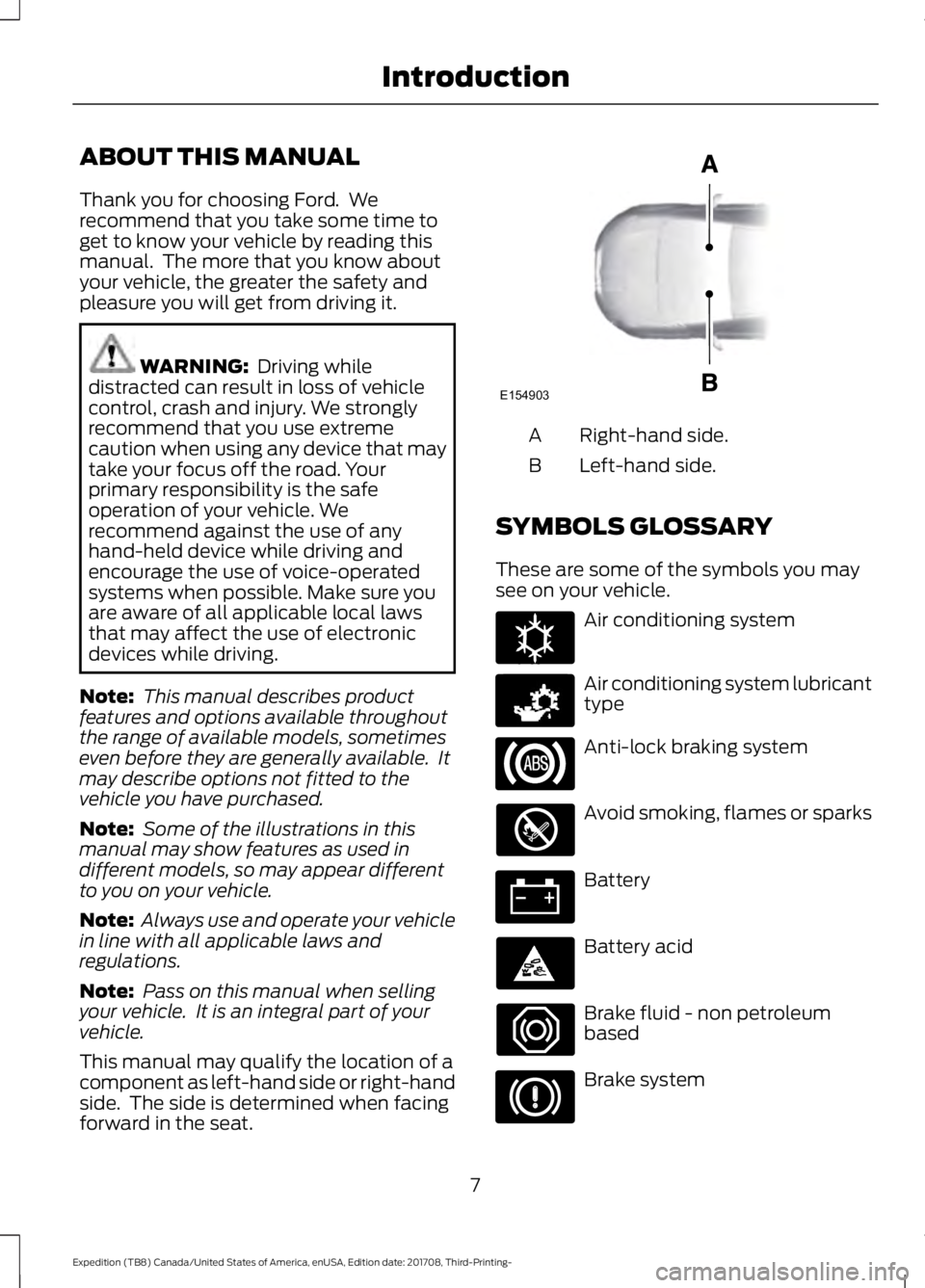
This manual may qualify the location of a
component as left-hand side or right-hand
side. The side is determined when facing
forward in the seat. Right-hand side.
A
Left-hand side.
B
SYMBOLS GLOSSARY
These are some of the symbols you may
see on your vehicle. Air conditioning system
Air conditioning system lubricant
type
Anti-lock braking system
Avoid smoking, flames or sparks
Battery
Battery acid
Brake fluid - non petroleum
based
Brake system
7
Expedition (TB8) Canada/United States of America, enUSA, Edition date: 201708, Third-Printing- IntroductionE154903 E162384 E231157
Page 56 of 571
GENERAL INFORMATION ON
RADIO FREQUENCIES
This device complies with Part 15 of the
FCC Rules and with Licence exempt RSS
Standards of Industry Canada. Operation
is subject to the following two conditions:
•
This device may not cause harmful
interference, and
• This device must accept any
interference received, including
interference that may cause undesired
operation.
Note: Changes or modifications not
expressively approved by the party
responsible for compliance could void the
user's authority to operate the equipment.
The term "IC:" before the radio certification
number only signifies that Industry Canada
technical specifications were met.
The typical operating range for your
transmitter is approximately 33 ft (10 m).
Vehicles with the remote start feature will
have a greater range. One of the following
could cause a decrease in operating range:
• Weather conditions.
• Nearby radio towers.
• Structures around the vehicle.
• Other vehicles parked next to your
vehicle.
The radio frequency used by your remote
control can also be used by other radio
transmitters, for example amateur radios,
medical equipment, wireless headphones,
wireless remote controls, cell phones,
battery chargers and alarm systems. If the
frequencies are jammed, you will not be
able to use your remote control. You can
lock and unlock the doors with the key.
Note: Make sure you lock your vehicle
before leaving it unattended. Note:
If you are within range of your vehicle,
the remote control will operate if you
unintentionally press any button.
Intelligent Access
(If Equipped)
The system uses a radio frequency signal
to communicate with your vehicle and
authorizes your vehicle to unlock when one
of the following conditions are met:
• You touch the unlock sensor on the
back of the door handle with the
intelligent access key within
3 ft (1 m)
of your vehicle.
• You press the luggage compartment
button.
• You press the unlock button on the
transmitter.
If excessive radio frequency interference
is present in the area or if the transmitter
battery is low, you may need to
mechanically unlock your door. You can
use the mechanical key blade in your
intelligent access key to open the driver
door in this situation. See
Remote
Control (page 53).
REMOTE CONTROL
Integrated Keyhead Transmitter (If
Equipped)
Note: A two-button remote control
operates similarly.
Use the key blade to start your vehicle and
unlock or lock the driver door from outside
your vehicle. The integrated keyhead
transmitter functions as a programmed
ignition key that operates all the locks and
starts your vehicle, as well as a remote
control.
53
Expedition (TB8) Canada/United States of America, enUSA, Edition date: 201708, Third-Printing- Keys and Remote Controls
Page 58 of 571
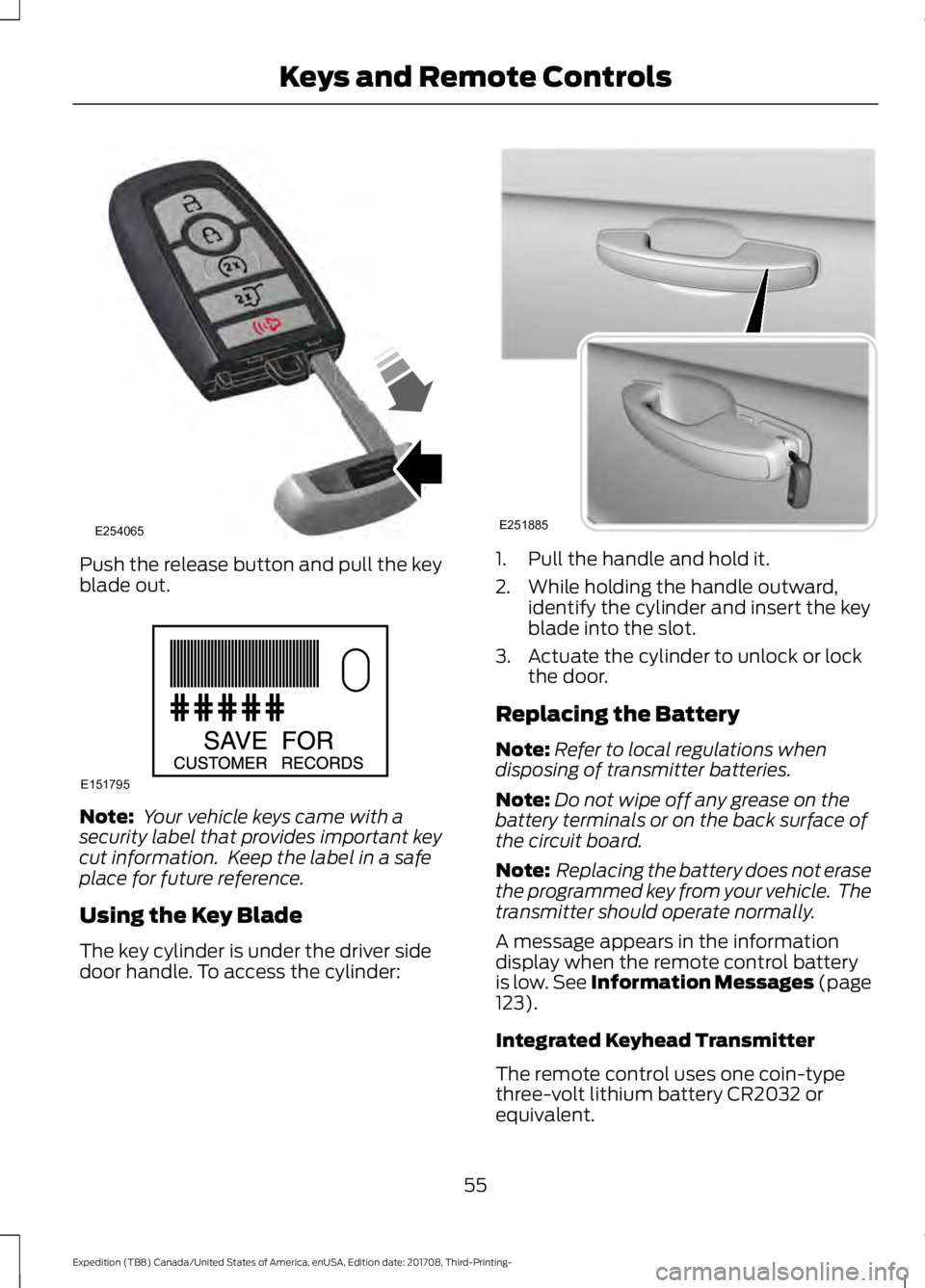
Push the release button and pull the key
blade out.
Note:
Your vehicle keys came with a
security label that provides important key
cut information. Keep the label in a safe
place for future reference.
Using the Key Blade
The key cylinder is under the driver side
door handle. To access the cylinder: 1. Pull the handle and hold it.
2. While holding the handle outward,
identify the cylinder and insert the key
blade into the slot.
3. Actuate the cylinder to unlock or lock the door.
Replacing the Battery
Note: Refer to local regulations when
disposing of transmitter batteries.
Note: Do not wipe off any grease on the
battery terminals or on the back surface of
the circuit board.
Note: Replacing the battery does not erase
the programmed key from your vehicle. The
transmitter should operate normally.
A message appears in the information
display when the remote control battery
is low. See Information Messages (page
123).
Integrated Keyhead Transmitter
The remote control uses one coin-type
three-volt lithium battery CR2032 or
equivalent.
55
Expedition (TB8) Canada/United States of America, enUSA, Edition date: 201708, Third-Printing- Keys and Remote ControlsE254065 E151795 E251885
Page 59 of 571
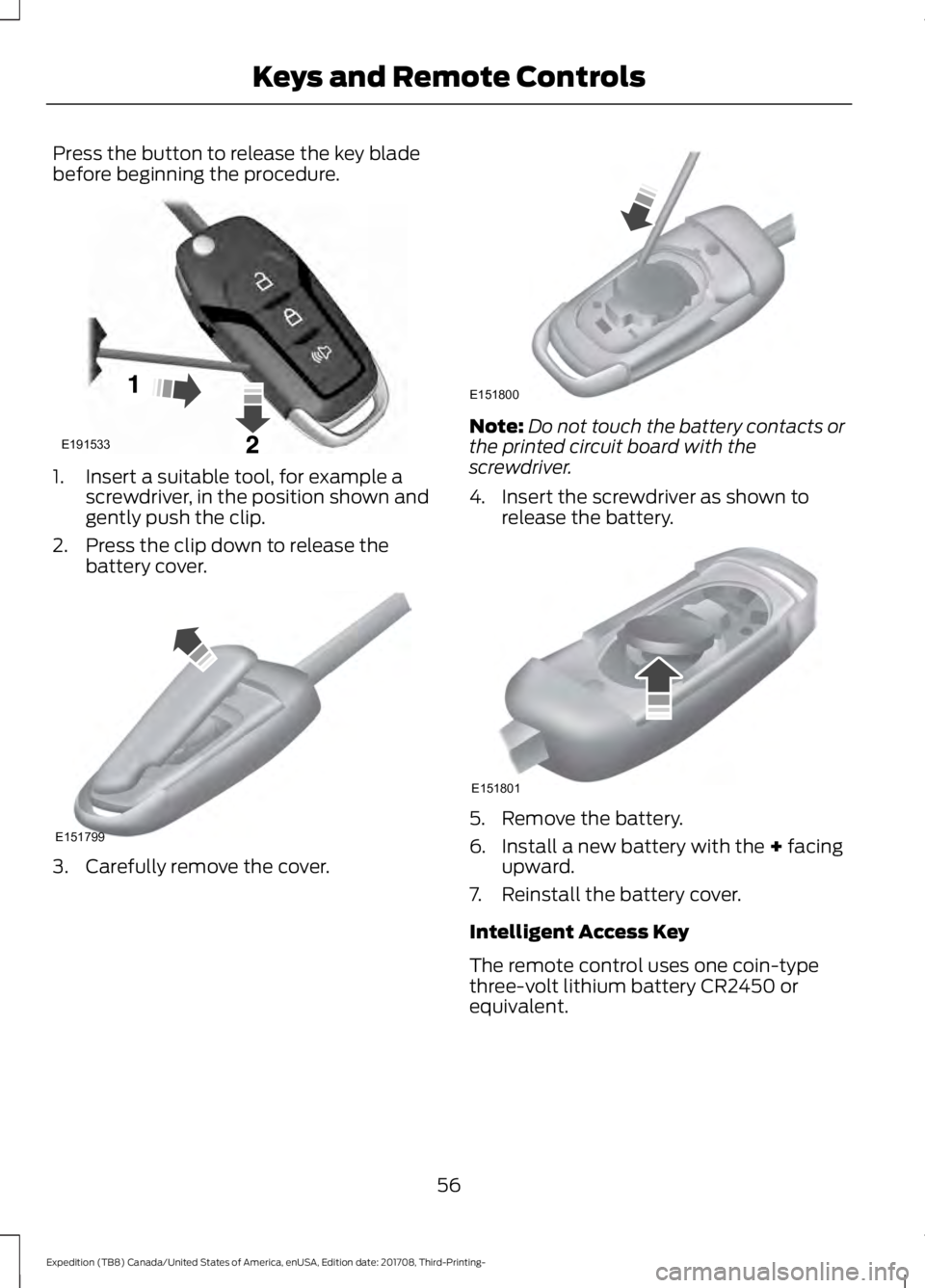
Press the button to release the key blade
before beginning the procedure.
1. Insert a suitable tool, for example a
screwdriver, in the position shown and
gently push the clip.
2. Press the clip down to release the battery cover. 3. Carefully remove the cover. Note:
Do not touch the battery contacts or
the printed circuit board with the
screwdriver.
4. Insert the screwdriver as shown to release the battery. 5. Remove the battery.
6. Install a new battery with the + facing
upward.
7. Reinstall the battery cover.
Intelligent Access Key
The remote control uses one coin-type
three-volt lithium battery CR2450 or
equivalent.
56
Expedition (TB8) Canada/United States of America, enUSA, Edition date: 201708, Third-Printing- Keys and Remote ControlsE191533 E151799 E151800 E151801
Page 60 of 571
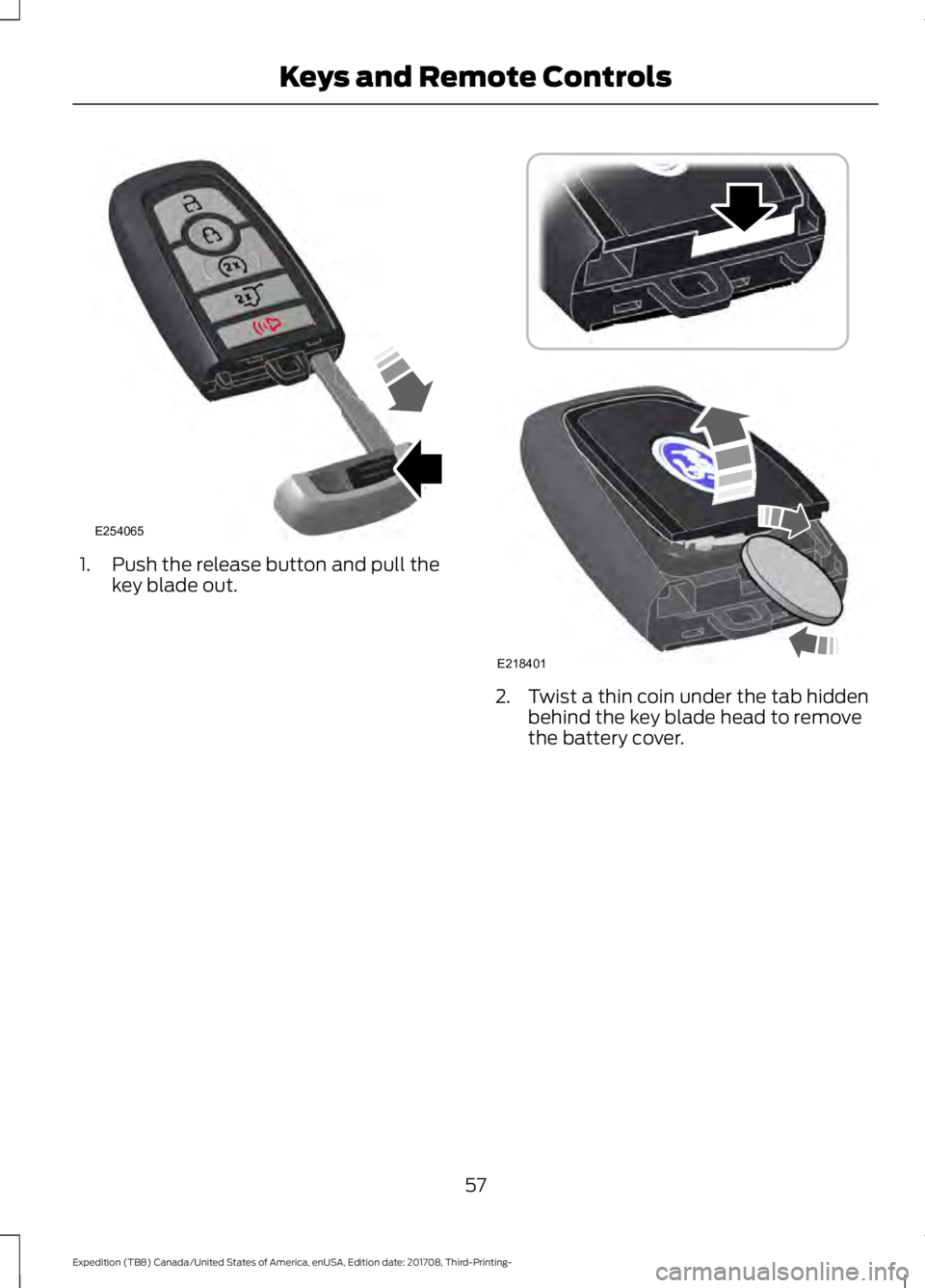
1. Push the release button and pull the
key blade out. 2. Twist a thin coin under the tab hidden
behind the key blade head to remove
the battery cover.
57
Expedition (TB8) Canada/United States of America, enUSA, Edition date: 201708, Third-Printing- Keys and Remote ControlsE254065 E218401
Page 61 of 571
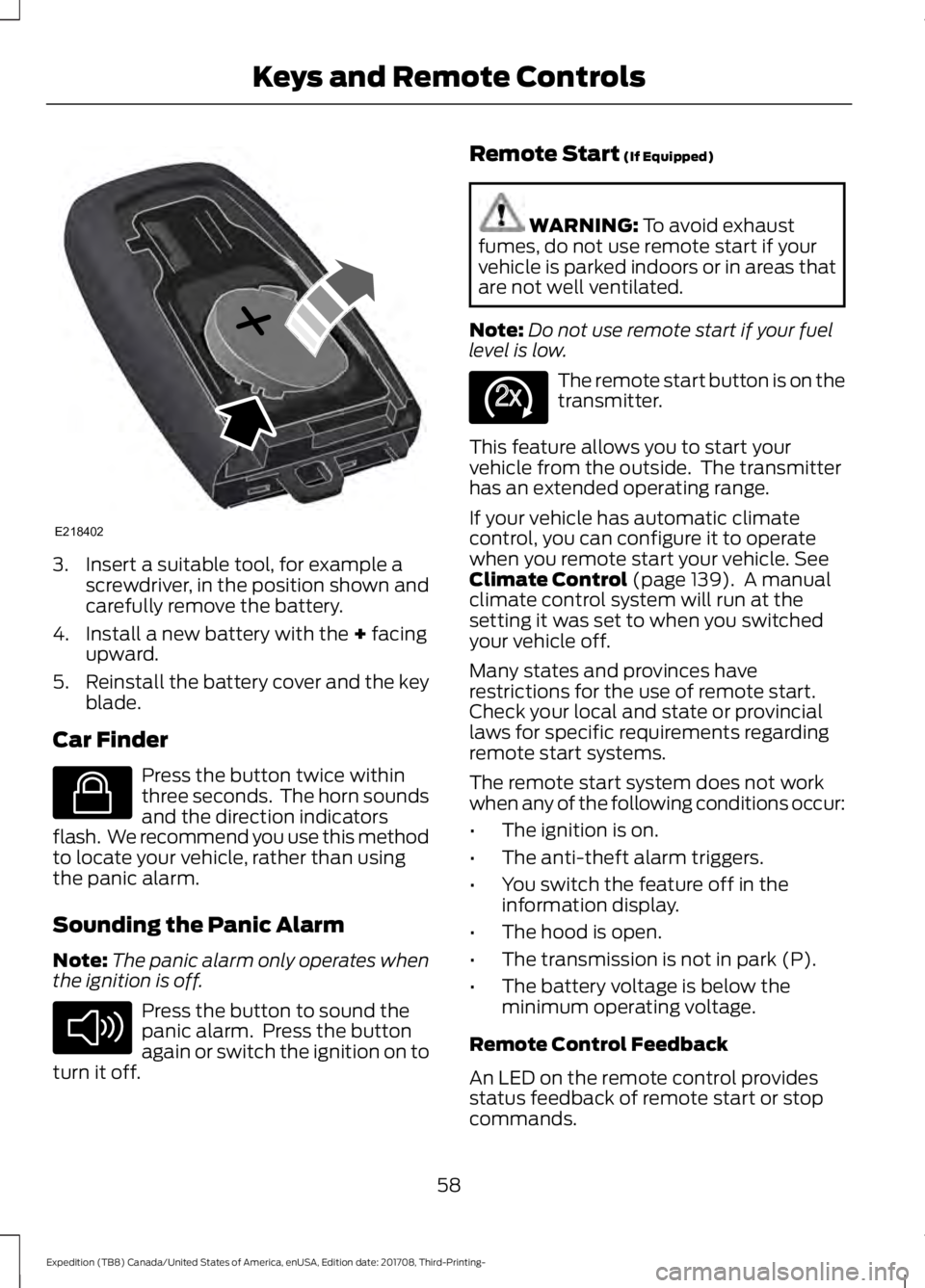
3. Insert a suitable tool, for example a
screwdriver, in the position shown and
carefully remove the battery.
4. Install a new battery with the + facing
upward.
5. Reinstall the battery cover and the key
blade.
Car Finder Press the button twice within
three seconds. The horn sounds
and the direction indicators
flash. We recommend you use this method
to locate your vehicle, rather than using
the panic alarm.
Sounding the Panic Alarm
Note: The panic alarm only operates when
the ignition is off. Press the button to sound the
panic alarm. Press the button
again or switch the ignition on to
turn it off. Remote Start
(If Equipped) WARNING:
To avoid exhaust
fumes, do not use remote start if your
vehicle is parked indoors or in areas that
are not well ventilated.
Note: Do not use remote start if your fuel
level is low. The remote start button is on the
transmitter.
This feature allows you to start your
vehicle from the outside. The transmitter
has an extended operating range.
If your vehicle has automatic climate
control, you can configure it to operate
when you remote start your vehicle.
See
Climate Control (page 139). A manual
climate control system will run at the
setting it was set to when you switched
your vehicle off.
Many states and provinces have
restrictions for the use of remote start.
Check your local and state or provincial
laws for specific requirements regarding
remote start systems.
The remote start system does not work
when any of the following conditions occur:
• The ignition is on.
• The anti-theft alarm triggers.
• You switch the feature off in the
information display.
• The hood is open.
• The transmission is not in park (P).
• The battery voltage is below the
minimum operating voltage.
Remote Control Feedback
An LED on the remote control provides
status feedback of remote start or stop
commands.
58
Expedition (TB8) Canada/United States of America, enUSA, Edition date: 201708, Third-Printing- Keys and Remote ControlsE218402 E138623 E138624 E138625
Page 69 of 571
Press the button again within three
seconds to confirm that all the doors are
closed. The doors will lock again, the horn
will sound and the direction indicators will
flash if all the doors and the liftgate are
closed.
Note:
If the system does not function, use
the key blade to lock and unlock your
vehicle.
Mislock
If any door or the liftgate is open, or if the
hood is open on vehicles with an anti-theft
alarm or remote start, the horn sounds
twice and the direction indicators do not
flash. You can switch this feature on or off
in the information display. See General
Information (page 111).
Opening the Liftgate Press twice within three seconds
to open the liftgate.
Activating Intelligent Access
(If
Equipped)
General Information
You can unlock and lock the vehicle
without taking the keys out of your pocket
or purse when your intelligent access key
is within
3 ft (1 m) of your vehicle.
Intelligent access uses a sensor on the
back of the door handle for unlocking and
a separate sensor on the face of each door
handle for locking.
The system does not function if:
• Your vehicle battery has no charge.
• The key battery has no charge.
• The key frequencies jam.
Note: The system may not function if the
passive key is close to metal objects or
electronic devices, for example keys or a cell
phone. Note:
If the system does not function, use
the key blade to lock and unlock your
vehicle. See
Remote Control (page 53).
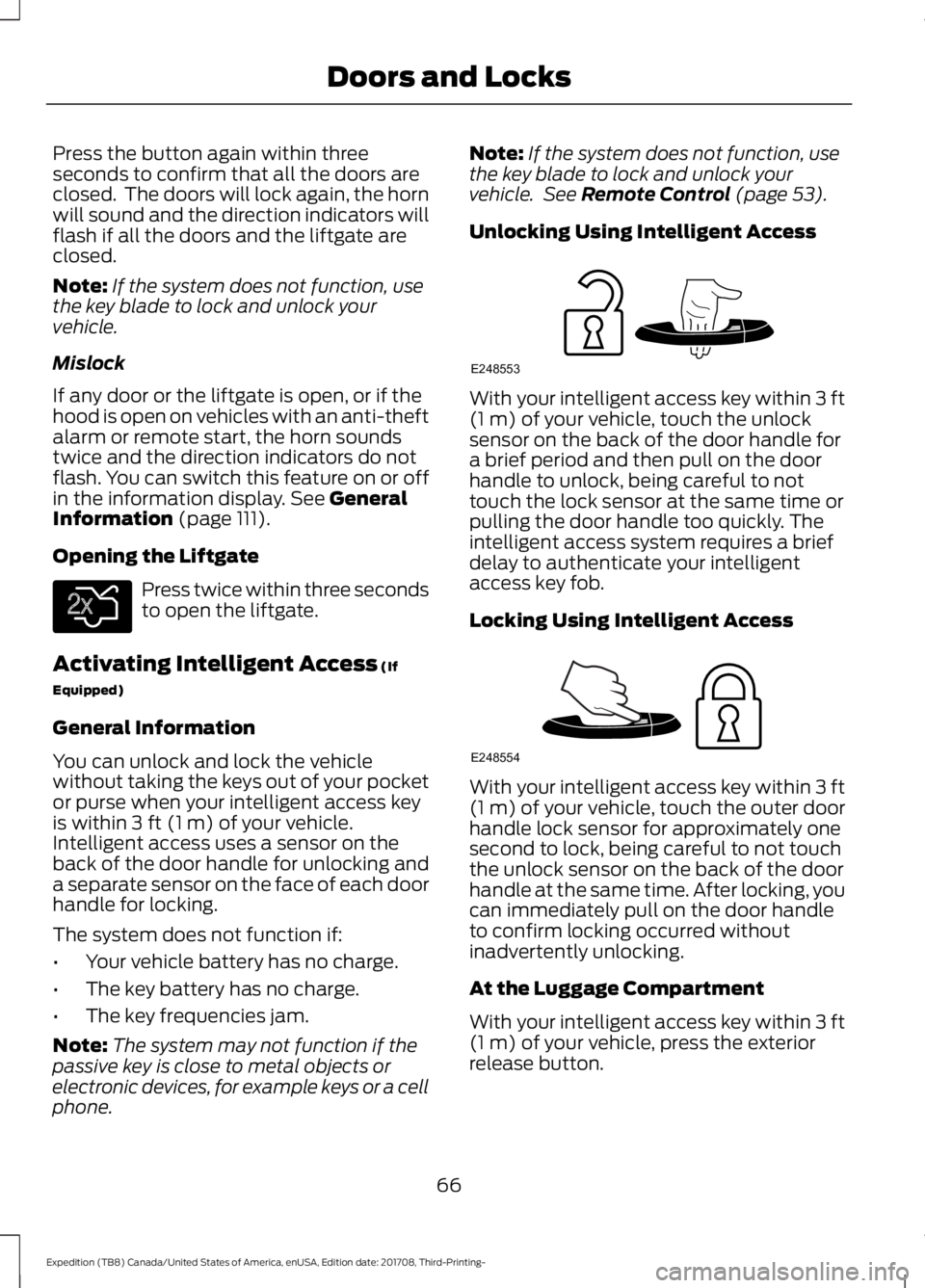
Unlocking Using Intelligent Access With your intelligent access key within
3 ft
(1 m) of your vehicle, touch the unlock
sensor on the back of the door handle for
a brief period and then pull on the door
handle to unlock, being careful to not
touch the lock sensor at the same time or
pulling the door handle too quickly. The
intelligent access system requires a brief
delay to authenticate your intelligent
access key fob.
Locking Using Intelligent Access With your intelligent access key within
3 ft
(1 m) of your vehicle, touch the outer door
handle lock sensor for approximately one
second to lock, being careful to not touch
the unlock sensor on the back of the door
handle at the same time. After locking, you
can immediately pull on the door handle
to confirm locking occurred without
inadvertently unlocking.
At the Luggage Compartment
With your intelligent access key within
3 ft
(1 m) of your vehicle, press the exterior
release button.
66
Expedition (TB8) Canada/United States of America, enUSA, Edition date: 201708, Third-Printing- Doors and LocksE138630 E248553 E248554
Page 71 of 571
Autounlock
Autounlock unlocks all the doors when:
•
The ignition is on, all the doors are
closed, and your vehicle has been
moving at a speed greater than 12 mph
(20 km/h).
• Your vehicle comes to a stop and you
switch the ignition off, or to the
accessory position.
• You open the driver door within 10
minutes of switching the ignition off or
to accessory.
Note: The doors do not autounlock if you
electronically lock your vehicle after you
switch the ignition off and before you open
the driver door.
Enabling or Disabling Autounlock
You can enable or disable the autounlock
feature in the information display or an
authorized dealer can do it for you. See
General Information
(page 111).
Illuminated Entry
(If Equipped)
The interior lamps and some exterior
lamps illuminate when you unlock the
doors with the remote control.
The lamps turn off if:
• The ignition is on.
• You press the remote control lock
button.
• 25 seconds have elapsed.
The lamps do not turn off if:
• You turn them on with the lamp
control.
• Any door is open.
Illuminated Exit
The interior lamps and some exterior
lamps illuminate when all doors are closed
and you switch the ignition off. The lamps turn off if all the doors remain
closed and:
•
25 seconds have elapsed.
• You press the push button ignition
switch.
Battery Saver
If you leave the courtesy lamps, interior
lamps or headlamps on, the battery saver
shuts them off 10 minutes after you switch
the ignition off.
Battery Saver for Intelligent Access
Keys
If you leave the ignition switched on, it
shuts off when it detects a certain amount
of battery drain, or after 45 minutes.
KEYLESS ENTRY
SECURICODE™ KEYLESS ENTRY
KEYPAD
The keypad is near the driver window. It
illuminates when touched.
Note: If you enter your entry code too fast
on the keypad, the unlock function may not
work. Enter your entry code again more
slowly.
68
Expedition (TB8) Canada/United States of America, enUSA, Edition date: 201708, Third-Printing- Doors and Locks